In an era where AI is getting integrated into as many aspects of technology as possible, Apple has remained relatively quiet about this new technology. For reference, some people had to take the responsibility to count and report how many times Google mentioned “AI” in Google I/O last year.
Apple could unveil plans for an AI App Store during WWDC 2024
Now reports are signaling that the upcoming WWDC event, which is usually held in June, could be Apple’s turn. Apple could potentially announce an ‘AI App Store‘ at WWDC 2024. Analysts speculate that Apple’s strategy might involve creating a dedicated platform for AI applications. This comes after the news of Apple’s potential introduction of AI-powered ads in its App Store.
Ben Reitzes, head of technology research at Melius Research, predicts that Apple could unveil plans for an AI App Store during the conference. It will reportedly offer consumers access to a wide array of AI apps from various vendors.
Reitzes draws parallels between Apple’s history of disruptive innovation and its potential approach to AI. He suggests that, much like Apple did with the iTunes Store and iPhone App Store, the company may collaborate with industry leaders to curate an ecosystem for AI applications. Just as Steve Jobs convinced record labels to embrace digital downloads, Apple could leverage its influence to encourage developers to create and distribute AI apps through its platform.
Apple’s AI App Store could allow developers to showcase their work
Apple will likely offer its own suite of AI services, including enhancements to Siri. Additionally, Reitzes envisions a broader marketplace where third-party developers can also contribute. This aligns with previous reports from analysts like Wedbush, who anticipate the emergence of a separate AI App Store. Such a platform could allow developers to showcase their innovations and users to discover new tools for various purposes.
The concept of an AI App Store isn’t purely speculative. Apple has reportedly engaged in discussions with companies like Chinese tech company Baidu and Google. These were to explore partnerships related to AI services. For instance, Apple has shown interest in Google’s Gemini AI to enhance Siri’s capabilities.
While details remain scarce, analysts expect the event to shed light on how consumers can access AI apps. The conference may serve as a platform for developers to learn about opportunities for contributing to the AI ecosystem and for users to envision the future of AI integration into their daily lives.
Update: The Snapdragon 8 Gen 3 and Snapdragon 8s Gen 3 are now the latest and greatest chipset from Qualcomm. However, the Snapdragon 8 Gen 2 is still being used in new phones like the OnePlus 12R.
Qualcomm announced its next flagship mobile processor, the Snapdragon 8 Gen 2, at its Snapdragon Tech Summit in Hawaii on November 15, 2022. It’s the new processor that we will see in almost all flagship smartphones launching in 2023. So it’s a pretty important chipset.
In this article, we’re going to tell you everything you need to know about this new chipset. Including how powerful it is, how power efficient it is, and so much more. So you’re prepared for when the latest smartphones start rolling out with it next year.
Up to 200MP Photo Campture Up to 108MP single camera @30fps Up to 64+36MP Dual cameras @30fps Up to 36MP triple cameras @30fps Bokeh Engine 2 for Video Capture
240 12MP Photos in one second 3.2 Gigapixels per second 4 stops of dynamic range 8K HDR + 64MP 18-bit RAW 5X Better Night Mode Dedicated Bokeh Engine
Video Capture
8K @ 60fps 4K @ 120fps 720p @ 960fps
8K HDR @ 30fps 4K UHD @ 120fps 720p @ 960fps
Video Playback
8K 60fps Video super resolution Pro Sight Video Capture Computational HDR video capture
8K 4K HDR up to 120fps H.265 and VP9 video decoder 360 degree
First Available
Q4 2022
Q4 2021
What’s new in Snapdragon 8 Gen 2?
There’s quite a bit that’s new with the Snapdragon 8 Gen 2 this year, though quite a bit of it, users won’t really see. Remember, Qualcomm’s chipsets are more of an entire package, instead of just a chip. Qualcomm is involved in a lot of areas in smartphones, including the modem, the ISP and more.
Snapdragon Smart
This year, Qualcomm’s AI Engine is still included in the Snapdragon 8 Gen 2. It will provide groundbreaking AI integrated across the entire system. It’s fueled by the Hexagon Processor, which users will be able to experience faster natural language processing with multi-language translation and advanced AI camera features. There’s also a bigger Tensor accelerator this year, for up to 4.35x increased AI performance.
This is also the first Snapdragon mobile platform to support INT4. That is a revolutionary AI precision format. Which is going to provide a 60% performance per watt improvement. That’s going to be great for sustained AI inferencing.
On top of that, there’s the Qualcomm Sensing Hub which does now pack dual AI processors, it also supports intuitive experiecnes that will enable custom wake words. Qualcomm says to expect additional features and tools from the Qualcomm AI Stack. That includes the Qualcomm AI Studio, so developers are able to give new life to next-gen AI apps.
Snapdragon Connect
With the Snapdragon 8 Gen 2, Qualcomm is debuting an industry-first. And that is support for WiFi 7 on this chipset. That’s part of the new FastConnect 7800 that’s inside the chipset. It also supports Dual Bluetooth connectivity for sustained immersion. There’s also High Band Simultaneous Multi-Link which can enable peak WiFi 7 speeds and performance globally. Now keep in mind, the WiFi 7 standard hasn’t really even been finalized.
Now in terms of the new Snapdragon X70 5G Modem-RF System, it has some upgrades too. Qualcomm claims that it is the most advanced 5G modem on the market. It’s the first Snapdragon platform that supports 5G+5G/4G Dual-SIM Dual-Active. That’s going to allow you to use two 5G SIMs at the same time. The same peak speed is available here, of 10Gbps as well.
Snapdragon Sight
The cameras have always been a big part of the Snapdragon mobile platform, and that’s no different this year. Qualcomm is delivering professional quality camera experiences with its first ever Cognitive ISP. So this new chipset is going to be able to automatically enhance photos and videos in real time with semantic segmentation. That will use AI neural networks to make the camera contextually aware of faces, facial features, hair, clothes, skies and more.
Sony will be working on the first quad digital overlap HDR technology, which will be fine-tuned for Snapdragon. While Samsung’s ISOCELL HP3 image sensor is optimized for the Snapdragon 8 Gen 2. That’s the first ever 200MP camera. This is also going to be the first Snapdragon mobile platform to support the AV1 codec. That gives it support for video playback up to 8K HDR and 60 frames per second.
Snapdragon Elite Gaming
It couldn’t be a new chipset without some new features for Snapdragon Elite Gaming. Qualcomm is including real time hardware-accelerated ray tracing that delivers life-like light, reflections and illuminations to mobile games. This is thanks to the upgraded Adreno 740 GPU, which can deliver up to 25% faster performance. As well as the upgraded Qualcomm Kryo CPU which enables up to 40% more power efficiency.
This is going to give users better gameplay, and better battery life. Gamers will also be able to experience photorealistic human characters in their games with the world’s first mobile optimized support for Unreal Engine 5 Metahumans Framework on Snapdragon.
Snapdragon Sound
The new Qualcomm Snapdragon 8 Gen 2 does touch nearly every aspect of your phone, and that includes the sound. Snapdragon Sound is here to provide premium and immersive music, calls and gaming. It uses spatial audio with dynamic head tracking for complete surround-sound immersion and support for 48kHz lossless music streaming.
This also attributes to gamers, as they will have the lowest-ever latency at just 48ms. To make built-in voice backchannel even better.
Snapdragon Secure
Snapdragon Secure is here to keep your phone safe and sound. It is offering the latest in isolation, cryptography, key management, attestation and more. This is all intricately designed to protect users’ data and privacy.
When can we expect smartphones powered by the Snapdragon 8 Gen 2?
Qualcomm says that we can expect to see the first Snapdragon 8 Gen 2 devices launching before the end of 2022. While we don’t know for sure who that is, Qualcomm prefers to leave that announcement up to their partners. But we do know that Honor is announcing a new foldable on November 23. That’s a little over a week from now.
As for who else is using the Snapdragon 8 Gen 2? Well, Qualcomm confirmed these names:
ASUS
Honor
iQOO
Meizu
Motorola
Nubia
OnePlus
OPPO
RedMagic
Redmi
Sharp
Sony
vivo
Xiaomi
ZTE
We also know from the leaks that Samsung will be using the Snapdragon 8 Gen 2 in the Galaxy S23, which is due to launch early next year. It’s a bit surprising that Samsung’s name isn’t on this slide, but they are definitely using the Snapdragon 8 Gen 2.
Google just announced a significant upgrade for its Google Chat app, with the introduction of voice messages on mobile devices. This a highly anticipated feature that has been present in other chat applications for some time.
There are times when typing out a message simply isn’t the most efficient option, and this is where voice messages have come in to fill that gap. Using voice messages, particularly when on the go, offer several advantages. Aside from the obvious time-saving benefits, voice messages can also be extremely helpful when the nuances and tone of the message are important to keep intact. Additionally, for users with limited dexterity or visual impairments, voice messages can be a crucial accessibility tool.
Although a bit late to the party, it’s good to see this feature being added to Chat, but Google isn’t stopping there. The company also promises that transcription for voice messages will also be added and will be rolling out to users in the coming months. This powerful addition will make voice messages searchable and allow for easier consumption by users who prefer reading over listening.
Users will be able to send and receive voice messages to direct messages, group chats, and spaces within the Google Chat Android and iOS apps. The ability to receive voice messages will also work on the web, but sending will not be possible through a browser just yet. There is also a huge caveat: This is a Google Workspace feature that will only be available to paid Enterprise users, specifically those on the Enterprise Essentials, Enterprise Essentials Plus, Enterprise Standard, and Enterprise Plus tiers. This makes the feature’s availability very limited, and we hope this eventually trickles down across all accounts.
For the lucky ones who will get this feature, the process will be pretty straightforward: Open a direct message, group chat, or space, tap on the microphone icon, start speaking, and press send. Once sent, voice messages function just like text-based messages, allowing for quotes, reactions, and threaded replies.
The enterprise rollout will happen gradually, with domains on the Rapid Release track getting the feature as early as March 26th, with a two-week window before it reaches all users. The Scheduled Release track will follow on April 15th, with the same two-week window until completion.
The Android 15 Developer Preview 2 is out, and it brings with it three new keyboard features to make using physical keyboards easier. Android has been a smartphone operating system through and through for its entire life. But Google has recently been introducing compatibility and accessibility features to the OS. These features are designed to make using Android with external devices easier and more convenient. The Android 15 Developer Preview 2 gives us a look at three such features that are sure to make work on Android less frustrating.
Three Android 15 keyboard features for physical keyboards
The three new keyboard features introduced in Android 15 are focused around external, physical keyboards. Many users often attach a physical keyboard to their Android device for faster work output. But the OS didn’t ever really provide the same convenience desktop operating systems did. Thus, Google has rectified that by introducing what it thinks are features that will result in more ease of use. The three features are:
Sticky Keys
Anyone who’s used the Windows operating system and gamed on it has probably encountered Sticky Keys. Sticky Keys make it easier to enter keyboard shortcuts. Modifier keys like the CTRL key, once pressed, stay pressed virtually. So the user can press the other keys of a combination without having to physically keep the modifier key pressed. This makes it vastly simpler to enter keyboard shortcuts and combinations. Sticky Keys was enabled on Windows by rapidly pressing the Shift key five times, as many gamers discovered.
Bounce Keys
The second keyboard feature being introduced in Android 15 is Bounce Keys. Bounce Keys, when enabled, ignore repeat presses of a key when done in quick succession. This is most helpful to people with impaired motor skills who may accidentally press the same key multiple times without meaning to.
Slow Keys
Last, we get Slow Keys. Simply put, Slow Keys make it so a key has to be pressed for a specified period of time before it does something. This prevents accidental presses from interrupting a user’s work. The Developer Preview 2 shows that the feature will be configurable to up to five seconds. While Sticky Keys and Bounce Keys were seen in the Android 14 QPR3 Beta 2, Slow Keys are new.
Samsung’s OneUI already has these features
As pointed out by SamMobile, these three features aren’t completely new. Though they’re now being introduced to stock Android, OneUI has had them for a while now. OneUI is Samsung’s own custom UI for Android, seen on the company’s phones and tablets. It has recently seen some changes and has become a truly spectacular experience loved by many.
OneUI is full of thoughtful little touches that enhance a user’s experience. And these three keyboard features already being present in OneUI are a testament to that fact. Nevertheless, the introduction of new keyboard features in Android 15 is excellent news. Especially for those who prefer the look and feel of stock Android.
Microsoft plans to introduce several new AI-powered features to enhance the functionality of Copilot within Microsoft Teams. It will surely improve calls, meetings, and overall collaboration experiences inside the app. The company is also adding a well-known Copilot feature to summarize team meetings.
Microsoft Teams’ in-built Copilot is getting smarter: Boosts collaboration with enhanced AI features
In the coming months, the app will include spoken transcripts and written chats in a single view, thus making it simpler for users to catch up on missed meetings. Moreover, Copilot will get better at writing messages in chat. People only need to add the context for the message and choose a writing style such as a call to action or playful tone.
A newly introduced feature is Intelligent Call Recap for traditional team meetings. It helps note down all conversation minutes during calls automatically. Once it is available, likely within the next quarter, people can access this feature via Teams Premium subscription. It will help users keep up with telephone conversations and review any activity that should follow without having to write manual notes.
All the latest AI improvements contribute towards increased flexibility of Copilot within Teams reflecting how well Microsoft integrates its Office suite with AI. Microsoft also announced hybrid meeting enhancements within Teams, which cater to both remote and in-room participants.
The IntelliFrame feature on Team Rooms will have an automatic camera switching option powered by artificial intelligence. It will opt for the best camera view that guarantees a clear view for virtual participants especially in obstructed meeting room situations.
Microsoft has some new carriers supporting its Teams Phone Mobile feature
Additionally, voice enrollments are provided with a speaker recognition function for any microphone in the Team Rooms to capture accurate transcription during meetings. Lastly, Microsoft extends carrier support for the Team smartphone, which provides a mobile presence across workers on cellular devices.
New partners including AT&T, Odido, Virgin Media O2, and Vodafone UK will offer phone numbers for Teams later this year thus improving flexibility for the platform users. These updates reflect Microsoft’s ongoing use of AI technology in enhancing collaboration and communication experiences and address complications in remote and hybrid work circumstances.
Discover the ShadowRay campaign exploiting CVE-2023-48022 in the Ray AI framework, risking thousands of companies. Attackers hijack resources, mine crypto, and steal data, impacting education, finance, and healthcare. Major users include Uber, Amazon, and Netflix – Urgent patch advised.
Recent revelations from the Oligo research team have shed light on a troubling development in cybersecurity. Dubbed “ShadowRay” by the researchers, it represents the first documented instance of an active attack campaign targeting AI workloads within the widely utilized Ray open-source AI framework.
CVE-2023-48022
The core of the issue lies in a critical vulnerability, known as CVE-2023-48022, which has been a subject of contention and remains unpatched. This vulnerability exposes thousands of companies and their AI infrastructure to exploitation, allowing malicious actors to hijack computing resources and potentially leak sensitive data.
Shockingly, this security vulnerability has been actively exploited for the past seven months, impacting various sectors including education, cryptocurrency, and biopharma.
According to the technical findings stated in Oligo Security’s blog post shared with Hackread.com ahead of publication on Tuesday, the exploit has led to the compromise of numerous Ray servers worldwide.
These compromised machines, some of which have been under attack for over half a year, pose a significant threat to the integrity and security of sensitive data. Attackers have been able to obtain valuable insights from command history stored on these machines, potentially exposing critical production secrets.
“As of now, Oligo has found hundreds of compromised clusters. Each cluster consists of many nodes, which are machines connected to the cluster over the network. Most nodes have GPUs, which are leveraged by attackers for cryptocurrency mining, making this infrastructure an even bigger target for attacks. In other words, attackers choose to compromise these machines not only because they can obtain valuable sensitive information, but because GPUs are very expensive and difficult to obtain, especially these days.”
Oligo Security
Who Uses Ray?
Currently, Ray boasts 30,000 stars on GitHub, indicating a feature enabling users to bookmark repositories of interest or utility, akin to “liking” content on social media platforms.
Furthermore, Ray finds application in production environments across some of the globe’s leading organizations, such as Ant Group, an affiliate company of the Chinese conglomerate Alibaba Group, Uber, Amazon, LinkedIn, Doordash, Netflix, Spotify, Pinterest, and OpenAI, etc.
Expert Weighing In
John Bambenek, President at Bambenek Consulting, emphasized the inherent challenges in defending against such attacks, particularly within AI environments. He highlighted the ongoing struggle to establish robust threat detection mechanisms, noting that the current landscape lacks comprehensive visibility. With attackers increasingly targeting data-rich environments, the need for proactive measures to safeguard AI workloads has never been more pressing.
“AI has been sprung on environments and we are still struggling with getting basic frameworks in place to start detecting threats and attacks. We have pieces, however, there is no way to know if this is the first attack as we still lack a notion of how to get complete visibility. That said, it’s clear attackers know full well this is a blind spot and anything with lots of data will be attractive targets.“
As organizations grapple with the implications of ShadowRay, caution and proactive security measures are important. The Oligo research team has urged all entities utilizing Ray to conduct thorough reviews of their environments, identify any potential vulnerabilities, and remain vigilant for signs of suspicious activity.
In today’s world, where data is incredibly valuable, it’s more crucial than ever to protect against the constantly changing dynamics of cybersecurity threats.
Google Messages has been expanding beyond a simple SMS/RCS application. Now, it’s more of a fully-fledged messaging platform with a ton of features to make messaging a treat. If you use Google messages with an account, you will be able to use several features that enhance the experience. However, Google will show a message letting you know what features you will be missing out on when logging out of Google Messages.
Google Messages is the default messaging application you get on Pixel devices and many other near-stock Android devices on the market. It’s been coming out with several features lately that make it one of the best messaging options out there. For example, the app recently unveiled its in-app camera. This is a custom camera interface that Google will be able to control and update.
Also, Google Messages is working on improving its ability to send multiple images at the same time. You will be able to select more than one image to send in a pack rather than having to summon the photo picker for every single image.
Google Messages will tell you what features you will miss out on when logging out
Most people don’t think about accounts when using their default messaging applications. All they are looking to do is send messages to people. However, Google Messages is connected to your Google account. This makes it a bit more of a customizable experience. For starters, Google has been working on letting users create actual user profiles so that contacts can have their own profile pictures.
Well, if you are looking to sign out of your Google account in Google Messages, or use the application without an account, the platform will notify you about what features you’ll be missing out on. You will not be able to use Magic Compose (the platform’s generative AI tool to assist you with writing messages) or device pairing.
Also, if you have profile discovery on, you have the option to stop people from discovering your profile for your phone number. They will not be able to see your profile picture or find your account through other Google products.
You will get a full-screen dialog whenever you are logging out or switching accounts. It will give you the option to stay logged in just in case you change your mind.
Samsung has officially revealed the final specifications of its next-gen GDDR7 GPU VRAM for graphics cards. The company appears to have opted for the reliability and performance of its graphics memory modules instead of boasting higher numbers.
Companies including NVIDIA, AMD, and others would soon begin testing Samsung’s GDDR7 VRAM for their upcoming graphics cards. The South Korean tech giant competes with SK Hynix and Micron in the memory game, but the latter may have beaten Samsung in the numbers game.
What are the final specs of Samsung GDDR7 VRAM chips for GPUs?
Samsung has announced two types of GDDR7 VRAM modules: K4VAF325ZC-SC28 and K4VAF325ZC-SC32. As the names indicate, K4VAF325ZC-SC28 memory chips boast 28Gbps speeds. The K4VAF325ZC-SC32 VRAM chips can go up to 32Gbps.
The Samsung K4VAF325ZC-SC32 has a standard-voltage 32 Gbps die, while the K4VAF325ZC-SC28 is optimized for low voltage. What this essentially means is that the majority of upcoming low and mid-tier graphics cards will be featuring low-voltage optimized 28Gbps VRAM chips. Only the top-tier, power-hungry, GPUs from NVIDIA may pack the 32Gbps chips from Samsung.
According to WCCFTech, “each module will feature a 32-bit wide bus interface and a refresh rate of 16K/32ms”. Samsung has confirmed it will offer the GDDR7 memory modules in a 266 FBGA package.
Each GDDR7 VRAM module will feature a 32-bit wide bus interface and a 16K/32 ms refresh rate. It is interesting to note that Samsung has confirmed its upcoming GDDR7 GPU memory will only feature 16GB chips, which translates to 2GB VRAM per module. Incidentally, the current generation GDDR6 chips too have 16GB modules.
How does the Samsung memory stack up against the competition?
Samsung’s current generation GDDR6 VRAM modules max out at 24Gbps. Moreover, only a few rare top-end GPUs such as the NVIDIA GeForce RTX 4080 SUPER have been able to hit 22.5Gbps.
Simple mathematics indicates, in terms of raw speed, the upcoming GDDR7 memory promises to be 24.5% better in the lower-end 28Gbps variant, and a whopping 42% better in the 32Gbps line-up.
Samsung recently revealed its GDDR7 VRAM chips at GTC, and the company has now moved the production line to “sampling”. What this means is that GPU makers can request Samsung for a trial batch and incorporate these new GDDR7 VRAM chips into their graphics cards.
If Samsung and GPU makers scale up manufacturing quickly, graphics cards with the new GDDR7 memory modules may arrive in the third or fourth quarter of the current year.
While these swanky new chips are attractive, Samsung’s main competition may have beaten the company in the numbers game. SK Hynix and Micron had recently hinted their upcoming VRAM chips could hit 40Gbps speeds. Moreover, these companies have also promised 64GB memory modules. It is, however, important to note that these manufacturers haven’t yet handed over their products to graphics card manufacturers.
Google hasn’t been shy at all lately about experimenting with the interface of its note-taking app, Google Keep. Just last week, we reported on a floating navigation bar that was being tested in Keep for new note creation, similar to the design used in Google Chat. However, it looks like now Google is experimenting with yet another way to input your notes.
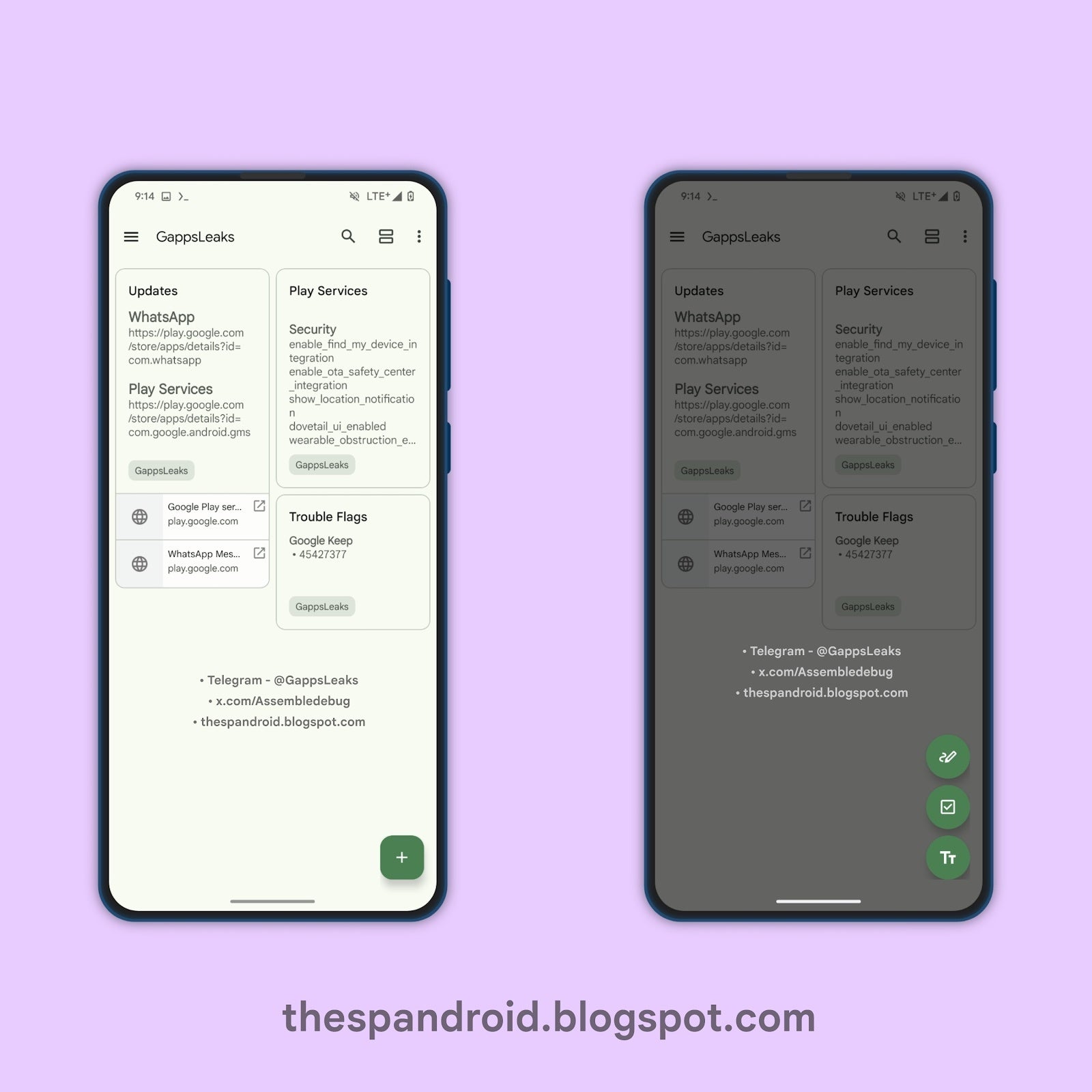
As reported by TheSPAndroid, a fresh Google Keep update (version 5.24.112) brings another iteration of the new note button to light. Upon digging into the code for that version, it appears the floating navigation bar is a thing of the past. The new experimental update introduces a floating action button (FAB), the iconic circular button with a plus sign often found in Google’s design language. This choice mirrors the design seen in Google Calendar.
Image Source: TheSPAndroid
This new floating button replaces the entire bottom navigation of the Keep interface. Tapping on this FAB expands it vertically to offer three distinct options: draw a note, create a list, or create a text note.
While unexpected, this change signals that Google is not done tweaking Google Keep’s interface in search of the most intuitive note-taking experience. The use of the FAB instead of the floating bar we saw last week, does offer some advantages. Collapsing the bottom bar frees up more screen space for your notes, which could now be taken with a single tap. Additionally, the FAB button aligns with Google’s material design trends, so it offers a familiar design that may be more intuitive for those that regularly use Google’s apps.
Of course, this is still an experimental feature and there is no guarantee that it’ll roll out to the wider public. However, it illustrates Google’s dedication to streamlining Google Keep’s functionality and interface. Google Keep’s current interface is starting to become stale, so a little sprucing up and the addition of new features is a welcome change.
Heads up, WordPress admins! A new malware campaign is actively preying on WordPress websites, generating popup ads. Identified as Sign1, the malware has targeted over 2500 WordPress sites in the recent wave of attacks, exhibiting sneaky behavior to avoid detection.
Sign1 Malware Actively Targets WordPress Sites
According to a recent post from the WordPress security service Sucuri, they have caught the Sign1 malware actively infecting hundreds of websites lately.
As explained, the researchers found the malware embedded in a website plugin that otherwise allows arbitrary code injection by site owners. While such plugins help the developers, criminal hackers may also abuse them maliciously. In this campaign, the researchers detected the malware in the plugin’s custom-css-js.
Dissecting the code made the researchers find the time-based randomization (using the Date.now function), which further helps the malware to generate dynamic URLs. Besides, the malicious code also exhibits obfuscation, hence becoming more difficult to detect.
Both these techniques aided the attackers in staying under the radar. Consequently, they could compromise over thousands WordPress websites before catching Sucuri’s attention. The researchers admitted that the malware remained unnoticeable, and they could only detect its presence by running the server-side scan that looks for any file changes into the environment.
This malware’s dynamic URLs generate random popups and ads for a compromised site’s visitors. However, the malware specifically targets visitors arriving from prominent sites such as Google and Facebook and won’t execute otherwise. That’s how it remained undetected for many site admins who seldom use a search engine to reach their website. Moreover, it ensured displaying the popup only once per visitor.
Due to its stealthy techniques, the Sign1 malware has successfully compromised over 39,000 websites since its beginning. With time, the malware evolved further to enhance its malicious capabilities, with the recent variant targeting over 2500 websites during two months.
To prevent this threat, the researchers advise users to secure their sites’ admin panels and use website firewalls for protection.