A few years ago, back when LG still made phones, the company released one of the most innovative and interesting phones we had seen in that day and age, The LG Wing. This was a phone with a swivel action display that could actually flip 90° into landscape mode, revealing a miniature display underneath. Well, LG wing mini displays are being repurposed into a phone called the Xeta One.
The Xeta One is a phone that’s referred to as a renovation project, so it’s not likely that you will see it hitting the shelves. It’s currently a crowdfunded project, so if you are interested, you can check it out. However, be sure to read the description and the fine print before you send any money.
The Xeta One uses repurposed LG Wing mini displays
The second you look at this phone, it’s obvious what fandom it’s trying to appeal to. If you remember the Blackberry Keyone from back in the day, then it will look familiar. The Xeta One has a relatively small 3.9-inch display that sits atop a physical QWERTY keyboard. We’ve seen several attempts at reviving the physical keyboard in smartphones over the years.
So, where does the LG Wing come into this? Well, the 3.9-inch display on this phone is made from the repurposed mini display on the LG Wing. So, the case, then this phone will have a very nice display, as LG’s phone displays were some of the best on the market.
As for the phone itself, we don’t know too much about it. However, the announcement video shows us a few of the specs. We don’t know exactly what processor it’s using, but it says that it’s using a Qualcomm Snapdragon 5G processor. It will have 8GB of RAM and 128GB of storage. The storage will be expandable up to 2TB. As for the display, since it’s using repurposed LG Wing mini displays, it is a pOLED panel with a resolution of 1080 x 1240. Other than that, this phone will launch with Android 13.
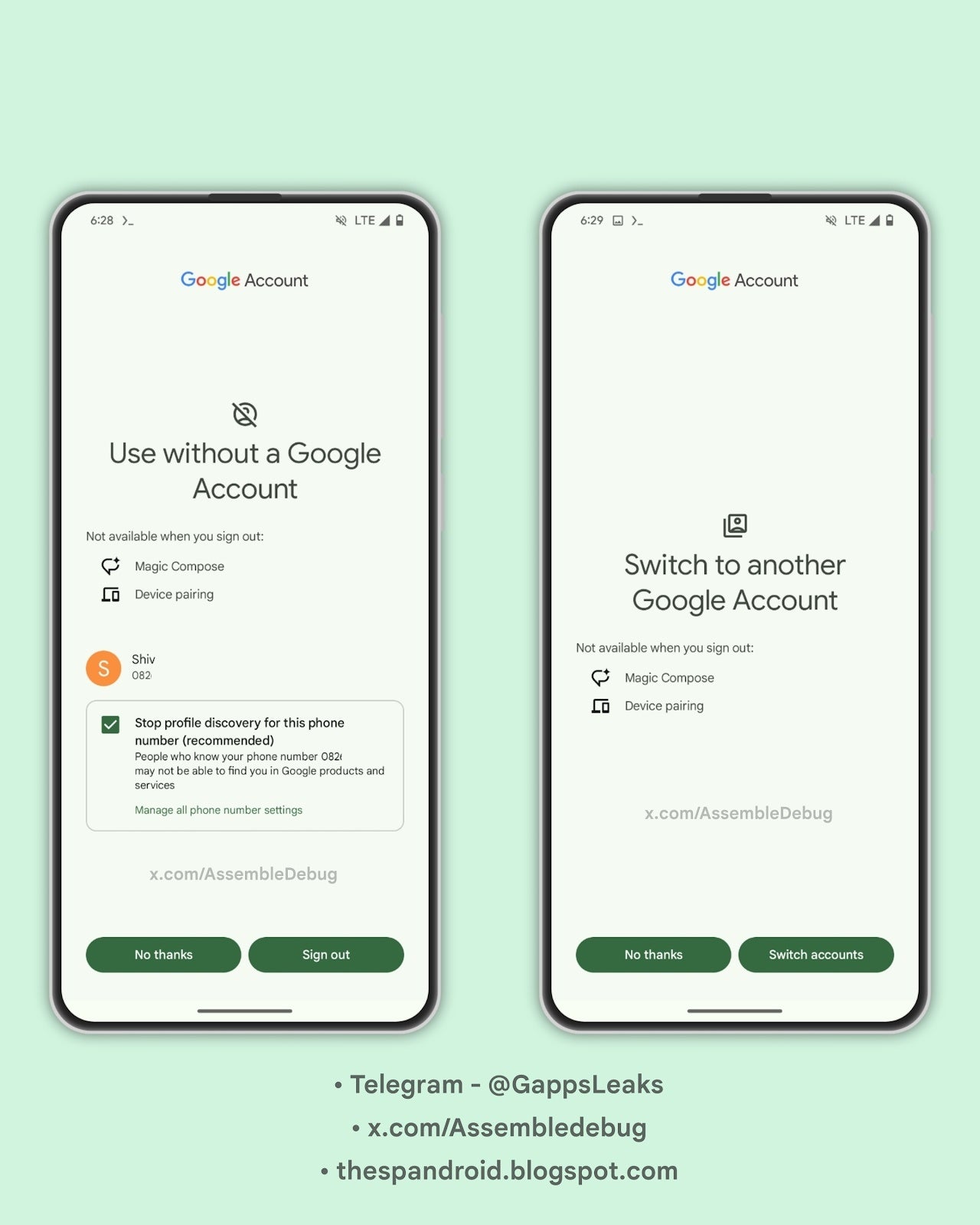
If you’re a Google Messages user with multiple Google accounts linked to your Android phone, you’ve probably experienced how seamless account-switching currently is within the app. However, switching accounts or opting to use Google Messages without a Google account altogether can lead to some unexpected limitations. Google appears ready to address that with a new warning that appears when you want to ditch the Google account login.Google Messages is rolling out a new feature in beta that clearly outlines which features you’ll lose when either signing out of your account or switching to a different Google account within the app. Signing out entirely from your Google account will warn you that you’ll lose access to features like Magic Compose (those helpful AI writing suggestions) and Device Pairing (linking your phone to Chromebooks or other desktop devices for seamless messaging).
If you have Google’s Profile Discovery feature enabled, you’ll be prompted to disable it. This prevents others from seeing your profile picture and name in Google products, but also means people knowing your phone number might not easily connect with you on various Google services.
If you are switching between accounts, you’ll also get a similar warning. Magic Compose and Device Pairing will also become unavailable, as these features are tied to your specific Google account. Both of these warnings were spotted by @Assembledebug from TheSPAndroid during his usual search for new features.
Source: TheSPAndroid
Previously, Google Messages didn’t explicitly display the potential drawbacks of using the app without an associated account. However, adding this notification greatly improves transparency, letting users make informed choices about how they interact with Google Messages as it is not completely necessary to tie the app to a Google account. The feature seems to be rolling out gradually for those on the latest Google Messages beta, which is v.20240321_01_RC00 at this time.
Telegram is a cloud-based messaging platform that sets itself apart by limiting the amount of restrictions on users by a great deal. This lack of security and moderation put the platform in hot water as it was almost suspended in Spain, and it’s unknown if it’s out of it yet.
The Spain High Court ordered the suspension of the popular messaging platform Telegram. However, the court dropped the order shortly after. With the looming ban on TikTok by the US, users wonder which platform will be next to get in legal trouble.
Telegram almost faced a suspension in Spain
Telegram is the fourth most popular app used for messaging in Spain. Despite that, Spaniards almost had access to the application temporarily revoked thanks to an investigation. On Friday, March 22, 2024, The Spain High Court temporarily ordered Telegram to be suspended in Spain. The suspension was due to complaints by media companies such as Atresmedia, EGEDA, Mediaset, and Telefonica.
The mentioned media companies alleged that the chat service allowed users to upload their copyrighted content without permission. As a result, the court ruled to ban the service temporarily. Judge Santiago Pedraz, who issued the order for the temporary ban, did so while an investigation was ongoing to confirm the validity of the claims.
The same judge realized that the ban would undoubtedly affect many citizens. Therefore, while the ban was supposed to take effect the following Monday, it did not get past the weekend. Judge Pedraz halted the order on Monday, February 25, 2024. The court statements had the following to say:
Such extreme measures would “clearly be detrimental to millions of people who use it, the vast majority of whom are not linked to any illegal activity.”
Telegram has yet to respond to the ruling of the High Court and Judge Pedraz, but refusal to cooperate with the ongoing investigation might enact another ruling in Spain. In recent years, copyright infringement claims have been taken more seriously. Telegram’s refusal to remove such content is the root cause of the Spain Court’s controversial decision.
Is Telegram safe now?
Spain is not the only country to have banned the messaging platform. Other countries have banned Telegram in the past for varying reasons. For example, Brazil suspended Telegram for the same reason as Spain. The suspension was temporarily lifted and then reenacted as Telegram refused to change its policy regarding copyright infringement.
Telegram didn’t change anything despite Spain’s close suspension of the platform. Therefore, there’s a chance the Spain High Court might do the same thing Brazil did and reenact the platform’s ban. The future looks gloomy as Telegram is steadfast in its policies despite ending up in hot water multiple times thanks to copyright infringement issues.
Microsoft released an out-of-band update, KB5037422, on March 22, 2024, specifically for Windows Server 2022 (OS Build 20348.2342) to address a critical memory leak issue in the Local Security Authority Subsystem Service (LSASS).
The leak occurred on domain controllers (DCs) after installing the March 2024 security updates (KB5035857) and impacted both on-premises and cloud-based Active Directory DCs during Kerberos authentication requests.
Excessive memory usage could lead to LSASS crashing and unexpected DC restarts, while the update addresses the LSASS memory leak and improves the overall servicing stack functionality for future Windows updates.
Out-of-band Update
The memory leak vulnerability manifested after installing the KB5035857 update, which was released on March 12, 2024, as the flaw was triggered when DCs processed Kerberos authentication requests, leading to a substantial memory leak.
Alert Fatigue that helps no one as security teams need to triage 100s of vulnerabilities.:
The problem of vulnerability fatigue today
Difference between CVSS-specific vulnerability vs risk-based vulnerability
Evaluating vulnerabilities based on the business impact/risk
Automation to reduce alert fatigue and enhance security posture significantly
AcuRisQ, which helps you to quantify risk accurately:
The excessive memory consumption could cause LSASS to crash, resulting in unexpected domain controller reboots, while the update specifically targets and resolves the critical LSASS memory leak issue.
It’s essential to apply this update to DCs, especially those that haven’t yet uninstalled the vulnerable KB5035857 update, to prevent potential crashes and subsequent downtime on your domain network.
Microsoft released a servicing stack update (SSU) for Windows Server 2022, KB5035857 (OS Build 20348.2334), which specifically targets the servicing stack component, a critical system function responsible for the deployment of Windows updates.
Windows Server Racks
By implementing quality improvements to the servicing stack, this SSU enhances its reliability and robustness. Consequently, devices receiving this update will benefit from a more efficient and reliable process for acquiring and installing future Windows updates.
The improvement is particularly significant for maintaining a healthy and up-to-date Windows Server environment, as timely updates are essential for addressing security vulnerabilities, bug fixes, and new feature implementations.
The update delivers the latest cumulative update (LCU) bundled with the latest servicing stack update (SSU) for Windows 10, improving the reliability of the update process.
While Microsoft isn’t aware of any issues, the update isn’t available through Windows Update or Windows Update for Business.
Instead, it needed to download from the Microsoft Update Catalog website or leverage Windows Server Update Services (WSUS) for deployment.
If it is required to remove the LCU after installation, the DISM tool with the LCU package name can be used, but be aware that this won’t remove the SSU.
Stay updated on Cybersecurity news, Whitepapers, and Infographics. Follow us on LinkedIn & Twitter.
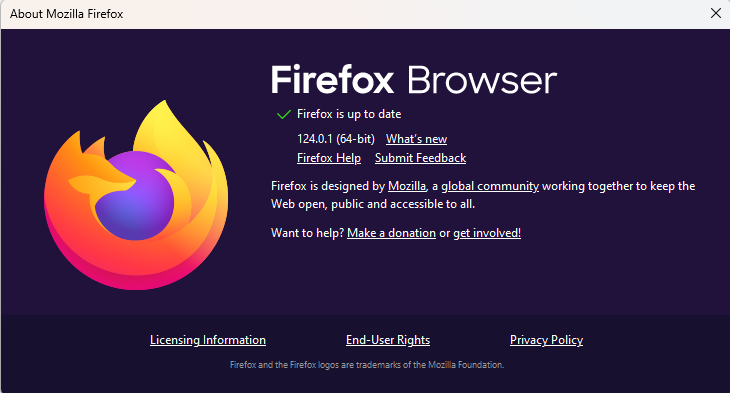
Mozilla released version 124.0.1 of the Firefox browser to Release channel users (the default channel that most non-developers run) on March 22, 2024. The new version fixes two critical security vulnerabilities. One of the vulnerabilities affects Firefox on desktop only, and doesn’t affect mobile versions of Firefox.
Windows users that have automatic updates enabled should have the new version available as soon or shortly after they open the browser.
Click the menu button (3 horizontal stripes) at the right side of the Firefox toolbar, go to Help, and select About Firefox. The About Mozilla Firefox window will open.
Firefox will check for updates automatically. If an update is available, it will be downloaded.
You will be prompted when the download is complete, then click Restart to update Firefox.
To change the way in which Firefox installs updates, you can:
Click the menu button (3 horizontal stripes) and select Settings.
In the General panel, go to the Firefox Updates section.
Here you can adjust the settings to your liking.
The vulnerabilities
The vulnerabilities were found during the Pwn2Own Vancouver 2024 hacking competition. The Common Vulnerabilities and Exposures (CVE) database lists publicly disclosed computer security flaws. The CVEs patched in this update are:
CVE-2024-29943: an attacker was able to perform an out-of-bounds read or write on a JavaScript object by fooling range-based bounds check elimination. This vulnerability affects Firefox < 124.0.1.
An out-of-bounds read or write can occur when a program has access outside the bounds of an allocated area of memory, potentially leading to a crash or arbitrary code execution or disclosure of information. This can happen when the size of the data is larger than the size of the allocated memory area, when the data is written to an incorrect location within the memory area, or when the program incorrectly calculates the size or location of the data.
CVE-2024-29944: An attacker was able to inject an event handler into a privileged object that would allow arbitrary JavaScript execution in the parent process. Note: This vulnerability affects Desktop Firefox only, it does not affect mobile versions of Firefox. This vulnerability affects Firefox < 124.0.1 and Firefox ESR < 115.9.1.
Firefox ESR (Extended Support Release) is offered for organizations, including schools, universities, businesses, and others who need extended support for mass deployments.
An event handler is a program function that is executed by the application or operating system when an event is executed on the application.
Programming languages are built on the concept of classes and objects to organize programs into simple, reusable pieces of code. A privileged object is a function or piece of code with elevated permissions.
Together, the two vulnerabilities allowed the researcher to achieve a sandbox escape of Firefox. The sandbox is employed to protect against malicious content entering the system through the browser.
We don’t just report on vulnerabilities—we identify them, and prioritize action.
If you use WhatsApp often, then you’ve more than likely had to upload media to send to other people. This is a core part of the WhatsApp experience for some people, and the company has just made it better. WhatsApp will give people the option to choose the quality of the media they upload.
In order to save space, most social media platforms compressed the media that was shared. However, some platforms have the option to send higher-quality media for a better experience. This helps preserve some important information and details in the pictures or videos. Most of the time, it doesn’t really matter, but there are instances when higher-quality pictures come in handy.
WhatsApp is coming with a new media quality feature
WhatsApp hasn’t let users really control the quality of the media they upload. The media was automatically compressed, and there wasn’t really a way to send higher-quality images without having to use other means of sending files. For example, people would have to upload the files to Google Drive and paste the link into the chat. That’s more tedious than just sending a file to people.
Well, thanks to a new report from WABetaInfo, we now know that WhatsApp wants to give users more control over the media that they upload. In the latest version of the Android beta, version 2.24.7.17, we see that WhatsApp is going to allow people to select the quality of the media they want to upload.
In the Storage & Data section of the settings, there will be a new media upload quality section. When you tap on that, you’ll see a little pop-out window appear. The first option is the standard quality option, and this will compress your media as usual. However, the HD quality option will send your media at a higher quality. This will not send it in its original quality, but it states that the quality of the media you upload could be up to six times higher.
It also states something that we all know: standard quality media uploads faster and takes up less space, and higher quality media uploads slower and takes up more space.
This feature is available to some beta testers, and it will start rolling out to more users over the coming days.
The Right to Repair has become a viral subject in the past decade or so, but only recently has it really made some waves. Both Apple and Samsung are making it easier for customers to repair their devices, and States are starting to pass their own laws for the Right to Repair.
It’s really as simple as it sounds, the right to repair anything and everything that you own. This is something that has been primarily an issue in the US and European Union.
In this article, we’re going to tell you everything you need to know about Right to Repair, and if it’s something you need to pay attention to.
What is the ‘Right to Repair’?
The Right to Repair basically refers to the concept of allowing users to freely repair the product(s) in case of any type of issue. There are four requirements that are of particular importance:
The device should be constructed and designed in a manner that allows repairs to be made easily
end users and independent repair providers should be able to access original spare parts and tools (software as well as physical tools) needed to repair the device at fair market conditions
repairs should, by design be possible and not hindered by software programming
The manufacturer should clearly communicate the repairability of a device.
Originally, the Right to Repair was driven mostly by the automotive industry. But it has now expanded to basically every industry. A big part of this is due to the tech industry. Especially smartphones. Those screens shatter, but that doesn’t mean the rest of the phone needs to be tossed out, creating e-waste. But getting that screen replaced can cost a few hundred dollars unless you do it yourself. And that’s where the Right to Repair lives.
The main goal of Right to Repair is to favor repair over replacement. As mentioned, replacing something because it has a broken part leads to a lot of e-waste, and the world already has a lot of that.
Brief history of Right to Repair
The Right to Repair is actually not new, not at all. The earliest history starts in the 1920s, which started with automotive companies moving to make it harder to do independent repairs. GM was behind that, with executive Alfred P. Sloan suggesting that continuous changes to its models on a year-over-year basis would fuel demand for customers to replace their vehicles sooner. Ford, on the other hand, preferred a simple and easy way to replace parts.
In the 1950s, many manufacturers started making it harder to get access to parts, not just automotive companies.
However, in the 2000s, things started to heat up with the Right to Repair. In 2001, the Motor Vehicles Right to Repair Act was brought up, but it failed. This was the first of many attempts to establish a Right to Repair for automobiles.
In 2008, the US Supreme Court favors a class action lawsuit challenging carriers’ policies against unlocking phones. In 2012, Massachusetts passed a right to repair act for automobiles. And then in 2014, South Dakota passed a Digital right to repair bill.
Fast-forward to 2019, about 20 states begin to consider the right to repair bill. Those states include California, Georgia, Hawaii, Illinois, Indiana, Massachusetts, Minnesota, Missouri, Montana, North Dakota, Nevada, New Hampshire, New Jersey, New York, Oregon, South Dakota, Vermont, Virginia, Washington, and West Virginia.
Now in 2024, we’re seeing many more States looking at Right to Repair and looking to pass some legislation there as well. So it’s nothing new, but it has become a much bigger deal in recent years compared to the 1920s.
Does my State have an active Right to Repair bill?
They might. If you head to this website, you’ll learn more about the different Right to Repair bills, which states have active bills being considered, which ones had them historically, and which ones never had them.
Currently, these States have active Right to Repair bills:
Alabama
Alaska
Arizona
California
Colorado
Hawaii
Illinois
Indiana
Kentucky
Maine
Maryland
Massachusetts
Michigan
Minnesota
Mississippi
Missouri
New Hampshire
New Jersey
New York
Ohio
Oklahoma
Oregon
Pennsylvania
Rhode Island
Tennessee
Utah
Vermont
Virginia
Washington
West Virginia
You can help get involved and get your Representatives and Congress people to get this bill passed by heading to that site. Just click on your State and you can write to your representatives. You can also call their office and tell them you want this law to pass. Remember, your Representatives and Congress people work for you.
Do people even care about Right to Repair?
Most normal consumers probably don’t care. They aren’t going to replace a battery in their smartphone themselves, which isn’t totally what Right to Repair is. It is also allowing third-party repair shops to fix your products. Instead of having to go directly to Samsung to fix your Galaxy Z Fold 3. You could go to one of those mall kiosks (you know the ones I’m talking about), and get it fixed there, for a much cheaper price. And usually faster to.
Right to Repair is going to allow that mall kiosk to use genuine parts for your Galaxy Z Fold 3 too. So it’ll be fixed like it’s brand new. As well as allowing the person to have instructions on how to do it properly.
Now as you can imagine, that does eat into a company’s sales and profits, especially one like Samsung or Apple – the two biggest smartphone makers in the world.
Companies have fought against it for years
Manufacturers will employ many different tricks to make it nearly impossible to repair your device yourself, should something go wrong. By using proprietary screws, not publishing repair documentation or even gluing parts together.
iFixit has been great at showing us how well some products are to repair and how bad others are. The iPhone typically has some of the worst repairability scores from iFixit. They also sell some great kits to help you repair your devices and also some great repair guides.
Smartphones use a lot of glue internally, and that might not be to keep you from repairing it yourself. But because there’s so many little parts inside and most screws wouldn’t really work that well. But it could also be to fight against the Right to Repair.
Why would anyone be against the Right to Repair?
Companies lobbied against a Right to Repair law in New York state back in 2018, these included Facebook (surprisingly), Toyota and Verizon, among others. An Apple lobbyist in 2017 told a Nebraska Senator that the state would suddenly become a hotspot for bad actors, it if had passed a Right to Repair law.
Some of the main points for opposition to Right to Repair legislation comes from security risks in giving criminals access to technical information, safety risks from unauthorized repair, and risks to intellectual property.
Some of these issues are valid, like the last two. If your laptop got an unauthorized repair and it was not done correctly, that could cause some issues. And since many of these have batteries inside, that could become a hot issue. And the theft of IP or Intellectual Property is a big deal. That’s not something that any company wants to have happen to them. Especially after spending millions and in some cases billions, on R&D for that product.
It’s mostly companies that are against the Right to Repair. And one reason that was not mentioned, is sales. If you’re able to repair your device for a lower cost at another repair shop, you’re less likely to buy a new phone. Which is where companies make the majority of their money.
Colorado has enacted the first ‘Right to Repair’ law, others following suite
Colorado enacted the first Right to Repair law in early June 2022. Governor Jared Polis signed into legislation, a law that would allow wheelchair owners to get access to parts, software and manuals so they can repair their own wheelchairs. This legislation is only for wheelchairs, but it is a step in the right direction.
New York is also about to ratify a Right to Repair bill that would include electronics, making it the first in the country for electronics. The Digital Fair Repair Act, is ready to be signed into law, and it’ll pave the way for citizens in New York State as well as across the country, to repair their own devices.
New York’s bill mandates customer access to two things:
parts from device manufacturers and the ability to hire repair services from whomever they want
manufacturers can charge fees for parts, tools, and perhaps even repair manuals, but they must be provided under “fair and reasonable terms”.
This law does have a few exceptions, though it does cover almost all electronics. The exceptions include medical devices (which another law covers), home appliances, auto parts, and industrial hardware including tractors and all-terrain vehicles.
This is only the beginning and we expect to hear more States starting to adopt their own Right to Repair laws. President Joe Biden is also planning to do an executive order regarding Right to Repair. Though we have very few details on that right now.
Apple & Samsung launching Repair programs
Apple has already launched its own repair program and Samsung is gearing up to launch theirs this summer. It’s been a rocky road so far for Apple however. In November 2021, Apple announced its Self Service Repair program, and it launched in April of 2022.
Apple’s Self Service Repair program
Apple launched its self service repair program in late April of 2022. It was a little odd, as the website that hosts the program looks very outdated, compared to something Apple would launch. But it is legit, and they will sell you parts as well as allow you to borrow the tools needed to do the repairs.
YouTuber iUpdate attempted to repair the screen on his iPhone 12, and you can see the full video below.
Basically, Apple lets you borrow the tools for $49. Which seems reasonable, though the tools are pretty insane. Apple does also place a hold on your credit card for the tools, so that if they don’t get sent back, they charge you the price of them. Some say it’s a $1200 hold. By the end of the video iUpdate comes to the conclusion that it was actually more expensive to do it himself than to take it to the Apple Genius Bar. And I’m sure that was done by design.
Samsung’s Right to Repair service coming this summer
Samsung is launching its own Self-Repair service later this summer, and fingers are crossed that it’s a bit easier than what Apple has done. Samsung says that the program will be available for the Galaxy S0, S21 and Galaxy Tab S7+ family of devices first. Surprisingly, not the new Galaxy S22 models that were announced earlier this year.
Samsung is working with iFixit for this program. As mentioned already, iFixit already has a bunch of teardown and repair guides for Samsung phones, so this is smart. Not to mention, it sells a lot of toolkits too.
Should you care about Right to Repair?
Yes, you should care.
Obviously, not all of us are going to go ahead and repair our own devices by ourself. This is a bit more than you repairing your own device. It’s more of allowing third-party repair shops to get access to authentic parts, and repair guides that will allow the repair shop to do the job correctly.
Instead of having to go to Google, Samsung, or OnePlus to fix your phone, you can just head to a local repair shop and get it done. Or even do it yourself. Right to repair is actually a very big deal.
Cybersecurity threats have increased over the years. Research shows that, on average, 2,200 cyber-attacks are happening daily, and a single data breach can cost your business around $9.44 million on average.
These stats highlight the importance of securing your business data. If your business frequently deals with data transfers or file exchanges, investing in reliable cybersecurity tools is necessary.
But with so many options available, it can be overwhelming to determine which ones are best suited for your organization’s needs. That’s why we’re here to help. In this article, we’ll discuss the top three cybersecurity software to help protect your business data effectively.
Why Should You Use Cybersecurity Tools or Platforms?
Cybersecurity tools are software solutions designed to protect against online threats such as viruses, malware, and hacking attempts. These tools help you to,
Keep important data safe from hackers and cyber threats.
Stop unauthorized users from getting into your networks and systems.
Continuously watch for unusual actions and alert you to potential breaches.
Prevent costly data breaches that could harm your finances.
Comply with laws and standards for your industry.
Maintain the confidentiality of your customers’ personal information.
Prevent interruptions in your business operations, saving time and money.
Regular use of cybersecurity tools improves your overall security, making it harder for attackers to succeed.
Top 3 Cybersecurity Tools
Among the variety of cybersecurity tools available, these three are tailored specifically for businesses managing substantial volumes of sensitive file transfers.
IBM Aspera
IBM Aspera is a high-speed data transfer solution developed by IBM. It serves organizations globally, including those in the manufacturing, healthcare, and media industries. With this tool, you can enjoy file transfer up to 100 times faster, managing up to 100 TB of data daily.
Aspera ensures secure data transfer, facilitating big data transport, large file sending, and low-latency streaming. It supports automation and management of file transfer processes, including hybrid cloud workflows. Additionally, it uses blockchain technology to enhance security in multi-cloud environments.
Features
Secure data transfer: Transfers safely globally with strong security measures.
Big data transport and sync: Move, distribute, and sync large files and datasets efficiently worldwide.
Large-file sharing: Speed up collaboration by sharing big data and large files with teams globally.
Transfer management: Automate, monitor, and control file transfers and workflows smoothly.
Any bit-rate streaming: Send data of any size and high-bit-rate video with very little delay.
Hybrid cloud workflows: Create scalable workflows that work on-premises, in the cloud, or both.
Secure asset exchange: Increase security in digital asset movement using blockchain technology.
Trend Micro Cloud One
Trend Micro Cloud One File Storage Security offers strong security solutions for cloud storage services. With the increasing use of cloud-based applications, protecting file upload and transfer processes is vital.
Trend Micro provides top-notch protection supported by extensive threat research. It includes automated malware scanning and file reputation technologies to ensure safety. This solution protects files of all sizes across different business processes and applications, making the cloud storage environment secure.
Features
File reputation: Blocks known malicious files using anti-malware signatures.
Variant protection: Identifies obfuscated or polymorphic malware variants.
Extensive flexibility: Supports scanning of various file types, including .BIN, .EXE, .JPEG, .MP4, .PDF, .TXT, .ZIP, and more.
Irdeto
Irdeto is a trusted cybersecurity solution with over 50 years of experience. It protects your business solutions from piracy and cybercriminals.
Irdeto protects over 5 billion platforms and apps, ensuring robust security measures. It addresses increasing threats in video entertainment, gaming, connected transport, health, and IoT industries.
Its expertise lies in providing modernized content security protection, including DRM technology for encrypting and transmitting encryption keys. By managing encryption keys effectively, Irdeto reduces the risk of cyber-attacks, safeguarding your organization’s intellectual property.
Features
DRM Security: Protects high-value content through digital rights management.
Enhanced HLS Protection: Safeguard content delivery with advanced encryption methods.
Forensic Watermarking: Provides hidden intelligence to shape strategic goals and refine operational tactics for content owners.
Conclusion
It is important to protect your business data if you don’t want to become a victim of cyber-attacks. By investing in the top 3 cybersecurity software we have discussed in this blog, you can easily keep your data safe from cyber threats. These tools offer advanced features to securely manage data transfer, prevent breaches, and comply with industry standards.
Samsung is always seen as a titan for software and update support in the world of Android. The recently launched Galaxy S24 series of devices comes with seven years of promised software support. This is the highest among any other Android OEM. Anyway, going back to our main headline, there is some strong information making rounds on the internet that claims the Galaxy S23 will start getting the OneUI 6.1 update very soon.
Samsung may start rolling out the Galaxy S23 OneUI 6.1 update on March 28
OneUI 6.1 is another major update for Galaxy smartphones and tablets. It brings a lot of changes to the software and optimizes some existing features such as animations and fluency of the UI. Samsung had previously claimed that their Galaxy S23 users would get access to the update sometime in March.
Even after almost 80% of the month, we have not heard anything related to the Galaxy S23 OneUI 6.1 update. But, it seems that our wait is finally coming to an end. Samsung has started pushing out a notification on its Chinese variant of the Galaxy S23 devices that confirms the OneUI 6.1 update will start rolling out on March 28.
To add more, a community moderator from Samsung confirmed that they are all set to push the OneUI 6.1 update to Galaxy S23 devices starting March 28th.
The Galaxy S23 FE is getting the update as well
It looks like March 28 is going to be a happy day for many Samsung owners. According to reports, the Galaxy S23 FE will also get the OneUI 6.1 update starting from March 28th. The Fan Edition devices generally do not get the update on the same date as the normal variant of the series. But it’s going this time.
As of right now, it is unclear whether all the variants across the globe will receive the update on the same day or not. However, according to the past record of the brand, all the variants get the update on the same day. The update will first start rolling out to a few selected devices and then the broader rollout will happen after a couple of days.
Global threat intelligence (GTI) is crucial for cybersecurity as it offers real-time data on emerging and persistent cyber threats worldwide.
Threats can originate anywhere, so understanding regional variations is essential.
For example, North Korean actors target government infrastructure, while Eastern Europe is a hub for Ransomware-as-a-Service (RaaS) like LockBit.
Organizations must leverage GTI from various sources beyond their local region to comprehensively view the global threat landscape.
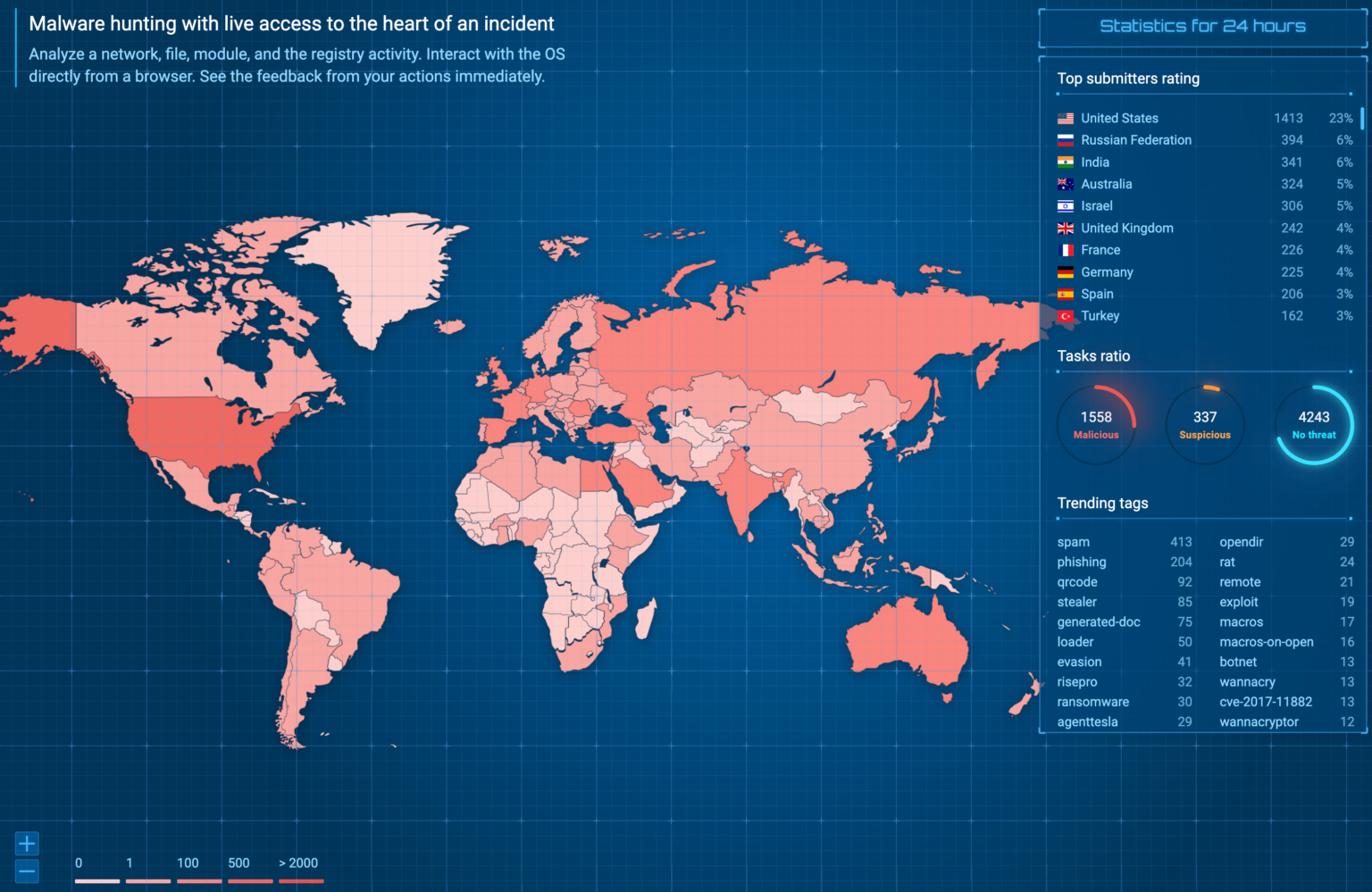
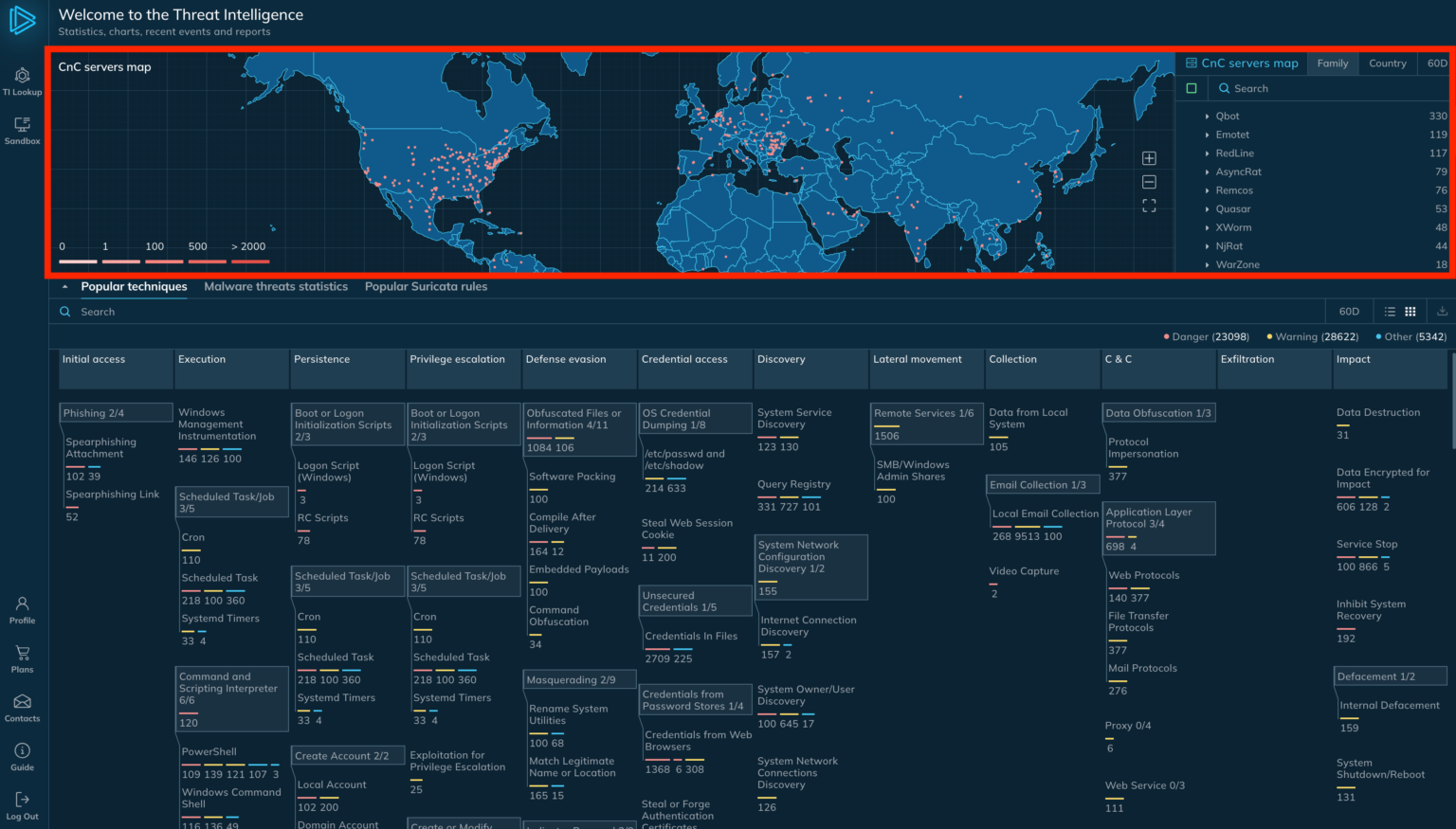
ANY.RUN’s global map of sample submissions
A threat intelligence sourceshould pull data from international organizations worldwide to comprehensively understand global cyber threats.
In contrast, monitoring allows them to track threats, malware campaigns, and other malicious activity that can impact organizations anywhere.
Ultimately, a source is needed that provides Indicators of Compromise (IOCs) and event details that can identify a compromised system.
Document
Integrate ANY.RUN in Your Company for Effective Malware Analysis
Are you from SOC, Threat Research, or DFIR departments? If so, you can join an online community of 400,000 independent security researchers:
Real-time Detection
Interactive Malware Analysis
Easy to Learn by New Security Team members
Get detailed reports with maximum data
Set Up Virtual Machine in Linux & all Windows OS Versions
Interact with Malware Safely
If you want to test all these features now with completely free access to the sandbox:
The IOCs could be IP addresses, domain names, file fingerprints, network traffic patterns, or even specific commands used by malware.
According to ANY.RUN global threat intelligence considered the report; the following sources should be included.
Comprehensive data sources
Global threat intelligence relies on collecting data from sources around the world, and the more international organizations from different countries and regions contribute to the data source the more holistic picture it will be able to provide.
Global monitoring
It involves monitoring cyber threats, malware campaigns, and other malicious activities that transcend geographical boundaries and have the potential to impact organizations worldwide.
Global IOCs and event fields
The data source should provide access to artifacts or patterns that indicate a system has been compromised or is under attack, like IP addresses, domain names, file hashes, patterns of network traffic, or CMD to PowerShell commands associated with known malware.
Global Threat Intelligence in ANY.RUN
ANY.RUNoffers a cloud-based malware sandbox for security teams to analyze suspicious files, detect malware within 40 seconds, and identify malware families using built-in rules.
Unlike automated sandboxes, it allows interactive analysis in a virtual machine to uncover zero-day exploits.
As a cloud solution, it reduces setup and maintenance costs, and its user-friendly interface simplifies onboarding for security analysts.
ANY.RUN offers threat intelligence solutionsthat cover technical, tactical, and operational aspects on a global scale.
Their data source is comprehensive, providing insights into indicators of compromise, attacker techniques, and the types of malware being used globally. This allows for the analysis of potential threats, understanding of how attacks might unfold, and identification of specific malicious elements to monitor.
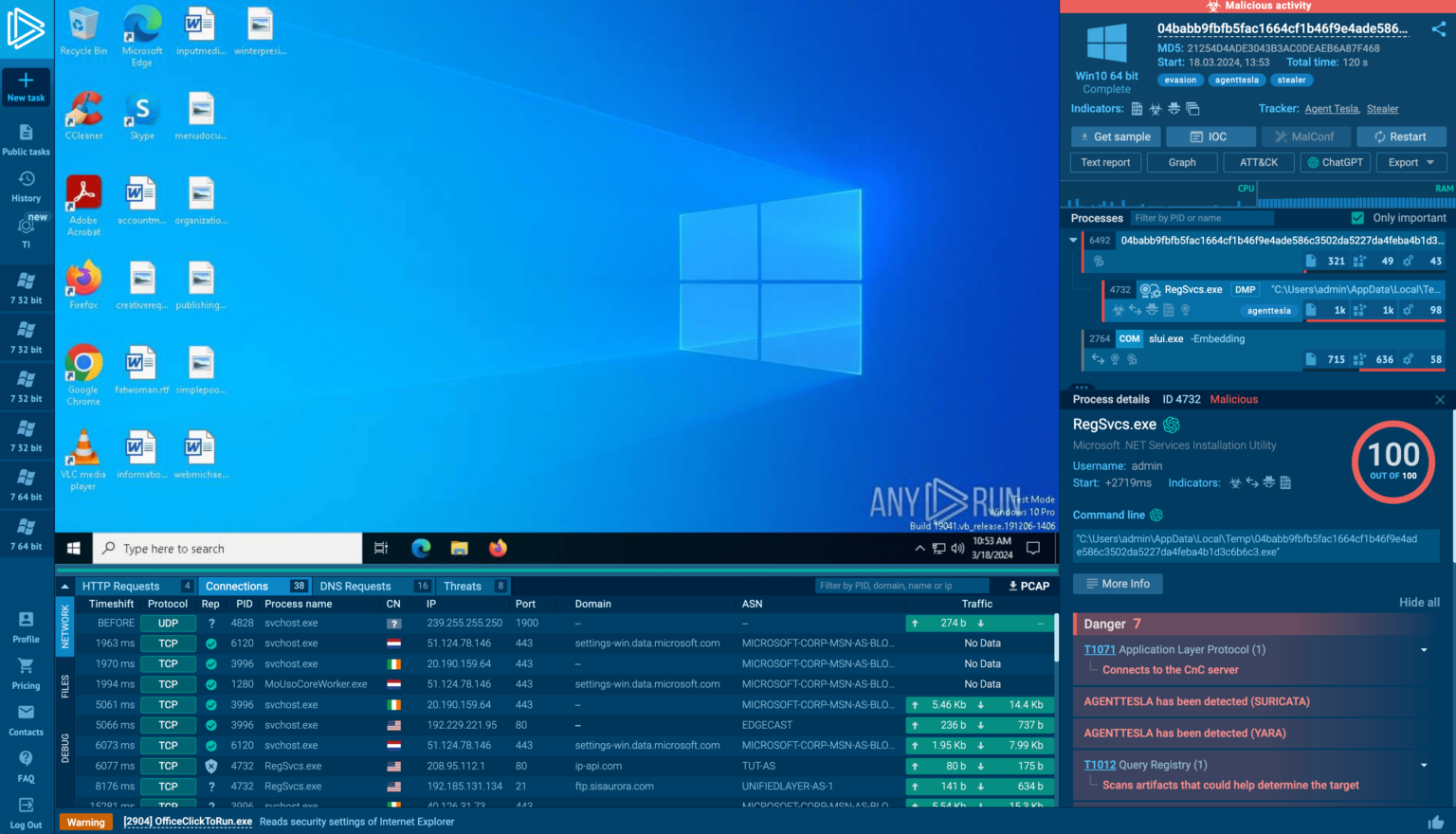
ANY.RUN’s online sandbox interface
The interactive sandbox environment allows malware researchers to analyze suspicious files in a cloud-based virtual machine quickly.
The sandbox captures detailed data about the file’s behavior, including file and registry changes, loaded modules, network connections, and more.
DocumentAre you from SOC and DFIR Teams?
Sign up and start using the interactive malware sandbox for free.
.
The data is stored along with Indicators of Compromise (IOCs) extracted from the analysis, and users can utilize the data in two ways: subscribing to threat intelligence feeds delivers fresh IOCs in a standardized format.
At the same time, the lookup portal allows searching for specific indicators and linking them to potential malware families based on historical analysis data.
The rich collection of IOCs and related events provides valuable context for security professionals investigating potential threats.
Example of Global Threat Intelligence in ANY.RUN
ANY.RUN extracts C2 server locations from analyzed malware and displays them on a global map within their Threat Intelligence Lookup portal.
Filter C2 locations by country or by threat name
The map allows users to filter threats by location or family to identify communication patterns and techniques (MITRE ATT&CK) used by different malware families worldwide.
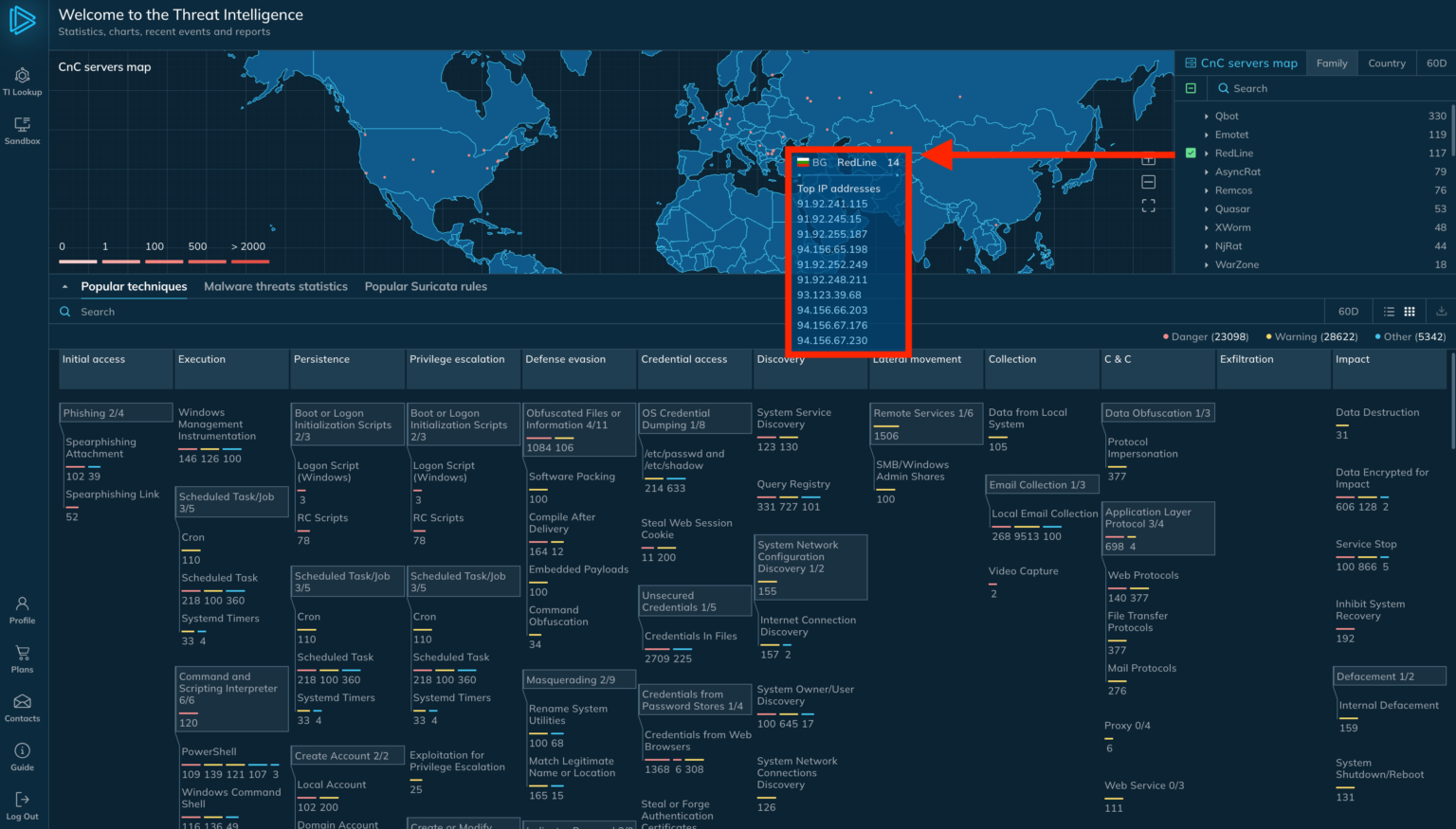
Hover over any location to bring up a list of IPs
Users can access granular details like IP addresses associated with those threats by hovering over specific locations.
The information empowers users to configure security measures (WAFs) to block malicious traffic and enrich incident reports with threat identifiers for improved analysis.
Are you from SOC and DFIR Teams? – Analyse Malware Incidents & get live Access with ANY.RUN -> Start Now for Free.