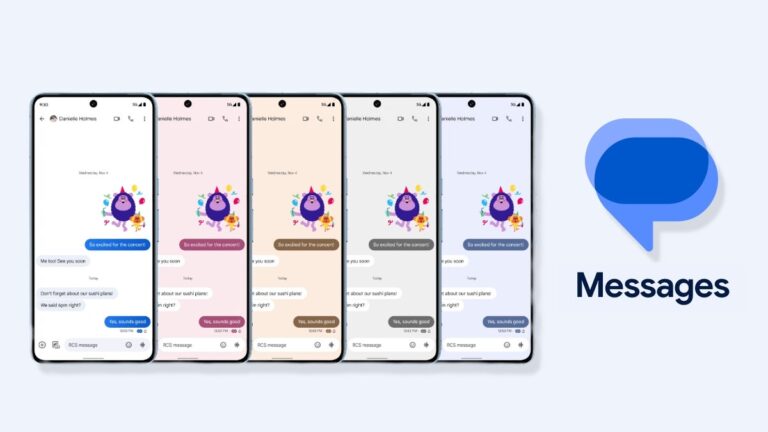
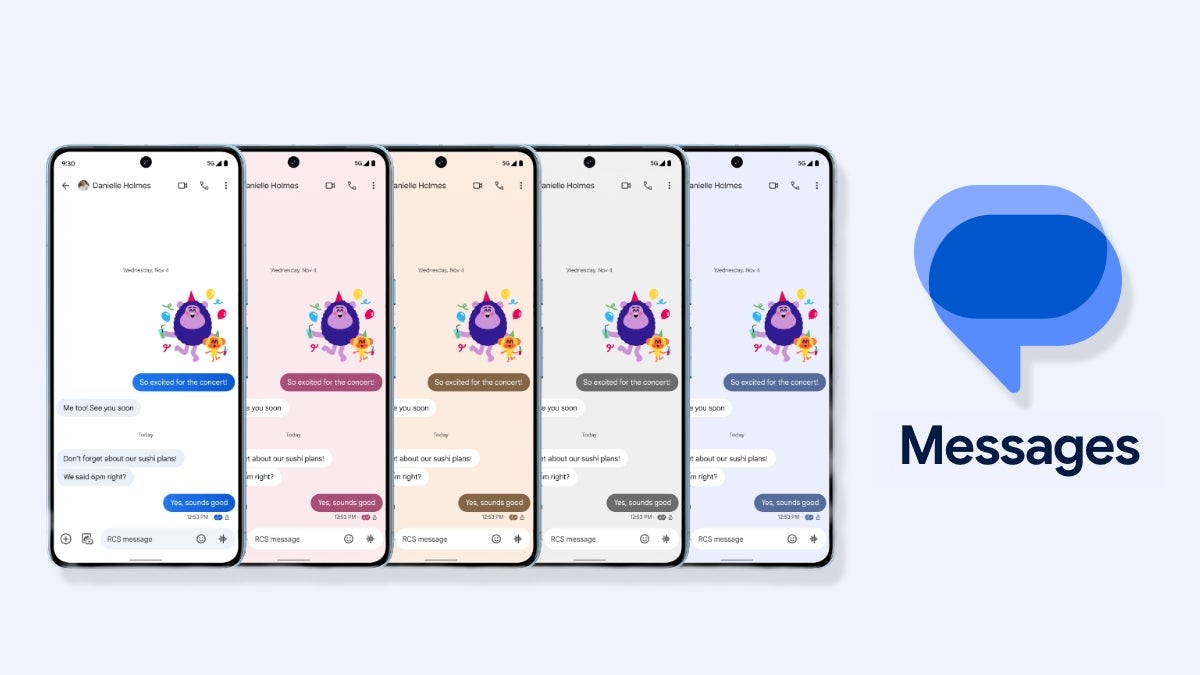
Back in November, Google announced some new features for its Messages app as part of its celebration for reaching a one billion monthly active RCS users milestone. Many of these promised features, such as animated emoji, Photomoji and screen effects, have already been rolled out to users. However, there is one feature that has taken quite a while to roll out widely: custom themes.Custom themes were announced as a customization feature that would allow users to change the bubble and background colors of individual conversations. Presumably, this feature was to help eliminate the limitations of blue versus green bubbles and to aid users with differentiating conversations.
However, according to Android Police, it appears that this feature is currently receiving a wider rollout. Although some users started seeing this option with the latest version of the Google Messages app in beta (v20240308), I received the update myself without updating my app (still in beta version 20240228), suggesting that this is a server-side push.To check if the feature is available to you, you will first make sure you are in an RCS chat, as this feature does not work with SMS/MMS conversations. Once inside any chat thread, tap on the three dot menu and select “Change colors.” This will then open the UI for changing themes, showing you all the color options available, including the default.
Theming options on a Google Pixel device
Theming options on a Samsung Galaxy device
It should be noted that this works slightly differently on Pixel devices that use Material You dynamic theming. When I tested on a Pixel, the theme affected both the background of the conversation and the bubble color. On a Samsung Galaxy device, though, it only altered the bubble color.
Additionally, when you successfully change the theme, you receive a small notification at the bottom that reads “You changed the theme,” which also gives you a quick shortcut to change the theme again. Happy theming!
Phones are very smart; however, phone displays aren’t. It can be tough for your phone’s display to differentiate between your finger and raindrops. This is why companies are coming out with new ways to adjust phone sensitivity for different environmental scenarios. Google is working on a way of doing so, according to a new report. The Pixel 9 may debut with Google’s Adaptive Touch feature.
There are some phones with screen technology that can adapt to different circumstances. For example, the OnePlus 12 (Review) has its Aqua Touch display that makes it easy to use under heavy rain. Even the Pixel 8 Pro (Review) has a screen protector detector that will know when you apply a screen protector to your phone. However, it appears that Google wants to take this to the next level.
The Pixel 9 might come with an Adaptive Touch feature
This information should be taken with a grain of salt, as it was discovered in the Android 14 QPR 3 Beta. Mishaal Ramen (via Android Authority) did an APK deep dive into the latest version of Android. As such, there is no guarantee that this feature will come. We’ll have to wait and see.
However, the code hints at a feature that will automatically detect different scenarios. When the phone detects them, it will adjust the screen sensitivity accordingly. So, if you are outside, and it happens to rain, the phone could, theoretically, detect that it is raining and adjust the screen sensitivity so that it can better ignore the raindrops. Right now, we don’t know the specific scenarios that will trigger this feature. However, rain seems to be the most likely scenario.
What will make this feature nope worthy is the fact that it will most likely be completely automatic. Other phones typically require you to go into your settings and turn on a high-sensitivity mode. Well, by the way this feature sounds, it appears that it will trigger automatically. Also, we know that Google is big on automation, so it seems likely that Google will make this an automatic feature.
This might be coming with a Pixel 9, not the Pixel 8a
One thing noted by Rahmen is the fact that, in the code, this feature is referred to as P24. Internally, Google’s devices are sometimes referred to with the letter “P” followed by the year the device was released. For example, the Pixel 8 and Pixel 8 Pro were referred to as P23, as they were released in the year 2023. The Pixel 7a was also released in 2023, but that phone was designated with the name P23_MIDYEAR.
So, since the Adaptive Touch feature was labeled P24, it appears that it will be exclusive to the Pixel 9 phones. Hopefully, it will come to both models and not be blocked from the base Pixel 9 due to “hardware limitations.”
Information newly made available under California law has shed light on data broker practices, including exactly what categories of information they trade in.
Any business that meets the definition of data broker must register with the California Privacy Protection Agency (CPPA) annually. The CPPA defines data brokers as businesses that consumers don’t directly interact with, but that buy and sell information about consumers from and to other businesses.
Where there’s money to be made you’ll find companies and individuals that will go to any length to get a piece of the action. At the moment there are around 480 data brokers registered with the CPPA. However, that might be just the tip of the iceberg, because there are a host of smaller players active that try to keep a low profile. There are 70 fewer data brokers listed than last year, but it is questionable whether they went out of business or just couldn’t be bothered with all the regulations tied to being a listed data broker.
The law requires registered data brokers to disclose in which of the following categories they actively trade information in:
Minors (24)
Precise Geolocation (79)
Reproductive healthcare data (25)
Four of these data brokers are active in all three of these categories: LexisNexis Risk Solutions, Harmon Research Group, Experian Marketing Solutions, and BDO USA, P.C., Global Corporate Intelligence group.
What is particularly disturbing is the traffic in the data of minors. Children require special privacy protection since they’re more vulnerable and less aware of the potential risks associated with data processing.
When it comes to children’s data, the CCPA requires businesses to obtain opt-in consent to sell the data of a person under the age of 16. Children between the ages of 13 and 16 can provide their own consent, but for children under the age of 13, businesses must obtain verifiable parental consent before collecting or selling their data.
Data brokers were under no obligation to disclose information about selling data belonging to minors until the Delete Act was signed into law on October 10, 2023. The Delete Act is a Californian privacy law which provides consumers with the right to request the deletion of their personal information held by various data brokers subject to the law through a single request.
The next step forward would be if more states followed California’s example. So far only four states—California, Vermont, Oregon, and Texas—have enacted data broker registration laws.
The Children’s Online Privacy Protection Act (COPPA), which regulates children’s privacy, does not currently prevent companies from selling data about children. An update for the bill (COPPA 2.0), that would enhance the protection of minors, is held up in Congress.
In Texas, data brokers are governed by Chapter 509 of the Business and Commerce Code and this includes the specification that each data broker has a “duty to protect personal data held by that data broker.” This is important because, as we have seen, breaches at these data brokers can be combined with others and result in a veritable treasure trove of personal data in the hands of cybercriminals.
If you want to find out how much of your data has been exposed online, you can try our free Digital Footprint scan. Fill in the email address you’re curious about (it’s best to submit the one you most frequently use) and we’ll send you a free report.
We don’t just report on threats – we help safeguard your entire digital identity
Cybersecurity risks should never spread beyond a headline. Protect your—and your family’s—personal information by using Malwarebytes Identity Theft Protection.
The OnePlus Nord CE4 has been confirmed to launch on April 1. The company confirmed as much via its social media accounts in India. It remains to be seen if this handset will make its way to other markets. The OnePlus Nord CE 3 Lite 5G launched globally, for example.
The OnePlus Nord CE4 launch date gets confirmed
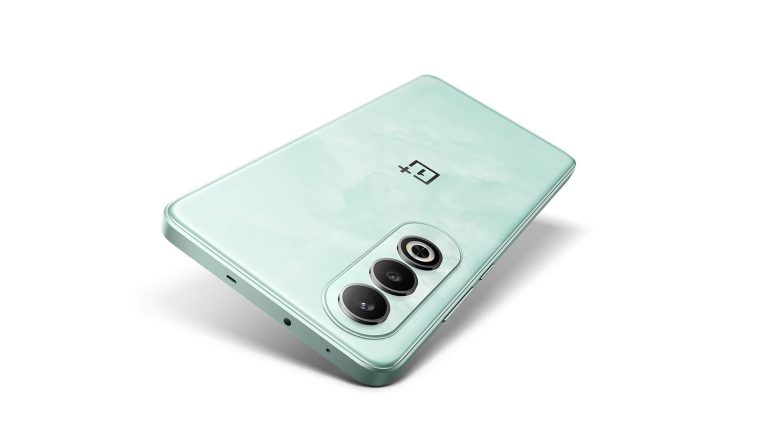
In any case, OnePlus not only confirmed the launch date for the Nord CE4, but it also showed us its design… partially. If you take a look at the images below, you’ll get to see the back side of the phone, along with its left, right, and top sides.
The OnePlus Nord CE4 will feature two cameras on the back, it seems, with an LED flash being the third cutout there. All those cameras will sit in the top-left corner, and they’ll be vertically aligned. OnePlus’ logo sits on the back too, and the back side is mostly flat. It does curve slightly towards the edges on all sides.
All the physical buttons will sit on the right-hand side. The power/lock button will be placed below the volume rocker keys. The left side will be completely empty, which means that the SIM card tray will be accessible from the bottom, as it’s not included at the top either.
The phone will include an IR blaster & the Snapdragon 7 Gen 3 SoC
What does sit at the top, however, is an IR blaster, which is interesting. This phone will not include an alert slider, which is something the company’s flagships do come with.
It has been confirmed that the Snapdragon 7 Gen 3 SoC will fuel this handset. It should bring a considerable improvement compared to the Snapdragon 782G that is included in the OnePlus Nord CE 3.
The OnePlus Nord CE4 is coming in Dark Chrome and Celadon Marble colors. The latter will have a marble effect on the back, while the former is kind of self-explanatory.
The phone is expected to include a 6.7-inch AMOLED display, along with 50 and 8-megapixel cameras on the back. A single 16-megapixel shooter is expected to be included on the front side of the phone.
Ever since TikTok hit the market, it’s been digging deeper and deeper into Instagram’s user base. Because of this, Instagram has been putting much more energy and effort into a video. Well, in an extremely ironic move, it appears that TikTok is looking to make its own photo-sharing app, much to Instagram’s dismay.
You’re definitely going to want to take this news with a grain of salt. This news was discovered via an APK deep-dive into the latest version of the TikTok app. So, there is not a 100% guarantee that this is going to happen. Be sure to stay tuned to Android Headlines for more information on this developing story.
TikTok could be working on its own photo-sharing app
TikTok is synonymous with video content creation, having popularized the vertically scrolling video feed several years ago. Now, it’s one of the largest video-sharing platforms in the entire world. So it seems a bit odd that the company wants to focus on photography. Even Instagram, the company that popularized mobile photography, made a hard pivot to video content because of TikTok.
However, as discovered by the SPAndroid, version 33.8.4 of the TikTok app has hints alluding to an app called TikTok Photos. For starters, there are strings in the code that hint at certain text prompts you’ll see pertaining to TikTok Photos. These include the text “Share this post to TikTok Photos,” “Open TikTok Photos,” and “Reach other like-minded people who enjoy photo posts.” So, this is most likely the text you’ll see when interacting with TikTok videos.
Next, there could be a photo syncing option. TikTok already allows you to share photos via animated slideshows. However, it looks like TikTok is planning to allow you to sync those photos with the TikTok Photos app. So, when you post photos to TikTok proper, they will also show up on your TikTok Photos feed.
Last but not least, within the TikTok code, She SPAndroid found what could possibly be the icon for this app. It looks like a rectangular sheet of paper folding in on itself. This creates the illusion of the letter “P.” Also, this icon will share the same color scheme as The TikTok proper icon.
Whether or not TikTok launches this new app remains to be seen. However, given what we’ve seen so far, it seems rather likely. It might have some hurdles, as TikTok could be banned in the US soon.
From when we were chucking dice in the ancient sands to the digital wonders that keep us glued to our screens today, gaming’s been a huge chunk of the human story. Thanks to tech going nuts in the best way possible, we’ve got everything from casino online action to brain-bending strategy games and epic RPGs in our pockets. Smartphones aren’t just for dodging calls from your mom anymore—they’re prime real estate for gaming domination.
Why Are We All Hooked?
Mobile games are like the Swiss Army knife of entertainment. Got a few minutes? There’s a puzzle for that. Need a mental marathon? Strategy games have got you covered. This buffet of digital delights means there’s something for everyone, and it’s all at your fingertips. No fancy equipment needed.
A Wild World of Choices
The beauty of mobile games is their variety. You’ve got everything from adrenaline-pumping adventures to games that make you stroke your chin and plan like a general. And how they get their dough varies too—some are free, living off ads, while others tempt you with shiny goodies you can buy. This mix-and-match approach means games can charm a rainbow of players, from penny pinchers to big spenders.
Getting Players Hooked: The Secret Sauce
A game’s gotta feel good. Designers are all about crafting that perfect ride—easy to get into but hard to put down. They’re conjuring up worlds where you’re the hero, the villain, or the brainiac, with controls that feel just right.
Game mechanics are the heart of the beast. They’ve gotta be slick for the casual dabblers and deep for the head-scratchers. It’s about finding that sweet spot where players feel challenged but not ready to throw their phones out the window.
Knowing Your Playground
In the wild world of mobile gaming, knowing what your players dig is key. It’s about peeking at the competition, figuring out what makes players tick, and filling in the gaps. Standing out means knowing your stuff and serving it up in a way that’s fresh and addictive.
Easy Does It: The Hyper-Casual Scene
Enter hyper-casual games: they’re the snack food of gaming. Quick, easy, and perfect for when you’re on the go. The revenue from these games comes mainly from advertisements, making them freebies that anyone can jump into. But what does this mean for the old-school game makers? It’s a shake-up, pushing everyone to rethink their game plans.
For Those Who Wanna Dive Deep
On the flip side, you’ve got games like the novels of the gaming world—rich, engaging, and they keep you coming back for more. Players aren’t just passing time; they’re investing in another universe. And unlike their hyper-casual cousins, these games often have you reaching for your wallet to beef up your gaming arsenal.
What’s Next? The Future Is Now
Mobile gaming isn’t hitting the brakes—it’s just picking up speed. With tech like AR and VR starting to muscle in, we’re on the brink of getting lost in games that are more real than reality.
Looking Ahead: The New Frontier of Play
Mobile games have staked their claim in the entertainment empire, and they’re not going anywhere. They’re set to redefine our playtime as we look to the future, offering gateways to adventures we’ve yet to dream up.
But as we ride this wave of tech and creativity, what’s the next chapter for interactive entertainment? How will mobile games keep dazzling us in a world that’s constantly changing?
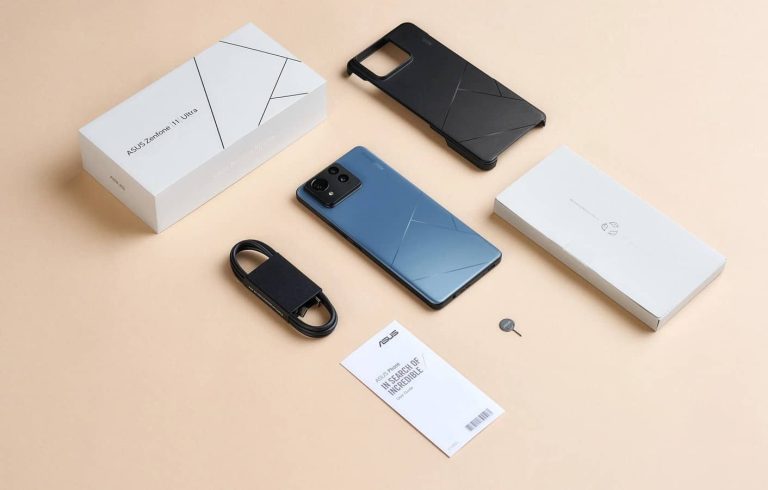
The ASUS ZenFone 11 Ultra price tags have just leaked, along with the phone’s specs. We’ve already seen the specs, but the price tags are new. Do note that they come from the Czech Republic, though, so they will vary in other markets.
The ASUS ZenFone 11 Ultra price has just leaked, for both 12GB & 16GB RAM variants
According to a Czech store, the ASUS ZenFone 11 Ultra with 12GB of RAM and 256GB of storage will cost CZK24,990 ($1,078/€986). The variant with 16GB of RAM and 512GB of storage will set you back CZK26,490 ($1,143/€1,045).
One thing to note is that these are promo launch prices. It is noted that they are valid until March 14 to April 14. After that period passes, the cheaper model will be CZK1,000 ($43/€39) more expensive. The top-end model will get a CZK2,500 ($107/€98) price bump.
The price tag in the US likely won’t be a direct translation of these prices, though. The phone will probably be a bit more affordable in the States. In the rest of Europe, chances are similar price tags will be on offer.
It will have rather powerful specs, reminiscent of the ROG Phone 8
What about the specs? Well, they’ve leaked in the past, but the source did share them again. A 6.78-inch LTPO AMOLED display is expected, with up to 144Hz refresh rate. Do note that such a refresh rate will only be available in some games.
The phone will be fueled by the Snapdragon 8 Gen 3 processor. A 5,500mAh battery is expected, while wireless charging will also be supported. A 50-megapixel main camera will be backed by a 13-megapixel ultrawide camera and a 32-megapixel telephoto shooter.
ASUS’ 6-axis Hybrid Gimbal Stabilizer will also be a part of the package. The phone is coming in five color variants, Eternal Black, Skyline Blue, Misty Gray, Verdure Green, and Desert Sienna.
The ASUS ZenFone 11 Ultra will launch on March 14. It will look like a slightly altered ROG Phone 8.
Elon Musk today announced that xAI is going to open source the Grok chatbot. Notably, Grok is one of the competitors of OpenAI’s ChatGPT, the company Musk co-founded and recently filed a lawsuit for steering away from the non-profit mission. This lawsuit referred to OpenAI as a “closed-source de facto subsidiary” of Microsoft, which owns over 49% stake. In return, OpenAI said that Musk wanted to combine the company with Tesla and become its CEO in old emails. Now, let’s hop on to the recent development.
Elon Musk announces xAI will soon be open source
Elon Musk shared this update via a post on X, however, he didn’t delve into many details. According to him, the Grok chatbot could open source this week. At the same time, he fired shots at OpenAI. “OpenAI is a lie,” he replied to a user. Open sourcing the code of Grok means that developers could access and modify the code which could open doors for creativity. Among many who reacted to this post is Nothing CEO Carl Pei who called this move, “Based” and Perplexity boss Aravind Srinivas who reacted with a salute emoji.
Grok is accessible exclusively for those users who have subscribed to Premium+ on X. Musk, once referred to Grok as “based and loves sarcasm.” He reiterated that Grok has “little humor in its responses.”
This isn’t the first time for an Elon Musk-owned enterprise
Musk’s companies have a history of open-sourcing codes for users. Tesla, for example, made its patents public ten years ago, and now many car makers use its electric vehicle charging connector. Another Musk venture, X, released the code for its “For You” algorithmic feed last year, but it didn’t reveal much.
Meanwhile, The Wall Street Journal points out Musk might be thinking that by allowing other developers and researchers to explore Grok’s code, more people will use the model. Feedback from the developer community could also make Grok better. This makes sense since Grok hasn’t reached the same heights as its competitors, including Microsoft-backed ChatGPT and Google’s very own Gemini.
Hackers exploit unpatched Ivanti vulnerabilities to deploy malware on Linux systems. Magnet Goblin targets businesses using outdated software. Patch immediately and implement strong security measures to protect against these attacks.
Cybersecurity researchers at Check Point are warning of a malicious campaign targeting one-day vulnerabilities in Ivanti and other security software products, potentially impacting a wide range of organizations.
The culprit behind this campaign is a financially motivated hacker group known as Magnet Goblin. This group has been active since January 2022 and specializes in leveraging newly disclosed vulnerabilities, targeting public-facing servers and edge devices.
According to Check Point’s research, Magnet Goblin is using one-day security vulnerabilities to breach edge devices and public-facing services and deploy custom malware on Linux systems. For your information, after zero-day vulnerabilities are disclosed publicly and patches are released, they are referred to as one-day vulnerabilities.
The attackers exploit unpatched servers like Ivanti Connect Secure VPN, Magento, Qlik Sense, and possibly Apache ActiveMQ to deploy a cross-platform remote access trojan (RAT) called Nerbian RAT, first documented by Proofpoint in 2022. It also utilized Nerbian RAT’s simplified variant, MiniNerbian, which allows arbitrary command execution from a C2 server.
“NerbianRAT and MiniNerbian… these tools have operated under the radar as they mostly reside on edge devices. This is part of an ongoing trend for threat actors to target areas which until now have been left unprotected,” researchers noted.
NerbianRAT is downloaded from compromised systems with critical Ivanti Connect Secure flaws. While researching, CheckPoint discovered a 1-day vulnerability infection that led to the download of the NerbianRAT Linux variant.
The variant was used to execute various malicious activities on compromised systems, including modifying connection intervals, work time settings, and updating configuration variables.
They used a JavaScript credential stealer called Warpwire and the open-source tunnelling tool Ligolo to exploit these vulnerabilities. Warpwire stealer is linked to mass Ivanti vulnerability exploitation and was used in a 2022 Magento server attack. In addition, they used remote monitoring tools ScreenConnect and AnyDesk, targeting Qlik Sense and Apache ActiveMQ.
It is worth noting that Ivanti issued a public advisory in January for CVE-2024-21887, a command injection vulnerability, urging users to patch their systems against wild exploitations. However, Check Point found that Magnet Goblin exploitations occurred within a day of patch issuance, targeting systems not yet patched with available fixed updates.
Compromised Magento servers used in Magnet Goblin campaigns (Screenshot: Checkpoint)
John Gallagher, Vice President of Viakoo Labs at Viakoo commented on the findings stating, “It’s clear that Magnet Goblin is taking the easy route; using recently disclosed vulnerabilities to exploit poorly defended systems. With many edge and IoT devices and applications there is a lag time between when a vulnerability is disclosed and when a patch is available…and then another lag time between when the patch is released and when it is implemented.”
“Often the teams managing edge and IoT systems are outside of IT and may have different priorities or sense of urgency when it comes to patching. One can expect that one-day threats will be a major security issue, as the speed of AI can accelerate these specific types of threats. Until the speed of delivery by threat actors is matched by the speed of response by defenders this will be an ongoing security risk.”
Organisations of all sizes relying on Ivanti software for endpoint management and security are at potential risk. This includes companies in various sectors that utilize Ivanti to safeguard their critical infrastructure.
Therefore, patching Ivanti software is necessary to prevent exploitation along with increased monitoring, and adopting a layered security approach, including implementing Endpoint Detection and Response (EDR) solutions to strengthen the overall security of the network and devices.
Samsung‘s February 2024 security update is finally available for factory-unlocked units of the Galaxy A53 in the US. It comes more than a month after the carrier-locked variants picked up the update. The company is also pushing the new security patch to the Galaxy A32 and Galaxy A13 stateside. These devices may or may not get the March security update from Samsung.
The Galaxy A53 is widely getting Samsung’s February update in the US
The Galaxy A53 was one of the first Samsung devices to receive the February 2024 SMR (Security Maintenance Release) in the US. The 2022 mid-range device picked up the update early in February. However, the company only pushed it to the carrier-locked variants. We expected it to cover unlocked units soon but not to be. After making users wait for a whole month, Samsung has finally begun a wide rollout.
The latest update for the unlocked Galaxy A53 in the US comes with the firmware build number A536U1UES8DXA5. According to SamMobile, which first reported this rollout, the update is available for users on all major carrier networks, including AT&T, Bluegrass Cellular, C-Spire, Cellular South, Comcast, Cricket, DISH, MetroPCS, T-Mobile, US Cellular, Verizon, and Xfinity Mobile.
Like the carrier-locked Galaxy A53, unlocked units are also only getting last month’s security fixes. There are no new features or other changes in this package. Samsung fixed more than 60 security vulnerabilities (the vast majority were Android OS patches released by Google) in February. Some of those were critical security flaws that could allow threat actors to gain remote access to affected devices.
These security fixes are also rolling out to the Galaxy A32 and Galaxy A13 in the US. The update is currently available for the carrier-locked variant of the former and the unlocked variant of the latter, the same publication reports. The new build numbers are A326USQSCDXB2 and A136U1UES7DXB1, respectively. Unsurprisingly, the update only brings security fixes with no additional changes.
The March SMR is already rolling out to Galaxy devices
These Galaxy smartphones are getting the February update in the US just as Samsung is rolling out the March SMR to other models. The Galaxy S24 and Galaxy S23 have already received the new update. More will join the party soon. If you are using a Samsung phone or tablet, you can always check for updates by navigating to Settings > Software update and tapping the Download an Install option.