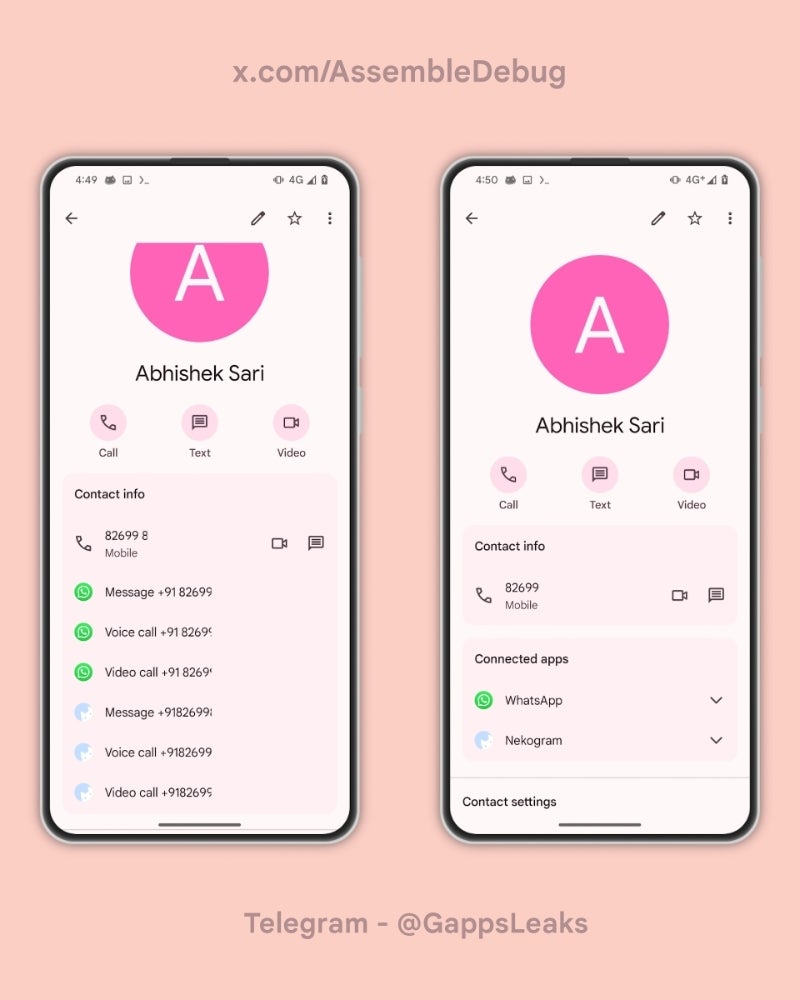
The ability to group and share Wi-Fi passwords, hotspots, and moving video calls between Android devices has been rumored for some time now. However, new evidence suggests that the video call transfer feature in particular might be bound to just one specific app: Google Meet.
“Call transfer,” as the feature is believed to be called, will reportedly allow you to link devices that are logged in with the same Google account, enabling seamless sharing of those services. Recently, an Android Authority breakdown of the underlying code powering this feature found more info on how it will reportedly work.
At first glance, it appears as if the feature has had a recent name change. This is because in a previous version of Google Play services (v24.06.12), tipster @AssembleDebug found references to it by enabling some hidden flags. These referred to it as “Call cast,” instead of “Call transfer,” as found in the latest version (v24-08-12). However, because in this latest version there is also a reference to “Call cast,” it is now believed that these may indeed be separate features— one for video and one for audio.
Cross Device Services in Google Play Services
✓ Call Cast ✓ Wifi Sharing ✓ Hotspot Sharing
Might be enabled in upcoming beta version of Play Services. Screenrecord is from version 24.06.12, enabled with a lot of flags.#Google#Androidpic.twitter.com/bvUbnYbB9d
In this latest iteration, the code was found to have a very specific reference to Google Meet and apps like it. This suggests that Meet will most definitely be one of the apps supported, and the “apps like Google Meet” reference could mean that it extends to other video calling apps such as Zoom and Microsoft Teams.
<string name=”enrollment_feature_description_call_transfer”>Switch between devices on video calls in apps like Google Meet</string> <string name=”enrollment_feature_explanation_call_transfer”>See video calls across your devices and switch between them;/string>
While we still don’t have a confirmed release date, it’s clear that Google is gearing up to make the Android experience even more connected. The ability to transfer video calls – and maybe even voice calls – between our devices will be a real game-changer for those juggling multiple Android smartphones or tablets.
A big part of using a digital keyboard is actually being able to see the text and numbers that you’re typing. Well, this isn’t much of a possibility for some users thanks to a new Gboard bug. This Gboard bug is resulting in tiny text and a tiny floating window.
At this point, we’re not certain what the cause of this bug is. However, it seems to only affect people using Pixel devices. Also, reports state that this issue happens after using Android Auto. So far, it doesn’t seem that Google is aware of the issue. Once this issue gains more traction, we know that the company will swiftly issue an update to fix it.
A new Gboard bug is causing tiny text
Several users on Reddit reported this issue. After using Android Auto on their phone, they would open the Gboard to find that the keyboard itself is the proper size, but all of the letters and numbers inside of the keys are extremely tiny. This is obviously going to be an issue for people who can’t see well. Also, another issue will show all of the keys and the keyboard in their proper size, but when you pop out the keyboard as a floating window, the floating window will be minuscule.
It’s an irritating bug to have, but there are workarounds. According to users, to fix the keyboard, you can restart your phone. However, that can get annoying after a while. Another thing you can do is force-stop the keyboard from the App Info screen. Other than that, users are just going to have to wait until Google fixes the issue. Since Gboard and Android Auto are very popular services, we’re certain that a substantial amount of people are experiencing this bug. So, we expect enough reports to come out to get Google’s attention.
Speaking of Gboard, Google recently released a feature that allows the Gboard Proofreader to proofread selected text. This makes it a lot more convenient to use rather than proofreading entire bodies of text.
Right now, we are trying to figure out how to differentiate between what’s real and what’s artificially generated. It’s extremely tough for companies to do this because AI companies like OpenAI, Google, MidJourney, etc. are constantly improving their technology. It’s to the point where they are indistinguishable from real-life images.
This wasn’t much of a problem back in 2022 when AI image generation first hit the public. However, it’s now a major concern in 2024, as the US presidential election is set to begin within a few months. So, we can expect unscrupulous individuals to artificially generate false images of wrongdoing on either side of the political spectrum.
AI-generated images of Trump with black supporters hit the internet
Even though the elections are months out, we are already getting our first taste of AI-generated political misinformation. According to sources, there have been a handful of images depicting former president Donald Trump with black supporters. These are the types of images that distort reality and make people assume things that didn’t really happen. Unfortunately, we do not know the source of the images. However, according to the report, one image was actually generated as satire.
In any case, this still foreshadows a major issue that is only going to ramp up as we get closer to the official election. In fact, there have been several studies that show just how easy it is to create fake political images.
For example, one fairly recent report found that some of the top AI image generators are more susceptible to generating images of voter fraud than generating images of either Donald Trump or Joe Biden. Also, a report conducted by the nonprofit Center for Countering Digital Hate found that they were able to create images of armed militia members at polling spots and President Joe Biden stuffing ballot boxes.
So, it’s only the beginning of a storm we are going to have to weather over the next couple of months. Not only will the US be in a bind, but other countries as well. They will also have to deal with this type of drama with their government elections.
At this point, the companies making these image generators are not properly managing them. So, it’s extremely easy to create images like these. We’re going to have to see if major companies are going to be able to call or reduce these types of images before the elections take off.
GoPlus Security, a leading cybersecurity provider for the Web3 ecosystem, has successfully concluded its Series II+ private funding round, raising $4 million from a consortium of top-tier venture capital firms.
This latest financial injection provides additional funding to a private round conducted in 2022 by Binance Labs. These resources will bolster GoPlus Security’s mission to enhance the Web3 experience, aiming to provide robust protection and peace of mind for millions of users across the globe.
GoPlus Security provides a security data infrastructure layer for Web3. In total, $15M funding from several different rounds was led by major investment funds including Binance Labs, SevenX Ventures, Redpoint China Ventures, Avalanche, and Crypto.com. The latest investment provides follow-on funding to a private round conducted in 2022 that Binance Labs led.
GoPlus Security Co-Founder Eskil Tsu said: “This funding in our Private II+ round is not just a financial boost but a strong endorsement of our vision to redefine user security network in the Web3 space, in the Web3 way. I’m thrilled for the support and excited about the future we’re building together.”
GoPlus Security, with secured funding, is set to broaden its User Security Network. The goal is to develop a Web3 User Security Network that focuses on transparency and empowering users. This involves offering open-access security data that users can verify and trust, backed by a robust decentralized data and computing layer.
Additionally, GoPlus is launching an end-user service platform named “SecWareX”, by engaging third-party “User Security Services” like Harpio, Webacy, Kekkai, Trusta, Wallet Guard, etc. Through these initiatives, GoPlus aims to become the leading provider of User Security Modules as a Service across various blockchains, essentially creating a foundational layer for Web3 user security.
About GoPlus Security
GoPlus is building a Web3 User Security Network that prioritizes transparency and user empowerment by providing permissionless security data and an end-user service environment. Goplus offers User Security Modules as a Service to any Chain.
With a cutting-edge AI module, we adopted into the tech architecture, Goplus has already served 10K+ partnerships with 21M+ User Security Data calls daily, supporting 20+ public chains.
Leveraging top-notch advancements in Web3 defences, GoPlus Security enhances safety with end user-focused services in “SecWareX” while empowering protocol User Security teams with “SecWare” advanced resources for developers. More facts about Goplus in the following:
The utilization of GoPlus’s security data infrastructure has significantly increased, with a 5000-fold growth from 2022 to the present, and daily API calls reaching 21 million.
The platform incorporates an AI-driven module to monitor Web3 security, offering real-time detection of risks associated with tokens, NFTs, and malicious activities. It evaluates over thirty risk parameters to dynamically address thousands of potential attack vectors.
GoPlus provides a range of User Security Modules as a Service, supporting over 20 blockchain networks. This includes collaborations with Risk as a Service (RaaS) providers like Altlayer and partnerships with Layer 2 solutions such as zkSync, Manta, and Scroll.
The introduction of new products, such as the “Secscan” security engine and Secware Middleware, marks steps towards a more decentralized approach in data and computing security.
Plans are underway to launch SecWareX Planned in early March, aiming to offer users a customizable on-chain security experience. The GoPlus Token will serve as a utility token within this ecosystem, facilitating operations and expanding its utility.
GoPlus continues to focus on Web3 security innovation and user-centric solutions. This includes encouraging participation from the community by allowing them to contribute as SecWare Service Providers, Data Providers, and Computing Node Providers, in exchange for GoPlus Tokens, thereby enhancing the overall User Security Network.
Switching from one mobile platform to another is never easy. This is especially true when the two platforms are so different like iOS and Android are. Fortunately, it seems like Apple is working on a way to make switching from iPhone to Android easier, even if there’s still some time for the changes to take effect.
It’ll be easier to switch to the Android side soon
The European Union’s Digital Markets Act, or DMA, is rattling the entire tech industry. Since the act aims to increase competition in the EU’s digital markets, some of the largest online companies like Apple, ByteDance, Meta, and Microsoft brought changes to how they operate. One of those changes includes Apple making it easier for iPhone users to switch to Android phones.
Apple had the following to say as a part of Apple’s “Non-Confidential Summary” of how it’s complying with the European Union’s new Digital Markets Act.
“Apple plans to make further changes to its user data portability offering. Third parties offer migration solutions that help users transfer data between devices with different operating systems. To build on those options, Apple is developing a solution that helps mobile operating system providers develop more user-friendly solutions to transfer data from an iPhone to a non-Apple phone. Apple aims to make this solution available by fall 2025.”
While it’s unclear how it will work, this wouldn’t be the first “iPhone to Android” solution. Google made the “Switch to Android” app for iOS users a while back. However, it’s limited in what data you can transfer and, in our experience, doesn’t work the best. Most of the limitations stem from the restrictions of iOS in providing the “Switch to Android” application access to data.
The document states that the solution will “build on” currently existing migration tools. This suggests Apple’s plan might be to give Google better access to data from iOS devices. Doing this would make the “Switch to Android” application a complete solution for users switching from iPhone to Android.
There’s still time until Apple gives more information on this change since Apple likely plans to make it available by late 2024 or early 2025. Naturally, making it easier for iPhone users from the EU to switch to Android devices but restricting others wouldn’t fare well with anyone. Therefore, the solution might initially be only for EU users. Hopefully, everyone will get access to it shortly after its launch.
Update: In an announcement on April 21, 2022, CNN+ will cease operations on April 30,2022. Lasting just 33 days. Some of the content will shift over to HBO MAX in the future.
CNN Plus is yet another streaming service that is launching in 2022. It’s not a full-fledged streaming service like Disney Plus or Hulu, but instead a compliment to the existing CNN channel that you get with your cable or streaming live TV subscription. It’s a lot like what ESPN Plus is to ESPN.
The service is not yet available, but will be launching on March 29, 2022. So here is everything that we know about CNN Plus right now.
What is CNN Plus?
CNN says that this service will serve as a way for people to get the news who don’t already have a cable or satellite TV service, and also does not have a streaming Live TV service. Basically, WarnerMedia is looking to capture the cord-cutters with CNN Plus, who still want to keep up on the news.
WarnerMedia has said that CNN Plus will offer between eight and 12 hours of live programming every single day. There will also be on-demand news specials, including some that are going to be exclusive to CNN Plus.
There has been some talk about some interactive elements to the service, like allowing those that watch content on CNN Plus to interact directly with its news anchors and commentators. Though this has not been revealed just yet.
When does it launch?
CNN announced in early March, that the new service is going to start streaming on March 29, 2022. Prior to this, WarnerMedia kept referencing a “Spring 2022” date. This is in the early part of Spring which is likely surprising to a number of people.
If you sign up for CNN Plus now, you’ll be able to log in a much cheaper price, before it goes live on March 29, 2022.
How much will CNN Plus cost?
CNN Plus will be available for $5.99 per month, or you can get an annual plan for $59.99/year (basically giving you two months free). That makes it one of the cheaper streaming services out there. CNN is likely hoping that due to the low price, many will sign up and keep the subscription, since it is so cheap compared to Netflix, Hulu and others.
For a limited time, if you sign up for CNN Plus ahead of the March 29, 2022 launch date, you can get it for $2.99 per month for as long as you keep your subscription. At that price, it is a lot more attractive.
Will there be ads?
WarnerMedia has confirmed that there will be no ads or commercial within CNN Plus. What that means is that you won’t see ads for retirement homes and such on CNN Plus, like you do on regular CNN. But you will see “ads” for other content on CNN and CNN Plus. So there will be some breaks in the live video on demand, but to promote its own content. Peacock does this already on its ad-free plan.
There could be a time in the future where CNN Plus does ad some ads and commercials to the service though, for a cheaper price. Offering an ad-free and ad-supported tier like Peacock, HBO MAX and Hulu.
Can I bundle it with HBO MAX?
Currently, WarnerMedia has no plans to bundle CNN Plus with HBO MAX (or Discovery Plus once that merger goes through). But that could change in the future, and likely will. Given how popular the Disney Plus bundle has been for Disney since it launched. But at this time, that is not the plan.
Where will I be able to stream CNN Plus?
At launch, CNN Plus will only be available in the US. This could change in the future, as CNN is an international news channel. But for now, WarnerMedia has said it will be US only.
For those that already use the CNN app for things like CNNgo, that will sunset. All of the different streaming services that CNN has worldwide will live within the CNN app starting on March 29.
“At the launch of CNN+, the CNNgo brand will sunset for users on desktop, mobile and several streaming platforms and devices, and the functionality of accessing CNN TV content will be fully integrated within CNN’s app. CNN will have a single app where CNN+ subscribers can access CNN+ programming and pay TV subscribers can get the TV Everywhere experience they have enjoyed for many years. The app will include CNN’s linear TV feeds of CNN, CNN International, HLN and CNN en Español channels, which will be available exclusively for pay TV subscribers. Pay TV subscribers will also have the opportunity to subscribe to CNN+ to access the full CNN+ programming all in one place. CNNgo will remain on some select streaming platforms.”
What platforms will it be available on
As mentioned in the last section, CNN Plus is going to be available within the CNN app, so it will work everywhere that the CNN app already works. Which is virtually everywhere. But here’s the full list as of right now:
Apple TV
Amazon Fire TV
iPhone
iPad
Android Phone
Android Tablet
Web
At launch, surprisingly CNN Plus is not available on Android TV or Roku. But we wouldn’t be surprised to see those two platforms added in a few weeks or even sooner. Especially considering how large of a platform Roku is right now.
What can I watch on CNN Plus?
Since announcing CNN Plus last year, the company has gone on a hiring spree. It has already hired over 450 people for the service. And that hiring spree is likely to continue. WarnerMedia has announced some exclusive shows for CNN Plus already, these include:
The Newscast with Wolf Blitzer – A daily evening newscast hosted by The Situation Room’s Wolf Blitzer
Jake Tapper’s Book Club – A weekly show focusing on a number of diverse writers, hosted by CNN anchor Jake Tapper.
The Don Lemon Show – A weekly talk show hosted by CNN Anchor Dom Lemon.
Who’s Talking to Chris Wallace? – Chris Wallace, who formerly was a reporter and anchor for Fox News, has jumped over to CNN Plus. His weekly show will feature interviews with newsmakers, entertainers and other major figures.
In addition to that, over 1,000 hours of CNN library programming will be available. This includes all 12 seasons of Anthony Bourdain: Parts Unknown, all seven seasons of This is Life with Lisa Ling and many more titles. You will also have access to over 40 years of CNN’s news archive, allowing you to watch coverage of major world and national events, along with episodes of the classic talk show Larry King Live.
It will also feature some docuseries that are exclusive to the service, including:
The Land of the Giants: Titans of Tech – A five-part series on the rise of tech companies like Facebook, Google, and others.
The Murdochs: Empire of Influence – A six-part look at the Murdoch family, the media moguls that own Fox News, The Wall Street Journal, and more.
The Last Movie Stars – A six-part series about the lives of the movie star couple Joanne Woodward and Paul Newman.
And that’s really just the tip of the iceberg for what will be available on CNN Plus.
VMWare has issued secuity fixes for its VMware ESXi, Workstation, Fusion, and Cloud Foundation products. It has even taken the unusual step of issuing updates for versions of the affected software that have reached thier end-of-life, meaning they would normally no longer be supported.
This flaws affect customers who have deployed VMware Workstation, VMware Fusion, and/or VMware ESXi by itself or as part of VMware vSphere or VMware Cloud Foundation.
A virtual machine (VM) is a computer program that emulates a physical computer. A physical “host” computer can run multiple separate “guest” VMs that are isolated from each other, and from the host. The physical resources of the host are allocated to the VMs by a software layer called the hypervisor, which acts an intermediary between the host and the VM (the guest system).
VMWare’s decision to offer fixes for end-of-life software is because the vulnerabilities patched in these updates are escape flaws that allow a computer program to breack of the confines of a VM and affect the host operating system. Specifically, an attacker with privileged access, such as root or administrator, on a guest VM can access the hypervisor on the host.
Besides instructions about how to update the affected products, the advisory lists possible workarounds that would block an attacker from exploiting the vulnerabilities. Since three of the vulnerabilities affect the USB controller, applying the workarounds will effectively block the use of virtual or emulated USB devices. For guest operating systems that do not support using a PS/2 mouse and keyboard, such as macOS, this means they will effectively be unable to use a mouse and keyboard.
The Common Vulnerabilities and Exposures (CVE) database lists publicly disclosed computer security flaws. The CVEs patched in these updates are:
CVE-2024-22252 and CVE-2024-22253 are use-after-free vulnerabilities in the XHCI and UHCI USB controllers of VMware ESXi, Workstation, and Fusion. A malicious actor with local administrative privileges on a virtual machine can exploit the issues to execute code as the virtual machine’s VMX process running on the host. On ESXi, the exploitation of either is contained within the VMX sandbox, but on Workstation and Fusion this may lead to code execution on the machine where Workstation or Fusion is installed.
The VMX process is a process that runs in the kernel of the VM and is responsible for handling input/output (I/O) to devices that are not critical to performance. The VMX is also responsible for communicating with user interfaces, snapshot managers, and remote consoles.
Use-after-free vulnerabilities are the result of the incorrect use of dynamic memory during a program’s operation. If, after freeing a memory location, a program does not clear the pointer to that memory, an attacker can exploit the error to manipulate the program. Referencing memory after it has been freed can cause a program to crash, use unexpected values, or execute code.
CVE-2024-22254 is an out-of-bounds write vulnerability in VMWare ESXi. A malicious actor with privileges within the VMX process can trigger an out-of-bounds write leading to an escape of the sandbox.
A sandbox environment is another name for an isolated VM in which potentially unsafe software code can execute without affecting network resources or local applications.
An out-of-bounds write can occur when a program writes outside the bounds of an allocated area of memory, potentially leading to a crash or arbitrary code execution. This can happen when the size of the data being written to memory is larger than the size of the allocated memory area, when the data is written to an incorrect location within the memory area, or when the program incorrectly calculates the size or location of the data to be written
CVE-2024-22255 is an information disclosure vulnerability in the UHCI USB controller of VMware ESXi, Workstation, and Fusion. A malicious actor with administrative access to a VM may be able to exploit this issue to leak memory from the VMX process.
We don’t just report on vulnerabilities—we identify them, and prioritize action.
At this point, Google Lens has been integrated into several parts of the Google and Android user interface. You’re likely to have used it over the past nearly seven years, and you’ve most likely taken pictures from within the Google Lens app. Well, sometimes, you want to keep a record of the pictures you took within the app, but you’ve never really been able to. Fortunately, Google will save the images you take in Lens.
Sometimes people will take a picture using their default camera app and import it into Google Len. This method is functional, but it also involves more steps than necessary. People do this so that they can retain a record of the pictures they took in Lens. If you take the picture within the Lens app, it will not be saved.
Google will save the images you take in Lens
Sure, a picture of a billboard phone number or an odd-looking flower is hardly worth preserving. However, there are times when we want to keep the images we searched. So, this is why the Google Lens search history comes in handy. As spotted by 9To5Google, if you go to your MyGoogleActivity page, you will see the pictures you take within Google Lens.
If you don’t know what the MyGoogleActivity page is, it’s basically the central hub to monitor what sort of data Google is keeping track of for you. You will see a feed of pretty much all actions you performed across your Google products. This includes your Chrome web history, YouTube history, Google Assistant searches, Etc. Now, the feed will include pictures you’ve taken within Google Lens. You will see a little thumbnail of the picture you took within Lens. If you click on the thumbnail, the image will automatically be downloaded. Your computer will download the full-resolution picture.
Right now, this feature is currently rolling out. So, there is a chance that you won’t see it just yet. If you don’t see it, then you may want to wait a day or two.
Google Chrome is expected to offer the ability to “Install page as an app” as a Progressive Web App (PWA). The feature, discovered inside the Canary (beta) version of the popular web browser, isn’t new but Google is finally simplifying the process.
The Chrome browser for desktops and laptops will easily install any website as an app. The browser is essentially offering the ability to create a shortcut to a website on users’ home screen or desktop. Regardless, websites are increasingly offering multiple functions and rivaling dedicated apps, and this feature will allow users to run websites as apps.
Google Finally Makes It Easy To Quickly Add Website Shortcuts As PWAs On Desktops
Google has long believed in the idea of PWAs. These aren’t apps in the traditional sense, but instead, have launch shortcuts that quickly take the user to the website. For all practical purposes, these weblinks appear and even behave as natural apps and programs installed on a desktop.
Chrome users have been actively installing PWAs for years. Moreover, websites have been clamoring to be as accessible as possible. Needless to mention, the load times for PWAs are lesser than traditional apps. Additionally, PWAs do not consume disk space. As a bonus, PWAs also reduce the number of apps that need to be updated at regular intervals.
Although PWAs have existed for several years, Google has finally made it easy to quickly add a website’s shortcut as a PWA. The latest Chrome Canary build, which is updated daily and is usually a glimpse of an upcoming stable build, offers a straightforward way to install PWAs.
Multiple popular websites including YouTube and Reddit have had their PWAs for quite some time. Moreover, they have been regularly prompting users to install them.
The ability to add PWAs is now included in the easily accessible Save and Share submenu. Moving forward, after opening a website, users will be able to click on “Install page as app…” to place the website’s shortcut on the desktop.
Specifically speaking, Chrome will create a new app for the website. This shortcut will have the icon of the website and a dedicated listing in the user’s app drawer.
Incidentally, Google Chrome already offers the ability to add PWAs. However, the search giant hadn’t activated the setting in the stable release of the web browser.
Nonetheless, users who are interested in activating the setting, have two ways to do so. The experimental flags #web-app-universal-install and #shortcuts-not-apps are available. However, it would be wise to wait for a little while because Google should include the feature in the upcoming stable release of the web browser.
It looks like Microsoft is on a killing spree, as the Redmond-based company recently confirmed it will discontinue support for running Android apps on Windows 11 come March 5, 2025. Another feature that Microsoft plans to kill involves the ability to preview files uploaded to OneDrive.
Microsoft confirmed yesterday that it will discontinue support for the preview feature that allows users to upload files to OneDrive from a URL. This feature will stop working come March 29, 2024, so after this date, users will no longer be able to upload files to OneDrive from a URL.
On the bright side, files that have already been uploaded from a URL will remain in OneDrive and will not be affected by the change.
The reasoning behind the change is low usage, Microsoft claims. Moreover, the company says that the feature has high maintenance costs, “and it does not align with out vision for OneDrive as a cloud storage service that syncs your files across devices.”
OneDrive users who want to continue to benefit from this preview feature after March 29, 2024, will have to upload smaller files, or for larger files start using upload sessions.