Spotify is aiming to create a safer online environment for young people, the popular streaming service announced.
There’s a recent blog piece by Marcelina Slota (Head of Spotify’s Platform Integrity) that states so.
With safety being a “top priority” for Spotify, the company aims to make it easier for young people and parents to understand and navigate the digital world. That’s why Spotify announced a new Parental Guide to assist in this effort and joined the Tech Coalition to share best practices within the industry for upholding youth safety.
The Tech Coalition is an organization that unites the global tech industry to foster a safer online environment for young people by preventing and combating online child sexual exploitation and abuse.
This partnership expands Spotify’s network of trusted third-party experts who help advise its teams on launching policies and products with safety by design.
In addition to partnering with global experts, Spotify works to craft a safe and enjoyable experience for young people in several ways, including:
Establishing a zero-tolerance policy against content that exploits children and Platform Rules that ban illegal and/or abusive behaviors that could harm children;
Leveraging machine learning signals and establishing user reporting mechanisms to detect potential policy and/or legal violations;
Staffing teams around the clock to review and promptly remove potentially violating or explicit content; and
Connecting potentially vulnerable users to mental health resources when they search for content related to suicide, self-harm, and disordered eating content.
The aforementioned mental health resources include the US’ National Suicide Prevention Lifeline, the TREVOR Project, National Eating Disorders services, and more.
So, if you or someone you know is struggling or thinking about self-harm, there are ways to get help. If you’re concerned about self-harm, drug or alcohol usage, or depression, please talk to someone or reach out to one of the organizations listed below for professional support.
Is critical journalism under attack? A recent exposé reveals a disturbing trend: Companies, in this case, an Indian firm, using fake DMCA notices to silence investigative reports. Learn how “Delete Negative Links” schemes work!
A recent investigation by Swedish cybersecurity organization Qurium Media Foundation uncovers a disturbing trend – the rise of fake DMCA (Digital Millennium Copyright Act) requests to manipulate online content. They dubbed it a “delete negative links industry.”
The Case of Ojo Público:
In April 2024, the Peruvian investigatory newspaper Ojo Publico faced a seemingly ordinary DMCA takedown notice. The notice allows copyright holders to remove infringing content online. However, in this case, it targeted a legitimate investigative report about money laundering by the current mayor of Cajamarca Joaquín Ramírez.
Qurium began investigating Ojo Publico’s article about Ramírez after receiving emails from Alisa Muncy representing Judith Warner, who claimed to be a former special correspondent for Newsweek in Paris.
Muncy complained that the website infouse.exposureco, was the article’s source and that OjoPúblico copied content from fake websites like Exposure.co, Blogger, and Tumblr, mirroring the original reports.
Beyond Muncy’s emails, OjoPúblico identified 13 other copyright complaints filed against them on Google’s Lumen Database, likely linked to the same effort. These complaints aimed to remove the report on Ramírez and another on his cousin Osías Ramírez, both facing money laundering investigations.
Emails from Mrs. Muncy, provided a hint of her location, as they were sent from the time zone GMT +05:30, which corresponds to India.
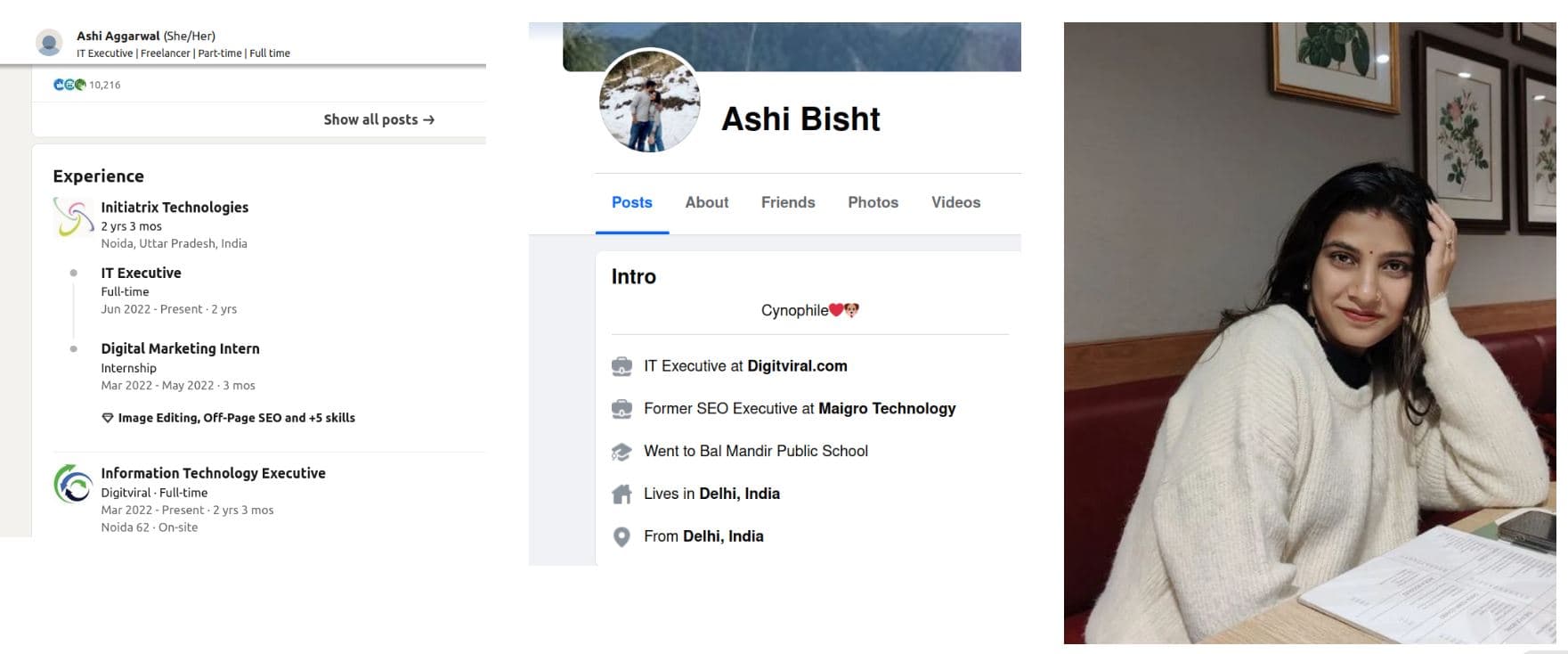
The same day, someone used the service “hosting-checker.net” to find out where Ojo Publico was hosted. When asked about copyrighted parts of the article, Alissa Muncy responded with a document with metadata revealing it was allegedly created by Ashi Aggarwal. However, no traces of Warner or Muncy were found.
Screenshot provided by Qurium
Tracing the Takedown:
Ashi Aggarwal’s social media profile revealed she worked for Initiatrix Technologies in Noida, India registered as Amit Vatsya and owned by two businessmen Jha Piyush and Vipin Kumar. Alissa Muncy also runs a blogspot blog used to run several DMCA take-down requests with Google.
Initiatrix Technologies uses a multi-pronged approach to silence critical content, including fabricating fake websites, employing fake names or stolen identities to submit DMCA requests, and creating “back-dated copies of legitimate websites to claim copyright infringement of the investigative report on the original site,” Qurium’s report read.
Their goal? As per researchers, is to remove investigative articles that could damage their clients’ reputations.
Interestingly, the individual named in the Ojo Público case mysteriously closed all their social media accounts coinciding with Qurium’s report. Ojo Público, armed with Qurium’s findings, is pursuing further investigations. This incident highlights the vulnerability of investigative journalism to manipulation tactics.
Qurium
For your information, Qurium has been quite a vocal and active organization that protects human and media rights. Over the years, the organization has reported several instances of cybercrime, leading to vast government-level investigations.
These include the shutdown of the illegal prostitution ring in Kazakhstan back in September 2019, a deep dive into the DDoS attacks on the human rights watchdog Karapatan in August 2019, the large-scale Chinese scammers’ rings that exploited cloned websites for its global illegal gambling network in November 2023, DDoS attacks on the Philippines media giant Rappler to quiet critics in December 2023, and, most recently, last week’s report exposing the Chinese Vigorish Viper, which has been exploiting DNS and European football club sponsorships for illegal gambling.
BreachForumsV1, a notorious online platform for facilitating illegal activities, has reportedly suffered a massive data breach.
According to a recent post on X by DailyDarkWeb, the database of BreachForumsV1 has been leaked, exposing a treasure trove of sensitive information.
The breach has sent shockwaves through the cybersecurity community and raised serious concerns about the privacy and security of users involved in such forums.
Sensitive Information Exposed
The leaked data reportedly includes a wide array of sensitive information. Private messages, passwords, emails, date formats, time zones, and the last known IP addresses of the users are among the compromised data points.
This information could be used for various malicious purposes, including identity theft, blackmail, and further cyber-attacks.
The breach highlights the inherent risks associated with participating in illegal online activities and the potential consequences of such involvement.
The BreachForumsV1 data leak underscores the growing threat of cyber-attacks and the importance of robust cybersecurity measures.
Experts warn that cybercriminals could exploit the exposed information to launch targeted attacks against individuals and organizations.
The breach also serves as a stark reminder of the vulnerabilities within online platforms, particularly those operating on the fringes of legality. In response to the violation, cybersecurity professionals are urging users to protect their personal information immediately.
This includes changing passwords, enabling two-factor authentication, and being vigilant for any signs of suspicious activity. Additionally, law enforcement agencies are likely to intensify their efforts to track down the perpetrators behind the breach and hold them accountable.
As the investigation into the BreachForumsV1 data leak continues, it remains to be seen what further repercussions will emerge.
For now, the incident serves as a cautionary tale about the dangers of engaging in illicit online activities and the critical need for enhanced cybersecurity measures in an increasingly digital world.
Protect Your Business Emails From Spoofing, Phishing & BEC with AI-Powered Security | Free Demo
Samsung seems all set to launch the Galaxy Tab S10 series with MediaTek’s Dimensity 9300+ chip in October. It would be the company’s first flagship Android tablet with a MediaTek processor. According to the Korean media, it’s a well-thought-out strategy from the firm to bolster its bargaining powers with Qualcomm.
Samsung uses MediaTek chip to make Qualcomm drop prices
Flagship Galaxy tablets have long used Qualcomm’s Snapdragon chips globally. Samsung also uses Qualcomm processors in its foldables globally, while its flagship smartphones are often split between Snapdragon and Exynos chips. Depending on where you live, you get one or the other version (the Galaxy S23 series didn’t have an Exynos version).
However, for a change, Samsung is using a MediaTek chip on the Galaxy Tab S10 series. And it isn’t necessarily a bad move. The Dimensity 9300+ is equivalent to the Snapdragon 8 Gen 3, both on paper and in real-world performance. They are fabricated on TSMC’s 4nm process node and offer comparable raw performance and power efficiency.
It always looked like the Korean firm was making the switch due to price differences. MediaTek’s flagship chipsets are said to be about ten percent cheaper than Qualcomm’s competing solutions. However, this move may have multiple benefits for Samsung. Alongside saving some costs, the firm is reducing its reliance on Qualcomm, giving itself more space for price negotiations. It can make Qualcomm offer special discounts on its chipsets.
There have been rumors of Samsung considering using MediaTek’s next-gen Dimensity 9400 3nm chip in its Galaxy S25 flagships next year. The company might equip the Galaxy Tab S10 series with the Dimensity 9300+ to see how Qualcomm reacts. Ideally, Qualcomm would want to power as many Galaxy S25 units as possible with its 3nm Snapdragon 8 Gen 4. This competition between the two chip vendors may benefit Samsung.
“If it increases its reliance on Qualcomm, it will lose its bargaining power in price negotiations,” The Koreran Economic Daily quotes a semiconductor industry source as saying about Samsung primarily using Snapdragon chips in its devices. “MediaTek is a good card that Samsung can use as leverage in negotiations with Qualcomm.” The Dimensity 9400 and Snapdragon 8 Gen 4 arrive later this year as the first 3nm chipsets for Android flagships.
Samsung has two more flagship products in the pipeline
Alongside the Galaxy Tab S10 series, Samsung has two more flagship products in the pipeline. The company is readying the Galaxy S24 FE and Galaxy Z Fold 6 Ultra/Slim. These devices are also expected to launch between October and December this year. Time will tell whether we will see a MediaTek chip in either device. Well, chances of MediaTek powering the Fold are slim, but we won’t rule out the Fan Edition phone getting a Dimensity processor.
Sam Bright, VP & GM of Google Play, briefing the media on the new Google Play features | Photo Credit — Stephen Bondio for Google
Enhanced discovery and personalized recommendations
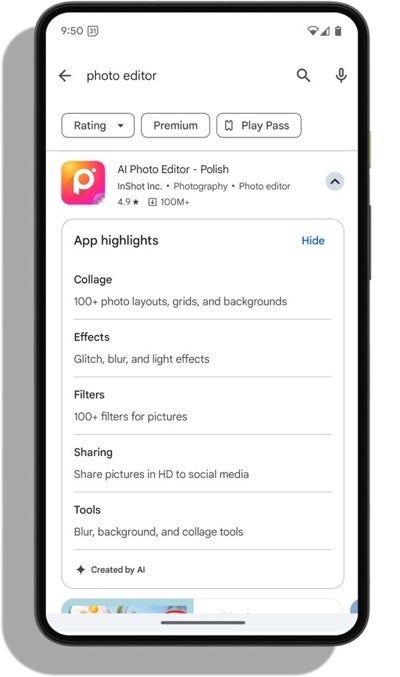
Google Play is going all in on AI and is leveraging it to simplify app discovery. As such, Google Play will now include AI-generated app reviews and FAQs which offer concise summaries of user feedback and frequently asked questions. Additionally, a new AI-powered feature helps users compare apps in similar categories, streamlining decision-making.
Google Play’s multi-select interest filters | Image credit — Google
Personalized recommendations are a key focus. To address this, Google has introduced multi-select interest filters allows users to manually specify their preferences, ensuring more relevant game suggestions based on individual gaming interests.
Curated spaces and comics in Japan
Curated spaces in Google Play cater to specific interests, offering a centralized hub for content exploration. Following a pilot for cricket enthusiasts in India, Google Play has partnered with Japanese comic publishers to launch a dedicated space for comics in Japan. Users can access comics-related content, including free previews, events, trailers, and reviews, all in one place.
Sample of “Chainsaw Man” manga in Google Play | Image credit — Google
Unfortunately, this experience is currently only available in Japan and in Japanese. During the briefing, the question came up several times on whether this would eventually expand to other regions. However, Google had no further information to share on that at this time. Hopefully, this is something that can be made possible in the future.
Enhanced gaming experience
Play Pass, Google’s subscription service, provides access to over 1,000 games and apps without ads or in-app purchases. However, Play Pass will now expand its offerings by including new deals in Asphalt Legends Unite, Call of Duty: Mobile, Candy Crush Saga, and the upcoming addition of Kingdom Rush 5: Alliance. New subscribers in select regions will be able to enjoy a significant discount for their first three months.
However, the highlight of the changes across gaming is the expansion of Google Play Games on PC, which will now allow users to enjoy mobile games on multiple devices seamlessly.
Multiscreen and multi-game experience on Google Play Games | Images credit — Google
These changes will allow you to start a game on your mobile device, and then seamlessly switch it over to your PC if you wanted. The upcoming multi-game capabilities will enable PC gamers to play multiple titles simultaneously, enhancing the overall gaming experience.
Rewarding loyalty
Google Play Points, one of the world’s largest rewards programs, is stepping up its offerings. Super Weekly Prizes will give Diamond, Platinum, and Gold members a chance to win enticing prizes like Pixel devices, Razer gaming products, and merchandise. The program also offers exclusive experiences, such as a recent Pokémon GO Fest event and an upcoming Marvel Games event at San Diego Comic-Con.
Google Play super weekly prizes can get you some very nice new tech | Images credit — PhoneArena
Personalized content and privacy controls
The new Collections experience in the U.S. will curate relevant content from various apps directly on the home screen. Automatically organized categories like Shop, Watch, and Listen simplify content discovery and resumption.
Google Play’s personalized content into categories | Images credit — Google
Google Play prioritizes transparency and control, so users can now manage their app data preferences through “Personalization in Play,” ensuring a tailored experience while respecting privacy choices.
With these new features and enhancements, Google Play is striving to become a more engaging and personalized platform, helping users discover, enjoy, and get rewarded for their favorite apps, games, and content.
Google has unveiled the latest version of its Chrome browser, Chrome 127, which is now available on the Stable channel.
The update, identified as version 127.0.6533.72/73 for Windows and Mac, and 127.0.6533.72 for Linux, will be rolled out over the coming days and weeks.
This release addresses 24 security vulnerabilities, enhancing the browser’s security and stability. This update includes numerous security fixes as part of Google’s commitment to user safety.
According to Google reports, external researchers were rewarded for contributing several of these fixes.
Access to bug details and links may be temporarily restricted until most users have updated their browsers. This precaution ensures that vulnerabilities are not exploited before users are protected.
High Severity Vulnerabilities
CVE-2024-6988: Use after free in Downloads, reported by lime(@limeSec_) from TIANGONG Team of Legends at QI-ANXIN Group, rewarded $11,000.
CVE-2024-6989: Use after free in Loader, reported by Anonymous, rewarded $8,000.
CVE-2024-6991: Use after free in Dawn, reported by wgslfuzz.
CVE-2024-6992: Out-of-bounds memory access in ANGLE, reported by Xiantong Hou of Wuheng Lab and Pisanbao.
CVE-2024-6993: Inappropriate implementation in Canvas, reported by Anonymous.
Medium Severity Vulnerabilities
CVE-2024-6994: Huang Xilin of Ant Group Light-Year Security Lab reported heap buffer overflow in Layout, rewarded $8,000.
CVE-2024-6995: Inappropriate implementation in Fullscreen, reported by Alesandro Ortiz, rewarded $6,000.
CVE-2024-6996: Race in Frames, reported by Louis Jannett (Ruhr University Bochum), rewarded $5,000.
CVE-2024-6997: Use after free in Tabs, reported by Sven Dysthe (@svn-dys), rewarded $3,000.
CVE-2024-6998: Use after free in User Education, reported by Sven Dysthe (@svn-dys), rewarded $2,000.
CVE-2024-6999: Inappropriate implementation in FedCM, reported by Alesandro Ortiz, rewarded $2,000.
CVE-2024-7000: Use after free in CSS, reported by Anonymous, rewarded $500.
CVE-2024-7001: Inappropriate implementation in HTML, reported by Jake Archibald.
Low Severity Vulnerabilities
CVE-2024-7003: Inappropriate implementation in FedCM, reported by Alesandro Ortiz, rewarded $2,000.
CVE-2024-7004: Insufficient validation of untrusted input in Safe Browsing, reported by Anonymous.
CVE-2024-7005: Insufficient validation of untrusted input in Safe Browsing, reported by Umar Farooq.
Google also acknowledged the efforts of security researchers who collaborated during the development cycle to prevent security bugs from reaching the stable channel.
Many security bugs were detected using advanced tools such as AddressSanitizer, MemorySanitizer, and libFuzzer.
For users interested in switching release channels or reporting new issues, Google provides resources and a community help forum.
Protect Your Business Emails From Spoofing, Phishing & BEC with AI-Powered Security | Free Demo
The Samsung Galaxy Z Fold 6 is finally out, and the pre-order period is over. This does mean that a lot of those great promos that were going on are now over. However, Samsung and the carriers are still offering some pretty sweet deals to get you a new foldable.
In this article, we are rounding up the very best deals on the Galaxy Z Fold 6, and we will be updating this quite frequently so you can get the best deals on Samsung’s latest foldables. Who doesn’t want to save money?
The Galaxy Z Fold 6 is a pretty impressive smartphone to be quite honest. Despite its $100 price increase this year, Samsung has made it more durable, reduced the crease, reduced the size of the hinge, and improved screen brightness, among a few other changes. Of course, durability is probably the most important part here, as it now has dust resistance at IP48. The Galaxy Z Fold 5 was IPX8, which means it had no dust resistance.
At $1,899, this is a pretty expensive phone. However, you can get it for far less than that. Check out the latest Galaxy Z Fold 6 deals down below.
A new report claims that the launch of the Huawei Mate 70 series has been delayed. The company was expected to announce these devices in October. However, it seems that we will have to wait a little longer, and the reason would be HarmonyOS NEXT.
HarmonyOS NEXT is Huawei’s next big move in the mobile software segment. Unlike the current HarmonyOS, NEXT gets rid of APK support. This means that it is not compatible with Android apps, completely betting on its own software ecosystem.
Huawei Mate 70 series’ HarmonyOS NEXT needs more development time
The Huawei Mate 70 series is expected to bring the first devices with HarmonyOS NEXT pre-installed. However, it seems that this is exactly the reason for the possible delay in the launch. According to RODENT950 on X/Twitter and Digital Chat Station on Weibo, Harmony OS 5 (NEXT) “needs more development time.” So, Huawei would still have work to do to get the new OS ready.
According to the report, the brand’s new mobile flagships will arrive in mid-to-late Q4 of 2024. In any case, the launch expected for October already fell in that time range. Therefore, the Huawei Mate 70 series could have been delayed until November-December.
Until now, no news had emerged about potential problems in the development of HarmonyOS NEXT. However, it is already an important milestone to have developed a completely new OS in just a few years. The original HarmonyOS with AOSP core was born out of Huawei’s need to gradually disengage from North American technology after trade restrictions were set in 2019.
Huawei pushing forward its own software ecosystem
Currently, HarmonyOS NEXT is estimated to have 4,000 native apps. Huawei hopes to raise this figure to 500,000 in the coming years. Regarding the Mate 70 series, the leaks have revealed some important improvements in key sections. The devices are said to bring a solvent Kirin 9100 chip, a curved LTPO OLED display (1.5K), and an OmniVision OV50K main camera (1-inch) with variable aperture.
Lastly, Huawei seems to have suffered problems in manufacturing the new flagship Kirin chip. Initially, it was expected to use SMIC’s 5nm process. However, SMIC wafers were not up to par, resulting in low-yield rates, so the Kirin 9100 would resort to the 7nm process. That said, they would apply the N+3 variant for production, so the transistor density will be higher than that of other 7nm Kirin chips (like the 9010 of the Huawei Pura 70 series).
Meta, Mark Zuckerberg’s conglomerate, has announced Llama 3.1 405B (“the first frontier-level open source AI model”) and parallels have been drawn with the Linux revolution.
We’re publicly releasing Meta Llama 3.1 405B, which we believe is the world’s largest and most capable openly available foundation model.
– Meta blog, July 23, 2024
Llama 3.1 405B is “the first openly available model that rivals the top AI models” when it comes to state-of-the-art capabilities in general knowledge, steerability, math, tool use, and multilingual translation, Meta claims.With the release of the 405B model, Zuck’s team is promising to “supercharge innovation”.
As part of this latest release, Meta also introduced upgraded versions of the previous Llama 8B and 70B parameter sizes. “This enables our latest models to support advanced use cases, such as long-form text summarization, multilingual conversational agents, and coding assistants”, the article reads.
The team claims they’ve evaluated performance on over 150 benchmark datasets encompassing a wide range of languages. Additionally, extensive human evaluations were conducted to compare Llama 3.1 with competing models in real-world scenarios. The experimental evaluation suggests that the new flagship model is competitive with leading foundation models, including GPT-4, GPT-4o, and Claude 3.5 Sonnet, across various tasks.
Mark Zuckerberg: Open Source AI Is the Path Forward
Image credit – Meta
In addition to the announcement, there’s an open letter from Mark Zuckerberg that’s titled: “Open Source AI Is the Path Forward“.He takes the long way around and brings us back to the early days of high-performance computing: that’s when major tech companies “invested heavily in developing their own closed source versions of Unix”. Unix is a family of multitasking, multi-user computer operating systems.
Then, Zuck argues, Linux emerged as a game-changer due to its open source nature, allowing extensive customization, affordability, and ecosystem growth.
A game changer, if you will!
That’s why open source AI, (as Meta’s new Llama model), will follow a similar trajectory of rapid advancement and adoption, Meta’s CEO argues.
Meta is committed to open source AI. I’ll outline why I believe open source is the best development stack for you, why open sourcing Llama is good for Meta, and why open source AI is good for the world and therefore a platform that will be around for the long term.
– Mark Zuckerberg, July 23, 2024
His point is that the importance of open source for a positive AI future cannot be overstated. That’s because AI has, in theory, immense potential to boost human productivity, creativity, quality of life, and economic growth, while advancing medical and scientific research. Open source ensures broader access to AI benefits, prevents power from concentrating in a few companies.Safety concerns fall into two categories: unintentional harm, where AI systems cause damage without intending to, and intentional harm, where bad actors use AI maliciously. Most worries center on unintentional harm, which open source could, in theory, mitigate through transparency and widespread scrutiny.
When it comes to intentional harm, distinguishing between individual bad actors and resource-rich nation-states is crucial, Zuck argues and talks about “how the US and democratic nations should handle the threat of states with massive resources like China”.
Some people argue that we must close our models to prevent China from gaining access to them, but my view is that this will not work and will only disadvantage the US and its allies. Our adversaries are great at espionage, stealing models that fit on a thumb drive is relatively easy, and most tech companies are far from operating in a way that would make this more difficult. […] The bottom line is that open source AI represents the world’s best shot at harnessing this technology to create the greatest economic opportunity and security for everyone.
– Mark Zuckerberg, July 23, 2024
What side are you on? Would you like to see more or less open source US AI models?
As enterprises increasingly migrate their workloads to cloud infrastructure, the need for robust security measures becomes more pressing.
Unlike traditional data centers, cloud environments offer business agility at a reduced cost, making them attractive targets for cybercriminals.
Defending cloud infrastructure, particularly within Amazon Web Services (AWS), is complex and requires a nuanced understanding of security controls and threat detection.
This article explores how defenders can address detection gaps in AWS environments by leveraging a combination of Mitigant Cloud Attack Emulation and the Sekoia Security Operations Center (SOC) Platform.
The integration of these tools demonstrates a Threat-Informed Defense strategy that enhances an organization’s ability to detect and respond to threats effectively.
Enterprises are increasingly adopting cloud infrastructure to benefit from its agility and cost-effectiveness. However, this shift has not gone unnoticed by cybercriminals, who now target cloud workloads with sophisticated attacks.
Defending cloud environments is inherently more complex than on-premises infrastructure, necessitating a comprehensive approach to security.
The Sekoia report provides a use-case scenario demonstrating how defenders can address detection gaps in AWS environments by combining Mitigant Cloud Attack Emulation and the Sekoia SOC Platform.
It also discusses how organizations can adopt a Threat-Informed Defense strategy by integrating security measures, Cyber Threat Intelligence (CTI), and evaluation/testing.
This strategy enables organizations to detect and respond effectively to threats within their AWS infrastructure.
Threat Model
The threat model features Acme, a fictitious Fintech company hosting its banking system on AWS cloud infrastructure. John Doe, Acme’s Chief Information Security Officer (CISO), is concerned about the increasing threat Scattered Spider poses.
After attending an MITRE ATT&CK Workshop, John decides to implement a Threat-Informed Defense Strategy (TIDS) to enhance Acme’s cyber-resilience.
He incorporates the following cybersecurity products to align with TIDS:
Defensive Measures: Sekoia Defend is a leading SOC platform that provides threat detection and incident response capabilities.
Cyber Threat Intelligence: Sekoia Intelligence, a structured and actionable CTI service.
These attacks are orchestrated against Acme’s AWS environment to mimic Scattered Spider, and the Sekoia SOC Platform is used to detect these attacks.
Cloud Attack Phases and Detection
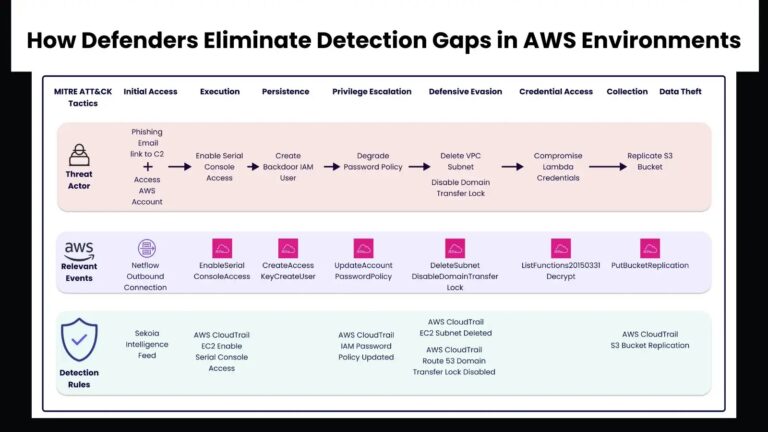
The threat scenario is emulated to illustrate real attacks, which are typically multi-step and captured via attack kill chains. The MITRE ATT&CK framework groups these attacks into Tactics and Techniques. The attacks against Acme are categorized as follows:
Initial Access
The attacker gains access to Acme’s corporate AWS account using stolen credentials obtained through phishing. Bob from Acme’s finance department receives a malicious email containing a link to a fake corporate website.
The user’s workstation logs this activity, and Sekoia.io’s Intelligence Feed rule detects suspicious IP access.
The “Serial Console Access” attack Implemented in Mitigant is a Common Technique Used By Scattered Spider.
Execution
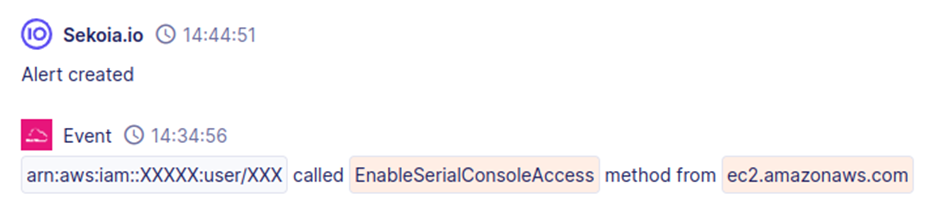
The attacker enables serial console access to EC2 instances, bypassing network security controls. This action is detected by the Sekoia.io rule “AWS CloudTrail EC2 Enable Serial Console Access.”
Insert image of AWS CloudTrail log showing serial console access here.
Persistence
The attacker creates new IAM users and backdoors existing IAM users, raising the “CreateAccessKey” and “CreateUser” events. Specific detection rules tailored to the environment can help identify these activities.
Privilege Escalation
The attacker weakens IAM password policies to facilitate further attacks, triggering the “UpdateAccountPasswordPolicy” event. The Sekoia.io rule “AWS CloudTrail IAM Password Policy Updated” monitors this event.
Insert image of IAM password policy update event here.
Defense Evasion
The attacker deletes VPC subnets and disables domain transfer locks to hide their activities. These actions are detected by the Sekoia.io rules “AWS CloudTrail EC2 Subnet Deleted” and “AWS CloudTrail Route 53 Domain Transfer Lock Disabled.”
Insert image of VPC subnet deletion and domain transfer lock disablement events here.
Credential Access
The attacker compromises Lambda credentials, raising the “ListFunctions20150331” event. Due to their frequency, creating effective detection rules for these events can be challenging.
“Malicious Bucket Replication” Attack Launched from Mitigant Showing the Corresponding MITRE Tactic & Techniques
Collection
The attacker replicates S3 buckets and exfiltrates sensitive data, triggering the “PutBucketReplication” event. The Sekoia.io rule “AWS CloudTrail S3 Bucket Replication” detects this action.
Insert image of S3 bucket replication event here.
The integration of CTI helps detect and contextualize attacks, providing a better understanding for further investigation. Alert fatigue is a significant challenge for SOC teams, and triaging rules by effort level can help manage this issue.
Sometimes, customers should create their own rules to reduce false positives. Attack emulation is essential for testing rules and ensuring comprehensive coverage. Context is crucial, and security teams must add context to reduce false positives.
Emulating attacks in the environment provides an excellent approach for deriving the precise context. As cloud infrastructure adoption increases, so do the associated security risks.
Security teams must adopt approaches that allow precise threat optimizations with minimal alert fatigue and false positives. A Threat-Informed Defense strategy provides a meaningful approach, aligning with real attacks.
This article presents an instructive scenario based on the Scattered Spider threat actor, offering valuable lessons for improving cloud security posture.
By adopting a Threat-Informed Defense strategy and leveraging tools like Mitigant Cloud Attack Emulation and the Sekoia SOC Platform, organizations can effectively eliminate detection gaps in AWS environments and safeguard their cloud infrastructure against sophisticated cyber threats.
Protect Your Business Emails From Spoofing, Phishing & BEC with AI-Powered Security | Free Demo