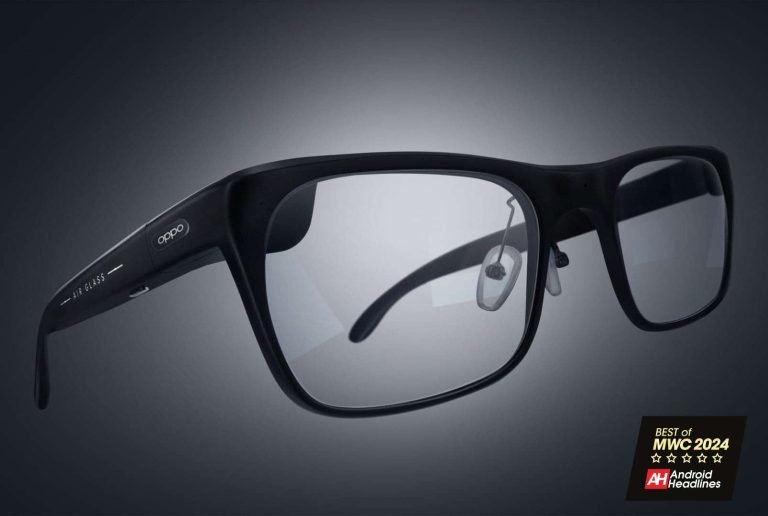
The Oppo Air Glass 3 gives us a glimpse at the company’s vision for the future at MWC
Wearable smart technology is getting more advanced as time goes on, and we’re all eagerly awaiting the days when it’ll be indistinguishable from what we see in Sci-Fi movies. Well, Oppo wants to turn science fiction into science fact with the Air Glass 3. At this point, this device is only a prototype, so, we shouldn’t expect to see it launching anytime soon. However, it does give us an idea of what Oppo has planned for this device, and it looks pretty spectacular.
These glasses will remind you of the smart glasses that we have today. However, these will stand out by implementing generative AI. They will have the ability to access generative AI models. The model it’ll use won’t be the most popular on the market. Rather than using any AI models from OpenAI, these glasses will use AndesGPT. This is Oppo’s proprietary AI model.
These glasses will be very inconspicuous. If you remember the Google Glass, you remember a pair of glasses with a very noticeable component over one of the lenses. However, these glasses will look very similar to a regular pair of eyeglasses. This is thanks in part to the fact that they will not come with a camera. This will undoubtedly make the glasses much lighter.
The Oppo Air Glass 3 will probably be just fine on their own, but they’re mostly made to integrate with Oppo’s other devices. So, you’ll use an Oppo phone along with the dedicated Air Glass 3 app to get the most out of the experience.
For their sleek design and innovative technology, the Oppo Air Glass 3 have won the hearts of those visiting MWC and us here at Android Headlines.
Tecno is here to show us that it truly knows how to make a gaming phone
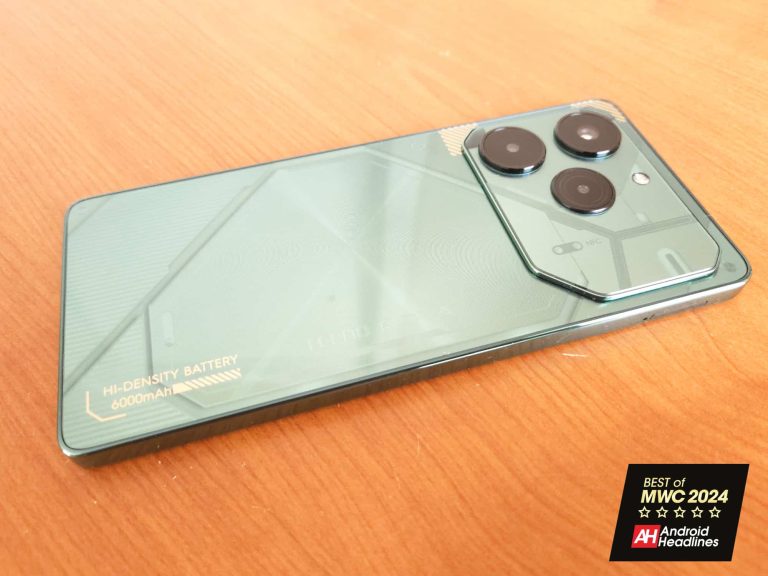
MWC 2024 is going on, and all the top tech brands are showing off the latest and greatest innovations. Rising star in the tech world, Tecno showed off some interesting new tech at the event. One device was its latest gaming phone. The Tecno Pova 6 Pro 5G comes with gaming features like an array of RGB lights, software-based game optimizations, and an overall gorgeous aesthetic that we mostly see with other gaming phones.
This phone comes with an absolutely gorgeous 6.7-inch AMOLED display that will make all of the games you’re playing look amazing. This is actually a big upgrade from the LCD panel that was present in the Pova 5 Pro (Review). That display looks nice, but the Pova 6 Pro 5G’s is a step up. Also, it’s a much brighter display.
The Pova 6 Pro 5G comes with Dynamic-Light miniLED effects. The back glass of the phone is perfectly transparent, and it lets you see a set of nice-looking RGB lights. They will turn on, pulsate, and react based on the activity you’re doing on your phone.
You’re going to want to play games for a while using this incredible phone, so Tecno hooked the Pova 6 Pro 5G up with a whopping 6000mAh battery. This will give you some amazing battery life. Also, to charge a battery this big in a reasonable amount of time, Tecno gave this phone 70W charging.
When it comes to the performance, the Pova 6 Pro 5G has an impressive 12GB of RAM. This is flagship-level, and it can be extended to 24GB of RAM via storage. With such an incredible design, beautiful display, and powerful internals it’s no wonder why the Tecno Pova 6 Pro 5G has our reward for Best of CES 2024.
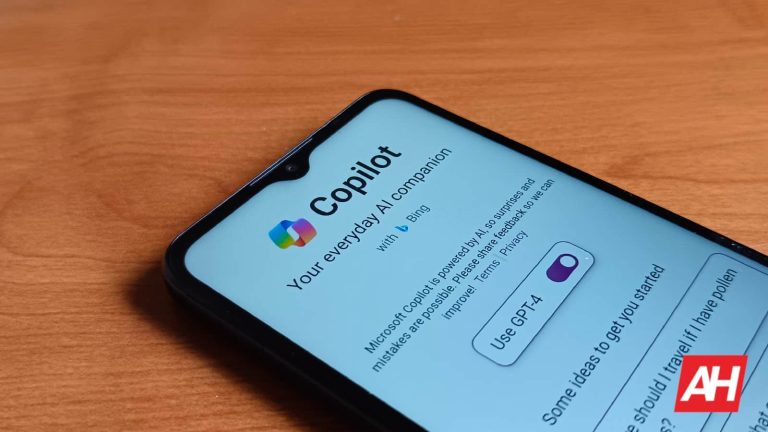
A recent update to the Microsoft Copilot app for Android has positioned it as a contender to replace Google Assistant or Bixby as the default digital assistant on Android devices. This beta update, marked as version 27.9.420225014, allows users to set Copilot as their default assistant app. With this change, users can launch Copilot from any screen by swiping diagonally from the corner or long-pressing the power button, the same as the way they launch Google Assistant.
Microsoft Copilot now joins virtual assistants like Google Assistant and Bixby on Android
This development marks a significant expansion in the options available to Android users for their digital assistants. For example, previously users had the choice between Google Assistant and Bixby on Samsung devices, with additional options like Amazon or DuckDuckGo.
Notably, Google has also introduced Gemini, its AI-driven assistant, as a replacement for Google Assistant. However, until now, Microsoft Copilot was notably absent from the list of available digital assistants on Android devices.
Microsoft Copilot, powered by OpenAI’s GPT-4 LLM and featuring an image generation tool fueled by DALL-E, offers users a comprehensive AI experience. The inclusion of Copilot in the list of available digital assistants on Android phones signals Microsoft’s commitment to reaching more users with its AI.
However, Microsoft Copilot is not taking the full advantage of this addition as of now
While the ability to set Copilot as the default assistant app is a significant step forward, there are some limitations to its current implementation. For example, invoking Copilot currently launches the main activity of the app instead of presenting users with a small overlayed box with a chat function, as seen with other assistant apps. Additionally, Copilot does not automatically listen for input or utilize APIs to grab screenshots of on-screen content as of now.
However, these shortcomings could be addressed in future updates, as Microsoft continues to refine and improve the Copilot experience. Overall, the introduction of Copilot as a default assistant app for Android devices offers users more flexibility and choice in how they interact with their devices.
Apple was expected to release iOS 17.4 early in March to beat the March 8th deadline imposed by the EU for Apple to deliver all of the changes coming to Safari, the App Store, and iOS in the 27 EU member countries. Those in the EU will be able to use a browser with a non-WebKit engine, select a third-party default contactless payment app, choose an alternative third-party app store to install apps from, and much more.
Developers will be able to have in-app purchases processed by an alternative payment processing platform and avoid the so-called Apple Tax which will be reduced in the EU from 15%-30% everywhere else to 10%-17%. Those in the EU can thank the Digital Markets Act (DMA) for these changes while those living in other countries with an iPhone can hope for a DMA of their own.
iOS 17.4 will bring an improvement to the Stolen Device Protection feature that makes it harder for passcode stealing creeps to grab your phone and change your Apple ID and Password, reset Face ID and Touch ID, disable the Find My app, and create new passwords for your financial apps allowing them to take control and wipe you out. The feature requires the use of Face ID and Touch ID to verify your identity before changes can be made to your phone. More sensitive tasks will require verification from Face ID and Touch ID and puts certain changes on hold for an hour before they become official. This way, if you realize your iPhone has been stolen, you can call Apple to alert the company.
Apple releases iOS 17.4
When Stolen Device Protection debuted in iOS 17.3, users could either enable it to work at unfamiliar locations, or disable it. In iOS 17.4, a new option has been added allowing the feature to be disabled, enabled for use in unfamiliar locations, or set to be on always. Personally, I chose the latter because it would seem to offer you protection from passcode thieves anywhere.
With iOS 17.4, the Apple Podcasts app will give you the ability to read transcripts of your favorite podcasts including an entire episode. You can tap on any part of the transcript and listen to the podcast from that point going forward, or search for a specific word or phrase. As a podcast is played on the app, the transcript is highlighted to match what is being heard.
The update to iOS 17.4 includes improved security for iMessage which will defend it “against even highly sophisticated quantum attacks.” The system is called “post-quantum cryptographic protocol or PQ3. And new Emoji comes to the iPhone with iOS 17.4 including a brown mushroom, a phoenix, a broken chain, a lime, and two shaking heads. One of the heads is shaking vertically, the other is shaking horizontally,
To download the update, go to Settings > General > Software Update and follow the directions.
Class-leading camera hardware coupled with top-of-the-line specs
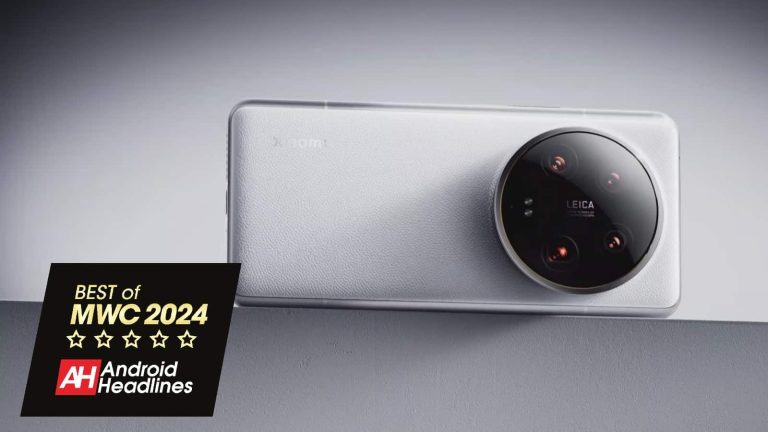
The Xiaomi 14 Ultra is the latest flagship smartphone from the company. This handset launched globally at MWC 2024, and needless to say, it managed to attract a lot of attention to itself. It launched in China only a couple of days prior to MWC, so it’s brand new in every way, shape, and form. The Xiaomi 14 Ultra won one of our MWC 2024 awards, as it really is a very interesting smartphone. Xiaomi updated the design of last year’s ‘Ultra’ model, while also improving the cameras, and making a more powerful smartphone all around.
Four 50MP cameras, Leica lenses & a whole lot of potential
Xiaomi’s latest ‘Ultra’ smartphone is a camera-centric phone, there’s no denying that. Xiaomi went all out with four 50MP cameras on the back, all of which sit inside that huge camera oreo. Leica is also a part of the package here, as the company’s lenses and expertise are also a part of the package. Yes, Leica also helped out on the software side of things. You’ll even find both ‘Leica Vibrant’ and ‘Leica Authentic’ modes inside the camera UI. The main camera on the phone offers variable aperture, and Xiaomi opted for Sony’s top-of-the-line LYT-900 1-inch type sensor here.
The other three sensors are also quite compelling, and you’re getting both 3.2x and 5x optical zoom cameras here. They’re supposed to mimic 75mm and 120mm focal lengths, by the way. As if that wasn’t enough, the ultrawide camera is also a beefy one, and it offers a 122-degree FoV. On top of everything, Xiaomi also announced a new photography kit for the phone. This time around it includes a battery, and it basically turns your Xiaomi 14 Ultra into a proper camera from the design standpoint too.
The Xiaomi 14 Ultra has truly powerful specs
This is a camera-centric phone, but Xiaomi went all out in other areas too. Qualcomm’s Snapdragon 8 Gen 3 SoC is used here, along with 16GB of LPDDR5X RAM and UFS 4.0 flash storage. Xiaomi basically used the best of the best specs for performance. A gorgeous 6.73-inch QHD+ panel is also used, and yes, this is an LTPO AMOLED panel with a maximum refresh rate of 120Hz. It also does get immensely bright, in case you were wondering. Great speakers are also on board, as is Bluetooth 5.4 and a really fast in-display fingerprint scanner.
What about the battery? Well, you’ll find a 5,000mAh unit on the inside, which is a bit smaller than in the China-destined model, but it’s still a beefy battery pack. If you ever end up needing a quick top-up, you’ll get it here. The Xiaomi 14 Ultra supports 90W wired charging, and a charger is included in the box. On top of that, it also comes with 80W wireless charging support, and 10W reverse wireless charging. Needless to say, Xiaomi covered all grounds when it comes to charging.
The Xiaomi 14 Ultra is one of the most ‘Ultra’ phones in the market right now, and easily one of the most interesting smartphones that launched at MWC 2024.
The Lenovo ThinkBook Transparent Display laptop is quite possibly one of the most intriguing devices that was brought to MWC 2024, and it’s easily the most stunning laptop you’ll ever lay eyes on. It certainly looks and feels like a laptop, but then again it doesn’t. Not in the traditional sense. That’s because it comes with a Micro-LED transparent display that unless the laptop is powered on, looks just like a piece of glass.
It also has a completely touch-based keyboard to keep with the design theme. The end result is a laptop that is visually pleasing to look at. So much so, that we’d imagine it would sometimes be hard to get any work done on it because it would just be too easy to sit there and stare at its good looks. Looks aren’t everything of course. But they play a big role in what makes this laptop so intriguing. Because the design of its display being transparent actually goes beyond a stunning design. It’s intended to add some very functional aspects to the everyday workflow.
A fun, new way to collaborate and create content
When you think about what laptops are used for, there are always the usual suspects. Studying, working, gaming, and content creation. While you could likely use this laptop for any of those, Lenovo is positioning this as a device that would be excellent for work collaboration and content creation. The unique new ways in which you would be able to use this device come down to the Micro-LED transparent display. In pairing with this see-through screen, the laptop uses what’s called Artificial Intelligence Generated Content.
And as Lenovo puts it, it allows users to overlay digital content on top of real-world objects. Potentially leading to some exciting ways to create content. Think about art creation, for example. Imagine putting your subject in the background which you could see behind the transparent display. This could make it super simple to use the subject as a guided reference for your take on it. Not unlike tracing the outlines of whatever you’re drawing. It could also be a neat way to use the subject as a core piece to build off of. This is just one example too. But there could be tons of other uses for creatives.
A large, super-bright display with no bezels
People always talk about wanting slimmer bezels for their displays. Especially on laptops and TVs. There are lots of laptops and other devices out there that use the term “bezel-less” but none of them are quite as bezel-less as they let on. That is until Lenovo came out with the ThinkBook Transparent Display laptop. This display is truly bezel-less, and that’s one of the key points that make it enticing.
The display is 17.3 inches in size as well. So it’s not only bezel-less, but it’s big enough to do anything on that you would use a laptop with a normal display for. On top of that it features a 1,000-nit peak brightness which is pretty bright. Certainly bright enough to use both indoors and outdoors Lenovo says. Lenovo isn’t going to be selling this laptop as it’s just a proof of concept. But it’s a striking one that caught our attention immediately.
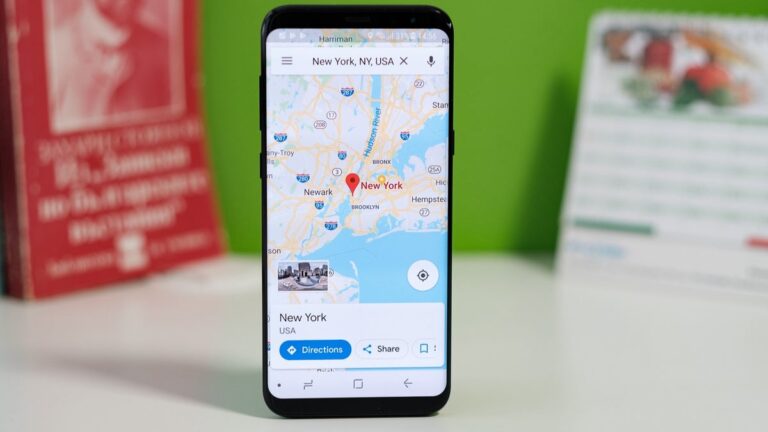
After nearly a year-long delay, Google Maps’ “glanceable directions” feature is finally rolling out to Android and iOS devices worldwide. This long-awaited addition makes your navigation experience more convenient and safer by bringing vital trip information directly to your lock screen.
Google originally announced this feature way back in February 2023, but the rollout took significantly longer than expected. After a few sporadic sightings over the course of last summer, there were no further updates on its development until January 2024, when it was reported that the feature began silently appearing for users everywhere. Now, according to Android Police, this is now rolling out widely.
What are these “Glanceable directions”?
Glanceable directions give you a quick overview of your journey with essential updates like real-time estimated time of arrival (ETA) and turn-by-turn navigation prompts. You can track your progress along the route overview even without starting full-fledged navigation, making it ideal for confirming your route or when you’re in familiar territory. Maps will also automatically adjust your route if you decide to take a detour without any manual intervention needed, ensuring you stay on track even if unexpected changes occur.
Glanceable directions also make navigating less distracting, which means you won’t need to unlock your phone constantly to check your progress. This is particularly beneficial while driving, making your trips safer.
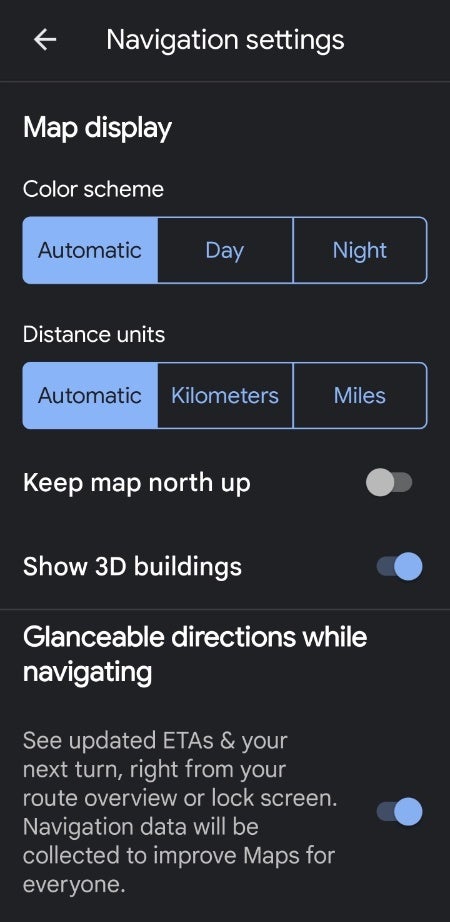
Google Maps on Android settings toggle for “Glanceable directions” | Image via Phone Arena
The feature is present right now in Google Maps version 11.116.0101 from the Google Play Store; however, it is possible that this is a staged rollout, meaning that you may be missing it from your Maps applications until the update reaches your device.
To check if the feature is available to you and to enable it, open Google Maps, tap on your profile icon (top right corner), go to Settings > Navigation Settings, scroll down to find the “Glanceable directions” toggle, and turn it on.
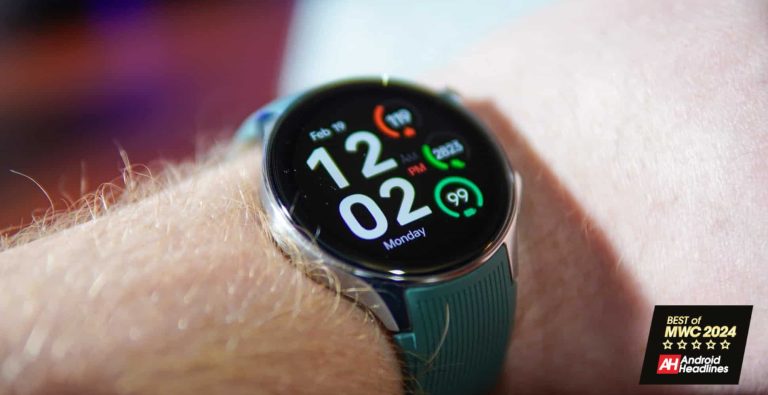
The OnePlus Watch 2 was OnePlus’s big announcement for this week making its debut at MWC 2024, and without mincing words, OnePlus has made a huge splash with this watch, and to our surprise, it might just be our new favorite. When OnePlus launched its original smartwatch, it was running on OnePlus’s own operating system, and compared to other options, it just wasn’t living up to what you’d expect from OnePlus. The company knows it missed the mark with the first model and went to work to improve things for the 2nd model.
There are so many improvements across the board, that the OnePlus Watch 2 is easily capable of becoming the best Wear OS watch out there for many consumers.
The battery life on the OnePlus Watch 2 is setting a new standard
I have no problem saying that the OnePlus Watch 2 will be the undisputed king of battery life when it comes to any Wear OS watch. Battery life has always been an issue with smartwatches in general and Wear OS has been among the worst. Although there have been some standouts ahead of the pack. OnePlus is turning that on its head by touting up to 100 hours of battery life on the OnePlus Watch 2 which is, quite honestly amazing. Now there are some tricks to this that allow for this to be possible. Part of it is on Google’s end with some optimizations it’s made to Wear OS. But the other more substantial part is on the OnePlus Watch 2’s hardware, as well as some software tweaks that OnePlus made.
All-in-all it equals out to a nearly full workweek of battery life on a single charge. In fact, in our review, we got almost five days out of it. If battery life is something you stress over but you don’t want to move off of Wear OS, then the OnePlus Watch 2 is the watch for you. Aside from the battery life, there are a lot of other niceties to capture your attention. Not the least of which is the design. This is a really good-looking smartwatch and it shows. There’s also a sapphire crystal display which means you don’t have to worry so much about scratches, scuffs, or the occasional ding against a counter or something.
That doesn’t mean you don’t need to take care of it still, but you won’t need to baby it. And in the end that’s all you really need. A smartwatch that can enhance your life without you needing to coddle the thing because you’re afraid it might break.
Charging at the speed of light
Other than battery life another complaint of smartwatches sometimes is how long it takes to charge them. OnePlus has consistently been one of the top contenders for fast-charging devices. Without fail, every year, it comes out with new products that charge a lot faster than most if not all of the competition. The OnePlus Watch 2 is no different. You can get to a full battery in about an hour which is lightning quick. In our personal testing, it was about 58 minutes from 4% to 100% and that’s so much faster than any other Wear OS watch out there.
Case in point, when the battery does finally die, just pop it on the charger before you start your day and it’ll be back up to 100% in no time. Then you’re good for almost another week. The watch also has a 5ATM rating and it’s IP68 water resistant. And the best part is that it’s not super expensive. At $299, this is a bargain.
Using Google Assistant, you’re able to set reminders and access Google Calendar simply by voice. This came in handy when you just needed to quickly set a calendar event and be done with it. It’s just a testament to how well-integrated Google Assistant is with Android. Now, Gemini is playing catch-up while simultaneously trying to replace the Assistant.
Google acknowledges that it has a long way to go before Gemini can completely replace Assistant. It outlined a list of changes it needs to make ASAP if it wants Gemini to fill Google Assistant’s shoes, and it’s carving away at that list.
Gemini can now integrate with Google Calendar
Not too long ago, Gemini gained the ability to make tasks through Google Assistant. This was a step in the right direction and this new change adds more functionality to the chatbot. If you’re using Gemini as your phone’s default assistant, you can summon it and ask a question about your calendar. You can ask it questions like “Do I have any events coming up?” You could also ask it to show you your calendar. This is a great and easy way to get a glimpse at your upcoming events.
Along with that, you’re able to ask Gemini to create an event for you. Just say something like, “Add an event to my calendar.” At that point, it will go through the steps of asking you how you want to customize the event. When you’re all finished, the event will be added to your calendar, and you’ll call it a day.
The new Atomic variant uses Python and Apple Script code to target browser and system files, obtain user account passwords, and identify sandbox or emulator execution.
Bitdefender researchers have discovered a new variant of the AMOS Stealer (or Atomic Stealer), one of the most prevalent threats for macOS users in the last year. According to Bitdefender, the new variant was discovered while revisiting old or new malware samples to improve detection capabilities for macOS cyber-security products.
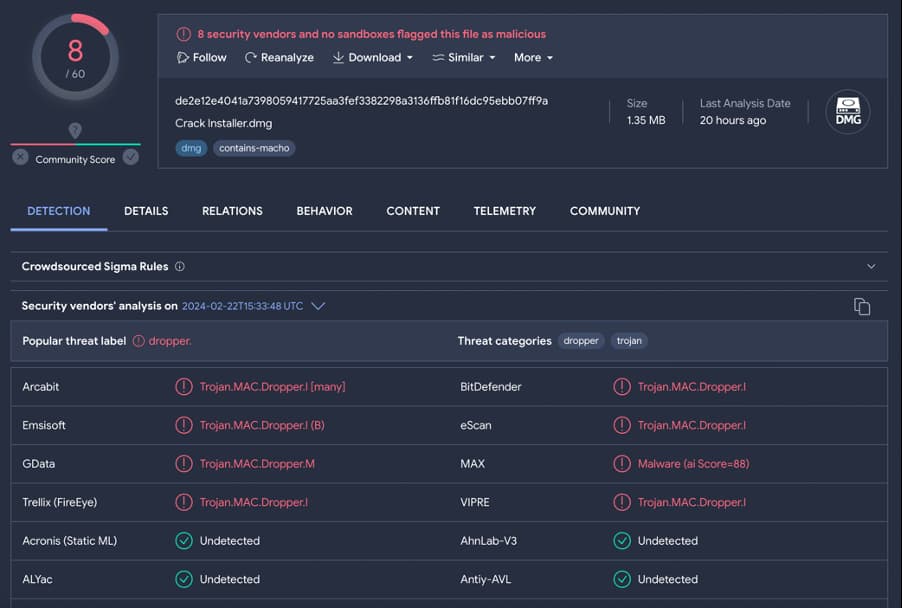
When researchers isolated several suspicious macOS disk image files, which were surprisingly small for their size (1.3 MB), they became suspicious of the emergence of a new variant of the AMOS Stealer.
Screenshot from VirusTotal (Bitdefender)
The new variant combines functionalities of numerous malware families, including information stealers, keyloggers, and cryptocurrency mining tools, allowing it to steal sensitive data while its advanced stealth makes it harder for users to identify/remove the infection.
Further probing revealed that this variant shares similarities with the second variant of RustDoor. “Both seem to focus on collecting sensitive files from the victim’s computer, with the current one being a more developed version of the script used by RustDoor,” researchers noted.
However, the new variant has additional features. It collects the Cookies.binarycookies file, which stores Safari browser cookies, obtains files with targeted extensions from specific locations and uses the system_profiler utility to gather information about the compromised computer.
The attackers aim to obtain hardware-related details, operating system versions and connected displays and graphic cards. They add sensitive information to the archive, including passwords, encryption keys, and certificates, indicating their growing interest in cryptocurrency platforms.
This version has an unusual technique of combining Python with Apple Scripting where the filegrabber() function executes a large block of Apple script using the osascript -e command. DMG files contain FAT binary and Mach-O files for Intel and ARM architectures, used by threat actors to steal data.
When opened, as noted by researchers in a blog post, the Crack Installer application prompts the user to open the file. The Python script collects sensitive data from multiple sources, including crypto-wallet extensions, browser data, and user account passwords.
The Chromium () function collects files from targeted Chromium-based browsers, including web data, login data, and cookies. It also targets cryptocurrency browser extensions and Mach-O binaries. The parseFF() function targets Firefox and collects files associated with all profiles.
Moreover, the script targets installed crypto wallets like Electrum, Coinomi, Exodus or Atomic. The collected data is stored in a ZIP archive, which is sent to a C2 server using a POST request. The archive structure is confirmed by the C2 server.
The variant is largely undetected at the moment. Bitdefender has released Indicators of Compromise to help organizations and practitioners detect and mitigate this threat.