Google Chat is launching a new update that will make it even easier to navigate conversations within its in-line threaded spaces. Following last year’s transition to in-line threading, the latest update continues to improve on that functionality in order to boost productivity and efficiency for its users.With multiple threads running across different spaces, it can be time-consuming to figure out which messages need your immediate attention. The latest update from Google Chat makes it easier to keep track of conversations by showing participant avatars alongside unread threads in the conversation view.
This feature allows you to quickly identify the participants in the conversation and determine if their comments are pertinent to you. You can now efficiently prioritize important threads without having to click on them for additional details.
Google Chat’s new in-line participant avatars for unread threads both on the web and mobile
Google states that it recognizes that dealing with numerous threads across multiple spaces can be overwhelming and that this feature was introduced in order to give you more context upfront. The goal is that it will make it easier for you to prioritize and stay on top of the conversations that matter the most to you. This will ultimately help you stay organized and focused on what’s important.
This feature is rolling out automatically and gradually for up to two weeks, starting today. For all Google Workspace users, including those with free personal Google accounts, it will be by default enabled on the web, Android, and iOS.
Google has been steadily introducing improvements to Chat as it continues to compete with other established messaging platforms, such as Slack and Microsoft Teams, and aims to make Chat a more attractive option for businesses looking to improve collaboration and efficiency within their teams. The company hopes that this new feature will enhance productivity and streamline communication for users across all platforms.
FortiGuard Labs has released a report detailing the emergence and impact of the Abyss Locker ransomware, which has been targeting Microsoft Windows and Linux platforms.
Abyss Locker, believed to be based on the HelloKitty ransomware source code, has been stealing and encrypting victims’ files, demanding ransom for file decryption, and preventing the release of stolen data.
The Abyss Locker ransomware’s wallpaper
The severity level of this ransomware is classified as high. The first Abyss Locker sample was detected in July 2023, but the ransomware’s origins may date even further.
The Windows version of Abyss Locker was discovered in January 2024, with a second version shortly after. The Linux variant, which targets VMware ESXi systems, has also been identified.
You can analyze a malware file, network, module, and registry activity with the ANY.RUN malware sandbox, and the Threat Intelligence Lookup that will let you interact with the OS directly from the browser.
Attack Method
The Windows version of Abyss Locker performs several actions to ensure the successful encryption of files. It deletes Volume Shadow Copies and system backups using commands like vssadmin.exe delete shadows /all /quiet and wmic SHADOWCOPY DELETE.
It also sets the boot status policy to disable automatic repair and ignore all boot failures.
The ransomware encrypts files and changes the file extension to “.abyss” or a random five-letter extension for the version 1 variant.
A ransom note titled “WhatHappened.txt” is dropped, and the desktop wallpaper is replaced with a message demanding a ransom.
The Linux version of Abyss Locker uses the esxcli command-line tool to manage VMware ESXi systems. It attempts to gracefully shut down running VMs before encrypting files with a “.crypt” extension.
A ransom note with the “.README_TO_RESTORE” extension is created for each encrypted file.
Both versions of the ransomware avoid encrypting specific file extensions and directories to maintain the system’s operability and ensure the victim can communicate with the attackers for ransom negotiation, reads Fortinet report.
Infection Vector
The infection vector for Abyss Locker is not specified, but it is likely similar to other ransomware groups.
Abyss Locker ransomware’s ransom negotiation site
The ransomware samples have been submitted from various regions, indicating a widespread attack.
While no current data leak site exposes victims’ names, a ransom negotiation site on TOR is available. The ransom demands vary, with higher amounts typically set for consumers.
The Abyss Locker ransomware poses a significant threat to Windows and Linux users, particularly those utilizing VMware ESXi systems.
You can block malware, including Trojans, ransomware, spyware, rootkits, worms, and zero-day exploits, with Perimeter81 malware protection. All are extremely harmful, can wreak havoc, and damage your network.
Stay updated on Cybersecurity news, Whitepapers, and Infographics. Follow us on LinkedIn & Twitter.
INTMAX, an innovative Layer 2 zkRollup that uses stateless architecture, has officially launched Plasma Next on the mainnet α (Alpha). INTMAX Co-founder and long-time Plasma researcher Leona Hioki unveiled it at ETH Denver. Based on the foundational principles of the Plasma framework, it scales with a constant cost per block regardless of the number of users, and achieves the scalability that the original Plasma aimed for while retaining the same security assumptions as zkRollups.
Plasma Next represents a paradigm shift in how blockchain networks can achieve scalability without compromising on decentralization. By leveraging the power of bulk-token-transfer and Merkle Trees, and integrating ZKP-TLC for conditional payments, Plasma Next introduces a system with the constant state growth per block. This innovative approach eliminates the need for users to provide individual liquidity or remain constantly online, thereby enhancing the user experience and network efficiency.
INTMAX Co-founder Leona Hioki said, “INTMAXgoes beyond just presenting theoretical or conceptual papers. It includes the release of code and the network as well. Made available under an open-source license, it allows anyone to fork the code and launch the network.”
One of the most important parts of Plasma Next is its stateless architecture which, according to a16z researchers, is challenging to achieve because validators would need to store only a minimal, constant-size state. Despite significant research and efforts to reduce the storage burden for validators, a16z concludes that a completely stateless blockchain is impractical. However, Plasma Next can scale at a fixed cost per block, regardless of the number of users. The solution theoretically becomes a pseudo solution to the impossibility of statelessness, as proven by a16z.
Stateless solutions are where instead of nodes or validators holding the data, users manage their own data. While the idea of users managing their own data may sound complicated, most of it would be automated along with encrypted backups.
Plasma, a once-prominent Ethereum layer-2 scaling solution conceptualized by Vitalik Buterin and Joseph Poon in 2017, was intended to help bring Visa-level transaction volumes to Ethereum. Plasma networks allow all data and computation, except for deposits, withdrawals and Merkle roots, to be kept off-chain. This opens the door to very large scalability gains that are not bottlenecked by on-chain data availability.
However, Plasma had significant issues with user experience and online requirements such as:
Users had to wait an entire challenge period before withdrawing
Users had to monitor transactions on the Plasma chain
For these reasons, Plasma had been superseded by Rollups. The newly launched Plasma Next is a hybrid between Plasma and Rollups, combining the strengths of both to enhance security and scalability. It incorporates sophisticated zero-knowledge proofs (ZKPs) to ensure transactions are processed with unparalleled privacy and security.
Plasma Next represents a groundbreaking evolution, promising to redefine blockchain scalability and privacy for the digital age. By addressing the need for constant online presence—a significant barrier to user adoption—Plasma Next marks a significant leap forward. It enables constant state growth per block without requiring individual liquidity preparations, thereby enhancing on-chain privacy and simplifying blockchain transactions.
About INTMAX
INTMAX is the Stateless Ethereum Layer built for mass adoption. It is an innovative Layer 2 zkRollup that uses stateless architecture to offer a highly efficient, secure, and scalable solution for blockchain applications. INTMAX provides a ready-to-use solution to empower any applications and services with instant, the most secure, and near-zero cost crypto transactions.
The Mobile World Congress (MWC) is going on right now, and some of our favorite brands but showing off the latest and greatest devices, technology, and concepts. Infinix is a brand it’s not known by too many people, but it made an appearance at the show. According to a new report, Infinix showed off its color-changing concept phone at MWC. And, looks pretty cool.
Not too many people know about Infinix in the West, but it definitely deserves more recognition. The company made the Infinix Note 30 Pro, a very well-reviewed device that we had the honor of reviewing last year. You can check out our Infinix Note 30 Pro review if you want to see why it gained a five-star score.
Infinix shows off its color-changing phone concept at MWC, and it looks pretty cool
Back in 2021, Infinix gave us a look at its color-changing phone concept, and it definitely caught our attention. It was a phone with a monochromatic display on the back. The display was an E-Ink display that could display different patterns.
This time around, Infinix brought us much the same thing; however, it decided to add color. Looking at the demonstration below, we see the back divided into distinct rectangular sections. Each section looks like a giant pixel and can be triggered independently.
Because of this, the phone can generate patterns on the back. With as large as these sections are, you couldn’t realistically expect them to form a picture. However, they appear to just be a way to decorate the back of the phone. Say, you want to have a blue device, well, you could change the back panel to blue. If you change your mind and want to switch to red, you could do so.
Since we’re only looking at a concept phone in the video above, it’s not reflective of any final product that Infinix could produce. In the video, we see a diamond pattern in the middle that does not change with the rest of the colors. That section is actually fixed and does not change.
If Infinix does pursue an actual product with this technology, we could probably expect it in the next couple of years.
At the ongoing MWC 2024, Infinix has introduced its new flagship cooling technology called CoolMax. Designed specially for high-end gaming smartphones, the brand’s new tech claims to reduce temperature by over 10 degrees Celsius. In addition, the company has also revealed plans to launch its first dual-core flagship gaming smartphone this year. The handset in question is expected to be called the Infinix GT Ultra and could utilize the new CoolMax cooling technology.
CoolMax tech is touted to reduce temperatures by 10 degrees Celsius
Infinix’s CoolMax cooling technology utilizes Thermal-Electric Cooling and the Peltier effect to reduce the heating on gaming smartphones. The tech integrates both a cooling fan and thermoelectric cooling in a phone to achieve this feat. Both the Thermal-Electric Cooling and Peltier effect tech dynamic duo work together to keep the SoC temperature in check. Notably, the brand claims this cooling approach is capable of slashing temperatures by up to 10 degrees Celsius.
Furthermore, Infinix’s CoolMax cooling technology works in tandem with its AI algorithm. The AI algorithm dynamically adjusts large cores for heavy tasks and switches to the smaller/medium cores for lighter operations.
“This AI-driven optimization ensures the chipset operates at peak efficiency without constantly running at maximum performance, leading to reduced heat generation and lower temperature levels. The integration of AI not only enhances gaming experiences but also contributes to energy savings and effective thermal management”, stated the brand in the press release.
Infinix’s gaming phone with CoolMax tech and Dimensity 9300 SoC achieves an AnTuTu benchmark score of over 2 million
Infinix said that it tested the CoolMax tech on a concept gaming smartphone powered by the MediaTek Dimensity 9300 SoC. The device managed to achieve a whopping AnTuTu benchmark score of over 2 million points, 22,156,639 to be precise. Infinix says that it pulled off this major score thanks to its CoolMax cooling system.
The concept gaming phone also flaunts a Pixelworks visual processor, which works alongside the Immortalis-G720 GPU to amplify frames. Notably, this device is capable of offering 180Hz at FHD+ resolution and 144Hz at QHD+.
Infinix is likely to offer its upcoming gaming smartphone with the Dimensity 9300 SoC, CoolMax tech, G720 GPU, and AI enhancements. While it’s not officially revealed, the handset could be called the Infinix GT Ultra. We will know for sure in the near future, so stay tuned for regular updates.
Hackers have exploited a vulnerability in a 14-year-old Content Management System (CMS) editor, FCKeditor, to launch SEO poisoning attacks against government and educational websites worldwide.
This campaign has compromised numerous sites, redirecting unsuspecting users to malicious or scam websites through open redirects and poisoned search results.
Open redirects are a critical flaw where websites redirect users to external URLs without proper validation, making them a prime target for cybercriminals.
These redirects are particularly dangerous because they originate from legitimate domains, allowing attackers to bypass security filters and trick users into visiting malicious sites.
This technique has been effectively used to perform phishing attacks, distribute malware, and scam users while maintaining the appearance of legitimacy.
You can analyze a malware file, network, module, and registry activity with the ANY.RUN malware sandbox, and the Threat Intelligence Lookup that will let you interact with the OS directly from the browser.
FCKeditor: The Target of Choice
The focal point of this campaign is the outdated FCKeditor plugin, a web text editor popular for editing HTML content directly within web pages.
Despite being rebranded as CKEditor in 2009 with significant improvements, many sites continue to use the deprecated version, especially in the education and government sectors.
Fear Fortnite Vbucks Threat Actors👀
Watch out @ckeditor open redirects engaged in SEO poisoning campaigns targeting edu and governamental domains
Cybersecurity researcher @g0njxa uncovered the campaign after noticing Google Search results for ‘Free V Bucks’ generators hosted on university sites, revealing the extent of the exploitation.
Malicious Google Search results
Educational and Government Sites Compromised
The campaign has not spared prestigious institutions and government entities. Among the affected are MIT, Columbia University, Universitat de Barcelona, Auburn University, University of Washington, Purdue, Tulane, Universidad Central del Ecuador, and the University of Hawaiʻi.
Government and corporate sites, including those belonging to Virginia, Austin, Texas, Spain, and Yellow Pages Canada, have also been targeted, utilizing a combination of static HTML pages and redirects to malicious sites.
In SEO poisoning, attackers manipulate search engine results to promote malicious websites.
By leveraging the trust and authority of compromised domains, these actors can poison search engine results, leading unsuspecting users to scam sites, fake news articles, phishing pages, and malicious browser extensions.
This not only endangers users but also tarnishes the reputation of the compromised sites.
FCKeditor Deprecated
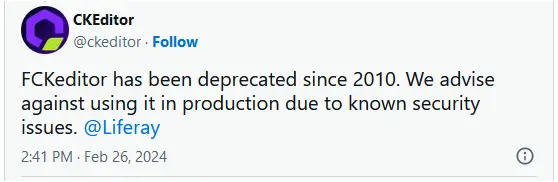
The software maker has responded to the open redirects campaign, emphasizing that FCKeditor has been deprecated since 2010 and should no longer be in use.
However, the persistence of this outdated software on critical sites highlights the broader issue of legacy systems and their vulnerabilities.
It’s a stark reminder for organizations to update and patch their systems to protect against such exploits.
The software maker responded to the open redirects campaign report on X, saying that FCKeditor has been deprecated since 2010 and nobody should use it anymore.
This campaign underscores the importance of maintaining up-to-date software and the need for vigilance against sophisticated cyber threats.
As attackers continue to exploit vulnerabilities in outdated systems, website administrators and users are responsible for ensuring the security of their digital environments.
You can block malware, including Trojans, ransomware, spyware, rootkits, worms, and zero-day exploits, with Perimeter81 malware protection. All are extremely harmful, can wreak havoc, and damage your network.
Stay updated on Cybersecurity news, Whitepapers, and Infographics. Follow us on LinkedIn & Twitter.
The German Federal Office for Information Security (BSI) has published a report on The State of IT Security in Germany in 2023, and the number one threat for consumers is… identity theft.
The thing is, you can protect your devices and your online privacy as much as possible, but what happens when some organization which you have trusted with your personal information gets breached?
The report states:
“For consumers, the issue of data leaks was prominent in the reporting period (2023). In many cases, these were related to ransomware attacks, in which cybercriminals exfiltrated large amounts of data from organizations in order to later threaten to publish it unless a ransom or hush money was paid.“
In addition to data breaches, there is the danger of information stealers that allow cybercriminals to obtain various types of personal data, such as login details for various online services, and financial information. The stolen data may also include website cookies and biometric data that can be used by criminals to defraud the victim.
Cybercriminals are also getting better at using these data. For example, the report mentions that on one of the largest underground marketplaces for identity data, cybercriminals offered interested parties a browser plug-in that made it possible to import stolen credentials directly into the web browser, allowing criminals to assume the victim’s digital identity with just a few clicks.
We’ve previously talked about the dangers of data brokers that, by trading and buying, are accumulating massive troves of personal data. Now, with the mass availability of Artificial Intelligence tools, it becomes so much easier to correlate all these data sets and piece together a complete profile of everyone affected.
As you can see, it’s usually not the victim’s fault that their data become available to cybercriminals. In many cases, there isn’t even that much that they could have done about it. Some services simply are not available in the offline world anymore, and we have no choice than to trust an organization with our information.
So, all we can do is make sure we come prepared to act when a data breach affects us, and keep an eye on how much we share and how much others will be able to find out about us.
What to do in the event of a data breach
Check the vendor’s advice. Every breach is different, so check with the vendor to find out what’s happened, and follow any specific advice they offer.
Change your password. You can make a stolen password useless to thieves by changing it. Choose a strong password that you don’t use for anything else. Better yet, let a password manager choose one for you.
Enable two-factor authentication (2FA). If you can, use a FIDO2-compliant hardware key, laptop or phone as your second factor. Some forms of two-factor authentication (2FA) can be phished just as easily as a password. 2FA that relies on a FIDO2 device can’t be phished.
Watch out for fake vendors. The thieves may contact you posing as the vendor. Check the vendor website to see if they are contacting victims, and verify any contacts using a different communication channel.
Take your time. Phishing attacks often impersonate people or brands you know, and use themes that require urgent attention, such as missed deliveries, account suspensions, and security alerts.
Set up identity monitoring.Identity monitoring alerts you if your personal information is found being traded illegally online, and helps you recover after.
If you want to find out how much of your own data is currently exposed online, you can try our free Digital Footprint scan. Fill in the email address you’re curious about (it’s best to submit the one you most frequently use) and we’ll send you a report.
We don’t just report on threats – we help safeguard your entire digital identity
Cybersecurity risks should never spread beyond a headline. Protect your—and your family’s—personal information by using Malwarebytes Identity Theft Protection.
Samsung hints at the future of phones with its Cling Band
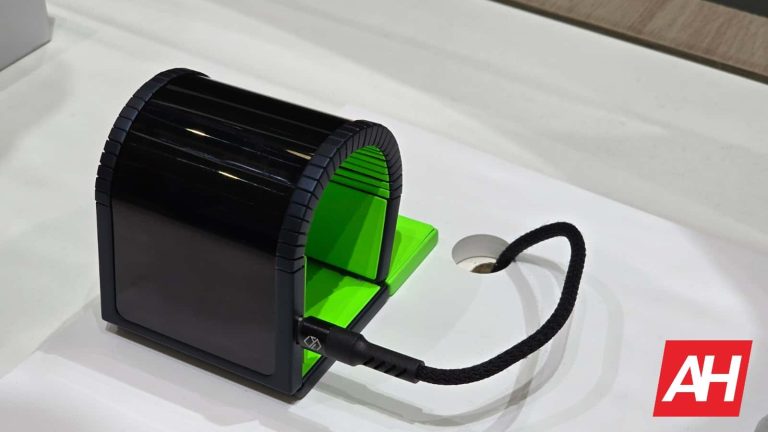
The Samsung Cling Band is sort of a smartphone and smartwatch combined into one device. It features a flexible OLED display as big as a regular smartphone. But it is so flexible that you can wrap it around your wrist, making a watch with a huge display. The company has used a ridged structure on its body, including the backside, to make the whole thing bend such that it forms a domed bridge on your wrist.
The concept product shown at the MWC 2024 in Barcelona featured a USB Type-C port and a speaker grille at the bottom. We could also see a single camera and a heart rate sensor on the back. The addition of a heart rate sensor makes it ideal to wear as a watch to track heart rate and other health metrics. Of course, it would be uncomfortable to wear a bulky device on the wrist for a long time, but we are talking about a concept device here.
Samsung is showcasing its flexible OLED technology more than the device itself. However, the Cling Band could be a product for the future. As we push to make our smartwatch screens bigger, it might not be out of the possibility to see a device that can double up as a smartphone and a watch in a few years. Motorola also showcased a similar device at the MWC 2024, so there is interest in this tech from multiple players.
Samsung mounted an OLED screen onto headphones, earbuds, and speakers
Samsung’s display booth at the MWC 2024 also featured more such innovative concepts. The Korean firm mounted OLED screens onto the charging case for TWS earbuds, over-ear headphones, smart speakers, smart car keys, golf ball markers, and other devices. These displays can show the battery level of the device, media playback controls, and other information. The OLED golf ball marker can connect with other devices to show the incline and distance to the hole. It remains to be seen which of these futuristic products sees the light of day first.
Within the wearable space, there are reports that Apple is currently examining new designs for its products. According to Mark Gurman’s Power On newsletter, some of the possible concepts Apple is studying include smart glasses, integrating cameras into AirPods, and developing a smart ring
Concepts: Apple smart glasses and camera-embedded AirPods
The rumored smart glasses are likely to mimic Amazon Echo Frames and Meta Ray-Bans with intelligent sound features and AI functions. These represent an interim step before more ambitious augmented reality glasses could take over. The smart glasses being more accessible than Apple’s Vision Pro is a profitable route for the company.
One of the more interesting projects described in the Newsletter is the reimagined AirPods. The new design embeds low-resolution camera sensors inside the earbuds. This project began last year and aims to make AI and health seamlessly fit into people’s lives using multimodal voice-and-image AI systems. Such a system can recognize objects for the user in their field of vision, similar to Meta x Ray-Ban glasses.
The AirPods with built-in cameras demonstrate a direction toward stealthy yet potent AI-integrated wearable gear. As far as embedded AI cameras go, smart glasses could have better capture quality and longer battery life, though, at the same time, they would be more conspicuous.
Apple fitness ring with health-sensing features
Furthermore, Apple is also mulling over a smart ring design that might offer health-sensing capabilities to customers unwilling to wear bulkier devices like the Apple Watch. 9to5Mac expands on the topic and suggests that Smart glasses, in a similar vein, will help ease the flow in Apple’s ecosystem, liberating users from constant interactions with handheld devices. Although undisclosed, there are more innovative ideas on the company’s drawing board. And we will be hearing about those soon.
These initiatives are only commencing now, therefore, it would be too early to predict where Apple is going with its wearable tech portfolio. For now, these projects are internal developments with no market releases expected in the near future. These revolutionary wearables will remain speculative until Apple suggests otherwise.
Hackers hijacked subdomains of major brands like eBay and CBS to send spam emails disguised as legitimate messages – Learn how to protect yourself from these deceptive phishing attempts.
Guardio Labs is monitoring a campaign called SubdoMailing, which has been circulating spam and phishing emails since September 2022. The campaign, attributed to a threat actor called ResurrecAds, manipulates the digital advertising ecosystem by resuscitating dead domains associated with big brands – A malicious practice also known as Brand Hijacking.
The scam was detected after Guardio Labs’ email protection systems discovered unusual patterns in email metadata mainly related to SMTP servers that are authenticated as legitimate senders. This led Guardio to launch an investigation into the SMTP protocol, domain hunting, and DNS scanning tools.
The ResurrecAds incident mirrors a prior case where, in November 2022, cybersecurity researchers at Cyjax uncovered 42,000 phishing domains posing as well-known brands, distributing malware for ad revenue.
The team discovered an unprecedented subdomain hijacking operation, where thousands of hijacked sub-domains were used to send spammy and malicious emails, falsely authorized under international brands. The campaign uses the trust in these domains to circulate spam and phishing emails, bypassing security measures.
The emails can also circumvent the Sender Policy Framework (SPF), an email authentication method, and pass DomainKeys Identified Mail (DKIM) and Domain-based Message Authentication, Reporting and Conformance (DMARC) checks to prevent messages from being marked as spam.
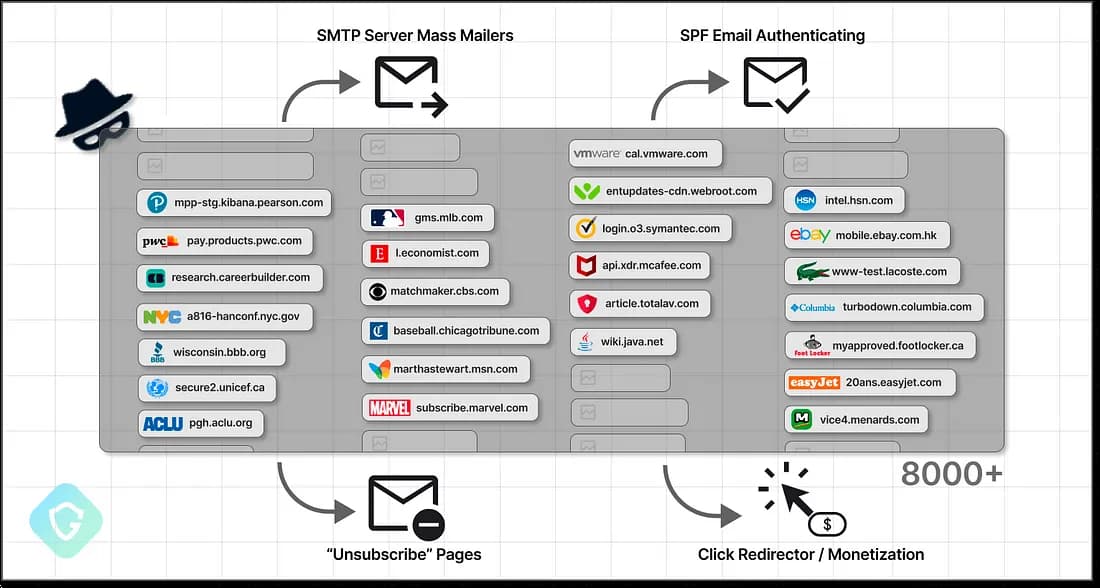
Guardio researchers discovered over 8,000 domains from renowned brands/institutions (MSN, VMware, McAfee, The Economist, Cornell University, CBS, Marvel, eBay). Researchers dubbed this activity “SubdoMailing,” which exploits users’ trust to circulate spammy phishing emails.
They called it a classic subdomain hijacking scheme because it involves scanning and enumerating domains for forgotten subdomains, registering them, and using SPF records to send malicious emails. This can lead to unauthorized access to SMTP servers and valuable assets for hackers.
The sample email researchers analyzed was disguised as an image to bypass spam filters, trigger click-redirects through various domains, targeting device type and location to display content tailored to maximize profit. This unique scheme raises questions about how it bypasses authentication and security checks with major email providers.
The evidence suggests a single threat actor, “ResurrecAds,” is responsible for a large-scale operation scanning the internet for “vulnerable domains, identifying opportunities, purchasing domains, securing hosts and IP addresses, and orchestrating email dissemination,” researchers noted.
Their strategy involves reviving domains affiliated with big brands, exploiting legitimate services and brands, and circumventing email protection measures, demonstrating their sophisticated technical sophistication.
One of the examples of an abandoned domain being abused in the scam (Credit: Guardio Labs)
The study revealed thousands of active cases of CNAME-takeover and SPF-takeover, which involve stealing abandoned domains of old email/marketing services. These attacks have been ongoing for at least two years, allowing attackers to easily inject their IPs into the domain’s SPF records using the main domain name as the sender.
“Given these sophisticated tactics, we’re clearly facing a formidable operation characterized by significant expenditure and substantial revenue.”
Researchers have launched a “SubdoMailing” checker website, enabling domain administrators and site owners to quickly identify and address any abuse detected, ensuring domain security.