Google Messages is now an essential app for billions of people globally in this fast-paced age of communication. Google Message provides a smooth experience for anything from short text messaging to sharing images and videos.
The capability to edit messages after they have been delivered, on the other hand, has proven to be elusive thus far. The exciting news that Google Message will soon include an edit message option is examined in this article, along with how this much-needed addition will improve our messaging experience.
Google Message’s new edit message feature
You may view the modified message’s change history in Google Messages as well. The source states that there is a string called “Original message.” Additionally, there is a time limit on message editing. Only messages sent within the past 30 minutes are editable.
Moreover, the source validates their results following many further weeks of work by the Google Messages team. After changing a few settings, he was able to access the edit message capability in the most recent beta version of Google Messages (messages.android_20240213_01_RC00.phone.openbeta_dynamic).
It seems that Google still has to complete certain tasks before releasing the Messages Edit feature. The leaker noticed that his altered messages appeared as distinct texts in a group RCS discussion, indicating that the functionality is presently not functioning as intended. Additionally, it appears that both participants must have the Edit option selected to edit a sent message in Google Messages.
According to AssembleDebug, Google might release the feature of editing sent messages in Google Messages at the end of February or the beginning of the next month in the app’s beta channel. Keep in mind that normal text messages will not have the ability to modify delivered texts in Google Messages; only RCS conversations will have this feature. SMS does not allow alteration of transmitted text messages, even though it has been around for a few decades.
Will the recipient know that a message has been edited?
Google Messages app will display that a message has been modified using a modest signal to ensure transparency in communication. This signal, which shows that modifications have been made, will show up next to the message that has been modified. To protect privacy and minimize misunderstanding, the recipient will not be able to see the precise changes that were made.
How does it work?
A user only needs to tap on a message and choose the edit (pencil icon) option to change it. The message editor will then open, allowing them to make the required adjustments. When the changes are finished, the recipient receives the modified message automatically, replacing the previous one. Even if changes are made after the message has been read, this easy procedure guarantees that everyone agrees.
Google just released the first Android 15 Developer Preview. It’s actually a week later than it was last year for Android 14, but where Google is getting away from their monthly release dates for updates these days, we might be able to expect that a bit more.
It first leaked earlier this week on February 15, which was the release date for the first developer preview for Android 15. But it looks like it was pushed back a day to February 16. It’s being called “Android V” internally, with it being called “Vanilla Ice Cream” internally.
There’s not a lot of new user-facing features in Android 15 so far. This is quite common with the past few Android releases. Google normally keeps a lot of the new user-facing features for the first beta or two, which is released during Google I/O in May.
What’s new in Android 15
The first developer preview for Android 15 focuses on three main areas: prioritizing privacy and security, supporting creators, and helping developers manage heat and processing power better.
As with every Android release, Google is working on prioritizing privacy and security, and in Android 15, they are incorporating the latest version of Privacy Sandbox, which will improve user privacy and add new APIs to the FileIntegrity Manager to help protect files that could compromise a developers app.
On the creator front, Google is adding more extensions that will allow for precise control of camera hardware so creators can take advantage of high-end camera capabilities. Google is also refining the OS before the final consumer release so that developers can leverage premium hardware features like power GPUs and AI processing so developers can deliver top-tier app experiences to their users.
Finally, Google is adding new capabilities to the Android Dynamic Performance Framework. This is going to help developers optimize thermal, CPU, and GPU management so that performance-intensive apps and games work more efficiently.
As mentioned before, there’s not a lot of user-facing features in this developer preview, it is mostly under-the-hood things that are going to help developers make your phone even smoother. We do expect to see some user-facing features coming in the first beta, which is set for April.
Google is going to do two developer previews, followed by four betas starting in April, with the final release being after that fourth beta in July. This time around, Google is not putting a month for the “Final Release” like they’ve done in the past. So it could be anywhere from August to October.
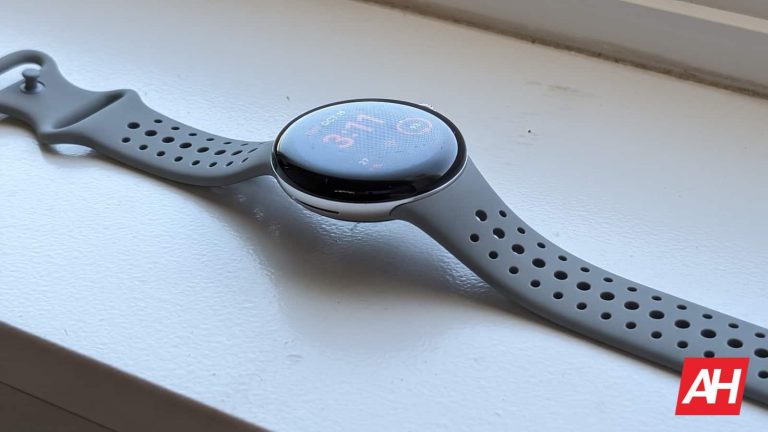
The Google Pixel Watch (Review) was one of the most popular and anticipated devices of 2022. The wearable launched with RAM and storage comparable to the competition. However, it appears that Google didn’t originally intend for it to. According to a new report, a Reddit user accidentally bought a prototype of the Pixel Watch, and the specs were pretty surprising.
As we know, the Google Pixel Watch launched with 2GB of RAM and 32GB of storage. Sure, that may sound like what you would have gotten on a 2015 mid-range phone, but that is a lot for a modern smartwatch. This lends to the performance and the number of apps that you can download on the device.
However, the Pixel Watch prototype had specs that were not quite robust
A Reddit user ordered a Pixel Watch that had some extreme burning on the screen, along with terrible performance and spotty charging. When they tried to reset the watch, the watch said that it had “less than intended Ram”, and asked if they still wanted to pair it.
Upon entering the fastboot mode, the user saw that this model had only 1GB of RAM and only 8GB of storage. That’s half the amount of RAM that the Pixel Watch debuted with and a fourth of the storage. In the post, the user stated that this was possibly a scam or a knockoff. However, it appears that this is a prototype of the Pixel Watch.
Looking at the specs, it appears that, somewhere along the line, Google planned on giving this watch very mild specs. While smartwatches typically have pretty modest specs, only 1GB of RAM and 8GB of storage would have definitely been a major letdown.
This is especially true because it is one of the pricier smartwatches on the market. The cheapest version of the Pixel Watch costs $349.99. If Google launched this watch at that price with those specs, people would not have liked that.
In any case, the user said that they had shelled out for a used Galaxy Watch 5. So, life goes on.
While a new version of Android is always exciting, it’s also sad. As this generally means that a phone or two will be getting support dropped. And this time around, it’s the Google Pixel 5a.
The Google Pixel 5a is guaranteed to get updates until August 2024 – that’s Android and security updates. This could be when Android 15 launches, but Google also mentions in their blog post today that the developer preview is available for the Pixel 6 and later. That means the Pixel 5a is definitely not going to see Android 15 – officially, at least.
On that note, this will be the last major Android update that the Pixel 6 and Pixel 6 Pro will see actually, as their guaranteed Android updates end in October 2024. However, they will continue to get security updates until October 2026.
This marks the first Android update that will only be available for Pixels running on Tensor chipsets. Not that it matters much since this is going to be available for many other devices, not running Tensor, either.
Android 15 developer preview is available for Pixel 6 and later
If you have a Pixel 6 or later, and you want to run the developer preview on it, feel free to go ahead. But keep in mind that you do need to flash the entire image onto your phone. This means you’ll be losing all of your data, as your phone will be wiped. It also won’t be very stable at all, so we recommend holding off from updating your daily driver, at least until the betas start in April.
Google purposefully makes the developer previews tougher to install because they are pretty rocky and really only meant for developers. And not everyday people who might flash it onto their daily driver. As that can cause a lot of issues. But if you’re brave enough, here’s how you can flash the image.
Working in the technology industry has been particularly tumultuous over the past year or so, as the sector has been rocked with extensive layoffs. There was once a time when it seemed like there was no limit to the growth that big tech companies could experience. However, a lot has changed in the tech industry, and we have new numbers to qualify just how volatile it has been. Just last year, more than 250,000 workers in the tech industry were laid off. More importantly, the biggest tech companies were the worst offenders.
The totals are courtesy of layoffs.fyi, a layoff tracker for the companies in the tech sector. It was started following the COVID-19 pandemic in 2020, and is the most expansive database of tech layoffs available on the internet. According to the site, 1,191 tech companies are known to have laid off employees in 2023. Those layoffs resulted in 262,735 employees being laid off. They are just the ones we know about, too. It’s likely that the real total is higher than that. More people in the tech industry were laid off last year.
Meta and Google laid off the most workers in 2023
Notably, the biggest companies in the tech industry laid off the most workers last year. This contrasts from what is usually the case, when startups fold and experience mass layoffs while large corporations continue to rise. In fact, two of the largest companies — Meta and Google — have continued to layoff employees in the name of efficiency. Meta laid off more than 20,000 employees in 2023, which is the most by any one company. Google eliminated 12,000 jobs to start last year as well, setting the tone for what would follow.
A common theme amidst these widespread layoffs is the focus on “efficiency.” Due to potential overhiring and redundancy, many of the companies said the layoffs were aimed at efficiency.
Will more workers in the tech industry be laid off in 2024?
Unfortunately, it doesn’t look like this year holds a better outlook. We are just over a month into 2024, and there have been plenty of layoffs already. In fact, layoffs.fyi reports that 154 companies in the tech industry laid off 24,496 workers so far. Some companies are even preparing their employees for the worst. Google laid off thousands of workers to start this year, and its CEO Sundar Pichai told employees to expect those layoffs to continue. We don’t know what the future holds, but it’s a rough time to be working in tech.
Well, the GoldPickaxe Trojan does not literally steal your face, but it does steal an image of your face in order to be able to identify as you.
Researchers have found a family of Trojans, attributed to a financially motivated Chinese group, which come in versions for iOS and Android.
Cybercriminals try to trick victims into scanning their faces along with identification documents. The victims are approached through phishing and smishing messages claiming to be from local governments or other trusted sources. They ask the target to install a fake government service app.
At this stage there is a crossroads where Android and iOS infections are different. While Android users go straight to the malicious app, due to measures taken by Apple the criminals ask the iOS users to install a disguised Mobile Device Management (MDM) profile. MDM allows a controller to remotely configure devices by sending profiles and commands to the device. As such MDM offers a wide range of features such as remote wipe, device tracking, and application management, which the cybercriminals take advantage of to install malicious applications and obtain the information they need.
The criminals then request that the victim take a photo of an official ID and scan their face with the app. Additionally, the criminals request the target’s phone number in order to get more details about them, particularly their bank accounts.
Once the criminals have a scan of the face they can use artificial intelligence (AI) to perform face-swaps. Face swapping is a technique that allows you to replace faces in images with others.
With the face swap and the photo of the ID the criminals can identify themselves as the victim to the victim’s bank and withdraw funds from their account. Many financial organizations use facial recognition for transaction verification and login authentication. Although the researchers found no evidence that bank fraud was the goal of the cybercriminals, their story was confirmed by warnings from the Thai police.
Although this group is mainly active in Asia, more precisely in Thailand, it makes sense to expect such a successful method to be copied.
Malwarebytes and ThreatDown solutions detect the GoldPickaxe Trojan as Android/Trojan.Agent.prn1.
We don’t just report on phone security—we provide it
We are now firmly on the road to Android 15, with Google releasing the first developer preview on February 16, 2024. This is not typically when Google releases developer previews and betas; usually, that’s on a Wednesday. But Google did mention late last year that it was moving away from its typical release schedule and will release updates, betas, and previews when they are ready.
That is a week after Android 14 started last year, with the first developer preview dropping on February 8, 2023.
In this article, we are going to tell you everything you need to know about Android 15 and update you throughout the developer preview, beta, and stable stages of the life of Android 15 until Android 16 launches in late 2025.
What will Android 15 be called?
Publicly, Google has dropped dessert names from new versions of Android. However, it is still used internally, and Android 15 is using the letter “V”. So Android 15 is referred to internally as Android V or Vanilla Ice Cream. This follows Upside Down Cake for Android 14 and Tiramisu for Android 13. Here are the most recent versions of Android and their dessert names. Wonder what Android 16 will be with “W” next year?
Android 10 – Quince Tart
Android 11 – Red Velvet Cake
Android 12 – Snow Cone
Android 13 – Tiramisu
Android 14 – Upside Down Cake
Android 15 – Vanilla Ice Cream
When will Android 15 be released?
Typically, Google will put out a developer preview or beta every month until August. Then, in either August, September, or October, the final stable version will start to roll out. This has moved around a bit in recent years, being as early as mid-August for Android 13 in 2022 or mid-October for Android 12 in 2021 and Android 14 in 2023. Here are the stable release dates for previous Android versions:
Google has, in the past, released new versions of Android well ahead of the new Pixel release. So don’t think that Google is waiting for the Pixel 9 announcement to release Android 15; that’s not happening.
What’s the developer preview and beta schedule?
The first developer preview launched on February 15, 2024. We typically get a new developer preview or beta just about every month. The full schedule is below.
We’re expecting two developer previews in February and March. Then, the beta cycle begins in April, with four betas each month until July. After that is the final release, which Google is not adding a month for this time around; it could be as early as August or as late as October, as we’ve seen in recent years.
Developer Preview 1 – Released on February 16, 2024
What devices will get Android 15?
Right now, we can only speak to the Google Pixel range of smartphones. Google says that the Pixel 6 and later will be the only devices on the schedule for getting Android 15. Here’s the complete Pixel list:
Google Pixel 6
Google Pixel 6 Pro
Google Pixel 6a
Google Pixel 7
Google Pixel 7 Pro
Google Pixel 7a
Google Pixel Fold
Google Pixel Tablet
Google Pixel 8
Google Pixel 8 Pro
We’ll need to wait until the fall to see what devices from other manufacturers will get updated to Android 15. For the developer preview, you’ll need to flash the image onto your Pixel device.
What features is Android 15 bringing?
So far, Android 15 is very developer-focused, hence the “developer preview” state. So the majority of the changes are under-the-hood changes that developers and OEMs will be able to take advantage of on their apps and their phones. But here’s a short list of what we have so far.
User Privacy and Security
As with every new Android release, Google is focusing on protecting user privacy and security with a few pretty major changes. First up is the Privacy Sandbox on Android. Android 15 brings this to extension level 10. That will incorporate the latest version of the Privacy Sandbox on Android. It’s part of Google’s work to develop new technologies that improve user privacy and enable effective, personalized advertising experiences for mobile apps.
Next up is Health Connect. This is the app that allows you to sync your health data between different apps like Google Fit, Fitbit, and Samsung Health. Android 15 brings extensions 10 around Health Connect by Android, which brings support for new data types across fitness, nutrition, and more.
Android 15’s FileIntegrityManager gets new APIs that will tap into the power of the fs-verity feature in the Linux kernel. With fs-verity, files can be protected by custom cryptographic signatures that will help you ensure that they haven’t been tampered with or corrupted.
Finally, Google is adding partial screen sharing. Allowing you to share or record just an app window rather than the entire device screen.
Supporting Content Creators
It’s obviously essential for Google to support content creators; after all, they do own YouTube. But with Android 15, Google is adding better in-app camera controls that can be used in other apps. Developers will get better support for using features of high-end cameras, like the 200-megapixel camera on Galaxy S24 Ultra.
Android 15 is also extending UMP support to virtual MIDI apps. This enables composition apps to control synthesizer apps as a virtual MIDI 2.0 device just like they would with a USB MIDI 2.0 device.
Performance
Google is also making some changes to improve the performance and quality of apps across all of the Android devices on the market. The Android Dynamic Performance Framework is getting updated. Which now has a new power-efficiency mode for hint sessions to indicate that there associated threads should prefer power saving over performance.
GPU and CPU work durations can both be reported during hint sessions, which is going to allow the CPU and GPU to adjust the frequencies together to best meet workload demands. Thermal headroom thresholds are also added, which will interpret possible thermal throttling status based on headroom prediction.
More to come
Generally, the first couple of updates for a new version of Android are geared towards developers. Give them more time to get their apps ready for the final release of Android 15 by releasing some of the APIs now. The APIs won’t be final until the June beta release, however.
User-facing features will likely come in the first beta, which is set for April.
When will my phone get Android 15?
It’s tough to really say right now when your phone might get updated to Android 15, especially since we’re still so many months away from the stable release. However, Pixel devices should be first in line to get the update. The Pixel 6 and newer should be updated this time around, with support for Pixel 5a getting dropped. Samsung has also been pretty quick to roll out updates for new versions of Android, and it’ll likely come with One UI 7 around October or November.
As for other manufacturers, we’ll have to wait until this Fall to know for sure.
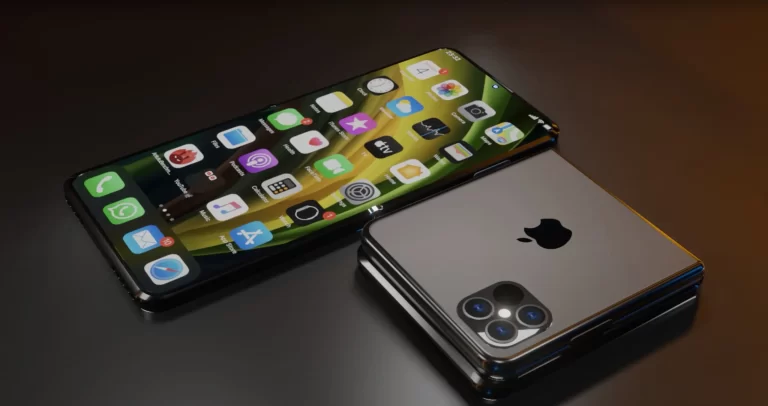
Apple‘s foldable plans may have hit a roadblock. According to a tipster, the company has temporarily halted the development work due to display issues. Its early display tests have reportedly failed. It is unclear whether this will delay the launch of the first foldable iPhone.
Apple faces a display setback in foldable iPhone development
Foldable smartphones have existed since 2019, but Apple has not entered the scene. The Cupertino-based tech behemoth, which overtook Samsung to become the world’s largest smartphone vendor in 2023, isn’t rumored to release a foldable iPhone before 2027. At the earliest, it might debut the first-gen model in 2026. To put that into perspective, Samsung will introduce its eighth-gen foldables in 2026.
Apple is likely taking its time to perfect everything, from the design and specs to the build quality and durability. Perhaps eliminate the display crease too. A tipster on the Chinese microblogging site Weibo says the company has purchased a bunch of existing foldable phones from various brands and is thoroughly examining them. Its research and development team has dismantled the device to dive into the internal structure.
The iPhone maker may be looking at how each company has done things differently and learning from them. All of this might eventually help Apple determine the areas where it can do better than the competition. That’s one way to go about a product that still needs a lot of refinement. However, the source adds that the firm has temporarily shelved its foldable project. Its display team allegedly “failed to pass the screen test.”
It’s worth mentioning here that the Weibo post is written in Chinese. We used Google Translate to translate it into English. There’s a possibility that something was lost in translation. However, from what we can see, Apple’s foldable project isn’t progressing smoothly. Roadblocks aren’t uncommon when you are doing something new. It remains to be seen whether this temporary halt affects the launch timeline.
Apple could first launch a folding iPad
There is a lot of uncertainty around Apple’s first foldable product. Some industry experts believe the company will launch a folding iPad ahead of a folding iPhone. We should get a clearer picture as the development progresses. While Apple does a better job at plugging leaks than the likes of Google and Samsung, a few of them sneak out once in a while. We will keep you posted accordingly. In the meantime, Samsung is gearing up to launch its sixth-gen foldables—Galaxy Z Fold 6 and Galaxy Z Flip 6—later this year.
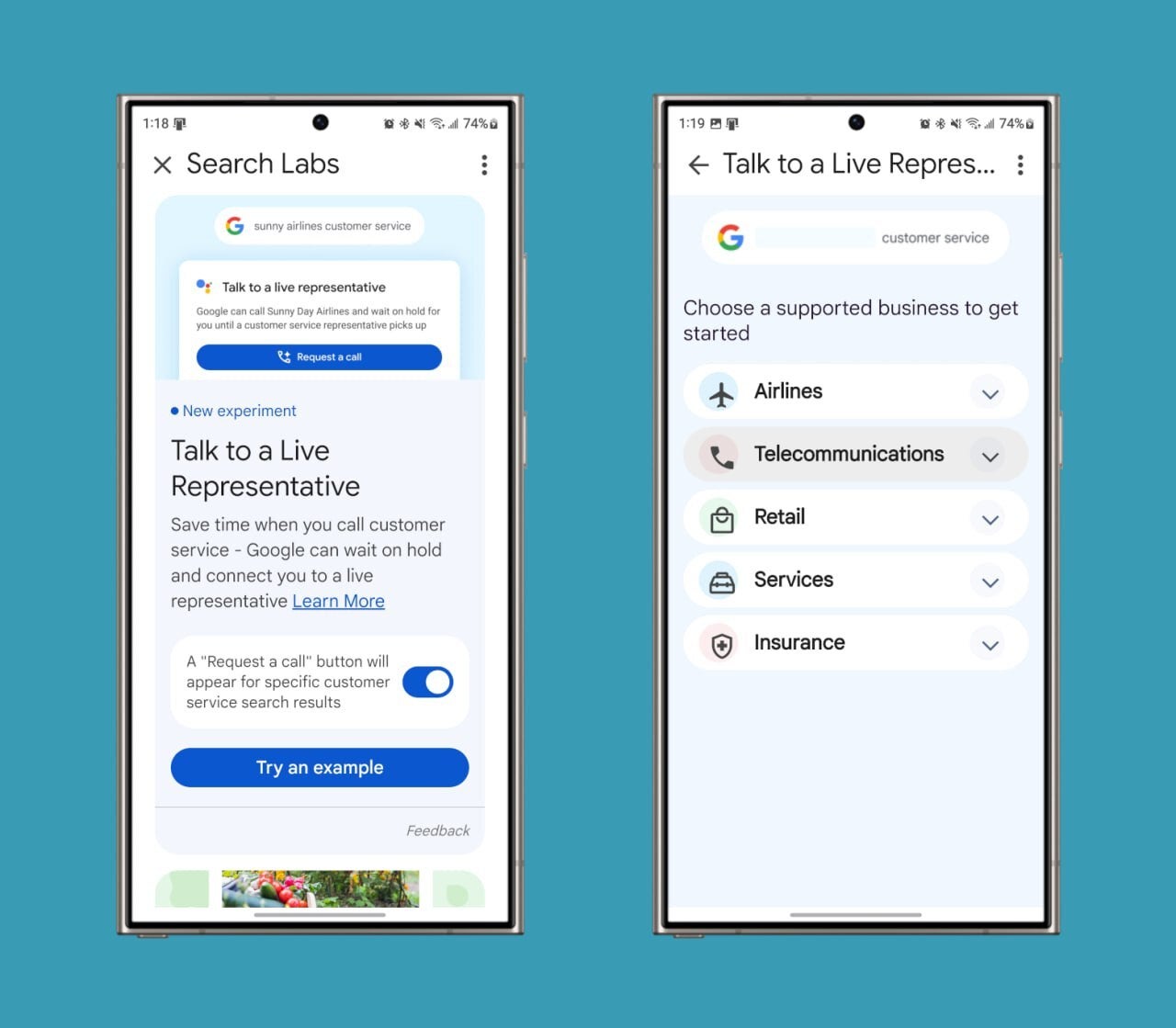
Google is currently rolling out a new feature in its Search Labs called “Talk to a Live Representative” that is very similar to its Pixel-exclusive “Hold for Me” feature, except it would make it available to other devices. This could make in many cases the dreaded task of calling customer service and waiting on hold a thing of the past.
Here’s how it works: You can enable this in the Google App by tapping on the “Search Labs” button in the top left. Then a “request a call” button will appear for specific customer service search results. You will then see a “Talk to a Live Representative” option.
Following those steps, Google then handles the calling process for you, navigating the automated systems and waiting on hold. Once a live representative is available, Google will then place a call to your phone, saving you valuable time.
Users start by providing a reason for their call and a phone number to be reached out for text message updates. The system also displays an estimated wait time and the option to cancel the request at any point during the process.
This process may sound extremely familiar to Google Pixel users who have been enjoying the “Hold for me” feature on their devices for some time now, moving the starting point from the Phone app to the Google search page instead. This feature will be initially available in the United States for Google Search Lab users on the Google app (on both iOS and Android) and on the desktop.
As reported by 9to5Google, a wide range of industries are included, from airlines like Delta and United to mobile carriers like T-Mobile and Sprint and household retailers like Walmart and Best Buy. Insurance, delivery, and waste management services are also supported.
The notorious SpyNote Android spyware returns, exploiting Accessibility APIs to target crypto wallets and unsuspecting users, ultimately stealing their cryptocurrency.
The Android spyware SpyNote developers are now considering cryptocurrencies, extending beyond mere credentials spying to initiate cryptocurrency transfers, revealed the latest research report from FortiGuard Labs.
Researchers noted that Spynote, a notorious Remote Access Trojan (RAT), is now targeting “famous crypto wallets” by abusing the Accessibility API. The API’s job is to automatically perform UI actions, such as recording device unlocking gestures and is mainly helpful for people with disabilities.
The malicious code abuses the Accessibility API to automatically fill out a form and transfer cryptocurrency to cyber criminals. It reads and memorizes the destination wallet address and amount, and replaces it with the attacker’s crypto wallet address.
The information is sent to a remote server with which the malware has established a connection already to complete the action. It is worth noting that the entire act is completed automatically, without alerting the user.
According to Fortinet’s blog post, on 1st February, a malicious sample was found posing as a legitimate crypto wallet, incorporating SpyNote RAT and anti-analysis features. They also observed that threat actors are mainly targeting users with mobile crypto wallets or banking applications in this financially motivated, medium-severity hacking saga.
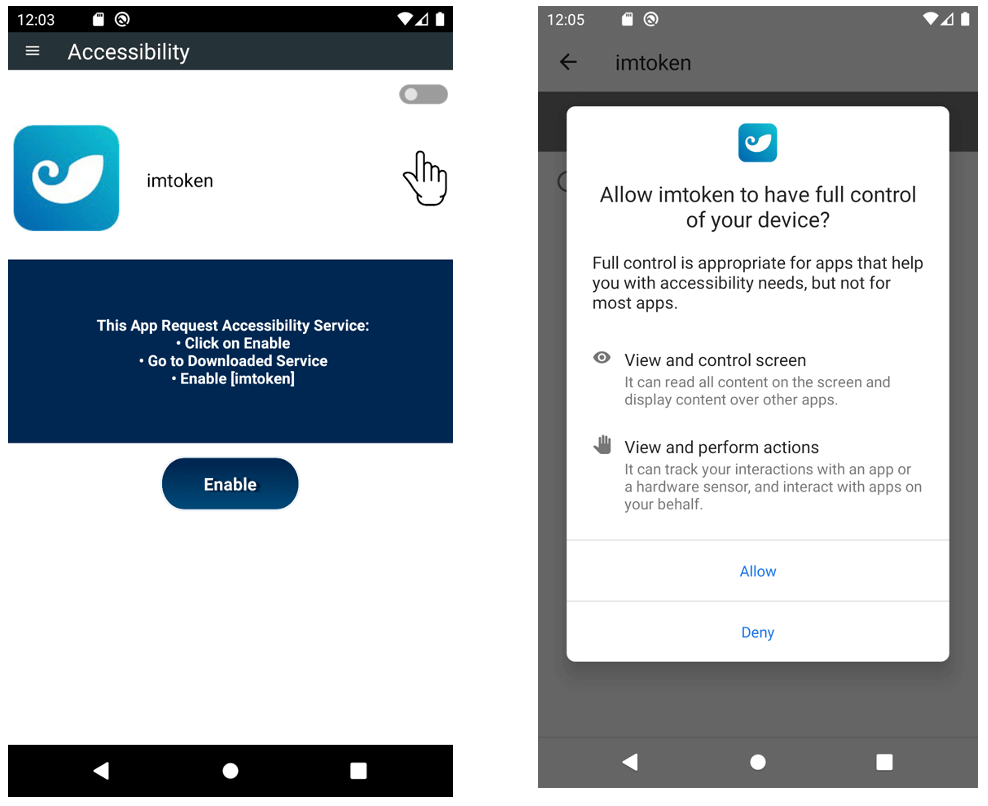
Researchers showed screenshots in which SpyNote malware can be seen requesting Accessibility Service and the user granting access with the Android OS displaying additional warnings. It is evident that clicking on “Allow” signals the malware to perform its nefarious action whereas clicking “Deny” prevents it from gaining access.
Screenshot: FortiGuard Labs
Hackread has been following the evolution of SpyNote ever since it made its first appearance back in 2016 when Palo Alto’s Unit 42 discovered this RAT on a dark net forum mainly targeting users who install APK apps. Researchers noted that SpyNote helped attackers gain remote control of infected devices, and enabled sideloading on Android devices.
In 2017, Zscaler IT security researchers discovered fake apps infected with the SpyNote RAT, allowing attackers to gain remote administrative control on Android devices. Researchers identified various apps, including fake Netflix, WhatsApp, YouTube, Facebook, Photoshop, SkyTV, Hotstar, Trump Dash PokemonGo, etc., infected with a new variant of SpyNote RAT.
Over the years, SpyNote has become a common family of Android malware, with over 10,000 samples and multiple variants, noted FortiGuard researchers.
Last year, the malware authors shifted focus to banking fraud, as the Cleafy Threat Intelligence Team reported SpyNote targeting European financial institutions with social engineering tactics and abusing Accessibility services. The attack started with deceptive smishing campaigns, directing victims to install a “new certified banking app” and granting remote access to their devices.
It is worth noting that malware often lures victims into giving them the necessary rights to access the Accessibility API through different lures, posing a threat to users, especially people with disabilities.
Android users are advised to pay attention to applications requesting the Accessibility API. End-users should treat these requests as suspicious, especially from alleged crypto wallets, PDF readers, and video players.