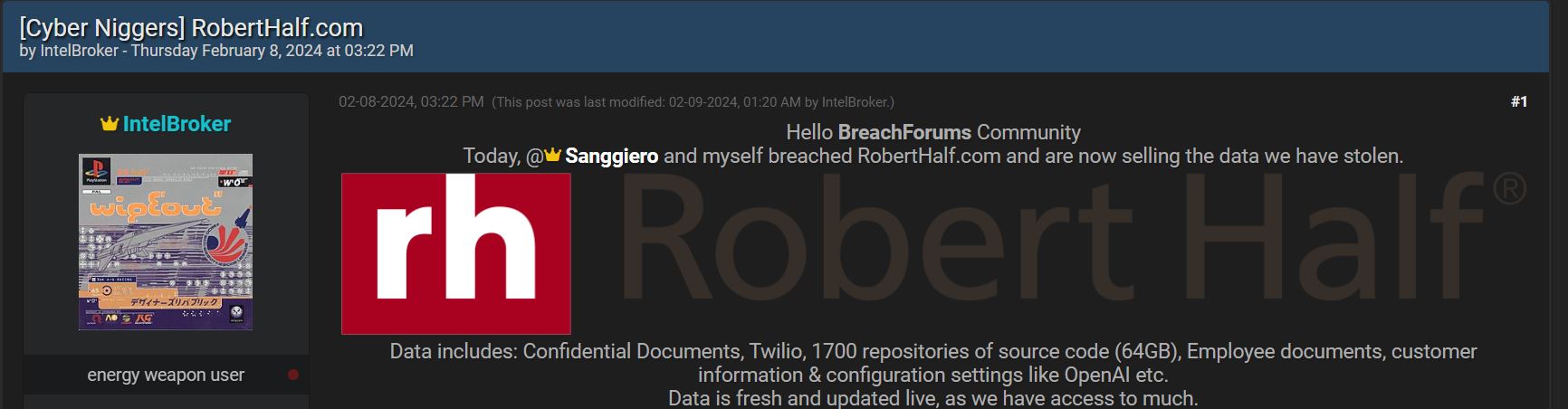
The hackers, infamously known as IntelBroker and Sanggiero, claim to possess a trove of data from Robert Half, which is being sold for $20,000 in Monero (XMR) cryptocurrency.
In June 2022, Robert Half International Inc., a global staffing and business consulting service, filed a data breach notification with the Office of the Maine Attorney General. According to the notification, the company experienced a data breach in which hackers targeted more than 1,000 customers, successfully obtaining their names, addresses, social security numbers, and tax information.
Now, Hackread.com can confirm that individuals operating under the aliases IntelBroker and Sanggiero are claiming responsibility for another breach at Robert Half International. They claim to have successfully breached the company once again, bragging about the theft of a substantial amount of data.
The stolen data is currently being offered for sale on the notorious Breach Forums at the price of $20,000 in Monero (XMR) cryptocurrency. Notably, the data listing initially appeared on Thursday, February 8, 2024, and has remained active since then.
The hackers claim that they breached RobertHalf.com on the same day, indicating that this alleged data breach is separate from the previous one in 2022. However, it remains uncertain whether these are the same hackers responsible for the earlier breach.
IntelBroker on Breach Forum (Screenshot: Hackread.com)
Nevertheless, IntelBroker is already recognized for their high-profile and credible hacks, which include breaches of the Weee! Grocery, General Electric and the most recent data leak involving a partial Facebook Marketplace database.
The Alleged Stolen Data
Headquartered in Menlo Park, California, United States, and established in 1948, Robert Half International holds the distinction of being the world’s first and largest specialized talent solutions firm. With over 325 offices globally, spanning countries such as Australia, Brazil, the UAE, the UK, Germany, Japan, China, and Canada, the company presents a lucrative target for cybercriminals.
In their post on Breach Forums, IntelBroker disclosed that they managed to gain access to confidential records, employee documents, customer information, and configuration settings related to services such as OpenAI and Twilio.
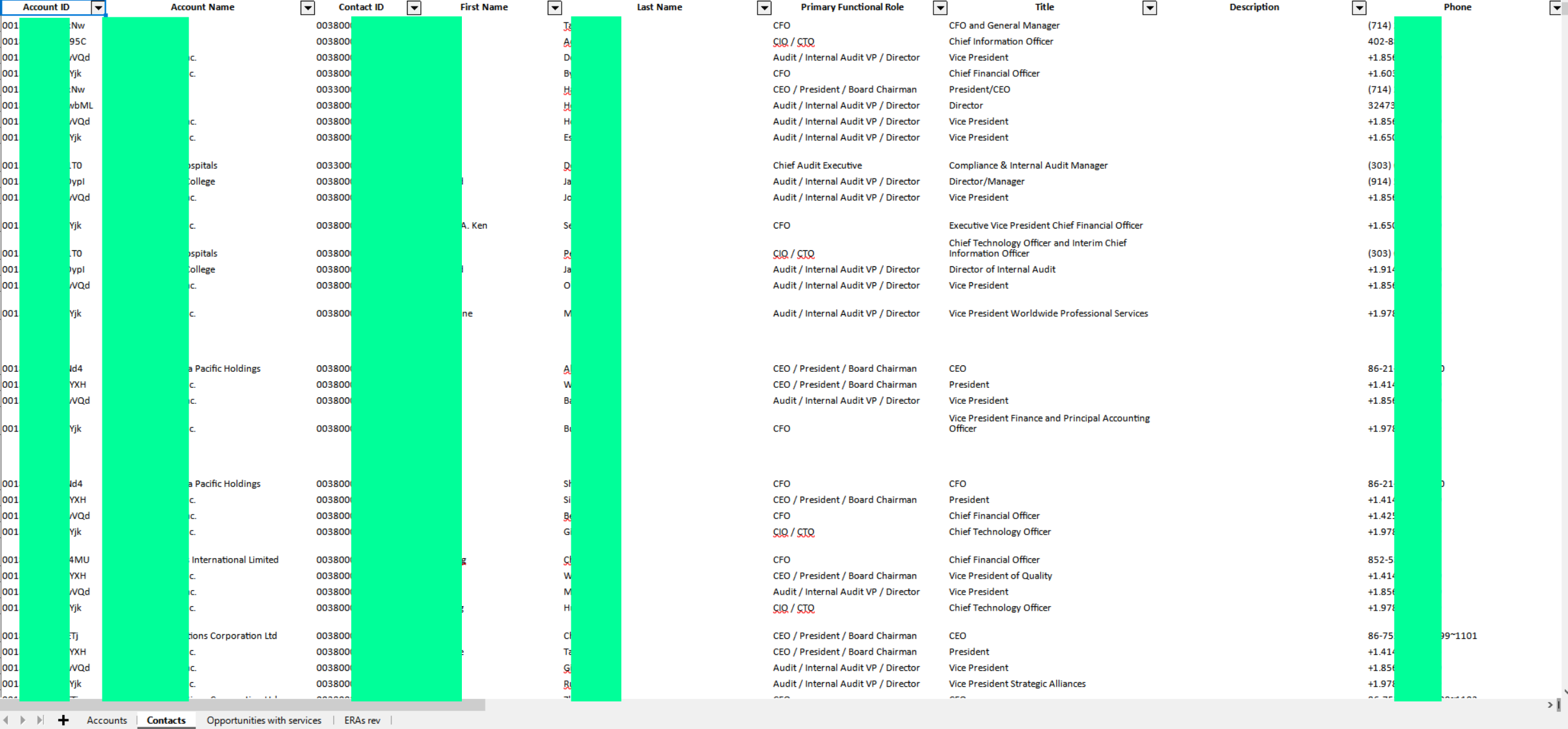
The hackers additionally shared screenshots purportedly displaying the stolen data, Git repositories, and AWS-related system settings. One screenshot appears to reveal a client list, with companies listed under ‘Account Names,’ accompanied by full names, primary functional roles, titles, and phone numbers.
Sample data leaked by the hacker (Hackread.com)
The full scope of the breach and the number of affected individuals remain uncertain. Hackread.com has contacted Robert Half International Inc. for an official statement or clarification. As this is a developing story, the article will be updated accordingly.
Increasing Data Breaches
In the first two months of 2024, there has been a notable increase in data breaches affecting both companies and government organizations. Last week, Infosys disclosed a breach impacting over 57,000 Bank of America customers.
Earlier this month, two major US insurance companies, Washington National Insurance Company and Bankers Life and Casualty Company, reported a SIM-swapping-related breach affecting more than 66,000 customers.
In January, Jason’s Deli fell victim to a significant data breach, exposing the personal information of over 344,000 users due to a successful credential-stuffing attack. Also in January, hackers targeted Indian ISP Hathway, compromising the personal information and KYC records of over 4 million unsuspecting customers.
Google’s three apps that make writing and editing text such a breeze even on mobile devices, Docs, Slides and Sheets, have been updated earlier this week with a bunch of improvements to their comments system.
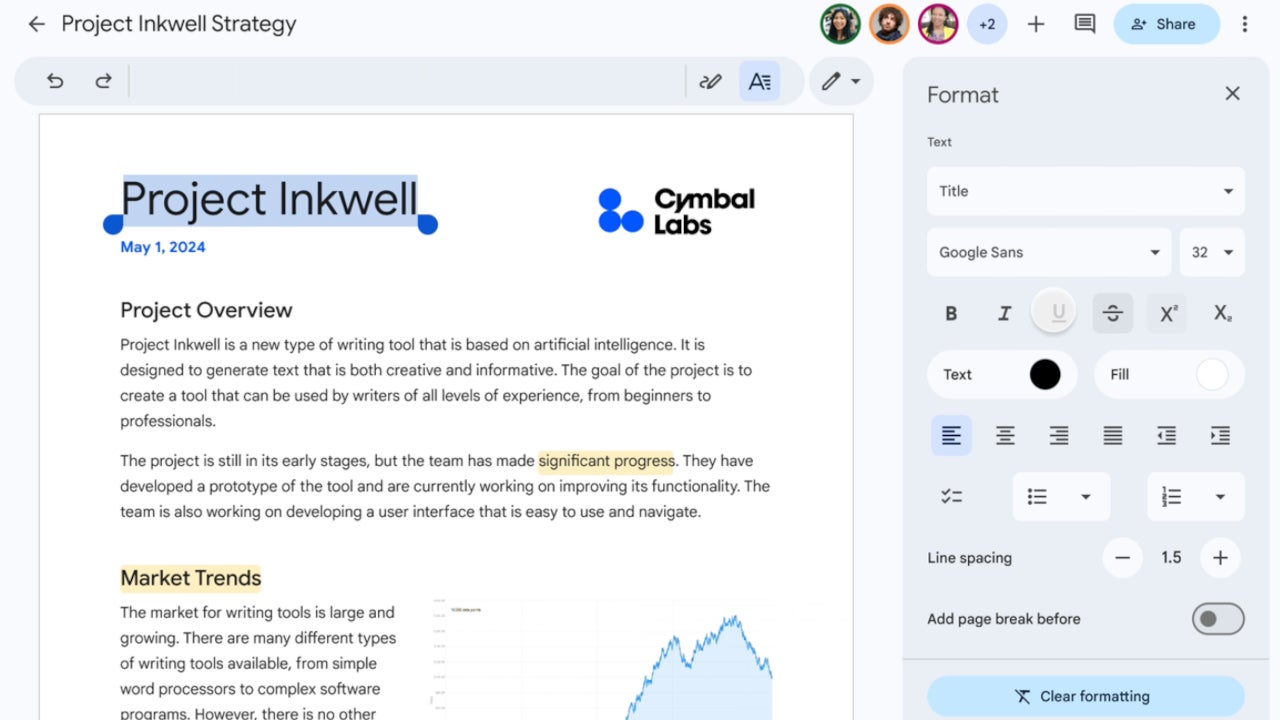
Over the weekend, the search giant confirmed that another important update is making its way to Android users. All three apps, Docs, Slides and Sheets, are getting a new formatting sidebar that reduces the number of taps needed to navigate to formatting options.
Basically, you’ll be able to arrange text, tables, images and more, much easier than before. The new formatting sidebar will be rolled out to Android tablets at the beginning of the next month, Google announced in a blog post.
According to the Mountain View company, the update will be released to Scheduled Release domains on March 6, while users enrolled in the Rapid Release domains should already be able to take advantage of the new formatting sidebar on their Android tablets.
It’s important to add that the new feature is available to all Google Workspace customers, Google Workspace Individual subscribers, and users with personal Google accounts. So, just about everyone who uses Google’s Docs, Slides, and Sheets apps.
In related news, Google announced that its Slides apps is getting another new feature that will allow users to easily drag and drop an image to replace the background in the app.
This feature is currently rolling out to Rapid Release domains and should be launched to Scheduled Release domains on February 26. It will be available to all Google Workspace customers, Google Workspace Individual subscribers, and users with personal Google accounts.
Remember Apple’s television ads for the iPhone 3G? The ad would tell you, regardless of any problem you need a solution for, “There’s an app for that.” When you think about it, for any subject matter that you have an interest in, there’s a podcast for that. And if you are an iPhone user, you probably use the Apple Podcasts app. But until recently, the app had a serious problem that was preventing users from listening to the latest episodes of certain Podcasts stored in the user’s library.
The bug prevents the latest episodes for affected podcasts from showing up as these episodes will not automatically be downloaded. This means that these podcasts won’t appear in the Up Next queue. If the user knows that a new episode for a podcast he/she follows has dropped, the episode can be discovered by looking for the new episode in the app’s search tab. But many podcast app users rely on getting alerted by the app whenever a new episode is ready and thanks to the bug, this is not happening.
Follow the workaround listed below to get the latest episode of a podcast you follow if it is affected by this bug
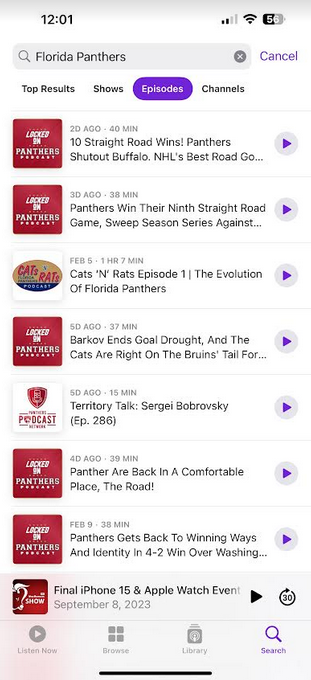
It’s unknown exactly how many podcasts are affected by the bug but complaints on social media seem to indicate that the problem is widespread. And there is the aforementioned workaround. Open the Apple Podcasts app and after tapping the Search tab on the bottom right of the screen type in the name of the podcast you want to hear the latest episode of and tap the blue “search” bar next to the space bar on the virtual QWERTY keyboard. Press the Episodes filter above the search results (which is also below the search bar) and the latest episode will be on the top of the list. Just press the play button on the right of the listing to hear it.
You might not have to do this much longer because some users say that they are now getting new episodes automatically sent to their Apple Podcasts app. If so, that’s good news. If not, try the workaround until your Podcast app is working perfectly again. By the way, if you don’t have the app on your iPhone, click on this link to download it from the App Store.
The #MonikerLink vulnerability (CVE-2024-21413) holds a CVSS score of 9.8 out of 10, indicating critical severity and high exploitability, potentially enabling system compromise with minimal user interaction.
Check Point Research (CPR) has discovered a critical security flaw in Microsoft Outlook. Dubbed the #MonikerLink; the vulnerability allows threat actors to execute arbitrary code on their targeted device. The research, detailed in a blog post, highlights the flaw’s potential to exploit the way Outlook processes certain hyperlinks.
The exploit is tracked as CVE-2024-21413 with a CVSS score of 9.8 out of 10, which means the vulnerability has critical severity and is highly exploitable, possibly allowing an attacker to compromise the system with minimal user interaction. This could lead to complete system compromise, denial of service, and data breach. Furthermore, an attacker could execute arbitrary code, steal data, and install malware.
The issue occurs due to the way Outlook processes the “file://” hyperlinks, leading to severe security implications. Threat actors can execute unauthorized code on the targeted device. CPR’s research reveals that the #MonikerLink vulnerability misuses the Component Object Model (COM) on Windows, allowing unauthorized code execution and leaking of local NTLM credential information.
The vulnerability exploits a user’s NTLM credentials to enable arbitrary code execution through the COM in Windows. When a user clicks on the malicious hyperlink, it connects to a remote server controlled by the attacker, compromising authentication details and potentially leading to code execution. This allows attackers to invoke COM objects and execute code on the victim’s machine remotely, bypassing the Protected View mode in Office applications.
Researchers studied three attack vectors for MS Windows-Outlook 2021: the “obvious” Hyperlink attack vector, the “normal” attachment attack vector, and the “advanced” attack vector. The “obvious” Hyperlink attack vector involves sending emails with malicious web hyperlinks, posing security risks in browsers.
The “normal” attachment attack vector involves the attacker sending a malicious email and luring the victim to open the attachment. The Advanced attack vector, the Email Reading attack vector, triggers security problems when the victim reads an email on Outlook.
Microsoft Outlook, one of the world’s most popular Microsoft Office suite apps, has become a critical gateway for introducing cyber threats into organizations. Microsoft’s Threat Protection Intelligence team discovered a critical vulnerability (CVE-2023-23397) in Outlook in March 2023 which threat actor Forest Blizzard was exploiting to steal Net-NTLMv2 hashes and access user accounts.
According to CPR’s blog post, the company has confirmed the latest vulnerability in Microsoft 365 environments and notified the Microsoft Security Response Center. Microsoft is yet to respond to the issue. Hackread.com will update readers as soon as more details are shared with the cybersecurity community.
This vulnerability, which extends beyond Outlook, poses a significant risk to organizational security. Both users and organizations are advised to apply patches, follow security practices, and remain vigilant against suspicious emails.
UPDATE: The Samsung Galaxy Z Fold 4 is now getting the Android security update for February 2024 in the US. You can read more about it at the very end of the article.
…
On August 10, Samsung announced a bunch of new products. The Galaxy Z Fold 4 was arguably the most popular among them. This is the company’s new foldable flagship. it is not the only foldable smartphone that was announced during that event, but it is the most powerful one. As usual, there’s a lot to talk about when it comes to this phone. We already have a ton of content on the site, but this article will come in handy if you’d like more information about the device.
In this article, we’ll try to squeeze as much information about the Galaxy Z Fold 4 as possible. You’ll be able to read about its price, general availability, specifications, features, accessories, and more. The Galaxy Z Fold 4 surely is not a cheap smartphone, but if you’d like to experience a foldable smartphone properly, this is one of your best options. Let’s see what the phone has to offer.
When does the Samsung Galaxy Z Fold 4 come out?
The Galaxy Z Fold 4 pre-orders start on August 10, the same day the phone launched. The phone will become available to purchase starting on August 26.
How much does the Samsung Galaxy Z Fold 4 cost?
The Samsung Galaxy Z Fold 4 comes in three variants, all of which include 12GB of RAM. The phone is available in 256GB, 512GB, and 1TB storage options. The phone’s pricing, for an unlocked variant, is set at $1,799. So, as you can see, its price is the same as last year. That was the price tag of the entry-level Galaxy Z Fold 3 when it launched a year ago. This time around, the options go all the way up to 1TB.
There are plenty of offers in the US for the Galaxy Z Fold 4. Do note that Samsung has some really neat offers, as do the US carriers. So, we’ll talk about those separately.
Samsung offers
Samsung has some pre-order offers in place for the Galaxy Z Fold 4. If you opt to pre-order the device between August 10 and August 25, you will receive a complimentary memory upgrade to double the storage. On top of that, Samsung will give you up to $1,000 off with an eligible trade-in, and a Standing Cover with Pen case. You’ll also get a $100 Samsung Credit.
Samsung also offers Samsung Care+ if you purchase this device, You’ll get 24/7 Samsung expert support, cracked screen repairs for as low as $29, protection against drops and spills, and more. Do note that coverage is available for $8 or $11/month.
AT&T offers
AT&T offers up to $1,000 off the retail price for the Galaxy Z Fold 4. You can get such a discount if you trade in your Galaxy phone. The discount will depend on the device you trade in, of course.
If you pre-order the phone from AT&T, you can get some added perks. Those perks include a free memory upgrade (double the storage), and a Samsung case.
Verizon offers
Verizon offers up to $800 off the Galaxy Z Fold 4 with a select trade-in on a qualified 5G Unlimited plan. You’ll also get a $200 Verizon eCard in that case, if you opt to sign up.
You can also get upgraded to the next storage tier for free if you pre-order the 256GB Galaxy Z Fold 4 from Verizon. The company is also offering, for a limited time, 50 percent off on select Samsung phone cases, 25 percent off select Samsung chargers, and if you buy the Galaxy Z Fold 4, you can get $75 off on the Galaxy Buds 2 Pro.
Where can I buy the Galaxy Z Fold 4?
The Samsung Galaxy Z Fold 4 will become available on August 26 from Samsung.com, Samsung Experience Store, and all major carriers and retailers. You can, however, already purchase the device, and some links are provided below.
What carriers support the Galaxy Z Fold 4?
All major carriers support the Galaxy Z Fold 4.
Which carriers will sell the Galaxy Z Fold 4?
The Galaxy Z Fold 4 will be sold by all major carriers in the country (US), and the world. In the US that goes for AT&T, T-Mobile, and Verizon.
Can I get an unlocked Galaxy Z Fold 4?
Yes, you can buy the unlocked Galaxy Z Fold 4. Both Samsung.com and Best Buy will sell it unlocked. Best of all, you’ll be able to use that device on any US carrier, and as well as MVNOs that run on those networks. So basically anywhere in the US.
What colors are available?
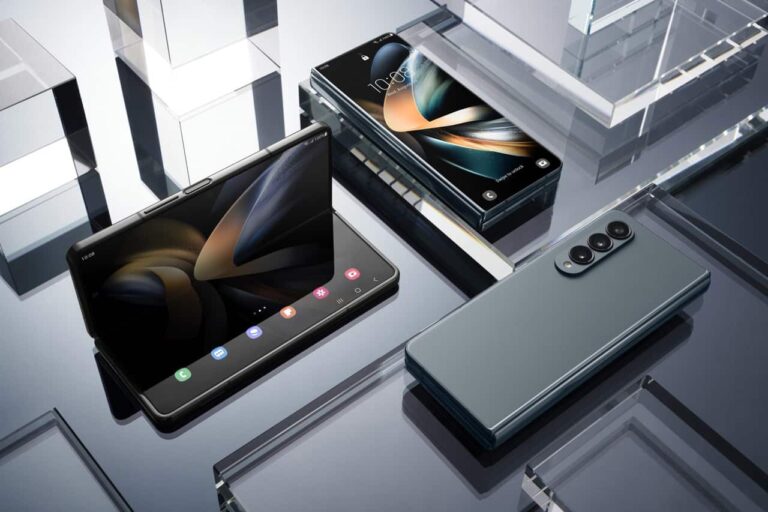
The Samsung Galaxy Z Fold 4 comes in three color variants. The company is using its semi-fancy names for these colors, which are Phantom Black, GrayGreen, and Beige. The first and last are kind of self-explanatory. You’re getting black and beige colors here. The second, well, that’s not the name we’d use for that color, but there you have it. The GrayGreen color is way more gray than green, it actually seems like a gray color with just a little bit of blue in it. In addition to those three colors, however, the Burgundy model is also available, but only exclusively from Samsung.com.
Folded: 155.1 x 67.1 x 15.8mm Unfolded: 155.1 x 130.1 x 6.3mm
Folded: 158.2 x 67.1 x 14.4-16mm Unfolded: 158.2 x 128.1 x 6.4mm
Weight
263 grams
271 grams
Price
$1,799
$1,799
Colors
Phantom Black Graygreen Beige
Phantom Black Phantom Silver Phantom Green Thom Browne Edition Wooyoungmi Edition
Available
Pre-order
Yes
What new features did Samsung unveil?
The Galaxy Z Fold 4 is a smartphone packed with features. Samsung’s One UI skin comes with plenty of added features, on top of what Android delivers on its own. We’ll talk about the most notable ones here, and do our best not to repeat some existing features/changes you’re quite familiar with.
Android 12L
Android 12L comes pre-installed on the Galaxy Z Fold 4. This is actually the very first smartphone to ship with Android 12L, in case you’re unaware. Google created Android 12L as a specialized version of its OS for large-screen devices. That includes both foldable phones and tablets.
Taskbar
With the Galaxy Z Fold 4, Samsung introduced a brand new ‘Taskbar’. Taskbar actually provides you with a layout similar to your PC. It allows you to quickly access your favorite and most recent apps, making you more productive in the process. Do note that this feature is supported on the main screen only.
Multitasking
Multitasking has also been improved on the Galaxy Z Fold 4. Not only because of the ‘Taskbar’, but the new swipe gestures Samsung introduced. You can instantly switch full-screen apps to pop-up windows or enter the split-screen mode. In order to use the new swipe gestures for multitasking, though, you’ll need to activate ‘Labs’ in the phone’s settings.
Improved cameras
The Galaxy Z Fold 4 was announced with the improved camera hardware. The main improvement is in the main camera, as a newer 50-megapixel sensor is used here. It comes with larger pixels, and this sensor allows for 23 percent more light to enter a scene. Samsung also says that image processing has been improved, and that is especially true for low-light scenarios.
Less visible under-display camera
The Galaxy Z Fold 3 was the company’s first smartphone with an under-display camera. That camera was still kind of visible, though, and looked quite odd at the same time. Well, Samsung decided to improve things in that department and claims that the under-display camera is now less visible than before. You can still see it, though.
What accessories are available?
Samsung launched several accessories alongside the Galaxy Z Fold 4, one case, and two S Pen accessories, at least in the US. You can read more about them below.
Standing Cover with S Pen
The Standing Cover with S Pen is the only case currently available for the Galaxy Z Fold 4. It comes with the S Pen, and a holster for it. It also has an adjustable kickstand to hold your screen up to a comfortable angle of 55 degrees. Graygreen, Black, and Sand color options are available, while the case is priced at $89.99.
The S Pen Fold Edition is Samsung’s S Pen stylus which is optimized for the Galaxy Z Fold 4. It has a precise 1.5mm tip, and low latency for easy and accurate writing, sketching, and drawing. It’s available in a black color only. This S Pen is priced at $49.99.
The S Pen Pro is a more advanced offering from Samsung, in comparison to the S Pen. How? Well, this one comes with Bluetooth built-in. That way, you can use it as a remote as well. The S Pen Pro can be yours for $99.99.
Samsung has started rolling out a new security update to the Galaxy Z Fold 4. Users in the US are now getting the February 2024 Android security update. The rollout is staged, and it’s coming over-the-air (OTA). It is now rolling out to factory-unlocked models. This update comes with a firmware version ‘F936U1UES4EXAD’, and the rollout started on Metro PCS and T-Mobile networks, but it will soon spread to other carriers. This update fixes 72 security vulnerabilities, but it doesn’t bring any new features, as expected.
Based on Deutsche Telekom’s statement, this AI assistant will “understand your goals and take care of the details”. So your voice commands are essentially supposed to get this AI assistant to do things for you.
It’s supposed to be able to conduct various tasks you ask of him, including planning trips, shopping, and even creating video clips, and editing images for you, if that’s what you need. This does sound great, but we wonder how well will it work considering the scope of actions you can do via your phone.
Now, Deutsche Telekom also says that it’s creating an interface where this AI assistant would be able to predict the next task you may ask of it. Needless to say, the AI aspect is powered by Brain.ai, one of Deutsche Telekom’s partners.
The cloud will play a huge part in how this device functions
All the smarts will be conducted in the cloud, so it shouldn’t put a strain on the phone itself. That would open the possibility of cheaper devices to use this technology.
So, yes, the technology will be demonstrated at MWC 2024, including some prototype phones. Those are not finished products, not at all. In fact, Deutsche Telekom was careful to state that the finished product would take some time to arrive.
Needless to say, this is a big challenge, and many would say that AI is simply not there yet. It will be interesting to see this device(s) in action, that’s for sure.
The highly anticipated first software update for the Galaxy S24 series is finally here. For real, this time. Samsung has begun the rollout in South Korea, its home country. It should soon release the update in other markets, including the US. Along with the February security patch, the update brings bug fixes and performance improvements to the new flagships.
The Galaxy S24 series is getting its first update
On Wednesday, Samsung announced the first update for the Galaxy S24, Galaxy S24+, and Galaxy S24 Ultra. However, much to users’ disappointment, the company said it plans to begin the rollout on February 22. Thankfully, it isn’t making users wait another week, at least not those in South Korea. The update is rolling out in Samsung’s homeland with the firmware build number S92xNKSU1AXB5.
The OTA (over the air) package for the Ultra model weighs just under 555MB. The other two Galaxy S24 models should also receive the update with a similar file size. As Samsung promised, the update introduces a slider to manually adjust the vividness of screen colors after switching to the Vivid color profile in Settings. Previously, the Vivid mode produced similar color saturation as the Natural mode with no option to adjust colors.
The Galaxy S24 series is also getting a host of camera improvements and fixes. A Samsung Community moderator detailed all the changes in a lengthy post. Samsung has improved the quality of backlit shots in high-pixel mode (50MP/200MP) by adjusting the brightness. Night mode gets saturation and white balance optimization for more accurate colors. It has also applied additional color data to make colors pop when shooting in food mode.
Additionally, Samsung has optimized the Expert RAW app to let you explore images in greater detail. For Galaxy S24 Ultra users, this update should improve the clarity of text when zooming in. The company also promises improved videos and photos of fast-moving subjects in backlight conditions captured by the rear camera. You are getting optimizations for photo previews, exposure, and color expression as well.
Another feature update might follow soon
According to the Samsung moderator, some of the features mentioned in this changelog may not be part of this update. Samsung will push a second update to the Galaxy S24 series to add those, and possibly more functional improvements. There is no timeline available for the second update but it might arrive within a few weeks. If you’re using Samsung’s latest flagships, watch out for a new update or check for it from the Settings app.
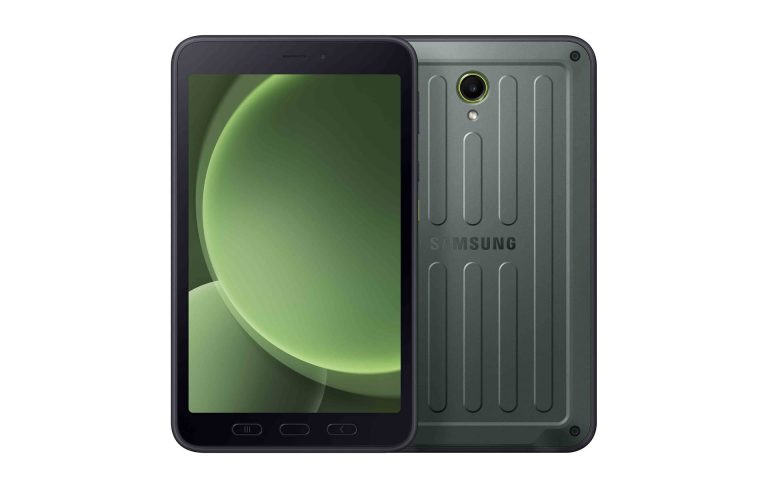
Samsung‘s Galaxy Tab Active 5 is now available in the US. Originally scheduled to go on sale in March, the new rugged Android tablet arrived a few weeks earlier. You can purchase it through the Samsung Business website. The device comes in Wi-Fi and cellular (5G) variants.
Galaxy Tab Active 5 arrives in the US early
Samsung unveiled the Galaxy Tab Active 5 in early January. At launch, the company only announced its pricing and availability details for Europe. It followed up with the US release details about two weeks later. The Korean firm said the new rugged tablet will be available through its business website starting in March.
However, on Thursday, Samsung announced that the Galaxy Tab Active 5 is available for purchase in the US. Its business website lists both Wi-Fi and 5G variants of the device. The former is priced at $548.99, while the latter costs $658.99. You can bring the prices down with eligible trade-ins. Samsung is also offering some freebies and coupons with the devices.
As far as specs are concerned, the Galaxy Tab Active 5 sports an 8-inch TFT LCD screen with a Full HD+ resolution, a 120Hz refresh rate, and Touch Sensitivity. You get Corning Gorilla Glass 5 protection, a MIL-STD-810H military standard build with shock resistance, and an IP68 rating for dust and water resistance. The bundled S Pen is equally rugged and durable.
The tablet is powered by Samsung’s Exynos 1380 processor, the same chipset found inside the Galaxy A54 premium mid-range smartphone and the Galaxy Tab S9 FE series mid-range tablets. Both connectivity variants of the tablet come with 6GB of RAM and 128GB of onboard storage in the US. An 8GB+256GB configuration also exists, but it isn’t available stateside. Thankfully, it supports microSD cards of up to 1TB capacity.
The tablet can be used without a battery
Samsung has equipped the Galaxy Tab Active 5 with a 5,050mAh user-replaceable battery. It charges via a USB Type-C port as well as a Pogo Pin. However, if you continuously use the device, you can run without a battery. There’s a built-in No Battery Mode that directly sends the power to the device, bypassing the battery.
Other highlights of the Galaxy Tab Active 5 include a 13MP rear-facing camera with LED flash, a 5MP selfie camera, Wi-Fi 6, Bluetooth v5.3, NFC, face recognition, a side-mounted fingerprint scanner, a 3.5mm headphone jack, Dolby Atmos audio, GPS, a customizable Active Key, and Samsung Knox security with Samsung Knox Vault. The tablet ships with Android 14 out of the box.
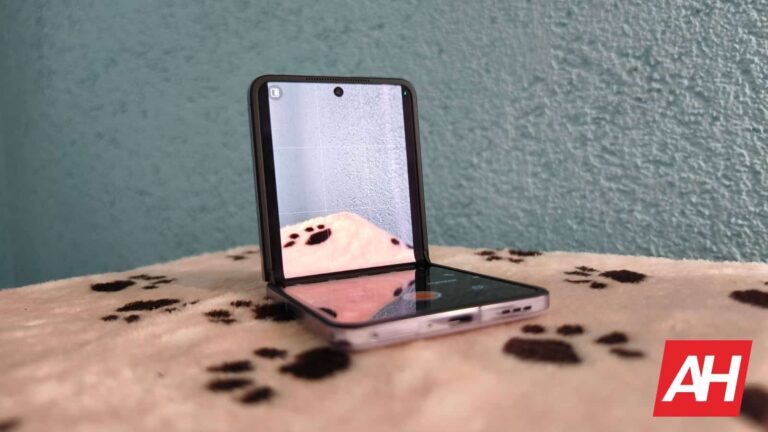
Two major companies may not launch flip phones this year. In a new report, Ming-Chi Kuo mentions that the global sales momentum of foldable phones has slowed down recently.
That is rather interesting, as it has been on the rise for the longest time. In any case, the report states that even huge companies in the space, such as Samsung, are forced to revise their foldable phone shipment targets.
Two major companies may not launch flip phones at all in 2024
What’s even more interesting is that two major players don’t really plan on launching flip phones at all this year. The companies in question are OPPO and Vivo. Do note that the report states that they are not planning to do so in its homeland, China.
Still, those companies almost always launch their devices in their homeland first, before making them available globally. Or at the very least they launch at the same time. So if they’re not planning to launch something in China, chances are that it’s not coming to global markets either.
Vivo didn’t really make a single one of its foldable phones available globally. OPPO is a different story, though. The company’s OPPO Find N3 handset turned out to be a huge success, that device is basically identical to the OnePlus Open, by the way, so that statement goes for both devices as a whole.
OPPO offered two of its clamshell foldable phones in markets outside of China
That is a book-style foldable, though. OPPO also launched two clamshell foldables to global markets, the OPPO Find N2 Flip and Find N3 Flip. Well, it seems like we won’t see their successor this year.
The sales have slowed down in the Chinese market as well. Flip phone foldables were usually more appealing to consumers due to their price tags. It seems like most Chinese brands kind of lost interest in flip phones (at least this year), other than Huawei.
This doesn’t mean that OPPO and Vivo won’t continue offering flip phone foldables in 2025, though. Also, this is just a report from a market analyst, nothing has been confirmed just yet.
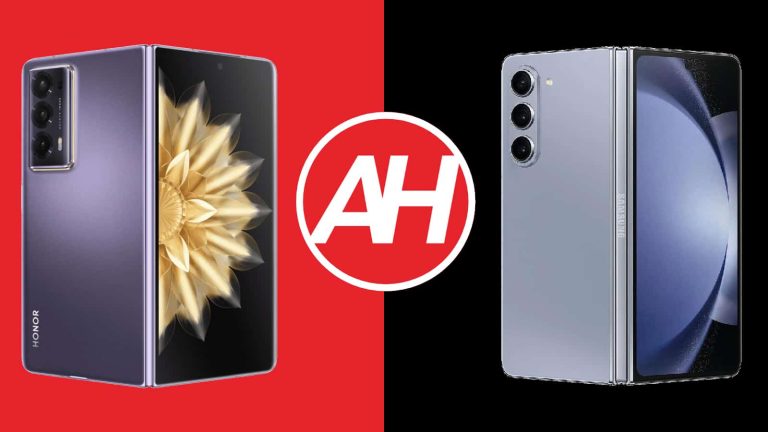
The HONOR Magic V2 was one of the most talked-about, if not the most talked about foldable smartphones in the last couple of months. How does it stack up to probably the best-known one? Well, that’s what we’re here to find out. In this article, we’ll be comparing the Samsung Galaxy Z Fold 5 vs HONOR Magic V2. The very best foldable smartphone from Samsung vs the best from HONOR.
If you have the option of getting the HONOR Magic V2, now that it’s available outside of China, this may interest you. HONOR really made true strides with the hardware, and the difference truly is interesting. We’ll first check out their specifications side by side, and will then move to compare them across a number of other categories. We’ll compare the two phones’ designs, displays, performance, battery life, cameras, and audio performance.
Specs
Samsung Galaxy Z Fold 5 & HONOR Magic V2, respectively
Both of these devices are made out of aluminum and glass. The HONOR Magic V2 also comes in a variant with a vegan leather backplate. These two phones do feel entirely different in the hand. The HONOR Magic V2 is a much thinner and considerably lighter smartphone. That’s actually one of its main advantages over any other foldable. It’s the thinnest and lightest inwards-folding large-format foldable in the market.
The HONOR Magic V2 measures only 4.7-4.8mm when unfolded, and 9.9-10.1mm when folded. The Galaxy Z Fold 5, on the other hand, measures 6.1mm when unfolded, and 13.4mm when unfolded. The Magic V2 weighs 231 grams or 237 grams, depending on the model. The vegan leather variant is lighter. The Galaxy Z Fold 5, on the other hand, weighs 253 grams. That is a difference you will feel in the hand, that’s for sure.
The Galaxy Z Fold 5 also has a very narrow cover display, narrower than any other regular smartphone. The HONOR Magic V2, on the other hand, has a regular cover display width, thus it’s more useful as a regular smartphone (when unfolded). Furthermore, the crease on the Magic V2’s display is very well maintained, while that’s not the case with the Galaxy Z Fold 5. Both smartphones do fold flat, however.
You will find three cameras on the back of both phones, though those camera islands do look a bit different. The cameras are vertically aligned on both devices. The power/lock key also doubles as a fingerprint scanner on both of these smartphones. Samsung’s foldable does have the advantage of offering an IPX8 water resistance rating, while the Magic V2 doesn’t have any such rating.
The HONOR Magic V2 actually feels like a regular smartphone when you’re holding it in its folded form. When you’re using it too, it’s probably the first smartphone that can say that for itself. That’s definitely not the case with the Galaxy Z Fold 5.
Samsung Galaxy Z Fold 5 vs HONOR Magic V2: Display
Both phones include two displays, one foldable, and one non-foldable. The Samsung Galaxy Z Fold 5 features a 7.6-inch 1812 x 2176 Foldable Dynamic AMOLED 2X panel as its main display. That display has a refresh rate of 120Hz, and it supports HDR10+ content. It also has a 6.2-inch cover display which offers a resolution of 2316 x 904 pixels. That is a Dynamic AMOLED 2X panel with a 120Hz refresh rate. The maximum brightness of these displays is 1,750 nits. Corning’s Gorilla Glass 2 protection is used here.
HONOR Magic V2
The HONOR Magic V2, on the other hand, has a 7.92-inch 2156 x 2344 Foldable LTPO OLED display for its main panel. That panel can project up to 1 billion colors, and it has a 120Hz refresh rate. This display does support HDR10+ content, and it’s IMAX Enhanced. It has a peak brightness of 1,600 nits. The cover display measures 6.43 inches, and it’s an LTPO OLED display. It can also project up to 1 billion colors, its refresh rate also goes up to 120Hz, and it also supports HDR10+ content. This panel has a max brightness of 2,500 nits, and it’s protected by the nanocrystal glass 2.0.
I have to say that all four displays are actually really good. They are vivid, have great viewing angles, and they are also more than sharp enough. They do get bright enough as well, and neither main display feels too plasticky or anything of the sort. It is worth noting that the HONOR Magic V2 has a much less noticeable crease on its main display, though, it’s not even close. Also, its cover panel has a more “normal” aspect ratio, though some of you may prefer the very narrow ratio of the Galaxy Z Fold 5’s cover display.
Samsung Galaxy Z Fold 5 vs HONOR Magic V2: Performance
Both of these phones are fueled by the Snapdragon 8 Gen 2 SoC, but the Galaxy Z Fold 5 has the overclocked version. The Galaxy Z Fold 5 also includes 12GB of LPDDR5X RAM and UFS 4.0 flash storage. The HONOR Magic V2 sports 16GB of LPDDR5X RAM and UFS 4.0 flash storage as well. The Magic V2 does have more RAM, while the Galaxy Z Fold 5 has higher clock speeds, but in order to performance-related hardware, they’re on the same playing field, pretty much.
They do show their power when it comes to performance. Both smartphones do deliver great performance with no lag or anything of the sort. An occasional stutter is present, but that’s pretty much it. Truth be said, we did notice that those happen a bit more frequently on the Galaxy Z Fold 5. HONOR’s MagicOS 7.2 may not be the most modern-looking skin, but it does offer really smooth performance. They both do a fantastic job when it comes to regular, everyday performance, regardless of what you’re doing. They’re great for multitasking, though the Galaxy Z Fold 5 has more features that take advantage of its main display. We’ve enjoyed using it for multitasking a bit more.
In terms of gaming, both of these phones do a really good job. The Snapdragon 8 Gen 2 may not be the best chip Qualcomm has to offer at this point, but it’s not far from it. Even games like Genshin Impact run really well on both of these phones, so if you’re planning to use them for gaming, that’s perfectly fine. They both do get quite warm if you push them with games, but we did not notice any drops in gaming quality after 30-60 minutes of intense gaming. Neither phone got too hot to handle either.
Samsung Galaxy Z Fold 5 vs HONOR Magic V2: Battery
Samsung’s handset includes a 4,400mAh battery, while the HONOR Magic V2 features a 5,000mAh battery. HONOR is using a more advanced silicon-carbon battery in its phone, which explains how the company managed to fit such a huge unit in such a compact body. Is the battery life any good, though? Well, they both offer good battery life, but the HONOR Magic V2 does have an edge, at least that was the case for us.
We were able to get up to 7 hours of screen-on-time on the Galaxy Z Fold 5, but very rarely. It was more like 6-6.5 hours, depending on the day. The HONOR Magic V2 is capable of going over the 7-hour mark on a regular basis, without a problem. Do note that this is based on our mixed usage, with no gaming involved on those days, or very light gaming. We did not baby either phone, and have used them both under Wi-Fi and mobile internet, but mostly under Wi-Fi… for context’s sake.
The Galaxy Z Fold 5 supports 25W wired, 15W wireless, and 4.5W reverse wireless charging. The HONOR Magic V2, on the flip side, has support for 66W wired charging and 5W reverse wired charging. Do note that only the HONOR Magic V2 comes with a charger in the box, the Galaxy Z Fold 5 does not. Also, the Magic V2 does charge a lot faster in comparison, though it lacks wireless charging.
Samsung Galaxy Z Fold 5 vs HONOR Magic V2: Cameras
The Samsung Galaxy Z Fold 5 features a 50-megapixel main camera, a 12-megapixel ultrawide camera (123-degree FoV), and a 10-megapixel telephoto camera (3x optical zoom). The HONOR Magic V2, on the flip side, has a 50-megapixel main camera, a 50-megapixel ultrawide unit, and a 20-megapixel telephoto camera (2.5x optical zoom). The results that these cameras offer are different, though.
Samsung Galaxy Z Fold 5
The Galaxy Z Fold 5 likes to add a bit more saturation to images, while both phones tend to prefer to offer brighter rather than more color-accurate photos. Images during the day are sharp and nice-looking from both phones, though they both can push things a bit too far when it comes to saturation. During the night the Magic V2 tends to brighten up images a bit more, but both of them like lighter photos in lower light with brightened shadows. Ultrawide cameras are good on both phones, while the ones from the Magic V2 do provide a bit more detail, and keep up with the main camera a bit more overall.
Telephoto images look good on both sides, though nothing truly special in all honestly. The differences between telephoto images and the main ones are kind of obvious, especially when the light goes away. All in all, neither phone offers the very best camera performance, but both are really good, and the vast majority of people won’t really care about the difference, in all honesty. Video performance, on the other hand, is good on both, but nothing to write home about. It’s above average, but not outstanding.
Audio
When it comes to speakers, both phones offer stereo setups. The ones on the Galaxy Z Fold 5 are tuned by AKG, and the loudness both smartphones provide is good. Both sets of speakers are also well-balanced, though the ones from the Galaxy Z Fold 5 do provide a bit more oomph.
If you were hoping to get an audio jack on either of these two phones, well, you’ll be disappointed. Neither phone offers it, but you can always utilize their Type-C ports for audio connections. Both phones also come with Bluetooth 5.3 support for wireless audio.