It’s no secret that YouTube TV is testing new features all the time and that many of these features aren’t released in their original form. The ability to watch multiple content streams simultaneously is one of the features that YouTube TV has been testing for quite a while.
Known as “Multiview,” the feature was originally meant to be used for sports programs, but YouTube TV decided to expand compatibility to other types of programs like news and weather.
Recently, YouTube TV announced that it has improved Multiview to allow more customization options. Starting this week, this feature is available to all NBA League Pass subscribers as “Build your Multiview.”
Since it’s only available to NBA League Pass subscribers, you can’t select anything else other than pre-selected games. With “Build your Multiview,” you can customize the combination of up to four games that you want to watch on your screen simultaneously. Here is how you can take advantage of the feature:
Launch YouTube TV on your smart TV.
Click on a live game.
You will see an option to “Watch in Multiview,” which would give you an option to “Build a Multiview.”
Select the games available to build your own multiview.
Besides the YouTube TV subscription, you’ll have to pay $14.99 per month to benefit from the “Build your Multiview” feature. Hopefully, this will expand to all YouTube TV subscribers in the not-so-distant future.
ESET, a cybersecurity firm, has released patches for a high-severity vulnerability identified in several Windows-based security products, including consumer, business, and server security.
The vulnerability tracked as CVE-2024-0353 has a CVSS score of 7.8 and was identified in the real-time file system protection feature of ESET’s products, which handles file operations.
The Real-time file system protection feature on Windows OS is found to be vulnerable in handling file operations. This vulnerability can potentially be exploited and cause security issues.
The vulnerability in question could allow an attacker to exploit ESET’s file operations, which are carried out by the Real-time file system protection feature, to delete files without the required permission, reads the advisory.
The flaw can be exploited by an attacker with low privileges to delete arbitrary files with System privileges. The vulnerability allows an attacker to misuse ESET’s file operations to delete files without proper permission.
Researchers with Trend Micro’s ZDI reported the security defect, and the company has no evidence of in-the-wild exploitation.
DocumentLive Account Takeover Attack Simulation
Live attack simulation Webinar demonstrates various ways in which account takeover can happen and practices to protect your websites and APIs against ATO attacks.
Versions and programs that are impacted
ESET’s Windows antivirus, endpoint, server products, email security, and products for Exchange Server, IBM Domino, SharePoint Server, and Azure are all affected.
Patches for the vulnerability have been released for various products, including NOD32 Antivirus, Internet Security, Smart Security Premium, Security Ultimate, Endpoint Antivirus, Endpoint Security for Windows, Server Security for Windows Server, Mail Security for Exchange Server and IBM Domino, and ESET Security for SharePoint Server.
ESET recommends that customers using File Security for Microsoft Azure migrate to Server Security for Windows Server. However, the list of affected products does not include ESET products that have reached their end-of-life (EOL) status.
Given the high privileges of security products, exploiting vulnerabilities in these applications could have disastrous consequences. ESET advises its customers to apply the available patches as soon as possible.
Stay updated on Cybersecurity news, Whitepapers, and Infographics. Follow us on LinkedIn & Twitter.
Microsoft has addressed a recent issue where its Edge browser was found to automatically import browsing data and tabs from Chrome without user consent. Tom Warren from The Verge also encounteredthis problem after a routine PC reboot following a Windows update last month. Despite repeated inquiries, Microsoft remained tight-lipped on the matter. However, the latest Microsoft Edge update quietly includes a fix for the issue, addressing a feature that wasn’t syncing properly across devices.
The fix provided by Microsoft, to prevent automatic tabs and browsing data import from other browsers to Edge, suggests that the setting controlling the automatic import of browsing data wasn’t syncing correctly across devices. While this resolves the immediate issue, questions remain about the root cause of the problem. Microsoft is yet to provide a detailed response on the matter. This lack of transparency may stem from Microsoft’s history of employing tactics that resemble those used by spyware developers to promote its web browser, notes The Verge.
Microsoft’s past strategies include monthly Windows updates that automatically launch and pin Edge to the desktop and taskbar without user consent. Additionally, prompts or polls occasionally appear to discourage users from downloading competing browsers like Chrome.
Mozilla has commissioned a research paper to explore the tactics that Microsoft Edge uses
The research paper highlights harmful design tactics employed by Microsoft, which contradict the company’s own design guidelines and undermine competition from rival browsers. These tactics extend to subtle methods that steer Windows 11 users towards Edge, such as ignoring the default browser when clicking links from certain interfaces like the Windows Widgets panel or search results. Moreover, Microsoft’s decision to force Outlook and Teams to open links in Edge has garnered criticism, particularly from IT administrators.
Addressing concerns surrounding Microsoft’s tactics, the Digital Markets Act (DMA) in EEA markets aims to empower users by allowing them to uninstall Edge and permitting search providers like Google to integrate custom web searches into the main Windows Search interface. However, these regulations do not apply to Edge, Bing, or Microsoft Advertising, as they are exempt from DMA rules.
While Microsoft has pledged to cease some actions aimed at forcing Edge on users who prefer alternative browsers, these changes only scratch the surface of the broader issues outlined in Mozilla’s research. Furthermore, Microsoft will limit the implementation of these changes to users in the EEA, leaving users in other regions unaffected by these adjustments.
Pre-installed on many Android smartphones, the Google Messages app is among the most popular messaging apps, with over 1 billion monthly active users worldwide. Recently, the app has been on a streak, rolling out new features, and it seems like it’s not planning to ease up anytime soon.
As per TheSpAndroid blog (via Android Authority), various flags within Google Messages hint at upcoming features, including camera effects, the ability to remove top contacts and preview drafts, and more.
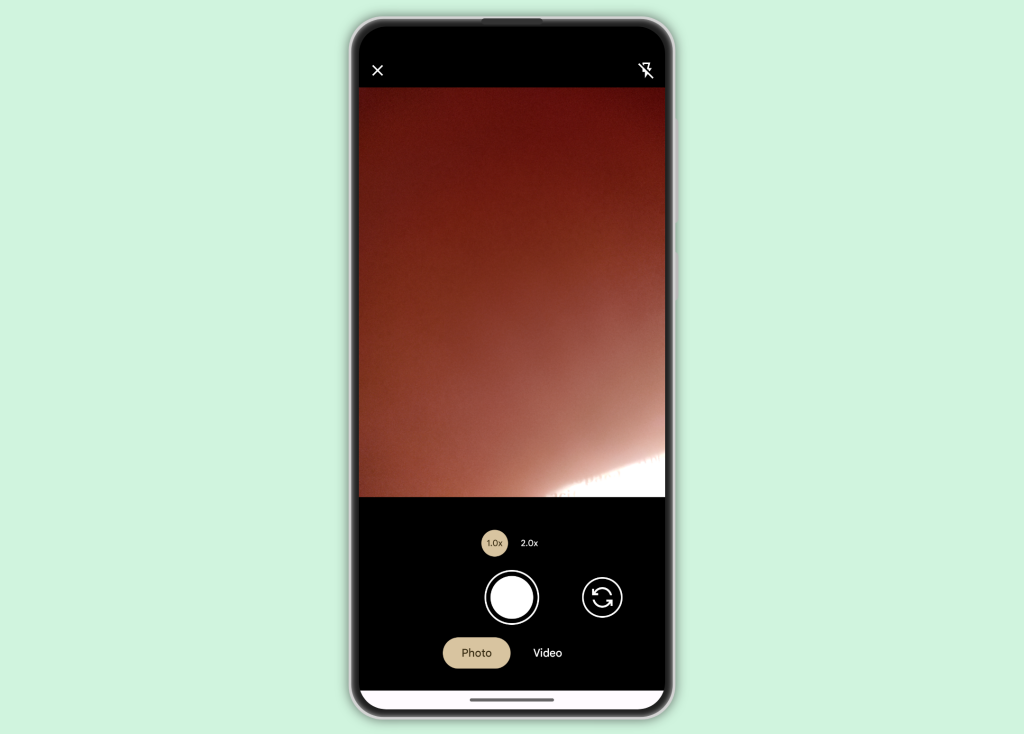
Google Messages has its own camera activity integrated within the app, distinct from the camera app on your phone. It appears that Google is developing camera effects features, which might be accessible through this built-in camera. While details on the effects remain scarce, Google will likely allow users to toggle these effects on or off.
Here’s how the built-in camera interface looks right now without any camera effects (Image Credit–TheSpAndroid)
Moreover, Google Messages might eliminate the top contacts displayed when you tap the search icon in the app. Typically, Google Messages shows recent contacts with whom you’ve been chatting. However, as per the source, activating a flag in the latest beta version makes the top contacts list disappear entirely.
Likewise, a new flag removes the preview of draft messages from the main screen. While this provides a cleaner appearance to the app’s main screen, it hides a genuinely useful feature. This flag may be used for internal debugging purposes, similar to the one removing top contacts. However, we’ll have to wait for these changes to roll out to beta testers to confirm if this is indeed the case.
Furthermore, it appears that Google might offer users the option to opt in or out of providing usage and diagnostics information, specifically collected from the Google account associated with the user’s sign-in on Google Messages. This setting is expected to be available in Google Messages Settings > Advanced > Usage & Diagnostics.
February 16, 2024 – A group of cybercriminals is committing bank fraud by convincing victims to scan their IDs and faces.
February 16, 2024 – One of Microsoft’s Patch Tuesday fixes has flipped from “Likely to be Exploited” to “Exploitation Detected”.
February 15, 2024 – Personal data belonging to 200,000 Facebook Marketplace users has been published online, including email addresses and phone numbers.
February 14, 2024 – In 2023, the CL0P ransomware gang broke the scalability barrier and shook the security world with a series of short, automated campaigns.
February 14, 2024 – The PC Security Channel tested Malwarebytes against 2015 files. Here’s how we did.
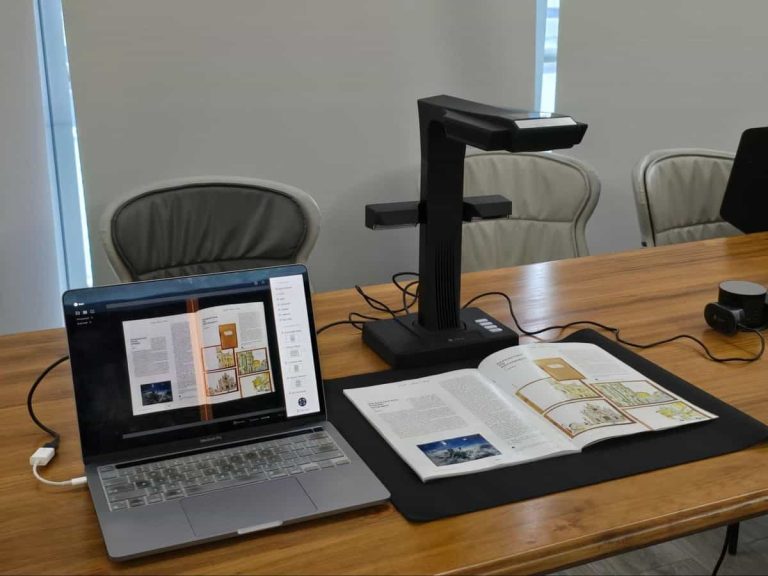
Accessing a plethora of information through portable devices is something much more practically beneficial than carrying books and documents around! Where books and documents give you excess weight and the potential threat of damage to the paper, PDFs do not. Thus, individuals are actively considering utilizing a professional book scanner such as CZUR ET24 Pro.
Top-Tier Functionalities Of CZUR ET24 Pro
A professional book scanner, CZUR ET24 Pro, has all the functionalities and advanced features that users would desire to turn books into PDFs. CZUR’s latest scanning technology makes it possible for users to get the features mentioned below:
– Characteristics
CZUR ET24 Pro is designed with a lean dimension of 375*220*390mm (L*W*H), coupled with an approximate weight of 1.5 kg. On top of that, it comes with a built-in LED array and an attachable LED light.
– Patented Curve Flattening Technology
The 3-dimensional shape and angle of the pages are detected, and each piece of information is immediately transferred to the CZUR software. With the help of the Curve Flattening Technology™, book curves are automatically flattened, as are original documents that are positioned askew.
– Automation Through Software
Talking about its software capabilities, it can easily detect materials and finger traces. Orientation correction is another one of its many amazing software features.
– Prompt Scanning Speed
Equipped with a High-Definition 24-megapixel camera containing, 5696×4272 resolution and 320 DPI. Making it a proficient document scanner, you can scan through foot paddling, manually and automatically as well with a speed of 1.5s per page flipping.
– OCR Feature
Through Its OCR (Optical Character Recognition) feature with ABBYY, you can easily scan through more than 180 languages and numerous fonts. It supports creating searchable PDFs and editable Word and Excel files for a lifetime free.
Accessories Available In The Box
Coming packed in a rigid box professional book scanner, the ET24 Pro has multiple accessories that you can use together with the scanner. From the document scanner itself to accessories such as USB cables, power supplies and adapters, there are many more.
Using original accessories along with the CZUR ET24 Pro allows you to take the professional scanner for books into efficient use. The professional scan tools in the box include:
– Foot pedal for easy capturing – Finger coats for holding the books and eliminating chances of having any finger traces – A beginner guide along with the CD is given for learning the adequate use of the scanner – Adapters for using plugs from different countries
Procedure To Set-Up CZUR ET24 Pro
Setting up the ET24 Pro takes no more than a couple of minutes with proper execution of the correct steps. Many would be curious about how to scan a book easily. To do so, a proper setup of the ET24 pro scanner would be significantly beneficial. To set up the CZUR ET24 Pro, follow the steps mentioned below:
– The foremost thing to do is choose suitable adapters to connect the computer and power supply. – Once that connection is done, you will need CZUR’s software on your computer. – To download the software, visit the official website and download the software according to your computer’s operating system. – Place the black mat corresponding to the document scanner to digitize the document. – Along with placing the mat, use side lights, which can assist you in preventing reflections while scanning. – On the CZUR software, enter the SN code written on the ET24 pro base and start scanning.
Adequately Utilization ET24 Pro Scanner
How to scan a book easily? How to digitize thick books? These are some common queries of many individuals wanting to use a professional book scanner. Well, once you understand the adequate procedure to digitize documents, your queries will be solved! So, let’s intricately learn the steps to use the ET24 Pro professional scanner:
– Connect ET24 Pro with your device and use CZUR’s software to operate the scanner – Before doing any scanning, you will have to choose the path where you want to save the document – After that, click on the scan, which will bring you to the scanning page – On the scanning page, you will find professional scan tools such as colour modes, which enable you to change the way content looks – You can select from numerous scanning modes such as flat single page/facing page/combined sizes/manual selection/no processing etc – Utilizing advanced tech like flattering technology for accuracy and a fast scanning speed of 1.5 sec, on which ET24 Pro will scan each page – While scanning the book, use the side white lights which have 2 levels to capture without having any reflections on the books – Use finger coats while scanning, to enable auto finger removal during the scanning process – There’s auto tilt correction and page splitting, which enables you to scan seamlessly without worrying much about the placement of text – There’s OCR provided in the CZUR software, which enables you to scan over 180 languages without any complications – The scanned text can be edited and saved conveniently due to OCR tech offered by ABBYY inside the software. – Professional scanner for books, ET24 Pro allows you to scan and save documents in multiple formats from Word, Excel, TIFF, and PDF to JPG. – To scan the text you can use hand control, a pedal, software options, or auto scan and button on the scanner – ET24 Pro comes with an HDMI port, which has a substantial benefit as it allows you to stream books or documents on the projector.
Conclusion
When it comes to professional scanners like CZUR ET24 Pro, top-tier functionalities are a must! Fortunately, CZUR ET24 Pro does a fantastic job of providing the latest tech with advanced features for scanning books and other documents.
Ranging around $549.00. USD the ET24 Pro has two other variants in which ET24 Pro is the best and flagship scanner. There’s a Chinese New Year discount that grants you 20% off on your purchase.
WhatsApp’s status section, usually used to share quick updates with friends and close contacts, was recently rumored to be integrating with Instagram. And now, it seems like there’s another update on the horizon.
According to WABetaInfo, a trusted source for WhatsApp updates, the Meta-owned messaging app is gearing up to enhance the interface for the updates tab. Thanks to the latest WhatsApp beta for Android 2.24.4.23 update, found on the Google Play Store, it’s revealed that WhatsApp is in the works for a new interface for the status updates tray.
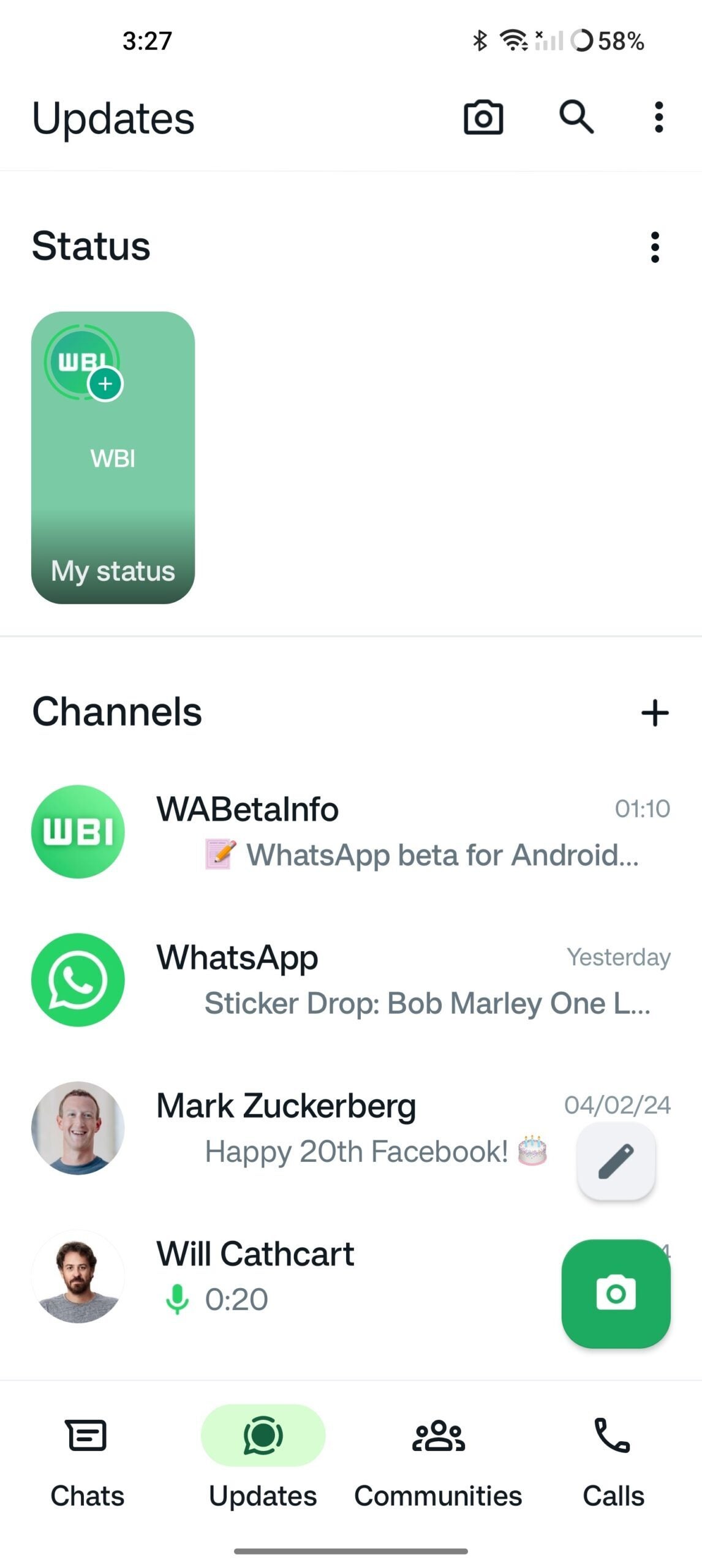
Image Credit–WABetaInfo
In the attached screenshot, you can see a sneak peek of an upcoming update that lets users try out a redesigned interface for the status updates tray. The tray remains at the top of the updates tab, ensuring it’s easily accessible as soon as users open this tab.
What’s new? Well, the revamped interface allows users to preview the first shared status update through its thumbnail. This means you won’t have to open each update individually. The new interface for the status updates tray is currently in development and should be rolled out in a future update of the app.
The upcoming interface for the status updates tray could be a welcomed change to the user experience. Previously, many users were frustrated with the new horizontal layout for status updates, which replaced the convenient thumbnail preview of shared updates with the profile picture. This change made browsing less intuitive and efficient, as users had to open each update individually to view its content.
On a different note, WhatsApp is still experimenting with a feature that allows using usernames instead of phone numbers. The app is also exploring cross-platform functionality, potentially enabling users to send messages to other apps like iMessage, Telegram, Google Messages, Signal, and more.
The Russian cyber espionage threat group “Turla APT group” was discovered to be using a new backdoor for its malicious operations.
This new backdoor has been termed “TinyTurla-NG” (TTNG), which shares similarities with a previously disclosed implant, TinyTurla, regarding coding style and functionality implementations.
However, this new backdoor has been circulating since December 2023 with targets as Polish non-government organizations that were supporting Ukraine during the Russian invasion. Additionally, this backdoor also uses a PowerShell script for exfiltration purposes.
DocumentLive Account Takeover Attack Simulation
Live attack simulation Webinar demonstrates various ways in which account takeover can happen and practices to protect your websites and APIs against ATO attacks.
According to the reports shared with Cyber Security News, the Turla threat group was widely known to target several entities worldwide with multiple sets of offensive tools.
Their targets included the U.S., the European Union, Ukraine, and Asia. Moreover, this threat actor previously used CAPIBAR and KAZUAR malware families while targeting Ukrainian defense forces.
Nevertheless, researchers have discovered three different TinyTurla-NG samples in which the earliest compromise was found on December 18, 2023, and remained active till Jan 27, 2024. The latest campaign used WordPress-based websites as command and control (C2) endpoints for the TTNG backdoor.
All the attacker-controlled WordPress websites ran with a vulnerable version that allowed the upload of PHP files containing the C2 code. The PHP files had names like rss-old[.]php, rss[.]old[.]php or block[.]old[.]php.
TinyTurla-NG : PowerShell & Command Line
This backdoor is also similar to the previously used TinyTurla backdoor, which runs as a service DLL started via svchost.exe. Apart from the working, this new malware seems to be different and new, with several features distributed through multiple threads.
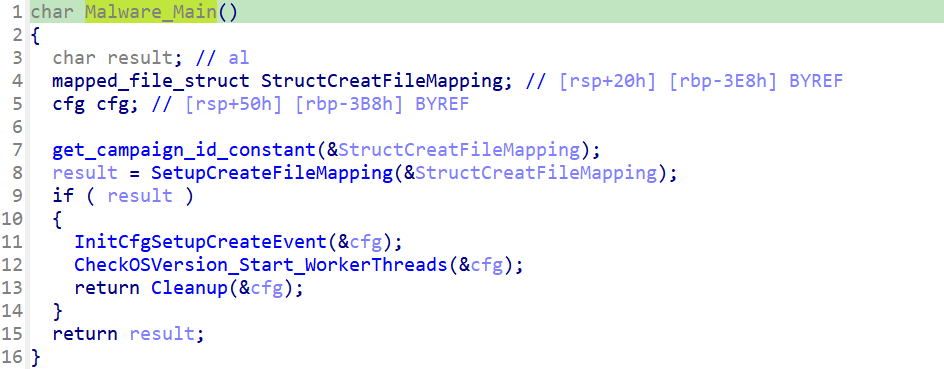
Thread initialization (Source: Talos)
Initially, the InitCfgSetupCreateEvent function in the malware initializes the config variables followed by two more threads via the CheckOSVersion_StartWorkerThreads function. These functions check the PowerShell and Windows versions, and the C2 is started with a campaign identifier and “Client Ready” message. Once the client is registered with the C2, the TTNG backdoor will ask the C2 for a task to execute.
This task is executed by the second thread, which was started with the CheckOSVersion_Start_WorkerThreads function, which waits until the TTNG backdoor receives the response from the C2.
In addition to this task execution, the backdoor also accepts the following command codes for the C2 as part of the administration of the implant or for file management.
timeout – changes the sleep duration between asking the C2 for new tasks
changeshell – switches the current shell (cmd.exe to Powershell.exe)
changepoint – tells the implant to switch to the second C2 URL
get – fetches a specified file from the C2
post – exfiltrates a file from the victim to the C2
killme – used to create a BAT file that is further used to delete a file from the disk of the victim machine.
Exfiltration Capabilities & C2
The backdoor uses a PowerShell script consisting of a C2 URL and file paths. The script also specifically excludes files with the extension “.mp4” and focuses on password management software and key materials that are used to secure password databases.
The files are then converted into a ZIP archive and exfiltrated to the C2 server using HTTP/S POST request along with the activity log. The C2 servers were discovered to consist of legitimate vulnerable WordPress-based websites that the Turla threat group compromised.
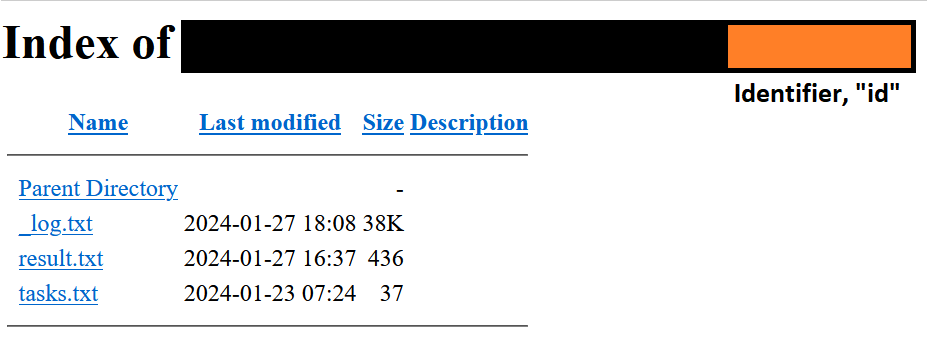
These C2 servers will contain directories and some files, such as
C2 scripts (folder): This directory consists of PHP scripts ending with the extensions – “.old.php” and the URLs of these C2 servers were coded into the TTNG backdoors
Logging (folder): This folder contains three log files
_log[.]txt: contains the log of all infected endpoints beaconing into the C2.
result[.]txt: contains the log of all messages received from the TTNG backdoor.
tasks[.]txt: contains the log of all commands issued to the infected hosts.
A novel, very sophisticated mobile Trojan dubbed GoldPickaxe.iOS that targets iOS users exclusively was discovered to collect facial recognition data, intercept SMS, and gather identity documents.
The Asia-Pacific region includes the majority of those impacted by this harmful activity. On the other hand, two APAC countries that deserve particular consideration are Vietnam and Thailand.
The GoldPickaxe family, which comes in iOS and Android variants, is based on the GoldDigger Android Trojan (discovered in October 2023) and receives frequent modifications to improve its functionality and avoid detection.
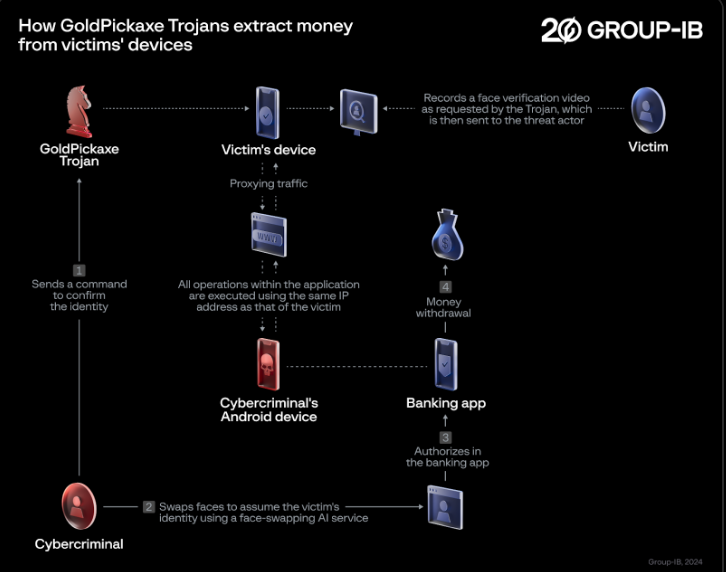
“To exploit the stolen biometric data from iOS and Android users, the threat actor creates deepfakes using AI face-swapping services to replace their faces with those of the victims. This method could be used by cybercriminals to gain unauthorized access to victims’ bank accounts”, Group-IB researchers shared with Cyber Security News.
DocumentLive Account Takeover Attack Simulation
Live attack simulation Webinar demonstrates various ways in which account takeover can happen and practices to protect your websites and APIs against ATO attacks.
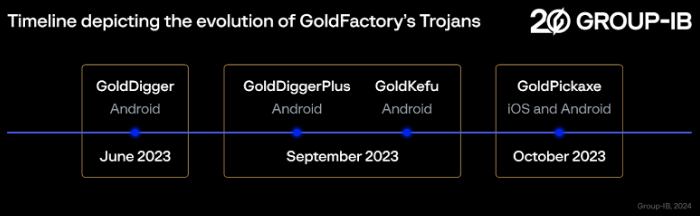
Timeline of GoldFactory’s Trojans
Group-IB has linked the entire threat cluster to a single threat actor known as GoldFactory, which has created an advanced collection of mobile banking malware.
Timeline of GoldFactory’s Trojans
The traditional Android banking Trojan GoldDigger exploits Accessibility Service to provide hackers access to the device. Another Android malware that increases GoldDigger’s capability is called GoldDiggerPlus.
GoldDiggerPlus features an embedded Trojan called GoldKefu, which contains web fakes and allows real-time voice conversations with victims. A Trojan called GoldPickaxe was created for the iOS and Android operating systems used to obtain and exfiltrate biometric data and personal information from victims.
GoldPickaxe.iOS Employs a Notable Distribution Scheme
Thai financial institutions extensively utilize facial recognition for login authentication and transaction verification. Because of this, GoldPickaxe’s facial recognition video capture and unique features give attackers the chance to access bank accounts without authorization.
GoldPickaxe Trojans extract money from victims’ devices
Hackers are using their own Android smartphones to install banking apps, and they are exploiting the captured face scans to get over facial recognition security measures and gain unauthorized access to victims’ accounts.
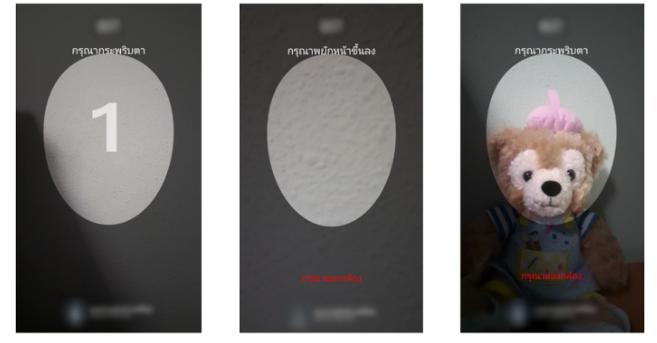
Screenshots displaying how GoldPickaxe for Android captures a facial biometric profile
Cybercriminals pose as government officials in Thailand and convince victims to utilize LINE, one of the nation’s most widely used chat services. The LINE user needs to add another as a friend to initiate a chat.
“Malicious links are distributed through messengers to encourage the installation of the app. Victims are then lured into a fraudulent application posing as a ‘Digital Pension’ app, purportedly enabling them to receive their pension digitally”, according to Thailand Banking Sector CERT (TB-CERT).
Researchers noticed in one instance the CryptoRAM campaigns, in which fraudsters disseminated fake cryptocurrency applications by using Apple’s TestFlight platform.
Another technique is manipulating Apple devices using Mobile Device Management (MDM). MDM is an all-inclusive and centralized approach to controlling and safeguarding mobile devices inside an organization, including tablets and smartphones.
Thus, a proactive and comprehensive strategy for cybersecurity must include user education and integrated current security techniques to proactively identify the introduction of new Trojans and alert end users.
Stay updated on Cybersecurity news, Whitepapers, and Infographics. Follow us on LinkedIn & Twitter.
Apple might have to dig deep into its pockets to pay off a fine being imposed on it by-who else-the EU. The fine, which could total 500 million EUR ($539 million), would be accompanied by a ban on certain App Store rules related to music streaming apps. The Financial Times (via Bloomberg) says that it has been told by five unnamed sources that claim to have knowledge of the matter, that the European Commission (EC) will announce the fines in a ruling to be released early next month.
Spotify squealed to the EU by filing an antitrust complaint against Apple in 2019; the music streamer complained about App Store rules then in place that prevented developers from sending customers links to alternative payment options. The alternative in-app payment platforms would have allowed Spotify to avoid having to pay Apple the 15%-30% cut it receives on in-app payments processed using the tech giant’s own in-app payment platform.
The Financial Times report states that the EC will say that Apple violated EU Anti-trust law creating “unfair trading conditions” for its rivals. Apple could consider itself lucky if the fine is limited to 500 million EUR since the penalty could have been as high as 10% of the company’s revenue for the most recent fiscal year. For the fiscal year 2023, Apple grossed $383 billion which means that the fine could have reached $38.3 billion.
Apple changed App Store rules in 2021 and the new App Store policy launched in 2022. It allowed developers of “Reader apps,” apps that provide content such as music, video, digital magazines, newspapers, books, and audio, to direct subscribers to the web to make payments and bypass the “Apple Tax.” But Spotify said this past summer that the changes made by Apple “were just for show.”
Spotify filed a complaint against Apple to the EU in 2019
Next month, with the release of iOS 17.4, iPhone users in the 27 EU states will be allowed to sideload apps from third-party app stores, use a mobile browser that runs on a different browser engine than Apple’s WebKit, and make in-app payments through alternative in-app purchasing platforms.
In-app purchases made through the EU App Store and processed through Apple’s platform will give the company a commission of 10%-17% of the transaction amount, down from the 15%-30% it collects in other parts of the world. Apple will not take any cut of in-app purchases processed through third-party platforms. But don’t start passing around a hat for Apple because it is adding a new Core Technology Fee for certain apps that are successful in the EU.
Apple states, “For developers who choose to agree to the new business terms in the EU, membership in the Apple Developer Program includes one million first annual installs per year for free for apps distributed from the App Store and/or alternative marketplaces. Developers who achieve exceptional scale on iOS in the EU will pay a Core Technology Fee of €0.50 (54 U.S. cents) for each first annual install over one million in the past 12 months.