Taiwan and China have a history of conflict for many reasons we won’t dive into here. Recently, the tension between them escalated as Taiwan accused China of stealing its advanced semiconductor technology. Just so you know, Taiwan is the top player globally when it comes to semiconductor tech, thanks to companies like TSMC, the biggest semiconductor maker worldwide in terms of revenue, overtaking Samsung back in 2022.
Taiwan accuses China of stealing semiconductor technology
As reported by Tom’s Hardware, Taiwan’s diplomat in Washington, Alexander Yui, accused China of trying to compete with Taiwan’s semiconductor industry unfairly. He said China is stealing Taiwan’s ideas and secrets. Yui doesn’t think China can catch up with Taiwan’s chip technology, especially in making the newest and best chips. But China’s ambassador in the US denies these allegations and says Chinese companies are not doing anything wrong.
Taiwanese diplomat told Reuters, referring to China, “They do not really follow the rules,” he further said, “They cheat and they copy, etc. They steal technology.”
China’s diplomat denied these allegations. China Embassy spokesperson told Reuters, “China’s scientific and technological achievements are never made through ‘cheating’ and ‘stealing’.”
The troubling relationship between the US and China might also have an effect here. Washington accuses China of using its big market and control over supply chains to force countries into giving away important technology. They say China’s extensive cyber theft makes it the biggest threat to America’s tech competitiveness.
Meanwhile, Taiwan has been looking into many Chinese companies suspected of stealing semiconductor engineers and other tech experts.
Both are top players in terms of tech
While Taiwan is home to the world’s largest independent semiconductor foundry, China has established itself as the biggest phone maker in the world, ahead of India.
China, notably, is home to major brands like Huawei, Xiaomi, Oppo, Vivo, and OnePlus. Other than phones, it has houses semiconductor firms like SMIC, HiSilicon, etc.
Beware, as a new iOS trojan dubbed GoldPickaxe has emerged, capable of stealing banking data, ID documents, and even facial data from infected devices.
Group-IB has discovered a new iOS Trojan, dubbed GoldPickaxe.iOS designed to steal facial recognition data, identity documents, and intercept SMS. The company’s Threat Intelligence Unit has attributed the entire threat cluster to a threat actor dubbed GoldFactory.
The GoldPickaxe family has been active since mid-2023, targeting the Asia-Pacific region, specifically Thailand and Vietnam and the attack method involves impersonating local banks and government organizations.
As per Group-IB, the threat actor exploits stolen biometric data using AI-driven face-swapping services to create deepfakes, allowing unauthorized access to a victim’s banking account, which is a new monetary theft technique.
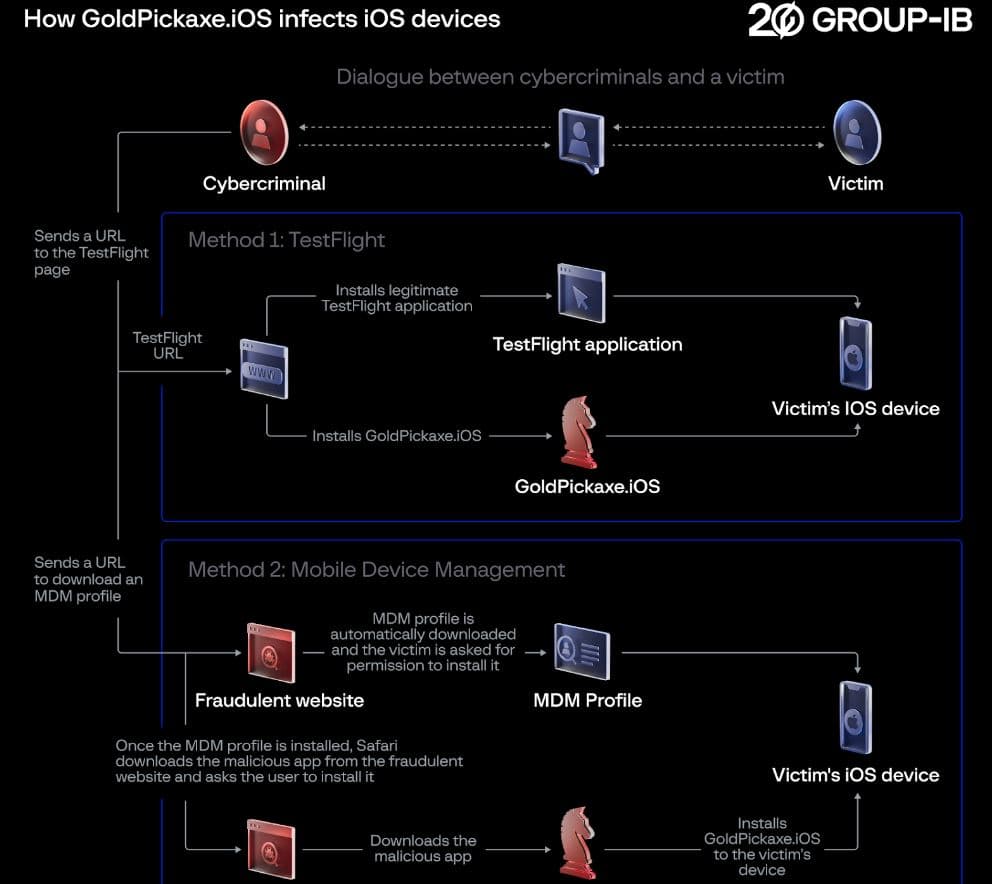
In this campaign, GoldFactory has successfully used Mobile Device Management (MDM) to manipulate Apple devices, distributing its iOS Trojan by abusing TestFlight. Victims receive seemingly innocent URLs (e.g. testflight.apple.com/join/) leading to the installation of malicious software.
Another sophisticated method is tricking victims into interacting with fraudulent websites to install an MDM profile, allowing cybercriminals complete control over the victim’s device.
Thailand Banking Sector CERT (TB-CERT) has also reported that cybercriminals are distributing malicious links via messengers to lure victims into a fraudulent app posing as a ‘Digital Pension’ app. The app’s credibility is doubtful as Group-IB’s investigation confirmed multiple versions of GoldPickaxe impersonating official Thai government services, including the Digital Pension app for Thailand.
Researchers believe that the group may be engaging operators proficient in Thai and Vietnamese or possibly running a call center since an SMS written in Thai was found in the phishing campaign. In Thailand, cybercriminals impersonate government authorities and convince victims to use LINE, a popular messaging application.
According to Group-IB’s blog post, the gang reportedly employs a combination of smishing and phishing techniques to carry out their malicious activities in Vietnam and Thailand. Despite evidence that it is a Chinese-speaking group, the involvement/role of local cybercriminals cannot be ruled out when calls made to victims are examined.
It is worth noting that Group-IB previously discovered an Android Trojan, codenamed GoldDigger, stealing facial data, targeting over 50 Vietnamese banking applications, electronic wallets, and cryptocurrency wallets since June 2023.
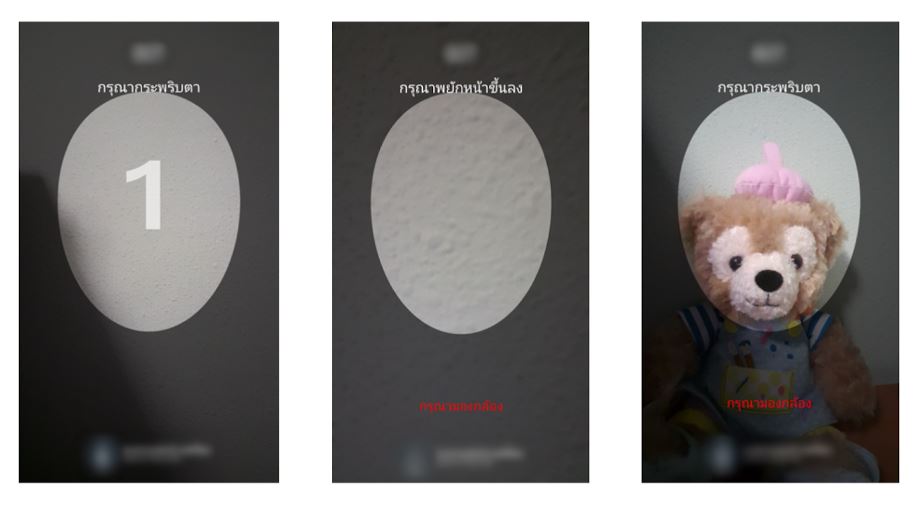
GoldDigger stealing facial data from Android devices (Group-IB)
The newly discovered GoldPickaxe family is based on the GoldDigger Android Trojan. However, researchers claim the infection chain for GoldPickaxe iOS variants is not significantly different for other Trojans within the GoldFactory family.
GoldPickaxe malware was developed using the same communication mechanism and cloud bucket URL as GoldDigger but has fewer functionalities compared to its Android sibling due to iOS’s closed nature and stricter permissions.
Both versions use fake login pages to access fake Digital pension applications, potentially avoiding detection. Another variant, GoldDiggerPlus, was also identified with extended GoldDigger’s functionality, allowing real-time call calls through a specially designed APK called GoldKefu. All Trojans identified are currently in the active stage of evolution.
“Overall, we identified four Trojan families that were used by cybercriminals. We maintained the naming convention by using the prefix Gold for the newly discovered malware as a symbolic representation that they have been developed by the same threat actor,” Group-IB researchers noted.
Researchers couldn’t identify the toolset GoldFactory uses, indicating that this is a highly organized and technically advanced group.
For your information, in March 2023, the Bank of Thailand mandated facial biometric verification for transactions exceeding 50,000 baht, and 200,000 baht per day, and raised credit transfer limits on mobile devices. As per Group-IB’s research, GoldPickaxe likely reached Vietnam in February 2024 when a Vietnamese citizen performed a facial recognition scan, withdrawing over 40,000 USD.
The State Bank of Vietnam plans to mandate facial authentication as a security measure for all money transfers from April 2024, indicating the potential exploitation of GoldPickaxe in the country. The use of GoldPickaxe in Vietnam is expected to increase assessed Group—IB.
“GoldFactory is a resourceful team, having many tricks up their sleeve: impersonation, accessibility keylogging, fake banking websites, fake bank alerts, fake call screens, identity and facial recognition data collection. Equipped with diverse tools, they have the flexibility to select and execute the most suitable one that fits the scenario,” researchers noted.
The report highlights the growing cybersecurity threat and the sophisticated techniques used by cybercriminals. They have refined GoldDigger malware, introduced new categories for facial recognition data harvesting, and developed a tool for communication between victims and cybercriminals. Group-IB researchers emphasize the need for proactive, multi-faceted cybersecurity measures, including user education.
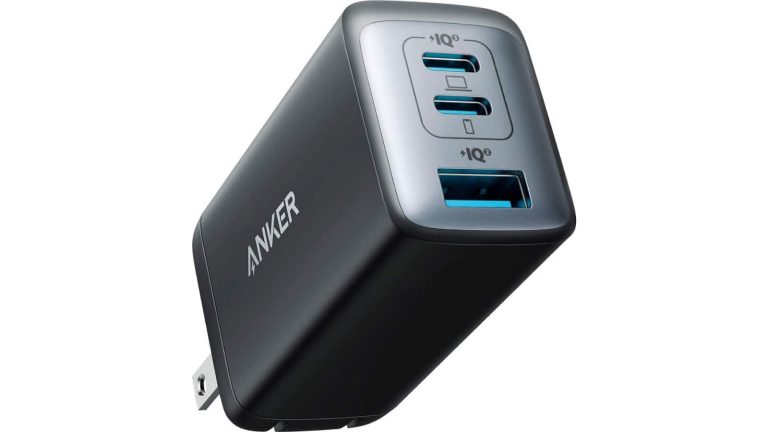
If you’re in the market for a new USB-C wall charger, then you’ll want to look no further than the Anker 735. This is a three-port USB-C charger with two USB-C ports and a USB-A port for only $31.99 (regularly $55.99). With many smartphones coming without a wall charger these days, this is a great charger to pick up.
Anker is well-known for its chargers, and this is another great one. I actually have one myself and use it when I travel. Mostly because it is pretty small, it has a foldable plug and can charge multiple phones at the same time, which is super useful when traveling.
As if that wasn’t a big enough reason to buy this charger, it is also a GaN charger – or Gallium Nitride. What this means is that you’re going to get a much smaller charger, that can charge faster. Anker claims that this is about 53% smaller than most other 65W chargers. This means that when you plug it into a surge protector, it won’t cover other outlets.
It’s a 65W charger, but it can actually push out 65W from a single outlet. However, the more you plug in, the slower it’ll get. If you use all three outlets, the USB-C1 will charge at 40W max, USB-C2 will charge at 12W max and the USB-A will charge at 12W max – that does only equal 64W however, as there are some losses expected.
If you do a lot of traveling, or need a new charger for your office, bedroom, or anywhere else, this is a great pick up.
Well, it looks like Lenovo wants to bring the future to us. We’ve seen a few renders of a supposed transparent laptop that could come from the company. Now, we have another leak of this transparent laptop, and it further confirms the information that we have so far.
Even though more information is coming out about this device, you will still want to take this with a grain of salt. Lenovo has not officially announced this, so there’s always the chance that the information may not be 100% accurate.
Rumor has it that Lenovo will unveil this during MWC which is coming up in a matter of days. So, if the rumors are true, then we may actually see this device in the flesh during the event. We expect to see that along with the Nothing Phone (2a) at MWC. This phone is rumored to retain the popular Glyph Interface.
We have another leak of the Lenovo transparent laptop
No matter how you look at it, this device looks very futuristic. Thanks to a new leak from Evan Blass, it appears that this laptop will indeed have the same look that we saw in the previous images. Looking at the image, we see that the top section will be completely transparent and bezel-less. This adds more to the illusion that the graphics are just floating in mid-air.
The only bezel that we see is directly under the screen. It will house many other components that will power the display. Under that, we see the hinge.
As for the rest of the computer, it appears that it will not have a physical keyboard. It looks like there’ll be a digital keyboard instead. This seems like an odd addition to the computer, as digital keyboards are still a very niche thing. So, we’re going to have to see how people react to that.
Looking at the side of the computer, we can’t really take what we see to heart. The right side of the computer looks like it has three random slots with the power button at the very top. However, this will most likely not reflect the final product if one does reach the market.
Stylus support
One thing we do see is the stylus sitting next to the computer. So, this points to the computer having stylus support, which everyone can appreciate. We’re not sure if the transparent screen will be touch-sensitive. If not, then you will use the stylus on the bottom of the computer.
That could explain the touch-sensitive keyboard. It’s hard enough to make a transparent screen, so we can’t rightfully expect it to also be touch-sensitive.
Right now, this computer is still a mystery. If it does come out, we’re all going to wonder why the world needs a transparent laptop. Sure, it looks cool, but other than that, what purpose does it serve? We’ll just need to wait to find out.
While Artificial Intelligence holds immense potential for good, its power can also attract those with malicious intent.
State-affiliated actors, with their advanced resources and expertise, pose a unique threat, leveraging AI for cyberattacks that can disrupt infrastructure, steal data, and even harm individuals.
“We terminated accounts associated with state-affiliated threat actors. Our findings show our models offer only limited, incremental capabilities for malicious cybersecurity tasks.”
OpenAI teamed up with Microsoft Threat Intelligence to disrupt five state-affiliated groups attempting to misuse their AI services for malicious activities.
DocumentLive Account Takeover Attack Simulation
Live attack simulation Webinar demonstrates various ways in which account takeover can happen and practices to protect your websites and APIs against ATO attacks.
State-affiliated groups
Two groups linked to China, known as Charcoal Typhoon and Salmon Typhoon,
The Iranian threat actor “Crimson Sandstorm,” North Korea’s “Emerald Sleet,” and Russia-affiliated group “Forest Blizzard.”
Charcoal Typhoon: Researched companies and cybersecurity tools, likely for phishing campaigns.
Salmon Typhoon: Translated technical papers, gathered intelligence on agencies and threats, and researched hiding malicious processes.
Crimson Sandstorm: Developed scripts for app and web development, crafted potential spear-phishing content, and explored malware detection evasion techniques.
Emerald Sleet: Identified security experts, researched vulnerabilities, assisted with basic scripting, and drafted potential phishing content.
Forest Blizzard: Conducted open-source research on satellite communication and radar technology while also using AI for scripting tasks.
OpenAI’s latest security assessments, conducted with experts, show that while malicious actors attempt to misuse AI like GPT-4, its capabilities for harmful cyberattacks remain relatively basic compared to readily available non-AI tools.
OpenAI strategy
Proactive Defense: actively monitor and disrupt state-backed actors misusing platforms with dedicated teams and technology.
Industry Collaboration: work with partners to share information and develop collective responses against malicious AI use.
Continuously Learning: analyze real-world misuse to improve safety measures and stay ahead of evolving threats.
Public Transparency: share insights about malicious AI activity and actions to promote awareness and preparedness.
Stay updated on Cybersecurity news, Whitepapers, and Infographics. Follow us on LinkedIn & Twitter.
Remote Monitoring & Management (RMM) software, including popular tools like AnyDesk, Atera, and Splashtop, are invaluable for IT administrators today, streamlining tasks and ensuring network integrity from afar. However, these same tools have caught the eye of cybercriminals, who exploit them to infiltrate company networks and pilfer sensitive data.
The modus operandi of these threat actors involves deceiving employees through sophisticated scams and deceptive online advertisements. Unsuspecting employees, misled by these tactics, may inadvertently invite these criminals into their systems. By convincing employees to download and run these seemingly benign RMM applications under the guise of fixing non-existent issues, these fraudsters gain unfettered access to the company’s network.
In this post, we explore a particular phishing scam targeting corporate users via the AnyDesk remote software and how ThreatDown can prevent the misuse of such programs by cybercriminals.
Phishing site hosts remote software
We believe victims are first targeted and then contacted via phishing emails or text messages (smishing) based on their position in the company.
Attackers could trick them by sending them to a typical phishing page or making them download malware, all of which are good options. However, they are instead playing the long game where they can interact with their victims.
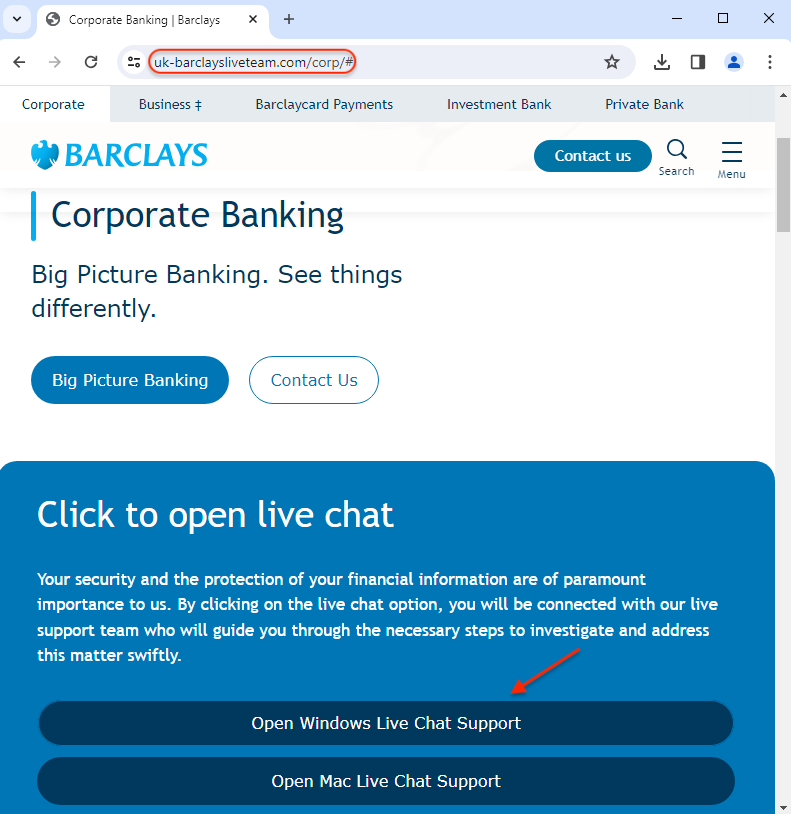
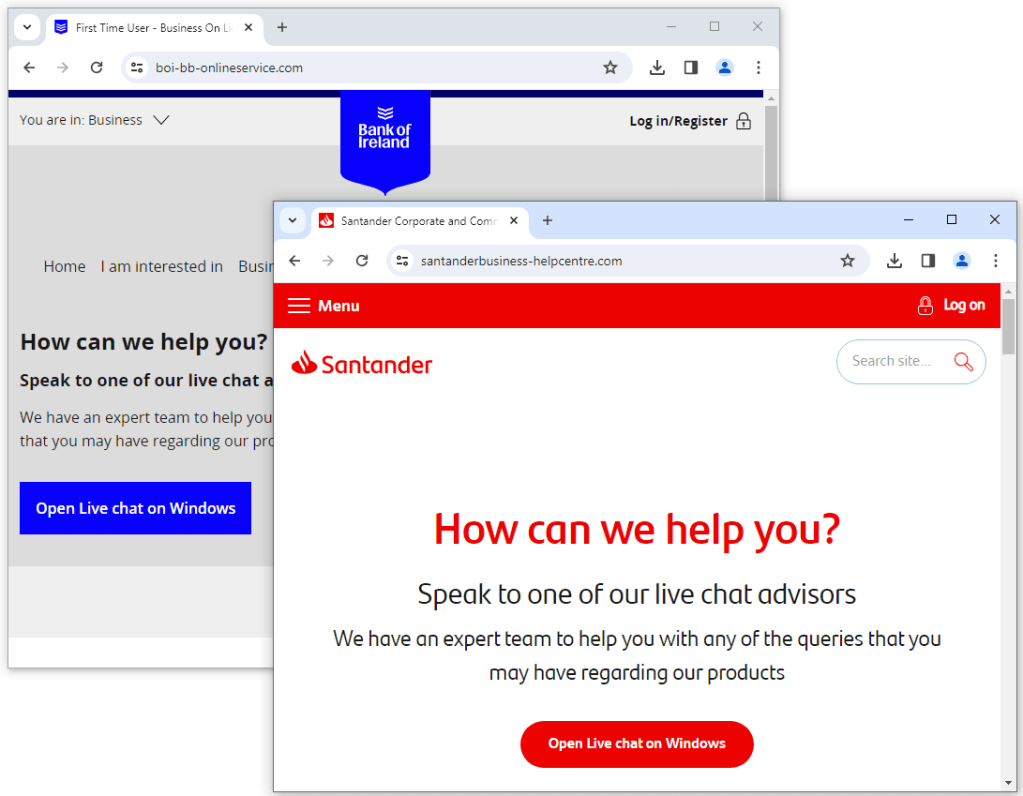
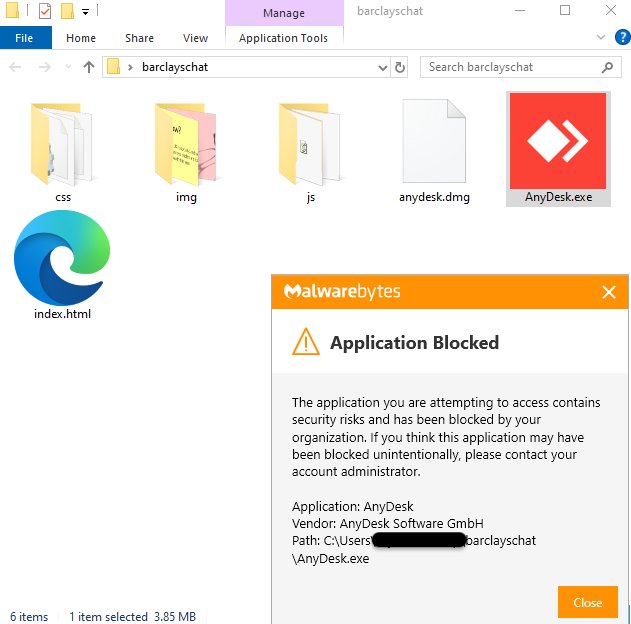
Users are directed to newly registered websites that mimic their financial institution. In order to get support, they need to download remote desktop software disguised as a ‘live chat application’.
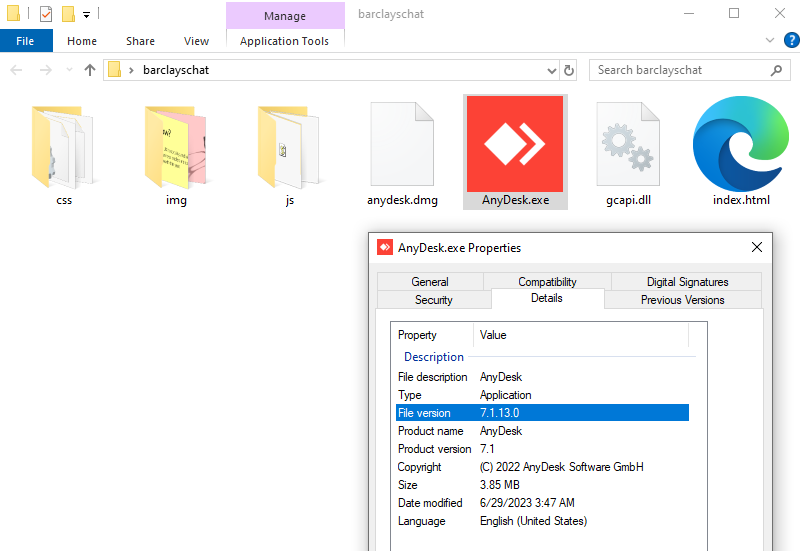
It’s interesting to note that the downloaded software is not malware. For example, in this instance they are using a legitimate (although outdated) AnyDesk executable which would not be detected as malicious by security products.
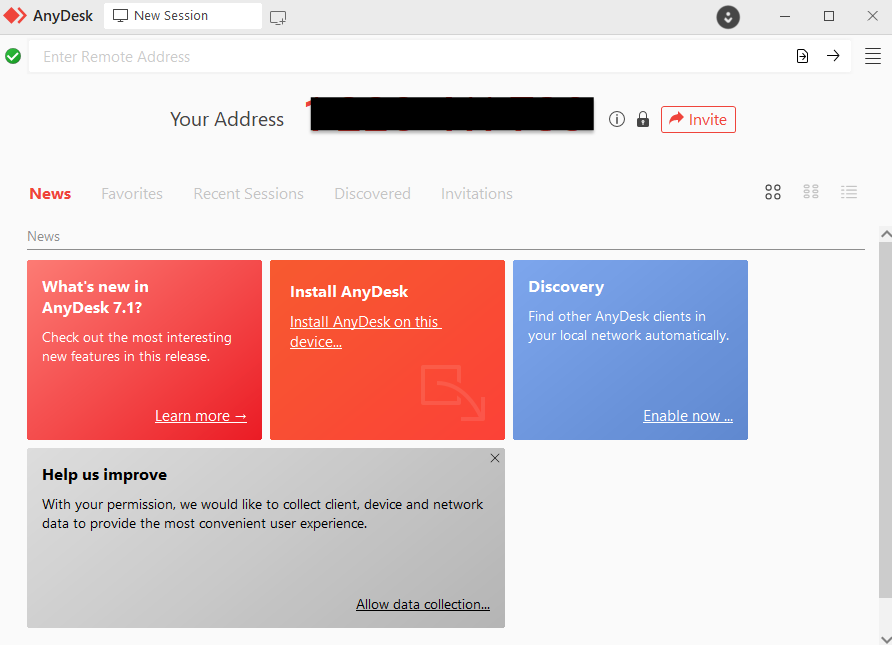
Running the program will show a code that you can give to the person trying to assist you. This can allow an attacker to gain control of the machine and perform actions that look like they came directly from the user.
Threat actors have registered phishing domains for different financial institutions, following the same style of the ‘Live chat on Windows’. It’s unclear whether it is all the same group or whether several criminal gangs are operating this scam. However, most of these domains are hosted on AS200593 which has a number of ‘traditional’ phishing sites.
Certain banking sites try to detect if a customer is currently running a remote program, before allowing them to login. However, not all banks have this feature and there are certain cases where threat actors can evade such detection.
There are a number of RMM tools on the market which scammers and criminals will leverage. Ironically, the more popular and simple ones also tend to be the most abused.
AnyDesk recently got in the news for a security breach that allowed the attackers to compromise their production systems. The vendor has since revoked its code signing certificates and is urging customers to update their software.
RMM vendors are aware of the illicit use of their software and regularly remind users about common safety tips. AnyDesk also partnered with fraud fighters such as ScammerPayback to shut down call centers.
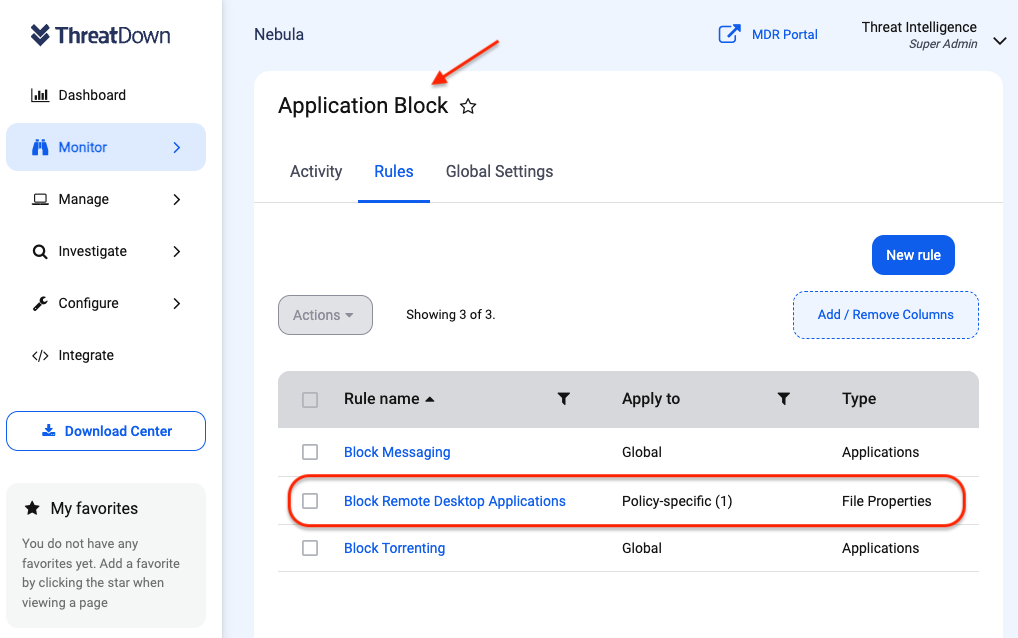
Free with every ThreatDown Bundle, Application Block can easily protect organizations against the rising trend of legitimate RMM tools being exploited. Organizations can block RMM tools via Application Block by:
Navigating to the ‘Monitor’ section within their Nebula console.
Selecting ‘Application Block’
Enabling the ‘Block RMM’ toggle switch provided by ThreatDown or customizing the list to fit their specific needs.
Saving the configuration to immediately block these RMM tools network-wide.
Adopt a robust defense stance by blocking all unnecessary applications, and for those you must use, the EDR/MDR layers of our ThreatDown Bundles will provide an additional safety net in the event of an infection.
For IT teams plagued by the triad of complex deployment, scattered tooling, and excessive alert noise, ThreatDown bundles emerge as a superior solution that caters to the needs of today’s security teams.
Discover the difference with ThreatDown Bundles and elevate your organization’s defense against cyber threats. Get in touch for a free trial and experience the benefits of a simplified, yet robust, security framework.
Samsung might equip the Galaxy Z Fold 6 with its best smartphone camera yet. According to a well-known industry insider, the company plans to ship the new foldable with the same camera sensor as the Galaxy S24 Ultra. The source isn’t specific, but they may be talking about the 200MP primary shooter. If true, it would be a massive upgrade from the 50MP unit found on the Fold 5.
Samsung plans to equip the Galaxy Z Fold 6 with a 200MP camera
Samsung’s Galaxy Z Fold 5 and Fold 4 feature a 50MP primary camera at the back, upgraded from a 12MP unit on the Fold 3. It is the same sensor found on the smaller two models of the Galaxy S22, Galaxy S23, and Galaxy S24 lineups (Ultra models have a 108MP/200MP camera). The sensor would have almost turned three years old by the time the Galaxy Z Fold 6 hits the market. It wouldn’t be unfair to call it an outdated camera.
However, a few months back, a couple of noted tipsters claimed that the next-gen Fold won’t get a camera upgrade. Samsung was said to be focused on making the device thinner and wider, something users have been demanding lately. If there was enough space, the company would rather increase the battery capacity from 4,400mAh instead of equipping the device with a bigger camera.
It appears the company has changed its mind or is at least mulling to do things differently. According to X tipster Revegnus, one of the two people who made the previous claim, Samsung is now considering equipping the Galaxy Z Fold 6 with the Galaxy S24 Ultra’s 200MP camera. Well, they didn’t specify the sensor but they are likely referring to the primary shooter. Or maybe the whole camera setup, we shall find out soon.
The battery capacity may remain unchanged
The tipster added that Samsung plans to upgrade the Galaxy Z Fold 6’s camera “instead of decreasing the battery capacity.” We believe they made a typo and meant to say, “instead of increasing the battery capacity.” The 200MP camera in question has an optical size of 1/1.3 inches. It is bigger than the Fold 5’s 50MP camera, which measures 1/1.56 inches. Samsung may not be able to squeeze in a bigger camera and battery.
If this information turns out to be accurate, the Galaxy Z Fold 6 will come with an industry-leading 200MP camera and a 4,400mAh battery. Coupled with a thinner build and wider design, which makes the cover display more like a regular smartphone than a tall screen, the new Fold is shaping up to be a fairly decent upgrade. We expect more leaks about it and the Galaxy Z Flip 6 in the coming months.
Right now, Google is in a heated battle against OpenAI. ChatGPT is the AI chatbot to beat, and Google has its hands full with that. However, it looks like Google is going to have competition on its home front. According to reports, OpenAI could be developing its own search engine.
Based on the reports, this is very early information. So, as always, you’ll want to take this news with the grain of salt. Information could change over time. Also, if the company is working on a search engine, there is always the possibility of it scrapping the project. So, we’re going to want to wait for more information to come out to be completely sure.
OpenAI could be working on its own search engine
Using ChatGPT to steal people away from Google Search is one thing, but developing its own search engine seems like a direct shot taken at Google. As we know, Google makes most of its money from Search. It sells ads throughout the Google Search engine, and this earns it tens of billions of dollars every year.
So, if OpenAI were to make its own search engine, it would be more than likely to steal users away from Google Search. However, we’re not quite sure how many users it’ll be able to steal.
Reports state that OpenAI will heavily use the Bing search engine. This makes sense, as OpenAI and Microsoft are so closely tied together. There’s no doubt that the OpenAI search engine, if it ever comes to fruition, will be powered by Bing.
At this moment, details are extremely scarce. Either OpenAI is holding this project very closely to the chest or it’s in extremely early development.
How will it fare against the giant?
The only question is if OpenAI could make its search engine an actual threat to Google. Google has been the top search engine for the longest time, and no other company has even come close to tapping its dominance. Microsoft Bing is struggling to break 10% of the search engine market. Meanwhile, Google is paying billions of dollars every year to be the default search engine on iPhones.
A newcomer out of the blue, regardless of whether it is powered by ChatGPT or not, stands very little chance of being ample competition. However, with such a landmark anti-competition case that Google has gone through, there’s no telling if things will be different for the company by the time OpenAI unveils its own search engine.
Personal data belonging to Facebook Marketplace users has been published online, according to BleepingComputer.
A cybercriminal was allegedly able to steal a partial database after hacking the systems of a Meta contractor.
The leak consists of around 200,000 records that contain names, phone numbers, email addresses, Facebook IDs, and Facebook profile information of the affected Facebook Marketplace users. BleepingComputer was able to verify the some of the data.
Marketplace was introduced by Facebook in 2016 and quickly became a popular platform to sell items to local buyers. It’s often preferred over other marketplaces because you can find or sell items locally that would be too expensive to ship, but you can easily pick up yourself.
Smaller businesses also use it as well to get their ecommerce side of the business started. Statistics say that every month, on average 40% of Facebook users are Marketplace users, and an estimated 485 million or 16% of active users log in to Facebook for the sole purpose of shopping on Facebook Marketplace.
Depending on the buyer of the leaked data, both the email addresses and the phone numbers could be used in phishing attacks. Phishing is the art of sending an email with the aim of getting users to open a malicious file or click on a link to then steal credentials. The combination of email addresses and phone numbers could also be used in SIM swapping attacks.
SIM swapping, also known as SIM jacking, is the act of illegally taking over a target’s cell phone number. This can be done in a number of ways, but one of the most common methods involves tricking the target’s phone carrier into porting the phone number to a new SIM which is under the control of the attacker. Having control over or access to the victim’s email combined with the knowledge of the associated phone number makes a SIM swap relatively easy.
Protect yourself from a SIM card swap attack
Don’t reply to calls, emails, or text messages that request personal information. Should you get a request for your account or personal information, contact the company asking for it by using a phone number or website that you know is real.
Limit the personal information you share online.
Set up a PIN or password on your cellular account. This could help protect your account from unauthorized changes. Check your provider’s website for information on how to do this.
Use Multi-Factor Authentication (MFA), especially on accounts with sensitive personal or financial information. If you do use MFA, keep in mind that text message verification may not stop a SIM card swap. If you’re concerned about SIM card swapping, use an authentication app or a security key.
If you want to find out how much of your own data is exposed online, you can try our free Digital Footprint scan. Fill in the email address you’re curious about (it’s best to submit the one you most frequently use) and we’ll send you a report.
We don’t just report on threats – we help safeguard your entire digital identity
Cybersecurity risks should never spread beyond a headline. Protect your—and your family’s—personal information by using Malwarebytes Identity Theft Protection.
The OnePlus 12R was announced last month. The phone arrived alongside the OnePlus 12 as a more affordable option. The OnePlus 12R went on sale in India last week, and is now available to buy in North America and Europe too, through the company’s official website, amongst various retailers.
The OnePlus 12R is now available to buy in both North America & Europe
The phone is now available in the US, Canada, and Europe. In the US and Canada, it comes in Cool Blue and Iron Gray colors and can be purchased in both 8GB and 16GB RAM options. Those two variants come with 128GB and 256GB of storage, respectively.
In Europe, you can only get a 16GB RAM variant of the phone, which also has 256GB of storage. Do note that only the Iron Gray model is available in the UK, while the rest of the countries offer the Cool Blue model too.
In the US, the two models are priced at $499.99 and $599.99. In Canada, you can buy 8GB and 16GB models for CAD$669.99 and CAD$799.99, respectively. The 16GB RAM model in Europe costs €699, while it’s priced at £649 in the UK. The purchase links are included below the article.
The device has an outstanding price tag in the US
The OnePlus 12R actually has an outstanding price point in the US. It offers a great package for $499.99. Those price tags don’t seem as appealing in Europe, but that’s not a bad price tag either, considering what you’re getting.
The OnePlus 12R is fueled by the Snapdragon 8 Gen 2 processor. The phone includes a 6.78-inch 2780 x 1264 LTPO4 AMOLED display. That panel gets immensely bright, it’s exactly the same display as the one in the OnePlus 12.
The phone has three cameras on the back, led by a 50-megapixel main shooter (Sony’s IMX890 sensor). An in-display fingerprint scanner is also included, as are stereo speakers.
The device has a large 5,500mAh battery, and it supports 100W (80W in the US) wired charging. We’ve already reviewed the device, and we were quite impressed, especially considering the price tag.