Google has announced a crackdown on senders of mass emails to Gmail users, signaling a shift towards stricter guidelines to combat spam and phishing. According to reports, Google will begin rejecting emails that do not meet the bulk sender guidelines, which are designed to safeguard Gmail users from unsolicited and potentially harmful messages.
Starting this month, bulk email senders (any email sender that sends close to 5,000 messages or more to personal Gmail accounts within a 24-hour period) failing to meet the requirements have been receiving temporary error codes on a percentage of their emails. These error codes serve as alerts, allowing senders to identify non-compliant traffic and take necessary actions to ensure compliance with the new guidelines. However, from April onwards, Google will start rejecting a portion of non-compliant email traffic, gradually increasing the rejection rate over time.
By June 1, 2024, bulk email senders must include a “clearly visible” unsubscribe link in promotional messages
One of the key requirements for bulk email senders is to facilitate an unsubscribe link for recipients. By June 1, 2024, senders must include a “clearly visible” unsubscribe link in the body of marketing and promotional messages, enabling recipients to opt out with a single click.
It’s important to note that these guidelines do not impact messages sent to Google Workspace accounts. Google defines a bulk sender as any entity sending 5,000 or more messages to personal Gmail accounts within a day, regardless of the sender’s primary domain. Notably, a personal Gmail account is an account that ends in “@gmail.com” or “@googlemail.com”. Once a sender meets this threshold, Gmail will permanently categorize them as a bulk sender.
Google’s decision to implement these stricter measures follows its October 2023 announcement, where it emphasized the importance of email validation in reducing the prevalence of unauthenticated messages and phishing scams. By requiring bulk senders to authenticate their emails, Google aims to close loopholes exploited by attackers and enhance trust in email communication.
Overall, Google’s efforts to tighten regulations for bulk email senders reflect its commitment to protecting Gmail users from spam, phishing, and other bad activities. As these new guidelines take effect, users can expect a relatively safer and more secure email experience on the platform.
In November 2023, the Lockbit ransomware gang claimed responsibility for targeting the Infosys McCamish system, and it appears that the aftermath of the data breach is unfolding.
Bank of America customers participating in deferred compensation plans are facing concerns after a data breach at Infosys McCamish Systems (IMS), a third-party provider managing these plans. The incident, initially reported in November 2023 but only publicly disclosed this month, exposed the personal information of 57,028 individuals.
The latest incident shouldn’t be surprising, given that Bank of America is a lucrative and highly sought-after target for both script kiddies and sophisticated cybercriminals. The data breach in May 2020 serves as a notable precedent, as does the continuing series of phishing attacks targeting the bank’s customers.
What Happened:
In a letter sent by Infosys McCamish to affected customers, on November 3rd, 2023, an unauthorized third party infiltrated the IMS systems, accessing sensitive customer data. The information potentially compromised includes names, addresses, social security numbers, dates of birth, financial details linked to deferred compensation plans and other account information.
According to the data breach notification filed by the company with Maine’s Attorney General, 93 residents of Maine have been impacted by the data breach. The information trove could be used for a variety of malicious activities, including identity theft, financial fraud, and phishing scams. Although the specific nature of the security lapse remains unclear, IMS has implemented measures to prevent future breaches.
Affected Individuals:
While the exact number of affected Bank of America customers is known (57,028), the extent of data accessed for each individual remains uncertain. IMS claims they cannot determine which specific pieces of information were viewed by the unauthorized party.
However, it is worth noting that on November 4, the LockBit ransomware gang claimed responsibility for the IMS attack, stating that its operators encrypted over 2,000 systems during the breach.
Bank of America’s Response:
Bank of America learned of the breach on November 24th, 2023, and has since taken steps to notify affected customers. The bank is offering complimentary two-year memberships to Experian’s identity theft protection services to help mitigate potential risks. Additionally, they recommend that customers remain vigilant and monitor their accounts for suspicious activity.
Experts Provide Insight on the Data Breach:
For insights into the latest development, we spoke with Tim Callan, Chief Experience Officer at Sectigo, a Scottsdale, Arizona-based provider of comprehensive certificate lifecycle management (CLM), who raised questions about the cybersecurity measures at third parties.
“As financial institutions increasingly rely on third-party vendors for various services, they inadvertently broaden their attack surface, exposing sensitive customer data to potential breaches. Strengthening oversight and implementing stringent security protocols for third-party partnerships are imperative to mitigate such risks,” Tim Advised.
Al Lakhani, CEO of IDEE, emphasized the limitations of traditional multi-factor authentication (MFA) systems and advocated for next-generation MFA solutions to protect the supply chain.
“Protecting the supply chain is critical. Especially when they can cause these kinds of attacks. Therefore, relying on first-generation MFA that requires two devices and lacks the capability to prevent credential phishing attacks is a non-starter,” Al explained. “To fortify supply chains effectively, they must be protected using next-generation MFA solutions, which protect against credential, phishing and password-based attacks, including adversary-in-the-middle attacks by using same device MFA,” he said.
Ongoing Concerns:
Despite Bank of America’s response, concerns remain for impacted individuals. The lack of clarity regarding which data was accessed and the possibility of misuse are significant sources of anxiety. The potential for financial losses, identity theft, and other negative consequences cannot be ignored.
Industry Implications:
This incident highlights the growing threat of data breaches within the financial services industry. It underscores the importance of strong cybersecurity measures for both financial institutions and third-party providers like IMS. The reliance on third-party services introduces additional vulnerabilities, requiring stringent data security protocols and comprehensive risk management strategies.
Looking Forward:
While the immediate impact of the breach remains to be seen, it serves as a stark reminder of the importance of data privacy and security. Individuals are advised to remain vigilant, monitor their accounts closely, and utilize the resources offered by Bank of America.
Additionally, this incident emphasizes the need for stricter regulations and enhanced security protocols within the financial services industry to protect customer data and prevent future breaches.
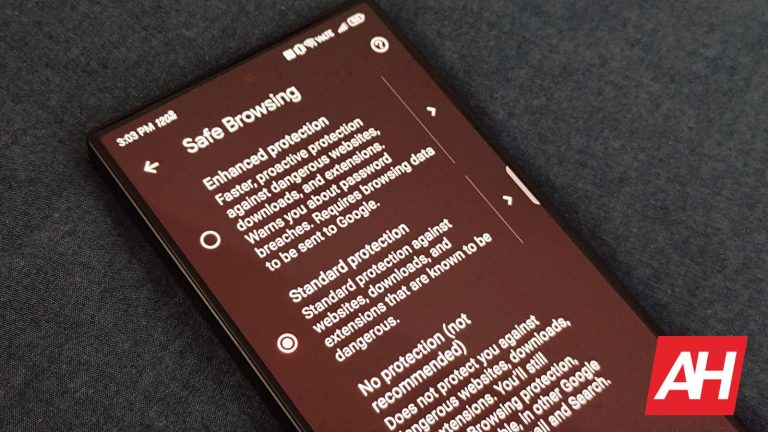
Google’s Safe Browsing feature in Chrome is there to safeguard people’s web browsing experiences, even if that means slowing down the load times a bit. Now, we’re not talking about slowing them down significantly. Just enough for Safe Browsing to do its security checks. It’s a necessary step in helping to prevent unsafe browsing that can lead to any number of bad situations. Like phishing, malware, and other things you don’t want happening.
In an upcoming update to Chrome, Google is going to be making Safe Browsing more efficient. The update, which is slated to come with Chrome version 122, will speed up load times. All while still performing its security checks. Google explains the details in a post over on the Chromium Blog and notes that the update will allow pages to load even while Safe Browsing performs its real-time checks. This balancing act should help move things along when you’re trying to browse quickly but no less safely. Google says this will help keep things secure “without a degradation in security posture.”
Safe Browsing load times will speed up sometime next week
As noted by 9To5Google, the Chrome 122 update begins rolling out to users next week. When that happens, safety checks will be asynchronous to allow the page loads at the same time. Here’s how that’ll look. You’ll attempt to load up a website and Safe Browsing will begin its checks as the page loads. The page will load fully and you can continue browsing as long as Safe Browsing doesn’t find any issues or potentially dangerous security problems.
If something is found, however, Chrome will bring up the alert page that users currently see when Chrome detects a security issue. This is a noticeable change compared to how Safe Browsing works right now. Where checks need to finish before a page loads at all. Google expects this change to speed up load times and improve the overall user experience.
Those worried about this increasing risk shouldn’t be. Google says it evaluated both phishing and social engineering attacks and exploits against the browser, and it feels there are sufficient mitigations in place to continue protecting users from these sorts of risks. In addition to safety measures and page load times, Google has been making other changes to Chrome to improve the user experience.
Back in January, it announced plans to add some generative AI features like generative AI themes and a tab organizer. In the same month, it also announced a one-tab unsubscribe button for getting rid of super spammy popups.
Artificial intelligence has taken massive leaps since the release of OpenAI’s ChatGPT last year. However, in order for artificial intelligence to take the next step toward artificial general intelligence (AGI), Huawei researchers say it will need a body. The researchers, who are part of Huawei’s Paris-based Noah’s Ark Lab, published a preliminary report on the matter. In the report, Huawei researchers call it “embodied artificial intelligence,” or E-AI for short. The team of Huawei researchers say that giving AI a body is the only way it can learn the world via interaction.
Artificial general intelligence, or AGI, is considered to be an end goal for AI research. This is the term for AI that can think on the same level as humans and can tackle just about any task. However, there is no concrete definition for AGI. While AI has developed significantly to date, it is still far from reaching AGI. That’s why Huawei researchers propose embodied AI as a solution.
“It is a prevalent belief that simply scaling up such models, in terms of data volume and computational power, could lead to AGI. We contest this view,” the researchers wrote. “We propose that true understanding, not only propositional truth but also the value of propositions that guide us how to act, is achievable only through E-AI agents that live in the world and learn of it by interacting with it.”
The researchers’ framework of embodiment seems like a plan for the distant future. The technology doesn’t really exist today to pull off something like embodied AI. For one, the large language models (LLMs) that power AI chatbots are massive. They aren’t stored locally, which would pose a challenge for embodied AI. This is something that the researchers themselves point out as a hurdle to overcome.
Is work being done on embodied AI now?
That’s not to say that work isn’t being done on embodied AI right now. In fact, there are plenty of advanced robotics projects that could be supercharged with AI in the future. Boston Dynamics is a huge name in the robotics industry, but there’s also Tesla. Aside from the electric cars, Tesla is also working on a humanoid robot. Prototypes of the Tesla Bot already make use of AI, just like Tesla cars. However, the Tesla Bot isn’t an actual product yet.
But to take the next step, Huawei researchers say AI needs a body, like the Tesla Bot. From their view, embodied AI is “the next fundamental step in the pursuit of Artificial General Intelligence (AGI).”
Samsung is rolling out the February 2024 Android security patch to a few more Galaxy devices in the US. The new security update is available for the Galaxy Note 20 series and the Galaxy S20 FE 5G stateside. The company has already updated over a dozen other models to the latest security patch. It patches 69 vulnerabilities, including three critical ones.
The Galaxy Note 20 series gets Samsung’s February update in the US
Samsung is updating both carrier-locked and unlocked variants of the Galaxy Note 20 and Galaxy Note 20 Ultra to the February 2024 SMR (Security Maintenance Release) in the US. The new firmware build numbers for the last Note-branded phones are N981USQS6HXA1 and N981U1UES6HXA1, respectively. The update doesn’t bring anything more than this month’s security fixes.
As of this writing, the new security patch isn’t available to the Galaxy Note 20 lineup in any other region, not even to the 4G/LTE models (4G models weren’t sold in the US). However, it shouldn’t be long before Samsung pushes the latest SMR to the devices globally. The phones are already done getting feature updates—they didn’t receive Android 14. Security updates should come for at least a few more months.
The Galaxy S20 FE 5G, meanwhile, is picking up the February SMR in the US as well as some international markets. In Latin America, to be precise. The US rollout is limited to carrier-locked variants, with the device getting the build number G781USQSEHXA1 with the update. In Latin America, it comes with firmware version G780GXXS8EXA6. Regardless of the build number or region, the update is all about the latest security fixes.
Once again, the 4G model is missing the update. Hopefully, Samsung won’t keep users waiting much longer. The company should soon update all eligible Galaxy Note 20 and Galaxy S20 FE units to the February SMR globally. You will get a notification once the update reaches your Samsung device. You can also manually check for updates from the Settings app that comes pre-loaded on the phone.
The February SMR patches three critical Android OS vulnerabilities
Every month, Google rolls out a new security patch for Android devices. Samsung takes Google’s Android OS patches, adds a few Galaxy-specific patches, and pushes it to Galaxy devices as a new SMR. This month, it is pushing eight Galaxy patches along with 61 Android OS fixes from Google, three of which are labeled as critical issues. Make sure to update your phone to the latest security patch whenever available.
Today, Warner Bros Discovery announced that its streaming service, Max, would be the first to stream live sports in Dolby Vision. This is going to be available for all subscribers with supported devices through the B/R Sports Add-On.
Max is now the first streamer to offer Dolby Vision for live sports, which is going to help put customers in the center of the action with incredible visuals that only Dolby Vision can offer.
This announcement comes just in time for the NBA All-Star Weekend that will be broadcast on TNT Sports. Allowing subscribers to watch the All-Star festivities in Dolby Vision and Dolby Atmos. The All-Star Game will take place on Sunday, February 18 at 8 PM.
“We know how crucial it is for sports fans to have a top-notch live video player experience so they can truly engage with the action,”said Sudheer Sirivara, executive vice president of Global Technology, Warner Bros. Discovery. “We’re excited to launch this industry-first feature and bring fans even closer to the game.”
Why is Dolby Vision so important?
Dolby Vision is a big deal for streaming since you aren’t stuck with what the pipes are able to offer – that’s the case with TV channels, especially OTA channels. Dolby Vision is able to offer a much more stunning picture quality, as it is a form of high dynamic range (HDR) that enhances the picture quality. It essentially adds a layer of metadata to the core HDR signal, which is able to provide instructions on how the screen should display HDR content.
For Max, this is only available on specific devices. Those devices include Amazon Fire TV, Android TV, Apple TV 4K, AirPlay 2-compatible TVs, Google Chromecast Ultra or Chromecast with Google TV, 4K LG Smart TVs, iPhone and iPad, Roku Ultra, Roku Ultra LT, Roku Streaming Stick 4K+, Roku Streaming Stick 4K, Roku 4K TVs, and Roku 8K TVs. Now if you have a set-top box or a dongle that is compatible with Max Dolby Vision, you still need a TV that has Dolby Vision for it to really take effect. So keep that in mind.
Looking to test their vision, iPhone users went into the App Store to install an app named Kimi. The description of the app said, “Compare and click on the two pictures to easily improve your observation skills.” But as it turned out, what those who installed the app were observing were popular television shows and movies that they had illegal access to thanks to the app.
As recently as this morning, the app remained in the App Store but was kicked out by Apple following a report by The Verge. The app was number 8 on Apple’s list of free entertainment apps and was number 46 on the free apps list. But there were some things about the app that were strange. For example, as The Verge pointed out, user comments didn’t seem to be appropriate for an app that claimed to test users’ vision.
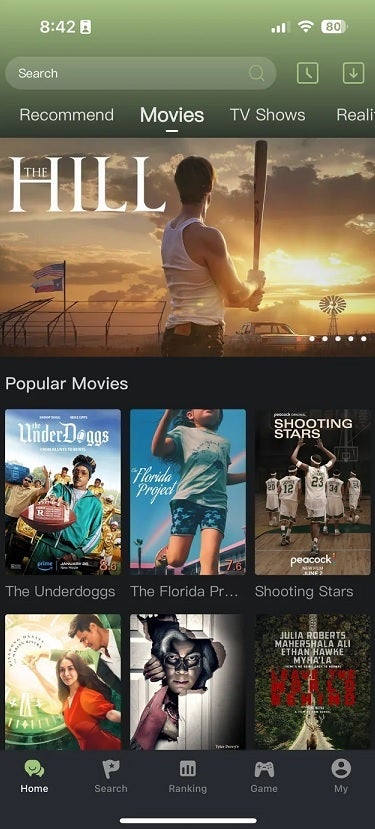
Instead, comments from users bragged about how they used the app to watch “Frozen II” and one comment compared Kimi to Netflix. Data from Appfigures revealed that the app was launched in September 2023 and had generated 25,000 installations since then. There was no indication that Kimi tried to hide its real purpose in the App Store as opening the app for the first time revealed a home page with tabs on top that said “Movies,” “TV Shows,” and more. Under a Popular Movies heading, titles were listed that users could view.
After opening the Kimi app for the first time, this is what users would see
It isn’t clear whether the app is using torrents to allow users to stream movies and television shows, but it seems likely considering the number of dollars it would take to host these selections. That’s how Popcorn Time did its thing back in 2015 when it was known as “Netflix for pirates” before being removed from the App Store. Since Popcorn Time was open source, Movie DB.Net app used a fork of Popcorn Time’s code to create a torrent app that was listed in the App Store and was even given the green light by Apple to complete three updates. The app also is no longer listed in the App Store.
Kimi had some useful tools including a “Ranking” tab that showed users which movies or television shows were being viewed the most on the app. But after The Verge asked some pointed questions about the app to Apple, the gang in Cupertino removed Kimi from the iOS App Store, iPadOS App Store, and the macOS app store.
And to make it clear in this age of conspiracy theories, Apple removed the Kimi app. You do not have a problem with your vision that would require you to use the Kimi app to test your vision. That is if the Kimi app did perform such tests instead of hooking you up to content to be viewed illegally.
When you’re choosing a photo to upload to social media or edit using an image editing software, you’re usually tied to the pictures that are on your phone. However, the Android photo picker is about to get a major upgrade by integrating Google Photos as a storage option. This will make it so much easier to access your images stored in cloud storage.
The Android photo picker has been getting some updates recently. It got a revamp with Android 13, and it’s continuing to get changes. When it comes to choosing images to use in different apps, it’s really great at showing you the photos you have stored on your device. However, there are people who primarily store their photos in the cloud. This means that if they want to upload their photos or edit them in an app, they have to first download the photo from the cloud storage. That’s not extremely inconvenient, but it can be tedious if you have to do it on a constant basis.
The Android photo picker will integrate with Google Photos
The February 2024 Android system update is on its way. When it lands, it’ll bring a new functionality to the Android photo picker. When you summon it after the update, you’ll see a banner letting you know that cloud photos are available. The banner will have two options. If you are completely okay with this, simply tap on the Dismiss button. However, if you don’t want to implement your Google Photos content, you can tap on the Manage Account button. This will give you the ability to deactivate it.
If you choose to keep it on, then you will see your Google Photos albums along with your local albums. Simply tap on the Albums tab, and you will see them. Also, you will see your Favorites album.
This process will make it so much easier to upload and share pictures that are not stored on your device.
You don’t only have to use Google photos
In the settings, you’re able to assign Google Photos as the cloud storage option. However, you don’t only have to use Google Photos. You’re actually allowed to assign the cloud storage platform that you want to use. So, if you have your files saved on Microsoft OneDrive, Dropbox, Mega, etc., you will be able to use those.
NVIDIA today has announced its Chat with RTX chatbot, giving you the power of an AI chatbot that can process and deliver contextually relevant answers to your queries. The best part, it’s all done locally on your PC with no connection to the internet. So your data stays on the PC. If you’re worried about privacy and personal data safety, this should give you some peace of mind. Since all search queries are done locally on your PC, you won’t have to worry about your information being uploaded to a server and putting it at risk.
You can use the chatbot to do a search based on local files you have stored. For example, say you have a menu file for a restaurant you’ve been meaning to try. But you can’t remember the name or what file format it’s in. You just know you have it stored somewhere on your PC. With this tool, you can ask what the restaurant is, and then it’ll do a search for contextually relevant files. You will need to point the chatbot to the folders you want it to look in. So it doesn’t just scan everything. NVIDIA says it processes user queries in “just seconds” too. So you shouldn’t be waiting around all day for it to find what you’re looking for.
The NVIDIA RTX chatbot can also search YouTube videos for information
In addition to having it search local files and directories, it can search YouTube videos for specific information. This function does technically require the internet. Since you’ll need to have internet to access YouTube and get the video link. This could be useful if you’re looking for a specific piece of information in a really long video. Say you want to know what PC games were announced during Summer Games Fest. But you don’t feel like watching the entire hours-long video. You can simply copy and paste the YouTube URL into the chatbot tool and it’ll search for the details for you.
Then spit back out the answers with the reference file. In this case, the video you linked. If you’d like to try out this chatbot for yourself, there are a few caveats. First of all, this is a tech demo. It’s not a fully-fledged piece of software yet. Meaning, NVIDIA is still working on it and probably plans to do a full rollout in the future.
It also requires the use of an RTX 30-series GPU such as the RTX 3060, or higher like the RTX 4070 Ti Super that NVIDIA just recently announced as part of its 40-series lineup. That will limit some users who were hoping to check it out. But maybe there’s hope for it coming to the RTX 20-series cards at some point. Lastly, you need Windows 10 or Windows 11. It’s not compatible with Mac or Linux, and NVIDIA says it has no news to share on additional platform support. But it is listening to user feedback from those who want access via non-Windows platforms.
The two Americans reportedly received assistance from two Russian hackers in the highly sophisticated hacking scheme, resulting in profits exceeding $100,000 over the years.
Two men from Queens, New York, were sentenced to prison today for their roles in a scheme to hack the electronic taxi dispatch system at John F. Kennedy International Airport (JFK). Daniel Abayev, 47, received a four-year sentence, while Peter Leyman, 49, received two years. Both were convicted of conspiring to commit computer intrusion.
The scheme, as reported by Hackread.com, involved Abayev and Leyman working with Russian hackers to manipulate the taxi queue, allowing participating drivers to jump ahead of the line for a fee. This not only disrupted the fair and orderly flow of taxi services at JFK Airport but also impacted the livelihood of honest taxi professionals who followed the rules.
“This was not just a technical crime; it was an attack on the integrity of a critical system and a betrayal of the trust placed in these individuals,” stated U.S. Attorney General Damian Williams. “Their actions caused real harm to honest taxi drivers and undermined the public’s confidence in the fairness of the system.”
According to the investigation, Abayev and Leyman conspired with the Russian hackers to exploit vulnerabilities in the dispatch system. This allowed them to remotely manipulate the queue, placing taxis driven by participants at the front of the line regardless of their arrival time.
The scheme reportedly facilitated up to 1,000 expedited trips per day, generating over $100,000 in illegal income for the perpetrators. The scheme started in September 2019 and continued until September 2021.
The judge presiding over the case, Paul A. Crotty, emphasized the seriousness of the offence, stating, “Hacking is just another way of stealing. This was done persistently over an extended period of time.”
In addition to the prison sentences, Abayev and Leyman were ordered to pay substantial restitution ($3,456,169.50) and forfeiture ($161,858.26) amounts. They are also subject to supervised release upon their release from prison.
This case goes on to show the potential consequences of cybercrime, particularly its impact on critical infrastructure and the livelihoods of ordinary people. It also highlights the importance of strong cybersecurity measures and vigilance in protecting sensitive systems from malicious actors.