Google One VPN: Everything You Need To Know

0
[ad_1]

Google announced a new VPN service on October 29, 2020. It’s called Google One VPN and is included in the Google One subscription service. It’s yet another feature that Google has added to Google One, giving it even more value. And now over 100 million people have access to this free VPN from Google.

It’s advisable for everyone to have a VPN for various reasons. Therefore, it’s great news that Google is offering a free VPN service. The easiest way for someone to start using a VPN is by getting it for free, and Google is now adding this perk to its Google One service. Similar to Amazon’s Prime, Google is adding more features to One to make it a more appealing service for users, ensuring that they receive the best value for their money.

What is a VPN?

What exactly is a VPN? Well, it stands for Virtual Private Network.

With a VPN, you will be able to browse the web using a secure connection, that hackers won’t be able to see what you’re doing (or steal your information), and you can also get around restricted websites. For example, if you are in China for a few days and need to use Google, you’ll need to use a VPN to do so. You can get around the region restriction by connecting to another server in another country, and it tells the internet that you are located elsewhere, like France, rather than China.

The biggest reason why people need a VPN is public WiFi. If you’ve ever used WiFi at Starbucks, McDonalds, or even the airport, chances are you’ve connected to an unsecure WiFi network, which makes it easier for hackers to steal your data. So when you use a public WiFi network, make sure to flip on your VPN, and you’ll be secured.

What is Google One VPN?

Google One VPN, is basically Google’s own VPN that it is offering to Google One subscribers. It was originally only available to those on the 2TB plan, however now, Google One VPN is available on all paid plans. Which starts at 100GB for $1.99 per month.

It’s basically a VPN for those who are not tech-literate. It is essentially just a toggle in the Google One app. Just flip the switch, and boom, you’re connected. There are no settings for things like which server you are connecting to, when to disconnect, and so forth.

The only downside here is that you will have a persistent notification saying that you are connected. You can also move the VPN quick setting into your quick settings so you can quickly enable it whenever you need it.

Google isn’t new to the world of VPNs. It actually has used one for its customers on Google Fi for many years now. Essentially with Google Fi, whenever you connected to a public WiFi network, you would automatically be connected through Google Fi’s VPN. As mentioned before, this is because Public WiFi networks are not secure. So, while keeping you from using a lot of data, since Fi charges per gigabyte, it also keeps you protected.

Now, Google is just moving its VPN to where everyone can use it. Whether they are a Fi customer or not.

Should I trust Google with more of my data?

This is the million-dollar question. Should you use this VPN? And trust Google with even more of your data? Once you enable the VPN, everything you do online routes through Google’s servers. While Google, arguably already has a lot of data on you, this VPN is going to give it even more.

However, and this is important, Google has said numerous times that it will not use the VPN connection to track, log, or sell your browsing activity. But then again, how will we know that Google is not doing that? We won’t. And that goes for any other company, too.

It’s up to you whether you trust Google not to collect this data when you’re using its VPN. But don’t forget that if Google really wanted that data, it could quickly get it from your Android smartphone too. So the real question is, what new data would Google be getting with this VPN? However, if you’ve been using Google services for this long, what kind of data do you not have of yours right now? Probably not much.

Google vs. a third-party VPN

If you do have reservations about Google having more data on you, thanks to this VPN, you can always use a third party. Like Express VPN, Opera VPN or even NordVPN, to name a few. However, they can also store and collect your data. Even though they promise that they don’t – similar to Google.

With Google, they are betting that because you already use Google services and the ease of using this VPN, you’re more likely to use this than a competitor. Seeing as these competitors charge at least $3/month  just for a VPN. Meanwhile, with Google, you’re paying at least $9.99 per month, but you are also getting a whole lot more than just a VPN.

If you need the ability to be able to change what server you are on, switching to Paris from Los Angeles for instance, then a third-party VPN is going to be a must-have for you. But don’t forget that some of these other VPN services out there, also have a cap on data. Meanwhile, Google VPN has no cap on how much data goes through its VPN. So that’s one more thing to keep in mind, and something that helps out Google, of course.

How do I get Google One VPN?

The VPN is only available through Google One. To be able to get access to it, you’ll need to sign up for one of the paid plans. This starts at $1.99 per month for 100GB. You can also get 2TB for $9.99 and the new Google AI plan for $19.99 per month.

Screenshot 2024 02 13 at 10 08 11 AM

With that 2TB Google One plan, you’re getting quite a bit of features. Not only do you get 2TB of storage for Gmail, Drive and Photos, but you are also getting 10% back when you shop on the Google Store. As well as the ability to add family members, and some other benefits. The ability to add your family members is a big deal actually. As you could opt for the 10TB plan for $50/month and split it four ways, making it much cheaper, and everyone gets access to that storage.

Google has not announced any plans yet, to roll out the VPN separately. So that customers can subscribe to just the VPN, without getting the extra storage. However, considering Google is removing the unlimited free storage options on Google Photos and with Google Docs, you’re going to need that storage.

How to use Google One VPN

Setting up the Google One VPN is super simple. Open up the Google One app, which should be pre-installed on your Android device. If not, you can grab it from the Google Play Store here.

Once you open up the Google One app, you should see a card at the very top that says “Online Protection with a VPN,” and there’s a button that says “Enable VPN.” Tap on that. If that is not available, tap on the “Benefits” tab, and you should see the card there.

google one vpn screenshot
Google One VPN

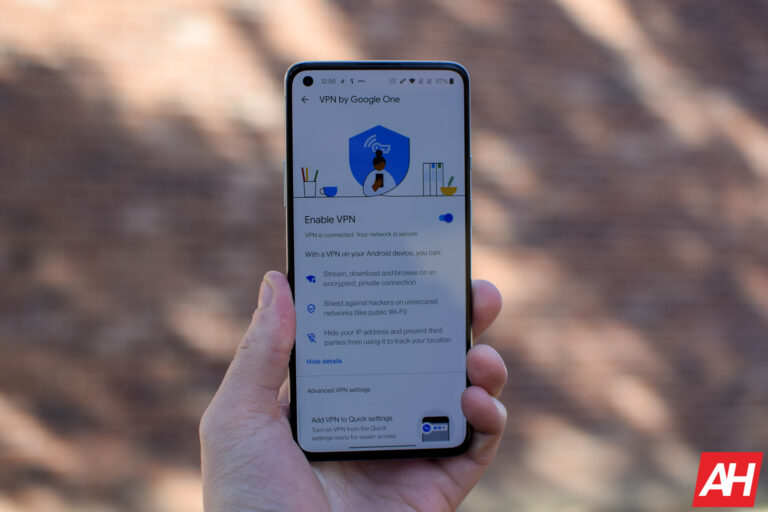
This will take you to a new page, which has a toggle to enable the VPN. It also gives you a bit more information about the VPN. It tells you that you can stream, download, and browse on an encrypted, private connection. And such.

From here, you can tap on the toggle to turn on your VPN.

Now, there is an easier way to do this, as the Google One app notes at the bottom of this page. You can add your VPN to the quick settings. So you can quickly turn it on and off when needed.

Once the VPN is connected, it will show up in your notification shade, where you can see the status of the VPN and also disconnect at any time.

There are no settings here for changing the server that it is connected to. Or seeing how much data goes through the VPN and so forth. It’s basically just on or off. This makes it super simple for those who are not tech-literate and don’t need all of those extra settings. That’s where Google is really trying to target with this VPN.

What devices does it work on?

Currently, the availability of the Google One VPN is somewhat limited. It’s only available on Android and Chrome OS devices that support Android apps. Essentially, that means that it only works on Android smartphones and tablets, Android TVs, and Chromebooks (and Chromeboxes). Not Windows and MacOS computers, which would be a nice addition. That could change in the future, but it may not be as simple as toggling it on and off as it currently is.

Basically, any device that can run the Google One app, has support for the VPN. Since the Google One app is not available on iOS either, that means that there’s no support for the VPN there.

google one vpn screenshot
Google One VPN – Android Notification

When will it work on the desktop?

Google One VPN will be coming to the desktop. It’ll be available on Windows, MacOS, and iOS in “the coming months,” according to the company. It’s likely going to take a bit longer since it’s not as simple as including it in the Google One app. But it shouldn’t take too long to become available.

And this is going to make it a whole lot easier to keep your browsing safe on all of the devices that you use. From your smartphone to your tablet, to your TV, and even your desktop (or laptop computer). That’s going to keep you safe when you’re browsing at home or on the go. And you’ll never need to worry about connecting to unsecured WiFi networks again, which is a big deal for some people (it should be for everyone, though).

Where is it available?

Google One VPN started out as being available in the US only, like most of Google’s products. However, it is now available in the US, Mexico, Canada, France, Germany, Spain, Italy and the United Kingdom. That’s still a far cry from being available everywhere that Google’s services exist.

If you live in the US, Mexico, Canada, France, Germany, Spain, Italy, or the United Kingdom, sign up for the 2TB plan from Google One, and you’ll be able to use the VPN.

Update: On August 10, 2021, Google announced it was expanding its VPN service to other countries. That includes Mexico, Canada, France, Germany, Spain, Italy and the United Kingdom.

Is the VPN worth it?

Given the recent storage changes that Google has announced, most of us are likely going to be upgrading to the 2TB plan anyway, which makes the VPN free. Or at least included. And that makes this VPN a lot more functional. As well as being more likely to be used. It’s definitely worth using, especially if you do a lot of traveling or use a lot of public and/or unsecured WiFi networks.

The big issue though, with the Google One VPN, is that it is not available on everything. The biggest sticking point is computers. Normally when I travel, I take my laptop and do most of my work on that. Having the Google One VPN available on my laptop would be a huge help. Especially when trying to get around region-restricted websites. That is something Google is adding in the future, but as of right now, it’s a no-show.

If the VPN is worth it for you, it is only something you can answer, though. It’s always better to be safe than sorry. And let’s face it, our ISPs don’t need to know where we spend most of our time online, these days, anyway.


[ad_2]
Source link
HBO MAX with Ads: Everything You Need To Know

0
[ad_1]

Update: After WarnerMedia and Discovery merged to form Warner Bros. Discovery, the company relaunched HBO MAX as simply “MAX” which has HBO, Warner Bros and Discovery content in the same app. A lot of what is mentioned here still applies to MAX, however.

WarnerMedia has just launched its much anticipated second plan for HBO MAX. Now you can get HBO MAX with Ads, and it’ll cost a third less than regular HBO MAX would cost you. Making it just $9.99 per month. Of course, the big differentiator here is that it does have ads. But there are a few other things that make this different from the regular HBO MAX plan, which is $14.99 per month. And we’re here to help you figure out which plan is the best for you.

HBO MAX has made quite a few changes over the past year since its launch. As well as debuting some pretty incredible shows and movies. Including two reunions for Friends and The Fresh Prince of Bel-Air. Which has helped HBO MAX become a pretty popular streaming service in the US. And now that it is available for less, it’s going to grow its reach even further.

HBO MAX vs HBO MAX with Ads

As the name of the plan indicates, HBO MAX with Ad’s biggest differentiator is the fact that it has, well, ads. But it’s not quite that clean-cut.

There will be ads on some of the shows and movies available on HBO MAX. But not any of HBO MAX’s original programming. Basically anything that it has licensed from other studios – as well as Warner Bros. And you’ll also see ads if you pause playback. This means that you won’t actually see a whole lot of ads on HBO MAX with ads. And that’s a pretty good user experience, to be quite honest.

The other big difference here is new releases. Now, this really only affects users for the rest of 2021. But those theatrical releases that are available on HBO MAX the same day that they come to theaters, won’t be available to those on the HBO MAX with Ads plan. So you’ll need to wait for them to actually come to HBO MAX a few months later on.

Screenshot 2024 02 13 at 8 08 52 AM

Thankfully, HBO MAX has been pretty quick about getting its movies onto its platform after the theatrical release. Wonder Woman 1984 for example, hit HBO MAX in May, about five months after it landed in theaters. That used to take about a year to happen, or longer. So that’s good news.

WarnerMedia has also stated that it is committed to keeping the ad load pretty low on this plan. Management says that you’ll see less than four minutes of ads per hour, on average. Of course, different titles will have different amounts of ads. So you could end up seeing no ads at all.

There are two more differences here, which are still pretty minimal. But with HBO MAX with Ads, you won’t be able to download titles to watch offline. And you will be limited to streaming in HD. While the standard HBO MAX plan does offer 4K HDR (with Dolby Vision), though that is not available on every title. So also keep that in mind.

Is there a free trial?

Unfortunately, HBO MAX did kill off its free trial last December. Just before Wonder Woman 1984 hit the platform alongside its theatrical release. HBO MAX decided to get rid of the free trial so that users couldn’t just sign up for the free trial and watch Wonder Woman 1984 and then leave. Though, there’s still no committment for HBO MAX, and you can leave whenever you want. So that’s not a big deal.

However, WarnerMedia does offer a bunch of ways that you can get HBO MAX for free. So there’s that.

Can I get HBO MAX for free?

If you’re an AT&T subscriber, probably.

So AT&T has laid out who will get HBO MAX for free, and it’s the majority of its customers. Here’s how it breaks down for different AT&T customers:

  • If you have DirecTV Premier or Lo Maximo
  • If you have U-Verse U400, U450 or U450 Latino
  • If you have AT&T TV Choice, Xtra, Ultra or Optimo Mas plans
  • If you have AT&T TV Now
  • If you have DirecTV Choice, Xtra, Ultimate, Mas Ultra or Optimo Mas packages. (But you only get a year for free.)
  • Other plans may get it free for one month
  • If you have the AT&T Unlimited Elite wireless plan

These free HBO MAX offers range from one month to a year. So you won’t be getting it for free, forever, unfortunately. But that is long enough to decide whether you want to keep it. So there’s that.

hbo max billboard

Can I switch between the three plans?

Once you sign up for HBO MAX, you’ll be able to switch between the three plans, pretty much anytime. However, if you’re downgrading to save a few bucks each month, the change won’t actually take place until your billing cycle is up. This means that HBO MAX won’t pro-rate your account if you switch to the ads tier halfway through your cycle.

On the flip side, if you want to upgrade and download some titles before jumping on a plane, you can do that. And you’ll be charged the difference right away.

Is HBO MAX with Ads worth the $5 savings?

You might be wondering if switching to this cheaper HBO MAX plan is worth the savings. And well, it might be. If you don’t care about watching movies the same day they hit theaters – which really only matters for about six more months – then, yeah, it’s worth it.

WarnerMedia also makes sure to keep the ad load pretty low on everything on HBO MAX, which helps to make this a much more attractive option. The fact that you’ll see less than four minutes per hour of watch-time is really incredible. Some ad breaks on regular TV are over four minutes long. And by the looks of things, the ads are just between episodes or at the beginning and end, which isn’t really that annoying when you think about it.

If $15 seems like it’s a bit much for HBO MAX, $10 probably seems a bit more palatable. Honestly, that’s just a dollar more than Netflix Basic – which is really Basic by 2021 standards, to be quite honest. You can sign up for HBO MAX by hitting the link below.

Sign Up For HBO MAX


[ad_2]
Source link

Patch now! Roundcube mail servers are being actively exploited

0
[ad_1]

The Cybersecurity & Infrastructure Security Agency (CISA) has added a vulnerability in Roundcube Webmail to its Known Exploited Vulnerabilities Catalog, based on evidence of active exploitation. This means that Federal Civilian Executive Branch (FCEB) agencies need to remediate this vulnerability by March 4, 2024, in order to protect their devices against active threats. We urge other Roundcube Webmail users to take this seriously too.

Roundcube is a web-based IMAP email client. Internet Message Access Protocol (IMAP) is used for receiving email. It allows users to access their emails from multiple different devices, and it’s why when you read an email on your laptop it’s marked as “read” on your phone too. Reportedly, there are over 132,000 Roundcube servers accessible over the internet. Most of them situated in the US and China.

The affected versions are Roundcube versions before 1.4.14, 1.5.x before 1.5.4, and 1.6.x before 1.6.3. An update to patch the vulnerability with version 1.6.3 has been available since September 15, 2023. The current version, 1.6.6 at the time of writing, does not have the vulnerability either.

The Common Vulnerabilities and Exposures (CVE) database lists publicly disclosed computer security flaws. The CVE patched in these updates is:

CVE-2023-43770, which is a persistent cross-site scripting (XSS) bug that lets attackers access restricted information.

XSS vulnerabilities occur when input coming into web applications is not validated and/or output to the browser is not properly escaped before being displayed. Persistent, or stored XSS, is a type of vulnerability which occurs when the untrusted or unverified user input is stored on a target server.

This means that a persistent XSS attack is possible when the attacker exploits a vulnerable website or web application to inject malicious code, and this code is stored on a server so it will later automatically be served to other users who visit the web page.

In this case it appears that attackers can send plain text emails to Roundcube users with XSS links in them, but Roundcube does not sanitize the links, and, of course, stores the email, creating persistence.


We don’t just report on vulnerabilities—we identify them, and prioritize action.

Cybersecurity risks should never spread beyond a headline. Keep vulnerabilities in tow by using ThreatDown Vulnerability and Patch Management.


[ad_2]
Source link

FCC commissioner calls for investigation into Apple’s shutdown of Beeper Mini

0
[ad_1]

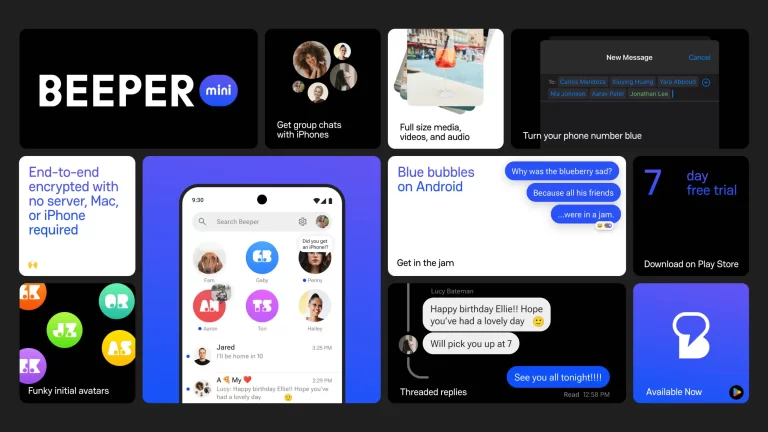
The recent demise of Beeper Mini, a service that allowed Android users to access iMessage, has sparked controversy and drawn the attention of regulators. Initially promising Android users the ability to send “blue bubble” messages from their devices, Beeper Mini utilized a reverse-engineered method to access iMessage without requiring an Apple ID. However, Apple swiftly shut down the service, leading to accusations of anticompetitive behavior.

FCC Commissioner Brendan Carr has now joined the fray, calling for an investigation into Apple’s actions regarding Beeper Mini. During the State of the Net Conference, Carr expressed concerns over potential violations of FCC rules, particularly those related to accessibility for people with disabilities. Part 14 of FCC rules outlines requirements for “advanced communications services,” including provisions for accessibility.

Carr’s focus on Part 14 suggests concerns about accessibility and usability of services

Although the exact nature of Apple‘s alleged violations remains unclear, Carr’s focus on Part 14 suggests concerns about accessibility features and usability. One aspect highlighted by Carr is the color scheme used by Apple for distinguishing between iMessage (blue bubble) and SMS messages (green bubble). Carr argues that the low contrast of the green bubble messages may pose difficulties for users with low vision or visual impairments, potentially impeding accessibility.

Furthermore, Carr’s remarks indicate broader concerns about Apple’s actions in banning users of Beeper Mini. The FCC rules explicitly prohibit network features or capabilities that impede accessibility or usability, raising questions about Apple’s decision to disable Beeper Mini and ban users. Carr’s call for an investigation underscores the need to ensure compliance with regulations that protect access to communication services for all individuals.

While the FCC has yet to formally launch an investigation, Carr’s intervention signals growing scrutiny of Apple’s practices. The outcome of any potential investigation could have significant implications for the tech industry, particularly regarding antitrust issues and accessibility standards. As the debate continues, stakeholders will closely monitor developments to assess the impact on competition and consumer rights in the digital landscape.


[ad_2]
Source link

Google commits €25 million to boost AI training and skills in Europe

0
[ad_1]

Google has announced €25 million (approx. $27 million) funding to boost AI training and skills in Europe. The funding is part of its AI Opportunity Initiative which will provide foundational and advanced AI training to people across the region. The initiative will have a particular focus on vulnerable and underserved communities, while simultaneously supporting startups and the general public.

Google to help Europeans seize the opportunity of AI with its initiative

Artificial intelligence or AI has revolutionized a wide range of industries and is reshaping the global economy. As AI adoption grows, it will impact society in new ways—some good and some bad. Google says AI will create new opportunities for people who can understand and utilize its potential. Through its AI Opportunity Initiative, the company wants to empower Europeans with skills that will help them seize the opportunity.

“Europe can lead the way in harnessing AI to create a strong and equitable economy — with more productive industries, more meaningful work, and many new kinds of jobs. We want to play our part in empowering Europe’s workforce, supporting people through change so that everyone can benefit,” said Matt Brittin, the President of Google EMEA (Europe, the Middle East, and Africa).

Google is working with European governments and local communities to ensure that its initiative reaches the people who are most likely to benefit from this training. It has teamed up with the Centre for Public Impact and is seeking applications from social enterprises and nonprofits who can help it maximize the impact of the initiative. The firm will provide bespoke and facilitated training to selected organizations.

Google will also provide cash grants to these organizations for critical wraparound support. The company will begin with €10 million in funding dedicated to equipping workers with the AI skills they need to enhance their productivity so they aren’t left behind in this ever-evolving world of AI. The initiative will also help startups leverage AI to scale their business across Europe, the Middle East, and Africa.

Google now offers AI foundational courses in 18 languages

As part of the AI Opportunity Initiative, Google has expanded its AI foundational courses to 18 languages. The courses are available to everyone for free. They include a series of modules on AI skills tailored to help people and businesses develop practical skills and knowledge. Google also plans to add more AI resources to its Google Career Certificates program that offers a professional certificate.

This isn’t the first such initiative Google has launched in Europe. In 2015, the company debuted the “Grow with Google” initiative to offer free training on digital skills. It has so far trained over 12 million people across the region. The tech behemoth says that many of the people it trained “have gone on to grow their careers, start new businesses, or get a new job using what they learned.”


[ad_2]
Source link

Google fixes the biggest hurdle to using Gemini as your Android’s Assistant

0
[ad_1]
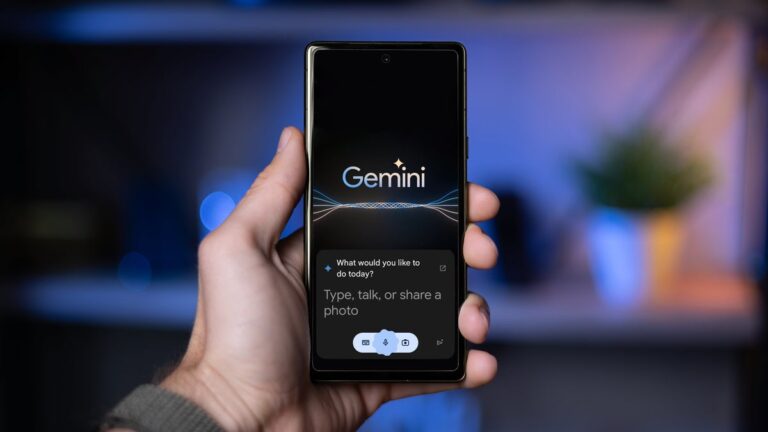
Google recently released Gemini for Android and the web, implying it might be the Assistant’s eventual successor on your smartphones. As with any major release, users put it to the test and quickly noticed it didn’t quite have all the features and abilities that the Google Assistant currently has. While we know that Gemini will evolve and gain more features as time passes, there is at least one feature that was recently pushed out that gets it closer to that goal.


Prior to the update, manually activating Gemini on Android required tapping the send button (bottom right of the Gemini overlay panel) after each spoken command. This means that you had to pay attention and make sure to press that button once you were done telling Gemini what you wanted, otherwise its mic indicator would just spin until you told it you were done.

While that doesn’t seem like a huge deal, it’s one of those things that Google Assistant users have become accustomed to: having a more natural back-and-forth without the need to enter too much manual input. Fortunately, as spotted by 9to5Google, Google quickly remedied that by issuing an update over the weekend (version 1.0.606412536) that gives Gemini the ability to automatically process commands without having to press the send button. This works when using it by holding down the power button, using a corner swipe, or using the “Hey, Google” command.
It is a wonder why Google would initially release Gemini lacking this very basic feature. However, we already know that Gemini is still a work in progress and it is sadly still missing other basic Assistant features such as continued conversation and being able to handle multiple requests back to back. It is unknown when Google plans to fully switch us over to Gemini in favor of the tried and true Assistant, but it is clear that there is still plenty to be fixed before we reach that point.

[ad_2]
Source link

Fileless Revenge RAT Abuses Tools to Hide Malicious Activity

0
[ad_1]

Threat actors are distributing Revenge RAT malware, developed using legitimate tools like “smtp-validator” and “Email to SMS.”

When executed, the malware runs a malicious file and a legitimate tool, making it difficult for users to know there is malicious activity.

Moreover, threat actors have also created a setup.exe file that is executed and hidden before the execution of smtp-verifier.exe. In addition, several files are used in this Revenge RAT malware execution process.

Document
Live Account Takeover Attack Simulation

Live attack simulation Webinar demonstrates various ways in which account takeover can happen and practices to protect your websites and APIs against ATO attacks.

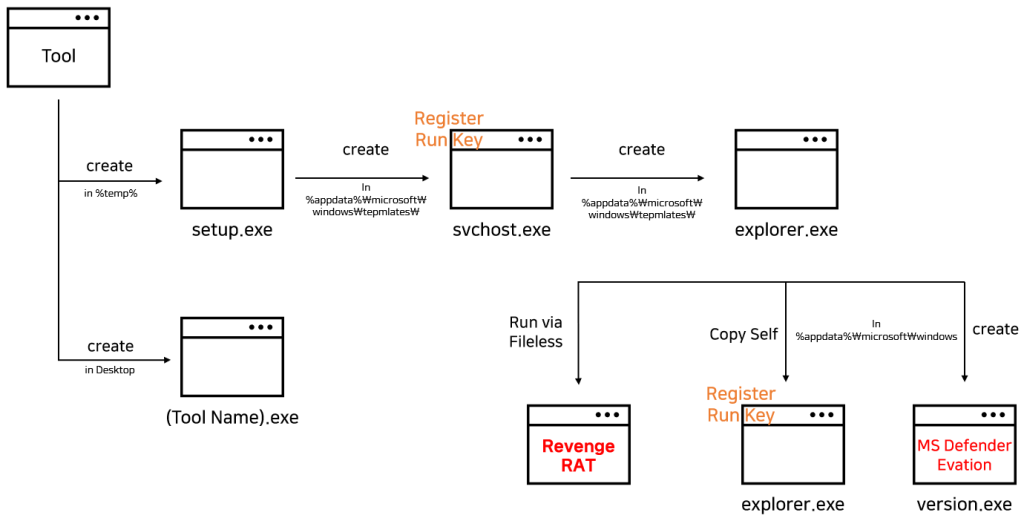
According to the reports shared with Cyber Security News, the malicious file “setup.exe” is used for generating additional malware by creating and running svchost.exe in the %appdata%Microsoft\Windows\Templates path with a hidden attribute.

Revenge RAT Malware flow (Source: AhnLab)

After this, the svchost.exe file is registered in the autorun registry by the setup.exe file with the value “Microsoft Corporation Security.” The svchost.exe file connects to the C2 server and downloads the HTML file, which is then decompressed.

The downloaded HTML file creates and runs the explorer.exe file in the %appdata%Microsoft\Windows\Templates path. There were 2 C2 servers mentioned as an alternate solution in case the first C2 server URL was blocked or when a new C2 was updated.

C2 with binary disguided (Source: AhnLab)

This new explorer.exe file creates another file with the name version.exe in the %appdata%Microsoft\Windows\ path and a .inf file in the %temp% path. This version.exe file is executed with an argument to cmstp.exe (CMSTP defense evasion). Finally, the Revenge RAT is run as fileless malware.

To further prevent disruption of the malware activity, version.exe is designed to run a PowerShell command that adds the files used by the Revenge RAT malware as an exception list in the Windows Defender.

ASEC provides detailed information on the malware, source code, file execution, etc.

Indicators of Compromise

File Detection

  • Trojan/Win.Generic.C4223332
  • Trojan/Win.Generic.C5583117
  • Dropper/Win.Generic.C5445718
  • Dropper/Win.Generic.R634030
  • Backdoor/Win.REVENGERAT.C5582863
  • Backdoor/Win.REVENGERAT.R634026

MD5

  • 42779ab18cf6367e7b91e621646237d1 (smtp-verifier.exe)
  • fb34fe9591ea3074f048feb5b515eb61 (Email To Sms V8.1.exe)
  • 6d5ad2adce366350200958c37f08a994 (setup.exe)
  • 914ec5019485543bb2ec8edcacd662a7 (setup.exe)
  • 5e24e97bbc8354e13ee3ab70da2f3af6 (svchost.exe)
  • 1242c41211464efab297bfa6c374223e (svchost.exe)
  • 438817d3938ae5758d94bf2022a44505 (explorer.exe)
  • 304e264473717fad8f7c6970212eaaa7 (version.exe)
  • d1af87e121d55230353cbad9b7024fae (Fileless RevengeRAT)
  • 6e22b450a765caa999ca984521b42242 (g1rfp0hb.inf)

C&C

  • qcpanel.hackcrack[.]io:9561

Stay updated on Cybersecurity news, Whitepapers, and Infographics. Follow us on LinkedIn & Twitter.


[ad_2]
Source link

Stalkerware App “TheTruthSpy” Hacked Again, 50,000 Device Data Stolen

0
[ad_1]

TheTruthSpy, a seemingly harmless surveillance application, has been secretly gathering sensitive data from users worldwide, despite its advertised purpose of monitoring children or employees. A flaw in the system allows unrestricted access.

TheTruthSpy, a consumer-grade spyware operation, got hacked twice in 2022 and may have broken a world record by being hacked for the fourth time in the same manner, making around 50,000 Android devices vulnerable to cyberattacks. TheTruthSpy has been reportedly monitoring large clusters of victims across Europe, India, Indonesia, the US, and the UK, the latest data being from December 2023.

Switzerland-based hacker Maia Arson Crimew wrote in a blog post published on 12th February 2024. In December 2023, two independent hacking groups ByteMeCrew and SiegedSec discovered and exploited an IDOR vulnerability in the 1Byte-owned TheTruthSpy stalkware, which allows data retrieval directly from TheTruthSpy servers without verifying the client’s right to do so.

Originally reported by TechCrunch, this yet unfixed vulnerability allows for easy enumeration and scraping of data that is typically difficult to access otherwise.

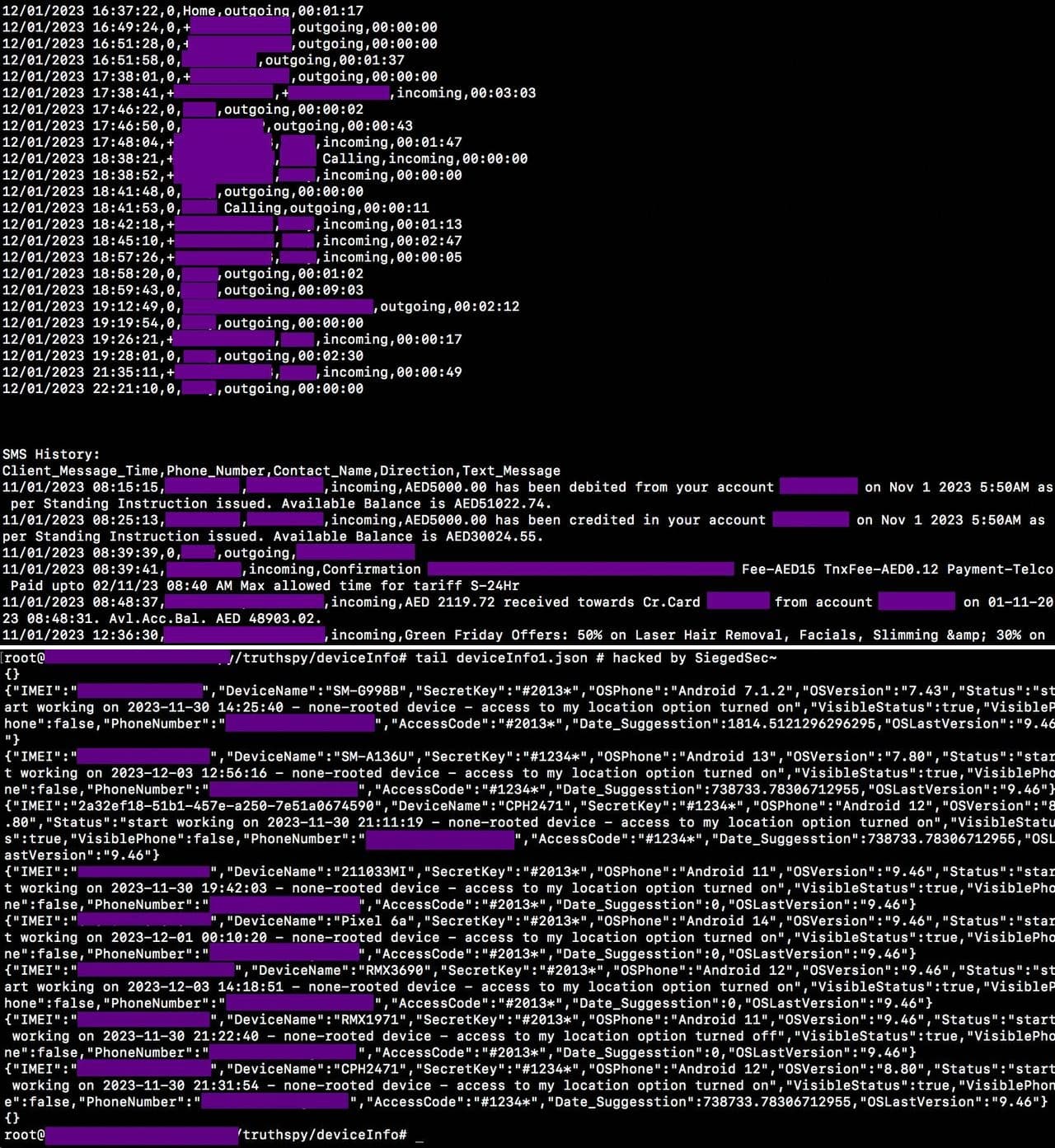
The hacking led to granting access to over 140,000 mobile devices. The affected data includes application logs, text logs, call history, contact logs, browser history, location info, photos, notes, call recordings, IMEI, phone OS, and version.

Stalkerware App "TheTruthSpy" Hacked Again, 50,000 Device Data Stolen
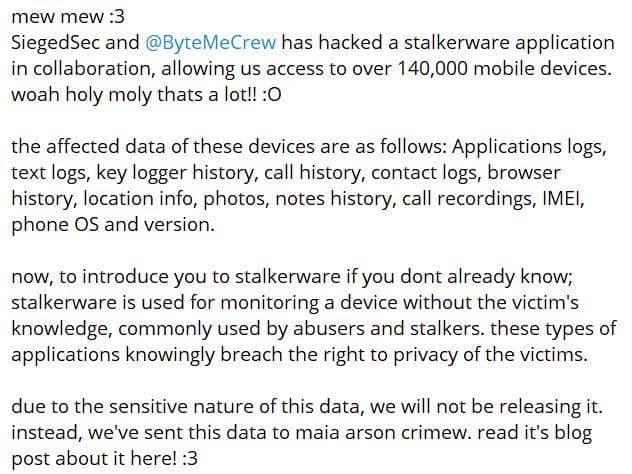
A screenshot from Telegram shows the data accessed by the hackers (Credit: Hackread.com)

Maia, who, according to their blog post, had exclusively received a cache of breached data from ByteMeCrew, collaborated with tech journalist Zack Whittaker to investigate the issue. Whittaker reached out to server hosts and payment providers, forcing the company to switch to a Moldovan host company called AlexHost, and via crypto, they moved checkouts to p2p payments through their support portal.

Their investigation involved monitoring a daily English pronunciation training app website using Firefox developer tools. Multiple IDOR vulnerabilities were found, allowing access to user data and analytics tracking data without authentication. Matching this data with employee names provided personal email addresses and phone numbers.

TheTruthSpy app is known for its advanced surveillance capabilities, with the ability to stay hidden on home screens, but fails to prioritize the security of the data it steals, as it continuously uploads the victim’s phone contents to a dashboard accessible to the abuser.

SiegedSec and ByteMeCrew reportedly, discovered Android device identifiers of every phone and tablet compromised by TheTruthSpy up to December 2023, totaling approx. 50,000 new devices. TechCrunch expanded its free spyware lookup tool to identify more compromised devices.

In their Telegram post, the hacking groups stated they would not disclose the data for being highly sensitive as it includes IMEI numbers and advertising IDs of thousands of Android phones.

Stalkerware App "TheTruthSpy" Hacked Again, 50,000 Device Data Stolen
Screenshot from Telegram (Credit: Hackread.com)

For your information, stalkerware is malicious software that monitors a victim’s device without their knowledge, often used by abusers and stalkers to track activities, knowingly violating their privacy rights.

The investigation reveals that 1Byte’s stalkerware platform and other ventures, including educational tools under the VardyTest brand, are gravely insecure. TheTruthSpy is posing a serious security and privacy risk to thousands of Android users due to a simple security flaw that its operators have not fixed. Given the number of times it got hacked, the only way forward is to shut down operations and disband to show user safety, Maia concluded.

  1. Hacker erase 1 terabyte of data from spyware developer server
  2. Parental spyware app Family Orbit hacked; 281 GB of data exposed
  3. Iranian Stalkerware ‘Spyhide’ Steals Data from 60,000 Android Devices

[ad_2]
Source link

visionOS 1.0.3 makes resetting Vision Pro easier when you forget the passcode

0
[ad_1]

Apple has rolled out a significant update for its Vision Pro headset with the release of visionOS 1.0.3. This is the first update since the Apple Vision Pro‘s launch. The visionOS 1.0.3 brings a crucial feature that allows users to reset their Vision Pro headset themselves if they forget their passcode. It eliminates the need to visit an Apple Store to reset the device.

However, users of the ‘spatial computing‘ platform will still need to wipe everything stored on the device. The update just makes it a bit easier with the option to leverage the Apple ID password that they used while setting up the device. After resetting the Vision Pro, users who have already backed up their data such as images, videos, and messages to iCloud will be able to regain access to those files.

Users can now access this feature by navigating to the settings app and selecting the software update section to install the latest update.

The reset option in visionOS 1.0.3 is noteworthy for its simplicity and accessibility

If a user forgets their passcode and attempts to unlock the device unsuccessfully for four times in a row, they receive a prompt that says your device is disabled. From here, the user needs to reset the device to use it again.

Furthermore, Apple has provided detailed instructions on how users can initiate the reset process directly from their Vision Pro headset. By tapping the “Forgot Passcode?” button after four incorrect passcode attempts, users can start the reset procedure and follow on-screen prompts to erase the device and set it up again. This streamlined process ensures that users can regain access to their devices quickly and efficiently without the need for external support.

Apple’s release notes for visionOS 1.0.3 highlight the importance of the update, stating that it provides essential bug fixes and adds the option to reset the device in case of a forgotten passcode. This enhancement reflects Apple’s commitment to continuously improving the user experience and addressing customer feedback to enhance the functionality of its products.

Overall, the inclusion of an easy reset option in visionOS 1.0.3 represents a significant improvement for Vision Pro users, offering greater convenience and peace of mind in managing their device’s security settings.


[ad_2]
Source link

Elon Musk has to testify in SEC’s probe over his Twitter acquisition

0
[ad_1]

Elon Musk’s purchase of Twitter is still making headlines. In the most recent case, a judge has ordered Musk to testify in the SEC’s probe into his purchase of the company. The billionaire and the SEC now have one week to determine the time and place of testimony. If they fail, the court will decide for them.

The US Securities and Exchange Commission (SEC) started investigating Twitter’s (later rebranded to X) takeover by Elon Musk in 2022. The agency wants to find the reason behind Musk’s late disclosure of his initial Twitter stake. Before taking over the whole company, Musk bought 5% of Twitter shares. The move allowed him to purchase more shares without notifying other shareholders.

In December, US Magistrate Judge Laurel Beeler ruled that Musk should testify before the SEC, and the recent ruling forces the billionaire to comply. Musk has tried multiple times to evade testifying about his Twitter purchase.

A federal judge obligates Elon Musk to testify before the SEC

As per Reuters, the ruling came after Musk didn’t appear in his testimony meeting in September. And later didn’t even appear in a rescheduled interview. In response, Musk said he had done the interview two times, and even accused the SEC of harassment. He said the subpoena was issued by a staff member appointed by the SEC’s Director of Enforcement.

However, the judge rejected these claims and noted that the SEC has the authority to issue a subpoena. The SEC further claimed it had found some new documents related to Elon Musk’s purchase of Twitter and that he needs to answer some questions.

Elon Musk has faced multiple lawsuits and investigations since his bid to buy Twitter was accepted in October 2022. Since then, he has been sued multiple times by former employees, lawyers, and US government agencies over his way of governing the platform.

Musk and the SEC also had a brawl in 2018 when Musk tweeted “funding secured” after he decided to take Tesla private. The SEC later ordered Musk to consult with lawyers before tweeting about Tesla. The agency sued the billionaire in 2019 for breaching the agreement. As a result, Tesla paid $20 million in fines and Musk left his role as the company chairman. Elon Musk’s alleged use of drugs in private parties has also made shareholders rethink of his ability to run the company.


[ad_2]
Source link