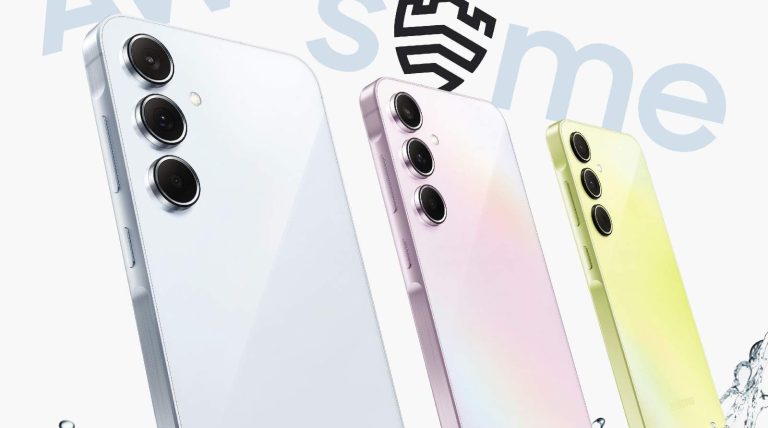
Samsung‘s Galaxy A35 and Galaxy A55 have leaked in another set of renders. Shared by renowned tipster Evan Blass on X, we have images showing the two upcoming mid-range phones in multiple colors. The devices may go official soon as the company has started putting up support pages on its website.
Galaxy A35 and Galaxy A55 show up in fresh renders
Early last month, we exclusively leaked the official renders of the Galaxy A35 and Galaxy A55 in three colors each: Awesome Iceblue, Awesome Lilac, and Wesome Navy. It appears Samsung will offer the phones in a Greenish Yellow color too, at least the former model. The images shared by Evan Blass, aka @evleaks, show it in a shade of Yellow similar to that of the Galaxy A25. The other device is seen in the same three colors.
At first glance, it is hard to tell the difference between the two models. They feature the same rear design, including the layout and positioning of the cameras, the LED flash unit, and the Samsung logo. The button placement is also the same, with both phones sporting the Korean firm’s new Key Island design language. The frame is slightly raised around the power and volume buttons on the right side.
The Galaxy A55 and Galaxy A35 also look identical from the front, thanks to Samsung upgrading the latter to a hole-punch design. However, looking closely, you will find a few design differences. Most notably, the Galaxy A55 has antenna lines on the frame, confirming a metallic structure. The Galaxy A35 has no antenna lines, meaning that it will feature a plastic frame. The former also has its camera lenses protruding further away from the body.
The two devices differ a lot internally
Samsung’s upcoming mid-range smartphones may look identical on the outside but they differ a lot internally. While we don’t have detailed specs, we know that the Galaxy A35 is a slightly bigger package overall. It will feature a bigger display. The two phones will also ship with different chipsets. The Galaxy A55 should get a new Exynos processor with an AMD-powered custom GPU. The devices may share the 50MP primary rear camera, though.
Over the past few weeks, Samsung has received regulatory approvals for the Galaxy A35 and Galaxy A55 from several government and certification agencies around the world. The company has also published support pages for the phones on its official websites. The support pages are live on its websites in India, the UK, Africa, the UAE, Latin America, and more regions. This is an indication of a nearing launch. Samsung might unveil the devices soon.
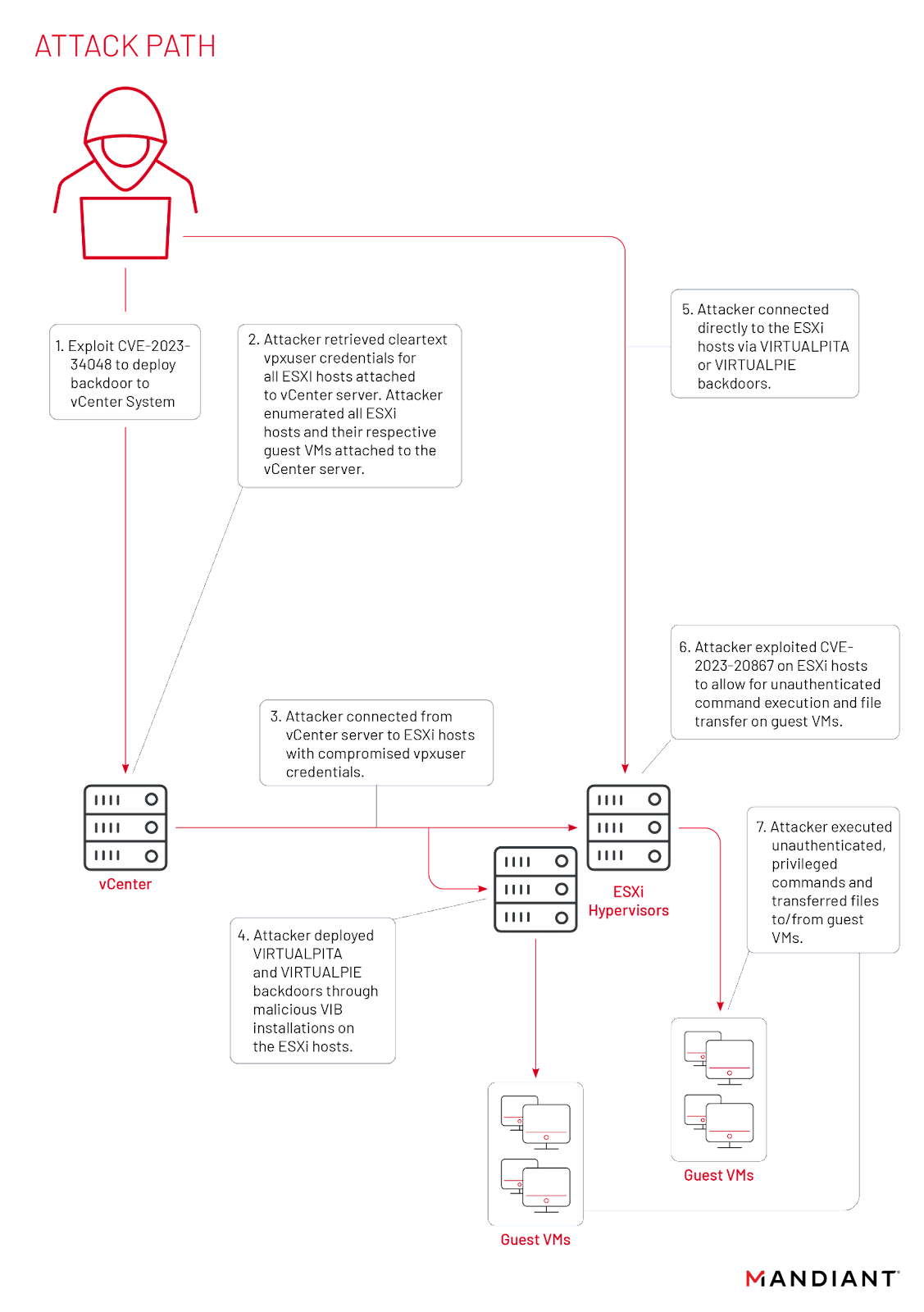
Mandiant and VMware recently uncovered a sophisticated cyber espionage campaign. The attackers, a Chinese group identified as UNC3886, leveraged a known vulnerability in VMware software (CVE-2023-34048) to maintain access to the targeted systems for over a year.
This case highlights the importance of staying vigilant against persistent and evolving cyber threats.
Mandiant’s investigation revealed that UNC3886 employed advanced techniques to target vulnerable areas of technology that are beyond the reach of antivirus software.
This discovery underscores the need for a multi-layered security approach that goes beyond traditional antivirus measures.
VMWare 0 day Flaw
Mandiant persisted with its investigation, with a specific focus on identifying the techniques utilized for deploying backdoors into vCenter systems.
DocumentProtect Your Network From Data Breach
Prevent malware from infecting your network at the delivery stage by intercepting malicious files in transit from their source to the target device’s web browser..
As per the analysis conducted by Mandiant, the crash of the “vmdird” process of VMware was found to be significantly linked to the exploitation of a specific vulnerability, namely CVE-2023-34048.
Though patched, Mandiant found evidence of these crashes in UNC3886 attacks between late 2021 and early 2022.
“Most environments where these crashes were observed had log entries preserved, but the “vmdird” core dumps were removed,” reads the report.
This means the attackers had access to the vulnerability for over a year and a half before it was fixed.
This vulnerability, fixed in October 2023, allowed attackers to execute commands without authentication remotely.
Mandiant strongly recommends that all VMware users update to the latest version of vCenter to mitigate this risk.
Stay updated on Cybersecurity news, Whitepapers, and Infographics. Follow us on LinkedIn & Twitter.
The Trojan.MAC.RustDoor backdoor is potentially linked to the notorious BlackBasta and (ALPHV/BlackCat) ransomware operators.
Bitdefender researchers have discovered a new backdoor targeting macOS devices. The backdoor, dubbed, Trojan.MAC.RustDoor is written in Rust language and can steal specific files, archive them, and upload them to the C2 (command and control) server.
According to the researchers, the backdoor has been active since November 2023. While Bitdefender could not attribute the campaign to a known threat actor, artefacts and indicators of compromise (IoCs) suggest a possible relationship with BlackBasta and ALPHV/BlackCat ransomware operators.
The backdoor impersonates a Visual Studio update, distributed as FAT binaries with Mach-O files for Intel x86_64 and ARM architectures. Samples identified by Bitdefender were titled:
zshrc2
Previewers
VisualStudioUpdater
VisualStudioUpdating
visualstudioupdate
VisualStudioUpdater_Patch
DO_NOT_RUN_ChromeUpdates
The first samples were found in November 2023 and the newest on 2nd February 2024. The Rust-based source code makes it harder for security researchers to analyze and detect its malicious code, potentially giving malware authors an advantage.
The backdoor has multiple variants, named Variant 1, Variant 2, and Variant Zero, with most samples sharing core functionalities. Variant 1 is a testing version, first seen on 22nd November 2023, and contains an embedded plist file. It is meant to ensure persistence using LaunchAgents but does not include a field for this method.
The second variant, found on 30th November 2023, is an upgraded version of the malware, containing a complex JSON configuration and an embedded Apple script for data exfiltration. The script is used to exfiltrate documents with specific extensions and sizes from Documents and Desktop folders, as well as user notes stored in SQLite format.
Variant Zero, discovered on 2nd February 2024, is the least complex variant, lacking Apple script and embedded configuration, despite its backdoor functionality.
All samples contain the backdoor functionality, with supported commands such as ps, shell, cd, mkdir, rm, rmdir, sleep, upload, botkill, dialog, taskkill, and download. These commands allow the malware to gather and upload files and gather information about the machine.
Additionally, the information extracted with the sysctl command and the output of two other commands (pwd and hostname) are submitted to the Register endpoint of the C&C server to receive a Victim ID.
According to Bitdefender’s blog post, communication with the C2 servers is performed using endpoints such as POST /gateway/register, POST /gateway/report, /gateway/task, and /tasks/upload_file. The C2 servers are currently answering with “detail”: “Not found.”
Trojan.MAC.RustDoor is a malware family that employs multiple persistence mechanisms, including lock_in_cron, lock_in_launch, lock_in_dock, and lock_in_rc. These methods are common in recent malware families but not as popular. Lock_in_cron involves using cronjobs, while lock_in_launch uses LaunchAgents to execute the binary every time a user logs in.
Lock_in_rc is achieved by modifying the ~/.zshrc file to execute the binary every time a new ZSH session is opened. Lock_in_dock is achieved by adding the binary to the Dock using the command defaults write com.apple.dock persistent-apps -array-add.
This is an ongoing research. Hackread.com will update readers when new details are shared regarding the likely threat actors behind this operation.
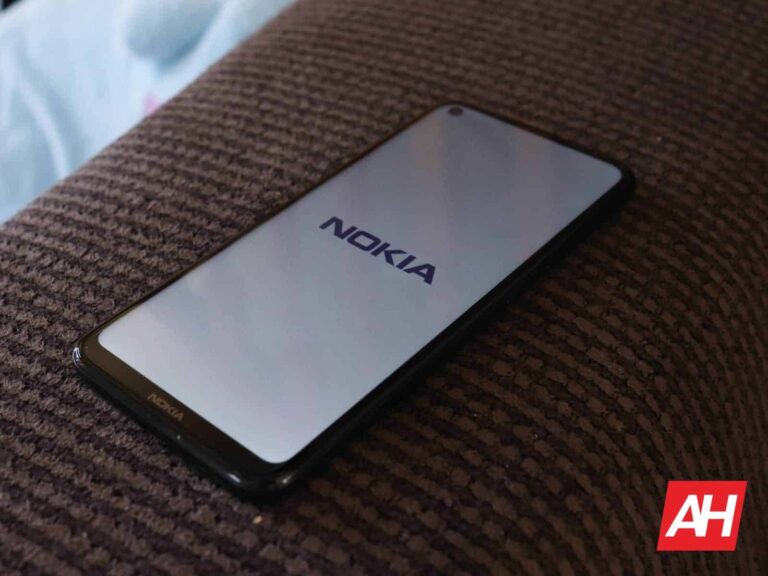
17 Nokia devices appeared and caused some confusion
So, what’s going on here? Well, we’re not entirely sure. HMD Global does have an agreement with Nokia until 2026, but the company is obviously phasing out the Nokia name. It was confirmed that some Nokia phones would still be sold offline, but we assumed those were the existing models.
Is it possible that HMD Global will actually release new Nokia-branded smartphones in addition to its own HMD-branded devices? Well, it’s possible, but not probable. Why would HMD Global kill the Nokia Mobile social media accounts and even rebrand the website itself then? It doesn’t make sense.
Perhaps these were the planned devices prior to HMD Global’s change of heart?
Perhaps these devices were in the pipeline prior to HMD Global’s decision. That is a possibility, but we cannot know for sure. Either way, the device was spotted by GSMChina, in case you were wondering.
Those are just a bunch of model numbers, actually nothing more. Some of the models are TA-1603, TA-1607, TA-1609, TA-1610… and all the way to TA-1628, while some model numbers in the row got skipped.
These models were spotted in the IMEI Database, in case that wasn’t clear. Those listings did not share any additional information about the phone, other than their model numbers.
HMD Global will announce the very first ‘HMD’ devices during this year’s MWC in Barcelona. That will happen later this month, and we’re hoping to get more information about the whole Nokia situation as well. Things seemed pretty clear until now, but perhaps HMD Global has other plans.
Stay alert against Temu phishing scams: Cybersecurity experts warn of scammers using fake giveaways to steal credentials. Over 800 new ‘Temu’ domains registered in the past 3 months.
Temu is the latest brand chosen by scammers for their phishing scams. Checkpoint’s Harmony Email’s cybersecurity researcher Jeremy Fuchs, has noted that hackers are using Temu’s giveaway rewards to entice users to give away their credentials, with over 800 new domains registered as “Temu” in the last three months.
For your information, Temu is an international e-commerce store having 40% of its user base in the USA. It offers discounted goods shipped directly to consumers. Temu was launched in 2022 and is available in 48 countries, including Europe, the Middle East, Southeast Asia, and Australia.
As of February 7, 2024, it is the number one shopping app on Google Play Store and second on the Apple App Store. The app’s most frequent shoppers are senior citizens, mostly 59 and above.
The sample phishing email identified by researchers claims to be from Temu Rewards. However, if you look closely, it is sent by an unrelated email address- onmicrosoft.com. The email contains a blank image and a link to a credential harvesting page. The threat actors try to attract recipients by informing them that they have won.
The email has Temu’s name as the sender. However, if the user realizes the sender address isn’t related to Temu or the links don’t lead to a Temu page, they’ll stay away from this scam. The email should raise suspicion as it is sent from a generic address onmicrosoft.com, and the image does not load.
One of the phishing emails used in the scam (Check Point)
Brand Names and Phishing
This isn’t the first time threat actors have exploited brand names and the latest trends to steal credentials or other sensitive information from innocent users.
In November 2022, Hackread reported that Cyjax researchers discovered a sophisticated phishing campaign targeting over 400 brands across various sectors. The scammers, likely having Chinese affiliations, used 42,000 domains to distribute malware and generate ad revenue with at least 24,000 survey/landing domains used to promote the scam.
Cybersecurity researchers at Bloster AI recently discovered a USPS Delivery phishing campaign utilizing advanced techniques to target victims in the US. Bolster’s CheckPhish detected over 3,000 phishing domains mimicking Walmart. The campaign tricked consumers into thinking they had failed deliveries and late payments. Threat actors have improved their attack tactics, transitioning from deceptive messages to luring victims into downloading financial or banking data-stealing apps.
A phishing scam targeting Meta Platforms, Inc. business owners to steal their email addresses and passwords, leading to the takeover of their Facebook page, profile, and financial information was discovered in January 2024. The scam used Meta Platforms’ authority to create urgency and legitimacy.
Temu and Cybersecurity
Temu itself has faced several cybersecurity-related issues, including allegations of collecting user and device data such as text messages and banking information.
In November 2023, a class-action lawsuit was filed in the United States, alleging that the company had unlawfully collected its customers’ data. Furthermore, another report surfaced, implicating Temu in the unauthorized disclosure of customer data, particularly in connection with data purportedly appearing for sale on the dark web after customers make purchases through the app.
Nevertheless, it’s crucial to emphasize basic security measures with users and ensure that all threats can be stopped, both simple and sophisticated, especially scams like these, which exploit users’ trust in big brands.
Additionally, to protect against phishing attacks, security professionals must implement AI-based security, robust URL protection, and full-suite security to scan documents and files.
OPPO has released a list of smartphones that will be getting Android 14 this month, globally. For the vast majority of them, the rollout has already started while for three India-specific ones, the rollout will start towards the end of the month.
Android 14 is now rolling out to a bunch of OPPO smartphones… globally
This update is coming with ColorOS 14 on top of Android 14, of course. Do note that the update is rolling out in stages, so it may not be available to everyone at once. You may have to wait a bit.
Let’s start with the N series. The OPPO Find N3, Find N3 Flip and Find N2 Flip are already getting the update. Three devices from the ‘X’ series are also getting it, the OPPO Find X5 Pro, Find X5, and Find X3 Pro.
Quite a few OPPO Reno phones are also listed here. The OPPO Reno10 Pro+ 5G, Reno10 Pro 5G, and Reno10 5G are on the list. The same goes for the Reno8 Pro 5G, Reno8 5G, Reno8, Reno8 T 5G, and Reno8 T.
The OPPO Reno7 is getting the update too, and that closes out the Reno phones. The OPPO F23 5G, F21s Pro, F21 Pro, and K10 5G are also listed. The rest of the list is reserved for OPPO’s A series smartphones.
Even a number of OPPO A series devices are included
The OPPO A98 5G, A78 5G, A77 5G, A77s, A77, and A57 are all getting Android 14. That closes out the list of smartphones that are available in a number of markets, globally. The three remaining ones are available in India only. The last three phones on the list are the OPPO A58, A38, and A18.
This update brings an improved Aquamorphic Design. It brings new sound effects, color systems, interactions, and more. The Always-On Display will also get improvements on devices that support it. It raises awareness about climate change.
AI also plays a huge role in boosting efficiency in ColorOS 14. AI-powered Smart Touch is also included in this update, and the same goes for File Dock. If you’d like to know more, click here.
In today’s fast-paced business landscape, efficiency and agility are paramount for staying ahead of the curve. As organizations strive to streamline their operations and maximize productivity, the role of workflow automation has become increasingly essential. One platform that stands out in this realm is Appy Pie Connect, offering a comprehensive suite of tools to automate workflows and drive business growth. Let’s take a closer look at how Appy Pie Connect’s capabilities can help accelerate your business to new heights.
Streamlining Processes for Seamless Operations
At the heart of Appy Pie Connect lies its ability to streamline processes seamlessly. By integrating various apps and tools, it facilitates the automation of repetitive tasks, reducing manual effort and minimizing the risk of errors. Whether it’s syncing customer data between different platforms, sending automated notifications, or updating records in real-time, Appy Pie Connect empowers businesses to operate more efficiently and effectively.
One of the standout features of Appy Pie Connect is its support for Netsuite integrations. Netsuite is a powerful enterprise resource planning (ERP) system used by businesses worldwide. By integrating Netsuite with other key applications and services through Appy Pie Connect, organizations can achieve greater cohesion across their operations. For instance, they can automate the transfer of sales data from their e-commerce platform to Netsuite, ensuring accurate and up-to-date records without manual intervention.
Unlocking Insights with Data Integration
In today’s data-driven landscape, access to actionable insights is crucial for making informed business decisions. Appy Pie Connect goes beyond basic automation by enabling seamless data integration, allowing businesses to unlock valuable insights from disparate sources. By connecting tools like Tableau, a leading business intelligence platform, businesses can consolidate data from multiple sources and gain a holistic view of their operations.
With Tableau integrations, organizations can visualize complex datasets and uncover trends, patterns, and correlations that may otherwise go unnoticed. By automating the process of data extraction and transformation through Appy Pie Connect, businesses can save time and resources while gaining deeper insights into their performance metrics, customer behavior, and market trends. This, in turn, enables them to make data-driven decisions that drive growth and innovation.
Enhancing Collaboration and Communication
Effective collaboration and communication are essential for driving productivity and fostering innovation within organizations. Appy Pie Connect facilitates seamless communication by integrating with popular communication tools such as Slack, Microsoft Teams, and Zoom. By automating the sharing of updates, notifications, and reminders, it ensures that teams stay aligned and informed, regardless of their location or time zone.
Moreover, by integrating these communication tools with other key applications, such as project management platforms or CRM systems, Appy Pie Connect enables cross-functional collaboration and ensures that relevant information is shared across departments in real-time. This not only enhances efficiency but also fosters a culture of transparency and accountability within the organization.
Scaling Operations for Growth and Adaptability
As businesses grow and evolve, scalability and adaptability become increasingly important. Appy Pie Connect’s flexible and customizable automation capabilities enable organizations to scale their operations seamlessly and adapt to changing business requirements. Whether it’s automating repetitive tasks, orchestrating complex workflows, or integrating new applications into their existing ecosystem, Appy Pie Connect provides the flexibility and agility needed to support growth and innovation.
Furthermore, with its extensive library of pre-built connectors and customizable workflows, Appy Pie Connect empowers businesses to tailor automation solutions to their specific needs and preferences. Whether they’re a small startup looking to streamline their sales process or a large enterprise seeking to optimize their supply chain, Appy Pie Connect offers a scalable and cost-effective solution that can grow with their business.
In conclusion, Appy Pie Connect’s workflow automation capabilities offer a powerful solution for accelerating business growth and driving innovation. By streamlining processes, integrating data, enhancing collaboration, and scaling operations, it empowers organizations to operate more efficiently, adapt to changing market dynamics, and stay ahead of the competition. With its support for Netsuite and Tableau integrations, Appy Pie Connect provides a comprehensive platform for businesses to automate their workflows, unlock actionable insights, and achieve their strategic objectives. Whether you’re a startup, SME, or large enterprise, Appy Pie Connect has the tools and capabilities you need to take your business to the next level.
Wow, that Mediterranean climate sure is something! Five companies from Southern Europe have been called out by Google and accused of producing spyware software that infects and affects phones all over the world.
The search engine giant said these five companies from Italy, Greece and Spain were “enabling the use of dangerous hacking tools”, and urged the United States and its allies to do more to combat the spyware industry (via Reuters).
Many of these businesses claim their products are for exclusive use by governments across the world for national security, but often the spyware tools are used to snoop on civil society. Not so long ago, the Israeli firm NSO’s Pegasus spyware made headlines after it became known it was used to spy on many people globally.
There are many more enterprises besides NSO that “help the proliferation of spy technology for malicious uses”, the report states. Researches from Google’s TAG threat-hunting team say:
Demand from government customers remains strong and our findings underscore the extent to which commercial spyware vendors have proliferated hacking and spyware capabilities that weaken the safety of the Internet for all. The private sector is now responsible for a significant portion of the most sophisticated tools we detect.
The companies that are accused of breaking into phones by bypassing the security measures in iOS and Android include the Italian firms Cy4Gate, RCS Labs and Negg Group, Greek company Intellexa and Spain’s Variston.
Negg Group’s website says the company is focused on cybersecurity, but Google said its software was found to have been used to spy on people in Italy, Malaysia, and Kazakhstan.
Variston made software that infected users’ phones via the browsers Google Chrome, Mozilla Firefox or iOS apps.
The five companies either did not respond to Reuters for comment or were not reachable.
The United States State Department has recently revealed a $10 million reward for any valuable information that could lead to the detection or whereabouts of the principal members of the Hive ransomware gang.
Hive Ransomware targeted victims in the United States and globally. Today we are holding them accountable. @StateDept is announcing rewards of up to $15M for information leading to identification, arrest, and/or conviction of key leaders and participants of Hive Ransomware. pic.twitter.com/tjjB3Tx0sB
Following that, the State Department has announced a $5 million reward for providing any information that leads to the arrest or conviction of the suspected cybercriminals.
DocumentProtect Your Network From Data Breach
Prevent malware from infecting your network at the delivery stage by intercepting malicious files in transit from their source to the target device’s web browser..
Over a year ago, the FBI collaborated with international law enforcement to conduct a seven-month covert surveillance operation that resulted in the seizure of the gang’s servers and websites.
“Beginning in late July 2022, the FBI penetrated Hive’s computer networks, obtained its decryption keys and offered them to victims worldwide, preventing victims from having to pay up to $130 million in ransoms demanded,” the State Department said.
The #FBI and partners recently penetrated a Hive ransomware network that targeted victims across the U.S. The @StateDept is offering up to $10,000,000 for information on leaders of the organized crime group. Read the full announcement at https://t.co/AaJo9KcvDW
Since the start of 2021, Hive and its affiliated groups have targeted attacks against over 1,500 organizations across 80 countries.
Hive Ransomware Attacks
These attacks have resulted in the theft of over $100 million in funds. The victims of these attacks include school districts, financial institutions, and critical infrastructure providers.
For a few months, the FBI was able to infiltrate Hive’s computer systems. As a result, they prevented victims from making ransom payments amounting to $130 million.
Despite the persistent efforts of the U.S. government to combat the menace of ransomware, cybercriminals have succeeded in extorting an unprecedented amount of $1.1 billion as ransom payments from their victims.
The Hive operation attacks have been a recent concern for the Federal Bureau of Investigation (FBI). In response, the FBI released a flash alert in April 2021 that contained technical details and indicators of compromise associated with the gang’s operations.
The Hive ransomware group has been operating since June 2021 and offers a Ransomware-as-a-Service (RaaS) called “Hive.” The group uses a double-extortion tactic, where it steals sensitive data from its victims and then threatens to publish it on its leak site, HiveLeaks, in addition to demanding a ransom payment.
Chainalysis, a blockchain analytics firm, has released a report revealing that Hive, a ransomware strain, ranks among the top 10 most lucrative ransomware operations in revenue generated in 2021.
“Today’s announcement complements the Department of Justice announcement that, with Europol, the German and Dutch authorities, and the United States Secret Service, it had seized control of Hive’s servers and websites, thereby disrupting Hive’s ability to attack further and extort victims.”
“We will continue to work with allies and partners to disrupt and deter ransomware actors that threaten the backbone of our economies and critical infrastructure.”
Stay updated on Cybersecurity news, Whitepapers, and Infographics. Follow us on LinkedIn & Twitter.
The Samsung Galaxy S22 series is no longer the latest and greatest from Samsung. The Galaxy S24 series (Galaxy S24, Galaxy S24 & Galaxy S24 Ultra) is the latest the company has to offer.
Samsung has announced three new flagship smartphones as part of the Galaxy S22 series. Those three devices are the Galaxy S22, S22+, and S22 Ultra, as expected, and in this article, we’ll share plenty of information about the three devices. We’ll try to help you make a purchasing decision, to decide whether one of them is for you or not. You’ll also get more information about their specifications, features, exact pricing, and more.
The Galaxy S22 and S22+ look basically the same, save for the size difference. The Galaxy S22 Ultra stands out, as it is a spiritual successor to the Galaxy Note series. These three phones aim at completely different types of consumers, and they are different in the size department as well. The price difference between the three models is also quite considerable. That being said, let’s get started, shall we?
How much does the Galaxy S22 series cost?
The Galaxy S22 pricing starts at $799.99, while the ‘Plus’ model’s pricing starts at $999.99. Do note that both devices will ship in both 128GB and 256GB storage options, so more storage will cost you more money. In the case of the Galaxy S22 Ultra, things are a bit different. Not only is it more expensive, but it comes in more different variants. The pricing of the ‘Ultra’ model starts at $1,199.99. That variant comes in both 8GB and 12GB RAM flavors. The 8GB RAM model comes with 128GB of storage (price listed above), while the 12GB RAM variant comes in 256GB, 512GB, and 1TB storage options. Needless to say, the more storage you want, the more you’ll have to pay.
If you can, it probably wouldn’t be a bad idea to wait a bit. Based on what happened with previous Galaxy S series smartphones in the US, all three phones will likely get a discount in a month or two. That usually doesn’t have anything to do with poor sales, but it’s probably just a sales tactic. Regardless, chances are you’ll be able to save a couple of hundred bucks in a couple of months.
What offers are available at launch?
The Galaxy S22 series smartphones are available to pre-order starting today. As far as offers go, those of you who pre-order one of the three phones are eligible to upgrade to the next storage tier when purchasing 128GB or 256GB storage options. Samsung noted that this offer also includes eligibility to redeem additional Samsung Credit of up to $200 for the Galaxy S22 Ultra, $150 for the Galaxy S22+, and $100 for the Galaxy S22, which you can spend towards purchasing the new Samsung Freestyle earbuds, or the Galaxy Watch 4. Do note that if you pre-order your Galaxy S22 series smartphone today, you can also get a discount of up to 25 percent on any Galaxy Tab S8 tablet.
The US carriers will also offer their own promotions, we’ll update the article once that happens.
Where can I buy the Galaxy S22 series?
You can purchase the Galaxy S22, S22+, or Galaxy S22 Ultra directly from Samsung.com, and both carriers are retailers. All major retailers who usually offer Samsung smartphones will have the devices for sale, and that includes both Amazon and Best Buy. You will also be able to get them from T-Mobile, AT&T, and Verizon.
What carriers support the Galaxy S22 series?
All three major US carriers support the Galaxy S22, AT&T, T-Mobile, and Verizon. All three carriers support 5G connectivity that Samsung’s new smartphones offer.
Which carriers will sell the Galaxy S22 series?
It has not been officially announced which carriers will sell the phone as of writing this article, but all three major US carriers are expected to do so. That goes for AT&T, T-Mobile, and Verizon.
What colors are available?
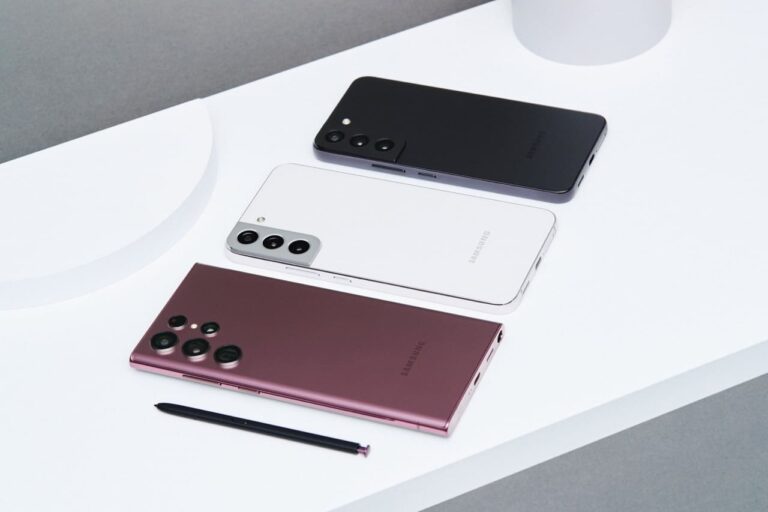
All three Galaxy S22 smartphones come in four general color variants. Each of them has some added Samsung Shop-exclusive colors. Let’s talk about the general ones first, shall we? The Galaxy S22 and S22+ are offered in the exact same shades. Those two phones come in Phantom Black, Phantom White, Green, and Pink Gold models. The Galaxy S22 Ultra, on the other hand, comes in Phantom Black, Phantom White, Green, and Burgundy flavors.
Samsung Shop exclusive colors
In regards to Samsung Shop exclusive colors. The Galaxy S22 is offered in Graphite, Sky Blue, Violet, and Cream colors. The Samsung Galaxy S22+ comes in Graphite, Light Blue, Violet, and Cream colors. The Galaxy S22 Ultra is on offer in Red and Sky Blue Samsung Shop-exclusive colors.
What are the specs of the Galaxy S22 series?
Below are the specs for all three models of the Galaxy S22 series. There are plenty of similarities between the three.
Galaxy S22
Galaxy S22+
Galaxy S22 Ultra
Display
6.1-inch FHD+ Dynamic AMOLED 2X 120Hz
6.6-inch FHD+ Dynamic AMOLED 2X 120Hz
6.8-inch QHD+ Dynamic AMOLED 2X 120Hz
Processor
Snapdragon 8 Gen 1 Exynos 2200
Snapdragon 8 Gen 1 Exynos 2200
Snapdragon 8 Gen 1 Exynos 2200
RAM
8GB
8GB
8GB/12GB
Storage
128GB/256GB
128GB/256GB
128GB/256GB/512GB/1TB
Battery Capacity
3700mAh
4500mAh
5,000Ah
Charging Speeds
25W fast wired charging 15W wireless charging Wireless PowerShare
45W fast wired charging 15W wireless charging Wireless PowerShare
45W fast wired charging 15W wireless charging Wireless PowerShare
General: Phantom Black Phantom White Green Pink Gold Samsung Shop exclusive: Graphite Sky Blue Violet Cream
General: Phantom Black Phantom White Green Pink Gold Samsung Shop exclusive: Graphite Light Blue Violet Cream
General: Phantom Black Phantom White Green Burgundy Samsung Shop exclusive: Red Sky Blue
Available
February 25
February 25
February 25
What new features did Samsung unveil?
All three Galaxy S22 smartphones come with some notable new features. They, of course, include improved specs across the board compared to the Galaxy S21 series, but in addition to that, various new features. So, let’s talk about those.
Improved camera performance, with a focus on low light
Samsung says that its new smartphones come with improved camera performance. When it comes to the Galaxy S22 and S22+, which offer the same camera setups, Samsung mentioned “new Nightography features”. These devices feature a 23 percent larger sensor than their predecessor. On top of that, they offer the Adaptive Pixel technology. That tech will enable these cameras to let in more light and gather more details at the same time, while keeping the colors really nicely balanced, even in low light. Both phones also come with “advanced VDIS technology”, which should minimize vibrations.
Samsung also emphasized that it improved portrait photo-taking capability here. Thanks to the AI Stereo Depth Map, your subjects should look better than ever. The company focused on the smallest of details in order to keep everything sharp. The aforementioned algorithm should take care of that.
The Nigtography features also apply to the Galaxy S22 Ultra. That handset comes with a different camera setup, and many would say an even more impressive one. It has a 2.4u pixel sensor, which is Samsung’s largest pixel sensor ever. The Galaxy S22 Ultra also comes with the advanced ‘Super Clear Glass lens’, which should help you take smoother and cleaner nighttime video without flares. Video Auto Framing should help out as well. Samsung also mentioned that the Galaxy S22 Ultra is packed with AI camera features, and it offers you the ability to save photos in the RAW format up to 16bit.
Faster charging speeds
All three Galaxy S21 series smartphones offered 25W wired charging, alongside 15W wireless charging, and Wireless PowerShare aka reverse wireless charging. Well, the Galaxy S22+ and S22 Ultra improve upon that. The Galaxy S22 still offers the exact same charging as the Galaxy S21 series, across the board. The Galaxy S22+ and S22 Ultra improve in the wired charging sector. Those two phones offer support for 45W charging now. Do note that a charging brick is not included in the box, so you’ll have to get one separately if you don’t own it already.
Extremely bright displays
Samsung makes some of the best displays in the business. The Galaxy S22 series phones come with improved panels. All three phones offer 120Hz displays, with an adaptive refresh rate. The Galaxy S22 Ultra has the most advanced display, though, and the sharpest one. That being said, the Galaxy S22 panel offers a maximum brightness of 1,300 nits. The Galaxy S22+ and S22 Ultra take things to a whole new level, though. The maximum brightness on those two phones is 1,750 nits.
Glass + metal finish across the board
All three Galaxy S21 phones offered a frame made out of metal. The Galaxy S21+ and S21 Ultra had glass backs, but the Galaxy S21 featured a plastic backplate. Well, that’s not the case this time around. All three phones combine glass and metal to feel as premium as possible.
The S Pen factor (Galaxy S22 Ultra)
The Samsung Galaxy S21 Ultra supported the S Pen. It did not ship with one, nor did it have a slot for it. Well, that’s not the case with the Galaxy S22 Ultra. This phone is a true spiritual successor to the Galaxy Note line. It not only ships with the S Pen, but it also has a slot for it on the inside, as did the Galaxy Note series smartphones. Not only that, but this is the fastest S Pen Samsung offered to date. It has up to 70 percent lower latency.
Wi-Fi 6E
The Galaxy S22+ and S22 Ultra offer support for Wi-Fi 6E. Wi-Fi 6E can be twice as fast as Wi-Fi 6, presuming you have the right router, and that your Internet connection allows it. It is nice to see that Samsung included such tech here, though, readily available.
The Galaxy S22 series is “eco-conscious”
Samsung says that the Galaxy S22 series is the “most eco-conscious” lineup of devices the company ever released. It says that it pioneers mobile tech while it’s also supporting our planet. Needless to say, plastic pollution is posing a serious threat to our planet. So, Samsung decided to help out, even if just a little bit. It decided to turn to discarded fishing nets, which can be especially harmful to the oceans and seas. Samsung helps recover fishing nets and transforms them into a high-performance material for the Galaxy S22 series.
What cases are available?
The Samsung Galaxy S22 series smartphones are not cheap. On top of that, they’re quite slippery. So, many of you will want to protect them with a case. Well, you’ll be glad to know that Samsung has quite a few official cases to offer for its new smartphones. You can buy them from the links provided below this paragraph, and below that, you’ll find details and images of each of the cases on offer.
This is exactly what you think it is, and many of you are familiar with them. Samsung has its own, official silicone case for sale for a number of models. That list now includes the Galaxy S22 series as well. You can get these silicone cases in several different colors for all three phones.
Leather Cover
If you want a case that is also a bit fancy at the same time, the Leather Cover may be just right for you. As its name says, this is a leather case for your Galaxy S22 series smartphone.
Clear Cover
If you want a regular, see-through case, Samsung has that on offer as well. This is a rather slim case at the same time, so it’ll fit minimalists as well.
Clear Standing Cover
The second kickstand case, and the last case we’ll talk about here, is the kickstand case with a horizontal kickstand, which Samsung calls ‘Free Stop Hinge’. This kickstand is placed alongside the bottom portion of the phone’s back, and it’s placed horizontally. It’s more natural to use that way, as it’s likely you’ll use it most in landscape view. You can, however, use it in portrait mode as well.
LED View Cover
The LED View Cover is a case that covers your entire phone when closed. You can see call and text alerts on the LED cover, using the icons you choose. You’ll need to open it up in order to use the phone, though, of course.
S-View Flip Cover
The S-View Flip Cover actually allows you to answer calls, pause your music, and more, when closed. All that without touching your display.
Silicone Cover with Strap
Some of you may remember that case with a strap for the Galaxy Z Flip 3. That case managed to attract a lot of attention last year. Well, it is now available for the Galaxy S22 as well. It basically looks the same (design-wise), but it’s made for the Galaxy S22, it comes in a different shape.
Protective Standing Cover
If you love having a kickstand on the back of your smartphone case, but would also like to remove it when you don’t need it, Samsung has a perfect solution for you. It offers a kickstand case with a removable kickstand. It comes in a number of colors, and if you get more than one, you can even mix and match kickstands.
…
Updated on February 8, 2024:
The Samsung Galaxy S22 series has received a new update with camera improvements. This update comes following the January 2024 security patch, and it brings unspecified camera improvements. The update is marked as ‘S90*BXXU7DXA6’, and users in Europe got it first. This is still a part of One UI 6.0, by the way.