Apple and Google both removed the Wizz app from their respective app storefronts this week. Wizz is a social media app popular among U.S. teens. According to NBC News, the alleged use of the app in sextortion scams led the National Center on Sexual Exploitation to send an email to Apple and the latter removed the app from the App Store.
NBC News was able to review some emails and reported that one from an Apple representative to the center said, “We take App Store violations seriously and appreciate your outreach. The app has been removed from the Store and we are in touch with the developer.” Google suspended the app from the Play Store on Tuesday citing its child endangerment policy which demands that apps “prohibit users from creating, uploading or distributing content that facilitates the exploitation or abuse of children.”
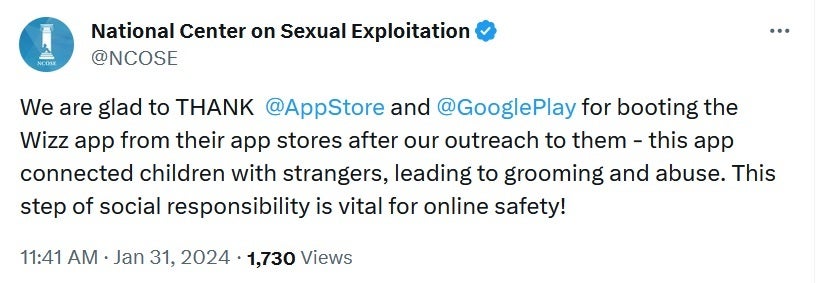
The National Center on Sexual Exploitation thanked Apple and Google in a tweet for removing the app”
In a tweet posted yesterday, the National Center on Sexual Exploitation thanked both Apple and Google for removing Wizz. “We are glad to THANK @AppStore and @GooglePlay for booting the Wizz app from their app stores after our outreach to them – this app connected children with strangers, leading to grooming and abuse. This step of social responsibility is vital for online safety!”
Wizz is hoping to return to both the App Store and the Play Store. An e-mailed statement from a Wizz spokesperson says, “Apple and Google are seeking more information on our app, and we are working closely with their teams to clarify our platform’s extensive safeguards for users. We hope to resolve this matter soon.” Despite being hopeful about a return to the App Store and the Play Store, Wizz did not say what it intends to do in order to have Apple and Google reinstate the app.
Wizz, which has been compared to Tinder, says on its website, “Welcome to Wizz, where the fun comes from the unexpected. Wizz is the ultimate online platform for random chats with people from all over the world.” The app allows users to scroll through profiles that show a person’s photo, his/her first name, age, state, and zodiac sign. The app has marketed itself as a “safe space” where users as young as 13 can make age-appropriate friends.
Teens have committed suicide due to the shame of getting caught in a sextortion scam
However, a study by the non-profit organization Network Contagion Research Institute, which studies hatred and crime online, says that the Wizz app has been used in financial sextortion scams. With such scams, adult criminals get kids and teens to send them explicit photos online. The criminals then threaten to publicly post the explicit photos or share them with parents, other relatives, and friends unless they make online payments to the criminals. These payments can include cash, gift cards, or cryptocurrency. Some victims have felt so much shame that they have committed suicide.
The study noted that “Some victims report being targeted by sextortion within minutes of joining the app, suggesting that criminals have saturated Wizz.” Subscribers claimed that the app was “serving pornographic ads to minors.”
Alex Goldenberg, the Network Contagion Research Institute’s director of intelligence said, “Wizz has something in the ballpark of 20 million active users. But if the app store doesn’t continue to carry it, they cannot sustain, let alone grow, their user base.”
Goldenberg also said that the app’s age verification system is not strong enough. “We’ve seen threat actors who can bypass age verification facial recognition by having their cousin or brother take a selfie, and then they will be off and running on the platform,” he said. “And it’s not just threat actors — if you’re under the age of 13, it’s very easy to have an older sibling have a photo taken, as well.”
Volt Typhoon, initially identified by both Microsoft and U.S. authorities, infiltrated a diverse range of critical infrastructure organizations within the country.
In a recent court-authorized operation conducted in December 2023, significant disruption was made to a botnet comprised of hundreds of U.S.-based small office/home office (SOHO) routers. These routers had been hijacked by state-sponsored hackers affiliated with the People’s Republic of China (PRC), a group known in private sectors as “Volt Typhoon.”
The operation targeted routers infected with the “KV Botnet” malware, which the hackers used to conceal the origin of their hacking activities directed against U.S. and other foreign targets.
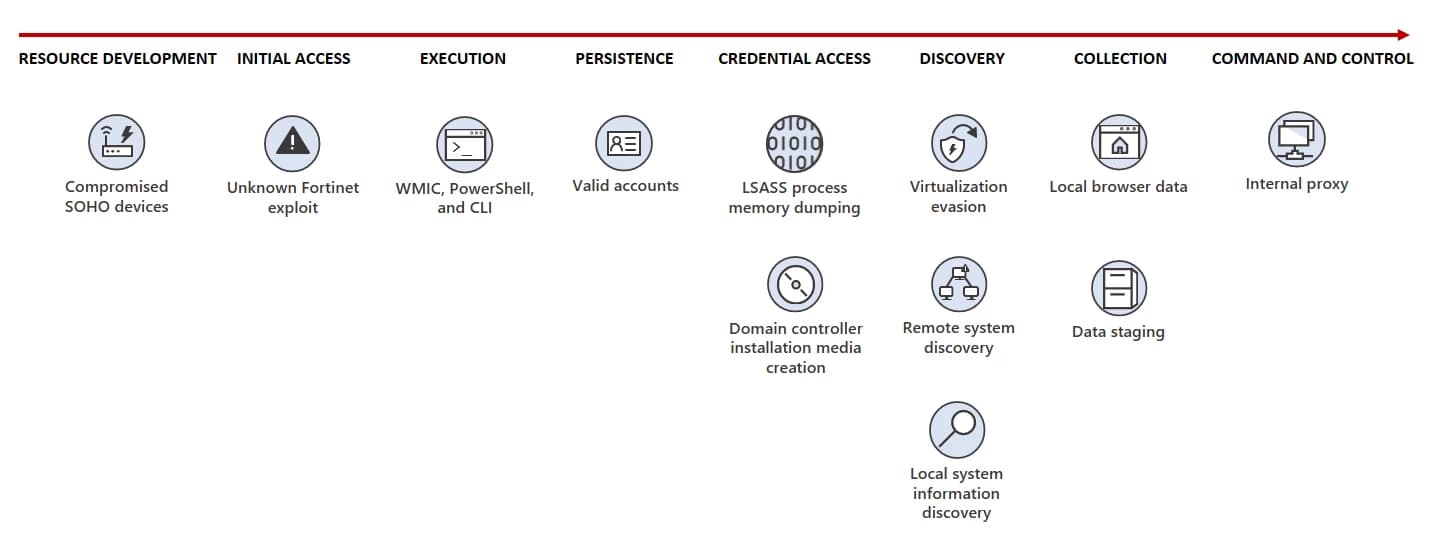
Volt Typhoon attack diagram (Microsoft)
Identified by both Microsoft and U.S. authorities, Volt Typhoon, infiltrated a wide array of critical infrastructure organizations in the United States, including communications, manufacturing, utilities, transportation, construction, maritime, government, IT, and education.
The sophistication and dangers posed by the threat actors were also highlighted in a May 2023 advisory from the FBI, National Security Agency, Cybersecurity and Infrastructure Security Agency (CISA), and foreign partners.
The botnet primarily comprised Cisco and NetGear routers that had reached “end of life” status, meaning they were no longer supported by security patches or updates from their manufacturers. The operation aimed to remove the KV Botnet malware from these routers and sever their connection to the botnet, thereby preventing further exploitation.
In a press release, FBI Director Christopher Wray condemned the actions of the Volt Typhoon, noting the potential real-world threat their activities posed to the safety of American citizens and critical infrastructure. He underscored the FBI’s determination to thwart such malicious activities and work with partners to protect against cyber threats.
For additional insights, we reached out to Toby Lewis, Global Head of Threat Analysis at Darktrace, a leading provider of global cyber security artificial intelligence. Toby cautioned that while the botnet may be a thing of the past, the group behind it still exists and could potentially resurface with a fresh botnet.
“The actions by the US government have likely significantly disrupted Volt Typhoon’s infrastructure, but the attackers themselves remain free. Targeting infrastructure and dismantling attacker capabilities usually leads to a period of quiet from the actors where they rebuild and retool, which we’re probably going to see now,” said Toby.
“The government’s ambitious approach to mimic the attacker’s own command network is a win in the short term, but there is no way to guarantee that this has a lasting impact on the threat landscape,” Toby explained. “Organizations need intelligent systems which can detect subtle, emerging, and novel threats and take targeted action without relying on knowledge of the attacker’s specific systems,” he warned.
Nevertheless, the FBI provided notice of the operation to owners or operators of infected SOHO routers and encouraged them to replace end-of-life routers to prevent future exploitation. The investigation into the Volt Typhoon’s activities continues, with efforts ongoing to mitigate further cyber threats posed by the group.
Not too long ago, we got our first glimpse at one of the phones that HMD is planning on bringing to the market. What we saw was a pretty standard-looking mid-range device, which wasn’t all too unexpected. However, we now have a new leak of the upcoming HMD phones, and one of them looks very interesting.
In case you don’t know, ever since 2017, a Finnis company called HMD Global took over Nokia’s branding. The company produced Nokia-branded phones, but they couldn’t really do much to bring Nokia back into the forefront. Over the last year, the company has been working on branching out and producing its own self-branded line of phones.
We recently got a leak showing off one of the phones coming to the market. However, we couldn’t get a good look at it. What we saw was that it was going to have at least two camera sensors. The model pictured in the previous leak was a blue color.
We have new leak of the upcoming HMD phones
Thanks to leaker Roland Quandt, we have three new images of these potential phones. At least two models are being showcased. The first image shows what looks like a woman running through a bunch of phone components.
From Roland Quandt
Looking at the chassis of the phone, we see that it has a pretty typical smartphone shape. The corners are a little bit sharper than what we would see on a Galaxy S phone, and the sides are very flat.
We got a glimpse of all of the internals of the phone, but this isn’t some cover-busting leak. All the components are showcased for artistic purposes. In any case, we can glean that this phone will have three cameras on the back.
The other two images show a more interesting-looking device. Whereas the first image showed us a phone with very flat edges, this phone has very round edges. It seems more reminiscent of a modern Galaxy S phone. The left and right edges are very rounded, and the top edge is completely flat.
On the back of the phone, we see what looks like a dual-camera package encased in a metal Island.
Why this phone is designed sticks out
There are a few things that make this phone’s design (the ones in renders #2 and #3) stick out. For starters, from the looks of the renders, it appears that this phone could have a metal unibody. This greatly contrasts the metal and glass sandwiches that we see nowadays. This leads us to wonder if HMD is trying to bring this aesthetic back to life. If it does, then we can forget about wireless charging.
Another thing to note about the renders (this could just be because these are very early renders and not meant to be accurate representations of the phones) is that we don’t see any buttons or ports at all on this phone. In the pink render, we’re looking at the right side of the phone, and in the green render, we’re looking at the left side. There are no buttons whatsoever on any of them.
This leads us to wonder if HMD is truly trying to differentiate itself from other phones and bring the buttonless smartphone to the market. If so, it would prove the HMD is not trying to silently blend in with all of the other mid-range smartphone makers. If it is indeed trying to develop some portless/buttonless phone, then it could be trying to lead the industry and develop an identity for itself. And, we’re all for it!
YouTube Music and Premium announced today that it has hit a major milestone for the platform’s music streaming goals, surpassing 100 million members (including trial users). This number, which is accurate as of January 2024, represents a 20-million-member growth in just over a year, according to Lyor Cohen (Global Head of YouTube Music).In 2015, YouTube Music was launched with the goal of giving music lovers a one-stop-shop for all their music needs, including ad-free listening, offline capabilities, and access to music videos. As a result of feedback from the community and changes in the industry, the service underwent several changes throughout the years. As part of this evolution, YouTube Music rebranded, expanded to more countries, and added new features — some of which include podcast integration, AI-powered music discovery tools, and better video playback.
Lyor Cohen, Global Head of Music at YouTube, sending thank you letters to all hundred million subscribers
In his celebratory announcement, Cohen focused on the milestones and features that have taken the platform to where it is now. Reminiscing about its shaky beginnings, Cohen attributes this growth to the features that were integrated within the Premium model that were once considered too different or too risky to try out — such as blending music streaming with various video formats. He also spoke to the introduction of AI-powered features, such as conversational video tools and comment summarization, as a draw for new subscribers that see YouTube Premium as hub for exploring new tech advancements in the music industry.
YouTube puts great emphasis on its $6 billion contribution to the music industry within a year, reaffirming its commitment to artist and fan value. They see AI-assisted creative tools and seamless content integration as essential drivers of a successful future for both parties.
However, looking ahead, YouTube will undoubtedly face further competition in the crowded music streaming scene. Its future success will most certainly be determined by its ability to convert more trial users into paying subscribers while keeping the same unique formula that they have found this success with.
Despite price hikes and a war against ad blockers, YouTube Premium remains one of the top subscription services for people who want to stream content. A recent announcement just clued us into how good the platform is doing. According to a new blog post from YouTube, YouTube Premium has crossed 100 million subscribers.
In case you need a refresher on what YouTube Premium is, it’s the paid subscription service provided by YouTube that offers several perks you don’t get if you are a free user. For starters, you can enjoy the platform with no ads.
Also, you get other perks like video downloads, background play, access to new experimental features, and a subscription to YouTube music. All of these are bundled in a $13.99/month package for individuals. Depending on your region, the added tax can push the service to nearly $16/month, so you’ll want to keep that in mind.
YouTube Premium reaches over 100 million subscribers
After crossing the 100 million user mark, YouTube released a blog post about it. Ever since 2015, YouTube has charged a monthly fee for its premium offering. Back in the early days, it was called YouTube Red. This platform paid prominent creators at the time to produce original content. Those days are behind us now, but there are some great shows that came from it (shoutout to Collegehumor’s “Bad Internet”).
Now YouTube Premium lives on as a way of getting the most out of YouTube. There’s been a lot of controversy surrounding it. For starters, the service has been increasing its price, but what else is new? This is happening with all streaming services. YouTube Premium used to cost about $12/month for an individual package a few years ago. So, the fact that it’s nearly $16/month is a bit of a bummer.
Also, YouTube has been in a war against ad blockers. Obviously, this gives people the ability to completely sidestep advertisements on their videos. This leads to a substantial decrease in YouTube’s ad revenue. While the company has been trying to stop this, it’s struggling to do so. In any case, the fact that the company’s user base is growing means that people are still willing to pay for the service to enjoy the features.
Fine print
One thing to notice is that YouTube is counting both YouTube Premium and YouTube Music. While they’re tightly integrated, they’re still two separate services. So, there’s a community of people who only have YouTube music. YouTube is counting both YouTube Music and YouTube Premium subscribers.
Also, the company stated in the blog post that it’s also including current trials. So the 100 million users include people who have not paid for the service yet. There’s always the chance that they would hastily deactivate their trial on the very last day. Again, what else is new?
Bard, Google’s AI collaboration tool, is getting a major update today, adding advanced capabilities and new features to a larger audience, including the ability to create images and more languages.
Perhaps the most exciting of the Bard improvements that were announced today via a blog post, is the brand new skill that puts it in a closer footing to OpenAI’s ChatGPT Plus: the ability to create images based on the user’s prompts. While ChatGPT requires a paid subscription in order to gain access to tools like DALL-E, Bard will now allow you to do the same for free. This feature is initially available in English in most countries and is powered by Google’s updated Imagen 2 model.
The feature is very easy to use: just enter a few words to describe what you want Bard to bring to life, and watch it do its magic. If the initial results received don’t quite match what you had in mind, you can click “Generate more” to get more alternatives and download the ones you like.
Image Source – Google
This is very impressive, especially considering that it comes free of cost. However, it is important to note that is not quiet perfect…yet. In my testing I attempted to have Bard generate an image for me based on the physical description of a person. Bard promptly returned a response stating that it was not yet capable of doing that.
Error message returned by Bard when asked to create an image based on human physical characteristics
Additionally, Google states that in order to stay consistent with the company’s AI principles when it pertains to image generation, any images generated by Bard will use SynthID to embed a digital watermark into the results. This watermark is not detectable to the human eye, but can be scanned for identification.
But that’s not all the smarts that Bard is gaining today: Previously only available in English, the enhanced Gemini Pro in Bard, is now available in over 40 languages and 230 countries and territories. This expansion makes Bard a more inclusive and accessible platform to people globally.
Keeping with the spirit of this new multi-lingual Bard, now even its double-check feature will be available in more than 40 languages. This can be accessed by clicking on the “G” icon that appears below the response to your prompt, and checks the information against what is found on the web.
These upgrades are definite improvements to Bard’s accessibility and capabilities. The free addition of an image generation tool, along with its multi-language support, makes it a more helpful and adaptable tool for creative projects, daily activities, and information verification in a global scale.
The ANY.RUN sandbox has now been updated with support for Linux, further enhancing its ability to provide an isolated and secure environment for malware analysisand threat hunting.
ANY.RUNallows malware analysts, SOC members, and DFIR team members to safely examine Linux-based samples and Windows malware in an interactive cloud environment.
A cloud malware sandbox called ANY.RUN performs the difficult malware analysis work for SOC and DFIR teams.
Linux malware analysis is necessary because Linux is a popular target for hackers, and Linux malware is sophisticated.
Many organizations utilize Linux for their IT infrastructure, meaning there are many files to analyze on Linux systems.
Researchers at IBM have noticed an increase in Linux malware. In 2020, the number of malware families related to Linux increased by 40%.
Compromising Linux-based cloud computing platforms could allow attackers access to massive resources, making the OS an appealing target.
Malware Sandboxing Leader ANY.RUN is a cloud malware sandbox that handles the heavy lifting of phishing and malware analysis for SOC and DFIR teams and also helps 300,000 professionals use the platform to investigate incidents and streamline threat analysis.
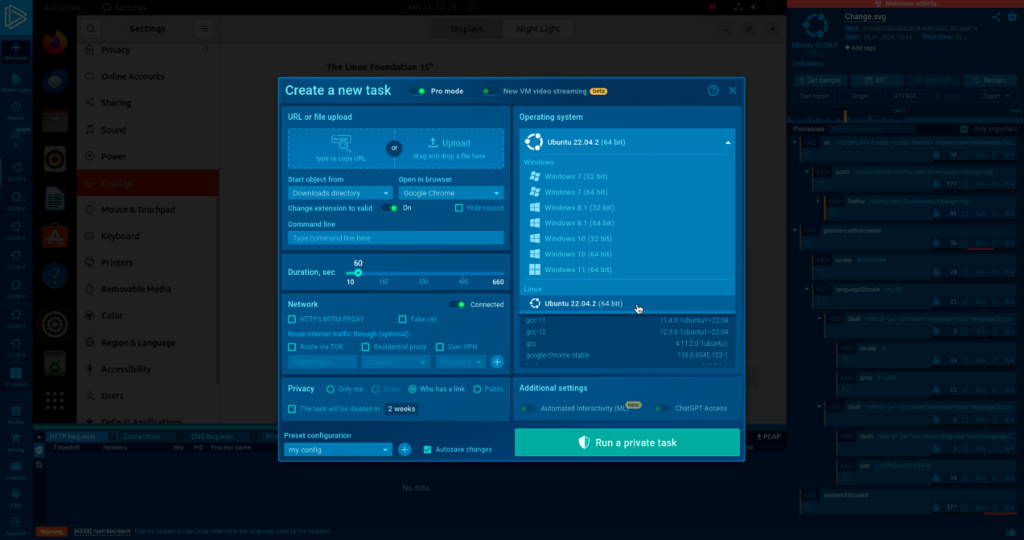
Creating A LINUX New Task
You can select Linux from the Operating System drop-down menu when creating a new task.
If you choose it, Ubuntu will run your sample. Ubuntu 22.04.2 will be supported upon launch—all ANY.RUN users, including those on the community plan, can access Linux.
Linux as an option in the Operating system drop-down
The Ubuntu logo is used to identify Linux samples for easy navigation, making it simple to distinguish between Windows and Linux-based tasks in the team’s homepage menu and sidebar quick menu.
DocumentAnalyse Shopisticated Malware with ANY.RUN
More than 300,000 analysts use ANY.RUN is a malware analysis sandbox worldwide. Join the community to conduct in-depth investigations into the top threats and collect detailed reports on their behavior..
Enhancing Linux Malware Analysis with ANY.RUN’s
The interactive analysis power of ANY.RUN is now available on Linux for the first time. With Windows samples, ANY.RUN enables analysts of all levels to enhance threat analysis while using fewer resources and delivering quicker training for entry-level analysts and reverse engineers.
The foundation of ANY.RUN is an interactive analysis that enables analysts to identify undetected threatsmore quickly by changing the analysis’s vector, even in the case of zero-day vulnerabilities. It’s accessible for Linux for the first time.
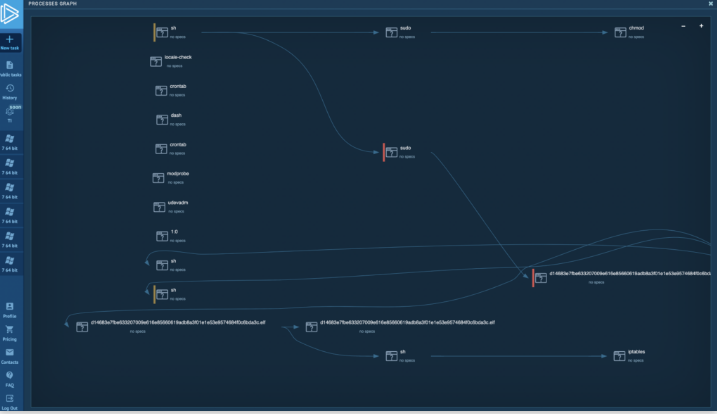
Process Graph view – clear reports of ANY.RUN
Additionally, it provides real-time alerts to the analyst about suspicious activities, ensuring that no crucial information is ignored.
Users receive concise reports upon task completion, ensuring analysts can access all relevant data and IOCs for additional investigation or incident response.
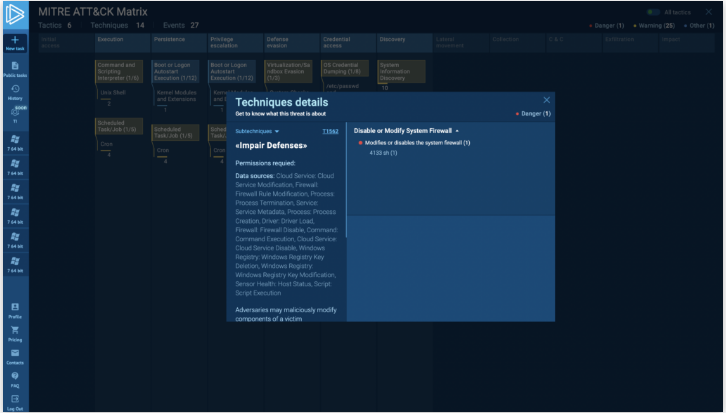
One simple approach to identifying the kind of family or threat you face is quickly aligning suspicious behaviors that the sandbox recorded in a Linux task with TTPs using ANY.RUN’s MITRE Matrix report.
Operating systems like Linux are, by nature, more secure than Windows. This indicates that the many malware families that can exploit Linux vulnerabilities are complex and challenging to identify.
ANY.RUN provides the easiest way to analyze Linux malware, providing information from the analysis in real-time. Analysts immediately understand the results, allowing them to proceed efficiently without context switching.
Not every security expert has the reverse engineering skill set to swiftly identify the behavior of complex Linux malware and extract the required IOCs.
To overcome this, ANY.RUN offers real-time information obtained through the analysis. Analysts can move forward effectively and without switching contexts because they immediately grasp the results.
ANY.RUN is a cost-effective solution that lowers business expenses by doing away with custom infrastructure requirements.
Because the Linux virtual machines (VMs) are preconfigured to gather IOCs, customers can avoid weeks of infrastructure setup time related to DevOps.
In addition to being a stand-alone research platform, ANY.RUN can also be utilized in conjunction with SIEM/SOAR.
Accurate analysis of malware for Linux is necessary for strong security. Because Linux is so widely used, particularly in cloud hosting, attackers find it a desirable target. Breaching Linux-based systems might provide access to a wealth of resources. As a result, Linux users need to be aware of the growing threats to their devices.
Try all features of ANY.RUN at zero cost for 14 days with a free trial.
Whitehat hackers from Pen Test Partners identified a critical issue in Airbus’ Flysmart+ Manager suite, which was remediated 19 months after the initial disclosure.
Cybersecurity researchers at penetration testing firm Pen Test Partners have been testing the security of various electronic flight bag (EFB), IoT and vehicle applications for several years. Due to their extensive research, a crucial issue was identified in the Flysmart+ Manager suite from Airbus and remediated 19 months after initial disclosure.
NAVBLUE, an Airbus-owned IT services company, developed the Flysmart+ Manager app for iPad, which synchronizes and installs airline data into other apps, including EFBs. According to a report from Pentestpartners, this app has a disabled security control, allowing it to communicate with servers using insecure methods, potentially allowing an attacker to modify aircraft performance data or adjust airport information.
For your information, Flysmart+ is a suite of apps for pilot EFBs. EFBs are crucial for storing critical flight data and information, but they can be exploited to disrupt operations or compromise aircraft systems. Airline EFBs can be exposed to untrusted networks due to known pilot layover hotels, and standard operating procedures may not detect tampering.
Research published on February 1, 2024, revealsthat one of the suite’s iOS apps has intentionally got the App Transport Security (ATS) feature disabled. This issue exposes it to Wi-Fi interception attacks, potentially tampering with engine performance calculations, leading to tailstrike or runway excursion.
The app, Flysmart+, was previously disabled due to a lack of ATS protection, which prevents unencrypted communications. This vulnerability allows attackers to intercept and decrypt sensitive information in transit. Due to disabled ATS, insecure communication occurs, making the app susceptible to interception. An entry in the info.plist file allows insecure HTTP loads to any domain.
Airlines often use the same hotel for layover pilots, allowing attackers to modify aircraft performance data through targeted Wi-Fi networks. That’s because pilots in layover hotels can be easily identified, along with the airline and the suite of EFB apps they will likely use.
This helped Pen Test Partners to access data from NAVBLUE Servers, including SQLite databases containing aircraft information and take-off performance data (PERF), with specific table names.
Researchers downloading the data from data the NAVBLUE Servers (Screenshot: Pen Test Partners)
It is worth noting that database tables are crucial for aircraft performance, including the Minimum Equipment List (MEL) and Standard Instrument Departure (SID). Misunderstandings in MEL and SID can lead to safety issues, such as fuel starvation in the Gimli Glider. Confusion between units like US gallons, imperial gallons, litres, kilograms, and pounds can also cause safety problems.
“We’ve now worked on disclosures with Boeing, Lufthansa, and Airbus We’re really pleased that the vulnerability was successfully closed which is a win for aviation safety and security.”
Antonio Cassidy – Pen Test Partners
The researchers shared the vulnerability report with Airbus on 28 June 2022 and the next day Airbus confirmed the issue. By 25th July 2022, the company had replicated the issue and promised a fix for the next version of Flysmart+ by the end of 2022.
On 22 February 2023, the Airbus VDP team confirmed fixing the issue in the latest version of Flysmart+, and the mitigation measure was communicated to customers on 26th May 2023. The findings were presented at DEF CON 31 in Las Vegas in 2023, as well as at the Aerospace Village and Aviation ISAC in Dublin.
Google Play is rolling out a new tool aimed at enhancing the app experience by encouraging them to update their apps to the latest versions. Google Play aims to accomplish this with the help of specifically designed in-app update prompts. Despite the convenience of auto-updates and in-app updates, some users may still be using outdated or unsupported versions of an app.
The newly introduced Play recovery tools provide developers with the ability to prompt users, running specific versions of an app, to update every time they restart the application. This proactive approach ensures that users are not stuck on older versions, potentially plagued with issues, and brings them closer to the intended app experience.
Developers can use the Google Play console to utilize this feature
To utilize the update prompts, developers can log into the Google Play Console and navigate to the Releases or the App Bundle Explorer page. Here, they can choose the app versions for which they want to trigger the update prompts. Additionally, the Play recovery tools are accessible through the Play Developer API, and an upcoming extension will enable developers to target multiple app versions simultaneously. Note that developers must build the designated version as an app bundle to ensure a seamless and effective update process.
Developers can further refine the targeting criteria for the update prompts by factors such as country or Android version, offering developers flexibility in tailoring their approach. Remarkably, over 50% of users have responded positively to these prompts, noted Google. It leads to a substantial increase in users transitioning to the latest versions of apps. Following the update prompts, developers can leverage Play Console’s recovery tools to modify their update configuration, monitor its progress, or cancel the recovery action if needed.
This initiative by Google Play aligns with the platform’s commitment to ensuring users have access to the most optimized and secure versions of applications. By providing developers with these recovery tools, Google aims to create a more cohesive app experience for users. Google encourages developers to explore and implement this tool to enhance user engagement and satisfaction.
Today, Google is introducing a new way for Google Maps users to find places using generative AI. Google’s large-language models (LLMs) will analyze the detailed information that Maps has for over 250 million places and reviews and recommendations from more than 300 million contributors. With this huge data bank, Google Maps will be able to tell you where to go.
Google’s Local Guides will get first crack at the new feature this week. These are, in the words of Miriam Daniel, VP & GM, Google Maps, “…some of the most active and passionate members of the Maps community. Their insights and valuable feedback will help us shape this feature so we can bring it to everyone over time.”
So how can generative AI help you find places using Google Maps? An example that the company gives has you in San Francisco browsing around the city for some “unique vintage finds.” So you would ask Maps to find “places with a vintage vibe in SF.” Maps will then analyze information about businesses nearby augmented with the use of photos, ratings, and reviews from the Maps community to deliver suggestions that users can trust.
Using AI in Google Maps to find places with a vintage vibe in San Francisco
The results could be divided into different categories such as clothing stores, vinyl shops (what you might know as a ‘Record store’) and flea markets. Review summaries and photo carousels would show you why a specific store might be exactly what you’re looking for. You can follow up your original query by asking “How about lunch?” and Maps will look for dining experiences with a vintage vibe which, according to Google, would include an “old-school diner.”
All of the places recommended by Maps can be put into a list to keep you organized, or to share with friends, or to look at when you return to the city at a future date.
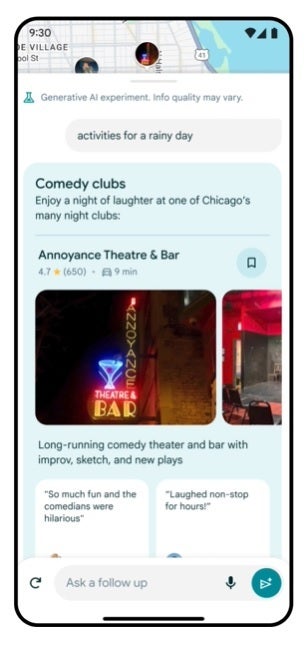
If the weather turns bad, you can quick find appropriate nearby activities
The new Google Maps feature can come in handy if an unexpected change in the weather takes place. If it starts raining, you can ask Maps to show you “activities for a rainy day,” and be directed to nearby movie theaters, bowling alleys, museums, and more with pictures and reviews from contributors who have been to these locations.
Google says, “This experimental capability introduces a whole new way for people to more easily discover places and explore the world with Maps. This is just the beginning of how we’re supercharging Maps with generative AI, and we’re excited to start with our passionate community of Local Guides as we shape the future of Maps together.”