Today, the chief executive officers of big tech companies are appearing before the United States Senate’s Judiciary Committee. The committee is aiming to get answers from these leaders about the dangers of social media platforms to teenagers and children. The corporate heads of Meta, TikTok, Snap, Discord, and X (formerly Twitter) will be called upon. Meta’s CEO Mark Zuckerberg has appeared before the Senate previously, and prominently leads the company behind Instagram and Facebook. However, the CEOs of Snap, Discord, and X will be appearing in front of the Senate for the first time.
A central point of the hearings has been the effect that social media sites have had on victims and families. As reported by CNN, this hearing was different from prior ones due to the amount of victims and families in attendance. The outlet reports that there were emotional and passionate responses to testimony, such as laughter, applause, and more. Further, some parents said that their children suffered or died due to the effects of social media. In one instance, New Mexico’s Attorney General, Raúl Torres, said that Zuckerberg “needs to start acting like a parent” in a press conference. Torres was obviously referencing Zuckerberg’s own children with his remark.
Senate leaders, to this point, have been unsatisfied by the insights provided by the CEOs. “Their CEOs showed up today with even more excuses,” said Senator Ed Markey (D-MA). “It was outrageous.”
At one moment, Zuckerberg stood before the people in the Senate hearing room and apologized. “I’m sorry for everything you have all been through,” the Meta CEO said. “No one should go through the things that your families have suffered and this is why we invest so much and we are going to continue doing industry wide efforts to make sure no one has to go through the things your families have had to suffer.”
What comes next for social media after the Senate hearing
Neither lawmakers nor families were content with the executives’ comments. So, the next target may be Section 230 of the Communications Decency Act of 1996. This is a law that, among other things, prevents internet publishers from being held responsible for what is posted by users on their sites. For example, a social media app can’t be sued for what gets posted on its site.
“I am tired of talking. I’m tired of having discussions,” said Senator Lindsey Graham (R-SC). “Open up the courthouse door. Until you do that, nothing will change. Until these people can be sued for the damage they’re doing, it is all talk.”
Currently, it’s hard to hold social media sites responsible. Until the CDA is amended or replaced, that is unlikely to change.
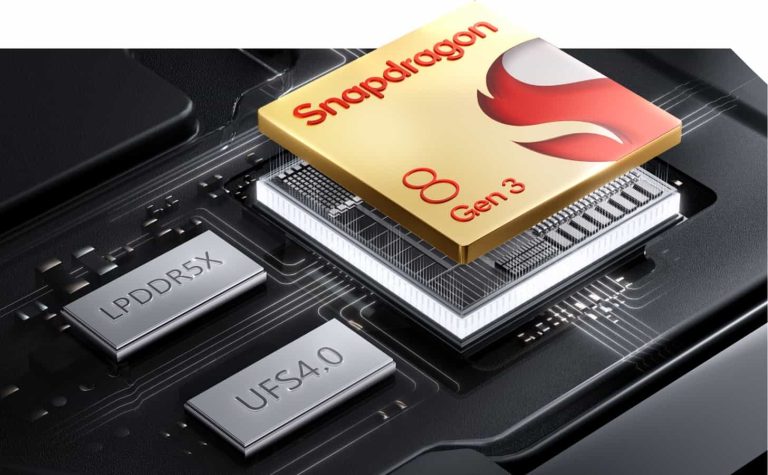
Qualcomm faces a price dilemma with its top-of-the-line Snapdragon 8 Gen 3 Chipset. With a boost in specs, the company’s flagship SoC is now demanding 25% additional cost compared to its predecessor, Snapdragon 8 Gen 2. Qualcomm partners now face a challenging decision, as to absorb the elevated cost or pass it on to customers. It could potentially hinder the path for those planning to upgrade their smartphones in 2024.
Qualcomm’s Impact on the Pricing of Samsung Galaxy S24 series
The trend is not something new, and the companies have observed it over many generations of Qualcomm chipsets. With a gradual surge in pricing, the Snapdragon 8 Gen 3 has become the first-ever chipset to reach the $200 mark. Sourced through a recent X leak, the numbers estimate a 25% increase in the SoC’s pricing over the last generation, from 1160 to 1400 Yuan.
As evident by Samsung’s latest Galaxy S24 series, the 8 Gen 3 smartphones are getting steeper in pricing. In several markets, Samsung has opted to deliver the S24 series with an Exynos 2400 chip instead to lighten the blow. This strategy has allowed the company to maintain profit margins while saving consumers from the brunt of additional costs. Apart from last year, the company has opted for this strategy in the past, and will surely continue this trend moving forward.
However, the fact remains. In the U.S., the Galaxy S24 Ultra retails for $1,299.99, about a $100 increase from the previous year, likely influenced by the rising costs of Qualcomm Snapdragon 8 Gen 3. Even in the future, the SoC’s price trajectory may not see a relief. According to a Qualcomm executive, the transition to custom cores in the Gen 4 could make it even more expensive than the current Gen 3.
MediaTek Dimensity 9400 Rising to the Occasion as a better alternative
This news raises concerns about the affordability of future flagship smartphones. The trend will limit consumer choices and drive manufacturers to explore alternative chipsets to cut hardware costs. The competing silicon manufacturer, MediaTek, might be the next best choice for smartphone makers involved in the flagship industry. After the launch of MTK Dimensity 9300 last year, the company is now preparing to launch a successor shortly.
While Qualcomm faces escalating prices, MediaTek Dimensity 9400 looms on the horizon. Slated to enter mass production later this year, MediaTek will capitalize on Qualcomm’s market. It will offer a competitive second choice at a lower price. This move will allow manufacturers to curb the impact of rising chipset costs on device pricing. Since chipsets are getting more expensive by the day, companies like Samsung, Xiaomi, and OnePlus find themselves in a delicate pricing limbo.
Nitrogen is the name given to a campaign and associated malware that have been distributed via malicious search ads. Its signature move is using Python and DLL side-loading to connect to the attacker’s command and control server.
In this blog post, we look at a recent Nitrogen campaign and specifically at how the initial payload is being served onto victims. The threat actors seem to have a preference for hosting their payloads on compromised WordPress sites, many of which are already hacked with malicious PHP shell scripts.
We also review the connection between malvertising and ransomware in the context of increased web-based attacks.
Malicious ads
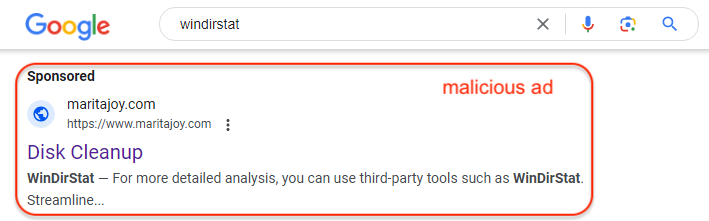
The ads are displayed via Google searches for popular search terms related to programs used by IT and system administrators. The ads are attached to domain names that have a previous history but expired, which allowed the threat actors to register them and bypass certain security checks that involve looking at the age of a domain name.
Malicious ad
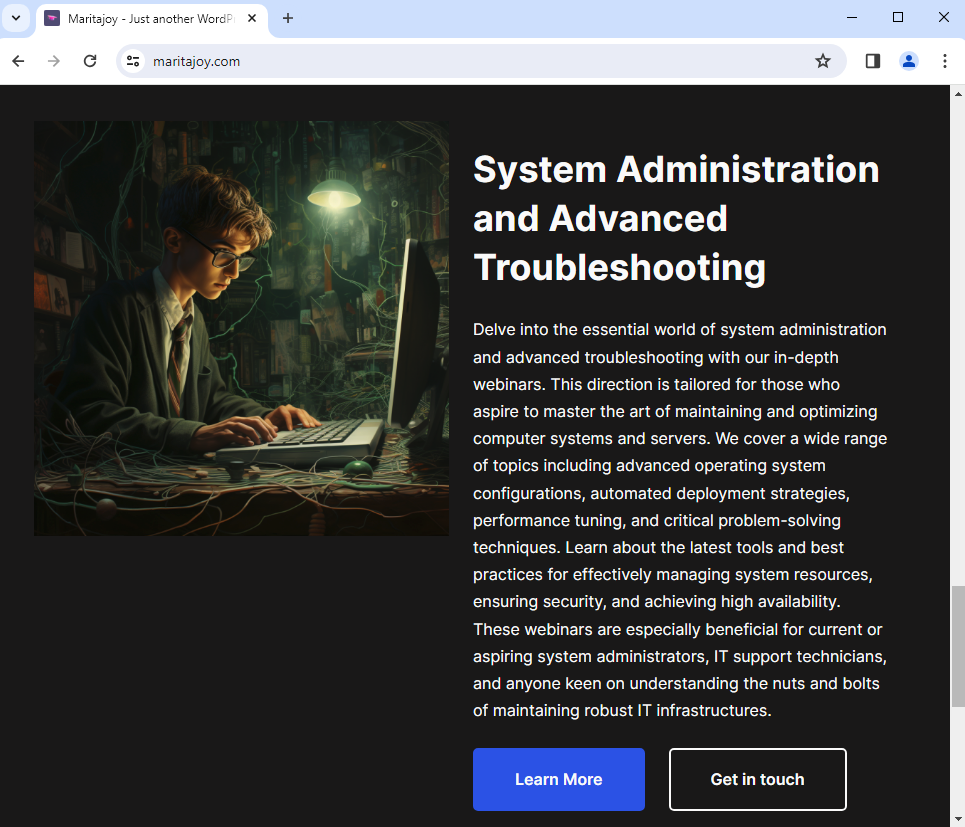
The first step upon clicking on the ad consists of filtering visitors. If it doesn’t like your IP address or other client-side setting, it will display a fake page. The content looks like it was generated via Chat-GPT or some other LLM.
Decoy website
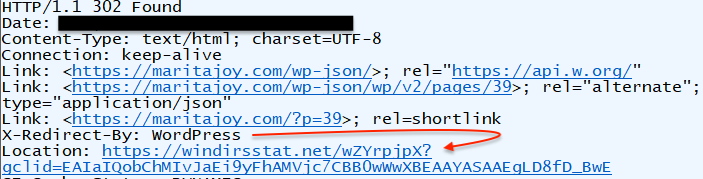
Real victims will instead be served a 302 redirect to a decoy site at windirsstat[.]net:
Malicious redirect
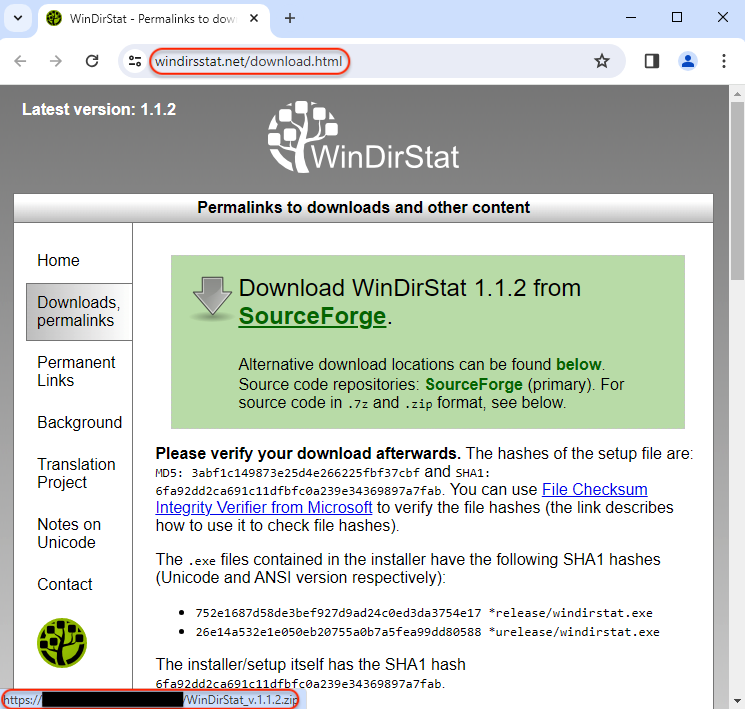
The page is designed to look identical to the real website except for the download link which points somewhere else.
Fake WinDirStat website
Compromised sites
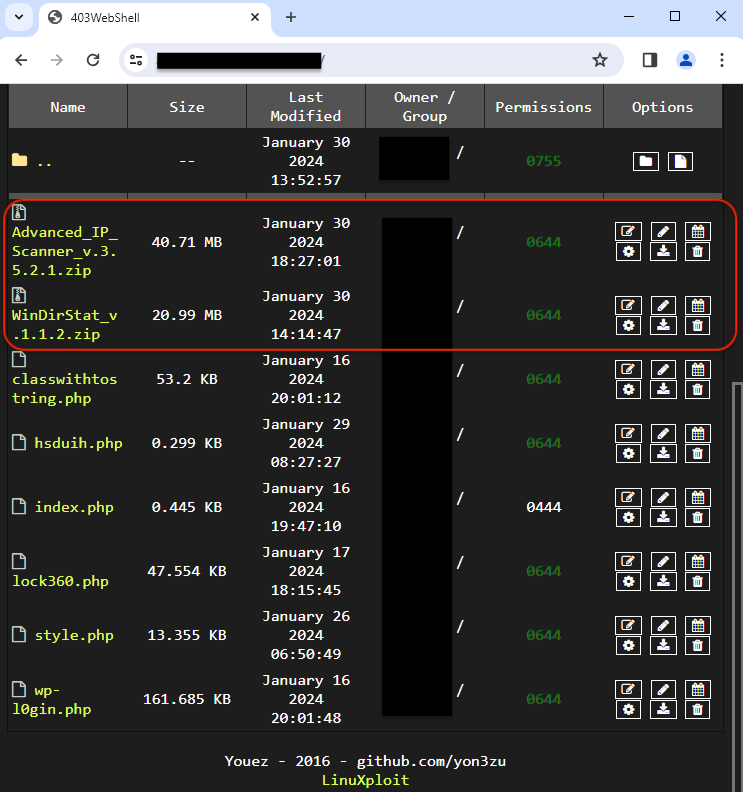
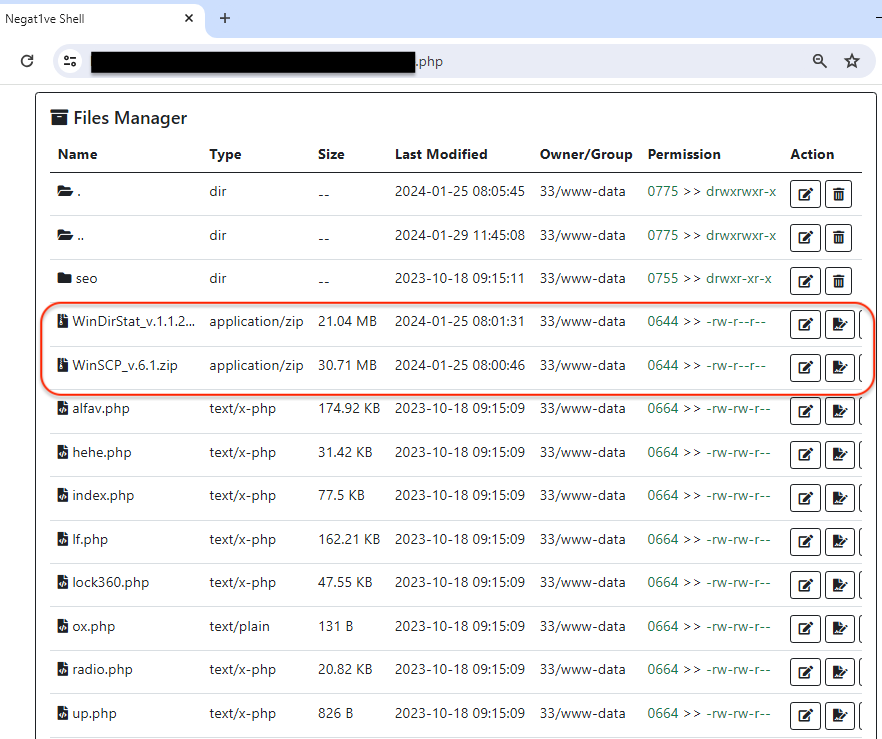
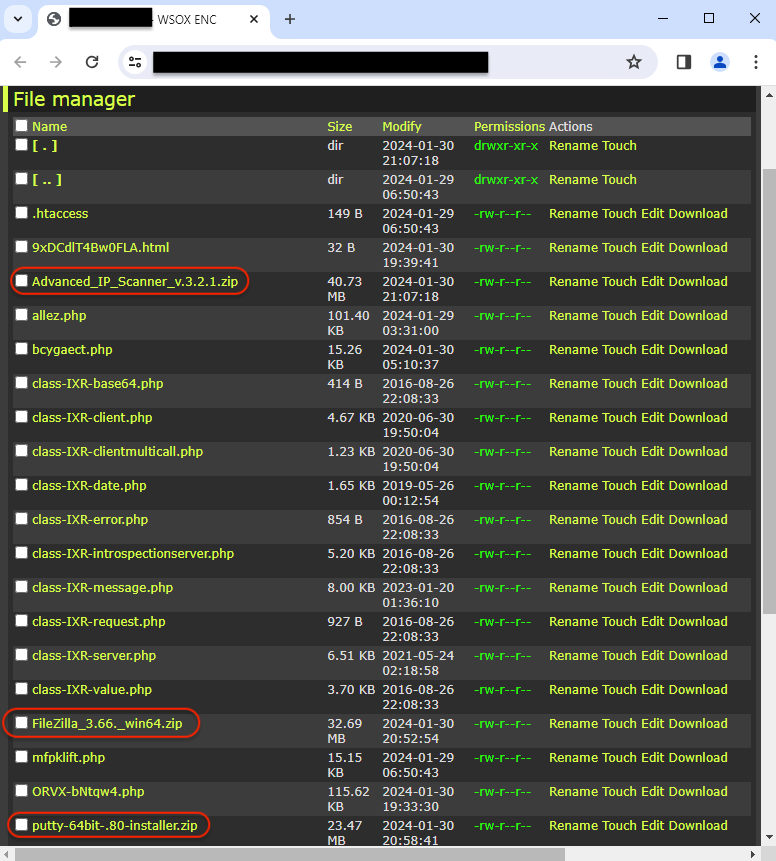
The threat actor is using a number of hacked sites to host their malicious payloads which they regularly rotate through. This is not a new technique, but it is yet odd to see the fake installers cohabit with various web shells.
In fact, anyone could easily change the files or even delete them. Here, we’re simply observers and looking at the file managers that are open on the internet.
403WebShellNega1ve ShellWSOX Shell
Payload
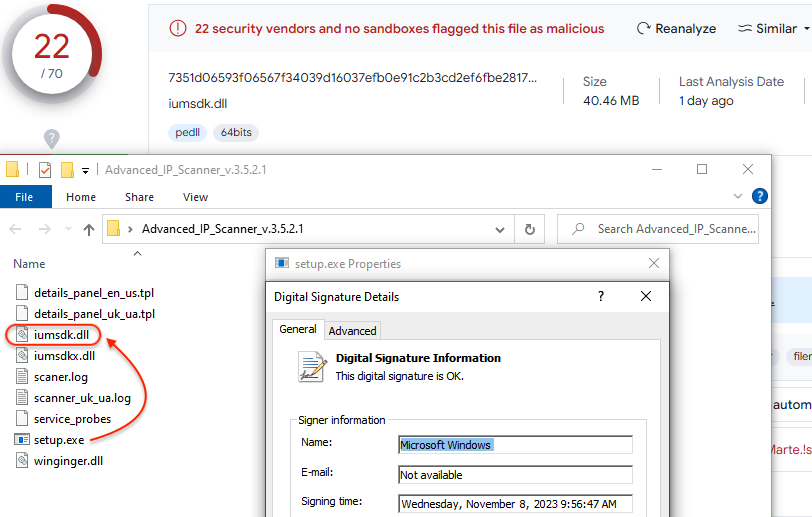
Nitrogen uses DLL side-loading via a signed executable to launch its payload:
Side-loading a malicious DLL
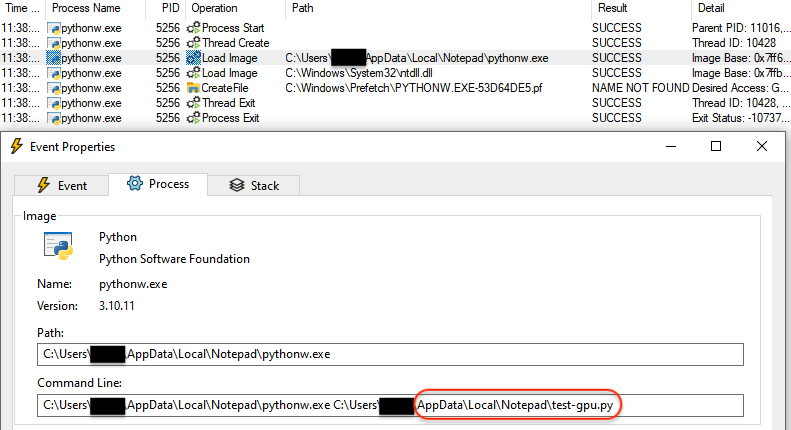
It then proceeds with running Python from a newly created folder under %appdata%:
Python running a malicious file
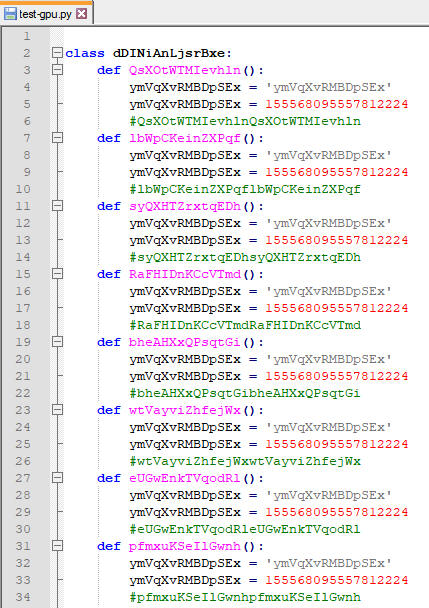
The Python file it executes is heavily obfuscated:
Obfuscated Python file
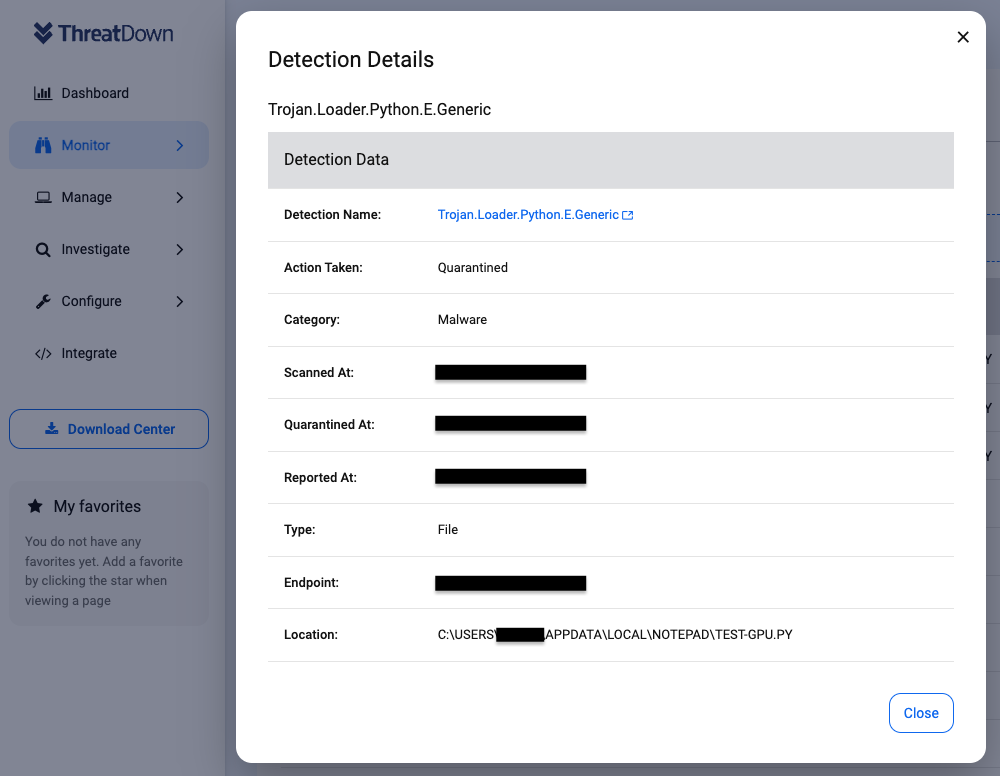
ThreatDown will detect this malicious activity and quarantine the malicious Python file:
ThreatDown detecting and blocking the malicious Python file
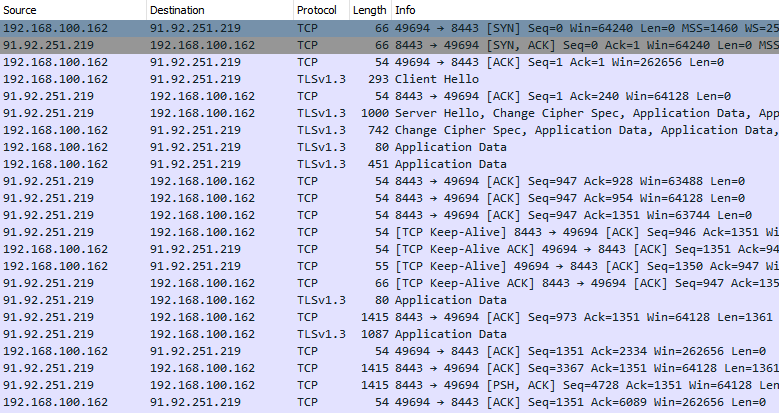
Blocking the payload at this step is crucial as it is the point where it will otherwise contact its command and control server (C2):
Network traffic between victim and C2
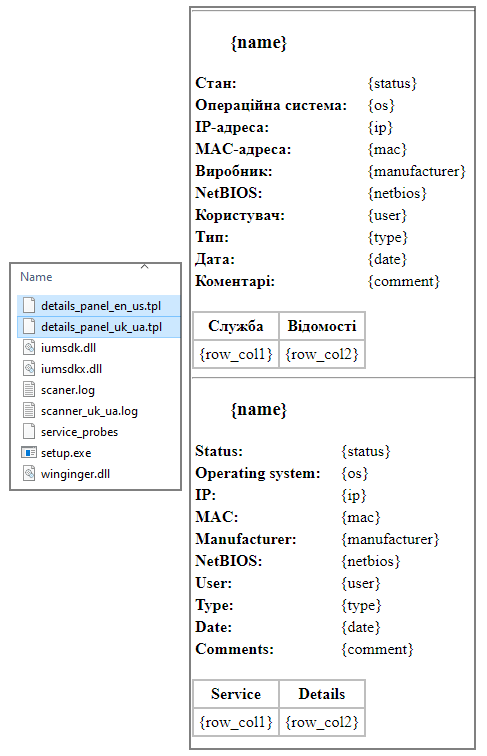
In recent Zip installers for Nitrogen, we noticed two files likely related to their control panel. It’s worth noting that one of them is in Ukrainian language:
Panel template files
Victims are added to the attackers’ control panel for further processing. The threat actors will need to cleanup their database to remove uninteresting entries such as those generated by malware sandboxes and researchers. The remaining victim can then be divided into a team of specialists that will use post exploitation tools to further gather information and compromise the network, before launching additional payloads.
Protecting networks from malicious ads
What makes Nitrogen a serious threat for businesses is its known connection with ransomware. The threat actors who gain access to a compromised machine deploy adversary emulation framework tools such as Sliver before dropping ransomware, namely ALPHV/BlackCat.
Many businesses are not adequately protected when it comes to malicious ads. This is typically reflected in the tools and security software installed on endpoints, which will often focus on spam and phishing emails.
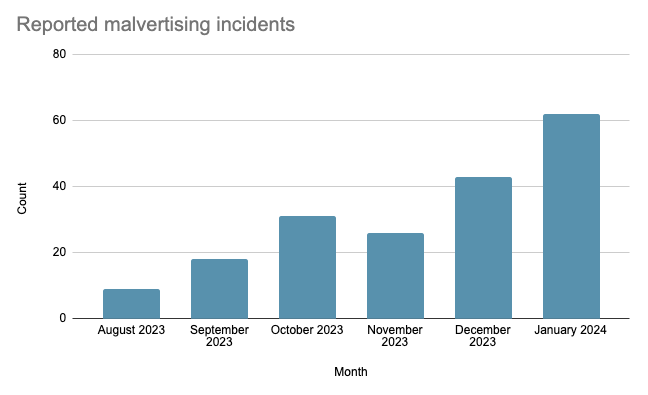
Threat actors are well aware of this, and they have been using online ads as a delivery vector for malware heavily since late 2022. Based on our own stats from tracked incidents, we have been seeing a rise in reported incidents since summer 2023.
ThreatDown protects your networks thanks to its web-based and malware blocking features. Being able to block the infrastructure used by criminals to funnel traffic from ads is critical to avoid malware even landing on endpoints.
Just about every account you have has an email address associated with it, and most people have a main email address. It’s completely natural for someone to use their main email address for all of their online accounts. However, things change sometimes. People need to change their main email addresses from time to time, and that affects the accounts they’re signed up for. If you have a Spotify account, and you want to know how to change your email address, here is a quick guide to show you how to do that so.
Why you will want to change your email address
Being able to change your email address is very important because there are times when you need to switch up your main email address. Maybe you find an email client that’s more convenient than the one you currently have. Or, perhaps you created your email address at the age of 11, and you feel like it’s time to switch to a more mature email address. No one wants to go through life with an email address like [email protected].
When you want to get a new email address, it’s important to change it in Spotify and other accounts beforeyou make the switch. This is because it’s really easy to forget your login credentials for your old email account. In the event that you forget how to access your old email account, it could be extremely hard to get back in.
So, if you try to change your email address to a new one in Spotify after the fact, you run the risk of not being able to do so. If Spotify has to send you a verification email to verify it’s you before changing your email address, then it’ll be sent to your old email address. That could really put you in a pickle.
How to change your Spotify email address
So, let’s get down to it. Firstly, you will be able to change your email from either the mobile app or the browser version. The process isn’t that different between these versions, but we’ll still go over both.
If you’re on your phone, tap on your profile picture to open the left-side panel. There, tap on the Settings and privacy button. This will take you to your settings page. Under the Account section, tap on the email button. This will show you two text fields.
Here, simply type in the email address you want to change to. Under that, in the second field, type in your current Spotify password. Once you do that, your email address will be changed. Just make sure that you entered your new email address correctly.
On the computer
If you don’t use the app, and you are on your PC, then changing your password will not be much different. Open the Spotify website or desktop application and click on your profile picture at the top right of the screen. There, click on the first item which is the account button. You’ll see your account page with several sections outlined. Under the account section, click on the Edit profile button.
There, you’ll be taken to a page with certain settings that you can change. The very first setting will be your email address. Just like before, type in the email address you want to change to, and then type your password under that. This will change your password. It’s as simple as that!
Confirmation email
After you change your email address, you’ll get a confirmation email from Spotify letting you know that it has been changed. You don’t have to respond to the email, however. If you see it pop up in your inbox, you can safely ignore it.
You should only take action if you get an email like this and you did not change your password. If you get one of these emails without actually changing anything on your account, you will need to read the email and follow the steps that Spotify has outlined for you. Unfortunately, accounts get hacked very often, and if your account is hacked by someone, then they can do whatever they want with your account.
How to connect your Spotify account with your Discord account
Another cool thing you can do with your Spotify account is connect it to your Discord account. Doing so is pretty simple, and it has some neat results. What can you do? Well, connecting your Spotify account with your Discord account lets your Discord friends know what you’re listening to. If you’re a person who likes to share the kind of music that they listen to, letting other people know what you’re jamming out to can be a neat feature.
Also, with your accounts connected, you will be able to broadcast music live to other people in a Discord chat group. Say, you are in a D&D chat group, and you want to stream some fantasy music to set the mood. Well, every person in the chat group will hear the music that you’re playing.
How to connect the accounts
In order to do this, you need to go to the Discord website or desktop application and go to your settings. Go to your profile picture on the bottom left of the screen, and click on the gear icon next to it. This will take you to your settings panel. On the left side of the screen, you’ll see a long list of settings you can adjust. Close to the top, you will see the Connections button.
On the resulting page, you will see a few things. Up top, you’ll see a carousel of the available services you can connect to your Discord account. Click through the carousel until you find Spotify. When you click on Spotify, you’ll be taken to a page in your default browser that will have you log into your Spotify account. Once you log into your Spotify account, they will be officially connected.
If you want to disconnect your account, go back to that same page, and click on the “X” button on the top right of the new Spotify panel on the connections page. And with that, you should be able to enjoy this Spotify integration with Discord.
If you’re the type who wants their Android apps updated right away, you can open the Play Store, tap the profile icon at the upper right of the screen, and press on Manage apps & device. Under the heading Updates available, you can select between Update all, or See details. If you don’t care which apps are being updated, tap on the former. If you want to see which apps are getting updated, press on the latter.
If you press See details, you will see a list of the apps scheduled to be updated. You can tap the Update all button or tap the Update button for each individual app. App developers can also arrange to send an in-app alert to an Android user working with an older version of the app. This alert reminds him/her to upgrade the app. But these are not standardized notifications as some will prompt you to update multiple times while others will show a one-time notification.
According to the Android Developers Blog (via AndroidPolice), to help developers alert users who are “stuck on outdated, unsupported or broken versions” of their apps, Google is introducing a “new tool” that will prompt users of an app to update. This is important for developers because they want those using their apps to have the best experience possible; that usually requires users to have the latest version of an app that they are using. The notifications will appear everytime users running certain versions of an app open that app.
Google is standardizing App update prompts
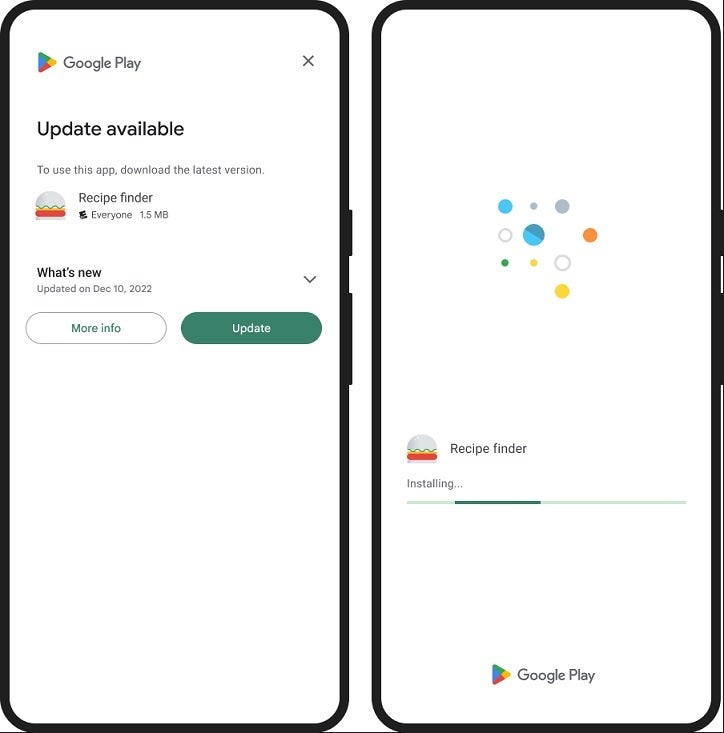
One new prompt is a full-screen page that says “Update available” and says “To use this app, download the latest version.” That is followed by the name of the app and What’s new with the update. There are two buttons that can be tapped; one says More info and the other says Update. If you select the latter, you will see a screen with the name of the app and an icon with a progress bar underneath.
Another version was spotted by Android Police for the Google Opinion Rewards app which was a card with an Update button. The card creates an urgency that leads the user to update to the latest version of the app.
Google notes that over 50% of users are responding to the prompts allowing more of them to experience the best versions of developers’ apps. So if you are an Android user and you see a prompt asking you to update an app, press that Update button right away and you might find yourself enjoying a particular app more.
On January 23, 2024, we reported on the discovery of billions of exposed records online, now commonly referred to as the “mother of all breaches” (MOAB).
Since then, the source of the dataset has been identified as data breach search engine Leak-Lookup.
Prevention platform SpyCloud compared the MOAB data with its own recaptured dataset and found at least 94% of the data was either public, old, or otherwise widely-known. That leaves a lot of new records.
From SpyCloud’s blog:
“a small number of individual breaches totaling a large number of records – approximately 1.6 billion – appeared distinct, as compared to SpyCloud’s dataset.”
SpyCloud was able to attribute some data to what it calls “private sale breaches”, which are datasets that were sold privately or otherwise traded outside of the public space.
As Troy Hunt of HaveIBeenPwned pointed out on his blog, there is a data breach “personal stash” ecosystem. This consists of personal stashes of data breaches existing all over the place, fueling an exchange ecosystem that creates copies of billions of records of personal data over and over again.
“The data of a significant portion of the global internet-using population, just freely flowing backwards and forwards not just in the shady corners of the dark web but traded out there in the clear on mainstream websites.”
These shady services, Hunt says, allow interested parties, including criminals, to access records that contain usernames, passwords (including in clear text), email addresses, and IP addresses. And Hunt says he feels that Leak-Lookup is one of the “bad” guys for the following reasons:
After purchasing access, it returns extensive personal information exposed in data breaches including names, email addresses, usernames, phone numbers, and passwords.
The operator is clearly trying to remain anonymous with no discoverable information about who is running it.
It has Terms of Service that include: You may only use this service for your own personal security and research. But it does nothing to enforce that restriction.
What worries me even more is the amount of buyers and brokers for breach data. I, for one, never realized there were so many of them. That’s regardless of whether they are there to sell data to anyone that is willing to pay, or only offer it to those that rightfully own the data.
This in itself constitutes multiple risks. As we all learned in economics, demand drives up the price and the higher the price the more attractive it becomes to go after the data. And, as the MOAB breach clearly demonstrated, not everyone is as careful as they should be about accidentally exposing their collection.
And it’s not just cybercriminals that are buying this type of data. US Senator Ron Wyden released documents confirming the National Security Agency buys Americans’ internet records, which can reveal which websites they visit and what apps they use, despite a recent FTC order saying that data brokers must obtain Americans’ informed consent before selling their data.
If you want to find out if your data is exposed online, you can try our free Digital Footprint scan. Fill in the email address you’re curious about (it’s best to submit the one you most frequently use) and we’ll send you a report.
We don’t just report on threats – we help safeguard your entire digital identity
Cybersecurity risks should never spread beyond a headline. Protect your—and your family’s—personal information by using Malwarebytes Identity Theft Protection.
Sometimes, the best part of the smartphone experience isn’t about the smartphone itself, it’s about the accessories. These auxiliary devices are designed to add a multitude of functionalities to your phone, no matter how feature-packed the phones are. Well, if you just bought yourself a Samsung Galaxy S24, then you probably want to know some of the best accessories you can buy for it to extend its functionality.
That’s what this post is about! We’re going to go over some of the best accessories that you can use for this already great device. This list will include items such as headphones, Bluetooth speakers, selfie sticks, smart watches, Etc. These are all the best products that can be used with your Galaxy S24 to make the great experience even better. Be sure to check back every now and then, as this list will be constantly updated.
Before jumping in, if you’re still on the fence about whether or not to pick up a Galaxy S24, you should read our preview. It has all the information you need to know about this phone and its larger sibling. The base Galaxy S24 comes in at $799. It’s chock full of a ton of amazing software and AI features that only make the experience that much better. Be sure to give it a try.
The Galaxy S24 is great, it’s sturdy, it’s well built… but it’s not indestructible. No matter how many high-quality and premium materials a phone is made from, it can still be damaged in a fall. This is why phones need sturdy cases. Samsung has a strong Shield case for the Galaxy S24. Coming in at $34.99, this case is sure to keep your phone protected when the unfortunate happens.
Since this is a Samsung product, you know that it’s made with quality in mind. This shield case is made from high-quality materials that help protect it against drops and scratches. Since it’s built to provide unparalleled protection, it has a few features that increase its durability rating. For starters, there is a ridge pattern on the back. This adds additional thickness to the case that protects the phone’s back plate during the fall. It manages to do this without making the case itself bulkier.
Also, the corners of the case have additional padding. Falls on the corner are some of the worst, as all the impact force is concentrated on one area of the glass. So, it’s so much easier for the screen to break that way. Having additional padding on the corners reduces the risk of cracking the screen in the case of a corner fall.
Speaking of protecting the screen, this case has a raised lip that extends past the screen. So, if the phone happens to fall face down, the case will make contact with the ground and not the phone’s display. So, this further reduces the chance of the phone cracking its screen.
On the back of the phone, the same thing goes for the camera package. You can never control where your phone lands when it falls, and there’s always the chance that it could fall directly on the cameras. When that happens, you run the risk of having a cracked camera lens. However, this case fully encompasses the cameras so that it makes contact with the ground before any of the cameras do.
This just shows that Samsung really wants you to keep your Galaxy S24 for the long haul. The Shield case is a very tough case that will keep your phone protected for years to come. That’s convenient, as this phone does have seven years of software updates.
You want to keep your phone protected, so the natural thing to do is slap a case on it. However, people often don’t want bulky cases that weigh their phones down and add extra thickness. For people like that, there’s a Thinborn case for the Galaxy S24. A premium case coming in at $60, the Thinborne Samsung Galaxy S24 Case will keep your phone protected while maintaining a thin and very manageable profile.
So, a case like this seems to be a bit counterintuitive; how can a case so thin add any protection? Well, this case isn’t exactly an OtterBox, however, it can still keep your phone protected in the case of a drop. The materials, while thin, are very high quality. The case is made from 600D Arabic fiber. This is a material that’s characterized by its high impact resistance while meaning thin and light.
Most other cases are made from thermoplastic polyurethane (TPU) or polycarbonate (PC). These materials are tough, but they can’t be quite as thin as airmen fiber and maintain their durability. So, while the Thinborne case is thin, it’s still plenty durable and strong enough to keep your phone safe.
This case is thin enough to allow for wireless charging, which is great for people who have fully converted. Aside from that, this case is also MagSafe-ready. If you’re a person who cares about using MagSafe accessories, you’ll be able to do so using this case. The magnets are strong enough so that the phone will stick to whatever accessory you’re using without falling off. So, this case adds additional functionality to the actual phone, which is always great to see.
As for the design itself, this case is made from Airmen fiber. This not only protects the phone, but it also gives it an extremely sleek and stylish look. It has an elegant look to it. The recurring pattern runs down the phone and just adds to the overall elegant aesthetic. It’s the equivalent of putting a fancy business suit on your phone. It’s extremely elegant and it adds to the already elegant look of the Galaxy S24.
Since we’re talking about a Samsung phone, what better earbuds to get the Samsung earbuds? A flagship phone is as great as a Galaxy S24 and deserves flagship earbuds that are as great as the Galaxy Buds 2 Pro. They’re definitely up there in price weighing in at $299.99. However, the price is well justified. Using your Galaxy Buds with your Galaxy S24 brings some notable benefits, and this is a true testament to the powerful ecosystem that Samsung has built with its devices.
Saying that the Galaxy Buds2 Pro are a quality pair of earbuds is an understatement. These are the best earbuds that have come out of the company so far, and they really bring an extremely high-quality listening experience in just about every way.
Starting off with the audio quality, these buds use a powerful set of drivers tuned by AKG. So, you know that everything you listen to is going to sound absolutely amazing. You’ll hear a very well-balanced sound with powerful bass and great treble. This means that, no matter what genre you listen to, whether it be older or newer, everything will sound great. These earbuds are designed for people of all kinds of musical tastes.
The Galaxy Buds 2 Pro support 24-bit audio. This is great for the audiophiles out there who want to get the most out of their music. You’ll enjoy clear audio with less noise.
Speaking of noise, these earbuds come with some of the best active noise cancellation on the market. They use an enhanced noise cancellation technology that’s miles above its predecessors. The technology analyzes the noise in your area and intelligently filters it so that you can listen to your music without any interruptions. If you’re in traffic, on the bus, under an AC, etc., the noise cancellation technology will be able to isolate you with your music. It’s as if they turn the world on mute.
When it comes to battery power, the Galaxy Buds2 Pro should get you about a full day’s worth of battery power including the case. If you want to further stretch the battery power, then you can turn the ANC off. This will extend the battery power to up to 29 hours on a single charge.
If you’re going to be using a Galaxy phone, then you may want to also use a Galaxy Watch. Samsung has this line of Galaxy-branded smartwatches that interact flawlessly with its phones. So, a powerful phone deserves an equally powerful smartwatch, and the Galaxy Watch 6 Classic will be the perfect match for you. Coming in at $399.99, this is one of the pricier smartwatches you can get, but it’s well worth it if you want a powerful smartwatch to carry your Galaxy experience.
When it comes to this watch’s performance, you’re getting a perfectly smooth experience. This is Samsung’s own hardware we’re talking about, and that goes for the processor as well. So, you know that you won’t have to worry about any sluggish performance at all. Smartwatches are used as auxiliary devices, but if they perform poorly, they can definitely drag down the entire experience. This is why the smooth and fluid experience you get with the Galaxy Watch 6 Classic is a welcome treat.
Moving on to the software front, this uses Google’s Wear OS 4 operating system. This is a powerful wearable computing platform, and it comes with several benefits. For starters, you can expect plenty of software updates to come over time. Software updates keep everything running smoothly and provide the Smartwatch with new features over time.
Also, Wear OS gives you access to a full library of apps you can download to your smartwatch to boost the overall experience. There are fitness apps, clock apps, watch faces, games, and many other types of apps. So, feel free to browse the app store
When it comes to the design, the Galaxy Watch 6 Classic looks just like an expensive traditional timepiece, so you will love it if you want to go for that aesthetic. Everything is professionally engineered and looks absolutely gorgeous. Whether you’re using the black color or the silver color, your watch will look like a fabulous addition to your wardrobe. Samsung put years and years into refining the design of the smartwatch, and it shows.
Also, this smartwatch has a rotating bezel. It’s a crown that goes around the display that you can physically rotate. You can use this to select items in the operating system. This is one of the best smartphones you can get on the market, and the fact that it is 100% compatible with your Galaxy S24 only sweetens the deal
The Galaxy S24 has great battery life, but any phone can use a good portable charger. You never know when you’re going to be trapped in traffic or left in the middle of nowhere. This is why a good portable charger comes in handy. The Rasbes Solar Portable Charger is a charger to get because it comes with some neat features. It’s an incredibly useful tool to have, and it is worth more than its $23.99 price tag.
Right off the bat, this portable charger has a massive capacity of 38,800mAh. That’s almost 10 times larger than your phone’s battery. Obviously, because of several factors, you won’t be able to charge your phone 10 times using this charger, but you’ll be able to charge it multiple times over and keep it charged for the long run.
If you need to charge this portable charger, you can plug it into an outlet. However, this is a solar charging Bank. This means that it charges by being exposed to sunlight. So, if it ever happens that you are in the middle of nowhere, and there are no Outlets to charge it with, you still have another source of energy. This is another factor that adds to this portable charger is utility. So, it can really come in handy in the event of an emergency.
This is a portable charger that’s made with the outdoors in mind. Not only because it’s solar powered, but because this is very durable. The last thing you want is a portable charger that breaks on you. The Rasbes Solar Portable Charger is made from very sturdy materials to keep it from getting damaged during a fall. It’s made from shockproof materials to keep all the internals from getting broken. Also, this portable charger is IPx6 water-resistant. This means that it won’t be damaged if caught in the rain. You just need to be sure that you don’t submerge it completely.
Adding to this portable charger’s utility is a set of powerful LED lights on the very front. This is perfect in case you need a light in an emergency. In the event of a power outage, while you’re charging your device using the charger, you can use the flashlights to light your way.
So, it should be common knowledge that Samsung no longer provides a charger in the box with its phones. So, if you want to have a charger, you have to use one from home. If you don’t quite have a charger that can charge this phone to its full charging speed, then you may want to look into the AceFast GaN 65W charger. This is a very robust charger that’s not only meant to charge one device. It’s actually meant to charge multiple devices and act as an HDMI pass-through.
When it comes to charging your phone quickly, this charger will not have any issues. The Galaxy S24 charges at 25W, and this charger tops out at 65W. So it will charge your phone at full capacity. Along with charging your phone, it can also charge other devices. Since it has a 65W peak speed, it could also charge some laptops. Many Chromebooks only use 45W charging, and even some of Samsung’s Galaxy books use 68W charging. So, this adapter is perfect for those. It can even charge your Nintendo Switch.
If you’re in a pinch and have to charge more than one device at a time, this will be a good option for you. This AceFast charger comes with a USB-C 3.1 port and a USB-A port. So, if you have multiple devices that you need to charge at the same time, you can do so. You won’t have to choose between charging a laptop and charging your phone anymore. It’s able to deliver enough power to quickly charge all of your devices at once.
Do you want to watch the big game on the big screen, but you can only access it through your laptop? Well, you won’t have to worry about that. This adapter also acts as an HDMI pass-through. This means that you’ll be able to pass a signal from your computer through the adapter and to your TV. This is incredibly useful if you want to give a presentation or play games on a larger screen.
The Galaxy S24 has a set of amazing speakers, but you just can’t beat a dedicated Bluetooth speaker. Whether you’re trying to crank up some jams or play some music to relax to, having a Bluetooth speaker is a must. The company MEGUO is known for making affordable products that are nice and quality. If you’re looking for a Bluetooth speaker that brings a lot of amazing features and a small price, look no further. This speaker brings quality audio along with an amazing aesthetic.
There’s no point in having a great and amazing Bluetooth speaker if the sound is low quality. This speaker comes with a pair of high-quality and well-tuned drivers that provide a great and immersive sound. No matter what you’re listening to, everything will sound amazing. They’re tuned to give a Hi-Fi sound with a great range of frequencies. The total output of this speaker is 20W, which is enough to fill an entire room with sound.
If you’re looking for a quality built speaker, then this is definitely for you. This speaker is built for the outdoors, being made out of rugged and strong materials. It has a thick outer casing that can protect the speaker during a drop. Not only that, but the grille is also well-built. When it comes to water resistance, the speaker has an IP56 water and dust resistance rating. This means that it’s protected from most forms of solids, and it is secure enough to survive being out in the rain. You’ll just want to avoid completely submerging this speaker in water. The company’s focus on durability means that this speaker will survive for the long haul.
Not only does the speaker sound good, but it also looks good. It has an array of LED lights that shine when you’re playing music. The LEDs exist on the inside of the speaker, and there is a lighted band that wraps around the phone. These lights change color, and they make for an absolute spectacle of a site. So, this speaker is not only a treat for the ears, but it is also one for the eyes.
The Galaxy S24 is a Samsung flagship phone, and if it’s one thing that Samsung flagship phones have, it’s a flagship-grade camera package. Undoubtedly, you’re going to want to use this camera to record some vlogs or take selfies. You’re going to want to have a quality selfie stick with you. Well, that is exactly what the SYNCWIRE 55-inch Selfie Stick is. Coming in at $27.98, this is a selfie stick that goes above and beyond what a typical selfie stick can do.
First off, this isn’t just a selfie stick, it’s an all-in-one device. This versatile tool can extend your reach by up to 55in (140cm). That’s almost 6ft, so you know you’re going to have some incredible range. Since the selfie stick is able to stretch so far, it’s built from quality materials. It was crafted using ABS plus PC black injection molding technology. You can extend it to its full length without worrying about it bending. So, you can use this selfie stick worry-free
Besides being a selfie stick, this is also a handy dandy tripod. The handle folds outward to reveal three legs that will stand your phone up. This gives you a nearly 6-foot-tall tripod that you can use when you need to take stationary videos. When you’re finished, you can compact it down to a size small enough to carry in a bag or maybe even fit in that pocket.
Also, this acts as a remote control shutter button. All you have to do is press the button on the remote, and your phone will take a picture. The Bluetooth remote is rechargeable and it’s able to take over 20,000 on a single charge. You can use the remote while it’s inside the selfie stick, but you can also detach it and use it as a shutter button at long distances.
If you’re looking for a versatile item to get your vlogging and selfies done, then look no further than this device. It is certainly one of the best on the market
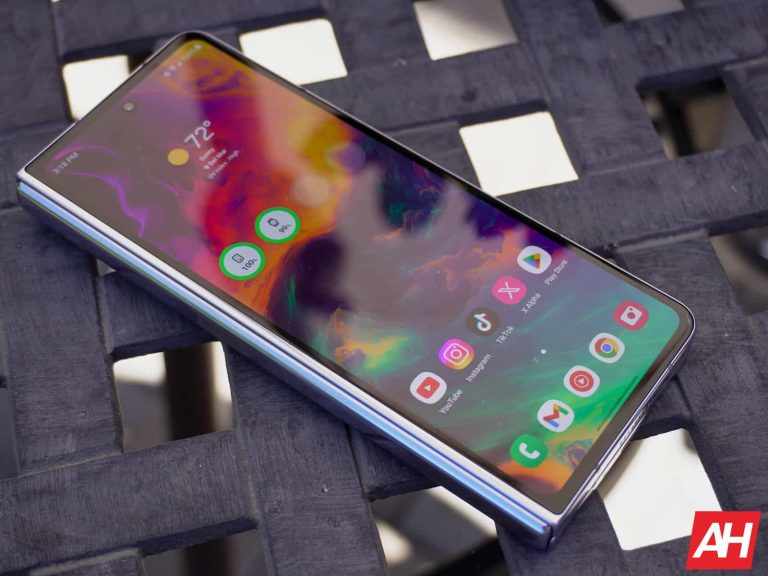
The Galaxy Z foldables phones are some of the most expensive foldables on the market, reaching close to the $2,000 Mark. While that’s the case, most notebook-style foldables are very expensive. The cheapest notebook foldable to ever hit the market is the Tecno Phantom V Fold, which comes in at roughly $1,100 when converted to USD.
So, with Samsung’s Z Fold foldables so high in price, the company wants to make the form factor more accessible.
A mysterious Galaxy Z Fold phone code-named Q6A appears
We are half a year away from the unveiling of the Galaxy Z Fold 6. As such, we need to be sure to take this news with a grain of salt. Anything could happen between now and the unveiling, and who knows if this potential project could be canceled?
Rumors have been coming out that Samsung has been wanting to make a more affordable Galaxy Z Fold phone. If it’s an affordable Foldable phone, we’re pretty sure that Samsung would put it in the FE series of phones (Maybe a Galaxy Z Fold 5 FE). Previous reports have come out saying that Samsung is considering this.
Now, thanks to a fresh new leak, we have what appears to be a bit of concrete evidence. Reports state that the code name for a mysterious Galaxy Z foldable was discovered. Last year, the Galaxy Fold 5 (Review) and Z Flip 5 used the code names Q5 (for the Fold) and B5 (for the Flip). This year, the code names are going to be Q6 and B6.
Well, a mysterious code name was found at Samsung. This Galaxy Z foldable has a code name Q6A. Obviously, this is not a direct indication of a cheaper device. However, this, coupled with the previous rumors, all point in that direction.
Launching a more affordable Z Fold phone could be a bit tricky
If Samsung does launch a more affordable Galaxy Z Fold 6, pricing it could be a bit tricky. Phones like the OnePlus Open (Review) offer the latest and greatest specs, and it’s priced at a lower price point than the Galaxy Z Fold 5. However, we’re certain that this mysterious device won’t have the greatest specs. So, if the price of a watered-down Galaxy Z Fold phone is too similar to a fully specced-out OnePlus phone, that’ll look pretty bad on Samsung.
So, Samsung will really have to focus on making this an affordable device. However, making it too affordable could potentially eat into the Z Flip sales. Galaxy Z Flip phones have been priced at $999 for a bit. Launching a Fold at a price too close to that could possibly cannibalize the Z Flip phones. So, if Samsung does launch this cheaper Galaxy Fold, then it will have to hit a sweet spot to make it appealing to buyers without cannibalizing any of its own products.
Imagine you’re on a boat, navigating through the ever-changing waters of the tech world. SaaS applications are like the currents – powerful and essential, but if you lose control, you’re steering towards a disaster. That’s where understanding the importance of ITDR comes into the picture.
As we delve deeper into the age of digital transformation, our reliance on Software as a Service (SaaS) applications skyrockets, making the traditional disaster recovery plans somewhat obsolete. We find ITDRsitting snugly in the middle of the equation, as it evolves into something more dynamic that can sustain the pace of SaaS expansion.
The Challenge of Security Configurations Amid SaaS Diversity
Every SaaS application comes with its own set of rules, and when you’re juggling multiple, it’s like trying to understand different dialects of the same language. It can be overwhelming. The problem here isn’t just the number of security settings but ensuring they sing the same tune.
Imagine one app demands a strong password that changes monthly, while another seems perfectly content with ‘password123’ forever. This jarring inconsistency can make the entire IT infrastructure susceptible to cyber threats, much like a fortress with one unguarded gate.
To further decode the dialects of SaaS applications, companies need to establish a centralized security configuration protocol. This strategy needs to be broad enough to accommodate various SaaS applications yet specific enough to maintain stringent security standards.
It’s akin to developing a universal translator that can seamlessly interpret and secure the flow of data and user access across different platforms. Such centralized command ensures a uniform security posture that is both agile and robust, mitigating risks proactively.
Adapting Security Measures for Enhanced SaaS Management
Staying ahead of the game is not just about having a good defence but also about being nimble and preemptive. The key lies in developing an adaptive security strategy that evolves with both the changing threat landscape and advancements in SaaS offerings.
An organization practising proactive SaaS security posture management can be likened to a chess player, anticipating moves and strategizing in advance. They’re not just reacting to threats; they’re preventing them from materializing, thus safeguarding their virtual ‘kingdom’ from potential breaches and data loss incidents.
Boosting Cloud Defence Through SaaS Security Reinforcements
Did you know that SaaS applications often come equipped with an arsenal of security features? That’s right, like hidden treasures waiting to be discovered and utilized. To fully harness these protective measures, regular audits and updates are essential.
It’s a matter of tailoring these features to fit your organization’s unique needs and bolstering your overall cloud security posture. It’s like fortifying a castle – you want to make sure every tower is manned, every gate reinforced and every drawbridge functional, to withstand the sieges of cyber threats.
Staying Secure in the Fast Lane of SaaS Adoption
As your organization speeds along the SaaS highway, with applications being added to your convoy regularly, how do you maintain oversight without slowing down? The answer is twofold: one part policy, one part flexibility. Consider every new SaaS addition as a new member of your fleet.
They need to understand the convoy rules (security policies) but there has to be room for manoeuvre (flexibility), enabling them to adapt to the changing traffic conditions (business needs) without causing a pile-up (security breach). Striking this balance is crucial for a seamless and secure journey.
So, while navigating this vast sea of SaaS applications might seem daunting with security risks lurking below the surface, realizing the importance of ITDR and a solid SaaS security posture management strategy can keep your organizational ship afloat and cruising confidently toward its goals.
The Galaxy S24 series of phones has proven to be a very popular series. However, some users are experiencing an issue with their phone’s display. They appear more dull than they should be. Well, Samsung knows about the Galaxy S24 display issue, and it’s working on the fix for it.
Samsung phones are usually lauded for their displays, so a display issue with a Galaxy flagship does not sound like fun. It’s like a camera issue on a Pixel phone.
What’s the issue?
Users are reporting that the screen vibrancy for the Galaxy S24 is far below what it should be. In the display settings, people have the choice between the vivid mode and natural screen mode. Natural mode gives us more muted and true-to-life colors, while the vivid mode gives us more punchy and saturated colors.
However, people are noting that the saturation difference between the vivid and natural modes is non-existent. This is something that we’ve experienced here at Android Headlines as well. Switching between the modes slightly changes the color temperature, but it does not increase the color saturation. This is a major bummer for people who get Samsung phones for their superior displays.
Some folks speculated that this is because of the new Corning Gorilla Glass Armor that Samsung showed off during Unpacked. However, only the Galaxy S24 Ultra (Review) got this glass; the color vibrancy issue affects all three variants of the phone. So, fortunately, this is a software-based issue that can be patched up with an update.
Samsung knows about the Galaxy S24 display issue, and it is working on a fix
People who are frustrated with this display issue need not worry. Samsung is a big company, so it’s easy for some of the smaller issues and headlines to go unnoticed by it. However, this display issue has definitely been making the rounds, so Samsung took notice. Thanks to a new screenshot posted, the company acknowledged the issue, and it stated that it is currently working on a fix for it.
In the screenshot, we see a chat conversation between a user and a Samsung support agent. The agent says that this coming software update will fix the issue. So, it appears that the fix will come with the February security patch. However, that has yet to be officially confirmed. In any case, it’s good to know that the issue is being resolved and that we can expect it to land soon