If you’re a person selling products on the internet, then you know the issue with creating convincing product images. Shopify knows your plight, and it has a new tool to help you out. The new Shopify AI image editor will help you give your product images and professional look without much effort.
When you are selling a product, you need to be sure that the product image looks professional. This can be very tough, as many products are shot in expensive studios with multi-hundred or multi-thousand dollar cameras. However, the small-time entrepreneur will not have access to these things. Most people just have their iPhones and their bedrooms.
So, this presents a dilemma. Many people decide whether or not to check out a product based on the product’s image. If the image looks unprofessional, the potential buyer would think that the company is unprofessional.
Shopify announces a new AI image editor to help make your product images look more professional
Any person who navigates any e-commerce platform like Amazon is likely to see some over-the-top and visually appealing product images. Well, a lot of the time, there was a lot of money thrown around for expensive equipment and Photoshop. However, not everyone has access to all of these. This is where the Shopify AI image editor comes in. This is a tool you can use to augment your existing product image using AI technology.
You’ll upload an image of your product, and suggest certain edits that can be made to it. For example, if you have a picture of a pair of headphones, and you want to look like they are in the sky, you can upload the image and ask the AI to generate a background of the sky. Just like other image generators, this tool has different visual styles that it can create your image in. We’re also pretty sure that the AI will reconstruct the image from the ground up so that it better fits into the background.
This could be a great tool for people who want to have extravagant backgrounds for the images but who don’t have the funds to make it happen. If you want to try out these free AI features, you can start your free Shopify trial. There are other powerful AI tools that Shopify introduced last year, so you can check them out as well.
Email hijacking occurs when cybercriminals gain unauthorized access to an individual’s or organization’s email account, it continues to pose a significant threat in the digital world. This security incident has the potential to result in unauthorized access and misuse of valuable information, financial harm, and significant disruptions for individuals and organizations alike.
Recent statistics emphasize the increasing frequency and sophistication of these attacks. In 2023, there were reports of a significant rise in email-related breaches. Phishing attempts became more focused and intelligent.
The FBI’s Internet Crime Complaint Center has noted the global financial losses caused by Business Email Compromise (BEC) scams taking over email accounts. According to cybersecurity firms, email hijacking events have increased, compromising many business email systems.
These numbers highlight the crucial significance of email security. With email being such a crucial method of communication in both personal and professional settings, the hijacking issue is a major concern.
Cybercriminals always find new ways to carry out their malicious activities as technology advances. They take advantage of weaknesses in email systems and rely on human mistakes to achieve their goals. The consequences of these breaches can vary from individuals falling victim to identity theft to businesses suffering substantial financial losses and potential legal and compliance consequences.\
In this case, You can launch a free Threat Scan to See the real-time advanced threats that are living in your inbox. It will be deployed in minutes by API, Email Relay, or any email server.
Understanding Email Hijacking
This act is a matter of great concern for several reasons:
Accessing Sensitive Information: Email accounts frequently store a vast amount of sensitive information, encompassing personal and professional data. Unauthorized individuals can gain access to sensitive information, including confidential data, personal communications, and financial details, among other things.
Identity Theft and Fraud: When criminals gain control of an email account, they can pretend to be the account holder. These risks can compromise personal data, leading to potential harm such as identity theft, financial fraud, and unauthorized use of personal information.
Business Disruption and Reputation Damage: Email hijacking can significantly impact businesses, causing disruptions to operations and potentially damaging the organization’s reputation. Valuable business data is at risk of being unlawfully accessed, potentially leading to a breach of trust with clients and partners.
Potential for Continued Attacks: Frequently, obtaining entry into an email account is simply the initial phase for attackers. Utilizing the data discovered in emails, individuals can exploit it to initiate additional assaults, such as gaining unauthorized access to other connected accounts (such as bank accounts or social media profiles).
Both individuals and organizations need to grasp the gravity of email hijacking. The importance of implementing strong security measures to safeguard email accounts and the valuable data they hold cannot be overstated.
DocumentRun Free ThreatScan on Your Mailbox
Trustifi’s Advanced threat protection prevents the widest spectrum of sophisticated attacks before they reach a user’s mailbox. Try Trustifi Free Threat Scan with Sophisticated AI-Powered Email Protection .
How Email Accounts Are Compromised
Phishing Attacks
Phishing attacksemail account holders by requesting login passwords or personal information. Attackers send authentic-looking emails from banks or providers with links to bogus login sites.
A bank email requesting account confirmation due to suspicious activities’ The link is to a bogus banking site that steals credentials.
In contrast to traditional hacking methods, social engineering focuses on manipulating people’s emotions and thought processes. Convincing someone to violate established security protocols is a common tactic.
An imposter calls a company and pretends to be an IT assistance representative to trick an employee into giving over their email credentials.
Man-in-the-Middle (MitM) Attacks
MitM attacks intercept user-email service traffic. Attackers can steal data on insecure public Wi-Fi networks.
An attacker who steals a user’s email login information is watching the public Wi-Fi network of a coffee shop.
Account Recovery Information Theft
Attackers can access email accounts by stealing or guessing account recovery information such email addresses or phone numbers.
An attacker resets a user’s primary email password using their alternative account.
SIM Swapping
A SIM swap scam involves the attacker convincing the cell provider to move the victim’s phone number to his SIM card. This lets them steal 2FA codes.
An attacker swaps SIMs and gets the victim’s email account’s 2FA SMS codes.
You can try AI-powered Protection for Business Email Security from Trusitifi to stop sophisticated attacks before they reach a user’s inbox – Request a Free Demo.
Cybercriminals still use phishing, which is the most common and successful way to take over email accounts. Using lies to get people to give up private information, like login passwords, is what this method does. Understanding how phishing attacks work is important for people and businesses wanting to improve their security.
Phishing is a type of cyberattack that uses fake emails as a tool. The goal is to get the person who gets the email to think that it is something they want or need, like a note from their boss or a request from their bank. This will make them click on a link or download a file.
The Way a Phishing Attack Works
First Contact: The attacker sends an email that looks like it came from a real company. A well-known business, a bank, or even a coworker using a hacked account could be the target.
Content and Lure: The email has a message that is meant to make the receiver feel rushed or scared, which will make them act quickly. This could be a message saying that someone tried to log in without permission, that there is a problem with an account, or that personal information needs to be confirmed.
Deceptive Links and Attachments: The email may have a file that the receiver is told to open or a link to a fake website that looks like a real website.
Attack Types of Phishing
Spear phishing is an attack that is specifically aimed at certain people or businesses.
Whaling: Phishing attacks that go after famous people, like C-level leaders, are called “whaling.”
Clone phishing is when someone uses a real email that has already been sent and has a file or link to make a similar email with malicious content.
How to Spot Phishing Emails
Suspicious Email Addresses: The sender’s email address might look a lot like a real one, with only a few small differences that are easy to miss.
Generic Greetings and Signatures: Plagiarized emails often use general greetings like “Dear Customer” instead of those specific to the recipient.
Grammar and spelling mistakes: A lot of scam emails have spelling and grammar mistakes, which should raise a red flag for the people who receive them.
Techniques and Tools for Phishing
Link manipulation is when someone hides the real target URL by using misleading domain names or URL shortening services.
Website forgery is making a fake website that looks exactly like the real one. This is often done by changing the look of the address bar with masking or JavaScript.
Strategies for social engineering Using the desire to know and how people think to get someone to reveal private information.
Implementing AI-powered email security solutions can secure your business from today’s most dangerous email threats, such as Email Tracking, Blocking, Modifying, Phishing, Account takeover, Business Email Compromise, Malware and ransomware – Request Free Demo.
Email Account Takeover:
An email account takeover is gaining illegal access to and control of a victim’s email account.
This can result in identity theft, financial fraud, and illegal access to connected accounts and sensitive information. The impact of this is quite significant.
Initial Breach: In order to get initial access to the victim’s email credentials, the attacker may employ a variety of techniques, including phishing, malware, or exploiting network flaws.
Verification of Credentials: Once the attacker has obtained prospective credentials, they will verify them, frequently with the cooperation of automated scripts.
Exploitation: Once the attacker has acquired access to the account, they are able to exploit it for a variety of harmful actions, such as sending spam, accessing associated accounts, or launching other assaults.
Trustifi’s AI-Powered Email account take over protection monitor user email behavior to detect anomalies in variables such as volume, context, devices, geo-location, type of sent emails, and more to detect and alert when a user’s mailbox has been compromised.
The Compromise Reached by the Executives in Real-World Scenario
An executive at a big organization receives an email that purports to be from the company’s information technology department. The email contains instructions on how to change their password using the email.
The email includes a link to a portal that allows users to reset their passwords, but it is a phony. They input their email credentials, which the attacker subsequently takes. The executive then enters their credentials.
The consequences of this include that the attacker can intercept critical company messages, make financial transactions, and compromise other employee accounts if they have access to the executive’s email account.
Email-Managed Security and Detection
“Email-managed security and detection” means a service or set of tools businesses use to keep their email systems safe from different online risks. These services and tools can find, stop threats like scams, malware, spam, and other bad things that can damage email security. To give you an idea of what this usually involves:
Threat Detection: This involves identifying potential security threats in incoming and outgoing emails. Advanced threat detection technologies like machine learning algorithms can analyze email content for signs of phishing, malware, or other types of attacks.
Spam Filtering: An essential part of email security, spam filters block unsolicited and potentially harmful emails from reaching user inboxes.
Phishing Protection: This includes identifying and blocking emails that attempt to deceive recipients into disclosing sensitive information, like passwords or credit card numbers.
Malware and Virus Scanning: Emails and attachments are scanned for malicious software that could harm the network or steal data.
Data Loss Prevention (DLP): This involves monitoring and controlling sensitive information transfer outside the corporate network via email.
Encryption: Encrypting email messages to protect sensitive information during transit and at rest.
Incident Response and Remediation: If a threat is detected, these services provide tools and protocols for responding to and mitigating the threat.
Compliance Management: Ensuring that email communication complies with relevant regulations and standards, such as GDPR, HIPAA, etc.
User Training and Awareness: Educating users about best practices in email usage to reduce the risk of human error leading to security breaches.
Reporting and Analytics: Providing insights into the types and frequencies of threats, helping organizations understand their security posture and improve it over time.
Try getting a customized free demo to see how Trustifi’s AI-powered Protection for Business Email Security can secure your business from today’s most dangerous email threats.
Trustifi’s AI-Powered Email Security solutions
With Trustifi’s AI-powered email security services and advanced protection, even the most complex email-borne threats, such as ransomware, malware, phishing (with harmful links), CEO impersonation, business email compromise (BEC), and so on, can be rapidly detected and countered.
Understanding the Risks of Email Hijacking
Email hijacking involves unauthorized access to an email account, leading to data breaches, financial fraud, and identity theft. The methods used for these attacks, such as phishing, malware, and account takeover tactics, are becoming increasingly sophisticated. As these threats evolve, so must our strategies for combating them.
Trustifi’s ai Powered Email Security Solutions
Trustifi offers a suite of AI-Powered email security solutions designed to tackle the multifaceted challenges of email hijacking. Here’s how Trustifi stands out:
Advanced Threat Protection
Trustifi’s email security services use cutting-edge algorithms and scanning methods to detect threats that traditional filters might miss. This includes protection against phishing, spear-phishing, and other sophisticated email-based attacks.
Data Loss Prevention (DLP)
Trustifi’s DLP capabilities help prevent sensitive information from being shared unintentionally or maliciously. This feature is crucial for compliance with regulations like HIPAA, GDPR, and others.
Email Encryption
To ensure the confidentiality and integrity of email communication, Trustifi offers military-grade encryption. This ensures that even if an email is intercepted, the contents remain secure and unreadable to unauthorized parties.
Inbound and Outbound Email Security
Trustifi not only secures incoming emails from potential threats but also monitors outgoing emails. This dual approach ensures comprehensive protection.
Ease of Integration and Use
Trustifi’s solutions are designed for easy integration with existing email platforms, making the transition seamless for users. The user-friendly interface ensures that all employees can effectively utilize these tools without extensive training.
In order to prevent the largest possible range of sophisticated email based attacks from reaching a user’s inbox, advanced threat prevention ensures that they are prevented.
Trusitifi provide a comprehensive email security solution that is hosted in the cloud. This solution functions as an email filter, employing advanced artificial intelligence to analyze incoming emails and successfully identifying and preventing email threats.
Text analysis with advanced AI detects impersonation, spoofing, spear phishing, and BEC.
URL protection stops dangerous URLs from any device; full URL and file scanning
Filtering spam/gray emails using AI prevents attacks involving phishing.
DLP tools Email encryption Content analysis tools Compliance monitoring systems
User Impact
Primarily affects incoming email to users within the organization.
Controls and monitors emails sent from the organization to external contacts.
Real-World Applications of Trustifi Solutions
In a corporate environment, where email is a primary communication tool, Trustifi’s solutions provide peace of mind. For example, a financial services firm handling sensitive client data can utilize Trustifi’s encryption and DLP features to safeguard against data breaches. Similarly, healthcare providers can ensure HIPAA compliance through secure email practices facilitated by Trustifi.
The Importance of User Awareness and Training
While Trustifi provides robust technical defenses against email hijacking, user awareness and education are equally important. Trustifi’s approach includes tools and resources for educating users about email security best practices, making it a comprehensive solution for email protection.
Conclusion: A Proactive Approach to Email Security
In conclusion, with the rise of email hijacking threats, the need for robust email security solutions has never been more critical. Trustifi’s suite of products offers a proactive and comprehensive approach to safeguarding email communication. By combining advanced technology with user education, Trustifi presents a formidable defense against the ever-evolving landscape of email security threats, making it an indispensable tool for individuals and businesses aiming to protect their digital communications.
You can try AI-powered Protection for Business Email Security from Trusitifi to stop sophisticated attacks before they reach a user’s inbox – Request a Free Demo.
Hackers exploit zero-day vulnerabilities in Ivanti VPN, deploying malware and cryptocurrency miners, with targets including Fortune 500 firms, gov’t agencies, and defence contractors.
Cybersecurity concerns are rising as hackers try to exploit zero-day vulnerabilities in Ivanti VPN devices to deploy malware and cryptocurrency miners. The vulnerabilities, identified as CVE-2023-46805 and CVE-2024-21887 were discovered in Ivanti Connect Secure (ICS) and Ivanti Policy Secure Gateway appliances, allowing attackers to execute arbitrary commands remotely on targeted hosts to load a Rust-based malware named KrustyLoader.
“Vulnerabilities have been discovered in Ivanti Connect Secure (ICS), formerly known as Pulse Connect Secure and Ivanti Policy Secure gateways. These vulnerabilities impact all supported versions – Version 9.x and 22.x,” Ivanti confirmed in a recent advisory.
CVE-2023-46805 is an Authentication Bypass flaw with a CVSS score of 8.2. It allows a remote attacker to bypass control checks in the web component of Ivanti ICS 9.x, 22.x, and Ivanti Policy Secure.
CVE-2024-21887, is a command injection vulnerability, with a CVSS score of 9.1. It is discovered in Ivanti Connect Secure (9.x, 22.x) and Ivanti Policy Secure web components, and allows an authenticated administrator to exploit Ivanti appliances by sending crafted requests and executing arbitrary commands.
Targets include global small to large businesses, including Fortune 500 companies, government departments, telecommunications, defence contractors, technology firms, banking, finance, accounting institutions, consulting services, and aerospace entities.
The issues were first reported by Volexity, according to which these vulnerabilities have been exploited as zero-days as early as 3 December 2023. They identified a Chinese threat actor named UTA0178 (tracked by Mandiant as UNC5221) to be responsible for this exploitation. Volexity was alerted after discovering an attacker executing webshells on multiple internal and external-facing web servers.
The company launched an investigation and discovered over 2,100 compromised Ivanti Connect Secure VPN devices using the GIFTEDVISITOR webshell in December 2023. A new scan in January 2024 revealed 368 more compromised devices.
Researchers inspected a compromised Connect Secure VPN appliance and found that UTA0178 made modifications to the in-built Integrity Checker Tool, causing the tool to report no new or mismatched files.
Synacktiv researcher Théo Letailleur conducted an extensive probe and discovered that threat actors are exploiting Ivanti zero-days to install an XMRig cryptocurrency miner and execute a Golang-based Sliver backdoor from a remote server.
KrustyLoader served as a loader to download/execute Sliver on compromised hosts. Since it is based on Rust language, it is challenging to fully comprehend the malware’s behaviour.
Bishop Fox’s Sliver is a post-exploitation toolkit designed for cybercriminals to maintain control over compromised systems. It gained popularity among cybercriminals in 2023 after law enforcement attempted to shut down ‘cracked’ versions of Cobalt Strike.
The backdoor offers extensive functionalities, including network spying, command execution, loading reflective DLLs, and spawning sessions. Synacktiv reports that all samples download Sliver from different URLs, and establish a connection with the C2 using HTTP/HTTPS communication.
Ivanti’s advisory suggests that if CVE-2024-21887 and CVE-2023-46805 are used together, an attacker can send malicious requests to unpatched systems without authentication, allowing arbitrary command execution.
Ivanti and Mandiant are working to address over 2100 system compromises, and a patch was scheduled for January 30. However, no patch is currently available.
Samsung unveiled its latest premium Galaxy S series phone, the Galaxy S24, and we’re all excited to get our hands on one. These phones are designed to be sturdy and high-quality, but ANY phone can use a good case. No matter how strong the Gorilla glass on it is, “Glass is glass, and glass breaks.” so, here’s a list of some of the best cases you can get for the Galaxy S24.
More about the Samsung Galaxy S24 and where to buy
At the time of writing this list, these phones are up for pre-order. Using the links below will give you $50 off of your order. The Galaxy S24 starts at $799, and you can expect some nice trade-in deals. Be sure to check them out.
The Galaxy S24 has a beautiful design that’s the result of years of refinement. There are people who want to keep their phones protected while still showcasing that design. Well, this clear case from ESR is the case for you if you’re one of those people. Aside from being sturdy, it’s also incredibly convenient.
This case was shown off during CES 2024 along with other cases and accessories. This ESR case is a pretty straightforward accessory being crystal-clear. This way, you can still see what color you picked for your Galaxy S24. What’s neat about this is that the materials it uses also resist yellowing. So, you’ll be able to keep this case for a while without it looking gross on you.
When it comes to protection, this case protects the phone in several areas. For starters, the screen is usually the first part of a phone to get broken. The ESR Galaxy S24 Case has a raised edge that extends slightly above the screen. This means that, in the event of a fall, there’s less chance for the screen to make contact with the surface. The case will take the impact of that and keep the screen safe. There’s also a raised edge over the camera package that protects the protruding camera lenses.
The corners of the case keep the phone safe using Air Guard technology. This locks a layer of air between the case and the phone’s corner. It provides additional cushioning in the event of an impact. Adding to the overall security, the back of the case is made with scratch-resistant hard acrylic.
Another neat feature of this case is the aluminum alloy kickstand on the back of it. It swivels outward to support your phone. You’re able to prop your phone up in both portrait and landscape orientation.
When talking about protective cases, there are some companies that strive to give you 360 degrees of protection. This is what SPIDERCASE is looking to do with this clear case. Don’t be fooled by its sleek and slim profile, this case will envelope your Galaxy S24 to keep it fully protected in the event of a fall. $19.99 is a great price to pay for this kind of protection.
The SPIDERCASE Galaxy S24 case is a crystal-clear case that lets the phone’s design shine through. It’s made from a strong thermoplastic polyurethane material that resists yellowing and protects the phone. The case uses anti-slip materials that allow you to have a better grip on your phone. Sure, it can protect your phone in the case of a drop, but why not avoid as many drops as you can? It offers additional grip so that your phone won’t slip off of tables or chairs.
The edge of the case is raised 1.6mm, so it keeps the display and camera package protected in the event of a fall. Speaking of falls, this case was rated to keep phones protected from 10ft falls. With a rating like that, you shouldn’t be afraid if your phone takes a tumble from your pocket. The materials that this case is made up of are military-grade.
Again, this case offers 360 degrees of protection, and it does this with additional add-ons. For starters, this case comes with a set of two sturdy tempered glass screen protectors. These will sit over the phone’s screen and take the impact of a fall. This adds even more protection along with the raised lip, so your phone’s screen is well-protected. Along with the screen protector, the case comes with two camera lens protectors. These are metal cutouts reinforced with tempered glass to keep the camera safe.
You should already be familiar with Otterbox. This is the brand that brings extremely resilient cases that make your devices nearly indestructible. These are usually rather bulky cases that are composed of several parts that lock into place. Simply put, you can put your phone through a ton of abuse, and it won’t get a mark. However, Otterbox also makes sleek and formfitting cases that keep a low profile. The Otterbox Symmetry series of cases keeps your phone protected without weighing it down too much.
This case is sleek, but it’s not meek; it’s built from high-quality materials. So, if your phone does hit the pavement, it’s still protected. In fact, the case has an official MIL-STD-810G 516.6 rating. It was drop-tested at least from a height of 4ft dozens of times onto solid concrete, and it survived. So, if your phone slips from your pocket, just know that this case is designed to withstand much worse.
This should come as no surprise, but this case has a raised lip that extends past the screen and the camera package. This keeps these parts of your phone safe during a drop.
The case pictured above is the black version, but this case also comes in two more colors if black isn’t your thing. There’s also a pink colorway and an orange colorway. This is for people who want more of a pop of color. The Galaxy S24 currently doesn’t have a pink color, and the orange color is a Samsung.com-exclusive. So, if you want any one of those colors, this case is your chance.
The Otterbox Galaxy S24 Symmetry Case is made with more than 50% recycled materials. This makes it good for people who want to reduce their impact on the environment.
When you’re looking for a case, sometimes, you’ll want one that serves more than one purpose. There’s a ton of potential for cases to do more than just provide protection in the case of a fall. If you’re looking for a case that’s like a Swiss army knife, then you should look no further than this TAURI case. It comes with a few goodies that will make it a compelling offering for only $24.99.
Right off the bat, this is a durable case that will keep your Galaxy S24 from ruining its pretty little face. The case is crafted from high-quality materials that can take a ton of drops without showing any signs of damage. It’s made from sturdy TPU and TPE materials that provide all-around protection. There’s a raised lip that protects the screen and camera package, which is pretty par for the course.
While sturdy, this case still remains sleek. It’s not going to weigh the phone down or feel bulky when you hold it. It’s a formfitting case for people who don’t want to add too much heft to their phone.
The TAURI case has a few goodies that provide added utility to your phone. Starting off, there’s a sliding door that covers the camera package. This provides additional protection for the camera package, but it’s also a privacy feature. There’s no telling what apps could be using your camera without your permission. So, it blocks your rear cameras.
The camera cover also swings outward to act as a kickstand. You adjust the kickstand so that your phone sits at different angles. When you collapse the kickstand, it will sit relatively flat on the case.
Lastly, if you’re a person who likes to use MagSafe, then you’ll want to use this case. It comes with a magnetic ring right below the surface so you can use it with MagSafe accessories and chargers.
Leather is a very elegant material that looks great and has a nice feel to it. However, not everyone likes how it’s created. So, for them, we have vegan leather accessories. Samsung has provided a nice-feeling vegan leather case for its Galaxy S24. It’s a way for everyone to enjoy having a leather case.
No matter what material it’s made of, this case looks and feels great. Since it comes right from Samsung, you know that it’s quality-made. Also, you know that it’s going to fit your phone perfectly. So, there’s no worry about getting a case that doesn’t sit well on your phone.
Along with being stylish, this vegan leather case is also sturdy. In the case of a fall, this case will keep the phone protected. There are some nice padded edges that take the impact from a fall. Falls on the edge can sometimes be the worst for your phone. The thick leather material will keep most of the force from being transferred to your screen.
Speaking of protecting the screen, this case has a raised lip that will keep the screen shielded during a fall. The Galaxy S24 comes with some durable screens, but it’s not the toughest on the market. So, you’ll want to make sure that it’s always protected. The raised lip also helps protect the cameras on the back of your phone. It encompasses the rear cameras to keep the glass on them from breaking.
While the outside of the case is tough, the inside of it is soft. There’s a gentle inner lining that keeps your phone from getting scratched up when your phone is inside. The Galaxy S24 is a great-looking phone, and you’ll want to make sure that it stays that way.
When you buy this phone, you know that you’re getting the care and quality that Samsung is known for.
If you’re an outdoorsy person, then you’ll appreciate a case that goes above and beyond to protect your phone. FNTCASE has made some pretty compelling cases, and the company is back to protect your Galaxy S24. This is a case that’s made for people who always travel where no phone should be taken. To protect your $800 phone, a $23.99 purchase is well worth it.
For this case, it’s all about the layers. The FNTCASE case for the Galaxy S24 comes with four layers. Firstly, this case comes with a tempered glass screen protector. It will be pressed onto your screen and take the impact of a fall and spare your screen. The next layer is a tough Polycarbonate frame that extends from the screen a bit. This will further protect the screen from the force of a fall. The frame will sandwich the screen protector between it and the phone.
The next layer will sit behind the phone; it’s a rugged backplate that will protect the back of the phone. Along with that, it will also cover the corners of the Galaxy S24. The corners are raised slightly, so they’ll absorb more of the shock from a corner fall. The backplate also has a useful kickstand that swings out. You’re able to use the kickstand to prop the phone up when you’re in the mood to watch some content. The kickstand can stand the phone up in both portrait and landscape orientations.
Lastly, there’s a handy belt clip that you can use to attach your phone to your person. This is for people who don’t want to keep their phones in their pockets. It is a pretty sleek case, but it does add some bulk to your phone. There might not be enough space for it in your pocket. Also, you won’t have to worry about it being damaged while hanging from your belt; remember, this is a very sturdy case.
When looking for a new case for their phones, people sometimes tend to go for the more robust-looking cases with thick outer casings and included kickstands. These are all great options, but there are some people who just want a simple case to add some protection and give the phones a pop of color and personality. The GVIEWIN is a simple case at just $17.99, but it also brings a few neat features and a bunch of fun colors.
This model is the successor to a previous model, and it brings some added protection. The older version had a pill-shaped cutout that exposed the camera package. This time around, the case covers the area surrounding the camera lenses as well. The case rises about 0.1 inches above the cameras, so they won’t make contact with any surface. It also extends about 0.03 inches above the display.
As for the materials, the GVIEWIN case is made from silicone. This makes it flexible so that you can easily put it on and take it off of your phone. The material also means that it will take much of the impact from a fall. It’s a great case to use if you’re not looking for a bulky case. It’s rather slim, and it hugs your phone.
While this is a simple case, there are still a few goodies. Firstly, it comes with a screen protector included. It’s your typical tempered glass screen protector that will add some additional protection. Also, there’s a magnetic ring on the back that allows you to mount and wirelessly charge your phone.
This case comes in a ton of different fun and exciting colors that you can choose from. There are a whopping 30 colors that you can choose from. There are different shades of classic colors, pastel colors, saturated colors, etc. There’s plenty to choose from, so you’re sure to find your favorite color.
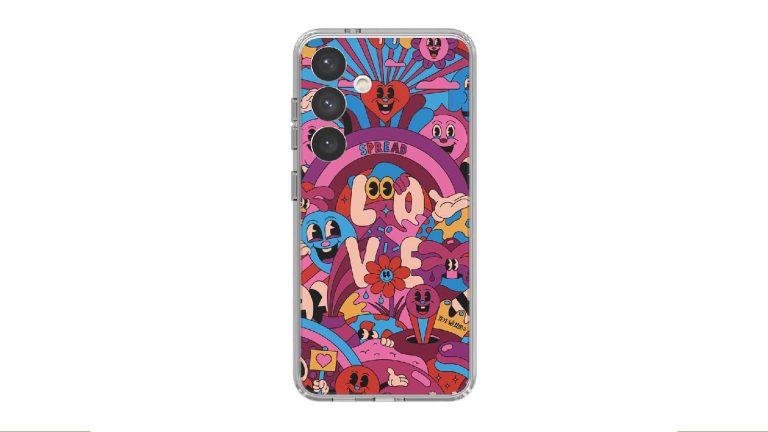
Protecting your phone doesn’t mean sacrificing one of the most important parts of having a smartphone, showing off! Sure, you can opt for a straightforward and no-nonsense bulky case, but there are also cases that offer fun and artistic designs while keeping your phone protected. This is where this case with a design by Yeye Weller comes in. It has a design that’s sure to turn heads.
There are thousands of cases on the market that give your phone some visual flair, but they are lacking in the protection department. You don’t have to worry about that, as this is a Samsung case. Since it comes right from the company, you know that you’re dealing with a quality-made case. Everything from the padded edges to the ink used for the art is high-quality. It’s great for people who know they’re going to keep their case for the long run. You know that this case will last you years without wear and tear.
Along with being fashionable, this case will keep your phone protected in the case of drops. This case is made from quality materials that will take the impact from a fall, and make sure that your phone isn’t damaged. It’s able to take a ton of abuse without giving way, which means that you won’t have to baby your phone just to use it.
This case not only customizes the outside of your phone, but it adds flair to the inside as well. Using NFC, this case is able to sync with your Always-on display. You’ll see the incredible artwork that you see on the back of the case come to life when you power on your screen. So, whenever you turn on your screen, you’ll see this cool animation.
We often see cases that serve more than one purpose. They come with built-in attachments that expand their usability, and those are some of the best cases. This is the case of the Humixx Two-in-one case for the Galaxy S24. This case brings a very unique and stunning design along with additional functionality that people will enjoy.
Starting off, this case uses non-slip and scratch-resistant materials. This means that the case will look great even over an extended period of time. The scratch-resistant materials mean that you won’t have to worry about putting your phone into your pockets with your keys and coins. Also, you won’t have to worry about your phone slipping off of surfaces when you’re not looking.
The Humixx case is a slim case that hugs your phone tightly. Regardless, it’s still sturdy enough to protect your phone in the case of a drop. It’s made from strong TPU plastic, and it has thick edges to take the impact. There’s also a cover for the rear cameras that keep them from cracking.
This case has a visually appealing NeoFlex CarbonStyle design. It gives the case a sleek and stylized look. It’s like giving your phone a fancy business suit. With that style, it’s sure to make your phone stand out among the sea of phones.
This is a two-in-one case; it doubles as a wallet. There’s a magnetic ring on the back of this case that allows a small card holder to attach to it. The magnetic ring holds onto the cardholder tightly, so you won’t have to worry about it falling off. If you’re a person who doesn’t carry too many cards with you, then you can very well leave the house without your wallet. The cardholder can hold a few cards as well; you can pack your driver’s license along with your credit cards.
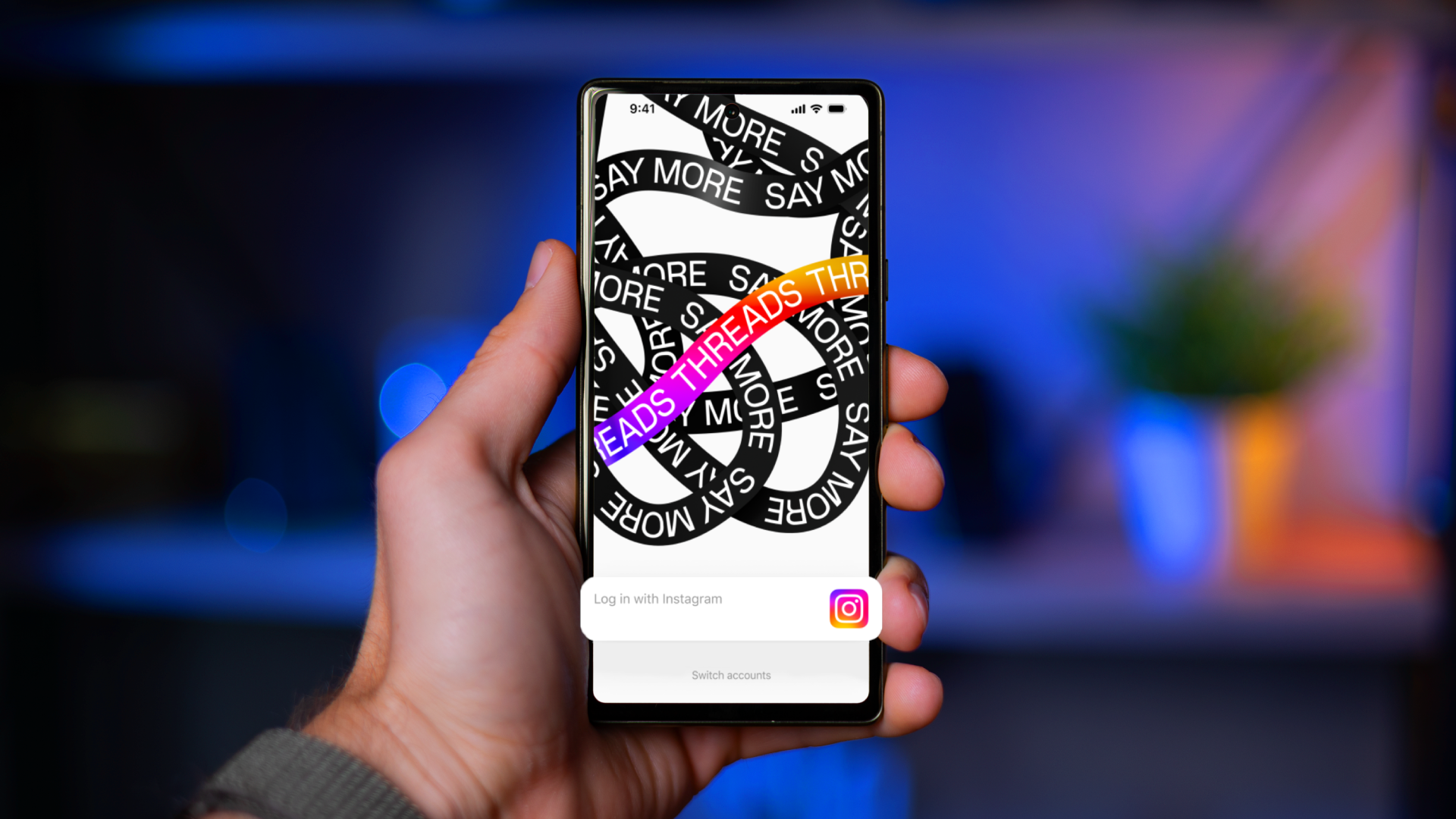
Threads by Instagram, the Meta-owned social networking app that has become a direct competitor to X (formerly Twitter), made a surprising return in December 2023. Ranking fourth in downloads on the iOS App Store and eighth on the Google Play store — averaging 28 million downloads across both platforms — this surge in interest suggests a potential turning point for the app following its lukewarm July 2023 launch.As reported by PC Mag, Threads hadn’t cracked the top ten download lists on Appfigures since August, and some were beginning to question the app’s long-term viability. However, users appear to be responding well to the newly introduced and improved sharing and discovery options, as well as other new features. In addition, Instagram began advertising Threads content on its own network, potentially encouraging the onboarding of more members.
What’s going on with X/Twitter?
This renewed interest contrasts with how Elon Musk’s X (the app formerly known as Twitter) has performed. Although there are approximately 540 million users on X as of July 2023, growth has slowed under Musk’s leadership. The app data company 42Matters noticed a decrease in X downloads between November 2022 and October 2023, which could imply a drop in user interest. Furthermore, X’s download ranking in December was only 36th, but to be fair, the app has been around since 2006 and most users might already have the app downloaded already.
In terms of active users, X remains in the lead. Data.ai‘s 2023 app activity analysis rated X in the top ten, while Threads didn’t even make it to the list. This suggests that, while Threads is attracting new members, the level of involvement there may not be as great as X’s present user base.
Although Threads’ recent growth is encouraging, it is unknown whether the app will be able to sustain its momentum and convert app downloads into daily active users, which is the true test of success. While it has added many user-requested features since its launch, it still has more work to do before it can pull away daily active X users.
Italy’s Data Protection Authority (GPDP) has uncovered data privacy violations related to collecting personal data and age protections after an inquiry into OpenAI’s ChatGPT. OpenAI has 30 days to respond with a defense.
ChatGPT is an artificial intelligence (AI) chatbot that can engage in conversations with users, and answer their questions. It does this using natural, human-like language, a trick which is accomplished by training the underlying algorithm with large amounts of data from the internet.
Italy and ChatGPT historically have a troubled relationship. In April, 2023 ChatGPT was happy to announce that the artificial intelligence chatbot was available again in Italy after a month long block. To accomplish this the company had to meet the demands of Italy’s regulators who temporarily blocked ChatGPT over privacy concerns.
But Italy didn’t rest the case at that point. The GPDP started an investigation into data privacy violations. Around the same time the European Union’s European Data Protection Board set up a special task force to monitor ChatGPT.
The Italian authority has since concluded that elements indicate one or more potential data privacy violations without providing specific details, but added its investigation would take into account work done by the European task force.
In December of 2023 the European Union (EU) reached a provisional deal on landmark EU rules governing the use of artificial intelligence. This agreement requires Large Language Models (LLMs) such as ChatGPT and more general purpose AI systems (GPAI) to comply with transparency obligations before they are put on the market.
The GPDP noted two major concerns which are only voiced in general terms:
The available evidence pointed to the existence of breaches of the provisions contained in the EU.
It is concerned that younger users may be exposed to inappropriate content generated by the chatbot.
For those reasons Italy’s watchdog said it would like to see OpenAI:
“implementing an age verification system and planning and conducting an information campaign to inform Italians of what happened as well as of their right to opt-out from the processing of their personal data for training algorithms.”
ChatGPT is already blocked in a number of other countries, including China, Iran, North Korea, and Russia. Which might turn out to be their loss. Time will tell.
We shouldn’t forget that we are talking about a revolutionary technology that is only just scratching the surface of its potential and going through some growing pains like a child would—a child with the knowledge and vocabulary of a library, but no idea what a secret is, let alone how to keep one.
To demonstrate the fact, Ars Technica found that ChatGPT is leaking private conversations that include login credentials and other personal details of unrelated users.
In November, 2023, researchers published a paper reporting how ChatGPT could be prompted into revealing email addresses and other private data that was included in training material. Those researchers warned that ChatGPT was the least private model they studied.
So, yes, it’s good to keep a keen eye on the developments and pace them where needed. But we should not do this to the extent that we push it away from the public eye. A child needs to be supervised, not locked in a basement.
We don’t just report on threats—we remove them
Cybersecurity risks should never spread beyond a headline. Keep threats off your devices by downloading Malwarebytes today.
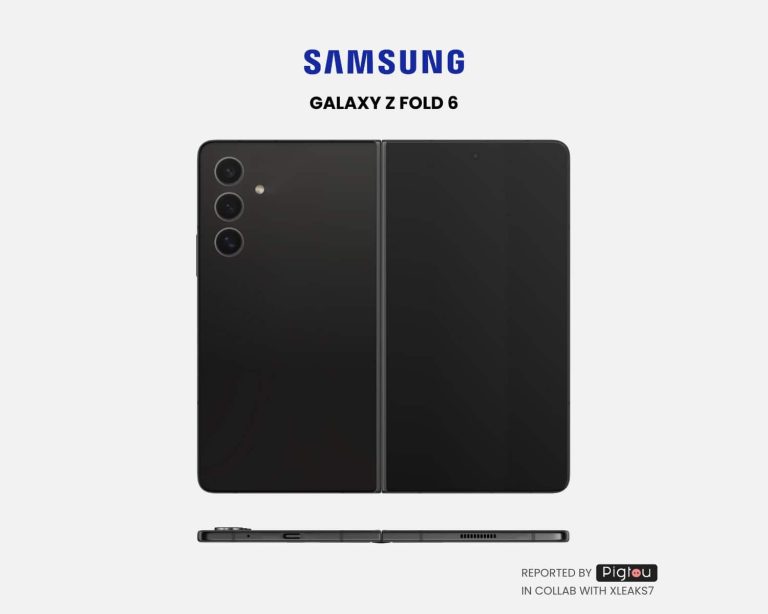
Samsung’s foldable smartphones are rumored to undergo a major design overhaul this year. Industry insiders say the Galaxy Z Fold 6 and Galaxy Z Flip 6 will feature bigger and wider displays. A newly published Samsung patent might have revealed what the new Fold will look like.
Samsung patent shows a wider book-type foldable smartphone
Samsung has been making foldable smartphones since 2019. Over the past five generations, the devices have evolved significantly in terms of design and functionality. However, the company has yet to address one of the biggest complaints with the design of its Fold-series foldables. The cover display is too tall and doesn’t feel like a standard smartphone.
While the Galaxy Z Fold 5 is wider than previous models, its cover display still has an aspect ratio of 23.1:9. That is much taller than normal bar-type smartphones. For example, the Galaxy S24 Ultra has a 19.5:9 aspect ratio. Foldable enthusiasts and Samsung fans have been calling for the company to look into this. It might finally listen this year with the Galaxy Z Fold 6.
Spotted by Pigtou, the United States Patent and Trademark Office (USPTO) recently published a patent application from Samsung for a foldable smartphone design. The accompanying documents contain sketches of the patented design. The publication collaborated with leaker David Kowalski, aka Xleaks7, to create a concept device based on these sketches.
The results are the images you can in this article, above and below. The phone is significantly wider than the Galaxy Z Fold 5. Its cover display might have a similar aspect ratio as the Galaxy S24 Ultra. Samsung also seems to have made the device thinner than before. The 2023 model already folds shut without leaving any gap. With a thinner build, it would feel less bulky in the pocket.
This could be the Galaxy Z Fold 6
There is no way to verify that we are looking at the Galaxy Z Fold 6’s design here. However, as the publication pointed out, Samsung’s early foldable phones look similar to the sketches in its patents. Based on this, the device shown in this patent should be an upcoming foldable. There are also rumors about the Fold model getting a wider form factor.
Connecting the dots, the phone seen in this Samsung patent could be the Galaxy Z Fold 6. The device is expected to arrive in July or August this year alongside the Galaxy Z Flip 6. We should come across more leaks about rumors about the duo in the coming months.
Yelp, the global crowd-sourced reviewing platform, has introduced new and improved AI tools to help consumers choose where to go. As AI continues to improve at a rapid pace, companies around the world are jumping on the hype train. And as Large Language Models (LLMs) are quite adept at reading through and summarizing large walls of text, it was only natural Yelp would implement them into its service. So the next time you open Yelp to find a nice restaurant in your area, you’ll have a helpful little AI guiding you.
What are these new Yelp AI tools?
Summarization isn’t the only thing Yelp is rolling out, though it is a major highlight. Yelp’s AI tools will be “revamping” the home feed, and showing you more relevant content. It is worth noting that all these exciting AI-powered changes are only coming to Yelp’s iOS app for the moment. Android users will have to wait an indeterminate amount of time before they get these features, if at all.
Alongside a better home feed, the Yelp app will also show users dishes most frequently searched for. The most exciting feature however, is using AI to summarize the experience one can expect at a restaurant. Yelp’s AI will parse through recent reviews of restaurants and give users a concise but informative summary. This summary will include what the food is like, what the atmosphere is like, what the best dishes are, and what you can expect to pay for them. This will drastically cut down the time Yelp users have to spend reading reviews themselves, enhancing and simplifying the whole process.
Separate tools for business owners
It’s not just the users getting access to Yelp’s AI tools. Separate tools specifically made for business and restaurant owners are being released as well. There will be a new “Yelp for Business” page that will share data with business owners. This data will include competitor analysis as well as letting owners know what is trending in what part of town among which demographic.
There is also an AI-powered tool for budgeting. Yelp claims this will help business owners maximize ROI and advertise the right highlights to the right people. Lastly, Yelp is introducing scheduled consultations with its customer support service for business owners. This, Yelp says, will streamline the process and not force business owners to remain on hold waiting for a representative.
Once thought the realm of science fiction, today consumers see AI-powered services revolutionizing business. Yelp’s new tools seems amazing, though the summarizations and recommendations still feed off of human data. And, as some have already pointed out, this human data isn’t always as reliable as one would hope.
The networking giant Cisco addressed a severe security flaw affecting its Unified Communications Products. Exploiting the vulnerability could allow remote code execution on target devices. Cisco urges users to update their systems with the latest software release at the earliest to receive the fix.
Critical RCE Flaw Riddled Cisco Unified Communication Products
As disclosed through a recent advisory, Cisco patched a critical severity remote code execution flaw affecting its Unified Communications Products.
Specifically, the vulnerability existed due to “improper processing of user-provided data that is being read into memory.” An adversary could exploit the flaw by sending maliciously crafted messages to the listening port of the target device. Once done, the attacker could execute arbitrary codes on the target system with the web services user privileges. In worst-case exploitation, the attacker could also gain root access to the target system.
Regarding the vulnerable Cisco products, the advisory mentions the following devices.
Unified Communications Manager (Unified CM)
Unified Communications Manager IM & Presence Service (Unified CM IM&P)
Unified Communications Manager Session Management Edition (Unified CM SME)
Unified Contact Center Express (UCCX)
Unity Connection
Virtualized Voice Browser (VVB)
While the firm confirmed no active workarounds for this vulnerability, they did share a mitigation strategy to address the flaw. It includes establishing separate access control lists (ACLs) on intermediary devices, allowing access to the ports of deployed services, and separating vulnerable devices from the rest of the network. In cases where an immediate software update isn’t possible, this mitigation can help protect vulnerable devices from potential threats. Nonetheless, Cisco leaves it to the users to decide whether applying the mitigation suits their environments.
Cisco identified this vulnerability, CVE-2024-20253, as a critical severity flaw that achieved a CVSS score of 9.9. The firm acknowledged the security researcher Julien Egloff from Synacktiv for discovering and reporting this matter.
DXOMARK has published the results of the camera testing for Samsung’s Galaxy S24 Ultra, and it’s not all good news. It achieved a score of 144. Which sounds pretty good, right? Well, not entirely. This puts the Galaxy S24 Ultra at 18th on DXOMARK’s rankings and surprisingly puts it behind a number of phones that were launched in 2023 and 2022.
Just above the Galaxy S24 Ultra is the iPhone 15/15 Plus, which was released in 2023. The iPhone 14 Pro/Pro Max is also right above it, released in September 2022. The kicker is right below the Galaxy S24 Ultra (a single point below it, actually) is the Huawei P50 Pro, which came out in July 2021. This alone shows that Samsung needs to make some changes to its cameras.
The Galaxy S24 Ultra hasn’t really compared well to its predecessor since launching earlier this month. And there were rumors about it getting an update before launch. This wasn’t true, and obviously, now we know it’s not true since the phone launched today, and there is still no update. However, I’m sure there is an update coming to the Galaxy S24 Ultra pretty soon. We just don’t know when.
The DXOMARK results
Now, let’s go over the results. For photo, it did pretty well, scoring 144 points. The only real issues here were autofocus and noise. Bokeh received a score of 70, which isn’t bad, but it’s also not great. Zoom picked up a score of 145 points, which, surprisingly, is quite far below the record score for both telephoto and wide camera sensors. Finally, there’s Video, which scored 137 points. It really seemed to fall behind in Exposure, Color, and Texture.
The good news here? It did improve in almost every area of the Galaxy S23 Ultra. The only one that remained the same was actually Bokeh. The other areas picked up almost 10 points each. And the overall score is 9 points higher.
Samsung phones don’t generally fare well in the camera tests from DXOMARK. How could that be? Well, one reason is that DXOMARK is pay-to-play. They actually offer a way for manufacturers to pay them to optimize their cameras for DXOMARK’s tests to score better. It’s not a surprise, as they do need to make money somehow. But it’s important not to make DXOMARK the end-all-be-all for camera testing. It’s still a good resource for checking out cameras and other tests, but that should not be the only review and/or tests that you check out.