Google Chat offers a range of features commonly seen in messaging apps. Yet, no platform covers every aspect, and Google Chat has been notably lacking a basic feature. The good news is that this gap is soon to be filled.
AssembleDebug, a trusted leaker, has revealed on TheSpAndroid (via Android Police) that Google Chat is gearing up to introduce a much-needed feature: voice messages. According to the leaker, this feature was activated by flipping a flag in the Google Chat app for Android. It is expected to roll out by the first quarter of 2024, so we might not have to wait long to start sending voice messages on the app.
The same flag reportedly worked in the Gmail app, too, as Google has integrated Google Chat functionality into it, according to the source.
Voice messages or recordings can be activated using the mic button at the bottom right of the screen, as illustrated in the screenshots. This mic button replaces the send button temporarily. However, the send button reappears either when the user begins typing in the text field or after they have finished recording the audio.
Although voice messaging is a common feature in popular messaging apps like WhatsApp, Messenger, Telegram, iMessage, and even Google’s own Messages app, it is quite surprising that Google hasn’t introduced it to Chat until now. As the feature is still in development, there is no precise timeline for its release. However, as said earlier, it is anticipated to roll out in the first quarter of 2024.
For those unfamiliar, Google Chat is a cloud-based messaging platform developed by Google for businesses and individuals. It is part of the Google Workspace suite of productivity tools and is integrated with other Google products like Gmail, Google Calendar, and Google Drive.
In order to obtain unauthorized access and control, hackers take advantage of software vulnerabilities by manipulating updates.
By corrupting the updates, hackers can disseminate malware, compromise user data, and build backdoors for future attacks.
This enables hackers to compromise a large user base at once, making the software upgrades a luring target for malicious activities.
Cybersecurity researchers at ESET recently identified that Chinese hackers have been actively targeting and hacking software updates to install malware since 2005.
Chinese Hackers Hijack Software Updates
ESET found China-linked threat actor Blackwood behind a cyberattack since 2018. They use AitM attacks to deliver NSPX30 implants through software updates by targeting Chinese and Japanese entities.
DocumentRun Free ThreatScan on Your Mailbox
Trustifi’s Advanced threat protection prevents the widest spectrum of sophisticated attacks before they reach a user’s mailbox. Try Trustifi Free Threat Scan with Sophisticated AI-Powered Email Protection .
Blackwood hides the C2 server location by intercepting NSPX30-generated traffic.
In 2020, a Chinese system was hit by a surge of attacks from Evasive Panda, LuoYu, and LittleBear. Security analysts found a new threat, NSPX30, traced back to 2005 amid suspicious files, and it’s been discovered via a deep investigation.
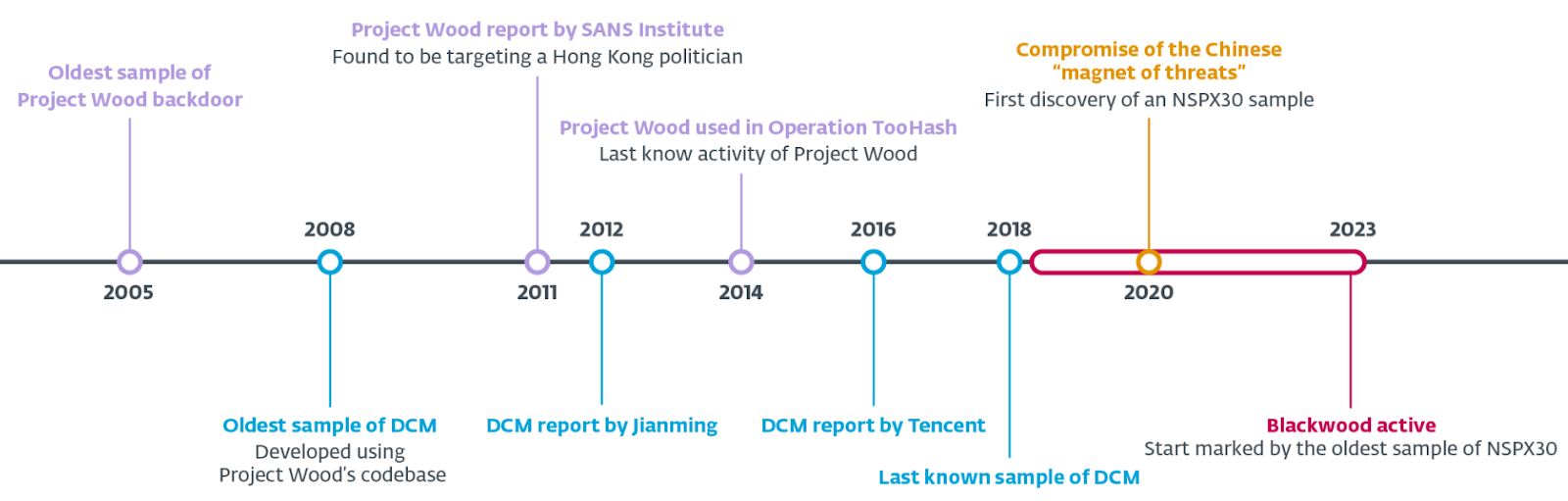
Timeline (Source – ESET)
Evolution starts with a 2005 backdoor, Project Wood, which was found via timestamps. Researchers validate authenticity through the metadata of the PE header, UPX version, and Rich Headers.
Project Wood served as a codebase that led to DCM in 2008. Tencent’s 2016 report details DCM’s advanced variant, exploiting AitM capabilities.
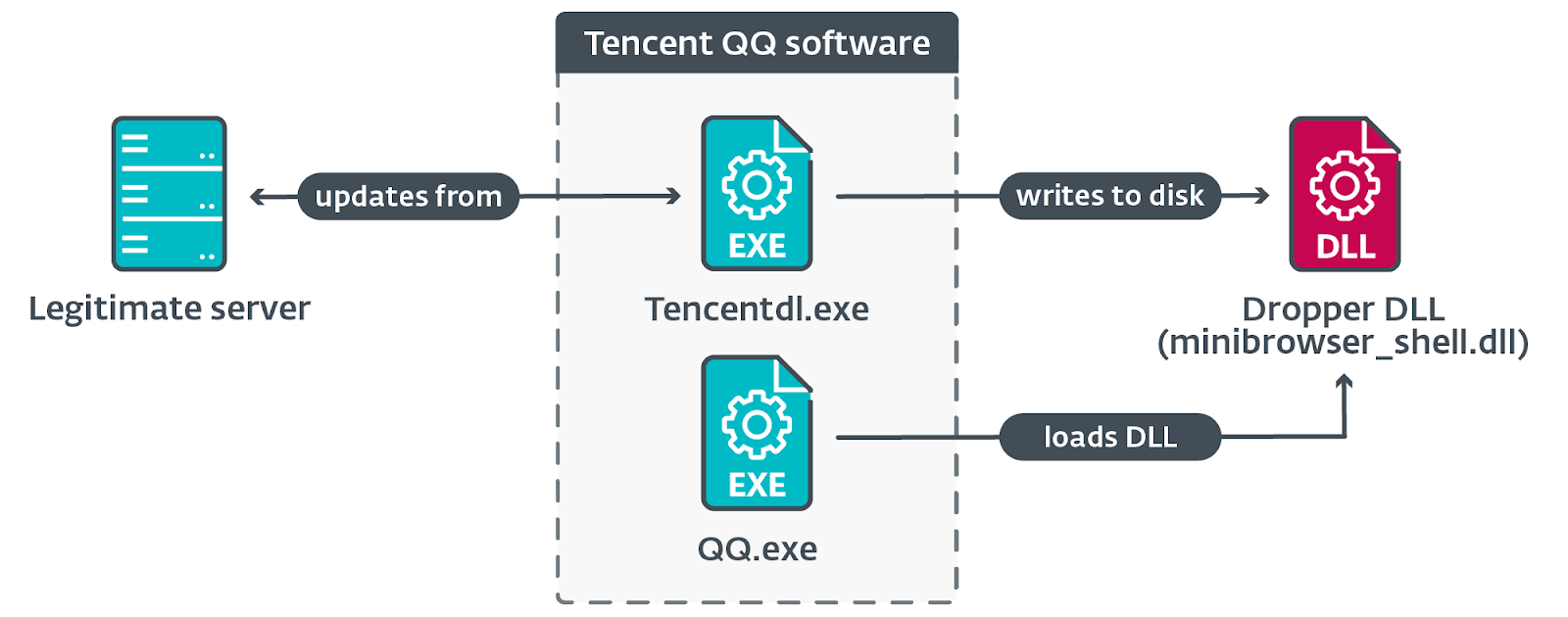
The compromises occur during legit software updates via unencrypted HTTP that affects the popular Chinese software.
Chain of execution (Source – ESET)
Cybersecurity researchers at ESET found IP addresses linked to legitimate software firms in their telemetry. Millions of connections were registered, with downloads of genuine software components.
How NSPX30 is delivered as malicious updates is unknown. Speculation points to a network implant, possibly on vulnerable devices like routers.
However, no DNS redirection hints at intercepting unencrypted HTTP traffic for delivering the NSPX30 implant.
Orchestrator uses Baidu’s site to download backdoor, posing as Internet Explorer on Windows 98. Custom User-Agent and Request-URI reveal orchestrator and system info.
While the backdoor initializes the UDP socket, facing complications with firewalls and NAT. Data exfiltration via DNS queries to Microsoft[.]com takes place and cleverly hides C&C location using AitM capability.
Geographical distribution (Source – ESET)
Victims in Japan and the UK were targeted via the AitM system. Blackwood threat actors have been observed since 2005 and have been constantly evolving from Project Wood. The history of the primordial backdoor, Project Wood, hints at experienced malware developers.
Tech giant Meta has just announced it will be imposing stricter message settings for minors on Instagram and Facebook. In a recent news post on its site, Meta talked about teen safety on its social media platforms. The new changes will promise to not only protect teens but also allow guardians more control. Unsolicited contact with minors on social media has been a societal plague for years. These new restrictions aim to combat this social contagion, as well as giving parents greater peace of mind.
Meta’s proposed changes to messaging minors
The company announced that it was planning to implement various different restrictions on its apps. For starters, Meta made changes to Instagram and Facebook earlier this month. These changes will help protect teens from encountering sensitive media on both platforms. Till now, anyone aged 19 or up has been unable to message a minor, period. This, of course, is only restricted to people said minor doesn’t follow. The limit is part of a larger change recently which included limiting strangers from messaging a user more than one message, or anything not text-based.
Now, teens on Instagram and Facebook have the option to turn off messages from strangers completely. This setting also includes other teens and will be on by default for minors. Going forward, only people a minor is connected to will be able to message them or add them to groups. This protection also extends to Facebook’s Messenger app, which will only allow messages from contacts or people a minor follows on Facebook. Meta says another feature is also in the works that will protect teens from seeing sensitive content from people they do follow. It wouldn’t be a bad bet to say this upcoming feature is likely to make use of AI.
Changes to parental supervision tools
In addition to message settings, Meta is also giving more control over supervised accounts. Parents and legal guardians will now have the option to approve or deny changes to their teen’s account settings. Before this, Instagram would only notify supervisors of changes to an account. Settings that will now require approval from guardians include the messaging restrictions mentioned above. Meta says these restrictions will apply to teens aged under 16, and under 18 in “certain countries”.
Parents and legal guardians will find it much easier to manage their teen’s social media exposure going forward. These proposed tools, restrictions, and features should hopefully see a significant reduction in inappropriate conduct with minors. Furthermore, these tools are more likely to entice strict parents to let their teens use Meta’s social media apps over other platforms.
So why is there no dedicated Netflix app for Vision Pro? Peters explained by saying, “We have to be careful about making sure that we’re not investing in places that are not really yielding a return, and I would say we’ll see where things go with Vision Pro. Certainly we’re always in discussions with Apple to try and figure that out but right now, the device is so subscale that it’s not really particularly relevant to most of our members.”
If Vision Pro takes off, Peters says Netflix can put together a dedicated app “very, very quickly”
What if Apple were able to do something with Vision Pro that would change “the big picture strategic calculus for Netflix.” Peters responded, “And that’s something that’s been — we’ve worked together for a long time, we’ve always had active discussions to how we could help each other out. Sometimes we find a great space of overlap. We can move very, very quickly. Sometimes it takes a little bit longer.”
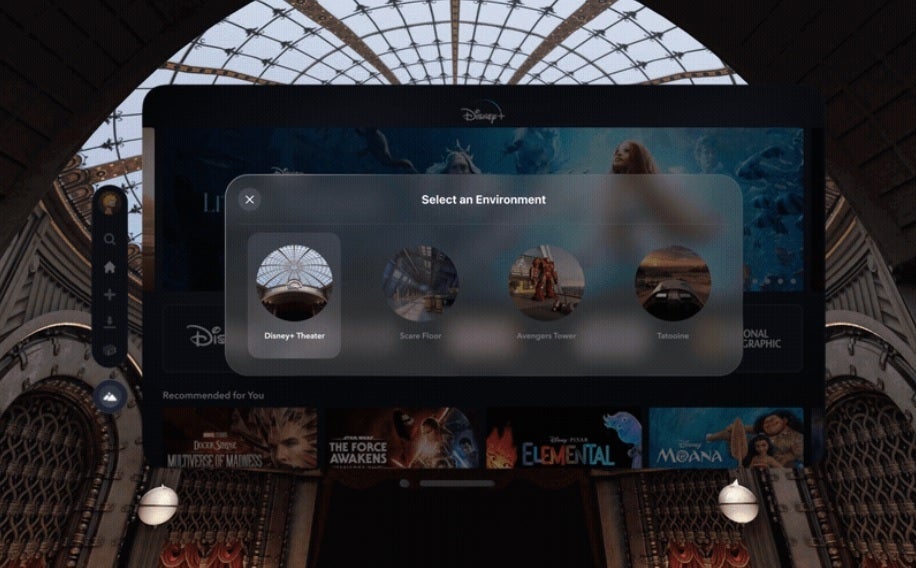
Disney+ will offer Vision Pro users four different immersive environments for viewing its content
So even though Netflix won’t have a dedicated Vision Pro app now, it is something that could appear in the future. Right now it just isn’t worth the time, money, and effort for Netflix to develop an app for visionOS, especially considering that it’s been estimated that pre-orders for the spatial computer amounted to 180,000 units during the first weekend that units could be reserved. Compare that with the 1.56 million active iPhone units forecast to be active by the end of this year and you can understand Peter’s decision better.
Vision Pro users will still be able to access the video streamer via the spatial computer’s Safari browser
This absence of Vision Pro apps for Netflix and YouTube doesn’t mean that those who shell out $3,499 and up for the spatial computer can’t watch streaming video from the popular pair. It simply means that users will have to use Vision Pro‘s Safari browser, point them in the direction of the Netflix and YouTube websites, and view their content that way. Sure, it sounds so 2007 but if Vision Pro catches on, and subsequent versions have a more affordable price, Peters could have a dedicated Vision Pro app made available.
Let’s look at one video streamer that went all in to Vision Pro, Disney+. Bob Iger, Disney CEO said, “At Disney, we’re constantly searching for new ways to entertain, inform, and inspire by combining exceptional creativity with groundbreaking technology to create truly remarkable experiences. Apple Vision Pro is a revolutionary platform that will bring our fans closer to the characters and stories they love while immersing them more deeply in all that Disney has to offer. We’re proud to once again be partnering with Apple to bring extraordinary new Disney experiences to people around the world.”
And Disney+ is including four different environments with its Vision Pro app. The company says, “Each environment includes animations and sounds that make the space feel alive, and Easter eggs from films and franchises that will surprise and delight fans.” Netflix could have done something like this too, but not as many entertainment-related firms get Apple as much as Disney does.
Other video streamers that will have a dedicated app on Vision Pro besides Disney+ include Amazon Prime Video, and Paramount Plus. Vision Pro will be released on February 2nd.
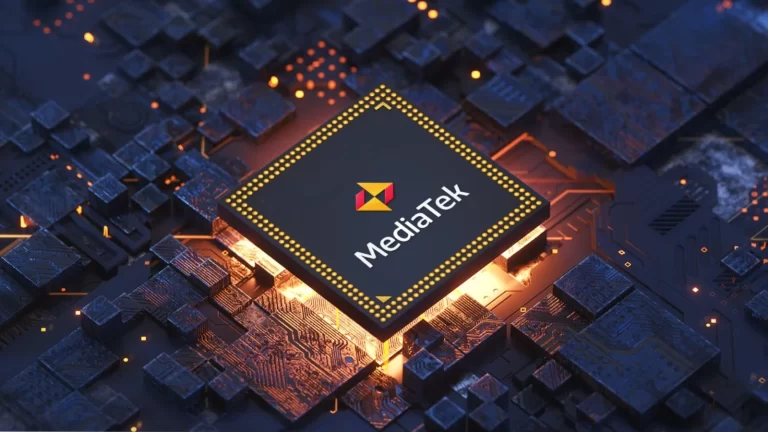
MediaTek’s Dimensity 9400 processor will use TSMC’s new 3nm process, just like Qualcomm’s new chip
This information comes from a tipster, Digital Chat Station. That Chinese tipster is usually spot on, so we don’t really have a reason to doubt him. He also said that we can expect considerably improved performance.
As a reminder, Apple’s A17 Pro processor is made using TSMC’s 3nm processor. That chip is made using the ‘N3B’ process, which is the first-generation 3nm tech. MediaTek aims to use the ‘N3E’ process, which is the second-gen tech.
Just to be clear, MediaTek won’t be the only one to use it. Qualcomm will also utilize that tech for its Snapdragon 8 Gen 4 processor which is also coming later this year. So the two competitors will reach for the same manufacturing tech.
This processor will rely on ARM’s CPU and GPU designs
In any case, Digital Chat Station also mentioned that the Dimensity 9400 will rely on ARM’s CPU and GPU designs. We do know that the Cortex-X5 will be included, but not much else, unfortunately.
It will be interesting to see what kind of setup will MediaTek use. With the Dimensity 9300, the company decided to ditch efficiency cores altogether. It remains to be seen if the same will happen with the Dimensity 9400, but the rumors are saying it will.
Also, Qualcomm is switching to its custom Oryon cores later this year. So it remains to be seen how will that improve the chip, or perhaps lead it down a different path. The battle between Qualcomm and MediaTek chips is on the table every year, and we’re looking forward to this year’s. Oryon cores and a brand-new manufacturing process will certainly keep things interesting.
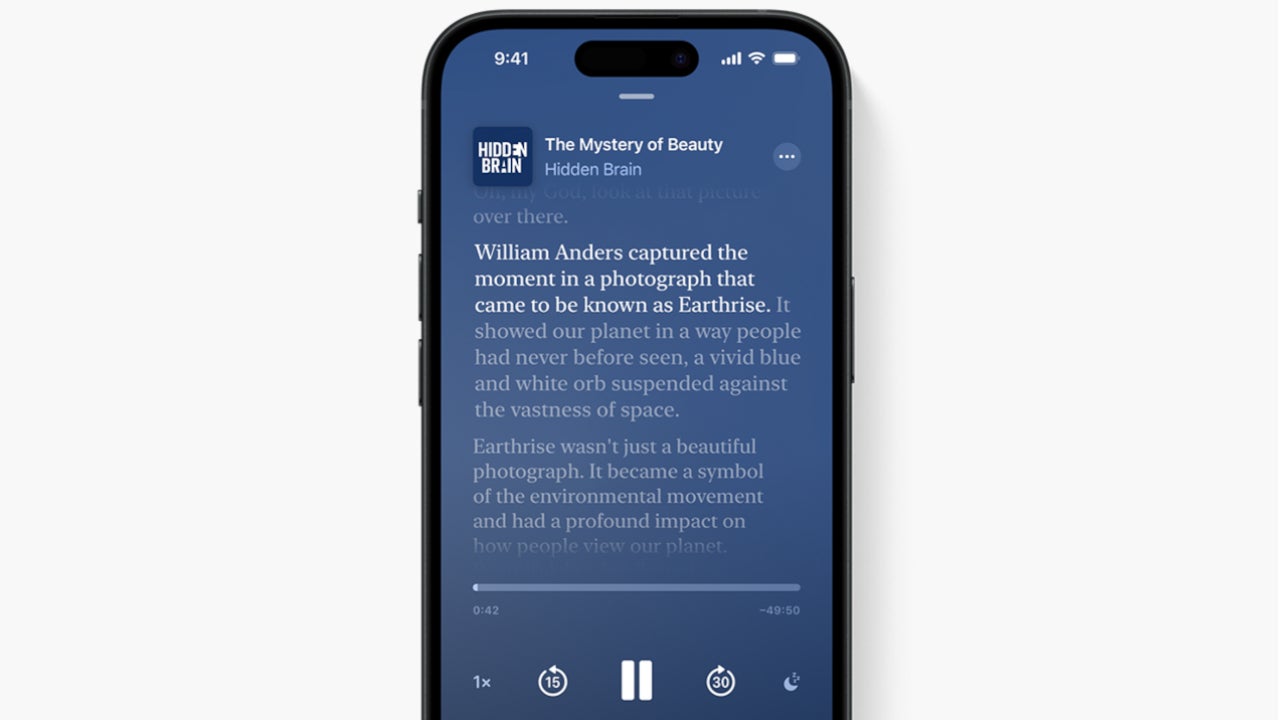
Apple announced a lot of changes yesterday, including a complete rehaul of the App Store to allow sideloading, as well as new fees for those publishing their apps through the store. Many more changes have already been introduced with iOS 17.4 but they may have been overlooked in favor of the more important ones announced specifically for the EU.One such new feature that Apple has added with iOS 17.4 is transcripts for podcasts. Apple Podcasts have been around since 2012, although the Cupertino-based company supports podcasts for nearly two decades.
Transcripts allow Apple Podcasts listeners to read the full text of an episode, search for the episode for a specific word or phrase, as well as tap the text to play from that point in the episode.
It’s a nifty feature that makes it so much easier for anyone to access podcasts. Once transcripts are enabled, each word is highlighted while the episode plays. Additionally, Apple Podcasts users can access transcripts from the episode details page. Simply touch and hold a podcast episode and the option to view a transcript will show up.
Apple notes that it automatically generates transcripts after a new episode is published. However, there will be a short delay while Apple processes the transcript.
According to the company, if parts of an episode change with dynamically inserted audio, Podcasts won’t be able to display the segments of the audio that have changed since the original transcription. It’s also important to add that music lyrics are not displayed in the transcripts.
As far as availability goes, transcripts are now live in iOS 17.4 for podcasts in English, French, German, and Spanish. Apple says that more transcripts are being added to podcasts over time and that the new feature can be accessed in over 170 countries and regions.
In today’s highly connected world, remote access to our devices provides much-needed flexibility in our daily lives. The ability to control computer with phone, or vice versa, enables us to access files, applications, and more from anywhere conveniently. This article will discuss how you can establish remote connectivity between an Android phone and a Windows PC using specialized remote access software.
We will cover how to control your PC using your Android device, as well as how to remotely control Android phone from your computer. Whether you need to quickly transfer files or fully operate your computer while on the go, read on to learn how remote desktop apps can make device control efficient and straightforward.
Part 1. Can I Control My PC from Android and Vice Versa?
The short answer – is yes; you can control PC with phone or Android device and also control a phone from PC. Technological advancements in remote desktop software now allow us to mirror one device’s screen onto another and even fully control it with special permissions. Apps like Avica Remote Desktop provide user-friendly mobile and desktop platforms equipped with all the necessary tools to enable seamless remote connectivity.
Part 2. How to Remotely Control PC with Android Phone
As working professionals and students increasingly operate on the move, securing instant remote access to your personal computer proves vital for productivity. This is where Avica’s mobile app steps in – serving as the ultimate solution for controlling your PC directly from Android smartphones and tablets.
With efficient features like low latency, multi-screen previews, and accessibility permissions, Avica guarantees a lag-free remote control experience between PC and Android. Its compatibility across Windows and Android operating systems makes remote device control achievable by anyone with the right permissions enabled. So whether you have an urgent file to access or want full control over applications, Avica’s remote desktop app facilitates it with ease.
Quick Look at Avica’s Standout Features:
Before moving on to the step-by-step PC access guide, first, let’s briefly highlight some of Avica’s winning attributes that make mobile-based remote connectivity a breeze:
Cross-Platform Versatility: With support for Windows, macOS, iOS and Android operating systems, Avica facilitates seamless and stable connections across multiple devices.
Minimal Latency: Avica’s cutting-edge video encoding technology minimizes lag, allowing up to 144fps refresh rates for smooth remote operations.
Enterprise-Grade Security: It implements bank-level end to end AES-256 encryption for securing data transfers between devices.
Zero Configuration Requirements: Get remotely connected instantly without tedious network configurations for LAN-paired devices.
With these reliable capabilities now guaranteed by Avica, accessing critical computer applications, files, and even software tools on the go have become more efficient.
Step-by-Step Guide to PC Control from Phone via Avica
Follow these easy instructions to start controlling your Windows PC straight from the Avica mobile app installed on your Android phone/tablet:
1. Install and Launch the Avica App
Download and install the Avica app on your PC and Android Phone. You can get Avica app from its official website or get Avica mobile app from Google Play. Register using your email ID and set up a strong password.
2. Enable Remote Connectivity on PC
Head to your Windows PC’s settings to toggle “Remote Access” permissions, along with enabling screen recording and input control.
3. Access PC’s Unique Device ID
Your PC will now display a unique Avica ID and Password. Note these down to pair with your smartphone.
4. Connect Android Device via the Avica App
On the Avica mobile app, head to the ‘Remote Control’ tab. Enter your PC’s Avica ID and the prompted access Password to connect.
5. Manage PC Directly from the Android Interface
You’ll now gain complete remote control for PC over your Android. Access files, run software tools, and control media – all directly through Avica’s intuitive mobile interface!
Handling business-critical work or creative applications is now possible remotely via your mobile, thanks to Avica’s top-notch remote access capabilities. Simply install the app and follow the guided instructions above to effortlessly access your PC’s digital workspace straight from Android devices!
Part 3. How to Remote Control Android from PC
Just as you can control your PC from an Android device, Avica also lets you access and manage your Android phone/tablet directly from your Windows computer. After enabling the necessary permissions, Avica grants you full authority over your Android screen – letting you access app files, run queries and much more.
Follow these simple steps to get started with remote control Android using Avica desktop:
1. Download and install the Avica desktop remote access software on your Windows PC. Similarly, install the Avica mobile app on your Android device as well.
2. Set up your account credentials in both apps by adding your email ID and setting up a strong password. Sign into both apps.
3. On your Android device, go to Avica’s app settings and toggle the “Allow remote access” control to enable connectivity permissions.
4. You’ll now need to permit additional accessibility controls like screen recording and usage access. Enable all prompts-related permissions. You can remote into Android phones if permissions are enabled.
5. Under the connectivity tab, you’ll find the unique “Device ID” and “Password” keys for your Android device required to pair your PC. Note these down.
6. Head to your Avica app on PC, and under “Remote Session,” add your Android phone’s Device ID and enter the password when prompted.
7. You’ll now have seamless remote accessibility and control phone from PC through your PC’s keyboard and mouse.
Conclusion
The ability to control devices remotely paves the way for the future of computing mobility. With efficient remote connect device apps like Avica now bridging the gap between PCs and phones, staying productive on the go is easier. Its reliable connectivity protocols, intuitive control mechanisms, and multi-device support cement its position as a pioneering solution for remote device management. Implement the app’s features into your workflow to access computer applications from anywhere and even full device control for added convenience. Avica’s remote control capabilities usher in flexibility into our device access models, helping both the personal and professional realm.
If you love playing Fortnite on your iPhone, we have good news and bad news. Thanks to Apple’s announcement today that it will allow iPhone users in the EU to download apps from third-party app stores, Epic Games made an Epic announcement on “X.” The Epic Games Newsroom account said in a tweet, “Fortnite will return to iOS in Europe in 2024, distributed by the upcoming @EpicGames Store for iOS.”
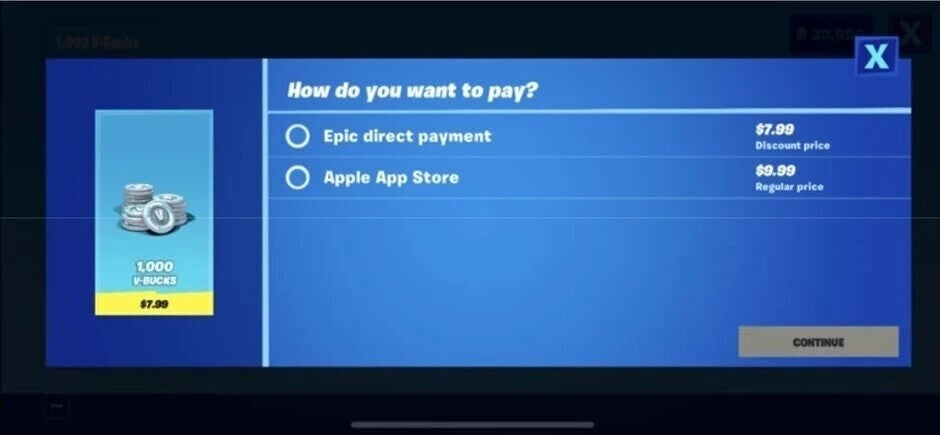
Since the European Union’s Digital Markets Act (DMA) has forced Apple to allow sideloading and third-party app stores for the iPhone in the EU, Apple cannot continue to block Fortnite from iOS in the 27 EU member countries. Fortnite and Epic were kicked out of the App Store in August 2020 after Epic included a link to its own in-app payment platform inside Fortnite and offered items such as in-app currency at a lower price since it evaded Apple’s 30% tax on purchases made through its own platform.
Epic allowed iOS users to access its own in-app purchasing option and buy game currency at a discount to the App Store price
That led to, and please bear with me, an Epic lawsuit; because the U.S. Supreme Court refused to grant Apple a writ of certiorari and won’t hear the case, Apple must follow the ruling of Judge Yvonne Gonzalez Rogers and allow developers to redirect to third-party in-app payment platforms. But to do so, the developer must also link his/her app to Apple’s in-app payment platform. And even if a developer gets one of his customers to use an alternative payment processing platform, Apple will still get a 27% cut of the revenue in the U.S.
However, an iPhone user in one of the 27 EU member countries will eventually be able to visit the Epic Games Store and install Fortnite. Epic CEO Tim Sweeney isn’t calling it a day after getting Fortnite back on the iPhone in Europe. Talking about the U.S. App Store, the executive said today, “We’ll continue to argue to the courts and regulators that Apple is breaking the law.”
In response to Apple’s recent announcement of changes to its App Store in the European Union (EU) to comply with the Digital Markets Act (DMA), Tim Sweeney, CEO of Epic Games, expressed strong criticism, calling it “a new instance of Malicious Compliance” or, in simpler terms, “hot garbage.”
Apple’s modifications include allowing sideloading, alternative app stores, third-party browser engines, and more, with the rollout of iOS 17.4 in March. These changes come as a response to the EU’s DMA, which mandates tech giants to adhere to specific rules promoting competition in the mobile app market.
Epic Games, known for its Epic Games Store and Fortnite, has been a vocal advocate for such alterations and engaged in a legal battle against both Googleand Apple’s closed app distribution ecosystem. However, Sweeney deems Apple’s planned changes unfair to developers.
Apple is essentially pushing developers to choose between App Store exclusivity and the store’s terms
He argues that Apple is essentially pushing developers to make a choice between App Store exclusivity and the store’s terms, which he claims will be illegal under DMA, or accepting a new, allegedly illegal, anticompetitive scheme. Sweeney points to the introduction of a €0.50 Core Technology Fee for each annual install for apps downloaded over 1 million times in the EU as an example of these alleged “Junk Fees.”
Moreover, Sweeney raises concerns about Apple having the authority to choose which stores are allowed to compete with the App Store. He suggests that Apple could potentially block Epic, Microsoft, Valve, and others from launching their storefronts.
Despite these challenges, Sweeney outlines his goal to launch the Epic Games Store on iOS and Android, aiming to become the “#1 multi-platform software store” based on payment competition, low fees ranging from 0% to 12%, and exclusive titles like Fortnite.
Other developers, including Spotify, have already signaled their intent to respond to Apple’s rule changes. Spotify plans to introduce an in-app payment system in the EU once the DMA is in effect. Both Epic and Spotify have been vocal critics of Apple, particularly against the 27 percent tax imposed on purchases made outside the App Store in the United States. Sweeney hints at further critiques, stating, “There’s a lot more hot garbage in Apple’s announcement,” and promises additional insights as more details emerge.
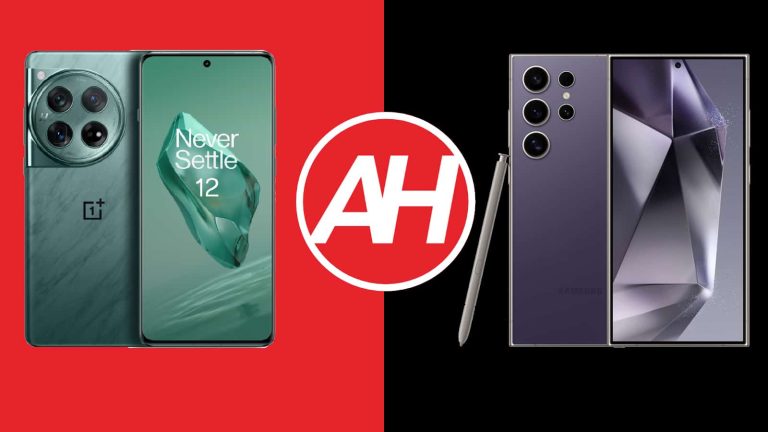
We’re here to compare two brand-new flagship smartphones, the OnePlus 12 vs Samsung Galaxy S24 Ultra. Both of these devices launched in January 2024. Well, truth be said, the OnePlus 12 originally arrived in early December, but its global model launched this month. In any case, these two phones are the very best OnePlus and Samsung have to offer. It’ll sure be interesting to compare them.
They are quite different, and yet extremely powerful. What is especially interesting is that the OnePlus 12 is a lot more affordable than the Galaxy S24 Ultra, at least in the US. OnePlus decided to go with a truly aggressive price tag. Let’s see if shelling out more for the Galaxy S24 Ultra is worth it, or can you get away with getting the OnePlus 12. That’ll be your call, of course, but we’ll try to give you some information to make that choice.
Specs
OnePlus 12 vs Samsung Galaxy S24 Ultra, respectively
These two phones have considerably different designs. The OnePlus 12 has a curved display, while the phone’s corners are rounded. Not a single side on that phone is flat. The Galaxy S24 Ultra, on the flip side, has a flat display, with very sharp edges, and the top and bottom sides of the phone are entirely flat. Both smartphones have a centered display camera hole on the display, and both have immensely thin bezels around the display.
All the physical buttons sit on the right-hand side of both devices. The OnePlus 12 also has a three-step alert slider on the left side. The Galaxy S24 Ultra does pack in an S Pen stylus, which is accessible from the bottom of the phone. Both phones are made out of metal and glass. The OnePlus 12 combines aluminum and glass, while the Galaxy S24 Ultra uses titanium and glass. When we flip them over, there are even more differences to see.
The OnePlus 12 has a circular camera island with three cameras. That camera island sits in the top-left corner of the phone’s backside. The Galaxy S24 Ultra has four cameras on the back, and each of those cameras is its own island, kind of. They all protrude from the backplate directly. The OnePlus 12 is a bit taller than the Galaxy S24 Ultra and noticeably narrower. It’s also a bit thicker than Samsung’s flagship, and a bit lighter (12-13 grams).
They do feel rather different in the hand, which is not surprising at all. One thing to note is that both phones are quite slippery, so using a case may not be a bad idea. They both have that premium feel to them, and both come with certification for water and dust resistance. The OnePlus 12 is IP65 certified, while the Galaxy S24 Ultra offers IP68 certification.
OnePlus 12 vs Samsung Galaxy S24 Ultra: Display
The OnePlus 12 includes a 6.82-inch QHD+ (3168 x 1440) LTPO AMOLED display. That panel is curved, and it supports up to 1 billion colors, and Dolby Vision too. It has HDR10+ support on top of that, and its refresh rate is adaptive (1-120Hz). The max theoretical brightness of this display is 4,500 nits. The OnePlus 12’s panel is covered by the Gorilla Glass Victus 2, as far as display protection goes.
OnePlus 12
The Galaxy S24 Ultra, on the flip side, has a 6.8-inch QHD+ (3120 x 1440) Dynamic LTPO AMOLED 2X panel. That display is flat, and it also offers an adaptive refresh rate (1-120Hz). HDR10+ content is supported here too, and the display aspect ratio is 19.5:9. This panel has a theoretical max brightness of 2,600 nits, and it’s covered by the Gorilla Glass Armor. The OnePlus 12 actually has a slightly higher screen-to-body ratio.
That being said, both of these displays are great. They’re vivid, sharp, and have great viewing angles. The blacks are deep, and the touch response is good on both. Both displays also get immensely bright when needed, so you don’t have to worry about that at all. The Galaxy S24 Ultra does have one major advantage, though, the Gorilla Glass Armor. Why? Well, because it battles reflections much better than Gorilla Glass Victus 2. In fact, it does better than basically anything else available in the market now, at least as far as display protection is concerned. Other than that, you’ll enjoy both displays, both are very good.
OnePlus 12 vs Samsung Galaxy S24 Ultra: Performance
The Snapdragon 8 Gen 3 fuels the OnePlus 12, Qualcomm’s most powerful chip. OnePlus also included up to 16GB of LPDDR5X RAM here, and UFS 4.0 flash storage too. The Galaxy S24 Ultra is fueled by the Snapdragon 8 Gen 3 for Galaxy SoC. That is basically an overclocked version of the Snapdragon 8 Gen 3. Samsung’s flagship comes with 12GB of LPDDR5X RAM and UFS 4.0 flash storage.
The performance on both smartphones is outstanding. That is what you’d expect out of brand-new flagships, but still, it’s worth saying. They both offer great performance backed by very good animations through their Android UIs. No matter what you throw at them, they’ll do a great job of keeping up. They can multitask like nobody’s business, opening apps is fast, as is browsing, and camera launching, while they’re also great for consuming multimedia.
In regards to gaming, well, they do a great job in that area too. Samsung did actually focus on cooling in the Galaxy S24 Ultra, and the OnePlus 12 goes even a level above that and includes a truly massive vapor chamber. Running the most demanding games on these devices is not a problem at all. They both get warm during intense sessions, but never too much. The OnePlus 12 handles such situations even better in terms of heat, that vapor chamber is making a difference.
OnePlus 12 vs Samsung Galaxy S24 Ultra: Battery
A 5,400mAh battery sits inside the OnePlus 12. The Galaxy S24 Ultra, on the other hand, includes a 5,000mAh unit. You’ll be glad to hear that both of these smartphones are true road warriors when it comes to battery life. Their predecessors were some of the best flagship smartphones when it comes to battery life, and both of these devices carry on the torch. They offer truly outstanding battery life.
The Galaxy S24 Ultra did surpass the OnePlus 12 in our battery rundown test, but both offered some of the best results we’ve seen. They didn’t disappoint in general usage situations either, quite the contrary. Both of these can be two-day phones in terms of battery, for many people. Getting plenty of hours of screen-on-time is on the table, it surely is. We were able to cross 8 hours of screen-on-time on both devices and still had plenty of juice in the tank. On most days we had 5 hours of screen-on-time and more than 50% of battery charge left. Do note that we did not play demanding games during those days, but the phones handled plenty of other tasks. The whole point is that they both offer outstanding battery life, there’s no denying that, even though your mileage may vary, of course.
The OnePlus 12 supports 100W wired, 50W wireless, and 10W reverse wireless charging. The phone comes with a 100W charger in the box, by the way. Samsung’s flagship does not include a charger in the box. It supports 45W wired charging, though, in addition to 15W wireless charging, and 4.5W reverse wireless charging. The OnePlus 12 easily wins in the charging section.
OnePlus 12 vs Samsung Galaxy S24 Ultra: Cameras
You’ll find three cameras on the back of the OnePlus 12. A 50-megapixel main camera is backed by a 48-megapixel ultrawide unit (114-degree FoV). A 64-megapixel periscope telephoto camera (3x optical zoom) is also included. The Galaxy S24 Ultra, on the flip side, has four cameras on the back. A 200-megapixel main camera comes with a 12-megapixel ultrawide unit (120-degree FoV). A 20-megapixel telephoto camera (3x optical zoom) is accompanied by a 50-megapixel periscope telephoto camera (5x optical zoom).
Samsung Galaxy S24 Ultra
These two smartphones do provide considerably different camera results, but they’re both great in that regard. Samsung toned down on saturation and image processing in order to try and provide images that look closer to real life. It also leaves images a bit darker in low light than it did before. The OnePlus 12 provides very detailed shots with outstanding colors, and OnePlus’ image processing is on point most of the time. Both devices handle HDR situations with grace as well, and both worked on improved capture of skin tones as well.
Ultrawide cameras on both devices do a good job, though we preferred results from the OnePlus 12. That may not be surprising considering what hardware is used, but they simply looked better overall, at least most of the time. Ultrawide cameras on both phones also did a good job of keeping the same color profile as the main camera, most of the time, at least. The telephoto camera performance varies. It all depends on what distances you’re shooting at. The OnePlus 12 mostly did a better job at closer zoom levels, while the Galaxy S24 Ultra took the win in more pronounced zooms (5x and beyond). It all depends on the situation and the scene.
They both did a great job overall, and that includes low-light images. Their low-light shots also looked quite different, but great nonetheless. We preferred the colors provided by the OnePlus 12, while both captured well-balanced shots in those situations, even with their secondary cameras. You can see some camera samples in our OnePlus 12 review, while the Galaxy S24 Ultra review is coming.
Audio
Both of these phones include a set of stereo speakers. Those speakers are very good on both sides, even though they do sound a bit different. Sound is well-balanced, and they don’t break at high volumes, there’s no distortion to speak of.
If you were hoping to get an audio jack on either device, that’s not the case. You can always utilize their Type-C ports for wired audio connections, though. Alternatively, there’s always Bluetooth. The OnePlus 12 supports Bluetooth 5.4, while the Galaxy S24 Ultra comes with Bluetooth 5.3 support.