Gboard is one of the most popular digital keyboards on Android devices, and it comes with a ton of features. One feature is voice typing. Well, thanks to an APK deep-dive, it appears that Google wants to make voice typing using Gboard more seamless.
Since this is an APK deep-dive, you’ll want to take this news cautiously. Some lines of code were found within the latest version of the Gboard beta that hint at this upcoming feature. However, that’s not to say that the feature willcome out. It’s currently unannounced, and Google can take the code out at any point. Also, there could be substantial changes by the time the feature hits the public (if it ever hits the public).
Google could make voice typing on Gboard more seamless
Just recently, Google brought a feature that compresses Gboard when using a physical keyboard. When it detects that a physical keyboard is connected, you will see the rows of letters and numbers disappear while the top bar collapses to the bottom of the screen.
As for voice typing, Google is doing much of the same thing. When you activate voice typing, the numbers and letters will disappear, and you only see a small toolbar at the bottom of your screen. There’s not much point in having a full keyboard when you’re typing with your voice.
Well, according to a new report, it appears that Google wants to make voice typing even more seamless. When you have the voice typing toolbar pulled up, you still have to tap on the microphone icon to start voice typing. However, Google could be working on a feature that will automatically start voice dictation once you tap on a text field. If this feature sounds like it’ll be annoying, you’ll be able to turn it off in the settings.
We’re not 100% sure that Google is going to bring this feature. However, we’ve seen another Google feature leaked recently. This feature will bring text captioning to Google Messages. If we start seeing more potential Google features pop up, then that may hint at a possible lineup for the next feature job. Only time will tell.
In a brazen act of digital deception, the U.S. Securities and Exchange Commission’s (SEC) official Twitter account, @SECGov, was compromised on January 9th, 2024.
This wasn’t just a prank; it sent shockwaves through the financial world, momentarily igniting a frenzy of cryptocurrency trading fueled by a fake announcement of Bitcoin ETF approval.
Unpacking the details of this incident reveals a story of vulnerability, swift action, and ongoing investigations.
DocumentFree Webinar
Compounding the problem are zero-day vulnerabilities like the MOVEit SQLi, Zimbra XSS, and 300+ such vulnerabilities that get discovered each month. Delays in fixing these vulnerabilities lead to compliance issues, these delay can be minimized with a unique feature on AppTrana that helps you to get “Zero vulnerability report” within 72 hours.
Timeline of a Tweet-Jacking:
4:00 PM ET: The unthinkable happens – an unauthorized party gains control of the @SECGov account.
4:11 PM ET: A tweet claiming the SEC’s approval of spot Bitcoin ETFs appears, sending the crypto market into a speculative whirlwind.
4:13 PM ET: Another cryptic tweet simply reads “$BTC,” further amplifying the confusion.
4:26 PM ET: The SEC, alerted to the breach, issues a public statement via Chair Gary Gensler’s Twitter, notifying everyone of the unauthorized activity and clarifying that no such Bitcoin ETF approval exists.
4:40-5:30 PM ET: The compromised access is finally terminated, but the damage is done.
Investigations, still ongoing, point towards a “SIM swap” attack, where the hacker tricked the phone carrier associated with the @SECGov account into transferring its number to a new device, thereby gaining control of the account’s password reset process.
The @SECGov X account was compromised, and an unauthorized post was posted. The SEC has not approved the listing and trading of spot bitcoin exchange-traded products.
— U.S. Securities and Exchange Commission (@SECGov) January 9, 2024
This highlights a critical security lapse, as two-factor authentication (MFA) was surprisingly disabled at the time despite being standard practice.
Anatomy of a Response:
Amidst the chaos, the SEC’s swift response is commendable.
They alerted the public promptly, deleted the false tweets, and engaged in damage control.
Collaboration with law enforcement agencies like the FBI and the SEC’s own Office of Inspector General demonstrates a commitment to a thorough investigation.
Katie Moussou, Founder of Luta Security, said, “The ease with which the hackers bypassed safeguards underscores the need for multi-layered security protocols, including hardware tokens for MFA and stricter identity verification processes with phone carriers.”
The @SECGov hack raises vital questions:
How did the hacker breach the phone carrier’s security?
Was any other SEC data compromised?
Should social media ever be relied upon for official announcements?
The cybersecurity researchers at Huntress have issued a warning about a recent surge in cyber attacks, highlighting a new strategy employed by cybercriminals who are exploiting TeamViewer to deploy LockBit ransomware.
TeamViewer has a history of being exploited in large-scale cyber attacks. Recently, once again, cybersecurity experts have observed a surprising surge in cybercriminals’ attempts to exploit TeamViewer, a trusted remote access tool, to deploy LockBit ransomware, potentially exposing users to data encryption and extortion demands.
Researchers claim attackers exploit vulnerabilities in TeamViewer to gain initial access to victim devices and then deploy the aggressive LockBit ransomware, which encrypts critical files and demands substantial ransom payments for decryption.
Although infections were either contained or averted, no ransomware operation has been officially associated with the intrusions. The payload resembled LockBit ransomware encryptors. It is worth noting that in 2022, the ransomware builder for LockBit 3.0 was leaked, allowing the Bl00dy and Buhti gangs to launch their campaigns.
For your information, TeamViewer is a popular remote access tool in the enterprise world. Unfortunately, it has been exploited by scammers and ransomware actors to access remote desktops and execute malicious files for years. In March 2016, numerous victims reported their devices being breached via TeamViewer and attempts made to encrypt files with the Surprise ransomware.
Back then, TeamViewer’s unauthorized access was attributed to credential stuffing, where attackers used users’ leaked credentials instead of exploiting a zero-day vulnerability.
The software vendor explained that online criminals often log on with compromised accounts to find corresponding accounts with the same credentials, potentially allowing them to access all assigned devices for malware or ransomware installation.
The latest analysis from Huntress SOC analysts reveals that cybercriminals continue to use old techniques, abusing TeamViewer to take over devices and deploy ransomware. In one of the instances, as observed by Huntress, a single threat actor used TeamViewer to compromise two endpoints by deploying a DOS batch file on the desktop, and executing a DLL payload.
In both cases, Huntress researchers observed similarities, hinting that a common attacker could be responsible. Huntress observed multiple employee accesses to the first compromised endpoint, indicating that it was used for legitimate administrative tasks. The second endpoint, running since 2018, had no activity in logs for three months, indicating that it is less monitored and potentially more attractive to attackers.
“An investigation into each endpoint illustrated that initial access to each endpoint was achieved via TeamViewer. The final entry from the TeamViewer connections_incoming.txt log file showed the threat actor’s access to each endpoint.”
Huntress
TeamViewer attributes unauthorized access cases to issues in the tool’s default security settings. The attacks appear to be using the password-protected LockBit 3 DLL. However, Bleeping Computer identified a different sample uploaded to VirusTotal that was detected as LockBit Black but it wasn’t using the standard LockBit 3.0 ransomware note, suggesting another ransomware gang’s involvement in creating the builder.
Reports suggest attackers have not launched a widespread campaign yet, which means there is potential for expansion. To protect yourself, update TeamViewer software, enable two-factor authentication, be wary of suspicious connections, and invest in vital cybersecurity solutions like antivirus, anti-malware, and endpoint detection and response (EDR) tools to detect and prevent potential threats.
For insight into the latest development, we reached out to Xage Security’s CEO Geoffrey Mattson who shared the following statement regarding the exploitation of TeamViewer:
“This attack underscores a growing trend in cyber threats, wherein cyber adversaries exploit vulnerabilities in legacy security and virtualization software and steer away from traditional targets like browsers and endpoints. Notably, VPNs, Firewalls, VDIs, and Remote Access Tools have become prime vectors for multi-stage attacks, prompting the Cybersecurity and Infrastructure Security Agency (CISA) to issue new advisories, such as “Protecting Against Malicious Use of Remote Monitoring and Management Software.”
“The vulnerability is compounded by another challenge – TeamViewer is often installed as “shadow IT” by employees looking for easier access solutions than the official option at their company,” said Geoffrey. “That means the security and IT teams may not even know about the existence of TeamViewer in their environment, and thus won’t know that they’re exposed to this attack vector. The complexity of existing enterprise remote access solutions leads employees to create security risks. Ease-of-use is a security issue,” he warned.
One UI 6.1 made its debut alongside the Galaxy S24 series last week, ushering in some noteworthy changes, especially when it comes to integrating AI in many of the features. A significant shift also comes from Samsung’s decision to move away from exclusively relying on the Find feature within SmartThings and introducing a standalone app.For users accustomed to tracking their Samsung SmartTags through the SmartThings app, a change has arrived. The familiar Find feature within SmartThings has been replaced by a new standalone app called Samsung Find, as highlighted in a recent post by Mishaal Rahman on X (via 9to5Google).
Samsung Find is a new app preloaded on the #GalaxyS24 series. This dedicated app provides a map view of your Galaxy devices on the SmartThings Find network. You can also track items you’ve attached your Galaxy SmartTag trackers to.
Unlike its predecessor, the Samsung Find app offers an enriched experience with additional features beyond the SmartThings app’s capabilities. The app structure remains familiar, featuring tabs showcasing a map in the upper segment.
While it’s not exclusive to SmartTags, the app accommodates People and Items tabs alongside the Devices tab. The Devices tab conveniently displays trackers, phones, and watches. The People tab allows users to track the locations of friends and family with their consent (hopefully).
However, Rahman’s post indicates that the Samsung Find app is currently without the “notify when left behind” feature, which prevents users from leaving their devices behind. This functionality is present in the SmartThings app and is expected to be added to the Samsung Find app through future updates.
Despite the introduction of the Samsung Find app, it appears that the SmartThings app isn’t entirely letting go of the Find feature at the moment. The coexistence of a standalone app on Galaxy devices suggests a potential transition away from the SmartThings app in the future. For now, the Samsung Find app will come pre-installed on the Galaxy S24, Galaxy S24+, and Galaxy S24 Ultra. If you have a Galaxy device and update to the latest One UI 6.1, you can download it from the Galaxy Store.
OnePlus has started rolling out a new update to its first foldable smartphone, the OnePlus Open, but it’s not Android 14. Many of you were probably hoping the next (this) update would bring Android 14 and OxygenOS 14, well… we’ll have to wait a bit longer.
This update does bring the January 2024 security patch to the table, though. The update is marked as CPH2551_13.2.0.301. It weighs 459MB, and in addition to a new security patch, it brings forth improvements and fixes.
A new update is rolling out to the OnePlus Open, but without Android 14
Before we get into the details, do note that this update seems to be rolling out to all OnePlus Open units out there. It’s popping up all over Europe, and chances are users in the US are also getting it.
In the changelog, OnePlus quotes improved stability, and improved touch control experience with this update. On top of that, this improves the Open Canvas too. You can now drag an app to replace the current one in a three-way split view.
If you’ve been experiencing a display issue in Quick Settings, that should be fixed now. The Background stream feature in Smart Sidebar has been removed with this update as well.
This update delivers ‘Communications’ and ‘Camera’ improvements too
In the ‘Communications’ section we see one entry. OnePlus says that it also improved the stability of network connections. There is one entry in the changelog for the ‘Camera’ too. The camera performance seems to have been improved.
That’s basically everything this changelog has to deliver. This is not exactly a major update, but it’s nice to see it either way. We’re hoping that the next one OnePlus releases will bring Android 14 and OxygenOS 14 to the OnePlus Open.
That update should improve the phone’s performance even further, even though it works great as it is. It will also deliver the ability to automatically cut out shapes from images, and much more.
Motorola has announced two new G-series phones in the European market. These include the Moto G04 and Moto G24. The former is an entry-level offering whereas the latter is a mid-range device. The G24 arrives as the successor to the last year’s G23. The latest smartphones come after the Lenovo-owned brand debuted the G Play (2024) and the G34. Read on to know what the G04 and G24 offer out of the box.
The Motorola Moto G04 and G24 share some similarities
The newest Moto G04 and G24 look identical with a boxy design and a raised camera module. There is a side-mounted fingerprint scanner embedded in the power button. Both phones have a 6.6-inch centre-aligned punch-hole display bearing an HD+ resolution and a 90Hz refresh rate. The screen is surrounded by thick bezels and a bottom chin. The new G-series phones have an IP52-rated water-repellent design.
The Moto G04 and G24 come with stereo speakers and Dolby Atmos for an enhanced audio experience. Both devices are backed by a 5,000mAh battery unit with support for 15W fast charging. On the software front, they also ship with Android 14 OS out of the box.
Moto G04 color options
Different hardware, cameras, and of course pricing
On the optics front, the Moto G04 has a single 16MP rear camera with an LED flash. There is a 5MP selfie snapper. Meanwhile, the Moto G24 features a dual rear camera setup of 50MP and 2MP sensors with LED unit. It also has an 8MP front-facing camera.
Under the hood, the Moto G04 is equipped with a Unisoc T606 processor whereas the G24 is powered by a Helio G85 chipset. Both phones pack 4GB RAM along with virtual RAM technology. The G04 has 64GB internal storage while the G24 maxes out at 128GB with both devices supporting storage expansion via a microSD card slot.
The Moto G04 comes in Concord Black, Sea Green, Satin Blue, and Sunrise Orange colors. It starts at €119 ($129). Meanwhile, the Moto G24 carries a starting price tag of €129 ($140) and is offered in Matte Charcoal, Ice Green, Blueberry, and Pink Lavender hues. Both phones are available in Europe and are expected to debut in other markets in the near future.
Threat actors have been using several methods for credential stealing, which varies based on the environment and infrastructure of the system.
Most of the time, the threat actors dump the LSASS process to extract the account credentials.
For this, tools such as Mimikatz, which offers several suspicious features, can be used. However, most security products are focused on these kinds of malicious tools that the threat actors know.
Many new methods to dump LSASS memory that maliciously use legitimate tools have been discovered as a means of bypass detection.
Sysinternals’ ProcDump was a widely used tool for these purposes, but other methods were detected, such as Process Explorer, Task Manager, etc.
Moreover, due to the legitimate use of these tools by users, it is difficult to detect these suspicious activities and prevent their exploitation.
DocumentFree Webinar
Compounding the problem are zero-day vulnerabilities like the MOVEit SQLi, Zimbra XSS, and 300+ such vulnerabilities that get discovered each month. Delays in fixing these vulnerabilities lead to compliance issues, these delay can be minimized with a unique feature on AppTrana that helps you to get “Zero vulnerability report” within 72 hours.
Hackers Abusing LSASS Process Memory
LSASS Process
When a local user logs in, the NTLM authentication method is used, which is implemented at the “msv1_0.dll” that is loaded into the lsass.exe process. Since the process only has the NT hash for the password used for authentication, a threat actor faces difficulty in obtaining the plain-text password.
However, the threat actor can use multiple dictionary attacks to obtain the original password. In worst cases where a password cannot be obtained, the threat actor can log into the system using the stolen account’s NT hash using the NTLM protocol method.
Mimikatz
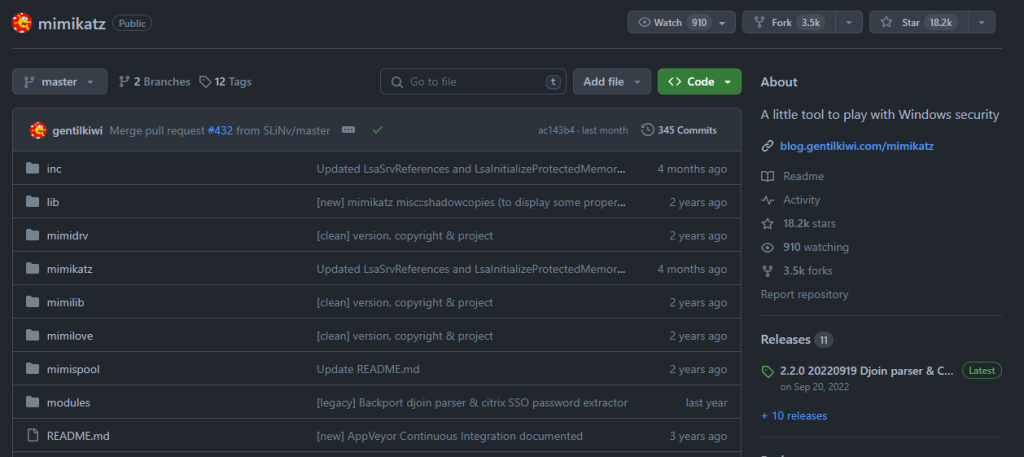
This program has the feature to extract account credentials, which also provides a feature that uses basic commands to dump the LSASS process memory that can be used to display the extracted NT hash. Moreover, this is an open-source tool, and threat actors have a great history of using it in several high-profile attacks.
Mimikatz GitHub (Source: AhnLab)
sekurlsa::logonpasswords and sekurlsa::minidump are the commands used to dump the LSASS process memory, extract the NT hash, and extract the account credentials without directly accessing the LSASS process.
ProcDump
Sysinternals, currently owned by Microsoft, developed this tool, which supports the feature of dumping specific memories. Moreover, the ProcDump tool is a legitimate file signed with Microsoft’s certificate that threat actors regularly use to dump LSASS process memory.
This tool shows the process of ProcDump and extracts the created memory dump file by using Mimikatz to steal account credentials.
Process Explorer
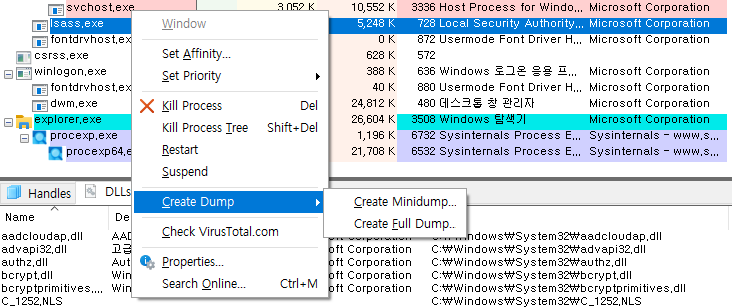
Also developed by Sysinternals, this tool can show a list of running processes, look up information, control processes, and has many other features. It also supports the dumping of specific process memories, which can be used to dump LSASS process memory to extract account credentials.
Process Explorer Memory Dump (Source: AhnLab)
Task Manager
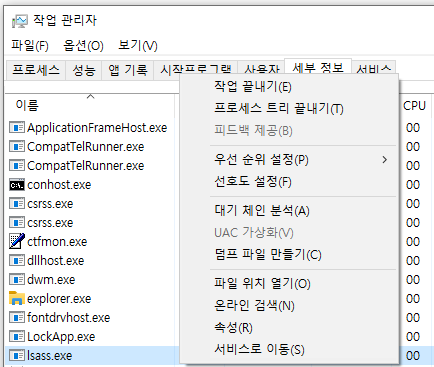
This is a default tool provided by Microsoft Windows OS, which will create no suspicions when account credentials are dumped. It also provides a complete overview of running processes, installed services, startup programs, and a kingdom of information for threat actors to use.
Task Manager Memory Dump (Source: AhnLab)
Like other tools, this tool also provides dumping of LSASS memory that can be used to extract account credentials.
Comsvcs.dll
This is a DLL file that is in charge of COM+ service features and is installed in Windows by default.
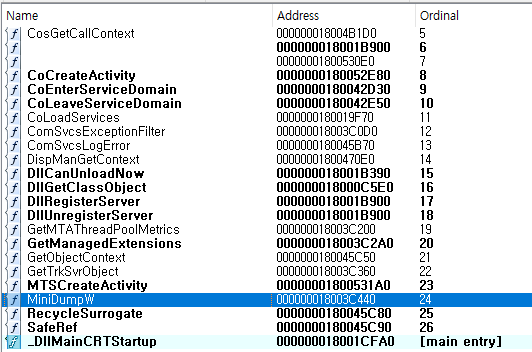
This file also offers a “Minidump” function that can be used to dump specific process memory, which, therefore, can be used by threat actors to dump LSASS process memory for credential extraction.
Comsvsc.DLL (Source: AhnLab)
ASEC published a detailed report explaining the tool’s usage, functions, extraction methods, etc.
Buckle up and get ready for a fascinating journey! Imagine a world where machines rule, and robots become some of our closest companions. Don’t worry, though, this isn’t an episode of your favorite sci-fi TV show; it’s reality! A recent MIT study has unearthed some mind-blowing insights into how artificial intelligence (AI) is unleashing its potential in the job market, revolutionizing the way we work and leaving us in awe.
Stop and think for a moment: AI can be your secret weapon! With this groundbreaking technology, we can now automate tedious tasks that used to eat up our precious time. Picture yourself sipping your favorite drink while AI expertly takes care of repetitive jobs. Whether it’s data analysis, customer service, or even house chores, AI is here to lend a hand and provide the freedom you’ve always craved.
Its Power and Perks
Not only does AI lighten our workload, but it also sparks great potential for reshaping careers. Think outside the box for a second — AI is creating brand-new job opportunities we could never have imagined. Professionals skilled in AI are now among the most sought-after in the market, as companies race to incorporate this game-changing technology into their strategies. It’s the perfect moment to embark on an exciting AI learning journey, unlocking doors you never thought possible.
But wait, there’s more! AI’s transformation isn’t just limited to the corporate world; it permeates every aspect of our lives. With AI-powered personal assistants like Siri and Alexa, you can playfully chat with these trusty sidekicks or simply ask them to tell you a joke (prepare yourself for some corny ones!). Moreover, advancements in robotics are pushing the boundaries of imagination. Welcome to the era of AI companions who may soon walk beside us, rendering science fiction a reality.
Let’s not forget the thrilling world of gaming, where AI’s implications are nothing short of astonishing! Picture yourself diving into the immersive realm of online casino games, where AI is taking the lead in enhancing convenience and security. AI algorithms are revolutionizing the gaming experience, ensuring fair play while minimizing fraudulent activities. From intelligent chatbots that assist players with inquiries to sophisticated systems that detect suspicious behavior, AI has become the guardian angel of online gaming, providing a safe and seamless environment for players to enjoy the best online casino games from the comfort of their own homes. With AI at the helm, your next gaming session will be a secure and thrilling adventure!
Coexist With AI
As AI continues its meteoric rise, we must address some concerns. What about jobs that rely on human touch, creativity, and empathy — the qualities that truly set us apart? Fear not! While machines conquer mundane tasks, the human touch remains indispensable. Our uniquely human traits, emotional intelligence, and ability to adapt creatively will become even more valuable in this AI-driven world. We have the power to coexist harmoniously, leveraging AI’s strengths while showcasing our own.
Final Say
In this exciting era, the AI revolution is turning our preconceptions upside down. From freeing up our time to unlocking new career horizons, it’s an adventure full of surprises. So, dear readers, embrace this technological revolution with open arms and a sense of wonder. As AI shapes our future, let’s remember to maintain a balance between our own humanity and these extraordinary machines. Together, we’ll usher in a future where both brawn and brains, AI and humans, harmoniously coexist for the greater good.
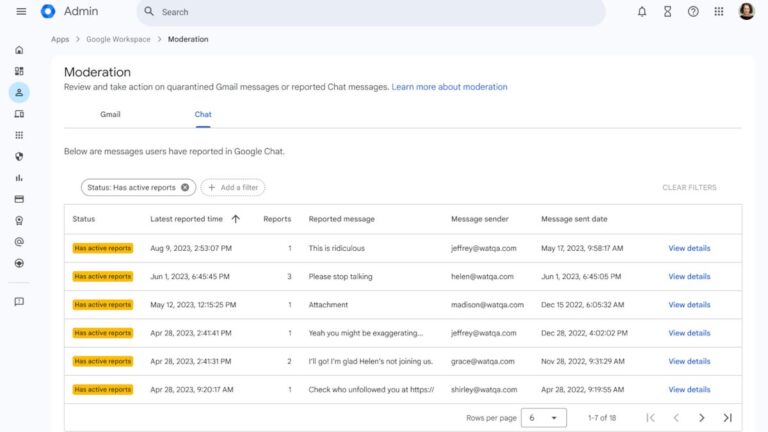
Google starts this week with yet another update for its Chat app. After bringing star messages to iOS and Android, Google Chat is now getting a new moderation tool in the admin console.
The new moderation tool has been specifically designed for reviewing and taking action on reported Google Chat content via the Admin console under Apps / Google Workspace / Moderation.
The search giant announced that super admins will have access to the moderation tool when it becomes available in Google Chat. Also, they will be able to assign users the new “Moderate Chat content report” privilege.
Google recommends that this privilege only be assigned to users who are best suited to review Chat content, otherwise it won’t be too effective at reducing the super admins’ workload.
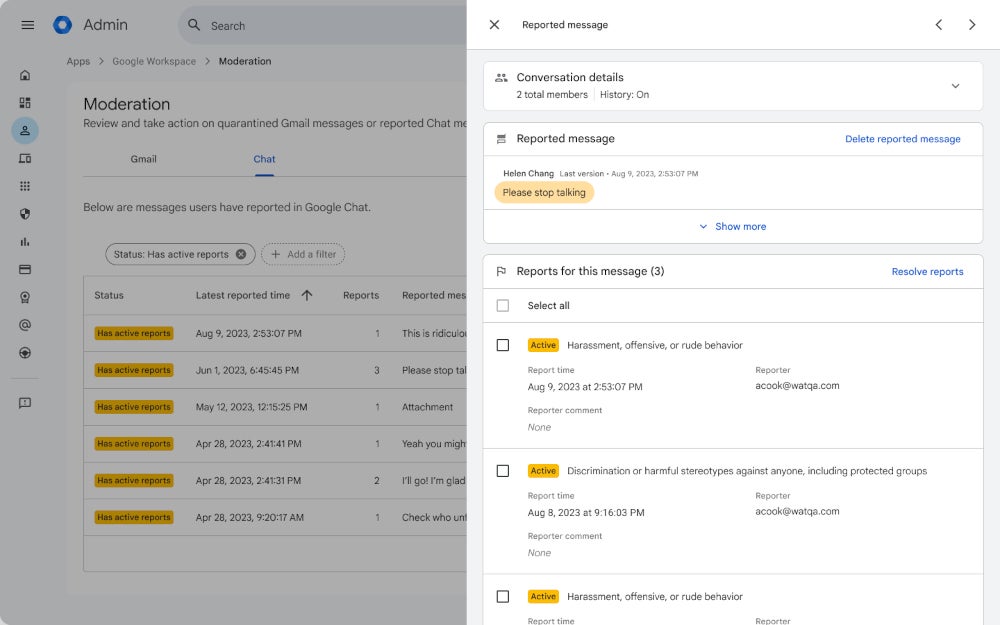
Once a new report is submitted by users, the moderation tool can be used to see all reports associated with the message, review the edit history of a message and conversation transcript (including up to 5 message posted before the reported message), as well as details that provide info about the type of conversation with number of participants, space managers, guidelines, and more.
It’s also important to add that moderators will be able to add comments to the report should the content require further auditing in the future.
In the same piece of news, Google announced that the moderation tool will also include a tab for managing quarantine Gmail message. The Gmail tab is available to all Google Workspace customers.
The new moderation tool accessible by going to Apps / Google Workspace / Moderation will be rolled out in the next two weeks. It will be available to Google Workspace Enterprise Plus, Education Standard and Education Plus customers.
SSH or Secure Shell is a cryptographic network protocol that enables secure communication and remote access over an unsecured network.
This network protocol is widely used for secure command-line login, file transfers, and tunneling of other protocols.
It provides a secure way to access and manage devices, servers, and systems by encrypting data during transmission and verifying the identity of the connecting parties.
A new version of SSH has been launched recently, SSH3, which has been revamped with HTTP using QUIC+TLS1.3 for security and HTTP Authorization for user authentication.
DocumentFree Webinar
Compounding the problem are zero-day vulnerabilities like the MOVEit SQLi, Zimbra XSS, and 300+ such vulnerabilities that get discovered each month. Delays in fixing these vulnerabilities lead to compliance issues, these delay can be minimized with a unique feature on AppTrana that helps you to get “Zero vulnerability report” within 72 hours.
SSH3 New Improvements
The new version brings a multitude of new enhancements, and here below, we have mentioned all the enhancements:-
Significantly faster session establishment.
New HTTP authentication methods, such as OAuth 2.0 and OpenID Connect, are in addition to classical SSH authentication.
Robustness to port scanning attacks: your SSH3 server can be made invisible to other Internet users.
UDP port forwarding, in addition to classical TCP port forwarding.
All the features allowed by the modern QUIC protocol, including connection migration (soon) and multipath connections.
SSH3 – Faster & Rich Secure Shell
SSH3 leverages TLS 1.3, QUIC, and HTTP for secure channels by adopting proven internet security methods from e-commerce and banking.
It supports standard and new authentication methods like OAuth 2.0, enabling login with accounts from Google, Microsoft, and Github.
SSH3 in early proof-of-concept needs extensive cryptographic review before production approval. Open-source for community feedback, not recommended for production without peer review.
Testing it in sandboxes/private networks is recommended due to potential risks. SSH3 offers security against scanning and dictionary attacks by hiding behind a secret link that enhances the protection against unauthorized access.
OpenSSH features implemented
Here below, we have mentioned all the OpenSSH features implemented:-
Parses ~/.ssh/authorized_keys on the server
Certificate-based server authentication
known_hosts mechanism when X.509 certificates are not used.
Automatically using the ssh-agent for public key authentication
SSH agent forwarding to use your local keys on your remote server
Direct TCP port forwarding (reverse port forwarding will be implemented in the future)
Proxy jump (see the -proxy-jump parameter). If A is an SSH3 client and B and C are both SSH3 servers, you can connect from A to C using B as a gateway/proxy. The proxy uses UDP forwarding to forward the QUIC packets from A to C, so B cannot decrypt the traffic A<->C SSH3 traffic.
Parses ~/.ssh/config on the client and handles the Hostname, User, Port, and IdentityFile config options (the other options are currently ignored). Also parses a new UDPProxyJump that behaves similarly to OpenSSH’s ProxyJump.
Developers seek collaboration for the responsible progression of SSH3 by inviting security experts for code review and feedback. Encouraged to engage with standards bodies for formal IETF/IRTF processes.
With collective effort, they aim to enhance SSH3 for safe production but acknowledge the need for thorough cryptographic review and recognition by security authorities for reasonable security claims.
Try Kelltron’s cost-effective penetration testing services to evaluate digital systems security. Free demo available.