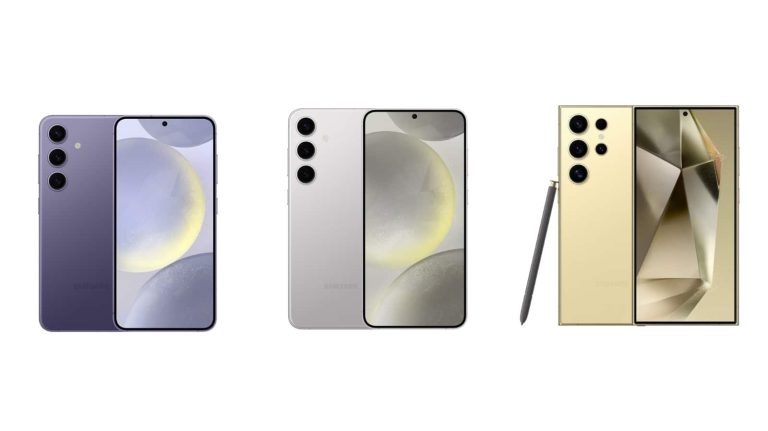
Oh, not again, Samsung! The company prematurely listed the unannounced Galaxy S24 phones on its official website, again. Product pages for the base and Ultra models were briefly up on its website for Ecuador, revealing the design, prices, and colors. Its branded retail partner in Colombia made a similar blunder in late December. The new flagships go official later today.
Samsung accidentally publishes Galaxy S24 product pages on its website
Spotted by leakster Roland Quandt, Samsung’s Ecuadorian website accidentally listed the 256GB variant of the Galaxy S24 and 1TB variant of the Galaxy S24 Ultra. Or at least these two listings were caught by the public eyes before the company realized the mistake and took the pages down. Archivecopies of both listings are available, though.
Listed with the SKU SM-S921BZKKGTO-1, the Galaxy S24 has a price tag of $1,399, discounted to $1,049. The Ultra (SKU SM-S928BZTIGTO-1) is listed with a price tag of $1,749, discounted to $1,499. Whether these prices are accurate, we’ll know in a few hours—the launch event kicks off at 10 AM PT/6 PM GMT. Meanwhile, this leak from Samsung confirms the colorways for the new flagships.
We can see that the Galaxy S24 and Galaxy S24 Ultra will come in the same four colors: Black, Gray, Violet, and Yellow. The Plus model is also rumored to be available in the same set of colors. Leaks suggest Samsung will market these colors as Onyx Black, Marble Gray, Cobalt Violet, and Amber Yellow. For the Ultra, which has a Titanium frame, they are allegedly called Titanium Black, Titanium Gray, Titanium Violet, and Titanium Yellow.
In addition to these, Samsung may also offer three limited edition colors of these phones exclusively through its online store. The company has always done that in the past and there are rumors this time around too. These colors may not be available globally, though. Thankfully, it won’t be long before we have all the missing details about the Galaxy S24 series.
You can livestream the launch event
Samsung’s Galaxy S24 launch event will take place in San Jose, California. The company will livestream the event on its official website and YouTube channel. So, you can catch everything as it happens. The Korean firm has been building up hype around Galaxy AI, its suite of on-device AI features for the Galaxy S24 series. We will soon see what it is all about, and how it will transform the way we use our mobile phones.
Today, January 17, is the day Samsung’s much-awaited Galaxy S24 series breaks cover. Hours before the big unveiling, the company released a short promo teasing a new era of AI-powered smartphones. The upcoming flagships boast unprecedented on-device AI capabilities.
Samsung gears up to launch the Galaxy S24 series with Galaxy AI
Galaxy AI is Samsung‘s suite of on-device AI features for the Galaxy S24 flagships. The company has built AI into various stock apps and functions, offering a seamless and intuitive user experience enhanced by AI. Since it confirmed today’s launch event in San Jose, California, the Korean firm has been busy hyping up Galaxy AI with promo videos and teasers.
Titled “Galaxy AI is coming,” its latest video is the official teaser for Galaxy AI. The video runs for a minute and six seconds and takes us back to the very beginning of Samsung’s mobile phone journey. It features a couple on a subway, discussing the future of smartphones. “Phones were so different back in the day,” the lady says after seeing a young woman holding a modern phone.
The couple goes into a flashback, remembering the evolution of phones. Samsung takes the opportunity to show its first-ever mobile phone released in 1988. It was a chunky piece of tech that allowed people to make calls wirelessly from anywhere. Then came the TV Phone in 1999. It featured a display where you could watch videos, while still offering calling functions.
Over time, the screens got bigger and better while the phones got smarter and stronger. In 2011, Samsung introduced its first Galaxy Note phone with a 5.3-inch display. The next big innovation came in 2014 when the company added dust and water resistance to its Galaxy S lineup. It was followed by the introduction of contactless payments via Samsung Pay in 2015.
The Galaxy Z series of foldable smartphones debuted in 2019, pioneering a whole new category of mobile phones. There hasn’t been any further innovation in the mobile industry and Samsung plans to change that with the Galaxy S24 series today. The new flagships will usher into a new era of mobile powered by AI. The company aims to change the way you use your phone with Galaxy AI.
The launch event is just hours away now
Samsung’s Galaxy Unpacked event for the Galaxy S24 launch kicks off at 10 AM PT/6 PM GMT today. The event will take place in San Jose and will be streamed live on Samsung’s official website as well as YouTube channel. If you can’t watch the event like, we will bring all announcements to you here at Android Headlines, so stay tuned. In the meantime, you can watch the official Galaxy AI teaser below.
Ever since the beginning of 2023, infostealers targeting macOS have been on the rise, with many threat actors actively targeting Apple devices. As of last year, many variants of Atomic Stealer, macOS meta stealer, RealStealer, and many others were discovered.
However, Apple updated their built-in antivirus “XProtect” signature databases in macOS which denotes that Apple is completely aware of these info stealers and has been taking necessary measures to prevent them. On the other side, threat actors have been constantly evolving and evading known signatures.
DocumentFree Webinar
Compounding the problem are zero-day vulnerabilities like the MOVEit SQLi, Zimbra XSS, and 300+ such vulnerabilities that get discovered each month. Delays in fixing these vulnerabilities lead to compliance issues, these delay can be minimized with a unique feature on AppTrana that helps you to get “Zero vulnerability report” within 72 hours.
Three Active Infostealers
According to the reports shared with Cyber Security News, Keysteal, Atomic InfoStealer, and CherryPie were three active infostealers that presently evade many static signature detection engines, including XProtect.
KeySteal
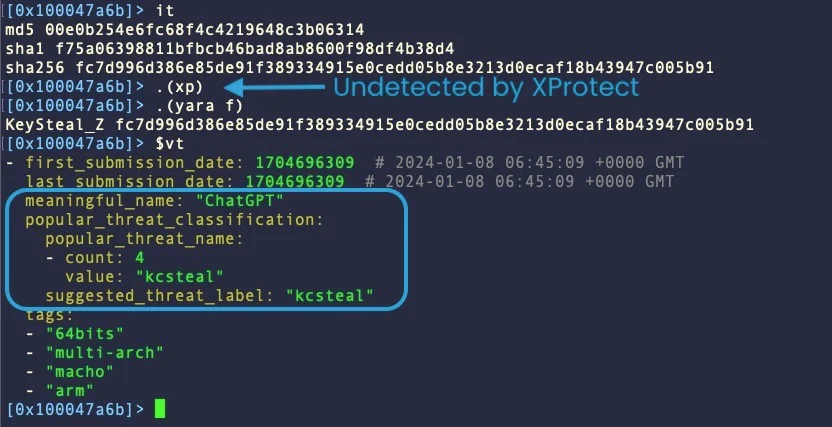
This stealer was first discovered in 2021 and has been constantly evolving with evasion techniques. Some of the distributions of this malware were under the binary name “ChatGPT”. Apple added a signature for this malware in 2023 inside XProtect which no longer works.
Recent sample of KeySteal (Source: SentinelOne)
During the initial stages of this Keysteal, it was distributed with a .pkg format embedded inside the “ReSignTool” macOS utility. It is coded in such a way to steal Keychain information which holds a lot of sensitive password information and establish persistence on the affected device.
The latest version of KeySteal replaces “ReSignTool” with multi-architecture Mach-O binaries under the names “UnixProject” and “ChatGPT“. The malware is written in Objective C and current distribution methods are unclear.
Atomic Infostealer
Apple updated its XProtect Signature databases to detect this malware earlier this month. But it seems like threat actors have up-to-date information about signature detection and have modified the malware with a Go language version shortly after the signature update.
In addition to this, this malware has been seen with completely different development chains, unlike other infostealers, which update only the core version. There have been several variations of this malware currently in the wild attacking macOS devices.
The malware is written in C++ and consists of logic to prevent victims, analysts, or malware sandboxes from running the terminal in parallel with the stealer. Furthermore, it also checks if the malware is being tested inside a virtual machine.
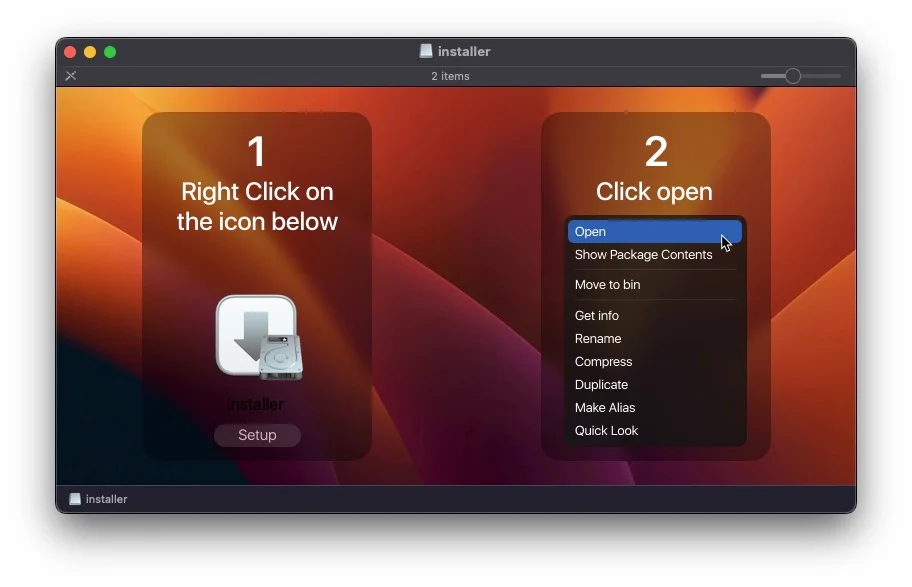
The distribution of this malware was through torrents or gaming-focused social media platforms appearing as a “CrackInstaller” with the .dmg format.
GateKeeper Override by Atomic Stealer (Source: SentinelOne)
CherryPie
This infostealer malware is also known as Gary Stealer or “JaskaGo” which is a cross-platform malware written in Go with extensive logic for anti-analysis and VM detection. However, the malware developers seem too confident that they left extremely obvious strings that indicate the core intent and purpose of this malware.
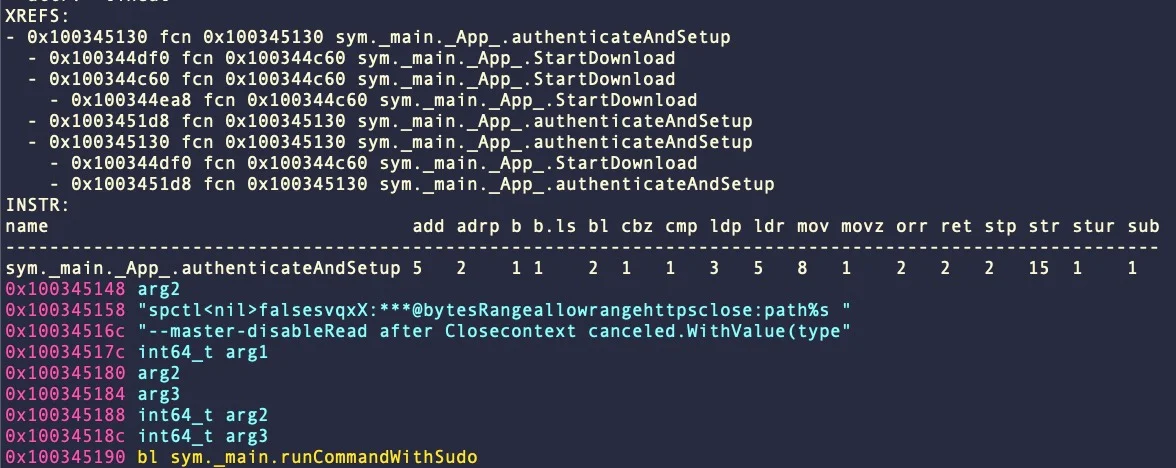
CherryPie attempts to disable GateKeeper (Source: SentinelOne)
Some samples showed traces of using the Wails project to bundle their malicious application. While executing this malware, the application calls the spctl utility with the –master-disable argument for disabling the Gatekeeper and runs with administrative privileges.
Furthermore, a complete report about this malware has been published, providing detailed information about the source code, behavior, intent, and other information.
Indicators of Compromise
KeySteal
95d775b68f841f82521d516b67ccd4541b221d17
f75a06398811bfbcb46bad8ab8600f98df4b38d4
usa[.]4jrb7xn8rxsn8o4lghk7lx6vnvnvazva[.]com
Atomic InfoStealer
1b90ea41611cf41dbfb2b2912958ccca13421364
2387336aab3dd21597ad343f7a1dd5aab237f3ae
8119336341be98fd340644e039de1b8e39211254
973cab796a4ebcfb0f6e884025f6e57c1c98b901
b30b01d5743b1b9d96b84ef322469c487c6011c5
df3dec7cddca02e626ab20228f267ff6caf138ae
CherryPie
04cbfa61f2cb8daffd0b2fa58fd980b868f0f951
09de6c864737a9999c0e39c1391be81420158877
6a5b603119bf0679c7ce1007acf7815ff2267c9e
72dfb718d90e8316135912023ab933faf522e78a
85dd9a80feab6f47ebe08cb3725dea7e3727e58f
104[.]243[.]38[.]177
Looking for cost-effective penetration testing services? Try Kelltron’s to assess and evaluate the security posture of digital systems – Free Demo
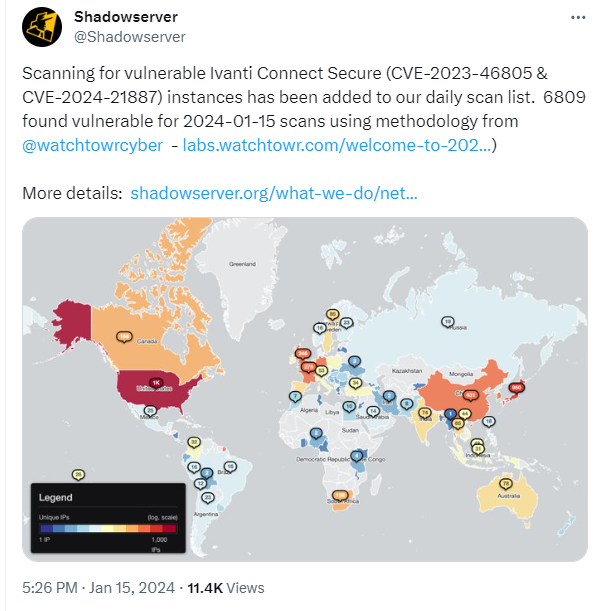
The researchers that discovered the active exploitation are warning that these attacks are now very widespread.
“Victims are globally distributed and vary greatly in size, from small businesses to some of the largest organizations in the world, including multiple Fortune 500 companies across multiple industry verticals.”
At first, the scans by the researchers showed only limited exploitation. But later they observed scans made by an unknown party that revealed compromised devices which had a different variant of the web shell on them. The latest numbers indicate some 1700 compromised devices.
The fact that there are no patches available and users were asked to apply a workaround and monitor their network traffic for suspicious activity, may have contributed to the slow response to the sounded alarms. Almost 7000 devices remain vulnerable according to the latest count.
The workaround requires importing a mitigation.release.20240107.1.xml file which can be obtained via the download portal (login required). The XML file is in the zipped format, so you’ll need to unzip and then import the XML file.
Navigate to Maintenance > Import/Export > Import XML
Use the Browse button to point to the unzipped XML file
Click the Import Button
Importing this XML into any one node of a Cluster is enough. A FAQ and more detailed instructions can be found in the Ivanti advisory article.
It is important to note that applying the workaround or a patch, when they are made available, is not enough to undo the effects of an attack.
To find out whether your devices have been compromised, you can run the Integrity Checker Tool provided by Ivanti. This integrity tool allows an administrator to verify the integrity of the ICS / IPS Image installed on Virtual or Hardware Appliances This tool checks the complete file system and finds any additional/modified file(s).
We don’t just report on vulnerabilities—we identify them, and prioritize action.
This information comes from Digital Chat Station, in case you were wondering. That is one of the best-known and most reliable tipsters from China. He shared the news via Weibo.
The Porsche Design HONOR Magic6 to launch in March with a new camera sensor
Now, in addition to the Porsche Design HONOR Magic V2 RSR, HONOR also announced its Magic6 and Magic6 Pro smartphones. The Porsche Design HONOR Magic6 will likely be a slightly altered version of one of those two phones.
I doubt that Porsche Design and HONOR will re-release both phones in a ‘Porsche Design’ variant, though. If I had to guess, I’d say that the ‘Pro’ model will get the new treatment, with an altered backplate.
The thing is, it may include some more changes. Digital Chat Station also says that the phone will ship with a 1-inch camera sensor by OmniVision. That means that the changes compared to the standard variant won’t be only aesthetic.
This phone will utilize OmniVision’s first 1-inch camera sensor
The camera sensor in question will be the OV50K, and it has “the highest dynamic range in the industry”, says the tipster. For comparison’s sake, the HONOR Magic6 Pro utilizes the OVH9000 sensor from OmniVision for its main camera. That’s a 1/1.3-inch sensor.
OmniVision’s new 1-inch camera is supposed to be in direct competition with the Sony LYT-900 camera sensor. We don’t really know what to expect, as this will be the first 1-inch camera sensor from OmniVision.
We still don’t know the exact launch date of the Porsche Design HONOR Magic6 (Pro), but it’s coming in March. So, it seems like HONOR will aim to launch this phone after the Mobile World Congress (MWC) in Barcelona, which will take place towards the end of February. The regular HONOR Magic6 and Magic6 Pro could launch globally at MWC, though.
Google Chrome has released its stable channel update version 20.0.6099.234 for Mac, 120.0.6099.224 for Linux, and 120.0.6099.224/225 for Windows.
However, Google stated that this new security update will roll out in the upcoming days/weeks.
The extended stable channel has also been updated to 120.0.6099.234 for Mac and 120.0.6099.225 for Windows.
DocumentRun Free ThreatScan on Your Mailbox
Trustifi’s Advanced threat protection prevents the widest spectrum of sophisticated attacks before they reach a user’s mailbox. Try Trustifi Free Threat Scan with Sophisticated AI-Powered Email Protection .
Zero-Day exploited in the wild
According to the Google security updates report, the vulnerabilities that Google Chrome patched were associated with out-of-bounds write (CVE-2024-0517), type confusion (CVE-2024-0518), and out-of-bounds memory access (CVE-2024-0519), which existed in the V8 JavaScript engine.
Threat actors discovered that CVE-2024-0519 was one of the vulnerabilities they exploited in the wild.
This vulnerability allows a remote threat actor to exploit heap corruption on the vulnerable versions using a crafted HTML page.
Google Chrome gave the severity of this vulnerability a “high” rating. Google also stated that the zero-day is still being investigated, and a full report can be expected soon.
CVE-2024-0517 and CVE-2024-0518 were the other two vulnerabilities, also denoted as “high” severity vulnerabilities.
CVE-2024-0517 was reported by Toan (suto) Pham of Qrious Secure and rewarded with $16,000, whereas CVE-2024-0518 was reported by Ganjiang Zhou (@refrain_areu) of ChaMd5-H1 team and rewarded with $1000.
An anonymous person reported the zero-day CVE-2024-0519 and the reward was yet to be announced by Google Chrome.
It is recommended that Google Chrome users upgrade to the latest version of Google Chrome to prevent the exploitation of these vulnerabilities.
Update Now!
To update the Chrome web browser, you have to follow a few simple steps that we have mentioned below:
First of all, go to the Settings option.
Then select About Chrome.
Now, you must wait, as Chrome will automatically fetch and download the latest update.
Then, wait for the latest version to be installed.
Once the installation process is complete, you will have to restart Chrome.
That’s it. Now you are done.
Looking for cost-effective penetration testing services? Try Kelltron’s to assess and evaluate the security posture of digital systems – Free Demo
The growth of online shopping has opened up opportunities for businesses. One such opportunity is the print on demand industry, which has experienced expansion in years. Specifically, tech accessories have played a role in driving sales on Shopify. This post will delve into the impact of print on demand for Shopify sellers and highlight how tech accessories are boosting sales.
The Influence of Print on Demand
Print on demand services have transformed the way businesses design and sell custom products. Entrepreneurs can now offer a range of designs without the need to store inventory or make substantial upfront investments. This business model allows sellers to focus on their creativity and marketing efforts while relying on suppliers to handle manufacturing and logistics.
Tech Accessories: A Thriving Market
With technology advancing, there is a growing demand for tech accessories. From smartphone cases to laptop sleeves and everything in between, consumers are continuously seeking ways to personalize and stylize their devices. Embracing this trend, entrepreneurs can tap into the market by leveraging print on demand with Shopify. This innovative approach allows them to offer customizable tech accessories, meeting the increasing consumer desire for unique and personalized products in the ever-evolving tech landscape.
Shopify as an E-Commerce Platform
Among entrepreneurs looking for a user-powerful solution, Shopify has emerged as one of the most popular e-commerce platforms available. The platform simplifies the process for anyone, regardless of their skills, to create a store and start selling products quickly. With its range of apps and plugins, it provides sellers with the flexibility to optimize their store’s performance and cater to niches.
The Collaboration Between Print on Demand and Shopify
The integration between print on demand services and Shopify has greatly contributed to the success of sellers. By connecting these two platforms, entrepreneurs can offer a variety of tech accessories without having to handle production or shipping processes directly.
Moreover, print on demand services enable sellers to experiment with designs without any risk. They can try out patterns, textures, and colours or even collaborate with designers until they find winning product combinations that resonate with their target audience. Without print on demand, the upfront costs associated with bulk manufacturing and inventory management would make this level of flexibility for small or medium-sized businesses.
Advantages of Selling Print on Demand Tech Accessories
1. Minimal Investment: Selling print on demand tech accessories requires an initial investment. Entrepreneurs can allocate their resources toward scaling marketing efforts to build brand awareness and acquire customers.
2. Customization: One of the advantages of offering products in the tech accessory industry is the appeal it holds for consumers. By utilizing print on demand, sellers can cater to this desire by incorporating designs, graphics, and slogans that resonate with their target audience.
3. Trend Integration: Another key benefit of print on demand is its ability to adapt quickly to changing trends. Sellers can continuously update their designs and keep up with the industry fads, allowing them to stay ahead of their competitors and offer customers fresh and unique options.
4. Diverse Product Range: The tech accessory market offers a range of products in shapes and sizes, providing entrepreneurs with ample opportunities for diversification. From smartphone cases to laptop skins and mouse pads, there are possibilities within this niche.
5. Viral Potential: In today’s age, a designed product that aligns with current trends has the potential to go viral rapidly. With social media sharing capabilities, exposure can exponentially increase among targeted demographics who appreciate tech accessories.
Strategies for Success
To achieve success in selling printed tech accessories through Shopify or any other platform, it is essential to implement the following strategies:
1. Research Trending Designs: Stay updated on the design trends for tech accessories by exploring media platforms, attending trade shows, or browsing through online marketplaces.
2. High-Quality Visuals: Invest effort into creating high-quality images that immediately grab attention for your products.
3. Leverage Influencer Marketing: Collaborate with influencers who specialize in technology or popular niches like gaming or fashion to reach an audience.
4. Customer Reviews and Testimonials: Encourage customers to leave reviews and provide testimonials that showcase their satisfaction with the product. This helps build trust and credibility for buyers.
5. Targeted Advertising: Utilize Shopify’s marketing tools to create targeted advertising campaigns aimed at reaching customers with tech-related products.
In conclusion, print on demand has revolutionized how entrepreneurs sell custom products and tech accessories that are driving sales on Shopify. This presents opportunities for those looking to capitalize on trends and offer personalized products within the thriving e-commerce industry. By embracing print on demand, entrepreneurs can benefit from its costs, product range, and customization options to build successful businesses catering to today’s tech-savvy consumers.
In the fast-paced digitally-focused and app-driven world that we live in, cleaning your pool and keeping it safe isn’t as cumbersome or time-consuming as it used to be. In that spirit, we’ve shortlisted five of the best robotic pool cleaners money can buy in 2024!
1. Beatbot AquaSense Pro
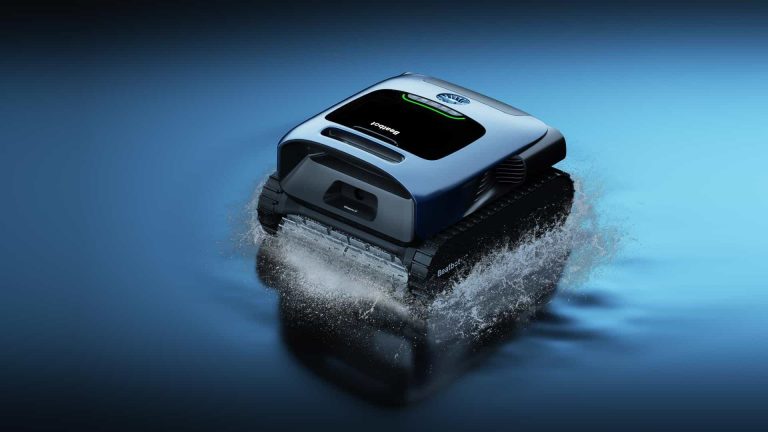
The Beatbot AquaSense Pro is the world’s first all-in-one intelligent pool cleaning robot. Let’s face it. Older technologies often lack the intelligence or power to clean the entire pool, get stuck and fall back down when climbing the walls, and many feature unsightly and frustrating chords. AquaSense Pro fixes these challenges with past technologies by delivering comprehensive 5-in-1 pool cleaning floor, walls, waterline, surface, and water clarification. Its ability to evaluate and produce the right dosage of cleaning agents for water clarification provides unmatched water clarity. Beatbot AquaSense Pro features many industry-first technologies to bring pool care up to modern expectations. Powered by Beatbot OS (the robot’s brain), to help it actively see and think unlike other pool cleaning devices, it features 20 sensors including ultrasonic sensors and dual gyroscopes to help it find and avoid obstacles and path planning to ensure efficient cleaning with no missed areas.
AquaSense Pro is also a significant leap forward in power and convenience, with 9 motors, 4 brushes, and 2 filters, Beatbot AquaSense Pro is a powerhouse. Its Industry-First NonaDrive™ 9 Motor System, paired with front and back brush sets, doubles performance and offers variable speeds for precision control. The two ultra-fine filtration filters (up to 150 µm) efficiently capture debris. The Beatbot smart app provides pool visualization, path visualization, five different cleaning modes for convenience, and records to monitor recent cleaning data. The device is completely cordless and propels itself back to its dock at the water surface. Filter cleaning is also very easy as it releases water on the way to the dock to make it very light for retrieval. Finally, AquaSense Pro is a safe choice for any pool owner. It’s very durable and has been awarded comprehensive safety and environmental certifications, packaged with a two-year warranty for peace of mind, all making it our top choice in January 2024.
This model is on Pre-sale now. You can get it for $1699 now with a discount.
2. Dolphin Explorer E70
Elevate your pool maintenance with the Dolphin Explorer E70 Robotic Pool Cleaner, equipped with advanced features for efficiency and convenience. Seamlessly manage your Dolphin anytime, anywhere through the MyDolphin Plus Mobile app. The Dolphin Explorer E70 excels in waterline scrubbing on vertical surfaces, ensuring a spotless waterline.
Experience intensified cleaning power with the Super Scrub feature, providing a thorough and comprehensive cleaning of pool surfaces. The Pickup Mode adds convenience, allowing the Dolphin Explorer E70 to wait at the pool edge for quick and easy removal. Embrace a new era of control and effectiveness in pool cleaning with the Dolphin Explorer E70 Robotic Pool Cleaner. $1999 on Amazon.com.
3. Dolphin Liberty 300
The Liberty 300 is Dolphin’s first robotic pool cleaner powered entirely by a battery. It’s light and compact design makes it great for all kinds of pools. It can track all pool surfaces with excellent grip, along with an active front brush, navigation system and advanced scanning software which round off the package nicely at $1,249.
The new cordless design features impressive agility and inductive charging. The Magnetic-Connect system allows for easy snap-in-place and walk-away charging, while an Eco Mode allows you to keep your pool clean throughout the week with relatively shorter cleaning cycles. A Cycle Selector is included to let you choose between floor and wall cleaning or floor-only cleaning. Convenient!
Dolphin has always been a product synonymous with reliability and service, and the Liberty 300 is no different, only this time, it’s cordless! The powerful and intensive scrubbing system as well as the robust filtration system make it a worthy buy to consider in 2024. $1249 on Amazon.com.
4. Dolphin Nautilus CC Plus
Dolphin’s Nautilus CC Plus has been one of the most talked about robotic pool cleaners of 2023 and 2024, namely because it can clean pools rather quickly, even if they are up to 50 feet long! What’s surprising though that it is very lightweight to use and remove from the pool, given its cleaning capacity.
The Nautilus CC Plus can be best described as a powerful and efficient robotic pool cleaning tool with a durable housing wrapped around it. Even though it has been primarily designed for in-ground pools, some users have reported that it works fine when cleaning above-ground pools too.
It’s very easy to set up – just turn it on and drop it into your pool – it’ll work its magic. Priced between $800 and $850, depending on where you buy it from, we’d say it’s not a bad buy at all to consider this year. $849 on Amazon.
5. Polaris 9650IQ Sport
The Polaris 9650iQ Sport, although a tad expensive at just under $1,500 (on Amazon), is an innovative piece of machinery, offering all-around superb cleaning performance, and sturdy construction. It’s quite easy to use and maintain, and comes with a user-friendly app.
The multiple programming options, including the smart home features like Wi-Fi connectivity lets you control your robotic pool cleaner from your smartphone, no matter where you are.
Boasting a slick and sturdy design, it measures 16.9 x 18.9 x 10.6 inches, weighing just 21 lbs. The powerful 4-wheel drive system helps you navigate your pool’s bottom and sides, while a pair of front-mounted rubber brushes help to dislodge dirt. The attached debris canister is very easy to remove, clean, and maintain, and you never end up getting your hands dirty.
Preparing the Polaris 9650iQ Sport is quick and easy – the caddy assembly shouldn’t take more than 5 minutes to set up. Just assemble it, download the iAquaLink app and you’re good to go!$1399 on Amazon.com.
6. Aiper Seagull Pro
The Aiper Seagull Pro offers a fully cordless robotic vacuuming system which makes pool cleaning super-easy.
Coming in with an MSRP of $899, it offers a quad-motor system, 3 cleaning modes with control dial, WavePath navigation technology, the ability to charge fully in just 90 minutes and more. Its powerful suction, efficient routing, long run time, and high capacity filter basket make it one of the bestselling robotic pool cleaners this year.
Unboxing and setup is really easy too – no apps need to be installed, just choose the desired cleaning mode through the top-mounted dial, and that’s it. $718 on Amazon.
According to a new report coming from China, Google made a rather major change when it comes to its future chips. Google has decided to take a step back from Samsung for future Tensor and AI chips. Not the ones coming this year, though. More on that later.
Google is about to step away from Samsung for future Tensor & AI chips
This information comes from Taiwan Economic Daily, and it claims Google is looking for alternative semiconductor suppliers for its “Tensor” chips. The company allegedly approached Taiwanese companies in the process.
The name ‘KYEC’ was mentioned in the report, as the company allegedly secured a portion of Google’s orders. Google also invested in KYEC’s facilities in Taiwan in order for the manufacturing process to run smoothly. Process testing is expected to kick off mid-year.
Why is Samsung even mentioned here? Well, because the company was the sole supplier of Google’s Tensor chips thus far. Google is rumored to use TSMC’s N3E process for the Tensor G5, though, so taking a step back from Samsung may not be all that surprising.
Google is allegedly collaborating with KYEC, a Taiwanese company
Now, I also mentioned AI chips in the title. Well, in addition to Tensor chips, Google is expected to collaborate with KYEC for its AI chips too. It’s a bit surprising Google didn’t immediately go for TSMC, also a Taiwanese company, but went for KYEC, a far less-known name.
Needless to say, this collaboration can highly benefit KYEC. On the opposite side, KYEC will likely provide Google with plenty of freedom when it comes to chip designs, and that’s probably what Google wants.
The Tensor G4 next year will be a completely different product
Just to be perfectly clear, however, don’t expect any of what we talked about here to reflect on the Tensor G4. The Tensor G4 will fuel the Google Pixel 9 series later this year. That chip will almost certainly be provided solely by Samsung, as were the previous three.
The real change will come with the Tensor G5. Previous rumors/reports suggested it, and so does the new one. So, look for those changes in Q4 2025, not Q4 2024.
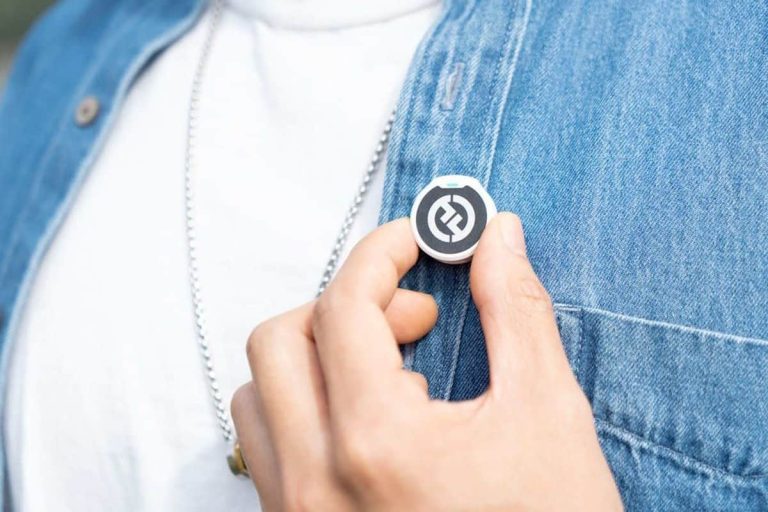
Hollyland introduced the LARK M2, its new ‘top level’ consumer-grade wireless lavalier microphone. This product is very lightweight, by the way, it weighs only 9 grams. Needless to say, that alone makes it stand out.
The Hollyland LARK M2 is a truly lightweight wireless lavalier microphone
Such weight wouldn’t be a surprise if it were a tiny wired microphone, but it definitely is considering it’s wireless. Hollyland hopes to market this to filmmakers, vloggers, and podcasters.
It’s not only very light but also very small, so you can attach it to your clothes without a problem. It’s also rather unintrusive considering its size. The best of all, you’re not getting horrible battery life either, despite this thing’s size and weight.
Hollyland says that LARK M2 can provide you with up to 10 hours of recording. It can be fully recharged in 1.5 hours once it’s empty. The ‘camera version’ of the LARK M2 provides a total operation time of up to 40 hours, while the ‘mobile version’ up to 30 hours with the charging case.
You can easily connect this thing to your phone, computer, and more
You can easily connect this microphone to your Android or iOS device. The same goes for cameras, action cameras, computers, and so on. It’s a very versatile product, as you’d expect.
The Hollyland LARK M2 comes with high-gain LDS (Laser Direct Structuring) antenna. That antenna reduces signal blockage caused by the human body, says the company. It’s supposed to provide “stable, uninterrupted audio transmission”. Hollyland says you can get up to 300 meters of range (line of sight) with this microphone.
The LARK M2 is equipped with environmental noise cancellation (ENC), which you can adjust to your preference. You can do that via the LarkSound app, with ease. You’ll also be updating the LARK M2 via that app.
It offers “studio-grade” Hi-Fi sound quality
Having said that, the microphone system Hollyland used features studio-grade 48kHz/24bit Hi-Fi sound quality. It also offers a single-to-noise ratio of 70dB, and a maximum sound pressure level of 115dB. You can easily switch between mono and stereo modes also.
The Hollyland LARK M2 comes in four versions. Those versions are: Mobile (LIghtning), Mobile (USB-C), Camera, and Combo Version. You’ll get a number of accessories in each package, such as windscreens for outdoor recording, cable connectors, and more.
The Hollyland LARK M2 is already available. You can get it from Amazon, or through “local distributors”. The Mobile (Lightning) and Mobile (USB-C) versions are priced at $149 and $139, respectively. The Camera Version costs $159, while the Combo Version will set you back $179. If you’re interested, the purchase link is included below.