In the shadowy realm of commercial spyware, the spotlight turns to the notorious Intellexa spyware and its Predator/Alien solution, as dissected by Cisco Talos in their comprehensive May 2023 report.
This expose navigates the labyrinthine intricacies and disconcerting features of Intellexa’s offering, highlighting profound concerns surrounding accountability and ethical boundaries.
Intellexa’s Predator stands as a persistent specter, transcending the conventional escape route of device reboots.
The optional persistence add-on ensures the spyware’s survival, presenting a formidable challenge even after a device restart, contingent on the selected license.
With a chilling awareness of its clientele’s cross-border targets, Intellexa raises unsettling questions about potential misuse for political repression and human rights violations.
The global scope of their operations calls for heightened scrutiny of the geopolitical implications of commercial spyware.
Public scrutiny and reports seem to barely ruffle Intellexa’s feathers.
Adaptable and quick to assimilate new exploit chains, the spyware vendor renders domain exposure a futile attempt at containment, echoing the resilience of this clandestine industry.
Intellexa Spyware Adds Persistence
Talos’ technical deep dive into Predator unveils the labyrinthine architecture of the spyware, illuminating the challenges in detection and mitigation.
The report serves as a crucial resource for understanding the evolving landscape of sophisticated cyber threats.
Using Intellexa as a case study, Cisco Talos underscores the inherent risks embedded in the commercial spyware landscape.
Cautionary notes echo the necessity for stringent regulations to navigate the precarious intersection of technology and ethics.
Evolutionary Trajectory:
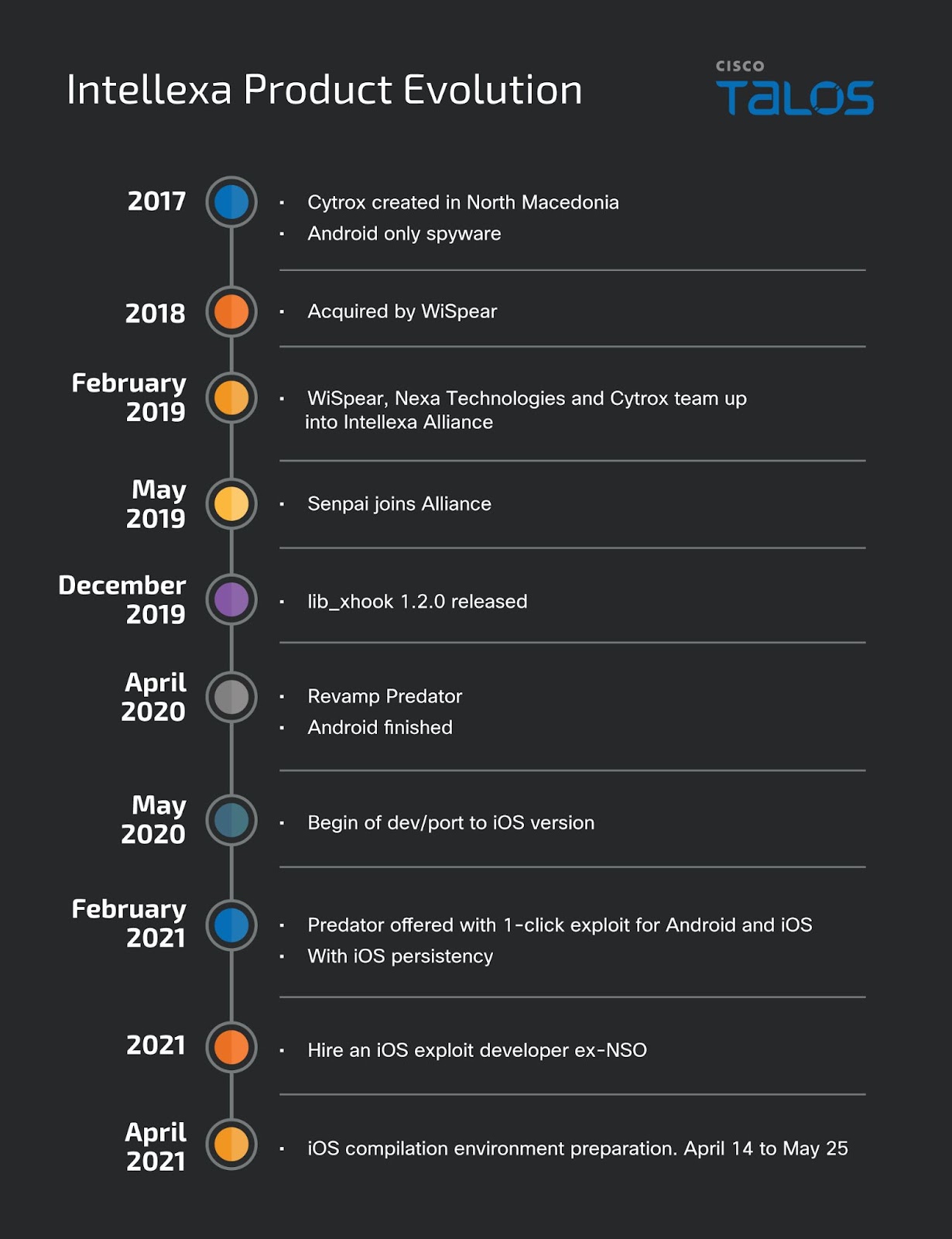
Tracing Intellexa’s journey from a struggling Cytrox to a formidable spyware provider exposes the alarming trend of knowledge and expertise converging in this domain.
The metamorphosis raises pertinent questions about the trajectory of surveillance technologies.
Leaked proposals unravel the substantial financial investments associated with Intellexa’s offerings, highlighting the exclusivity of such spyware and its likely patrons—state-sponsored agencies.
The hefty price tags underscore the commodification of espionage.
Plausible Deniability:
Craftily constructed proposals from Intellexa allocate responsibility for infrastructure and delivery methods to customers, creating a veil of plausible deniability.
This strategic move shields the spyware vendor from potential repercussions.
Recruitment strategies and LinkedIn profiles unveil a concerning talent pool fueling the commercial spyware industry.
The ease with which these companies attract highly skilled engineers raises ethical concerns about the workforce behind the clandestine operations.
Intellexa’s ability to seamlessly adapt to new operating systems underscores the modular design of Predator.
The reliance on Python modules facilitates swift adjustments, solidifying the spyware’s resilience in the face of evolving technological landscapes.
The vulnerability of exploit chains becomes a fleeting concern for Intellexa, swiftly replaced by commercial exploit vendors to minimize disruptions.
This adaptive strategy serves as a testament to the symbiotic relationship between spyware vendors and exploit providers.
Talos advocates for detailed technical analyses and public disclosure of malware samples as a powerful tool against spyware vendors.
This transparency imposes development costs on the industry and empowers researchers to fortify cybersecurity defenses.
Hackers use PowerShell commands because they provide a powerful scripting environment on Windows systems, allowing them to stealthily execute malicious scripts and commands called Operation RusticWeb.
While besides this, the PowerShell’s capabilities make it an attractive tool for gaining:-
Unauthorized access
Performing reconnaissance
Executing various cyber attacks
Cybersecurity researchers at SEQRITE Labs recently identified operation RusticWeb, in which they found threat actors using PowerShell commands to exfiltrate confidential documents.
RusticWeb Using PowerShell
The operation RusticWeb tracks overlapping tactics with Pakistan-linked APT groups like-
While threat actors shift from compiled languages to the following languages for cross-compatibility and evasive tactics:-
Golang malware examples include Windows-based Warp with Telegram bot C2 and Linux-based Ares RAT stager payload. Rust-based payloads in Operation RusticWeb use malicious shortcuts and a fake AWES domain for data exfiltration.
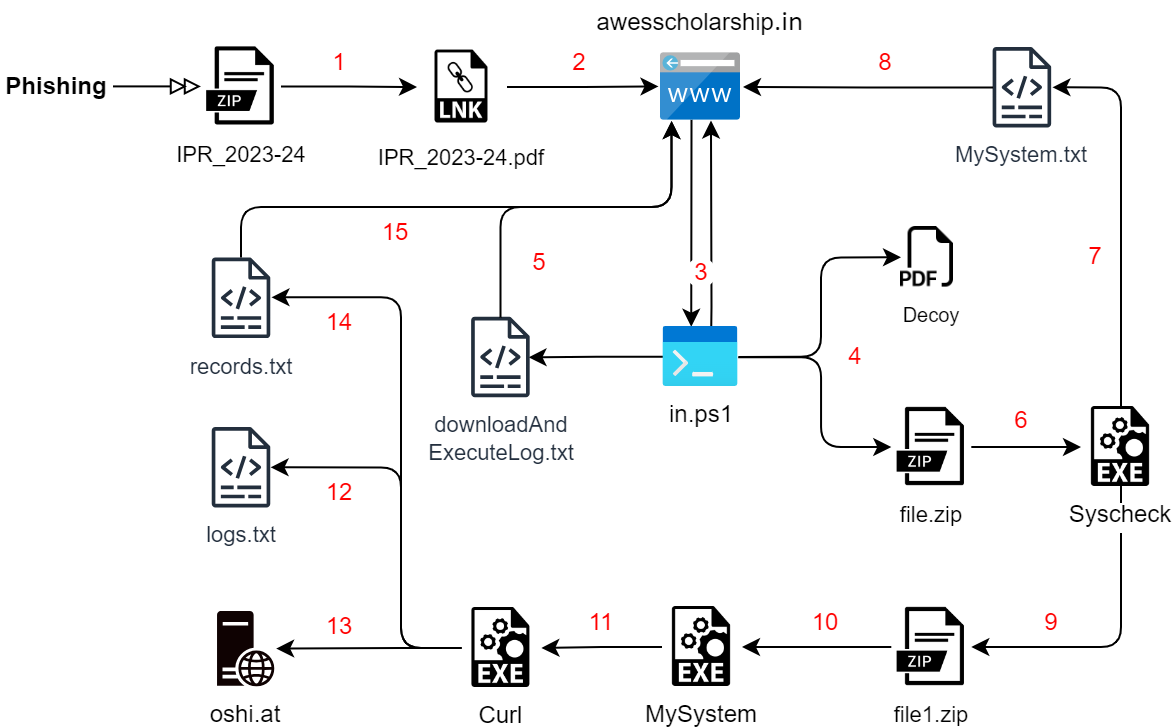
Spear-phishing targets victims with an archive file named ‘IPR_2023-24,’ triggering PowerShell to download scripts from rb[.]gy domain.
Infection Chain 1 (Source – SEQRITE Labs)
The campaign started in September, with 26.53% activity from India. Fake domain ‘awesscholarship[.]in’ mimics AWES, redirecting to the official page.
PowerShell script sets up paths for payload downloads and uploads. Besides this, the decoy PDF file extraction triggers Rust-compiled EXE payload execution.
Another Rust-based malware does the following things:-
Steals files
Collects system info
Uploads via OshiUpload
New December payloads target Kailash Satyarthi Children’s Foundation, indicating a focus on Indian government officials associated with children’s foundations or societies.
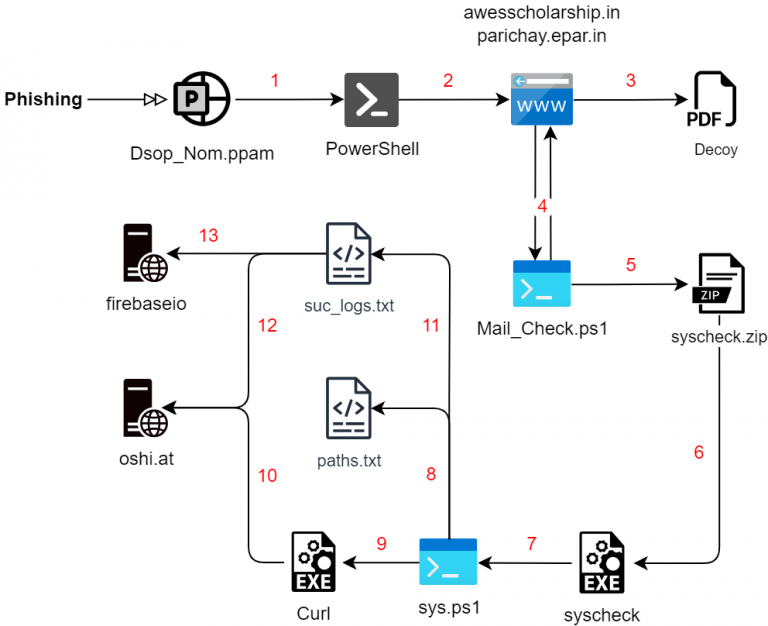
In a December infection chain, maldocs were used with PowerShell scripts for enumeration and exfiltration, omitting Rust-based payloads. Two fake domains and encrypted PowerShell scripts were involved.
Phishing maldoc initiates infection with a VBA macro containing obfuscated encrypted PowerShell commands. Similar maldocs use modified PS commands, converting numbers to ‘PoWeRSHEll’ upon document opening.
PowerShell command decryption employs techniques akin to Emotet, with slight variations. Obfuscation uses Invoke-Obfuscation techniques to mask the IEX command trigger.
Decrypted PowerShell commands download decoy files and next-stage script from domains, executing them in Downloads and Documents directories.
Infection Chain 2 (Source – SEQRITE Labs)
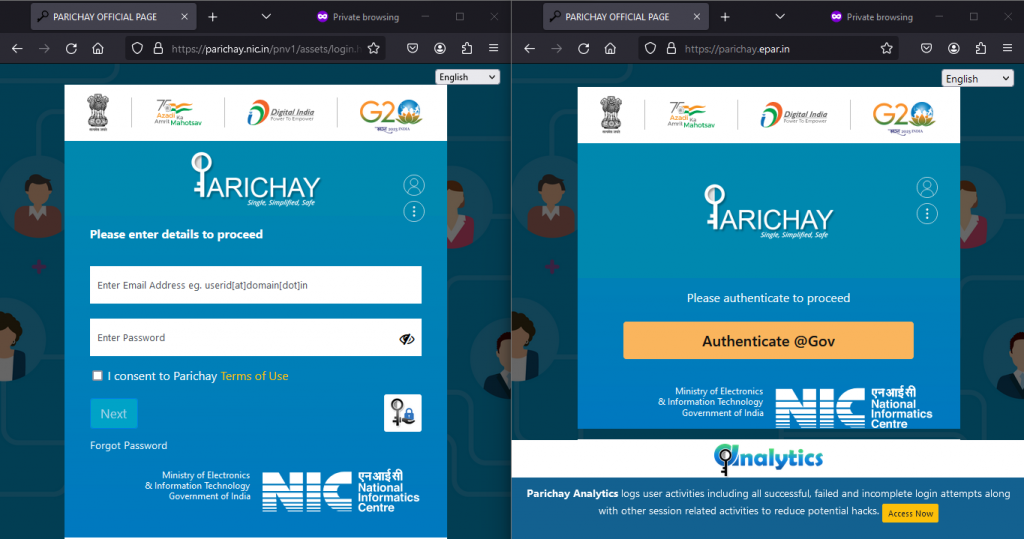
In the first scenario, the downloads occur from ‘parichay.epar[.]in,’ and in the second scenario, the fake domain mimics ‘parichay.nic[.]in,’ an Indian Government SSO platform.
Legitimate and fake Parichay domains (Source -SEQRITE Labs)
The initial decoys pertain to the DSOP Fund form, and the Ministry of Defence presentation was the second. PowerShell script ‘Mail_check.ps1’ drops encrypted ‘syscheck.exe’ to Startup for persistence.
Rust-based payload with PDB name ‘Aplet.pdb’ (Dec 14 timestamp). Here below, we have mentioned all 13 file types that are shortlisted:-
.pp
.pptx
.pdf
.xlsx
.xlsm
.xls
.xlam
.doc
.docx
.docm
.txt
.dot
.ppam
New phishing hits the Indian government, stealing secrets via Rust payloads, encrypted PowerShell, and OshiUpload.
Fake domains mimic government entities in the RusticWeb attack, possibly tied to the APT threat linked to Pakistan. As threat actors adopt Golang, Rust, and Nim, researchers urged users to stay vigilant and take all the necessary security precautions.
In this article, we’ll compare the Google Pixel 8 vs Apple iPhone 15. These two phones are a part of Google and Apple flagship lineups, even though they’re not the most powerful offerings. Their price tags are somewhat similar, however, and chances are that quite a few of you are considering getting one or the other. So, we’ll do our best to help out with that decision. We’ve already compared the Google Pixel 8 and Apple iPhone 15 Pro, so it’s now turn for the vanilla iPhone 15.
As per usual, we’ll first list the specs of both phones, and will then move to a number of other categories. Those categories are design, display, performance, battery, cameras, and audio. There’s plenty to talk about here, as these two smartphones are quite different. Having said that, let’s begin, shall we?
From the design standpoint, these two devices are quite different. The Google Pixel 8 is quite curvy. Its backplate is curved towards the sides, while the sides themselves are also quite curved. The iPhone 15 is the opposite of that. Its front and back sides are flat, and so is the phone’s frame, all around. The frame is slightly curved towards the edges, though, for comfort’s sake.
The two devices also look different. The Pixel 8 has a flat display and a centered display camera hole, along with very thin bezels. Those bezels are not uniform, but almost. All of its physical buttons sit on the right-hand side. The iPhone 15, on the other hand, has a flat display too, with a pill-shaped cutout at the top. Its bezels are also quite thin, and they’re also uniform. The physical buttons are split between the left and right sides of the phone.
If we flip them over, you can see even more differences. The Pixel 8 includes a camera visor on the back, which connects to the frame on the left and right sides. It is covered by metal, and does protrude on the back. The iPhone 15, on the flip side, has a regular camera island in the top-left corner. The two devices are similar in size, but the Pixel 8 is slightly taller, slightly narrower, and a bit thicker. It is also 16 grams heavier than the iPhone 15, at 187 grams. Both smartphones are IP68 certified for water and dust resistance, and both are quite comfortable to use, albeit quite slippery.
Google Pixel 8 vs Apple iPhone 15: Display
The Google Pixel 8 features a 6.2-inch fullHD+ (2400 x 1080) OLED display. That panel is flat, and it supports a 120Hz refresh rate. The display also offers support for HDR10+ content. It gets up to 2,000 nits of brightness at its peak. The screen-to-body ratio here is 85.5 percent, and the display aspect ratio is 20:9. This panel is protected by the Gorilla Glass Victus from Corning.
On the iPhone 15, you’ll find a 6.1-inch 2556 x 1179 Super Retina XDR OLED display. That panel is also flat, and it supports HDR10 content. Dolby Vision is also supported, and the panel goes up to 2,000 nits of brightness at its peak. This is only a 60Hz panel, unfortunately, you’re not getting a high refresh rate here. The screen-to-body ratio is 86.4 percent, and the display aspect ratio is 19.5:9. The iPhone 15 panel is protected by the Ceramic Shield Glass.
The Google Pixel 8 does have one major advantage here, its refresh rate. You will notice the difference between them. Some people simply don’t care, though, so if a high refresh rate doesn’t matter to you, both displays are great. They are very vivid, have great viewing angles, and the blacks are deep. The touch response is also very good, and both displays have good protection too. They’re both also plenty bright, no complaints there.
Google Pixel 8 vs Apple iPhone 15: Performance
Google’s handset is equipped with the Google Tensor G3 processor. It also includes 8GB of LPDDR5X RAM, and UFS 3.1 flash storage. The Apple iPhone 15, on the other hand, comes with the Apple A16 Bionic processor, 6GB of RAM, and NVMe flash storage. The iPhone 15 does have a more powerful SoC, despite the fact it’s not the latest one, though the Tensor G3 is great for AI, and it’s well-optimized for the Pixel.
The point is, both of these smartphones offer great performance. When it comes to regular actions, such as browsing, taking pictures, consuming multimedia, and various other everyday tasks… they’re both very smooth. Even multitasking goes without a hitch, no complaints there. The gaming department is where you may notice a difference, however, especially if you’re into high-end titles.
Let’s take Genshin Impact for example, as that’s always a good benchmark. It runs better on the iPhone 15, even though the Pixel 8 is not far behind. The Tensor G3 is not made for gaming, but it proved it can handle games without a problem. It does get warmer than the iPhone 15 while gaming, though.
Google Pixel 8 vs Apple iPhone 15: Battery
The Google Pixel 8 packs in a 4,575mAh battery. The iPhone 15 has a 3,349mAh battery. Apple’s iPhones usually have smaller battery packs due to the nature of iOS, but that doesn’t necessarily mean that they have inferior battery life. Is that the case here? Well, from what we’ve seen, the two phones are on par in terms of battery life. Neither is outstanding, but both are good.
Getting around 6.5-7 hours of screen-on-time should be possible on both. Do note that we’re talking about battery life without the gaming component. Your mileage may vary, though, of course, as you’ll be using your phone differently, with different apps installed, and with different signal strengths. The point is, both smartphones do offer good battery life, it’s just not outstanding or anything of the sort. For most people, however, this will be plenty.
Neither phone offers particularly fast charging, unfortunately. The Pixel 8 supports 27W wired, 18W wireless, and 5W reverse wireless charging. The iPhone 15, on the flip side, supports 20W wired, 15W wireless MagSafe and Qi2 charging, and 7.5W wireless Qi charging. Reverse wired charging is also on offer at 4.5W. Neither of these two smartphones comes with a charger in the box, though, so keep that in mind.
Google Pixel 8 vs Apple iPhone 15: Cameras
On the Pixel 8, you’ll find a 50-megapixel main camera, along with a 12-megapixel ultrawide unit (126-degree FoV). The Apple iPhone 15, however, has a 48-megapixel main camera, and a 12-megapixel ultrawide unit (120-degree FoV). The good news is, both smartphones do a great job in the camera department. The pictures coming from these two phones are considerably different, though.
The images from the Pixel 8 look contrasty and processed, which is a look many people truly appreciate. The iPhone 15 is trying to keep things closer to real life, but also enhance pictures a bit, so that they pop. Both smartphones do succeed, as the images end up looking sharp, detailed, and vivid. Both handle HDR situations really well, but that’s where the Pixel 8 truly shines.
In low light, the Pixel 8 has a tendency to brighten up shots more, which is not a bad thing. Low-light shots from the iPhone 15 do look more realistic, and they’re darker. Both devices manage to retain quite a few details in low light. Their ultrawide camera do keep a good balance too, and can be used in low light as well. They also manage to keep the color science of the main camera, which is great.
Video recording is still something that the iPhone excels at, and that’s the case here too. The Pixel 8 is only a step behind, however, as the videos do end up looking great.
Audio
You will find stereo speakers on both the Google Pixel 8 and Apple iPhone 15. Speakers on both of them are good. They’re loud enough, and well-balanced. We’ve heard better speakers, though, many of them. Still, not many people will find things to complain about.
What you’re not getting on either phone is a 3.5mm headphone jack. You can always use their Type-C ports for wired audio connections, but there’s no dedicated audio jack. Both smartphones do ship with Bluetooth 5.3 support, however, so you can connect your headphones wirelessly.
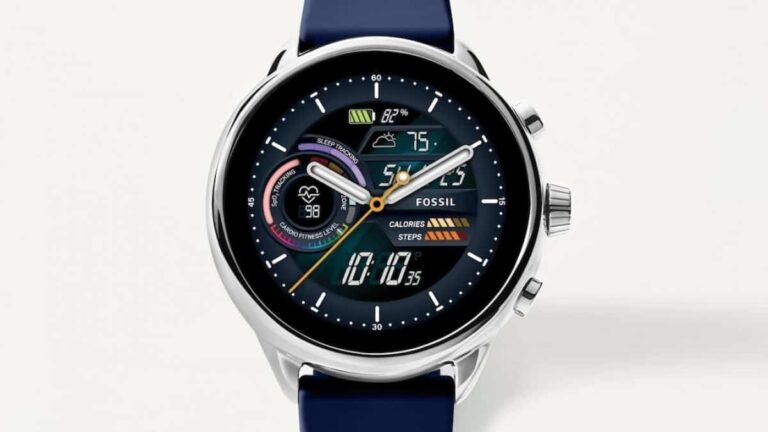
Fossil might have given up on Google’s Wear OS-powered smartwatches. Multiple Reddit users have claimed that Fossil won’t be releasing another Wear OS-based watch in the future. The Reddit posts seem to be in line with the rumors around the future of Fossil’s Wear OS-powered smartwatches.
Fossil Gen 7 Wear OS watch allegedly won’t see the light of the day
Several Reddit users have allegedly spoken to retail employees. They have purportedly shed some light regarding the future of Fossil’s Wear OS-based products. The employees claim that the Fossil Gen 7 Wear OS watch will not see the light of the day. The reports could be true because the Gen 7 watch hasn’t been the subject of major headlines.
The company’s usual late-summer product launch timeframe has also come and gone without any new devices. Also, CES 2024 is just around the corner when Fossil usually introduces its latest wearables. However, there aren’t many leaks or any signs regarding the Fossil Gen 7 Wear OS smartwatch.
Notably, more than two years have passed since the launch of Fossil Gen 6, the brand’s latest Wear OS watch. The most recent development for the lineup was the rollout of Wear OS 3.5 update in November this year.
Furthermore, one Reddit user claims a “friend who works at Fossil” suggests that the brand is waiting for new chipsets. The company is purportedly waiting for the chipset giant Qualcomm to release a new Wear OS platform. However, there haven’t been any reports of Qualcomm developing a new chipset for Wear OS devices. So, there’s not much to back the information posted by the Reddit user.
Fossil is running a fire sale on the Gen 6 watch, possibly to clear inventory
Fossil is currently running a fire sale of its last Wear OS smartwatch, the Fossil Gen 6 Wellness Edition. It is available to buy on the company’s website for $129, which is 50 percent off the usual retail price. Fossil may be running this sale around Christmas to clear the remaining stocks of the Gen 6 Wellness Edition.
Notably, most of the original Fossil Gen 6 watches have also disappeared from sale on the company’s online store. Only some of the Gen 6 hardware is available to purchase at the moment.
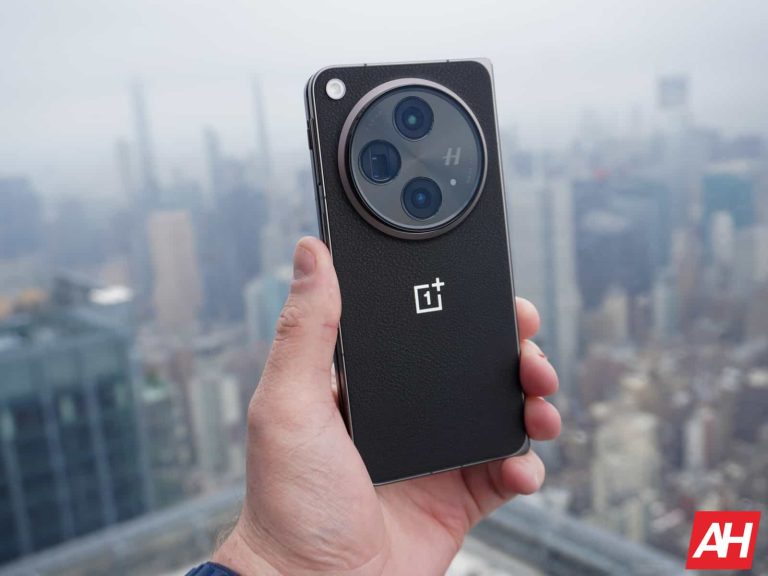
OnePlus entered the foldable market with the OnePlus Open this year. It turned out to be a massive success and also made it to our list of best smartphones of 2023. Well, the OnePlus’ foldable is getting an update, but hold your horses because it’s not Android 14. Nevertheless, it is still a noteworthy update. The latest update is OxygenOS 13.2 and as the name suggests it builds upon the Android 13.
OnePlus Open receives a new update but it’s still Android 13
As spotted by the Telegram channel OnePlus Open: The Chatroom (via Android Authority), the latest Oxygen OS 13.2 weighs about 190.66 MB in size and comes with firmware version CPH2551_13.2.0.203(EX01), including the latest December 2023 security patch. It is comparatively lighter than the last November 2023 security patch which weighed around 508.98 MB.
What’s new with the OxygenOS 13.2 update on the OnePlus Open?
The new update brings several performance upgrades to enhance the overall experience. It tackles both system and camera performance, offering a smooth and stable browsing experience. Specifically, it improves touch controls and reduces the device’s power consumption. Additionally, network stability receives a boost, promising seamless connectivity.
Photography enthusiasts will be happy to know that OxygenOS 13.2 addresses several camera concerns. It finally fixes the shutter lag issue when switching out of Nightscape, tackling those unresponsive UI elements like Retouch and Flash. It also resolves the main screen freezing when using Dual Preview with the rear camera. With these improvements, capturing stunning photos and videos is now smoother than ever on OnePlus Open.
The latest OxygenOS 13.2 update will be rolling out to all devices throughout the week. Ideally, your phone will automatically download. But if you’re eager to jump in, you can check for it yourself by heading to Settings > About device > OxygenOS > Check for update. There’s no official word on OnePlus Open’s Android 14 update yet. However, with other OnePlus models like the mid-range Nord CE 3 Lite already receiving the update, it’s anticipated to be available for the OnePlus Open soon.
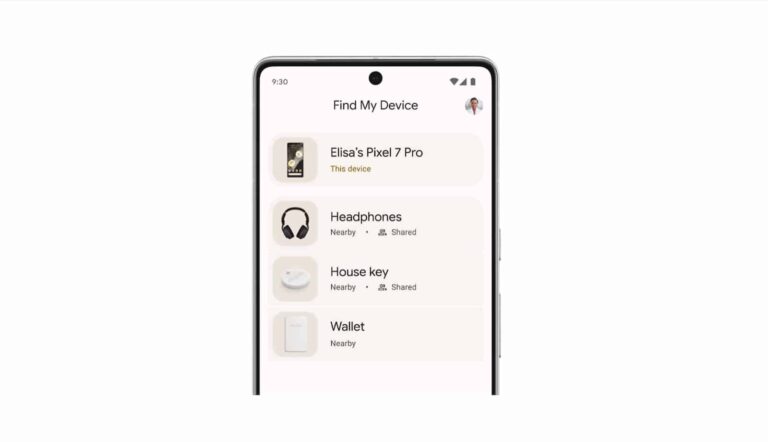
Google and Apple have jointly submitted a proposed industry specification to implement Android’s ‘Find My Device‘ network. It aims to ensure compatibility with unauthorized tracking detection and alerts across Android and iOS platforms. Notably, the implementation of the ‘Find My Device’ network is currently waiting for Apple to adopt the required specifications.
Bluetooth location-tracking devices, often used for finding personal items, have raised concerns about potential unwanted tracking of individuals. The proposed specification outlines best practices and instructions for manufacturers. It provides guidance on incorporating unauthorized tracking detection capabilities into their products.
Dave Burke, Google’s Vice President of Engineering for Android, emphasized Android’s commitment to user protection, stating, “Android has an unwavering commitment to protecting users and will continue to develop strong safeguards and collaborate with the industry to help combat the misuse of Bluetooth tracking devices.”
Google and Apple lead initiative to combat unwanted tracking with Android’s ‘Find My Device’ network
Apple, which introduced AirTag with proactive features to discourage unwanted tracking, sees the industry specification as a critical step forward. The collaboration of both Apple and Google builds upon AirTag protections, representing progress in combating unwanted tracking across iOS and Android, notes Ron Huang, Apple’s Vice President of Sensing and Connectivity.
Importantly, the proposed specification not only incorporates feedback from device manufacturers but also integrates input from safety and advocacy groups. The Internet Engineering Task Force (IETF) has proposed the specification required to implement Android’s ‘Find My Device’ network. Interested parties are invited to review and provide comments over the next three months. Google and Apple plan to address feedback and release a production implementation of the specification for unwanted tracking alerts by the end of 2023, supported in future versions of Android and iOS. This week Google has up
All in all, the collaboration between Google and Apple represents a significant step towards establishing industry-wide standards to enhance user privacy and safety. It’ll particularly address the potential misuse of Bluetooth location-tracking devices for unwanted tracking.
AI technology could push humanity forward, but many people fear that it will push humanity into the unemployment line. This is what’s occupying more people’s minds as AI gains the ability to automate more and more tasks. Now, tens of thousands of Google employees fear that they’re going to be replaced by the same AI that’s paying their paychecks.
This is still a developing story, and we’re still waiting for more information from Google. So, we’ll keep you updated on what happens. Google is a large ad company, and it has a massive ad sales division consisting of more than 30,000 employees. Reportedly, the company is looking to eventually use various AI tools to help boost productivity internally.
While AI isn’t as smart as a human being in certain ways, it’s still smart in other ways, and it has the ability to perform tasks much faster than a human being. This is what’s putting the fear of unemployment into many people. So, the company switching to using AI tools has led to some anxiety within the company.
Thousands of Google employees fear being replaced by AI
The fear’s only growing because, according to The Information, Google told its employees that it’s going to be reorganizing its ad sales business. Sure, that’s not outright telling the employees “Pack your stuff”, but it still has many employees on their toes. Also, we can’t deny that when many companies cut jobs, they refer to it as “reorganizing” or “restructuring” certain departments. It’s a way of sugarcoating the harsh facts.
As noted in the report, about 45% of the 30,000 employees in the ad sales department are working on projects that have been simplified by AI. This means that nearly half of the people in the unit are working on projects that could easily be taken over by Bard or Gemini.
If the company does downsize its employees for the sake of efficiency, it’ll really throw a wrench into the company’s whole “Developing AI responsibly” spiel. Earlier this year, the company made a big deal about how its AI technology won’t negatively impact people. Well, does this extend to the people working at the company? This is what we’re all wondering.
We’ll just need to wait and see what the company is doing. It, unfortunately, seems likely because companies are cutting jobs left and right. Intel recently cut hundreds of jobs.
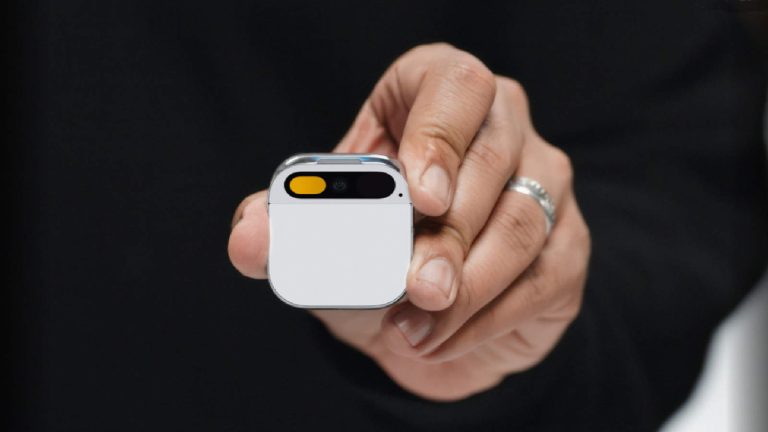
Earlier this year, Humane AI shook the tech world with the introduction of the AI Pin. This is a device that aims to bring generative AI into the real world, and it’s a first for the industry. News about it has been ramping up over the past couple of months like how much the AI Pin will cost, its notable features, and other information. Now, according to sources, we know that the AI Pin will ship in the spring of 2024.
What is the AI Pin?
Imagine taking ChatGPT and clipping it to your shirt. This is basically what the AI Pin is. It’s a small mobile device that you clip onto your shirt. It has the ability to scan real-world objects by using the built-in camera and microphone and give you feedback using generative AI.
Say, you scan a food item using the Pin. Well, using generative AI, it will be able to ascertain what it’s looking at and answer questions based on it. The company’s co-founder Imran Chaudhri gave an example of scanning a candy bar and asking if he should eat it during a Ted Talk.
The AI Pin doesn’t have an operating system per se, according to Humane. Instead, it’s described as a collection of AI models that access when needed. So, if you ask it a question, it looks like it will look for and tap the right model for the task.
How much does it cost?
This is a fancy device, and fancy comes at a premium. The AI Pin costs $699, and you get a pack with all of the basics. This includes a few accessories as well. You’ll get the Pin, two Battery Boosters, a charging case, a charging cord, a wall adaptor, and a wireless charging pad.
Along with the Pin, you’ll also need to pay a $24/month subscription fee for the wireless service. This is through Verizon, and you’ll need this for the Pin to access the internet; thus, you’ll need this to access the AI models.
The AI Pin will ship in several months
This is a really unique device, and it looks promising. If you’re excited to get your hands on one, there’s still going to be some time to wait. According to some new reports, the AI Pin will officially ship in March 2024. This is for people who put their orders in early. If you’re a later adopter, your orders should be coming in a bit later.
Microsoft completed the Activision Blizzard acquisition in October after facing multiple backlash from regulators. Since then, the tech firm has started to change its Xbox gaming leadership to integrate Activision Blizzard. Now, Microsoft is again shaking up the Xbox gaming structure following the departure of Activision Blizzard CEO Bobby Kotick.
As The Verge reports, Bobby Kotick will step down as Activision Blizzard CEO on December 29. He announced the news on a company’s blog post, saying, “As my last day leading this company inches closer, I marvel at how far the talented people at our company have come toward realizing the great potential of games.”
It remains to be seen who will lead Activision Blizzard after Kotick. While Kotick’s departure wasn’t that surprising, most members of Activision Blizzard leadership will continue working under Microsoft and its game content and studios president, Matt Booty.
Activision Blizzard CEO Bobby Kotick leaves the company following Microsoft’s takeover
Meanwhile, Activision Blizzard’s chief communications officer, Lulu Meservey, will also leave at the end of January. Humam Sakhnini, vice-chair of Blizzard and King, and a bunch of other executives will part ways with Microsoft, too.
According to Xbox chief Phil Spencer, Brian Bulatao (chief administrative officer), Julie Hodges (chief people officer), Armin Zerza (chief financial officer), and Grant Dixton (chief legal officer) will report to their peers at Microsoft gaming department. Spencer added the named people will depart Microsoft in March 2024. He also noted they have an “exciting 2024 lineup of games” across Activision, Bethesda, Blizzard, King, and Xbox Game Studios.
In an internal memo sent by Matt Booty, he also announced some structural changes at ZeniMax and Bethesda. Jill Braff will serve as the new head of ZeniMax/Bethesda studios and will lead their game development teams. Jamie Leder continues working as CEO of ZeniMax/Bethesda and directly reports to Matt Booty.
Microsoft started changing its Gaming business leadership in October
Structural changes at Microsoft Gaming business and Activision Blizzard date back to October. Less than two weeks had passed since the acquisition of Activision Blizzard, Microsoft promoted Matt Booty to president of game content and studios. Sarah Bond was also appointed as the new Xbox president to lead the Xbox platform and hardware work. Microsoft is expected to make even more structural changes in 2024.
The exploited WinRAR vulnerability was a zero-day flaw identified in August 2023 – Despite subsequent patching efforts, unpatched systems remain at risk and continue to be targeted.
Cybersecurity researchers at Deep Instinct Lab have revealed a new series of cyberattacks carried out by ‘UAC-0099,’ specifically targeting Ukrainians. These attacks employ common tactics such as using fabricated court summons to entice targets into executing malicious files.
The group’s activities were initially revealed in May 2023 through the Ukrainian CERT advisory ‘#6710,’ and Deep Instinct has now provided exclusive insights into their latest attack.
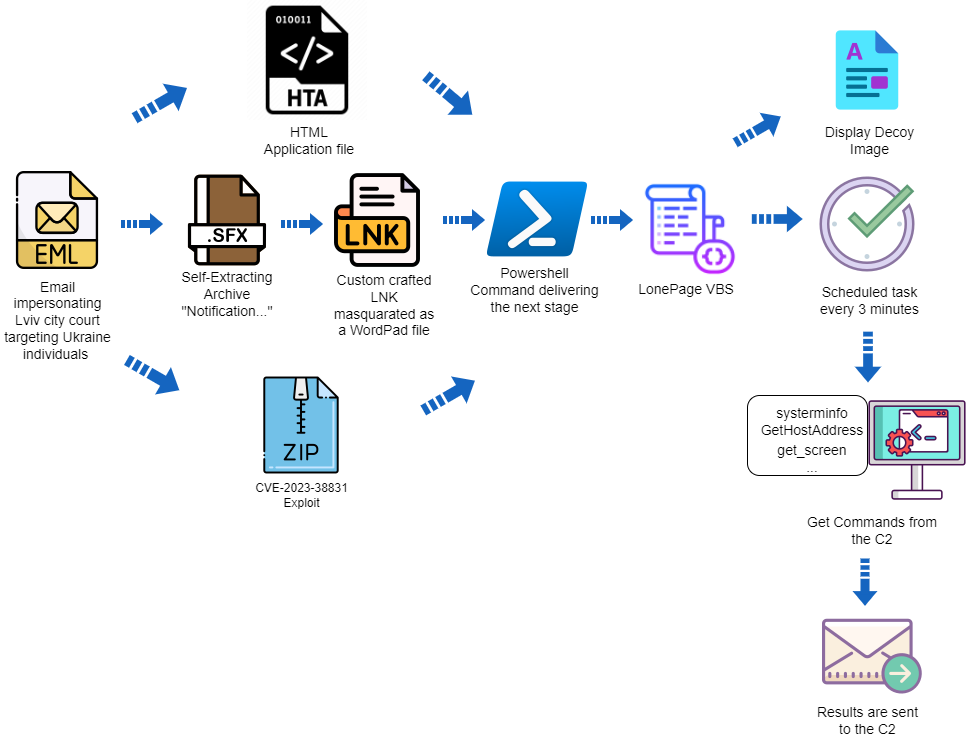
According to a blog post from the company, on December 21st, 2023, ‘UAC-0099’ utilized an email scam to impersonate the Lviv city court via the ukr.net email service. The target was a Ukrainian employee working remotely for a company outside Ukraine. The deceptive email contained an executable file created by WinRAR, named docx.lnk.
Although appearing as a regular document, it was an LNK shortcut designed to execute PowerShell with malicious content, decoding two base64 blobs and writing the output into VBS and DOCX files.
The VBS malware, identified as ‘LonePage’ by CERT-UA, establishes a concealed PowerShell process that communicates with a predefined C2 URL to retrieve a text file. The script verifies the presence of the string ‘get-content’ in the text file, subsequently executing the code from the server and saving it as an array of bytes.
The LonePage VBS (VBS) proves to be a potent tool, enabling cybercriminals to infiltrate computers and execute malicious code. Employing a deceptive tactic, it utilizes a DOCX decoy document, tricking victims into believing they are opening a legitimate file. Employing a method akin to the LNK attack vector, the HTA technique involves an HTML file incorporating a VBScript that executes PowerShell with a recurring four-minute task cadence.
In both incidents, the pro-Russian gang exploited a recognized WinRAR vulnerability, designated as CVE-2023-38831 in August 2023, and identified by Group-IB. This vulnerability arises from the way WinRAR processes ZIP files, requiring user interaction with a specially crafted ZIP archive for exploitation.
The attacker crafts a seemingly harmless archive by appending a space after the file extension. This archive contains a folder with an identical name and an extra file bearing a “.cmd” extension.
When a user double-clicks on the innocuous file, the associated “cmd” file is executed instead. This vulnerability heightens the risk of widespread infections, as even security-aware victims may inadvertently run malicious code while opening what appears to be a harmless file.
Researchers have found this gang’s tactics simple yet effective. They rely on PowerShell and create a scheduled task to execute a VBS file. Monitoring/restricting these components can reduce the risk of “UAC-0099” attacks and help identify them quickly in case of compromise.
The attack flow (Deep Instinct Lab)
This isn’t the first time Russian hackers have exploited known vulnerabilities. In early December, Hackread.com reported how the Russian GRU’s affiliated Forest Blizzard exploited an Outlook vulnerability allowing attackers to steal Net-NTLMv2 hashes and access user accounts.
On December 15, 2023, reports surfaced that Russian hackers breached a major US biomedical company in a TeamCity-linked attack. Despite the vulnerability, which scored 9.8 on the CVSS scale, being patched in September 2023, unpatched systems remain susceptible to ongoing cyberattacks.