Chipmaker Intel has laid off as many as 311 workers across its California offices, with 235 impacted in Folsom and 76 in other Santa Clara locations. The affected employees will be notified by the end of the month, meaning they’ll lose their jobs before the year ends.
Intel’s Folsom campus is a key location for the company. It drives research on Solid solid-state drives (SSDs), graphics, software, and more.
The semiconductor major has conducted a series of layoffs throughout 2022 and 2023, impacting hundreds of employees. In August 2022, the company laid off 140 workers.
It was followed by a larger wave of layoffs in late 2022 and early 2023, which saw around 500 employees lose their jobs. While these reductions may seem small compared to Intel’s global workforce of 110,000, they have had a significant impact on the affected individuals, regardless of the scale of the layoffs. A report by CRN notes that Intel had about 131,900 employees during the end of 2022, per January’s regulatory filing.
Could there be more layoffs in 2024?
Yes or no. However, reports suggest that Intel could continue to cut the workforce in the next year, as well. Santa Clara-based semiconductor major hinted at the same in several publications. A spokesperson told The Register, “Intel aims to speed up its strategy and cut costs.”
Intel is also reported to be struggling with revenues. In October, Intel’s Chief Executive Officer, Pat Gelsinger, spoke about challenges. The PC market slowed down. So, the third-quarter revenue dropped from $19.4 billion to about $15.4 billion. Plus, Intel plans to boost its U.S. manufacturing. This move likely stems from the recent and ongoing China-U.S. trade tensions. Meanwhile, due to AI, more than 30,000 individuals in various fields are concerned about potential job losses.
Google is always adding new and useful changes to Chrome that augment the experience. There’s a reason why it’s the most popular browser. The company just announced some useful safety and performance improvements to Chrome that only make the experience better.
Here are the new safety and performance improvements coming to Chrome
Starting off the list, we have a feature that’s useful any time of the year, but it’s most useful during the holiday season. You’re likely to be doing some last-minute holiday shopping. Well, the holiday season is the time when most online scams happen. Bad actors like to prey on folks looking for the best deals on what to buy their loved ones.
Safety Check
Well, Google announced that the Safety Check feature will now run in the background. This is the feature that monitors your web activity and makes sure that you’re safe online. You’ll get notifications about which of your passwords were compromised. Also, the program will let you know if any of the extensions you’re using are harmful and if you’re not on the latest version of Chrome.
Google is also adding more functionality to Safety Check. Some sites need permissions like the ability to use your microphone or camera. Well, if you grant a site that permission, and you don’t visit that site for a while, Chrome will automatically remove those permissions.
Lastly, if a site you don’t typically interact with is sending you notifications en masse, Chrome will disable notifications for that site.
Saved Tab Groups
This feature shouldn’t be a surprise to you if you’ve been testing out Chrome features early. In fact, this feature has been in testing for the greater part of the year. Now, it’s making its way to the public. You’ve been able to make Tab groups in Chrome. However, this feature will let you save those groups to be summoned at a later time. The group will live right under your navigation controls. You’ll see the saved tab groups even if you close the program.
Smarter Performance Controls
Rounding out the list of new changes coming to Chrome, we have some new additions to the Memory Saver Mode. If you don’t know what this mode is, Google introduced Memory Saver last year. When you hover your cursor over a tab, you’ll see how much memory (RAM) that tab is using up. Memory Saver mode will put certain tabs to sleep in order to save RAM.
With this update, when you hover over the tab, you’ll see more information. It will show you how much Memory Saver has saved you. Also, Chrome will make it easier to know what sites should remain on all the time.
These changes are rolling out now, so be on the lookout for a new update from Chrome.
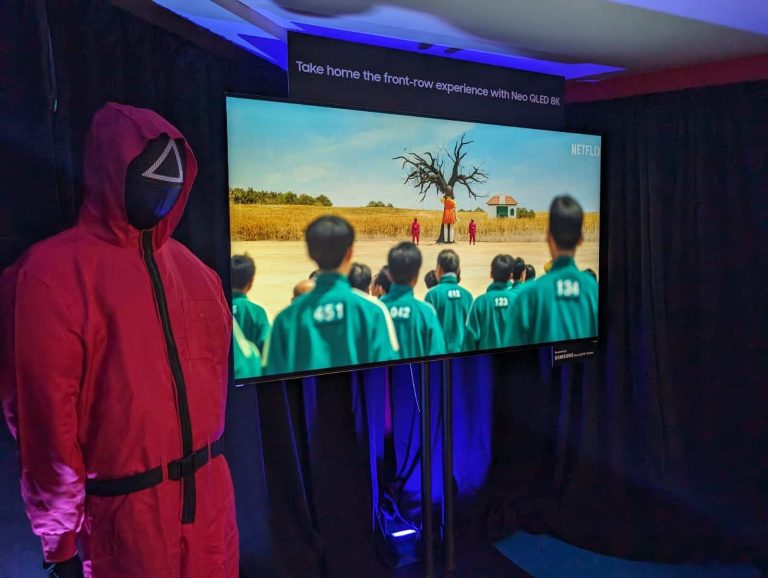
Samsung and Netflix have teamed up to bring the hit series Squid Game to life through an immersive pop-up experience in Los Angeles. The setup features iconic sets inspired by the show and lets visitors compete in games that are drawn from the show too. The Korean firm’s cutting-edge technologies and products, including the latest Smart TVs and Galaxy smartphones, power the experience.
Samsung and Netflix bring Squid Game to life through a pop-up experience
Called “Squid Game: The Trials,” Nextflix and Samsung’s new setup in Los Angeles offers a one-of-a-kind experience to fans of the mega-hit series. Visitors can not only experience sets inspired by the series in real life but participate in similar games too. Of course, unlike the series, there is no actual death involved here. Samsung’s flagship Neo QLED 8K, 4K, and The Frame TVs and Galaxy Z Flip 5 and Galaxy S23 Ultra smartphones power the setup.
The Neo QLED 8K TV welcomes guests at the entrance with the “Squid Game: The Challenge” trailer. Once inside the venue, visitors can enjoy various experiences with the Galaxy Z Flip 5 and Galaxy S23 Ultra. The Flip’s FlexCam allows them to take hands-free photos, which they can download and get framed. The Ultra’s powerful processor, large display, and built-in S Pen make it perfect for an immersive gaming experience.
The pop-up experience offers a total of six immersive games all inspired by the Netflix shows. Those who come out as winners will receive priority casting consideration for “Squid Game: The Challenge” season 2. The immersive experience will last about 70 minutes. “Do you have what it takes to survive 70 minutes of gameplay masterminded by the infamous Front Man? Take on beloved—and dreaded—games from the Squid Game universe,” Netflix says.
After enjoying the games, participants can retreat to the VIP room. They can then watch ongoing challenges on Samsung’s The Frame lifestyle TV’s expansive 85-inch screen. “The Lifestyle TV—with its latest Matte Display technology—offers a premium viewing experience that replicates the commanding ambiance of the Front Man’s quarters in the series,” the Korean behemoth said in a press release.
The pop-up experience is currently open to visitors
The “Squid Game: The Trials” pop-up experience is currently open to visitors in Los Angeles. The precise location is 200 N. Fairfax Ave, Los Angeles. Anyone aged 13 or above can visit the pop-up experience. Tickets start at $39 and are available at Netflix.com or Ticketmaster.com. The experience will run into the new year but tickets are available in limited numbers. Netflix and Samsung plan to bring this experience to more cities around the world later.
Microsoft’s security team researchers discovered numerous security vulnerabilities in the Perforce Helix Core Server platform. One of these includes a critical severity remote code execution flaw. Microsoft urges users to update their systems with the latest software versions to receive the relevant security fixes.
Microsoft Warns Users Of Severe Perforce Helix Core Server Vulnerabilities
In a recent post, Microsoft elaborated on the Perforce Helix Core Server vulnerabilities that its researchers discovered during a security review. An unauthenticated adversary could exploit the vulnerabilities to trigger denial of service on the target systems or execute arbitrary codes.
Briefly, they found the following four vulnerabilities riddling the platform.
CVE-2023-45849 (CVSS 9.8): Unauthenticated DoS via rmt-UpdtFovrCommit RPC Command. The vulnerability allowed system-level access (LocalSystem) to unauthenticated remote attackers. Exploiting the flaw could let the attacker implant backdoors into the target software, exfiltrate Source codes, and steal other information.
CVE-2023-5759 (CVSS 7.5): Unauthenticated DoS via RPC Header Abuse
CVE-2023-35767 (CVSS 7.5): Unauthenticated DoS via rmt-Shutdown RPC Command
CVE-2023-45319 (CVSS 7.5): Unauthenticated DoS via rmt-UpdtFovrCommit RPC Command
Microsoft has shared a detailed technical analysis of these vulnerabilities and how they discovered them in their post.
After discovering the vulnerabilities, Microsoft responsibly disclosed the flaws to the vendors in August 2023. Followbug report, the vendors started working on developing the relevant security fixes, deploying them all for the users with Perforce Server version 2023.1/2513900. Users must upgrade to this (or the latest) version to avoid potential threats.
Perforce Helix Core Server is a dedicated source code management platform, providing users with a central location to store codes, files, and digital assets. The platform boasts a huge user base from various sectors, such as government, military, gaming, and technology. Its clientele includes some prominent tech giants, including Microsoft.
It seems like Google is planning to change the name of its Nearby Share service. As many of you know, Nearby Share comes pre-installed on Android devices, and it can be used for sending and receiving files via Wi-Fi. Think of it as AirDrop for Android.
Nearby Share is getting a new name, and the choice here makes us wonder…
This information comes from kamila, a tipster. After the tipster installed the latest beta update to Google Play services (version 23.50.13), the change occurred. Nearby Share got a new name, Quick Share.
The tipster even got a notification to let him know the change happened, as you can see in the gallery below. Along with a new name, a new icon has arrived. That new icon has two arrows pointing at each other, that is also shown in the gallery below.
Other than the name change, and the icon change, everything else seems to be the same. We have no idea why Google opted to change the name of Nearby Share. It has been in use for 3 years, and it’s a perfectly fine name.
‘Quick Share’ is also the name of Samsung’s file-sharing service
That being said, what’s interesting here is that ‘Quick Share’ is also the name of Samsung’s file-sharing software which comes pre-installed on Galaxy phones. Was this change intentional?
Google has to be aware that Samsung is using the same name. So, why this change? Well, it’s possible that Google and Samsung achieved some sort of a deal, and plan to merge their file-sharing services. That’s just a wild guess, though.
The two companies have collaborated closely a number of times in the past, so this wouldn’t be all that surprising. The name of the service is less important, what’s truly important is that it comes pre-installed on Android devices, as it did thus far.
Google will likely address this change once it hits the stable channel. For the time being, this is just a beta change.
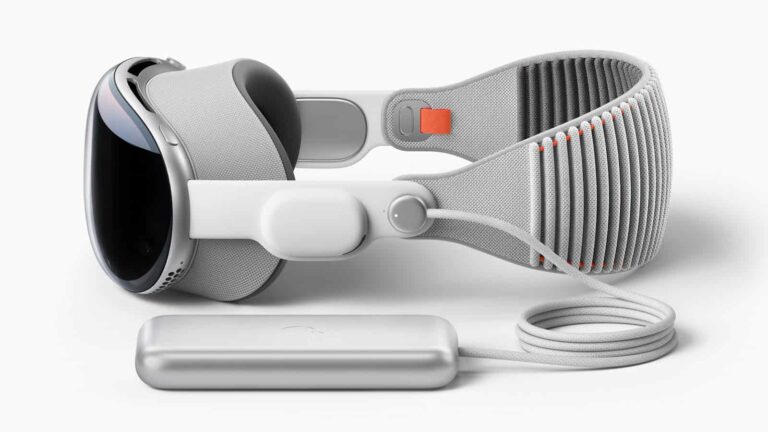
Apple may have finalized a release date for its first-gen XR (extended reality) headset, the Apple Vision Pro. According to a Bloomberg report, the headset will arrive on the market in February 2024. The publication hasn’t shared a date but says the company has urged software developers to “get ready” for the Vision Pro’s market debut, hinting at an imminent release.
Apple is gearing up to release the Vision Pro
Apple announced the Vision Pro in June. The company then said the $3,500 XR headset would debut in “early 2024” but didn’t provide a precise date. Reports suggested it would come as early as January. However, the Korean media recently said Apple has pushed back the release to March, supposedly to give a finishing touch to the product. After all, it has to justify a huge price tag.
Meanwhile, sources have told Bloomberg that the Vision Pro is headed to the market in February. It appears Apple has made significant progress in readying the headset for retail debut. The production is already in full swing, with the company aiming to complete the production of customer-bound units by the end of January. A market release will follow shortly.
The publication also obtained an email Apple sent to app and software developers. It encouraged the developers to start testing their Vision Pro apps with the latest tools. The firm also asked them to send their software to Apple for feedback and get ready for the headset’s market debut. All of this hints at a nearing release. Unless there is a last-minute hiccup, a February or March release looks highly likely.
Since the Vision Pro is an entirely new product in the Apple family—the first new product category since the company entered the smartwatch market in 2015—it needs to train employees to properly wear and use the headset, so they can demonstrate the product better in front of prospective buyers. The firm plans to start the training in January. It would train at least two employees from each of its retail outlets.
Samsung is working on its Vision Pro alternative
Apple’s Vision Pro may have a new competition in the market within months or weeks of its debut. Samsung is also working on its own XR headset, allegedly called the Galaxy Glass. It is hurrying to release the product in early 2024. The Samsung device may not be as premium as the Vision Pro but is expected to bear a lot of functional similarities to the latter. The two tech giants appear all prepared for an XR battle next year.
The OnePlus 12R renders have just surfaced and thus confirmed that the device will look like the OnePlus 12. That is not surprising anyone, really, as that’s exactly what we expected will happen.
The OnePlus 12R will look almost identical to its sibling, the OnePlus 12
Just to be clear the renders that leaked are coming from China Telecom, and are showing the OnePlus Ace 3. That same phone will be rebranded to the OnePlus 12R in China, Europe, and the US, so we’re basically getting a look at the OnePlus 12R too.
You really have to look hard in order to find a difference between the two phones. It is visible on the back, though. The sizes of the sensors are different, and also the fourth circle inside the camera island.
You’ll notice that an extra sensor is missing from there, only an LED flash is placed on the inside. It look a bit different on the OnePlus 12, with an extra sensor next to the LED flash.
Other than that, they look the same. We’re looking at a glass sandwich design here, with metal being stuck between two glass sheets. A centered display camera hole is placed on the front, and the display is curved.
The power/lock and volume rocker buttons are placed on the right-hand side. There is an alert slider included on the left-hand side of this phone. Check out the images above to get a full picture.
The phone will be quite powerful, and hopefully have a great price tag
Now, in terms of specs, we also know what we’re getting. The device will be fueled by the Snapdragon 8 Gen 2 SoC. It will include a 6.78-inch LTPO panel with up to 120Hz refresh rate.
OnePlus will offer 8GB and 16GB LPDDR5X variants, globally, and 128GB and 256GB storage options. It seems like only the 256GB storage variant will utilize UFS 4.0, though.
A 5,500mAh battery is also coming, and it will support 100W wired charging. A 50-megapixel main camera will be backed by an 8-megapixel ultrawide unit, and a 2-megapixel macro camera.
The device will launch in China on January 4, and it will arrive to global markets on January 23.
There’s a bit of good news following the whole Beeper Mini drama of the last few weeks. The Department of Justice and the Federal Trade Commission are apparently launching investigations into Apple’s alleged anti-competitive practices. This follows the recent call from a group of bipartisan Congress members asking the DOJ to open an investigation.
However, the Department of Justice is already embroiled in a four-year-long investigation into Apple’s alleged anti-competitive conduct. The New York Times is also suggesting that the FTC is involved in this investigation, pointing to a blog post from the commission that was published yesterday. It warns that it will evaluate “privacy and security” justifications for refusing to interoperate with other companies’ technology.
Beeper Mini launched earlier this month, bringing iMessage to Android
For years, companies have been making strides in bringing iMessage to Android. Most of the time, it lacked security and also required you to log in with your Apple ID on a Mac Mini that you didn’t have access to. That’s pretty scary. However, Beeper Mini was different. It was able to reverse engineer iMessage and allow your Android phone to register on iMessage’s servers without needing your Apple ID at all. It was quite impressive, to say the least.
However, it took Apple all of 24 hours to find that exploit and patch it. Keeping Beeper Mini from working. Then the cat-and-mouse game began for Apple and Beeper Mini. Until eventually, Beeper Mini called it quits yesterday. Beeper Mini released one last update to the app, which should hopefully keep it running, but it requires having a jailbroken iPhone or an older Mac that has to stay on all the time for iMessage registration.
And this is all because Apple wants to keep everyone locked into iMessage and on the iPhone. Apple is adding RCS support next year to appease the European Union. However, that won’t solve the issues of texting and receiving texts from Android users on the iPhone. For one, Android users will still be green bubbles, it also is going to be the most basic version of RCS. Meaning it won’t have all the features that Android users currently have with RCS.
Arion Kurtaj, a 17-year-old from the United Kingdom, faced accusations of being part of the Lapsus$ gang, hacking industry giants, including Uber, Rockstar Games, Nvidia, BT, Samsung, and others.
In July 2023, Hackread.com reported that two UK teenagers, 17-year-old Arion Kurtaj and an unnamed 18-year-old hacker, were facing trial for computer misuse, blackmail, and fraud against BT Group Plc and Nvidia.
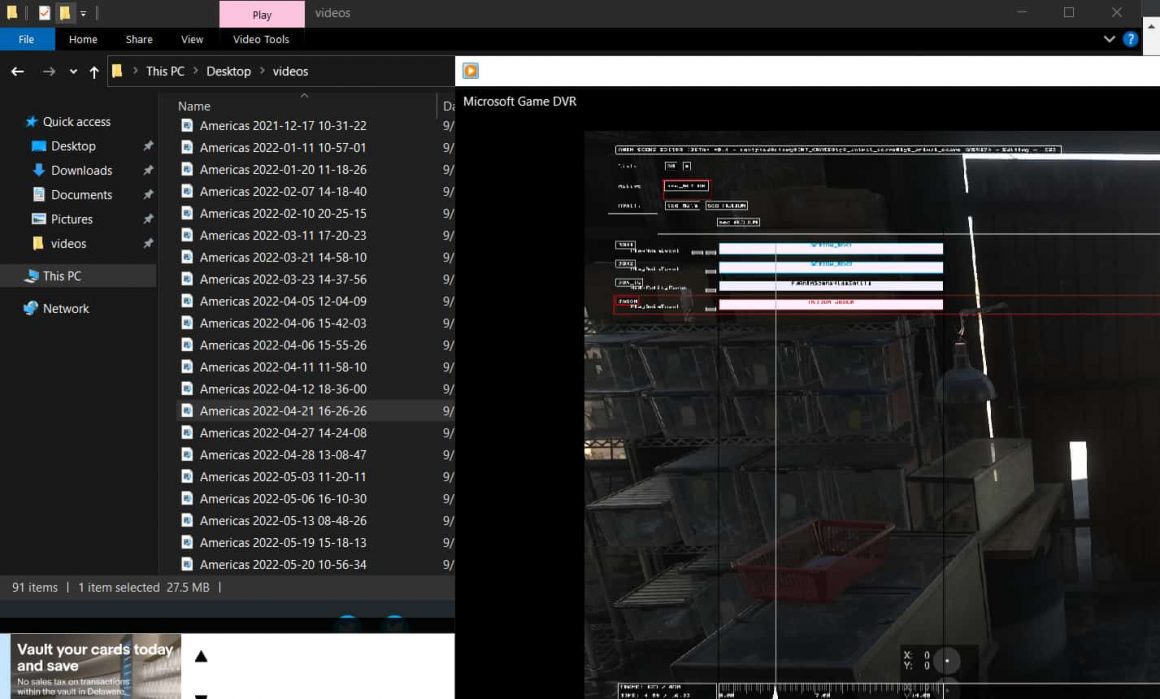
The duo was accused of stealing sensitive data and demanding ransom money. Now, one of the accused, Kurtaj, has been sentenced, but due to his autism, he has received an indefinite hospital order for leaking clips of Grand Theft Auto 6 (GTA 6), an upcoming game from Rockstar Games.
GTA images and videos plus internal software (Image: Waqas – Hackread.com)
Kurtaj was identified as a key member of the infamous Lapsus$ cybercrime gang, known for launching devastating cyberattacks against tech giants such as Uber, Nvidia, and Rockstar Games. The gang executed cyberattacks between August 2020 and September 2022, targeting telecoms, computer parts manufacturers, and gaming companies.
According to Rockstar Games’ testimony during the trial, the hack orchestrated by Lapsus$ cost them $5 million to recover from, contributing to the overall financial impact of nearly $10 million on the targeted companies.
Reportedly, Kurtaj had been violent while in custody, with dozens of reports of injury or property damage. Doctors deemed him unfit to stand trial due to his severe autism, so the jury at a Southwark crown court was asked to determine whether he committed the alleged acts without criminal intent.
Considering Kurtaj’s skills and inclination to commit cybercrime, the judge deemed him a high risk to public safety. Consequently, he will be held at a secure hospital for life unless doctors determine he is no longer a danger. A mental health assessment was conducted as part of the sentencing process. Shockingly, it was revealed during the hearing that Kurtaj continued hacking while on bail, targeting major entities like Nvidia and BT/EE even under police protection at a Travelodge hotel.
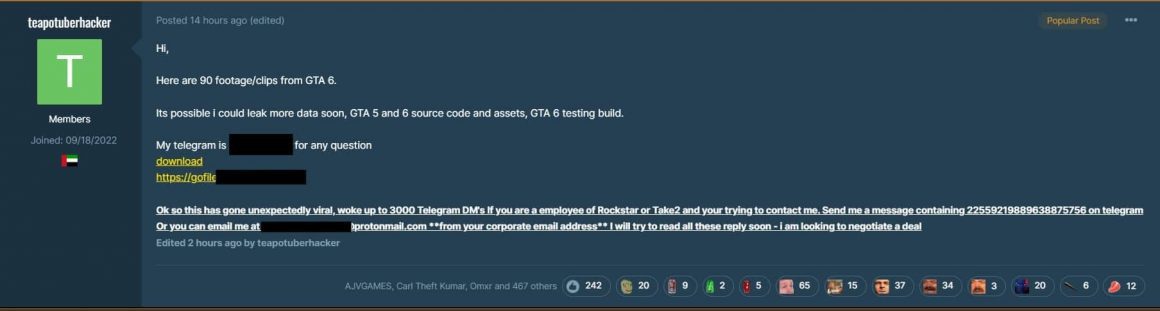
Reportedly, he breached Rockstar, the company behind GTA, using an Amazon Firestick, hotel TV, and mobile phone to hack its internal Slack messaging system. He stole 90 unreleased clips and threatened to release the source code if Rockstar didn’t contact him on Telegram within 24 hours. Kurtaj posted the clips and source code on a forum under the username TeaPotUberHacker. He was rearrested and detained until his trial.
Uber hacker ”TeaPotUberHacker” on GTA forums announcing GTA 6 hack and leaking its data (Image: Waqas – Hackread.com)
Contrary to reports, cybersecurity researcher Robert Graham asserts that claims of Kurtaj using just an Amazon Firestick to breach the gaming giant are inaccurate and exaggerated. Graham contends that the hacker employed his phone for this purpose.
“Specifically, he connected his phone to the TV and its Bluetooth keyboard, through the FireTV stick. This made things more convenient when accessing the Internet from his phone, but was by no means such things were essential,” tweeted Graham.
Cybersecurity expert here: no.
The stories of teenage hacking are sensationalized.
As far as we can tell, he didn’t hack into the company using a FireTV stick. He accessed the company using his phone.
Specifically, he connected his phone to the TV and its bluetooth keyboard,… https://t.co/N2a5w8U369
In a separate development, a 17-year-old member of the Lapsus$ gang was found guilty of two counts of fraud, two Computer Misuse Act offences, and one count of blackmail by Guildford Crown Court in Surrey. He was sentenced to a youth rehabilitation order, which includes 18 months of supervision, six months of rehabilitation, and three months of intensive supervision and surveillance.
The cases highlight the dangers young people can face online and the serious consequences it can have on their future, stated DCS Amanda Horsburgh, from the City of London police.
“Unfortunately, the digital world can also be tempting to young people for the wrong reasons,” Horsburgh added.
Hackread.com has followed UK law enforcement’s crackdown against the Lapsu$ gang members and those behind high-profile security breaches. In September 2022, Hackread reported the arrest of a 17-year-old teen from Oxfordshire by the City of London Police for their suspected link with Uber and Rockstar Games’ breaches.
The surge in remote work has brought about intense concerns regarding data security including unsecured home networks and the increased use of personal devices pose significant challenges.
You’re living in an era where traditional office spaces are rapidly becoming a thing of the past. The advent of technology and the internet has brought about a paradigm shift in the way you work. This shift, however, has also ushered in new challenges, especially concerning data security. Data is the lifeblood of modern businesses, and its security should be a top priority.
The shift to remote work has only increased the need for robust data security measures. With employees accessing confidential information from a variety of locations and devices, the risk of data breaches has never been higher. Therefore, it’s important to understand these risks and implement effective measures to mitigate them.
In this article, you’ll explore the top data security issues of remote work and how to manage them effectively. Let’s begin.
The Growth of Remote Work
While the return-to-office initiative is on the rise, many organizations still allow remote or hybrid work arrangements. In 2023 alone, 28.2% of full-time employees use a hybrid approach, while 12.7% work from home. The flexibility offered by remote work is a big draw for many employees, and businesses are finding that it can also lead to increased productivity and cost savings.
However, as the number of remote workers increases, so does the risk of data security issues. Working from home often means using less secure home networks and personal devices, which can be a goldmine for cybercriminals. Furthermore, the lack of direct supervision makes enforcing corporate policies and regulatory requirements harder.
Top Remote Work Data Security Issues
One of remote work’s most significant data security issues is the risk of data breaches. In a traditional office setting, physical security measures can prevent unauthorized access to sensitive data. However, in a remote work setting, these measures are often absent. Moreover, the increased use of cloud services for collaboration and data storage also presents additional risks.
Another major issue is the vulnerability of home networks, which frequently lack the security measures found in corporate environments. Home networks, unlike corporate networks, frequently lack strict firewalls and antivirus software, making them a prime target. Cybercriminals can easily exploit these security flaws, putting personal information and data at risk. As a result, strengthening home network security is critical.
Other security issues to keep in mind include:
Use of Personal Devices: Remote employees frequently use personal devices for work, which can jeopardize data security. These devices may lack the same level of security as company-supplied equipment, making them more vulnerable to cyber threats and data breaches.
Enforcing Corporate Policies and Regulatory Requirements – Enforcing corporate policies and regulatory requirements is another major challenge with remote work. Ensuring compliance with data security policies can be difficult without the physical presence of supervisors and IT staff.
Increased Risk of Phishing, Malware, and Social Engineering – Remote workers are also more susceptible to phishing, malware, and social engineering attacks. These attacks often exploit human error and can lead to significant data breaches. Therefore, educating remote workers about these threats and how to avoid them is essential.
Inadequate Secure Wi-Fi Networks: Remote workers typically connect to corporate networks through unsecured or public Wi-Fi networks, which poses a significant security risk. Cybercriminals can easily exploit these networks by intercepting data transmission or injecting malware, potentially resulting in data breaches or system compromises.
Managing the Data Security Issues of Remote Work
Regardless of these challenges, there are ways to effectively manage the data security issues associated with remote work. Implementing a data protection platform and zero-trust security controls are two of the most effective solutions.
A data protection platform is an essential component of today’s cybersecurity strategies. It offers a comprehensive solution for safeguarding sensitive data while meticulously monitoring and controlling data access. Its sophisticated mechanisms ensure that only authorized individuals have access to sensitive data, preserving data integrity and confidentiality. This platform is vital for preventing data breaches, improving regulatory compliance, and providing businesses with a secure digital environment.
Zero-trust security controls, on the other hand, are founded on a fundamental principle: by default, trust no user or device. Because of this, each access request is thoroughly verified before it can be approved. It is not a case of being overly suspicious, but of being proactive in terms of security. By scrutinizing every request, these controls significantly reduce the likelihood of data breaches. This method is extremely effective in preventing unauthorized access while also maintaining the integrity and confidentiality of sensitive data.
Other benefits of using data security tools for remote work include:
Improved Visibility and Control: Data security tools provide real-time visibility into all data movement, allowing businesses to monitor and control data access effectively.
Improved Compliance: These tools help to meet regulatory requirements by ensuring that data is handled and stored in a compliant manner, lowering the risk of penalties.
Data Loss Risk is Reduced: Data protection tools include features like automatic backups and encryption, which reduce the risk of data loss due to accidents or cyber-attacks.
Advanced Threat Detection: Some tools use artificial intelligence and machine learning to detect suspicious activity or anomalies, preventing potential breaches.
Increased Productivity: In a secure environment, employees can focus on their work without being concerned about potential data breaches, resulting in increased productivity.
Improved Remote Work Security: Data security tools include features like secure VPNs and multi-factor authentication, significantly enhancing network security by making it more difficult for unauthorized individuals to access sensitive information.
Cost-Effective: Implementing these tools can lead to long-term cost savings by preventing costly data breaches and reducing the time and resources spent on recovery after a breach.
Ultimately, remote work presents distinct data security challenges. These challenges, however, can be effectively managed with the right strategies and tools. A solid data protection platform that provides a secure foundation for your digital assets is extremely important.
Coupled with zero-trust security controls, you can ensure solid safeguards for your valuable data. These safeguards are essential to maintaining business continuity, especially in this day and age when remote work is becoming more common. With careful planning and implementation, you can weather the storm of data security threats in a remote work scenario.