“Amazon got hacked” messages are a false alarm

0
[ad_1]

Amazon customers have been seeing a message on social media that has caused some alarm.

Most of the posts look like one of these (depending on the social media platform):

“PSA!! Amazon got hacked. For USA based people, check your Amazon account. Hackers added HUB lockers as your default delivery addresses. Remove it! I had 2 added to mine.”

Hub lockers are local secure places for people to pick up their Amazon order rather than risk them being left on a doorstep, so the concern was that someone could buy something on your account and then send it to the Hub locker to be picked up.

Here’s another similar post, this time saying the lockers were actually fake:

“PSA: check your saved addresses on Amazon. Amazon got hacked and a lot of people (including me) have random “Amazon lockers” saved in their addresses – which are not actual lockers. If you do use Amazon lockers, be sure to verify that the locker you’re sending it to is an actual locker.

Double check your order history and make sure there aren’t any orders you don’t recognize. And check your bank accounts to make sure your credit card on file is also not being used for unauthorized purchases. “

It’s not surprising that those messages would raise the alarm amongst Amazon’s customers, but thankfully the security alert is nothing to worry about.

The additional addresses are genuine Hub locations or other pick-up locations and they weren’t put there by hackers. Amazon added them in error.

As an Amazon spokesperson told Snopes:

This isn’t a data security matter and our systems are secure. Amazon pickup locations were added to a small number of customer accounts in error, and we are working to fix the issue. We apologize for any inconvenience this may have caused, and customers with questions about their account are welcome to contact customer service.

Things like this are tricky – on the one hand we are always pleased for people to share security issues and alert others to potential problems. However in this case it appears as though people were forwarding the message without first checking if it was, in fact, a real issue.

And nowadays with social media and instant messaging, rumours like these can spread fast. All it takes is some panic, little research, and a lot of contacts.

If you see a message like this, always do a bit of research before forwarding it on. Sites like Snopes allow you to search for keywords and you’ll find a lot of hoaxes including this one.


We don’t just report on threats—we remove them

Cybersecurity risks should never spread beyond a headline. Keep threats off your devices by downloading Malwarebytes today.


[ad_2]
Source link

X app for large displays starts rolling out to Pixel Fold & tablet

0
[ad_1]

A tweaked X app for large displays is now rolling out to the Google Pixel Fold and Pixel Tablet. The app has not been completely revamped to fit large displays, but this is definitely better than having no change at all.

The Google Pixel Fold & Pixel Tablet are getting new X app optimized for large displays

Instead of having a really ugly, stretched-out interface with black boxes on the sides, the app now makes use of the full width of the display, without stretching the content. You can see how it looks below.

X app large displays 1

So, you’ll basically be getting the same layout as on smartphones, as far as the main feed is concerned, at least. The bottom bar is now spread out from one side of the screen to the other. The same goes for the top bar too.

Now, the change is rolling out to Google’s devices, but they should technically become available on other, similar devices. So, the OPPO Find N and Find N2 also have more of a horizontal layout when unfolded, so this change is expected to become available for those devices too. That’s just an example.

This change should also be visible on other, similar devices… soon, if not already

That also goes for Android tablets in general, the moment you flip them to landscape mode. We’re not sure when will it be visible on those devices, though. If you do have a non-Pixel Android tablet, do try it when you get the X v10.18.0 app.

That being said, let’s hope X will improve upon this offering moving forward. It would be nice to see a proper tablet app on both foldables and tablets. An app that would adapt nicely to all foldables, not just landscape-oriented ones.

The X app doesn’t exactly look great on the Galaxy Z Fold series, and other foldable devices that have a square-ish screen when unfolded. They simply get a stretched-out version of the regular app.

It would be nice to see a complete revamp of X for large-screen devices. So, let’s hope that is coming at some point down the road.


[ad_2]
Source link

Sony unveils flagship LYTIA mobile camera sensor, the LYT-900

0
[ad_1]

After a rather long period of rumors, the Sony LYT-900 is now official. This is the company’s flagship camera sensor for smartphones. This camera sensor has been mentioned several times thus far.

The Sony LYT-900 camera sensor has been announced, Sony’s most powerful LYTIA offering for mobile devices

This is a 1-inch camera sensor with a 1.6um pixel size. It is allegedly a tweaked version of the Sony IMX989, a 1-inch camera sensor smartphones have been boasting since last year.

Sony shared the news via Weibo, a Chinese social media network. We still don’t have all the tiny details regarding the sensor, but Sony at least shared something.

This camera sensor is supposed to sit above the Sony LYT-808 and LYT-T808. Those two camera sensors have proven to be quite powerful, as they’re represented by the OnePlus 12 and OnePlus Open, respectively. Those are basically the same sensors, but the ‘T’ is tweaked for foldables.

The Sony LYT-900 is not only a huge sensor on its own, but it has huge pixels. Considering this is a LYTIA sensor, it’s almost certainly a dual-stacked sensor, just like the Sony LYT-808 and LYT-T808.

The OPPO Find X7 Pro will probably debut this camera sensor

It will be interesting to see what will this sensor be capable of, as it looks great on paper. The Sony LYT-900 is allegedly set to be featured on the OPPO Find X7 Pro, Vivo X100 Pro+, and the Xiaomi 14 Ultra. Either OPPO or Vivo will debut it, it remains to be seen which device will launch first.

The OPPO Find X7 Pro is expected to arrive in the first quarter of next year, while the Vivo X100 Pro+ has reportedly been delayed, it was supposed to arrive very soon. That device will likely arrive in April or May, based on rumors.

The Xiaomi 14 Ultra is the third device mentioned in regards to this sensor. That handset will likely arrive closer to mid-year next year. Well, at least based on the Xiaomi 13 Ultra launch. The Xiaomi 13 Ultra launched in April this year. It is possible that Xiaomi will move up the launch date in 2024, we’ll see.

Sony LYT 900 announcement


[ad_2]
Source link

MrAnon Stealer Attacking Windows Via Weaponized PDF Files

0
[ad_1]

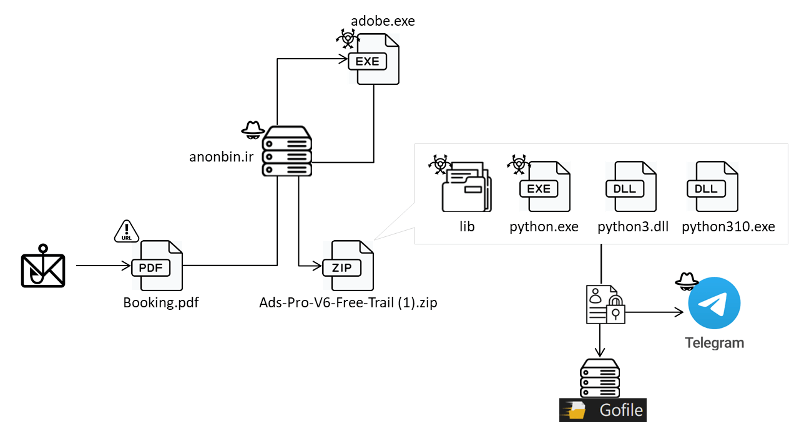
Phishing emails targeting Windows users were discovered, tricking users into opening a malicious PDF file called “MrAnon Stealer” that spreads malware by using fake booking details.

To obtain the final malware, the PowerShell script is executed by the PDF after it has downloaded a.NET executable file made with PowerGUI.

Credentials, system data, browser sessions, and cryptocurrency extensions were all stolen by Mr. Alan Stealer.

Attack Flow of MrAnon

According to FortiGuard Labs, this malware is a Python-based information stealer that has been compressed with cx-Freeze to avoid detection.

The majority of queries to the downloader URL came from Germany, indicating that the country was the attack’s main target.

November 2023 had a notable increase in the number of inquiries for this URL, suggesting a more vigorous and active marketing during that month.

Attack Flow
Attack Flow

Posing as a company seeking to book hotel rooms, the attacker sends phishing emails with the subject line “December Room Availability Query.” The body includes fake hotel reservation information for the upcoming holidays. 

Phishing Email
Phishing Email

Researchers say a downloader link for the malicious PDF file is concealed in the stream object.

The malicious PDF file

Researchers discovered that the malware employed the PowerShell script editor, which converts PowerShell scripts into Microsoft executable files, by looking through the strings in the class “Loader.”

“The script initiates the loading of a Windows Form and configures its settings, including form, label, and progress bar. Additionally, it defines text within the execution of the subsequent script to mitigate user suspicions”, FortiGuard Labs shared in a report with Cyber Security News.

In this scenario, a window labeled “File Not Supported” appears along with a status message that reads, “Not Run: python.exe.” This misleading presentation aims to trick users into thinking that the malware hasn’t been effectively executed.

“The malware uses PowerGUI and cx-Freeze tools to create a complex process that involves .NET executable files and PowerShell scripts,” researchers said.

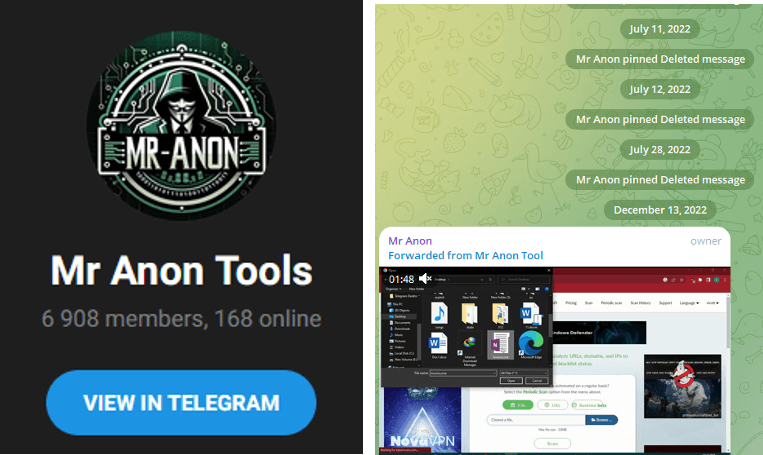
MrAnon Stealer’s support channel offers more features, advertises the product, and has a page where users can buy all related tools.

MrAnon Stealer's telegram channel
MrAnon Stealer’s telegram channel

Data and sensitive information are stolen from many applications, compressed, and uploaded to the threat actor’s Telegram channel and a public file-sharing website. As a result, users are cautioned to avoid opening suspicious PDF files and phishing emails.


[ad_2]
Source link

Interpol Busts Human Traffickers Luring Victims with Fake Online Job Ads

0
[ad_1]

The operation covered a range of cyber scam cases, including 40 Malaysian victims lured to Peru for a high-paying job, and several citizens taken to Dubai for employment before being diverted to Thailand and Myanmar.

The Interpol operation targeting human trafficking-fueled fraud, named Operation Storm Makers II, has uncovered that crimes are spreading beyond Southeast Asia. This global initiative is designed to combat human trafficking and migrant smuggling, shedding light on the intricate network of cyber scams. Law enforcement agencies from 27 countries were mobilized for this operation.

Interpol’s efforts have generated significant results, leading to the arrest of 281 individuals involved in a range of offences, including human trafficking, passport forgery, corruption, telecommunications fraud, and sexual exploitation. Additionally, authorities have successfully rescued 149 victims through over 360 investigations, with some still ongoing.

The operation covered a range of cyber scam cases, including 40 Malaysian victims lured to Peru for a high-paying job, and several citizens taken to Dubai for employment before being diverted to Thailand and Myanmar. It involved over 270,000 inspections and police checks at 450 human trafficking global hotspots between 16 and 20 October.

Investigators found that increasing cyber fraud schemes involving fake crypto investments, work-from-home, lottery and online gambling scams are encouraging human trafficking globally. Victims are often trafficked to cyber scam centers, where they are lured through fake job ads and forced to commit online fraud.

It is worth noting that earlier this year, Interpol shut down a notorious phishing-as-a-service platform called 16shop involved in the sale of ‘phishing kits’ to hackers to scam internet users. 

In a press release, Interpol’s assistant director of vulnerable communities, Rosemary Nalubega, stated that the human cost of cyber scams is continually rising and the only productive option to tackle it is concerted global action. Operation Storm Makers II has proven effective in diverting law enforcement’s attention towards cyber scams.

In India, police registered one of their first cases of human trafficking through cyber fraud whereas in Myanmar since 2022, authorities have reported rescuing trafficking victims from 22 countries, mainly from Kayin and Shan States.

Apart from the cyber scam centres, Operation Storm Makers II revealed other human trafficking and migrant smuggling offences. A 13-year-old boy from Bangladesh, who was trafficked to India, has been rescued. Two female victims from Nepal were rescued from India and sent home.

Turkish law enforcement caught 239 migrant smugglers while patrolling the country’s coastline, and intercepted around 4,000 irregular migrants. The operation also focuses on prevention, and member countries have rolled out awareness campaigns to help potential victims avoid being trafficked.

Participating countries include Angola, Australia, Bangladesh, Brazil, Cambodia, China, Ethiopia, Ghana, India, Indonesia, Kazakhstan, Kenya, Laos, Malaysia, Myanmar, Nepal, Pakistan, Philippines, Singapore, South Africa, Sri Lanka, Tanzania, Thailand, Turkey, Uganda, United Arab Emirates, and Vietnam.

William Wright, CEO of Closed Door Security endorsed Interpol’s work. In a statement to Hackread.com, Wright said “The latest announcement from Interpol highlights how the whole criminal ecosystem is becoming increasingly interlinked. Now we are seeing people being trafficked and forced to commit cyber fraud, which links two of the biggest underworld industries. Gangs are now resorting to kidnapping to force people to carry out fraud, which also shows just how far beyond digital cybercrime has become today.”

Wright warned that despite the large-scale operation and its success, there is much more to be done. “The update highlights just how many scam centres are in operation today, but the numbers announced by Interpol are a drop in the ocean in comparison to the reality,” he added.

“To fight back against these horrible crimes, we need to see more collaboration from law enforcement across the world, where data is shared, and criminals are publicly sanctioned. We must also make consumers more aware of these scams, so they are better educated to recognise them and ignore them, before clicking on a malicious link or handing over their confidential information. Doing this will have a knock-on effect on scam centre profits, which will significantly hurt the criminals behind them,”  Wright warned.

  1. EMPACT Hackathon Targets Online Human Traffickers
  2. Utilizing Programmatic Advertising to Locate Abducted Children
  3. Operation Narsil – INTERPOL Busts Decade-Old Child Abuse Network
  4. Anonymous Hacks Thailand Senate Website against Human Trafficking
  5. DARPA Builds ‘Memex’ Deep Web Search Engine to Track Sex Traffickers
  6. US seizes classified advertising website Backpageover human trafficking
  7. Senior OPERA1ER Cybercrime Gang Member Arrested in Global Operation

[ad_2]
Source link

Google Podcasts shutdown confirmed for April 2024

0
[ad_1]

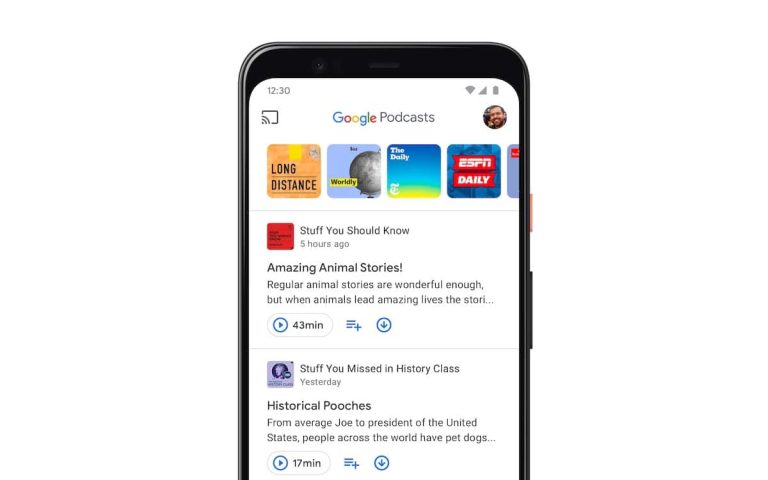
In September, Google announced that its dedicated podcasts app, Google Podcasts, is shutting down next year. At that time, the company didn’t reveal a precise date or even a timeline for the planned shutdown of the app. We now have those details. Google has confirmed that Google Podcasts will be gone in April 2024. You can use the app through March, with migration of existing subscriptions supported through July.

“You will be able to use Google Podcasts through March 2024,” a banner on an official Google support page reads. “If you wish to save your Google Podcast subscriptions, use one of the methods below through July 2024.” The page provides users with instructions on moving their existing podcast show subscriptions to YouTube Music or other supported podcast or music apps.

Google Podcasts is folding into YouTube Music in April 2024

Google is folding Podcasts into YouTube Music, which will be its all-things-audio platform. The company is following the likes of Spotify, which has been expanding its podcast portfolio within its music streaming app. To ensure a seamless migration, YouTube Music recently gained the ability to add podcasts using an RSS feed URL. This allows users to easily upload podcasts to their Music library. After all, not all podcasts are available on YouTube Music.

Migrating your Google Podcasts subscriptions to YouTube Music is a fairly simple process too. Open the Podcasts app and click Export subscriptions at the top of the screen. Tap Export under Export to YouTube Music and you should be taken to the new app (if not installed, you will be asked to install it). Here, tap Transfer and then tap Continue below the disclosure.

The migration will finish in a few minutes, with a confirmation notification appearing on the YouTube Music home screen. You can go to the Library tab to view your imported podcast subscriptions, which will feature an RSS badge. As said earlier, you may not find all of your existing podcast show subscriptions on YouTube Music. Google says Music will display a “Content is unavailable” banner next to the title of missing shows.

For missing shows, you will have to manually save them to your Music library using the show’s RSS feed link. To do that, go the the Library tab on YouTube Music and select Podcast in the top carousel. Now tap the Add podcast button in the bottom right corner and select Add a podcast by RSS feed. Read and accept the disclaimer, enter the URL of the RSS feed, and tap Add to save the podcast to your library.

You can also move your Podcasts library to non-Google apps

While Google would love to see you move from Podcasts to YouTube Music, it does give you the option to migrate to some other app that supports OPML (Outline Processor Markup Language) imports. You can also download a copy of your Podcasts’ data using Google Takeout. The company has provided step-by-step guides for both export options on the aforementioned support page. This marks another product going to the Google product graveyard.


[ad_2]
Source link

Samsung One UI 6.1 brings AI wallpapers & more AI features

0
[ad_1]

A few days back, it was revealed that Samsung‘s One UI 6.1 will introduce a more advanced battery health protection tool. The feature seemingly uses artificial intelligence (AI) to manage the overnight charging of Galaxy devices. A new leak has now revealed a host of other AI features that the company is working on. These include AI wallpapers, image expansion, object relocation in photos, and enhancements to Samsung Notes.

Samsung’s One UI 6.1 will introduce AI-generated wallpapers

Samsung will debut Android 14-based One UI 6.1 with the Galaxy S24 series in January 2024 and roll it out to older models later. Rumors say the new flagship lineup will bring unprecedented on-device AI capabilities, with AI features baked into system software. The company has already announced a few of them, including live translation and transcription of audio calls. The feature comes integrated with the native call app.

X user @BennettBuhner has now given us a peek into what else Samsung is cooking. Most notably, One UI 6.1 will add support for AI-generated wallpapers. Google introduced this feature with the Pixel 8 series, which ran Android 14 out of the box. The Korean firm skipped it in One UI 6.0, the first Android 14-based update for Galaxy devices, but the next One UI version will seemingly bring the feature.

As you might expect, the Galaxy S24 phones will create wallpapers based on your text prompt. You have to first select a general topic and provide additional details such as the subject and backdrop. A screenshot posted by the source shows that AI wallpaper for the topic “Bloom” offers the prompt “a hazy image of lavender plants on a backdrop of red space galaxy.” You can replace lavender plants with any other subject and edit the backdrop.

As 9to5Google pointed out, the Pixel 8 series offers the same prompt and preview image for AI-generated wallpaper under the topic “Bloom.” Of course, this can’t be a coincidence. Samsung is seemingly borrowing Android 14’s tool and pushing it with One UI 6.1. Like with other stock Android features, Samsung has made some tweaks here. Most notably, its preview image is more compact while Google’s is full-screen.

Samsung One UI 6 1 AI generated wallpapers leak

The new One UI update may be all about AI features

One UI 6.1 will also let users add weather and portrait effects to their Galaxy phone’s lockscreen. You can select between sunny, cloudy, rainy, and snowy weather, specify the time of the day (morning, evening, etc.), and boom, your lockscreen looks completely different. You may even be able to customize the lockscreen and animate the AI-generated effects.

Additionally, Samsung’s next One UI update will let you relocate objects in an image. You can simply touch and hold an object, including people and pets, to reposition it. AI should automatically fill in the details in the original position. You can even move objects or clips from one photo to another. Did you miss one of your friends in a group shot because they were capturing it? One UI 6.1 has a solution.

If there isn’t sufficient space in the photo for that friend, Samsung still has a solution. You can use the AI capabilities of your Galaxy phone to expand the image by adding non-existing details. If the photo you took isn’t aligned perfectly, AI will take care of that too. AI drawings or decorations you add to photos are saved and recorded so you can go back and make adjustments anytime. No need to begin from scratch.

Coupled with the advanced photo and video editing tools Samsung added to One UI 6.0, Galaxy phones are turning out to be comprehensive photography solutions. The upcoming One UI update will also improve Samsung Notes with AI features that can quickly organize and summarize your notes using bullet points and auto-formatting. AI can even format hand-written notes and convert them into text.

Other Galaxy devices will also get these features

Samsung will roll out One UI 6.1 to other eligible Galaxy phones after the Galaxy S24 launch in January next year. The Galaxy S23 series, Galaxy Z Fold 5, Galaxy Z Flip 5, and several other devices will receive the update. Most of the new AI features, if not all, will trickle down to those devices. Rumors say the 2024 flagship lineup will go official on January 17, so just about five more weeks of waiting now.


[ad_2]
Source link

Hackers Spy iPhone Users Using Malicious Keyboard Apps

0
[ad_1]

A new method of keylogging using malicious keyboard apps has been discovered to affect iPhones, evading all Apple’s security detection procedures.

Additionally, threat actors could also use this method to steal passwords, authentication codes, notes, private messages, etc.,

There have been many spyware application developers who have used this technique and also offer keylogging services for just $30.

As iPhones are considered the most secure devices, this particular method of keylogging proves a significant risk for Apple users.

Hackers Spy iPhone Users

As per the reports shared with Cyber Security News, this new technique has no prerequisites for exploitation and is compatible with all iPhone models.

This technique abuses an existing feature within the iOS system and is simple to exploit.

The threat actor can set up a custom keyboard on the victim’s device in a specific manner that logs all the keystrokes on the device and sends them to an online portal. The threat actor can access this portal from anywhere in the world. 

The fact that this technique was possible is because of the lenient review process of TestFlight apps. TestFlight is a platform for developers to test iOS apps before launching them on the App Store.

TestFlight apps do not have a strict review process as other applications when launching to the public.

How to Identify and Prevent?

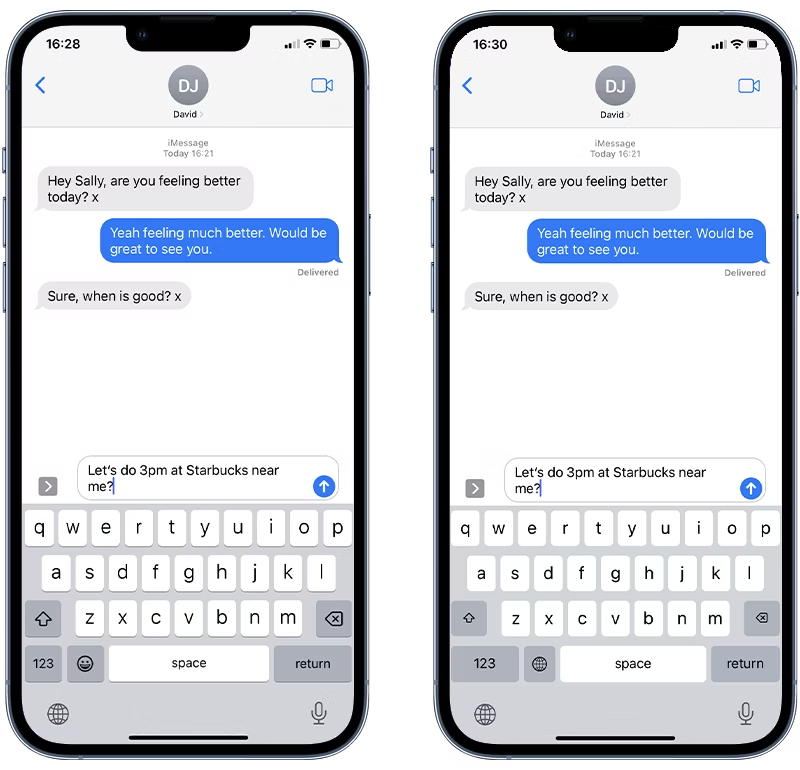
These malicious keyboards appear almost identical to Apple’s default keyboard which makes it difficult to find.

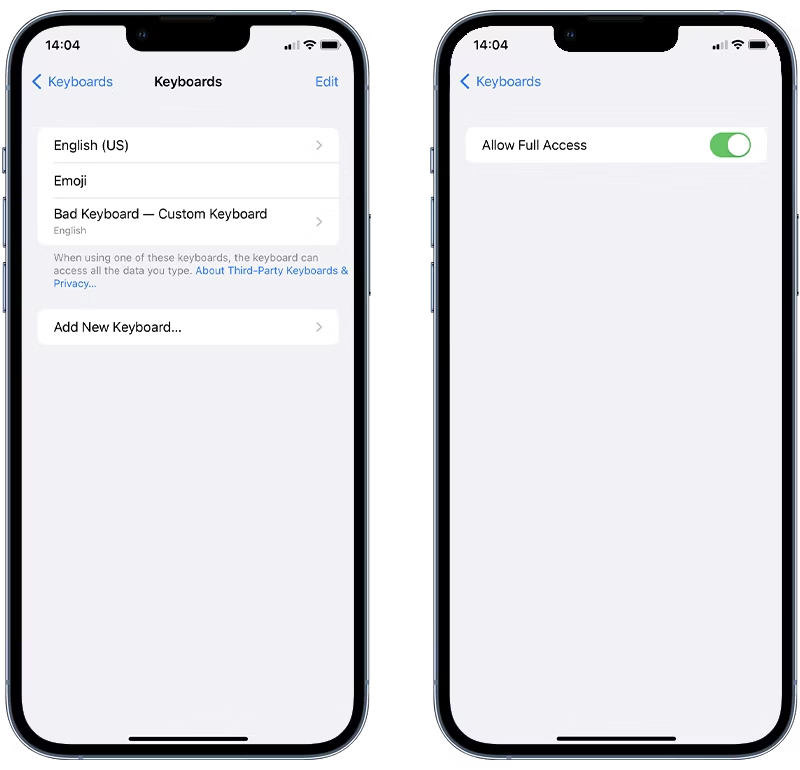
To provide a short note, Apple only has two keyboards by default, which are “English (US)” and “Emoji.” Hence, any other keyboards that are not recognized could be malicious and must be removed immediately.

Hackers Spy iPhone Users
Apple keyboard (left) v. Malicious Keyboard (right) (Source: Certosoftware)
Hackers Spy iPhone Users
Checking for Custom Keyboards (Source: Certosoftware)

In order to delete an unrecognized keyboard, the below steps can be followed,

  • Tap Edit
  • Tap on the Red “-” button on the unknown keyboard
  • Tap Delete

A complete report about this technique and method has been published, providing detailed information on the method, portal, cybercriminals, and others.

Users are recommended to follow the above steps to prevent any malicious keyboards from logging their activities.


[ad_2]
Source link

Jack Dorsey-backed Tidal to lay off 10% of its staff

0
[ad_1]

The Covid pandemic led to a surge in company hiring, which was good news for the labor force. However, following the pandemic’s end, coinciding with the global economic slowdown, many companies started to lay off their staff. As per a report by Layoffs.fyi, over 257,538 employees are laid off in 2023.

The music streaming app Tidal is the latest company to announce plans to let go of 10% of its staff. According to Engadget (via Bloomberg), the decision could affect 40 company employees across various departments. “We do not take these decisions lightly, and we are sincerely grateful for the contributions of our impacted teammates,” a Tidal spokesperson noted.

The Tidal parent company, Block Inc., detailed its plans to curb spending last month during a meeting to discuss its third-quarter earnings results. Back then, former Twitter (X) CEO Jack Dorsey said the firm would only keep 12,000 employees on its payroll. This is almost 1,000 employees less than what it had at the end of the third quarter.

The plan takes effect by the end of 2024. So, more layoffs are on the way for Block Inc. staff. Block Inc. currently oversees business payment processing services Square, Cash App, and Tidal.

Jack Dorsey reflects on Tidal layoffs

Dorsey sent a note to Tidal staff on Wednesday (via Business Insider) to reflect on the recent layoffs and highlight the company’s horizon for the coming year. He noted putting “constraints” on the company’s growth and laying off a part of staff were among the “hardest actions” to be made. Dorsey continued that he wanted to be more communicative to bring everyone into a “shared understanding” of why this decision was made.

The business executive formerly said Block Inc. needs to take a more sustainable path for its future. In most CEO’s dictionaries, more sustainability means more employees should expect to lose their jobs.

Meanwhile, Tidal isn’t the only music streaming app that’s laying off staff. In early December, Spotify announced it would cut 1,500 jobs across the company. This is Spotify’s third round of layoffs in 2023.


[ad_2]
Source link

How Smart Cars Are Spying You?

0
[ad_1]

Privacy concerns related to smart cars primarily revolve around the extensive data collection, sharing, and potential misuse of personal information.

Automobiles that are outfitted with artificial intelligence that is driven by systems are known as smart cars. 

They comprise numerous parts of contemporary cars, components beyond using hybrid fuel, and an essential Bluetooth connection. 

You can use your phone to operate certain parts of a smart automobile. They are also called connected cars or intelligent vehicles as they are equipped with advanced technology.

How do they handle data?

Most of the capabilities needed to collect data for an Internet of Things solution are already in the vehicle when it leaves the assembly line.  

Through an onboard connector, such as the ODBII connector found on most passenger cars, every sensor, module, and control system can report its status.  

Incorporating the generated data into your IoT application is the first step towards enabling communication. 

Certain automobile manufacturers have installed cellular components that enable the transmission of this data without adding a cellular gateway.  

Typically, data collection occurs via a cellular gateway that establishes a connection with the car diagnostic port. 

Sometimes, a user or manufacturer wants to record additional information, like when a door 

opens or how cold a storage area is.  

Sensors in those situations provide real-time data. 

How do smart cars work?

A smart car’s operation requires the integration of multiple systems and components. 

Key Components in a Smart Car:

Sensors: 

Smart cars employ a range of sensors to gather information about their environment. Ultrasonic, lidar, radar, and camera sensors are some of these sensors. 

The data gathered from these sensors powers several vehicle features, including automated emergency braking, adaptive cruise control, and lane departure warning.

Computers: 

Many computers are installed in smart cars, which use the data from their sensors to process and decide how to operate the vehicle. 

These computers manage the infotainment system, the engine, the brakes, and everything else.

Actuators: 

The hardware that carries out computer commands is called an actuator. Solenoids, servo motors, and motors are examples of these actuators. 

They are in charge of everything from managing the car’s direction and speed to controlling the windows and mirrors.

Networking:

Due to their internet connectivity, smart cars can exchange data with infrastructure and other vehicles. Better traffic flow, real-time traffic updates, and even roadside hazard alerts can all be achieved with the help of this data.

Importance of Smart Cars

As autonomous driving becomes more common, fewer drivers will be required to run public transit systems.

Improved safety: 

Numerous sensors and technologies are included in smart cars to help prevent collisions. These consist of blind spot monitoring systems, lane departure warning, and collision avoidance systems.

Reduced congestion: 

To facilitate better traffic flow, smart cars can communicate with infrastructure and one another. Driving may become more efficient and less congested as a result. 

Increased convenience: 

Convenient features like hands-free calling, navigation, and parking assistance are available in smart cars.

Reduced environmental impact: 

Smart cars have the potential to be more fuel-efficient and contribute to lower emissions than conventional cars.

New mobility options: 

Smart cars may help the emergence of new mobility options like self-driving cars and car-sharing services.

How Smart Car is Tracking You?

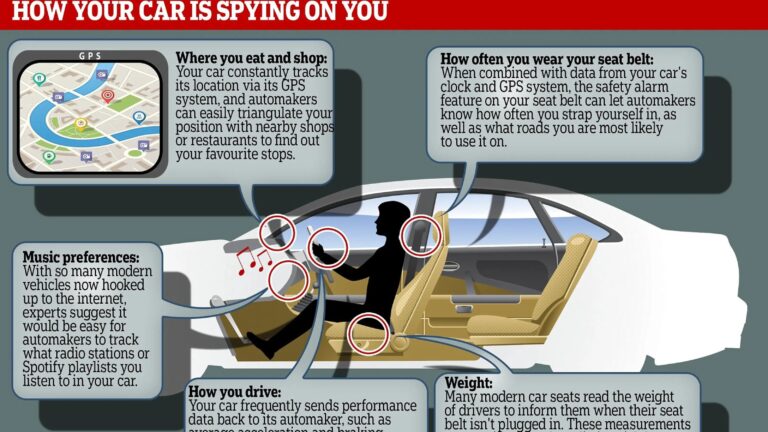
Many connected gadgets, including smart cars, can gather and send information about their owners. Location information, drive habits, car performance data, and other types of data may be included in this. How much smart cars can track their owners depends on the type and make of the car, as well as the available features and settings.

According to ExpressVPN, there are 20 different ways your smart car will track you. Here are some of the most important concerns: 

GPS Tracking: GPS technology is often used in smart cars to help people find their way. This is necessary for features like maps and real-time traffic reports, but it also means that the car can find out where it is.

Telematics Systems: Many new cars have systems that send and receive information about the car’s performance, repair needs, etc. This information is often sent to the maker to be looked at.

Access Features: Cars with Bluetooth, Wi-Fi, or cellphone access may be able to send and receive information over the internet. This connection can make things like online diagnosis and over-the-air updates more possible, but it also makes people worry about their privacy.

Information and Entertainment Systems: Smart car information and entertainment systems can keep track of friends, music, and other data. Third parties can see or share this information in some situations.

Mobile Apps: Many smart cars come with mobile apps that let owners handle some of the car’s features from afar, find out where it is, and get alerts. These apps can send and store information.

Future Innovation.

In the coming years, smart cars will transform our cityscapes due to various factors and trends, such as the widespread integration of Automotive Open System Architecture (AUTOSTAR), the personalization of cars through subscription models, autonomous vehicles, and augmented reality.

Soon, these developments will enable the development of a completely autonomous vehicle, contributing to safer driving environments and smarter cities.

Privacy Concerns in  Smart Cars 

Smart cars gather much information about your driving style, including location, speed, and even how you accelerate and brake. 

In addition to tracking your movements, this data can enhance the vehicle’s performance.

In-built cameras in certain smart cars can even record you driving and your passengers. A thorough profile of your life—including your routines, passions, and social networks—can be produced using this information.

Smart car manufacturers contend that tracking personal information is essential to increasing vehicle safety. 

For instance, they could utilize your data to spot possible dangers on the road and alert you to them. 

They might also use your data to improve the performance of their autonomous vehicles.

On the other hand, some are worried about how tracking smart cars may affect their privacy. 

Concerns about their data possibly being utilized to follow them around without their knowledge or approval. 

In addition, they fear that their information may be sold to unaffiliated businesses without their awareness or approval.

Currently, no laws in the US mainly address how smart cars track data. 

The Federal Trade Commission Act (FTC Act) and the Electronic Communications Privacy Act (ECPA) are two general privacy laws that apply to all businesses. 

According to these laws, it is illegal for businesses to gather and utilize your data without your permission.

Many smart car brands, including Tesla, General Motors, and Ford, are using their consumers’ private information.

How AI is Used in Smart Cars 

Leading the way in AI-powered car technology, Tesla uses cutting-edge AI systems to improve the capabilities of its cars and provide a more autonomous driving experience.

  1. Autopilot and Advanced Driver Assistance Systems (ADAS)

Allows for a certain degree of autonomous driving. With minimal input from the driver, Autopilot maintains lane position speeds and navigates highways using a combination of cameras, radar, and ultrasonic sensors to sense its surroundings.

  1. Object Detection and Classification

Large datasets of actual photos and videos are used to train algorithms so they can accurately recognize and categorize objects on the road. Traffic signs, road markings, bicycles, pedestrians, and cars all fall into this category. Accurately identifying these components lets the car decide what to do next, making for a safer driving experience.

  1. Predictive Analytics and Trajectory Prediction

Systems can do more than just identify objects; they can also forecast their future paths. With the help of its predictive capability, the car can anticipate the movements of pedestrians, cyclists, and other cars. This allows it to proactively alter its speed, braking, and steering to prevent collisions. 

  1. Vision and Sensor Fusion

Can combine information from various sensors—such as ultrasonic, radar, and cameras—to generate a thorough picture of the environment around them. The car can make better decisions because of this combination of sensor data, which gives it a more trustworthy and robust view of the outside world.

  1. Natural Language Processing (NLP) and Voice Recognition

integrate natural language processing (NLP) skills, allowing the vehicle to comprehend and react to voice commands in natural language. This improves the convenience and safety of driving by enabling hands-free operation of various vehicle functions.

  1. Parking Assistance and Summon Feature

Using sensors and algorithms to maneuver the vehicle into confined parking spaces, the parking assistance system lowers the possibility of collisions and facilitates easier parking. 

Additionally, owners can use a smartphone app to summon their Tesla car to a specific location. This makes hands-free parking and retrieval possible

Conclusion

People who use smart cars and services that go with them should be aware of the privacy rules and terms of service that come with them. Manufacturers often explain what information they gather, how they use it, and if they share it with other people. Also, if users are worried about their data being tracked, they can often change their privacy settings or turn off certain features.

Smart car features can be convenient, but users need to weigh the pros and cons of these features against their privacy concerns and make smart choices about how to use and set up their connected cars.


[ad_2]
Source link