New leak shows Samsung’s Galaxy A15 in three colors

0
[ad_1]

Samsung is readying a couple of new budget Android smartphones, the Galaxy A15 LTE and Galaxy A15 5G. Based on leaks, 5G support on the latter is the only difference between the two models. They pack the same specs and sport the same design. We have already seen the handset in leaked renders. As we wait for the official unveiling, another set of renders has just surfaced online.

Galaxy A15 LTE/5G renders have been leaked again

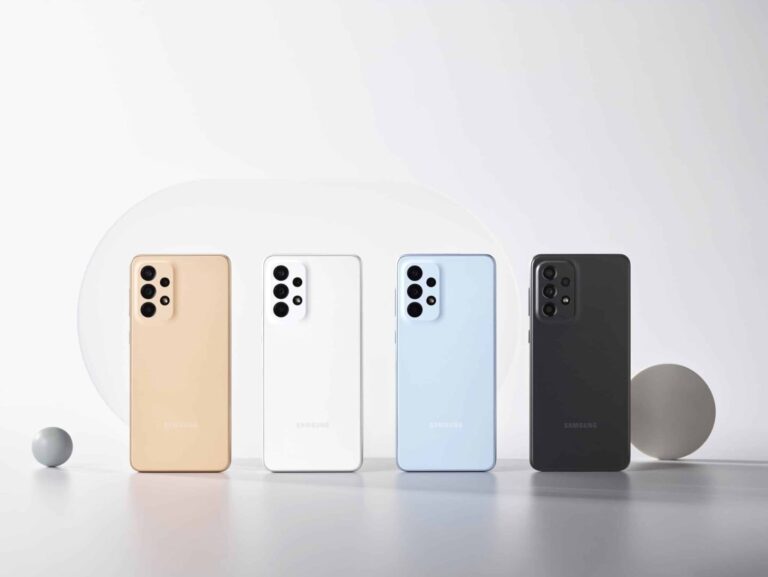
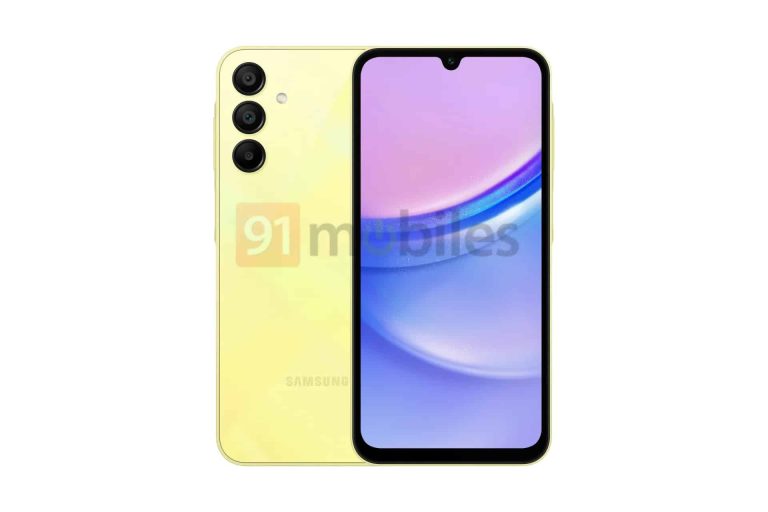
The latest set of Galaxy A15 LTE/5G renders leaked courtesy of 91Mobiles. The publication shared images of the phone in three colors: yellow, blue, and light blue. If you have been following news about Samsung’s next-gen A-series phones, you might have noticed that they all feature the same rear and frame design. On the back, we have three cameras aligned vertically with no camera bump.

The frame is mostly flat but a little bulge can be seen around the power and volume buttons on the right side. The Galaxy A15 has a side-mounted capacitive fingerprint scanner embedded into the power button. The Galaxy A55, which is a premium model, will feature the same design, though it has a metallic frame. The less premium A-series phones have a plastic frame.

The front design varies significantly across the lineup. The Galaxy A15 has a notched display with wide bezels. The bottom bezel is wider than the rest. The Galaxy A25 features a U-shaped notch too, but with slightly narrower bezels. The Galaxy A55 and Galaxy A35 have a punch-hole display, with the latter also rumored to upgrade from a plastic to a metallic frame.

Samsung’s next-gen A-series phones may not look vastly different, but their spec sheets don’t have many things in common. After all, each model is targeted at a different price segment. The Galaxy A15 is a budget offering expected to feature a 6.5-inch display with a 90Hz refresh rate. It has a 50MP primary camera, a 5MP ultrawide lens, and a 2MP macro camera. Rumors have also hinted at a 13MP selfie shooter.

Both versions will feature the same chipset

Rumors say the Galaxy A15 LTE is powered by MediaTek’s Helio G99 while the 5G version features the Dimensity 6100+. They are essentially the same 6nm chipset, with an integrated 5G modem in the latter. The octa-core SoC is clocked at up to 2.2GHz and features the Mali G57 GPU. We should get 6GB RAM and 128GB storage with support for Micro SD card. A 5,000mAh battery will fuel the phone with 25W fast charging support. Stay tuned for the launch date.


[ad_2]
Source link
How Android Users Can Now Stop Green Bubbles

0
[ad_1]

For years, companies have tried making iMessage available on Android so that Android users can stop the green bubbles on iPhones. Over the years, we have seen many different approaches to this, including logging into a Mac Mini in a server farm somewhere – which is really shady, seeing as you’re logging into your Apple ID on a computer you cannot access. But today, Beeper Mini changes all of that.

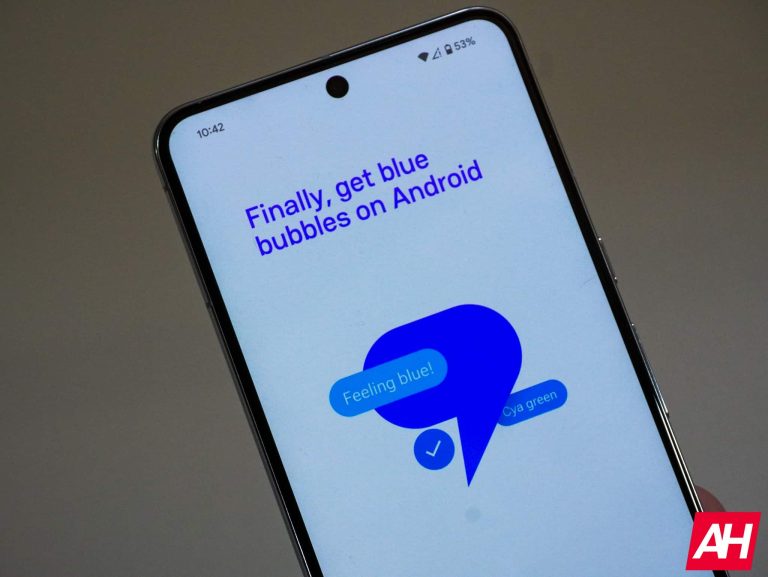
Beeper, whose app has been available with a waitlist, has now launched a new app that has no waitlist – called Beeper Mini. This app will make your Android phone number a blue bubble. Beeper Mini is also blazing fast, has end-to-end encryption, and it’s a standalone Android app. Beeper makes a point of stressing that there’s no server, laptop, Mac, or iPhone required for this.

How does Beeper Mini work with iMessage?

Beeper explains that Beeper Mini does not use a Mac relay server in a data center. Instead, it directly connects to Apple’s servers to send and receive end-to-end encrypted messages. This means that encryption keys never leave your device, and there’s no Apple ID required.

Beeper is also stressing that it cannot access your Apple Account. So you can use Beeper Mini without worrying about your Apple ID falling into the wrong hands.

Beeper only works with iMessage, but it will add about fifteen other messaging networks over time. To make it your truly all-in-one messaging app. This could be the future of messaging.

The service is not free, as you’d expect. Beeper does need to make some money so that the app will cost you $2 per month.

beeper mini
Beeper Mini Features

How did Beeper Mini make iMessage possible?

It’s all thanks to a 16-year-old on Discord.

Eric Migicovsky, the co-founder of Beeper, also founded Pebble in 2008. Migicovsky received a message on Discord from user JJTech0130, whose real name is James Gill, saying he had just released a coding project called Pypush. Which is a mashup of “Python” and “push notifications.” Gill claimed he “reimplemented iMessage” and thought Migicovsky would be interested. Less than 10 minutes later, he responded, “Holy crap! Does it work?”

Of course, Gill responded, “Yes, it works,” with a tongue-out emoji. Gill worked on this project between his high school robotics classes and part-time shifts at McDonald’s. Keep in mind this kid is only 16 years old. It is quite impressive for someone who is a Junior in High School.

Gill said that “in theory, iMessage uses public encryption keys, because that’s how end-to-end encryption works”. He continued by stating, “Pypush figures out how we can publish those keys to Apple’s key server and how you can retrieve keys from Apple’s key server.”

Migicovsky was so impressed with Gill’s work that he offered him a contract to work part-time at Beeper, and obviously, Gill accepted after his parents agreed, of course.

The Beeper team quickly took Gill’s proof of concept, rewrote it, and added a few new features. This includes photo and video sharing, group chat dynamics, and someone else’s typing status. And over the past three months, the team has added all of these features to Beeper – the company’s original app. Remember that Beeper runs on Beeper Cloud, but Beeper Mini runs inside the app.

Could Apple patch this and shut down Beeper Mini?

If you’re like me, you’re probably wondering if Apple might make some changes to iMessage and block this functionality. It could happen, but Migicovsky also notes that the Digital Millennium Copyright Act (DMCA) says that reverse engineering for interoperability is protected.

That won’t necessarily prevent Apple from sending a Cease and Desist order to Beeper. Apple did previously sue the NSO Group to block it from using its services, and it’s possible that Apple could make a good legal case here if it chose to.

However, the Digital Markets Act in Europe could hold Apple back. This new law in Europe forced Apple to add USB-C to the iPhone and side-loading on the iPhone in Europe starting next year.

With all of this happening, it’s possible that Apple could sweep it under the rug instead of bringing up more legislation for the trillion-dollar company.


[ad_2]
Source link

Files by Google app is getting Smart Search and Google Drive’s new document scanner

0
[ad_1]
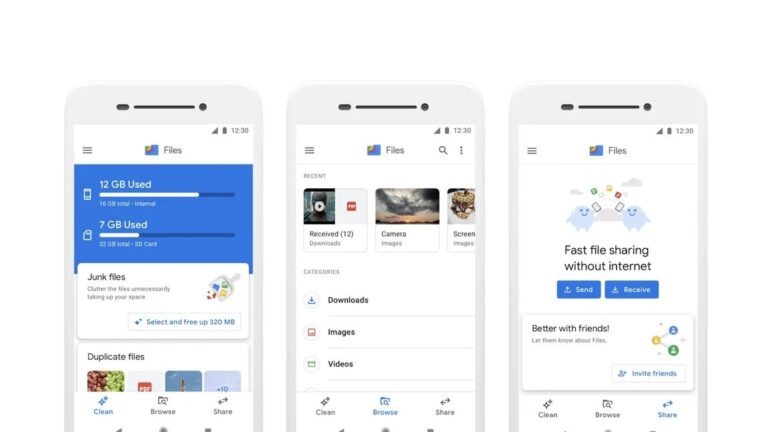
The “Files by Google” app could quite possibly be one of the most underrated and underutilized apps in the Android ecosystem, but that may be about to change with a new feature that has begun to roll out. The feature, called “Smart Search” was discovered back in September, but is now now making its way to users.
Smart Search will make finding stuff on your phone a whole lot easier, as the nifty feature uses clever machine learning to scan your documents and images, so you can track them down using keywords instead of just relying on file names. It also works with photos and screenshots, so you can easily find that funny meme you saved a few weeks ago without having to dig through your camera roll.

This functionality mirrors what the newly implemented document scanner in the Google Drive app does. Smart Search can read the text in your PDFs and images, so you can find important documents even if they have the most vague or unhelpful names. This is a huge lifesaver for those times when you can’t remember what you named something, or when the file name doesn’t give you any clues about what’s inside.
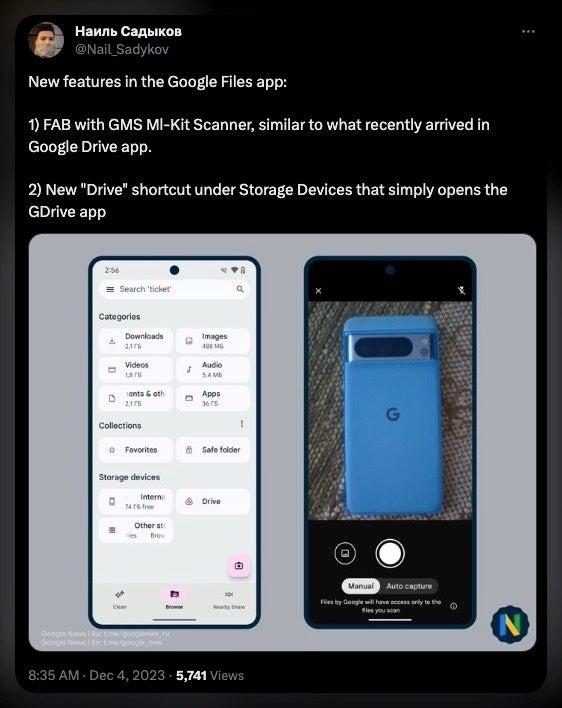
This was discovered by @Nail_Sadykov and reported by Android Police when a floating action button was spotted for document scanning. This button triggers the same machine learning scanner used in the Google Drive app, thus effectively linking the two apps.

Of course, no new feature is perfect, and Smart Search has a few quirks that need to be ironed out. For example, the scanning process that indexes your files for searching happens every so often, rather than in real time. This means that new files you download or add to your phone might not be searchable right away. Also, Smart Search can’t recognize locations in photos yet, even though the changelog said it could.


The new document scanner or the Drive shortcut is yet available for everyone in the latest version of the Files by Google app (v1.1737.587592893). This could mean that this could be a staged server side rollout, like many Google features tend to be. However, it appears that it is rolling out more widely now, so it should only be a matter of time before the feature appears on your Android.


[ad_2]
Source link

Smartphone-sized Chromebox Micro turns your display into a Chromebook

0
[ad_1]

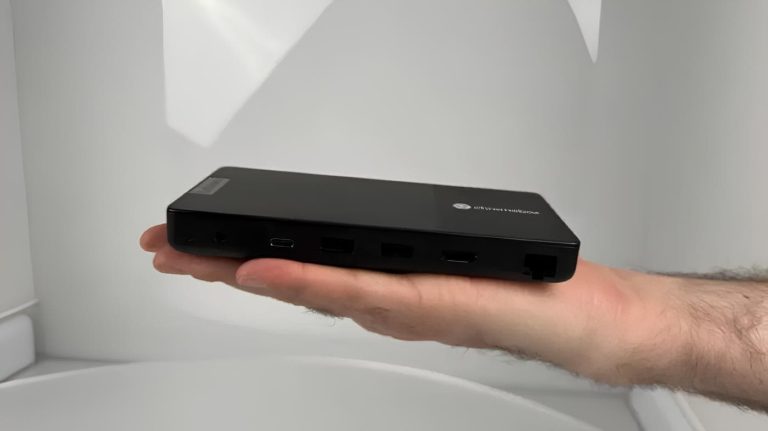
In the dynamic world of Chrome OS-powered devices, Google and Lenovo are introducing the Chromebox Micro which is about the same height and width as the Google Pixel 8 Pro although a bit thicker (20mm) and weighs around 450 grams. However, it can convert your display into a Chromebook.

Google touts it as a compact and affordable Chromebox to date, catering to a range of applications, particularly in kiosks and digital signage. However, its appeal extends beyond these use cases, presenting an enticing option for those seeking an affordable mini PC.

Under the hood, the Chromebox Micro is powered by an Intel Celeron N4500 CPU, delivering a lightweight computing experience. Accompanied by 8GB of RAM and 32GB of eMMC storage, the device strikes a balance between performance and efficiency. Notably, it features a fanless and ventless design, making it resistant to dust, which is a good addition for sure.

The Chromebox Micro offers the Celeron N4500 CPU, 8GB of RAM, and 32GB eMMC storage within a fanless design

When it comes to connectivity, this device doesn’t disappoint either. With a suite of ports and connections, including two USB-C ports, two full-sized USB ports, HDMI, Ethernet, and a headphone jack, users have ample options for peripherals. The device also comes with screw holes for easy mounting, adding to its adaptability.

Lenovo is taking the Chromebox Micro experience further by collaborating with a smart retail company to offer 15.6-inch and 21.5-inch displays that they have specifically designed for the Chromebox Micro. Tailored for seamless integration with the mini PC, these displays feature a rear cavity for storing the Chromebox and connect via a single USB-C port for power, video, and data.

The Chromebox Micro will start at $219 in select markets in Q1 2024. However, the questions arise about its availability for general consumers versus enterprise customers. Android Authority has approached Google for clarification, although there wasn’t any response at the time of writing this. Nonetheless, the Chromebox Micro appears to present an intriguing option for those in search of a tiny, cost-effective mini PC.

Lenovo Chromebox Micro mounted
Image credit: Google

[ad_2]
Source link

Taking pictures on the Pixel Fold is about to get better

0
[ad_1]

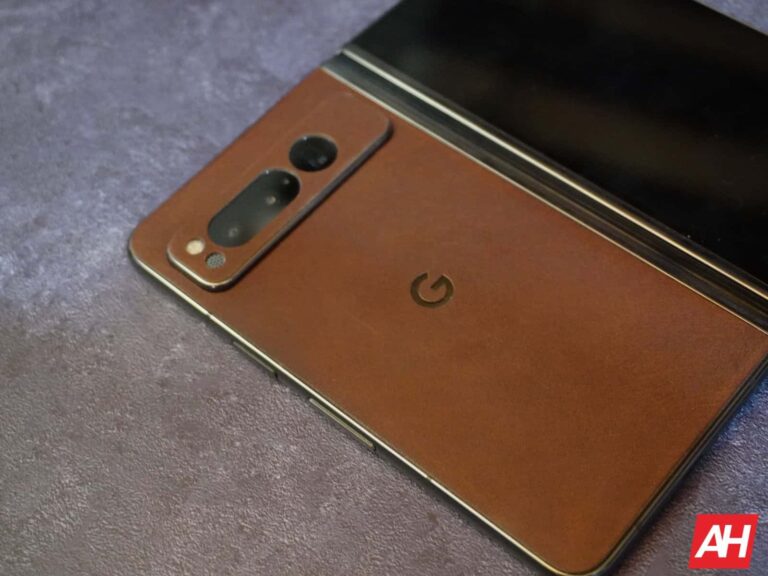
Google took its first step into the foldable phone market with the Pixel Fold earlier this year. The camera experience on this phone is pretty great, but Google is about to make it better. According to a new report, Google could bring a dual screen camera mode to the Pixel Fold.

If you’re looking into getting one of these phones, you can read our Pixel Fold Review. It will dive deep into what makes this phone great. If you have questions, don’t worry, we know Everything you need to know about the Pixel Fold as well.

Notebook foldable phones have two screens on them, and that increases their potential usability. Companies have been finding ways to use them to their advantage. One way that companies have been doing this is by boosting the camera experience. With Google being”the smartphone camera company”, it’s surprising that the company hasn’t implemented this feature just yet.

Google could be bringing a new dual screen camera mode

When you’re using the Pixel Fold to take a picture, you’re more likely to use it while the device is closed. However, what if you’re taking a picture or video of yourself and you want to get a preview of what you’re recording? Well, you’re out of luck. Sure, you can use the selfie camera, but it’s nowhere near as good as the rear cameras. However, the company is now working on bringing a dual screen camera mode to the phone.

This mode will let you use both the inner and outer screens when you’re taking pictures. This means that, when the phone is opened, you’ll be able to see what you’re photographing on the outer display.

This is great, but when is it coming out?

That’s tricky, as this feature isn’t official. The folks over at Android Authority found some strings hidden in the latest version of the camera app (v9.2) that point to this feature. Internally, it’s called “Saturn”.

<string name=”saturn_available_desc”>Use the rear screen to show your subject a preview of the image.</string>
<string name=”saturn_title”>Dual Screen</string>
<string name=”saturn_unavailable_desc”>To use dual screen switch to photo and unfold.</string

<string name=”saturn_unavailable_due_to_battery_saver_desc”>To preview Dual Screen, turn off Battery Saver mode</string>
<string name=”saturn_unavailable_due_to_battery_saver_title”>Turn off Battery Saver?</string>
<string name=”saturn_unavailable_due_to_thermal_throttling_desc”>Device too warm for Dual Screen</string>
<string name=”saturn_unavailable_title”>Dual Screen not available</string>

This means that the company is still working on the feature at the moment. Since it hasn’t been officially announced yet, you’ll want to take this information with a grain of salt. At any moment, Google could slash this feature. We’re not sure when the company’s going to bring the feature if it does. You’ll just want to be on the lookout for it.

Hopefully, the company does bring it to the market. People tested the Pixel Fold’s camera, and it managed to perform pretty well. This feature will make it that much better.


[ad_2]
Source link

Nothing’s ‘Something’ is an apparel line, not the Nothing Phone (2a)

0
[ad_1]

In an anti-climactic end to a series of official teasers, the Nothing Phone (2a) doesn’t seem to be coming this week. Instead, the first batch of Nothing Apparel will go on sale this Thursday, December 7. There is still no launch date for the new mid-range Android phone.

Nothing’s teasers weren’t for the Phone (2a) but its apparel line

It hasn’t been long since we came to know about the existence of the Nothing Phone (2a). The first rumor surfaced in late November, with a few more following over the past week. However, the device has already picked up regulatory certifications, hinting at a nearing launch. While we didn’t expect it to break cover within the next few days, the firm recently started teasing a new product.

On Monday, Nothing updated its X/Twitter bio to state that “something is coming this week.” It followed up with a post asking fans to “check bio.” The company updated the bio again to reveal that the big announcement will be made at 13:30 GMT/5:00 PT on Tuesday. These teasers led to speculations that the Nothing Phone (2a) is on the way. After all, there haven’t been rumors about any other Nothing product recently.

Unfortunately, it wasn’t to be. A few hours before the scheduled announcement, Nothing dropped a more obvious hint that the Phone (2a) isn’t coming this week. It was preparing to launch the first lot of Nothing Apparel, its maiden clothing line announced in October. The company says its “Workwear” is something that “we still want to wear when the work is done.”

The “Drop 1” of Nothing Apparel will land this Thursday, 7 December, at 11:00 GMT/3:00 PT. The clothing products will be available online through Nothing’s website and in-store at Nothing Store Soho, its flagship store at 4 Peter Street, Soho, London. The firm previously said that Nothing Apparel—a uniform for designers and engineers—will be first seen at the Dover Street Market in London.

The new mid-range phone is still in the pipeline

The Nothing Phone (2a) will mark the launch of a new mid-range smartphone lineup for the London-based company founded by Carl Pei. It may not be coming this week but the device is in the pipeline. With this phone, the firm plans to bring its unique transparent aesthetics to a more affordable price segment. We will keep a close eye on developments around the Nothing Phone (2a) and let you know when we have more information.


[ad_2]
Source link

Motorola Razr Plus gets an update to fix bugs and more

0
[ad_1]

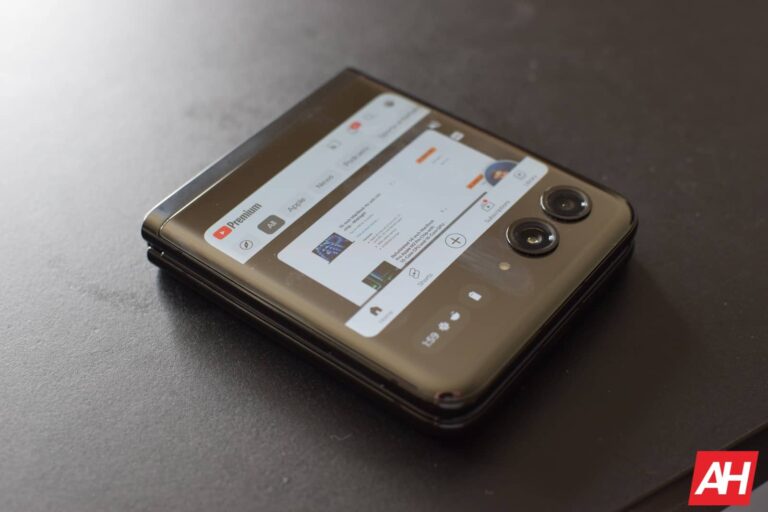
The November 2023 security patch for Motorola Razr Plus also includes a new update package that brings minor improvements and bug fixes to the flip phone. Unlike the previous update in early November, no new apps and features will come to the Razr Plus this month via the latest update.

With only 190MB in size, Motorola has released a relatively small update package to its device. The update version is T2TZ33.18-75-9, and besides some bug fixes, it upgrades the Razr Plus security patch level from September to November 1, 2023. The previous update weighed 1.45GB and rolled out with build number T2TZ33.18-75-4.

The Motorola Razr Plus gets the November 2023 security patch

So far, Motorola has done a great job keeping its devices updated to the latest security updates. The phone maker already promised to release bi-monthly updates to the phones.

The changelog doesn’t go deeper into what the new update brings to the Razr Plus phones. It just notes that the update fixes some bugs and improves the device’s stability. The overall UI and phone experience supposedly remain unchanged. However, the former update brought UI tweaks and the new Moto Unplugged and Moto Connect apps to the Razr Plus devices.

You can now check your Motorola Razr Plus to see if the update is rolled out to the phone. Once the update is finished, a notification appears on the screen that encourages you to “Optimize your updated device.” While it seems to be a genuine offer by the company, it just allows you to install some bloatware apps.

Motorola has been consistent with releasing bi-monthly updates. However, it still needs to clarify when Android 14 will be rolled out to its phones. Google has previously released the name of Pixel devices that would get Android 14. Samsung has also rolled out the Android 14 update to the Galaxy S21 series in the US.


[ad_2]
Source link

Fake Lockdown Mode Exposes iOS Users to Malware Attacks

0
[ad_1]

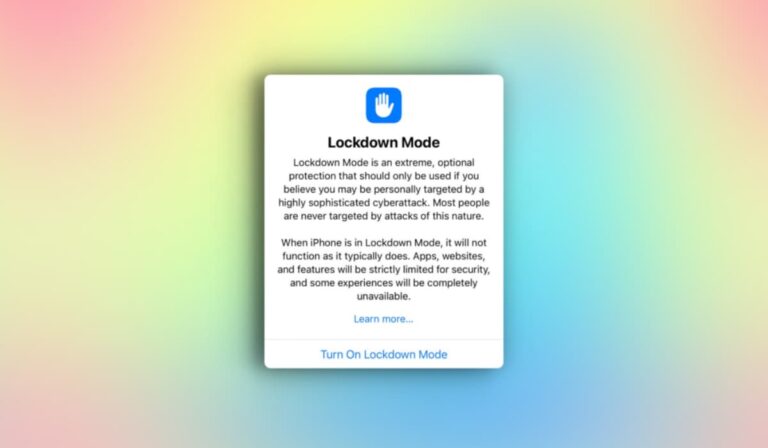
It turns out that visually mimicking this Fake Lockdown Mode without incorporating any of the original mode’s security features is possible.

Cybersecurity researchers at Jamf Threat Labs have discovered a new technique that allows malware to bypass Lockdown Mode on iOS devices. For your information, Lockdown Mode is a security feature introduced by Apple in iOS 16 to limit certain features/functions on an iOS device so that compromising the device becomes difficult for attackers.

Researchers found that the mode’s primary control is through user-space components, and it isn’t integrated deeply into the iOS kernel. This flaw offers threat actors an opportunity for malware to bypass the Lockdown Mode’s restrictions by altering the user’s default database or using method hooking techniques.

Jamf Threat Labs’ researchers noted that visually mimicking this Fake Lockdown Mode without providing any of the original mode’s security features is possible. It is worth noting that successful implementation of this technique is possible if the device is already compromised.

What happens is that when a user activates Lockdown Mode through the Settings app, the method is triggered, which initiates a sequence of actions, including disabling shared albums, link previews, developer mode, and enabling USB restricted mode. Additionally, it sets the LDMGlobalEnabled key in the user’s default database to “YES,” indicating that Lockdown Mode is active.

Simply put, on an already infiltrated device, a hacker can cause Lockdown Mode to be “bypassed” when the user triggers its activation. So, a user would think their device is in Lockdown Mode, but it is not and will remain vulnerable to attacks.

In their demo video, researchers created a scenario where malware intercepts Lockdown Mode activation, and instead of triggering the expected sequence, it creates a file titled “/fakelockdownmode_on.”

Then, it initiates a user space reboot and tricks the system into believing that the Lockdown Mode is active. The researchers could maintain control over Lockdown Mode by manipulating the device’s reboot process. The malware could continue to run and monitor the user’s activity, even if they had taken steps to safeguard their device.

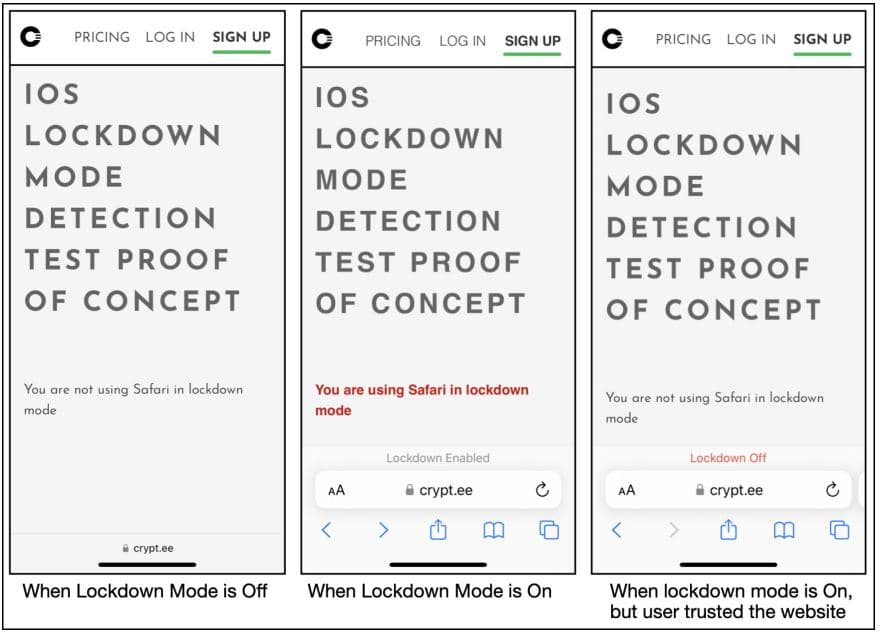
The researchers also manipulated Lockdown Mode in Safari, one of the most commonly used applications on iOS devices. By hooking into Safari’s code, they forced the system to think that Lockdown Mode was always enabled, even when it wasn’t.

Researchers also showed how to activate Lockdown Mode in Settings and disable it without the user’s knowledge. They could view PDF files in Safari, which isn’t allowed when Lockdown Mode is truly enabled.

Fake Lockdown Mode Exposes iOS Users to Malware Attacks

Lockdown Mode is a practical feature in certain situations, such as the BLASTPASS zero-click exploit identified in September 2023. However, this finding reveals that it isn’t foolproof, and it is possible to manipulate it to bypass security measures on compromised devices.

Apple addressed the vulnerability in iOS 17 by elevating Lockdown Mode to kernel level. Still, researchers are warning users to remain cautious and take steps to protect their devices. This includes using strong passwords and keeping devices updated with the latest security patches.

  1. Apple Safari Safest, Google Chrome Riskiest Browser of 2022
  2. Update NOW! Pegasus Spyware Exploiting iPhones on Latest iOS
  3. Apple issues iPhone software update after fake police ransomware scam

[ad_2]
Source link

Android 14 rolling out to Galaxy A52s, Galaxy A33 & Galaxy A14

0
[ad_1]

Samsung has released Android 14 for three more A-series phones. The Galaxy A52s, Galaxy A33, and Galaxy A14 (LTE) are receiving the big update, which brings One UI 6.0. The 5G version of the latter picked up the update last month.

Samsung updated more Galaxy A phones to Android 14

Over the past couple of weeks or so, Samsung has pushed its Android 14-based One UI 6.0 update to half a dozen A-series phones. The Galaxy A73, Galaxy A54, Galaxy A53, Galaxy A34, Galaxy A24, and Galaxy A14 5G have all received the big update. The company simultaneously updated its flagship smartphones and tablets, including foldables.

We now have confirmation about the availability of Android 14 for the Galaxy A52s, Galaxy A33, and Galaxy A14 (LTE). The former two are picking up the update in Europe with firmware build numbers A528BXXU5FWK4 and A336BXXU7DWK6, respectively. The update for the latter is available in Asia with the build number A145FXXU4BWK8.

Samsung will soon roll out Android 14 for these phones in more markets. You should receive a notification when the update reaches your Galaxy devices. Alternatively, you can go to Settings > Software update on your phone and tap on Download and install to check for OTA (over the air) updates manually.

Since Android 14 and One UI 6.0 bring a lot of new features and changes, the OTA file sizes are huge. All three models are receiving updates with files weighing more than 2GB. The November 2023 Android security patch is part of the package. It contains fixes for over 60 security issues, five of which are confirmed to be critical vulnerabilities.

The Galaxy A52s won’t get Android 15

This is the last major Android OS update for the Samsung Galaxy A52s. The premium handset debuted in August 2021 with Android 11 onboard. It has now received updates to Android 12, Android 13, and Android 14. The phone isn’t eligible for Android 15, though security patches will come for two more years—at least until August 2025.

The Galaxy A33 debuted with Android 12 and the Galaxy A14 with Android 13. This is the second major update for the former and the first for the latter. Both handsets will get Android 15, with the Galaxy A14 possibly making the jump to Android 16 as well. Of course, there’s plenty of time to go for that. Samsung has yet to push One UI 6.0 to dozens of devices, including the Galaxy Z Flip 4 and Galaxy Z Fold 4. We will keep you posted on its Android 14 rollouts.


[ad_2]
Source link

Meta, IBM, and othe companies form an AI alliance

0
[ad_1]

Is AI technology the next step for humanity, or is it a step ON humanity? That’s a question that most of us are waiting to be answered. However, some of us aren’t waiting and are, rather, looking to find a favorable answer. Meta, IBM, and other companies have banned together to establish an open-source AI Alliance. This will help create AI tools that everyone has access to.

The issue with most of the AI LLMs on the market is that they’re all held privately behind major companies like Google, OpenAI, Anthropic, and so on. These are the companies developing and training these AIs, so it’s their right to own the AI, but this poses a problem in Meta’s eye.

Meta partnered with IBM to establish an open-source AI Alliance

Meta has openly been in favor of open-source AI, and this alliance is only further proof of that. “The AI Alliance brings together researchers, developers, and companies to share tools and knowledge that can help us all make progress whether models are shared openly or not.” Meta’s president of global affairs, Nick Clegg said in a statement, “We believe it’s better when AI is developed openly”.

The company has been looking toward some big names in technology including Intel, IBM, and NASA. Yale University is also on this list. The list of companies stretches to over 50, and we won’t be surprised to see it grow over time.

The thinking behind the AI Alliance is that AI development shouldn’t be kept behind a gate and it should be open to other companies. This is the best way to ensure safe innovation. It’s “a group of leading organizations across industry, startup, academia, research and government coming together to support open innovation and open science in AI.”

The alliance will provide openly available tools for developers so that they can develop AI safely. Along with that, it will prioritize transparency so that potential threats can be identified and addressed. With privately owned AI, threats can be held from the public. We’re still waiting on information about Q*, the OpenAI breakthrough that could “potentially be a threat for humanity“, reports state.

One aim of the alliance is to craft tools that will inform the public and policymakers about potential risks and other information about AI. This will make it easier for everyone to understand what to do regarding the technology.

This is something that AI needs

This alliance is a major boon for AI safety. We can’t have all of the primary innovations in AI tech be held behind major companies. The thing is that we’re talking about large multi-billion dollar and trillion-dollar companies like Google and Microsoft. OpenAI is in a weird gray area because it’s technically a non-profit company. However, it should be on this list, as it stands to gain from companies using its chatbot.

AI is, among other things, a business venture to these companies, especially for Google and Microsoft. Their AI tools will boost the attractiveness of their for-profit products, and so they also stand to gain from AI. So, rather than being in a race to create beneficial AI that will help the world, we can’t deny that they’re also chasing the all-mighty dollar. We can’t have companies pushing AI for the sake of profit, because it turns into a large push to beat out the competition.

Pushing to have more transparency and publicly available tools to help develop AI safely will be extremely beneficial going forward.


[ad_2]
Source link