Sony may shift all its smartphone image sensors to the new LYTIA brand, including the existing IMX sensor lineup. According to a new report, the company is slowly doing away with the IMX brand for mobile image sensors. It has already rebranded some IMX sensors to LYTIA (LYT). It plans to completely shift to the LYT lineup by 2026.
Sony to move its IMX mobile image sensors to the LYTIA brand
Sony is one of the first names that comes to mind when talking about smartphone camera makers. The Japanese firm has been in this industry since 2003 and supplies image sensors to many smartphone companies. Its IMX sensors are found on flagship and mid-range smartphones. It is a leading player in the image sensor industry, alongside Samsung and a few others.
A few years ago, Sony introduced a new LYTIA line of mobile image sensors. The company said the new brand will “convey the worldview and value that its mobile image sensors provide to the world.” With LYTIA, it aims to “build on its history of contributing to smartphone photography and videography” and give more people access to creative imaging experiences “beyond imagination.”
Since then, Sony has gradually expanded the LYTIA lineup of mobile image sensors. It has launched new products across various categories, including a few flagship offerings. The OnePlus 12 uses the LYT-808 flagship sensor for its 50MP primary camera. Its 48MP ultrawide camera has Sony’s IMX581 sensor, while the 64MP 3x zoom camera uses OmniVision’s OV64B sensor.
According to tipster Yogesh Brar on X, the IMX lineup of Sony sensors will soon disappear. The Japanese firm is in the process of ending this branding for its image sensors. LYTIA will replace it across all segments. Not just new sensors, Sony plans to move its existing IMX solutions under the LYTIA brand. The 50MP IMX890 and IMX882 have already been rebranded as LYT-701 and LYT-600.
The rebranding will be completed in 2026
Sony plans to gradually rebrand all IMX sensors to LYT. This rebranding process will reportedly be completed in 2026. Realme has already confirmed that its upcoming Realme 13 Pro and 13 Pro+ will feature Sony’s rebranded LYT-701 and LYT-600 50MP sensors. The phones will arrive later this month. In the meantime, expect Sony LYTIA sensors on more phones.
The company should also soon announce new LYTIA image sensors. Its arch-rival Samsung recently unveiled a 200MP sensor and two 50MP sensors for flagship smartphones.
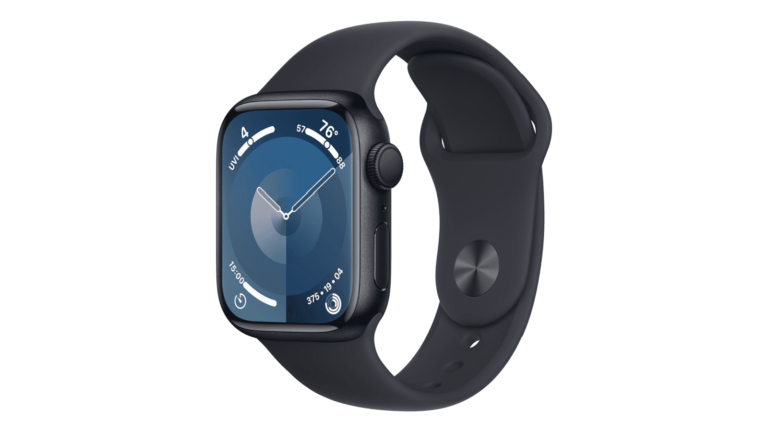
Amazon is currently selling the newest Apple Watch Series 9 for just $299, which is going to save you $100 off of the regular price and make for a great early Prime Day Deal. Currently, the 41mm model is on sale for $299, with the 45mm for $329. That’s $100 off of each size. On top of that, the cellular models are also on sale, with the 41mm cellular being on sale for $399 and the 45mm cellular being on sale for $429.
This is the first time in a long time that we have seen all models of the Apple Watch Series 9 discounted. So if you’ve been on the fence about grabbing one, now is the time.
The Series 9 builds upon Apple’s already impressive health monitoring capabilities. With the introduction of more advanced sensors, users can expect even more precise readings on heart rate, blood oxygen levels, and sleep patterns. The addition of a new temperature sensor enhances its ability to monitor overall health, providing valuable data that could detect early signs of illness or stress. These features alone make the Series 9 a worthy investment for those conscious about their health and well-being.
Apple’s dedication to user experience shines through in the Series 9, with its faster processor ensuring that apps launch quickly and run smoothly. This seamless interaction, coupled with the latest watchOS, offers a range of new software features and improvements, enhancing productivity and allowing for greater customization.
Fitness enthusiasts will appreciate the expanded workout tracking capabilities, which now include more sports and activities. Whether you’re into high-intensity interval training, yoga, or outdoor adventures, the Series 9 has you covered, offering detailed analysis and personalized feedback to help you reach your fitness goals.
Moreover, the Apple Watch Series 9 boasts an even more durable design, making it suitable for all kinds of adventures. Its enhanced battery life also means you can go longer between charges, ensuring you stay connected and on top of your health and fitness without constant power-ups.
Finally, with its elegant design and customizable watch faces and bands, the Series 9 is not just a smartwatch; it’s a fashion statement that complements any style.
The latest Ticketmaster leak impacts top celebrities and events including Taylor Swift, Jennifer Lopez, and Justin Timberlake concerts. Hackers claim barcodes can’t be refreshed, undermining security.
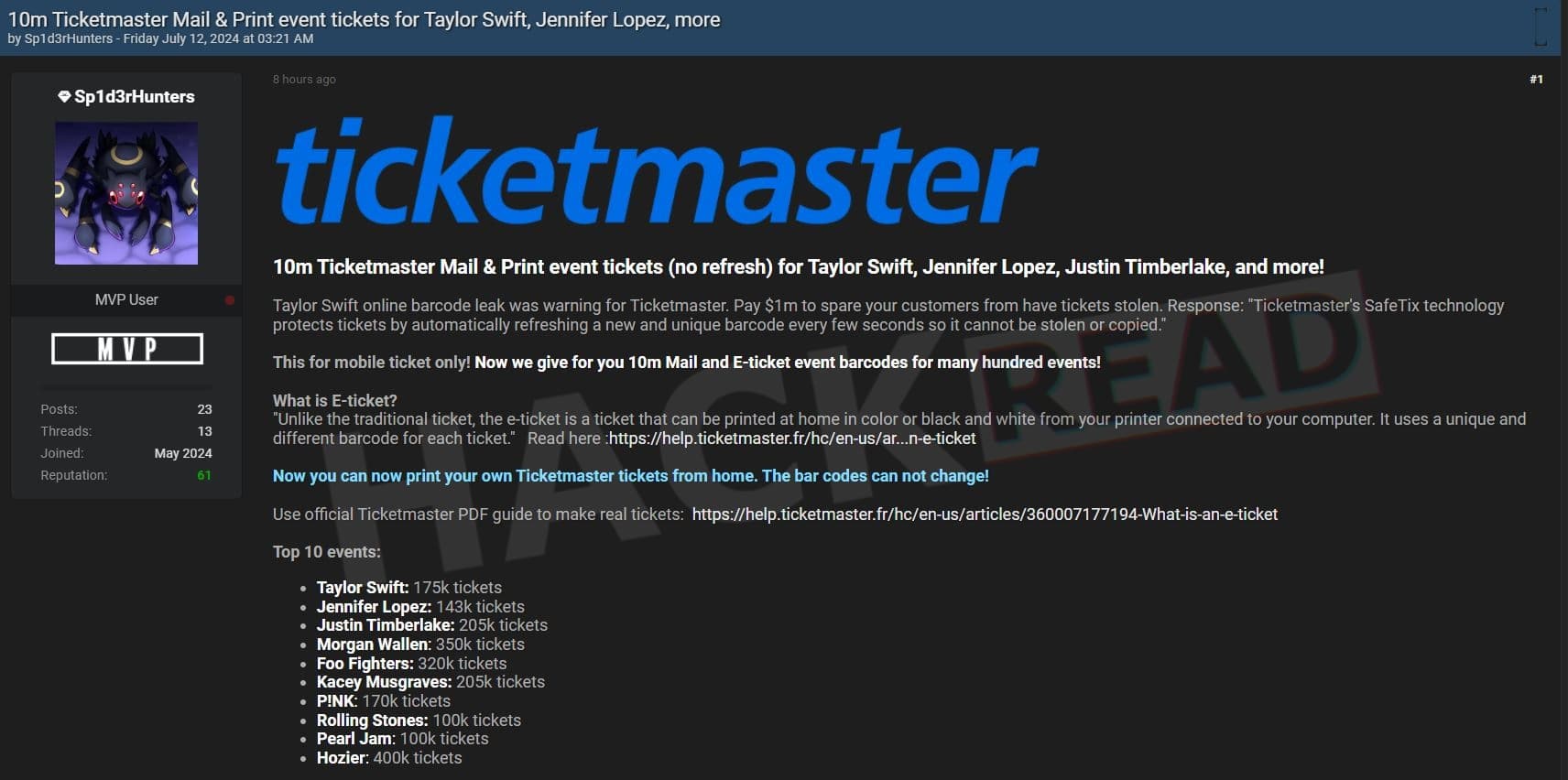
Ticketmaster hackers have released 10 million tickets, including barcodes for high-profile events featuring top celebrities like Taylor Swift, Jennifer Lopez, and Justin Timberlake. This latest attack directly challenges Ticketmaster’s “SafeTix” technology, which is designed to prevent ticket theft by continuously refreshing barcodes.
The hackers posted the data on Breach Forums early this morning, claiming that the barcodes cannot be refreshed, undermining Ticketmaster’s security measures specifically designed for mobile tickets.
According to threat actors behind the latest leak, the data includes mail and e-ticket event barcodes for hundreds of events, inviting users to print their own tickets from home without fear of the barcodes changing.
Top Events Affected:
As seen by the Hackread.com Research Team, the leaked data impacts the following celebrities and events:
Taylor Swift: 175,000 tickets
Jennifer Lopez: 143,000 tickets
Justin Timberlake: 205,000 tickets
Morgan Wallen: 350,000 tickets
Foo Fighters: 320,000 tickets
Kacey Musgraves: 205,000 tickets
P!NK: 170,000 tickets
Rolling Stones: 100,000 tickets
Pearl Jam: 100,000 tickets
Hozier: 400,000 tickets
Threat actor publishing Ticketmaster data (Screenshot: Hackread.com)
Data Analysis
The ticket industry is a complicated one. Although Hackread.com has over a decade of experience in data breach analysis, things can be tricky sometimes. Therefore, we used ChatGPT-4o to analyze a small sample from the leak. Here’s what it found:
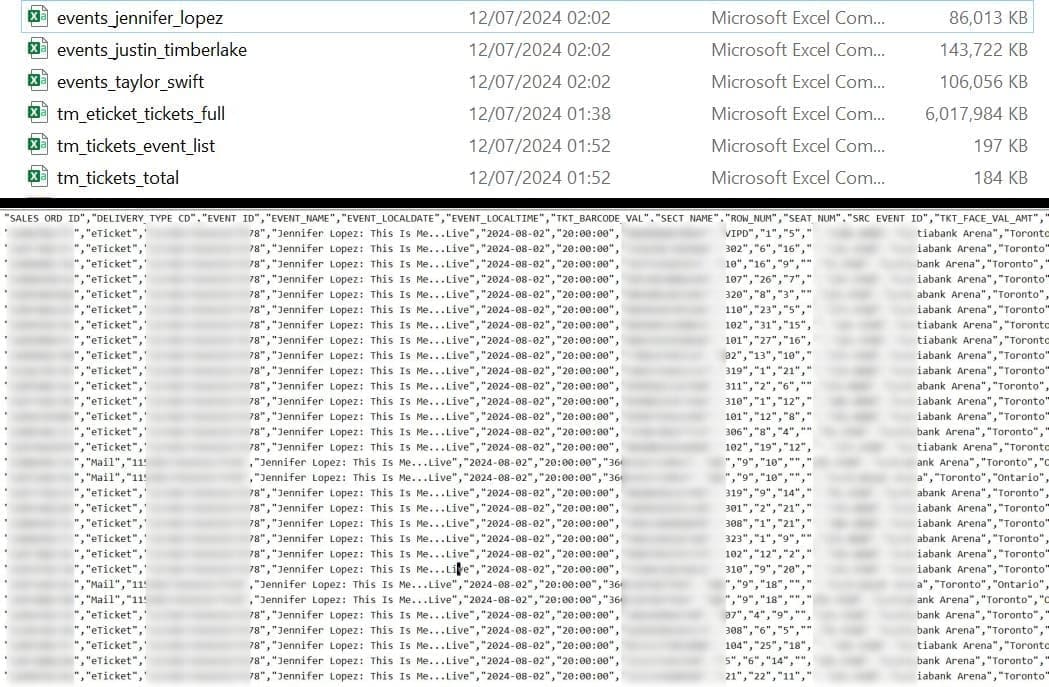
"The dataset appears to be a detailed extract of Ticketmaster ticket sales for an upcoming event featuring Jennifer Lopez. The data includes various details about the tickets, such as sales order ID, delivery type, event details, ticket barcode values, seat information, pricing, and venue information. Here’s a breakdown of the key columns and their meanings:
SALES_ORD_ID: Unique identifier for the sales order. DELIVERY_TYPE_CD: Type of ticket delivery, e.g., "eTicket" or "Mail". EVENT_ID: Unique identifier for the event. EVENT_NAME: Name of the event (e.g., Jennifer Lopez: This Is Me...Live). EVENT_LOCALDATE: Local date of the event. EVENT_LOCALTIME: Local time of the event. TKT_BARCODE_VAL: Barcode value for the ticket. SECT_NAME: Name of the section where the seat is located. ROW_NUM: Row number for the seat. SEAT_NUM: Seat number. SRC_EVENT_ID: Source event ID (not provided in this data). TKT_FACE_VAL_AMT: Face value amount of the ticket. EVENT_VENUE_NAME: Name of the venue (e.g., Scotiabank Arena). EVENT_VENUE_CITY: City where the event is taking place (e.g., Toronto). EVENT_VENUE_STATE: State or province where the event is taking place (e.g., Ontario). EVENT_VENUE_COUNTRY: Country where the event is taking place (e.g., CA for Canada). SERVICE_CHARGE_AMT: Service charge amount for the ticket. HOST_SYS_CD: Host system code. HOST_VAX_ACCT_NUM: Host VAX account number. EXTENDED_TKT_TYPE_CD: Extended ticket type code. BASE_TKT_TYPE_CD: Base ticket type code. XNUM_CD: Extended number code. VEN_ID: Venue ID. QUALIFIER_NAME1: Qualifier name 1. QUALIFIER_NAME2: Qualifier name 2. QUALIFIER_NAME3: Qualifier name 3. QUALIFIER_COMBO_ID: Qualifier combo ID. CPN_CAT_ID: Coupon category ID. CPN_PWD_PRIM_VAL: Coupon password primary value. MEMBERDB_SALES_ORD_ID: Member database sales order ID. ORD_CREATE_OPR_CD: Order create operator code. SALES_PLATFORM_CD: Sales platform code. EVENT_KEY: Event key. EVENT_HEX: Event hexadecimal code. EVENT_TIMEZONE: Timezone of the event. EVENT_URL: URL of the event page on Ticketmaster. EVENT_VENUE_KEY: Venue key. EVENT_VENUE_POSTCODE: Venue postcode. EVENT_VENUE_ADDR1: Venue address line 1. EVENT_VENUE_ADDR2: Venue address line 2. EVENT_VENUE_LONG: Longitude of the venue. EVENT_VENUE_LAT: Latitude of the venue.
Key Points:
Event Information: All entries are for the event "Jennifer Lopez: This Is Me...Live" on August 2, 2024, at 8:00 PM, held at Scotiabank Arena in Toronto, Ontario, Canada. Ticket Delivery Type: Tickets are either "eTicket" or "Mail".
Ticket Details: Includes section, row, and seat number, along with the barcode value.
Pricing: Face value and service charge amounts are included.
Venue Details: Information about the venue's name, city, state, country, postal code, and geographical coordinates.
Sales Platform: Tickets were sold through different platforms such as mobile, desktop, and webview.
MOST CRUCIAL:
The dataset includes critical details that could be used to create counterfeit tickets if it falls into the wrong hands. Here’s why:
Ticket Barcode Values: Each entry contains a unique TKT_BARCODE_VAL which is the barcode value for the ticket. This barcode is what gets scanned at the event venue to verify the ticket’s authenticity and entry validity.
Event Details: The dataset includes the exact date, time, and location of the event. This information is essential for generating a legitimate-looking ticket.
Seating Information: Detailed seating information (section, row, and seat number) is provided, which would allow for the creation of tickets that look real and are specific to certain seats.
Face Value and Service Charges: Knowing the exact face value and service charges helps to make the counterfeit ticket pricing appear genuine.
Venue Information: The venue’s name, address, and even geographical coordinates are available, which are typically included on a printed ticket.
URLs: The dataset includes URLs that could potentially be used to fetch additional event-specific information or resources to further validate the counterfeit ticket.
If someone has access to this dataset, they can potentially print their own tickets using the barcodes provided. The challenge for Ticketmaster would be to differentiate between legitimate and counterfeit tickets, especially if the barcodes are static and not refreshed regularly."
Screenshot from the leaked data (Screenshot: Hackread.com)
Previous Leaks:
The latest leak is part of the hacking spree the threat actors unleashed against Ticketmaster back in May 2024 when the ShinyHunters hacking group claimed responsibility for stealing data from 560 million Ticketmaster users.
On July 8, 2024, hackers leaked 30,000 ticket barcodes for major events, including a DIY guide on how to create physical tickets from the leaked data. Earlier leaks on July 4 and 5, 2024 involved 44,000 and 170,000 ticket barcodes related to Taylor Swift’s The Eras Tour, respectively. In total, the hackers announced stealing a treasure trove of data including the following:
980 million sales orders
680 million order details
1.2 billion party lookup records
440 million unique email addresses
4 million uncased and deduped records
560 million AVS (Address Verification System) detail records
400 million encrypted credit card details with partial information.
It is worth mentioning that ShinyHunters and Sp1d3rHunters are two different individuals but are affiliated with the group behind the Ticketmaster data breach.
Nevertheless, Ticketmaster faces increasing pressure to reinforce its security protocols and regain public trust. The company has yet to comment on the latest leak and its implications for the “SafeTix” technology. Stay tuned for further updates on this developing story.
The OnePlus Nord 4 will launch on July 16, and the company’s COO, Kinder Liu, talked about the phone ahead of that date, its metal build, updates, and more. He did not reveal much, but he was interviewed by Digital Trends and did reveal some tidbits.
The OnePlus Nord 4 will deliver metal unibody build & offer 4 years of major OS updates
If we compare it to Samsung’s mid-rangers, the Galaxy A35 and A55, the OnePlus Nord 4 will get supported for one extra year. The Galaxy A55 could be one of its main competitors, which is why this comparison makes sense.
Liu explained why OnePlus went with a metal unibody build here
That construction has disappeared from the scene for a while. Kinder Liu went on to explain that it’s because of 5G, and the number of antennas required for it. The OnePlus Nord 4 has 50% smaller antennas, with strategic placement. That allowed OnePlus to proceed with the metal unibody build.
OnePlus’ COO said that a metal unibody build was chosen for “durability, beauty, permanence, and strength”. The last piece of information that he shared is that the OnePlus Nord 4 was tested by TÜV SÜD simulating 72 months of use. It was certified to stay fluent long after you start using it.
Everything will be revealed on July 16, so stay tuned for more information about OnePlus’ new mid-ranger.
In 2024, securing these personal vaults—especially for Android users—becomes paramount when smartphones often know more about us than we do ourselves. Given the platform’s openness and app diversity, Virtual Private Networks (VPNs) are crucial in shielding your online deeds from the overly curious and malicious. Innovations surge as the VPN arena evolves, making a knowledgeable choice more important than ever. This guide dives deep into the premier VPN apps for Android, evaluating their features, performance, and value to enhance your digital armor in this interconnected age.
Understanding VPN Necessity for Android Users
In today’s digital mesh, Android users are especially vulnerable to threats that lurk on public Wi-Fi and through geo-restrictions that limit access to global content. VPNs stand out by creating an encrypted tunnel that cloaks your online moves from various snoops, ensuring that personal details, financial information, and private communications remain confidential—even on unsecured networks. They also mask your IP address, opening up a world of content beyond digital borders.
Android’s inherent openness makes it more susceptible to risks than closed systems, amplifying the importance of employing a robust VPN. Throughout 2024, leading VPN providers have emphasized more robust encryption protocols and privacy features tailored to integrate seamlessly with Android, ensuring they don’t just add security but also gel well with your device’s performance.
Key Features in Top Android VPN Apps
When shopping for the best VPN app for your Android device, several features are non-negotiable: AES-256 encryption secures your data under a virtually impenetrable digital lock, while a strict no-logs policy ensures that your online history stays private, not just from outsiders but also from the VPNs themselves. Look for services that undergo independent audits to confirm these claims.
Other essential features include a kill switch to protect data if the VPN drops and split tunneling to manage what apps or websites you shield. A broad network of servers enhances the ability to skirt geo-restrictions and offers more options for speedy connections. The presence of the WireGuard protocol is another plus, offering cutting-edge speed and security.
Top VPN Picks for Android in 2024
Among the plethora of options, specific VPNs stand out for Android users this year:
– NordVPN shines with its vast server network and double encryption, making it a powerhouse for security and speed. Its Android app is intuitive and features threat protection to block malicious sites.
– ExpressVPN remains a favorite for its high speeds and strong privacy track record, which are supported by its TrustedServer technology. The Android app offers impressive split tunneling options for detailed control over VPN use.
– Surfshark offers unlimited connections and exceptional value, with innovative features like CleanWeb to fend off ads and trackers. Its all-in-one solution now includes antivirus features, making it a versatile pick for Android users.
– ProtonVPN emphasizes privacy and security with advanced features in an easy-to-use interface. Its free tier offers a robust introduction to VPN services without data caps, a rare find.
Performance and Usability: What to Expect
The top VPNs in 2024 have focused on optimizing their Android apps to deliver robust performance without draining your device’s battery. Features like quick connections to the fastest servers and stable connections are crucial, especially when switching between Wi-Fi and mobile data. User-friendly interfaces with precise settings and server info make these VPNs stand out, enhancing the overall experience without compromising security.
Privacy and Security Advances in Modern VPNs
As threats evolve, so do VPN features. In 2024, more Android VPNs will offer multi-hop connections for added anonymity and advanced obfuscation techniques to hide VPN traffic during everyday internet use, which is crucial for users in restrictive regions. Integrated features like malware blocking enhance browsing security, and DNS protection prevents exposure to your online queries.
Conclusion
They are navigating the digital world in 2024, which demands robust mobile security. For Android users, the right VPN is more than a tool; it’s an essential layer of protection, ensuring privacy and freedom online. From NordVPN’s speed and security features to ExpressVPN’s renowned reliability, there’s a VPN that meets every need and preference. As digital landscapes evolve, these tools will only become more vital, making now the ideal time to invest in one, securing your mobile life with the best VPN for Android.
mSpy, a widely used phone spyware application, has suffered a significant data breach, exposing the sensitive information of millions of its customers.
The breach, which Brainstack, mSpy’s parent company, has not publicly acknowledged, has raised serious concerns about spyware applications’ security and ethical implications.
The Extent of the Breach
mSpy Customers’ Locations
The breach, first disclosed by Switzerland-based hacker Maia Arson Crimew, involved over 100 gigabytes of Zendesk records. These records contained millions of individual customer service tickets, email addresses, and the contents of those emails.
Techcrunch data revealed that mSpy’s customers are spread globally, with significant clusters in Europe, India, Japan, South America, the United Kingdom, and the United States.
Troy Hunt, who runs the data breach notification site Have I Been Pwned, obtained a copy of the leaked dataset. He added about 2.4 million unique email addresses of mSpy customers to his site’s catalog of past data breaches.
Hunt confirmed the accuracy of the leaked data by contacting several subscribers who verified the information.
Implications for Privacy and Security
The mSpy data breach is the latest in several incidents involving phone spyware operations. This breach underscores the inherent risks associated with spyware applications, which are often marketed for parental control but can be misused for unauthorized surveillance.
The leaked data included customer information and details of unwitting victims targeted by mSpy users.
Dataset analysis revealed that some journalists had contacted mSpy following a previous breach in 2018. Additionally, U.S. law enforcement agents had filed or sought to file subpoenas and legal demands with mSpy.
In one instance, a mSpy representative provided billing and address information about a customer to an FBI agent investigating a kidnapping and homicide case. The emails in the leaked data show that mSpy’s operators were aware of the spyware’s misuse.
After being discovered, some customers inquired about removing mSpy from their partner’s phone. The dataset also raised questions about U.S. government officials and agencies, police departments, and the judiciary using mSpy, with some instances lacking transparent legal processes.
Brainstack’s Role and Response
Brainstack, the Ukrainian tech company behind mSpy, has remained largely hidden. Despite its significant customer base, Brainstack has not publicly acknowledged the breach.
The leaked Zendesk data exposed Brainstack’s involvement in mSpy’s operations, revealing records of employees using false names to respond to customer tickets.
When contacted by TechCrunch, Brainstack employees confirmed their names as found in the leaked records but declined to discuss their work.
Brainstack’s chief executive, Volodymyr Sitnikov, and senior executive, Kateryna Yurchuk, did not respond to multiple emails requesting comment. A Brainstack representative, who did not provide their name, declined to answer questions but did not dispute the reporting.
Zendesk, the platform used by mSpy for customer support, stated that they had no evidence of a compromise of their platform. However, they did not clarify whether mSpy’s use of Zendesk violated their terms of service.
The mSpy data breach has exposed the vulnerabilities and ethical concerns surrounding spyware applications. With millions of customers’ data compromised, the incident highlights the need for stricter regulations and oversight of spyware operations.
As authorities and watchdogs continue to investigate, the breach is a stark reminder of the potential dangers of surveillance technology.
"Is Your System Under Attack? Try Cynet XDR: Automated Detection & Response for Endpoints, Networks, & Users!"- Free Demo
The Google Pixel 9 Pro Fold & Pixel 9 Pro XL names have been confirmed
The certification in question is the REL (Radio Equipment List) certification from Canada. MySmartPrice spotted both listings, and both of them flat-out mention the names of the two models, along with the belonging model numbers.
Do note that the Pixel 9 and Pixel 9 Pro are also coming, though. Google is planning to launch either three or four devices during its August 13 press event. Yes, the Pixel event is now taking place in August, not in October. Google decided to move it.
Google will either announce the Pixel 9, Pixel 9 Pro, and Pixel 9 Pro XL during that event, all it could opt to push out all four devices. We’re still not sure whether the Pixel 9 Pro Fold will get a separate launch event or not.
The Pixel 9 Pro Fold could launch on August 13, but we’re not sure
Judging by the fact that it carries a very similar name to the other Pixel devices now, it could end up launching at the same time. We’ll see, as we didn’t hear that much about that device, unlike the other three Pixels.
Google will switch up the design of its non-folding Pixel smartphones, as they will have a camera island on the back more reminiscent of the Pixel Fold than the Pixel 8 series. Flat sides will be in use too, and so on.
All three smartphones already surfaced, both in CAD renders and in real-life images. The Pixel 9 Pro Fold is still a bit of a mystery, though. Google is expected to make it more similar to other book-style foldables, so it will be less wide, and taller.
In April 2024, we reported how Apple was warning people of mercenary attacks via its threat notification system. At the time it warned users in 92 countries. In a new round, Apple is now warning users in 98 countries of potential mercenary spyware attacks.
The message sent to the affected users says:
“Apple detected that you are being targeted by a mercenary spyware attack that is trying to remotely compromise the iPhone associated with your Apple ID.”
In the same message, Apple says that it is very likely that the person in question is being specifically targeted because of what they do or who they are. And, although there is a certain margin of error, the user should take this warning seriously.
Mercenary spyware is used by governments to target people like journalists, political activists, and similar targets, and involves the use of sophisticated tools like Pegasus. Pegasus is one of the world’s most advanced and invasive spyware tools, known to utilize zero-day vulnerabilities against mobile devices.
On the website that explains Apple threat notifications and protection against mercenary spyware, it specifically mentions Pegasus:
“According to public reporting and research by civil society organizations, technology firms, and journalists, individually targeted attacks of such exceptional cost and complexity have historically been associated with state actors, including private companies developing mercenary spyware on their behalf, such as Pegasus from the NSO Group.”
Apple has sent out similar notifications multiple times a year since 2021 but doesn’t disclose how it determines who to send them to, since that might aid attackers in evading future detection.
Amnesty International urges those that have received such a notification to take it seriously. Amnesty’s Security Lab offers digital forensic support to potential victims like human rights defenders, activists, journalists and members of civil society.
If you are a member of civil society, and you have received an Apple notification, you can contact Amnesty International and request forensic support using the Get Help form.
Whether you’ve received that notification or not, every iPhone user should make sure they have the latest updates, protect the device with a passcode, use multi-factor authentication and a strong password for Apple ID, only install apps from the Apple Play store, use a mobile security product, and be careful what they open or tap on.
People that have reason to believe they might be individually targeted by mercenary spyware attacks, can enable Lockdown Mode on their Apple devices for additional protection.
Lockdown Mode does the following:
Blocks most message attachments
Blocks incoming FaceTime calls from people you have not called previously
Blocks some web technologies and browsing features
Excludes location from shared phots and removes Shared Albums
Blocks wired connections when the device is locked
Blocks auto-joining non-secure WiFi networks
Blocks incoming invitations from people you have not previously invited
Blocks installation of configuration profiles you may require for work or school
How to turn on Lockdown Mode on iPhone or iPad
Open the Settings app.
Tap Privacy & Security.
Scroll down, tap Lockdown Mode.
Tap Turn On Lockdown Mode.
Read what it does and tap Turn On Lockdown Mode if that is what you want.
Tap Turn On & Restart, then enter your device passcode.
We don’t just report on phone security—we provide it
HONOR announced two book-style foldable smartphones today, the Magic V3 and Magic Vs3. We’ve already talked about the Magic V3, the company’s brand new flagship foldable smartphone.
The HONOR Magic Vs3 is inferior to the Magic V3, but also a bit cheaper
Well, the Magic Vs3 also arrived, and it’s basically a cheaper alternative to the Magic V3. It also looks a bit different thanks to a completely different-looking camera island on the back. It’s also very thin and light, though, even though not to the extent of the Magic V3.
When unfolded, this phone measures 156.8 x 145.2 x 4.65-4.8mm. When folded, it measures 156.8 x 74 x 9.8-10.1mm. Depending on the model, the Magic Vs3 weighs 229 or 231 grams.
The ‘Velvet Black’ model is thinner and lighter here, while the ‘Tundra Green’ and ‘Qilian Snow’ are slightly thicker and heavier. That black model has vegan leather on the back, which thins down the phone further, while it also making it lighter. The other two variants have glass backs.
It includes two powerful displays and the Snapdragon 8 Gen 2 SoC
The HONOR Magic Vs3 features a 7.92-inch main display. That panel has a resolution of 2344 x 2156, and it’s an LTPO AMOLED display with a refresh rate of up to 120Hz. The cover display measures 6.43 inches and has a resolution of 2376 x 1060 pixels. That display also has an adaptive refresh rate of up to 120Hz. Both displays offer a 3,840Hz PWM dimming.
The Snapdragon 8 Gen 2 fuels the Magic Vs3, unlike the Snapdragon 8 Gen 3 which is included inside the Magic V3. This phone comes in 12GB and 16GB RAM models with 256GB, 512GB, and 1TB of storage. Android 14 comes pre-installed with MagicOS 8.0.1.
Three cameras, a 5,000mAh battery, and fast wired & wireless charging are all here
A 50-megapixel main camera (f/1.9 aperture) is included here. A 40-megapixel ultrawide unit (f/2.2 aperture) also sits on the back, as does an 8-megapixel periscope telephoto camera (f/3.4 aperture, 5x optical zoom). A 16-megapixel selfie camera (f/2.2 aperture) sits on each of the phone’s displays.
A 5,000mAh battery is also a part of the package here. It supports 66W wired and 50W wireless charging. The company also included two nano SIM card slots inside of this phone and a side-facing fingerprint scanner.
The HONOR Magic Vs3 pricing starts at CNY7,699 ($1,061), and we’re not sure if the phone will launch outside of China. The Magic V3 almost certainly will, but we’re not sure about the Magic Vs3.
RALEIGH, NC—Advance Stores Company, Incorporated, a prominent commercial entity in the automotive industry, has recently been the victim of a cyber attack.
The breach, which occurred on April 14, 2024, was discovered on June 10, 2024, and has compromised the personal information of over 2.3 million users, including 13,858 residents of Maine.
Ethan Steiger, the Senior Vice President and Chief Information Security Officer at Advance Auto Parts, confirmed the breach in a formal notification submitted to the authorities.
The compromised data includes names and other personal identifiers, raising serious concerns about potential identity theft and misuse of personal information.
Details of the Breach
The breach was identified as an external system breach, commonly known as hacking. The attackers managed to infiltrate the company’s systems and gain unauthorized access to sensitive user information.
The breach was not detected until nearly two months later, highlighting the sophisticated nature of the attack and the challenges in identifying such threats promptly.
According to the Office of Maine Attorney General reports, Advance Auto Parts immediately mitigated the damage and secured its systems.
The company has since notified the affected individuals through written communication, with notifications sent out on July 10, 2024.
Affected users are offered identity theft protection services to safeguard their personal information. Advance Auto Parts has implemented several measures to enhance their cybersecurity infrastructure in response to the breach.
This includes a thorough review of their security protocols, increased system monitoring, and collaboration with cybersecurity experts to prevent future incidents.
Ethan Steiger emphasized the company’s commitment to protecting their customers’ data and ensuring such breaches do not occur again.
“We deeply regret the inconvenience and concern this incident may have caused our valued customers. Our team is working tirelessly to address the situation and strengthen our defenses against future threats,” Steiger stated.
The company has also notified consumer reporting agencies, as the law requires, to ensure that affected individuals can take necessary precautions. Users are advised to monitor their accounts for suspicious activity and report anomalies to the relevant authorities.
The Advance Auto Parts data breach is a stark reminder of the growing threat of cyber attacks and the importance of robust cybersecurity measures. As businesses continue to digitize their operations, the need for advanced security protocols and vigilant monitoring becomes increasingly critical.
Customers affected by the breach are encouraged to take advantage of the identity theft protection services offered by Advance Auto Parts and remain vigilant in safeguarding their personal information.
"Is Your System Under Attack? Try Cynet XDR: Automated Detection & Response for Endpoints, Networks, & Users!"- Free Demo