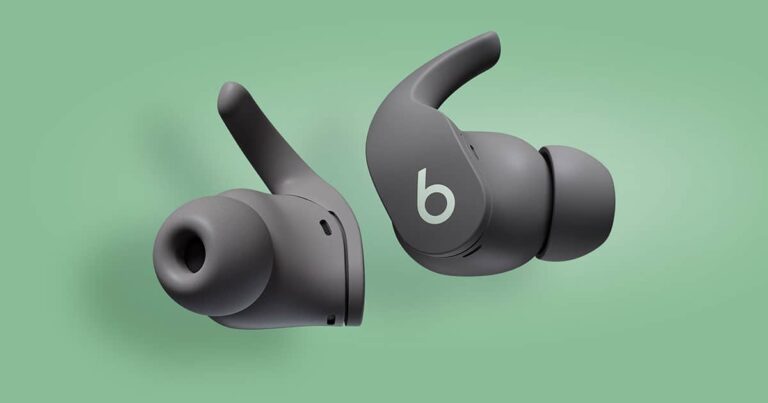
The Beats Fit Pro is a great pair of earbuds for working out or running errands. They’re comfortable and secure, and they have a great sound quality. Right now, you can get them in new colors for a discounted price. Currently, they are on sale for just $149 over at Amazon for Prime Day. That’s going to save you $40 off of their regular price and does bring it back down to an all-time low.
The Beats Fit Pro comes in 10 colors: black, white, sage gray, stone purple, coral pink, dune, earth, moon, tidal blue, and volt yellow. All of these colors are on sale for $159 right now. So, no matter which color you’ve been eyeing, you can get them for less now.
With the Beats Fit Pro, you’re getting a pair of headphones from Apple that actually work with Android quite well. Not only do they work over Bluetooth, but they also work with Google’s Fast Pair. So you can open the case, and they’ll automatically pop up on your Pixel like they would on an iPhone, which is really lovely.
Additionally, these can last around six hours of continuous playback with ANC on or up to seven hours with it off. You’ll get 24 hours of playback with the included charging case (or 30 hours with ANC off). That’s pretty impressive for such a small pair of earbuds, to be quite honest. And these charge with USB-C and not Lightning, which is a really nice bonus for Android users.
These have Active Noise Cancellation, so you can block all of the external noise and immerse yourself in your music. You can still hear stuff around you in transparency mode as well. That way, you can walk down a street and still hear when a car is nearby and not get run over.
You can pick up the Beats Fit Pro from Amazon today by clicking here. This sale is not going to last very long, so you’re going to want to grab this before it’s gone.
Google is set to announce new Pixel devices next month at an event in Mountain View. It’s a bit of a strange thing for Google, since Pixels are usually announced in October, and at an event in New York City or San Francisco. Not at Google’s campus in Mountain View. However, it is rumored that Google has at least four Pixel smartphones to announce and at least two smartwatches. So there’s lots to see next month.
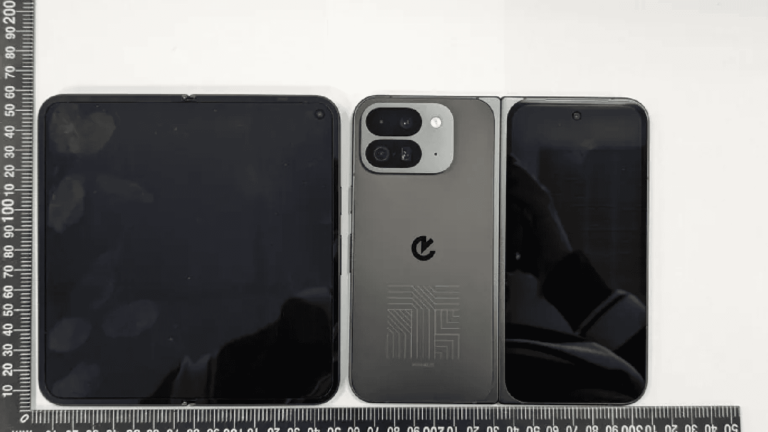
That brings us to the latest leak, which actually comes from Taiwan’s National Communications Commission (NCC) which is basically their version of the FCC. Like with the FCC, Google needs to send products over to the NCC for approval before they can be sold. And the NCC has decided to publish pictures of the phone. So we can see the Pixel 9 Pro Fold here, but it also appears to be a prototype and could be a final prototype. But we can tell based on the logo on the back, that it is not the final, final version.
While we don’t know exact dimensions yet of the Pixel 9 Pro Fold (I really hope that is not the final name), it looks a lot like the OnePlus Open or OPPO Find N3. Which has a 18:9 aspect ratio main display, similar to a regular slab phone. That would be a big departure from the passport-style Pixel Fold the company released last year. Which I, and many others loved.
Google’s opting for a smaller battery this year
In a surprising turn of events, Google is supposedly using a smaller battery for the Pixel 9 Pro Fold, at just 4,560mAh. The original Pixel Fold was 4,727mAh, that’s about 4% smaller. But let’s face it, the Pixel Fold wasn’t exactly known for its battery. Perhaps the new Tensor G4 is going to offer better efficiency than the Tensor G3 did; the Pixel 8 series with Tensor G3 fell in last place in almost every battery test this past year. Don’t forget, the Pixel 9 Pro Fold is jumping from a Tensor G2 to a Tensor G4, so it’s getting two generations of chip upgrades here.
With a name like “Pixel 9 Pro Fold,” I can’t help but think that Google might release a non-Pro foldable this year or at some point in the future. Which could be good for a cheaper price tag. The Pixel Fold was priced at $1,799 last year – the same as the Galaxy Z Fold 5. However, the OnePlus Open did start at $1,599 and pretty much lapped both of those other foldables. If Google can offer the Pixel 9 Pro Fold at a lower price, it could really be a big seller.
Pixel 9, Pixel 9 Pro and Pixel 9 Pro XL also appear
The NCC isn’t just releasing pictures of the Pixel 9 Pro Fold either. They have also released pictures of the Pixel 9, Pixel 9 Pro and Pixel 9 Pro XL. Now, from our understanding, the Pixel 9 and Pixel 9 Pro are going to be the same size, with the Pixel 9 Pro XL being a larger model.
With the Pixel 9, we can see that it is still using a glossy back, similar to the Pixel 8. I thought for sure Google would use matte this time around since the Pixel 8a had a matte finish. While both Pixel 9 Pro and Pixel 9 Pro XL sport matte finishes, as well as the triple-camera bar on the back. All three models are sporting sharp edges around the camera bump, which many won’t like.
According to the NCC, we could also see faster charging, at least on the Pro models. As the Pixel 9 Pro is reportedly 25.20W, and the Pixel 9 Pro XL is 32.67W. So it’s likely going to be 27W charging and 33W charging, respectively.
Now for the battery sizes, the Pixel 9 and Pixel 9 Pro have a 4,558mAh capacity battery, and the Pixel 9 Pro XL is 4,942mAh.
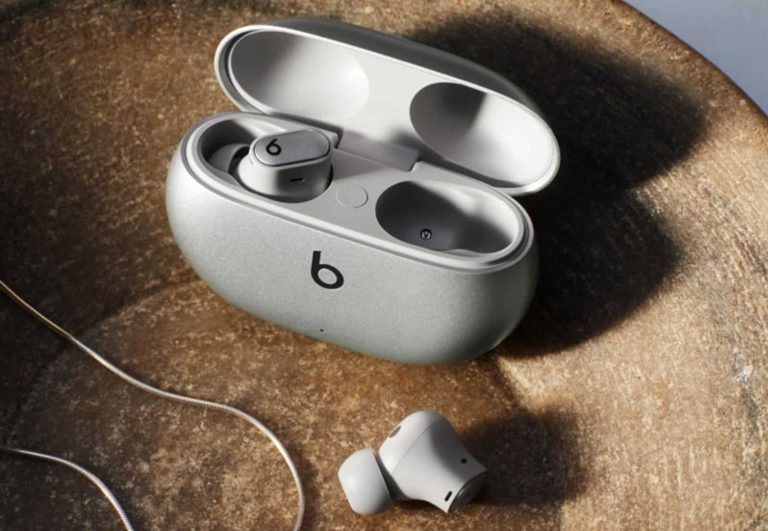
Amazon Prime is going on right now, and a bunch of top brands are cutting prices on their best products. Right now, Beats By Dre is selling the stellar Beats Studio Buds + for $40 off for Prime Day. This knocks them down to just $129.95.
If you’re looking for one of the best audio experiences on the market, then you’ll want to look into this deal. You’ll be getting a powerful experience with great audio, battery life, and more.
Starting off with the design, these are good-looking earbuds. They have that unique Beats design aesthetic that will make them stand out. There are four colors to choose from; however, only three of them are discounted. You have a transparent color along with an ivory and black/gold color. The one that’s not discounted is the silver colorway. This one costs the full $169.95.
These earbuds have great high-quality drivers that help deliver a wide and encompassing sound. It doesn’t matter what you’re listening to, everything will sound amazing! This includes music, movies, podcasts, games, etc. This is nothing new to the Beats brand.
These earbuds come with IPX4 water resistance. This means that you shouldn’t be afraid of letting your sweat get into them and breaking them.
These earbuds have a lightweight and comfortable fit. So, you’ll be able to wear them for an extended period of time. Not only that, but they have great battery life. They can last you up to about nine hours on a single charge. With the charging case, you’re looking at about 36 hours of listening time.
These are some of the best earbuds that you can get. This makes the $40 discount that much better. The Beats Studio Buds + are worth the money.
Guess what, Amazon Prime Day is happening right now! All of the top companies are offering their best devices at great discounts. This includes Samsung, who’s offering the Galaxy S23 FE for $150 off. This brings the phone to $449.99 down from $599.99.
Samsung launched a pretty great phone under its FE branding, and it earned a 5-star review from us. The Galaxy S23 FE brought a lot of what we liked about the Galaxy S23 phones. This goes for the design. The Galaxy S23 FE is a premium-feeling phone that shares the design with the Galaxy S23. It uses metal and glass, and it has the same camera setup.
This phone is rocking a beautiful 1080p AMOLED display. So, it’s on par with the displays in Samsung’s other premium phones. So, you’ll love to watch all kinds of content on it. This is also true with the great set of speakers that come with it. Honestly, they’re some of the best at this price point.
If you’re looking for a great Galaxy experience, then you’ll love using the Galaxy S23 FE. After the latest updates, this phone can use some of the best features that Samsung has to offer. Yes, this includes the new Galaxy AI features. These allow you to summarize and generate text using Samsung’s proprietary keyboard and apps. They will help make this phone that much better.
As for the camera, Samsung fitted this phone with an impressive set of cameras. They performed well through our review. If you’re interested in reading our Galaxy S23 FE review, there’s a lot more information to read.
The Galaxy S23 FE is truly one of the best phones to get at this price point!
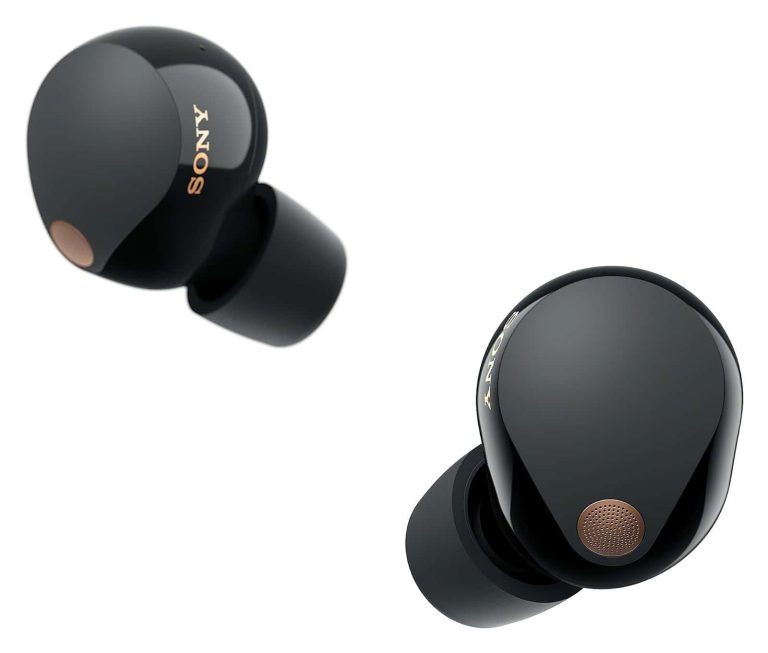
Guys, get your wallets out; it’s Prime Day! Top companies are offering their products at deep discounts. One company is Sony, and it’s offering its amazing WF-1000MX5 Bluetooth earbuds for over $70 off for Prime Day. This brings the price down to just $228 down from $299.99.
Sony is one of the top companies in the audio market, and its XM5 line of headphones and earbuds represents the best that the company has to offer. The WF-1000XM5 Bluetooth earbuds have a confusing name, but there’s nothing confusing about the audio quality.
They come with custom-tuned drivers that deliver some stunningly good audio quality. They come with Sony’s Dynamic Driver X units that give you better vocals. All in all, Sony’s earbuds offer some of the best audio at this price point.
This superior audio quality doesn’t only apply to listening to content. The great audio quality also means that calls will sound great. No more incoherent calls.
You can’t expect a pair of quality earbuds without amazing noise cancelation. These earbuds have large microphones on the outside that help with the noise cancelation. They’re able to filter a wide range of noise. They’re able to isolate you with your music. So, it doesn’t matter if you’re inside or outside, you’ll hear your music with maximum clarity.
These are comfortable earbuds, so you’re going to want to wear them for extended periods of time. They come with amazing battery life. You’ll get up to eight hours of mileage on a single charge. With the charging case, you’re looking at about a full day of battery life.
All of these features, with the beautiful design, make these some of the best earbuds on the market. You should pick them up!
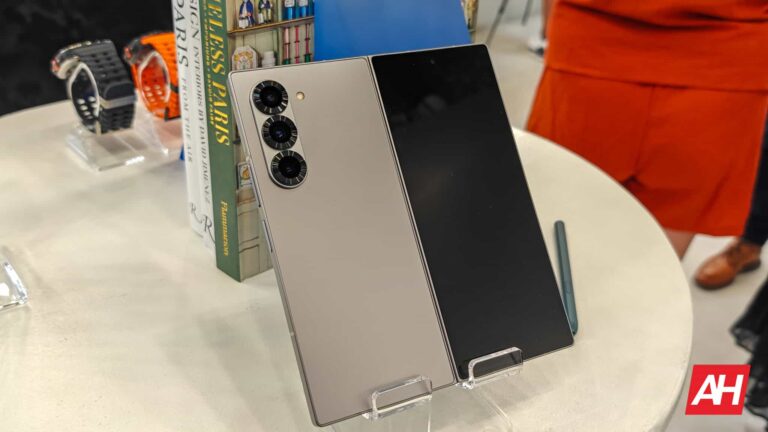
Samsung hasn’t given up on the Galaxy Z Fold 6 Ultra yet. Also called the Galaxy Z Fold 6 Slim, the device is still in the company’s pipeline. The Korean firm is actively developing the beefy new foldable, newly spotted evidence on its servers suggests. The last time we heard about its launch schedule, it was said to arrive in the fourth quarter of 2024.
The Galaxy Z Fold 6 Ultra/Slim is still in Samsung’s pipeline
Initially thought to be separate devices, the Galaxy Z Fold 6 Ultra and Fold 6 Slim appear to be the same Samsung foldable. Their rumored specs and features are identical. Add to the fact that both devices could be limited to China and/or South Korea. Some industry insiders called it Ultra because it packs more powerful specs than the regular Fold 6. Others called it Slim because it is slimmer.
Over the past few weeks, there have been some contrasting reports about its existence. While Samsung has been working on the device, it was reportedly on the fence about its launch. The company was contemplating whether it should release a separate slim foldable to take on Chinese rivals such as HONOR’s newly launched Magic V3. It is just 4.35mm thick when unfolded and 9.2mm when folded.
Since most Chinese foldables are limited to the domestic market, where Samsung already struggles to sell phones, the Slim or Ultra version of the Galaxy Z Fold 6 may not be a huge success. However, it appears the company has decided to go ahead with it. Perhaps it plans to release it in South Korea only, ditching China. That’s based on the newly spotted test firmware on its website.
Discovered by GalaxyClub, Samsung recently added test firmware builds for an unannounced Galaxy device with the model number SM-F958N to its servers. This model number has been previously associated with the Galaxy Z Fold 6 Ultra or Slim. According to the Dutch publication, test firmware for the device exists for country codes KOO, KTC, SKC, and LUC. All of those correspond to South Korea.
The device is still several months away
Samsung’s test firmware for the Galaxy Z Fold 6 Ultra/Slim didn’t exist on its servers a week ago. This means the company is actively working on the device behind the scenes. But this also means the beefy new foldable is several months away. The previously rumored launch timeline of Q4 2024 might be accurate, but there’s little chance the device will arrive early in Q4. And when it does, its availability might be limited to one or two markets. The Galaxy Z Fold 6 is Samsung’s best foldable for most people.
The UK’s Competition and Markets Authority (CMA) is now investigating Microsoft for hiring former Inflection AI employees and acquiring licenses to use its technology. The situation has also caught the attention of the FCC and keeps the EU vigilant for possible effects on competition.
Earlier this year, Microsoft AI was officially introduced as a new division of the company. Since then, Microsoft has been hiring high-profile talent to boost it, such as Mustafa Suleyman. The company also hired most of the staff from the startup Inflection AI. In addition, Microsoft paid around $650 million to license Inflection AI’s technology. So, while the company did not officially buy the startup, the end result could be quite similar to that of a merger.
The UK’s CMA now investigating if Microsoft’s hiring of Inflection AI staff was a disguised merger
Since it was not an official merger, the process did not pass through the scrutiny of antitrust regulators. This situation caused multiple organizations, such as the EU and the Federal Trade Commission (FCC), to investigate the matter. Now, the CMA of the UK joins the list of organizations examining whether everything has been done according to the law.
Phase one of the CMA investigation will conclude on September 11. That day, depending on the result, they can dismiss the case or move to phase two to begin a more in-depth one. The CMA seems to consider that the hiring of Inflection AI staff and the acquisition of the startup’s technology could be a disguised merger. Microsoft would have done this to skip the requirements of official company mergers.
Although it was not officially a merger, the outcome is similar to one. The CMA wants to ensure that the process will not have a negative impact on competition in the UK market.
Microsoft claims to be complying with the law
Microsoft sent a statement to Bloomberg in this regard. The statement says: “We are confident that the hiring of talent promotes competition and should not be treated as a merger.” So, the company seems to be sure that the law supports its actions.
Amid pressure from regulators, Microsoft has taken some actions. For example, it resigned from its non-voting observer seat on OpenAI’s board. This case is also under vigilance by regulatory entities. Although the company did not officially purchase OpenAI, it has invested more than $10 billion.
New Backdoor ‘BugSleep’ Discovered in MuddyWater Phishing Attacks. Cybersecurity researchers uncover a custom-made backdoor used by the notorious MuddyWater hacking group to gain remote access to compromised systems. Learn about the new threat and how to protect yourself from phishing scams.
Iranian threat group ‘MuddyWater’, linked to the Ministry of Intelligence and Security, has intensified cyber warfare targeting the Middle East, particularly Israel, since the onset of the Israel-Hamas war in October 2023, reveals the latest report from Check Point Research.
For your information, MuddyWater (aka Mango Sandstorm and Static Kitten), is an infamous cyberespionage group known for using phishing emails to trick victims into clicking on malicious links or downloading infected attachments.
The group uses compromised email accounts to target various organizations in areas of interest, including Israeli municipalities, government entities, airlines, travel agencies, and journalists. MuddyWater is believed to be active since 2017.
BugSleep Backdoor – Saudi Arabia – Israel
Usually, MuddyWater’s campaigns involve the use of legitimate Remote Monitoring and Management (RMM)Tools like Atera Agent and Screen Connect, but this time they have deployed BugSleep, a custom monitoring tool with backdoor capabilities.
Initially, actors used a tailored lure in campaigns sent to dozens of targets in the same sector, such as municipalities, to download a new app. However, as per Check Point’s report, the group now use generic-themed phishing lures like webinars and online courses to reuse the same lure across different regions.
The group also use English more frequently now. Two emails identified by CP researchers used the same lure, one sent to Saudi Arabia and the other to Israel, with the main differences being email addresses and the final payload.
In Saudi Arabia, the payload was an RMM, while in Israel, it was BugSleep. Moreover, files related to this campaign, uploaded on VirusTotal were from IP addresses in Azerbaijan and Jordan, with the Azerbaijani language in the PDF lure allowing a correlation with the target.
BugSleep operates by first utilizing the Windows Sleep API multiple times, a tactic employed to evade detection by automated security programs known as sandboxes. It then proceeds to load the necessary functionalities required for its operation.
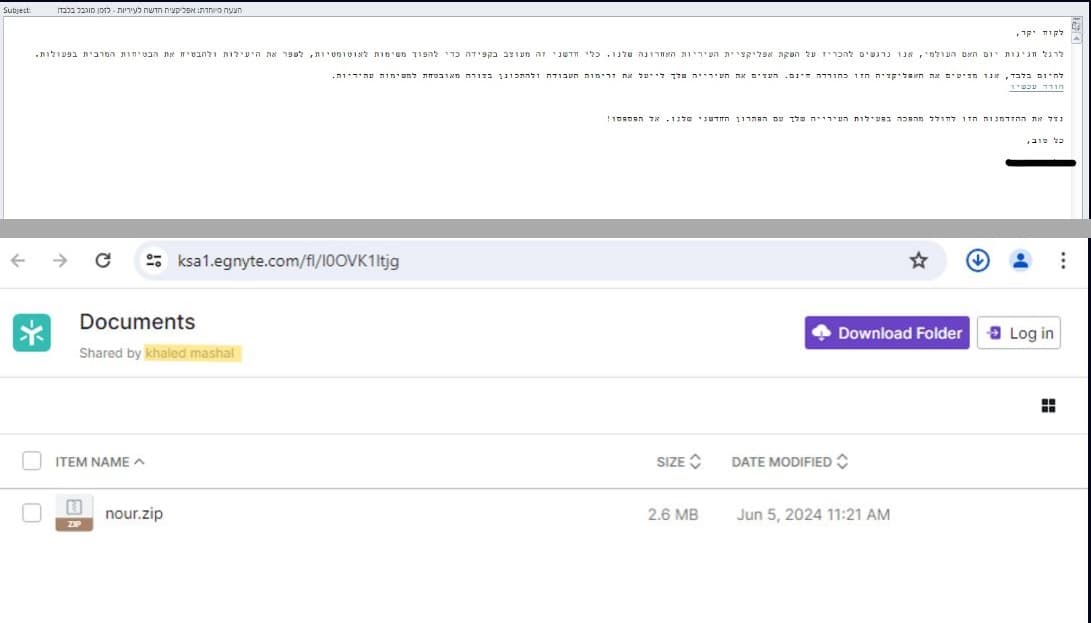
Malicious emails sent by the MuddyWater APT group to Israel and Saudi Arabia (Credit: Check Point)
While the core functionality remains consistent across versions, Check Point highlights that BugSleep offers the attackers the ability to execute commands on the compromised machine and transfer files between the infected computer and a C&C server controlled by the attackers.
The malware is distributed through Egnyte, a secure file-sharing platform, and is triggered every 30 minutes daily. The updates, occurring within short intervals between samples, suggest a trial-and-error approach.
The discovery of custom-made malware demonstrates the evolving tactics of cybercriminals and MuddyWater’s commitment to bypassing traditional security measures. Therefore, it’s crucial to be cautious of unsolicited emails, verify the sender’s identity before opening them, regularly update your operating system and security software, use strong passwords, and enable multi-factor authentication whenever possible.
Samsung is using drones to deliver the Galaxy Z Fold 6 and Galaxy Z Flip 6 in its home country South Korea. The company says it’s a pilot aimed at speeding up foldable deliveries to nearby areas. If the pilot is successful, it may launch a drone delivery service for other mobile products in the future.
Samsung is delivering the Galaxy Z Fold 6 and Flip 6 using drones
This drone delivery service for Samsung’s new foldables is the company’s collaborative project with the Korean Ministry of Land, Infrastructure, and Transport. The firm uses the government’s drone delivery infrastructure, including drones, take-off and landing zones, and control systems built under the Drone Demonstration City Construction Project.
According to Samsung, drones can reduce delivery times from about a week to just a day in some areas. This improves consumer experience as they won’t need to physically visit a store or wait long for delivery. The service is operational even during vulnerable times. It can be used to deliver critical goods urgently when other delivery methods are not available.
Samsung first tested its drone delivery service on Jeju Island with a loading weight of up to 10kg in June. After a successful test, the company is now expanding the pilot to more areas. It aims to eventually roll it out across the nation. The ultimate goal is to deliver mobile devices such as Galaxy smartphones, tablets, wireless earbuds and watches wherever possible.
“The drone delivery service is a new attempt to provide a faster and more convenient Galaxy experience to consumers in island areas,” a Samsung official said. “As a company that leads the AI era, we will continue to develop new technologies and services to improve the convenience and rights of consumers.” Samsung offers various other delivery services to consumers, including timed installation for large home appliances.
The service is limited to select areas
Samsung’s drone delivery service for the Galaxy Z Fold 6 and Flip 6 will begin on July 19. This first-of-its-kind delivery service for mobile products will be available for buyers of the new foldables in nearby island areas of Jeju Island, Tongyeong, and Yeosu. In Jeju, the drone will take off from dedicated centers such as Sangmori and Geumneung. It will deliver the product to three bases in Gapado, Marado, and Biyangdo.
In Yeosu and Tongyeong, Samsung offers drone delivery of the Galaxy Z Fold 6 and Flip 6 to more than ten bases, including Hahwa-do, Islands, Songdo, Bisan-do, Jwa-do, and Manji-do. As said earlier, the Korean conglomerate plans to expand this futuristic delivery service to more regions in its home country. Maybe we will also see Samsung deliver its products using drones in markets outside of South Korea someday.
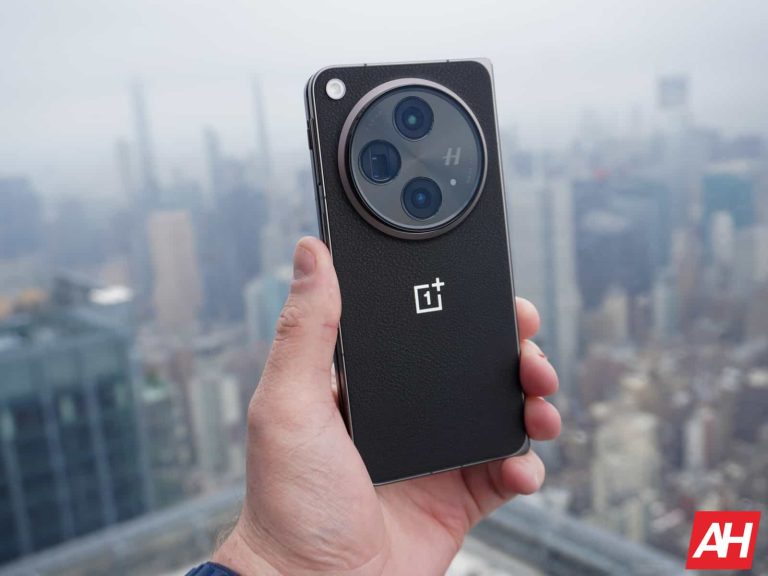
The OnePlus Open was one of my favorite phones of 2023 and arguably one of the best foldables to land in the US last year. And now it’s on sale.
Currently, it is on sale for $1,299, which is $400 off. That is a pretty incredible deal. Because this is the 16GB/512GB variant – also the only variant of the Open, it’s far cheaper than the Galaxy Z Fold 6, which has a regular price of $2,019 for that RAM/Storage variant.
I’ve been using the OnePlus Open on and off since the device was announced last fall. It’s still my absolute favorite foldable available and perhaps my favorite phone available today. It’s just that good. OnePlus nailed the screen sizes and brightness here. It gives us an 18:9 aspect ratio on the front display, so you don’t need to open the phone every time you want to use it. That also means that you can use two apps side-by-side on the inner display at a regular app size. There’s also Open Canvas, which does a good job with multi-tasking and lets you use more screen real estate than you actually have.
The displays are also incredibly bright at 2,800 nits of peak brightness. So, the problem of not being able to see foldable displays in the sun is not a problem here.
On top of that, OnePlus included an incredible camera setup on this phone. It’s been the first time that I have routinely grabbed a phone that wasn’t a Pixel to take photos. That’s really saying a lot.
Finally, we can’t forget about the rest of the specs, which are pretty high-end for the end of 2023. This includes the Qualcomm Snapdragon 8 Gen 2 processor, 16GB of RAM, and 512GB of storage onboard, along with a 4,800mAh capacity battery, which is quite impressive for a foldable, especially one that is this light.
You can pick this up at Best Buy today, but this sale won’t last long, so you’d better be quick.