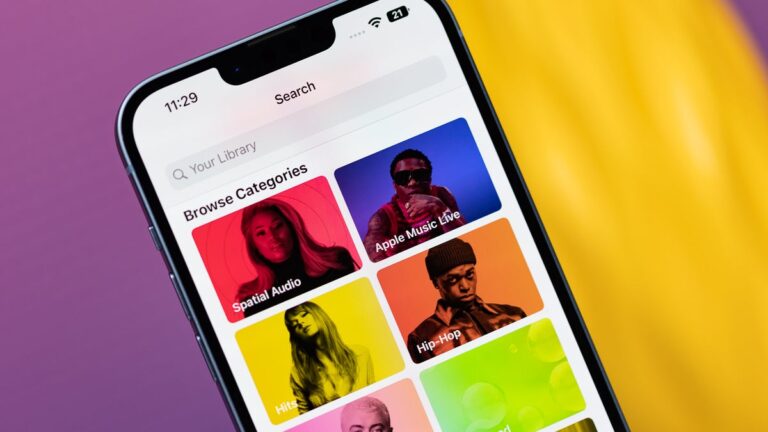
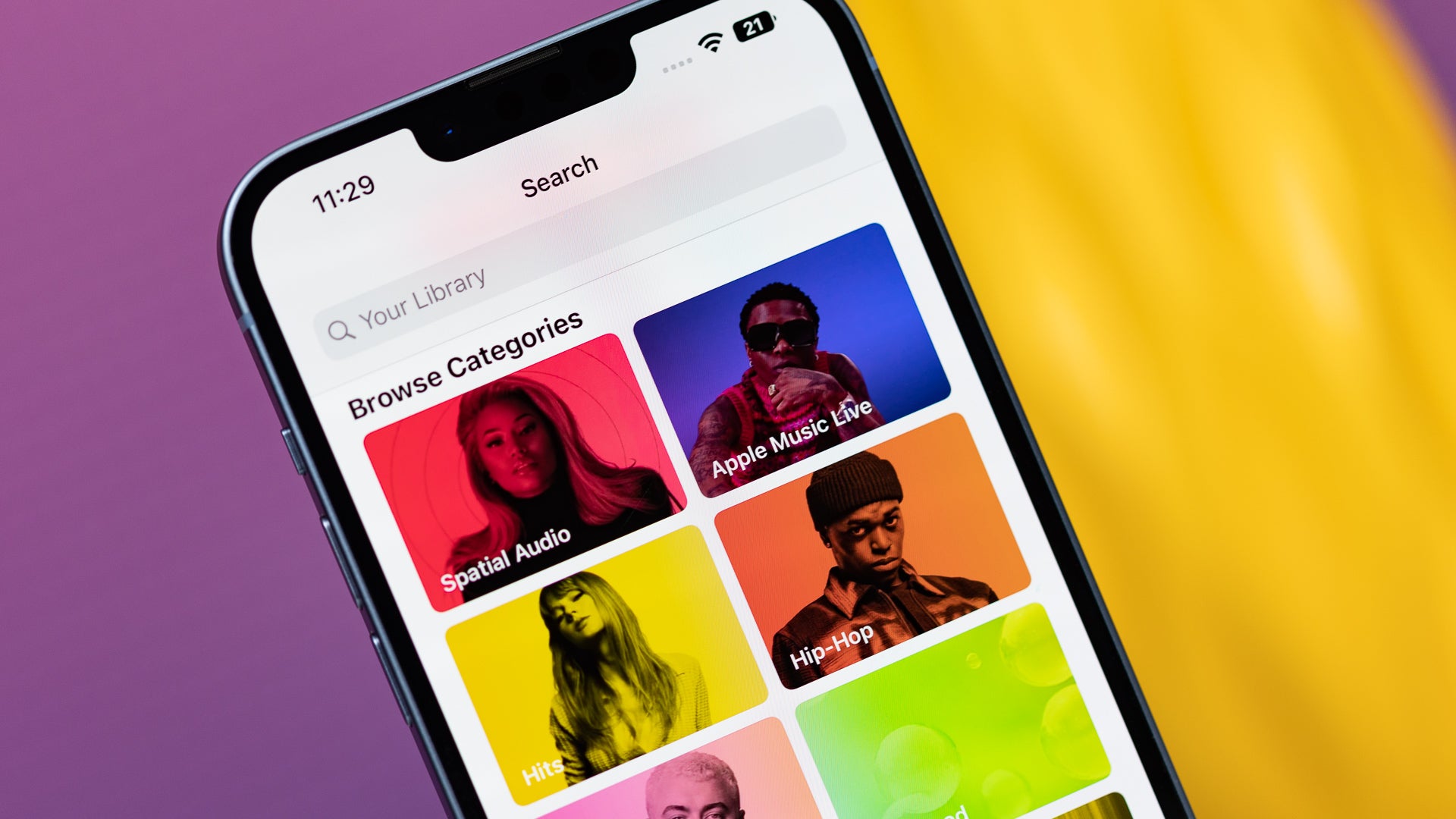
Apple is keeping a close eye on Apple Music and for the last year, it has cranked up its protection against so-called streaming manipulation (via 9to5Mac).
The anti-fraud measures have been so successful that the fraud rate has fallen by 30%, says a new report by Billboard.
Streaming fraud can take many forms, the most obvious one is where a musician uses bots to stream their music 24/7 in order to obtain royalties. Apple says it has detected other examples as well!
“Apple Music quietly rolled out its own strengthened fraud protections — including hitting repeat offenders with “financial adjustments” — more than a year ago, according to an email obtained by Billboard that the platform sent to music industry partners in March. Apple Music’s internal metrics indicate that the policy has already led to a 30% drop in streaming manipulation”, reads the report from Billboard.Another type of fraud is the 31-second song albums – Apple pays a royalty per track, with a proviso that a track of 30 seconds or less isn’t included in the deal. Some have created entire albums of 31-second songs just to hop over the 30-second limit.
“To help labels and distributors figure out where fraud is occurring, Apple Music’s email says the platform started sending daily reports detailing “a content provider’s albums with streams held in review.” “After each review,” the email goes on, “we remove manipulated streams and release legitimate plays. At the end of each month, content providers also receive a report with all excluded streams.” (Spotify has now also ramped up the reporting it provides to labels and distributors, according to one executive at a distribution company, “adding a new dimension of seeing repeat offenders.”)”, says the Billboard report that quotes Apple Music officials.
Cyberattacks pose a significant risk, and prevention alone isn’t enough, so timely detection is crucial. That’s why most organizations use SIEM (Security Information and Event Management) systems to centrally collect and analyze security events with expert-written rules for detecting intrusions.
Organizations use SIEM rulesets for intrusion detection, focusing on misuse patterns for known attacks. It’s effective, simple, and aids investigation with detailed alerts.
AMIDES, an open-source Adaptive Misuse Detection System, spots attack-like behavior not caught by SIEM rules.
The following cybersecurity researchers from the respective organizations and universities introduced this new detection system:-
Rafael Uetz from Fraunhofer FKIE
Marco Herzog from Fraunhofer FKIE
Louis Hackländer from Fraunhofer FKIE
Simon Schwarz from University of Göttingen
Martin Henze from RWTH Aachen University, Fraunhofer FKIE
It uses supervised learning, classifying events based on similarity to known-malicious or known-harmless activity without the need for a manually extensive attack set. Besides this, the AMIDES identifies potential evasion and suggests the likely evaded SIEM rules.
DocumentFree Webinar
In the upcoming webinar, Karthik Krishnamoorthy, CTO and Vivek Gopalan, VP of Products at Indusface demonstrate how APIs could be hacked. The session will cover: an exploit of OWASP API Top 10 vulnerability, a brute force account take-over (ATO) attack on API, a DDoS attack on an API, how a WAAP could bolster security over an API gateway
AMIDES
SIEMs collect data from source systems in Syslog and Windows Event Log format. Due to data volume, automated threat analysis is essential.
If a threat is detected, a human analyst in a security operations center reviews the alert. Misuse detection, using expert-written rules and signatures, is the primary method for SIEMs to automatically spot malicious activity.
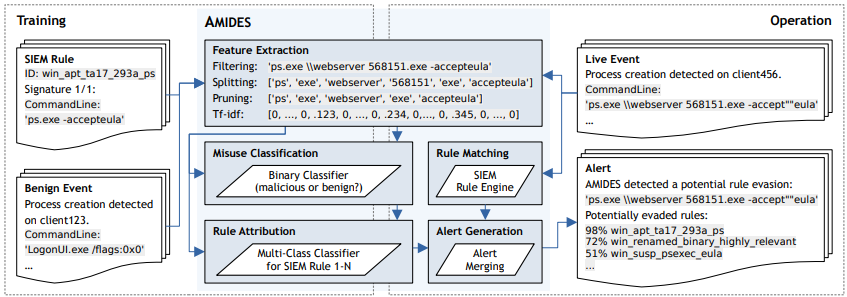
AMIDES process chain (Source – Usenix)
AMIDES enhances SIEM misuse detection in enterprise networks by adding machine learning components to identify rule evasions alongside traditional rule matching.
SIEM events undergo rule matching and feature extraction. The misuse classification component classifies the feature vector as malicious or harmless.
For the training process, this complete system needs the following two key elements:-
SIEM rules
Harmless events
It works with existing SIEM rules in organizations using traditional misuse detection, and at the moment, it supports Sigma rules, with potential for Splunk in the future.
This open-source detection system is freely accessible under the GPLv3 license, and it prioritizes performance for large enterprise networks, implemented in Python using:-
By auto-detecting the SIEM rule evasions, AMIDES reduces network blind spots significantly, but effective detection isn’t enough alone.
This work targets SIEM rule evasions creating critical blind spots in enterprise networks. Analyzing open-source SIEM rules, experts found 110 fully evadable and 19 partially evadable rules out of 292, exposing networks to undetected attacks.
This open-source solution is adaptive for misuse detection, extending rule-based detection to identify evasions and bypassed rules. This approach utilizes existing data, making it convenient for enterprise networks.
Experience how StorageGuard eliminates the security blind spots in your storage systems, try a 14-day free trial.
The RedMagic 9 Pro is an upcoming gaming smartphone, and it will offer up to 24GB of RAM. This info has been revealed by the AnTuTu benchmark. That’s not all that was revealed, of course.
The RedMagic 9 Pro will feature 24GB of RAM & Android 14
That listing also reports that the phone scored 2,290,773 points on AnTuTu. Needless to say, this is way, way up there. This benchmark also confirms that the Snapdragon 8 Gen 3 will fuel this smartphone.
RedMagic will utilize LPDDR5X RAM, and UFS 4.0 flash storage. Speaking of which, the model that got benchmarked is also equipped with 1TB of storage. Android 14 was also mentioned here. AnTuTu also confirmed that a 120Hz panel will be in use.
Now, we do know the launch date of this smartphone. The RedMagic 9 Pro will become official on November 23, so only three days from now. RedMagic also confirmed the design of the phone already, by releasing a bunch of images.
The phone won’t include a camera bump at all
The RedMagic 9 Pro will resemble the RedMagic 8 Pro and RedMagic 8S Pro. There will be one major difference, though… the new phone won’t have a camera bump, at all. Its rear cameras will be flush with the backplate.
The variants that the company showed off via its official social media channels have a see-through backplate. It’s basically a custom for RedMagic to release at least one model with a see-through backplate.
In any case, this handset will have a bunch of gaming features, including shoulder triggers on the right-hand side. When you hold the device in landscape orientation, those will basically be there for your index fingers.
This phone will also have some form of advanced cooling, including a fan, almost certainly. It is launching in China on November 23, but the device will become available globally too.
The iPhone 16 Pro Max, which Apple is expected to launch next year, will have a bigger display than the Galaxy S24 Ultra. Samsung will announce its ‘Ultra’ phone in Q1 next year, it seems, while Apple’s will arrive towards the end of Q3 2024.
The iPhone 16 Pro Max will have a bigger display than the Galaxy S24 Ultra
In any case, this display info comes from two sources, Anthony and Ice Universe, two tipsters. Anthony mentioned that the iPhone 16 Pro Max will have a 6.86-inch display, while he also added that it will be the biggest on an iPhone yet, and even bigger than the Galaxy S24 Ultra’s.
Ice Universe reshared that post on X, and added the exact display size of the Galaxy S24 Ultra. He said that the exact size is 6.7913385827 inches. Samsung will market this as a 6.8-inch display, though.
The difference in size between these two panels is, of course, not that big. Both are kind of huge, so you’ll have a gigantic canvas to work with no matter what device you end up getting.
Both devices will include flat displays
For the first time in a long time, both Apple and Samsung flagship smartphones will also have flat displays. Samsung is going flat this time around. All three of its flagship-grade phones will have flat displays, even the ‘Ultra’.
Speaking of which, the Galaxy S24 Ultra will launch alongside the Galaxy S24 and Galaxy S24+. All three of those devices are expected to arrive in January next year. January 17 is tipped, and the launch event is expected to take place in San Francisco.
Designs of all three phones already surfaced. As expected, the Galaxy S24 and Galaxy S24+ will look the same, but differ in terms of size. The ‘Ultra’ model will once again stand apart, with a different design. It will be less different than before, though, mainly due to the flat display.
A recent leak points out that OLED display iPad entries will hit the global market sometime next year. This impressive design option for Apple’s iPads will be exclusive to the Pro models. Following this, the leak also claims that the iPad Air and Mini entries will also get OLED displays two years after the Pro models.
For the iPad Pros that are said to get OLED screens by next year, their display will be superior to the Air and Mini models. This is because the Pro models might use a two-stack dual-emission OLED panel. As for the more affordable and smaller Air and Mini models, they’ll stick with a single-stack single-emission OLED display.
Despite the difference in OLED displays across the iPad model line-up and their time of availability, this is a great improvement. Currently, the available iPads make use of Liquid Retina XDR mini-LED LCD screens for the Pro models. The more affordable iPads use a similar display to the Pro models but drop off the XDR display technology. If this leak is anywhere close to being accurate, then iPad users can expect an impressive display upgrade by next year.
A significant upgrade is coming to the iPad Pro models with the introduction of OLED display panels
Currently, the available iPad Pro models use LED and mini-LED display technology. This display technology is exclusive to the Pro models on Apple’s more recent iPads. But leaks point out that this will change by next year with the launch of newer iPad Pro models.
The upgrade on these modes will not only bring improvements to the M2 chips onboard but also new screen displays. At this moment, Apple offers its iPad Pros in two different screen sizes, 12.9 and 11 inches. Both of these screen sizes come with LED and mini-LED displays, respectively. However, Apple has been working hard to switch over to OLED displays with its top display suppliers.
For next year, the OLED panel on the iPad Pro models might feature a single-stack single-emission OLED display. By 2027, reports have it that this single-stack display will only be available for the Air and Mini iPad models. Apple will then switch over to the two-stack dual-emission OLED display for the Pro models.
Available reports have it that the iPad Air and Mini models won’t get OLED displays until 2026. A year after this, the Pro models will improve upon the OLED display technology that they offer users. For these upgrades to be possible, Apple might change the suppliers of its OLED panels for coming iPads.
Samsung, one of the brand’s major display suppliers, might not be part of the suppliers for the two-stack OLED display. Apple might switch its attention to other suppliers that’ll make these displays available for future iPad models. With this news, it becomes clear that Apple is gearing up to compete with Android tablets that already use OLED displays.
Multiple critical flaws in the infrastructure supporting AI models have been uncovered by researchers, which raise the risk of server takeover, theft of sensitive information, model poisoning, and unauthorized access.
Affected are platforms that are essential for hosting and deploying large language models, including Ray, MLflow, ModelDB, and H20. While some vulnerabilities have been addressed, others have not received a patch.
Researchers discovered a wide range of vulnerabilities in the tools used in the supply chain for building chatbots and other kinds of AI/ML models, according to Protect AI’s November Vulnerability Report.
“Many of these OSS tools, frameworks, and artifacts, come out of the box with vulnerabilities that can lead directly to complete system takeovers such as unauthenticated remote code execution or local file inclusion vulnerabilities”, reads the report.
Details of the Affected Platforms
Large language models (LLM), as well as other ML platforms and AIs, are hosted, deployed, and shared via the impacted platforms.
DocumentFree Webinar
In the upcoming webinar, Karthik Krishnamoorthy, CTO and Vivek Gopalan, VP of Products at Indusface demonstrate how APIs could be hacked. The session will cover: an exploit of OWASP API Top 10 vulnerability, a brute force account take-over (ATO) attack on API, a DDoS attack on an API, how a WAAP could bolster security over an API gateway
These consist of the machine learning management platform ModelDB, the machine learning lifecycle platform MLflow, the machine learning platform Ray, which is used for the distributed training of machine learning models, and the open-source Java-based H20 version 3 machine learning platform.
List of Critical Vulnerabilities Patched
CVE-2023-6021 with CVSS Score 9.3, Ray Log File Local File Include.
CVE-2023-6020 with CVSS Score 9.3 Ray Static File Local File Include.
CVE-2023-6019 with CVSS Score of 10, Ray Command Injection in cpu_profile parameter.
CVE-2023-1177 with CVSS Score of 9.3, MLflow Local File Include via Model Versions API.
CVE-2023-6014 with CVSS Score of 9.1, MLflow Authentication Bypass.
CVE-2023-6015 with CVSS Score of 10, MLflow Arbitrary File Upload.
List of Critical Vulnerabilities Unpatched
CVE-2023-6013 with CVSS Score of 9.3, H2O Stored XSS/LFI.
CVE-2023-6038 with CVSS Score of 9.3, H2O Local File Include.
CVE-2023-6016 with CVSS Score of 10, H2O Remote Code Execution via POJO Model Import.
CVE-2023-6018 with CVSS score of 10, MLflow Arbitrary File Write.
Recommendation
Users are recommended to “Upgrade to the latest non-vulnerable version” for fixed vulnerabilities. “Restrict access to the web application” for unpatched vulnerabilities.
Experience how StorageGuard eliminates the security blind spots in your storage systems, try a 14-day free trial.
The OnePlus 12 has been in the rumor mill for quite some time now, and the company has just seemingly revealed its launch date. Based on what OnePlus shared on Weibo, the phone will launch on December 4, exactly a month before the OnePlus 11.
The OnePlus 12 launch date has seemingly just been revealed by the company
The OnePlus 11 arrived on January 4. It launched in China first, and it seems like the same will be the case with the OnePlus 12. Now, this announcement is rather odd, to be quite honest.
Several sources said that the phone is definitively launching on December 4, but after looking at OnePlus’ post on Weibo, I’m not 100% sure. OnePlus did announce some sort of event for its 10th anniversary (which is on December 4), and OnePlus 12 was mentioned. OnePlus did not, however, strictly say that the phone is launching on that day.
It would make all the sense in the world, to be quite honest. Launching a new flagship product on your 10th anniversary, it’ll probably happen, but until OnePlus flat out says it, Let’s just say it’s expected, but not definitively confirmed.
Following that post, OnePlus did share several other posts in which it talks about the OnePlus 12. The company basically mentioned all the info that was already announced, including the phone’s BOE X1 display, Sony LYT-808 main camera sensor, and more.
The global launch event will take place later on, it seems
So, by the looks of it, the device will launch on December 4. The global launch will likely follow at a later date, as it did last year. It will come sooner this time around, however, as the device will launch a month earlier in China.
The OnePlus 12 will be rather similar to its predecessor design-wise. It will be fueled by the Snapdragon 8 Gen 3 SoC, Qualcomm’s latest and greatest chip. Top-of-the-line RAM and UFS storage are expected too
A 5,400mAh was mentioned in several leaks, a noticeably larger battery pack than in the OnePlus 11. This phone will also offer immensely fast charging (100W, likely), and 50W wireless charging too.
It will have one of the brightest (if not the brightest) displays in the market, and a truly capable camera setup.
During the Microsoft Ignite 2023 event, the company launched its Azure AI Speech text-to-speech avatar creator. This tool is currently available for public preview and its main function is to create deep fakes of people for use. Microsoft also shows off how users can benefit from this new tool that they are adding to their list of AI-powered tools.
This new deep fake creator lets users make videos of people talking by just making a script and uploading the person’s image. After doing this, the AI will then work on the image provided and make the person say the words in the script. Two AI models are working together to make this new feature a reality.
One focuses on the animation, while the other turns its attention to the text-to-speech side of things. According to Microsoft, this new tool will be beneficial for businesses as they will be able to “build training videos, product introductions, customer testimonials [and so on] simply with text input.” Businesses looking to create realistic virtual assistants or chatbots can turn to this new feature for assistance.
While the Microsoft Azure AI Speech text-to-speech avatar looks impressive, it’s very concerning
Over the past few months, there have been complaints about the abuse of AI across the world. Scammers and bad actors have turned to these tools to make their jobs easier for them. Without necessary regulations, these have collectively been able to make away with millions of unsuspecting users.
Just a few days ago, an AI model was used to copy the voice of a popular actress for an ad she knew nothing about. A few months ago, an AI model helped generate music under the name of popular singers. These are just some cases that show the abuse of various AI tools that are currently available for use.
Now, nobody is saying that the Microsoft Azure AI Speech text-to-speech avatar is here to make scamming easier. But can this tool be accessible to these scammers and bad actors who will abuse its intended usage? The answer to that question is a resounding yes, so there need to be strong regulations for the usage of this new AI tool from Microsoft.
Microsoft is aware of the risks that this new AI tool can pose to the public if it gets into the hands of bad actors. For this reason, businesses or other users need “explicit written permission” to use this feature. At the end of the video, Microsoft also requires a disclosure which clearly states that the video is AI-generated.
These two measures might ensure that scammers and bad actors don’t abuse this new feature. Businesses and users can now try out this new feature to envision how they can put it to good use. In the coming months, netizens will get to see this new feature put to use in businesses and other areas as well.
Here’s a rumor that will make the influencers happy, if made come true. It seems that Samsung and Instagram are working together to bring a feature to the next-gen flagships from the tech giant.
Apparently, the Galaxy S24 series might provide lock screen access to the Instagram camera (via 9to5Google).
The report is referring to a Twitter/X post by leaker Alessandro Paluzzi, here it is: “Access the Instagram camera from your lock screen. Samsung Galaxy S24 users can now turn on a shortcut to Instagram Camera in settings”, reads the screenshot in the post. Talking about speed, huh?That’s not the first Samsung/Instagram collaboration. Some years ago, the Galaxy S10 series had a thing called “Instagram Mode” in the phone’s own camera app. This mode allowed users to directly upload on Instagram all of their favorite shots.
We’ll have to wait and get the Galaxy S24 in our hands to check if indeed it’s possible to access the Instagram camera without unlocking the phone.
Ok, but when?
At this point, it’s just a matter of weeks before the Galaxy S24 arrives, if the tipped January 17, 2024 premiere day proves to be correct. Time flies even quicker in December, so Samsung’s next flagship line is really around the corner!
As per the information, the event will take place in San Jose and it will be livestreamed. We can’t wait!
For half a decade, NordPass has delved into the realm of password habits, uncovering familiar tunes that persist.
However, this year’s narrative is layered with intriguing patterns, particularly within distinct platform categories.
Amidst the discourse on passkeys, a question lingers: Is there a superior approach to user authentication? Here’s the compilation of the most common passwords, unraveling trends and pondering the future of passkeys.
The research, conducted in collaboration with cybersecurity experts, dissected a vast 4.3TB database drawn from diverse sources, including the enigmatic dark web.
Emphasizing privacy, no personal data was procured for this study.
Covering up to 35 countries, the study meticulously categorized data into eight platform types, offering statistical insights without compromising user privacy.
The Alarming Rankings on top 5 commonly used passwords
‘123456’ A staggering 4,524,867 instances.
‘admin’ Commanding 4,008,850 occurrences.
‘12345678’ was swiftly breached in less than a second, with 1,371,152 cases.
‘123456789’ Another under-a-second victim, appearing 1,213,047 times.
‘1234’ Sub-second vulnerability was identified 969,811 times.
Collaborating with third-party researchers, NordPass scrutinized stolen passwords from a 6.6TB database, shedding light on the most popular passwords per platform category.
From the widespread “password” to the seemingly secure “P@ssw0rd,” the findings offer a comprehensive view of user habits across various digital landscapes.
DocumentFree Webinar
In the upcoming webinar, Karthik Krishnamoorthy, CTO and Vivek Gopalan, VP of Products at Indusface demonstrate how APIs could be hacked. The session will cover: an exploit of OWASP API Top 10 vulnerability, a brute force account take-over (ATO) attack on API, a DDoS attack on an API, how a WAAP could bolster security over an API gateway
The Password Predicament
As the list unfolds, it’s evident that certain passwords persist as favorites, raising cybersecurity concerns.
Researchers note that while evolving technologies bolster password security, malware attacks remain a significant threat to account integrity.
Statistics reveal alarming facts about password vulnerabilities:
86% of web app attacks deploy stolen credentials (Source: Verizon)
18% of dark web offerings include online accounts, emails, and passwords (Source: NordVPN.com)
24 billion credentials breached since 2016 (Source: Reliaquest.com)
The average user juggles around 100 passwords (Source: NordPass)
Passkeys – A Beacon of Security
Amid the labyrinth of weak passwords, passkeys emerge as the beacon of hope.
Based on FIDO standards, NordPass champions passkey technology, paving the way for a secure and seamless online experience.
The transition towards passkeys is inevitable, and credential managers play a pivotal role in navigating this evolution.
Executive Director & CMO of FIDO Alliance, Andrew Shikiar, emphasizes the urgency for users to fortify their password hygiene.
Credential managers, like NordPass, not only enhance security but also guide individuals and businesses in embracing passkeys – the future of online protection.
Safeguarding Your Digital Fortress
In a landscape riddled with vulnerabilities, the fundamentals of password safety become paramount:
Craft complex passwords with a minimum of 20 characters, incorporating a mix of uppercase and lowercase letters, numbers, and symbols.
Steer clear of password reuse across multiple sites, minimizing the risk of a widespread compromise.
Regularly assess password health, identifying and updating weak or reused passwords for a fortified online experience.
Embrace the assistance of a password manager, a stalwart ally in the battle for digital security.
Experience how StorageGuard eliminates the security blind spots in your storage systems, try a 14-day free trial.