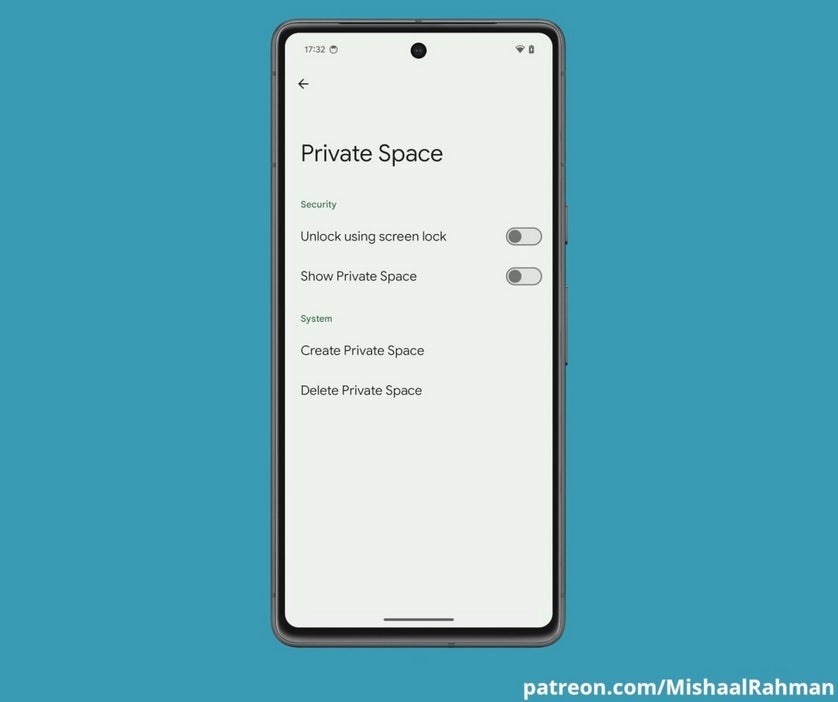
Last Wednesday, Google released Android 14 QPR2 Beta 1. This was the first beta release for the December Pixel Feature Drop and according to Wccftech, it comes with the setting page for a new feature under development called “Private Space.” When the feature is ready to be rolled out, tapping on a button that says “Create Private Space” will allow you to set up a new user profile in Android where you can hide some apps and other items. “Private Space” will be unlocked when the screen lock is opened.
The goal of “Private Space” is to make Android safer and more secure for users. Other Android manufacturers have had a similar feature including Samsung which offers its Secure Folder; the latter does not create a whole new profile so “Private Space” does have that going for it. Pixel users will soon be able to create a “Private Space,” or delete one. A couple of toggles will allow them to unlock “Private Space” with the screen lock and make “Private Space” visible.
Private Space will give Pixel users a place to hide apps and other items
The appearance of “Private Space” in the Android 14 QPR2 Beta 1 release would seem to indicate that “Private Space” will be offered to compatible Pixel users when the December Feature Drop is released next month. If you do happen to run across “Private Space” after installing the latest QPR beta on your Pixel phone, it is not going to work until next month.
In the good ole days, say, last year, we could have made a forecast telling you to expect the December Feature Drop to arrive on the first Monday of the new month, December 4th. Google stopped releasing updates at the same time each month with any regularity at some point this year. Having said that, I would look for the update to first arrive on December 4th and keep my fingers and toes crossed.
Google is still having issues releasing its Pixel updates. When it launched Android 14 QPR2 Beta 1 last week, the builds for the new Pixel 8 and Pixel 8 Pro models were conspicuous by their absence. Google said it would push out the update for its two latest Pixel models soon.
Google Home is one of the most popular smart home apps on the market, and it’s always getting new and useful features added to improve the experience. The company added a new quality-of-life feature that will help you better identify your products. Google Home will bring a new search bar that will help you find items on your Wi-Fi connection, according to a new report.
If you’re a smart home enthusiast, then you’re likely to have a bunch of devices connected to your IoT ecosystem. Well, these devices need to be connected to Wi-Fi to function properly. If you need to check up on a device, you will naturally go to the Wi-Fi page. You’ll see a list of the devices currently connected to your Wi-Fi connection.
There are a few issues, however. If you happen to have a ton of devices connected to your Wi-Fi, it can be hard to track down a specific device. Also, if you have the live update feature enabled, you will see the list consistently changing with devices switching spots constantly.
Google Home will make it easier to search for devices connected to your Wi-Fi
Thankfully, Google Home is coming out with a new feature that will make searching for your devices easier. Thanks to a new update, you will see a search bar on the Wi-Fi settings page. The search bar is rather thick, so it sticks out a bit more.
The search bar will act like a basic filter. So, when you start typing in the name of the device you want to search for, you’ll see the list update to only show items with that text and their names. This will help you narrow down your search so that you won’t need to wade through a long list.
If you don’t see this new search bar, you will want to update your Google Home app. Go to the Google Play Store and search for Google Home (you can also access your app info page and the app details button). There, look for the update button in the UI. Tap on it, and wait for your app to update. If you don’t see the update option, then you’ll just want to wait a little bit for the feature to roll out to your device.
When you think about the leading figures in AI, a few faces come to mind. You’ll picture Sundar Pichai (Google’s CEO) and you’ll picture Sam Altman (OpenAI’s CEO). Well, one of those figures was fired from his job, and it wasn’t Pichai. That’s right; seemingly without warning, Sam Altman was ejected from his leadership role at OpenAI. The company announced this via a blog post on OpenAI.com.
Why was Sam Altman fired?
As for the exact reasons, details are scarce. This may sound harsh, but we can’t really take the explanation the company gave at face value. In the blog post, the reason given was that he “was not consistently candid in his communications with the board, hindering its ability to exercise its responsibilities.” So, it seems that he wasn’t quite honest when speaking to the board of directors. If that’s the reason for his termination, then he must have been lying about something rather important.
All we can do is speculate until more information eventually leaks. What we know is that the company has been suffering some financial woes over the past couple of months. If there’s anything to lie to the board about, it’s money.
Also, we don’t know if he could have been lying about any safety or security issues with the company’s AI products. AI is now under the watchful eye of the government. Any potential safety issue will be met with tough scrutiny. So, if there’s anything that could impact user safety on a wide scale, who knows if it was kept under wraps? Again, this is all speculation.
So, what’s next?
Someone just got a promotion… well, temporarily. The company’s chief technology officer, Mira Murati, will be serving as interim CEO in Altman’s place. This is a temporary setup, as the company is now looking for a suitable permanent SEO.
As for the fate of the company, that remains to be seen. We haven’t gotten any good news about the company since we heard that it was staring bankruptcy in the eye. Unless the company managed to somehow triple the number of GPT Plus subscribers, we can guess that its finances haven’t improved much. OpenAI is looking for a new CEO, and it looks like “pulling the company from the brink of ruin” is going to be part of the job description.
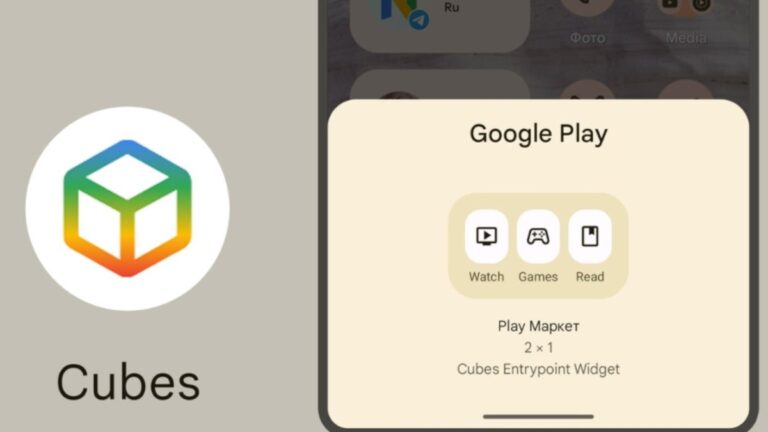
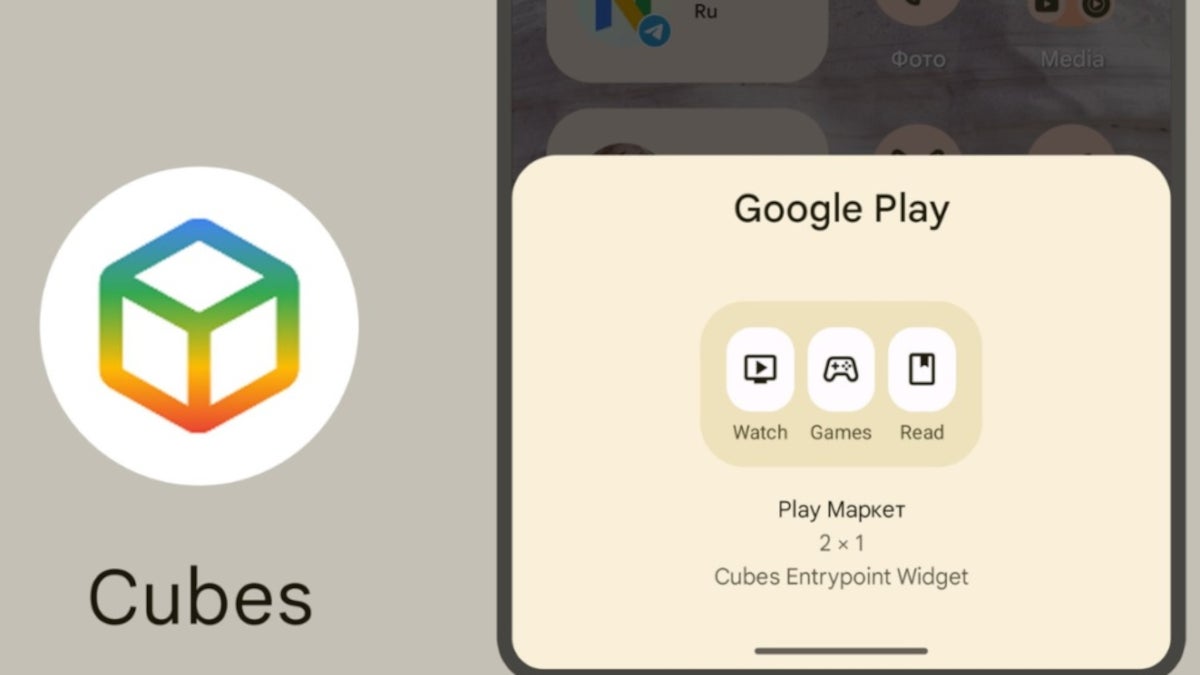
Google is believed to be developing an app for the Play Store called Cubes. First discovered earlier this year, in February Google News Telegram said “All we have at the moment is a shortcut that opens up a blank page and a ‘Cubes entry point widget’. That said, both the shortcut and the widget are part of the Play Store app.” Android Police now says that the Cubes app could be a central hub that will be used to discover new apps across a wide variety of categories.
In other words, the Cubes app could help users find new apps to install based on the category of apps already installed on the phone. Google News Telegram editor Nail Sadykov writes, “My assumption is that Cubes will be the kind of ‘entertainment center’ where purchased movies, games and books will be stored. I might be wrong, though.” Sadykov’s assumption could be a good one.
There is a Settings page that has a list of “Cubes.” That list includes:
Watch
Social
Shopping
Listen
Games
Read
Food
Sandcube
The directions say to “arrange the order of your Cubes and manage the apps within each of them.” Opening the Watch Cube, with it toggled on, the directions read, “Select which apps to see content from in this Cube.” Code tipster AssembleDebug discovered that users will be able to shop from Cubes although it isn’t clear what Android users will be able to go shopping for with the app. One possibility would be paid-apps.
When Cubes was first spotted in January of this year, the app was just an outline that didn’t feature clue about what the app was designed to do. The UI has been fleshed out a bit since but there is no content in the app yet since the backend has yet to be made public.
Google has a habit of testing things and then, without giving away too much information about what was being tested, doing away with the project completely. Right now, Cubes is alive and well although we have no idea when Google will get to that point where it is supposed to let us know what Cubes is and what it is going to do for Android users.
Kubernetes security is safeguarding your Kubernetes clusters, the applications they host, and the infrastructure they rely on from threats.
As a container orchestration platform, Kubernetes is incredibly powerful but presents a broad attack surface for potential adversaries. Kubernetes security encompasses several strategies and best practices to mitigate this risk, including hardening your containers and hosts, managing user permissions, implementing network policies, and setting up logging and monitoring.
One of the key aspects of Kubernetes security is the principle of least privilege, which implies that every component of your Kubernetes environment should have only the permissions it needs to function.
This minimizes the potential damage an attacker can do if they compromise a part of your system. Another foundational principle is defense in depth, layering different security controls so that a failure in one area does not lead to a complete system compromise.
However, it’s important to realize that Kubernetes environments are dynamic and constantly changing, with new workloads being deployed, old ones being updated or retired, and infrastructure being scaled up or down to meet demand.
This means your security posture needs to be continuously monitored and adjusted to keep up with these changes. Application mapping technology can help understand the current state of applications and dependencies in containerized environments.
How Can You Run Kubernetes on AWS?
Running Kubernetes on AWS offers several benefits, including easy scalability, high availability, and a rich ecosystem of integrations and services to enhance your Kubernetes deployments. However, it also introduces its security considerations, as you’re now relying on a third-party cloud provider for your infrastructure.
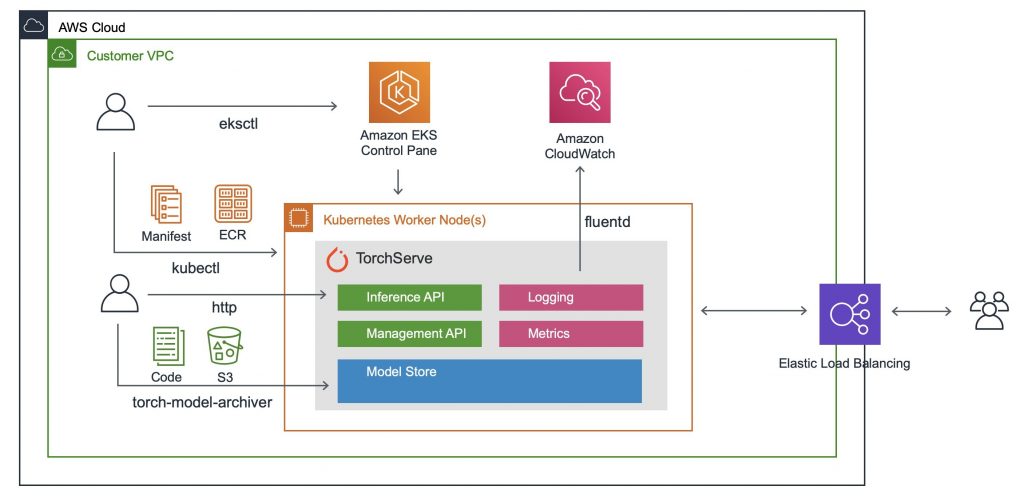
This section will discuss how you can run Kubernetes on AWS securely, focusing on three key AWS services: Amazon Elastic Kubernetes Service (EKS), Amazon Elastic Container Registry (ECR), and Amazon Elastic Compute Cloud (EC2).
Amazon Elastic Kubernetes Service (EKS)
Amazon EKS is a fully managed service that makes it easy to deploy, manage, and scale containerized applications using Kubernetes on AWS. One of its key advantages from a security perspective is that it takes care of a lot of the underlying infrastructure management for you, allowing you to focus on securing your applications and data.
EKS integrates with several other AWS services to enhance your Kubernetes security on AWS. For instance, it supports IAM roles for service accounts, which allows you to assign fine-grained access permissions to your Kubernetes applications. It also integrates with AWS Security Groups, providing network-level isolation for your pods.
However, using EKS doesn’t absolve you of all responsibility for your Kubernetes security. You still need to ensure that your application containers are secure, your Kubernetes configurations are hardened, and your workloads are monitored for anomalies. You also need to stay on top of patch management, as even though EKS automatically manages the Kubernetes control plane for you, you’re still responsible for keeping your worker nodes up-to-date.
Amazon EC2
Amazon EC2 (Elastic Compute Cloud) provides the virtual machines that power your Kubernetes nodes in an EKS cluster. As such, securing your EC2 instances is critical to your overall Kubernetes security on AWS.
EC2 instances come with several built-in security features, such as security groups that act as virtual firewalls and IAM roles that let you manage access to AWS services and resources. Additionally, you can use the AWS Key Management Service (KMS) to encrypt your instances’ EBS volumes, protecting your data at rest.
However, as with EKS, using EC2 doesn’t mean you can ignore other aspects of Kubernetes security. For instance, you must still secure your container runtime, harden your Kubernetes configurations, and monitor your workloads for anomalies.
Amazon ECR
Amazon ECR (Elastic Container Registry) is a fully managed container registry service that makes storing, managing, sharing, and deploying your container images easy. ECR integrates with AWS Identity and Access Management (IAM), allowing you to control who can push and pull images from your repositories. This can help prevent unauthorized access to your application code and dependencies.
In addition to IAM integration, ECR also offers image scanning capabilities. This feature scans your container images for known software vulnerabilities and provides detailed findings that you can use to improve your container security. However, it’s worth noting that this only covers known Kubernetes vulnerabilities in the software included in your image, and it doesn’t replace the need for good security practices at the application level.
Finally, ECR integrates with Amazon CloudWatch, allowing you to monitor and log activity in your repositories. This can help you detect and respond to suspicious activity and maintain an audit trail for compliance purposes.
Kubernetes Security on AWS: Best Practices
Using the Amazon VPC CNI Plugin for Kubernetes
The Amazon VPC CNI plugin for Kubernetes provides a robust solution for networking within a Kubernetes environment. This plugin allows Kubernetes pods to have the same IP address inside the pod as they do on the VPC network.
The Amazon VPC CNI offers multiple benefits. For instance, it provides high-performance networking, native AWS networking capabilities, and the ability to use familiar AWS security controls for applications.
Technically, the VPC CNI plugin allows Kubernetes to use security groups to control traffic. This is accomplished by associating security groups with elastic network interfaces, enhancing your Kubernetes security on AWS.
Integrating AWS IAM with Kubernetes RBAC
AWS Identity and Access Management (IAM) is a web service that helps you securely control access to AWS resources. You can use it to create and manage AWS users and groups and use permissions to allow or deny their access to AWS resources.
Kubernetes Role-Based Access Control (RBAC) is a method of regulating access to computer or network resources based on the roles of individual users within your organization. RBAC authorization uses the rbac.authorization.k8s.io API group to drive authorization decisions, allowing you to configure policies dynamically.
You can leverage AWS IAM roles and policies for your Kubernetes workloads by integrating AWS IAM with Kubernetes RBAC. This integration can be achieved using tools like kube2iam or kiam. These tools intercept calls to the AWS metadata API and assign IAM roles to individual pods based on annotations. As a result, you can have fine-grained control over the AWS resources that pods can access, thereby enhancing your Kubernetes Security on AWS.
Encrypting Data at Rest with AWS KMS
AWS Key Management Service (KMS) is a managed service that makes it easy for you to create and control the cryptographic keys used to encrypt your data. AWS KMS is integrated with other AWS services, making it easier to encrypt data stored in these services and control access to the keys that decrypt it.
In Kubernetes, you can use AWS KMS to encrypt data at rest. This includes data stored in etcd, a distributed key-value store that Kubernetes uses to maintain cluster state. By encrypting data at rest using AWS KMS, you can protect sensitive data and meet compliance requirements.
Moreover, AWS KMS allows you to centrally manage keys, enabling you to keep track of key use and replace keys as necessary. This end-to-end control over your keys further strengthens your Kubernetes Security on AWS.
Centralized Logging with Amazon CloudWatch
One of the key practices in securing your Kubernetes clusters on AWS is implementing centralized logging. Amazon CloudWatch is a monitoring and observability service that provides data and actionable insights to monitor your applications, respond to system-wide performance changes, optimize resource utilization, and get a unified view of operational health.
In the context of Kubernetes Security on AWS, CloudWatch enables you to collect and analyze logs from your Kubernetes environment. It helps you identify and troubleshoot security incidents by providing a centralized platform to monitor suspicious activity.
Moreover, CloudWatch allows you to create alarms based on specific log patterns. This proactive approach can help you detect and address potential security threats before they affect your Kubernetes clusters.
Using Service Mesh for Enhanced Security
A service mesh is a dedicated infrastructure layer for handling service-to-service communication. It’s responsible for the reliable delivery of requests through the complex topology of services that comprise a modern, cloud-native application.
Service meshes like Istio or AWS App Mesh can significantly enhance Kubernetes Security on AWS. They provide features like identity-based traffic encryption, advanced traffic controls, and detailed metrics. These features allow you to secure communication between services, control what services can communicate, and monitor your service’s behavior.
By implementing a service mesh, you can enforce security policies at the application level, independent of the underlying network configuration. This additional layer of security can help protect your Kubernetes workloads from threats, even if they bypass other security controls.
Infrastructure as Code for Consistent Security Configurations
Infrastructure as code (IaC) manages and provides computer data centers through machine-readable definition files rather than physical hardware configuration.
In the context of Kubernetes Security on AWS, you can use IaC tools like AWS CloudFormation or Terraform to define your Kubernetes infrastructure. This allows you to create consistent, repeatable configurations, reducing the risk of human error and ensuring that security controls are correctly implemented.
Moreover, you can version control your infrastructure definitions, allowing you to track changes over time and roll back if necessary. This makes your infrastructure more manageable and enhances security by providing a clear audit trail.
In conclusion, securing your Kubernetes clusters on AWS involves several best practices, including using the Amazon VPC CNI plugin, integrating AWS IAM with Kubernetes RBAC, encrypting data at rest with AWS KMS, implementing centralized logging with Amazon CloudWatch, using service meshes for enhanced security, and using infrastructure as code for consistent security configurations.
Android tech is sprinting forward, transforming our gadgets and how we use them. The future hints at even smarter, bendable phones and enhanced personal security. Take, for example, folks in New Zealand searching for a secure place to play online, they might swing by casino NZ for a safe bet on fun without compromising their digital safety.
The Rise of Foldable Devices
Foldable devices are reshaping mobile tech, with Android leading the pack. Samsung’s Galaxy Z Fold 5 exemplifies this revolution, featuring an Armor aluminum frame that enhances durability with better drop and scratch resistance. This device boasts a foldable dynamic AMOLED 2X display that not only flexes innovatively, but also promises a crisp, uninterrupted viewing experience. Running on Android 13, the Z Fold 5 epitomizes practicality. It smoothly transitions from a pocket-sized phone to a tablet-sized display, ideal for multimedia enjoyment or productivity tasks.
Upgraded Security Measures
Android’s digital security features should continue to advance over time. This means better protection against malware, more robust privacy controls, and even new forms of identification, such as advanced facial recognition or under-display fingerprint sensors. These features aim to protect both your device and personal data without making it more challenging to use your phone.
Connectivity and Speed
The leap to 5G is a game-changer for Android devices, promising a new world of connectivity with speed and stability like never before. Imagine video calling without a second thought with 5G’s vast capacity calls connected with crystal clarity, regardless of location. Gone are the days of downloading content before a trip. 5G lets you grab what you want on the go whether it’s a full music album or the latest episodes of a hit show. Android developers can tap into this power, creating interfaces that prompt users to download more, hence enriching their experience. And with generous bandwidth, apps can replace static images with dynamic videos, making every interaction with your device not just faster, but more immersive.
Sustainable and Eco-Friendly Tech
Sustainability is carving out a significant niche in tech, with Android at the helm. Beyond hardware that embraces recycled materials, Android is empowering users to make greener choices daily. Through apps such as Google Maps, users find sustainable transportation alternatives like carpooling and public transit, aligning their commute with eco-friendly practices.
Shopping sustainably also gets easier, as apps like Good On You and EcoCart connect consumers to green products and brands. Other applications champion waste reduction, offering practical advice on recycling and cutting down on single-use plastics. However, there are apps such as WWF Together and Ecosia aimed at educating on environmental conservation, increasing awareness about the realities of climate change.
As mobile technology races forward, Android is setting the pace with innovations like foldable screens, advanced AI and robust security. It is also important to mention the move towards a greener future. The evolving Android ecosystem suggests a shift where eco-friendly features are as crucial as technical specifications, leading to a future that’s not just smart and secure but sustainable too.
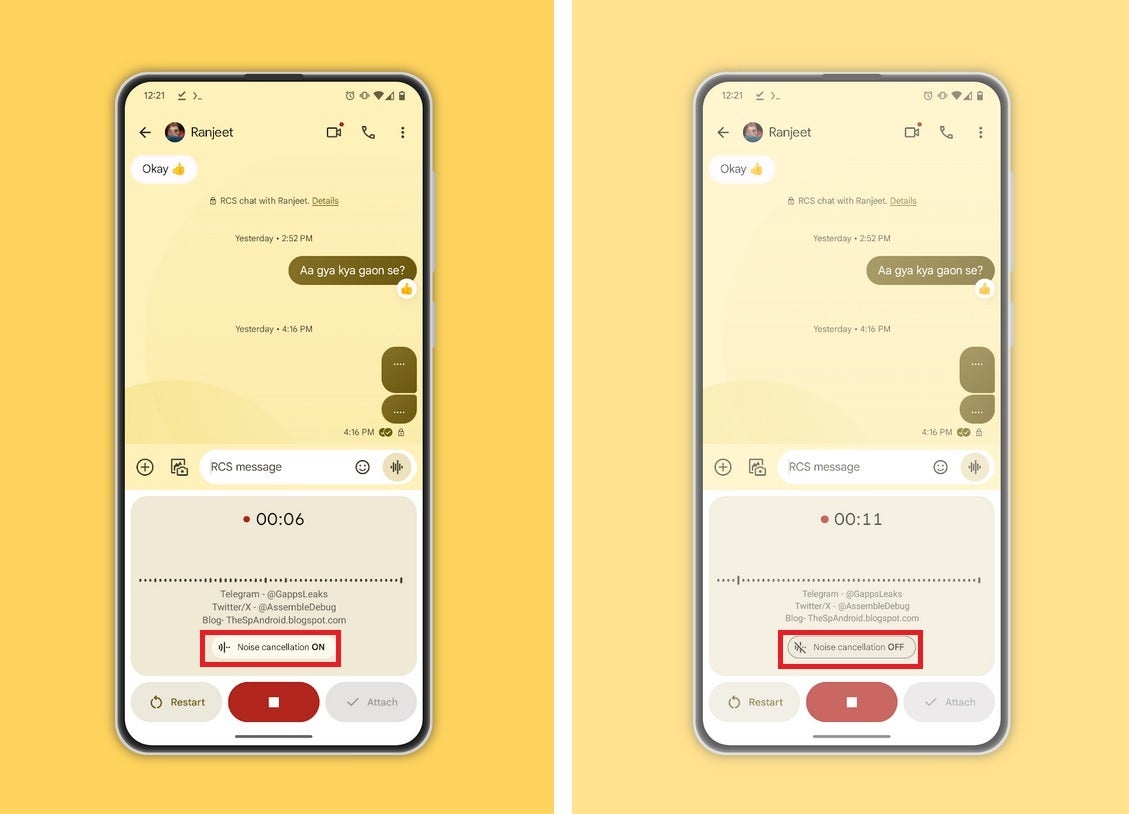
To reduce background noise in Google Messages voice recordings, Google is adding a new noise cancellation feature. In a post written by code tipster AssembleDebug on TheSpAndroid site, it appears that Google is prepping a feature that will allow Google Messages users to enable noise cancellation when creating a voice recording. Pressing on the noise cancellation button when making a recording makes it easier for the person receiving a voice message to understand exactly what is being said.
Imagine trying to record an audible voice message while walking on the streets of Manhattan. Between the car horns, the police sirens, and the sidewalk salesmen, any video you record is going to be lousy with background noise. Noise cancellation is exactly what is needed to clean up the distracting noises in the background and leave only your voice clear and easily understandable by the recipient of the message.
Screenshots showing the noise cancellation switch on (L) and switched off (R) in the voice recording dialogue box
Noise cancellation is available on the latest beta version of the Google Messages app which is beta version 20231113_01_RC00. To see which version of Google Messages you have, go to Settings > Apps; find and tap on Messages and scroll to the very bottom. There you will see the volume number of the Messages app you are currently running on your Android phone.
AssembleDebug was able to try the new noise cancellation feature in the latest Google Messages beta and said that it “greatly reduces the background noise.” The button to activate noise cancellation is found in the voice recording dialog box and it can be turned on before voice recording, or while a voice recording is in progress. If you’ve ever sent an audio message via Google Messages and the recipient couldn’t understand what you were saying due to the ambient noise in the background, this feature will prevent this from happening again.
If for some reason you don’t have the Google Messages app on your Android phone, you can find it by looking for it by its correct name, the “Messages by Google” app, in the Play Store. We can save you some time by giving you a shortcut to the app; simply tap on this link.
One of the biggest antitrust cases in the US is now over, as Google and DOJ wrapped things up after 2 months. The trial started on September 12, so it has technically been a little over two months at this point.
Google and DOJ wrapped up the antitrust case after approximately two months
As a reminder, the DOJ wanted to prove that Google abused its power in the market in order to keep its search monopoly. Google, of course, tried to prove otherwise. We’ve seen a ton of details shared during the trial, interesting details, despite the fact this was a semi-private trial.
This case was filed by the Trump administration, and the person assigned to oversee it was Judge Amit Mehta of the US District Court for the District of Columbia.
It is also worth noting that the very final witness that the DOJ presented, on the final day of the trial, was Michael Whinston. He is an MIT economics professor who disagreed with Google while on the stand.
The last DOJ witness said Google is in the wrong
He said that Google didn’t have to compete with Microsoft to be exclusively pre-installed on smartphones. He also said that Google’s payments to Apple and others, which were over $26 billion in 2021, were monopoly profits paid to distributors.
Mr. Whinston also added that Google’s US market share of 90% also meant that the company had little incentive to improve quality. Google’s lawyer, John Schimdtlein, said that those payments were legal revenue-sharing deals. The company reiterated that a number of times during the trial.
The lawyer also added that Google is as popular because of its quality. He said that in order to tackle the statement made by Michael Whinston.
We won’t get the Judge’s final decision until sometime in 2024
Now, the antitrust case is now wrapped up, but the decision has not been made, of course. We’ll have to wait a bit in order to get the ruling. And by “a bit”, I mean until next year, as that’s when we’ll get the decision from Judge Amit Mehta.
Do note that appeals are likely regardless of what the decision is. Another thing to note is that previous cases that the US ran in the tech sector. Microsoft’s case in the late 90s is a good example, it went in the opposite direction. Those cases do tend to hurt the companies they’re presented against, though, so… we’ll see what will happen.
Android 14 beta testers are already shocked that Pixel devices are already getting the QPR2 Beta 1 update. This is rather unusual, as the previous beta testing update was QPR1 Beta 2. Beta testers were expecting to get the QPR1 Beta 3 update, but instead, Google is rolling out the QPR2 Beta 1 update to users.
The features that were under testing in the QPR1 version will hit devices via a stable update next month. Devices will get these features via an over-the-air update and it’ll improve on certain things as well as squash any bugs. Following this is the new QPR2 update that is already hitting Pixel devices that are beta testing.
Both beta testing versions here are from Google’s Quarterly Platform Releases and they pack more punch than monthly updates. The new entry to these quarterly releases is the QPR2 which is currently in its first beta testing phase on Pixel devices. Reports claim that it’ll hit a stable release in March 2024, but just like other Quarterly Platform Releases, it brings a few issues for beta testers.
Android 14 QPR2 Beta 1 update hits Pixel devices along with the November 2023 security patch
This update to the Android system on supported Pixel devices doesn’t come alone. It comes with the November 2023 security patch update for those who have opted in for the beta testing program. So not everyone will get this update as it’s only rolling out to Android beta testers and it is currently available on only certain Pixel devices.
The devices that have this beta testing upgrade are the Pixel 5a, Pixel 6, Pixel 6 Pro, Pixel 6a, Pixel 7, Pixel 7 Pro, Pixel 7a, Pixel Tablet, and Pixel Fold. For some reason, the more recent Pixel 8 series doesn’t seem to be getting this beta update. Being a beta testing update, the Android 14 QPR2 Beta 1 brings a few issues and bugs affecting performance.
Some issues on this new beta update affect the Android platform, while others affect Google apps. For the Android platform, most users notice that unlocking their devices with the fingerprint scanner doesn’t give haptic feedback. The Pixel Fold also has a bug that prevents its inner screen from turning on after being unfolded.
With this beta update, Google’s Assistant At a Glance widget gives off weather information for the wrong location. Users can report these bugs via the Android Beta feedback app for Google to identify and work on. Other devices aside from Pixels will get this update in the coming days.
After adding AI chatbot features to Bing earlier this year, Microsoft is now rolling out its Copilot AI chatbot. This new AI chatbot is here to compete with ChatGPT and will be available to all Microsoft Windows 11 users. With this move, what was once a partnership is now turning into a competition struggling for user base and popularity.
Yes, early this year, Microsoft integrated ChatGPT into its Bing search engine. This step from the tech giant put it in close competition with Google, which at the time was also making its AI moves with Bard. Ever since this integration, Bing users have become familiar with the ChatGPT-enabled chatbot that their search engine provided them with.
Now this change is bringing a new AI tool or companion as Microsoft calls it to users. Windows 11 users will no longer need to access Bing before they can make use of the AI features Microsoft has to offer them. This service will be free to Microsoft business and consumer users for free and will be easily accessible for all.
Windows users are set to enjoy the benefits of the new Microsoft Copilot AI chatbot
Copilot is now becoming available to Windows 11 users for easy and faster access. A few months ago, these users had to rely on the Bing search engine for their AI needs. With this rebranding to Copilot, users will no longer need to access their AI companion via the web.
Microsoft is now advertising this new feature as the way to go for not only businesses but also consumers. This new AI assistant from Microsoft is out to compete with their previous partner’s option, ChatGPT. Copilot combines the power of Large Language Models (LLMs) with the user’s data in Microsoft Graphs and 365 apps.
By doing this, it can help the user get more productive with work thanks to cross-collaboration across Microsoft 365 apps. Aside from being available on Windows 11, Copilot will also be accessible via its domain. This means that this new AI chatbot service will be accessible across various devices with a Microsoft account.
For businesses, signing in will be done via an Entra ID, which is the cloud identity that replaced Azure AD. Regular consumers will be able to sign in via their Microsoft Account on various supported devices. For now, devices or platforms include Microsoft Edge, Chrome, and macOS.
If you use a Windows device or have a Microsoft Account for business or personal use, you can try out this new feature now. But with this launch comes various questions in the minds of users about the performance of this new AI assistant. One such question is whether it’ll gain wide acceptance and be put to use for businesses or personal usage.