In what seems to be a new twist on the ransomware theme, the notorious ALPHV/BlackCat ransomware group has filed a complaint with the US Securities and Exchange Commission (SEC) about the software company MeridianLink.
ALPHV is one of the most active ransomware-as-a-service (RaaS) operators and regularly appears in our monthly ransomware reviews. MeridianLink supplies “digital lending solutions” to banks, credit unions, fintechs, and other financial institutions.
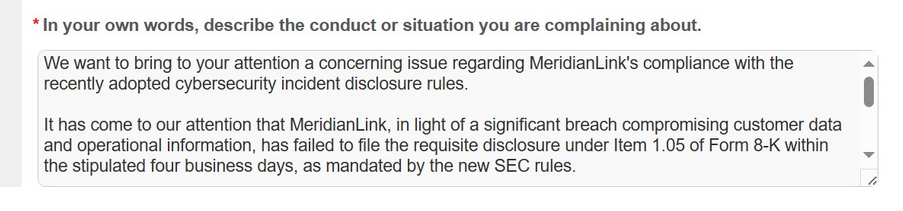
Since September 5, 2023 the SEC has required public companies to disclose within four days all cybersecurity breaches that could impact their bottom lines. Apparently ALPHV is aware of the new rules and in this screenshot of the SEC complaint form it wrote:
“We want to bring to your attention a concerning issue regarding MeridianLink’s compliance with the recently adopted cybersecurity incident disclosure rules.
It has come to our attention that MeridianLink, in light of a significant breach compromising customer data and operational information, has failed to file the requisite disclosure under Item 1.05 of Form 8-K within the stipulated four business days, as mandated by the new SEC rules.”
The referenced item (Form 8-K Item 1.05) states:
“Registrants must disclose any cybersecurity incident they experience that is determined to be material, and describe the material aspects of its:
– Nature, scope, and timing; and
– Impact or reasonably likely impact.
An Item 1.05 Form 8-K must be filed within four business days of determining an incident was material. A registrant may delay filing as described below, if the United States Attorney General (“Attorney General”) determines immediate disclosure would pose a substantial risk to national security or public safety.
Registrants must amend a prior Item 1.05 Form 8-K to disclose any information called for in Item 1.05(a) that was not determined or was unavailable at the time of the initial Form 8-K filing. “
As you can see, there are possible exceptions and for all we know, the investigation into the nature and gravity of the data breach is still ongoing. Or far from as material as ALPHV wants us to believe.
“Safeguarding our customers’ and partners’ information is something we take seriously. MeridianLink recently identified a cybersecurity incident that took place on Nov 10. Upon discovery on the same day, we acted immediately to contain the threat and engaged a team of third-party experts to investigate the incident. Based on our investigation to date, we have identified no evidence of unauthorized access to our production platforms, and the incident has caused minimal business interruption.
We have no further details to offer currently, as our investigation is ongoing.”
Apparently the ransomware operators like to pretend that what they are doing is their civic duty. This tile is posted on the landing page of the gang’s leak site.
ALPHV announces that it’s filed a complaint with the SEC
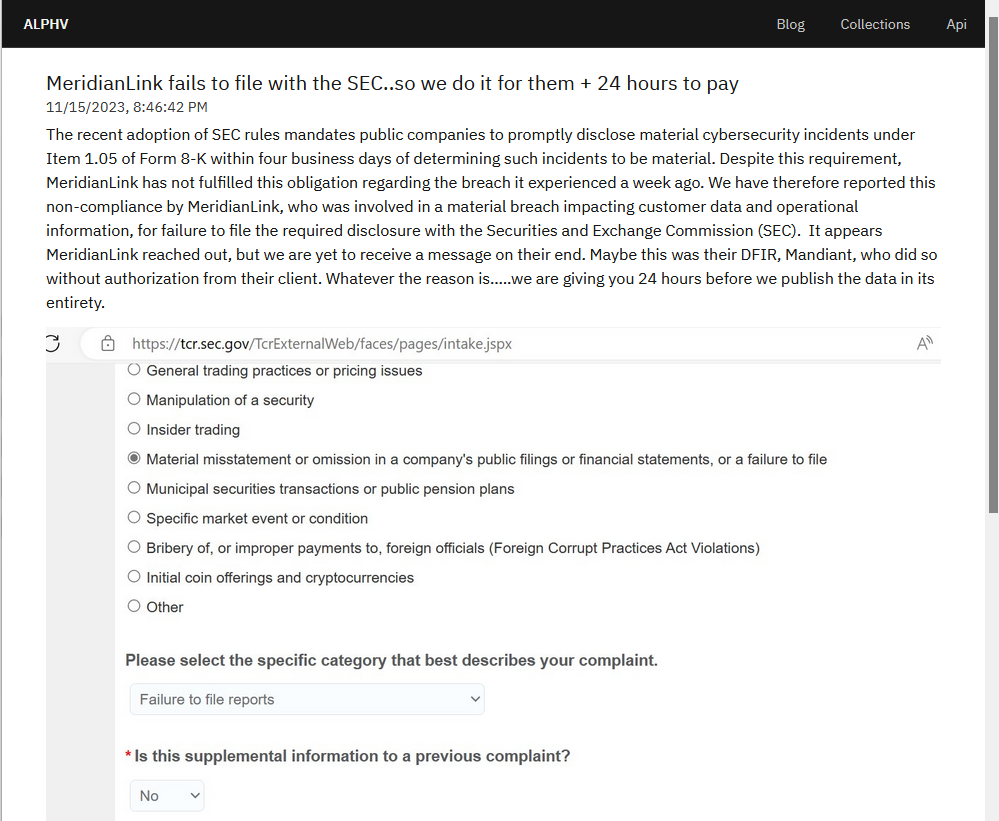
Clicking through, we found the screenshot of the form and a non-explanatory statement why they filled the form out.
“Despite this requirement, MeridianLink has not fulfilled this obligation regarding the breach it experienced a week ago. We have therefore reported this non-compliance by MeridianLink, who was involved in a material breach impacting customer data and operational information, for failure to file the required disclosure with the Securities and Exchange Commission (SEC). It appears MeridianLink reached out, but we are yet to receive a message on their end. Maybe this was their DFIR, Mandiant, who did so without authorization from their client. Whatever the reason is…..we are giving you 24 hours before we publish the data in its entirety.”
Whatever the reason is behind MeridianLink’s apparent decision not to report the cyber-incident (yet), the action taken by ALPHV certainly is something we haven’t seen before. It may be a warning or an attempt to gain extra leverage. Knowing how hard it can be to determine the scope of a cyberattack in just a few days, we can expect to see this happen more often.
Prevent intrusions. Stop threats early before they can even infiltrate or infect your endpoints. Use endpoint security software that can prevent exploits and malware used to deliver ransomware.
Detect intrusions. Make it harder for intruders to operate inside your organization by segmenting networks and assigning access rights prudently. Use EDR or MDR to detect unusual activity before an attack occurs.
Stop malicious encryption. Deploy Endpoint Detection and Response software like Malwarebytes EDR that uses multiple different detection techniques to identify ransomware, and ransomware rollback to restore damaged system files.
Create offsite, offline backups. Keep backups offsite and offline, beyond the reach of attackers. Test them regularly to make sure you can restore essential business functions swiftly.
Don’t get attacked twice. Once you’ve isolated the outbreak and stopped the first attack, you must remove every trace of the attackers, their malware, their tools, and their methods of entry, to avoid being attacked again.
Our business solutions remove all remnants of ransomware and prevent you from getting reinfected. Want to learn more about how we can help protect your business? Get a free trial below.
In this fast-paced world, it always helps to have shortcuts to your favorite functions. This goes especially for repetitive tasks like opening apps. This is where lock screen shortcuts come in. According to a new report, Instagram could be prepping a new lock screen shortcut for the Samsung Galaxy S24 phones.
This news came from a popular app reverse engineer Alessandro Paluzzi, who’s a reliable source. Still, you’ll want to take this news with a pinch of salt. We’re talking about leaked information. Instagram could make changes or completely take this away for all we know. Just know that anything could happen.
Instagram could be working on a lock screen shortcut for the Galaxy S24
Lock screen shortcuts are sometimes the quickest way to perform your favorite tasks on your phone. Instead of unlocking your phone and diving into the interface, you can jump right to the app or function you’re after. Samsung has long allowed to to add app shortcuts to your lock screen.
At the moment, you can already set a lock screen shortcut to access the Instagram app. However, if you want to jump right to the Instagram Camera and capture the moment at a moment’s notice, you might be able to if you pick up the Galaxy S24. We have a leaked screenshot showing the splash screen for this feature.
In the screenshot, we see the text “Access the Instagram Camera from your lock screen. Samsung Galaxy S24 users can now turn on a shortcut to Instagram Camera in settings.” Under that, we see the Try it button. The code for this feature might already be in the Instagram app, and it’s just waiting to be activated. We’re not sure at this moment.
This could be a standout feature in the Galaxy S24 Galaxy Unpacked event. Samsung could be planning on holding it earlier in the year compared to this year, so there might not be too much more time to wait.
You can never have a TV that’s too big. And that’s definitely true when it comes to Hisense. They are currently offering a huge discount on their 100-inch U8 Series TV, which is a Mini-LED TV, and it’s now just $2,999. That’s saving you $2,000 off of its regular price.
This TV is absolutely stunning, and at 100-inches, you won’t have trouble seeing it at all. Everything is going to be larger than life. Now this is an ULED panel, which is Hisense’s own branding for QLED. So with this panel, you’re getting inky blacks and really good contrast. It’s right up there with some of Samsung’s best TVs right now. When you pair that with Mini-LED for the backlighting, that makes it brighter, without disrupting the colors on this TV. All of which are very important.
Hisense has included support for Dolby Vision IQ. This is a step up from Dolby Vision, which gives you a really incredible picture quality from content that supports Dolby Vision – which is a lot of content on streaming services these days.
Inside the Hisense U8, you’re getting Google TV. So that gives you access to all of your favorite apps and games since the Google Play Store is available there. That includes YouTube, Hulu, Amazon Prime Video and so much more. There is also support for Google Assistant, which lets you control your smart home products using your voice, and even play titles using your voice. Google Cast is available, so you can play videos that may not support Google TV right now. Like videos from your Google Photos app.
For any TV buff, this is going to be a great Christmas present this year, and you can pick it up at the link below.
We’re all used to the general aesthetic of Google Maps. However, all things must change at some point. According to a new report, Google is rolling out a new updated color palette to Google Maps. This has been in testing for several weeks, so there are people who’ve had this new color palette for quite some time. Now, the company is rolling it out to the rest of its users. Try updating your app to see if you have access to it.
Go to the Google Play Store and find Google Maps. You can also access this screen on most phones by going through the App Info screen. There, if you see the update button, tap it and wait for it to install. If you still don’t see it, then you’ll just want to wait a bit.
Google Maps brings a new color palette
There are some subtle changes to the overall color scheme of the app, and you’ll notice that with the roads first. Before, roads would appear yellow, but now they’ve been replaced with a blueish-gray color. If you’re looking at freeways, you’ll see a darker shade of gray that will make them contrast the other roads.
Other than the roads, there are some other changes. The water is a different shade of blue. It’s closer to teal. Parks are also a lighter shade of green, which makes them a little harder to see, actually.
There was probably no reason to make these changes other than the fact that you have to switch things up every now and then. Other than the colors, there were no other changes. So, there are no functionality changes or added features.
Want to find out more of what you can do with Google Maps?
If you use Google Maps often, then you should read our rundown of some cool things you can do with Google Maps. It’s a list of some interesting things you can do on this platform that you might not have noticed. Who knows, you might find your new favorite feature!
Recent reports point out that Meta is now in a partnership with MediaTek, the chip manufacturing firm. This partnership aims to drive the production of chips or processors for AR smart glasses. The announcement was made public by a MediaTek executive, Vince Hu, during the company’s annual event for this year.
At the MediaTek Summit 2023, netizens learned that Ray-Ban smart glasses will use a new chip. With these coming chips, Ray-Ban will be able to break the boundaries of the AR industry. The new chips will also come with support for some technology that isn’t currently available on Ray-Ban glasses that are currently retailing.
Some of these technologies include things like a viewfinder display to blend the AR world with the real world. This partnership will bring visible changes to the AR glass that Meta’s Ray-Ban produces. Netizens can expect these glasses to become more functional for use in everyday activities.
MediaTek is bringing its chip development abilities to Meta Ray-Ban glasses with a new partnership
In an aim to improve the performance of its AR glasses, Meta is partnering with MediaTek. Meta is working to strengthen its presence in the AR and VR industry and is improving the products it offers. In the AR industry, Meta’s brand Ray-Ban dominates with the various AR smart glasses they offer.
Meta now intends to strengthen that dominance with this new MediaTek partnership. Already the AR space is getting more competitive with new products coming from rival brands. To stand out from the crowd, Meta needs to improve upon the performance and usability of its Ray-Ban AR smart glasses.
This is where the chips that will be developed as a result of this new partnership will come into play. MediaTek will work closely with Meta to develop chips that will help take Ray-Ban AR smart glasses ahead of the competition. Future AR glasses that will launch under this partnership will bring features that will make them more usable on an everyday basis.
Users might be able to use these glasses for more than just recording videos, connecting with their phone, and so on. They will be able to perform actions such as scanning QR codes and accessing their content, reading messages on their smartphones and so much more. MediaTek already has a good name for itself in the chip manufacturing industry, from budget performance chips to flagship chips on smartphones.
This partnership will also see Meta shift away from Snapdragon on its AR glasses. Already, the existing Meta Ray-Ban AR smart glass uses a chip from Qualcomm. In the coming future, more details on AR glass that will use the MediaTek chip will become available.
Google has discovered a new security vulnerability in Intel CPUs that could let attackers execute code on vulnerable systems. The vulnerability has been named “Reptar” by Google and affects numerous Intel CPUs, including those utilized in cloud computing environments.
What is Reptar Vulnerability?
Reptar is a side-channel vulnerability tracked as CVE-2023-23583. It allows attackers to leak information from a vulnerable system and use it to steal sensitive data such as credit card numbers, passwords, etc.
The vulnerability was discovered by Google’s Information Security Engineering team, which notified Intel and industry partners about the issue, and mitigations were rolled out before its public disclosure.
How Was Reptar Discovered?
According to Google’s blog post, a company’s security researcher discovered it in the way the CPU interprets redundant prefixes, and if successfully exploited, it allows attackers to bypass the CPU’s security boundaries.
For your information, prefixes allow users to change how instructions behave by disabling/enabling different features. Those prefixes that don’t make sense or conflict with other prefixes are called redundant prefixes. Such prefixes are generally ignored.
How does Reptar work?
Reptar works by exploiting an issue in the way speculative execution is handled by Intel CPUs. Speculative execution is a technique that allows CPUs to execute instructions before being fully validated. Although this technique is time-saving, it can make CPUs vulnerable to side-channel attacks.
The Reptar vulnerability is a serious risk to multi-tenant virtualized environments, where the exploit causes the host machine to crash on a guest machine, resulting in a denial of service to other guest machines connected to the same host. In addition, it could lead to privilege escalation or information disclosure.
In a multi-tenant virtualized environment, multiple tenants share the same physical hardware, so if one tenant is infected with Reptar, the attacker has access to the other tenants’ data through the same vulnerability.
Aubrey Perin, Lead Threat Intelligence Analyst at Qualys, a Foster City, Calif.-based provider of disruptive cloud-based IT, security and compliance solutions commented on the issue stating, “Unmitigated, this bug could be serious as an attacker could start testing to see if there is any order to the seemingly random outputs. As it stands, it sounds more like an oddity that could be used to take systems down.”
Mr Perin further explained that “Without reviewing the catalogue of patches, it’s hard to say that it’s atypical of the bugs usually found. In this case, where it can cause crashes, security teams should definitely prioritize the patch implementation to eliminate the risk of failure.”
“Researchers do find vulnerabilities all the time, often for bounty, and it benefits users when responsible disclosure practices are followed. Google is a very good practitioner of responsible disclosure, and you can often find references to the researcher or organization who disclosed the vulnerability in the notes associated with patches,” he added.
Intel’s Response
Intel has released an advisory to confirm the issue, explaining that the issue was discovered in some Intel processors caused by an error in the CPU’s handling of redundant prefixes. The company has released a patch for the issue. It was assigned a CVSS score of 8.8 and declared a High-security vulnerability.
This CPU vulnerability impacts several Intel desktop, mobile, and server CPUs., including 10th Generation Intel® Core™ Processor Family, 3rd Generation Intel® Xeon® Processor Scalable Family, Intel® Xeon® D Processor, and 11th Generation Intel® Core Processor Family, and CPUs used in cloud computing environments, etc.
The company is working on a long-term fix. In the meantime, it is advising users to patch their devices immediately.
Back in 2013, we got a 2D roguelike called Risk of Rain. It was a popular title that’s seen subsequent releases like a popular 3D sequel. Now, this franchise is hitting the mobile market with an all-new title. It’s called Risk of Rain: Hostile Worlds. It’s going to launch for Android and iOS soon.
In case you’re not familiar with the franchise, Risk of Rain surrounds a handful of survivors of a space freight crash. They wind up on a strange planet full of alien creatures. Also, the creatures just so happen to have a unanimous hatred of you, so your task is to fight your way through these creatures. That’s the core gameplay.
There’s a cast of different characters that you can play as, and each one has a different fighting style, so there’s a bunch of variety to the gameplay. If you want to play these for yourself, the three current titles (Risk of Rain, Risk of Rain 2, and Risk of Rain Returns), are all available to buy on Steam.
Risk of Rain: Hostile Worlds will hit the mobile market soon
This franchise has been available on just about every platform except for mobile. However, that’s going to change with Risk of Rain: Hostile Worlds. This is going to be a 3D roguelike with much the same gameplay as the original. You’re going to choose which character you want to play as and fight your way through hordes of enemies. It’s pretty straightforward in that regard.
As you play, you’ll encounter stronger enemies, which is to be expected. So, in order to counter this, you’ll need to grind and upgrade your character to keep up.
When you play, you’ll choose up to three characters to be in your squad. While you’re in battle, you’re able to switch between the characters, so you’ll be able to swap to characters better suited for the enemies you’re fighting.
Nostalgic folks might be in for a shock
So, this happens just about every time a company brings back a beloved franchise and pushes it to mobile phones. The original game came out in 2013; before the microtransaction craze. Now, in the year 2023, there’s no telling if this game is going to stay true to the older titles or go full gacha mode. At the end of the trailer, we see what looks like a character being summoned.
Summons are a big part of the whole gacha scene. Not to fearmonger, but you should expect some degree of modern mobile game shenanigans with this game. We will find out when this game launches. However, at the moment, we don’t know what that’s going to be.
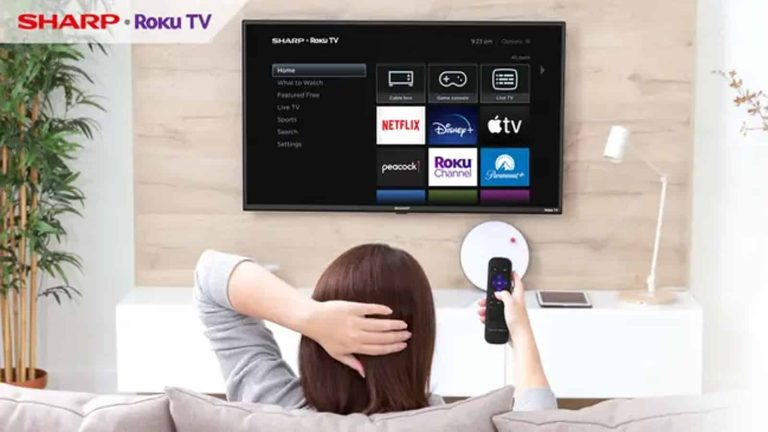
Sharp is bringing OLED technology to the Roku Smart TV class for the first time. This new series from Sharp packs two models with different screen sizes but very similar features and specifications. Judging from the asking prices of these new smart TVs, it is clear that they are flagship models and offer great features.
These products are hitting the market and already going in for Black Friday sales with some discounts. What’s more impressive is the set of features and specifications that this smart TV series brings to the table. Potential buyers will have them up against the competition to find out if the new entries from Sharp are a better buy in any way.
Well, for those potential buyers out making comparisons, they will likely put these new entries up against other Roku TVs. In this category, the new entries from Sharp excel in one area, which is their display and what they have to offer here. Here are the details on these new Roku TVs from Sharp that might sweep you off your feet.
Sharp excels in display and brings easy-to-use software on its new Roku Smart TVs
The new Sharp smart TVs and the first products to blend OLED technology and Roku software. With their software, these TVs assure users of a smooth experience without any difficulties. Yes, over time, lots of people have come to love Roku TVs for their easy-to-use and simple design.
Roku TV also offers users a ton of apps at their disposal via the Roku Channel Store. From here, users can access a ton of their favorite streaming apps and a lot more. Another solid point of these TVs is their display, as they come with 55-inch and 65-inch screen size options.
Both display options offer a 120Hz refresh rate, 800 nits brightness, HDR10, HLG, and Dolby Vision IQ support. These are some of the display specifications that buyers looking to spend above $1000 on a smart TV need. For its audio capabilities, these TVs come with Dolby Digital audio and a 30W speaker to help improve sound quality.
Turning to smart features, these smart TVs offer users Google Assistant and Alexa virtual assistants. These smart TVs pack a ton of connectivity ports, so users don’t have much to worry about. The new Sharp Roku Smart TVs feature a sleek design with slim bezels on three sides of the display.
If you’re looking to purchase any of these new devices, the 55-inch option retails at $1200. But if you’re looking to purchase the larger 65-inch option, then you’ll spend $1500. However, these new TVs are currently on discount for the Black Friday sales, so you’ll get them for less than their original retail price.
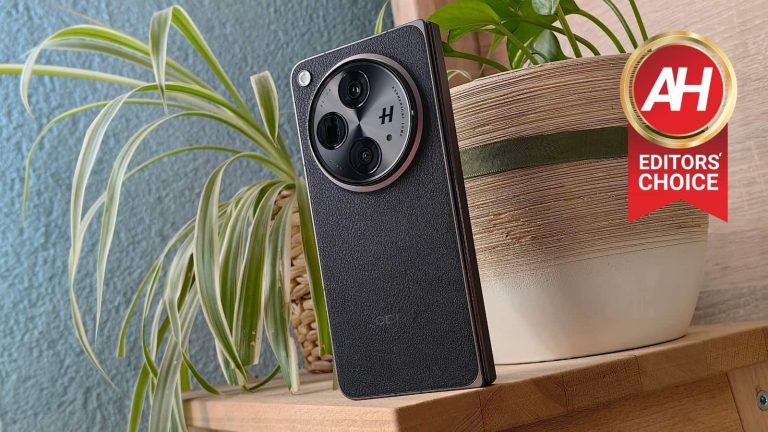
theFoldable smartphones have been around for a long time now. They’ve been fragile and quite frankly not very appealing at first, but that changed over the years. When OPPO and OnePlus, two sister companies, announced their new book-style foldable offerings this year, we were intrigued. The OnePlus Open proved to be an outstanding smartphone. Its twin brother, the OPPO Find N3, is on the same level. In this review article, you’ll be able to read about my experience with the OPPO Find N3. This phone is immensely similar to its twin brother, and just as amazing. I have to say that I was left smitten by this phone, in a similar degree to my colleague who reviewed the OnePlus Open.
The OPPO Find N3 is easily one of the best (foldable) smartphones on the market, and there are plenty of reasons why that is. That being said, before we get down to details, do note that this phone looks exactly the same as the OnePlus Open, right down to the measurements and weight. The only difference, hardware-wise, is that logo on the back. The software builds are also quite similar, but not identical, unlike the hardware. There is plenty to talk about here, to be quite honest, so let’s get down to it.
Table of contents
OPPO Find N3 Review: Hardware / Design
Prior to the OPPO Find N3, I’ve used the OPPO Find N2. This phone basically feels like a larger variant of the OPPO Find N3, which is a good thing actually. The OPPO Find N2 screamed quality when it comes to its build. I simply loved the flat sides with chamfered edges, and the vegan leather backplate too. That’s all back on the OPPO Find N3, as I got to review the vegan leather variant of the phone. Do note that this device comes in both glass back and vegan leather backplate models. The vegan leather model is not only slightly lighter, but it also offers more grip. On top of that, OPPO’s implementation of vegan leather is outstanding. It adds grip to the experience, and still looks premium, and stands the test of time really well, based on my Find N2 experience.
It offer great in-hand feel, especially the vegan leather model
The phone feels great in the hand, and it doesn’t cut into my hand at all, nor my pinkie, which I use to balance the phone when using it with one hand. I even used the OPPO Find N2 with one hand when unfolded. That’s not as viable here, as this phone is considerably larger, but using it with one hand while folded is still possible… for me, at least. Speaking of which, this particular unit weighs 239 grams, which is not that heavy for a book-style foldable, not at all. This phone is lighter than the iPhone 15 Pro Max, and only a couple of grams heavier than the Find N2, which is a lot smaller phone. It’s about as tall as the Galaxy Z Fold 5, despite the fact it has larger displays (both of them). It is wider than Samsung’s offering, but that’s actually a good thing here. Why? Because you’re getting a standard aspect ratio on the cover display, and not the odd, narrow 23.1:9 aspect ratio the Galaxy Z Fold 5 offers.
That huge camera oreo on the back is actually useful
The OPPO Find N3 also has a huge camera oreo on the back. Many people called out OPPO because of that, but quite frankly, I don’t mind it at all. It reminds me of actual cameras, and it’s also practical, kind of. It’s in the perfect spot for my index finger to sit, and thus help me hold the phone in the hand. It’s a great anchor point. It does protrude quite a bit, though, so using a case may not be a bad idea, if you’re not careful with your phones. Luckily, a case is included in the package, but we’ll talk about that in a separate section below. The device also has an alert slider on the right side when folded, and left side when unfolded. That alert slider has great feel to it, and moving between three different levels on offer is tactile and seamless, and yet doesn’t require too much force.
Clicky buttons are on board
The phone’s regular buttons are quite clicky, and have metal on top. They’re not difficult to find, as the volume rocker keys sit rather high up, so the power button is hard to miss. The alert slider does have a engraved pattern on it, by the way, so it’s easy to set apart from the actual buttons. The power/lock button also doubles as a fingerprint scanner, and that fingerprint scanner works brilliantly. It’s immensely accurate, and it unlocks the phone in an instant. I didn’t have any issues with it whatsoever, and I’ll gladly take this over any under-display fingerprint scanner, even the ultrasonic ones. Don’t get me wrong, I like a number of under-display fingerprint scanners out there, as they work great, but nothing beats capacitive ones for me.
It’s thinner than almost every other book-style foldable
All in all, the OPPO Find N3 does feel great in the hand, and is actually not difficult to hold or operate, at least this vegan leather model. It’s not a small phone, not at all, but it doesn’t feel as big as you’d think. Considering that it’s only 11.7mm thick when folded, it actually feels like a regular smartphone when in that state. Perhaps a regular smartphone with a case, but still, you don’t have a feeling like you’re holding a foldable smartphone… which is, great, of course. This is, thus far, one of my favorite designs of a foldable smartphone, top 2 for sure. OPPO did a fantastic job. One little detail I’d like to point out, though, is the fact the phone doesn’t fold fully flat. It folds at an angle of 178-179 degrees, instead of 180. That’s not something the vast majority of people will notice, nor care about, but I just wanted to let you know. The Pixel Fold is much worse in that regard, if we’re pulling comparisons, so… not a big deal.
Accessories
OPPO included a case in the box with the OPPO Find N3. A case is always nice to see in the box, even if it’s a regular silicone/gel one. In this case, it’s not. This case is comprised out of two parts, as this is a foldable phone. Its backplate actually tries to mimic the vegan leather that is included on the back of this phone. It’s made out of plastic, but it doesn’t feel like cheap plastic. it’s very thin, though, so that it doesn’t add much bulk to the phone. When applied on to the device, the front part is not that great, to be quite honest. It’s moving a bit when using the phone, as it’s immensely thin. It bothered me so much that I removed it soon after installing it. I used the back portion of the case for about a day, and I liked it, but I like using phones naked, so that’s what I did for the vast majority of my review period. Those phones are designed with great dedication from their OEMs, so using them all natural is a special feeling. That is especially true when there’s vegan leather on the back. I quite frankly don’t think this phone needs a case if you’re careful with your devices. If not, well, that’s a completely different story. Either way, the case is there, if you need/want it. And yes, it’s included with variants that have glass on the back too.
OPPO Find N3 Review: Display
Considering this is a book-style foldable, there are two displays included on it. Both of those displays are not only immensely bright, but great across the board. The main display measures 7.82 inches, and it has a resolution of 2440 x 2268. This is a foldable LTPO3 OLED display with a 120Hz refresh rate, and can project up to 1 billion colors. Dolby Vision is also supported, while the panel goes up to 2,800 nits of brightness at its peak. The cover display measures 6.31 inches, and has a resolution of 2484 x 1116 pixels. It’s also an LTPO3 OLED panel with a 120Hz refresh rate. It can also project up to 1 billion colors, and supports Dolby Vision. This panel also goes up to 2,800 nits of brightness at its peak, and it’s protected by the Ceramic Guard. Both displays are flat, and have a single display camera hole on them. The bezels around them are very thin. Do note that both panels do offer adaptive refresh rates too. The main display goes from 1-120Hz, while the cover panel goes from 10-120Hz.
The display are outstanding, they’re very bright and vivid
That’s a lot of technical details right there. Are they any good in actual use? Well, yeah, they are, they’re outstanding, actually. Both of these panels are more than sharp enough, while they’re also quite vivid by default, but you can move them to ‘vivid’ mode in order to boost those colors even more. That’s what I decided to do, as I simply loved the end result. The touch response on both displays is great, and I didn’t have any problems seeing the content while I was outside in direct sunlight, that goes for both displays. That’s expected considering their truly high brightness levels. Also, the main display is not as reflective as some others are (on foldable phones), not at all. The viewing angles on both displays are very good too, so I don’t really have any complaints in that regard either. OPPO seemingly nailed it with both panels here. Another thing worth noting is that the cover panel is very comfortable to type on as it has a standard aspect ratio. I found myself using both of those two panels quite a bit, depending on what I was working on. They’re on the same quality levels, and have identical color representation. OPPO also did a great job when it comes to optimizing a fast refresh rate with touch input on these two panels. They function exactly the same in that regard.
OPPO Find N3 Review: Performance
The OPPO Find N3 is fueled by the Snapdragon 8 Gen 2 SoC. That chip is the best Qualcomm has to offer, next to the Snapdragon 8 Gen 3. It is paired with either 12GB or 16GB of LPDDR5X RAM, and those two models come with 256GB and 512GB of UFS 4.0 flash storage. Do note that the model I tested is the more powerful one. Also, I’m not sure if the entry-level model is available with global software, it could be tied to only the 16GB RAM variant. Now that we got the technicalities out of the way, let’s talk performance. The OPPO Find N3 simply flew through everything I threw at it… or should I say, glided through. The performance was buttery smooth, regardless of what I was doing. I’ll talk about the software specifics in a separate section, we’re focusing on sheer performance here.
The performance is second to none
You can easily do all the regular stuff most users do, with ease, of course. That goes for (heavy) multitasking, browsing, multimedia consumption, image editing, video editing, and so on and so forth. Gaming is not a problem in the slightest either. I’ve fired up a Chess game, which is not a demanding game, and it ran fine. The same goes for Subway Surfers, and Genshin Impact. I basically wanted to test out all tiers of performance difficulty, basically. I’ve seen no problems for either tier, and that includes Genshin Impact. That chip on the inside, plus powerful RAM and storage, not to mention OPPO’s software optimization, did their job really well.
I was rather impressed with the performance here, although I didn’t expect anything less from this phone, to be quite honest. OPPO’s flagships have had a standard of great performance for quite some time now. Software specifics are a different conversation, and we’ll get to that next.
OPPO Find N3 Review: Software
The OPPO Find N3 ships with Android 13, and OPPO’s ColorOS 13.2 on top of it. Software is the area where you’ll hear most complaints when it comes to OPPO smartphones. Complaints usually come from people who love Google’s iteration of Android. Now, those complaints may be unwarranted, to a degree. Why? Let me explain. Just because something works a specific way in stock Android, doesn’t mean OPPO wants it to work the same in ColorOS. That may bother you, or you may like it. Giving shade just because something works differently, even though it works great, is not the way to go about it. That being said, I do agree that OPPO should change some things in ColorOS, sure, but that’s just my personal opinion, which is a part of the review experience. Before we get to it, though, I’d like to point out that ColorOS works wonderfully. The animations are outstanding, and the OS ticks like a Swiss watch. Notable problems of old are no longer here.
OPPO’s multitasking is a leap forward, and takes great use of that large display
Having said that, I’ll start with the things I like here, and will then circle back to some annoyances, just to give you some perspective. I’ve already mentioned the animations and general fluidity, but what I loved most is ‘Boundless View’. On the OnePlus Open it’s called ‘Open Canvas’. I’m referring to OPPO’s multitasking implementation on the main display. It’s the best multitasking implementation on any foldable, in my opinion, and it’s not even close. There is a persistent app bar at the bottom of the screen when you’re on the home screen, but when you open an app, that taskbar gets a bit smaller, and immensely useful at the same time. It’s separated into several sections. The first section has two icons, one that allows you to access any app on the phone (app drawer), and one that allows you to access recent documents and pictures. You can use that section to quickly share something via an app on the screen, simply drag and drop it. This works great with almost every app. The second section contains app shortcuts of your preference, while the third shows you several recently used apps for quick switch purposes.
Running three apps on the screen this way feels just right, and makes me quite productive
That’s not where this story ends. The real magic happens when you start dragging and dropping apps on the screen. You can basically use three apps on the screen at the same time, side by side. If you drag and drop one app from the taskbar, you’ll get a split screen view. If you drag another one upon those two, you’ll be able to see all three, but one will be slightly hidden. A sliver of its UI will be visible alongside the top, bottom, or one of the sides of the screen. In order to move it into the active position, simply tap it, and the app on the opposite side will move out of the way, leaving you with two active apps. This works so brilliantly, and so seamlessly, that I was left impressed. It made me extremely productive. Now, I see room for expansion here also, like adding four apps at the same time, for example. I also wish OPPO would let me re-arrange how those apps are portrayed while on the screen (by default), like which app will be hidden away horizontally at the bottom, and which one vertically on the side. Still, for the very first implementation, this is outstanding, and a great idea by OPPO. It pushed multitasking on foldables to a whole new level.
The gestures and animations are also great
Something else that I enjoy when it comes to ColorOS is… well, the gestures. The gesture navigation itself works great, but that’s not what I’m talking about. I’m referring to various hand gestures that you can utilize. For example, if you swipe from the top of the screen towards the bottom with two fingers, you can activate split screen real quick. If you swipe with three fingers across the screen, you can take a screenshot. If you have more than one app on the screen, you can even swipe across that app only, and only that window will be screenshotted. It’s a great solution. That’s not where things end, though. If you tap and briefly hold three fingers on the screen, and then start swiping down, the OS will allow you to take a partial screenshot. Another great solution by OPPO. There are also some gestures for previewing all apps in ‘Boundless View’, and more. You can really become immensely productive thanks to this entire portfolio of actions. I truly appreciate it that, especially considering how well everything works.
There are some annoyances here too, of course
So… what’s there not to like? Well, ColorOS does have its annoyances. First and foremost, app grid size. For the life of me I was unable to find the app grid size settings. They were not in the display section, nor in the homescreen section, and definitely not in any options when you hold your finger down on the home screen. I even used the phone’s settings to manually search for anything remotely similar to those words and I was unable to find them. I know that the OnePlus Open has that setting, even though it doesn’t allow you to go over a rather regular limit. It is very annoying as I’m used to increasing both vertical and horizontal grid size on my phones.
Options for lock screen shortcuts are not exactly vast
The second annoyance is related to lock screen shortcuts. There are two of them, one in the bottom-left corner, and one in the bottom-right. The one in the bottom right is reserved for the camera, while you can edit the one in the bottom-left corner. The thing is, the options are very limited. I was able to choose between Google Assistant (which I don’t use), Google Pay (which I have enabled by default without the need for a shortcut), and QR code (which I almost never use). I usually trigger a flashlight via that shortcut, as was the case on the Find N2. It was surprising that the option wasn’t available, but it’s possible OPPO will add it later on.
The power button doesn’t allow you to shut down the phone… by default
What else? Well, the power button doesn’t do what it’s supposed to. When you hold it down, you won’t be able to access the power menu by default. You can access the power menu by holding two buttons, but not that single one, as it’s reserved for a digital assistant. Luckily, you can change this via the settings, as that’s one of the first things I did when I set the phone up. The multitasking dock that is so useful doesn’t work if you’re running a third-party launcher. Everything will work great, including gestures, but you won’t be able to take advantage of the Boundless View feature, which basically renders third-party launchers useless to me.
The quick settings section is too large
Moving on, the quick settings section in the notification shade takes way too much space. When you swipe down and call your notification shade and quick settings, half the screen will be taken by quick settings toggles. That means that you won’t be able to see a whole lot of notifications. I wish OPPO handled this more like stock Android, or at least gave us an option to choose. No, such an option is not available, at least not yet, I spend a long time looking for it, even in developer settings. I really do hope we’ll get something that will give us more control over this.
Theming could use more integration
The last tidbit I’ll mention is related to theming. You can choose whether you want ColorOS to pick up a color from your wallpaper, or whether you want to use one of the presets. I decided to use a single color for everything, not any of the presets. So I basically chose a color from the color picker. That’s all great, and it works great, but if you use Google apps, they will pick up a color from your wallpaper by default. You can change that, but only temporarily. That means that I basically ended up with different colors for ColorOS elements, and different colors for Chrome, At a Glance widget, and so on. That’s not a problem at all if you don’t want to pick colors manually, of course.
You’ll notice I listed quite a few annoyances here, which I’m obligated to do for reviews, of course. Still, even despite these, I think ColorOS is great. ‘Boundless View’ and everything related to it is fantastic, and the OS works like a charm. All of these annoyances can be easily fixed by OPPO, so I do hope that at least some of them will.
OPPO Find N3 Review: Battery
The OPPO Find N3 includes a 4,805mAh battery, just to get the technical stuff out of the way. It also supports 67W wired charging, while the charging is included in the box. Also, reverse wired charging is supported too, but no wireless charging. That may be a problem for some of you, but considering how fast the wired charging is, and the fact the charger is included in the box… well, I can’t complain much. I also don’t tend to use wireless charging all that frequently as it’s almost always slower than wired charging, but that’s just a personal preference, of course.
The battery life is very, very good
Having said that, is the battery life any good? Well, yes, it is. In the first few days of use, my battery life was all over the place. That is to be expected, though. I never take into account the first few days. The battery needs to stretch its legs. Also, the phone needs to learn your habits. On top of that, I did use specific features of the phone quite aggressively, like the camera, for example, starting from the fourth or fifth day of use, things got much better. I’m not getting over 7 hours of screen-on-time without a problem, and getting over the 8-hour mark is also a possibility. As per usual, though, my usage won’t be the same as yours, so your mileage may vary.
The battery life is based on heavier usage, but without gaming
Do note that I do not usually play games on my smartphones. I do it for testing purposes, and once I’m done with that, I just don’t do it. However, I do use cameras extensively, watch a lot of YouTube content, and some TikTok videos as well. I have a ton of apps installed, message people a lot, send a lot of emails, and use the browser quite extensively too. On top of all that, I also like editing images on phones, especially foldable ones. Now, the ‘Boundless View’ multitasking was also utilized quite a lot by me on this phone. Just to give you a general idea of what is going on. I can safely say that the battery life is really good, though.
The phone not only has truly fast 67W charging, but it also includes a charger in the box
How fast is this 67W charging? Well, in about 10 minutes, you’ll get somewhere between 30 and 40% of battery charge. Getting the phone to a full charge usually takes well under an hour, around 45-50 minutes I’d say, though I didn’t time it exactly. You can comfortably charge during the day, as the charging is really fast. It’s not as fast as some phones offer, but it’s faster than basically any competition the OnePlus Open has in the foldable space. The Galaxy Z Fold 5 and Google Pixel Fold simply cannot compete, not to mention that they also ship without a charger.
OPPO Find N3 Review: Camera
I was very excited to try out the OPPO Find N3 camera setup, to be quite honest. I have to say… it did not disappoint, quite the contrary. The OPPO Find N3 has one of the best cameras on any foldable. That’s something I can say without thinking twice about it, after extensively using the cameras. I took over 300 pictures with the phone. You’ll find quite a few of them towards the end of this section. I did not include all of them, of course. The ones that are available below will give you a good idea of what to expect here. Let’s talk about the cameras, shall we.
Proper camera hardware + proper camera software = great camera performance
The OPPO Find N3 has a 48-megapixel main camera with an f/1.7 aperture, OIS, and multi-directional PDAF. It also has a 1.12um pixel size. This is actually Sony’s LYT-T808 camera sensor, a rather new camera sensor made for foldables. It’s a foldable version of the LYT-808, which OnePlus plans to use in its upcoming OnePlus 12 flagship. This is a 1/1.43-inch camera sensor, and it’s actually really, really good. This camera sensor gives a good depth of field. It also provides really nice, and vivid shots in collaboration with OPPO’s software. There are plenty of details in those images. Even when you shoot directly at the sun, the reflections are not bad at all. The colors are outstanding, I’d say, and Hasselblad definitely had something to do with that. I loved the colors in the OPPO Find X6 Pro photos, and the same is the case here. The photos are really well-balanced through and through, I really don’t have any complaints about daytime shots. Nothing is oversaturated, nor does the phone overexpose either. Portrait mode is not necessary at all, as the main camera does offer plenty of bokeh when needed.
Daytime samples:
The OPPO Find N3 does a fantastic job in low light too
What about low light? That’s another area where the OPPO Find N3 shines. If you check out the images below, you’ll see what I mean. It handles street lights with grace, while it manages to capture a lot of detail without allowing much noise to get into the shot. The images also end up looking really well-balanced, especially the ones shot outdoors. Even indoor shots have that contrasty, moody look at night, which is something I prefer, as it is night time after all. Even indoors the phone can retain enough detail, and provide you with great-looking images. Do note that you won’t have to fire up the night mode in order to shoot in low light, the phone handles all that perfectly.
Low light samples:
Its ultrawide camera is in line with the main shooter, in terms of colors
As far as the ultrawide camera goes, we’re dealing with a 48-megapixel unit that offers a 114-degree FoV. It has PDAF, and an f/2.2 aperture lens, along with a 0.8um pixel size. That camera actually does a great job complementing the main unit. It keeps a similar color layout, which helps with the overall consistency. It’s great during the day, and really good during nighttime too, as you’ll see in the camera samples linked above. It can do a visibly worse job than the main sensor in truly dark situations, but that is to be expected. Overall, it’s a great ultrawide shooter.
Ultrawide samples (day & night):
The telephoto camera is quite capable too
OPPO also utilized a 64-megapixel telephoto camera on the back. That camera supports OIS and PDAF, while it has an f/2.6 aperture lens and 0.7um pixel size. It offers 3x optical zoom, and 6x in-sensor zoom, both of which work great. The digital zoom goes up to 120x, but that’s not something you’ll want to use. That is the case on every phone, pretty much. Pictures at both 3x and 6x end up looking great, the quality does start to deteriorate above that. During the day, however, 10x images are also usable. They will look considerably worse than 6x shots, though. You can still use them in a pinch, even though the watercolor effect is present.
Telephoto samples:
OPPO Find N3 Review: Sound & Call quality
The OPPO Find N3 does come with stereo speakers, it includes three of them, actually. Some speakers in the market are slightly louder than the setup OPPO offers here. Still, these speakers do still get very, very loud. Despite that, however, there’s no distortion worth mentioning. They’re simply good, full-sounding speakers that are not easy to muffle with your hands. The fact that there are three of them definitely helps. The sound coming out of them is well-balanced, and quite detailed. You do also get some bass as part of the package. What I also appreciated is the fact that you can tuned them down really low in terms of volume. Speakers on many smartphones do end up sounding too loud even on the lowest setting, that’s not the case with these speakers.
You won’t have any issues with calls either, quite the contrary
In terms of call quality, I have no objections whatsoever. It was as good as it gets, basically. The earpiece is more than loud enough for me to properly hear people on the other side of the line, while I did not have any objections from the other side either. People I spoke to told me I sounded nice and crisp, basically.
OPPO Find N3 Review: Should you buy it?
Is the OPPO Find N3 the right phone for you? That is, of course, a question only you can answer directly. However, if you’re into foldables, and you have been waiting for a device that will push things a step forward, the OPPO Find N3 is easily that phone. Not only does it feel robust, and yet not too large, but it feels premium too. On top of that it offers outstanding displays, great performance, good battery life with fast charging, and truly capable cameras too. It is ahead of the competition in several ways when compared directly, each of the competitor smartphones. It may not be the best at everything, but as an overall package, the OPPO Find N3 (and its OnePlus Open twin) truly sits at the very top. It’s an outstanding foldable smartphone that can take your productivity to the next level.
You should buy the OPPO Find N3 if you:
…hate the display crease on other foldable phones …want a foldable, but don’t want to miss out on great cameras …feel like multitasking on foldalbes needed to make a step forward …need good battery life …find charging on other foldables to be too slow …need truly bright displays that are difficult to criticize …prefer vegan leather over glass (be careful which variant you get) …appreciate a smooth OS performance with great animations …love industrial design …hate it when OEMs don’t include a charger in the box …want a case to ship with your phone
You shouldn’t buy the OPPO Find N3 if you:
…absolutely need wireless charging …prefer smaller devices …love stock Android
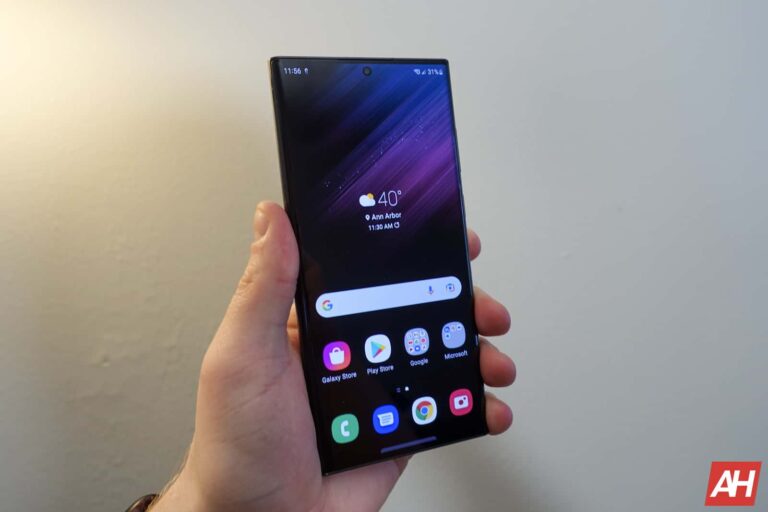
After a slight delay, Samsung appears to be back on track with its Android 14 rollout. It has released the big update for the Galaxy S22 series, bringing One UI 6.0 to the 2022 flagships. The update is also finally available for the Galaxy S23 series in South Korea.
Samsung pushes Android 14 to the Galaxy S22 series
Samsung began its Android 14 rollout in late October, with the Galaxy S23 series getting the update first. The company gradually pushed the update to the phones in most markets around the world, including the US. However, users in Samsung’s home country had to wait a little longer. The delay is finally over, letting South Korean Galaxy S23 users get a taste of stable One UI 6.0.
Simultaneously, Samsung is now rolling out the update to the Galaxy S22, Galaxy S22+, and Galaxy S22 Ultra. As of this writing, the stable Android 14 release for the 2022 flagship trio appears to be limited to beta users in Europe. The new firmware build number S90*BXXU6DWK4 (via SamMobile). However, it should be just a matter of time before the update reaches users on Android 13, both in Europe and beyond.
For beta users, the OTA (over the air) download size is just around 300MB. It would be a much bigger package for non-beta Galaxy S22 users, possibly weighing more than 3GB. Alongside all the goodies of Android 14 and One UI 6.0, the update will also bring the latest security patch. Samsung’s November patch contains fixes for more than 60 vulnerabilities, including at least five critical issues.
If you’re using a Galaxy S22, watch out for a notification prompting you to download the OTA update in the coming days. You can also go to Settings > Software update and tap on Download and install to check for updates manually. Samsung will soon release the update for other eligible models like the Galaxy Z Fold 5, Galaxy ZF Flip 5, Galaxy S21 series, Galaxy A54 5G, and more. We will keep you posted.
One UI 6.0 brings new camera features
One UI 6.0 is a massive update for Galaxy users. It introduces a UI overhaul, including changes to the notification panel and Quick Settings. Additionally, the update brings a host of new camera features. From selective Auto FPS and improved document scanning to new video editing tools, shutter speed optimization, and improved Image Clipper, there are plenty of new features to look forward to. One UI 6.0 also improves Samsung’s Expert RAW, Camera Assistant, and Galaxy Enhance-X apps.