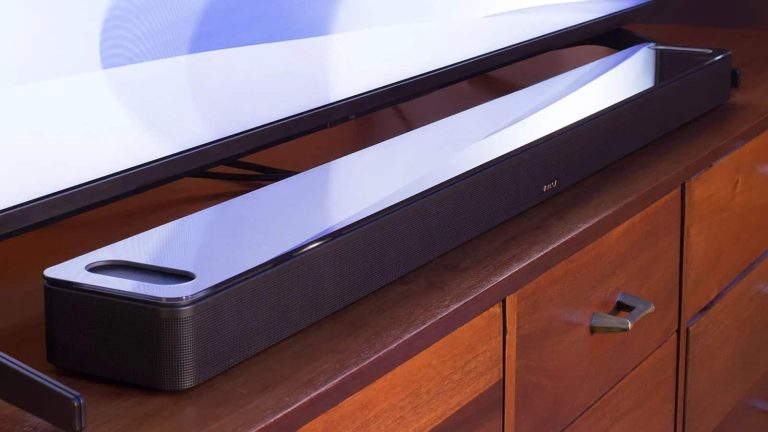
In need of a new soundbar for your living room or maybe your man cave? Well the Bose Smart Ultra Soundbar is currently on sale for Black Friday, and you can pick it up for just $799. That’s going to save you $200 off of its regular price. This is actually a pretty big deal, since Bose products rarely go on sale.
The Bose Smart Ultra Soundbar is a really impressive soundbar. Not only does it sound great, but it does also have support for Dolby Atmos. And once you’ve experienced Dolby Atmos, you won’t want to go back – trust me. Bose has also included a surround sound system using artificial intelligence here, so without needing a subwoofer, you can get a surround sound setup here. And that is truly quite impressive.
Bose offers the Smart Ultra Soundbar in two colors: white and black. It also comes in metal body with a glass top. Making it look rather unique and high-end, and that should also help to keep it from attracting so much dust. It’ll also fit quite nicely in your living room.
Instagram is rolling out a major update that introduces a bunch of new video editing tools, Reels improvements, and several new camera filters for content creators and users alike.
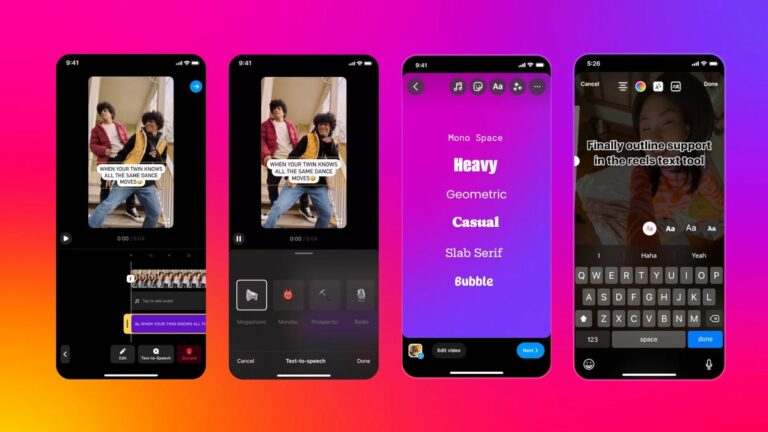
Starting this week, Instagram is testing the ability to scale, crop, and rotate individual clips. Also, new undo and redo options will be available in the video editor within the Instagram app.
Another new Reels improvement that Instagram is testing is the ability to pull from its clip hub to add clips with audio to a Reel. Not to mention that 10 new English text-to-speech voices have been added and are now available in select countries. On top of that, six new text fonts and styles available in hundreds of languages are part of the big update too.
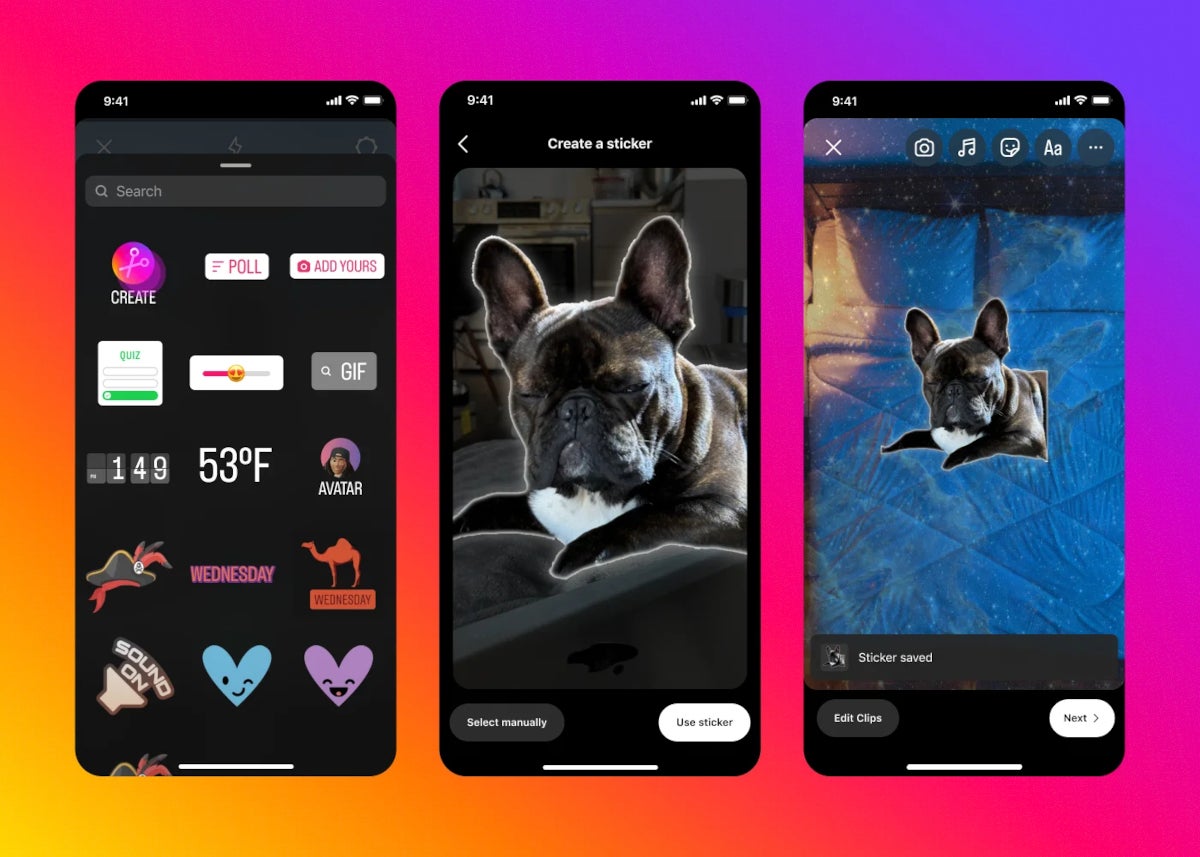
Moving on to the new camera filters, Instagram announced that it’s now testing the ability to create custom stickers from your own photos and videos in the Camera Roll, or from eligible photos and videos available on Instagram. This specific feature is powered by Instagram’s Segment Anything AI model.
Furthermore, new photo filters are now available in Posts. Instagram users can now edit photos and carousels with these new filters. The social app also made it easier to post by simplifying the way users find the tools they need while editing. Camera Roll is getting better previews, as well as the ability to zoom and search.
Finally, Instagram announced that over the coming months it will roll out the ability for creators to see how many people are watching their reel “on a moment-by-moment” basis via a new tool called Retention Chart.
theFoldable smartphones have been around for a long time now. They’ve been fragile and quite frankly not very appealing at first, but that changed over the years. When OPPO and OnePlus, two sister companies, announced their new book-style foldable offerings this year, we were intrigued. The OnePlus Open proved to be an outstanding smartphone. Its twin brother, the OPPO Find N3, is on the same level. In this review article, you’ll be able to read about my experience with the OPPO Find N3. This phone is immensely similar to its twin brother, and just as amazing. I have to say that I was left smitten by this phone, in a similar degree to my colleague who reviewed the OnePlus Open.
The OPPO Find N3 is easily one of the best (foldable) smartphones on the market, and there are plenty of reasons why that is. That being said, before we get down to details, do note that this phone looks exactly the same as the OnePlus Open, right down to the measurements and weight. The only difference, hardware-wise, is that logo on the back. The software builds are also quite similar, but not identical, unlike the hardware. There is plenty to talk about here, to be quite honest, so let’s get down to it.
Table of contents
OPPO Find N3 Review: Hardware / Design
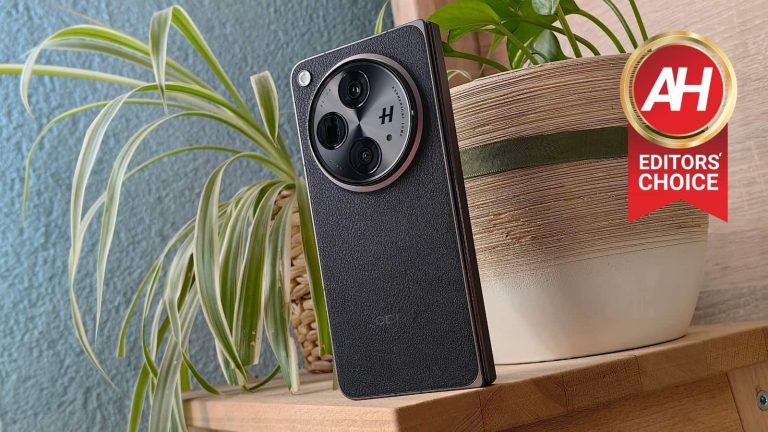
Prior to the OPPO Find N3, I’ve used the OPPO Find N2. This phone basically feels like a larger variant of the OPPO Find N3, which is a good thing actually. The OPPO Find N2 screamed quality when it comes to its build. I simply loved the flat sides with chamfered edges, and the vegan leather backplate too. That’s all back on the OPPO Find N3, as I got to review the vegan leather variant of the phone. Do note that this device comes in both glass back and vegan leather backplate models. The vegan leather model is not only slightly lighter, but it also offers more grip. On top of that, OPPO’s implementation of vegan leather is outstanding. It adds grip to the experience, and still looks premium, and stands the test of time really well, based on my Find N2 experience.
It offer great in-hand feel, especially the vegan leather model
The phone feels great in the hand, and it doesn’t cut into my hand at all, nor my pinkie, which I use to balance the phone when using it with one hand. I even used the OPPO Find N2 with one hand when unfolded. That’s not as viable here, as this phone is considerably larger, but using it with one hand while folded is still possible… for me, at least. Speaking of which, this particular unit weighs 239 grams, which is not that heavy for a book-style foldable, not at all. This phone is lighter than the iPhone 15 Pro Max, and only a couple of grams heavier than the Find N2, which is a lot smaller phone. It’s about as tall as the Galaxy Z Fold 5, despite the fact it has larger displays (both of them). It is wider than Samsung’s offering, but that’s actually a good thing here. Why? Because you’re getting a standard aspect ratio on the cover display, and not the odd, narrow 23.1:9 aspect ratio the Galaxy Z Fold 5 offers.
That huge camera oreo on the back is actually useful
The OPPO Find N3 also has a huge camera oreo on the back. Many people called out OPPO because of that, but quite frankly, I don’t mind it at all. It reminds me of actual cameras, and it’s also practical, kind of. It’s in the perfect spot for my index finger to sit, and thus help me hold the phone in the hand. It’s a great anchor point. It does protrude quite a bit, though, so using a case may not be a bad idea, if you’re not careful with your phones. Luckily, a case is included in the package, but we’ll talk about that in a separate section below. The device also has an alert slider on the right side when folded, and left side when unfolded. That alert slider has great feel to it, and moving between three different levels on offer is tactile and seamless, and yet doesn’t require too much force.
Clicky buttons are on board
The phone’s regular buttons are quite clicky, and have metal on top. They’re not difficult to find, as the volume rocker keys sit rather high up, so the power button is hard to miss. The alert slider does have a engraved pattern on it, by the way, so it’s easy to set apart from the actual buttons. The power/lock button also doubles as a fingerprint scanner, and that fingerprint scanner works brilliantly. It’s immensely accurate, and it unlocks the phone in an instant. I didn’t have any issues with it whatsoever, and I’ll gladly take this over any under-display fingerprint scanner, even the ultrasonic ones. Don’t get me wrong, I like a number of under-display fingerprint scanners out there, as they work great, but nothing beats capacitive ones for me.
It’s thinner than almost every other book-style foldable
All in all, the OPPO Find N3 does feel great in the hand, and is actually not difficult to hold or operate, at least this vegan leather model. It’s not a small phone, not at all, but it doesn’t feel as big as you’d think. Considering that it’s only 11.7mm thick when folded, it actually feels like a regular smartphone when in that state. Perhaps a regular smartphone with a case, but still, you don’t have a feeling like you’re holding a foldable smartphone… which is, great, of course. This is, thus far, one of my favorite designs of a foldable smartphone, top 2 for sure. OPPO did a fantastic job. One little detail I’d like to point out, though, is the fact the phone doesn’t fold fully flat. It folds at an angle of 178-179 degrees, instead of 180. That’s not something the vast majority of people will notice, nor care about, but I just wanted to let you know. The Pixel Fold is much worse in that regard, if we’re pulling comparisons, so… not a big deal.
Accessories
OPPO included a case in the box with the OPPO Find N3. A case is always nice to see in the box, even if it’s a regular silicone/gel one. In this case, it’s not. This case is comprised out of two parts, as this is a foldable phone. Its backplate actually tries to mimic the vegan leather that is included on the back of this phone. It’s made out of plastic, but it doesn’t feel like cheap plastic. it’s very thin, though, so that it doesn’t add much bulk to the phone. When applied on to the device, the front part is not that great, to be quite honest. It’s moving a bit when using the phone, as it’s immensely thin. It bothered me so much that I removed it soon after installing it. I used the back portion of the case for about a day, and I liked it, but I like using phones naked, so that’s what I did for the vast majority of my review period. Those phones are designed with great dedication from their OEMs, so using them all natural is a special feeling. That is especially true when there’s vegan leather on the back. I quite frankly don’t think this phone needs a case if you’re careful with your devices. If not, well, that’s a completely different story. Either way, the case is there, if you need/want it. And yes, it’s included with variants that have glass on the back too.
OPPO Find N3 Review: Display
Considering this is a book-style foldable, there are two displays included on it. Both of those displays are not only immensely bright, but great across the board. The main display measures 7.82 inches, and it has a resolution of 2440 x 2268. This is a foldable LTPO3 OLED display with a 120Hz refresh rate, and can project up to 1 billion colors. Dolby Vision is also supported, while the panel goes up to 2,800 nits of brightness at its peak. The cover display measures 6.31 inches, and has a resolution of 2484 x 1116 pixels. It’s also an LTPO3 OLED panel with a 120Hz refresh rate. It can also project up to 1 billion colors, and supports Dolby Vision. This panel also goes up to 2,800 nits of brightness at its peak, and it’s protected by the Ceramic Guard. Both displays are flat, and have a single display camera hole on them. The bezels around them are very thin. Do note that both panels do offer adaptive refresh rates too. The main display goes from 1-120Hz, while the cover panel goes from 10-120Hz.
The display are outstanding, they’re very bright and vivid
That’s a lot of technical details right there. Are they any good in actual use? Well, yeah, they are, they’re outstanding, actually. Both of these panels are more than sharp enough, while they’re also quite vivid by default, but you can move them to ‘vivid’ mode in order to boost those colors even more. That’s what I decided to do, as I simply loved the end result. The touch response on both displays is great, and I didn’t have any problems seeing the content while I was outside in direct sunlight, that goes for both displays. That’s expected considering their truly high brightness levels. Also, the main display is not as reflective as some others are (on foldable phones), not at all. The viewing angles on both displays are very good too, so I don’t really have any complaints in that regard either. OPPO seemingly nailed it with both panels here. Another thing worth noting is that the cover panel is very comfortable to type on as it has a standard aspect ratio. I found myself using both of those two panels quite a bit, depending on what I was working on. They’re on the same quality levels, and have identical color representation. OPPO also did a great job when it comes to optimizing a fast refresh rate with touch input on these two panels. They function exactly the same in that regard.
OPPO Find N3 Review: Performance
The OPPO Find N3 is fueled by the Snapdragon 8 Gen 2 SoC. That chip is the best Qualcomm has to offer, next to the Snapdragon 8 Gen 3. It is paired with either 12GB or 16GB of LPDDR5X RAM, and those two models come with 256GB and 512GB of UFS 4.0 flash storage. Do note that the model I tested is the more powerful one. Also, I’m not sure if the entry-level model is available with global software, it could be tied to only the 16GB RAM variant. Now that we got the technicalities out of the way, let’s talk performance. The OPPO Find N3 simply flew through everything I threw at it… or should I say, glided through. The performance was buttery smooth, regardless of what I was doing. I’ll talk about the software specifics in a separate section, we’re focusing on sheer performance here.
The performance is second to none
You can easily do all the regular stuff most users do, with ease, of course. That goes for (heavy) multitasking, browsing, multimedia consumption, image editing, video editing, and so on and so forth. Gaming is not a problem in the slightest either. I’ve fired up a Chess game, which is not a demanding game, and it ran fine. The same goes for Subway Surfers, and Genshin Impact. I basically wanted to test out all tiers of performance difficulty, basically. I’ve seen no problems for either tier, and that includes Genshin Impact. That chip on the inside, plus powerful RAM and storage, not to mention OPPO’s software optimization, did their job really well.
I was rather impressed with the performance here, although I didn’t expect anything less from this phone, to be quite honest. OPPO’s flagships have had a standard of great performance for quite some time now. Software specifics are a different conversation, and we’ll get to that next.
OPPO Find N3 Review: Software
The OPPO Find N3 ships with Android 13, and OPPO’s ColorOS 13.2 on top of it. Software is the area where you’ll hear most complaints when it comes to OPPO smartphones. Complaints usually come from people who love Google’s iteration of Android. Now, those complaints may be unwarranted, to a degree. Why? Let me explain. Just because something works a specific way in stock Android, doesn’t mean OPPO wants it to work the same in ColorOS. That may bother you, or you may like it. Giving shade just because something works differently, even though it works great, is not the way to go about it. That being said, I do agree that OPPO should change some things in ColorOS, sure, but that’s just my personal opinion, which is a part of the review experience. Before we get to it, though, I’d like to point out that ColorOS works wonderfully. The animations are outstanding, and the OS ticks like a Swiss watch. Notable problems of old are no longer here.
OPPO’s multitasking is a leap forward, and takes great use of that large display
Having said that, I’ll start with the things I like here, and will then circle back to some annoyances, just to give you some perspective. I’ve already mentioned the animations and general fluidity, but what I loved most is ‘Boundless View’. On the OnePlus Open it’s called ‘Open Canvas’. I’m referring to OPPO’s multitasking implementation on the main display. It’s the best multitasking implementation on any foldable, in my opinion, and it’s not even close. There is a persistent app bar at the bottom of the screen when you’re on the home screen, but when you open an app, that taskbar gets a bit smaller, and immensely useful at the same time. It’s separated into several sections. The first section has two icons, one that allows you to access any app on the phone (app drawer), and one that allows you to access recent documents and pictures. You can use that section to quickly share something via an app on the screen, simply drag and drop it. This works great with almost every app. The second section contains app shortcuts of your preference, while the third shows you several recently used apps for quick switch purposes.
Running three apps on the screen this way feels just right, and makes me quite productive
That’s not where this story ends. The real magic happens when you start dragging and dropping apps on the screen. You can basically use three apps on the screen at the same time, side by side. If you drag and drop one app from the taskbar, you’ll get a split screen view. If you drag another one upon those two, you’ll be able to see all three, but one will be slightly hidden. A sliver of its UI will be visible alongside the top, bottom, or one of the sides of the screen. In order to move it into the active position, simply tap it, and the app on the opposite side will move out of the way, leaving you with two active apps. This works so brilliantly, and so seamlessly, that I was left impressed. It made me extremely productive. Now, I see room for expansion here also, like adding four apps at the same time, for example. I also wish OPPO would let me re-arrange how those apps are portrayed while on the screen (by default), like which app will be hidden away horizontally at the bottom, and which one vertically on the side. Still, for the very first implementation, this is outstanding, and a great idea by OPPO. It pushed multitasking on foldables to a whole new level.
The gestures and animations are also great
Something else that I enjoy when it comes to ColorOS is… well, the gestures. The gesture navigation itself works great, but that’s not what I’m talking about. I’m referring to various hand gestures that you can utilize. For example, if you swipe from the top of the screen towards the bottom with two fingers, you can activate split screen real quick. If you swipe with three fingers across the screen, you can take a screenshot. If you have more than one app on the screen, you can even swipe across that app only, and only that window will be screenshotted. It’s a great solution. That’s not where things end, though. If you tap and briefly hold three fingers on the screen, and then start swiping down, the OS will allow you to take a partial screenshot. Another great solution by OPPO. There are also some gestures for previewing all apps in ‘Boundless View’, and more. You can really become immensely productive thanks to this entire portfolio of actions. I truly appreciate it that, especially considering how well everything works.
There are some annoyances here too, of course
So… what’s there not to like? Well, ColorOS does have its annoyances. First and foremost, app grid size. For the life of me I was unable to find the app grid size settings. They were not in the display section, nor in the homescreen section, and definitely not in any options when you hold your finger down on the home screen. I even used the phone’s settings to manually search for anything remotely similar to those words and I was unable to find them. I know that the OnePlus Open has that setting, even though it doesn’t allow you to go over a rather regular limit. It is very annoying as I’m used to increasing both vertical and horizontal grid size on my phones.
Options for lock screen shortcuts are not exactly vast
The second annoyance is related to lock screen shortcuts. There are two of them, one in the bottom-left corner, and one in the bottom-right. The one in the bottom right is reserved for the camera, while you can edit the one in the bottom-left corner. The thing is, the options are very limited. I was able to choose between Google Assistant (which I don’t use), Google Pay (which I have enabled by default without the need for a shortcut), and QR code (which I almost never use). I usually trigger a flashlight via that shortcut, as was the case on the Find N2. It was surprising that the option wasn’t available, but it’s possible OPPO will add it later on.
The power button doesn’t allow you to shut down the phone… by default
What else? Well, the power button doesn’t do what it’s supposed to. When you hold it down, you won’t be able to access the power menu by default. You can access the power menu by holding two buttons, but not that single one, as it’s reserved for a digital assistant. Luckily, you can change this via the settings, as that’s one of the first things I did when I set the phone up. The multitasking dock that is so useful doesn’t work if you’re running a third-party launcher. Everything will work great, including gestures, but you won’t be able to take advantage of the Boundless View feature, which basically renders third-party launchers useless to me.
The quick settings section is too large
Moving on, the quick settings section in the notification shade takes way too much space. When you swipe down and call your notification shade and quick settings, half the screen will be taken by quick settings toggles. That means that you won’t be able to see a whole lot of notifications. I wish OPPO handled this more like stock Android, or at least gave us an option to choose. No, such an option is not available, at least not yet, I spend a long time looking for it, even in developer settings. I really do hope we’ll get something that will give us more control over this.
Theming could use more integration
The last tidbit I’ll mention is related to theming. You can choose whether you want ColorOS to pick up a color from your wallpaper, or whether you want to use one of the presets. I decided to use a single color for everything, not any of the presets. So I basically chose a color from the color picker. That’s all great, and it works great, but if you use Google apps, they will pick up a color from your wallpaper by default. You can change that, but only temporarily. That means that I basically ended up with different colors for ColorOS elements, and different colors for Chrome, At a Glance widget, and so on. That’s not a problem at all if you don’t want to pick colors manually, of course.
You’ll notice I listed quite a few annoyances here, which I’m obligated to do for reviews, of course. Still, even despite these, I think ColorOS is great. ‘Boundless View’ and everything related to it is fantastic, and the OS works like a charm. All of these annoyances can be easily fixed by OPPO, so I do hope that at least some of them will.
OPPO Find N3 Review: Battery
The OPPO Find N3 includes a 4,805mAh battery, just to get the technical stuff out of the way. It also supports 67W wired charging, while the charging is included in the box. Also, reverse wired charging is supported too, but no wireless charging. That may be a problem for some of you, but considering how fast the wired charging is, and the fact the charger is included in the box… well, I can’t complain much. I also don’t tend to use wireless charging all that frequently as it’s almost always slower than wired charging, but that’s just a personal preference, of course.
The battery life is very, very good
Having said that, is the battery life any good? Well, yes, it is. In the first few days of use, my battery life was all over the place. That is to be expected, though. I never take into account the first few days. The battery needs to stretch its legs. Also, the phone needs to learn your habits. On top of that, I did use specific features of the phone quite aggressively, like the camera, for example, starting from the fourth or fifth day of use, things got much better. I’m not getting over 7 hours of screen-on-time without a problem, and getting over the 8-hour mark is also a possibility. As per usual, though, my usage won’t be the same as yours, so your mileage may vary.
The battery life is based on heavier usage, but without gaming
Do note that I do not usually play games on my smartphones. I do it for testing purposes, and once I’m done with that, I just don’t do it. However, I do use cameras extensively, watch a lot of YouTube content, and some TikTok videos as well. I have a ton of apps installed, message people a lot, send a lot of emails, and use the browser quite extensively too. On top of all that, I also like editing images on phones, especially foldable ones. Now, the ‘Boundless View’ multitasking was also utilized quite a lot by me on this phone. Just to give you a general idea of what is going on. I can safely say that the battery life is really good, though.
The phone not only has truly fast 67W charging, but it also includes a charger in the box
How fast is this 67W charging? Well, in about 10 minutes, you’ll get somewhere between 30 and 40% of battery charge. Getting the phone to a full charge usually takes well under an hour, around 45-50 minutes I’d say, though I didn’t time it exactly. You can comfortably charge during the day, as the charging is really fast. It’s not as fast as some phones offer, but it’s faster than basically any competition the OnePlus Open has in the foldable space. The Galaxy Z Fold 5 and Google Pixel Fold simply cannot compete, not to mention that they also ship without a charger.
OPPO Find N3 Review: Camera
I was very excited to try out the OPPO Find N3 camera setup, to be quite honest. I have to say… it did not disappoint, quite the contrary. The OPPO Find N3 has one of the best cameras on any foldable. That’s something I can say without thinking twice about it, after extensively using the cameras. I took over 300 pictures with the phone. You’ll find quite a few of them towards the end of this section. I did not include all of them, of course. The ones that are available below will give you a good idea of what to expect here. Let’s talk about the cameras, shall we.
Proper camera hardware + proper camera software = great camera performance
The OPPO Find N3 has a 48-megapixel main camera with an f/1.7 aperture, OIS, and multi-directional PDAF. It also has a 1.12um pixel size. This is actually Sony’s LYT-T808 camera sensor, a rather new camera sensor made for foldables. It’s a foldable version of the LYT-808, which OnePlus plans to use in its upcoming OnePlus 12 flagship. This is a 1/1.43-inch camera sensor, and it’s actually really, really good. This camera sensor gives a good depth of field. It also provides really nice, and vivid shots in collaboration with OPPO’s software. There are plenty of details in those images. Even when you shoot directly at the sun, the reflections are not bad at all. The colors are outstanding, I’d say, and Hasselblad definitely had something to do with that. I loved the colors in the OPPO Find X6 Pro photos, and the same is the case here. The photos are really well-balanced through and through, I really don’t have any complaints about daytime shots. Nothing is oversaturated, nor does the phone overexpose either. Portrait mode is not necessary at all, as the main camera does offer plenty of bokeh when needed.
Daytime samples:
The OPPO Find N3 does a fantastic job in low light too
What about low light? That’s another area where the OPPO Find N3 shines. If you check out the images below, you’ll see what I mean. It handles street lights with grace, while it manages to capture a lot of detail without allowing much noise to get into the shot. The images also end up looking really well-balanced, especially the ones shot outdoors. Even indoor shots have that contrasty, moody look at night, which is something I prefer, as it is night time after all. Even indoors the phone can retain enough detail, and provide you with great-looking images. Do note that you won’t have to fire up the night mode in order to shoot in low light, the phone handles all that perfectly.
Low light samples:
Its ultrawide camera is in line with the main shooter, in terms of colors
As far as the ultrawide camera goes, we’re dealing with a 48-megapixel unit that offers a 114-degree FoV. It has PDAF, and an f/2.2 aperture lens, along with a 0.8um pixel size. That camera actually does a great job complementing the main unit. It keeps a similar color layout, which helps with the overall consistency. It’s great during the day, and really good during nighttime too, as you’ll see in the camera samples linked above. It can do a visibly worse job than the main sensor in truly dark situations, but that is to be expected. Overall, it’s a great ultrawide shooter.
Ultrawide samples (day & night):
The telephoto camera is quite capable too
OPPO also utilized a 64-megapixel telephoto camera on the back. That camera supports OIS and PDAF, while it has an f/2.6 aperture lens and 0.7um pixel size. It offers 3x optical zoom, and 6x in-sensor zoom, both of which work great. The digital zoom goes up to 120x, but that’s not something you’ll want to use. That is the case on every phone, pretty much. Pictures at both 3x and 6x end up looking great, the quality does start to deteriorate above that. During the day, however, 10x images are also usable. They will look considerably worse than 6x shots, though. You can still use them in a pinch, even though the watercolor effect is present.
Telephoto samples:
OPPO Find N3 Review: Sound & Call quality
The OPPO Find N3 does come with stereo speakers, it includes three of them, actually. Some speakers in the market are slightly louder than the setup OPPO offers here. Still, these speakers do still get very, very loud. Despite that, however, there’s no distortion worth mentioning. They’re simply good, full-sounding speakers that are not easy to muffle with your hands. The fact that there are three of them definitely helps. The sound coming out of them is well-balanced, and quite detailed. You do also get some bass as part of the package. What I also appreciated is the fact that you can tuned them down really low in terms of volume. Speakers on many smartphones do end up sounding too loud even on the lowest setting, that’s not the case with these speakers.
You won’t have any issues with calls either, quite the contrary
In terms of call quality, I have no objections whatsoever. It was as good as it gets, basically. The earpiece is more than loud enough for me to properly hear people on the other side of the line, while I did not have any objections from the other side either. People I spoke to told me I sounded nice and crisp, basically.
OPPO Find N3 Review: Should you buy it?
Is the OPPO Find N3 the right phone for you? That is, of course, a question only you can answer directly. However, if you’re into foldables, and you have been waiting for a device that will push things a step forward, the OPPO Find N3 is easily that phone. Not only does it feel robust, and yet not too large, but it feels premium too. On top of that it offers outstanding displays, great performance, good battery life with fast charging, and truly capable cameras too. It is ahead of the competition in several ways when compared directly, each of the competitor smartphones. It may not be the best at everything, but as an overall package, the OPPO Find N3 (and its OnePlus Open twin) truly sits at the very top. It’s an outstanding foldable smartphone that can take your productivity to the next level.
You should buy the OPPO Find N3 if you:
…hate the display crease on other foldable phones …want a foldable, but don’t want to miss out on great cameras …feel like multitasking on foldalbes needed to make a step forward …need good battery life …find charging on other foldables to be too slow …need truly bright displays that are difficult to criticize …prefer vegan leather over glass (be careful which variant you get) …appreciate a smooth OS performance with great animations …love industrial design …hate it when OEMs don’t include a charger in the box …want a case to ship with your phone
You shouldn’t buy the OPPO Find N3 if you:
…absolutely need wireless charging …prefer smaller devices …love stock Android
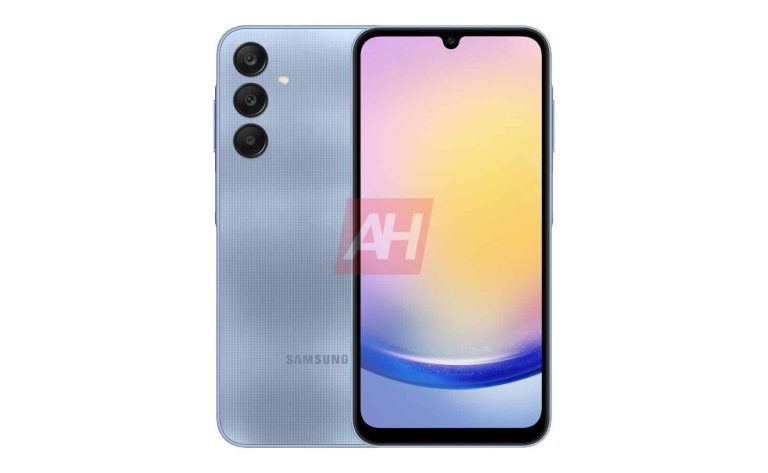
Samsung‘s upcoming mid-range smartphone, the Galaxy A25 5G, may not remain under wraps for much longer. Well, our exclusive leaks have already revealed the phone’s design and key specs, so not much is left to the imagination. However, the company has yet to officially announce the device. Meanwhile, the handset has just leaked in another set of renders, further detailing its design.
The Galaxy A25 5G shows up in another set of leaked renders
We exclusively revealed last week that Samsung is readying the Galaxy A25 5G in four colors, showing you official renders of the phone in all of its color options. MySmartPrice has now shared a few more renders in the same four hues. The images confirm a triple rear camera setup with the same vertical design that the Korean firm has used on its phones this year.
The Galaxy A25 5G doesn’t look different from some existing Samsung phones on the front either. There is hardly any room for a design overhaul on the front, anyway. We have a flat display with a U-shaped notch and sizable bezels, particularly the chin. The device does have a unique style element, though. Samsung has slightly raised the frame around the power and volume buttons on the right, which we haven’t seen on recent Galaxy phones.
The power button incorporates a capacitive fingerprint scanner. The phone’s SIM tray, which should have room for a microSD card, is on the left side. The bottom edge should house the USB Type-C port, a speaker, and a microphone. Though unconfirmed, we are also expecting a 3.5mm headphone jack here. The Galaxy A25 5G may lack stereo speakers, though.
Samsung may launch the phone soon
Samsung could be planning to unveil the Galaxy A25 5G before the end of the year. It has already published an official support page for the phone on its website. The device has also received certifications from the BIS in India, the FCC in the US, TUV Rheinland, Bluetooth SIG, and more regulatory agencies. Rumors say the mid-range handset will cost around $300 at launch.
The Galaxy A25 5G is shaping up to be a decent phone for its price. It features a 6.44-inch display and is powered by a 5nm Samsung Exynos 1280 chipset with up to 8GB of RAM and 256GB of storage. The device gets a 50MP main camera, 32MP selfie camera, 5,000mAh battery with 25W fast charging, IP67 dust and water resistance, and Android 14. It will receive updates up to Android 18. Stay tuned for the official unveiling.
If you had hoped that Apple’s RCS adoption would end the blue vs green bubbles issue, well, it will not. Apple confirmed to 9to5Google that it’s not happening, as iMessage will still be presented via blue bubbles. RCS, on the other hand, will use green bubbles, the same as SMS.
Apple’s RCS adoption won’t end the blue vs green bubbles problem, unfortunately
In case you’re out of the loop, Apple actually confirmed yesterday that RCS support is coming to iPhones. The company said that it will be implemented late next year, but we don’t know the exact timeframe.
Google reacted to the news recently, as the company welcomed Apple’s decision, and said it’ll help the company implement the service on iOS (if needed). Google has been pushing Apple towards this decision via its marketing campaign, but that’s almost certainly not the reason Apple did this.
In any case, RCS (Rich Communication Services) will bring a number of iMessage-type features to use across platforms. If you use an iPhone, you’ll be able to send images and videos to Android users, and vice versa. You’ll also get read receipts, typing indicators, and so on.
Let’s hope that Apple will at least use a different shade of green for RCS
Now, it would be nice to see a different shade of green for RCS on iPhones, at least. On Android, SMS messages are highlighted with a light blue color, while RCS messages are presented with a dark blue color. That goes for Google Messages, at least.
As I said, it would be nice to see a difference on iPhones as well. That way the users will have a clear indication of whether they can send images and videos to someone, or if that’s off-limits, if they don’t have access to RCS.
If not, then some other, obvious indication would be nice to have, that’s for sure. We’ll see how Apple will implement this. Unfortunately, we’ll have to wait for quite some time in order to see it happen.
The OnePlus 11 still remains as one of the best phones to launch in 2023. Largely because of its spec sheet and price tag. But what if I told you that you could save $170 off of the regular price on the 256GB model? Well you can, thanks to Best Buy’sBlack Friday sale. That’s a 16GB of RAM and 256GB storage OnePlus 11 for only $629, that’s a really incredible deal.
Why you should buy the OnePlus 11
OnePlus 11 is a pretty impressive phone, with a starting price of $699 for the 8GB/128GB model and $799 for the 16GB/256GB model. It comes with a 6.7-inch QHD+ 120Hz Adaptive AMOLED display, powered by the Qualcomm Snapdragon 8 Gen 2 processor, with a 5,000mAh capacity battery. That’s quite impressive for the price, and the battery is pretty powerful too.
In our review, we were able to get about 10 hours of on screen time over and over again on the OnePlus 11. So it’s going to get you through the day and then some. Additionally, with the 80W charging (and the charger is in the box!), you won’t really need to worry about battery life. As the battery is going to fully charge in less than an hour.
The camera is also improved this year on the OnePlus 11. It has a 50-megapixel main sensor, 32-megapixel telephoto and 48-megapixel ultrawide. OnePlus is also using Hasselblad once again here. Giving you a great looking image every time you take a photo. Which is not something we typically say about the OnePlus 11. So that’s definitely a good thing here.
While the OnePlus 11 5G is not sold by any carriers, but it is supported by them all. The OnePlus 11 5G is compatible with T-Mobile, AT&T and Verizon networks. As well as those MVNOs that run on those networks. So you can buy the phone unlocked and use it anywhere you want.
You can pick up the OnePlus 11 from Best Buy today.
IBM has halted ads on X, formerly Twitter, in response to Elon Musk’s amplification of far-right points. This decision comes after Musk publicly endorsed posts that promoted antisemitic and white supremacist ideologies. Media Matters highlighted these instances and pointed out that IBM, Apple, Comcast, and other companies had ads placed alongside pro-Nazi and pro-Hitler content (not posted by Musk) on X.
IBM pauses advertising on X, formerly Twitter
X owner Elon Musk has sparked controversy with his recent tweets expressing support for white pride and endorsing antisemitic views. These comments have drawn criticism from various media outlets and organizations, including IBM. In response, it has suspended its advertising on X.
IBM has stated its unwavering stance against hate speech and discrimination. It has affirmed its commitment to investigating this “entirely unacceptable situation,” the company told the Financial Times (via The Verge).
In one instance, Musk agreed with a far-right poster’s tweet that it is unacceptable for white people not to be allowed to be proud of their race. He further expressed support for antisemitic sentiments by endorsing a post that claimed Jewish communities have fueled hatred against white people.
Musk has also targeted the ADL, accusing the organization of unfairly attacking the majority of the West and criticizing minority groups. He has previously threatened to sue the ADL and continued expressing animosity towards the organization.
Elon Musk’s remarks are widely being criticized…mainly among advertisers
Musk’s actions have sparked concerns about the rise of hate speech and discrimination on X. Critics argue that his endorsement of such views undermines the platform’s commitment to free speech and creates an environment where marginalized groups feel unsafe.
Meanwhile, X CEO Linda Yaccarino says that the platform’s biggest advertisers have returned to the site, citing its moderation changes.
However, a previous Media Matters report says that they are spending far less than they used to. Yaccarino has responded that X has been clear about its efforts to combat antisemitism and discrimination. All in all, Musk’s comments have sparked criticism from various groups, including advertisers and they’re now kicking him in the back side.
Google has opened up access to Bard for teenagers with safety guardrails in place – it’s available from this week onwards to “most countries around the world”, but for those that “meet the minimum age requirement to manage their own Google Account” and have set English as their primary language.
In an announcement blog post, Google says that Bard has been “trained” to recognize areas that are “inappropriate to younger users and implemented safety features and guardrails to help prevent unsafe content, such as illegal or age-gated substances, from appearing in its responses to teens” (via 9to5Google).
“We also recognize that many people, including teens, are not always aware of hallucinations in LLMs (LLMs stands for Large Language Models). So the first time a teen asks a fact-based question, we’ll automatically run our double-check response feature, which helps evaluate whether there’s content across the web to substantiate Bard’s response. Soon, this feature will automatically run when any new Bard user asks their first factual question. And for teens, we’ll actively recommend using double-check to help them develop information literacy and critical thinking skills”, reads the post.Google explains that before launching Bard to younger people, advice from child safety and development experts was used to help shape the content policies and an experience that prioritizes safety: “And organizations like the Family Online Safety Institute (FOSI) advised us on how to keep the needs of teens and families in mind”.
“FOSI’s research found that most teens and parents expect that GenAI skills will be an important part of their future,” says Stephen Balkam, Founder & CEO of the Family Online Safety Institute. “Google’s thoughtful approach to expanding Bard access to teens represents an important step in offering teens the opportunity to explore this technology with the appropriate safeguards in place”.
In a momentous development in cybersecurity, Thomas Kennedy McCormick, alias “fubar,” a resident of Cambridge, Massachusetts, has been sentenced to 18 months imprisonment for masterminding a racketeering conspiracy within the infamous Darkode hacking forum.
The intricate web of cybercrime unraveled in the courtroom, revealing McCormick’s pivotal role in the development and dissemination of malicious software, resulting in substantial financial losses.
U.S. Attorney Matthew M. Graves and Acting Special Agent in Charge David Geist from the FBI’s Washington Field Office’s Criminal and Cyber Division jointly announced McCormick’s sentencing.
Along with the prison term, U.S. District Judge John D. Bates imposed 36 months of supervised release, emphasizing continued scrutiny over the convicted cyber offender.
Darkode’s Enigmatic Underworld
Court documents illuminated McCormick’s tenure as an administrator within Darkode, a clandestine organization operating within a password-protected cyber forum.
This illicit consortium served as a breeding ground for high-profile international hackers and cybercriminals, facilitating the development, trade, and exchange of hacking tools, knowledge, and nefarious ideas.
McCormick’s ascent from member to administrator marked his involvement in deploying malware worldwide, gaining illicit access and control over numerous devices.
McCormick’s malevolent activities extended beyond administrative duties, as he crafted and sold malicious software designed to pilfer users’ personal information, banking credentials, and credit card details.
The court revealed that his possession included stolen credit card data from nearly 30,000 individuals, along with an assortment of malware copies, reads the Attorney report.
McCormick’s guilty plea acknowledged his culpability in inflicting approximately $679,000 in financial losses through these cyber offenses.
Legal Charges and Culmination
Facing charges of racketeering conspiracy, conspiracy to commit wire and bank fraud, and aggravated identity theft, McCormick’s legal entanglement culminated in a guilty plea on March 3, 2020.
The sentencing was meted out as 12 months for racketeering conspiracy and an additional 6 months for aggravated identity theft, which encapsulates the legal ramifications of his cyber machinations.
This sentencing serves as the latest chapter in a sprawling investigation that led to the dismantling of Darkode in July 2015.
Twelve individuals faced charges in a coordinated effort involving law enforcement agencies from 20 nations, revealing the international reach and collaboration required to combat cybercrime.
The FBI spearheaded the investigation, receiving crucial assistance from Europol, the European CyberCrime Center (EC3), the United Kingdom’s National Crime Agency, and the Metropolitan Police Service (Scotland Yard).
Prosecutorial Symphony
The Fraud, Public Corruption, and Civil Rights Section of the U.S. Attorney’s Office for the District of Columbia collaborated with the Computer Crime and Intellectual Property Section, Violent Crime and Racketeering Section, and the Office of International Affairs of the Department of Justice’s Criminal Division.
Former Assistant U.S. Attorneys John P. Dominguez and Corbin A. Weiss, alongside current Assistant U.S. Attorney Peter V. Roman, orchestrated the legal proceedings.
Patch Manager Plus, the one-stop solution for automated updates of over 850 third-party applications: Try Free Trial.
Nokia has been outside of the flagship smartphone game for a while, but that doesn’t mean that the company is completely irrelevant. Like other companies that suffered a fall from grace, Nokia is now confined to the budget smartphone market. I was given the opportunity to review one of the latest entries, the Nokia G310 5G.
Not quite a premium phone, not quite a Bargain Bin handset, the G310 5G is a device to get if you want a nice balance of affordability and capability. It sits above the Nokia G210, and it’s eclipsed by phones such as the Nokia XR21. Thus, you’d expect a feature set to reflect this.
The question is, does the Nokia G310 5G reach The Sweet Spot between these phones, or is it the Forgotten middle child? Let’s find out in this review.
Nokia G310 5G Review: Design
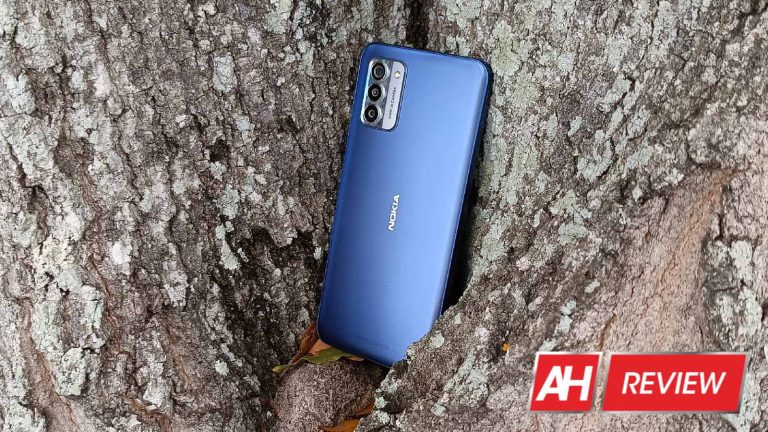
In terms of design, I have to admit; if it wasn’t for the Nokia logo front and center, I would have expected this to be a Motorola phone. The use of textured glass in the rounded rectangular camera Island is reminiscent of some of Motorola’s 2023 smartphones. It definitely resembles the Moto G Stylus 2023. In any case, the design does look very nice.
The back glass has this very nice textured and translucent look to it that plays with the light in a very neat way. The light permeates the glass and illuminates it beneath the surface, giving it a bit of depth. So, rather than reflecting off of the surface, the light looks volumetric. It looks absolutely beautiful in the sun.
As for the camera Island, it has a two-tone look that looks like a mixture of glass and metal. However, it’s actually two types of plastic. The size of the camera package and the nearly flush design give it an almost minimalistic and Sleek look.
The Nokia G310 5G has a singular color all around with the glass matching the color of the frame. When it comes to thickness, I’d say it’s pretty much in the middle. It definitely reaches the sweet spot between clunky and too thin. The volume rocker sits pretty high on the phone with the fingerprint scanner/power button right below it. Up front, we have the notched display with a teardrop notch up top and a pretty sizable chin bezel. However, I’ve definitely seen worse chin bezels.
Overall, in terms of design, I think that Nokia went for a nice and understated design that you appreciate. It’s the kind of design that brings to mind the saying “Less is More.”
Nokia G310 5G Review: Build Quality
When it comes to the build quality, admittedly, this phone is not winning any awards. That’s not to say that it’s bad; it’s just that Nokia didn’t go all out to give this phone a premium feeling. The back glass does feel pretty nice, but it does have an almost plasticky feel to it. That’s only made worse when you feel the camera package and its plastic components.
The Nokia G310 5G does have a nice bit of heft to it. This gives you the feeling that it’s not a cheaply made device. It’s pretty significant in the hand, and the thickness of the phone adds to that a bit. Other than that, the use of plastic components for the frame and the buttons does hinder the feeling of it.
On the other hand, when using the phone, there are no creeks or other sounds when pressure is added to it. This means that everything is tightly secured and nothing is moving around when I’m using it. Everything is held together tightly, which means that they should hold together for an extended period of time. Also, all the buttons are very clicky and tactile, which is a plus.
Overall, I’d say that the build quality is good. It gets all of the important parts right like eliminating creeks, and clicky buttons. These all hint at solid Manufacturing. Other superficial qualities like premium materials and weight in the hand aren’t there, but they’re not quite as important as the fundamentals.
Nokia G310 5G Review: Display
When it comes to Android phones, there’s always the chance that an affordable phone comes with an amazing display. This is something I’ve come across many times when reviewing the devices. So, when I first powered on this device, I did so with the understanding that I could very well be blown away by the screen performance. How does this display perform?
Brightness
Starting off with the screen brightness, it makes me feel nostalgic. Nowadays, even budget phones come with either very bright displays or panels that have an extended brightness mode to boost the brightness in the sunlight. However, back in the day, that was not the case, and you had to just deal with the poor visibility when you stepped into the sunlight.
Unfortunately, that’s the experience I had with this phone. The display brightness is very average. I can comfortably view it at full brightness while inside, which means that outside visibility is a major issue. The moment I stepped into the sun, I was greeted with my reflection. It was very hard to see anything on the screen, and that made taking pictures outside tough as well.
I turned on Adaptive Brightness to see if there was some extended brightness mode, but there was none. It was stuck with the default brightness. When outside in the shade, I think that the screen does pretty well. However, once you step out into the sun itself, you’re going to have to cover the screen with your body.
Colors
When it comes to the colors, I’d say that they are decent. Some displays I’ve seen on affordable phones really challenged the notion that LCD displays are unsaturated. However, you won’t get that with this display.
When I turned on some ultra-saturated high-definition HDR videos, I was met with a few pretty pleasing colors. I found that many of the more saturated colors were violet and other colors around that spot in the spectrum. These are videos that are meant to push your display’s colors to the absolute limit, so, the majority of your viewing experience will be pretty mundane compared to the videos.
When watching videos and playing games on this phone, the colors don’t really pop off of the screen, and there aren’t any Vivid or saturated display modes to boost the colors. Overall, the display is just a display.
Contrast
The contrast of this display is also nothing to write home about. It’s your typical LCD display with no tricks used to boost the contrast. This means that blacks are a dark gray, and high-contrast scenes look pretty dull. So, don’t expect any surprises there.
Smoothness
In terms of smoothness, this display is pretty decent. It’s not the smoothest display you’d find on the market, but it’s still above older phones that you’ll find in this price range. It has a 90Hz refresh rate. This means that the display is notably smoother than a standard 60Hz display.
So, if you are used to a 60hz display, then you will enjoy the added smoothness. However, if you’re more used to high refresh rates, then you will not be impressed.
In my opinion, it’s pretty nice. Animations are pleasant to watch and, with the additional hertz, animations ease in and out pretty gradually.
Overall
As I said, there are some cheaper phones with exceptionally good displays. Some of them are very bright for the price, some of them are very colorful, and some come with insanely high refresh rates. In the case of the Nokia G310 5G, it’s evident that the company didn’t put much more effort into the display other than having it turn on. You won’t find an exceptionally great display experience, but it’s not exceptionally bad. You will have a very average and run-of-the-mill experience.
Nokia G310 5G Review: Speaker Performance
Just like with display quality, I’ve tested a fair amount of devices with varying speaker qualities. Sometimes, some of the cheaper devices surprised me with how well their speakers performed. I had my preconceived notions about how the speaker quality would be with the Nokia G310 5G, however, there were some surprises with this phone speaker.
Starting off, I was disappointed to see that there was only one speaker on this phone. It’s a single bottom-firing speaker in an age where phones of similar prices come equipped with dual stereo speakers.
Loudness
When it comes to loudness, this was a bit of a disappointment. The speaker on this phone is by no means loud. Honestly, I was really wanting a bit more power. When testing speakers, I usually test them at near full volume. However, in the case of the Nokia G310 5G, the volume was full the entire time. And, I was still wanting more power from the speaker.
Nokia does have an ace up its sleeve, as this phone comes with a volume booster. Once the phone is at full volume, simply click the volume up button one more time to enter the volume booster mode. This will bring additional punch to the sound. Nokia says that this is for outdoor situations where you need a louder speaker so that everyone can hear that awesome new TikTok you just discovered.
There are a few issues with this, however. Firstly, the volume booster mode is Handy, but it’s building off of a peak volume that’s already underpowered. So, the volume booster mode pretty much just brings the volume up to par with other phones. It’s not providing any additional power.
Also, if you’re planning on using the volume booster mode, be prepared for the most shrill and brazen sound you’ve ever heard. The volume booster mode seems to just crank up the higher tones using a built-in EQ which makes the sound extremely hard to listen to. So, if you listen to music using this mode, your ears will get tired extremely quickly.
Low end
This is the area that surprised me about this speaker. I was expecting very weak low-end performance and shrill audio. However, that was not the case. Honestly, there’s a very pleasant amount of low-end, and that gave the sound a very nice depth and warmth.
I listened to several genres of music with this speaker, and I was actually able to get some decent performance while listening to classical music. The speaker isn’t the optimal speaker for classical music, but it did a great job of producing a well-balanced sound. Lower instruments like double basses and bassoons were able to sing very nicely. They sounded much better than I would expect from a single-firing speaker.
Moving on to more modern genres, the added bass gave a nice punch to epic cinematic music. While classical and epic cinematic music use similar instruments, cinematic music focuses more on impact. The low-end really made the sound pretty much explode. So, if you’re watching an action flick, then the music will sound amazing.
Other genres like 70s pop and 90s R&B sounded amazing. These are two genres I feel have a very tasteful amount of low-end in the sound, especially 90s R&B. 90s R&B focused a ton on warm velvety low sounds that just massage the soul, and this speaker was able to showcase that very nicely. I was able to get a good sound with ’80s music, but that genre had a particular focus on higher-end audio, even with the basses. So, I didn’t quite have the best experience with listening to 80s music.
All in all, I was pleasantly surprised with how much depth I was able to get from this single-firing speaker. It really sounded nice.
High end
Moving on to the high end, I was less than impressed. Nokia really toned down the high-end performance of the speakers. Granted, too much high-end audio can make the sound brazen on the ears, so I do appreciate the company’s restraint here. However, the higher-end just sounds flat. Sometimes, you want some additional punch when you’re listening to songs with higher percussion. Also, if you’re really into ’80s music, you will want to have those higher synth sounds really sing.
However, that’s not the case. All the higher-end audio just sounds flat with no emphasis. The low end sounds nice, but all the higher tones just seem to sound dead and lifeless. I listened to some examples of ’80s music with a lot of higher synth, and the higher tones just blended in with the mid-tones. The same thing happened when I listened to music with higher percussion. A lot of 90s hip-hop used a strong snare drum. When I listen to that music, the snare drum just blends in with the rest of the audio.
The same thing goes for vocals. The singers’ voices just did not project through the rest of the music. Again, they just sounded flat and lifeless
Overall
It seems that Nokia tuned the speaker to really emphasize the low end of the audio. However, the higher tones didn’t get any attention. It’s as though the company just took an EQ, cranked up the lower end, and left the other tones flat. If you want to listen to certain genres of music, you will definitely have a pleasant time. However, the music will sound dull for the most part.
Nokia G310 5G Review: Performance
Speaker quality, display quality, and build quality are great. However, none of that matters if the performance is bad. When it comes to the performance of this phone, it’s about par for the course for a device of this caliber. I didn’t really notice many stutters or dropped frames while using the interface, but they are there.
They’re few and far apart, and they don’t bog down the overall experience. It’s just the occasional stutter that happens when opening up a folder or summoning a menu.
Generally, however, the performance is solid. I didn’t come across any instances when apps took too long to load or lock up. App performance was smooth, and so was the general usability.
It did not heat up all that much. However, I did notice that the performance took a bit of a dip when the phone did eventually get warm. It wasn’t too bad, however. The occasional drop frames would appear slightly more often, and apps will take a little bit longer to load. Some apps will take about a second and a half to load, and some will take about 2 seconds. However, even that’s not too bad
I’d say that the performance of this phone is solid, and you will not have a bad time using it.
Nokia G310 5G Review: Gaming
Regular performance is one thing, but gaming performance is another. The Nokia G310 5G isn’t quite a gaming-centric device, however, there were some surprises. So, let’s go through the section to see whether this phone should be your next portable gaming console.
Simple 2D games
Simple 2D titles are usually the easiest ones to conquer, and I expected this phone to perform admirably. However, the experience was admittedly lackluster at some points but exceptional at others. I played simple 2D titles such as Best Fiends and Survival.IO.
Both games showed some stutter on this phone. They were far from unplayable, but the stutter and drop frames were very much noticeable. When I played Survivor.IO, the game started to lag very early in the round where there were only a few zombies on screen. Unfortunately, as the number of zombies increased, the game lagged even more. Still, it was not unplayable. Regardless, this is still something to keep in mind if you plan on using this phone for some serious gaming.
Mid-range 3D games
Cranking up the graphics a bit, I tried out some 3D games. The games I tested on this device were games like Asphalt 9, Sky: Children Of The Light, DragonBall Legends, and others of this caliber. These are 3D games that are moderately graphically intensive and can definitely slow down weaker Hardware.
The performance of the Nokia G310 5G is a bit of a mixed bag with these games. There is definitely more stutter than I would have wanted. While playing Asphalt 9, I would see it lag every now and then, this game gets very intense very fast, so it could be a pretty heavy load on the phone.
As for Sky, the gameplay was noticeably smoother. There was no lag or drop frames from what I could see. It was definitely nothing I will call a bad performance. The thing about this game is that most of the gameplay revolves around flying over large open areas. That just means that the phone has to render that much more, and it does so proficiently. Other games like DragonBall Legends ran equally as smoothly.
When it comes to games like these, it seems that the Nokia G310 5G is a decent performer. Most 3D games that you’d run across have graphics similar to these games, so you should be able to play most of your favorite games without much issue.
Graphically intensive 3D games
Now, let’s reach the top of the ladder. Games like Sky: Children Of The Light and Asphalt 9 are very pretty and nice to look at, but there are some titles that go the extra mile. Of course, I’m talking about games such as Honkai Star Rail and Genshin Impact. These are some of the most graphically intensive games on the market today, and they’re definitely capable of pushing your hardware to its limits.
Starting off with Star Rail, I played this game on its highest graphical setting, and smooth gameplay was not an option. The game ran at a consistently low frame rate which I figured to be between 12 and 15 frames per second. That only got slower as I entered into battle. Ultimate attacks would cause the game to drop some serious frames. Also, just running through the town setting, the game did not want to keep up.
However, it was still perfectly playable. You can definitely play this game on its highest graphical settings and still have a playable experience, albeit with consistent lag. Turning the graphics down to the low settings gave me much smoother performance, so you will want to do that.
Genshin Impact
Moving on to this game, it’s no surprise that I got a consistently laggy experience. When I turned the graphics up to the highest settings, rotating the screen and getting that motion blur effect turned the game into a slideshow. It was less playable than Star Rail on its highest settings.
Again, when I turned the graphics down to their low settings, the experience was much smoother. So, more graphically intensive games, obviously, slow this phone down. However, they still remain relatively playable at the highest settings and perfectly playable at lower settings.
All in all, this is not a gaming phone, but it’s still possible to get some decent gaming in. You’ll be able to play most of the titles on the Google Play Store without any fuss. Just know that more graphically intensive games will definitely slow it down
Nokia G310 5G Review: Camera
The camera is an area where I also had a few pleasant surprises. Nokia phones aren’t quite known for their camera quality, and this is still a mid-range device. So, my hopes weren’t super high when testing out this phone’s camera. However, the results came out much better than I expected.
Exposure
When it comes to the exposure, the camera did a great job at creating a well-balanced and well-exposed image. There weren’t really any places I felt came out underexposed. Overall, I actually felt that the images leaned more toward the bright side. There are some areas where I felt were getting really close to being overexposed. Some areas showed a few hot spots, but nothing was too severe.
At worst, some areas would just come out rather bright. Overall, the exposure is pretty nice.
Colors
This is the area where I was pretty surprised. Some cameras on cheaper phones usually tend to focus on oversaturating the image to make it seem more appealing. However, this camera actually struck an amazing balance with the color saturation.
It managed to make colors that were pleasantly saturated but kept from going overboard. There’s enough punch in the pictures to give grass a nice green and juicy look to it and the sky a nice sea blue. However, they kept from being cartoonishly saturated.
A good example is the flower below. This is a red flower, and digital sensors have a hard time capturing red. Normally, this red flower would look extremely saturated and bright in this image. However, the camera seemed to tone down the colors and deliver a nice balanced red tone.
I definitely give Nokia props for its excellent color reproduction. The colors were a bit on the warm side, and that helped with the overall look of the images. I think that the colors are probably the best part of the images.
Contrast
Another amazing aspect of the images is the contrast. Some of the shadows in the images do tend to get crushed, but it’s not a huge deal. Overall, I think that these images have excellent contrast. I can see the crisp shadows in high-contrast shots, and they look very nice. If the colors are the best part of these images, then the contrast will be the second best.
Low-light
Now, for the low-light performance. This is a pretty mixed bag, as the results were pretty inconsistent. For starters, without using the night mode, the phone didn’t really attempt to brighten the scene. It appeared to take the pictures of the scene as is. When the lights go down even lower, the camera will take a longer exposure shot to compensate for not brightening up the scene. That could be frustrating, as some scenes benefit more from a simple ISO boost rather than having to hold the phone steady.
When using the night mode, the phone will take an even longer exposure shot in dark environments. With that mode enabled, the results were a bit varied. Some shots came out very blurry and noisy while other shots came out nicely exposed and sharp. It seems to be hit or miss with the low-light performance.
With its best shots, I was able to get some pretty nice results from this camera. So, you might want to be careful when taking pictures at night with this camera.
Overall, I think that the camera performance is solid for this phone’s price. Honestly, I think that the colors and contrast really help to bring out these photos and make for some nice shots.
Nokia G310 5G Review: Battery
When it comes to the battery performance, there weren’t any surprises that jumped out at me. I was able to get just over a day of battery usage on a single charge. That was with moderate usage consisting of some light gaming, video watching, and social media scrolling. The phone lasted overnight into the next day but didn’t last too long after that.
I’d say that the battery performance is pretty decent overall. However, if you’re planning on using this phone heavily, then you’re going to want to have the charger ready. On heavier days, I will still be able to get about a day’s worth of battery power, but it was really struggling toward the later hours.
Final Verdict
Overall, I consider the Nokia G310 5G to be a solid device. It doesn’t particularly excel in any category. However, it’s not particularly bad in any category either. The screen brightness isn’t the best and the speaker quality leaves a bit to be desired. However, it excels at just being a generally good phone from head to toe. It does manage to hit a sweet spot in the market by offering a nice user experience.
Do I recommend that you pick up this phone? I’d say yes! For $199.99, you’re getting a solid device with solid performance across the board. There are other options around this price range from the likes of Motorola and TCL, and I think that you should consider those options as well. However, the Nokia G310 5G is ample competition for these devices.