Popular streaming service provider Netflix plans to launch its retail destinations in a few years. This new business model will be known as the Netflix House and will be open to streamers in various countries. With this, Netflix might take another step back into the physical market after stepping out years ago with the closure of its DVD rental business.
Following the reports of this coming business model from Netflix, the company’s users were a bit concerned about what this means for them. To better understand this plan, it’s best to hear things directly from the horse’s mouth. According to Netflix’s VP of consumer products, the company has noticed “how much fans love to immerse themselves in the world of our movies and TV shows.”
For this reason, they are finding new ways to take streaming to the next level. The Netflix retail destination is a great idea as it will not only give users movies and shows to watch, but also activities to engage in. This new business style is going to launch in 2025 and Netflix is currently working to perfect its ideas.
Netflix will soon let you go beyond movie streaming with their soon-to-launch retail destinations
Have you ever wished that you could go out with friends to see a great Netflix series? If you are like most people, then you have and you might also have opted to see the series with friends out in the park with a bit of refreshment going on. Netflix is now working on a way that you can see your wishes come to reality in an area dedicated to such activities.
The Netflix retail destination is the streaming company’s answer to your wishes. At this time, the idea is still undergoing some processing and will be ready for implementation in about a year. At the rental destinations, you can do more than just sit around and watch the new episode of that series you love so much.
In these retail destinations, you will be able to purchase food as well as other stuff. There will also be themed activities that you and your friends can take part in after watching your movies or series. These activities will borrow a thing or two from shows, series, and movies that are trending on Netflix at the moment.
Netflix currently offers some things the previous paragraph lists out. In the coming years, the streaming giant aims to launch Netflix retail destinations to take these activities to a whole new level. Streamers will be able to visit these locations with their family and friends to enjoy all it has to offer.
Just like every other business, this move is geared to earn Netflix some more cash. The US will be the first location to get one of these Netflix retail destinations, then other countries will follow suit. How excited are you about this plan that Netflix is currently working on?
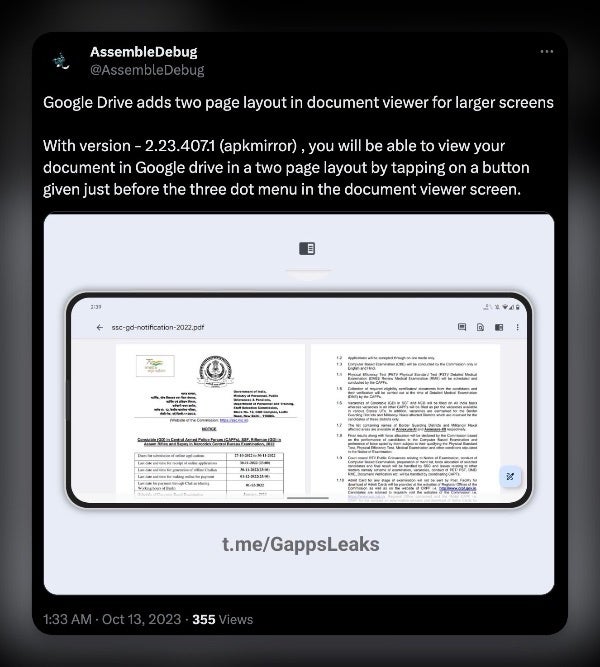
Google Drive is getting a new two-page layout on large screens, such as foldable phones and tablets. This is a significant improvement over the current layout, which merely stretches out the same portrait UI to fit landscape screens.
This new two-page layout option was spotted by @AssembleDebug on X and it seems to be showing up widely with version 2.23.407.1 of the Google Drive app on Android, though I was also able to replicate it on a foldable device using the current version (v2.23.397.0) found on the Play Store. It appears that this is a beta test currently in progress, so your mileage may vary. If the feature is available to you, you will see a new button on the top right of the document viewer (right before the three-dot menu), which you can tap to trigger this view.
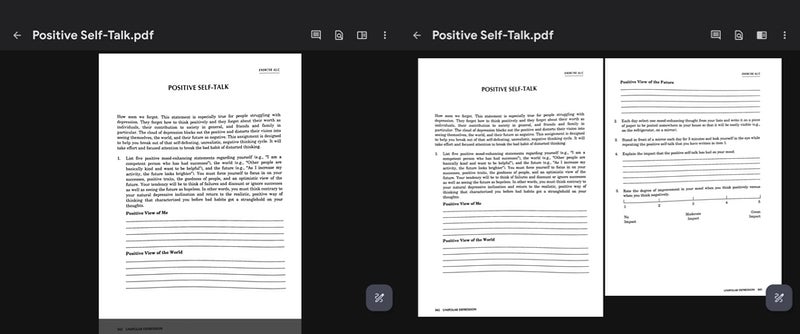
The new layout will make it much easier to read or quickly scan documents on large-screen devices. For example, users will be able to see two consecutive pages side by side, which will make it easier to compare and contrast different parts of a document. Additionally, the new layout will allow users to view more content on the screen at once, which will reduce the need to scroll up and down.
Single and two-Page layout in Google Drive on a foldable device (Image source: Phone Arena)
The two-page layout option is a significant change for the Drive app for Android because it addresses a long-standing complaint from foldable device users. The portrait-only layout was simply not suitable for large-screen devices, and it made it difficult to navigate between different pages of a document.
There is currently no known timeline for when the two-page layout will become widely available. However, it is likely that the feature will be rolled out to all users in a future Google Drive app update, a welcome improvement for users who rely on Google Drive for productivity on large-screen devices.
With October Patch Tuesday, Microsoft fixed 104 security vulnerabilities across different products, including three zero-day flaws. While Microsoft ensures automatic roll-out of the updates to all eligible devices, users must still check their systems for the updates, particularly in organizations, to ensure no delays in receiving the security patches.
Three Zero-Day Vulnerabilities Addressed
After patching four zero-day vulnerabilities with September updates, Microsoft has also addressed more zero-days with the October Patch Tuesday update bundle. While the tech giant mentioned the public disclosure for two of the three zero-days, it confirmed the active exploitation of all three flaws. These vulnerabilities include,
CVE-2023-36563 (CVSS 6.5) – an important severity information disclosure vulnerability in Microsoft WordPad that exposed NTLM hashes. Exploiting the vulnerability requires an adversary to trick the target user into clicking a maliciously crafted file.
CVE-2023-41763 (CVSS 5.3) – another important severity flaw affecting the Skype for Business server. Exploiting the flaw would expose the IP address and port numbers to the attacker, allowing elevated privileges to the target server. Some cases could also allow access to internal networks.
CVE-2023-44487 – a recently reported denial of service vulnerability, identified as the “HTTP/2 Rapid Reset Attack.” This vulnerability went under attack before a public disclosure, targeting HTTP/2 protocol. Microsoft has shared the details about this attack in a separate post.
Other Patch Tuesday October Updates For Microsoft Products
Apart from the three zero-days, this month’s update bundle also addresses 13 critical severity vulnerabilities. Of these, eight remote code execution vulnerabilities existed in the Layer 2 Tunneling Protocol, all achieving CVSS 8.1. Whereas the other four vulnerabilities include three RCE flaws affecting the Microsoft Message Queuing (CVE-2023-35349, CVE-2023-36697) and Microsoft Virtual Trusted Platform Module (CVE-2023-36718), and a denial-of-service vulnerability in the Microsoft Common Data Model SDK (CVE-2023-36566).
Besides, all other vulnerabilities across different products achieved important severity ratings from Microsoft, demonstrating the importance of this update bundle. Microsoft urges all users to update their systems immediately to receive all security fixes in time, especially those addressing zero days.
The Philippine Health Insurance Corporation (PhilHealth), has confirmed that it was unprotected by antivirus software when it was attacked by the Medusa ransomware group in September.
The Philippine Health Insurance Corporation (PhilHealth), has confirmed that it was unprotected by antivirus software when it was attacked by the Medusa ransomware group in September.
Antivirus software—or more correctly, its modern descendents endpoint security and Endpoint Detection and Response (EDR)—are essential tools in the battle against cybercrime. EDR can detect an intruder’s suspicious activity in advance of them running ransomware, as well as being able to identify the ransomware itself.
Because of this, ransomware groups, who can spend days or even weeks setting up an attack inside a compromised network, will typically try to disable antivirus software.
GMA News reports that PhilHealth confirmed that lack of antivirus on its news programme, 24 Oras:
In Mark Salazar’s report on “24 Oras” on Monday, PhilHealth confirmed that its antivirus software had expired on April 15, but that it had not been able to renew its subscription immediately due to complicated government procurement processes.
PhilHealth is the government owned and controlled corporation that provides universal health coverage in the Philippines. It was attacked on September 22, 2023.
According to a recent post on its Facebook account, all of the corporation’s public-facing applications have been back online since October 6, 2023, including “the website, Member Portal, eClaims for electronic submission of hospital claims, and EPRS for employer remittances.”
The organisation deserves praise for recovering its systems swiftly and for refusing to pay the ransom demand, which is reported to be around $300,000. In response, the Medusa ransomware group has made data stolen in the attack available for download on its dark web leak site, saying the “Company came to the tor chat but didn’t answer for the payment yet.”
Filipino news site Rappler reports that almost 750 gigabytes of information was stolen from PhilHealth, and the number of PhilHealth members affected is in the “millions”.
Their data is now available for download on the dark web. PhilHealth warns that members are likely to be “victimized by opportunists” who can use the information to create targeted and believable social engineering attacks.
In response, PhilHealth “strongly recommends changing passwords of online accounts, enabling multi-factor authentication, monitoring of suspicious activities in their online accounts, not opening and clicking suspicious emails and links, and not answering suspicious calls and text messages”
The attack is a great example of how ransomware attacks aren’t really about computers, they are about the effects they have on people. Despite expending a lot of hot air on the subject, ransomware groups have shown time and again that they are absolutely not above targeting the healthcare sector. As the attack on Ireland’s Health Service Executive in 2021 showed, attacks on healthcare can create uncertainty, delays, enormous stress and legal jeopardy for staff, and the very real risk of pain, physical harm and even death for patients.
In the twelve months between October 2022 and September 2023, there were 213 known attacks against the healthcare sector, making it the ninth most attacked sector globally. More than half of those attacks occurred in the USA, where healthcare was the third most attacked sector, suggesting it may be targeted deliberately in the USA rather than opportunistically.
Detect intrusions. Make it harder for intruders to operate inside your organization by segmenting networks and assigning access rights prudently. Use EDR or MDR to detect unusual activity before an attack occurs.
Stop malicious encryption. Deploy Endpoint Detection and Response software like Malwarebytes EDR that uses multiple different detection techniques to identify ransomware, and ransomware rollback to restore damaged system files.
Create offsite, offline backups. Keep backups offsite and offline, beyond the reach of attackers. Test them regularly to make sure you can restore essential business functions swiftly.
Don’t get attacked twice. Once you’ve isolated the outbreak and stopped the first attack, you must remove every trace of the attackers, their malware, their tools, and their methods of entry, to avoid being attacked again.
Malwarebytes EDR and MDR removes all remnants of ransomware and prevents you from getting reinfected. Want to learn more about how we can help protect your business? Get a free trial below.
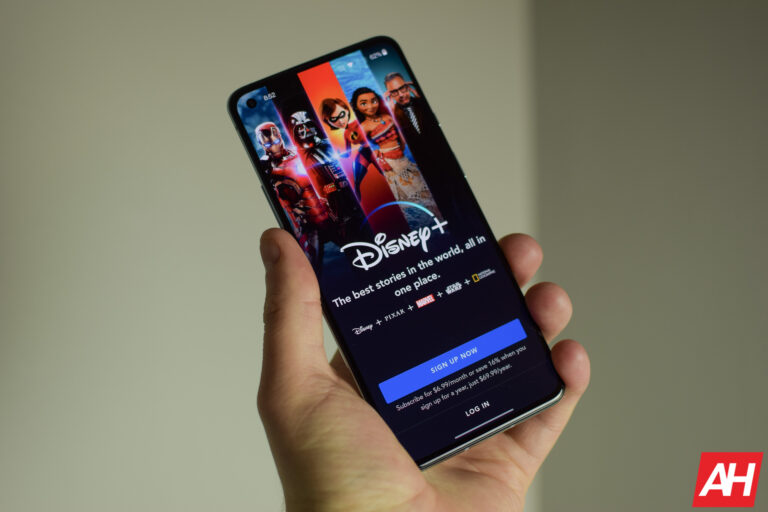
Disney+ launched in November 2019, with big aspirations of being the Netflix for everything Disney. From Disney, Pixar, Star Wars, National Geographic and Marvel. But now that the year that most people received for free, of Disney+ is coming to an end, a lot of people are looking to cancel their subscription. Luckily, it is pretty easy to cancel. And here’s how you can cancel Disney+.
Thinking about leaving Disney+? Well the good news is, it is pretty simple to cancel your Disney+ subscription, and we’re going to walk you through cancelling it.
This process only works if you signed up on Disney+’s website. If you signed up through Verizon, the process is a bit different.
How to cancel Disney+
First things first, head to the Disney+ website here.
If you try to cancel from the app on your smartphone or tablet, it’ll take you to the Disney+ website. So it’s just easier to start from the website instead of the app.
Once you have signed into Disney+ on its website, select your profile.
Then select Manage Account.
Next select Cancel Subscription.
Finally, select Complete Cancellation to confirm.
And that’s it. Your account will not be cancelled and will not renew.
How Verizon customers can cancel
Login to the Disney+ website.
Click on your profile, and then click on your account.
You’ll see a “Manage on Verizon” link instead of cancel subscription. Click on that.
This will take you to Verizon’s website. From here, you’ll need to go to your add-ons for your Verizon account and remove Disney+.
Does my account immediately cancel?
It’s important to note that your account will not immediately cancel. Since you pay for Disney+ at the beginning of the billing cycle, you will still have access to it until the end of your billing cycle. It simply will not renew when it would normally withdraw the funds from your bank account.
For instance, if you are charged in the 18th, and you cancel on the 1st, then you’ll have access until the 17th. After that, Disney+ will cancel and you’ll no longer be able to access Disney+ content until you resume your subscription.
We have almost reached the time of the year when Qualcomm, MediaTek, and Samsung launch their latest flagship smartphone processors. Samsung has already shared bits about the Exynos 2400, while Qualcomm will unveil the Snapdragon 8 Gen 3 later this month. MediaTek’s Dimensity 9300 is expected to debut in November. The new Dimensity chip doesn’t feature efficiency cores, and that reportedly makes it more powerful than the Snapdragon.
The Dimensity 9300 is ten percent more powerful than the new Snapdragon
According to noted Weibo (Chinese social network) tipster Digital Chat Station, the Dimensity 9300 will have an octa-core CPU in a 1+3+4 configuration. It may look like a fairly orthodox setup, but it isn’t. We aren’t talking about one prime CPU core, three mid-cores, and four efficiency cores. Instead, the chip features four prime cores and four mid-cores. There aren’t any efficiency cores here.
It has one Cortex-X4 core clocked at 3.25GHz, three more Cortex-X4 cores at 2.85GHz, and four Cortex-A720 cores at 2.0GHz. MediaTek will reportedly pair the CPU with the Immortalis-G720 GPU, whose operating frequency is not known currently. The Snapdragon 8 Gen 3, on the other hand, does have efficiency cores. It is an octa-core chipset with a 1+5+2 CPU configuration, i.e. one prime core, five mid-cores, and two efficiency cores.
You get one Cortex-X4 CPU core clocked at 3.19GHz, five Cortex-A720 cores at 2.96GHz, and four Cortex-A520 cores at 2.27GHz. The tipster claims that the Dimensity 9300 with its unusual CPU combination will be about ten percent more powerful than the new Qualcomm processor. However, with no efficiency cores, it will be interesting to see how MediaTek’s new chip performs in terms of power and thermal management.
The same source has confirmed that the Snapdragon 8 Gen 3 will debut inside the Xiaomi 14 series, which could launch on October 27 in China. The Dimensity 9300, meanwhile, could ship with the Vivo X100 series in November. As usual, the Exynos 2400 will power Samsung’s Galaxy S24 flagships early next year. The Korean firm will also use the new Qualcomm chip in those phones.
The Snapdragon 8 Gen 3 will power the Galaxy S24 Ultra globally
While Samsung is using both Exynos and Snapdragon in the Galaxy S24 series, this dual-chip strategy only applies to the smaller two models. The Galaxy S24 Ultra will ship with the next-gen Qualcomm processor globally. The new Samsung flagships are rumored to arrive earlier than the Galaxy S23. We should soon get to know more details about the phones as well as the upcoming processors.
The Motorola Razr was actually announced earlier this year, alongside the Razr+. But it only just launched in the US this fall, along with many other phones during Techtober. When I first got hands on with the Razr back in May, I was pretty impressed with the phone, to be quite honest. Especially when Motorola told us that it would be “considerably cheaper” than the Razr+ which had an MSRP of $999. That to me meant around $600-$700. And I was right.
The Razr is available with an MSRP of $699, however, during the pre-orders (ending on October 20) you can get it for just $599. That’s a pretty incredible price for a foldable. But the real question is, did Motorola cut to many corners to hit this price point? Probably. But let’s find out in our full review.
Table of Contents
Motorola Razr (2023) Review: Hardware and Design
Motorola has always built good hardware. Usually more of an industrial design with its smartphones, though in recent years, they have gotten to be a bit more “playful” with its designs and colors. And that’s apparent here with the Motorola Razr (2023).
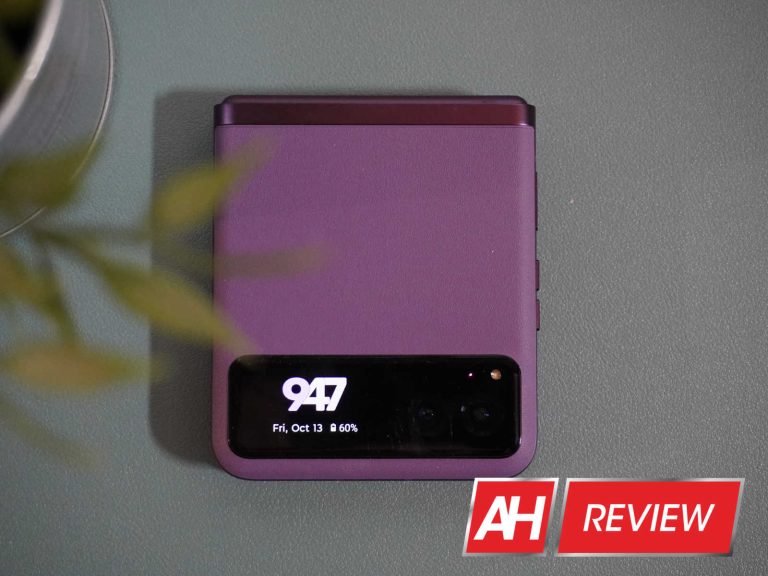
The model that we received to review is the Summer Lilac color, which is a really nice shade of purple. And what I really like about this color is that it’s apparent all around the outside of the phone. Unlike some other phones that will stick to a standard color on the frame, like the Galaxy Z Flip 5. Instead you have a very similar shade of purple on the frame and hinge, which is close to what the vegan leather purple looks like. It’s a really good look to be quite honest.
I am a huge fan of this vegan leather finish on the Razr. I loved it when I got hands on with the device many months ago, and love it even more now that I’ve been using the Razr for about a week or so. It’s a finish that I wish every smartphone maker would use on their phones. It’s a lot more grippy than the matte glass that you’ll find on the Galaxy Z Fold 5 or Google Pixel 8 Pro. And just looks incredible, to be quite honest.
The rounded sides here work really well for making it feel more comfortable in your hands. Despite this not being a super large phone, it’s still a 6.9-inch 22:9 aspect ratio display. Which makes it pretty tall, even taller than the Sony phones. Despite it being a fairly large phone, it doesn’t really feel that large. Of course, part of that comes down to the weight too, which is just 188.6 ounces. That’s far lighter than my iPhone 15 Pro Max.
Razr’s outside is pretty understated however. With a pretty small 1.5-inch outer display, and then your dual-camera setup. It looks quite different compared to the Razr+ which has the entire outside covered in a display.
Now, because of the folding nature of this phone, it makes the power and volume buttons a bit to high on this one for my liking. However, because this is a folding phone, that was bound to happen. It’d either be to high or to low. They aren’t so high that it’s hard to use, however, so Motorola has that going for them. The fingerprint sensor is built into the power button, like it is on all foldables, and it works as you’d expect. I’m still int he camp that a power button fingerprint sensor is the way to go, versus an under-display fingerprint sensor. Motorola also lets you use face unlock to secure your device. So if you don’t like the fingerprint sensor, you do have options.
The hinge on the Motorola Razr (2023) is still quite stiff. I was hoping that it would ease up a bit after being broken in, but it hasn’t. This is on the hand, good to see that it is pretty strong, and less likely to break. But on the other hand, it makes it a lot tougher to open one-handed. Now, I’m not someone that tends to try and open a foldable with one hand, so this isn’t as much of an issue for me as might be for some other people. But it is worth noting. And it does fold completely flat. This is pretty common for foldables now, especially since Samsung has gotten rid of the gap on its recent foldables. It also unfolds flat. Despite the Pixel Fold not unfolding completely flat to 180-degrees (it’s more like 179-degrees), most other foldables do unfold all the way, for the most part.
Motorola Razr (2023) Review: Display
Let’s first get that front display out of the way here. The Motorola Razr (2023) has a tiny 1.5-inch outer display. Now I get why they did this. One, it was cheaper than making the entire front a display. Two, it differentiates the Razr and Razr+ quite a bit. But this display is almost useless. All you can really do here is see the time, any timers or media controls, and see your notifications, one at a time. So it’s going to force you to open the phone a lot more often. I guess if you pick up your phone to see the time quite often, then this might be very helpful, but if not, it’s kind of a waste.
The main display is tall and fast
Then we have the main display. This one is a pretty tall one, coming in at 22:9. That is the same aspect ratio as the Galaxy Z Flip 5, however, the Motorola Razr (2023) is about 0.2 inches larger. Making it a bit taller. However, something that it has going for it that the Flip 5 doesn’t is, 144Hz. That’s right, this $700 phone has a 144Hz display. It can also reach a touch rate of 240Hz or 360Hz while gaming. It is honestly a really good display for doing a whole lot of things.
It’s also a pOLED display, which looks incredible here. Motorola has done a good job of tuning these displays, and even the brightness is quite good. We’re looking at a peak brightness of 1400 nits here on the main display. And it’s HDR-compatible for HDR10+. So watching videos from Netflix, YouTube and more on here is a treat.
What about that crease? Motorola has done a good job with the crease since the beginning, but on the Razr (2023), it’s pretty tough to see the crease here. You can really only see it when the screen is off. And you don’t really feel it much either. Like you can feel it, but nowhere near as much as some other phones like the Galaxy Z Flip 5. That’s quite impressive for Motorola, and even more impressive on a $699 foldable.
There’s really not much to complain about the main display, all of my complaints are on the outer display, and if the Razr+ and Flip 5 didn’t exist, I might not complain as much, but here we are.
Motorola Razr (2023) Review: Performance
When Motorola announced the new Razr and announced that it was coming with the Snapdragon 7 Gen 1, I was honestly a bit saddened by that news. You see, since the Snapdragon 8+ Gen 1, Qualcomm has had unreal battery efficiency in its Snapdragon 8 series. And I was hoping to see that same processor in this Razr. But the Snapdragon 7 Gen 1 is still manufactured by Samsung, whereas the Snapdragon 8+ Gen 1 and 8 Gen 2 are manufactured by TSMC (hence the big battery gains). So my expectations were not high for this phone with this processor. But I have to say, my expectations were exceeded.
The performance on the Snapdragon 7 Gen 1 has been pretty good. I honestly have not noticed much a difference between the performance here and any Snapdragon 8 Gen 2 device. And battery life has been up there as well, which we’ll talk about a bit more in a minute.
Pairing the Snapdragon 7 Gen 1 with 8GB of LPDDR4X RAM sounds pretty decent on paper. Not flagship material, but a pretty good high-end mid-range experience. And that’s true. Especially with Motorola’s nearly stock Android experience here. There’s not a whole lot of stuff running in the background compared to some other phones. So with that RAM, the Razr still runs quite nicely.
The speakers on the Motorola Razr (2023) is pretty decent actually, and Motorola does have Dolby Atmos included, which I absolutely love. And wish Google would add. But watching videos and listening to music on the Motorola Razr (2023) is pretty good, especially with these speakers, and that’s great to see. Even if you’re using earbuds, you still get Dolby Atmos.
Motorola Razr (2023) Review: Battery life and Charging
As I mentioned in the last section, I really thought that battery life might take a hit here with the Snapdragon 7 Gen 1, even though the Razr (2023) does have a pretty large battery for a foldable – at 4,200mAh. But I am happy to report that I was wrong here.
During my testing, I’d unplug the phone around 7AM, and go about my day using it. Generally getting about five to six hours of on-screen time before plugging it in at about 11PM. At that time, it was usually around 20-30%. Which means on a heavy day, it could likely get 8 hours of screen on time, and that is rather impressive. That also puts the Razr (2023) on par with the Razr+, Galaxy Z Flip 5 and the OPPO Find N3 Flip in terms of battery life. And that’s really good to see.
Now the bad news. Motorola is only touting 30W charging speeds on the Razr (2023). That is okay, especially with this smaller battery, but we would definitely like to see some faster charging here. The OPPO Find N3 Flip is able to do 44W and it’s also a flip phone.
The really bad news comes from the wireless charging. It charges at a max of 5W. And actually, I put it on my MagSafe charger here on my desk, and it was charging so slow that it actually lost battery while charging. Motorola added wireless charging because customers were asking for it, on the previous Razr models. But if you’re only going to give us 5W, why bother? Even Apple provides 15W wireless charging via MagSafe (10W without). If you do buy this phone, don’t even bother with the wireless charging, to be honest.
Motorola Razr (2023) Review: Software
At the time of reviewing the Razr (2023), it was running on Android 13 with the September 1, 2023 security patch. Motorola has guaranteed that the Razr (2023) will get three OS upgrades. One of which being Android 14, unfortunately. That means it will get Android 14, 15 and 16. It is also getting four years of security updates. Meaning it’ll get security patches until 2027. That’s not to bad, but also not the best, among Android manufacturers. Samsung is still doing more, and Google is blowing everyone out of the water with the Pixel 8 series getting 7 years of updates.
I honestly, really like Motorola’s software. I loved it on the Razr+ and the same goes for the Razr (2023). Why? Because it is basically stock Android with a few additional features added in. Motorola keeping the software nice and vanilla is a good move by them. And honestly, it does set them apart still. Even though the Pixel runs stock Android, it doesn’t really look like stock Android anymore.
One of the bigger changes that Motorola has made to the software is actually the Settings app. It’s laid out a bit different from stock Android, but it still makes sense. Motorola has also added a “Personalize” section, which gives you access to the wallpaper, icons, etc. This is basically everything you’d see when you long-press on the home screen. It’s good to see it all in one place, and that does kind of mirror what OnePlus and OPPO have done in OxygenOS and ColorOS.
The software here on the Motorola Razr (2023) is pretty good. It’s plain and simple, and that’s what works best sometimes. Not everyone needs or wants all of the many features that Samsung puts into its phones, which actually bogs down the phone to a degree. Keeping it simple lets the Snapdragon 7 Gen 1 perform very well here.
Some features for foldables too
Motorola has also added some features to this phone, because it is a foldable. But since it is a flip phone, there’s not a whole lot that needs to be added here, compared to a book-style foldable.
One thing that Motorola has done is added a section for the external display. You can customize just about everything on that external display. Though given how small it is, there’s not a whole lot to customize here. But you can change up the clock face, which panels show up, notifications, call settings and more.
Motorola has 15 different clock faces that you can use on the external display, and you are able to change up the color of the clock too. I’m currently using the “Bubblegum” clock face, and changed the color to purple to match the color of the phone. I think it looks really nice, and it’ll also show you the date and battery percentage.
Like the Razr+, the Razr (2023) does also give you a number of different panels that you can use. But keep in mind that this is a much smaller display, almost a ticker display if you will. So adding lots of panels may not be the best bet. I’ve added the weather, Timer and Media controls. Things I’d use often on the Razr (2023). There are also options for Contacts, Calendar and Audio Recorder. Motorola also lets you rearrange them into the order you want.
This is a 1.5-inch external display, but Motorola does a good job of letting you do a lot to customize how it looks and feels. And that’s a pretty big deal.
Motorola Razr (2023) Review: Camera
So far in this review, I’ve been pretty high on the Razr (2023). Well, that ends with the camera. The camera is okay, it’s not great or excellent. But it will get you some decent photos. On the backside, we are looking at a dual-camera setup with a 64-megapixel main sensor and a 13-megapixel ultrawide which is also used for macro.
Now while those numbers might sound pretty good, they are actually not. These are smaller sensors, compared to the competition. And thus let in less light. And honestly, some of the pictures just aren’t good at all, especially the macro shots. I took a handful of macro shots with the Motorola Razr (2023) which looked good on the actual phone. Then when I saw them in Google Photos on my monitor, I could tell they looked anything but good. The colors are slightly off, that’s not a big deal though. But the background and even some of the foreground has a lot of artifacting. It did slightly better outdoors on a cloudy day, versus inside. But it’s still not great.
Here are some of the macro shots I took with the Motorola Razr (2023), unedited.
When it comes to regular photos on the main 64-megapixel sensor, it’s a better experience. It can sometimes still blow out the sky, especially since it’s been very cloudy around here lately. The camera is just not great here. And if you’re someone that takes a lot of photos, you might want to look at a different foldable, or smartphone. Motorola has never really had a strong camera in its smartphones, so this doesn’t come as a big surprise, and I really hope they start to focus a lot more on their cameras on their future phones – not just foldables, but phones in general.
Here are some more pictures taken with the Motorola Razr (2023) unedited.
Should you buy the Motorola Razr (2023)?
I honestly really like the Motorola Razr (2023), but the camera being as poor as it is, makes it a lot harder to recommend. Especially when phones like the Galaxy Z Flip 5 and OPPO Find N3 Flip exist. Sure this is a $699 foldable, but the Galaxy Z Flip 5 is going to be that price in a month. And that makes the question of whether you should buy the Motorola Razr (2023) a pretty tough one to answer. Because the camera is such an important aspect of any phone these days.
A new phishing attack has been discovered, which uses malicious archive files to exploit the recently found WinRAR vulnerability CVE-2023-38831 using a Powershell script that steals credentials from Google Chrome and Microsoft Edge browsers.
The archive consists of a PDF document that shows the list of Indicators of Compromise (IOCs), which includes domain names and hashes associated with different malware like SmokeLoader, Nanocore RAT, Crimson RAT, and AgentTesla.
Due to the WinRAR vulnerability, threat actors could create a reverse shell on the affected system and execute PowerShell scripts.
DocumentFREE Demo
Implementing AI-Powered Email security solutions “Trustifi” can secure your business from today’s most dangerous email threats, such as Email Tracking, Blocking, Modifying, Phishing, Account Take Over, Business Email Compromise, Malware & Ransomware
Technical Analysis – CVE-2023-38831
CVE-2023-38831 was an arbitrary code execution vulnerability in WinRAR 6.23, which can be exploited by including an ordinary file (a JPG file) and also a folder with the same name as the file embedding inside the ZIP archive.
If the folder consists of executable content, it is processed when WinRAR attempts to access only the ordinary file.
This vulnerability in WinRAR was reportedly executed in the wild between April and August 2023.
However, WinRAR has released patches for fixing this vulnerability. This vulnerability was exploited in the current phishing campaign.
Exploiting the CVE-2023-38831
Threat actors used a file named IOC_09_11.rar to pretend to be a file that might contain Indicators of Compromise. This RAR file consists of a folder and a file named “IOC_09_11.pdf”. The folder consists of the “IOC_09_11.pdf[.]cmd, ” a BAT script.
Due to the vulnerability, when opening the PDF file, the BAT script is executed from the folder, which extracts the RAR file contents in the %TEMP% directory. Once extracted, the script file gets deleted from the folder and opens the PDF file for the victim to view.
Three Malicious Powershell commands
When the victim starts to view the contents of the PDF, the script starts to proceed with its intended work by launching three PowerShell commands. The first command creates a Private RSA Key in the %LOCALAPPDATA%\Temp folder, the second opens a reverse shell to the victim machine, and the third executes a Base64-encoded string.
In addition, the script steals the Login credentials from Google Chrome and Microsoft Edge browsers, which are then sent to the threat actor using the legit Webhook.Site service using a unique URL.
Furthermore, a complete report has been published by Cluster25, which provides detailed information about the source code, PowerShell commands, and other information.
Protect yourself from vulnerabilities using Patch Manager Plus to patch over 850 third-party applications quickly. Take advantage of the free trial to ensure 100% security.
Microsoft Threat Intelligence has revealed that it has been tracking the active exploitation of a vulnerability in Atlassian Confluence software since September 14, 2023.
Microsoft Threat Intelligence has revealed that it has been tracking the active exploitation of a vulnerability in Atlassian Confluence software since September 14, 2023. At the time the attacks were first observed the vulnerability was a zero-day, meaning that no update was available, so defenders had “zero days” to patch the flaw.
The vulnerability has since been issued an ID, CVE-2023-22515, and rated with the highest possible severity, a CVSS score of ten. Atlassian’s October 4 advisory warns that “Publicly accessible Confluence Data Center and Server versions … are at critical risk and require immediate attention.”
If you are running Confluence Data Center or Confluence Server inside your organisation and it’s exposed to the public internet you should take steps to prevent exploitation, upgrade your software and look for evidence of compromise (take a look at the Atlassian advisory for detailed information about threat hunting).
Versions of Atlassian Confluence before 8.0.0 are not vulnerable. If your Confluence site is accessed via an atlassian.net domain, it is hosted by Atlassian and is not vulnerable to this issue. The fixed versions of Confluence are 8.3.3 or later, 8.4.3 or later, and 8.5.2 or later.
CVE-2023-22515 is a broken access control vulnerability that allows an attacker with network access to the server to create unauthorized Confluence administrator accounts and access Confluence instances. If your Confluence software is on the public internet than the attacker has network access over the internet.
On October 10, 2023, Atlassian updated its advisory to say that it has “evidence to suggest that a known nation-state actor is actively exploiting CVE-2023-22515”.
On the same day, Microsoft Threat Intelligence took to X (formerly Twitter), to say that a nation-state actor, codenamed Storm-0062, which it believes to be a nation-state actor working on behalf of China, had been exploiting CVE-2023-22515 since mid-September.
Microsoft has observed nation-state threat actor Storm-0062 exploiting CVE-2023-22515 in the wild since September 14, 2023. CVE-2023-22515 was disclosed on October 4, 2023. Storm-0062 is tracked by others as DarkShadow or Oro0lxy.
— Microsoft Threat Intelligence (@MsftSecIntel) October 10, 2023
Although the vulnerability started as a zero-day in the hands of nation state hackers, it will likely take on a second life in the hands of less sophisticated criminals.
We are now in the “patch gap,” the period of time between a patch being available and it being applied. This creates a window of opportunity for mass exploitation, which could last months or even years. The arrival of a patch allows organisations to fix their systems, it also informs a wider group of criminals about the existence of the vulnerability. Criminals and researchers can then reverse engineer the patch to identify the problem, and then create their own code to exploit it, or wait for others to do it for them.
Proof-of-concept exploits for CVE-2023-22515 have already appeared on GitHub so there is not time to lose. How long the patch gap lasts is entirely down to how quickly organisations update their Confluence software. History suggests organisations may struggle to find the speed required. For example, one of 2022’s most routinely exploited vulnerabilities was CVE-2021-26084, a remote code execution flaw in Confluence that was discovered in the middle of the previous year.
We don’t just report on vulnerabilities—we identify them, and prioritize action.
Since the dawn of the generative AI age, we’ve all been wondering when AI technology was going to eventually seep into actual big-name productions. At this point, we’re starting to see cases of that with the latest case involving CD Projekt Red. The company used AI to recreate the voice of a deceased Cyberpunk 2077 voice actor.
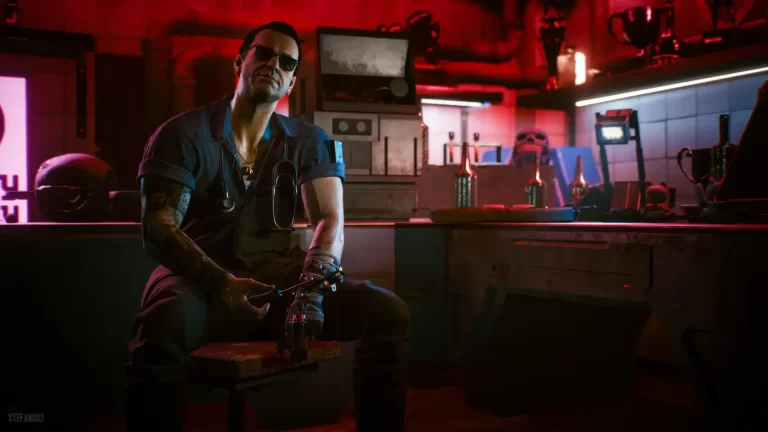
The voice actor in question is the late Miłogost Reczek, who passed away in December of 2021. He played the roles of Vesemir and Thaler in The Witcher games (another franchise from CD Projekt Red). He also provided the Polish voice of Homer Simpson in the Simpsons Movie. As far as Cyberpunk is concerned, he played the role of Viktor Vector.
CD Projekt Red recreated the voice of a deceased voice actor in Cyberpunk 2077 using AI
This might sound more scandalous than it actually is. Bloomberg (via Techradar) reports that CD Projekt gained permission to use Reczek’s vocal likeness from his family. As per the report, his sons were actually supportive of this, as something like this wouldn’t go over well with everyone.
After getting the permission to do so, CD Projekt Red went ahead with the lines. It didn’t generate the lines from scratch, however. The company hired a voice actor to read the lines, and we can guess that he had to have a similar tone to Reczek’s. After that, the company used Respeecher, an AI voice cloning platform, to make the voice sound like Reczek’s. So, you’re hearing an actual human being reading the lines. This is important because AI voices have yet to master human inflection.
Walking the line
This move might be divisive among people who are aware of the possible implications of AI in the workplace. CD Projekt Red gained proper permission from the family and used an actual human voice for the lines. This shows that the company is still considerate of those closest to Reczek. Also, it shows it still wants to pay human actors for their services.
However, this only proves how effective AI is in the field of voice acting. Most people didn’t notice that they were listening to a voice partially created with AI. We’re used to hearing AI-generated voices on low-budget YouTube and TikTok videos, but it’s reaching major big-name projects.
Voice actors rely on their roles to pay the bills. If major titles are starting to employ AI for roles, we can only guess that professional voice actors might start losing jobs. We also can’t forget about up-and-coming voice actors who are trying to break into the business. AI could potentially make it so that they don’t have a career to go to.
This is something that we’ll have to keep an eye on as time passes.