In September, two high-profile casino breaches taught us about the nuances of the RaaS affiliate landscape, the asymmetric dangers of phishing, and of two starkly different approaches to ransomware negotiation.
This article is based on research by Marcelo Rivero, Malwarebytes’ ransomware specialist, who monitors information published by ransomware gangs on their Dark Web sites. In this report, “known attacks” are those where the victim did not pay a ransom. This provides the best overall picture of ransomware activity, but the true number of attacks is far higher.
In September, we recorded a total of 427 ransomware victims. As usual, Lockbit (72) led the charts. New players we observed included LostTrust (53), ThreeAM (10), and CiphBit (8).
Last month, MGM Resorts and Caesar Entertainment made headlines after being attacked by an ALPHV affiliate known as Scattered Spider. Other significant attacks included Sony, targeted by RansomedVC, and Johnson Controls, targeted by Dark Angels.
The attacks on MGM Resorts and Caesar Entertainment—which collectively own most of the casino-hotel properties on the Vegas Strip—resulted in the former losing $100 million in earnings and the latter making a reported $15 million ransom payment to the attackers. In both cases, significant amounts of customer data were stolen.
In other news, both LockBit and the Akira ransomware gang, the latter of which has tallied 125 victims since we first began tracking them in April 2023, were confirmed last month to be exploiting a specific zero-day flaw (CVE-2023-20269) in Cisco VPN appliances. On a related note, the effect of CL0P’s MOVEit zero-day campaign was further revealed last month when the National Student Clearinghouse and BORN Ontario Child Registry disclosed data breaches attributed to the group.
Known ransomware attacks by gang, September 2023Known ransomware attacks by country, September 2023Known ransomware attacks by industry sector, September 2023
Last month’s two high-profile casino breaches were an interesting case study in the nuances of the RaaS affiliate landscape, the asymmetric dangers of phishing, and of two starkly different approaches to ransomware negotiation.
Primarily hailing from the US and the UK, and founded in May 2022, Scattered Spider launched two casino attacks that have given the group attention on a scale rarely seen with RaaS affiliates—whose attacks are normally grouped under whichever RaaS gang supplied them with the ransomware (in this case, ALPHV).
One possible explanation for Scattered Spider’s unusual spotlight resides in the group’s level of sophistication. RaaS, by its very nature, has a low barrier to entry, meaning many affiliates are relatively unsophisticated or possess only moderate technical skills. Scattered Spider, on the contrary, highlights the peril posed when ready-made RaaS software merges with seasoned experience: In both of their casino breaches, the group employed advanced tactics, techniques, and procedures (TTPs), including in-depth reconnaissance, social engineering, and advanced lateral movement techniques.
Scattered Spider typically kick off their attacks by manipulating employees into granting access, and their breaches of MGM Resorts and Caesar Entertainment began no differently. For the MGM breach, Scattered Spider used LinkedIn to pinpoint an MGM Resorts employee, subsequently impersonating them and contacting the company’s help desk requesting account access. Alarmingly, this ploy unveiled a gaping security flaw at MGM—the absence of a stringent user verification protocol at the service desk. After gaining an initial foothold, they escalated their access to administrative rights and subsequently launched a ransomware attack.
Less specifics are known about the exact social engineering scheme used in the Caesar Entertainment breach, but judging by the company’s SEC filing, it’s safe to say Scattered Spider used a similar help desk style scam. Both breaches remind us that, whether ransomware is deployed or not, the human element remains one of the most vulnerable spots in an organization’s defenses.
Additionally, the aftermath of these attacks highlights the absence of a one-size-fits-all solution when it comes to paying attackers ransom. According to the Wall Street Journal, MGM Resorts refused to pay the attackers while Caesars Entertainment, in an effort to prevent their stolen data from being leaked, reportedly paid attackers a ransom worth approximately $15 million. It’s worth reiterating, of course, that despite whatever internal calculus Caesars Entertainment made when deciding to pay the ransom, there is no guarantee that attackers will hold up their end of the bargain. The company’s public willingness to pay also makes them a vulnerable target for further attacks.
On the other hand, there’s no denying that a data leak, especially of sensitive customer or corporate information, can cause a level of reputational harm that some companies might view as impossible to risk taking on—even if it means paying a substantial amount to thieves who may or may not honor their word.
New Players
LostTrust
LostTrust is a likely rebrand from the MetaEncryptor ransomware gang we first spotted in August 2023. In September, they had a staggering 53 victims. The reason for the rebrand is unclear at present.
ThreeAM (3AM)
ThreeAM, a new ransomware family used as a fallback in failed LockBit attack, had 10 victims in September.
CiphBit
While CiphBit has been posting victims on their dark website since April, the group wasn’t discovered in-the-wild until last month. In September, they reported two new victims, bringing their total to eight victims to-date.
Detect intrusions. Make it harder for intruders to operate inside your organization by segmenting networks and assigning access rights prudently. Use EDR or MDR to detect unusual activity before an attack occurs.
Stop malicious encryption. Deploy Endpoint Detection and Response software like Malwarebytes EDR that uses multiple different detection techniques to identify ransomware, and ransomware rollback to restore damaged system files.
Create offsite, offline backups. Keep backups offsite and offline, beyond the reach of attackers. Test them regularly to make sure you can restore essential business functions swiftly.
Don’t get attacked twice. Once you’ve isolated the outbreak and stopped the first attack, you must remove every trace of the attackers, their malware, their tools, and their methods of entry, to avoid being attacked again.
Malwarebytes EDR and MDR removes all remnants of ransomware and prevents you from getting reinfected. Want to learn more about how we can help protect your business? Get a free trial below.
Google Search has been the default option on Apple devices for years. And it’s precisely that which has been part of the scrutiny surrounding Google in its landmark antitrust trial against the US Justice Department. Since the trial began back in September most days have brought to light new details about Google’s allegedly monopolistic business practices. And a new key detail might just give the DOJ a little more leverage.
An email correspondence from Google CEO Sundar Pichai suggests he didn’t think Google should be pushing so heavily to be the default search option in Apple’s Safari browser. The email is from 2007 while Pichai was running the Chrome team and was to co-founders Larry Page and Sergey Brin. It states that Pichai thought being the only search option on Apple’s devices was “bad optics.” Pichai also said he didn’t think being the only option was a good user experience.
This viewpoint from Google’s current CEO would seemingly lend credence to the DOJ’s claims that Google operates an illegal monopoly in the online search business.
Google currently pays a significant amount of money to be the default search for Apple devices
In addition to the details within the email, Bloomberg reports that DOJ attorneys questioned Google’s Joan Braddi. Braddi is a Google executive who helped secure the exclusive search deals outlined in earlier trial days. When asked whether or not Google pays a large sum of money to keep these exclusive deals in play, Braddi said yes. Though she also testified that it wasn’t always this way. “It wasn’t always, but today, yes,” Braddi said.
Throughout the trial Google has maintained that it doesn’t operate a monopoly in online search. Stating that users have complete control and can easily change the default after just a few taps. But both rivals and the DOJ dispute this. Stating that Google makes it unnecessarily difficult to swap from Google to another option.
Microsoft’s current CEO Satya Nadella echoed a very similar sentiment noting that everyone is just playing in Google’s web. And that because of its market dominance, rivals like Bing and others don’t stand a chance at gaining any market share.
Right now, Google is involved in a landmark antitrust case that’s been going on for some time. The search giant has had to face testimony from several individuals and companies that want to see it downsized. Well, audio brand Sonos is on the search giant’s case for a different reason; patent infringement. Sonos wants to continue its courtroom battle with Google after a disappointing ruling on Friday.
What is the battle about?
Sonos is facing off against Google over supposed patent infringement. The former is a brand that’s known for its audio equipment. Moreover, it frontiered the ability to sync its speakers so that you’re able to listen to the same content over multiple speakers. This was the main selling point of its devices besides the incredible audio quality.
Well, Sonos alleges that Google had copy-catted the company and used its technology in its Nest speakers. In a statement to The Verge, spokesperson Erin Pategas said, “We have proven that Google — a latecomer — has infringed on our invention of foundational customer experiences including setting up and syncing speakers, as well as other important features like group volume and stereo pairing.”
These are some rather innovative and useful features that the company is talking about, and it wants compensation from Google. However, Sonos stated another motive that fueled this lawsuit. It’s also standing up for smaller companies.
In case you don’t know, Google is a big company- a BIG company. It’s monumental enough to throw its weight (and billions of dollars) around to rush to the top of any market that it pleases. This is why it’s in a massive antitrust case.
Well. Sonos wants to fight for smaller companies that want to break into a market without the threat of being trampled by large companies like Google.
Lastly, Sonos also wants to create a revenue stream from companies that use its patents. Basically, it wants to establish a royalty system.
Sonos is NOT satisfied with the recent ruling
Right now, Sonos is not only fuming at Google. On Friday, US District Judge William Alsup tossed out a ruling that would have granted Sonos a large and lucrative victory. This would have granted the company $32.5 million in damages. So, it’s obvious that the company is not happy.
However, Alsup brought up the point that Sonos took quite some time to bring Google to court over this matter. Google’s speakers have been on the market for a while, and the company has hesitated until just recently to take any action on it. That seems to be the main reason as to why Alsup chucked Sonos’ verdict.
Alsup even went as far as to say that Sonos’ lawsuit is “emblematic of the worst of patent litigation.” The amount of time it took Sonos to open the case is what cost the company the victory.
Sonos is not giving up on this court battle against Google
That was a major blow to Sonos’ case but not its confidence. While the company’s shining victory was thrown out in one courtroom, that doesn’t mean that the legal battle is over. The company still has cases open against Google in other countries. So, Sonos hopes to score some victories in those countries and push its fight along. “We remain confident we will continue to prevail in our efforts against Google’s infringement,” said Sonos.
The company is vehemently against larger corporations stepping on the little guy, and you can hear that laced throughout its arguments. However, we can’t deny that a major part of its case is to protect its property.
Meanwhile, Google has been restoring the functionality that it had to strip away because of the case. This is a quick reaction to the ruling turnover, and it seems that Google is confident that it’s heard the last from Sonos. However, the question remains if that’s true. From the way it sounds, Sonos will not give up the fight to hold Google accountable. The fight rages on!
Google has released a new collection of ringtones, notification sounds, and alarm sounds for all Pixel phones. The collection, called “Gems,” is available now through the Pixel-exclusive Sounds app.
As reported by 9to5Google, this collection joins the already diverse list of collection choices on Pixel phones, each with its own individual tones or sounds. Some of the most prominent being “Pixel Sounds” and “Seasonal Celebrations” during special times of the year.
However, as Google has continued to add more visual customization options to their line of Pixel smartphones, sounds are also now getting some love in the new update to the Pixel “Sounds” app. The most recent version 3.1 (567492877) can be found on the Google Play Store, and although the update coincides with the launch of the Pixel 8 and 8 Pro this week, it should be available on all Pixel devices.
The new sounds are designed to be richer-sounding and more modern and vibrant than the previous offerings. Additionally, they sound more complex, detailed, and varied than traditional ringtones found in third party apps. It includes a total of eight ringtones, nine notification sounds, and nine alarm sounds — all named according to their earthy vibe.
New “Gems” collection found in the Ringtone, Notification sound, and Alarm sound sections of Pixel devices
To access the new sounds on your Pixel, simply open the Settings app and navigate to the Sound & vibration section. From there you can access the individual menus for Phone ringtone, Default notification sound, or Default alarm sound, where you will then see a new “Gems” category displayed underneath “Pixel Sounds”.
This is a welcome addition for Pixel phone owners, as it gives them more options to customize their ringtones and other sounds. The new “Gems” collection includes a variety of different styles, so there should be something for everyone, especially when paired with a matching wallpaper — such as those you can create yourself using the upcoming Pixel AI Wallpapers or those created by the Pixel Superfan community.
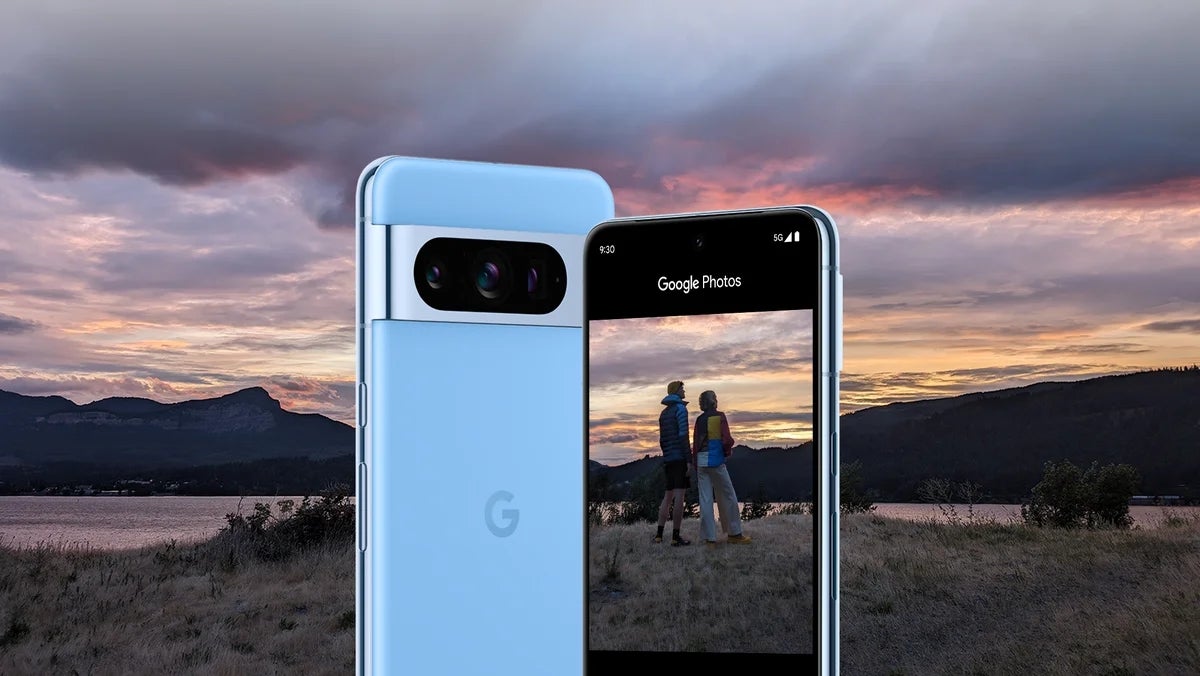
The Pixel 8 is Google’s eighth in-house smartphone and it shows. As seven years of making smartphones is seven years of experience in redefining and then refining what an Android smartphone should be. This has helped Google shape the future of Android in many ways. And is bringing more attention to the Pixel line than ever before. Much of that is attributed to the even more intelligent features thanks to Google’s best AI work yet. But it’s also due to other factors like various hardware improvements, and refined design details.
Google has done things like improve the battery for an all-day phone that can actually stick it out an entire day. It’s also gone back to a flat panel display for a better and more comfortable viewing experience. By all accounts the Pixel 8 is Google’s best work. But does all that make it worthy of your $699? Let’s take a look at that in our full review below.
Google Pixel 8 review: Hardware and design
The Google Pixel 8 has a refined design that doesn’t deviate too much from last year’s Pixel 7 series. And that’s a good thing since last year’s designs were well-liked. This year, Google has only really changed up a couple of things with the way the Pixel 8 looks compared to the Pixel 7.
One of these things is the thicker camera housing, or the camera bump if you will. Additionally, the Pixel 8 comes with more rounded corners. This overall makes the phone more comfortable to hold and for people that handle their phone a lot during the day that’s going to be a big deal. It certainly was for me since I’m using the phone often.
The colors are of course different again this year so that’s an obvious change. All of the Pixel 8 colors are nice, but it is a shame that Google didn’t go with matte finishes on the Pixel 8 like it did with the Pixel 8 Pro. Having said that, the Hazel Pixel 8 even with the glossy finish is quite a stunning color choice and my personal favorite. It’s subtle yet also not more of the same boring black, white, or gray colors many phones come in.
Google is also using lighter materials this year for the overall build. And that contributes to the comfort factor as it’s not nearly as heavy. That should translate to less fatigue, although it’s safe to say some users won’t notice the weight difference. It’s definitely there though, and definitely appreciated. There’s slimmer bezels this year too. Slim enough to make the viewing experience better for content consumption. But not so slim you encounter a ton of accidental touches on the edges of the screen. Overall the design of the Pixel 8 is top-notch and quite honestly one of my favorite phones to look at.
Google Pixel 8 review: Display
Google has done something special this year with the displays on the Pixel 8 and Pixel 8 Pro. For the Pixel 8, Google is using what it calls the Actua Display. While it feels a little like nothing more than Google’s way of naming its displays, the display on the Pixel 8 is actually pretty good.
It doesn’t have the highest resolution at 1080p. But it does go up to 120Hz for the refresh rate now which is going to be super noticeable for games that support it. Plus it just makes scrolling around on web pages and social media that much smoother.
One of the bigger display highlights is the peak brightness. The display on the Pixel 8 has a peak brightness of 2,000 nits which is wild. Because that’s noticeably brighter than many monitors. You won’t generally need it that bright while indoors but you will definitely want it that bright while outside from time to time. At least in direct sunlight on bright, sunny days. Especially if you live in a region where it’s sunny most of the year.
With exception of the last few days where it’s been mostly gray and rainy outside, I’ve used the phone in direct sunlight quite a bit. And having the brightness up to near the maximum amount made it really easy to see and read everything on-screen. I didn’t have to worry about the glare from the sun washing everything else out and then do the usual search for shade so I could see what I was looking at.
And that’s a very enjoyable trait to have on any phone. Obviously it won’t matter to you as much if you don’t use the phone outside as often. But the same thing applies even if you’re using the phone in super bright rooms. Say you work in an office that has insanely bright overhead lights. Just crank the screen brightness up and there won’t be an issue.
A display that other OEMs should be envious of
At least from a brightness standpoint. Another one of my favorite phones, the ROG Phone 7 Ultimate, has a really nice 1080p display. And it only has a peak brightness of 1,500 nits. That means the non-pro model of the Pixel 8 series gets brighter than a gaming phone that’s loaded with other top-end specs. It’s also right on par with the iPhone 15 Pro.
Suffice it to say, Google’s Actua Display on the Pixel 8 is quite good. Even if it doesn’t have the highest resolution, that doesn’t really matter with a display this small in my opinion. Sure it’s nice to have, but it’s far from required for a good experience. And the Pixel 8 definitely feels like a good display experience to me. And I’m certain many others will feel the same.
Google Pixel 8 Review: Performance
If there has ever been any reason to complain about Google’s more recent Pixel phones, like last year’s Pixel 7 series and 2021’s Pixel 6 series, it’s Tensor. Google’s in-house chipset that’s based on Exynos and fine-tuned to work really well with Google’s AI. Major issues included poor battery life, chipsets getting too warm, and just overall sluggishness compared to a flagship mobile platform from Qualcomm. Which at the time was the Snapdragon 8+ Gen 1.
Having spent the most of last year with the ROG Phone 6 Pro, and more recently the ROG Phone 7 Ultimate, I never expected Google’s Tensor G3 to keep up in terms of performance. However, I have been pleasantly surprised. No, I’m not saying the Tensor G3 is equal to the Snapdragon 8 Gen 2 or even last year’s Snapdragon 8+ Gen 1 processors. But, it is very noticeably better than the Tensor G2 and Tensor G1.
You might say, “yeah. It should be. It’s a third-gen chipset.” And you wouldn’t be entirely wrong. But I strongly believe everyone expected the Tensor G3 to be another year of lackluster performance across the board. And that isn’t really the case here. At least not completely. After using the phone since last Thursday, I haven’t had any problems with the phone getting uncomfortably warm.
I’m talking as bad as it was with the ROG Phone 5 Ultimate warm. Where after an hour of gameplay it felt like you were holding a sizzling fajita pan instead of a smartphone. I’ve also noticed that there’s no sluggishness in my day-to-day use. Everything seemed pretty smooth no matter what I did. Extended camera use, watching an hour or two of video. It was all fine. Battery did leave something to be desired but we’ll get to that in a bit. First let’s go over what I feel like is a true measure of performance. The gaming.
A Google gaming phone if there ever was one
This certainly isn’t a gaming phone. But if there ever was going to be one you could consider a gaming phone based on how it performs playing games, this would fit. I have spent countless hours playing Final Fantasy VII Ever Crisis on the ROG Phone 7 Ultimate and when the Pixel 8 came in, naturally I wanted to continue playing.
Not just because I wanted to progress the game further, but because I was very curious to see how well it would handle a game with some pretty excellent graphics during the combat scenes. And I wasn’t disappointed. On the contrary, I was quite happy. After booting up the game for the first time on the Pixel 8, I fully expected the graphics to be auto-selected on medium. When in fact they were automatically set to ultimate. The max graphics setting. And I rarely saw any dips in performance or frame rate. Now the game doesn’t go above 60 frames per second. But that’s still completely fine and the Pixel 8 seemed to continue running the game smoothly even after a couple of hours.
The experience was mostly the same with games like Genshin Impact. Although not quite as smooth with graphics running at the maximum allowed level after lengthy sessions. It is worth noting though that even the ROG Phone 7 Ultimate struggles to perform at its best after an hour or two of Genshin Impact gameplay. And that’s to be expected given how demanding the game is graphically at max settings. And because it’s a giant open world game. Long story short, the Pixel 8 plays games well and you will have no problem running them smoothly. We’ll see how well it holds up when Call of Duty: Warzone Mobile launches globally next year.
Google Pixel 8 Review: Battery life and charging
Anyone who has used a Pixel running on the older Tensor chips likely wants to know about one thing more than any other. How’s the battery life? Well it’s not great and it’s not terrible. Keep in mind that my previous phone was the ROG Phone 7 Ultimate and that has a massive battery which lasted forever on a single charge. There were days I had to question if I ever really used it based on how much battery was left by the time I’d go to bed.
That is definitely not the case with the Pixel 8 as I was lucky to get somewhere around 6 hours of screen-on time. It could probably last longer if I turned the brightness down and disabled the always-on display. I never usually use the AOD and my brightness is never at full rip. But I feel like most people would use these things so I left them on for the purposes of this review.
That being said I don’t think the AOD had a huge impact on the battery. Minimal at best, although it would be a noticeable difference with it off. Even if it was a small difference. Mostly the mediocre battery comes down to the still power in-efficient Tensor chip. While it has been upgraded and things are better, battery still sees the weakest improvement of things that needed to be improved.
That isn’t the worst thing in the world since the phone charges fast enough to not really worry about it. And if you work in an office at a desk or from home, you can easily just toss it on a charger or a wireless charger when you notice it needs to be juiced up. Then it’s ready to go should you have to leave the house. Google isn’t going to be recognized for battery life or charging here. But they have improved over last year’s phones and that’s a good thing.
Google Pixel 8 review: Software
Think of Google’s phones like a full meal. The camera is the meat. Outside of the camera, the software is the other main part of the meal. The potatoes. Android is Google’s software, and the Pixel is Google’s hardware. So naturally Google is going to focus a lot on the software experience for its latest phones every single year. It’s done so with every single iteration of the Pixel phone and it hasn’t stopped with the Pixel 8.
And that’s a good thing because the software is a great experience. It feels snappy and buttery smooth with lots of really cool features that make the phone shine. Like I said, the camera is one of the main reasons you buy a Pixel. The software is the other reason. And this year, it’s going to be good. Not just for this year though, for many years to come. Or so we’re told.
The Pixel 8 will get 7 years of software updates
This is one of the biggest bombshells Google dropped during the announcement. And while we can’t say for now how good these updates will be, 7 years of updates is wild for an Android device.
Not to mention this isn’t just security updates. It’s OS updates for 7 years. Then 7 years of both security updates and features as well. This is a big deal because no other Android phone does this. Although I imagine more manufacturers will start to try and support their phones longer after seeing Google up the support life cycle for its devices.
This means you can get a Pixel 8 and it will receive every new version of Android, plus new security updates, every year until 2030. It’s tough to say if it will get every new feature from every feature drop up until then. Cause I imagine some new features a few years down the line will require certain hardware like Google has done with past phones. But it will get feature drops for 7 years. Either way, it’s an exciting prospect to know that the majority of new software until 2030 will be available to the Pixel 8.
Generative AI is woven into every part of the software experience
Google is doubling down on generative AI. And really baking it into everything it can this year. And once you start using a Pixel 8, you’ll begin to see just how much it’s really being utilized. I’ve noticed it pop up more and more with each passing day and it’s very clear that Google wants AI to be one of the cornerstones of the Pixel 8 series and beyond. It’s what sets these phones apart from the competition after all.
One of the new features using AI is the AI wallpaper creator. We wrote about this last week, and it’s a unique new way to get some potentially interesting results for your wallpaper. You’ll find it in the wallpapers and style menu just like any of the other wallpaper categories. And once you tap on it you’re given a collection of categories to choose from. You then select a series of options to create a prompt and the AI will give you a wallpaper based on that prompt.
After a handful of attempts it seems to work mostly ok. But there are some combinations that don’t really give you the best results. Which to me says there are still some kinks to work out. However, it does sometimes produce some decent looking wallpapers. It does feel like kind of a niche feature but if you’re a huge fan of AI art then you will probably like the AI wallpaper creator. I’m not personally big on it but that’s because I am just not a fan of AI art. The feature does work though. And it does appear like Google has been steadily adding more options leading up to the consumer launch of the phone. So it may work even better with time.
Another new AI feature is ‘Summarize.’ You can use this to summarize important details of really any webpage you’re viewing. So you go to a webpage, then you just need to activate Google Assistant to get the summarize option to pop up. Once you tap it, it’ll summarize key points of the page. There’s also an option to have Google Assistant read the page aloud to you, with an option to have things translated into another language if you need or want that.
You can even pause the reading aloud and come back to it. The only downside is that this only works in Chrome it seems. For now at least. Which means you can’t access it if you use Edge, Firefox, Opera, or any other browsers. Though perhaps this will change down the line.
Android 14 gets even more useful
In addition to AI, the Pixel 8 is running on Android 14 out of the box. Which feels a lot like Android 13 to me personally but the software does feel a little snappier and just overall smoother. One of the best features I have found myself enjoying is the At a Glance widget. This sits in the top left corner of the screen and it can be extremely useful for getting quick glanceable information about stuff. For instance, if you place a food order through Uber Eats it can give you details about the order status.
It can do the same thing for flight and transit details, or even meetings coming up in your calendar. Mostly though I have just been using it to show the weather details and it’ll tell me if it’s going to be warmer or cooler than the day before. You can mix and match the information you want enabled and toggle off anything you aren’t interested in. Everything that’s left will surface once it actually has details to pull from.
Google has added a new monochrome theme with Android 14 as well. Plus there are new clock and wallpaper options for even deeper customization. One thing I’ve been using a lot that was kind of nice to have were the customizable quick actions from the lock screen. You get one quick action on the right and one on the left. With options for opening Wallet, enabling the flashlight, launching the Home app and more.
Once you have them set, you simply long press on that quick action icon and for things like the flashlight it’ll just turn on. Overall Android is really trying to make the user experience as useful and convenient as possible with Android 14. And most users are probably going to love these neat little features.
Google Pixel 8 review: The camera
As mentioned before this is the other big reason to buy a Pixel phone. The camera has always been and probably will always be the main focal point with Google for these Pixel phones. It’s refining the computational photography that Pixel phones offer with every Pixel phone release and this year things have gotten even better with all sorts of new features. All powered by AI.
Once again AI is more or less at the center of the experience. Though not all of the features are available on the Pixel 8. Some, like the Zoom Enhance feature, are exclusive to the Pixel 8 Pro. But many features are available on the Pixel 8. And it’s really going to change the way you think about taking photos. It might even get you to use the camera more knowing that you have more tools at your disposal to edit them.
New features include things like the Audio Eraser. You can use this to remove unwanted background noise from your videos to make a much clearer recording. How well this works might change from situation to situation. But in my initial testing it seems to work pretty good. I tested this by recording a short video while I was out having a beer in a popular crowded bar spot and to my surprise it got rid of basically all background noise. So you can imagine how this might be really useful for other even more crowded areas that might have ambient noise drowning out the audio you really want to hear.
The Magic Editor is going to blow users away
Then there’s the Magic Editor. And this is really where AI plays a big role in the camera this time around. With the Magic Editor you can adjust all sorts of stuff. You want it to remove people from the background? It can do that just like the Magic Eraser can but with better accuracy. It can also help you change the look and color of the sky. For example you can change out a dreary, more overcast setting for a sky that looks sunnier and brighter.
It can also shrink subjects and move them around to different parts of the photo. Letting you kind of create the image how you wanted it to be. It’s strange to see the first few times you use it. But I can already tell it’s going to be a fun and useful feature to have.
What I found myself using the most was just the auto generated Magic Editor. Instead of tapping on the image and circling or brushing part of it to start making edits, you can tap a button to allow the Magic Editor to generate image adjustments for you. In one image I took of the skyline, I tapped the Magic Editor and let it generate some new images for me using the ‘Golden Hour’ and ‘Stylized’ options.
Golden Hour completely changed the look of the sky to look more like it was just before sunset during the Summertime. And it actually looked really good. While Stylized made it look almost like a painting. And it even added some mountain ranges in the distance which weren’t there in the original image. Plus, once the Magic Editor generates an image for you, it gives you multiple images to choose from and you can select which one you like the best. It’s a super interesting tool and I can see myself using it often to play around with pictures to get some potentially cool tweaks.
How good is the camera?
Honestly, this is the best smartphone camera I’ve used in a long time. Without any editing whatsoever the picture quality just looks better than any other devices I have used more recently. Then you start looking at some of the additional features like the improved Macro Focus and you start to see how good the camera has become. Pulling out details in images that you wouldn’t expect from a camera that’s on a smartphone.
In short the camera is really, really good. And even people who aren’t into taking photos too often will likely find themselves starting to use the camera more. Because it just produces some really cool shots and you can take this camera with you anywhere. Is it going to completely replace legitimate cameras like DLSRs or mirrorless options? No. But is the image quality so good now that you might not care that the Pixel 8 images won’t quite match up? Yes.
The camera has gotten so good that you might find yourself questioning if you even really want to lug around a camera, extra lenses, a tripod and anything else you might normally carry. Of course if you’re a professional photographer then in most cases you will still probably bring all that gear with you. But for literally everyone else, trust me. The Pixel 8 camera will serve you well.
Should you buy the Google Pixel 8?
As always this is going to depend on multiple factors. If you don’t already have a Pixel phone and are wanting something with an industry-leading smartphone camera, in addition to really great software experiences, the Pixel 8 is going to be a great pickup. If you do have a Pixel phone currently, then it might be hard to justify spending the money unless you’re using an older model. That being said, you can easily save money on the upgrade through most carriers. And even Google Fi is offering an upgrade discount (without a trade-in) that can make spending the money more worth it.
You should buy the Google Pixel 8 if:
You want a great camera in a slightly smaller package
7 years of software updates sounds good to you
You want the best Android user experience available along with some nifty AI features
You shouldn’t buy the Google Pixel 8 if:
You’d rather have the Pixel 8 Pro-exclusive features
You want something more tailored to gaming (like a ROG device)
A new web skimming campaign has been discovered, which targets multiple organizations in the food and retail industries. This campaign was unique as it included three advanced concealment techniques.
One involved using the 404 error page to hide malicious code, making it difficult to mitigate and detect, whereas the other two were obfuscation techniques.
A web Skimming attack is when threat actors insert malicious codes into the website to extract data from an HTML form when the victims fill it. It is one of the sophisticated techniques threat actors use for various data extraction attacks.
DocumentFREE Demo
Implementing AI-Powered Email security solutions “Trustifi” can secure your business from today’s most dangerous email threats, such as Email Tracking, Blocking, Modifying, Phishing, Account Take Over, Business Email Compromise, Malware & Ransomware
A new campaign with 3 variations
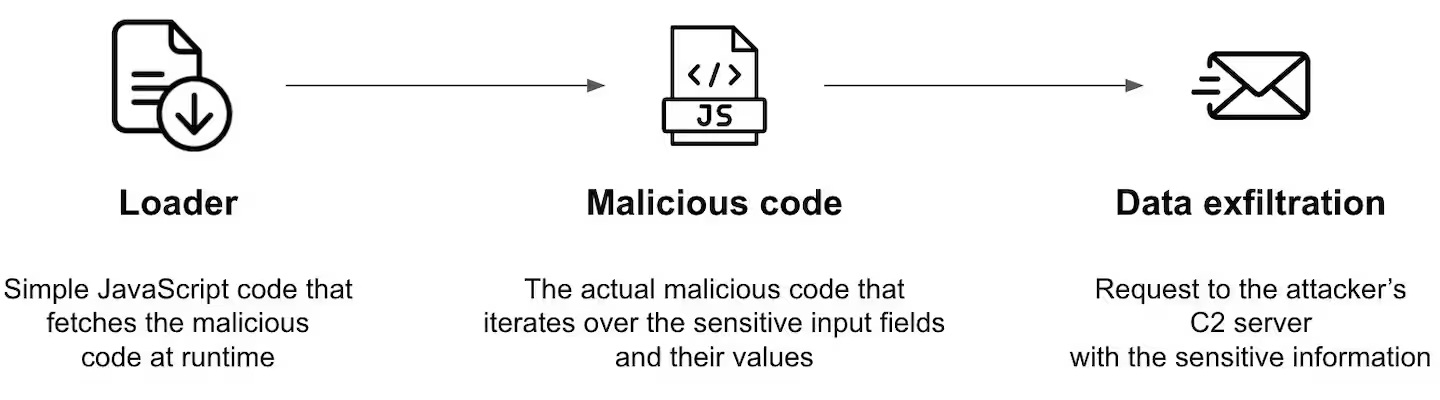
The new campaign targeted multiple Magento and WooCommerce websites and consisted of three main parts: loader, malicious attack code, and data exfiltration. However, according to the reports shared with Cyber Security News, this campaign directly exploited multiple victim websites.
The Loader is a JavaScript code snippet used for loading the complete malicious code of the attack. The malicious attack code is the primary JavaScript code used for executing the attack and other purposes, including detecting sensitive inputs, reading the data, disrupting the checkout process, and injecting fake forms. Data exfiltration is the method used for sending stolen data to the command and control (C2) server.
Magecart attack infrastructure (Source: Akamai)
However, there were 3 variations discovered in this campaign. These variations were improvements developed by the attacker within a short period of time to prevent detection and mitigation.
Two variations were similar, but the third one was unique as the attackers used the website’s default 404 error page to hide their malicious code.
Fake form is hidden while the user is prompted to re-enter their information (Source: Akamai)
Using the website’s default 404 error page is unique and can result in improved hiding and evasion. Though the loaders on the affected websites were removed, the malicious comments on the website’s default 404 page still remain. This can potentially allow the skimmer to reactivate the attack.
A complete report has been published by Akamai, which provides detailed information about the campaign, variations, and other information.
Indicators of Compromise
Pmdresearch[.]com
secures-tool[.]com
adsometric[.]com
cngresearch[.]com
Protect yourself from vulnerabilities using Patch Manager Plus to patch over 850 third-party applications quickly. Take advantage of the free trial to ensure 100% security.
A few days ago, during the Pixel 8 series launch, fans got to see the new AI wallpapers. These wallpapers are now becoming available on more Pixel devices via a new app that is making waves on the Google Play Store. The name of the app in question is ‘AI Wallpapers’ and it is part of the Google LLC apps.
Pixel users who install the app on their devices will be able to access 12 themes they can use while generating a wallpaper. After picking a theme they’d love to build on, users can then describe the wallpaper they want. With the description, the AI system that powers this app and the feature will then generate a wallpaper to fit the user’s description.
At the Pixel 8 series launch, this feature was a showstopper for some users as they got to see more uses for AI on Pixel smartphones. However, the feature comes loaded with the Pixel 8 series other Pixel devices can only access it for usage via this new app. Here are the details of this app that you’ll need to know before proceeding to install it onto your Pixel smartphone.
More Team Pixel fans can now try out the Pixel 8 series AI wallpapers on their devices
While the Pixel 8 series AI wallpaper app is becoming available for other Pixel users, its usage is a bit limited. These users who install the app from the Google Play Store will not have the liberty to export the wallpapers they create. They are only able to create wallpapers that can then be used on their Pixel device.
However, Mishaal Rahman while announcing that this app is becoming available for Pixel users pointed out a way to export wallpapers. The method he stated is currently inaccessible to certain Pixel users though. Since they don’t have the app. As it turns out, Google might be gradually rolling this app out to users.
So if you can’t find the Pixel 8 AI wallpaper app on the Play Store using your Pixel device you might need to wait. In the coming weeks, more users will be able to access this app from the Play Store on their devices. Once available on your Pixel device you can then proceed to explore your creative side, employing the AI to design nice wallpapers for you.
The app from Google lets users create wallpapers out of their imagination and save these wallpapers on their devices for usage. Users can also access these saved wallpapers and effect changes to them where necessary. This app makes use of AI-generated text-to-image diffusion models to help users create wallpapers.
Users of the Pixel 6 and 7 series will be sure to get this app on their devices once it rolls out to them. Users of other series might not get this feature on their devices, as it might be locked to only newer Pixel smartphones. Once this app is available on your Pixel device you’ll be able to install it from the Google Play Store.
Disinformation is a big deal, and Elon Musk’s platform might come under fire due to the recent turn of events. The EU is now turning its attention to X and how the platform has been handling the spread of information in recent times. These concerns are coming after various details on the Israel and Hamas conflict that is claiming lots of lives got to the social media platform.
Considering how delicate this matter is, the EU argues that there must be some control over what information gets to social media platforms. To do this, the EU requires transparency, swift moves to tackle disinformation and protection of users of the X platform. All these requirements are under the EU’s Digital Services Act regarding content moderation on various online platforms.
Over the past few days, X seems to have taken the back seat in the fight against disinformation. This is clear in the way and manner in which news and reports of the Israel and Hamas clash get to the platform. The EU is now demanding that X explains the measures they have taken to curb the flow of disinformation regarding the current issue.
EU asks Musk to address concerns over disinformation by explaining how X is fighting it
In a letter to Elon Musk, Thierry Breton and the EU commissioner expressed concerns about how X is handling disinformation. The letter also questions X’s compliance with the EU’s Digital Service Act requirements on content moderation. Over the past few days, the internet has been in shock over the sad events taking place in Gaza as Israeli troops clash with Hamas terrorists.
In various ways, innocent civilians are feeling the effects of this clash in their area of domicile. However, some ill-meaning individuals are out to thwart the narrative of the entire sad turn of events. They do this using various channels, from which netizens access information on the web.
One such channel is X and the platform is now flowing with some disinformation on the current events taking place in Gaza. Netizens are fed with misleading images pushing blame to one side of the conflict or the other. Some netizens are now believing this misleading information and are also spreading it to others as well.
The EU is now calling on Elon Musk to explain how his platform is handling the disinformation spreading on his platform. They also question what content X permits users to share and if it complies with the Digital Service Act requirements. With the letter, Thierry Breton also calls out Elon to X’s systems are functioning fine and demands a report on the recent turn of events on the platform.
Elon Musk was given just 24 hours to respond to the letter sent out by Thierry Breton. The EU also intends to kick off investigations on this matter and might penalize X if it is found wanting. More information on this issue will become available in the coming days.
Adobe Lightroom for Android has received a major update, adding support for HDR images. This means that users can now edit and export their HDR images directly from the app, without having to use a separate program.
The news was shared directly by Adobe via their help site while singing praises to High Dynamic Range (HDR) and the impact it has on photos. However, there are a couple of limitations to the app’s support of this format.
While you will now be able to capture, edit, and export HDR photos within the Lightroom Android app (v9.0.0), you will only be able to do so on supported devices running Android 14. Right now, the list of devices is pretty limited, including only the Google Pixel 7, Pixel 7a, and Pixel 7 Pro.
Currently, there is no mention of the newly released Pixel 8 series on the Adobe help page or the Play Store release notes, but presumably that won’t be the case for long. Google’s newest phones will be the first to support the new Ultra HDR feature for Android 14, which will allow users to capture and edit HDR images with an even wider range of dynamic range. Surprisingly, though, the barely four-month-old Google Pixel Fold is not supported as confirmed by its omission from the device support list and my own testing with the device.
For supported devices, using the new HDR feature within Lightroom is easy. Simply open an HDR image within the application, go into “Edit” mode and select the “Light” tool. Next, scroll to the bottom and toggle on the “Edit in HDR Mode” option. You will then see an HDR logo on the top right that you can tap to view the histogram and adjust your image. Don’t forget to check the “HDR Output” box when you are ready to export!
The addition of HDR support to Lightroom for Android and Google’s upcoming Ultra HDR feature are great news for Android users who enjoy taking and editing HDR photos, but don’t want to switch back and forth between applications to do so. Hopefully, we see support for this format expand to more devices and third party image editing apps.
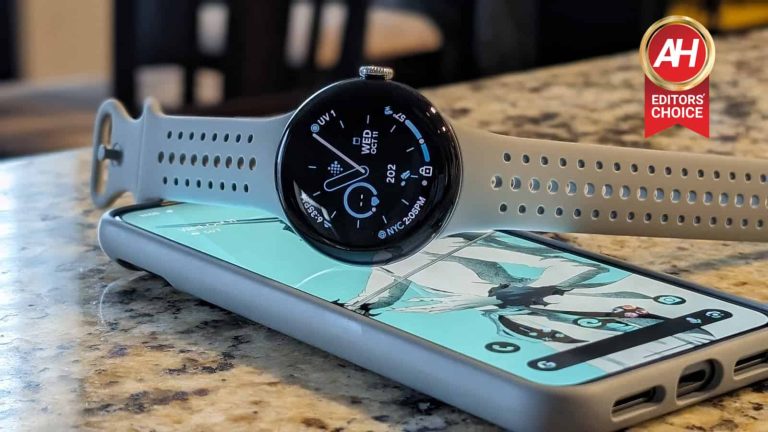
The Google Pixel Watch 2 is Google’s latest in-house smartwatch, introducing new features and upgraded hardware for an even more personal and tailor-made experience for Pixel phone users. Much like the Apple Watch for iPhone and the Galaxy Watch lineup for Galaxy phone users, the Pixel Watch is designed to bring enhancements to Google’s phones. And for its second run, Google definitely seems to be refining the smartwatch and Wear OS as a whole.
There are definite differences here between Google’s last iteration of the Pixel Watch but it also still carries familiarities. Such as the design, which hasn’t really changed. Nor should it really as it seems well-liked by the majority of users who own the first model. With that in mind, is the Pixel Watch 2 worth your hard-earned money at a base cost of $349? Let’s get into the full review and see if Google’s second Pixel smartwatch is worthy of your time.
Google Pixel Watch 2 review: Hardware and design
For the most part, not much has changed here from the original Pixel Watch design. The Pixel watch 2 still uses the water drop design with a seamless glass display that flows around the edge to almost melt into the watch case. This in particular is one of the most popular elements of the way Google’s smartwatch looks. And with how much people loved it it’s easy to see why Google wanted to stick with it for a second go-around.
The digital crown makes a return for easy navigation of the UI without having to touch the display and gunk it up with your fingerprints. And although you may still have to touch the screen sometimes, it’s not always necessary thanks to the crown. It’s not the rotating bezel of the Galaxy Watch 6 Classic. But it serves a similar purpose and that’s worthy of appreciation. The digital crown is also really easy to use and I found myself almost falling in love with it. I still prefer the rotating bezel though. If you have a watch that requires navigation via the display only, this is a nice hardware feature to have. And I’m glad Google didn’t get rid of it.
Bands also still attach the same way using the seamless attachment system from the first watch, and the single button on the side with the digital crown is back. Where Google has updated the hardware design is with the all new-multipath sensor on the bottom. And Google is also using aluminum this time around which makes the watch slightly lighter. Overall the design is great and there’s not much I would personally change if I were given the chance too. The only thing I wish was different was the display size. Everything else though is right where it needs to be.
Google Pixel Watch 2 review: Display
Let’s talk about the display. I’ll just get straight to it. I wish Google offered a model with a larger display. 41mm is just a little small for my liking after having the Galaxy Watch 6 Classic on my wrist. Plus the larger display really makes interacting with the watch a little easier, not to mention it makes things easier to see.
But personal preferences aside, the Pixel Watch 2 display is nice and most users are going to love it. It still has a peak brightness of 1,000 nits which is quite bright and really more than bright enough for most situations. Though it doesn’t really appear that you can manually set it to this value. Your best bet to ensure that you get the most out of the Pixel Watch 2’s display brightness is to do two things. Make sure adaptive brightness is enabled, then also enable the Sunlight Boost toggle.
This way if you do need to use the watch in direct sunlight, this feature will boost the display brightness temporarily to make sure things are as visible as possible. It’s in the part of the year here in Oregon where there’s not much sunlight to be had so I didn’t get to personally experience this very much. But over the past weekend I did test it out during a walk and it does appear to get noticeably brighter with the sun shining right down on you. All-in-all It’ll work well and I don’t think many people are going to have issues with how the display looks or functions.
Google Pixel Watch 2 review: Performance
I don’t have much of a frame of reference for how well performance is with the Pixel Watch 2 compared to the original, but from my limited time checking out the first watch the second model definitely feels like a smoother experience. Google has upgraded the hardware here and is using the Snapdragon Wear 5100 from Qualcomm. And this seems to make the performance feel more fluid.
I didn’t experience many snags that have been present in other Wear OS watches. And the Snapdragon Wear 5100 plays a big part in that. But Wear OS 4 most certainly plays a role as well. Google has said that Wear OS 4 helps deliver some improvements to performance to make the watch have a snappier feel to it when swiping between tiles or menus. And that really does show after using the watch for the better part of a week.
That being said, I did still notice the very rare hiccup when backing out of the app screen and going back to the homescreen. This isn’t going to bother most people and I wouldn’t even say it bothers me at all. Performance is most certainly better than most smartwatches out there. But it’s not flawless. That’s also not a deal breaker because any slowness almost never comes up and when it does it’s so minimal you’ll forget it happened quickly. Basically, performance is pretty decent.
Google Pixel Watch 2 review: Battery life and charging
Battery life was one of the main gripes people had about the original Pixel Watch. And with good reason because it struggled to last a full day with the always-on- display enabled. You certainly don’t need it turned on but it does help the user experience in a positive way making it easier to glance down at your wrist and see important information. Unfortunately this was also a noticeable drain on the battery. Enough that it wouldn’t be surprising if this turned some people off from buying one.
Luckily, this time around Google has made battery life improvements. Partly due to Wear OS and partly due to the new chipset. Google claims you can now use the watch with the Always-on display enabled and actually get a full 24 hours of battery life out of the watch. And in my experience that seems to be an accurate statement.
I never really did drain the watch completely during my testing before this review. But I did keep the aod on and I wore it to bed most nights to utilize the sleep tracking features and to see how long the battery would last. I found myself typically placing it on the charger the next morning out of habit and would just put it back on my wrist after a morning shower and making some coffee. This has been enough time for me to get to the next charge cycle and keep this loop going.
I’d still probably categorize this as average battery life. Not amazing but definitely better than last year’s watch. And the thing is the Pixel Watch 2 isn’t going to be the watch that most people take on long excursions where you might not be near a charger for days at a time. So a full 24 hours is not only acceptable, for many users it will be more than enough.
When it comes to the charging, it takes roughly 30 minutes to charge it up to 50%. And since I was usually around 50% or a little more by the morning, a half an hour would put me back up to full. On the days where I went out for walks the battery might be a little more drained by the end of the day but still not enough to where I couldn’t wear it to sleep. And for me, that’s all I have really needed. If you do tend to use most of the battery, a little over an hour on the charger gets you to 100% from 0%. So you could easily charge it for that amount of time before going to bed and be able to put it back on before dozing off.
Google Pixel Watch 2 review: Software
Software is a big part of the change with the Pixel Watch 2 since it comes with Wear OS 4 and that comes with plenty of little notable features. For instance, Wear OS 4 now supports Fall Detection. There’s also now more apps available like Calendar and Gmail. With apps like Calendar you can see updates to your schedule and even upcoming events or important dates. And with Gmail you get a lot more than just a notification that an email came in. You no longer have to pull out your phone to interact. You can read, and even reply or compose emails directly from your wrist. And with Google Assistant that makes composing new emails or replies a lot easier than you’d think it would be.
App updates on the watch are now super simple
One of the software improvements with the Pixel Watch 2 (thanks to Wear OS 4) that I really appreciated was the ability to update apps more easily. You can go right into the Play Store and scroll to manage apps just like you would on a phone and see all apps that need updates in one scrollable screen. If any apps do need an update, you can tap an “update all” button and everything should be finished within a few minutes.
What’s more is that you can tap apps individually to update only apps you choose to update. This whole process is just much more user-friendly than it used to be. And if you use apps on the watch a lot you’ll like being able to get things done in one go. You can also see recently updated apps and apps that are already up to date.
Change the text font size for better visibility
Another really cool new feature is the ability to change the size of the text font. While I didn’t feel the need to increase the size of the font personally, this is a nice touch for those that might have a harder time reading smaller text. You can even enable a toggle that changes the text to bold if you prefer. All of this can be done on the watch too. Although you can also change the font size in the Watch app if you’d rather do it that way. But there’s no need to do so and I found this to be more cumbersome and less convenient. Unless you were already in the app for some other reason.
Adjusting the font size to be bigger though will make notifications less glanceable in that you’ll see less of the information on the screen. Not just in a single notification but you’ll end up seeing less notifications. So it’s worth keeping this in mind as larger fonts will lead to more scrolling. If the default is too small for you, you’ll want to play around with the different sizes when you have some notifications and find a happy medium.
Watch face customization
Google has added new watch face customization options and this to me was a big deal. As I like to personalize the look of my devices any way I can. With the Pixel Watch 2, you have new watch face options for the face itself, but you can also now customize different aspects of the face you choose.
You can select from a wide variety of different color options and even choose different layouts. Additionally you can change styles and which complications to add and where you want those to be. Overall there’s a lot more personalization and it helps to make your watch unique to the way you want it to look and how you want to see information. You can use the digital crown to scroll through all the options too which makes the process of finding your personal style a breeze.
I tend to change my watch face often and I went through a few different watch face changeups before this review was over. And I expect I’ll do it a lot more as time goes on with the large variety of available tweaks you can make.
More information at a glance
One of my favorite new features is the more glanceable information from notifications that come in. Say you get a message from a friend or an alert from your video doorbell. It’s now possible to see details of the message or even a short clip of the video from the doorbell. All without having to do anything other than look at the notification.
Though if you do want more detail you can tap on the notification to expand it and see everything it has to show you. Then tapping it again will collapse the notification and you can choose what to do with it. Whether that’s swipe it away to clear it or interact with it some more. A quick swipe up or even using the digital crown can open up the notifications screen where you can see all notifications that have come in too. Overall I found this to be a much better experience than interacting with notifications on Wear OS 3.
Google Pixel Watch 2 review: Fitness
Last year’s Pixel Watch didn’t have what many would consider a crucial feature. Auto workout tracking. The Pixel Watch 2 rectifies this by adding it in. It will still only track a handful of different workout types automatically. With Google stating that the Pixel Watch 2 can track 7 different workout types including walking, running, outdoor cycling, and HIIT.
I really only ever noticed this during walks but I go on walks often enough that this was nice to have. As I didn’t have to worry about the watch tracking my walk or manually go in and start things. I can just go outside with the watch on and after about 10 minutes (it’s around 5 minutes for more vigorous activities like running) it would recognize I was walking and begin tracking my steps and such. This makes using the watch for fitness activities way better because it takes out some of the extra steps that didn’t need to be there. And that allows you to focus more on the workout.
The watch also now gives you reminders to start workouts, like logging a certain number of steps. And these alerts will pop up on the watch display throughout the day if it notices you haven’t moved around in a while. Again this was another nice new feature that has somewhat helped me to ensure I’m getting in some amount of exercise. Even if it’s just getting up and moving around or going out for a quick 5-10 minute walk.
You can take your fitness interactions on the watch even further with the Fitbit app. Which brings in advanced tracking features like heart rate zones and active zone minutes, goals, and even a touch lock feature for the display if you want to go for a swim. You can also access all of this information by swiping up or to the left to peruse through different screens.
Heart rate tracking with the new multi-path sensor
More accurate tracking is the name of the game and it certainly seems to work better than on other devices I’ve tried. The higher accuracy of the readings helped me stay more on top of what my heart rate was during specific activities. And I feel like it helps keep a handle on where your heart rate should be.
If you want more detailed metrics, you still have to open up the Fitbit app on your phone. But you get a decent amount of information right from the watch. So unless you want to check out your progress over time, the watch gives you what you need.
Sleep tracking
Sleep tracking is more robust on the Pixel Watch 2 thanks to both the skin temperature sensor and newly added details like sleep score and sleep stages. All you have to do is go to sleep with the watch on and then when you wake up in the morning everything is readily available.
I did notice that it takes around a minute or two for this information to populate. But after that you can find everything inside of the Fitbit Today app. In here you can scroll to where the sleep section is located and it displays the information listed above. Although you can also scroll to the sleep tile from the home screen and see a brief snippet of information there. Tapping on the tile will expand it to show you more information if you want it.
And if you’re curious you can check out your skin temperature during sleep too. Although you do need to wear the watch to sleep for three nights in a row to first establish a baseline temperature. While I did wear the watch to bed multiple nights, I did have a break in that three-day requirement for the baseline. So I haven’t been able to test this feature yet.
If you want even more information you can check out the sleep profile in the Fitbit app on your phone which draws in multiple key metrics that are intended to help your sleep quality improve. This does require Fitbit Premium though. Luckily the Pixel Watch 2 comes with a 6-month trial of it. So you can use it right away.
Should you buy the Google Pixel Watch 2?
This is potentially going to be a hard sell for some users, though perhaps really only if you already have a Pixel Watch and don’t necessarily need to have the new features. There is a plenty to love about the new watch though. From the auto workout tracking to the new and improved battery life and performance.
You should buy the Google Pixel Watch 2 if:
You want the auto workout tracking
Longer-lasting battery life is important to you
You want better and more accurate heart rate tracking
You shouldn’t buy the Google Pixel Watch 2 if:
You already own a Pixel Watch and are fine with the battery life