ChromeOS has always been a completely different beast from Android. It gets its own visual and functional improvements separately from Android. However, according to a new report from Android Police, it’s getting a feature that Android had for a few years. ChromeOS is finally getting Dynamic Colors.
This change was spotted in the latest version of ChromeOS. Right now, the stable version of ChromeOS has the build number 117.0.5938.115. If you have a Chromebook/Chromebox, you should check for the latest update.
Go to your settings, and click on the About ChromeOS button at the bottom of the left panel. Click the Check for updates button. The computer will search for the update and start installing it. After you restart your computer, you will be on the next version of ChromeOS.
ChromeOS finally gets Dymanic Colors
Slowly, ChromeOS has been picking up a few design queues from Android. The interface has already adopted a bit of the Material You influence. We’re seeing large rounded buttons, pill-shaped UI elements, and the overall bubbly aesthetic. The only thing that was missing from ChromeOS was Dynamic Colors.
Now, that’s no longer the case. With the latest update, ChromeOS will now take the colors present in your wallpaper and create a color palette based on it. This color palette will be used throughout the entire interface. Menus, the taskbar, windows, background, and other elements will get the custom color palette. This gives the interface a different look.
Just like in Android, when you’re changing your wallpapers, you’ll have your choice between different color palettes. What’s unfortunate is that you only have four options like in Android 12.
Other changes
This update doesn’t only bring a new paint job, but it brings more goodies. For starters, the clipboard is more readable. It will show you more details about what’s saved on it, so have a better idea of what you’re pasting.
Next, ChromeOS brought on the adaptive charging feature on Android. This will keep your phone from charging all the way. It will stop at about 80% while it’s idle. After that, it will slowly charge up to full based on your usage. Lastly, when you’re using the digital keyboard, you’ll now see GIFs.
Despite online rumors, using Android USB-C cables for the iPhone 15 series does not pose any damage to the device, AppleInsider reports.
A Chinese retailer has started to circulate a rumor that quickly went viral and terrified iPhone 15 owners. He claimed using Android USB-C cables for iPhone 15 would damage the device. The retailer, based in Foshan, Guangdong Province, said this while advertising Android USB-C cables. He argued one of his cables has nine pins on one side of the bi-directional cable and another one with 11 pins.
The Chinese retailer further added using cables with different numbers of pins could damage the iPhone 15. This claim quickly went viral on social media, and people started speculating about it. It was such a bold claim that required Apple to involve and respond to iPhone 15 owners directly.
It is safe to use Android USB-C cables for iPhone 15 series
The short answer is that you can use Android USB-C cables on your iPhone 15 devices without damage. The iPhone’s transition from Lightning to USB-C was partially due to reducing e-waste and meeting the EU requirements.
If iPhone 15 owners needed to buy a whole new cable for their device, the transition was totally futile. Of course, maybe Apple didn’t mind revealing an exclusive USB-C cable for its new devices (iCable, for example) and putting a $99 price tag on it.
Understanding the USB-C architecture isn’t an inside baseball matter. Every USB-C cable usually comes with 24 pins, and 12 of those pins are located on the side of the internal tongue to make it bi-directional. These cables are suitable for data and power transfer, charging, alternate modes between a host and a client, etc.
The thing iPhone 15 owners should be worried about is not the adaptability of Android USB-C cables but the durability of their devices. A recent drop test conducted by Sam Kohl revealed that despite using a titanium frame, the iPhone 15 Pro is less resistant than the iPhone 14 Pro.
Since 2010, a group of hackers known as BlackTech APT has been engaging in malicious activities. The targets of their attacks encompass a wide range of sectors, including governmental institutions, industrial facilities, technological infrastructure, media outlets, electronic systems, mobile devices, and military establishments.
In order to hide what they are doing, the group behind the attack uses custom-made malicious software, tools that can be used for both good and bad, and clever methods that take advantage of the resources that are already in a system, such as turning off routers’ data recording features.
The Japan National Police Agency (NPA) and the U.S. Cybersecurity and Infrastructure Security Agency (CISA) showed that BlackTech could change router firmware without being caught and use routers’ domain-trust relationships to move from having international subsidiaries to having headquarters in Japan and the U.S.
Criminals in the black market keep updating their tools to avoid being caught. They also steal code-signing certificates to make their malware look like it is real.
DocumentFREE Demo
Implementing AI-Powered Email security solutions “Trustifi” can secure your business from today’s most dangerous email threats, such as Email Tracking, Blocking, Modifying, Phishing, Account Take Over, Business Email Compromise, Malware & Ransomware
BlackTech Malware Attack
The threat actors are known for using custom-made malware payloads and remote access tools (RATs) to get into their victims’ computers.
Their custom malware works with a number of running systems, such as Windows®, Linux®, and FreeBSD®.
Living off-the-land TTPs are used by BlackTech actors to blend in with normal network activities and operating systems. This helps them avoid being caught by endpoint detection and response (EDR) tools.
The campaign they are running now is aimed at foreign branches of American and Japanese companies.
Once they get into the internal networks of companies, they can move from those networks to those at headquarters.
The report says, “BlackTech actors take advantage of trusted network relationships between a known victim and other entities to gain more access to target networks.”
BlackTech used a variety of router names and versions from firms like Cisco and others.
In the case of Cisco routers, the bad guys hide in Embedded Event Manager (EEM) rules, which are used in Cisco IOS to set up automatic tasks that run when certain events happen.
CISA and NPA talked about moves that could be taken to stop this BlackTech bad behavior. The Agencies strongly advise network defenses to keep an eye on strange traffic, reboots, and illegal downloads of bootloaders, firmware images, and images.
Protect yourself from vulnerabilities using Patch Manager Plus to quickly patch over 850 third-party applications. Take advantage of the free trial to ensure 100% security.
After an update for Google’s Bard AI, users found that shared conversations were turning up in search results.
Google is coming under scrutiny after people discovered transcripts of conversations with its AI chatbot Bard are being indexed in Google search results.
Bard is Google’s answer to ChatGPT, and allows users to have conversations with an AI. Services like these have attracted a lot of attention, because with a bit of tweaking and getting used to they can be really helpful in speeding up tasks. However, many are worried about the security and privacy implications of using services like Bard and ChatGPT.
As an illustration of why people might be worried, after an update to Bard, users found Google Search had begun to index shared Bard conversational links into its search results pages.
“Haha Google started to index share conversation URLs of Bard don’t share any personal info with Bard in conversation, it will get indexed and may be someone will arrive on that conversation from search and see your info Also Bard’s conversation URLs are ranking as snippets for some queries as well”
As it turns out, this happens only if the user chooses to share the conversational link with someone. That means that if you share your Bard conversation with a co-worker or relative by sending them the link, your conversation can be scraped by Google’s crawler. And when they’re scraped by the crawler then—you’ve guessed it—they show up as search results, spilling information you never meant to make public.
If you are curious and want to have a peek at the sort of conversations that have been scraped, you can type ‘site:bard.google.com/share‘ into the Google Search bar and hit enter. At the time of writing I got 464 results, some of which really don’t look as if they were intended to be public knowledge.
Google says that sharing chats with Search was an accident and is currently working on a fix:
“Bard allows people to share chats, if they choose. We also don’t intend for these shared chats to be indexed by Google Search. We’re working on blocking them from being indexed now.”
For those that actually find damaging content in the search results, you can file a removal request with Google.
Malwarebytes EDR and MDR removes all remnants of ransomware and prevents you from getting reinfected. Want to learn more about how we can help protect your business? Get a free trial below.
Despite having an impressive launch, Threads users are now leaving the app. This platform launched to compete with X allowing users to air their views on various topic matters with text. The concept behind the launch of this platform helped it in its early stages, but now the platform seems to be facing some hard times.
At its launch, Meta let those wanting to join Threads do so with their Instagram account. This meant that their followers on Instagram would be able to easily find them on Threads, hence keeping in touch. With this, a lot of people were quick to open Thread accounts using their Instagram accounts, leading to early growth for the platform.
Additionally, Threads became available at a time when lots of X users were looking for alternative platforms where they could share their ideas. However, despite the early growth of Threads, some of its users are now jumping ship, hence leading to some delay in growth. Despite this sad turn of events, some analysts say that the platform would close the year on a positive note.
Analysts forecast that Threads’ monthly users will reach over 24 million by the end of the year
In recent reports, analysts are predicting that Threads will hit 23.7 million monthly users by the end of the year. While this number is behind that, Twitter might close the year with an impressive number. From the analysis, X is to close the year with 56.1 million monthly users.
Because Threads launched this year, its growth in comparison with X is impressive. It is safe to say that Threads is a worthy X competitor that is still gaining momentum. X on the other hand is forecasted to lose some of its momentum as its users are still leaving for other platforms.
In the coming years, Threads might keep up its growth and amass 30 million active monthly users by 2025. It is good to note that the number of people who have Threads accounts is different from the number that use the platform. Currently, Threads users are over a mammoth 100 million in number, but not all actively use the platform.
With the addition of newer features to the platform, more and more users might start to frequent it more often. Well, these features should not just be any basic addition, as they are meant to draw users to the platform. So Threads should think out of the box and be more creative with the addition of new features if they want to take X’s place.
So far, Threads is outperforming other platforms that also launched to steal X’s users. Right now, they can stand as the most competitive platform that X faces. From the forecasts, it is clear that things might get harder for X down the road as Threads users grow.
Three credit unions are filing an antitrust lawsuit against Apple Pay for its alleged monopoly of the market. Part of their reasons for this case is that Apple charges too much for processing fees for others to make use of its payment services. Another reason is that the necessary hardware for this service to work is not accessible to other digital wallets.
This alleged monopoly makes it hard for people to switch from Apple to Android since they’ll lose their wallet access. Lots of other payment apps that work on both Apple and Android devices lack the payment convenience that Apple Pay brings. Additionally, Apple Pay is only available on Apple devices and not on Android devices, and this limits usage to only a certain group of people.
The Judge in charge of the antitrust hearing took the side that there is a possibility that Apple Pay is monopolized. This isn’t the first time that Apple Pay has come under consideration for its possible monopolization of the market. Apple has faced similar issues within the EU regions, but the case in question in this article will be tabled before a court in America.
The Apple Pay antitrust lawsuit might force the company to make some changes to its services
Once this antitrust lawsuit got to the court, Apple’s reaction was to request a dismissal from the court. However, the Judge in charge of the case didn’t grant Apple their wish, meaning the case would appear before the court. The plaintiff accuses Apple of practices that are harming the competition regarding Apple Pay services.
This payment service from Apple became available for users back in 2014, and it helps make payments easier. Well, one can rephrase the last sentence, saying that Apple Pay makes payment easier for Apple users. Others who do not make use of Apple devices can’t access this service, and this is harmful to businesses and individuals.
The plaintiff claims that Apple “coerces” users of their products to make payments using their in-house payment service. Also, businesses that make use of Apple Pay end up collectively paying $1 billion of excess fees. This is harmful to customers since these excess fees might result in a hike in prices for goods and services.
In its defense, Apple says that it charges nominal fees to all cardholders to keep costs down. They also argue that users of Apple Pay aren’t under any duress to use the payment platform. These users are free to make use of any other payment platforms or services that are convenient and more affordable to them.
Despite this, the Apple Pay antitrust lawsuit will still appear before the court in December. If all goes in favor of the plaintiff, Apple might need to make certain adjustments to their payment service, making it more accessible to all. It’s also good to note that the EU is also looking into Apple Pay and its possible monopolization.
The Snatch Ransomware group is considered dangerous due to its advanced techniques and ability to evade detection.
Security systems find it difficult to identify and stop such assaults since they use techniques like file encryption and memory injection to avoid detection.
Recently, the cybersecurity analysts at KrebsOnSecurity discovered that the Snatch ransomware group’s victim-shaming site exposes its location, operations, and visitor IP addresses, revealing its use of Google ads for malware distribution.
DocumentFREE Demo
Implementing AI-Powered Email security solutions “Trustifi” can secure your business from today’s most dangerous email threats, such as Email Tracking, Blocking, Modifying, Phishing, Account Take Over, Business Email Compromise, Malware & Ransomware
Snatch Exposes Data
During the malware distribution, the malware was disguised as free popular software like-
Snatch ransomware, seen since 2018, leaks data from non-paying victims on both open and darknet sites via Tor. Snatch’s darknet site reveals user IP addresses on its ‘server status’ page.
Victim shaming website for the Snatch ransomware gang (Source – KrebsOnSecurity)
Snatch’s darknet site attracts thousands of visitors, primarily from Russian IP addresses hosting its clear web domains.
Server status page (Source – KrebsOnSecurity)
Snatch RansomwareData Exposure
The most active IP, 193.108.114[.]41 in Yekaterinburg, Russia, hosts various Snatch domains. Another frequent IP, 194.168.175[.]226 with Matrix Telekom, also hosts Snatch domains and phishing sites for brands like-
IP 80.66.64[.]15 in Moscow frequently accessed Snatch’s darknet site and hosted similar-looking domains. These domains were registered to Mihail Kolesnikov, a name linked to phishing domains from malicious Google ads.
Kolesnikov, likely an alias associated with over 1,300 domains, has some advertising escort services in U.S. cities, raising questions about ransomware victim sourcing.
Recent phishing domains under Mihail Kolesnikov mimic major software companies. Trustwave Spiderlabs found Kolesnikov’s domains distributing Rilide trojan in August 2023.
Multiple groups may use these domains for phishing and spreading information-stealing malware, as warned by Spamhaus in February 2023.
Victims searching for Microsoft Teams on Google saw spoofed ads at the top, leading to a malicious domain registered to Kolesnikov. Clicking on the ad downloaded IcedID malware, known for stealing browser passwords and tokens.
Spoofed ads (Source – KrebsOnSecurity)
Cybercriminals may offer ‘malvertising as a service’ on the dark web, creating and selling software-themed phishing domains to others.
The @htmalgae, the researcher who alerted KrebsOnSecurity about Snatch’s exposed ‘server status’ page, also discovered the 8Base ransomware gang’s development-mode victim shaming site.
The 8Base ransomware gang’s oversight exposed its Russian site and a Moldovan programmer’s identity. Ironically, a group shaming others for data protection failed to protect its own data.
The malware targets Windows, but a Mac-based trojan, AtomicStealer, is advertised through similar-sounding domains and malicious Google ads.
Security analysts urged to stay cautious, especially with cracked software and rogue ads masquerading as search results.
Not only that, they also recommended that before downloading or installing anything, make sure to verify the website’s legitimacy.
Protect yourself from vulnerabilities using Patch Manager Plus to quickly patch over 850 third-party applications. Take advantage of the free trial to ensure 100% security.
The Bing AI chatbot labeled the malicious website as the official website of an IP scanner provider and recommended users to visit it, despite its involvement in the malvertising attack campaign.
In the wake of OpenAI’s ChatGPT‘s soaring success, Microsoft’s Bing AI Chatbot emerged as a challenging player in the world of artificial intelligence, boasting over 100 million active users. While this achievement underscores the growing influence of AI, it has also attracted the attention of cybercriminals seeking to exploit this massive user base.
Recent revelations indicate that Bing AI has become the latest target of malvertising attacks, raising significant concerns within the cybersecurity community.
In a blog post, Jérôme Segura, a senior security researcher at Malwarebytes Labs, shed light on the alarming exploitation of Bing AI Chatbot by malicious actors. The attackers have cleverly embedded malicious advertisements within the chatbot, representing a novel approach to malvertising.
It’s crucial to note that the advertising mechanism within Bing AI Chatbot operates similarly to conventional search results, where advertisers bid on specific keywords to have their ads displayed to users conducting related searches. However, there are noteworthy distinctions in how these ads manifest within chatbots.
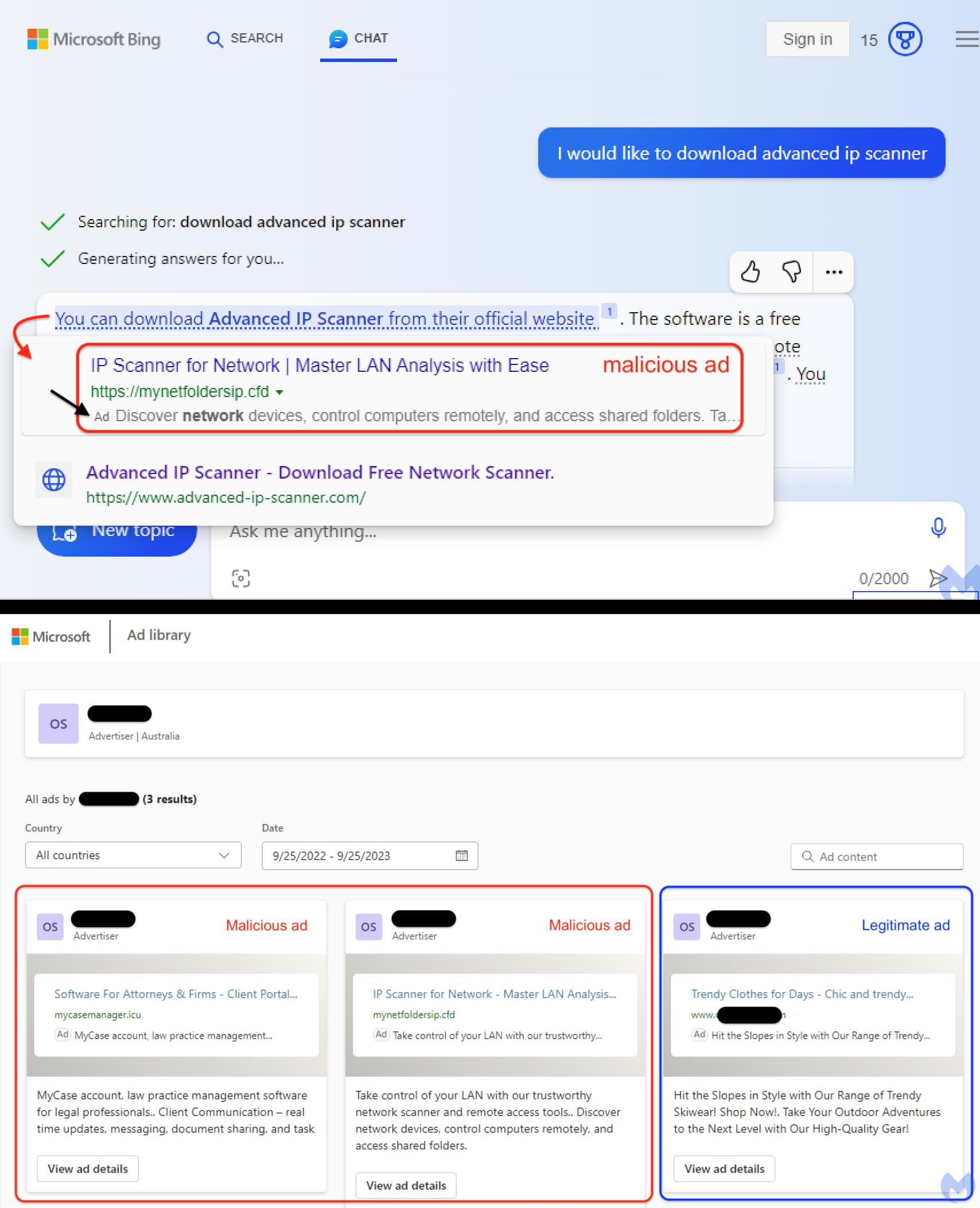
The attack unveiled by Malwarebytes involved cybercriminals masquerading as the Advanced IP Scanner provider to lure users into clicking on their malicious ads. Advanced IP Scanner is a tool commonly used by network administrators, hinting at the possibility that the culprits behind this campaign may be specifically targeting IT and cybersecurity professionals, although this remains unconfirmed.
In a screenshot shared by Segura, the top ad slot prominently features a website address (mynetfoldersipcfd), claiming to be the official source for downloading Advanced IP Scanner. To make things worse for unsuspecting users, Bing AI itself promoted this malicious website as the legitimate destination.
The true intent behind mynetfoldersipcfd is to segregate genuine victims from bots, sandboxes, or security researchers. It accomplishes this by scrutinizing various factors, including users’ IP addresses, time zones, and system settings, such as web rendering preferences that identify virtual machines.
Human users are redirected to a deceptive site (advenced-ip-scannercom), mimicking the official platform. Meanwhile, other unsuspecting visitors are rerouted to a decoy page. The subsequent step involves duping users into downloading and installing a fake malicious version of Advanced IP Scanner, facilitating the theft of user data. It is crucial to emphasize that the official website for downloading Advanced IP Scanner is advanced-ip-scanner.com, not (advenced-ip-scannercom).
The difference between the two sites is the use of a and e in their addresses: advanced-ip-scanner.com and (advenced-ip-scannercom). This is a typical case of Typosquatting. Typosquatting is a type of attack that involves registering domain names that are similar to popular websites but with common misspellings.
The malvertising campaign doesn’t stop here. Segura also flagged another malicious ad served through Bing AI Chatbot, where the same threat actor replicated Mycase.com, a US-based cloud legal practice management software solution. Mycase.com is instrumental in aiding attorneys and law firms in managing cases, clients, and communications.
Bing AI chatbot pushing Malvertising campaign (Image: Malwarebytes)
This incident emphasised the importance of exercising extreme caution when encountering ads within chatbots and search engines. Although malvertising attacks are not novel, their execution through an AI chatbot platform is definitely an unsettling development.
To safeguard against such threats, it is advisable to employ updated anti-malware solutions, leverage browser scanning applications or plugins, and stay vigilant by keeping software and systems up-to-date. In an era of evolving cybersecurity challenges, these precautions are essential to protect against the ever-creative tactics of cybercriminals.
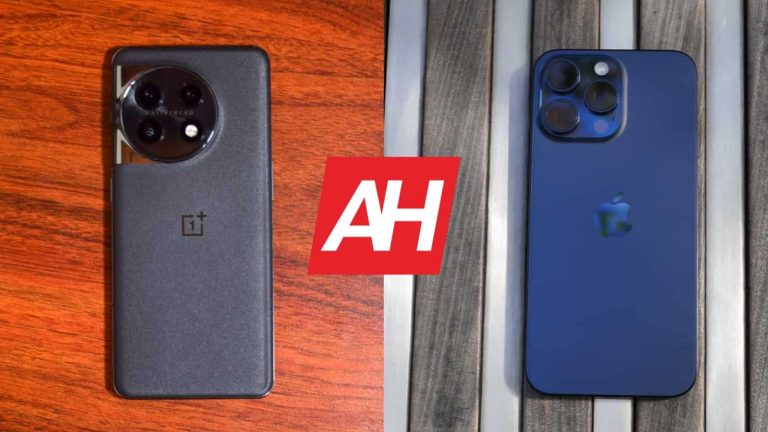
This time around, we’re comparing the OnePlus 11 vs Apple iPhone 15 Pro Max. In other words, we’re comparing the best of the best OnePlus and Apple have to offer at the moment. The OnePlus 11 originally launched back in January, but it took it some time to launch in global markets. It has been on the market for a while now. The iPhone 15 Pro Max arrived earlier this month.
Both of these smartphones are compelling in their own way, but they’re also very different. If you’re in the market for a large flagship, however, both of these are worth considering. We’ll list their specs below, and then continue to compare them across a number of categories. This will hopefully help you make a purchasing decision.
Specs
OnePlus 11 vs iPhone 15 Pro Max, respectively
– Screen size: 6.7-inch LTPO3 Fluid AMOLED display (curved, 120Hz, HDR10+, 1,300 nits) 6.7-inch Super Retina XDR display with ProMotion (flat, 120Hz, HDR10, 2,000 nits) – Display resolution: 3216 x 1440 2796 x 1290 – SoC: Qualcomm Snapdragon 8 Gen 2 Apple A17 Pro – RAM: 8GB/12GB/16GB (LPDDR5X) 8GB – Storage: 128GB/256GB/512GB (UFS 4.0) 256GB/512GB/1TB (NVMe) – Rear cameras: 50MP (f/1.8 aperture, OIS, multi-directional PDAF), 48MP (ultrawide, f/2.2 aperture, 115-degree FoV), 32MP (telephoto, f/2.0 aperture, 2x optical zoom) 48MP (f/1.78 aperture, second-gen sensor-shift OIS), 12MP (ultrawide, f/2.2 aperture, 120-degree FoV, macro photography), 12MP (telephoto, f/2.8 aperture, 5x optical zoom) – Front cameras: 16MP (f/2.5 aperture) 12MP (f/1.9 aperture) + TrueDepth – Battery: 5,000mAh 4,422mAh – Charging: 100W wired globally, 80W in the US (charger included) 20W wired, 15W wireless, reverse wired charging (charger not included) – Dimensions (unfolded): 163.1 x 74.1 x 8.5mm 159.9 x 76.7 x 8.25mm – Weight: 205 grams 221 grams – Connectivity: 5G, LTE, NFC, Wi-Fi, USB Type-C, Bluetooth 5.3 – Security: In-display fingerprint scanner (optical) Advanced facial scanning – OS: Android 13 with OxygenOS 13 iOS 17 – Price: $699 $1,199 – Buy: OnePlus Apple
OnePlus 11 vs Apple iPhone 15 Pro Max: Design
They are very different when it comes to design. The OnePlus 11 is made out of aluminum and glass. It has a curved display, a display camera hole in the top-left corner, and thin bezels. On the back, it utilizes a circular camera module, while its backplate is also curved. The front and back sides of the phone are actually proportional. The power/lock button sits on the right side, along with an alert slider. The volume up and down buttons are located on the left.
The iPhone 15 Pro Max, on the other hand, is made out of titanium and glass. It has flat sides all around, with slightly rounded edges. The display is flat here, and its bezels are the same on all sides. A pill-shaped cutout sits at the top of the display, and it’s much larger than the display camera hole on the OnePlus 11. The iPhone 15 Pro Max has its recognizable camera island on the back, in the top-left corner. The backplate on the phone is also flat. The power/lock button sits on the right side, while the volume rocker buttons, and an Action Button are placed on the left.
The OnePlus 11 is slightly taller and narrower than Apple’s handset. The two phones are almost the same in terms of thickness. The OnePlus 11 is lighter, though, at 205 grams compared to 221 grams of the iPhone 15 Pro Max. As a side note, they have the same display size, albeit with different aspect ratios. Still, they belong in the same exact size category. Both feel good in the hand, though entirely different. The OnePlus 11 is IP64 certified, while the iPhone 15 Pro Max offers IP68 certification for water and dust resistance.
OnePlus 11 vs Apple iPhone 15 Pro Max: Display
The OnePlus 11 has a 6.7-inch QHD+ (3216 x 1440) LTPO3 Fluid AMOLED display. That panel is curved, and it has a 120Hz refresh rate. Dolby Vision is supported here, and the same goes for HDR10+ content. This display can project up to 1 billion colors, and it goes up to 1,300 nits of brightness at its peak. The display aspect ratio is 20:9, while the Gorilla Glass Victus is here to protect it.
OnePlus 11
The iPhone 15 Pro Max, on the flip side, has a 6.7-inch 2796 x 1290 LTPO Super Retina XDR OLED display on the front. That panel is flat, and it supports a 120Hz refresh rate. HDR10 content is supported, and so is Dolby Vision. This panel is brighter than the OnePlus 11’s, at 2,000 nits of peak brightness. The display aspect ratio is 19.5:9, and Apple’s Ceramic Shield glass protects the display.
Both of these displays are great. They’re vivid, have excellent viewing angles, and they’re more than sharp enough. The iPhone 15 Pro Max’s panel does have the brightness advantage, in case you spend a lot of time outdoors, in direct sunlight. Other than that, do keep in mind that one panel is curved, and the other is not, if that plays a role in your decision. Chances are you won’t be disappointed by either panel.
OnePlus 11 vs Apple iPhone 15 Pro Max: Performance
The OnePlus 11 is fueled by the Snapdragon 8 Gen 2 processor. That is the most powerful chip Qualcomm has to offer. The phone also includes up to 16GB of LPDDR5X RAM and up to 512GB of UFS 4.0 flash storage. The iPhone 15 Pro Max, on the flip side, is fueled by the Apple A17 Pro processor. That chip is extremely powerful too, and has a lot of gaming prowess. Apple paired that with 8GB of RAM and NVMe flash storage.
That being said, both smartphones perform really well in day-to-day tasks, they’re extremely smooth. The thing is, the iPhone 15 Pro Max does seem to have problems with heat these days. Those are some early problems that Apple can resolve by lowering the performance of the SoC, and that will probably happen. That shouldn’t really affect the actual performance of the device. It is worth noting, though. The OnePlus 11 does a great job with games, it can run basically anything from the Play Store with ease. It also does a great job with heat management.
OnePlus 11 vs Apple iPhone 15 Pro Max: Battery
There is a 5,000mAh battery included inside the OnePlus 11, while a 4,441mAh unit sits inside the iPhone 15 Pro Max. That battery pack is smaller as iPhones usually need less power than Android phones. In case you’re wondering about the battery life, well, it’s great on both smartphones. The OnePlus 11 does have the edge, based on what we’ve seen, but the iPhone 15 Pro Max’s battery life improved a lot after several charges.
With the OnePlus 11, we managed to cross the 9-hour and 10-hour screen-on-time mark. The iPhone 15 Pro Max did not get us that far. We were able to get around 8 and a half hours of screen-on-time maximum, before the phone required a charge. So it sits a bit below the OnePlus 11, but at the same playing field. Both of these phones are true road warriors, and chances are you won’t need to worry about charging them before going to bed. For some people, they’ll easily last two days even.
When it comes to charging, things are rather interesting. The OnePlus 11 supports 100W wired charging globally, but it’s limited to 80W in the US. It can fully charge the phone in only 25 minutes at 100W. It does not support wireless charging, though. The iPhone 15 Pro Max supports 20W wired, 15W MagSafe wireless, 7.5W Qi wireless, and reverse wired charging. It will also support Qi2 once it launches. Unlike the iPhone 15 Pro Max, the OnePlus 11 includes a charger in the box.
OnePlus 11 vs Apple iPhone 15 Pro Max: Cameras
Both of these smartphones have three cameras on the back, not counting the iPhone’s ToF sensor. The OnePlus 11 includes a 50-megapixel main camera, a 48-megapixel ultrawide unit (115-degree FoV), and a 32-megapixel telephoto camera (2x optical zoom). The iPhone 15 Pro Max features a 48-megapixel main camera, a 12-megapixel ultrawide camera (120-degree FoV), and a 12-megapixel telephoto unit (5x optical zoom).
iPhone 15 Pro Max
It’s worth saying that both smartphones do a really good job when it comes to pictures. They both have pronounced colors without making the images look overprocessed or anything like that. They both provide plenty of detail, though in default mode, the iPhone 15 Pro Max does offer more detailed pics, if you pixel peep. Both ultrawide cameras do a great job, while the telephoto performance is interesting. The iPhone 15 Pro Max shines at 5x, but not as much at 3x. At 2x both are excellent, while the 3x is a close call. In low light, they both do a good job, while the OnePlus 11 does tend to brighten up the scene a bit more. They both manage to preserve quite a bit of detail in low light.
The video performance is good on the OnePlus 11, but the iPhone 15 Pro Max takes the cake in that department. Video recording has been the iPhone’s strong suit for a long time, and the same is the case with this generation.
Audio
You will find a set of stereo speakers on both smartphones. The iPhone 15 Pro Max’s speaker does get a bit louder, but not by much. Both sets are quite clear, and don’t sound muffled by any stretch of the imagination.
Neither of the two devices has an audio jack. You can still use their Type-C USB ports to connect your wired headphones, though, without a problem. If you prefer to go wireless, however, Bluetooth 5.3 is available on both phones.
NVIDIA offices in France have reportedly been raided by the French Competition Authority early morning on Wednesday September 27. According to a press release from Autorité de la concurrence, a dawn raid was conducted on the offices of a “company specializing in graphics cards” within the region.
NVIDIA is not specifically mentioned anywhere in the press release. But according to a recent report from The Wall Street Journal, NVIDIA was indeed the company referenced by Autorité de la concurrence. Based on the details given, the raid revolves around an investigation into NVIDIA’s potentially anticompetitive practices in the GPU market. It’s unclear what the agency did during the raid or if it seized any documents or information. But The WSJ notes that raids such as this one often include that kind of activity. With authorities seizing physical and digital materials and even interviewing employees.
NVIDIA’s offices were raided as part of a larger investigation into cloud computing
The raid was not just about NVIDIA’s GPU market dominance. Even if that was focus of it. It’s also reportedly part of a broader investigation. Back in June the Autorité de la concurrence published a lengthy press release about the health of the cloud market. In it the agency discusses its intent to determine if newer, smaller companies are able to compete with much larger ones. The raid suggests that the agency has reason to believe the answer might be no. It’s also keen to point out however that a raid does not mean any laws were broken.
“Such dawn raids do not pre-suppose the existence of a breach of the law which could be imputed to the company involved in the alleged practices, which only a full investigation into the merits of the case could establish, if appropriate” the agency says. Basically, the agency is not assuming NVIDIA broke any antitrust laws. It does intend to find out though. And that’s what an investigation will allow to happen. NVIDIA has seen lots of success in the past few years thanks to a rising demand for its AI chips. And that seems to have earned it a little more scrutiny.