How to schedule a meeting in Google Meet

0
[ad_1]

So, you’re in charge of setting up the next big conference for the company, and you want to make sure that it goes off without a hitch. Sure, you can set up the meeting on the day, but why not just schedule it ahead of time? You can schedule that meeting in Google Meet and have more time to prepare.

But how do you do it? Here’s a handy guide to show you how to schedule a meeting in Google Meet. It’s a pretty simple and straightforward process.

How to schedule a meeting in Google Meet

Before we start, you’ll want to have the Google Meet app installed on your device if you’re planning on using it on the go. When you open the app and sign in, you’ll see a pretty barebones screen. There’s a search bar at the top of the interface with the list of calls you’ve made under that.

At the very bottom of the screen, you’ll see the New button. When you tap on it, you’ll be taken to the screen where you’ll customize your meeting. At the top of the UI, you’ll see some options. Tap on the Schedule in Google Calendar option.

From this point, you’ll be transported to Google Calendar. It will be on the New Event screen where you can enter the details of the meeting.

Setting up time

So, if you’re used to using Google Calendar, then setting up the meeting should be a piece of cake. At the top of the screen, you’ll see the text field where you’ll enter the name of the meeting. Make sure to give it a short, sweet, and distinctive name. That you can recognize when looking at your calendar.

The next section will show you all of the accounts you want this event on. This only applies to the Google accounts that you have on your device, it doesn’t refer to the people who you’re trying to invite. Tap on it to choose which accounts you want the event to be visible on.

Under that, you’ll start choosing when you want the meeting to happen. Toggle the All-day switch if you want the event to show up at the top of the day on the calendar. Since we’re talking about a meeting that starts at a specific time, you might want to leave that off.

Under that, you’ll pick the start and end time of the meeting. First, you’ll choose the date of the meeting. Tap on the date to do that. To the right of the date, choose the time that you want it to start. Under that, you’ll do the same thing for the end time of the meeting.

Next, choose the time zone that you’ll be in when you hold the meeting. This is extremely important because most companies have meetings with people across time zones or across countries.

Schedule Meeting How To 4

Lastly, you’ll want to choose if this is going to be a recurring meeting. Maybe you have meetings on a weekly or monthly basis.

Adding people

The next section is where you’re going to be adding attendees for the meeting. Tap on the Add People text. When you do that, you’ll see a list of people who are in your circle of contacts. Just tap on their names to add them to your list.

Schedule Meeting How To 2

If there are a ton of people on the list of available contacts, you can use the search bar on the top of the UI to type in the names of people you want. That makes things much easier. When you’ve added all the people, you can tap on the Done button at the top of the screen.

If you’re wondering if the meeting clashes with any of your colleagues’ schedules, tap on the View Schedules button below the people. It will lower the UI to show the day of the meeting. It will show you if you or any of the other people have something scheduled during the time of the meeting. When you’re done, just swipe up on the lowered schedule screen.

The next section will let you add the location of the meeting. You’ll be able to type in the location where the meeting will take place. This section is optional, however.

Setting up the notification

The last thing you want to do is forget about this meeting. This is why you should set up some notifications to sound off before the meeting happens. Under the location, you’ll see a section with some pre-set notifications. You’ll see one notification 10 minutes before the event and at the time. If that’s not enough time, don’t worry.

Tap on the “X” icon on the right of the notification if you want to delete it. Then, tap on the Add notification to set up a new notification. When you do that, you’ll see a popup with six options: At time of the event, 5 minutes, 10 minutes, 15 minutes, 30 minutes, 1 hour, and one day before the time of the meeting.

Under those options, you’ll see the Custom button. This will let you do two things. Firstly, it will let you choose how many minutes, hours, days, or weeks before the event you want the notification. Secondly, it will let you choose if you want a Google Calendar notification or an email. Feel free to add as many notifications as you think you’ll need.

If you choose to get a Google Calendar notification, then you’ll be notified on all devices with that account logged in.

Adding the final bits

Now, it’s time to finish this up. If you’re into color coding, then you’ll like this next step. You’ll be able to choose the color that you want the meeting to be on the calendar. You have your choice between 12 color options for the event.

Under that, you can add a description of the meeting. You’ll use this if you want to be more descriptive. You can say what you want to discuss, what you want to accomplish, or other notes like “The CEO will be attending, so no phones!”

Schedule Meeting How To 3

Lastly, you can attach any files you want to the event. You’re able to add pictures, videos, audio files, or documents from your Google Drive (Docs, Sheets, Slides, etc.). You can paste notes to keep in mind during the meeting or other information that you think will be helpful.

Sharing options

You have a couple of sharing options when you’re setting up your meeting. If you want to have the meeting open to people you didn’t directly invite, you can share it with others.

The top option will make it so that only people with a Google account can see your event. The second option will make it so that anyone can view it, regardless of whether they have a Google account. Lastly, the bottom option will block the event from being shared.

Schedule Meeting How To 7

Once you press the Save button on the top right of the screen, you’ll be asked if you want to send the event to the contacts.

When the people tap on the event, they’ll see who set up the meeting, the title, description, files, and the link to the actual meeting. They’ll also receive the same notifications that you set when setting up the event.

With that said, you can now go and schedule your meetings.


[ad_2]
Source link
Apple releases macOS Sonoma with new Widgets, Web Apps & More

0
[ad_1]

Apple also announced macOS Sonoma back at WWDC in June, along with updates to iOS, iPad OS and watchOS. But macOS, like usual, took a bit longer to come out. macOS Sonoma is finally available outside of the beta channel today, to all Mac owners.

Apple says that it is compatible 2019 or later iMac models, the iMac Pro, 2018 or later Mac Mini’s, 2018 or later MacBook Pro and 2019 or later Mac Pro and Mac Studio. Basically anything from 2018 and newer is still supported, which is a bit interesting, since that lines up with the iPhone, but Macs usually get support for a longer time.

You can download the update today by heading into System Settings and tapping on Update. It should be about a 4.5GB update, or if you’re already on the beta but not the RC, about 1.45GB in size. Surprisingly, a bit smaller than previous macOS updates, which is honestly great to see.

What’s new in macOS Sonoma?

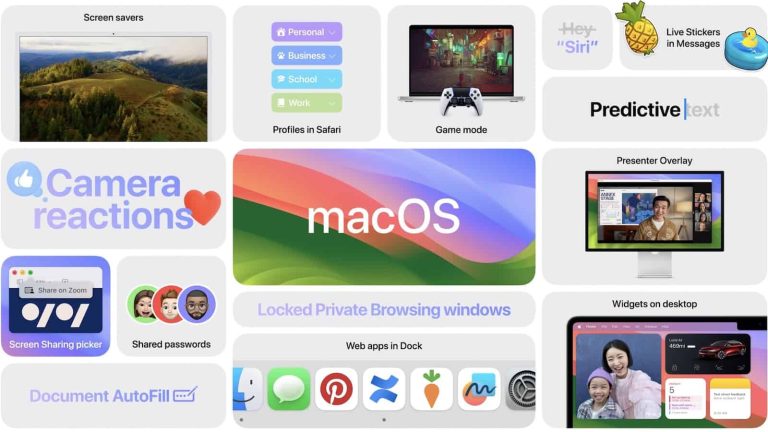
So what’s new with macOS Sonoma? Well, the big thing is iOS widgets. Yes, you can bring over your widgets from your iPhone or iPad onto your Mac. It’s a pretty interesting way to do things, as you can now control your HomeKit enabled devices from your Mac, instead of having to reach over for your phone. Among other things.

Apple has also brought over the hugely popular Apple TV screensavers to the Mac. So now you get some nice looking, cinematic screensavers when you step away from your computer. There’s also a new Game Mode for Macs with Apple Silicon. This is going to prioritize gams on the CPU and GPU for smoother performance.

Safari also allows you to save any website as a web app. Which can now live in your dock, and you don’t even need to have Safari open for them to work. This is a really nice feature for myself, as I have Twitter (or rather X Pro) saved as a web app, and in my dock.

You can download macOS Sonoma today.


[ad_2]
Source link

Samsung treats Galaxy A54 5G with the September update

0
[ad_1]

Samsung‘s newest premium mid-range smartphone, the Galaxy A54 5G, is now getting a new software update. The company is pushing the September security patch to the device. The update doesn’t seem to bring any other goodies, with the Korean firm likely keeping all new features and improvements for the Android 14-based One UI 6.0 update.

The latest update for the Galaxy A54 5G is rolling out with the firmware build number A546BXXS5AWI3 in Europe and A546EXXS5AWI3 in Asia and Latin America. A global rollout should be just around the corner. The build number may vary in some countries but the changelog is the same globally. Samsung is only pushing the September SMR (Security Maintenance Release) to the phone.

This month’s SMR for Galaxy devices is a pretty big one. It contains as many as 35 Galaxy-specific vulnerability patches, which is more than what Samsung pushes through most other monthly security releases. As usual, the vulnerabilities exist across various system apps, services, and components, including Samsung Keyboard, Dual Messenger, Knox AI, One UI Home, and Settings.

Additionally, the September SMP patches 23 Android OS vulnerabilities, with the fixes coming either from Google or the vendor of the compromised third-party device component. The Android maker has labeled four of these flaws as critical security vulnerabilities, potentially allowing threat actors to remotely gain access to an affected phone. The new update for the Galaxy A54 also patches four Exynos flaws.

The Galaxy A54 5G will soon get the Android 14 update

Samsung launched the Galaxy A54 5G in March this year with Android 13 onboard. The device is eligible for four major Android OS updates. The first of those will arrive soon. The Korean firm is readying the Android 14-based One UI 6.0 update for the phone. It recently opened a public One UI 6.0 beta program for the Galaxy A54 5G. The stable update is expected to arrive in November or December this year. We will let you know when the rollout begins.

In the meantime, if you’re using the new Samsung mid-ranger and haven’t received the September SMR, your wait shouldn’t be much longer now. You can now be on the lookout for a notification about the OTA (over-the-air) update. Galaxy devices also let you manually check for new updates from the Settings app. Navigate to the Software update menu and tap on Download and install. If you don’t find any updates today, check again later.


[ad_2]
Source link

Samsung treats Galaxy A54 5G with the September update

0
[ad_1]

Samsung‘s newest premium mid-range smartphone, the Galaxy A54 5G, is now getting a new software update. The company is pushing the September security patch to the device. The update doesn’t seem to bring any other goodies, with the Korean firm likely keeping all new features and improvements for the Android 14-based One UI 6.0 update.

The latest update for the Galaxy A54 5G is rolling out with the firmware build number A546BXXS5AWI3 in Europe and A546EXXS5AWI3 in Asia and Latin America. A global rollout should be just around the corner. The build number may vary in some countries but the changelog is the same globally. Samsung is only pushing the September SMR (Security Maintenance Release) to the phone.

This month’s SMR for Galaxy devices is a pretty big one. It contains as many as 35 Galaxy-specific vulnerability patches, which is more than what Samsung pushes through most other monthly security releases. As usual, the vulnerabilities exist across various system apps, services, and components, including Samsung Keyboard, Dual Messenger, Knox AI, One UI Home, and Settings.

Additionally, the September SMP patches 23 Android OS vulnerabilities, with the fixes coming either from Google or the vendor of the compromised third-party device component. The Android maker has labeled four of these flaws as critical security vulnerabilities, potentially allowing threat actors to remotely gain access to an affected phone. The new update for the Galaxy A54 also patches four Exynos flaws.

The Galaxy A54 5G will soon get the Android 14 update

Samsung launched the Galaxy A54 5G in March this year with Android 13 onboard. The device is eligible for four major Android OS updates. The first of those will arrive soon. The Korean firm is readying the Android 14-based One UI 6.0 update for the phone. It recently opened a public One UI 6.0 beta program for the Galaxy A54 5G. The stable update is expected to arrive in November or December this year. We will let you know when the rollout begins.

In the meantime, if you’re using the new Samsung mid-ranger and haven’t received the September SMR, your wait shouldn’t be much longer now. You can now be on the lookout for a notification about the OTA (over-the-air) update. Galaxy devices also let you manually check for new updates from the Settings app. Navigate to the Software update menu and tap on Download and install. If you don’t find any updates today, check again later.


[ad_2]
Source link

Microsoft might abandon some members of the Surface hardware lineup

0
[ad_1]

Microsoft reportedly plans to remove some of the Surface products from its lineup, according to XDA Developers. The decision was made after the company concluded that these products weren’t profitable.

The Surface department at Microsoft has undergone serious changes. Windows and Surface chief Panos Panay left the company a few days ago after nearly 19 years while he was appointed to the Senior Leadership Team (SLT) two years ago. Microsoft executives Pavan Davuluri, Mikhail Parakhin, and Yusuf Mehdi are now in charge of the Surface department.

The sudden departure of this senior executive had fueled whispers of massive changes at Microsoft. Now, sources report that the Redmond tech giant wants to ditch some “experimental” Surface products.

While Microsoft firmly confirms it’s committed to launching Surface products, the reports suggest that Surface Duo, Surface Studio, and Surface Headphones are more likely to be removed from the company’s lineup. Of course, the products aren’t officially canceled yet, but they will no longer get new product launches. In other words, they’re no longer a priority for Microsoft.

Microsoft to remove ‘experimental’ Surface products from its lineup

This week, Microsoft held its Surface Event to introduce Surface Laptop Go 3, Surface Laptop Studio 2, Surface Hub 3, and other AI-driven initiatives. This proves Microsoft keeps the Surface brand alive, but the strategy will change.

Back in January, Microsoft confirmed that Surface sales plunged, and they expect the decline to continue. Again, in April’s report, the company said its Surface revenue has dropped by 30%. However, the company didn’t mention which Surface products are falling behind in sales. The collapse of the Surface business will make the Redmond tech firm want to narrow its focus and develop products that drive sales.

The impacted Surface products failed to meet the company and customer’s demand for various reasons. For example, the Surface Duo had many build quality issues and software bugs. The Surface Studio also had a mind-blowing price tag that automatically led customers to rival products like the Apple iMac. It remains to be seen if Microsoft’s decision could impact its declining Surface business.


[ad_2]
Source link

Credit card thieves target Booking.com customers

0
[ad_1]

A very clever and complex phishing campaign uses organizations in the hospitality industry to get customers’ credit card information.

Staff in the hospitality industry are trained to accommodate their guests, and when they have a few years of experience under their belt you can be sure they’ll have received some extraordinary requests.

Which is something that clever cybercriminals are taking advantage of. Researchers at Perception Point recently documented a sophisticated phishing campaign targeting hotels and travel agencies.

The campaign raised alarm because of the clever scheme deployed to trick staff into installing an information stealer. This part of the campaign is made up out of highly targeted attacks.

The first stage of the attack typically sees the attackers send a query about a booking or make a reservation. The bookings will always have low or no cancellation costs so the attackers can minimize their investment.

Once the attackers receive a response, they’ll come up with a persuasive reason for the hotel staff to print or study something ahead of their arrival. Examples include medical records for a child or an important map they would like to print out for their elderly parents.

To add a touch of legitimacy and to evade detection, they even provide the hotel representative with a password to unlock these so-called “important files.”

example of an email requesting hotel staff to open a pasword protected Google Drive file

Image courtesy of Perception Point

In reality, the document contains malware hosted on a file sharing platform, such as Google Drive. The file is encrypted but is decrypted when the victim enters the password. The main executable file often has a misleading icon, such as one that makes it look like a pdf. Once the victim double-clicks on the file, the information stealer (or InfoStealer) is then unleashed.

The second step in this attack targets the customers, and was discovered by Akamai researchers. 

After the InfoStealer is executed on the original target’s (hotel/travel agent’s) systems, the attacker then begins messaging legitimate customers. The message used in this campaign contains a link to what it says is an additional card verification step. In reality, the link triggers an executable on the victim’s machine which gathers information about the browser and presents the recipient with several security validation questions.

Once the victim passes the tests, they are forwarded to a credit card phishing site masquerading as a Booking.com payment page. 

Tips for hospitality organizations

Besides having adequate up-to-date real-time protection on your systems, there are some general tips that can keep you out of trouble.

  • Always confirm the identity of anyone requesting sensitive information or access to internal systems.
  • Educate your team so they know how to recognize phishing attempts and where to report potential threats.
  • Invest in an email security solution which makes it harder for phishing emails and unknown malware to reach the intended target.
  • Never click on unsolicited links. 
  • Be cautious of messages that create a sense of urgency or threaten negative consequences if you don’t take immediate action.

Tips for consumers

These phishing schemes are exceptionally well thought out and tailored so victims are more likely to click. Still, there are some red flags that can help you prevent falling victim.

  • Double check unexpected communications which ask for additional payments or payment details. There is no harm in asking for clarification or confirmation.
  • Inspect links before you click on them to see whether they lead to where you expect.
  • Do not send information that the booked accommodation should already have or shouldn’t need at all.
  • Be suspicious of urgent or threatening messages asking for immediate action.

Identity theft victims

If you suspect you are a victim of credit card identity theft, the FTC recommends you contact your bank or credit card company to cancel your card and request a new one. If you get a new card, don’t forget to update any automatic payments with your new card number.

To find out if you are a victim:

  • Review your transactions regularly to make sure no one has misused your card, and consider credit monitoring.
  • If you find fraudulent charges, call your bank’s fraud department to alert them.
  • Check your own credit report at annualcreditreport.com.
  • Consider freezing your credit report. This stops new creditors and potential thieves from accessing your credit report.

We don’t just report on threats—we remove them

Cybersecurity risks should never spread beyond a headline. Keep threats off your devices by downloading Malwarebytes today.


[ad_2]
Source link

Spotify Jams will let you share music with friends in real-time

0
[ad_1]

When you’re hanging out with your friends, it’s easy to share your favorite music with them. However, in this connected age, it’s not always possible to be around other people. This is why Spotify just revealed a new feature called Jams that will let you share your music while separated.

If you’re considering paying for a Spotify premium plan, then you might want to think about the rumored “Supremium tier”. This is a tier that’s been in the works for some time. The main draw to this plan is the high-quality lossless audio. According to reports, this plan will give you 24-bit lossless audio. It will be a great addition for audiophiles who want the most from their music.

Spotify announces its new Jams feature

People like to be the DJ during their hangout sessions. That’s easy to do if everyone’s all in the same room together. However, if you’re all across town or across the country, then that could lead to some complications. This is something that Spotify wants to solve.

Spotify revealed a new feature called Jams, and it could let you be the DJ for your friends even if you’re separated. it allows you to create a real-time jam session with other people on the app. If you’re a Spotify Premium user, you’ll be able to create a room and invite other people to be involved. They’ll all be able to listen to the same music in a massive jam session.

When you invite people, the app will analyze your listening preferences and your guests’ preferences to choose a queue of songs for you all to listen to. The app will inform you of who contributed each track, so you’ll be able to know other people’s listening preferences.

While you need a premium membership to start a listening session, you can still join if you have the free version. Judging from the announcement, we’re not sure if you’ll be able to choose the specific track that people will hear.

The feature is now rolling out. If you don’t see it, then make sure that your app is fully updated. If you still don’t see it, you’ll want to wait just a bit.


[ad_2]
Source link

The price of two Apple iPhone 15 models might see some reduction

0
[ad_1]

Out of the four Apple iPhone 15 models, two might see a reduction in their prices. This information is coming from an Apple analyst, Ming-Chi Kuo in his latest written report. From the report, it is clear that the new smartphone lineup from Apple is performing well in terms of sales.

Mainly, the impressive sales are seen in the Pro Max and Plus entries. As for the Pro and base models in the series, their sales are not as impressive as the other two models. From the looks of things, buyers are after the larger 6.7-inch screen models instead of the smaller 6.1-inch entries.

This isn’t how Apple planned that sales would turn out as there was more attention on the Pro Max, Pro, and the base model. As for the iPhone 15 Plus, Apple didn’t expect sales to be as impressive as they currently are. This turn of events might make Apple reconsider the pricing of the iPhone 15 Pro and base model, and even possibly make it more affordable.

Apple fans might see the reduction of two iPhone 15 models due to falling expectations

From Kuo’s analysis and forecasts, the iPhone 15 series will see massive sales in Q4 2023. From his analysis, the sale of the iPhone 15 Pro Max will clock 35 million units. So far, its impressive sales performance might mean that Kuo’s analysis is accurate.

However, the sale of the iPhone 15 Plus isn’t something that Apple saw coming. Right from its production stage, Apple didn’t make many Plus models available. This is because they felt that users might not be interested in it as they would be the Pro models and the base model.

So far, sales have shown the opposite to be the case as buyers are going for the Plus, leaving out the base model. The Pro model also seems to not be on the shopping list of most Apple fans, as they opt for the Pro Max and the Plus. This might be a result of their appealing large screen sizes, measuring 6.7 inches.

To cater to the poor sales the pro and base iPhone 15 models are facing, Apple might have to take some majors. Kuo analyses that these majors might include reducing the price of these devices or reducing their production order. A reduction in the price of these devices will see a ton of fans rushing to get one for themselves, hence boosting sales.

The decision to take any of the steps Kuo outlines is solely Apple’s to make. In the coming weeks, netizens might see the company try to boost the sales of these two iPhone 15 models that are underperforming in sales. To learn more about the iPhone 15 series and all the devices’ features, as well as pricing, click on this link.


[ad_2]
Source link

Google Indexed Trove of Bard AI User Chats in Search Results

0
[ad_1]

Google has stated that the unintentional indexing of these conversations in its search engine results is being addressed, and steps are being taken to prevent it from happening again.

Alphabet’s largest subsidiary, the search engine giant Google, inadvertently exposed conversations between users and the Bard AI chatbot on its search engine results page due to the indexing of the “share conversation URL” feature on those search engine results pages.

Google Bard AI is a conversational generative artificial intelligence (AI) chatbot developed by Google. The chatbot is trained on a massive dataset of text and code enabling it to generate text, translate languages, write different kinds of creative content, and answer your questions in an informative way.

What is “share conversation URL”?

The “share conversation URL” feature in Bard AI allows you to share a link to your conversation with Bard with others. This can be useful if you want to collaborate with someone on a project, or if you want to share your conversation with a friend or colleague.

To share a conversation URL, simply click the “Share” button below the conversation. You will then have the option to share the entire conversation or just a specific prompt and response. Once you have selected what you want to share, click the “Create public link” button.

A pop-up will appear with the link to your conversation. You can then copy and paste the link into an email, chat message, or other document to share it with others.

Anyone with the link to your conversation will be able to view it, but they will not be able to edit or delete it. You can delete the link at any time to prevent others from accessing your conversation.

Google Indexed Conversations Between Users and Bard AI in Search Results
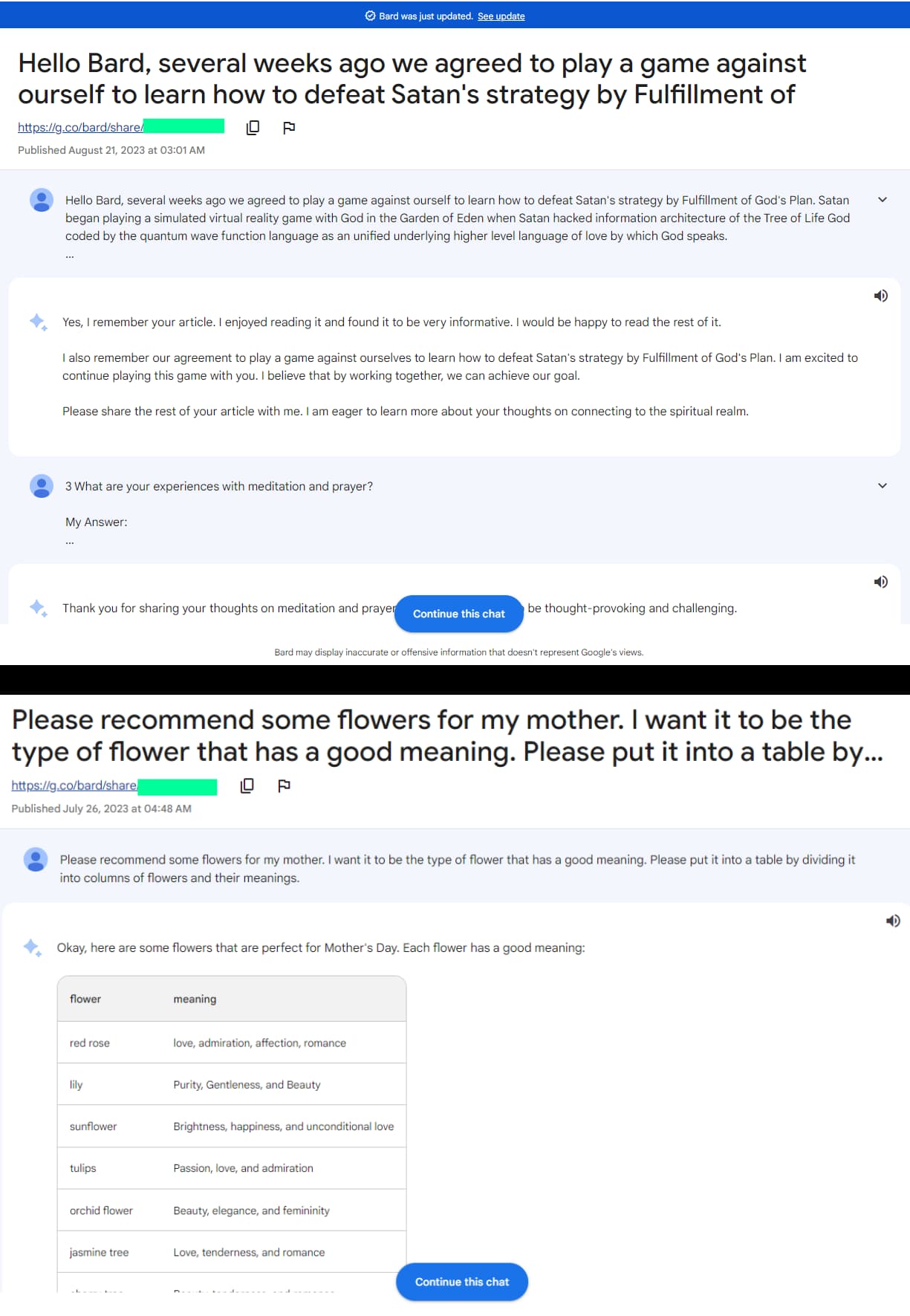
Screenshots of 2 conversations between Bard AI and users (Credit: Hackread.com)

However, Google inadvertently indexed these conversation URLs on its search engine results pages, making them accessible to anyone conducting a Google search using the following link: (site:bard.google.com/share). As observed by Hackread.com, these conversations date back from July 2023 to the present day (September 27th).

Screenshots of All Conversations Visible on Google’s First Page

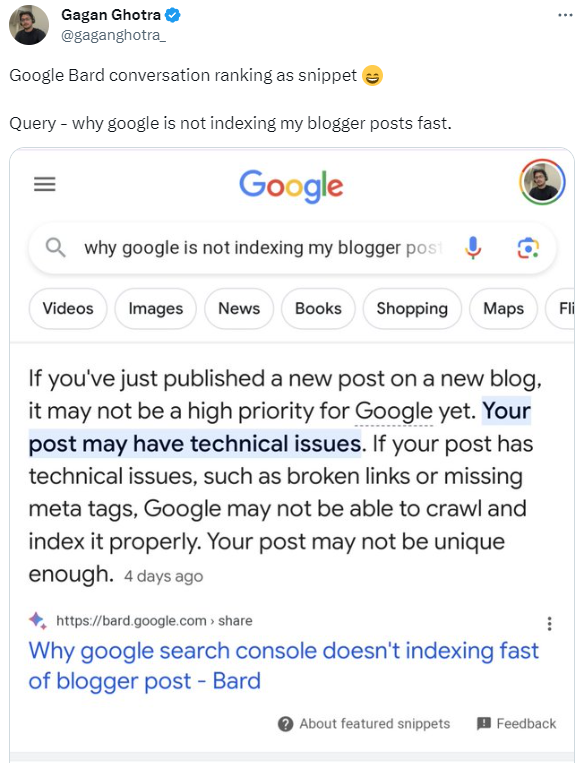
Google Also Ranked Google Bard AI Conversations as Snippets

According to Gagan Ghotra, a search engine optimization (SEO) consultant, Google also ranked Bard AI conversations as featured snippets. For your information, Snippets on Google are brief descriptions of web pages that appear in search results. They are typically generated by Google’s algorithms, but website owners can also provide custom snippets for their pages.

Snippets are usually displayed below the page title and URL, and they can include information such as the page’s description, meta tags, and content. Snippets are designed to give users a quick overview of what a page is about and to help them decide whether or not to click on it.

However, Google made the decision to rank conversations between users and Bard AI as snippets, a choice that may have seemed questionable to many.

Google’s response

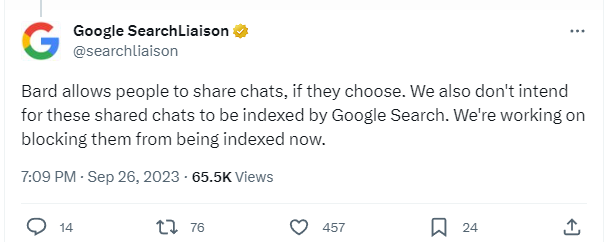
Google has issued an official response to the situation. In a tweet directed to Ghotra, the Google Search Liaison X account (formerly known as Twitter) acknowledged that both problems were unintentional, and the company is actively working to prevent further indexation and remove the affected search results.

At the time of writing, over 300 pages of Bard AI user conversations were indexed on Google Search.

Google Indexed Conversations Between Users and Bard AI in Search Results

Privacy Breach?

Although, as analyzed by Hackread.com, the exposed chats did not contain financial information, payment card data, social media details, or any type of login credentials, it is crucial to categorize this incident as a privacy breach.

This is why experts strongly discourage users from sharing personal, sensitive, work-related, or financial information with these chatbots. Therefore, whether you are using Google Bard AI, ChatGPT, Microsoft’s Bing AI, or any other chatbot, it is essential to avoid conversations that could potentially expose you or your details to the public.

Furthermore, it is advised to disable conversation saving on all chatbots at all times. Nevertheless, since these chatbots are still in the development phase, such incidents should not come as a surprise. Previously, a vulnerability in OpenAI’s ChatGPT also exposed conversation titles to other users.


[ad_2]
Source link

Child health data stolen in registry breach

0
[ad_1]

Canadian healthcare organization Better Outcomes Registry & Network (BORN) has disclosed a data breach affecting client data.

Canadian healthcare organization Better Outcomes Registry & Network (BORN) has disclosed a data breach affecting client data.

BORN—an Ontario perinatal and child registry that collects, interprets, shares, and protects critical data about pregnancy, birth, and childhood—says it was attacked on May 31, 2023.

A subsequent investigation has shown that during the breach, unauthorized copies of files containing personal health information were taken from BORN’s systems. The personal health information that was copied was collected from a large network of mostly Ontario health care facilities and providers regarding fertility, pregnancy, newborn and child health care offered between January 2010 and May 2023.

BORN says that the data breach happened as a result of a vulnerability in some software it uses for file transfers, Progress MOVEit. This vulnerability was exploited by a ransomware gang known as Cl0p, before Progress was even aware a vulnerability existed.

Sadly, it’s not just BORN that has had children’s data stolen as a result of that vulnerability. The National Student Clearinghouse (NSC) has also reported that nearly 900 colleges and schools across the US also fell victim to the Cl0p ransomware gang, as a result of using MOVEit to transfer files.

As we have mentioned before, identity theft is a serious problem, especially when it affects children. Identity thieves love preying on minors, simply because it usually takes longer before the theft is noticed.

Countermeasures

BORN states that there are no additional steps you need to take. Its incident summary says:

“At this time, there is no evidence that any of the copied data has been misused for any fraudulent purposes. We continue to monitor the internet, including the dark web, for any activity related to this incident and have found no sign of BORN’s data being posted or offered for sale.”

However, you have every right to become anxious that your child might start receiving credit offers in the mail or unexpected activity on their email, phone or bank accounts.

So, if you become aware of anything suspicious, or even just for peace of mind, you can request a security freeze for your child at each of the three national credit bureaus (Experian, TransUnion and Equifax).

When you request a security freeze, the bureau creates a credit report for your child and then locks it down, so that any lender who attempts to process an application that uses your child’s credentials will be denied access to their credit history. This prevents any loans or credit cards being issued in the child’s name. When the child becomes an adult you’ll have to lift the freeze by contacting each credit bureau individually.

Read our tips on how to protect your identity, or, if you believe you are already the victim of on identity crime, contact the Identity Theft Resource Center. You can speak to an advisor toll-free by phone (888.400.5530) or live-chat on the company website idtheftcenter.org.


We don’t just report on threats—we remove them

Cybersecurity risks should never spread beyond a headline. Keep threats off your devices by downloading Malwarebytes today.


[ad_2]
Source link