Cybersecurity isn’t limited to defending against malware anymore; it’s about ensuring your entire digital identity remains unscathed and your private details remain private.
Today, I am absolutely thrilled to share some exciting news: Malwarebytes is officially welcoming Cyrus Security into our family. This acquisition signifies an exciting chapter in our journey, and I wanted to share why this development is so special, and what it means for the millions who trust Malwarebytes to keep them safe.
We have always been committed to keeping you safe and secure in the digital landscape. But cybersecurity isn’t limited to defending against malware anymore; it’s about ensuring your entire digital identity remains unscathed and your private details remain private. With Cyrus Security’s specialized solutions, we can further our promise, delivering a more comprehensive protective shield.
Cyrus Security, much like Malwarebytes, has been an innovative force in the cybersecurity realm.
Its relentless focus on protecting users from identity theft and ensuring online privacy has consistently impressed us. Merging our forces means bringing together two of the industry’s brightest minds.
Cyrus security’s skills, expertise and technology will complement Malwarebytes’ advanced threat detection and remediation capabilities in a number of exciting ways:
Mobile security expertise
One of the standout aspects of Cyrus Security is its unparalleled expertise in mobile user experience. As our world becomes more mobile-centric, this proficiency is crucial. With Cyrus on board, our users can expect even more robust protection on their mobile devices, ensuring safety on-the-go.
Expanding our toolset
Cyrus Security’s cutting-edge technologies will soon be integrated into our product suite. Imagine the robust Malwarebytes protection you know and love, now amplified with Cyrus’s identity protection tools. It’s a combination that promises to enhance the security of our customers, no matter what device they are using.
Growth and learning
Every acquisition is a two-way street. While we’re eager to integrate Cyrus Security’s tools into our portfolio, we’re equally excited about the knowledge exchange, the shared learnings, and the new perspectives that will enrich our team.
A Future Full of Possibilities
With the combination of Malwarebytes and Cyrus Security, we are gearing up to explore emerging aspects of cybersecurity we haven’t ventured into before. This acquisition isn’t just about what we can offer now, but what we can develop and deliver in the future.
To our Malwarebytes family–both old and new–this acquisition is a testament to our commitment to you. Your safety, your trust, and your peace of mind are what drive us every day. With Cyrus Security on board, we’re more equipped than ever to champion these values.
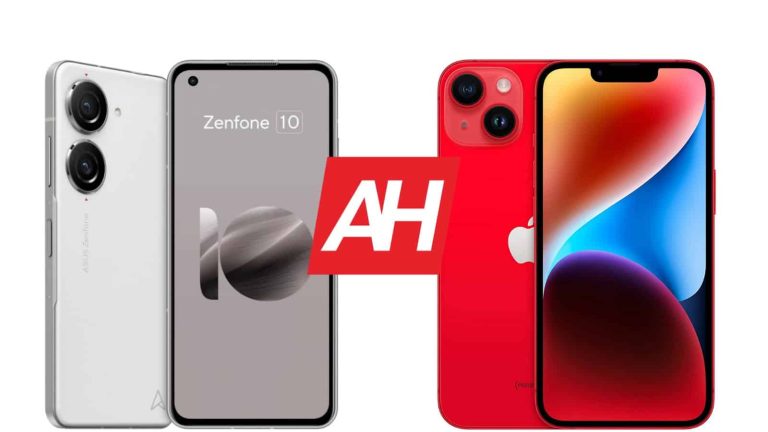
The ASUS ZenFone 10 is the company’s latest and greatest smartphone. This phone is considered to be one of the best compact smartphones on the market, and for a good reason. In this article, we’ll compare the ASUS ZenFone 10 vs Apple iPhone 14, another rather compact device. If you’re looking to get a compact phone, regardless of the platform, these two are worth considering.
We’ll first list their specifications, and will then go to compare them across a number of categories. We’ll compare their designs, displays, performance, battery life, cameras, and audio performance. Both of these phones have a lot to offer, but they’re also quite different at the same time. Let’s get to it!
Both devices have flat sides all around, and also curved corners. The ZenFone 10 does fit a bit better in the hand due to the chamfered edges on its frame. It also has a grippy backplate which seems to be a fancy plastic, rubberized one. It almost feels like eco-leather. The iPhone 14 has glass on the back, which is, of course, not grippy at all. Both phones do include a flat display, and thin bezels. The ZenFone 10 has a display camera hole in the top-left corner, while the iPhone 14 includes a display notch at the top.
Needless to say, the display camera hole is far smaller, and far less annoying. The backplate on the ZenFone 10 is also a bit curved towards all sides, which makes it fit in the hand a bit better. Speaking of the back, there are two camera islands on the ZenFone 10. Each of them hosts a single camera. The iPhone 14 also has two cameras on the back, though they’re a part of the camera camera island.
The two devices are equal in terms of height, but the ZenFone 10 is narrower, noticeably. It is also a bit thicker than the iPhone 14. The two phones weigh exactly the same, they both clock in at 172 grams. They also both offer IP68 certification for water and dust resistance. The ZenFone 10 is far grippier, and easier to use with one hand too. Both feel like high-end devices, they’re really well built.
ASUS ZenFone 10 vs Apple iPhone 14: Display
You will find a 5.92-inch fullHD+ (2400 x 1080) Super AMOLED display on the ZenFone 10. That panel is flat, and it supports a 144Hz refresh rate. It also supports HDR10+ content, and its brightness gets up to 1,100 nist at its peak. The display aspect ratio is 20:9, and the panel is protected by the Gorilla Glass Victus.
The iPhone 14, on the flip side, includes a 6.1-inch fullHD+ (2532 x 1170) Super Retina XDR OLED display. That panel is also flat, and it offers a 60Hz refresh rate. It supports HDR10 content, and also Dolby Vision. Its brightness gets up to 1,200 nits at its peak, while the display aspect ratio is 19.5:9. This panel is protected by Ceramic Shield Glass.
It is worth noting that the colors on both displays are quite vivid, vibrant. The viewing angles are also very good, while the blacks are deep, as you’d expect. The touch response is also good, while the max brightness is comparable. It’s good enough, though not up to par with some other flagship phones. The ZenFone 10 panel does have one major advantage, its refresh rate. It’s much higher than the one on the iPhone 14, and you do feel that while scrolling, etc.
ASUS ZenFone 10 vs Apple iPhone 14: Performance
The Snapdragon 8 Gen 2 fuels the ASUS ZenFone 10. ASUS also included up to 16GB of LPDDR5X RAM inside the phone, along with UFS 4.0 flash storage. The iPhone 14, on the other hand, is fueled by the Apple A15 Bionic chip, while the phone includes 6GB of RAM, and NVMe storage.
The ZenFone 10 does have a clear advantage in the RAM and storage departments, as it has newer hardware. Both of these processors are immensely powerful, however. Both smartphones do offer outstanding performance. The iPhone 14 can keep up with its ‘Pro’s sibling even, and the ZenFone 10 is one of the fastest smartphones of the year. They can both run even the most demanding games in their app stores, and they offered outstanding performance when it comes to regular, everyday tasks. That goes for opening and closing apps, multitasking, browsing, consuming multimedia, and so on. No complaints here.
ASUS ZenFone 10 vs Apple iPhone 14: Battery
The ASUS ZenFone 10 comes with a 4,300mAh battery, while the iPhone 14 has a 3,279mAh battery pack. iPhones usually have noticeably less battery capacity due to a different way iOS works, so they don’t need as much power. Having said that, both phones do offer really good battery life, but the ZenFone 10 definitely sits above the iPhone 14 in that regard. It goes above and beyond in terms of battery life, and has one of the best battery life numbers we’ve seen this year. That is a bit surprising for a small phone, but there you go, kudos to ASUS.
You’ll be able to cross the 8-hour screen-on-time mark on the ZenFone 10 with ease, at least we were able to. In fact, the phone went above the 10-hour screen-on-time mark for us, several times. The iPhone 14 will offer closer to 7 hours of screen-on-time. These are only our numbers, of course, without gaming thrown into the mix, with our usage. Your mileage may vary, of course, possibly even quite considerably.
Now, in terms of charging. The ZenFone 10 supports 30W wired, 15W wireless, and 5W reverse wired charging. The iPhone 14 offers support for 20W wired, 15W MagSafe wireless, and 7.5W Qi wireless charging. Not only does the ZenFone 10 offer faster charging, but it also comes with a charger in the box, which is not something we can say for the iPhone 14.
ASUS ZenFone 10 vs Apple iPhone 14: Cameras
The ZenFone 10 includes a 50-megapixel main camera, and a 13-megapixel ultrawide camera (120-degree FoV). The Apple iPhone 14, on the other hand, includes a 12-megapixel main camera, and a 12-megapixel ultrawide unit (120-degree FoV). Both smartphones are capable to produce really good photos, and also do a great job in the video department. They’re not at the top of the food chain in terms of photography, though.
The ZenFone 10 delivers a massive improvement compared to the ZenFone 9, in terms of sharpening. The ZenFone 9 had a tendency to oversharpen photos, quite a bit. That’s no longer the case, and the phone manages to provide well-balanced, vivid shots. The iPhone 14 does a great job too, though it does have a tendency to mess up the highlights, at times. Other than that, it does a really good job.
The iPhone 14 tends to keep low light images closer to real life, while the ZenFone 10 likes to boost the brightness a bit. They both do a really good job in low light, though. The video recording is great on both, and both offer outstanding stability. Gimbal OIS on the ZenFone 10 really shines during video recording.
Audio
You will find a set of stereo speakers on both of these smartphones. Those speakers are well-optimized on both, and provide clear, and well-balanced sound. They’re loud enough, though the iPhone 14 does offer louder speakers in comparison.
The ZenFone 10 does have one thing the iPhone 14 does not in terms of audio hardware, a headphone jack. If you want to connect a wired set of headphones to the iPhone 14, you’ll need to do it through the phone’s Lightning port.
Cybersecurity firm ESET’s researchers have identified a vulnerability affecting Acer laptops. The bug isn’t new, as ESET already discovered it affecting Lenovo models, whereas this time, it is impacting several models of Acer laptops.
Lenovo fixed the issue and published a technical advisory. However, the bug allows attackers to install malware on the device by letting them disable Secure Boot and bypass security mechanisms.
Vulnerability Details
ESET assigned the vulnerability a CVSS score of 8.1 and tracked it as CVE-2022-4020. It was discovered in the HQSwSmiDxe DXE driver that checks the ‘BootOrderSecureBootDisable’ NVRAM variable for deactivating UEFI (Unified Extensible Firmware Interface) Secure Boot.
In addition to #Lenovo vulnerabilities we disclosed earlier this month, we discovered another similar vulnerability in #Acer laptops. Same as in Lenovo case, it allows deactivating UEFI Secure Boot by creating NVRAM variable directly from OS. @smolar_mhttps://t.co/zsDjKGIAjQ 1/3— ESET research (@ESETresearch) November 28, 2022
Disabling this feature lets the attacker load their “own unsigned malicious bootloader” so as to gain complete control over the OS loading procedure. Moreover, they can bypass or disable protections to discreetly install malicious payloads, ESET advisory read.
“Vulnerability in the HQSwSmiDxe DXE driver on some consumer Acer Notebook devices may allow an attacker with elevated privileges to modify UEFI Secure Boot settings by modifying an NVRAM variable,” researchers explained. NVRAM refers to non-volatile random-access memory variables.
Acer’s Explanation
For your information, UEFI is responsible for kickstarting a computer’s hardware while the OS loads. The Secure Boot process has to ensure that malicious code doesn’t get loaded when the device is booting.
On November 23rd, 2022, Acer explained that the bug lets the attacker tamper with this mechanism’s settings by creating NVRAM variables. This happens because the firmware driver just checks for the variables’ presence and not their actual value.
At least five models of Acer computers are impacted by this bug, including A315-22, A115-21, A315-22G, Extensa EX215-21, and EX215-21G. Acer is currently trying to resolve the issue with a BIOS update, which will be posted on its Support site soon and will be included as a Critical Windows Update. The company recommends users update to the latest BIOS version.
One Punch Man: World is an upcoming action title published by Crunchyroll games and developed by Perfect World, and a new trailer just dropped today that shows off multiplayer combat, new bosses and more. There’s also a fair bit of anime cutscenes included. These may not be actual gameplay but they do serve to push the hype train forward. Especially for fans of the show and the manga.
While you can play the game solo, its multiplayer aspect is bound to deliver some good times with friends. If you haven’t seen the trailer yet, you can view it below to catch glimpses of some of the game’s included bosses. The trailer doesn’t show off all of them mind you. But it does give players a look at iconic villain characters that they’ll be able to fight. Including Crablante, Subterranean King, Vaccine Man, Mosquito Girl, Beast King, and Carnage Kabuto.
One Punch Man: World multiplayer combat involves raids
I first learning about this game and hearing there’s multiplayer combat, you might assume it’s PvP-based. And there honestly could be some PvP in this game at some point. But the multiplayer combat we’re talking about right now is PvE. So you’re grouping up with other players for completing content.
That kind of content will be raids with tougher challenges and bosses compared to other encounters in the game. So you’ll need a group to down these mega enemies. As in any MMO or MMO-like game. What’s more is that there are multiple playable characters from the show. So you can end up having an eclectic mix of party members.
Multiplayer combat and big boss battles won’t be the only gameplay elements though. There’s also going to be what looks like a pretty good time with an explore mode. Where you can run around the city and take in the game world as your favorite heroes. You’ll meet new people you can talk to and may even stumble on some quests to pick up. It has a whole Persona 5 vibe to it.
One Punch Man: World doesn’t have a release date yet but you can pre-register for it right now.
Last week code was found within Android which revealed a feature in progress for Google Keep. This alluded to the possibility of adding rich text formatting to notes within Google Keep, a highly requested feature for those that use the app regularly.
However, as the discovery had not rolled out to any users yet, all we had to go on at the time were the screenshots and notes provided by by Mishaal Rahman on his X post. Thankfully, we didn’t have to wait long for official word, as Google has now made an announcement via its Google Workspace Updates Blog.
In the official announcement, Google revealed that Google Keep will be gaining new text formatting options to notes on Android devices. The company cites the amount of users requesting this feature as its motivation for following through.
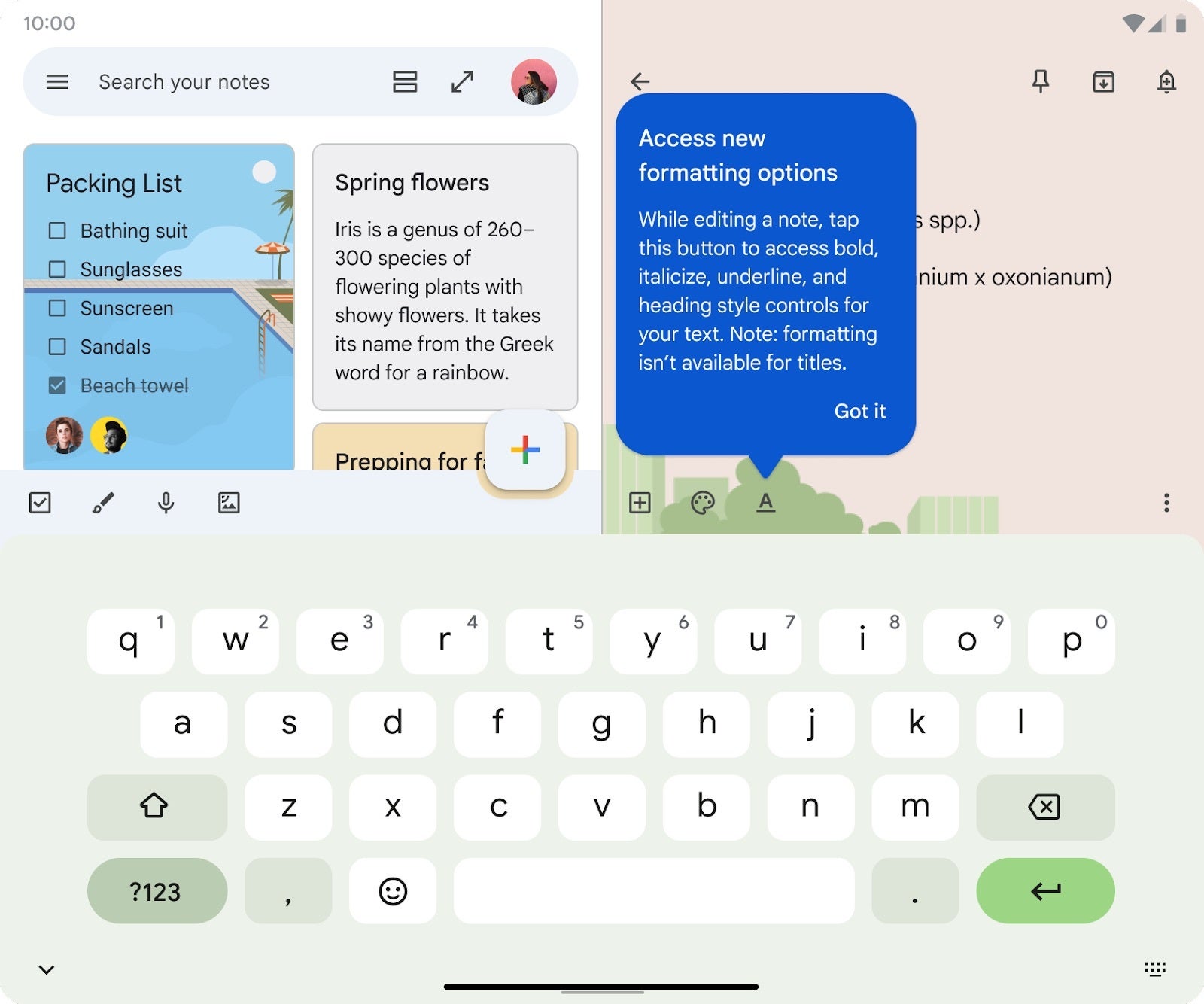
The new formatting options allow for users to customize notes by making text bold, italic, or underlined. You can also choose from different heading styles, such as H1 and H2.
Source – Google
For now, the new formatting options will only be available for new notes, although support for existing notes is expected to be added in the coming weeks. The rollout begins today for all Google Workspace customers and users with personal Google Accounts, although it make take up to two weeks for the feature to reach all users.
To use the new formatting options, simply tap on the text you want to format and then select the desired option from the toolbar. However, keep in mind that text formatting is only available on Android devices, so if you open a note with formatting on a desktop browser or an iOS device, any formatting you had previously applied won’t be visible there.
Even though the addition of formatting options to Keep does not bring it up to the same level as more advanced note-taking apps such as Microsoft’s OneNote or Squid, especially when you can only see the formatting changes on Android, it is definitely a good start to a feature that has been so highly requested for such a long time.
Discord Notifies Users of March Data Breach Impacting 180 Accounts.
Contrast Between Discord’s March Breach and Discord.io’s Recent Attack.
Discord.io Breach Affects 760,000 Users; Company Suspends Services.
Discord.io Exploits Vulnerability, Auctions Stolen Data Including Hashed Passwords.
Discord Responds: Comprehensive Overhaul to Strengthen Security Measures.
Discord, the popular communications server with approximately 150 million monthly users, has recently started notifying a subset of its user base about a data breach that occurred in March.
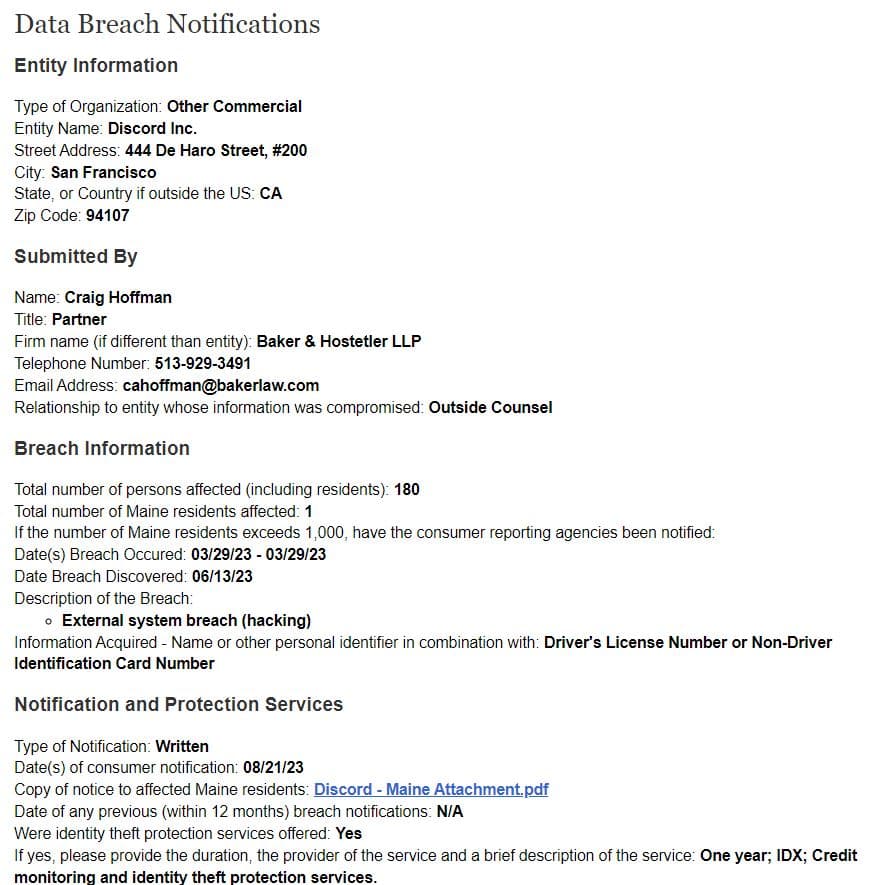
The breach, which was publicly acknowledged by Discord in May 2023, impacted a total of 180 accounts, according to a data breach notification filed with the Office of the Maine Attorney General.
Discord.io, a platform enabling Discord users to generate customized links for their channels, suffered a major breach on August 14. The attacker exploited a vulnerability within the website’s code, subsequently auctioning off stolen data, including hashed passwords, billing information, and Discord IDs.
As a response to the breach, Discord.io announced the suspension of its services. The company is now committed to a comprehensive overhaul of its website’s code and security practices to bolster its defence mechanisms against future breaches.
While the Discord.io incident primarily impacts users’ personal information, the breach in March involved the compromise of a customer support agent’s account. This breach allowed malicious actors to access user email addresses, support tickets, and communications exchanged with Discord’s support team.
Discord’s disclosure to the state of Maine’s attorney general office included a thorough investigation into the compromised support tickets. The findings revealed that the personal information of at least one Maine resident, encompassing their name and driver’s license or state identification card number, had been exposed. This information was subsequently used to inform and notify the affected individuals.
Discord’s disclosure to the state of Maine’s attorney general office
Discord is taking proactive measures to bolster its security infrastructure. Alongside enhancing the security of its platform to protect its user base, Discord is also providing credit monitoring and identity theft protection services to the impacted users to mitigate potential further damage.
The malware Raspberry Robin is distributed via external drives and uses a Microsoft Standard installer to execute malicious commands.
Red Canary’s Detection Engineering team has discovered a new worm-like Windows malware being distributed via removable USB drives. The malware was detected in several customer networks, mainly in the manufacturing and technology sectors.
About Raspberry Robin
Red Canary intelligence analysts attributed the malware to the Raspberry Robin cluster, noting that the worm leverages “Windows Installer” to access QNAP-linked domains and download a malicious DLL.
Raspberry Robin’s activity was first documented in September 2021. The operator’s objective is unclear, and researchers are also clueless about when and how the external drives get infected. They suspect that this infection occurs offline.
Attack Chain Details
Raspberry Robin’s attack chain starts with connecting an infected external/USB drive to a Windows device. Researchers noted that adversaries use msiexec.exe to deliver malware while “Raspberry Robin uses msiexec.exe to attempt external network communication to a malicious domain for C2 purposes.
Lauren Podber and Stef Rand Red Canary
The external drive is equipped with the worm payload that appears as a .LNK shortcut file in a legit folder. The worm creates a new process using cmd.exe to read/execute the malicious file on the USB drive.
According to Red Canary’s blog post, once this is done, the worm launches explorer.exe and msiexec.exe. The latter is used to establish network communication with a rogue domain and for downloading/installing the DLL library file.
Raspberry Robin event outline (Red Canary)
This DLL file is loaded and executed using legitimate Windows utilities like rundll32.exe, fodhelper.exe, and odbcconf.exe to bypass the UAC (User Account Control). Researchers also detected an outbound C2 contact involving regsvr32.exe, dllhost.exe, and rundll32.exe processes to IP addresses linked with Tor nodes.
Regarding why the worm installs a malicious DLL, the researchers were unclear. They hypothesized that it could be done to maintain persistence on the infected machine.
Samsung is reportedly planning to launch a rollable smartphone in 2025. The device will come with an under-display or under-panel camera (UPC) and feature a bezel-less design, noted industry insider @Tech_Reve reports. The product doesn’t yet have a name.
After foldables, rollable or slidable smartphones are said to be the next step in smartphone evolution. Several companies are exploring this design, with a few of them publicly showcasing prototypes and concept devices. Samsung has been toying with the idea for the past few years.
The Korean firm has already secured patents for various rollable and slidable smartphone designs. In the meantime, its display division, Samsung Display, has unveiled several big-size OLED panels that can be rolled into a small package when not in use. In May this year, the company took one such solution to the SID Display Week 2023 in California.
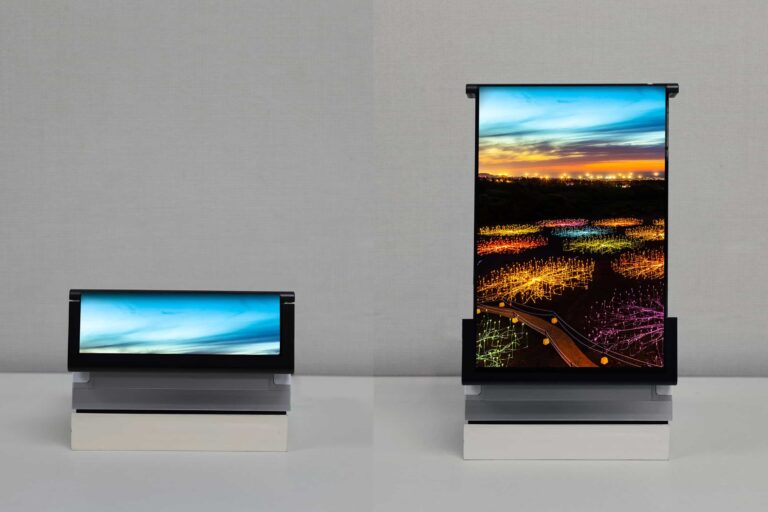
Called Rollable Flex, this OLED panel measures 254.4 mm (or ten inches) in length when extended fully. But if you want to roll it down, the whole screen can hide within a 49 mm (less than two inches) package. That’s a 5X scalability of the screen. It solves the portability issue with large-screen devices. Current foldable smartphones offer a 3X scalability, or even lower.
Of course, Samsung Display didn’t talk about the commercial availability of the Rollable Flex as a smartphone. That isn’t part of its business. The Korean firm’s mobile division (called MX or Mobile Experience) handles that. However, it was only a matter of time before the two units of the Samsung Group came together and worked on a real-world product. And they seem to have something in the pipeline.
Samsung is readying its first rollable smartphone
According to the new rumor, Samsung will begin the mass production of its first-gen rollable smartphone in 2025. The source didn’t share a more precise timeline, but the device will probably arrive alongside the company’s foldables — Galaxy Z Fold 7 and Galaxy Z Flip 7 — around August. That’s unless Samsung plans to give the new rollable more space in the market. In that case, it could arrive separately earlier or later than that.
Alongside the new rollable, Samsung is also working on improving its UPC tech. The company has used an under-panel camera on its Fold series foldables since the Galaxy Z Fold 3 in 2021. Two years on, the image quality is still quite poor. There have been improvements, but not big enough. We’ll have to wait and see what changes over the next couple of years.
Dubbed VirusTotal Hacking; the attack allowed researchers to access 1,000,000 login credentials exfiltrated by unencrypted crypto wallets and different types of malware.
Security researchers at SafeBreach have discovered a way to collect huge amounts of stolen user credentials only by executing searches on VirusTotal. For your information, VirusTotal is an online platform used to examine suspicious URLs and documents.
The problem with this new finding is that VirusTotal can be exploited to steal large amounts of credentials without hacking an organization’s network or buying the credentials.
Research Findings
According to SafeBreach researchers, they could collect over 1,000,000 credentials exfiltrated by unencrypted cryptocurrency wallets and different types of malware. The researchers managed to conduct the hack by executing simple searches using a $679 VirusTotal license and tools.
It all started with the curiosity to identify the kind of data a cybercriminal or hacker could collect if they have a VirusTotal license. A user with this license can perform a wide range of tasks such as searching for the service’s dataset with several queries to reveal the file type, submitted data, file name, country, file content, etc.
How Was The Hacking Planned?
SafeBreach researchers decided to hack VirusTotal to determine if a cybercriminal could exploit this service to steal credentials. Their research was based on the Google Hacking method.
This method is used by criminals to scan for vulnerable websites, web shells, Internet of things devices, and sensitive data leaks. Researchers revealed in their report that most information stealers collect credentials from various platforms like forums, browsers, and mail accounts and write them to a hard-coded filename, for instance, all_credentials.txt.
This file is then exfiltrated to the attacker’s C2 server from the targeted device. SafeBreach’s team of researchers used VirusTotal tools and APIs like VirusTotal Graph, Search, and Retrohunt to find files containing stolen data. SafeBreach’s director of security research, Tomer Bar, stated that this is a pretty straightforward technique to steal data from VirusTotal.
It is quite a straightforward technique, which doesn’t require a strong understanding of malware. All you need is to choose one of the most common info stealers and read about it online.
Tomer Bar – SafeBreach
Malware Used in the Research
According to SafeBreach’s report, researchers used known malware like Azorult, RedLine Stealer, Raccoon Stealer, and Hawkeye in their experiment. They also used popular forums like Snatch_Cloud, DrDark to uncover sensitive data that is readily available to criminals in VirusTotal.
Furthermore, researchers used VirusTotal Query to look for binaries identified by an antivirus engine. They got 800 results in return. Then they searched for files titled DomainDetects.txt. This is one of the file names that the RedLine malware can exfiltrate. They received hundreds of exfiltrated files in return.
Example of password file exfiltrated by RedLine malware (left) – One of the ZIP files, when extracted, contained plain text login credentials for Snapchat, Apple, Facebook, and other sensitive data (middle) – One of the RAR files when extracted contained data on 500 victims, including 22,715 passwords from several different websites (right) (Source: SafeBreach)
Thereupon, they used VirusTotal Graph to explore the dataset visually and found a RAR file containing exfiltrated data belonging to around 500 victims, including 22,715 passwords from different websites, larger files with more passwords, and government-related website URLs as well.
We proved that the “VirusTotal hacking” method works at scale. A criminal who uses this method can gather an almost unlimited number of credentials and other user-sensitive data with very little effort in a short period of time using an infection-free approach. We called it the perfect cybercrime, not just due to the fact that there is no risk and the effort is very low, but also due to the inability of victims to protect themselves from this type of activity.
Tomer Bar – SafeBreach
No action from Google
Bar also revealed that the company informed Google (since Google’s subsidiary company Chronicle Security owns VirusTotal) about their findings with recommendations that the sensitive data on the website should be immediately deleted.
However, after a month, Google thanked researchers for the alert but did not delete any of the reported data/files. Therefore, at the time of writing, the reported data was still accessible to malicious elements.
Google News is one of the most overlooked apps in Google’s arsenal of products. Realistically, you can get news from just about everywhere, but Google allows you to customize your news experience by following topics, locations, and sources. Most people who get the app only rely on the algorithmically curated list of headlines, but you can tailor your news feed to your liking. Here’s how to find your favorite news on Google News.
We’ll be taking a quick tour of what Google News is, how to navigate the app, and how to tweak your feed to your liking. If you want to download the app to your Android device, you can follow the link below.
When it comes to companies that curate news headlines, there’s always the chance that you’ll see some (or a bunch) that you don’t want to see. You’re given political headlines when you want the latest trend in cooking; you’re given articles about celebrities when you want to see what video games are coming out.
This is why you want to be able to fine-tune your results to your preferences. You can funnel in the headlines you want and screen out the ones you don’t. Google News gives you the ability to do that.
Following the news you want
There are three ways of getting news in the app. You can get it from topics, sources, and locations. Topics are broad subjects that could be the center of news headlines. They could be people, industries, companies, products, etc. Sources are particular news outlets like Android Headlines, Deadline, Variety, etc. Locations give you local news specifically from different cities.
When you open the app, you’ll see a list of headlines from different places based on your Google Search history. It’s called the For You feed. On the bottom of the screen, you’ll see the Following tab. When you tap on it, you’ll see two sections. The first section will show a carousel with the sources that you recently followed. The first item in this carousel is the Add interest button. It will let you search for sources to find.
If you want to see a list of all of the sources you follow, tap on the Library button on the carousel. It’s right next to the Add interest button. When you tap on it, you’ll see a page showing all of your sources divided into categories (topics, sources, and locations).
The second section will show you a feed of headlines from the sources you follow. You’ll see three articles from each source with the option to view more.
To follow a source, tap on the Add interest button. This will bring up a search bar. Here, you can search for the news that you want. After you type in your query, you’ll see a list of different types of results. Under each result’s name, you’ll see what type it is (whether it’s a topic, source, or location). You’ll also see general terms that will bring up headlines when you tap on them.
When you tap on a result, one that’s either a topic, source, or location, you’ll see a page that almost looks like a social media profile. You’ll see a profile picture with the name below. Under that, you’ll see a feed of relevant articles that you can check out.
On the right side of the screen, you’ll see a star icon. When you tap on that, you’ll follow that news source. When you exit that screen, you’ll see the source added to your Library in your Following tab.
Unfollowing news sources
If you accidentally followed a source or if you had a change of heart, you can reverse this. From the Following tab, look for the source you want to unfollow. Each source’s icon will have a three-dot menu on the top right. Tapping on that will summon a dropdown menu. You’ll see the “Stop following this source” button. Tap on that. If you’re on the source’s profile page, you can simply tap on the star icon again to unfollow.
How to screen out the headlines you don’t want to see
So, you’ve found all of the sources that you want to see headlines from, but you’re still dodging ones that you don’t want to see. Well, this process can be a little tedious, but it’ll pay off. You’re going to have to go in and tell Google what kind of news you don’t want.
In your For You feed, scan through for headlines that you don’t want to see. Tap on the three-dot menu for the article. From here, you’ll have two options. Firstly, you can choose to hide all articles from that source. This is the best if you have a certain outlet that you don’t want to see news from. It’s good for certain sources, but it’s not as effective if you want to adjust your entire feed.
If you want to fix your feed on a deeper level, go to the three-dot menu again. Instead of hiding it, you’ll go down to the bottom of the menu. You’ll see two hand icons (one thumbs up and one thumbs down). Tap on the thumbs-down option. This will tell Google to show you fewer headlines like that one.
You’ll want to go through and do this to as many articles as you can. The more you do this, the more you’ll train the algorithm to block them from your feed. This process might take a few days as the app will need to learn your patterns.
In order to help this process, go to articles you do want to see and tap on the thumbs-up button. This will help Google choose the right articles to throw your way.
Saving articles for later
Say, there’s an article you want to read, but you don’t have the time to do it at that point. You can save articles to read at a later time. Tap on the article’s three-dot menu and tap on the top option. This will store the article so you can access it later.
In order to see it again, go to your Following tab, and tap on the Library button. On the resulting page, scroll all the way to the bottom. You’ll see the Saved stories section. Tap on the View all and manage button on the bottom to see all of your saved stories.
The Newsstand
If you want to see a selection of stories selected by real newsroom editors, you can go to the Newsstand. On the bottom bar right next to the Following tab, you’ll see the Newsstand tab.
Here, you can look through the stories that are making headlines. You’ll see stories from different publications. Along with viewing stories from them, you’ll also be able to follow them. When you do, they will pop up in the Sources section of your Library.