Smoke Loader Botnet Drops Location Tracker Whiffy Recon Malware

0
[ad_1]

KEY FINDINGS

  • A new custom, Wi-Fi scanning payload called Whiffy Recon has been detected.
  • Whiffy Recon is used by the Smoke Loader botnet to infect compromised devices.
  • Whiffy Recon triangulates the positions of infected devices using nearby Wi-Fi access points.
  • Whiffy Recon then uses the Google Geolocation API to get the device’s coordinates.
  • Whiffy Recon creates a wlan.Ink shortcut in the Startup folder to maintain persistence on the device.
  • The purpose of obtaining this information is unclear, but researchers suspect that it could be used to intimidate victims or pressure them to comply with demands.

The cybersecurity researchers at Secureworks have detected a new custom, Wi-Fi scanning payload that they have named Whiffy Recon. The malicious executable hunts for the geolocation of compromised systems – In the case of Whiffy Recon malware, the targeted devices are Windows based.

Secureworks’ Counter Threat Unit has shared details of a brand-new Smoke Loader botnet that infects compromised devices with a custom Wi-Fi scanning executable. They observed this malicious activity on 8th August 2023.

For your information, Smoke Loader, also known as Dofoil, is a type of botnet malware that is often used to deliver various payloads to compromised computers. It’s categorized as a downloader and is commonly associated with the distribution of other types of malware, such as banking Trojans, ransomware, and cryptocurrency miners.

Previously, in April 2019, the Smoke Loader botnet was found spreading a banking trojan to steal $4.6 million from victims. Another campaign exposed in July 2018, saw the use of the botnet to drop the Kronos banking trojan against unsuspecting victims.

As for the latest campaign; Whiffy Recon malware triangulates the positions of infected devices using any nearby Wi-Fi access points as its data point to access Google geolocation API. For your information, the Google Geolocation service triangulates a system’s location and returns coordinates using the mobile network and Wi-Fi access points data.
Smoke Loader Botnet Drops Location Tracker Whiffy Recon Malware
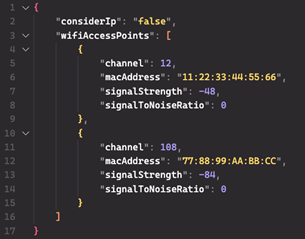
JSON-structured scan results in HTTPS POST request sent to Google Geolocation API. (Source: Secureworks)

According to Secureworks’ blog post, the payload starts its operation by scanning for the WLANSVC service on the compromised device. This is performed to confirm the Windows-based device has a wireless capability and exits if it isn’t present. It must be noted that Whiffy Recon only scans for the feature’s presence and not whether it is working or not.

It maintains persistence on the device by creating the wlan.Ink shortcut in the Startup folder that points to the Whiffy Recon malware’s exact location on the system. The malware’s main code has two loops- one of these registers the bot with the attacker’s C2 server and the other scans for Wi-Fi capability using the Windows WLAN API.

The second loop runs repeatedly with 60-second intervals to keep obtaining geolocation data. The scanning results are mapped to a JSON structure, which is transmitted to the Google Geolocation API through an HTTP Post request.

This information is then mapped to another JSON structure that contains information about every wireless access point present in that area, and the encryption methods these use.

What’s the purpose behind obtaining this information is still unclear to researchers. However, they suspect that attackers might want to “intimidate victims or pressure them to comply with demands.” Secureworks researchers urge organizations to use available controls and restrict access to Wi-Fi.

  1. Generation Z least likely to share their location data with Govt
  2. Researcher exposes how a US firm collected his location data
  3. Wikileaks Exposes CIA’s Linux Hacking, Geolocation Tracker Malware

[ad_2]
Source link

The Pixel 8 may get a few new AI camera features

0
[ad_1]

Google has recently sent a survey out to Pixel Superfans asking questions regarding AI-related camera features. AI camera features are of course, nothing new to the Pixel lineup. It’s part of what makes the Pixel such a good phone for photos. Because Google bakes in all these features that help the Pixel lineup edge out competing smartphones. At least when it comes to picture quality, if nothing else.

This new survey seems to suggest that the Pixel 8 series could release with some new AI camera features that aren’t currently available on the Pixel 7 series. According to Android Police, Google could be working on a feature that uses AI to merge multiple photos together to improve the look of everyone in the photo. The details come from X user @Za_Raczke, who posted an image of the complete list of the survey’s scenario options.

One of them mentions the AI-powered photo merging feature. “Create the perfect team picture by merging everyone’s best shot, so everyone looks great. No worries if someone’s distracted during a group photo, your phone’s AI can still make it into a perfect group photo.” The option reads. This is all the detail about the potential feature. But it’s also clearly labeled as ‘AI Photo Merging.’ So this might be something Google is playing around with.

Pixel superfan survey reveals more potential AI camera features

While the one above sounds interesting, it’s far from the only potential new feature on the way. One page in the survey asks fans to select scenarios that would influence their decision on what smartphone to buy. And the full list of options has plenty of intriguing scenarios in addition to the AI photo merging.

For example, one scenario hints at an AI editing tool that would let you swap people’s clothes out. But more than that it would also allow for instantly changing photo backgrounds. The scenario even mentions the ability to “truly change anything else in the photo.”

Another scenario mentions the Audio Eraser. Which was recently shown off in a leaked promo video. That one is most assuredly going to be included. As Google already offers a similar feature for erasing stuff in the image. In short, the new Pixel 8 series cameras could be quite a bit more interesting.


[ad_2]
Source link

Chrome is testing a bottom address bar, but not if you use Android

0
[ad_1]

People who use Google Chrome for mobile are used to reaching to the top of the screen to access the address bar. While that’s the case, it looks like Google is looking to change that. According to 9To5Google, Google is testing a bottom-mounted address bar for Chrome, but you can’t try it if you’re an Android user.

That’s right, Google is testing this out for iOS users. This should come as no shock, however, it always seems to surprise us when we’re talking about a Google-made app. Realistically, it’s easier to test on iPhones because there are fewer variations of iPhones than there are Android phones.

While Google is testing this out for iPhone users, it doesn’t mean that the feature isn’t coming for Android users. We may see a test eventually or it might just launch.

Google is testing a bottom-mounted address bar in Chrome for iOS

This will give Chrome a new look, but it isn’t something we haven’t seen before. Actually, several of the top mobile browsers have the address bar on the bottom. This includes Safari, Firefox, Vivaldi, Brave, and so on.

It’s an intuitive change, as it makes the address bar easier to reach. Phone screens are large to the point where reaching across them is just about impossible. Moving the address bar down to the bottom eliminates gratuitous hand gymnastics.

As for the test, only a limited selection of users will be able to access it. The feature is hidden behind a flag that you’ll have to activate.

When you activate the flag, you’ll have the option to move the address bar to the bottom or leave it at the top. It’s good that the company gives you the choice between the top or bottom-mounted bar. To change the setting, you’ll go to your settings, and go to the Address bar section. There, you’ll see a simple UI letting you choose.

How to activate the setting

If you want to try out this feature, you’ll need to enroll in the TestFlight program. It’s the beta testing program on Chrome for iOS (you can do that here). When you do that, update the app to the beta version.

In the beta version of the app, paste chrome://flags in the address bar. On the resulting page, you’ll want to search for “bottom-omnibox-steady-state”. When that result pops up, you’ll then want to set it to Enable. Relaunch the program and go to the setting where you’ll change the address bar.


[ad_2]
Source link

Hidden code reveals that emoji reactions are coming to Gmail

0
[ad_1]
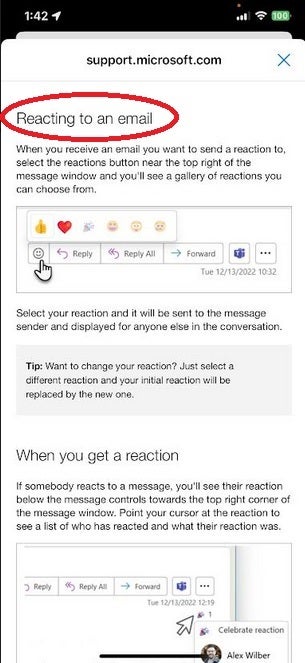
A new report says that Google is working on a feature for Gmail that would allow the recipient of an email to respond to it with an emoji reaction. According to The Tape Drive with Steve Moser, code hidden in the iOS Gmail app reveals that an emoji reaction button would be found on the email. Once tapped, the user would see a selection of emoji reactions that he/she could choose from. 
Using an emoji can help someone respond appropriately to an email without having to spend the time and effort to tap out a response. We wouldn’t suggest using an emoji to respond to all emails. For example, if your boss sends you an email asking why the department you head was deeply in the red last quarter, you wouldn’t send the “laughing with tears” emoji as a response-unless you were looking to get fired. But if you’re having an email conversation with a friend, family member, or even a co-worker that isn’t serious, you can show a range of emotions and save plenty of time by using an emoji reaction.

Since the code for this feature was hidden in the latest Gmail for iOS update, emoji reactions for Gmail is something that could be pushed out at any time. Currently, you can use emojis to react to email in Microsoft’s Outlook by tapping on the smiley face icon found on the top right of the message window. When you tap that button, a bar appears with six emoji that you can choose from. The Tape Drive says that the emoji reactions coming to Gmail will work in a similar fashion.

Emoji reactions have become commonplace on messaging platforms and some email apps (like Outlook) which means that it certainly makes sense for Google to roll out this feature to Gmail users. While it isn’t clear whether both iOS and Android Gmail users will get this feature at the same time, the only thing we do know is that the hidden code was spotted in the iOS version of the Gmail app.

[ad_2]
Source link

You can now use Threads on the web

0
[ad_1]

Since Threads peaked several weeks ago, the platform has been losing active users by the boatload. However, that’s not stopping Meta from pushing forward and adding more functionality to the platform. Threads is now available to use on the web.

This was one of the features that people really wanted from Threads. Most people use social media services on their phones, but being able to log on using a computer is still nice.

Threads for web is available, but how is it?

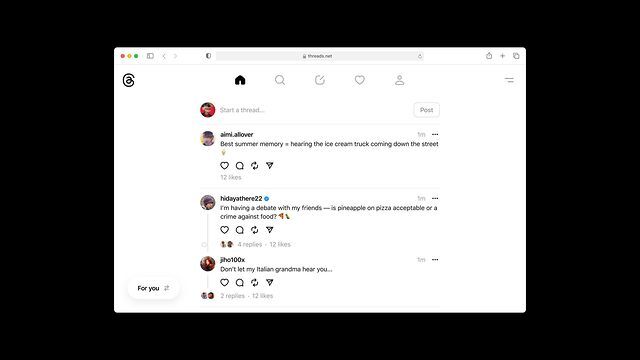
As you would guess, the web experience for Threads is pretty straightforward. It’s pretty bare-bones compared to Twitter. The feed sits as a slender column in the middle of the screen. There’s empty space on either side of the feed, and that makes it feel pretty empty.

The navigation bar that’s on the bottom of the mobile version sits at the top of the feed. You have your Home, Search, New Post, Notifications, and Profile buttons at the top of the interface. Also, right below that bar, you’ll see the text field to start writing a new post.

On the top right of the UI, you’ll see the button that summons the main dropdown menu. You’ll use it to access your settings, read the About page, report a post, and log out.

On the bottom left, you’ll see the option to switch from the For You feed to the Following feed. Just know that when you reload the page, the feed will automatically switch back to the For You page. That’ll be an issue for people who don’t like the For You feed.

You can go ahead and sign in to the website. Just follow this link and you’ll be taken to the login page. Once you do that, you’ll just use your Instagram credentials to get started. Since this is still in the process of rolling out, there’s a slight chance that you won’t see the site. If you don’t, then you’ll just want to wait a day or two.


[ad_2]
Source link

Galaxy SmartTag 2 color options and pricing revealed by retailer

0
[ad_1]

Samsung‘s second-gen smart object tracker, the Galaxy SmartTag 2, is nearing its market release. The company hasn’t officially announced the device but it has popped up on MobileFun, a UK-based accessory retailer. The retailer has revealed the color variants and alleged local pricing of the product. It has also shared a tentative launch timeline and given us a better look at the Galaxy SmartTag 2, which has undergone a complete redesign.

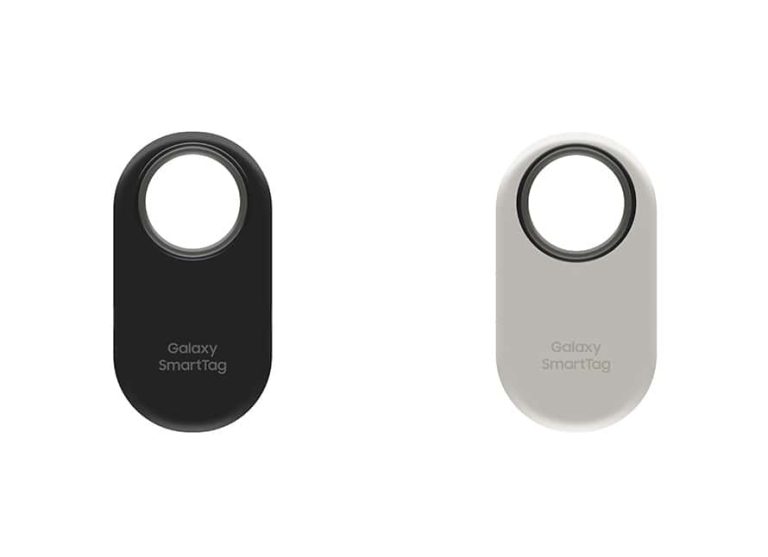
According to MobileFun, the Galaxy SmartTag 2 will be available in Black and White colors. They have the manufacturer part numbers EI-T5600BBEGEU and EI-T5600BWEGEU, respectively. The EIT5600 is the model number of the product. It’s unclear if Samsung will add more colorful options for the tracker later on. The first-gen model, which came in two versions, was available in some brighter shades as well, including Mint and Pink.

The two versions of the original Galaxy SmartTag, which debuted in January 2021, differed in connectivity technologies (and price, of course). The standard version only had Bluetooth connectivity, while the Plus version added UWB (Ultra-Wide Band) support. With Samsung only releasing a single version of the Galaxy SmartTag 2, UWB will come as standard along with Bluetooth.

Coming to the price, MobileFun has listed the Galaxy SmartTag 2 with a price tag of £52.99. That’s a bit higher than what Samsung charged for the Galaxy SmartTag+ (£39/$39.99/€39.90). Perhaps the pricing is inaccurate. That seems more likely when you consider the alleged pricing of a four-pack Galaxy SmartTag 2 (£129.99). We’ll have to wait for confirmation on that. The accurate pricing structure may emerge closer to its launch.

The Galaxy SmartTag 2 is rumored to launch in October

Samsung is reportedly planning to release the Galaxy SmartTag 2 in October. We don’t have a precise launch date yet, but the retailer is confident that the tracker won’t be delayed any further. Meanwhile, it has shared images showing the device’s new design, which we first saw in an FCC certification earlier this month. The Korean firm has made it larger with a big hole where you can easily put a lanyard or key rings.

The Galaxy SmartTag 2 can be tracked using Samsung’s SmartThings Find app. Thanks to UWB support, you can see its location even when the tracker is not in your Bluetooth range. You can create a virtual fence around your home to receive notifications every time it enters or leaves the designated area. The upcoming Samsung smart object tracker is also expected to work with Google’s Find My Device network.


[ad_2]
Source link

Threads for Web begins to roll out for users

0
[ad_1]
After teasing a web based version of Threads, the recently unveiled social media app positioned to compete with X (formerly known as Twitter), Meta has finally followed through and delivered on its promise today. As of this afternoon, Threads is now officially available to be used via your favorite browser.
The web based version is available by navigating to threads.net and logging in with your Instagram account. Once logged in, you’ll be able to add photos and videos to your posts, reply and repost, search for profiles and view your own, and see your notifications. It looks pretty much just as the web viewer version of the app did, which looks exactly like the app, except you can now perform more tasks.

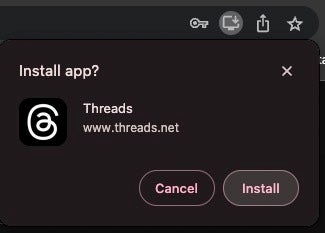
If you are into creating a separate web app and not just having your Threads displayed in a browser tab, you’ll be happy to know that Threads on Chrome will prompt you to create a PWA (Progressive Web App) so you can load the app in a separate window. This is important because the app’s biggest competitor, X (formerly known as Twitter), does offer this functionality as well.

However, the web app does not offer every single one of the features that the iOS and Android app does. While you can do most of the things you would normally do within the app, the web version does lack mobile features that the company states it is working on. One that was obvious to me right away is the lack of browser notifications on posts.

As barebones as it is at the moment, the app does feel smooth running in my browser and the features currently offered are sufficient and work well enough for a version one effort. There is even a toggle on the bottom left to switch between the “For You” and “Following” feeds.


[ad_2]
Source link

Russian Hackers Employ Telekopye Toolkit in Broad Phishing Attacks

0
[ad_1]
  • Telekopye Toolkit Unveiled: ESET research exposes a potent phishing toolkit named Telekopye, designed by Russian hackers, enabling even inexperienced scammers to carry out phishing attacks without technical expertise.
  • E-commerce Under Siege: Scammers leverage Telekopye to target popular Russian and non-Russian online marketplaces like OLX, Yula, JOFOGAS, BlaBlaCarm Sbazar, and eBay, causing concerns for both platforms and users.
  • Neanderthal Scammers: ESET researchers have named the scammers utilizing Telekopye as Neanderthals, who employ deceptive tactics and social engineering to persuade victims into sharing sensitive information.
  • Cryptocurrency Laundering: Once scammers acquire sensitive data, they employ it to launder cryptocurrency through cryptomixers, masking their stolen gains and complicating the tracking of funds.
  • Hierarchical Scammer System: Telekopye’s unique shared account structure assigns different roles like administrators, moderators, and workers, each with distinct commission fees, creating a layered payment ecosystem for scammers.

According to the latest research from ESET, Russian hackers have come up with a new toolkit dubbed Telekopye allowing even novice scammers to conduct phishing attacks without any technical expertise.

Telekopye toolkit allows scammers to create phishing websites, send fraudulent SMS messages and emails, and target popular Russian and non-Russian online marketplaces, including OLX, Yula, JOFOGAS, BlaBlaCarm Sbazar, and eBay.

Russian Hackers Employ Telekopye Toolkit in Broad Phishing Attacks
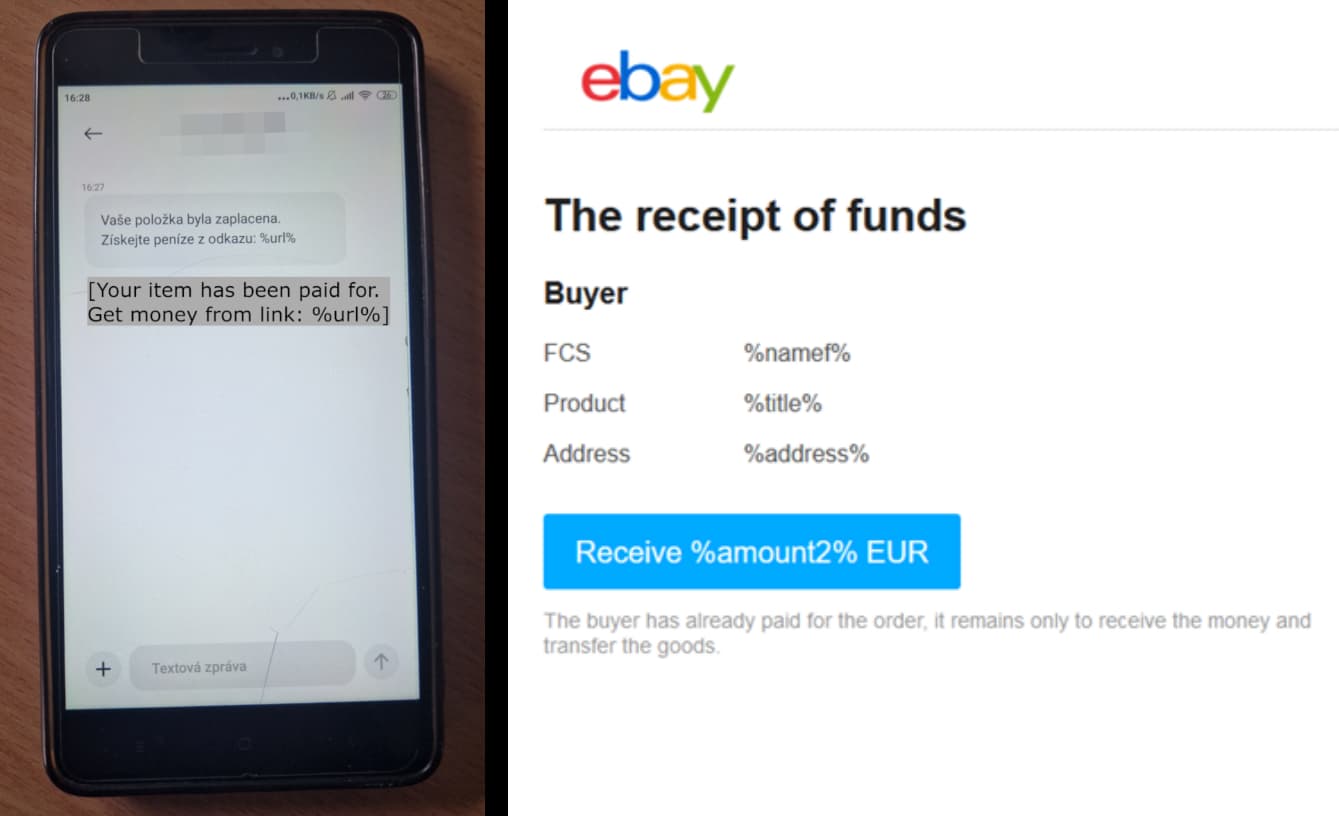
An SMSishing link and an eBay phishing page made out of Teleopye (ESET)

E-commerce platforms and users of these services have long been the targets of scammers and fraudsters. Radek Jizba, security researcher and the author of ESET’s blog post on Telekopye, wrote that the toolkit is named after its targeted platform Telegram, and Kopye is a Russian term for spear. Victims of Telekopye are referred to as Mammoths by the scammers, therefore, ESET researchers named the scammers as Neanderthals.

“We discovered the source code of a toolkit that helps scammers so much in their endeavours that they don’t need to be particularly well-versed in IT. Instead, they only need a silver tongue to persuade their victims.”

Radek Jizba -ESET

It is worth noting that researchers have detected various versions of this toolkit, the latest one seen in April 2023. Researchers believe that this toolkit has been available since 2015 and the language used in the comments in the code hints that its primary user base is in Russia, Uzbekistan, and Ukraine. Some of its versions can store sensitive user data such as payment card details or email addresses stored on the targeted system’s disk.

It is designed as a Telegram bot, which is added to a Telegram group chat and features several “easy to navigate” menus as clickable buttons to facilitate multiple Neanderthals. The information obtained from Telekopye is uploaded to VirusTotal. The toolkit comes with predesigned templates to create phishing pages, which further makes the job easier for the scammers.

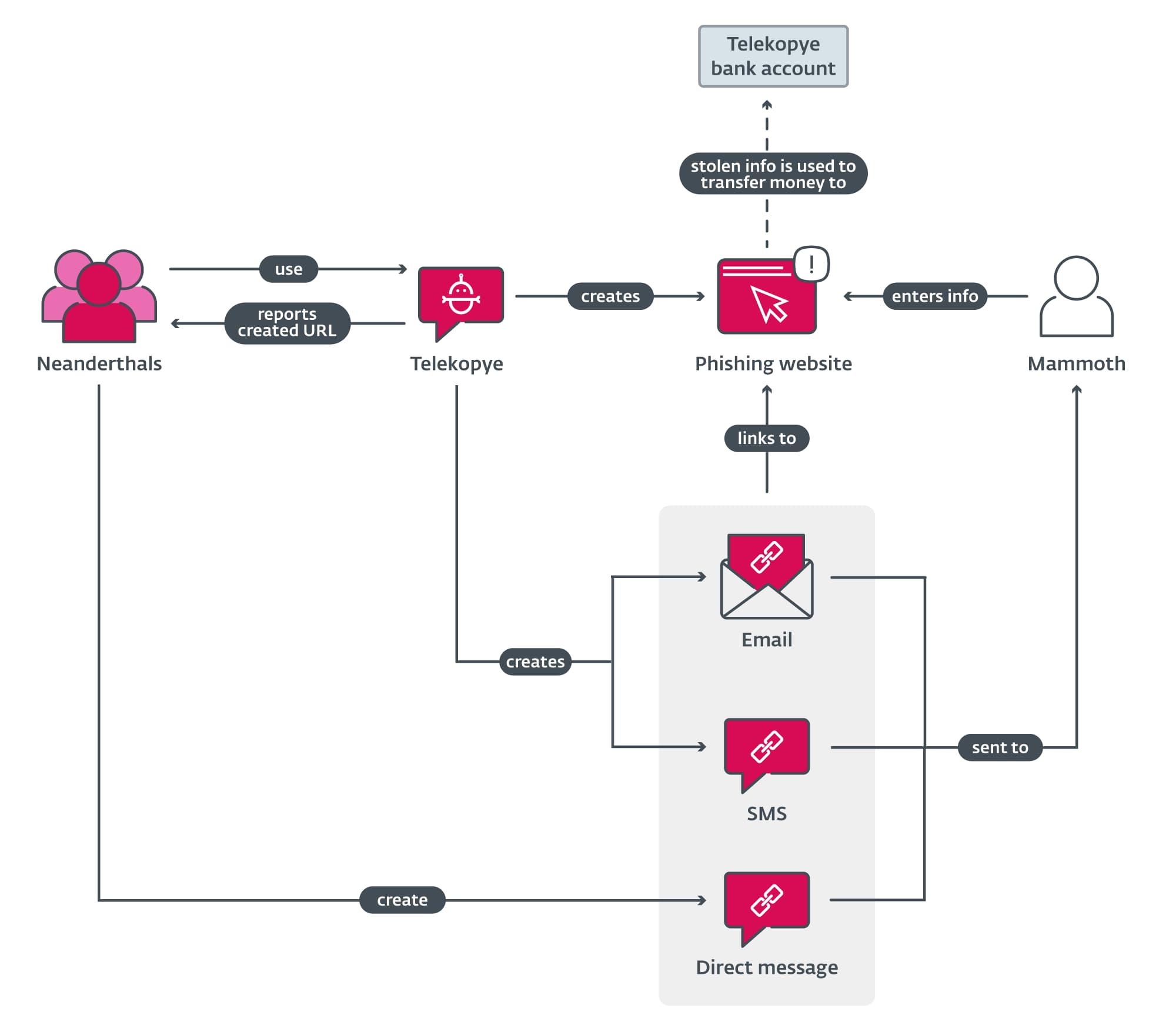
Regarding how Mammoths are hunted by Telekopye operators, in their blog post, ESET researchers noted that the Neanderthals first gained the victim’s trust by claiming to be a legitimate entity and compelling them to visit a genuine-looking phishing web page sent to them via SMS or email. Victims are then tricked into entering sensitive data such as credentials or credit card details.

Russian Hackers Employ Telekopye Toolkit in Broad Phishing Attacks
Scam Overview (ESET)

Once the information is obtained, the scammers can use it to launder cryptocurrency through cryptomixers to hide stolen money. However, researchers couldn’t determine how the scammers find their victims. They did note that stolen funds aren’t directly transferred to the scammers’ accounts because they use a shared Telekopye account, which is owned by the Telekopye administrator.

They also noted that Telekopye tracks every scammer’s success by featuring their individual contributions to the shared account and they are paid by the administrator accordingly. Interestingly, the shared account serves as a payment system for the scammers and there’s a hierarchical system in place where scammers are divided into different classes (administrators, moderators, good workers/support bots, workers, and blocked) with varying commission fees and perks.

The only way to prevent financial loss is to stay vigilant and avoid spending money to buy goods from online marketplaces unless fully confident about their legitimacy.

  1. RIG Exploit Toolkit Distributing CeidPageLock Malware
  2. New credit card skimmers channel funds through Telegram
  3. New Phishing Attack Spoofs Microsoft 365 Authentication System

[ad_2]
Source link

Razer unleashes Xbox Edition of Kishi V2 Pro for Android

0
[ad_1]

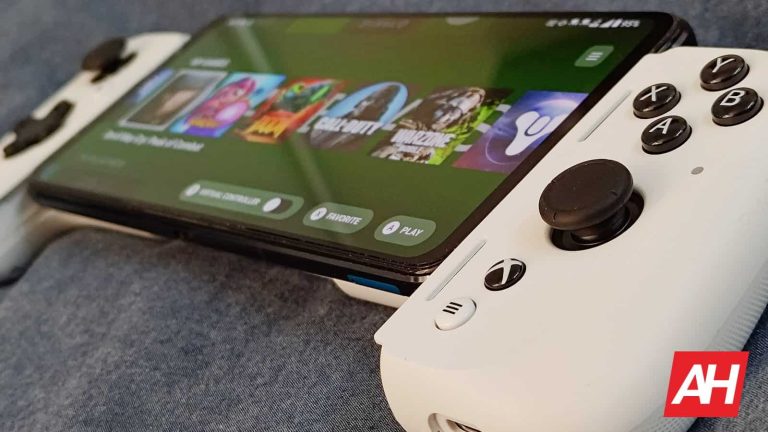
Razer has officially released an Xbox Edition of its popular Kishi V2 and Kishi V2 Pro controllers for Android and iOS. For the most part, this new version of the controller is the same as the Kishi V2 and Kishi V2 Pro that Razer already offered. The Kishi V2 initially launched last year and the Pro model was exclusive to the Razer Edge that launched this year. That is until recently. As Razer now offers a standard version of the Kishi V2 Pro for Android as well.

Both the regular model and the Xbox Edition of the controllers feature the same four action buttons with micro switches and remappable macro buttons up top. But there are of course differences. Between both the Kishi V2 and Kishi V2 Pro, and between the regular and Xbox versions of both. Here’s the main breakdown.

The Kishi V2 Pro Xbox Edition has the most features

Razer Kishi V2 Pro Xbox Edition (2)

The Kishi V2 and Kishi V2 Pro are the same except for two things. The Pro model has HyperSense haptics built-in as well as a 3.5mm audio port for plugging in wired headphones.

The regular and Xbox Editions of either controller are also only different in a few ways. The Xbox Edition comes in white for starters, and it has some additional features within the Razer Nexus mobile app. Such as better integration with Game Pass, and tighter integration with the haptics and certain AAA Xbox titles.

The Xbox Edition controller also has a dedicated Xbox button that when pressed can turn on the controller and launch the Game Pass app. Less noticeable are the slightly more prominent triggers than the standard Kishi V2 has. It’s very subtle, but you can feel it when you press them compared to the older Kishi V2 triggers.

As for the Nexus app itself, which powers all the Kishi controllers, it has a new virtual controller feature you can enable. And this lets you add Kishi controls to games that are touchscreen only. This feature has been great with the ASUS ROG Phones and its Armoury Crate app. And now Razer Kishi users can have it too. One other difference with the Xbox version is the cost. If you want to go with the Xbox Edition Kishi V2 Pro, it’ll cost you $149.99. That’s compared to the standard Pro model that comes in black at $129.99.

Or you could forego the Pro model entirely and just get the regular Kishi V2, which is still good. Either way, you can buy the Kishi V2 Pro Xbox Edition and the Kishi V2 Pro standard right now from Razer. Worth noting too, is that the Xbox Edition for Android is only available in a Pro controller. But if you have an iPhone, you’re limited to the non-pro model, which will run you $119.99. Should you choose the Xbox Edition, you do get a 1-month trial to Xbox Game Pass Ultimate. But this can only be claimed by new users. If you’ve had Game Pass before, it’s not stackable.


[ad_2]
Source link

Wireshark 4.0.8 Release: What’s New!

0
[ad_1]

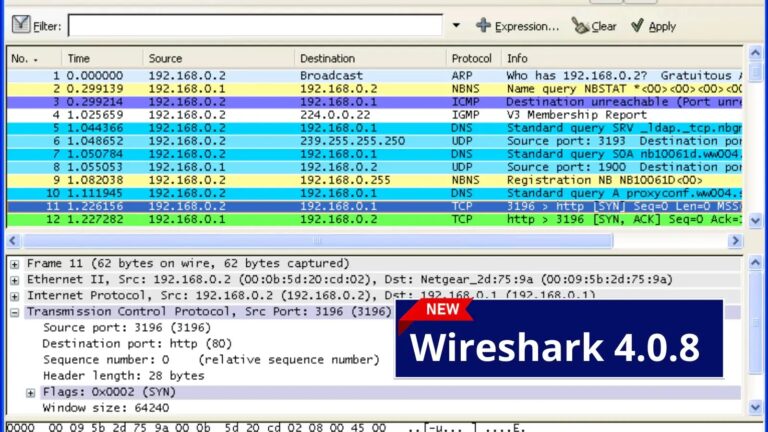
The most widely used network protocol analyzer in the world, Wireshark, has released version 4.0.8. It is employed for network analysis, troubleshooting, software and communications protocol development, and education.

This new version includes bug fixes, improved protocol support, and a few other improvements.

Wireshark 4.0.8 – Vulnerabilities Addressed

We have listed the fixed security issues below:-

Bugs Fixed:

  • TShark cannot capture to pipe on Windows correctly. Issue 17900.
  • Wireshark wrongly blames group membership when Pcap capabilities are removed. Issue 18279.
  • Packet bytes window broken layout. Issue 18326.
  • RTP Player only shows waveform until sequence rollover. Issue 18829.
  • Valid Ethernet CFM DMM packets are shown as malformed. Issue 19198.
  • Crash on DICOM Export Objects window close. Issue 19207.
  • The QUIC dissector is reporting the quic_transport_parameters max_ack_delay with the title \”GREASE\” Issue 19209.
  • Preferences: Folder name editing behaves weirdly, cursor jumps. Issue 19213.
  • DHCPFO: The expert info list does not show all expert infos. Issue 19216.
  • Websocket packets are not decoded and displayed for Field type=Custom and Field name websocket.payload.text. Issue 19220.
  • Cannot read pcapng file captured on OpenBSD and read on FreeBSD. Issue 19230.
  • UI: While capturing the Wireshark icon changes from green to blue when a new file is created. Issue 19252.
  • Conversation: heap-use-after-free after wmem_leave_file_scope. Issue 19265.
  • IP Packets with DSCP 44 do not indicate “Voice-Admit” Issue 19270.
  • NAS 5GS Malformed Packet Decoding SOR transparent container PLMN ID and access technology list. Issue 19273.
  • UI: Auto scroll button in the toolbar is turned on when manually scrolling to the end of the packet list. Issue 19274.

Updated Protocol Support

BT SDP, CBOR, CFM, CP2179, CQL, DHCPFO, DICOM, F1AP, GSM DTAP, IEEE 802.11, IPv4, NAS-5GS, PFCP, PKT CCC, QUIC, RTP, TFTP, WebSocket, and XnAP.

“We do not ship official 32-bit Windows packages for Wireshark 4.0 and later. If you need to use Wireshark on that platform, we recommend using the latest 3.6 release. Issue 17779”, according to Wireshark release notes.”

If you’re using Wireshark on macOS and have updated to macOS 13 from an older version, you may need to open and execute the “Uninstall ChmodBPF” package, followed by the “Install ChmodBPF” package to reset the ChmodBPF Launch Daemon. Issue 18734.

Wireshark source code and installation packages are available from here. 

Keep informed about the latest Cyber Security News by following us on Google News, Linkedin, Twitter, and Facebook.


[ad_2]
Source link