YouTube debuts “Your podcasts” page as Google Podcasts shuts down globally
YouTube is enhancing the podcasting experience beyond its Music app by introducing a dedicated “Your podcasts” page. On Android and iOS, you can find “Your podcasts” in the You tab, alongside “Your videos,” “Your movies & TV,” “Downloads,” and the newly added “Playables.” Only podcasts uploaded to YouTube will show up in this section.The page features a simple list with large cover art, placing your “New Episodes” playlist at the top. At the bottom, there is a shortcut to “Explore more podcasts.”
The new “Your podcasts” page aims to make it easier for users to navigate and manage their podcasts by gathering everything in one place. This feature is rolling out gradually, so it might not be available on your account just yet.
Meanwhile, following the US shutdown in early April, June 23 was the last day for international Google Podcasts users. The service is set to shut down soon, but you can still use the migration tool to switch to YouTube Music or a third-party service until July 29.
Speaking of podcasts, we have just launched our new weekly tech podcast! Each episode of the PhoneArena Show dives into the hottest topics and the latest news in mobile technology, covering everything from phones and tablets to wearables and the increasingly complex AI-driven software they use.
The latest Tor browser 13.5 release brings in numerous feature upgrades for desktop and Android users. Moreover, the new browser version also supports better bridges and connection improvements. Users must update their devices with the latest browser release to experience the new features.
Tor Browser 13.5 Arrives With Feature Upgrades
As elaborated in a recent post, the latest Tor Browser version 13.5 has arrived for both desktop and Android users. The latest update brings in feature upgrades and new options for the users.
Tor browser has long served users as a private web browser, even allowing them access to the dark web. While the browser provides privacy, navigating is often difficult due to feature complexity. Nonetheless, Tor developers keep improving the browser’s user experience, which the latest update demonstrates too.
Tor For Desktop Upgrades
Betterboxing: An improvement to the previous “Letterboxing” feature, Betterboxing provides users with an improved visual appeal and more control over window settings. Users can even find more Letterboxing settings within the General Settings menu.
Improved Bridge settings: With the latest Tor update, users can experience Bridge enhancements. First launched with Tor 11.5, Bridge Cards now appear in a more compact design instead of the stack of cards. Besides, the new Bridge Cards will also display the details about the Bridge’s source, and the browser will let users share three or fewer bridge cards at once, ditching the previous one-by-one process.
Better onion site errors: The latest Tor update also improves the design for onion site error messages.
Upgrades For Tor Android
Enhanced connection experience: Following its success with Tor’s desktop version, the developers have planned to introduce the Connection Assist feature with Tor for Android. But before its stable release, Tor brings in other feature improvements, including the launch of an auto-connect function and a readily accessible “Configure Connection” button.
Tor logs: The latest Tor update relocates Tor logs within the “Connection Settings” menu, making it easily accessible at any point while using Tor. Users can also copy all Tor logs with a handy button.
Tor developers urge users to update their devices with the latest browser releases to receive all feature upgrades.
Tecno is planning to launch the Phantom V2 Fold this year, and new details have just landed. This is the second-gen book-style foldable from the company. The first one was solid considering its price tag, so it’ll be interesting to see what will Tecno do this time around.
Some new details regarding the Tecno Phantom V2 Fold have just surfaced
This may be the latest information regarding the device, but certainly not the latest one. The Tecno Phantom V2 Fold surfaced on Geekbench back in January. That listing did reveal more details than Bluetooth SIG, that’s for sure.
The second-gen model will be fueled by the MediaTek Dimensity 9000+ processor. At least one of its variants will include 12GB of RAM, though that could be the only RAM variant. Android 14 will come pre-installed on the device.
This model will retain the same processor as last year’s unit
So, it seems like Tecno won’t change the processor it included in the first-gen model. The new phone will also have the same RAM count. Considering that Tecno used LPDDR5X RAM the first time around, we won’t see any change in that area either.
What about the rest of the specs? Well, we’re unsure at this point. We’re expecting to see more details to appear, but they’re under wraps at the moment. Both displays will be of the OLED variety, though, and likely 120Hz panels, as they were the first time around.
We’re expecting to see a major improvement in the camera department. The first-gen model was good enough considering the price tag, but Tecno will certainly be looking to improve in that regard. The design of the phone is also under wraps.
The world is evolving every day, and this includes the use of technology. As environmental challenges become more pressing, people are beginning to see how technology can help. One technology that is garnering a lot of attention is artificial intelligence (AI).
AI enhances efficiency, reduces waste, and drives innovation, making it essential for addressing some of the environmental challenges we face today. Its application has the potential to yield promising results. in this article, we’ll explore the role of AI in environmental protection and its future impact on our planet.
AI in Natural Resource Management
Some of these include the following:
Water Resource Management
One of our most valuable resources is water, and sustainability depends on how it is managed. Artificial Intelligence that ensures you use water effectively by tracking and forecasting usage. For example, AI-driven systems examine sensor data in irrigation systems to maximize the distribution of water in farming. This increases agricultural output while conserving water at the same time. AI can forecast water demand and identify leaks in cities in real time, reducing waste and guaranteeing a consistent supply.
Forestry Management
Forests are critical to preserving biodiversity, and artificial intelligence is playing an important role in their maintenance. AI can track deforestation and the condition of forests using satellite photos and machine learning techniques. These tools can detect illicit logging and anticipate areas prone to forest fires, allowing for prompt actions. AI is also useful for estimating the impact of climate change on forests and guiding replanting and conservation activities.
Fisheries Management
AI is assisting in the sustainable management of fisheries, which is crucial for the health of oceans. Fish population and ocean health are tracked by AI systems, which provide information to help control fishing methods. AI algorithms use sonar and satellite photos to predict fish populations and ensure sustainable harvesting. This sustains the livelihoods of populations that depend on fishing and helps preserve wildlife.
AI in Weather and Disaster Forecasting
These include the following:
Weather Prediction
To prepare for and minimize the effects of extreme weather events, an accurate weather forecast is crucial. AI improves the accuracy of weather forecasts by evaluating massive amounts of information from satellites, weather stations, and climate models. Machine learning algorithms can find trends in meteorological data, allowing for more accurate predictions of storms, heat waves, and heavy rainfall. Farmers, urban planners, and emergency services can all benefit greatly from this information.
Disaster Preparedness and Response
Life and property are at risk of natural calamities, including floods, hurricanes, and earthquakes. However, with AI, planning and anticipating these situations will be much easier. For example, AI models can use seismic data to forecast earthquakes and their potential consequences. In hurricane-prone areas, AI predicts storm trajectories and strength, assisting with evacuation and resource allocation. During disasters, AI-powered drones and robots help in search and rescue operations, delivering real-time data to responders.
AI in Carbon Emissions Capture
They include:
Smart Carbon Footprint Calculators
AI is a big part of the effort to reduce carbon emissions, which is vital for fighting climate change. Artificial intelligence uses smart algorithms for carbon footprint calculation of individuals and organizations. These technologies provide individualized recommendations for lowering emissions by processing data from multiple sources. AI recommends energy-efficient appliances, ideal travel routes, and long-term improvements to reduce carbon impact for individuals and enterprises.
Carbon Capture Technologies
Artificial Intelligence (AI) improves the effectiveness of carbon capture and storage (CCS) technologies, which are critical to reducing global warming. To remove as much CO2 as possible from industrial emissions, AI algorithms optimize the capture process. AI-powered predictive maintenance makes sure CCS infrastructure runs well, thereby cutting expenses and downtime. AI contributes to a healthy planet by drastically lowering atmospheric carbon emissions through technological advancements.
AI in Energy Consumption Optimization
These include:
Energy Management in Buildings
Buildings use a large amount of the world’s energy, and artificial intelligence (AI) helps to make them more energy-efficient. Artificial intelligence (AI) technologies track energy usage in real time and find locations where usage can be cut. Smart thermostats and lighting systems employ artificial intelligence to modify settings based on occupancy and environmental circumstances, hence optimizing energy use. This not only decreases energy bills but also lowers carbon emissions, which helps to promote sustainability.
Renewable Energy Integration
When it comes to integrating renewable energy sources like solar and wind power, Artificial Intelligence is essential. AI algorithms optimize renewable energy installations by monitoring weather patterns and energy use data. For example, AI can forecast solar panel performance based on weather predictions, guaranteeing optimal energy absorption. AI-powered predictive maintenance also helps in the efficient operation of renewable energy systems, lowering downtime and maintenance costs.
Conclusion
AI is an effective weapon in the struggle to stop ecological damage. AI offers innovative solutions for managing resources, predicting weather, capturing carbon, and optimizing energy use to tackle environmental challenges. AI’s involvement in environmental preservation will only expand as technology advances, bringing promise for a better planet.
Generative AI is all the hype nowadays, but its rapid adoption can cause problems. In a dramatic and somewhat comic string of events, TikTok’s Symphony Assistant was used to create AI avatars, reciting problematic scripts such as Hitler’s Mein Kampf and Osama Bin Laden’s “Letter to America.”
TikTok announced Symphony Avatars last month as part of its “Creative AI Suite,” aimed at helping create personalized videos without the need to hire real actors. The feature has been rolling out for the past week to TikTok Ads Manager accounts, or it was supposed to be limited to those accounts.
CNN producer and digital content creator Jon Sarlin gained access to the AI tool using his personal account and found that there are no safeguards when it comes to sensitive content.
Generative AI is in extensive use across the tech world, and TikTok is no exception. The platform first announced Symphony Avatars last month as part of its “Creative AI Suite,” enabling businesses, brands, and creators to create fully customized ads using generative AI and the likenesses of paid actors (avatars).
This feature was then rolled out earlier this week, but only for people with a TikTok Ads Manager account. However, it seems like this limitation was briefly not in place, with a CNN reporter gaining access to one of the Symphony AI tools using their personal account. This led to the reporter finding practically no guardrails or safeguards in this AI tool.
Uh-oh! TikTok is in trouble once again!
In a post on X (formerly Twitter), Sarlin showed some examples of videos, created with Symphony Assistant, including avatars, reciting the aforementioned problematic scripts. What’s even worse is that there were no watermarks or any indications on the videos to show that they were AI-generated.
Unsurprisingly, CNN reached out to TikTok for comment and received the following statement: “A technical error, which has now been resolved, allowed an extremely small number of users to create content using an internal testing version of the tool for a few days. If CNN had attempted to upload the harmful content it created, this content would have been rejected for violating our policies. TikTok is an industry leader in responsible AIGC creation, and we will continue to test and build in the safety mitigations we apply to all TikTok products before public launch.”
It’s unclear whether TikTok accidentally rolled out an “internal testing version” of the AI tool or just missed placing the appropriate filters and safeguard mechanisms, but now the issue has been remedied, according to TikTok (we understand that Symphony Assistant has been pulled off, at least for the moment).
ByteDance, the company behind TikTok, has an ultimatum until the end of the year to sell TikTok or have the app banned in the U.S. after the Senate voted to send a bill to the White House, and it was subsequently signed by President Biden. Legislators in the United States are concerned that ByteDance may be coerced by the Chinese Communist Party (CCP) to give up user personal information and spy on Americans.
AI isn’t going anywhere anytime soon, so expect more stories like this one to pop up. What do you think about it? AI is just a tool, and it’s us humans who ultimately use it unethically. But there should be mechanisms in place to prevent such mishaps, right?
Let’s talk about its design first. As you can see it has a flat display, with a centered display camera hole at the top. The bezels are rather thin, but they’re not uniform. All the physical buttons sit on the right-hand side.
The OnePlus Nord CE 4 Lite has a dual camera setup and a 120Hz display
On the back, there are two vertically-aligned cameras in the top-left corner. Those cameras are a part of the same camera island. That’s also where an LED flash is, while OnePlus’ logo is centered on the back. The phone also has a flat frame all around.
The device includes a 6.67-inch fullHD+ (2400 x 1080) OLED display. That panel has a 120Hz refresh rate and a 240Hz touch sampling rate. Its peak brightness goes up to 1,200 nits (2,100 partial brightness), by the way.
The Snapdragon 695 SoC from Qualcomm fuels this phone. OnePlus also included 8GB of LPDDR4X RAM here, and you can choose between 128GB and 256GB of UFS 2.2 internal storage. That storage is expandable via a microSD card, by the way, up to 1TB.
A 5,500mAh battery is also included, and the phone supports 80W charging
A 5,500mAh battery sits inside of this phone. The device supports 80W SuperVOOC wired charging. It also has stereo speakers, and it’s IP54 certified, which means it’s both splash and dust-resistant.
OnePlus included an in-display fingerprint scanner here. Android 14 comes pre-installed on the phone, with OxygenOS 14 included on top of it. There is also a hybrid dual SIM setup here (nano + nano / microSD).
A 50-megapixel main camera (Sony’s LYT-600 sensor, f/1.8 aperture, OIS) is backed by a 2-megapixel depth sensor (f/2.4 aperture). On the front, you’ll find a 16-megapixel unit (f/2.4 aperture).
The OnePlus Nord CE 4 Lite comes in three color options
The OnePlus Nord CE 4 Lite measures 162.9 x 75.6 x 8.1mm, while it weighs 191 grams. The phone comes in Mega Blue, Super Silver, and Ultra Orange colors. Do note that the latter color will stay exclusive to India.
The phone’s 128GB storage variant is priced at INR19.999 ($240), while the 256GB storage option costs INR22,999 ($276).
Just like everything else, traveling changed with the development of technology and the internet among other things. Today, it’s not only about packing your belongings and having your passport on you. Nobody travels without their mobile device and internet. Mobile data is an important part of every trip.
If you’re planning to travel to the Old Continent, eSIM in Europe can be a lifesaver for you. Europe eSIM offers a stable internet connection just like a physical SIM card would. With eSIM technology you get the much needed mobile data.
Each of these cards comes with a data plan, and depending on your purchase it could even come with unlimited data. Let’s see which advantages Europe eSIM brings and how it works.
eSIM in Europe Advantages
when in Europe do what the Europeans do. When traveling on the Old Continent many tourists decide to buy Europe eSIM plan from Holafly. With a Holafly Europe eSIM purchase, you don’t only get peace of mind but unlimited cellular data without buying a local phone number if your device is compatible. This is how it works:
Start by Customizing Your Plan
First of all, you need to know how long you will need your prepaid eSIM plans. When you have a set timeline you can adjust your data plan accordingly. With a proper service you will never run out of internet data connection nor will you be overspending. This is what makes multi country plans so good.
Aim For Unlimited Data Plans
Running out of internet data is everyone’s nightmare when abroad. This is why you need to have prepaid unlimited data in Europe that comes with an virtual SIM. When you’re covered by outlets such as Holafly you can sleep peacefully knowing that there will be no additional data roaming charges while at the same time you have the best coverage and access to best networks.
It Allows You To Keep Your WhatsApp Number
When travelling abroad keeping in touch with friends and family is paramount. So, having a service such as WhatsApp when using Europe eSIM comes in handy. Holafly’s eSIM package allows you access to WhatsApp and all of its contacts. Having unlimited calls via this mobile plan could prove to be a lifesaver when in a foreign country.
24/7 Customer Support
This is where the good part steps in. First of all, eSIM is easy to use for the needs of mobile data and everything else. Regardless, you could face some issues with network coverage even if you have access to best local network. So, it’s good to know that with a good eSIM plan, you’ll get 24/7 access to a support team via email or chat support. It was never easier to receive instructions and avoid any imaginable issues with your new eSIM data plan via this digital SIM.
Instant Delivery
It doesn’t matter if you’re planning on traveling or you’re already on the road. The eSIM delivery is an instant process. Europe eSIM can be sent directly to your email. Connection is possible in seconds and by a few simple clicks, you get instant access to your unlimited plan without having to resort to buying a local number or experiencing any hidden fees. Your data plan is activated immediately through a simple activation process. If you’re already hooked up on buying eSIM data program and have eSIM compatible device you should see this page.
Sharing is Caring
When you activate your eSIM plan it is possible to share it with your friends or travel companions on other devices. With every good eSIM plan, there is up to 500MB of data to share with whoever you want. You can use your smartphone to share the data by using a WiFi network or mobile hotspot. Multiple device connection is the norm here.
How Does eSIM for Europe Work?
As we already said, the process is quite straightforward. But, regardless of this, let’s walk you through the few steps necessary to install the eSIM Europe onto your mobile device and have you connected to unlimited data through some of the best Europe eSIM plans.
Check Compatibility
First, you need to check if your phone is compatible with an eSIM. There shouldn’t be any issues in this department as the majority of eSIMs are compatible with all the popular brands such as iPhone, Samsung, and Google Pixel among others.
Buying Prepaid eSIM Data Plans
Just like with any other online purchase you need to head to an eSIM online store and buy a cellular data plan that suits your needs the best. Once you have your eSIM the time is right to install it and start enjoying the perks of unlimited internet without a need for a physical SIM card.
Scan the QR Code
This part is easy. You’ll receive a QR Code on your device. Scan the QR Code and proceed by turning on your mobile data roaming in the settings of your phone. By doing this browsing the World Wide Web in Europe becomes accessible.
What Does Europe eSIM Offers?
There are plenty of reasons why one should opt for an eSIM mobile data connection in Europe when traveling. First of all, it provides a clear connection to the web. Your video calls and messages will go out uninterrupted. You can share your photos and videos on social media platforms without a delay. Both data upload and download will be super fast. Also, access to maps works seamlessly which is paramount when traveling. With a quality eSIM, you will have full access to high-speed 4G and 5G networks in Europe.
Things to Know About eSIMs
There’s a chance you’re still not convinced about buying an Europe eSIM immediately. That’s all right. We will give you a few more information about eSIMs that should provide enough reassurance about your upcoming decision. This is what you should know:
No Local Phone Number
Remember, while eSIMs are amazing they only provide access to internet data. You will not receive a local phone number. So, you can’t send SMS messages and make calls. for that you’ll need your original SIM card. But, as we said, same eSIM plan offers WhatsApp and Skype too and that should provide enough means for communication.
Your Phone Needs to be Compatible With an eSIM
Before you opt for buying any eSIM products from any provider and enable data roaming ensure that your phone is eSIM card compatible with this data service to ensure you always stay connected and that data connectivity is always top notch.
Install Before Traveling
Before you set off make sure you’re packed and that your European eSIM and international data plan is prepared. Buy the product before you travel but activate it when you reach your destination where it will be automatically upgraded to local standards. Just for your safety, it might be a good idea to carry a printed-out version of the QR Code you’ll receive in your email.
Bottom Line
eSIMs as a service just offer too many advantages to be ignored when you decide to travel to Europe. We believe enough information was shared to help you make the right decision. If that’s not the case, please tell us what we should add to help you activate data roaming via an eSIM card.
Google Wallet brings the ease of a digital wallet to millions, letting users store and use bank cards, tickets, passes, car keys, and IDs with a tap. Now, the tech giant has broadened its support to include additional banks.
Google Wallet continues to add new banks to its list
To attract a broader audience, Google Wallet continues to expand its support base, adding new banks each month. This year alone, over 170 banks have been included. Continuing this trend, Google has now added 29 new banks to its supported list. Keep in mind that support for the newly added banks may not be available right away, possibly due to gradual integration from the banks or a phased rollout by Google. For a complete list of supported banks, you can visit the Google Wallet Help page.
If your bank is on Google’s list of supported banks, you have a couple of options for adding your card. One way is to do it directly from your bank’s website or app. However, I find it easier to add it through the Google Wallet app. Here is how:
Launch the Google Wallet app.
Tap the + Add to Wallet button at the bottom right.
Select Payment Card.
Enter your card details manually or use your phone camera to scan the card.
Tap Save.
Agree to the terms and conditions, and you are all set!
Video credit – Google
Digital wallets offer incredible convenience by enabling quick payments for purchases, whether online or in-store. Personally, I rely on Apple Wallet, which serves a similar function to Google Wallet but for iOS users. It has become a daily essential for me and I have practically forgotten the hassle of carrying around a bulky physical wallet.
With tech giants like Google expanding support for digital IDs and driver’s licenses in digital wallet apps across more states, in the future, physical plastic cards could become a rarity. Of course, let’s hope that by the time that eventually happens, smartphone batteries will last much longer. Otherwise, ending up wallet-less and phone-less in a tough spot wouldn’t be ideal, would it?
Windows IIS Servers often host critical web applications and services that provide a gateway to sensitive data and systems due to which hackers attack Windows IIS servers.
A South Korean medical establishment’s Windows IIS server with a Picture Archiving and Communication System (PACS) has been attacked, as identified by AhnLab Security Intelligence Center (ASEC), which resulted in CoinMiner infections.
There are several suspicions of web shell uploads indicating possible PACS vulnerabilities or wrongly configured safety settings.
The attacks were two different situations just days apart, probably organized by Chinese hackers who used various tools like Cpolar and RingQ, complete with Chinese annotations.
This event is an example of the continuous targeting of exposed web servers in Korea but specifically directed towards China-speaking groups emphasizing the importance of having secure measures for such critical systems like PACS in hospitals.
Firstly, an attack was launched against a Korean medical institute’s web server via upload of Chopper and Behinder web shells, followed by system reconnaissance.
For privilege escalation, BadPotato was deployed by the threat actor, while Cpolar was used for remote access. A CoinMiner came in through a “1.cab” file that contained batch script, task scheduler XML, and downloader.
Finally, some Chinese-speaking attackers had chosen the above tools and also made annotations on the scripts.
They included several additional web shells (ASPXspy, Caidao), privilege escalation tools (PrintNotifyPotato, IIS LPE, GodPotato), port forwarding tools (Lcx, Frpc), as well as user account creation malware.
Consequently, this all-inclusive toolkit provided continuous accessibility to the compromised server, which enabled governing it, and assisted in cryptocurrency mining.
Days later, the second attack was launched on the web server of a Korean medical institution.
The attacker also used Certutil to download additional malware and installed more privilege escalation tools such as GodPotato, PrintNotifyPotato, and CVE-2021-1732 exploit which were among others network exploration tools deployed like fscan, remote shell, and Netcat.
EarthWorm served as a proxy tool while Ladon is a multi-functional Chinese-built tool that handles different steps in an attack process.
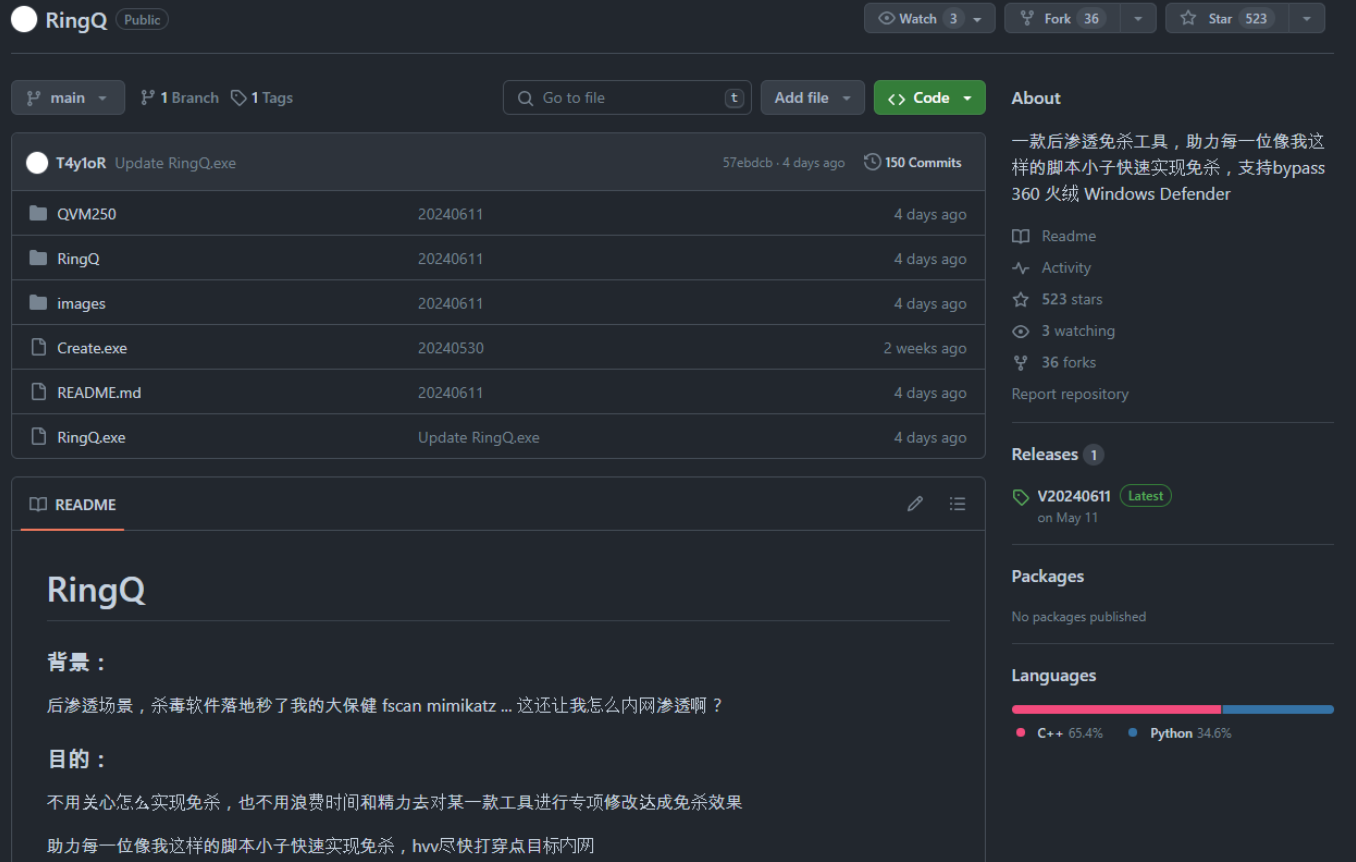
RingQ project on GitHub (Source – ASEC)
Besides that, evidence suggests that the threat actor may be a Chinese speaker, who used RingQ to encrypt and execute malware in memory to bypass file-based detection.
Consequently, they finely crafted an ASPX downloader as XMRig CoinMiner which had some of the most advanced evasion techniques or even focused on crypto mining.
Recommendations
Here below we have mentioned all the recommendations that the security analysts provide to prevent such attacks:-
Administrators should address file upload vulnerabilities.
Implement regular password changes.
Access controls to mitigate lateral movement risks.