People are soon to be receiving their Pixel 7a handsets and cracking into them. While this is an exciting phone, the Pixel 8 will be one of the most anticipated Pixel phones of the year. The Pixel 8 Pro might be even more interesting, as it may have a thermometer built into the camera package.
The Pixel 7a was just announced along with the Pixel Tablet and the Pixel Fold. Google showed these devices off during Google I/O, and you can check out more coverage on these devices on Android headlines.com.
The Pixel 8 Pro might have a built-in thermometer
Since we’re just under half a year away from the Pixel 8’s unveiling, you will want to take this information with a grain of salt. This is a leak that was covered by 91Mobiles. The leak originally included a leaked video, however, it was taken down, unfortunately.
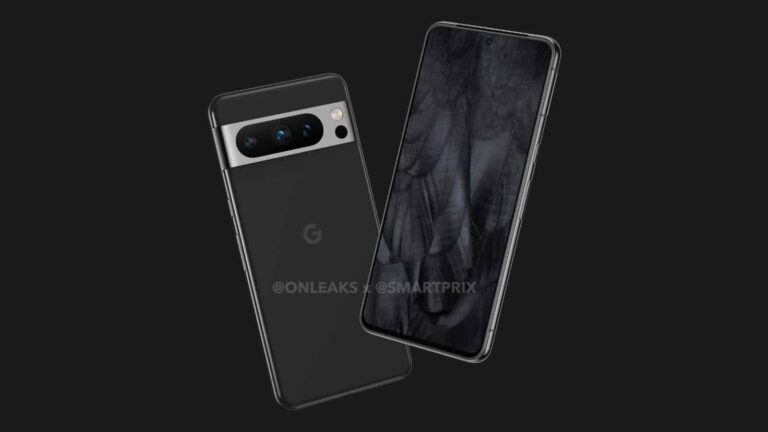
So, for the time being, we’re going to have to rely on word of mouth. According to the source, the Pixel 8 Pro will have an additional sensor in the camera package. The sensor will sit right below the flash.
In the image, we see the Pixel 8 with its metal visor and pill-shaped cut-out for the sensors. This is similar to what we saw with the Pixel 7 Pro, however, there was a difference. The Pixel 7 Pro had two sensors inside one pill-shaped cutout. The other sensor sat inside of its own separate circular cutout.
In the case of the Pixel 8 Pro, all three of the main sensors will be inside one large pill-shaped cutout with the flash and potential thermometer sitting right next to it. It still maintains the overall aesthetic that the Pixel lineup has established.
How will it work?
As for the functionality, it doesn’t seem like this will be like we see in the movies with the infrared imagery. Instead, this will be to help check your body temperature. You’ll have to press the start button for the thermometer and then hold it to the spot on your skin that you want to measure within five Seconds.
Along with your skin, you might be able to measure the temperature of objects as well. Since this is a sensor on your phone, you should expect some limitations in the functionality.
So far, it looks like this will only be available for the Pixel 8 Pro. The regular Pixel 8 will not have the sensor. This will be just another perk to entice you to pay the additional money for the pro variant.
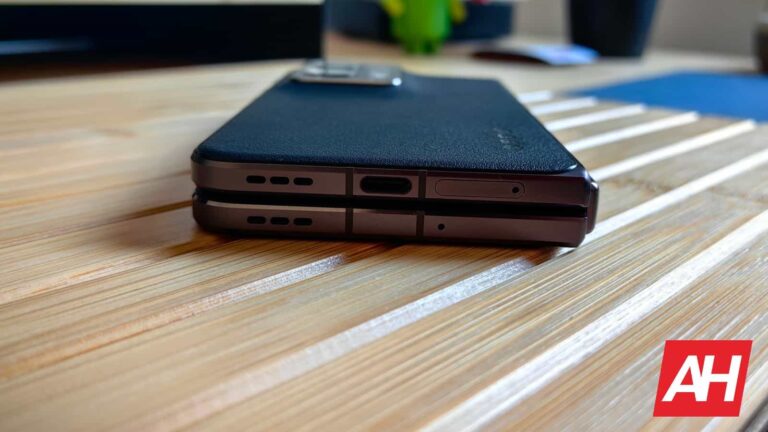
A couple of days ago, it was reported that the OnePlus V Fold and OPPO Find N3 will feature the same design. That information came from Yogesh Brar, in collaboration with 91mobiles. The same collab is back, sharing the OnePlus V Fold and OPPO Find N3 specs.
The OnePlus V Fold & OPPO Find N3 specs just leaked, but they could be a bit off
Before we get down to it, please note that these may be inaccurate. Yogesh Brar is not a tipster with the best track record out there, and something about these specs does seem off. Let’s see what’s up.
Based on the provided information, the specs listed here will be the same across these two devices. The main display is tipped to measure 8 inches in diagonal. It will be a QHD+ OLED panel with a 120Hz refresh rate, allegedly.
The external display will measure 6.5 inches, and offer a fullHD+ resolution, and a 120Hz refresh rate. This is what seems odd and out of place. The Find N3 is rumored to be larger than the Find N and Find N2, but chances are it will have a smaller outer display.
The OPPO Find N and N2 were horizontally-oriented when unfolded, and they were quite short in general. OPPO may increase the size of the Find N3, but chances are the device will stay horizontally oriented, and its outer display will be sub-6 in size, like the panel on the Pixel Fold. That’s just a guess, though. It seems unrealistic to expect that OPPO will both increase the size of the Find N3, and also change the form factor entirely.
The Snapdragon 8 Gen 2 SoC is tipped, along with up to 16GB of RAM
The tipster claims that the Snapdragon 8 Gen 2 will fuel the two devices. Up to 16GB of RAM is also mentioned, and up to 512GB of internal storage. The two companies will likely use LPDDR5X RAM and UFS 4.0 flash storage.
A 50-megapixel main camera is mentioned here, along with a 48-megapixel ultrawide unit. A 32-megapixel periscope camera also got listed by the tipster. Two 32-megapixel selfie cameras are also noted here, one for each of the two displays.
The OnePlus V Fold and OPPO Find N3 are also said to include a 4,800mAh battery on the inside, and support 80W wired charging. Wireless charging was not mentioned. The OnePlus V Fold is coming in Q3, while the OPPO Find N3 could land in Q4 this year.
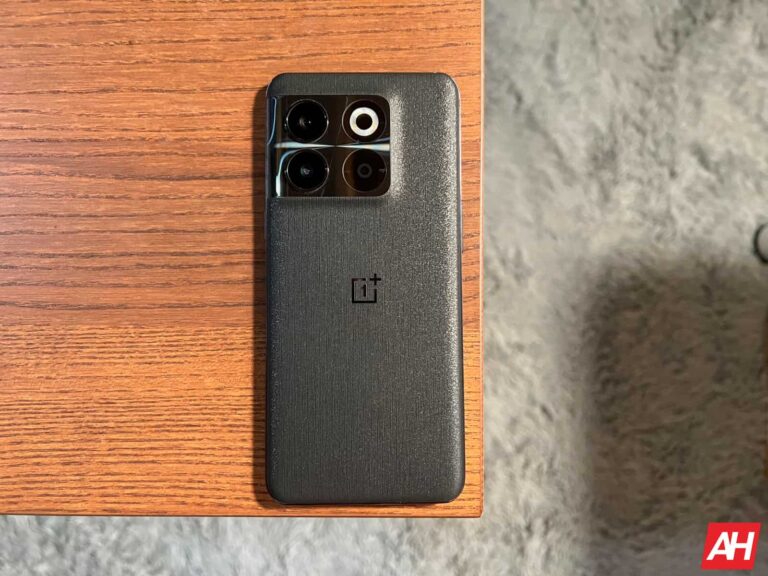
The OnePlus 10T has started receiving a new update, which delivers new gaming and health features. This update is marked as OxygenOS 13.1.0.520.
The OnePlus 10T is getting new gaming and health features via new update
There are two different builds, one for the Indian market, and the other for other (global) markets. The update brings some interesting new features to the table, and yes, the changelog is separated on gaming and health features, there’s nothing else in there.
Let’s kick things off with the gaming additions. This update adds the Championship mode to Game Assistant. OnePlus says that this mode will improve performance while also disabling notifications, calls, and other messages. It does all this to allow you to focus on gaming.
OnePlus also added a music playback control to Game Assistant. Now you can listen to and control music while gaming, with ease, without the need to call upon the notification shade or anything of the sort.
Now, when it comes to Health features, OnePlus added the TalkBack feature. This feature “recognizes and announces images in apps and Photos”, says the company.
The ‘Zen Space’ app has been added by the company
The second and last health-related addition is called ‘Zen Space’. This is an application that comes with two modes, Deep Zen and Light Zen. These two modes are supposed to help you “focus on the present”.
This update is rolling out in stages, as per usual. It has started rolling out in India, while other markets are expected to get it in the coming days. As it usually goes with staged rollouts, you may not get the update straight away, but don’t fret, it’s coming.
The OnePlus 10T was announced back in August last year, and it’s still very much a compelling smartphone. It came with high-end specs, excellent battery life, and much more. It’s nice to see that OnePlus is adding new features to it.
Researchers have revealed the shipping of millions of Android devices pre-infected with Guerilla malware. The infected devices include smartphones, smart TVs, and even smartwatches.
Lemon Group Pre-Infected Android Devices With Guerilla Malware
According to a recent report from Trend Micro, their researchers found many Android devices serving users with severe malware. Investigating the matter made them unveil a sneaky malware campaign that caused the shipping of pre-infected Android devices.
As explained, they traced back the malware campaign to the “Lemon Group” that re-flashed the target Android devices with new ROMs. Re-flashing ROMs is a technique that helps replace or modify the respective devices, such as a smartphone’s firmware. If done on pre-shipped devices, this process can help interested users run a different OS on the device.
Specifically, Trend Micro noticed the Lemon Group had exploited this technique to flash devices to infect them with Guerilla malware.
It remains unclear how the threat actors managed to infect pre-shipped devices. Yet, upon receiving numerous reports regarding the Guerilla malware infections in newly purchased phones, Trend Micro researchers analyzed the devices’ ROM images to find the malware.
On the infected devices, the malware installs various plugins serving different functionalities such as intercepting SMS messages, configuring reverse proxy from the infected device, hijacking WhatsApp sessions, harvesting Facebook data, and silent installations of other apps.
Malware Infected The Android Users Globally
Regarding the Lemon Group, Trend Micro explained that it mainly targets big data firms and advertisers, gaining insights about the potential targets it can infect with its malware.
For instance, in a recent campaign, the threat actors infected around 8.9 million Android devices, including smartphones, smart watches, Android TV boxes, and smart TVs.
These infected devices then targeted users in over 180 countries, including the United States, Indonesia, Thailand, India, Argentina, South Africa, Angola, Philippines, Mexico, and Russia. The researchers could identify around 490,000 different mobile numbers associated with OTPs generated for Lemon Group SMS-related activities.
The researchers have also shared the details about this campaign that’s seemingly ongoing for the past five years at the recent Black Hat Asia May 2023 conference.
For a while, we thought that the Snapdragon 8+ Gen 2 won’t launch at all. Well, based on some recent info, that chip is coming after all. The same tipster that shared that info is now bringing some fresh Snapdragon 8+ Gen 2-related information. Based on info from Revegnus, the OnePlus V Fold and/or OnePlus 11T will be fueled by the Snapdragon 8+ Gen 2 processor.
The OnePlus V Fold and/or OnePlus 11T are expected to utilize the Snapdragon 8+ Gen 2
In his tweet Revegnus wrote: “iQOO and OnePlus will use Snapdragon 8+ Gen 2”. He did not specify any models, but OnePlus has a couple of high-end devices left to launch this year, so we can guess.
The OnePlus V Fold is coming for sure, OnePlus confirmed its launch for Q3. We’re still not sure if that’ll be its name, though. The OnePlus 11T will likely launch in Q4 this year, though we haven’t heard anything about that phone just yet. There is also a chance we’ll see a clamshell foldable from OnePlus this year, but nothing is certain yet.
In any case, both the OnePlus V Fold and OnePlus 11T will reach for the most powerful chips on the market. The OnePlus V Fold could still use the Snapdragon 8 Gen 2, because it’s coming in Q3, it’s possible OnePlus already completely adapted it to the SNapdragon 8 Gen 2, and the ‘Plus’ model didn’t even launch yet.
If that chip does end up launching soon, the OnePlus 11T will utilize it for sure. The OnePlus 10T included the Snapdragon 8+ Gen 1 processor last year, which has proven to be the right call by OnePlus.
The Snapdragon 8+ Gen 2 will likely be a minor improvement over the Snapdragon 8 Gen 2
Qualcomm’s Snapdragon 8+ Gen 1 was a huge improvement over the Snapdragon 8 Gen 1. The Snapdragon 8+ Gen 2 won’t exactly be a huge boost over the Snapdragon 8 Gen 2. Qualcomm really did a fantastic job with that processor.
With the Snapdragon 8+ Gen 1, Qualcomm switched to TSMC, from Samsung. The Snapdragon 8 Gen 1, on the other hand, was manufactured by Samsung. TSMC is still ahead when it comes to SoC production tech. That is why we’ve seen considerable changes between the two chips. The Snapdragon 8+ Gen 2, if it does launch, will also be manufactured by TSMC:
We get it; AI chatbots like ChatGPT and Google Bard are rather insane in their abilities. They’re both able to produce a wide range of text-based responses with a certain level of humanity. While Bard can’t really be a proper alternative for ChatGPT in certain instances, it’s got a couple of tricks up its sleeves. Here’s a list of things that Bard can do that ChatGPT can’t.
Before we get started, we have a bunch of content on ChatGPT and other chatbots. Here’s how to use ChatGPT and a rundown of Snapchat My AI. Want to know why Google Bard and Bing AI aren’t proper ChatGPT alternatives? Well, click here.
Things that Google Bard can do that ChatGPT can’t do
So, for as impressive as ChatGPT is, other chatbots are catching up. Google Bard is a special case, as it’s not based on ChatGPT, and it was unveiled as a competitor to it. So, it’s impressive that it was able to bring such powerful capabilities after a rushed unveiling.
One thing to note is that Bard is still in the experimental stage. So, some of the features mentioned in the article might not be available for everyone just yet. If you can’t do some of these actions, then you’ll want to hang tight. The functionality should come out eventually.
Image responses
Getting text-based responses is great, but we sometimes need a little visual aid to go along with our results. This is where Bard one-ups ChatGPT. Bard will actually give you images in your results.
This is similar to what you’d get from doing a search on Google proper. These images are pulled from Google Images most likely, so you know that you’ll have a bunch of variety in the images you’ll see.
Accept image prompts
This should come as no surprise if you’ve used Google Lens before. Along with text inputs, you’re able to use images as inputs in Bard. When using image inputs, Bard will still be about as versatile as with text inputs. This means that you can upload the image, and ask Bard to generate all sorts of content based on it.
You can upload an image of your cat and ask Bard to write a poem or a story about it. It’s basically like using Bard but with a little aid from a picture.
Exporting content
One thing about ChatGPT is the fact that it’s an island. It doesn’t really mingle with other services on a user-facing level. This is one way that Bard really leapfrogs it.
If you’re using Bard, you’re able to export the content you generate to Gmail and send it to a colleague. Also, if you want to further edit the content, you can send it straight to Google Docs. Sure, you can copy and paste your text from ChatGPT, but it’s more seamless using Bard. Also, exporting preserves the formatting of the text.
Using voice input
So, you want to use Google Bard, but your hands aren’t free at the moment. Well, Bard has the ability to use voice input. If you click on the little microphone icon on the right side of the text field, you’ll be able to just say what you want and submit it.
Access the internet
As stated before, ChatGPT is on an island, and that plays against the chatbot in several areas. At the time of writing this article, ChatGPT’s knowledge stops at 2021, and it has no access to the outside world.
However Bard, well, it has Google… enough said. Google is the internet at this point. Bard is connected to the wide-reaching Google, so it has access to most corners of the internet. So, you’re able to get responses based on real-time events.
Plugins
Speaking of reaching out, Google is able to integrate with different services via plugins. You can tell Bard to do certain tasks in other services. At the time of writing this article, this feature is still in the works, so you will have limited functionality right now.
When this feature is fully realized, Bard will be able to integrate with services such as Adobe, Spotify, Indeed, Instacart, Walmart, Tripadvisor, Khan Academy, ZipRecruiter, WOLFRAM, Uber Eats, and other third-party services.
But, that’s not all. What is Google if not a digital empire? Bard, unsurprisingly, will be able to integrate with first-party Google services. These include Google Calendar, Maps, Lens, Drive, YouTube, Google Shopping, Google Travel, and Sheets. Docs and Gmail are on this list too, but that was already explained.
Coding
So, you’re already able to generate code with ChatGPT. That was one of the standout features of the chatbot. Bard can generate code too, but Google decided to take things a bit further.
Instead of merely giving you the code, Bard will explain why the code works. It will help in the learning process and provide tools to help you better learn how to code yourself.
Multiple drafts at a time
One of the main ways that Bard differentiates itself from ChatGPT is its multiple responses. When you type in a prompt, you’ll get an answer as usual. However, depending on what you typed in, you’ll see an arrow on the top right of it that says “View other drafts”.
When you expand that section, you’ll see several other drafts of responses that you can use. You’ll be able to pick and choose which one you want to use. It saves time regenerating responses in order to find the right one.
SEO assistance
This one is great to have if you own a website. As you can imagine, Google is a major company in the SEO business. The company uses this to its advantage and gave Bard this neat feature.
You can input the link to a website, and it will actually give you tips on improving the site’s SEO. So, you’ll be able to use this if you’re not getting the traffic that you want, and you want some guidance.
The fight is on
Google really pulled out the stops with Bard. At first, it was just another chatbot in the rising sea of chatbots we’re wading through. Now, it’s full of a bunch of useful features that shine a harsh light on ChatGPT.
As time goes on, both Google and OpenAI will add more features to their chatbots. So, you should expect to see articles like these updated as time goes on.
Elon Musk has just announced a useful new perk for Twitter Blue subscribers. The social media platform now lets paid users upload videos up to two hours long, with a file size limit of 8GB. Longer video upload is also now possible through the iOS app. Video quality is still capped at 1080p, though.
This change comes amid Twitter’s push to make the platform more appealing to creators as well as users. Musk has always been vocal about these plans, often referring to the “new Twitter” of his vision as X, the everything app. He said the same when announcing Linda Yaccarino as the new CEO of the company last week. The social network has taken several major steps towards this goal over the past few months, particularly after Musk completed his blockbuster $44 billion purchase of the platform.
In December last year, Twitter increased the duration limit for video uploads from ten minutes to an hour. It also enabled uploads of video files up to 2GB, four times the previous size limit of 512MB. That was followed by some improvements to the in-app media player. Most notably, Twitter added playback-speed controls to match modern media players that are found on most similar platforms. The company has now doubled the duration limit for videos and further increased the size limit by four times, at least for Blue subscribers.
Unfortunately, as said earlier, Twitter hasn’t added support for higher-resolution videos yet. It still only lets you upload videos at 1080p resolution. Hopefully, the company is working on upping the resolution cap as well. Meanwhile, Twitter users can now upload longer videos through the iOS app. Previously, it was only possible on the Twitter web. This ability should soon roll out on the Android app as well. As you’d expect, you can watch longer videos on all platforms. You don’t need a Blue subscription either.
Twitter recently enabled encrypted messaging for Blue subscribers
Along with support for longer video uploads, Twitter Blue subscribers get many other perks such as a verified checkmark, 10,000-character-long, edit tweet, text formatting, two-factor authentication via SMS, fewer ads, and more. Last week, the company enabled encrypted messaging as well. It currently encrypts one-on-one conversations and doesn’t sync encrypted messages across devices.
But Twitter will improve its encryption and other newly-added features in the coming months. Elon Musk recently announced that he will focus on the technical side of the platform, including software and sysops once Linda Yaccarino takes over as the new CEO. Yaccarino will probably handle Twitter’s business operations. Time will tell how the company changes under this split leadership.
Today, Amazon has announced a slew of new Echo devices. There’s four new Echo Devices, and one that is expanding to new markets. Without further ado, let’s dive right in.
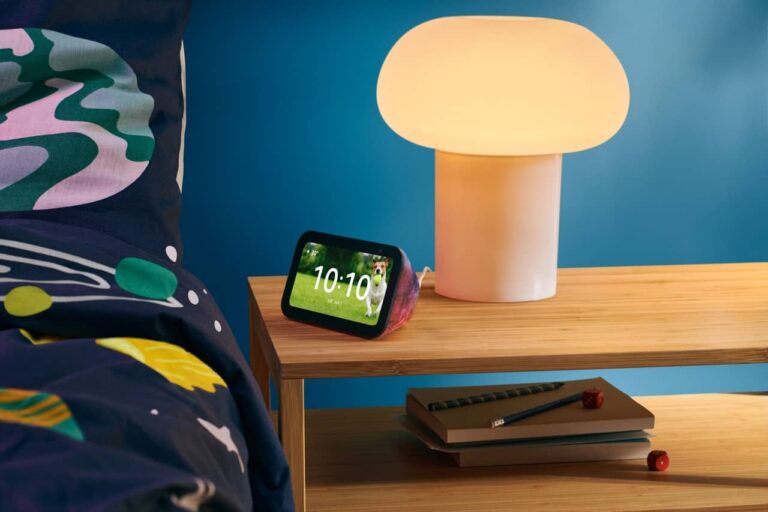
First up, let’s start with something familiar, the Echo Show 5. It’s keeping the same $89 price and $99 for the Echo Show 5 Kids Edition. Amazon says that the Echo Show 5 is the fastest model yet and features an entirely new speaker system. That allows you to have double the bass of any previous generation. Also giving you clearer sound.
Next up, is the Echo Auto. It’s now available in new countries, including Australia, Canada, the United Kingdom, Germany, France, Italy, Spain and Japan.
All-new Echo devices
Now onto the all-new models. This year, Amazon is announcing the Echo Pop. It’s going to retail for $39.99, and it’s a new addition to the Echo Family, with a redesigned form factor. It actually looks a lot like the Echo Spot from a few years ago, sans the display. Amazon is making it available in a couple of fun colors, including Lavender Bloom and Midnight Teal.
The Echo Pop does also have a front-facing directional speaker that is able to deliver full sound. Making it great for bedrooms, apartments and really any other small space.
Finally, the All-new Echo Buds. Obviously, the Echo Buds aren’t an entirely new product for Amazon, but they do get some nice upgrades this year. The Echo Buds are bringing personal AI on the go, which feature a semi-in-ear design that is able to deliver rich audio, a long-lasting battery and premium features. Not to mention the fact that they also have hands-free Alexa included. These new Echo Buds are the cheapest pair of headphones that Amazon has ever released, with a regular price of $49.99. Making these super affordable.
All of these products are available for pre-order from Amazon today.
ExtraHop released a new tool called “Reveal(x)” that helps organizations understand their potential risk exposure from employee use of OpenAI ChatGPT by providing visibility into the devices and users on their networks connecting to OpenAI domains.
ChatGPT has become highly familiar due to its potential usage in every organization.
It only took 2 months for ChatGPT to reach 1 billion customers, whereas tik tok took eight years.
A survey taken by Gartner in 2023 revealed that 9 out of 10 respondents chose ChatGPT implementation in their organization by 2025.
Though it has a very high capacity that can help organizations speed up their progress, there are still Intellectual Property risks in using AIaaS tools inside organizations.
Recently, there have been many data leaks associated with ChatGPT. Users using ChatGPT for code reviews or any discovery or research share proprietary information with ChatGPT, which puts confidential data at risk.
In addition, ChatGPT stores the data in public domains and uses this information to answer other user requests.
ChatGPT is an AI-as-a-Service (AIaaS) that can be widely used in productivity, software development, and research.
Reveal(x) – Data Protection from Rogue AI Use and Accidental Misuse
To overcome this risk, experts at ExtraHop have released Reveal(x), which will show the visibility of the devices and users inside the network that are connected to OpenAI domains.
This can help organizations to implement AI language models and generative AI tools with a lot of control over their data.
This information is crucial for organizations to identify the amount of data sent to OpenAI domains, which can help assess the risk linked with using AI services.
Security Personnel can validate the range of acceptable risks and decrease potential Intellectual Property loss.
Technical Analysis
Reveal(x) uses network packets as a primary data source for monitoring and analysis during real-time detection.
Reveal(x) can provide this deep visibility and real-time detection because we use network packets as the primary data source for monitoring and analysis, Extrahop said.
It strips the content and payload sent from OSI layers 2-7 (DataLink Layer to Application Layer) for complete data visibility.
Though there have been several rules, regulations, and policies on how AI must store and use data, it is still essential for organizations to understand how to use these services.
ExtraHop Stated that “ExtraHop believes the productivity benefits of these tools outweigh the data exposure risks, provided organizations understand how these services will use their data (and how long they’ll retain it), and provided organizations not only implement policies governing the use of these services but also have a control like Reveal(x) in place that allows them to assess policy compliance and spot risks in real-time.”
It is still undetermined how far an AI can go based on its capabilities and the risks it poses to data exposure.
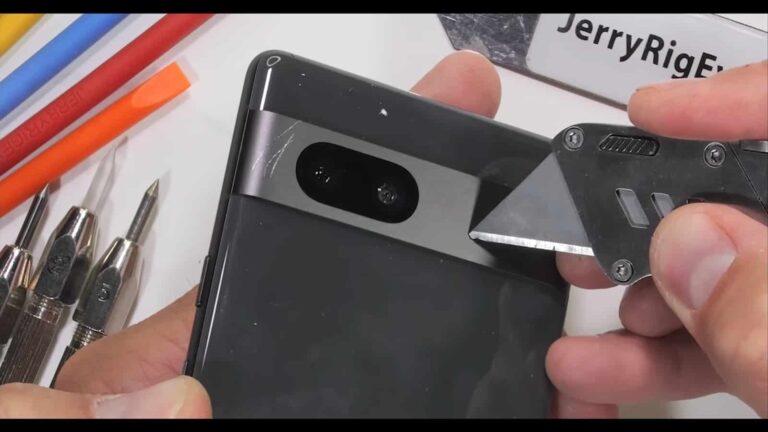
Zack from JerryRigEverything managed to get his hands on the Pixel 7a, and we all know what that means. The Pixel 7a got submitted to a number of durability tests, and it actually did a fantastic job.
The Pixel 7a did a great job in a series of durability tests
Let’s take it one step at a time, though. The first test was the display scratch test, as per usual. The display started scratching when Zack used a level 6 pick, with deeper grooves at a level 7. That is to be expected for the Gorilla Glass 3 that is included here. So no surprises there
The phone’s frame is made out of metal, as is the camera visor on the back. Zack also tested out the phone’s backplate to prove that it’s made out of plastic, which is not necessarily a bad thing. The phone’s buttons are also removable, by the way.
The phone’s display managed to last around 25 seconds under the heat of a lighter before going white. It did recover rather quickly after the heat was removed from the equation.
The phone aced JerryRigEverything’s bend test
And ultimately… the bend test. That is usually the test most people are waiting for. It’s also a test that the Pixel 7a aced. The phone barely bent at all, and that goes for applying pressure from both the front and the back.
It actually did a lot better than the Pixel 7 Pro. That device barely managed to survive this bend test. So, the company’s mid-range handset is basically more durable than its flagship, kind of.
If you’d like to check out the entire durability testing video, you can do that with ease, we’ve embedded the video below. It has a duration of five and a half minutes. We’ve also already reviewed the Pixel 7a, in case you’re interested in knowing more about the phone.




.webp "Reveal(x)")