Over the past few years, the robot vacuum cleaner industry has become a highly competitive market, with many new players entering the field. However, not every company has been able to keep up with the competition, as Neato Robotics, one of the major competitors to iRobot’s Roomba series, recently announced its closure due to declining sales and an inability to meet its economic goals.
Founded in 2005 by a group of Stanford graduates, Neato Robotics quickly made a name in the robot vacuum industry by pushing the envelope and introducing new features like Wi-Fi in 2011 and LiDAR mapping in 2020. However, despite the initial success and Vorwerk’s purchase of the company in 2017, Neato continued to struggle due to a lack of focus on independent sales in e-commerce and brick-and-mortar retail.
“The Vorwerk Group has therefore decided to further expand its investments in the area of vacuum cleaner robotics and to strengthen the robotics competence within the group by bundling development capacities centrally at the R+D location in Laaken,” reads the company’s blog post announcing the decision.
Vorwerk’s plans and impact on the industry
In an effort to give its existing customers the support they need, Neato says it has established a team of 14 professionals based in Milan, which will be responsible for maintaining the company’s cloud services for at least five years and will also help provide spare parts to users.
Although Vorwerk’s efforts in providing support to existing users are commendable, this closure will have a significant impact on the industry. As it stands, iRobot currently holds over 46% of the market, with Ecovacs and Roborock claiming 17% and 9% of the market, respectively. However, iRobot’s market domination and Amazon’s bid to purchase the company have caught the attention of American and European regulators, who have expressed concerns about potential harm to the competitive landscape.
A tool that’s harvesting pictures to train image-generating AIs has caused some measure of chaos among webmasters who’d rather their sites were not scraped.
Website owners are once again at war with tools designed to scrape content from their sites. An AI scraper called img2dataset is scouring the Internet for pictures that can be used to train image-generating AI tools.
These generators are increasingly popular text-to-image services, where you enter a suggestion (“A superhero in the ocean, in the style of Van Gogh”) and it produces a visual to match. Since the system’s “understanding” of images is a direct result of what it was trained on, there is an argument that what it produces consists of bits and pieces of all that training data, There’s a good chance there may be legal issues to consider, too. This is a major point of contention for artists and creators of online content generally. Visual artists don’t want their work being sucked up by AI tools (that make someone else money) without permission.
Unfortunately for the French creator of img2datset, website owners are very much dissatisfied with his approach to harvesting images.
The free program “turns large sets of image URLs into an image dataset”. Its claimed the tool can “download, resize, and package 100 million URLs in 20 hours on one machine”. That’s a lot of URLs.
What’s aggravating site owners is that the tool is ignoring assumed good netiquette rules. Way back in 1994, “robots.txt” was created as a polite way to let crawlers know which bits of a website they were allowed to pay a visit to. Search engines could be told “Yes please”. Other kinds of crawlers could be told “No thank you”. Many rogues would simply ignore a site’s robots.txt file, and end up with a bad reputation as a result.
This is one of the main complaints where img2dataset is concerned. Website owners contend that it’s not physically possible to have to tell every tool in existence that they wish to opt-out. Rather, the tool should be opt-in. This is a reasonable concern, especially as site owners would essentially be responsible for adding ever more entries to their code on a daily basis.
One site owner had this to say, in a mail sent to Motherboard:
I had to pay to scale up my server, pay extra for export traffic, and spent part of my weekend blocking the abuse caused by this specific bot.
Elsewhere, you can see a deluge of complaints from site owners on the tool’s “Issues” discussion page. Issues of consent, custom headers, even talk of the creator being sued: It’s chaos over there.
If you’re a site owner who isn’t keen on img2dataser paying a visit, there are a number of ways you can tell it to keep a respectful distance. From the opt-out directives section:
Websites can use these http headers:” X-Robots-Tag: noai”, “X-Robots-Tag: noindex” , “X-Robots-Tag: noimageai”, and “X-Robots-Tag: noimageindex”. By default, img2dataset will ignore images with such headers.
However, the FAQ also says this for users of the img2dataset tool:
To disable this behaviour and download all images, you may pass “–disallowed_header_directives ‘[]’”
This does exactly what it suggests, ignoring the “please leave me alone” warning and grabbing all available images. It’s no wonder, then, that website owners are currently so hot and bothered by this latest slice of website scraping action. With little apparent interest in robots.txt from the creator, and workarounds to ensure users can grab whatever they like, this is sure to rumble on.
Malwarebytes removes all remnants of ransomware and prevents you from getting reinfected. Want to learn more about how we can help protect your business? Get a free trial below.
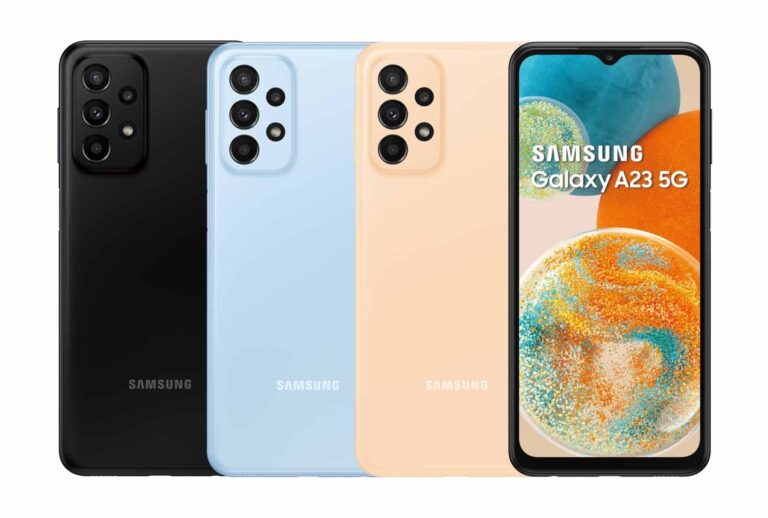
Samsung is rolling out a new update for the Galaxy A23 5G in the US. The device is picking up the April 2023 Android security patch. The new SMR (Security Maintenance Release) is also available for the 4G version of the phone in some markets.
The latest update for the Galaxy A23 5G in the US is currently limited to carrier-locked variants. Rolling out with the firmware build number A236USQS2CWD8, it brings nothing more than last month’s security patch. This isn’t surprising considering that the mid-range device recently picked up One UI 5.1 with tons of goodies.
Samsung should soon expand the latest release to factory-unlocked units as well. The new update may also reach more markets over the next few weeks. Outside the US, the Galaxy A23 5G was launched in Europe. The device has already received One UI 5.1 there as well.
The 4G-only Galaxy A23, on the other hand, didn’t arrive in the US but was sold in most global markets. It has also picked up One UI 5.1 widely. However, users in Latin America have been waiting for the new One UI version all this while. They are finally getting it. The big update comes with the firmware build number A235MUBU2CWD1 and brings the April SMR too. The latest security patch isn’t available for this phone elsewhere.
Since the Galaxy A23 and Galaxy A23 5G are only eligible for quarterly security updates, Samsung may not push the latest release to these phones everywhere. It may skip the April SMR in some markets and push May or June releases. As usual, you can always check for updates manually. Go to the Settings app, tap on Software update, and then on Download and install. If an update is available, you will be prompted to download it. If not, check back at a later date.
Galaxy M23 5G is also getting the April update
Along with the Galaxy A23 duo, Samsung is also pushing the April SMR to the Galaxy M23 5G. This phone didn’t arrive in the US but the company sold it pretty much everywhere else. The latest update for the device bears the firmware build number M236BXXU3CWD1 in Europe (via). It appears the update brings more than just some vulnerability fixes but the official changelog doesn’t mention anything. The device has already picked up One UI 5.1 widely. The new security release for the Galaxy M23 5G hasn’t reached other markets yet.
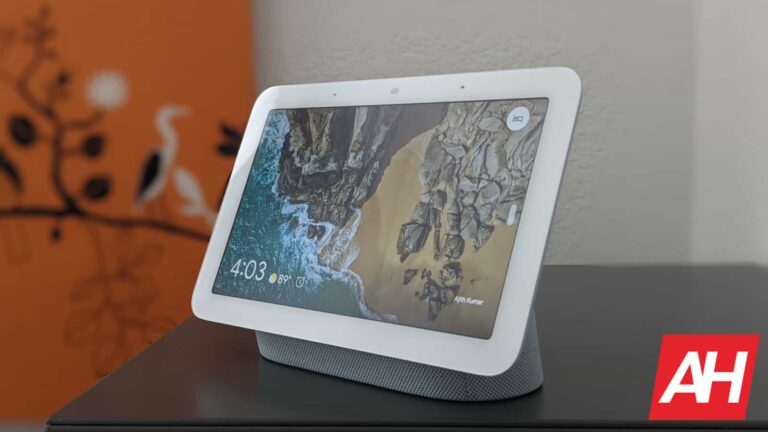
Google is pushing Fuchsia OS to yet another Nest product. The Nest Hub 2nd Gen is the latest device to get a switch from Cast OS to Fuchsia. The company has already updated the first-gen Nest Hub (originally Google Home Hub) and Nest Hub Max to the new operating system.
The Fuchsia rollout for the Nest Hub 2nd Gen began earlier today, 9to5Google reports. The company told the publication that the OS switch for the 2021 smart display, which comes with a Soli radar sensor for sleep tracking, will take place slowly. Like in the past, it will begin with a small percentage of users enrolled in the Preview Program in the Google Home app. Google will likely use those devices for public testing. Once it confirms that everything’s fine, the update should reach everyone around the world.
For users, it will all go relatively unnoticed. The Fuchsia OS update will not change anything on the Nest Hub 2nd Gen. It will only switch the operating system of the device, which shipped with Cast OS out of the box. The feature set will mostly remain the same, and so will the UI and everything else. If you want to check whether your smart display has been updated to Fuchsia, you can go to the Technical information page in Settings. If you see a “Fuchsia version” here, your device has received the update.
Google has a long-term vision for Fuchsia
Fuchsia is an open source non-Linux operating system that has been in development since at least 2016. After years of work, Google publicly released the new OS for the first-gen Nest Hub in August 2021. The Nest Hub Max started picking up the OS change in June 2022. The company took several months to complete the rollout for both devices. It is now taking a similar approach with the Fuchsia rollout for the Nest Hub 2nd Gen.
With this rollout, Google has updated all three of its recent smart displays to Fuchsia. However, as noted by 9to5Google, the timing of this update is curious. The company is gearing up to release the Pixel Tablet as an Android-powered alternative to the Nest Hub series. It’s also in the process of dropping support for several Assistant-powered apps and games on the Nest Hub devices, while third-party smart displays have already lost update support.
By the looks of it, Google wants to use Fuchsia-powered Nest devices as the stepping stone for the platform’s next major milestone. Fittingly, there are also hints of Next speakers getting a switch from Cast OS to Fuchsia. But the long-term plan is to develop Fuchsia into a “general-purpose” operating system, like Windows, Linux, and macOS. The company is working on a way to natively run Linux and Android apps on the new OS to ensure a strong app ecosystem.
“Fuchsia is a long-term project to create a general-purpose, open source operating system, which we have been developing in the open for years,” a Google spokesperson told 9to5Google in a statement following the release of the Fuchsia update for the Nest Hub 2nd Gen. “This is part of those continued efforts and fuchsia.dev will have the latest information on the team’s work.”
With the advent of the phablet, it can be easy to ignore our good friend the tablet. These large slates have fallen from the public eye in recent years as smartphones grew in size and power. Regardless, anyone can use a good tablet.
The thing is that finding the perfect tablet for you can be a hassle, as there’s a lot out there to choose from. What size should you get? Which version of Android is best for you? What kind of power do you need? Here is a list of the best Android tablets that you can get to hopefully help you answer these questions.
Top 10 Best Android Tablets Summary
Before we dig into the list, here’s a quick summary of the featured tablets. It will show you the price and where you can buy them from. If you just want a quick glance at what’s coming up, then you can view the table below. If you want a more in-depth look, then feel free to read the contents below the table.
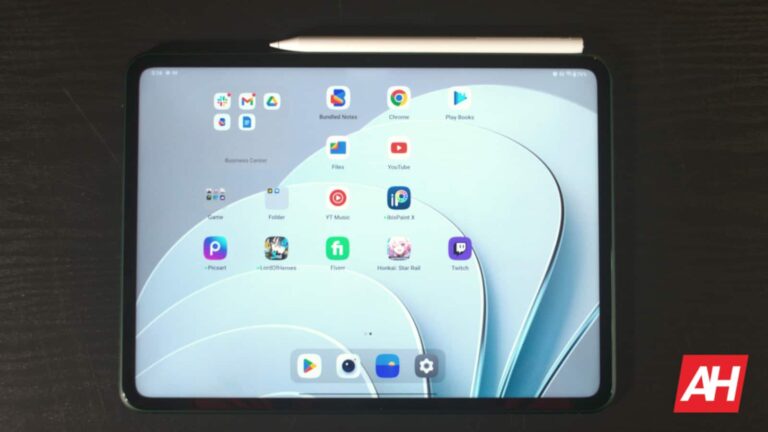
This is the first tablet made by OnePlus, but it doesn’t seem like it. The company did an amazing job with this tablet in several respects. It uses the powerful MediaTek Dimensity 9000 SoC. This is the most powerful processor from the company today.
If you’re into watching media with your tablet, then the OnePlus Pad is perfect for you, as it has a gorgeous display that runs at 144Hz and gets plenty bright. It’s perfect for reading documents, and it makes good-looking games look amazing. It’s a great tablet, and you get a lot for the price.
Lenovo has a wide selection of tablets to choose from, and this is one of the more affordable ones. The Lenovo Tab M10 Plus is a great tablet if you’re looking for one that will handle the basics. It’s a mid-range tablet, but it’s far from incapable. The performance is solid, and it’s powerful enough to handle most games on the market. It ran Genshin Impact on low settings.
The Lenovo Tab M10 Plus has a set of respectable speakers that will give you a powerful sound. They’re accompanied by a nice display that’s nothing to sneeze at. This tablet is great for media-watching, casual gaming, reading, and other basics.
The Lenovo Tab P12 Pro is a tablet that’s meant for power users. Starting off with the display, this tablet comes with a large 12.6-inch OLED display with a 2560 x 1600 resolution. It caps out at 120Hz and 600nits of brightness. You can bet that you’ll have an amazing viewing experience if you’re looking to watch content.
If you’re looking to get work done, you’re also covered in that department. This tablet uses the powerful Snapdragon 870 SoC. This is a flagship-grade processor that’s backed up by an impressive 6GB/8GB of RAM and 128GB/256GB of storage. If you need more storage, you can use a micro SD card to expand it.
In terms of software, it comes with Android 11, but you’ll be able to upgrade to newer versions of the software. With Android 12L and 13, you’ll be able to use the new tablet optimizations introduced by Google in late 2021. This makes it an even better tablet for work.
If you’re looking for a more unconventional tablet experience, then you can look at the Lenovo Yoga Tab 13. One thing that sets this tablet apart from others on the market is the included stand. The stand comes built-in, so you don’t need to shell out for additional accessories. This makes it ideal if you’re using it to watch content or game with a Bluetooth controller.
The Yoga Tab 13 has a large 13-inch IPS LCD display with a resolution of 1350 x 2160. This is sharp enough to make the content look amazing. Along with the display, there’s a set of amazing speakers that only add to the experience.
In terms of performance, this tablet uses the powerful Snapdragon 870 SoC. It’s not the newest processor on the block, but it will still give you ample power to get serious work and play done. This is backed up by 8GB of RAM and 128GB of storage.
Those looking for a more affordable Galaxy Tab experience should look no further than the Galaxy Tab S7 FE. This tablet was released as a great alternative to the main Galaxy Tab S7 tablets. You can expect a similar experience to those tablets, as the software is kept up to date. This tablet launched with Android 11, and it will receive Android 13.
You get an amazing 12.6-inch display with a resolution of 1600 x 2560. That’s perfect for watching all sorts of content. It’s an IPS LCD display, so you won’t be getting the best contrast, but it’s still an upper-tier display.
As for power, this device uses the Snapdragon 778 (Snapdragon 750 5G for the 5G model), so you’ll get some decent performance. This is one of Qualcomm’s more powerful mid-range processors. This means that you should expect near-flagship-grade performance. This is backed up by 4GB/6GB/8GB of RAM and 64GB/128GB/256GB of storage.
If you’re looking for a top-tier Galaxy Tab experience without breaking the bank, then you’ll want to consider getting the base Galaxy Tab S8. Though this is the bottom-tier Galaxy Tab S8, you still get the powerful Snapdragon 8 Gen 1 Processor. This gives it flagship-level performance to get serious work done.
You’re looking at an amazing 11-inch display with Samsung’s superior LCD technology. It’s great for watching movies and other content. The size also makes it great for working on the go. It’s about the size of a small laptop, so you can place it in a small bag if you need to. The Galaxy Tab S8 comes with a set of four speakers that augment the media experience.
We also can’t forget about the S Pen stylus support. You can use this tablet for drawing and signing documents in case you need to.
TCL has its collection of smartphones, but the company has its tablets as well. These are notable for their affordability and their nice displays, and the TCL Tab 10s is no different. This tablet has a nice 10.1-inch 1080P display that uses the company’s impressive NXTVISION technology. This upscales SDR content to HDR.
This is one of the more affordable tablets on this list, so it’s great if you’re not looking to pay a lot of money. The TCL Tab 10s is great if you’re looking for a great media-watching device. The display will give you great visuals, and the large size only makes it better.
Amazon just revamped its Fire HD line of tablets in 2022. This brought some new hardware with updated software. These tablets aren’t meant to be powerful productivity or gaming devices. Rather, they’re more for accessing Amazon’s services. They’re perfect for watching videos on Amazon Prime Video, reading/listening to books, and streaming music.
The software is perfectly optimized to have quick access to Amazon’s services. You’re presented with an easy-to-navigate interface where you can easily see your library of saved content, your apps, and recommendations. It’s perfect if you’re into the Amazon ecosystem of services and you want a central hub for entertainment.
The Amazon Fire Tablet 8″ is a perfect device to get if you’re integrated into the Amazon ecosystem of services. The software is formatted to access video streaming, music streaming, E-books, and audiobooks. Also, you can’t forget about quick access to Amazon shopping and products.
The 8″ size makes it perfect for people who prioritize portability. It’s perfect to slip into a bag, and you can hold it for extended periods of time without your hand getting tired. If you want a light tablet experience, and you don’t need too many bells and whistles, then you’ll want to consider this device.
This is a great tablet if you’re used to using Xiaomi’s unique software. The Redmi Pad is an affordable tablet that has a beautiful 10.61-inch display that can produce a billion colors. It has a 2000 x 1200 resolution, and it runs at a respectable 90Hz. So, if you’re looking for a great video-watching experience, then this is the tablet for you.
The Xiaomi Redmi Pad comes with 128GB of internal storage, so you’ll be able to download a bunch of large apps and a ton of files if you need. With the 6GB of RAM and the MediaTek Helio G99, you won’t get the best performance, but it will be good enough to cover the basics.
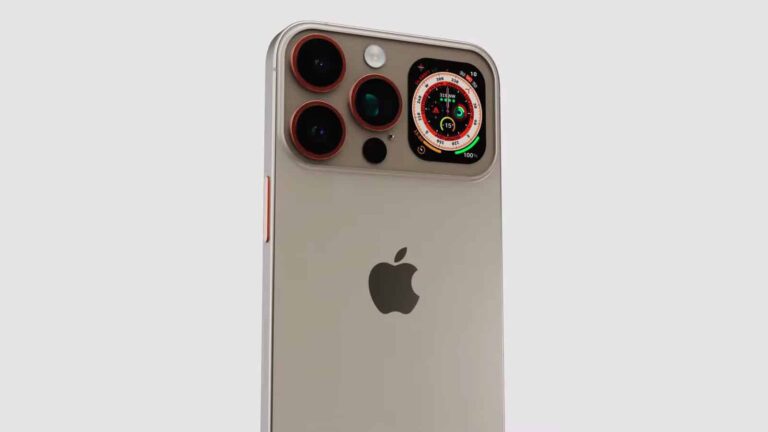
A new iPhone 16 Ultra concept design has surfaced on YouTube with two displays, and more. This one comes from Technizo Concept, and the designer also refers to it as the iPhone 16 Pro Max Ultra, iPhone 16 Pro Max, and iPhone 16 Pro. We’ll stick with the ‘Ultra’ name, as it’s over the top, design-wise.
This iPhone 16 Ultra has two displays, actually
Do note that this is not a leak or anything of the sort. It’s just a third-party concept. Now, the overall shape of the device is in line with what Apple would usually do. This phone does have a small display on the back, though, which is something Apple won’t do, at least not in the near future.
That display sits right next to the triple camera system on the back. The device also has bronze accents around its cameras, while its buttons are also bronze-colored. The sides are flat, as they are on current-gen models.
The power/lock button sits on the right side, while the volume rocker buttons are on the left, and they’re separated. There is even your good old alert slider included on the left side. The real thing will likely include an ‘Action button’ instead of it, as is the iPhone 15 Pro series.
The ‘Dynamic Island’ sits on the front, while a Type-C USB is also included
Front the front, the device looks exactly as you’d expect. It has a Dynamic Island cutout up top, while its bezels are thin and uniform. The corners of the phone are rounded, and the same goes for the display corners.
There is a Type-C USB port at the bottom, and the designer envisioned a titanium frame for the device. He also mentions the Apple A18 Bionic chip in the description, and the same goes for the periscope camera on the back and iOS 18.
You can check out a full concept video below, it’s embedded. It has a duration of over 2 minutes, but the design part of the video actually ends around the 1:40 mark. The real iPhone 15 series is coming later this year, in September, while the iPhone 16 series is expected around the same time next year.
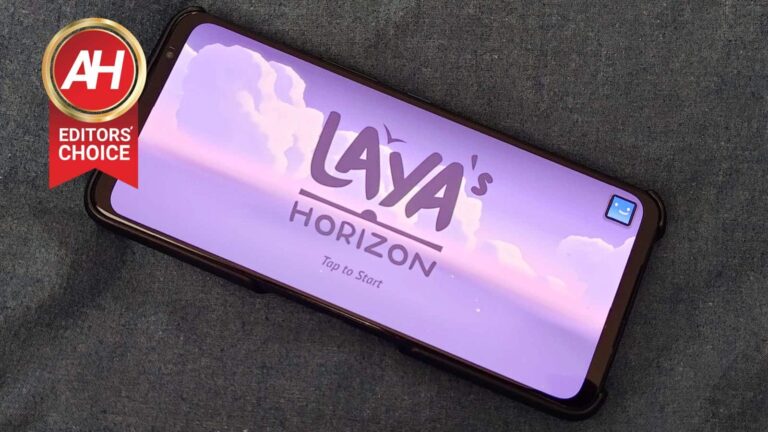
The launch of Laya’s Horizon is finally here and the game is ready to delight anyone with a current Netflix subscription, as it’s the latest Netflix mobile game. From the makers of previous smash hit mobile titles like Alto’s Adventure and Alto’s Odyssey, developers ‘Snowman’ have spent the last five years pouring their very heart and soul into the making of this newly released mobile game. And it’s one you should definitely check out if you subscribe to Netflix.
For the last few weeks, I’ve had the pleasure of testing out Laya’s Horizon in both pre-release and review builds prior to the game’s official launch on May 2. And to say Laya’s Horizon is anything other than a magical, surreal experience would be doing the game a disservice. This is something you will need to experience for yourself to get the full effect. Just know that you’re in for a good time.
Laya’s Horizon is a Netflix-exclusive launch title
Like quite a few other games this past year for Android and iOS, Laya’s Horizon is a game that’s exclusive to Netflix. When asked about why the studio went this way instead of premium or traditional free-to-play offerings, Snowman said this was simply the route that made the most sense. It allowed them to focus on developing just a really good quality mobile game. Without the worry of charging players for the game directly. Or sidelining and alienating parts of the player base with a game that was rife with ads.
No ads, no in-game purchases to get rid of them, and no in-game purchases for gear or upgrades. Just a fully-fledged mobile title that you have complete access to as part of the Netflix subscription. Where unlocks require player progression and time spent. And oh my, is that time spent going to be well worth it.
The gift of flight
So, what makes this game so special? It’s quite simple really. It gives you the gift of flight. You might think, “you can fly in tons of games, what makes Laya’s Horizon any different?” And that’s not an unfair question. But most games don’t allow you to fly the way Laya’s Horizon does.
If you’ve ever had the chance to try out games like No Man’s Sky in VR, where you’re jumping into hyperspace as you jet set around the galaxy in your ship’s cockpit, you know how surreal that is. Almost like you’re actually flying through space exploring the universe.
I won’t go so far as to say that Laya’s Horizon does that for you on such a grand scale. But it’s probably as close as any mobile game will ever come. And it’s all thanks to Snowman’s ingenious vision for how the flight mechanics work.
When you were a kid, you can probably remember pretending to fly using your arms as wings. Maybe you wore a cape too. Snowman took that idea and implemented it here. In Laya’s Horizon, you take control of Laya who will leap off cliffs and mountain peaks. To control her flight, the game uses gesture controls. Where each of your two thumbs will control one of Laya’s arms. You can move them independently to control whether she turns right or left. Or slide them up or down in sync to move Laya up or down.
Sliding your thumbs inwards will pull Laya’s arms inwards. Making her more aerodynamic and giving her a speed boost. Meanwhile, sliding them outwards will force Laya to open her arms and legs wide, briefly pivoting her to a vertical position. Slowing her down. Frankly, it’s a magical detail that really tries to put you into the role of Laya. And it works amazingly well.
Explore, expand, collect
Now that you know how flight works, what about the actual game content? Well there’s quite a lot of it. Laya will start with one single cape that she can use to fly down the mountainside. As you complete races and other small tasks, you can unlock and equip new capes. Each one having its own unique abilities depending on what kind of boost you want Laya to have.
One can give Laya an enhanced speed boost (this is actually the first cape you’ll acquire). There are also charms, one of which has the ability to suck in collectibles called sparks like a magnet. You’ll need these sparks, too, so it’s definitely a charm worth equipping. And there are many more of each item type that are there to discover. You can also explore a pretty vast landscape filled with different biomes. Basically, there’s no shortage of content.
And flying through it all is a pretty cool way to see everything that Snowman has built.
The controls are easy to learn, but tough to master
There is little out there that’s as rewarding as overcoming a challenge. And that’s kind of how I feel about the controls in this game. They’re extremely easy to learn. Heck, the game walks you through how to do every little movement Laya can perform before you really set out to chew on the real meat of the game.
But while these descriptions of what to do are simple to read, putting them into practice is an entirely different story. They’re a bit of a challenge to say the least. A challenge however, that is a fulfilling experience once you nail things down. Easy to learn and tough to master.
Even if you shy away from challenges in games more often than not, I would urge you to stick with it and really get the controls down. Because once you do, the game becomes so, so much more fun, as you’re able to effortlessly zip and glide through the world. And it’s already insanely fun to play to begin with.
Final thoughts
There are lots of mobile games, many of them worth your time. But few if any will provide you with a gameplay experience like Laya’s Horizon. In most cases I wouldn’t recommend getting a Netflix subscription just to play a game. But that isn’t the case here.
Sign up for Netflix for a month or two. Or even just a free trial if you have one available. Play through Laya’s Horizon and experience the wonder that it offers. And in between your flight sessions, enjoy whatever other content Netflix has that you can kick back and watch.
Just, if you like mobile games, especially ones with overflowing amounts of forethought and attention to detail, do yourself a favor. Play. This. Game. You can grab it on Google Play now.
Smartphones are frequently replaced by users when newer versions of smartphones with much more features are released.
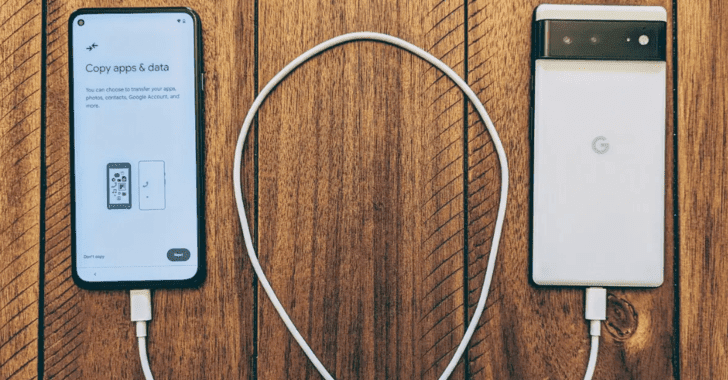
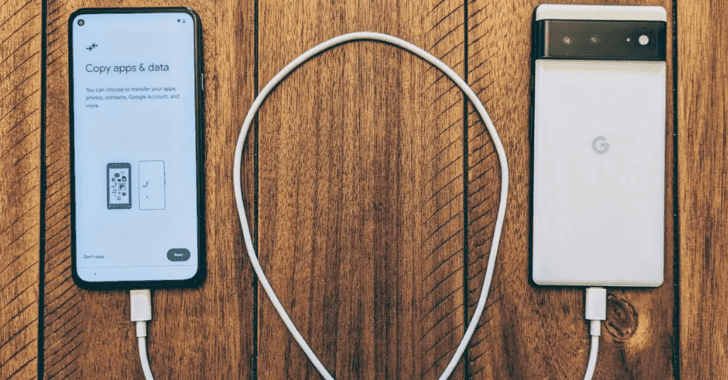
The exchange of smartphones has a significant complication in transferring data to the new device.
To overcome this problem, Cloning applications were introduced to overcome this problem, which will clone the entire device to the new one.
This includes applications, photos, personal data, mail accounts, and even session data of applications.
However, CloudSEK’s researchers found that many applications do not invalidate or revalidate the session after this data migration to a new device.
Threat actors are aware of this and use this lack of validation with highly privileged migration tools to copy to their devices, which can result in impersonation.
Source: CloudSEK
List of Applications that do not Invalidate or revalidate the session cookies.
Canva
BookMyShow
WhatsApp
Snapchat
KhataBook
Telegram
Zomato
Whatsapp business
Strava
LinkedIn
Highway Drive
BlinkIT
Future pay – BigBazaar now owned by Reliance
Adani One
Clash of Clans, Clash Royal (Supercell)
Discord
Booking.com
As per the migration experiment conducted by CloudSEK, WhatsApp transferred the secret keys to the new device, which resulted in the application not asking for 2FA.
“Researchers conducted an experiment using two Realme devices. After the data was transferred from the victim’s device to the attacker’s device, the two applications (Whatsapp and Whatsapp Business) were accessible on both devices via the same account.”
Even though the victim had activated WhatsApp 2FA, it wasn’t asked on the new (attacker’s) device, and now both devices could send messages via the same account. However, the replies from the user on the other end will only be received on the device which sent the last message; you can see the PoC video here.
A threat actor gaining access to this kind of vulnerability can impersonate a person and WhatsApp and send messages on the victim’s behalf.
Once the migration is completed, WhatsApp will receive messages on the device to which the last message was sent.
In such cases, the victims will only be able to know if they log on to Web WhatsApp and look for conversations.
Threat actors can bypass this easily if they delete the messages.
Meta owns WhatsApp. However, the same Meta-owned Instagram did not have this vulnerability, as it logged out all accounts when migrated to a new device.
Impact of this Vulnerability
As these applications do not invalidate or revalidate session cookies, threat actors can manipulate victims into installing Stealer Log malware that records users’ activities and sends them back to their servers which can be used to gain unauthorized access to victims’ accounts.
Once attacker steals the cookies not validated by the applications, they can use anonymous browsers to use stolen cookies resulting in the impersonation of network location and GPS.
Mitigation
Checking for unusual activity on their accounts and their device
Keeping the device locked when not in use
Do not leave the devices in the public places
Enable Two-factor authentication for the applications.
The Nintendo Switch OLED is great all on its own but for the best experience there are some accessories that all Switch OLED owners should consider. While some are simply nice-to-haves, others are absolute must-haves.
Whether you play your Switch OLED in handheld mode or while docked, or both, these accessories can help ensure you not only protect your Switch OLED, but also play it more comfortably, and just with more convenience and enjoyment. Most of these will also work for the regular Nintendo Switch. So if you don’t have an OLED, not to worry.
Also worth noting is that there are tons of other great Switch accessories out there, these are just what we found to be the best and most useful ones.
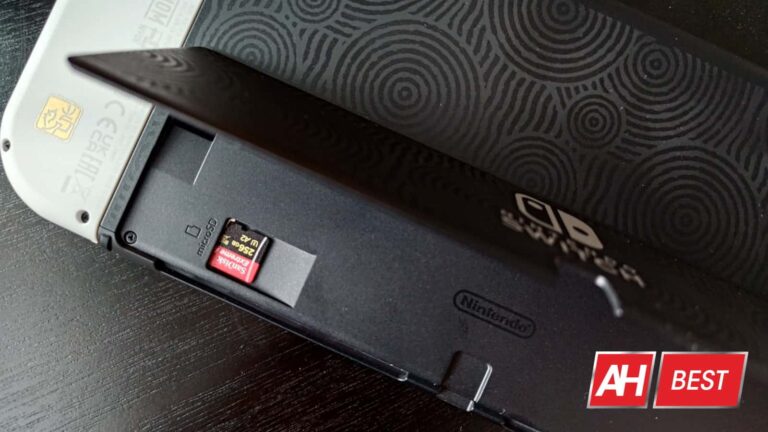
You can probably skate by for a while without a microSD card for your Switch OLED. Especially if you’re buying most of your games in their physical cart form. But sooner or later, you may end up wanting to download some games digitally. This is where the microSD card comes in handy.
There are lots of options out there but you don’t want to skimp on a microSD card. Not only do you want one with fast read and write speeds to ensure quicker load times and smoother gameplay, but you want one that won’t be poor quality. The last thing you want is for it suddenly break on you. That’s why we’re recommending the SanDisk Extreme Plus. It has read speeds of up to 200MB/s, and write speeds of up to 140MB/s. More than capable for the Switch and Switch OLED.
This card also comes in 128GB, 256GB, and 512GB sizes. So you have options for how much space you want or need. Of course we think it’s always better to have more than not enough. You could always go for the Nintendo co-branded SanDisk cards as well, but you may find them to more expensive than these non-branded ones. So these are just a better value. Hands down a good microSD card is one of the best accessories you could pick up for the Nintendo Switch and Switch OLED.
With portable devices that come with a display, it’s always an excellent idea to protect that display as best you can. That’s why we’re recommending this ZAGG InvisibleShield Glass+ screen protector for the Switch OLED.
In fact this is probably the first accessory you should buy. Or at the very least, some form of glass screen protector for the device. It doesn’t necessarily have to be this one, although we do feel this is the best one you can get. You just want something to protect that beautiful Switch OLED display from scratches and scuffs. This will do the job. It also comes with a smudge resistant coating and it’s super simple to apply.
Absolutely one of the best Nintendo Switch OLED accessories. That being said, this particular screen protector only works with the Switch OLED. But ZAGG does offer a version for the normal Switch as well.
If you plan to take your Nintendo Switch OLED with you outside of the home, you want a carrying case. We absolutely love this one from tomtoc for its slim and stylish design, but also for its utility. The fact that it’s slim means it’s easy to stuff into a backpack or bag pocket without taking up too much space. And if you don’t have a backpack or bag that you’re bringing with you, the case also has a carry handle.
Beyond that, you’ll get a nice snug (but not too snug) fit for the Switch OLED and the normal Switch, along with extra space for the Joy-Con joy sticks and buttons. Additionally, it has space for 10 physical game carts and the case is military standard drop tested, with a spill resistant coating. Plus it comes in loads of color options like white, black, and a range of new gradient colors. It’s one of the best Nintendo Switch OLED accessories and one of the cases for the console in general. So good we also recommend the Steam Deck version that tomtoc makes.
There’s a few reasons why this is an excellent headset worth your consideration for the Nintendo Switch OLED, not the least of which is the comfort. It also provides great audio quality and most importantly, lag-free audio thanks to the 2.4GHz USB-C dongle.
Simply plug that dongle into the Switch’s USB-C port and enjoy a lag-free connection. Or if you like, the headset works with Bluetooth as well and you could simply connect it that way.
Additional features include 360-degree spatial audio, multi-platform compatibility with PC, PlayStation, and mobile, and a 38-hour battery life. While something like the Arctis 1 Wireless would also work, this is quite a bit more comfortable and has better battery life. So if can get past the extra $80 in price, it’s worth it.
If you only have one pair of Joy-Con controllers, then you can easily just charge them by connecting to them to the console and then docking the console. But, if your console dock is broken or you have more than one pair of Joy-Con controllers that you want to keep charged up, this Joy-Con charging dock from PowerA is an invaluable accessory to have and one of the best accessories for the Nintendo Switch OLED.
It charges up to four Joy-Con controllers at the same time too. So if you have even more of them, you can easily top them up on power. The base is weighted so it stays in place and the dock isn’t terribly expensive. An excellent pickup for sure.
There’s more than one pro controller out there for the Switch, but quite honestly it’s hard to justify anything other than the official Pro Switch controller from Nintendo. While there are some other good ones out there, like the Fusion Pro controller for Switch from PowerA. But that controller is more expensive and doesn’t include things like the HD rumble haptics or the NFC support. Which means no use of Amiibos.
When it comes down to it, the official Switch Pro controller is still your best bet if you want something wireless. Whether you’re playing in docked mode or in the tabletop mode, the Switch Pro controller is a much more comfortable option (especially for longer sessions) than the Joy-Cons.
Probably one of the single best accessories for the Nintendo Switch OLED and the regular model is the Hori Split Pad Pro. This is an officially licensed accessory, and it’s a full size controller for the console while in handheld mode. Unfortunately it doesn’t support HD rumble or the motion controls, and it doesn’t support NFC which means no use of Amiibos. But it is a lot more comfortable to use when playing the Switch in handheld mode than the Joy-Con controllers.
It has larger grips, larger joysticks, a full size actual d-pad, and turbo functionality in addition to remappable rear triggers. It also comes in multiple colors.
If you like the Joy-Con controllers and prefer to use them, you may want to consider the Turbo Thumb Grips for the Joy-Con controllers from KontrolFreek. The Joy-Con controllers are great, and they certainly look nicer than alternative options for handheld mode. But in all honesty the thumbsticks could be a little more comfortable.
These thumb grips for the Joy-Con controllers really help quite a bit to provide more comfort and some additional anti-slip. They’re also high-rise for better control. Plus they’re not too expensive.
A really cool accessory that some people may not know about is the NeoGrip from Skull & Co. It’s an ergonomic hard shell that you can slide the Nintendo Switch into while the Joy-Con controllers are attached, so you get extra grip from the NeoGrip but can still use the Joy-Con controllers. We love this thing with the Turbo Thumb Grips above for a really comfortable handheld gaming experience.
This model of the NeoGrip also works with both the Nintendo Switch OLED and the regular Nintendo Switch, and there’s even a cutout space so you can use the Switch OLED’s kickstand with this thing on. It also comes with three different grip styles so you can find one that suits you best. And, it even works with the Switch OLED dock. So you don’t have to take it off when you dock the console. If you play a lot in handheld mode, definitely consider this accessory for your collection.
Last but certainly not least, we have the Global Convert Dock from GENKI. This is an absolute must-have accessory if you travel or take the Switch with you places often that have a TV or monitor.
It’s essentially your Switch and Switch OLED dock but in a compact formfactor. Simply plug the wall adapter into an available outlet, then plug in the USB-C cable to the Switch itself to charge it, and plug an HDMI cable into the dock and the other into the TV or monitor. And boom, you’re playing your Switch OLED in docked mode without the dock itself. There’s even a USB-A port for plugging in an accessory.
This particular version is the Global model which comes with three additional regional adapters. We highly recommend this one if you ever plan to play the Switch OLED or the regular Switch away from home in docked mode. Because it’s a lot easier to carry this around then the dock and associated cables.
We’re only beginning to tap the generative potential of artificial intelligence, and the further we push this technology, the more potent our fear of it grows. Thanks to a new report from NewsGuard (via The Verge), it looks like people are using AI to generate entire spam websites.
We have already seen people use AI to generate images, articles, books, advertising copy, videos that border on nightmare fuel, and more. There’s no doubt that it put many people out of their jobs, as it’s becoming harder to distinguish between AI content and human content. However, according to the new report, AI just took a major step forward.
People are using AI to generate spam websites
This should come as no surprise, as scores of people are using AI for their nefarious needs. Hundreds of books on Amazon are co-authored by AI, so people making entire websites using the technology won’t shock you.
The report from NewsGuard says that it has identified 49 sites. They seem to be completely written using AI. If they’re not completely written using AI, then they are almost entirely written using it. These are websites that seem to focus on posting written content like articles.
The thing about it is that, since they’re using AI, they can churn out hundreds of Articles every day. That basically gives a person the power to create a full newsroom from their bedroom.
The tells
That is scary, but there is a bit of a silver lining to this. There are obvious tells that the sites are using artificial intelligence. As sophisticated as chatbots are at creating articles, the delivery is still as clinical as a doctor’s report.
Also, since these articles are being copied and pasted right onto the website, no one is proofreading them. This means that blatant errors are being found in the articles.
According to NewsGuard, one article left an error message from the chatbot in the article. We see the text “I’m sorry, I cannot complete this prompt as it goes against OpenAI’s use case policy on generating misleading content,” appears randomly in the article. That is a dead giveaway.
Another tell is a little bit more subjective. Some of the sites have very generic names such as Biz Breaking News and Market News Reports. Ostensibly, if you’re churning out a ton of spam websites, then you won’t put that much effort into making a clever title. However, there are some legitimate sites out there whose names are a bit generic, so you won’t want to use that as your primary metric.
The best thing to do to fight off these AI spam sites is to always check for those tells. Pay attention to the wording and the phrasing of the articles and see if they sound human. Read the About pages for these sites and check out the writing staff.
Also, check out the dates for the articles. If the publication only started publishing articles a week ago, yet, it has a full writing staff of 20 people posting 500 articles every day, then it’s most likely an AI-generated site.