Windows Recall is changing in 3 key aspects after user backslash

0
[ad_1]

Microsoft is changing some key aspects of Windows Recall in response to all the controversy generated since its launch. The new feature never quite convinced the general public regarding data security and privacy. Now, the company wants to make sure that everyone is very clear about how it works. They are even making it easier to disable the feature.

The way Windows Recall works is based on constantly taking and saving snapshots of everything you do on your PC. This allows you to ask questions about your activity. For example, if you want to remember what you were doing on a specific day. Recall is an AI-powered feature that requires powerful NPUs to run smoothly. So, the best way to use it is on Copilot+ PCs. However, Recall can (barely) run on unsupported hardware as well.

It seems that it was never clear to the public how Recall would handle snapshots. Multiple questions arose about the security of your data in certain situations. For example, one of the concerns is that another person with physical access to your PC could potentially get your detailed activity history, even with images. In response to concerns, Microsoft is changing some of the most criticized aspects of Recall.

Microsoft is changing these key Windows Recall aspects

The changes focus on three main points. First, the company will modify the set-up process for Copilot+ PCs. Now users will be able to clearly decide whether they want to enable Recall or not. Even if you don’t choose any option, Recall will be disabled by default. This way, there will be no risk of enabling the feature without realizing it.

Next, the Windows Hello security system will now be a mandatory requirement to start Recall. This means that the feature will require biometric verification when you want to use it. But not only that, as the OS will also run a “proof of presence” test before you can check your timeline or do searches. Lastly, the company is encrypting Recall snapshots and the search index database. The latter was one of the most sensitive potential security holes. After all, it was just decrypted plain text.

The security features available before

The new security measures are in addition to those that were available before. For instance, fully on-device data storage and processing (nothing is uploaded to the cloud), persistent notification for when the feature is active, support for DRM services, and InPrivate support (to hide sensitive data fields).

With these changes, Microsoft wants to gain the public’s trust. They also offer more flexibility, allowing you to even disable Recall from the initial setup of your new PC. It will be interesting to see if users give it the opportunity once it is widely available. The feature rollout will begin on June 18.


[ad_2]
Source link

WhatsApp beta tests smarter status update ranking

0
[ad_1]
WhatsApp, the popular Meta-owned messaging, never seems to rest on its laurels. Always testing new features, the company recently revamped the status updates tray in their Android beta, giving it a sleek new look with bigger thumbnails and a more modern layout. But the changes don’t stop there – WhatsApp appears to be doubling down on enhancing the status update experience, with a particular focus on making sure you see updates from the people you care about most.A new feature currently being tested in the Android beta, dubbed “ranked status updates,” aims to prioritize updates from your most important contacts. This means that instead of seeing updates in strictly chronological order, WhatsApp will intelligently reorder them. This is based on several factors, including how often you interact with each contact, whether they’re pinned to the top of your chats, and how recently you’ve messaged them.

Image credit: WABetaInfo

Even status updates that are about to expire will get a boost, ensuring you don’t miss out on those fleeting moments. Notably, official WhatsApp updates will remain at the top of the list, guaranteeing you never miss important announcements from the app itself.

Keen-eyed users may notice the absence of timestamps on status updates. This is a deliberate design choice, as WhatsApp shifts its focus from displaying the newest updates to showcasing the most relevant ones. Reportedly, all the data used for ranking updates remains on your device, so your privacy is not compromised.

However, this new feature isn’t without its quirks. If you reinstall WhatsApp or link a new device, the ranking system essentially resets, meaning it will take some time for the app to relearn your preferences. Additionally, if you use WhatsApp on multiple devices, the order of status updates may vary slightly due to differences in synced chat histories.

As of now, the ranked status updates feature is only available to a limited number of beta testers. But if it proves successful, it’s likely to be rolled out to a wider audience in the near future. So keep an eye on those WhatsApp updates – your status feed could soon become a whole lot more personalized and engaging.


[ad_2]
Source link

One Phish, Two Phish, Red Phish, Blue Phish

0
[ad_1]
One of the interesting things about working for a cybersecurity company is that you get to talk to…
[ad_2]
Source link

Poco Pad Review: An all-around great tablet!

0
[ad_1]

For a few years there, we thought that the tablet was dead! There was a period when only Apple and Samsung made tablets that were worth anything. However, while the tablet market isn’t exactly flourishing, we’re seeing more companies put more effort into their slabs. Poco just made its foray into the tablet market. I was given the opportunity to review the Poco Pad, so let’s see if this tablet is worth the money.

Many of us in the mobile tech world know about the Xiaomi Poco brand and its significance. This is a brand that came out of the gate swinging with the Poco F1. That phone was sporting the most powerful Snapdragon SoC of the year along with other flagship specs for a measly $300. This was a true Flagship Killer back in the age when that term was in full swing. So, there’s the expectation that all of its products will share this mentality.

Well, I recently reviewed two phones that uphold the Flagship Killer name. Firstly, there’s the new Poco F6 (Review). This is a Snapdragon 8s Gen 3-powered beauty of a phone. It’s a great phone with a beautiful design, nice speakers, smooth performance, and other amazing attributes. It starts at $399.

Next up, there’s the Poco F6 Pro (Review). This is the more advanced version of the Poco F6 with a powerful Snapdragon 8 Gen 2, up to 1TB of storage, a gorgeous premium design, great performance, a solid camera, and other great aspects. It’s an amazing phone to pick up for the starting price of $499.

So, let’s see if the Poco Pad is a proper addition to this family.

Poco Pad Review: Design

In terms of this tablet’s design, there’s not much to talk about. I have to admit that many of the tablets that come out don’t really have notable designs. Most tablets nowadays share a similar aesthetic. There’s not much of a need to make tablets as diverse as phones. You’re more likely to take your phone out with you, so there’s more of a chance that people will see it. However, tablets are designed to stay at home. You’re not really planning to impress people while watching Moana on your couch.

So, the design of the Poco Pad isn’t really anything to write home about. It matches the aesthetic of most of the other tablets on the market. I received the gray colorway, and it has a sort of elegance to it. It’s not meant to be flashy. The tablet is designed to give off an appearance of professionalism.

The Poco Pad has a pretty minimalist design with a unibody that covers the back and the frame. As far as branding goes, the only text on the back is the Poco branding at the top left of the tablet. On the other side, we see two pretty large camera modules. In my opinion, they seem pretty big, but they do help give the tablet a more unique look.

Poco Pad (4)

In terms of design, I don’t have any complaints. I don’t expect the company to do something wild and outlandish with the design because there’s not much of a need to. The design is nice for what it is.

Poco Pad Review: Build quality

In terms of the build quality, I think that Poco delivered a solidly built device. When I pick it up, I don’t get the impression that I’m holding a cheap device. Firstly, it’s a pretty hefty tablet. There’s a decent amount of weight to it. It’s the kind of heavy that lets you know that it was made with quality materials. It doesn’t feel clunky or cumbersome.

As for the materials, Poco chose to use a metal unibody for the tablet, and that lends to the overall feeling in the hand. It feels nice grabbing a metal device rather than a plastic one. Not only does it feel nice, but I also get the impression that I’ll be able to use it for quite some time. You never want to use a device that feels like it’s going to be broken in a year or two.

I performed a slight bend test on this tablet, and, just as I expected, there was a little bit of flex to it. Since tablets are much bigger than phones while remaining as thin, they’re much easier to bend. Adding a bit of force to the tablet from both the front and back, I found that there was definitely some give to it, so you’ll want to be careful not to sit on it. There’s a chance that it could bend.

I also listened for any creaks or other sounds, and I did hear a few. It wasn’t bad, but I mostly heard them from where the frame of the tablet met the glass. This doesn’t mean that this is a poorly built tablet. It’s just one of those areas where Apple and Samsung tablets show why they cost so much money. You wouldn’t really hear these creaks from an iPad or Galaxy Tab. In any case, the Poco Pad is still a well-built tablet.

Poco Pad Review: Display

A big part of the tablet experience (both figuratively and literally) is the display. Many people buy tablets to consume media, so having a nice display can be make-or-break for some users. With much more expensive tablets, you can expect brilliant OLED displays. In the case of the Poco Pad, the company opted for a less flashy panel and went with a typical LCD display.

However, there are tablets out there like the OnePlus Pad and the Galaxy Tab S9 FE that have beautiful LCD screens. So, let’s see where this tablet’s screen falls. Just like with the Poco F6 series, it’s a bit tough to judge this display because it has several options to customize it. There aren’t as many customizations as with the F6 phones, but there are a few.

Poco Pad (11)

There are three color saturation modes that you can choose from. There’s the Standard mode which gives you more natural colors and the Vivid mode which automatically adjusts the color saturation based on the content you’re watching.

The last mode is the one I’ll be using, and it’s called Saturated. This will push the display to its highest saturation setting. People are more likely to use this setting, so I’ll be judging the screen by this setting.

Brightness

Starting off with the brightness, the Poco Pad’s screen can definitely get up there. It’s more than bright enough for indoor use. I used the tablet in some brightly lit indoor environments, and I was still able to see the screen without any issues.

When I took it outside, I was still impressed with the brightness. With older screens, I shudder to think of how bright sunlight ruined the viewing experience. In the case of the Poco Pad, I was still able to see the screen pretty well in the bright sunlight. I admit that this isn’t the brightest screen on the market, but I was still able to comfortably view the tablet’s screen in the sunlight. This included navigating the interface, using apps, and playing games. I was able to comfortably see everything on the screen. If a screen can pass the sunlight test, it’s a win in my book.

Colors

In terms of the colors, I think that this is a pretty good performer. I’ve seen several LCD panels produce colors that are basically on par with OLED panels. Well, the Poco Pad doesn’t have one of those displays. In its Saturated mode, the colors do look pretty punchy for an LCD panel. I feel that blues get a nice little pop.

However, in terms of overall saturation, I feel like the display strikes a nice balance between saturated and bland. The colors are on the punchy side, and they do make for some nice visuals. I was still able to enjoy watching movies and other videos on the display. It’s a nice-looking panel, don’t get me wrong, but you shouldn’t really expect it to blow your mind.

There are additional settings that allow you to change the color temperature of the screen. You can use these settings to further cater your viewing experience to your tastes.

Resolution

Are you a pixel peeper? Don’t be ashamed! This is a tablet with a pleasant-looking screen; a good resolution would only make the experience better. The Poco Pad has a QWXGA display with a resolution of 2560 x 1600. This gives the tablet a pixel density of 249 PPI.

Plainly put, that’s a decent resolution for this tablet. It’s more than double the resolution of 1080p, and you’ll want to have the extra pixels if you plan on watching content or gaming on it.

Overall

The Poco Pad has a generally good display. It has decent brightness, nice colors, and a good resolution. Take those with the 120Hz refresh rate, and you have a really good viewing experience. I wouldn’t say that it’s the best part of this tablet’s experience, but it’s not bad by any means.

Poco Pad Review: Speakers

Tablets have more real estate for larger speakers. This is why some tablets have really amazing speakers. There are some tablets I’ve used that I just use instead of a Bluetooth speaker; the speakers are just that good! The Poco Pad boasts an impressive four speakers. How do these speakers perform?

Poco Pad (2)

I tested these speakers using a set of test pieces. Each of these pieces was designed to accentuate a particular aspect of the tablet’s audio. These are the Loudness, Bass, Treble, Vocals, Balance, and Immersion. I also just generally used the tablet, so I’m not only judging the speakers on the test pieces.

Loudness

One thing I mentioned in both my Poco F6 and Poco F6 Pro reviews was the fact that they weren’t particularly loud. Well, the same is true with the Poco Pad. It’s plenty loud for personal and indoor use. Again, you’re more likely to use your tablet at home, so the speakers are perfect for the most part.

However, at their highest volume, I find that they’re a little quiet compared to other tablets that I reviewed. At their highest volume, I would have liked just a bit more punch. If you’re outside or in a loud environment, then you’ll certainly have trouble hearing the speakers on this tablet.

Bass

In terms of the bass, I wasn’t really surprised by the sound that I heard. When reviewing the Poco F6/Pro, I found that these phones’ speakers could produce some great bass. With the Poco Pad, it seems that the company paid an equal amount of attention to the speakers.

The bass that these speakers could produce is pretty great. It’s warm and rumbly without sounding muddy. The test piece that I used had a lot of lower instruments like Double Basses, Bassoons, Contra Bassoons, and Tubas. Not only was I able to hear the tone of each instrument, I was able to hear the low rumble that really characterizes lower tones. The speakers produced a very wide and rich sound, and that contributes to the overall experience.

Treble

It’s easy to overlook the treble, but you shouldn’t. The test piece that I used for the treble had certain instruments like Piano, Celeste, Violins, Flutes, and Pizzicato Strings to really drive the higher notes. I was listening for clarity in the sound, and I think that these speakers did a pretty good job creating clear high notes.

I wouldn’t say that the treble performance was a highlight of the speakers; I would have liked to hear just a bit more clarity. However, they’re not bad. I could hear some nice detail in the higher registers of these instruments. If your guilty pleasure is a little ASMR, then you won’t be disappointed.

Balance

While high notes and low notes are on opposite sides of the spectrum, it’s important that these two parts of the sound play nicely with one another. Balance is a crucial part of the audio experience.

When it comes to balance, I think that these speakers were able to give me a nicely balanced sound. Neither the bass nor the treble outshined the other. The piece I used was a very balanced song that had a fair share of low-end thumps and high-end notes. Listening to the song, I didn’t feel that I really needed any more of either the highs or lows.

Poco Pad (4)

Vocals

If you’re going to be listening to songs on these speakers, then vocal performance is important. Overall, I think that the speakers on the Poco Pad do a good job of projecting voices. No matter what song I listened to, the singer’s voice was able to cut through the music and be heard as clear as day.

Immersion

Immersion is where all of the elements of the audio come together to create an all-encompassing sound. Overall, I think that the speakers on the Poco Pad achieve this. The sound coming out of the speakers is very immersive.

Overall

I think that the speaker performance is one of the best things about the Poco Pad. The audio from the speakers, while not the loudest, checks a lot of boxes when it comes to quality. I could listen to these speakers without needing to reach for a pair of headphones or a Bluetooth speaker.

Poco Pad Review: Performance

Using this tablet, I didn’t really know what to expect. It’s not quite using the latest and greatest silicon from Qualcomm, but many devices wound up surprising me by using less powerful chips. In the case of the Poco Pad, I was thoroughly impressed with the performance. It’s powered by the Snapdragon 7s Gen 3 SoC, so it’s not quite at the cutting edge. However, that’s not to say that it’s a sluggish chip either. This is the kind of chip that won’t show its weakness under typical loads. It’s the kind of chip that you have to push to great heights in order to start seeing some slowdown.

Typical day-to-day performance is rather smooth. I didn’t experience any stutters or dropped frames while navigating the software, using the apps, or performing any tasks. Everything flowed, and I thank both the hardware and the software for this. This is the kind of tablet that you’ll most likely use for media consumption, but that’s not to say that you can’t use it for some work, If you’re going to use this tablet for some writing or drawing, you’ll have more than enough power to do that. Other than that, you won’t need to worry about it slowing down while performing other tasks.

When using affordable hardware, we’ve become accustomed to expecting a sluggish experience. We have cheaper tablets from back in the day to blame for this. Imagine using a $300 tablet back in 2016 (Yikes!). Nowadays, the companies making those crappy $300 tablets back in the day have learned better ways of optimizing their software to work on cheaper hardware. We also can’t forget about the major steps that the chipmakers took to boost the performance of their lower-powered chips.

Poco Pad (5)

Geekbench scores

Yes, I know that benchmark scores aren’t a proper measure of a device’s performance. However, it’s still nice to see some numbers every now and then to see where certain chips stand. I ran the Poco Pad through Geekbench 6.

This tablet got a single-core score of 1034, which is pretty wimpy by most standards. The performance seems to be comparable to a flagship phone from a few years back. It was able to land just below the Galaxy S21 FE (1096). So, it’s safe to say that this chip rests comfortably in the mid-range area… on paper.

Moving onto the multi-core score, the story isn’t much different. It scored 2974. Again, the performance was basically neck-and-neck with the Galaxy S21 FE. This time, it beat the Galaxy by four points. So, this tablet’s chip is performing on par with a two-year-old phone running on a three-year-old chip… on paper.

The fact of the matter is that I don’t expect to be using this as an alternative to an iPad Pro. However, the software and hardware are working together to give this tablet some nice and smooth performance. At no point during my usage do I find myself wanting more power.

Poco Pad Review: Gaming performance

With great chips comes great gaming performance! At least, that’s what we’ve been led to believe. This is the kind of mentality that leads us to think that devices not running the latest and greatest Snapdragon chips suck at gaming. It blinds us to performers that manage to leverage their chip’s power to push some graphically intensive games.

To test out the Poco Pad, I used two rather graphically intensive games and two of the prettiest games on the market. As for the first two games, I installed Asphalt 9 and Sky: Children of The Light. I turned all of those games up to their highest settings, and I expected to see some sort of stutter. However, the Poco Pad was able to power through them without breaking a sweat. I didn’t notice any dropped frames or hitches.

We all know how intense Asphalt 9 can get. It was once one of the most graphically intensive games on the market. It still holds up today, but most phones have managed to conquer it. Sky is also a very pretty game, and it’s not shy about having wide-open spaces.

Genshin Impact and Honkai Star Rail

Now, let’s kick things up a notch. Running these games on a device using an upper-mid-range processor sounds like some cruel form of torture, but don’t worry, the tablet’s fine. In fact, I was rather surprised by its performance.

Beginning with Star Rail, seeing the tablet stutter on the title screen didn’t give me much hope. Then again, that damn screen slows down just about every phone I’ve used.

When it comes to the actual gameplay, the Poco Pad powered through like a champ. I maxed out all of the graphical settings and set the frame rate to 60FPS. Overall, the gameplay was smooth. I feel like the tablet touched 60fps at points and remained between 40fps and 50fps the rest of the time. There are points when the animations don’t feel silky smooth, but they rarely ever got to the point where I saw any dropped frames. There were maybe one or two instances where I saw a dropped frame, but the general performance is smooth as butter.

Moving on to Genshin Impact, the performance was much the same. Again, I maxed out all of the graphical settings and set the frame rate to 60fps. Just like with Star Rail, I was able to play the game smoothly while getting some pretty high frame rates. This was consistent throughout my gameplay. It didn’t matter if I was in an open environment, a town, or in the heat of battle, the gameplay remained smooth.

Poco Pad (12)

Overall, if you’re looking to make this a bit of a gaming machine, go for it! It’s powerful enough to handle the best of what the Play Store has to offer.

Poco Pad Review: Battery

In terms of battery life, I don’t think that this tablet could go up against some of the best on the market, but it’s still able to deliver some decent numbers. Using it in my daily life, I’m able to get through a good work session or movie-watching session before needing to plug it in. If you’re planning on doing some hardcore work, you’ll definitely want to keep the charger on hand.

In order to test the battery, aside from using the tablet as I would typically use a tablet, I also ran it through a test. I charged the tablet to 100%, put on a 24-hour video, and let it run all the way down to 0%. The Poco Pad lasted about five and a half hours before giving up the ghost. Your mileage will vary, of course.

In any case, if you’re going to be using this tablet for casual use, you shouldn’t have to worry about the battery life. It should get you through what you need to do. However, it’s not the best. If you plan on doing any sort of serious work or gaming, then you’ll need to make sure you have the charger handy.

Poco Pad Review: Software

In terms of software, I don’t really have any complaints…. except for the big one. The Poco Pad uses Xiaomi’s HyperOS Android skin running on top of Android 14. HyperOS is starting to grow on me. I’ve been using it while reviewing the Poco F6 and Poco F6 Pro. I will say that the version on the Poco Pad isn’t quite as flashy as the version on the phones. There aren’t as many impressive animations throughout the software. For example, when you pull down the notification shade, you don’t see the clock slowly grow and change position.

In any case, it’s still a good Android skin, and there are some nice tablet optimizations like the bottom panel on the home screen and the window options. These window options let you easily place apps in split-screen mode or pop them out as windows.

My big complaint

So, what’s my big complaint? Well, remember Android on tablets BEFORE Google brought Android 12L? Well, it feels a bit like I’m using that version of Android on the Poco Pad sometimes. The place where I felt that the most was the notification shade. As you may know, HyperOS splits the notification shade into two separate pages. If you swipe down on the top left corner of the screen, you’ll see your notifications and if you swipe down on the right side, you get your quick settings.

That’s tedious, yet understandable on a phone, but on a tablet?! When I summon the quick settings, they drop down and take up about 25% of the right side of the screen. The rest of the screen is just empty space. It’s literally wasted space. It’s similar with the notifications; in the case of the notifications, they’re in the center of the screen.

Poco Pad (6)

I think that Xiaomi could have done what other companies have been doing and put all of the notifications and quick settings on one screen. The notifications could sit on the left side of the screen while the quick settings could sit on the right. That seems like a massive oversight on the company’s part.

Aside from that gripe, I think that the software’s great. I hope that the company will send an update that will change that.

Poco Pad Review: Final verdict

This is Poco’s first tablet, and I think that the company was able to deliver a very compelling device. The design is nice, the build quality is solid, the display is good, the speakers are great, the performance is smooth, and the battery life is decent. It’s an overall solid device, and it’s more than worth it for the price.

If you’re a person who’s looking for a great device for some work, play, or other needs, I recommend you give the Poco Pad a try.


[ad_2]
Source link

XSS Flaws In WordPress Plugins Exploited To Deploy Malware

0
[ad_1]

Researchers uncovered a new wave of malware attacks against WordPress websites, exploiting known XSS vulnerabilities in different WordPress plugins to deploy malware. Users must ensure updating their sites with the latest plugin releases to avoid the threat.

New Malware Campaigns Exploits XSS In Different WordPress Plugins

Reportedly, the threat actors have devised a new malware campaign leveraging the general practice of site admins, leaving their sites running with vulnerable plugin versions. In the recent campaign, the attackers exploited different cross-site scripting (XSS) vulnerabilities in three different WordPress plugins to deploy malware.

As explained in their post, researchers from the security team Fastly observed active exploitation of the following three XSS vulnerabilities.

  • CVE-2023-6961 (CVSS 7.2): A high-severity XSS affecting the WP Meta SEO plugin. The stored XSS impacted the ‘Referer’ header, allowing an unauthenticated adversary to inject arbitrary scripts on web pages that would execute following users’ page visits. The plugin developers patched this vulnerability with v.4.5.13.
  • CVE-2023-40000 (CVSS 8.3): Another high-severity vulnerability affecting the LiteSpeed Cache Plugin. The developers addressed this flaw with the plugin version 5.7.0.1, released in October 2023.
  • CVE-2024-2194 (CVSS 7.2): This high-severity stored XSS flaw affected the URL search parameter in the WP Statistics plugin. It impacted the plugin versions 14.5 and earlier, eventually receiving a patch with version 14.5.1

Fastly researchers observed a new JavaScript malware exploiting these flaws. As stated,

The attack payloads we are observing targeting these vulnerabilities inject a script tag that points to an obfuscated JavaScript file hosted on an external domain.

Specifically, this malware performs three main functions: installing PHP backdoors, creating rogue admin accounts, and setting up tracking scripts to monitor the targeted sites.

While the developers have adequately patched all three vulnerabilities, the active exploitation of the flaws in the wild clearly hints at the users’ ignorance about ensuring prompt site updates. Now that the threat is already in the wild, WordPress admins must ensure that these WP plugins (and all others running on their sites) are updated with the latest releases to receive all security fixes.

Let us know your thoughts in the comments.


[ad_2]
Source link

Advance Auto Parts customer data posted for sale

0
[ad_1]

A cybercriminal using the handle Sp1d3r is offering to sell 3 TB of data taken from Advance Auto Parts, Inc. Advance Auto Parts is a US automotive aftermarket parts provider that serves both professional installers and do it yourself customers.

Allegedly the customer data includes:

  • Names
  • Email addresses
  • Phone numbers
  • Physical address
  • Orders
  • Loyalty and gas card numbers
  • Sales history

The data set allegedly also includes information about 358,000 employees and candidates—which is a lot more than are currently employed by Advance Auto Parts (69,000 in 2023).

The cybercriminal is asking $1.5 Million for the data set.

post by Sp1d3r offering data for sale
Cybercriminal offering Advance Auto Parts data for sale

Advance Auto Parts has not disclosed any information about a possible data breach and has not responded to inquiries. But BleepingComputer confirms that a large number of the Advance Auto Parts sample customer records are legitimate.

Interestingly enough, the seller claims in their post that the data comes from Snowflake, a cloud company used by thousands of companies to manage their data. On May 31st, Snowflake said it had recently observed and was investigating an increase in cyber threat activity targeting some of its customers’ accounts. It didn’t mention which customers.

At the time, everybody focused on Live Nation / Ticketmaster, another client of Snowflake which said it had detected unauthorized activity within a “third-party cloud database environment” containing company data.

The problem allegedly lies in the fact that Snowflake lets each customer manage the security of their environments, and does not enforce multi-factor authentication (MFA).

Online media outlet TechCrunch says it has:

“Seen hundreds of alleged Snowflake customer credentials that are available online for cybercriminals to use as part of hacking campaigns, suggesting that the risk of Snowflake customer account compromises may be far wider than first known.”

TechCrunch also says it found more than 500 credentials containing employee usernames and passwords, along with the web addresses of the login pages for Snowflake environments, belonging to Santander, Ticketmaster, at least two pharmaceutical giants, a food delivery service, a public-run freshwater supplier, and others.

Meanwhile, Snowflake has urged its customers to immediately switch on MFA for their accounts.

Protecting yourself after a data breach

There are some actions you can take if you are, or suspect you may have been, the victim of a data breach.

  • Check the vendor’s advice. Every breach is different, so check with the vendor to find out what’s happened, and follow any specific advice they offer.
  • Change your password. You can make a stolen password useless to thieves by changing it. Choose a strong password that you don’t use for anything else. Better yet, let a password manager choose one for you.
  • Enable two-factor authentication (2FA). If you can, use a FIDO2-compliant hardware key, laptop or phone as your second factor. Some forms of two-factor authentication (2FA) can be phished just as easily as a password. 2FA that relies on a FIDO2 device can’t be phished.
  • Watch out for fake vendors. The thieves may contact you posing as the vendor. Check the vendor website to see if they are contacting victims, and verify the identity of anyone who contacts you using a different communication channel.
  • Take your time. Phishing attacks often impersonate people or brands you know, and use themes that require urgent attention, such as missed deliveries, account suspensions, and security alerts.
  • Consider not storing your card details. It’s definitely more convenient to get sites to remember your card details for you, but we highly recommend not storing that information on websites.
  • Set up identity monitoring. Identity monitoring alerts you if your personal information is found being traded illegally online, and helps you recover after.

Check your exposure

While the Advance Auto Parts data has yet to be confirmed, it’s likely you’ve had other personal information exposed online in previous data breaches. You can check what personal information of yours has been exposed with our Digital Footprint portal. Just enter your email address (it’s best to submit the one you most frequently use) to our free Digital Footprint scan and we’ll give you a report.


We don’t just report on threats – we help safeguard your entire digital identity

Cybersecurity risks should never spread beyond a headline. Protect your—and your family’s—personal information by using identity protection.


[ad_2]
Source link

Galaxy S24’s instant slo-mo feature to get HDR10+ support soon

0
[ad_1]

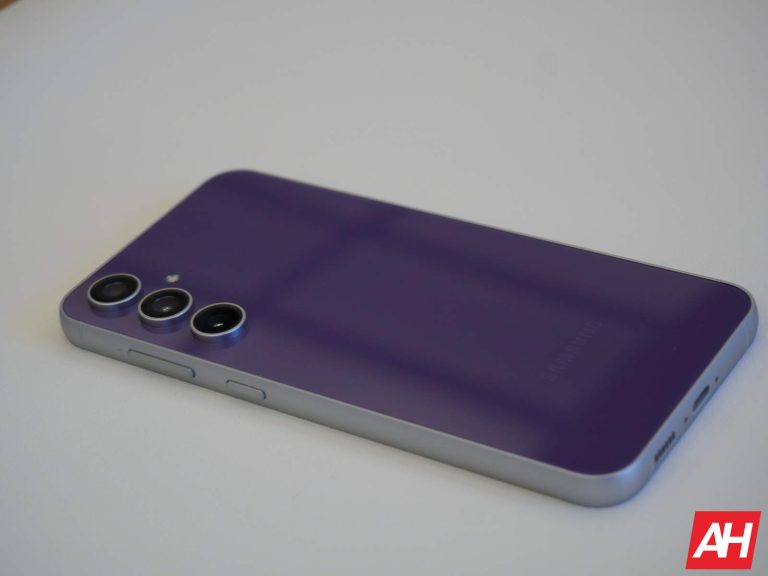
Samsung introduced its latest flagship smartphones called the Galaxy S24, S24+, and the S24 Ultra earlier in January. Among the new hardware, the Galaxy AI editing tools are the biggest highlights of the new flagship trio. One of these AI-powered editing tools is called Instant Slow-Mo. As the name suggests, it is capable of slowing down regular videos to make them look like they were shot in the slo-mo mode.

At the moment, the Galaxy S24’s instant slo-mo feature only works on non-HDR10+ videos. However, this is going to change soon as the company will soon roll out an update to fix it. The new firmware will allow Galaxy S24’s instant slo-mo feature to offer HDR10+ video support.

The upcoming software update will allow the instant slo-mo feature to offer HDR10+ video support

While replying to a user on Samsung’s community website, a moderator confirmed that the instant slo-mo’s HDR10+ support is in the works. The moderator said that the support for HDR10+ videos has been implemented in the slo-mo functionality on the Galaxy S24. The upgraded feature will be released to the users via a new software update. As of now, there’s no word when this firmware update will be released. The moderator did mention that “we will notify you when the SW update is provided”.

After the update, Samsung will improve the Instant Slow-Mo feature on the Galaxy S24 series devices by adding support for HDR10+ videos. The feature will let you use Galaxy AI and Instant Slow-Mo features to view and edit a regular HDR10+ video. Currently, to use HDR10+ footage with the Galaxy AI, you must convert it into the SDR quality.

Several other improvements are planned for the Instant Slow-Mo feature

Apart from support for HDR10+ videos, Samsung also has several other improvements planned for the Instant Slow-Mo feature. Soon, the brand will be adding “.mov” file editing support in the built-in video editor of the Gallery app.

Also, you will soon be able to directly share the Instant Slow-Mo footage of any video by hitting the Share button. As of now, it is not possible as you first have to export the footage in order to share it with others.


[ad_2]
Source link

Google’s $2.3 Million Check to DOJ Ends Antitrust Jury Trial, But Case Continues

0
[ad_1]

In an interesting turn of events, Google is not going to face a jury trial in the antitrust lawsuit brought by the US government. Reuters reports that the search engine giant has paid back the full amount of monetary damages sought by the Department of Justice in the lawsuit.

Google pays back the monetary damages sought by the DOJ to avoid jury trial

The antitrust lawsuit by the Department of Justice and eight states in the US sought to break up the search titan’s alleged ad tech monopoly. The Justice Department set a damages claim in the lawsuit and sought a trial by jury. However, Reuters reports that a jury trial won’t take place as Google filed a copy of a $2.3 million check. It will be enough to cover the monetary damages sought by the government three times, including interest, if necessary.

It’s worth mentioning that the US government initially claimed over $100 million in damages in the lawsuit. However, the Justice Department later requested less than $1 million while seeking a jury trial.

Google has allegedly paid the monetary damages without admitting any liability or wrongdoing. ”Contrived damages claim has disintegrated,” the company said in a statement on Friday, calling the case a ”meritless attempt to pick winners and losers in a highly competitive industry”, adds the report.

The bench trial is scheduled for September 9th

The US District Judge Leonie Brinkema in Alexandria, Virginia ruled on the matter on Friday. She has now set a non-jury bench trial for the lawsuit, which will take place on September 9th. Now, she will hear arguments from both parties directly to decide further on the case.

For the uninitiated, the DOJ and an alliance of states filed a lawsuit against Google last year. The lawsuit claimed that the search titan was unlawfully monopolizing the digital advertising market, apart from overcharging users. The case wants to end the company’s alleged dominance in the digital advertising business to allow for more competition.


[ad_2]
Source link

Little known feature quickly compares Apple Maps route with one created by Google Maps

0
[ad_1]
If there is one thing that iPhone users have that Android phone owners don’t, it is access to both Apple Maps and Google Maps. Apple Maps has matured over the last few years and there are some iPhone users who prefer it over Google Maps. And since Apple Maps is preinstalled on iOS, iPhone users needing directions probably find it easier to just open Apple Maps as opposed to running to the App Store and installing the iOS version of Google Maps.

As long as we are being cerebral about this, we can take an even deeper dive. Those switching to the iPhone from Android will probably install Google Maps since they are familiar with the app. Ditto for those who have been ping-ponging between iOS and Android multiple times. Suppose you wanted to compare the routes suggested by both Google Maps and Apple Maps for your journey to see if one of the two apps had some quicker way to get to your destination.

Let’s say you plan on driving from Salem, Mass. to the Apple Store in Fifth Avenue in New York City. Enter this information in Apple Maps and tap on the fastest option. Do not press on “GO.” You will see a page labeled Details that shows each turn that you will make. Scroll down to the bottom of the page and on the bottom right corner, you will tap on Share. You will then see two options available, Routing Apps and Print. Tap on Routing Apps to see all of the other navigation apps installed on your phone and a list of others available from the App Store.

If you have Google Maps downloaded on your iPhone, you will see it at the top of the screen. Tap on “Open” and you will see the journey from Salem Mass. to the Big Apple’s Fifth Avenue Apple Store via Google Maps which shows a time of five hours and 9 minutes. Using the Recent Apps carousel, you can return to Apple Maps to find that it’s journey to the Fifth Avenue Apple Store will take you five hours and 21 minutes. But since both apps show the trip covering 228 miles, it is likely that the directions are the exact same. There is a slight difference in presentation; while Google Maps clearly shows that there are a couple of accidents along the way, Apple Maps shows an unexplained slowdown at those two locations.

Knowing that you can easily compare the navigation directions between Apple Maps and Google Maps without having to retype the destination address makes this a feature worth knowing about. In this case, comparing Apple Maps and Google Maps showed that the latter was 12 minutes faster. But since the mileage for the journey was exactly the same 228 miles for both apps, it is more likely that the time difference comes down to the two accidents and how long each app computes that it will take to clear the road. In other words, you can use either app and have the same driving experience.

Another reason for using this has to do with Apple Messages. If you were sent an address through Messages, clicking on the address link will open up the journey to that location using Apple Maps by default. Knowing the procedure that we explained to you in this story, you can quickly open Google Maps’ navigation to the same location and again, do it without having to retype the destination address.


[ad_2]
Source link

New Phishing Campaign Uses Stealthy JPGs to Drop Agent Tesla

0
[ad_1]

Spanish speakers beware! A new campaign using the Agent Tesla RAT targets Spanish-speaking individuals. Learn how to protect yourself from this and other malware attacks.

FortiGuard Labs has discovered a phishing campaign targeting Spanish-speaking individuals to spread a new Agent Tesla malware variant. The campaign uses various techniques to target Windows-based systems and deliver the core module, including MS Office vulnerabilities, JavaScript code, PowerShell code, and fileless modules, wrote FortiGuard Labs’ researcher Xiapeng Zhang in their report.

Here is how the attack works:

A Spanish-language phishing email posing as a SWIFT transfer notification from a large financial institution is sent to MS Windows users. The email, translated into English, appears to be a message with a disguised Excel attachment in OLE format with crafted embedded data that exploits the CVE-2017-0199 vulnerability. 

The attachment contains an embedded OLE hyperlink, opened automatically once the victim starts the Excel file. Later, it automatically downloads an RTF document, which is opened by the Word program.

New Phishing Campaign Uses Stealthy JPGs to Drop Agent Tesla
The phishing email and the embedded OLE hyperlink to an online RTF document (Credit: FortiGuard Labs)

Another vulnerability exploited in this attack is CVE-2017-11882, a Remote Code Execution vulnerability in Microsoft Office’s Equation Editor component, allowing attackers to execute arbitrary code on a victim’s computer by overriding a return address in the stack.

This Agent Tesla variant is a powerful, versatile 32-bit, .NET-based Remote Access Trojan (RAT) granting attackers complete control over infected devices.  Once installed, it can steal sensitive information from 80 software applications, focusing on login credentials, banking details, and email contacts.

Additionally, it checks if the email client is Thunderbird, cookies from a wide range of web browsers such as Chromium-based and Mozilla-based browsers, system clipboard data, computer name, OS/CPU/RAM information, and saved credentials. It can also spy on you by capturing keystrokes and screenshots. The malware is assigned a critical severity level. 

As per the report published by FortiGuard Labs, the Agent Tesla core module is a fileless module downloaded by a malicious JavaScript base64-encoded Powershell code as a normal JPG file from this URL:

uploaddeimagens[.]com[.]br/images/004/773/812/original/js.jpg?1713882778.

This module is never saved in the local folder, making it difficult for researchers to detect. Surprisingly, this variant uses FTP protocol for data submission, unlike past variants that used HTTP POST and SMTP protocols.

Moreover, it “detects whether it’s running in an analysis environment, like sandboxes, virtual machines, etc., or where there is AV software running, like Avast, Comodo, etc.,” Zhang noted.

To stay protected, be cautious of phishing emails, update the operating system regularly, use strong passwords, and invest in reputable anti-malware solutions.

  1. Agent Tesla, Taskun Malware Targeting US Education Orgs
  2. Agent Tesla variant steals passwords from, browsers, VPNs
  3. Konni RAT Exploiting Word Docs to Steal Data from Windows
  4. Agent Tesla Variant Uses Excel Exploit to Infect Windows PCs
  5. Hackers Use Word documents to drop NetSupport Manager RAT

[ad_2]
Source link