The company mentioned this high-level security vulnerability as ‘CVE-2024-32896’, and it’s part of the Pixel Firmware. Well, it was until Google patched it up.
Google did not release any additional information about the flaw itself, but the company did say that “there are indications that CVE-2024-32896 may be under limited, targeted exploitation”. In other words, wrongdoers have exploited it thus far.
50 security vulnerabilities have been fixed altogether
Now, as already mentioned, this security patch tackles 50 security vulnerabilities. This major flaw is a part of them, as are five that are related to a number of components in Qualcomm chipsets.
With this update, Google patched the denial-of-service (DoS) issue which impacted Modem, and numerous information disclosure flaws that affected GsmSs, ACPM, and Trusty.
The company is rolling out this update to a number of its devices, as we speak. It is rolling out as an OTA (Over-The-Air) update to the Pixel 5a 5G and newer smartphones. Basically all devices that are eligible to get Google’s security update at this point.
These are the devices that are getting the security update
To be more accurate, the devices receiving the update are the Pixel 5a 5G, Pixel 6a, Pixel 6, Pixel 6 Pro, Pixel 7, Pixel 7 Pro, Pixel 7a, Pixel 8, Pixel 8 Pro, Pixel 8a, and the Pixel Fold.
Many of you are probably also aware that this is also Google’s Pixel Feature Drop update. Not all of these phones are getting those new features, though. Some of them are only eligible to get security updates at this point. The rollout is also gradual, as per usual, so the update could take a while to arrive to your device.
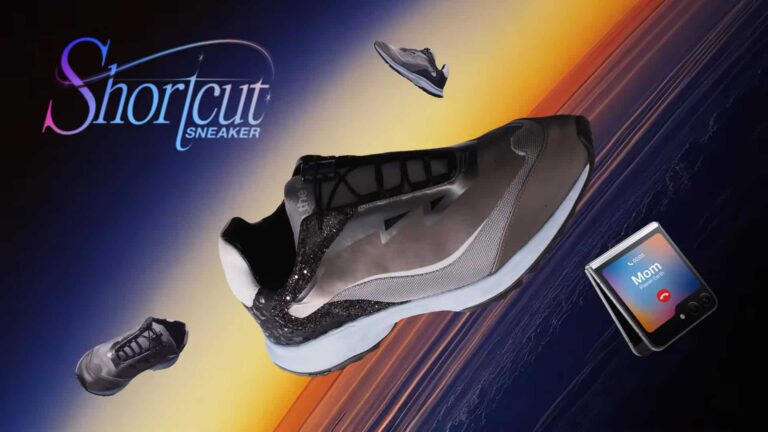
Samsung has just announced a revolutionary sneaker that can control your phone. Called Shortcut, the sneaker has built-in sensors that detect dance moves to launch different preset actions on the paired Galaxy phone. The company calls it the “sneaker of the future,” and rightly so. If only it made the sneaker available widely (more on its availability later).
The Samsung Shortcut is certainly the sneaker of the future
Samsung developed the Shortut sneaker in collaboration with Cheil Benelux, Elitac Wearables, Brut Amsterdam, and sneaker designer Roel van Hoff. According to the company, Hoff designed the sneaker inspired by the Galaxy and the universe. The shoe contains materials resembling the textures and colors of meteorites and supernovae. The designer carefully crafted every detail as a reference to Galaxy products.
But Shortcut is more about the magic it carries. Samsung has fitted this futuristic sneaker with motion sensors that continuously track their position relative to each other. The sensors can identify any movement of the feet. Based on these movements, the sneaker launches the linked action on the connected Galaxy device. “For example, you can make calls or play music with the moonwalk by dancing,” Samsung explains.
The company doesn’t make it clear if you can customize these actions and feet movements. However, it confirmed that the Shortcut sneaker can trigger five shortcuts on the phone with five different movements of the feet. You may not be able to expand it, though Samsung says the sneaker will become smarter over time as more people use it to perform various dance moves, effectively improving its accuracy.
“The concept was developed to make life not only more efficient but also more fun,” Samsung said in a press release. “Roel van Hoff’s design already makes it a special sneaker, but in combination with this technology, we have managed to create something that the loyal Samsung community will hopefully love. Quite unique: the first sneaker in the world with which you can call your friends,” added Tim and Daniel, Creative Directors Cheil Benelux.
How to get this futuristic sneaker?
This is the tricky part. Samsung’s Shortcut sneaker is extremely limited, so much so that the company has made only six pairs. Moreover, the Korean firm isn’t selling it. Instead, it is giving away the shoe to Galaxy users in the Netherlands via a contest in the Samsung Members app. Galaxy users in the country can participate in the contest by July 9, 2024, for a chance to win the futuristic sneaker. Samsung will announce the six winners in the second week of July.
JetBrains has alerted users to a critical vulnerability in its GitHub plugin for IntelliJ platforms, which exposes GitHub tokens. Although JetBrains has released a patch for this issue in the latest IDE versions, they strongly advise users to exercise caution and ensure their software is promptly updated.
According to a recent post, JetBrains patched a serious security flaw in the GitHub plugin that made the IntelliJ IDEs vulnerable to exposing GitHub access tokens.
JetBrains GitHub plugin for IntelliJ IDEs provides quick access to the GitHub repositories from the IDE. While it provides convenience to the users with GitHub account integration, the vulnerability posed a serious threat to IntelliJ IDE versions 2023.1 onwards having the GitHub plugin enabled.
As explained, the vulnerability, CVE-2024-37051, would affect pull requests within the IDE, exposing the GitHub access tokens to third-party sites.
JetBrains patched the vulnerability following an external security report, deploying fixes with the following IntelliJ IDE versions.
Moreover, the developers also patched the vulnerability with the latest GitHub plugin release, removing the older versions from the JetBrains Marketplace for users’ safety.
JetBrains also collaborated with GitHub for mitigations. However, the mitigations affect the performance of the JetBrains GitHub plugin in older IDEs. Hence, the users must ensure they are running the latest IDE versions to receive the patch.
JetBrains Also Recommends Revoking Tokens
While JetBrains urged deploying the patches, they also advised users actively using the GitHub pull request functionality in the IDE to revoke any GitHub tokens in use by the plugin. Although revoking tokens requires the users to set up the plugin again, it’s a precautionary recommendation to avoid potential abuse of the GitHub tokens to access the GitHub accounts, which become vulnerable even with the two-factor authentication enabled.
The Xiaomi MIX Flip will use the most powerful Snapdragon chip
This phone will compete directly with the Galaxy Z Flip 6, it seems, as that flip phone will use the same SoC. And yes, the Xiaomi MIX Flip is expected to launch globally, unlike its MIX Fold siblings that launched thus far. The upcoming Xiaomi MIX Fold device could also spread its wings, finally.
It is also worth noting that Xiaomi applied for 8 new folding screen-related trademarks last month. That could improve the folding mechanism in Xiaomi’s new foldable, but those patents won’t affect the two devices we’re talking about here. Their designs are already finalized.
The Xiaomi MIX Flip is expected to arrive in July. Xiaomi still hasn’t confirmed anything, but that is the month mentioned in rumors. As a reminder, the Xiaomi MIX Fold 3 launched in August last year.
The Xiaomi MIX Flip & MIX Fold 4 could end up launching at the same time
The Xiaomi MIX Fold 4 could end up launching in August, or arrive sooner and launch alongside the Xiaomi MIX Flip. Well, the rumors could also be wrong, the Xiaomi MIX Flip could arrive a bit later, and launch in August. We’re not really sure at this point.
What we are hoping will happen, however, is that we’ll get to see global variants of both of these phones. Consumers around the globe use Xiaomi’s products, so offering the company’s foldable devices will only help push the industry forward.
More and more companies have been offering their foldable devices on a global scale, so it’s time for Xiaomi to do the same. The company has been manufacturing foldable devices for quite some time now.
YouTube came a long way: it was launched in 2005, it got acquired by Google in 2006, gathered approximately 14 billion videos in 2021… and in 2024, it’s been accused of supporting “Google’s monopoly” and the “prospects for living room dominance”.
That’s what advocacy groups, focused on technology and competition, claim; they’ve urged the US Department of Justice to investigate YouTube. They argue that the video-streaming giant may enable Google and its parent company, Alphabet, to monopolize home entertainment.
There’s a letter to the DOJ antitrust chief Jonathan Kanter in which the American Economic Liberties Project, Demand Progress, and nine other organizations express concerns about YouTube’s rise as a rival to cable and streaming services. They argue that’s so because YouTube is pre-installed on smartphones and TVs sold in the US.
The groups requested the regulator to probe YouTube and point out that Google already holds a dominant position in the internet search market and leads in online advertising technology.
“YouTube has a decade-long record of using its dominance across numerous markets to crowd out competitors, lock in customers, and force the purchase of bundled services,” the groups stated. They further mentioned that the expansion of YouTube TV, the company’s subscription-based streaming service, boosts Google’s “prospects for living room dominance”.
A YouTube representative responded, saying, “Anyone looking for something to watch can see this space is very competitive,” and highlighting that the company competes with streaming services like Netflix and Disney+, as well as other video platforms such as Meta’s Instagram and TikTok.
In April, Alphabet reported that YouTube’s quarterly ad revenue exceeded $8 billion, a 21% increase from the previous year.
Google is already dealing with two antitrust lawsuits filed by the Justice Department and several states. One alleges that the company monopolizes the online search market, and the other claims it dominates the market for digital advertising technology. Google has defended its practices, arguing that its successes were achieved through lawful methods.
The advocacy groups argue that YouTube represents “the third leg of the stool that supports Google’s monopoly.”
An Indian national was sentenced to two years and eight months in jail for unauthorized access to his former employer’s computer systems, resulting in substantial financial losses.
Background of the Incident
Kandula Nagaraju, a 39-year-old Indian national, was employed by Singapore’s National Computer Systems (NCS).
His tenure at the company ended abruptly in October 2022 due to poor work performance.
However, Nagaraju’s departure from NCS was not the end of his involvement with the company.
Following his termination, Nagaraju accessed NCS’s computer systems without authorization.
In a calculated act of revenge, he deleted 180 virtual servers, significantly disrupting the company’s operations.
The financial impact of this cyberattack was severe, with NCS reporting losses amounting to SGD 918,000 (approximately Rs 5.6 crore).
Free Webinar on API vulnerability scanning for OWASP API Top 10 vulnerabilities -> Book Your Spot.
Legal Proceedings and Sentencing
According to India Today reports, the case was brought to light after NCS discovered the unauthorized access and subsequent deletion of critical cyber material.
Following a thorough investigation, Nagaraju was apprehended and charged with unauthorized computer access and data destruction.
Nagaraju was found guilty of the charges in court. The judge, emphasizing the severity of the crime and its impact on the company, sentenced Nagaraju to two years and eight months in jail.
The sentence reflects the judiciary’s stance on cybercrimes and the importance of safeguarding digital infrastructure.
This case underscores the critical need for robust cybersecurity measures within organizations.
It also highlights the potential risks posed by disgruntled former employees.
Companies are urged to implement stringent access controls and regularly update security protocols to prevent similar incidents.
The sentencing of Kandula Nagaraju serves as a stark reminder of the consequences of cybercrime.
As digital infrastructures become increasingly integral to business operations, the importance of cybersecurity cannot be overstated.
This case will likely prompt companies to reassess their security measures and protect their systems against internal and external threats.
FreeWebinar! 3 Security Trends to Maximize MSP Growth -> Register For Free
In Japan, there’s an app that’s getting more and more popular: it’s called CatsMe! and, as the name suggests, it has to do with cats.
That’s no wonder, as in Japan, a country with an aging population and a birth rate that has nosedived, there are many pets. According to the Japan Pet Food Association, there were almost 16 million pet cats and dogs in the country in 2023, more than the number of children under 15.
The latest Reuters report tells the story of Mayumi Kitakata and Chi, her housemate who loves treats, enjoys catnip a bit too much, and is 14 years old – an advanced age for a cat.
Kitakata, 57, has had several pet cats over the years, and to extend Chi’s life, she has turned to artificial intelligence.
In March, Kitakata started using the CatsMe! app which utilizes AI in order to detect when a cat is in pain, reducing the need for stressful vet visits.
“He is at an age where more and more diseases are going to appear,” said Kitakata, who is single and has a grown son. “So being able to consult the vet but still reduce the number of visits to the hospital is very important for him and for me”.
Nihon University professor Kazuya Edamura noted that while vets can often tell if an animal is in pain, it is more challenging for pet owners. According to Edamura, over 70% of elderly cats have arthritis or pain, yet only 2% visit a hospital. So, the app helps owners determine if their cat’s situation is normal.
Carelogy, a tech startup, and researchers at Nihon University developed CatsMe! by training it on 6,000 cat images. The app, used by over 230,000 customers since its launch last year, is said to deliver over 95% accuracy, expected to improve with more data.
Originally, the cat pain detection AI was launched as “CPD (Cat Pain Detector)” in 2023, but was rebranded as “CatsMe!” in January 2024.
Initially free, the app gained over 230,000 users in more than 50 countries within a year.Now, CatsMe! has transitioned to a basic paid service, offering features previously exclusive to premium members, such as “multiple cat record management”, “simultaneous AI evaluation of multiple photos”, and “cat albums”, to all users.
The key feature of this update is the new “AI Insight Function”, which analyzes AI judgment results, records, and notes from the past two weeks to provide personalized advice.
By tapping the “Perform AI analysis for the last two weeks” button on the calendar on your [My Page], users can easily review trends from the past two weeks.
This “AI Insights Feature” summarizes the past two weeks’ data, useful for sharing with vets or simply reviewing with the AI.
CatsMe! offers a two-week free trial to allow cat owners to experience the service.
Cybersecurity watchdog Shadowserver has identified 256,000+ publicly exposed servers vulnerable to a critical Remote Code Execution (RCE) flaw in Microsoft Message Queuing (MSMQ) services.
The flaw, designated CVE-2024-30080, poses a significant threat to global cybersecurity. It could allow malicious actors to execute arbitrary code on affected systems.
CVE-2024-30080 is a critical RCE vulnerability in MSMQ, a messaging protocol used for communication between applications.
Free Webinar on API vulnerability scanning for OWASP API Top 10 vulnerabilities -> Book Your Spot.
The flaw allows attackers to send specially crafted packets to the MSMQ service, enabling them to execute arbitrary code with the same privileges as the MSMQ service.
This could lead to unauthorized access, data breaches, and potentially severe disruptions in services relying on MSMQ.
Scope of Exposure
Shadowserver’s extensive scan revealed that approximately 256,000 servers worldwide are publicly exposed and vulnerable to this flaw.
Shadowserver report
These servers span various industries, including finance, healthcare, and government sectors, highlighting the widespread risk posed by this vulnerability.
Mitigation Measures
Microsoft has released a security patch addressing CVE-2024-30080. Organizations are strongly urged to apply this patch immediately to protect their systems. Additionally, it is recommended to:
Restrict Access: Limit MSMQ service exposure to trusted networks only.
Monitor Traffic: Implement network monitoring to detect and block suspicious activities targeting MSMQ services.
Regular Updates: Ensure all systems and applications are updated with the latest security patches.
The widespread exposure of servers to CVE-2024-30080 underscores the critical need for robust cybersecurity practices.
The finding that 256,000 servers were publicly exposed and susceptible to the MSMQ RCE flaw (CVE-2024-30080) clearly indicates the ongoing cybersecurity difficulties.
FreeWebinar! 3 Security Trends to Maximize MSP Growth -> Register For Free
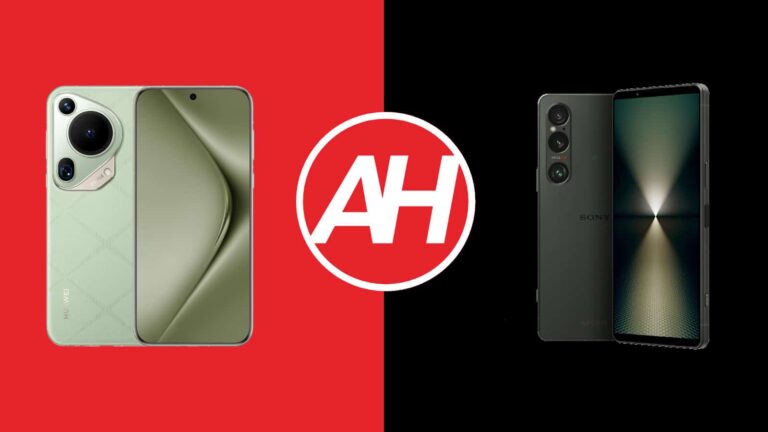
Both Huawei and Sony released very compelling flagship smartphones in the last couple of months. Huawei’s arrived in April, while Sony’s landed in May. In this article, we’ll compare those two handsets, the Huawei Pura 70 Ultra vs Sony Xperia 1 VI. Both of these phones are very compelling in their own right, but also very different at the same time. They’re both camera-centric, though.
Before we get started, do note that both come in global variants, but the Huawei Pura 70 Ultra does not include Google services. It comes with Huawei’s services, so without Google apps and the Google Play Store. As per usual, we’ll first list the specs of both devices and then move to other categories. We’ll go over their designs, displays, performance, battery life, cameras, and audio performance.
Specs
Huawei Pura 70 Ultra vs Sony Xperia 1 VI, respectively
These two phones both look different and feel entirely different in the hand. The Huawei Pura 70 Ultra is made out of aluminum and vegan leather. The Sony Xperia 1 VI combines aluminum and glass. Huawei’s handset comes with a quad-curved glass on the front, and its vegan leather backplate is proportional to that. The phone is very comfortable to hold and use, while it’s also not as slippery as the Sony Xperia 1 VI.
The Xperia 1 VI has flat sides all around, with a pattern on them. The back plate and front side are flat, with very slight curves on the edges. The Xperia 1 VI also has less rounded corners than the Pura 70 Ultra. Both smartphones include flat displays. The Huawei Pura 70 Ultra has a centered display camera hole. The Xperia 1 VI does not, but it has thicker top and bottom bezels because of it.
The physical buttons sit on the right-hand side of both phones. In addition to standard ones, the Xperia 1 VI also has a shutter key in the lower portion of its right side. On the back, they have considerably different camera islands. The Huawei Pura 70 Ultra’s is in the top-left corner, and it has an interesting shape and overall look. The Xperia 1 VI has a smaller camera island in the top-left corner, its cameras are vertically-aligned.
The two devices are almost identical in terms of height. The Pura 70 Ultra is slightly wider, and they’re almost the same in terms of thickness. Do note that the Pura 70 Ultra has a noticeably larger display, though, 0.3 inches larger. More on that soon. Both smartphones come with an IP68 certification for water and dust resistance. Both feel premium in the hand, but the Pura 70 Ultra is less slippery thanks to its design and design materials.
Huawei Pura 70 Ultra vs Sony Xperia 1 VI: Display
The Huawei Pura 70 Ultra includes a 6.8-inch 2844 x 1260 LTPO OLED display. That panel is flat, and it supports an adaptive refresh rate of up to 120Hz. This panel can project up to 1 billion colors, and HDR content is supported. The peak brightness here is 2,500 nits. The screen-to-body ratio on the Pura 70 Ultra’s display is around 89%. Kunlun Glass (Basalt-tempered) protects this display.
The Sony Xperia 1 VI, on the other hand, has a 6.5-inch fullHD+ (2340 x 1080) LTPO OLED display. This panel also has an adaptive refresh rate of up to 120Hz. It can project up to 1 billion colors, and HDR content is supported. The display aspect ratio is 19.5:9, while the screen-to-body ratio is around 86%. The Gorilla Glass Victus 2 protection from Corning is included.
Both of these panels are great. They offer vivid colors, deep blacks, and great viewing angles. They’re also both sharp enough, even though the Pura 70 Ultra has an advantage in that regard. The Pura 70 Ultra is also sharper, while the two displays are similar in terms of the maximum brightness they can achieve. Well, on paper the Huawei Pura 70 Ultra does get a bit brighter, but in practice, they’re mostly on par. The touch response is good on both. Chances are you’ll be happy with either of these two panels.
Huawei Pura 70 Ultra vs Sony Xperia 1 VI: Performance
The Kirin 9010 fuels the Huawei Pura 70 Ultra. That is Huawei’s chip made by SMIC, and it’s a 7nm processor. The Sony Xperia 1 VI is fueled by the Snapdragon 8 Gen 3 from Qualcomm. That’s a 4nm processor. The Huawei Pura 70 Ultra includes 16GB of LPDDR5X RAM. Sony included 12GB of LPDDR5X RAM inside of its smartphone. Both devices utilize UFS 4.0 flash storage.
Needless to say, the chip inside Sony’s smartphone is more powerful. The US ban did affect Huawei’s ability to use specific processors but don’t write off the Kirin 9010 just yet. Why? Well, because it performs great here. It is noticeably worse in benchmarks, but for the vast majority of intents and purposes, it does a great job. Using the Huawei Pura 70 Ultra was a great experience. Navigating through the phone was very smooth, and the same goes for multitasking, opening apps, consuming multimedia, and so on. The same can be said for the Xperia 1 VI, as the performance was great in almost every way.
Things change a bit in the gaming department. Non-demanding games will run fine on both, truly demanding ones, well, that’s a different story. The Xperia 1 VI does throttle CPU and GPU with truly demanding games, but that’s not something you’ll actually notice on the performance side of things. The Xperia 1 VI will do a better job with such titles than the Huawei Pura 70 Ultra. The processor difference will be noticeable. In all other ways, however, they both offer very smooth performance.
Huawei Pura 70 Ultra vs Sony Xperia 1 VI: Battery
There is a 5,200mAh battery included inside the Huawei Pura 70 Ultra. Sony’s flagship, on the other hand, carries a 5,000mAh battery. Despite the fact the Pura 70 Ultra has a larger battery, the Xperia 1 VI has a smaller display and a less sharp one. That does play a role in the battery life department, well, at least based on the results the two phones provided. They both offer good battery life, but the Xperia 1 VI has the edge.
You can technically go over the 7-hour screen-on-time mark on both phones, as long as you’re slightly careful. Games and other demanding tasks will affect that, of course. The Xperia 1 VI has proven to have around 20% better results in terms of battery life, though your mileage may vary, of course. The point is, the vast majority of you won’t have absolutely any complaints about the battery life on either one of these phones. Both are rather solid in that regard. We also did not notice excessive drainage on mobile data either.
When it comes to charging, the Huawei Pura 70 Ultra easily trumps the Xperia 1 VI. It supports 100W wired, 80W wireless, 20W reverse wireless, and 18W reverse wired charging. It also includes a charger in the box. The Sony Xperia 1 VI supports 30W wired, 15W wireless, and 5W reverse wireless charging. It does not include a charger or a charging cable in the retail box. The Huawei Pura 70 Ultra charges faster in every way, a lot faster.
Huawei Pura 70 Ultra vs Sony Xperia 1 VI: Cameras
Both of these phones include three cameras on the back. The Huawei Pura 70 Ultra has a 50-megapixel main unit (variable aperture, sensor-shift OIS, retractable lens), a 40-megapixel ultrawide unit, and a 50-megapixel periscope telephoto camera (3.5x optical zoom, macro). The Xperia 1 VI is backed by ZEISS, and it has a 48-megapixel main camera, along with a 12-megapixel ultrawide unit (123-degree FoV). A 12-megapixel periscope telephoto unit (3.5x-7.1x continuous optical zoom, macro) also sits on the back.
When it comes to camera performance, both devices shine, basically. These are some of the best-performing camera smartphones in the market at the moment. They both provide detailed, sharp, and well-balanced images. The Pura 70 Ultra does have a slightly warmer tone to its images, but both are great when it comes to the final product. Both prefer to keep things rather close to what you actually see. They also do a fantastic job with HDR shots, though the Pura 70 Ultra has a slight edge in such conditions.
Their secondary cameras follow the color science of the main shooters really well. When the light goes away, the results are visibly below the main shooters, but still very, very good. Macro photos from the Huawei Pura 70 Ultra in particular are outstanding. Low-light photos from the main cameras are great on both phones. Both devices control the noise very well and also manage to pull out a ton of details in such shots. The Xperia 1 VI does better when it comes to video recording, though.
Audio
Both smartphones include a set of stereo speakers. The thing is, the ones on the Xperia 1 VI are noticeably louder. Both sets of speakers do a fine job of balancing out the audio, however. The quality coming from both is very good.
The Xperia 1 VI also includes an audio jack, while the Huawei Pura 70 Ultra does not. You can utilize its Type-C port, though, if needed. The Pura 70 Ultra is equipped with Bluetooth 5.2, while the Xperia 1 VI offers Bluetooth 5.4.
Being inspired by the European Union’s Digital Marketers Act, India has come up with a draft of the Digital Competition Bill to stop tech giants like Google, Microsoft, Apple, and others from dominating the market through anti-competitive practices.
The draft of the Digital Competition Bill aims to prevent giants like Google from taking anti-competitive measures
According to a report by The Indian Express, the draft of the Digital Competition Bill includes provisions aimed at preventing major corporations from engaging in practices that could lead to monopolistic dominance in the market.
The draft also promises to impose “heavy penalties” for violations of the act. The amount could be in billions of dollars, possibly a significant percentage of the company’s turnover.
Reportedly, the Digital Competition Bill is similar to the EU’s DMA, which came into complete effect last year and requires tech giants like Google and Apple to open their services to their competitors. You might have already heard about Apple’s web distribution of apps in the EU. India’s Digital Competition Bill could also require the companies to take similar steps in the country.
The Indian Ministry of Electronics and Information Technology will hold a meeting on June 18 with tech giants to address “serious concerns” and consider the interests of all parties involved.
The draft faces criticism from tech companies
Just like what we are seeing with the EU’s DMA, tech giants could have to face a significant compliance burden in yet another region. As you may already expect, the bill has faced resistance from both tech companies and industry bodies funded by them.
As a result, the tech giants are seeking changes to strengthen the current competition law rather than moving to the newly proposed bill. For example, an industry executive told The Indian Express that because of the strict requirements of the EU’s DMA, there has been a 4,000 percent increase in the time it takes to find things via Google search.
If the bill comes into effect, Apple will have to allow iPhone users to download apps from third-party sources alongside its App Store. Google also prioritizes its own app store for app downloads citing security risks of sideloading, even if Android allows it.