If you have problems with your home Wi-Fi connection then Google has a solution with the Nest Wi-Fi Pro 3-pack, which Amazon currently has a deal on. The Nest Wi-Fi Pro 3-pack has a regular retail price of $400 but you can pick it up for $340 right now instead. Saving you $60.
Nest Wi-Fi is a mesh internet solution that allows you to expand your home Wi-Fi coverage by linking together multiple access points. Because this is a 3-pack, you get the main Nest Wi-Fi Pro router, and two access points to put anywhere else in the home. While you don’t really need this in smaller apartments or homes, it’s great for medium-sized places and above to ensure every inch of your home is covered with little to no dead spots. And if you do live in a smaller place, you can still set these up to be sure each room has a strong connection.
Aside from helping to expand your network coverage, the Nest W-Fi Pro is Wi-Fi 6E compatible so you’ll get faster speeds. Best of all though, at least in our opinion, is the ease of use. Thanks to the companion app the setup is about as simple as you could want it. The setup can also adjust your network based on the type of activity. Say you do a lot of video calls, streaming, or online gaming. Those tend to use a high amount of bandwidth, and the routers can adjust to prioritize those things over other activities.
On top of all these things, the Nest Wi-Fi Pro system gets automatic security updates. Plus you get parental controls. All of this and more can be managed inside the companion app too. In short, it’s an easy-to-use, fast, reliable Wi-Fi network setup.
Both OPPO and Apple have rather compelling flagship smartphones to offer at the moment. The one from OPPO has been released only in the Chinese market, but it can be imported, and used with Google services. It has proven to have one of the best cameras on a smartphone at the moment. That being said, we’re here to compare the OPPO Find X7 Ultra vs Apple iPhone 15 Pro Max.
These two smartphones are immensely different. That goes for all of their aspects, pretty much. The iPhone 15 Pro Max also has a rather compelling camera performance, while it looks entirely different compared to OPPO’s offering. We’ll first list the specs of both smartphones, and will then move to compare their designs, displays, performance, battery life, cameras, and audio output.
Specs
OPPO Find X7 Ultra vs Apple iPhone 15 Pro Max, respectively
OPPO Find X7 Ultra vs Apple iPhone 15 Pro Max: Design
These two phones look entirely different, as you can see in the provided image above. The OPPO Find X7 Ultra has a curved display, and a curved backplate, which are proportional. The iPhone 15 Pro Max has a flat front and a flat back, combined with flat sides. Not even their build materials are the same. The OPPO Find X7 Ultra uses an aluminum frame combined with vegan leather and glass on the back (two-thirds is vegan leather, though). The iPhone 15 Pro Max has a frame made out of titanium, and glass on the back.
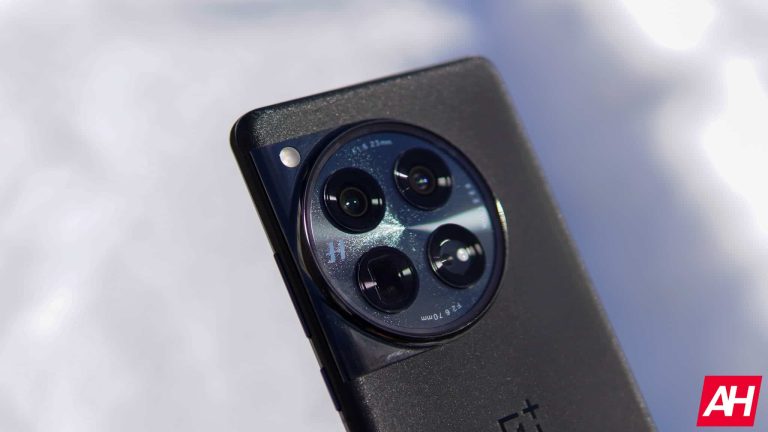
The OPPO Find X7 Ultra has a centered display camera hole on the front, with very thin bezels all around. The iPhone 15 Pro Max has a pill-shaped cutout on the front, which is also centered. Its bezels are also very thin. There is a large camera oreo included on the back of the OPPO Find X7 Ultra. That module is also centered. The iPhone 15 Pro Max’s camera island sits in the top-left corner, and it’s more a square than a circle.
OPPO’s flagship is a bit taller, and slightly narrower while being a bit thicker. The two phones have the exact same weight, though, they both weigh 221 grams. They both also offer an IP68 certification for water and dust resistance. The in-hand feel of these two phones is completely different. That’s perfectly normal considering how different they are. The OPPO Find X7 Ultra does offer a bit more grip than the iPhone 15 Pro Max. Both are comfortable to hold and use, though.
OPPO Find X7 Ultra vs Apple iPhone 15 Pro Max: Display
There is a 6.82-inch QHD+ (3168 x 1440) LTPO AMOLED display on the OPPO Find X7 Ultra. That panel is curved, and it can project up to 1 billion colors. Its refresh rate goes from 1 to 120Hz, as it’s adaptive. Dolby Vision is supported, as is HDR10+ content. The maximum brightness that this display can provide, in theory, is 4,500 nits. The screen-to-body ratio is at around 90%, and the panel is protected by the Gorilla Glass Victus 2.
Apple iPhone 15 Pro Max
The iPhone 15 Pro Max, on the flip side, has a 6.7-inch 2796 x 1290 LTPO Super Retina XDR OLED display. This display is flat. Its display refresh rate also goes from 1 to 120Hz, and HDR10 content is supported here. This panel also comes with Dolby Vision support, and the maximum brightness you can get is 2,000 nits. The screen-to-body ratio is at around 89%, while the display aspect ratio is 19.5:9. The Ceramic Shield Glass protects this display.
Both of these panels are outstanding. They are both more than sharp enough, while the viewing angles are great on both displays. They are both vivid and have deep blacks, while touch response is also very good. On top of that, both displays do get more than bright enough. The OPPO Find X7 Ultra does get a bit brighter, but you’ll never really lack brightness from the iPhone 15 Pro Max’s display. You can’t go wrong in terms of the display here, to be quite honest.
OPPO Find X7 Ultra vs Apple iPhone 15 Pro Max: Performance
The Snapdragon 8 Gen 3 SoC fuels the OPPO Find X7 Ultra. That is Qualcomm’s most powerful processor at the moment. OPPO also included up to 16GB of LPDDR5X RAM here, and UFS 4.0 flash storage. The iPhone 15 Pro Max is fueled by the Apple A17 Pro chip, while it offers 8GB of RAM and NVMe flash storage. Neither phone offers storage expansion, by the way.
The two devices have vastly different OS’, but both of them offer outstanding performance. They’re very snappy during day-to-day use, and they can both handle really demanding games without an issue as well. They do get warm with graphically intensive games, but we didn’t notice any drops in performance, overheating, or anything of the sort. The iPhone 15 Pro Max did have some issues at first, but Apple sorted that out really quickly.
One thing to note is that you’ll need to sideload the Google Play Store manually on the OPPO Find X7 Ultra if you get it, as it was released for the Chinese market only. Once you do, however, the phone works really well.
OPPO Find X7 Ultra vs Apple iPhone 15 Pro Max: Battery
A 5,000mAh battery sits inside the OPPO Find X7 Ultra. The iPhone 15 Pro Max has a 4,441mAh battery. Apple’s iPhones usually have smaller battery packs than their Android counterparts, due to the way iOS works. You’ll be glad to know that both of these phones offer really good battery life, though. Most often we’ve been able to get over 7 hours of screen-on-time, though both smartphones are capable of reaching the 8-hour screen-on-time mark. It all depends.
Do note that we’ve been using both phones in ideal conditions, as they were hooked up to Wi-Fi most of the time, while we also didn’t play any games during those days. We did push them in a number of other ways, though. Gaming does take a toll on battery life, though, a considerable one, and that goes for both phones. Do note that it is only evident if you’re playing graphically-intensive games, though.
When it comes to charging, OPPO’s flagship simply obliterates Apple’s. It supports 100W wired, 50W wireless, and 10W reverse wireless charging, while it also comes with a charger in the box. The iPhone 15 Pro Max supports 20W wired, 15W wireless (MagSafe and Qi2), 7.5W Qi wireless, and 4.5W reverse wired charging. It does not include a charger in the box. The OPPO Find X7 Ultra charges much faster, regardless of whether you use wired or wireless charging.
OPPO Find X7 Ultra vs Apple iPhone 15 Pro Max: Cameras
The OPPO Find X7 Ultra has four 50-megapixel cameras on the back. A 50-megapixel main camera (1-inch sensor) is backed by a 50-megapixel ultrawide unit (123-degree FoV). Two 50-megapixel periscope telephoto cameras are included too, one offers 2.8x optical zoom, and the other 6x optical zoom. This phone is also backed by Hasselblad. The iPhone 15 Pro Max, on the other hand, has three cameras on the back. A 48-megapixel main camera is backed by a 12-megapixel ultrawide unit (120-degree FoV), and a 12-megapixel periscope telephoto camera (5x optical zoom).
OPPO Find X7 Ultra
The images these two phones provide are immensely different. They both do a good job, but the OPPO Find X7 Ultra is more versatile, without a doubt. The OPPO Find X7 Ultra leans more on the contrasty side of things and is not afraid to leave images a bit darker in low-light situations. The iPhone 15 Pro Max prefers warmer tones, and it has a completely different style compared to OPPO’s flagship. Both phones provide plenty of detail during the day, though the OPPO Find X7 Ultra handles HDR situations a bit better. In regards to high-zoom shots, the OPPO Find X7 Ultra is more versatile and does better the higher you go.
In low light, both phones do a great job. We did end up preferring shots from the OPPO Find X7 Ultra most of the time, though, due to that contrasty look. The iPhone 15 Pro Max snapped some great ones too, though. Ultrawide and telephoto shots look better out of the OPPO Find X7 Ultra when low light situations are concerned. The video recording is still the iPhone’s forte, though.
Audio
Both of these smartphones include a set of stereo speakers. Those speakers are very good on both phones, and they’re more than loud enough. They’re also well-balanced, and the quality is on par, we’d say.
You won’t find an audio jack on either of these two devices. They both include a Type-C port at the bottom, so you can use that for wired audio connections. Alternatively, the OPPO Find X7 Ultra and iPhone 15 Pro Max come with Bluetooth 5.4 and 5.3, respectively.
It’s time to upgrade your doorbell. What if I told you that this doorbell from Google could tell you when someone is at your door and who is at your door? That’s right, the Nest Doorbell can do just that, thanks to machine learning and AI. It obviously has all of the usual features of a video doorbell, like motion alerts. And now, you can pick it up for $50 less.
The Nest Doorbell has built-in intelligence and can tell the difference between a person, package, animal, and vehicle, and it sends you an alert in the Google Home app; no subscription is required.
Easily check in from anywhere 24/7 with live HD video with HDR and night vision; see what you missed with 3 hours of free event video history; or add a Nest Aware subscription (sold separately) for up to 60 days of event video history. If your Wi-Fi goes down or there’s a power outage, the Nest Doorbell will store up to 1 hour of recorded events so you can see what you missed. The Nest Doorbell is easy to install, wired or wire-free; the built-in battery means it works with any door, or connect it to your existing doorbell wires with the included wire connector. Whether you choose battery or wired installation, the battery-powered Nest Doorbell cannot continuously record 24/7 video history, even with a Nest Aware subscription.
Talk and listen to visitors at your door, even if you’re away; use the Google Home app to say you’ll be right there, ask a delivery person to leave your package or respond to visitors with pre-recorded messages. The Nest Doorbell camera has a tall vertical field of view, so it’s easier to see people head to toe or packages left on the ground; you can also keep a close eye on high-traffic areas with Activity Zones.
You can pick up the Nest Doorbell (Battery) from Amazon today by clicking the link down below.
Apple is continuing to enrich its artificial intelligence capabilities, this time with the acquisition of French startup Datakalab. The company was founded in 2016 by two brothers – Xavier Fischer and Lucas Fischer. This startup was a specialist in artificial intelligence-powered algorithm compression and image analysis.
The agreement was reportedly signed in late 2023, according to the European Commission. However, none of the companies have revealed the amount. Neither Apple nor Datakalab even officially informed about the acquisition. The news is coming out now thanks to the French business magazine Challenges.
Apple’s commitment to play safe with AI has resulted in the acquisition of Datakalab
A portion of Mark Gurman’s latest Power On newsletter notes that Apple lacks generative AI capabilities as compared to some of its competitors like OpenAI or Alphabet’s Google. Several rumors also hint that Apple is internally focusing on catching up with its competitors in the AI race. In the world of high-end Android and Windows devices, AI has transitioned from being a cool addition to becoming a buzzword at this point.
However, it seems that Apple wants to play it safe. There’s a good chance you’ve already heard about at least one issue of the AI models, hallucination. It is basically when an AI model generates an inaccurate or misleading response. It happens due to a model being trained on insufficient or inaccurate data. This problem can increase even more when a model has been trained over AI-generated content, which is filling up the internet.
But how all of this is related to Apple’s acquisition of Datakalab? Well, Apple is working on its self-developed large language model “Ajax” that will run on-device. Nonetheless, there are some disadvantages as well, alongside some advantages of Apple’s approach.
The acquisition should help in developing their on-device LLM
The advantages include the ability to preserve user privacy. But there’s only so much that Apple can do with a first-generation on-device AI model. This is exactly where comes Apple’s acquisition of Datakalab. The Paris-based startup has been specializing in low-power deep learning algorithms, efficient in terms of execution, respectful of privacy, and operating entirely on-device.
Many of the members at Datakalab have also reportedly joined Apple. With this acquisition, Apple is expected to benefit from improving its on-device AI model.
Having some help during the password creation process to protect your data is always welcome, especially for inexperienced users. Most novice users aren’t familiar with additional privacy methods and don’t use 2-factor authentication or other alternatives. Some websites even offer a password strength bar to show you how good your new password is.
Furthermore, if you use Google Chrome, you might have noticed a “suggest strong password” popup. From the looks of it, the popup might get a level up and use AI to generate passwords. While this seems good on paper, the question arises, how safe is it to use AI to create a password?
Patches in the code suggest Gemini will be incorporated into Chrome
An observant software development watcher noticed Google’s plan to integrate Gemini into Chrome’s password suggestion. Leopeva64 reported their findings on X (formerly Twitter). They spotted references to Gemini in patches of Gerrit and the findings are backed up by screenshots.
The codes and screenshots give us a brief view of how Gemini could be integrated into Chrome to upgrade the password suggestions. Some patches in Gerrit mention that Gemini could generate stronger passwords in the future. Users would see the suggestions when they create a new password or when they change one that is saved.
Something else shown in a line of code is that the feature will be turned off if all passwords are deleted. Unfortunately, it’s currently unknown if deleting all passwords is the only way to disable the AI feature, or if there will be another way.
Will it be safe to use Gemini password suggestions?
Using AI to generate passwords can become a game-changer as the passwords are more likely to be stronger than human-made ones. However, that is not to say that hackers won’t be able to bypass and hack the passwords.
Google Gemini is an LLM or Large Language Model, and like all LLMs, it can become a victim of leaks caused by prompts or injection hacks. These hacks are created to trick the AI into giving out private information such as login details.
That said, when it comes to technology nothing is 100% safe. Risks are present in pretty much everything, regardless of how minimal they may be. Google will likely implement several security features to ensure maximum user safety.
Cybersecurity experts from SafeBreach have revealed a series of vulnerabilities that could allow attackers to remotely delete files on a computer using Windows Defender, potentially leading to data loss and system instability.
Tomer Bar and Shmuel Cohen, seasoned security researchers at SafeBreach, presented the findings during their talk at the Black Hat conference.
Uncovering the Vulnerabilities
The research team’s goal was to trigger false positives in security systems, which led to the discovery of the vulnerability CVE-2023-24860.
Free Webinar | Mastering WAAP/WAF ROI Analysis | Book Your Spot
By exploiting this vulnerability, the researchers demonstrated that it was possible to remotely delete critical files on Windows and Linux servers without authentication and bypass multiple security controls on fully patched servers.
The researchers employed a black box approach to extract byte signatures from Endpoint Detection and Response (EDR) systems, specifically targeting Windows Defender.
They developed a Python tool to minimize binaries into the smallest possible signature, which identified 130 unique signatures.
These signatures were then manually embedded into legitimate files to test the vulnerability.
Attack Vectors and Demonstrations
The team showcased several attack vectors, including the remote deletion of web server logs, local mailbox files in Mozilla Thunderbird, and Windows event log files.
They also demonstrated how Windows Defender could be tricked into deleting its own detection logs, a process they referred to as “self-cannibalism.”
Microsoft responded to the initial report by releasing a fix for CVE-2023-24860.
However, SafeBreach reported that the fix was incomplete and classified only as a “moderate DOS” by Microsoft, leaving several attack vectors unaddressed.
On the other hand, Kaspersky did not release a fix, stating that the issue could not be classified as a security vulnerability.
Further research led to the discovery of CVE-2023-36010, a bypass to the initial CVE-2023-24860 fix.
The researchers found that while some attack vectors were patched, others remained exploitable.
They also identified a method to bypass the patch for CVE-2023-36010 by manipulating MySQL storage engines and file formats.
Microsoft acknowledged the researchers’ disclosures and feedback, stating that they had implemented improvements to reduce the risk of false positives and data loss.
They also allowed customers to configure Defender to quarantine all remediation actions by default.
Looking to Safeguard Your Company from Advanced Cyber Threats? Deploy TrustNet to Your Radar ASAP.
Google Chrome’s latest beta version includes the ability to digitally sign PDF files. This feature could soon make its way to the stable version of the web browser. It would allow users to insert their digital signature into a PDF document.
The latest Google Chrome Canary version has a “PDF Ink Signature” feature
Google Chrome includes a robust, reliable, and fast PDF document viewer. It allows users to quickly open a PDF document without leaving the browser or opening another application.
The latest stable version of Google Chrome has multiple tools to view PDF files. Users can zoom in on a document, fit it to a page, enable a two-page view, rotate the pages, and access the table of contents. Google Files can also save scanned documents as PDFs, which can be accessed in Chrome.
There is a new flag in Chrome Canary that “enables the ability to annotate PDFs using a new ink library”, but so far I haven’t noticed any changes in the PDF viewer after enabling it:https://t.co/sX7rxOPMKepic.twitter.com/jGfpBpi5J1
PDF documents could accept and carry digital signatures for a long time. The digital code offered proof of authentication and authorization. Needless to say, to date, only a few dedicated platforms such as Adobe’s Acrobat suite offered this feature
Hidden inside the latest Canary version of Google Chrome is the ability to include a digital signature in a PDF document. The Chrome Canary version 126 has an experimental flag that, when activated, enables the “PDF Ink Signatures” feature.
When will Google Chrome allow users to digitally sign a PDF document?
Google hasn’t activated the PDF Ink Signature Annotations feature in the stable version of Chrome web browser yet. However, the presence of the flag inside the Canary version of the web browser is a strong indicator of the possibility.
Google Chrome works on Mac, Windows, Linux, Chrome OS, Fuschia, and Lacros. Hence Chrome web browsers for these Operating Systems (OS) could get the feature. There’s, however, no confirmed timeline for the deployment.
Chrome’s rival Microsoft Edge is considerably ahead in PDF document modification. Edge currently packs a full suite of annotation tools such as Draw, Eraser, Highlighter, etc. Google might be jumping straight to digital signature support.
To test the PDF Ink Signatures features, users need to download Google Chrome Canary. Then type “chrome://flags/#pdf-ink2” in the address bar, and toggle the setting to “Enabled”
It is important to note that the Google Chrome Canary version isn’t meant for everyday usage or the general public. It is an unstable experimental version intended for beta testers.
Hence, it would be wise to wait for an update for the stable version of the web browser for the PDF Ink Signatures feature to be activated by default. Google might be developing this feature for the recently introduced Chrome Enterprise Premium.
Google Wallet users on Wear OS smartwatches are feeling frustrated by a recent change that now requires them to enter their PIN on the watch before every contactless tap-to-pay transaction. This disrupts the previously seamless experience. And it has gotten some users questioning the convenience of using Google Wallet on their watches.
Previously, Wear OS users could simply open the Google Wallet app on their watch and tap to pay. Now, a PIN prompt appears, adding an extra step and defeating the purpose of the wearable’s quick payment capabilities. Google likely implemented this for enhanced security. However, users see it as a significant inconvenience that could potentially discourage the use of Google Wallet on their watches.
Security vs. convenience
The reason behind the change is security-focused, although Android Police speculates it could be a bug. But with Google Wallet on Wear OS already verifying a user’s PIN if the watch is removed from the wrist, this new measure may seem redundant. Some speculate whether Google doesn’t fully trust Wear OS’s existing security protocols.
The uncertainty surrounding the change is a further point of annoyance. Google has yet to officially confirm whether this is a permanent feature, a test in progress, or an app bug. The company’s updated support page mentions stricter verification but primarily focuses on phones, leaving smartwatch users in the dark.
Comparison to the Apple Watch
For those already annoyed by Google Wallet’s recent PIN requirement on phones, this Wear OS change adds insult to injury. Apple Watch’s streamlined double-tap of the side button now seems far more attractive, underscoring Google’s move as a step backward in user experience. It’s worth noting that entering a PIN on a watch’s small screen is inherently less convenient than phone-based fingerprint authentication. While people in the US may already be familiar with verification for every contactless payment, small transactions often go unverified in Europe. Limits vary by country – the UK allows up to £100, Germany €50, and Belgium only €25 before verification becomes necessary. With Google Wallet now requiring users to input a PIN with every transaction on their watch, the process will become a little annoying.
While enhancing security is admirable, Google’s latest Google Wallet change may have unintended consequences. Wear OS users value speed and ease, and this added PIN step significantly compromises that. Unless Google clarifies this change or introduces a better workaround, users may opt for traditional payment methods or even switch to competitor platforms with more seamless payment experiences.
Wear OS users might soon need to jump through an extra hoop before paying with their watches. According to reports from some users, Google Wallet on Wear OS is prompting them to enter a PIN before completing a transaction, whereas this has not been required in the past.
Google has recently begun to require device unlocks for individual tap-to-pay transactions, a behavior that had been previously observed on smartphones. However, on Wear OS smartwatches this had been traditionally bypassed as long as your watch was already unlocked. When this changed and Wallet users using their watches began to be prompted for pin verification, they were reasonably surprised.
However, while this change could be a slight annoyance for users who were accustomed to the simpler process, it might also indicate that Google is working on improving the security of Wear OS payments. After all, smartphones using Google Wallet already require users to verify their identity with a PIN or fingerprint scan after a period of inactivity. So, it’s possible that Google is planning to implement a similar security measure for Wear OS devices.
Unsurprisingly, Wear OS users aren’t exactly thrilled about the prospect of having to enter a PIN every time they want to pay for something with their watches. The convenience of contactless payments is a major selling point for wearable devices, and adding an extra step to the process could negatively impact the user experience.
As of now, Google hasn’t officially confirmed whether a PIN requirement is being rolled out for Wear OS payments. As a matter of fact, as noted by Android Authority, Google’s support page on this doesn’t specifically call out Wear OS, and instead uses the more generic term “device” in its instructions for making payments with Google Wallet.
Because of this, it’s important to take these reports with a grain of salt, as this could very well end up being a bug. Hopefully, if this change does become official, we will hear more about it directly from Google, either via a blog post or an update to the support documentation.
A zero-day exploit targeting the popular messaging app WhatsApp has been advertised on underground hacker forums.
The exploit has raised serious concerns regarding the safety of users on Android and iOS platforms.
This exploit is reported to have the potential to significantly compromise user data and privacy, making it a serious threat to millions of users.
The details of the exploit are still being investigated, but it is believed that attackers could gain unauthorized access to user devices and steal sensitive information such as passwords, personal data, and financial information.
It is important for users to remain vigilant and take necessary precautions to protect their devices and personal information.
Free Webinar | Mastering WAAP/WAF ROI Analysis | Book Your Spot
Exploit Capabilities
The exploit boasts a range of alarming capabilities that could compromise user security:
Remote Code Execution (RCE): The exploit allows arbitrary code to be executed on the victim’s device without their knowledge.
Attack Type: It is described as a ‘1Click’ attack, suggesting that the victim needs to perform only a single action, such as clicking on a link or an image, for the exploit to be triggered.
Payload Delivery: The malicious payload is reportedly delivered through an image, which could be easily disguised as a harmless photo.
Device Control: Once executed, the attacker can gain control over the device, which could lead to data theft, surveillance, or further distribution of malware.
The Advertisement
The advertisement for this exploit was posted by a user with the handle “Team9Sandman,” who claims to be a broker for the malicious software.
The user’s reputation on the forum is noted to be 30, with this being one of only two posts made by the account.
The existence of such an exploit is a significant concern for all WhatsApp users, as it could lead to unauthorized access and control of their devices.
This could result in the loss of personal and sensitive information, financial loss, and a breach of privacy.
WhatsApp users are urged to stay vigilant and update their apps to the latest version, as updates often include security patches for known vulnerabilities.
Additionally, users should be cautious of any links or images received from unknown sources and should regularly back up their data to mitigate the damage in case of an attack.
Looking to Safeguard Your Company from Advanced Cyber Threats? Deploy TrustNet to Your Radar ASAP.