Telegram is trying to expand its base to compete with WhatsApp Business and Facebook Business by allowing users to convert their personal accounts to business accounts. Telegram’s Business Accounts will enable its users to display information like hours, locations, a customized start page, and more.
Telegram Business Accounts have varied features at their disposal
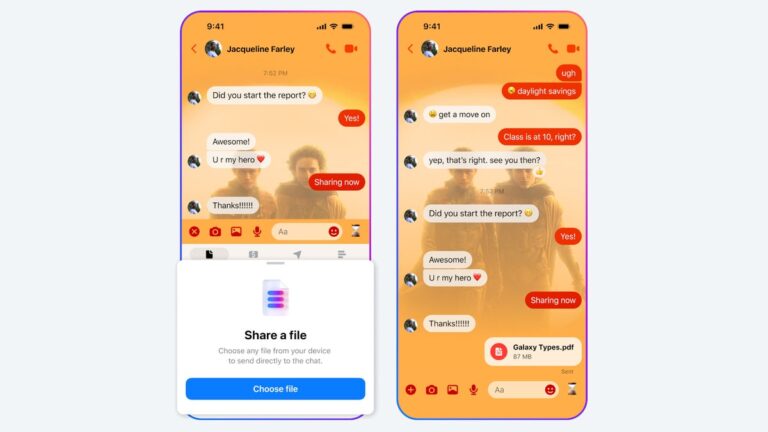
After getting a business account, the suite will allow its users to craft Quick Replies. Quick replies are preset shortcodes that include formatted text, links, images, stickers, and even PDFs. For instance, a coaching institution can effortlessly send the schedule or brochure of the batch with a preselected PDF file. As of now, Quick Replies are accessible only for personal chats by typing ‘/’ into the message bar.
For the one who is contacting the business for the first time, an Automated Greeting Message is the tool. This mechanism sends instant replies with the predetermined message, which can be any crucial information about the business, FAQs, or Away messages (when closed).
Telegram Business makes the segregation of customers easier. It allows to label chats with different tags like Delivery, Feedback, Order, etc. In individual chats, you can create links to chat with your business. These links work within the Telegram ecosystem or outside the app. Each link shows live performance tracking.
AI-enhanced Chatbots for Businesses
Business users can connect Telegram bots, that will reply on behalf of the owner. The owner can integrate it with existing tools and workflows, and even add AI assistants that manage these chats. In case the user feels the chats are sensitive, they can easily be excluded.
“This opens a new era for Telegram Bots – we welcome all developers to create new services that will help businesses automate and improve their communication with Telegram users.”, says Telegram.
Telegram Business is a very strategic move by Telegram founder, Pavel Durov, to widen its users by inviting businesses to AI-powered chatbots for enhanced customer service. Telegram Business is an excellent mode to adopt some of the best monetization practices. However, Telegram has a long way to cover the 200 million active WhatsApp Business users. The earning model of Telegram Business heavily depends on subscription fees, meanwhile, its competitor relies on the type of conversations.
It’s been a while since I’ve checked out anything from Vivo, in fact, I can’t remember the last time I used a Vivo device. It’s been at least 8 years? The point is, in that time Vivo has done some truly amazing work with its phones. Case in point, the X100 Pro is a smartphone that comes with a very impressive camera. And that’s probably to be expected since this phone isn’t really cheap. On the contrary, it’s actually quite expensive.
Now it is worth noting that this isn’t a phone you can officially buy a US version of. You can buy it on Amazon in the US, but only as the unlocked Chinese version of the phone. And the cheapest it’ll end up being is around $929. Price aside, as soon as I pulled the X100 Pro out of the box for the first time and held it in my hands, I knew this was going to be a pretty good phone.
I won’t lie, I thought the rear camera system was a little over the top at first. At least in terms of size. The camera bump is positively massive. But there’s a reason for that. Vivo partnered with Zeiss Optics on the camera and all of that space is because Vivo has packed some serious camera hardware in here. And that led to some amazing results. Bar none, the Vivo X100 Pro produces the best portrait mode photos I’ve ever seen from a smartphone. And that isn’t an exaggeration. They’re excellent. It might even be my favorite new camera on a smartphone.
They’re so good I really just didn’t want to use anything else when snapping shots for this review. But, we’ll dig into that a bit more in the camera section. Let’s dive in and see how this phone stacks up as a whole.
Vivo X100 Pro Review: Hardware & Design
Phone designs have gotten to a point where it feels like everyone just keeps putting out the same stuff. Year after year. I haven’t really used anything from Vivo in quite a long time so I can’t compare the design of the X100 Pro to previous devices. What I can do is say that the design of the X100 Pro is nice. There are a few things I am not overly fond of. Such as the very large camera bump on the back from the absolutely massive camera system.
And I said this in my OnePlus 12R review. I dislike curved displays on smartphones. Curved monitors are another story. I loved curved monitors. Curved phone screens though, not really my style. That said, Vivo has done a decent job at putting together a nice-looking phone. While I don’t personally care for some of the design aspects, those are just my personal tastes. The phone still looks and feels premium and I think that’s what’s most important when looking at the Vivo X100 Pro from a design standpoint.
I do like that the sides of the phone frame are somewhat contoured as this makes it a little more comfortable to hold in the hand. And when browsing for longer periods of time or playing games this is more important than you might think. You want the phone to feel comfortable to hold. And the ability for the phone to provide that to you is directly linked to the design. This is definitely a comfortable phone to hold.
Hardware build quality
Have you ever had a phone that looked really nice but it just felt really cheap or low-quality? If you have and know what I’m talking about, the Vivo X100 Pro is most certainly not like that. It feels very well-made and I absolutely adore that fact. There’s nothing that bums me out more when it comes to phones than having something that costs a lot and looks great but just feels poorly put together.
So I was extremely happy to see that Vivo put together a very premium-feeling device. Nothing creaks or rattles. The power and volume buttons have a nice tactile feel to them when pushing them in. And I was pleasantly surprised to find that the SIM tray was easy to eject. One of my main (also admittedly minor) gripes about the RedMagic 9 Pro was that the SIM tray was unreasonably difficult to eject for some reason. That wasn’t the case here at all. I didn’t have to use what felt like excessive force just to get the tray out so I could put a SIM card in.
This tells me that Vivo thought about even some of the most minor details when building this phone. All-in-all I think the design is mostly pretty solid and the build quality is good too. In terms of placement for everything, you’ll find the volume rocker and power buttons on the right side of the frame, with the SIM tray, USB-C charging port, and bottom speaker on the bottom part of the frame. The left side of the frame is completely empty and on the top, you have the mic and a tiny IR blaster. It also has a second speaker under the top part of the screen.
Vivo X100 Pro Review: Display
I’ve never been a fan of curved displays and after using the Vivo X100 Pro, that hasn’t changed. I still prefer a display that’s flat when it comes to smartphones but curved edges or not, the display on the Vivo X100 Pro is still nice. The curved edges add that waterfall effect which can be visually pleasing for certain content. Although I do find it a bit weird for content in landscape mode, like when watching videos on YouTube or playing games like Genshin Impact and Honkai Star Rail.
Colors also appear just a little bit flat compared to some other phone screens I’ve used recently but not really by much. I’ve found that what has been more important is that the display has good brightness.
The display is 6.78 inches in size and it’s an LPTO AMOLED panel with a 120Hz refresh rate, and a peak brightness of 3,000 nits. Now 3,000 nits is pretty bright but you generally aren’t going to see the brightness go that high. In my testing, the display didn’t go far above 1,000 nits at its peak, though I still found this to be more than bright enough for anything I was doing. The size and the refresh rate make this a pretty good gaming device, especially for any games that support higher frame rates. Plus the higher refresh rate is nice for scrolling through content on social or browsing the web.
Resolution on the display is default set to 2800 x 1260 right out of the box. However, there is an option to dump this down to 2400 x 1080 if you want more of a Full HD resolution. This could help with battery life but in my experience, the 2800 x 1260 resolution was perfectly fine. So this is what I stuck with during my time with the phone.
Now remember how I said the colors were a little flat? You don’t have to live with this. The Vivo X100 Pro does have a few different screen color options for you to choose from. Standard is what you’re working with out of the box. But you can change it to “Pro” or “Bright” as well. Bright helps make the colors pop a little more and it takes those mildly flat colors with the default “Standard” color setting and amps them up a bit. This made my games like Genshin Impact look a little nicer. Especially with all of the colors from special effects that fill the screen during certain parts of gameplay.
As for the Pro mode, this actually makes the colors look more flat than that of the Standard setting. So I never used this personally, but you might prefer it if you want stuff to look less saturated. Overall the display is nice-looking and if you don’t mind curved edges you’ll probably love it.
Vivo X100 Pro Review: Performance
The Vivo X100 Pro is the first phone to have come with MediaTek’s Dimensity 9300 chipset and as a competing chipset to Qualcomm’s Snapdragon 8 Gen 3, I was very curious to see how it would perform. Qualcomm’s flagship Snapdragon line is always held in high regard when it comes to performance under heavy GPU workloads. And that’s why you’ll see it being used in so many gaming phones. That being said, it does end up coming with a more premium price for manufacturers.
Which ends up shooting the cost of the phones up a little. Vivo’s choice to go with the MediaTek Dimensity 9300 over Qualcomm likely helped keep the cost of the phone lower. It’s still a premium flagship phone though, and it comes with a premium price. It’s just probably not as high as it would have been if Vivo went with Qualcomm.
With all of that said, I was quite pleasantly surprised with the overall performance of the device for most tasks. Casual gaming, using the camera, general browsing, all of these things were fine. Where the phone started to struggle just a tiny bit was with high-end gaming. Spending at least a few hours in a game like Genshin Impact or Honkai Star Rail proved to be pretty taxing on the GPU. And in the end, the phone. As it became quite warm in the later parts of a longer gaming session. This didn’t hamper game performance too much. But I did notice the frame rate suffered a little because of the heat.
You’re not really buying this phone for hardcore high-end gaming though. So I suspect this wouldn’t be much of a problem for most people who would buy it. When it comes to benchmarks, the Vivo X100 Pro actually didn’t do too badly.
Benchmarks
We’ve been running all of our phone reviews through a series of benchmarks for the past month or two so we can see how they perform on paper. The results from these tests aren’t necessarily what you should expect from your own experience. But they’re still important because they give you a baseline of what performance will probably be like for you. Of course, this does vary from person to person. Mainly because how you use the phone is probably different from how we would use it.
With that said, we run the phone through Geekbench 6, as well as 3D Mark’s Wildlife Extreme Stress Test. On top of these two tests, we also do our own test that we came up with which we like to call the CapCut test. For this, we simply load up a one-minute video and we add a simple animation to it, then we export it to the phone storage to see how fast it goes.’
Starting with the Geekbench 6 test, the Vivo X100 Pro does better than I honestly expected for its scores. It received a single-core score of 2159 and a multi-core score of 7189. And for the GPU score it received 14561. So overall, pretty good scores across the board. And to its credit, the phone does feel snappy in most day-to-day tasks. The only time it ever really struggles is with more GPU-intensive tasks like high-end gaming as mentioned above. And even then, it’s not bad, it just isn’t on par with things like the ROG Phone 8 Pro Edition, the Galaxy S24 Ultra, or the OnePlus 12 in real-world use.
Next up is the 3D Mark Wildlife Extreme Stress Test. This is geared more towards high-quality 3D-rendered graphics and it runs a one-minute loop video 20 times. So you really get a sense of how intensive the task is going to be on the GPU. For this test, the Vivo X100 Pro scored 4920 on its best loop, and 2532 on its worst loop with a stability of 51.5%. Those scores aren’t great compared to some of the other flagship phones.
Lastly, there’s the CapCut test, and here the X100 Pro did ok, with a total export time of 16.45 seconds. It’s far from being the fastest time to export the video but by no means the slowest. And if you’re using this phone a lot for photos and videos, you might be doing a lot of editing and exporting for uploading to social apps like TikTok or YouTube. So it’s good to know where this phone stands in how quickly it can do those tasks for you.
Thermals
Now let’s discuss the thermals. This might be something you don’t really think about a whole lot, but it’s an important aspect of the phone. You want to know how warm it’s going to get after doing the tasks you might use the phone for on a regular basis. To check the thermals we do three different thermal tests with each device. We look at the temperatures after the 3D Mark Wildlife Extreme Stress Test, as well as after one hour of Genshin Impact gameplay, and after recording 4K video. For the video recording, we check the temperature at both the 5-minute and 10-minute intervals to see how it progresses.
Starting with the 3D Mark Wilflife Extreme Stress Test, the Vivo X100 Pro ended up with a temperature of 114. Fairly manageable compared to a few other devices I’ve recently tested. While the phone did get warm, it wasn’t too hot to hold afterward like the RedMagic 9 Pro. For the Genshin Impact test, it ended up with a temperature of just 105.2 which is again not too bad. And finally with the camera testing the thermals ended up at 88.7 after 5 minutes and 95.9 after 10 minutes. For the most part, temperatures are decent and the phone shouldn’t have any issues with overheating.
However, if you do end up using this phone for gaming, just know that extended use beyond an hour is likely to cause you to run into some performance issues. Specifically, just some drops in things like the frame rate. But overall still usable, just not optimal.
Vivo X100 Pro Review: Battery Life and Charging
One of the most important factors of a smartphone for me and many others is battery life. I use my phone a lot so I need to make sure it’ll last throughout the day. And anything beyond a day is icing on the cake. Not entirely necessary but definitely helpful. We test the battery life on phones by bringing up a 24-hour long 4K video and letting it play with the screen at max brightness to see how long it takes before the phone battery dies.
In the Vivo X100 Pro’s case, the battery died in 18 hours and 25 minutes. I think this is pretty good considering some phones we’ve tested with larger batteries didn’t last as long. Keep in mind that this isn’t how long the battery will last during normal use. You’ll be doing a combination of things on the device every day. In my testing I was able to easily get about 7-8 hours of screen-on time with a mix of YouTube, Reddit, gaming, chatting with friends in apps like Discord and Telegram, and general web browsing. This is also with the screen brightness all the way up.
With that in mind, you’re likely to see some better battery life if you turn the brightness down to about 50% or 75%. In terms of charging the Vivo X100 Pro took longer than I expected to get back from 1% to 100%. In my testing, it took about 59 minutes and 8 seconds. Not terrible but definitely slower than some of the more recent phones I’ve tested. That being said, the charger I used was only charging at 80W, so it wasn’t charging the phone at the full speed it supports.
The X100 Pro comes with a 100W charger but it uses a Chinese plug, and I had no way to use this plug to charge the phone. Keeping this in mind, it would most certainly charge faster if you’re using this charger. The nice thing is that at least you get a wall adapter in the box. Whereas the most recent Pixel devices give you just a cable.
Vivo X100 Pro Review: Software
The Vivo X100 Pro runs Funtouch OS 14 which is Vivo’s UI on top of Android 14. Everything here feels pretty familiar and surprisingly, not too different from what I’m used to with stock Android on the Pixel 8 or the version of Android on the ROG Phone 8 Pro Edition. It doesn’t look the same, of course, but using it didn’t feel very different from either of those two phones.
By default apps show up on the home screen so you can swipe to the left to bring up the next page. This is a design I’ve never personally been too fond of but thankfully you can turn this off with a toggle in the settings. It’s also worth noting that Vivo is not the only manufacturer to do this and most Android phones offer the option. I just think it makes things look too busy and I prefer the standard app drawer that I’ve gotten so used to and grown to enjoy.
Outside of this very minor design choice, the software experience is very polished and there’s nothing I had any issues with. That is to say, nothing was broken or worked incorrectly in any shape or form. There are a lot of small touches with the software that I actually quite like. For instance, there’s a “Guest Mode” you can enable from the Quick Settings menu.
This wouldn’t be particularly useful to me since I’m the only one using my phone. However, I could see the Guest Mode being extremely useful to anyone who shares a device from time to time. Let’s say you have a younger cousin or niece or nephew come over and they want to play games on your phone for example. You could easily enable the Guest Mode so they don’t have access to all of your stuff. There’s also an Ultra Game Mode feature you can enable from Quick Settings. This type of thing isn’t unique to the Vivo X100 Pro, but not all phones have something like it. So I always enjoy it when it’s included.
With Ultra Game Mode you can toggle a few different things to make sure your gaming sessions happen unencumbered. I used this a ton so I wouldn’t get notifications while gaming. It’s also a great way to avoid turning on the Do Not Disturb Mode. Which I have turned on before but then forgot it was on after I was done playing games. Ultra Game Mode helps avoid situations like that. You can also enable a toggle to bring up the game bar while playing.
This little bar comes in from the left side of the screen and shows a few different stats like CPU and GPU usage, battery remaining and there are toggles to boost performance. As well as buttons for motion control and turning off background calls. Overall it’s a pretty useful tool for your game sessions.
One thing that I have never really gotten to use before is reverse wireless charging. The Vivo X100 Pro supports this and there’s a nifty little Quick Settings toggle for it. You can’t use it when the battery gets below a certain point. But it was nice to have for those few times when I wanted to charge up a pair of true wireless earbuds. Overall I think the software experience on the Vivo X100 Pro is pretty good. And I’d be perfectly happy with this being my software experience every day.
Vivo X100 Pro Review: Camera
The camera is really where this phone shines the most, and that’s by design. The Vivo X100 Pro was built to be a phone that focuses on the camera as its main selling point. That’s evident by the absolutely gargantuan camera bump on the back. This huge bump is needed of course since Vivo is using a bigger sensor in here than you’ll see in a lot of smartphones. It also paired with Zeiss Optics to fine-tune a lot of the camera features. And honestly, the results are very, very good. I would even venture to say this is quite possibly the best camera I’ve ever used on a smartphone.
Vivo has gone with a 50MP main sensor, a 50MP periscope telephoto lens with 4.3 times optical zoom, and a 50MP ultrawide lens. All of these play a big role in making this a stellar camera for a phone.
I’ve always been a big proponent of the Pixel as the go-to phone for taking photos. But this is mostly down to Google’s camera software which is just, really, really good. The X100 Pro just takes things up a notch. Not only is its camera software good, but the improved sensors result in some exquisite image quality. Even with the simplest of subjects. As an example, I took a picture of this little shelf I have with some Naruto figures on it. There are also a few other nerdy knick knacks, like my Tears of the Kingdom Link Amiibo and some Final Fantasy XIV stuff.
I took this photo with both the Vivo X100 Pro and the Google Pixel 8 to see how they would compare. It looks more detailed with noticeably more vivid colors in the image taken with the X100 Pro. Google’s camera software adds some neat smarts. Like with Magic Eraser, Magic Editor, and similar AI-powered tools. But the Vivo X100 Pro camera I think offers better overall quality for photos. Not just simple photos using the basic photo mode. But through some of the other features too.
There were some images I noticed looked a little washed out but I think this was more due to the weather outside at the time than the phone’s camera. What I found really cool was the collection of different bokeh effects you could add to photos before taking them. You’ll need to switch to Portrait Mode for these to be available. Once you do that, there’s a button across the top right that has the Zeiss label on it. Tap that and it brings up various different bokeh effects like Cine-flare that adds a lens flare to the image.
There’s a pretty cool Landscape and Architecture mode as well. I thought this was pretty interesting because this mode has two lines on the camera UI that you are supposed to fit the subject in the middle of, and then the edges get blurred a little similar to how they would with a bokeh effect. Why I found this cool is because you can change the angles of these lines. So the parts of the outer image that get blurred can change with them. It allows you to potentially get some pretty cool and interesting shots of stuff you may not have thought to take pictures of.
Overall, I found that the X100 Pro camera is good for many reasons. But I think one of the best reasons is because it just takes some excellent photos with the basic photo mode. So if you have somebody who is just getting into photography and doesn’t know much, they can still pump out some really good-looking pictures by doing nothing special at all. Then once they get a little more practice, there’s all this other stuff to play with. I know I already said this before, but I do think this is probably better than the Pixel 8.
Don’t get me wrong, the Pixel 8 camera is great too. But the Vivo X100 Pro was designed with the camera specifically in mind. And if top-quality photos are your main goal, I think this is hard to beat. At least from any of the phones I’ve personally tested recently.
Should you buy the Vivo X100 Pro?
I honestly really do like this phone. Way more than I thought I would. And that’s due a lot to the camera quality and how good the images come out. I think depending on what you’re looking for, the X100 Pro could be an amazing phone choice. The only major issue for people in the US is that you really can’t get this phone officially. You can buy it on Amazon and it would be unlocked. But you’re likely to pay a little bit of a premium. On top of that, it isn’t going to work with all the US bands.
So you’d probably have trouble connecting it to your network towers at least some of the time. But those things aside, this phone works perfectly when mobile data is out of the equation. Connecting it to WiFi for anything that needs data, and then just using it for its camera features, this phone shines brightly. I don’t think that’s enough to warrant buying it if you want the best possible experience for using it with your wireless carrier. But for anyone outside the US where this phone is being sold, like in China and India, and soon to be some countries in Europe, I think this is a fantastic option.
You should buy the Vivo X100 Pro if:
You want a top-notch smartphone camera
Gaming features aren’t your main focus
You want a super-fast charging battery
You shouldn’t buy the Vivo X100 Pro if:
Full carrier network compatibility is important to you inside the US
We’ve been following rumors surrounding the latest Oppo mid-range handset to hit the surface, and now we have a glimpse of the phone. The phone in question is the Oppo A3 Pro 5G. Well, a new leak of the Oppo A3 Pro 5G shows us the device and all its glory.
While this information was leaked from @Onleaks, a reputable leaker, you will still want to take this news with a grain of salt. Since this is not official information, anything could change between now and the official launch of this device. So, take the news cautiously.
A new massive leak shows off the Oppo A3 5G Pro with 5K renders
Aside from its flagship phones, Oppo has a series of mid-rangers under its A series of phones. These are pretty capable phones despite having lower prices. We’ve been waiting for information about the Oppo A3 Pro 5G. Well, we have a new series of leaked renders in a video showing us just about every inch of this device. They leave nothing to the imagination.
In the leak, we see a phone with some rather thin bezels. They are definitely thin for a mid-ranger, and they can give many flagship phones a run for their money. It looks like the chin bezel is slightly thicker than the forehead bezel. However, the overall look of it is still rather beautiful. Also, we see a rather small punch hole in the center.
Back panel
On the back, we see a large circular camera bump. It appears that the camera bump is made of brushed metal. Also, there appears to be a metal rim around the camera package to add to the overall aesthetic. It’s hard to tell what the back material is made from, but it appears to be a matte plastic.
Both the display and the back of the phone seem to have a notable curve. So, this could make it very comfortable to hold in the hand. It might remind most of us of the LG velvet.
From Giznext X @Onleaks
The frame of the OPPO A3 Pro 5G appears to be made from glossy metal, and it looks to have a slight curve to it. So, the frame will most likely be made of metal if not glossy plastic. We will have to wait to get the phone to find out.
We see the power button and volume rocker on the right side of the frame while the left side of the phone is Barren. The microphone, USB type-C port, and speaker live at the bottom while the top only has a microphone.
One thing we can tell from the leak is that this phone will most likely come with an under-display fingerprint scanner. We see no spot on the side of the phone for a side-mounted fingerprint scanner.
Leaked specs
Starting off with the dimensions, this phone is expected to measure 162.7 x 74.5 x 7.8mm. It’s also expected to have a large 6.7-inch display. However, we don’t know what technology or resolution it will be. We can reasonably expect it to be a 1080p+ OLED display because that’s pretty standard for mid-range phones nowadays.
As for the rest of the specs, we are still in the dark. We will have to wait for more information to arise.
Reportedly, Microsoft is testing an AI chatbot for its Xbox which will provide customer support to users. The Xbox Virtual Support Agent (chatbot) automates support tasks and responds to questions from players using AI.
Microsoft’s new AI chatbot might soon take over Xbox customer support responsibilities
Sources indicate that the chatbot connects to the Xbox network and ecosystem support documents, thus providing a range of answers to various user support queries. While currently in the test phase, it might expand to cover Xbox customers worldwide is a few months.
Haiyan Zhang who is responsible for gaming AI at Xbox confirmed the existence of the Xbox Support Virtual Agent describing it as an internal prototype that can deal with support topics using natural language mined from existing Xbox Support pages. She highlighted that it will make it easier and faster for gamers to get help whenever they need it.
In any case, details regarding the rollout timeline for this chatbot remain undisclosed but a credible source reveals that it’s currently in the testing phase against support queries about Minecraft Realms. Therefore there are high chances that this chatbot may soon go live after successful tests.
Also apart from responding to user questions and inquiries, this bot could assist them in getting refunds after game purchases on Microsoft’s website which further amplifies its duties as a customer service agent.
The company also has some other plans for its AI customer support chatbot
Besides having an AI chatbot, Microsoft also has plans to incorporate AI into other aspects of its Xbox platform such as developing AI-powered Copilots for moderation tasks which include content moderation and enforcement processes.
On the other hand, while most of Microsoft’s AI initiatives have primarily been directed towards developers within Xbox, a wider integration of AI tech into consumer-facing areas also seems imminent. Collaborations with InworldAI (an NPC creator endowed with Artificial Intelligence) and the probable introduction of upscaling solutions through Artificial Intelligence techniques in images, clearly indicating how determined Microsoft is to improve gaming experience via advanced AI applications.
Microsoft is still improving on their artificial intelligence-based projects used on their X-box systems hence they intend to have more efficient models for gaming, which will take time.
Keeper Security will add Passkeys support to its smartphone apps. Using the Passkey password manager, mobile users will be able to store and use all their logins and passwords with an added layer of security.
While websites are still struggling with user authentication techniques, password managers are embracing Passkeys. Keeper will get Passkeys support, as indicated by the company.
How will Android and iOS smartphone users use the Keeper Passkeys feature?
Passkeys allow users to ditch the traditional username and password combination to securely log in to a website, app, or other digital services. Although users have to save their login credentials initially, Passkeys enhance security by adding another authentication layer. Passkeys also eliminate the need to enter traditional passwords on multiple devices.
Incidentally, Google and Apple already have Passkeys authentication on the backend. However, many smartphone users desire a reliable third-party password manager. Needless to say, there are several password manager apps on the iOS App Store and Android Play Store.
Keeper Security Announces Passkey Support on Mobile Devices: Today, password management leaders Keeper Security have announced support for passkey management on iOS and Android mobile devices. With Keeper, passkeys are created, stored and managed in the… https://t.co/7BIFz1c8lEpic.twitter.com/Lds758xXGj
Keeper Security has reportedly confirmed that it will deploy Passkeys support for its iOS and Android apps. What this means is that Android and iPhone users will be able to manage their password-less authentications via the Keeper app.
Keeper offers dedicated browser extensions, which act as password managers. These extensions received Passkeys support last year. The iOS and Android apps will have Passkeys soon. In other words, Keeper could be one of the first cross-platform password managers to offer Passkeys support across major operating systems.
What is Passkey’s passwordless authentication?
FIDO-approved Passkeys is a backend user authentication system. The FIDO Alliance is a cross-industry association comprised of big tech industries and password management companies.
Passkeys essentially generate two cryptographic keys for every account. One key is outward-facing and is shared with the supporting website or apps. The other key is considered a “Private key”, which is stored locally.
Instead of the traditional username and password combination, Passkeys rely on interaction between the Private and Public keys for user authentication. Moreover, Passkeys don’t share or exchange these keys. Instead, the keys are merely matched to authenticate users.
How do you go passwordless? #Passkeys, #SSO and Keeper are a great place to start.
To begin the user authentication process, platforms merely ask users to unlock their devices. Users can opt for conventional methods such as fingerprint, face, or PIN.
Passkeys are usually more secure than passwords. This is because neither the end-user, the platform asking for user authentication, nor even the password manager, knows these keys.
Adobe has recently denied all the allegations that claimed its in-app AI tools are secretly scanning user documents. In a statement issued to Windows Latest, Adobe confirmed that the generative AI tool doesn’t scan documents unless they engage with the AI assistant and manually turn on the feature.
The controversy sparked after security reporter Brian Krebs posted a screenshot of an email sent by Adobe to some of its users. A part of the email mentions that AI Assistant in the Acrobat and Acrobat Reader app uses AI technology to understand the user’s query and answers based on the content in the opened PDF.
That’s not all, a help page’s documentation shared by Adobe on its official website points in the same direction. A part of the documentation with the heading ‘Turn off generative AI features’ mentions that the generative AI features in the alleged apps (Acrobat and Acrobat Reader) are turned on by default. However, there’s a mention of the user’s ability to disable the features if they wish to.
The controversy gained further spark on social platforms like Reddit where users posted the screen grab shared by Brian. They expressed their concern about the same and talked about how it could affect their privacy and security.
Adobe says its AI tool doesn’t scan your documents by default
That said, Adobe was quick enough to address the confusion and responded to Windows Latest when they inquired about the matter. The company says that the alleged apps have AI tools turned on by default. But, that doesn’t mean it will scan all your documents. The AI tool within its apps only scans documents when a user agrees to the terms and engages with the AI to summarize them.
Deepak Bharadwaj, the VP of Adobe’s Product Management for Document Cloud addressed the matter in an email to Windows Latest. He mentioned that Adobe designed its AI tools to respect user’s privacy. And, it doesn’t in any case scan the documents unless a user consents.
Soon, WhatsApp could allow you to quickly add a “Like” reaction to status updates thanks to a new simplified button. This is similar to implementations already present on other social platforms and messaging apps.
It’s pretty clear that the “Stories” format is quite popular, so much so that several of the most popular social apps have implemented it. Basically, it is text, an image, or a video that you can upload and that will be visible to your contacts for a limited period of time (normally 24 hours). Over time, apps that implemented the format added new ways to interact with updates, such as quick buttons that allow you to react, or even directly respond to them.
WhatsApp is working on a simplified “Like” button for status updates
Now, according to a recent report, the WhatsApp dev team is working on a feature that will allow you to “Like” the status updates of your contacts. This will be possible thanks to a heart-shaped button that will appear next to the text box when you are going to reply to a status update. If you’re an Instagram user, you’ll probably find this quite familiar.
The new “Like” button for status updates. Source: TheSpAndroid
Currently, the feature is partially implemented in the latest beta 2.24.8.6. The source indicates that, while you can enable the new feature, it is not yet fully functional. When you try to use the simplified WhatsApp heart button in its current state, nothing will happen. However, based on the operation of the button present on Instagram, it is possible that the other party will receive a notification indicating that you liked their status update.
It’s noteworthy that the app already lets you react to status updates from your contacts with certain predefined emojis. These appear just above the text box when you are going to respond to a new status. But, the simplified “Like” button will be right next to the text box, more within reach of your thumb, making the process easier. The new feature will probably seek to enhance the use of reactions to status updates and make them as common as they are in Instagram Stories.
Powerloom, a leading composable data network that enables protocols to index and query blockchain data in a decentralized manner, today announces its expansion to the Base ecosystem by introducing the first node mint on Base, an Ethereum Layer-2 scaling solution incubated by Coinbase.
The Base expansion comes as Powerloom celebrates the successful minting of over 5,200, marking a significant milestone in its commitment to providing actionable on-chain data across the L1 and L2 networks.
Powerloom’s strategic extension to Base heralds the first opportunity for Base users to mint a data node, offering a novel pathway to contribute to and benefit from on-chain data. The expansion will shape how data is captured and utilized across the Base ecosystem, especially with Powerloom’s one-click setup for Snapshotter Lite Nodes, which eliminates the need for dedicated infrastructure and significantly simplifies participation.
Swaroop Hegde, the Co-founder of Powerloom, said, “Reaching over 5200 Snapshotter Lite nodes is a milestone that signifies trust and growth in Powerloom’s mission. As we expand into the Base ecosystem, we’re growing from a tech standpoint and building the community. This step is pivotal as we continue to democratize on-chain data access. The future is exciting, and this is just the beginning.”
The Base expansion includes Base and other L2 solutions, with tech optimizations such as the Optimism Stack integration and enhanced participation options for Snapshotters in various data markets across the Base ecosystem.
Snapshots and Data Markets
Snapshots are on-chain data points captured by Snapshotter Lite Nodes from diverse data markets within the ecosystem, mainly focusing on DEX token pairs/pools like the USDC – ETH pair on DEXes like Uniswap (V2) and Aave.
Snapshotters are the backbone of the Powerloom ecosystem, capturing data from the blockchain and various data markets on-chain. The Lite version of the Node is tailored to be user-friendly and requires minimal technical experience.
In the last 30 days alone, Powerloom’s network generated over 250 million snapshots, with a daily increase to approximately 10 million snapshots, underscoring the scale and impact of its operations.
Powerloom is the go-to source for large, scalable, and credible data sets, ideal for building rich data products like dashboards. The network participants maintain integrity and reliability, ensuring every piece of data is accurate, thoroughly validated in consensus-backed computation, and further validated so developers can build with peace of mind. Powerloom’s data markets seamlessly integrate pre-computed, validated, and readily consumable APIs for the DeFi protocols and smart contracts for any use case.
The future looks promising as Powerloom expands its capabilities and ecosystem partnerships. With plans to broaden its reach to Base and other L2 solutions, technical optimizations, and increased data market participation, Powerloom is well-positioned to lead in the blockchain data infrastructure space.
About Powerloom
Powerloom is a leading on-chain data protocol that serves the evolving data needs of smart contract-based applications like DeFi, GameFi, NFTs, and more. The platform incentivizes participating peers to reach a consensus on state transitions and event emissions observations across many smart contracts.
Powerloom unlocks the power of on-chain data, enabling developers to build complex dashboards, smart bots, advanced aggregators, and insightful trackers with data integrity and adaptability. Every data point in every dataset generated by Powerloom is peer-validated, backed by consensus, and present on IPFS for complete transparency and trust.
Samsung‘s Galaxy A53, Galaxy A52, and Galaxy A51 are receiving a new update in the US. No, it isn’t One UI 6.1 or the April security patch. The company is pushing the March security patch to the devices. The former two should get One UI 6.1 in a few weeks or months, while the latter is no longer eligible for feature updates.
Galaxy A53’s March update goes nationwide in the US
The Galaxy A53 was one of Samsung’s first mid-range phones to receive the March security update in the US. However, the company initially rolled out the new SMR (Security Maintenance Release) to only the carrier-locked variants of the device. It is now widely available for unlocked units nationwide. The update comes with the firmware build number A536U1UES8DXC2.
Last month’s security update is also rolling out to carrier-locked and unlocked variants of the Galaxy A52 in the US. The new build numbers for the phones are A526USQSCFXC8 and A526U1UESCFXC6, respectively. Like its successor, this phone is also only getting new security fixes with no additional changes. The March SMR has more than 60 patches, including a few critical Android OS fixes.
The Galaxy A51 is another Samsung phone widely getting the March SMR in the US. The Korean firm is pushing the update nationwide for both variants across all wireless networks. The update for this model bears firmware versions A516USQSEGXC3 and A516U1UESCGXC3, respectively. The changelog remains the same. There aren’t any new features or improvements in tow.
In fact, as said earlier, the Galaxy A51 will not receive feature updates anymore. Debuted with Android 10, the device picked up updates to Android 11, Android 12, and Android 13. That is all it will ever get. Samsung may soon cease security patches as well. It is about time Galaxy A51 users upgrade to a newer model. The company recently launched the Galaxy A55 but doesn’t plan to bring it to the US.
One UI 6.1 is rolling out to older Galaxy devices
The Galaxy A51 may be done getting feature updates but the Galaxy A53 and Galaxy A52 still have a lot of life left in them. These phones should soon get One UI 6.1 with a host of new features. Debuted with the Galaxy S24 series, Samsung has already pushed the new One UI version to its 2023 flagship offerings, including the latest foldables and S series. Eligible mid-range models may get it over the next few weeks.
Apple has just introduced a novel AI model that is promising to improve Siri by making it almost as smart as ChatGPT and other top AI tools. In their recent paper, titled “ReALM: Reference Resolution As Language Modeling,” Apple researchers explain how its AI system intends to increase response accuracy by using contextual information on a device’s screen and ongoing tasks.
Apple introduces a better AI Model to enhance Siri’s performance and rival GPT-4
The central aim is for Siri to understand user queries better regarding elements such as displayed images, background music, or active tasks. According to DigiTimesAsia, this contextual awareness makes this AI surpass GPT-4, an eminent large language model for “reference resolution”.
This development is a significant leap forward for Siri which has previously been a less intelligent and underperforming assistant compared to others. If it can rival leading AI models, Siri would ultimately lose its label as a subpar assistant and give users a more sophisticated experience.
It’s worth mentioning that this accomplishment is remarkable considering the reputation of other companies’ AI assistants. Similarly, Samsung’s Bixby has been performing poorly, but even this voice assistant is moving towards incorporating generative AI features.
By competing with GPT-4, Apple underlines how much ground the company has gained with its on-device AI, positioning itself among major players in the field of artificial intelligence. While mainly focusing on one task in particular, the research does have great implications for Siri’s overall performance.
Curiously enough, even Apple’s smallest language model performs comparably well against GPT-4, demonstrating the impact of its investigations in developing AI technology. According to the company, there is room for further enhancement especially when dealing with hard questions that require fine-grained positional understanding.
Apple plans to introduce this new AI model with iOS 18
Apple’s artificial intelligence technology will likely integrate with iOS 18. The WWDC 2024 event scheduled for June is expected to unveil Apple’s latest software updates and may include improved Siri features. Greg Joswiak, the Senior Vice President of Worldwide Marketing at Apple has hinted at the ground-breaking nature of this year’s conference.
Apple continuously improves Siri’s AI and users should expect more intelligent and responsive digital assistants. Here, Apple’s progress reveals its determination to compete and outdo other players on AI grounds thus promising a lot of excitement over machine learning adoption in future iOS releases.