OnePlus and Xiaomi have some truly compelling smartphones out in the market now. Their best smartphones are both very compelling, but also very different. In this article, we’ll compare them, we’ll compare the OnePlus 12 vs Xiaomi 14 Ultra. Both phones come in global variants too, so getting them shouldn’t be much of a problem, at least in some markets. The Xiaomi 14 Ultra is considerably more expensive, though, so keep that in mind.
As per usual, we’ll first list their specifications, and will then move to compare them across a number of other categories. We’ll check out their designs, displays, performance, battery life, cameras, and audio performance. There is plenty to talk about here, needless to say, so let’s get to it, shall we?
From the front, the two phones do look somewhat similar, but that all disappears when you look at them from the back. They also have considerably different in-hand feel, so… there are plenty of differences. Both smartphones come with a frame made out of metal. The OnePlus 12 has a glass backplate, while the Xiaomi 14 Ultra has a vegan leather backplate (in both of its global versions).
The two phones have curved displays, and each has a centered display camera hole. The bezels are very thin on both devices. All the physical buttons sit on the right-hand side, while the OnePlus 12 also has an alert slider which is located on the left. If we flip them around, you’ll notice quite a few differences. The Xiaomi 14 Ultra has a centered camera oreo with four cameras. The OnePlus 12 also has a round camera oreo, but in the top-left corner, with three cameras. The one on the Xiaomi 14 Ultra definitely protrudes more, though.
The OnePlus 12 is a bit taller and a bit wider than the Xiaomi 14 Ultra, while the two phones have the same thickness. They are also almost identical in terms of weight. Do note that the Xiaomi 14 Ultra has both heavier and lighter models on offer, but only one variant is available globally, the one with a vegan leather backplate, A glass backplate model is available in China, and the same goes for a model with a titanium frame. There is a reason the OnePlus 12 is a bit larger, it has a bigger display.
Both smartphones come with a certification for water and dust resistance. The Xiaomi 14 Ultra is IP68 certified, while the OnePlus 12 is IP65 certified. So the Xiaomi 14 Ultra does have the edge in that regard. They both feel great in the hand, though completely different. The point is, they’re comfortable to use, and feel like premium devices. The OnePlus 12 is more slippery due to its glass backplate, though.
OnePlus 12 vs Xiaomi 14 Ultra: Display
There is a 6.82-inch QHD+ (3168 x 1440) LTPOA MOLED display included on the OnePlus 12. That panel is curved, and it has an adaptive refresh rate of up to 120Hz. Dolby Vision is supported, and the panel can also project HDR10+ content. The theoretical peak brightness of this display is 4,500 nits. The phone has a screen-to-body ratio of around 90%, while the Gorilla Glass Victus 2 protects this display.
OnePlus 12
The Xiaomi 14 Ultra, on the other hand, has a 6.73-inch QHD+ (3200 x 1440) LTPO AMOLED display. This panel is also curved, and it has an adaptive refresh rate of up to 120Hz. Dolby Vision is supported, as is HDR10+ content. The theoretical peak brightness of the display is 3,000 nits. The screen-to-body ratio is around 89%, and the display aspect ratio is 20:9. The Xiaomi Shield Glass protects this panel.
Both of these displays are outstanding. Choosing either one will make you happy, to be quite honest. Both are immensely sharp, vivid, and offer great viewing angles. Both of them also get immensely bright, so using them in direct sunlight is not a problem at all. They also have very good touch response too. Just do note that they’re both curved, just in case that’s not your thing. We don’t really have any complaints on either of these displays.
OnePlus 12 vs Xiaomi 14 Ultra: Performance
Qualcomm’s Snapdragon 8 Gen 3 processor fuels both of these smartphones. That is the most powerful processor Qualcomm has to offer at the moment. The OnePlus 12 comes in both 12GB and 16GB LPDDR5X RAM variants. The Xiaomi 14 Ultra is only available in a 16GB LPDDR5X RAM configuration. Both smartphones also offer UFS 4.0 flash storage, so they’re kind of on par in terms of performance-related specs.
Both of these devices offer outstanding performance, to say the least. They can handle anything you throw at them, ranging from simple multitasking to gaming. Launching apps is very fast on both, as is jumping between apps, consuming multimedia, browsing, taking pictures, processing images, and so on. They never seemed like they were struggling with anything. Their software offerings are considerably different, though, but they both come with Android 14 underneath their custom skins.
You can run pretty much any game on either one of these phones. They can even handle Genshin Impact without a problem. The OnePlus 12 does have a better cooling implementation, and that is noticeable, but neither phone got too hot during gaming or anything of the sort. Also, the performance did not suffer even after prolonged gaming sessions, at least for us. Both companies did a great job.
OnePlus 12 vs Xiaomi 14 Ultra: Battery
The OnePlus 12 has a 5,400mAh battery on the inside, while the Xiaomi 14 Ultra comes with a 5,000mAh battery pack. Its Chinese variant does include a larger battery, a 5,300mAh unit. We are focusing on the global variant, though, of course. The good news is that both smartphones offer great battery life. Both smartphones did great in our battery drain test, and they also proved worthy during regular testing.
Both of these smartphones were able to cross the 8-hour screen-on-time mark. That goes for days when we did not play any games, but we used them for plenty other things. Ranging from emails and web browsing to taking pictures and multimedia consumption. Do note that we did get slightly better battery life on the OnePlus 12, though. That phone even managed to cross the 9-hour screen-on-time mark. Your mileage may vary, however, of course, as you’ll be using your phone differently with different signal strengths, and so on.
When it comes to charging, both smartphones have plenty to offer. The OnePlus 12 supports 100W wired (80W in the US), 50W wireless, and 10W reverse wireless charging. The Xiaomi 14 Ultra supports 90W wired, 80W wireless, and 10W reverse wireless charging. You’ll also be glad to know that both smartphones do include a charger in the box. So you’ll get blazing charging regardless of which phone you get.
OnePlus 12 vs Xiaomi 14 Ultra: Cameras
The OnePlus 12 is equipped with three cameras. The main one is a 50-megapixel unit, while there’s also a 48-megapixel ultrawide camera (114-degree FoV) in use here. The third camera on the back is a 64-megapixel periscope telephoto unit (3x optical zoom). When it comes to the Xiaomi 14 Ultra, there are four 50-megapixel cameras used. A 50-megapixel main unit has a variable aperture. A 50-megapixel ultrawide camera offers a 122-degree FoV. There is also a 50-megapixel telephoto camera (3.2x optical zoom), and a 50-megapixel periscope telephoto unit (5x optical zoom).
Xiaomi 14 Ultra
It is worth noting that the OnePlus 12’s cameras are backed by Hasselblad. The ones on the Xiaomi 14 Ultra come with Leica’s lenses and expertise. Both of these smartphones have a lot to offer in the camera department, though it’s worth saying that the Xiaomi 14 Ultra is a bit more versatile thanks to that telephoto camera. The images they provide are excellent. The OnePlus 12 prefers a bit more contrasty shots, while the Xiaomi 14 Ultra aims for realistic pictures. They do a fantastic job in both day and night, to be honest.
The images turn up sharp, detailed, and vivid. The HDR shots are excellent, and both smartphones also handle noise in low light like champs. If we had to choose one of the two, we’d probably go for the Xiaomi 14 Ultra, but both smartphones are truly outstanding when it comes to photography. Even the video content that comes out of them is praise-worthy.
Audio
Both the OnePlus 12 and Xiaomi 14 Ultra include stereo speakers. Speakers on both smartphones are good, and they’re loud enough. The ones on the Xiaomi 14 Ultra are a bit louder, though. Both sets are well-balanced.
If you were hoping to get an audio jack on either of these two phones, well, that’s not the case. You can utilize their Type-C ports for wired audio connections, though. Both phones also support Bluetooth 5.4.
Google Home “Routines” has gained the option to read out Fitbit stats for the day. Google Assistant can deliver key metrics such as step count, distance traveled, calories burned, and much more.
Just like a digital motivational coach, Google Assistant can now summarize Fitbit health data, the fitness tracker has gathered in a day. Such verbal readouts could help Google Fitbit owners stay on track with their physical routines.
How to get Google Assistant to read out Google Fitbit Stats?
Google Home Routines is an interesting feature compilation of the smart home assistant. Users can merge specific keywords with the data or information they need. For example, users can club keywords such as “Good Morning”, “Tell me about my day,” or “I’m up” with their day’s to-do list, calendar, and so on.
Similarly, Google Fitbit users can reportedly club the keyword “Goodnight” with Google Fitbit sensor data. The Google Assistant Goodnight Routine can now verbally inform Fitbit users of their key vital health stats of the day. Users can even request their sleep data from the night before.
Google Home app has an “Automations” tab. The search giant has now added a new option for Routines, called “Get Wellness Info”. This tab essentially collects and collates Google Fit sensor data.
Google has included the new routine inside Google Home’s “Personal Routines”. Once activated, Google Home can deliver the day’s data, which has been made a part of a routine or automation, when a user speaks the preset keyword.
Google Fitbit users can choose to hear their daily activity and/or sleep data with the following categories:
Step count
Distance travelled
Calories burned
Days exercised out of the week
Hours slept
Sleep start time
It is not clear why Google decided to offer a verbal readout of Fitbit stats through Home Assistant so late. The company had plugged Fitbit into Google Assistant more than three years ago.
Google Assistant has been struggling with the simplest of verbal instructions. Several users were so frustrated with their Google Home initiating a Google Search instead of obeying their instructions, some recently developed a workaround.
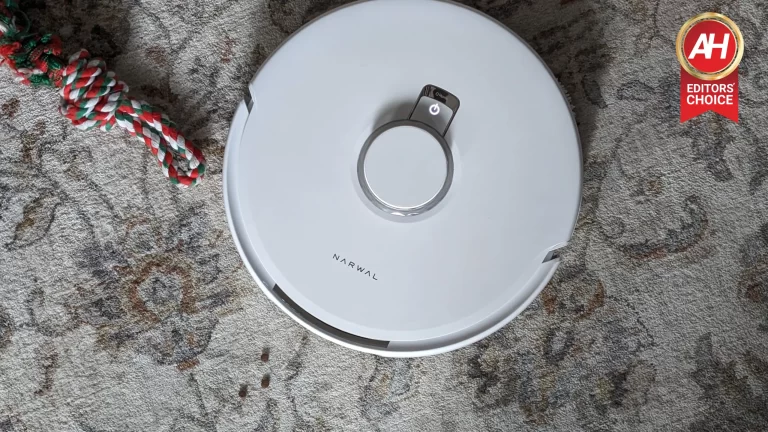
Robot vacuums have come a long way since the early days when all they did was vacuum, and even then it was a barely passable job. These days, however, robot vacuums have become so smart they can clean almost as well as you can when you put in 100% of your effort. They can certainly do it more efficiently. Enter the Narwal Freo X Ultra, the latest robot vacuum I’ve had the pleasure of testing, and, most certainly the smartest. The Freo X Ultra is jam-packed with features that deliver an almost entirely hands-off clean. Mind you, at a very steep price.
The only times I ever interacted with it were to start the cleaning sessions in the app, and to fill up the water container. Which you’ll need to do from time to time. I haven’t been using it long enough to go through one of the included dust bags. So I have yet to need to take it out and replace it. The point is, I’ve barely had to do anything with the vacuum other than hit the start button. And I haven’t had to clean my floor myself in weeks. With its laundry list of features and the promises from Narwal of its cleaning prowess, I had high hopes going into this review. And I can proudly say I was not let down.
Let’s dive into this review further to see how the Freo X Ultra stacks up and if it’s worth your hard-earned money. Because you’ll need to spend quite a bit to bring one of these home.
Narwal Freo X Ultra Review: Hardware & Design
In laying eyes upon the Freo X Ultra for the first time, the only thing going through my mind was how big it was. As a robot vacuum, it’s about the size you might expect. It’s a big round disc of a robot. Not necessarily much bigger than other vacuums I’ve used. But certainly not smaller. And that’s fine, really. It leaves more room for the components that give this thing all of the useful functions it offers. What really caught my eye was how big the base station is.
It’s massive. And when I say massive, I mean massive. It takes up a large chunk of space on the floor. In contrast to the Switchbot K10+ mini robot vacuum I tested last month, the entire thing is probably at least double the size. Which means it may or may not be the best option for small apartments. Certainly not those that don’t have hard floors that need a mopping system. Although, that’s really true of any robot vacuum.
The point is that this is a big unit. So you’ll want to be sure you have a bit of space for it on the floor. Even if you have to move some things around, as long as you have somewhere you can tuck it away, you’re good. I do feel though that it simply won’t be workable for everyone. This will depend on what your furniture setup looks like. Some places have very little extra space and you simply may not have room near an outlet to set up the base station. And if there were any drawbacks to the vacuum aside from the price, it would have to be this. Size aside, the design of the Freo X Ultra is intelligent and thoughtful.
Carry handles on the base station are a nice touch
I’ll briefly use the Yeedi Cube as an example here because Narwal’s design decisions are on this level. Back when I reviewed the Yeedi Cube there was one thing I absolutely loved about it. The handle on top of the vacuum served as a carry handle to move it from room to room and between floors. The Freo X Ultra doesn’t have a carry handle on the vacuum. But it does have carry handles on the side of the base station. And I’d wager that honestly, that’s a little more important.
We’ve already established that the base station is a big unit. Narwal knows this. So it designed handles into the side of the base station you can grab to make moving the base station much easier. Now, you aren’t going to be moving this thing a lot. But if you ever do need to move it, such as during the initial setup, this is going to simplify the process. This is the only vacuum I’ve seen with this kind of design, and I think was a very smart move on Narwal’s part.
The base station gets even heavier if you have the water tank in there completely full. And if for any reason you need to move it after you fill it up, it’s honestly more work to pull the tank out, then move the base station, and then put it back in. It’s more efficient to just pick up the base station and move it without removing anything other than the vacuum itself.
The self-contained dust bags are genius, hidden under a slick magnetic lid
In addition to the handles on the side of the base station, there’s a tiny lid on the top of the vacuum that can be pulled off to reveal a few things. Such as the QR code for the initial setup and the dust bag compartment. This lid is connected with magnets so it’s super simple to pull off when you need to. But strong enough to keep it secure at all other times. Plus, magnets are just slick whenever they’re implemented into any product design.
Narwal’s most genius design choice though might be the special dust compression bags with HEPA filters. These slot right into the vacuum under the magnetic lid and they compress dust, dirt, hair, and anything else the vacuum picks up for up to 7 weeks. When it needs to be replaced you simply pull out the now full bag and toss it out, then put in a new one. It’s a process that takes just a few seconds. Most importantly, the HEPA filter and enclosed bag means no dust getting out and no dusty odors.
This does have a drawback. The dust bags are disposable, so you will eventually have to buy new ones. Assuming each one lasts you the full 7 weeks, you can expect to have to buy new ones every six months, as the vacuum comes with three in the box. Narwal sells these in three-packs for $20 each. So after the first year with the Freo X Ultra, you’re looking at $40 a year for the dust bags. Admittedly, this is a very minor drawback. Because it saves you the time of emptying a plastic dust bin, which the vacuum does come with as well. $40 a year also isn’t that expensive. It is extra money though, and the vacuum isn’t cheap.
Still, the bags are a genius design. And they definitely simplify the cleaning process. So I think they’re worth it.
Narwal Freo X Ultra Review: Build Quality
Build quality might not be the first thing you think about with a robot vacuum, or most products for that matter, but maybe it should be. You want the stuff you buy to be made well, or as well as it can be, and thankfully, Narwal has built a quality product with the Freo X Ultra. I say thankfully because it’s a robot vacuum and mop combo that costs $1,400 at full retail price. And there’s no world where paying that much for this type of product should result in anything less than a well-made product.
I can confidently say that the Freo X Ultra has great build quality. It’s a very solid-feeling robot vacuum and none of the parts feel or look cheap. Even something as simple as the two water containers in the base station are designed well and don’t feel like they could just up and randomly break after normal use. They’re made of thick plastic with durable hinges and lids. Even the latch that helps keep them locked while in the base station feels nice and sturdy.
When it comes to the vacuum itself, it’s clear that Narwal set out to ensure the Freo X Ultra offered top-notch build quality. The wheels, the no-tangle brush, essentially everything feels like it belongs to a product that commands a premium price tag. In short, I have no worries that in six months something on this vacuum is going to go faulty, stop working, or physically break. At least not unless there’s a human element to it. Such as me picking up the vacuum and moving it and accidentally dropping it for example.
Narwal Freo X Ultra Review: Cleaning
If you’re buying a robot vacuum and mop combo, more than anything else, you want to know how it cleans. Because there’s no reason to buy one of these if it doesn’t clean well.
I typically don’t think much of devices that try to do too many different things. It just makes me think of them as a jack of all trades but a master of none. That isn’t something I was immediately thinking about the Freo X Ultra. But I was certainly curious if it would do well with both vacuuming and mopping. In my past experiences, it’s been either one or the other when it comes to a good clean, or both were decent but nothing to write home about. With the Freo X Ultra, it’s much different.
Mopping
I’m going to start with the mopping because it definitely feels more unique. Any of the robot vacuums I have personally used over the years that come with a mop all implement it pretty much the same way. They oscillate back and forth to gently scrub stains on the floor. Some may have had a variation on how that works. But in the end, they still oscillate back and forth. With the Freo X Ultra, it’s different. The mop on the Freo X Ultra uses two almost triangular-shaped mop heads that spin to scrub as the vacuum moves around. But it gets a lot more in-depth than that.
The mop heads also spin while the vacuum adds a downward force to the pads to help with lifting stubborn stains off the floor. To make things even better, the Freo X Ultra has what Narwal calls DirtSense technology. This basically identifies how dirty the floors are and the Freo X Ultra will continue mopping until the floors are spotless. For exceptionally dirty floors, it’s possible that you may have to refill the water in the clean water tank before competition. For example, my first time using the Freo X Ultra for mopping resulted in this kind of situation.
It wasn’t until this time that I realized we hadn’t mopped in a while. The clean water tank was emptied out towards the end of the mop session and it wasn’t even finished yet. At first, I thought this was just how it was going to be every time I mopped. Maybe it was the size of the apartment. Maybe it was how much hardwood flooring there was. Or how much water I had set the Freo X Ultra to use on the mop heads. Turns out, it was none of those things. There was just a lot of dirt and grime that needed to be cleaned up.
Mopping weather adjustments
What’s really interesting is that the Freo X Ultra will also adjust how much water is used on the mop heads based on the weather. For example, it uses less water in the mop heads when it’s rainy or cloudy. This is to prevent standing water on the floors. On the flip side of things, when it’s sunny and warm the water is likely to evaporate more quickly. So the base station applies more water to the mop heads to account for this. I haven’t really noticed much of a difference myself. But I think that’s because it’s been mostly cloudy here every day for weeks. It is that time of year and all.
Nevertheless, I thought it was cool that this was developed into the mopping system. Because I could totally see this being a situation you run into.
Mopping with AI DirtSense Technology
This is honestly the best part about this vacuum. Now I’ve already mentioned the DirtSense, but here’s a little more about how it works. There’s a sensor inside the robot that scans for the dirt level in the water. If it detects any dirt or if it determines the floor isn’t clean enough, it’ll go out for another pass and clean the floors until it no longer detects any dirt in the water. It’ll also periodically go back to the base station to empty this dirty water into the wastewater tank. So if it needs to clean the floors again, it can accurately sense the level of dirt in the next batch of water.
This is a genius idea. Because you’ll never have to wonder how good of a job the Freo X Ultra is doing. It will go back out for more mopping until the water comes back clean. Not too unlike how you are supposed to stop rinsing rice before cooking. You stop rinsing once the water runs clear. In my experience, this works incredibly well. The first time I used it, the clean water tank was emptied out almost completely. And the picture above is what the wastewater tank looked like afterward. If you’re doing the mopping more often, you won’t have to refill the clean water tank after every session.
And you’ll more easily be able to tell when the DirtSense is doing its job. This is one of the main reasons why I think this is such a good vacuum. Because I know when the floors have been mopped properly based on this alone.
Vacuuming
Now for the vacuuming. The other half of this machine’s intended purpose. I will say right off the bat, that this has done a better job vacuuming than any robot vacuum I’ve tested to date. One particularly pesky problem in this apartment is the pet hair. It’s everywhere. But thanks to the Freo X Ultra I’d say about 99% of what’s on the floor gets sucked up. That’s alongside any dust or dirt particles, food crumbs, and the like. I am not a fan of dog hair being everywhere around the house. Especially all over the floors as it ends up on my socks and then it gets in my shoes, on my carpet, and… well you get the picture. It feels a little like sand. You always find more.
Thankfully, the Freo X Ultra has done a very good job at cleaning up almost all of the pet hair on the floors around the apartment. The only area where it doesn’t quite get it all is the rug that’s on the kitchen floors. For whatever reason, nothing can completely clean the pet hair off this rug.
Most of it goes away with the upright vacuum we have. A little bit less with the Freo X Ultra. Ideally, it would be spotless. But I’ve come to terms with the fact that this is just how it’s going to be with this rug. It does get most of it. And certainly more than any other robot vacuum has. So that’s a huge plus. And more importantly, it gets everything else. So in the long run, the floors are still essentially spotless save for this one area. Now the Freo X Ultra does have plenty of suction power at 8,200 Pa. And I want to be clear that it’s more than powerful enough to get just about everything.
I think on other rug types, the Freo X Ultra would have zero issues sucking up all the hair it finds. Overall, it does a stellar job at vacuuming.
It really does have a zero-tangle brush
I think this is one of the best revelations about this vacuum. Narwal wasn’t kidding when they said the Freo X Ultra came with a zero-tangle brush. When I say every other robot vacuum I’ve ever used had some hair tangled around it, I mean it. You always end up having to use the included tool they give you to cut the hairs tangled around the brush. Which is not a fun job. This is not something you have to do with the Freo X Ultra.
The reason this works according to Narwal is two-fold. The conical shape of the brush paired with the bristles that sit at a 50-degree angle. This helps release the hairs as they get sucked up. So they go all the way to the dust bag or dust bin where they’re supposed to. I’m just so surprised at how well it works. And I’m thankful that I no longer have to deal with cleaning the brush off. That being said, I want to be clear. We have one dog in this house. A small pug. So I can’t say how well this would work with other types of dog hair that might be longer. I can however imagine it works just as well.
If you have a pet you love but you hate detangling its hair from the vacuum brush, this is the robot vacuum you want.
Narwal Freo X Ultra Review: The Base Station
The base station is just as important to the whole experience as anything else. While it is huge, it’s a great base station because it helps automate essentially everything. The only things you end up having to do are empty the wastewater tank and refill the clean water tank. And of course, replace the cleaning detergent from time to time. But the base station takes care of literally everything else. It automatically washes the mop heads after a cleaning session. It automatically dries them too.
Plus, the app allows you to set how strong you want the drying to be. You can choose to have it go full strength and dry the mop heads more quickly. However, this process is louder, so you can choose to have the drying be quieter while the process takes longer overall.
The base station also automatically sucks up any wastewater into the wastewater bin. While deploying water and detergent to the mop heads. And, my favorite part, is that it compresses anything the vacuum sucks up if you’re using the dust bag. And it can do this for up to seven weeks. So you’re not replacing the bag for almost two months.
When the dust bag does need to be replaced, you simply slide it out of the vacuum and toss it. Then put in a new one. I also briefly talked about this before but the base station has handles on it which makes it easy to move. Another nice little feature is the touch panel on top of the lid. You can use this for a few things. There are dedicated buttons for washing the mop heads as well as compressing the dust bag. There’s also a button for turning on/off the Freo Mind feature and a button for starting a cleaning session.
Naturally, you don’t want this being messed with. So if you have kids, there’s a nifty Child Lock function you can enable. I never used this touch panel myself. But it’s nice that it’s there if this is how you want to interact with the vacuum.
Narwal Freo X Ultra Review: Software
The software experience is, I feel like, always hit or miss. There’s never really an in-between. The app that lets you control the vacuum is either good or bad. In the case of the Freo X Ultra, it’s good. Not only is it well-designed visually, everything is pretty easy to use and easy to find. I will say that I had to poke around the app a bit to get to know the layout of where all the features were. But this really only took me like 5 minutes. By all accounts, not very long.
My only gripe with the app is that it took a ridiculous amount of time to get the vacuum set up. With the Freo X Ultra, I tried for multiple hours on the evening I first tried to set it up to get it all up and running. To no avail. I ended up giving it another try the following evening and everything was fine. You can also set up the vacuum using the QR code that sits under the vacuum’s lid (not the base station lid). I would have done this, but my review unit did not seem to come with a sticker that had this QR code on it. So I had to use the app.
Once I got things set up though, it was smooth sailing. First, the vacuum has to map your space. It feels like it’s the most accurate representation of my apartment setup that I’ve seen from any robot vacuum. Every room is also nicely color-coded.
If you want, there’s a way to display the floor plan and plenty of options for editing as well. In the map editor, this is where you can set up room names, merge rooms, and designate no-go zones if you don’t want the vacuum to clean somewhere. I for instance have it blocked off from two of the three bedrooms. But it has free roam over the rest of the place. And unlike some of the other vacuums I’ve used, the Freo X Ultra actually avoids these no-go zones every single time. It’s also possible to look at your tasks and set up schedules, as well as overlook the history of past cleaning sessions.
Cleaning modes
The app makes everything pretty straightforward when it comes to cleaning modes. You have Vacuum and Mop or Vacuum then Mop options. I mostly just used the vacuum and mop mode so everything gets done simultaneously. This is more efficient. However, you’re likely to get a better clean with the mopping if you set it to just mop only. This setting will mop until the floor is “flawless” Narwal says. And it does seem to do a better job but it does take longer.
That being said, it still does a great job when it does both at once. There’s also a custom option that lets you set different parameters for that specific time cleaning. Such as taking out any rooms you don’t need to clean for that one session or removing the mopping from one room for example.
Freo Mind
This is the majority of what makes this robot vacuum so smart. Now the nice thing is that this can be toggled on or off. So you don’t always have to have it enabled. And there is a reason to turn it off because it uses more battery power. However, you’re likely going to want to leave it on. It provides a better clean and in the end, that’s what you want. When enabled, which should be by default, the Freo X Ultra will vacuum and mop at the same time. But it also twists and swings at the same time.
This combination of movements helps to ensure a more thorough clean in corners and along baseboards. Freo Mind mode also helps remember the dirty parts of the floor around the home. Freo Mind will use the DirtSense tech to keep those dirtier parts in mind whenever you start a cleaning session. And it’ll focus more on those parts of the floor. Basically, you turn it on and let the intelligence of the vacuum handle everything. In my experience, it definitely provides a better, more noticeable clean compared to when it’s off.
I only tried having the vacuum clean once or twice without it, and it just seemed to be less clean than when I had this option enabled. I also think it’s worth noting that I do have a smaller apartment. So the battery never really runs out completely before the cleaning session is over. If you have a larger home, you may notice that the vacuum needs to go back and charge, then go back out to finish the cleaning session. Honestly, I think it’s worth keeping this on at all times.
Should you buy the Narlwal Freo X Ultra?
It’s an expensive robot vacuum and if I’m being honest, it’s not going to be right for everyone. However, if you want the best clean you can get, you should heavily consider spending the extra money. This has left my floors cleaner than they’ve ever been short of when I just moved into this apartment a few years ago. I think while expensive, the Narwal Freo X Ultra is worth the money. Hands down, this is the best cleaning experience I’ve had. And I think it’ll be hard for anyone to top what Narwal is currently offering.
On top of all this, using the Freo X Ultra is almost entirely automated. Most people don’t love cleaning. So if that happens to be you, you’ll love the Freo X Ultra.
Fresh real-life images of the Pixel 8a show off the display bezels
In a recent post by TechDroider on X, the newly leaked image of the Pixel 8a showcases the front and back of the device in its full glory. There’s no information yet on where the images popped from. But, looking closely, it is clear that Google is ditching the glossy back design of the Pixel 7a. That’s because the new Google Pixel 8a leak showcases a plastic matte finish on the back.
On the front, the rumored 6.1-inch screen with some big bezels at the bottom half is on display. In comparison, the side bezels don’t appear as chunky. As for the color, the leaked Pixel 8a image also shows off the supposed matte black or Obsidian color variant and a design inspired by the Pixel 6 series.
The Google Pixel 8a could be the next big hit from the company’s affordable A-series segment. Along with the leaked images of this phone, we also got some leaked specs. The device could feature up to 256GB of storage, which is double that of the Pixel 7a’s 128GB. Also, this could be the first Pixel A-Series phone to feature a 120Hz display. Last year’s Pixel 7a was fitted with a 90Hz display.
It is very unlikely that the Pixel 8a will see any further specs upgrades compared to its predecessor. However, we still expect this phone to be a powerful device. If you’re not excited about it, then there’s always the Pixel 9 to look forward to.
In this day and age, spam is one of the most annoying issues we have to deal with. While the canned meat product is a tasty ham substitute, it’s less preferred in our email in text message inboxes. Because of this, Google Messages will warn people of potential spam messages.
We’re used to hearing about spam invading our emails. However, spam can exist in our text message app inboxes. Text message spam follows the same principle of email spam. They are full of deceptive messages and links to malicious websites. Their end-goal is to deceive you into giving up your information or money.
Google Messages will warn you of potential spam messages
You’ve most likely been inundated with spam messages at some point, and it could be tough to differentiate between those messages and legitimate messages. All it takes is one tap to send your entire world spiraling, so proper precautions are always welcome.
The popup will read, “Caution: the sender isn’t one of your contacts,” it continues to say, “Links from people that you don’t know may open unwanted or harmful content.” Under that, you’ll see a checkbox giving you the option to allow the content. However, it hammers home the point that you’ll be doing this at your own risk.
Previous reports stated that this only applied to RCS messages. However, it applies to both RCS and SMS messages. It’s important to note that this feature only applies to the Google Messages app. If you are using a third-party messaging app, you will not receive this popup.
Most Android phones come with Google messages pre-installed, and this is the default messaging app on Pixel devices. So, if you think that this feature is something you would like to use, then you can download it using the link below.
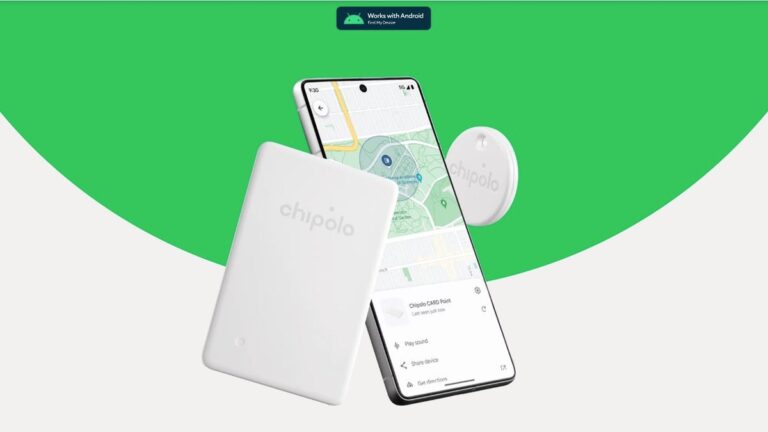
As part of the rollout of Google’s “Find My Device” network today, both popular tracker brands Chipolo and Pebblebee have updated their websites to reflect the new upcoming devices specifically made to work with the “Find My Device” app.
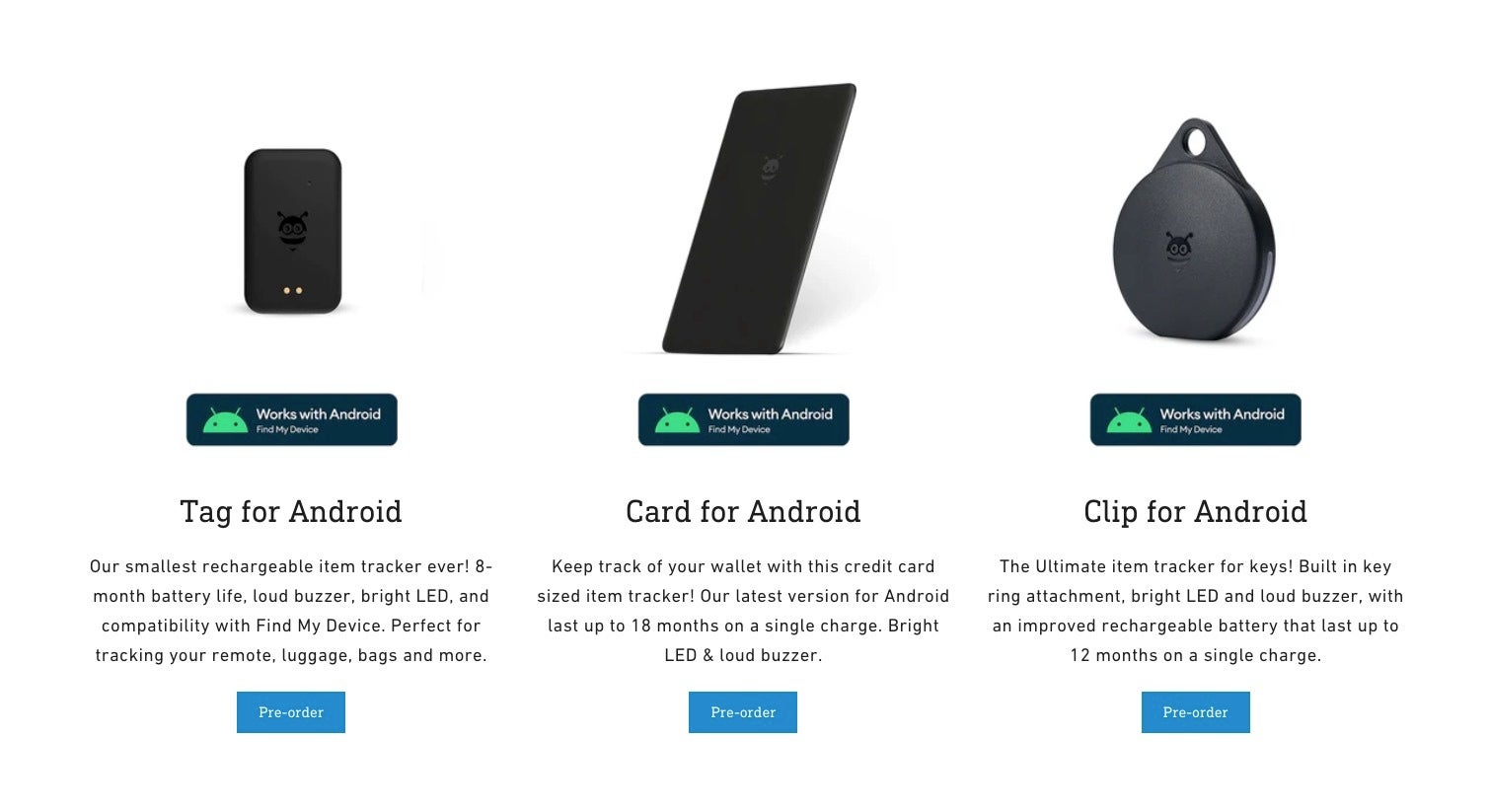
Both brands have stepped up to the plate and updated their inventory with brand-new trackers that feature fast pairing and compatibility within Google’s network. Pebblebee, for example, is rolling out a new Card, Clip, and Tag. These are rechargeable and have helpful features like LED lights and customizable sounds to make finding your stuff easier. The trackers are not in stock yet, but you can pre-order them directly from Pebblebee now and expect them in late May. You will also be able to buy them from the Google Store in June. Prices seem pretty fair at $29.99 a pop, and they’ve got bundle deals too.
Pebblebee’s Google “Find My Device” trackers
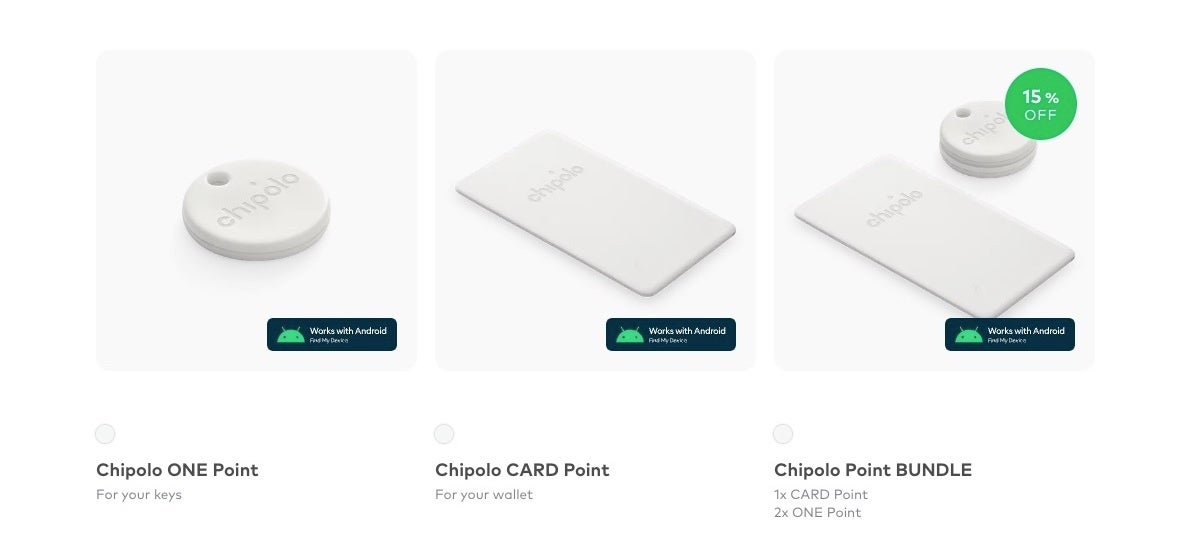
Chipolo is also joining the party with their ONE Point and CARD Point trackers. These devices promise up to two years of battery life, and the standout feature of sound alerts so finding them can be easier. If the sound alerts on these new trackers are anything like their older ones, these should be pretty loud, too. Chipolo’s devices will drop on May 27th on their website, and you can snag them on Amazon or at your favorite store later in July. Price-wise, the ONE Point is $28 and the CARD Point is $35, with those same bundle options for extra savings.
Chipolo’s Google “Find My Device” trackers
It should be noted that both Pebblebee and Chipolo’s new trackers support those unwanted tracker alerts. If an unknown tracker is hanging around with you, your phone will let you know. That’s an important privacy bonus and one that was highlighted in today’s announcement, along with all the other data safeguards that have been implemented into Google’s new crowdsourced tracking network.
Samsung has opened the floodgates for the April 2024 update for Galaxy devices. A flurry of Galaxy smartphones and tablets are receiving the latest security patch. These include the Galaxy Z Fold 5, Galaxy Z Flip 5, Galaxy Tab S9 series, and Galaxy A52. It will soon update more eligible devices.
Galaxy Z Fold 5 and Flip 5 get Samsung’s April update
Samsung started pushing the April update to Galaxy devices at the end of March. The Galaxy S24 series received the new SMR (Security Maintenance Release) first. It patches more than 40 vulnerabilities, including one critical Android OS flaw. Since the company was also simultaneously pushing the One UI 6.1 update to eligible devices, the new security patch took a backseat.
However, the floodgates may have opened. The Galaxy Z Fold 5 and Galaxy Z Flip 5 are widely receiving the April security update in Europe. The new firmware build numbers for the 2023 foldable duo are F946BXXS1CXCH and F731BXXS1CXCK, respectively. It shouldn’t be long before Samsung expands the rollout to other regions, including the US.
These foldables aren’t getting anything more than the latest security fixes with this update. This isn’t surprising as Samsung recently updated the Galaxy Z Fold 5 and Galaxy Z Flip 5 to One UI 6.1. It brought new AI features, camera enhancements, minor UI tweaks, and more changes and improvements. Kudos to the company for quickly following up with security enhancements.
The story is the same for the Galaxy Tab S9, Galaxy Tab S9+, and Galaxy Tab S9 Ultra. These flagship tablets also recently received One UI 6.1 with a host of new features. The latest update is all about security fixes. It is rolling out in South Korea with software version BXD2 (the last four characters of the build number). A global rollout of the new SMR should follow shortly.
The Galaxy A52 should get One UI 6.1 after the April security patch
The Galaxy A52 is also eligible for the One UI 6.1 update. However, Samsun hasn’t got around to updating its mid-range devices to the new One UI version yet. It hasn’t even updated the likes of the Galaxy S22 series and older foldables. These devices should get One UI 6.1 in the coming weeks.
Ahead of that, the Galaxy A52 is picking up the April SMR. The latest security patch is currently rolling out in a handful of markets in Europe and Asia. Samsung should gradually expand the update to other regions over the next few days. If you are using any of these Galaxy devices, watch out for a notification prompting you to download the latest security update.
One of the biggest topics affecting AI today is data scraping. In order to train AI models, companies need to scrape data from online sources to feed it into AI models. Well, we got the news that OpenAI has scraped tons of data from YouTube. However, we also got the news that even Google has been scraping data from YouTube videos.
OpenAI made the argument that it’s using information from publicly available YouTube videos. So, this should, ostensibly, be justified. However, YouTube states that it prohibits any unauthorized downloading or scraping of YouTube videos. This means that OpenAI could possibly be in violation of YouTube’s terms of use. If this becomes a big deal, then we are sure to see the companies battle this out in court at some point.
Google is also scraping YouTube videos
In a pretty big twist, it appears that Google is also scraping data from YouTube videos. What makes it significant is the fact that Google is YouTube’s parent company. So, it raises questions. Does YouTube know about this? Is Google telling YouTube to be quiet about it? Will YouTube seek any sort of legal action against its parent company?
These questions will remain unanswered for quite some time. In any case, it appears that Google has made a little change to its terms of service. This change, according to the report, allows the company to scrape data from publicly visible sources such as Google Docs, Google Sheet files, Google Maps reviews, Etc. This means that the company wants to ramp up its data collection, and that does not bode well for users who want to preserve their data.
People read companies’ terms of service to know what’s going on with their data. However, knowing what’s going on with your data doesn’t do anything if the companies can casually change their terms to allow them to scrape it.
We all know that Google is about implementing AI into just about every corner of its experience. Last year, while it was rolling out new AI products, the company announced Studio Bot. Well, according to a new report, Google renamed Studio Bot, and it brought Gemini Pro over to Android Studio.
If you’re an Android developer, and use Android Studio, the Studio Bot just might have been your best friend. This is an AI-powered chatbot that is integrated with an Android Studio. It’s a very helpful tool for people who want to develop apps efficiently.
If you need help with your code, you can simply ask Studio Bot to help you out. You can answer questions that you may have along with offering in-depth assistance. It’s definitely made coding easier for millions of Android developers.
Google added Gemini Pro to Android Studio
This change goes beyond just a simple rebrand. Google announced that it’s going to change the name of Studio Bot. Instead, it’s going to be called “Gemini in Android Studio.” Not quite the most streamlined name, but it’s not the worst.
Along with the new name, Google announced that the AI helping you out in Android Studio is about to get much more powerful. The company is implementing the Gemini 1.0 Pro model into Android Studio. Gemini Pro is the most powerful model available to the public, and it’s powering Gemini Advanced. If you’re curious about what Gemini Advanced is, you can check out our Gemini Advanced guide.
If you’re excited about using Gemini in Android Studio, there are a few things you’ll need to know. For starters, you will need to be running a preview version of Android Studio. A recommendation would be the Jellyfish beta. Also, when Gemini in Android Studio launches, you should expect it to cost you some money. Right now, using the preview is free. However, when it eventually hits the public, there’s a high chance that you will have to pay to use it.
Threat actors target home users with information-stealing malware like Vidar, StealC, and Lumma Stealer, which disguises the malware as pirated software and video game cracks in YouTube videos.
The videos appear to instruct users on obtaining free software or game upgrades. Still, a link in the description leads to malware, where the attackers compromise legitimate accounts or create new ones specifically to distribute the malware.
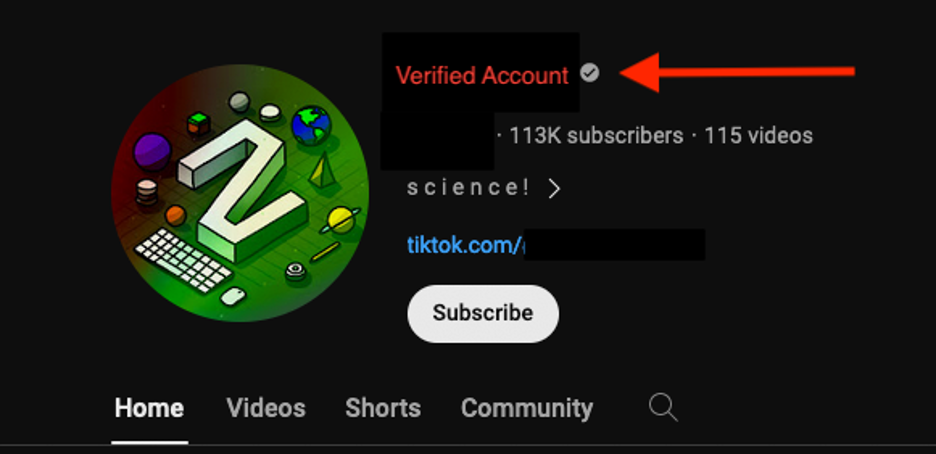
An example of a verified YouTube account with a large following, is suspected to be compromised.
The method is concerning because it targets younger users with games popular among children, who are less likely to recognize malicious content, as over two dozen such accounts and videos have been identified and reported to YouTube for takedown.
DocumentStop Advanced Phishing Attack With AI
Trustifi’s Advanced threat protection prevents the widest spectrum of sophisticated attacks before they reach a user’s mailbox. Stopping 99% of phishing attacks missed by
other email security solutions. .
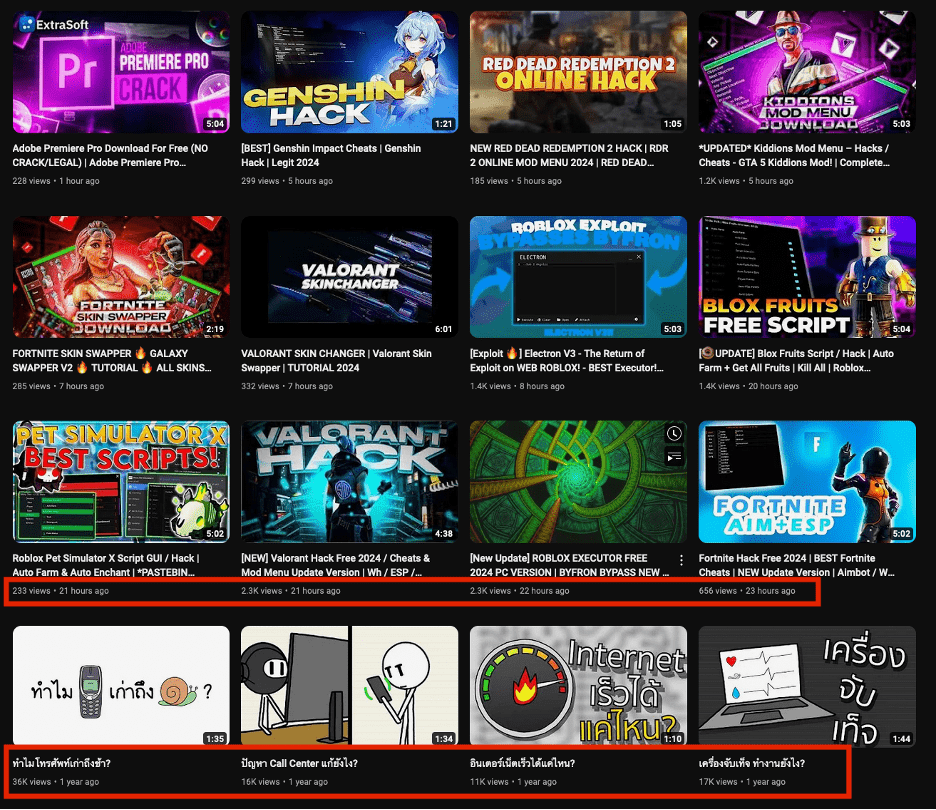
A verified YouTube channel had found a history of Thai content that abruptly switched to posting English videos with malicious links.
Screenshot of a suspected compromised YouTube account distributing malware, comparing upload dates.
The new videos, likely boosted by bots for legitimacy, offered pirated software and character enhancements for popular video games, whose descriptions contained links to password-protected archives (e.g., “Setup_Pswrd_1234.rar”) that deployed Vidar Stealer malware upon execution.
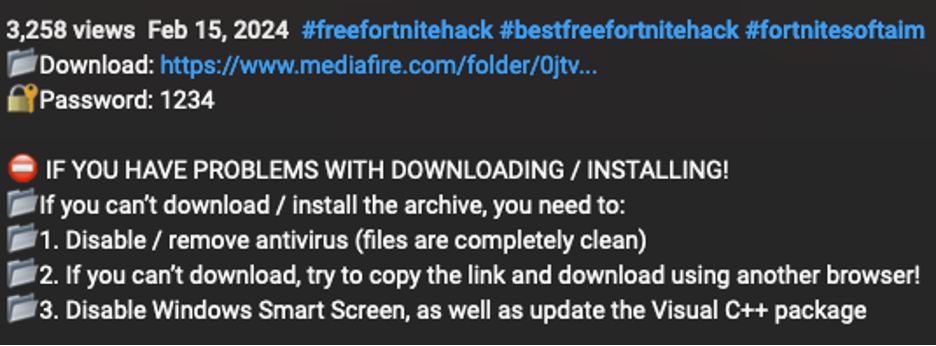
Screenshot of a video description that includes instructions to disable antivirus.
Fake comments further bolstered the legitimacy of the malicious content, which included instructions to bypass antivirus software, highlighting the social engineering tactics employed by the attackers.
Proofpoint found videos promoting fake Empress cracks for League of Legends, including instructions to download a RAR archive containing a malicious executable named “empress.exe” from a suspicious URL and used visual instructions to trick users into installing Vidar Stealer malware disguised as a game crack.
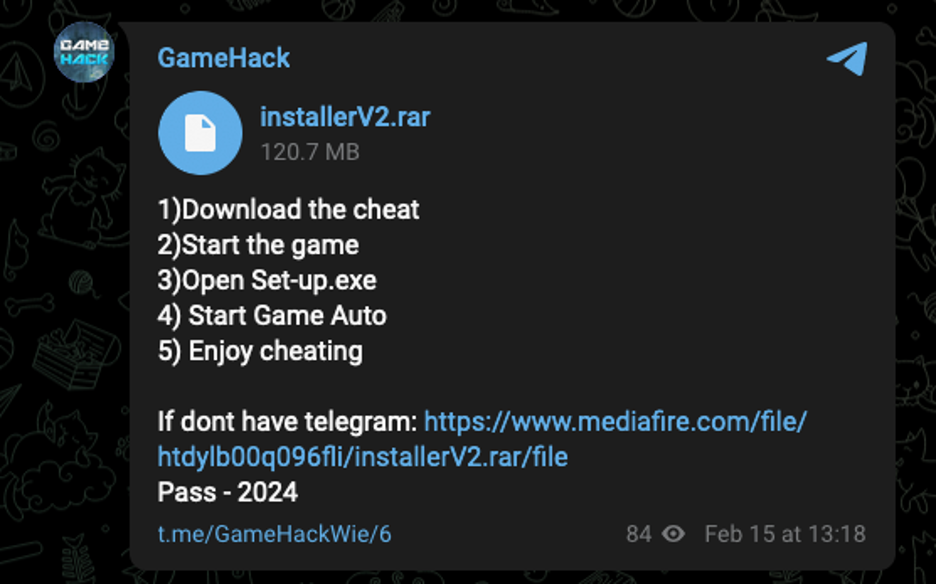
Telegram link from Empress video.
Malware details with Command and Control Activity
Malicious actors are distributing Vidar malware through YouTube videos containing links to password-protected, compressed executables hosted on MediaFire.
Repeating bytes identified in a hex editor.
The executables contain padding to bypass antivirus scanners and appear larger than they are, while Vidar retrieves its command and control instructions from social media accounts, including Telegram, Steam Community, and Tumblr.
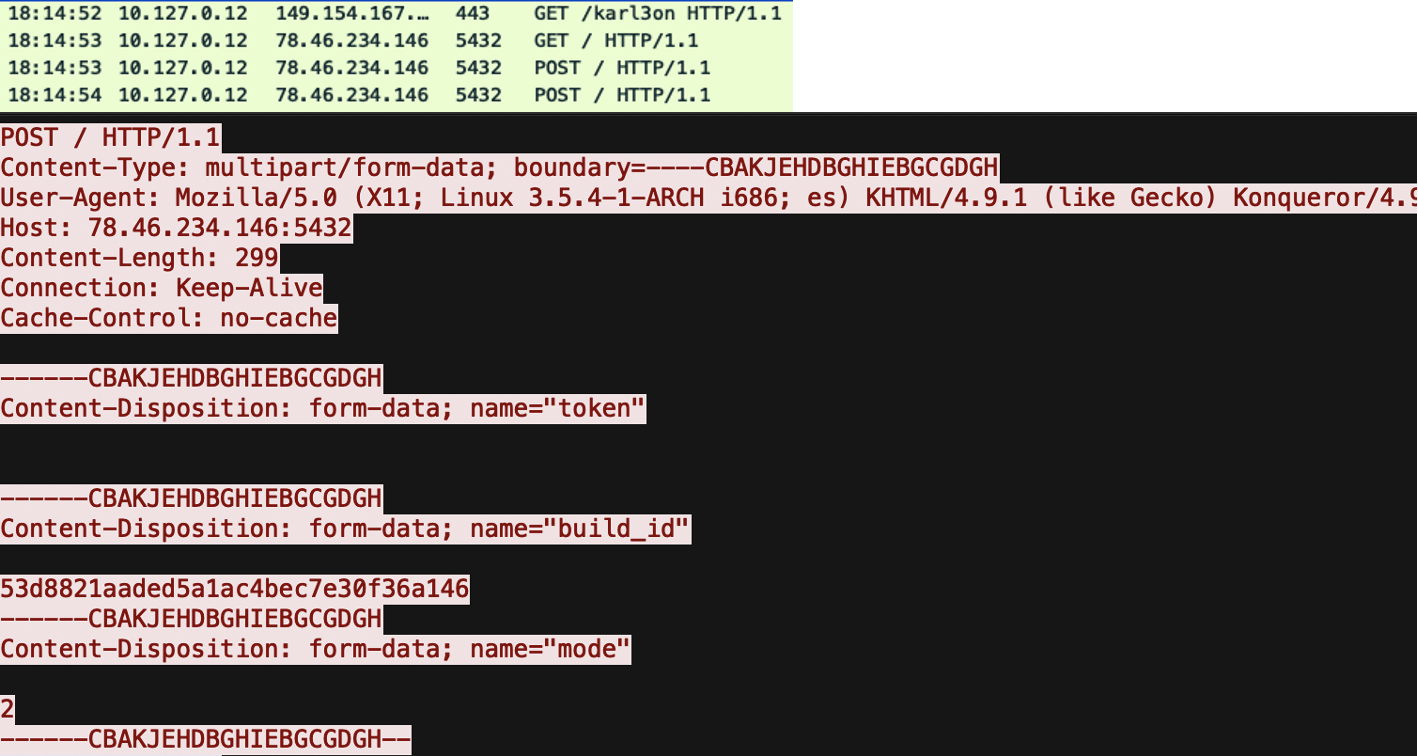
Vidar Stealer C2 check-in PCAP.
Accounts are identifiable by usernames containing alphanumeric characters followed by an IP address, which allows Vidar to blend in with regular network traffic.
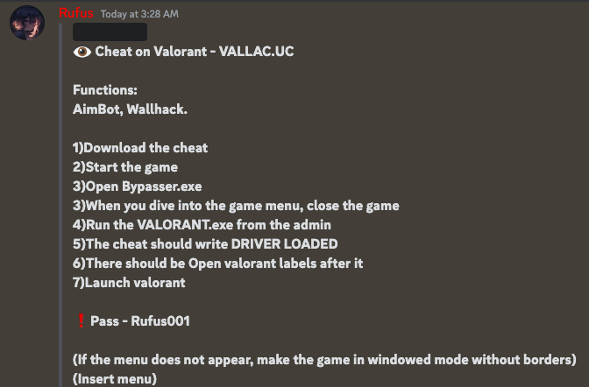
The link leads to a Discord post from the threat actor.
A malware distribution campaign targeted gamers as actors compromised YouTube accounts and used video descriptions to distribute Discord server links.
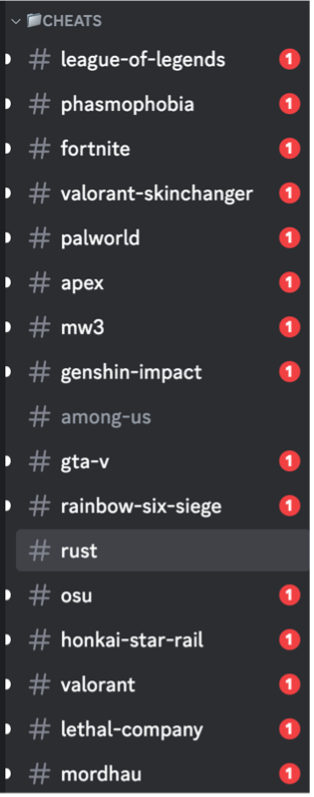
List of “supported” games.
The Discord server offered various game-specific malware disguised as cheats, in which downloaded files like “valoskin.zip” contained Lumma Stealer malware. At the same time, the campaign exemplifies a broader trend of information-stealing distribution via YouTube.
Similarities in video content, delivery methods, and target audience (non-enterprise users) suggest a single actor or a group of collaborators.
The provided indicators of compromise (IOCs) suggest a recent Lumma and Vidar malware campaign, where Lumma files (spoofer.exe, bypasser.exe) were disguised as legitimate applications (VALORANT.exe).
Vidar used social engineering tactics, using a Steam profile and Telegram channel as C2 servers. Both malware families have been active since February 2024, and new samples appeared in March.
Secure your emails in a heartbeat! To find your ideal email security vendor, Take a Free 30-Second Assessment.