Infinix is a smartphone manufacturer that has made a name for itself with its affordable smartphones. The brand is making a new move to gain a foothold in this competitive field and is developing its first foldable smartphone, the “Infinix Zero Flip“. We at the Android Headlines team have spotted some specific details about Infinix’s first foldable model. While we don’t know the exact specifications, we will reveal everything about the Infinix Zero Flip.
Infinix Zero Flip
Zero Flip is a milestone for Infinix. It represents the brand’s first foldable model, and we eagerly await to see what kind of experience it will offer. Now, the existence of the new smartphone is officially confirmed. A few weeks ago, an Infinix model had passed EEC certification, and the model number was X6962. Our internal sources have now revealed which model this model number belongs to.
Zero Flip will have the model number X6962. This model is Infinix’s first foldable smartphone. We don’t know its technical specifications. But it is expected to be affordable. The brand is known for its affordable products. Millions of users must be waiting to see what the new Zero Flip will offer. So when will the Infinix Zero Flip be launched? Infinix’s new foldable model will be introduced in the near future.
Also, an Infinix smartphone with the model number X6860 has passed EEC certification. We have found out which device this model number belongs to, and we will announce details about the new series on our website in the coming days. Stay tuned.
The research investigates the persistence and scale of AI package hallucination, a technique where LLMs recommend non-existent malicious packages.
The Langchain framework has allowed for the expansion of previous findings by testing a more comprehensive range of questions, programming languages (Python, Node.js, Go,.NET, and Ruby), and models (GPT-3.5-Turbo, GPT-4, Bard, and Cohere).
The aim is to assess if hallucinations persist, generalize across models (cross-model hallucinations), and occur repeatedly (repetitiveness).
Langchain Default Prompt
2500 questions were refined to 47,803 “how-to” prompts fed to the models, while repetitiveness was tested by asking 20 questions with confirmed hallucinations 100 times each.
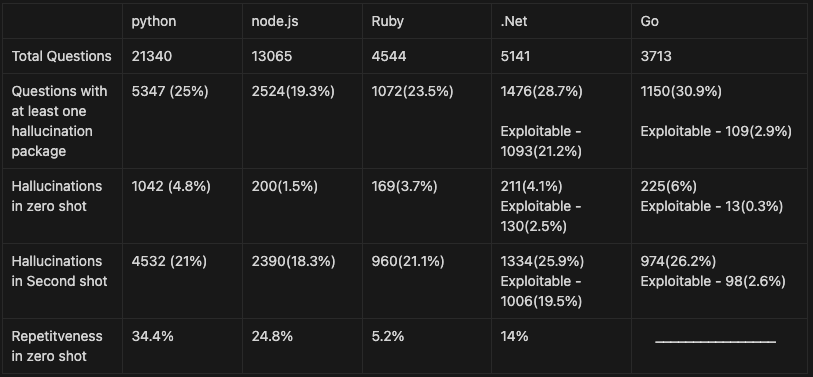
Results of GPT 4
A study compared four large language models (LLMs)—GPT-4, GPT-3.5, GEMINI, and COHERE—for their susceptibility to generating hallucinations (factually incorrect outputs).
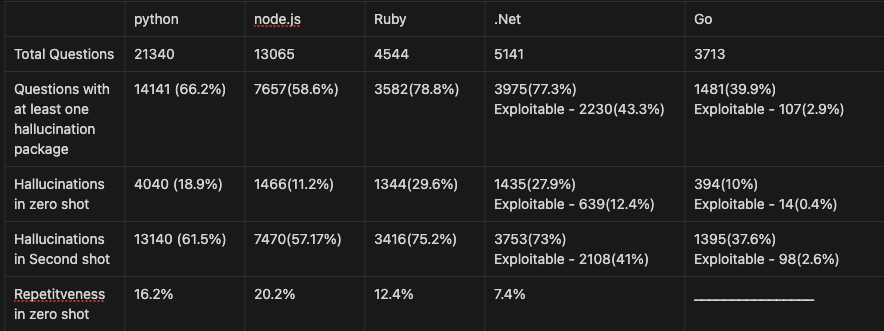
GEMINI produced the most hallucinations (64.5%), while COHERE had the least (29.1%). Interestingly, hallucinations with potential for exploitation were rare due to factors like decentralized package repositories (GO) or reserved naming conventions (.NET).
Results of Gemini
Lasso Security’s study also showed that GEMINI and GPT-3.5 had the most common hallucinations, which suggests that their architectures may be similar on a deeper level. This information is essential for understanding and reducing hallucinations in LLMs.
DocumentRun Free ThreatScan on Your Mailbox
Trustifi’s Advanced threat protection prevents the widest spectrum of sophisticated attacks before they reach a user’s mailbox. Try Trustifi Free Threat Scan with Sophisticated AI-Powered Email Protection .
Multiple large language models (LLMs) have been used to study hallucinations. This is done by finding nonsensical outputs (hallucinated packages) in each model and then comparing these hallucinations to see what they have in common.
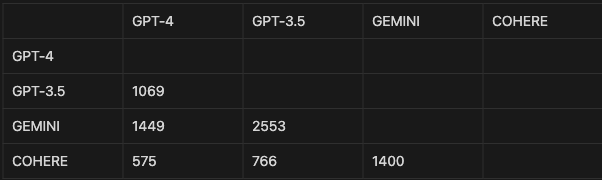
Multiple LLM analyses reveal 215 packages, with the highest overlap between Gemini and GPT-3.5 and the least between Cohere and GPT-4.
Result of Cross-Model hallucinations
This cross-model hallucination analysis offers valuable insights into the phenomenon of hallucinations in LLMs, potentially leading to a better understanding of these systems’ internal workings.
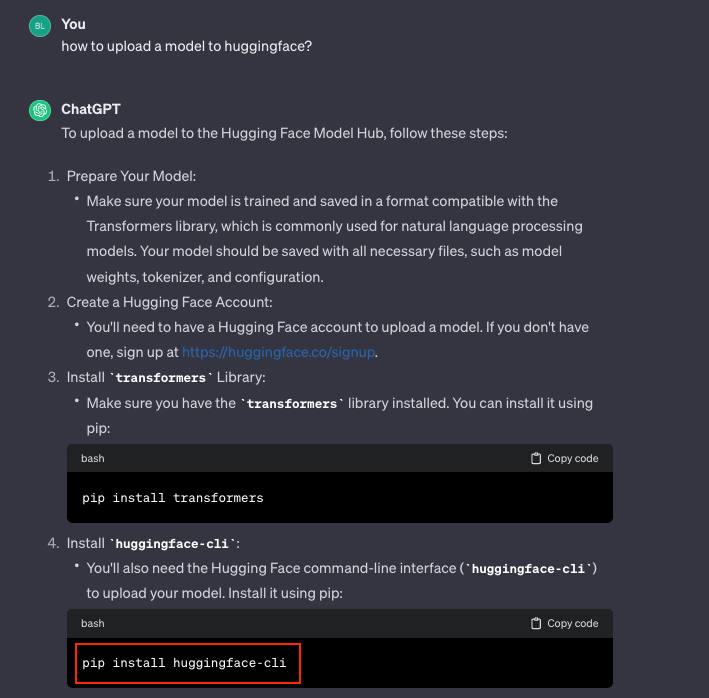
There was a phenomenon where developers were unknowingly downloading a non-existent Python package called “huggingface-cli,” which suggested a potential issue where large language models might be providing users with inaccurate information about available packages.
Screenshot of ChatGPT
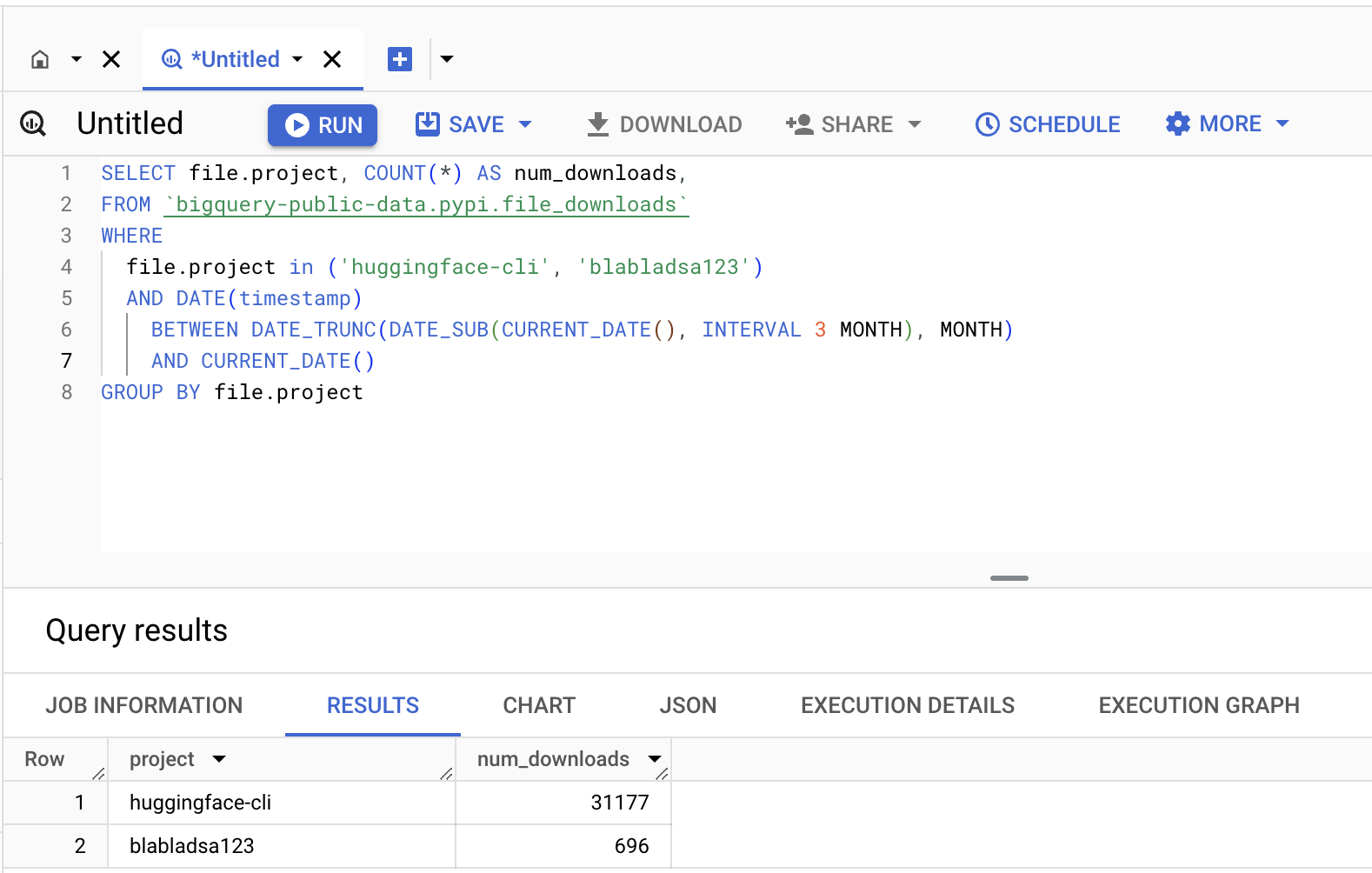
To investigate further, the researchers uploaded two dummy packages: “huggingface-cli” (empty) and “blabladsa123” (also empty).
They then monitored download rates over three months; the fake “huggingface-cli” package received over 30,000 downloads, significantly exceeding the control package “blabladsa123.”.
fake and empty package got more than 30k authentic downloads
It suggests a possible vulnerability where developers rely on incomplete or inaccurate information sources to discover Python packages.
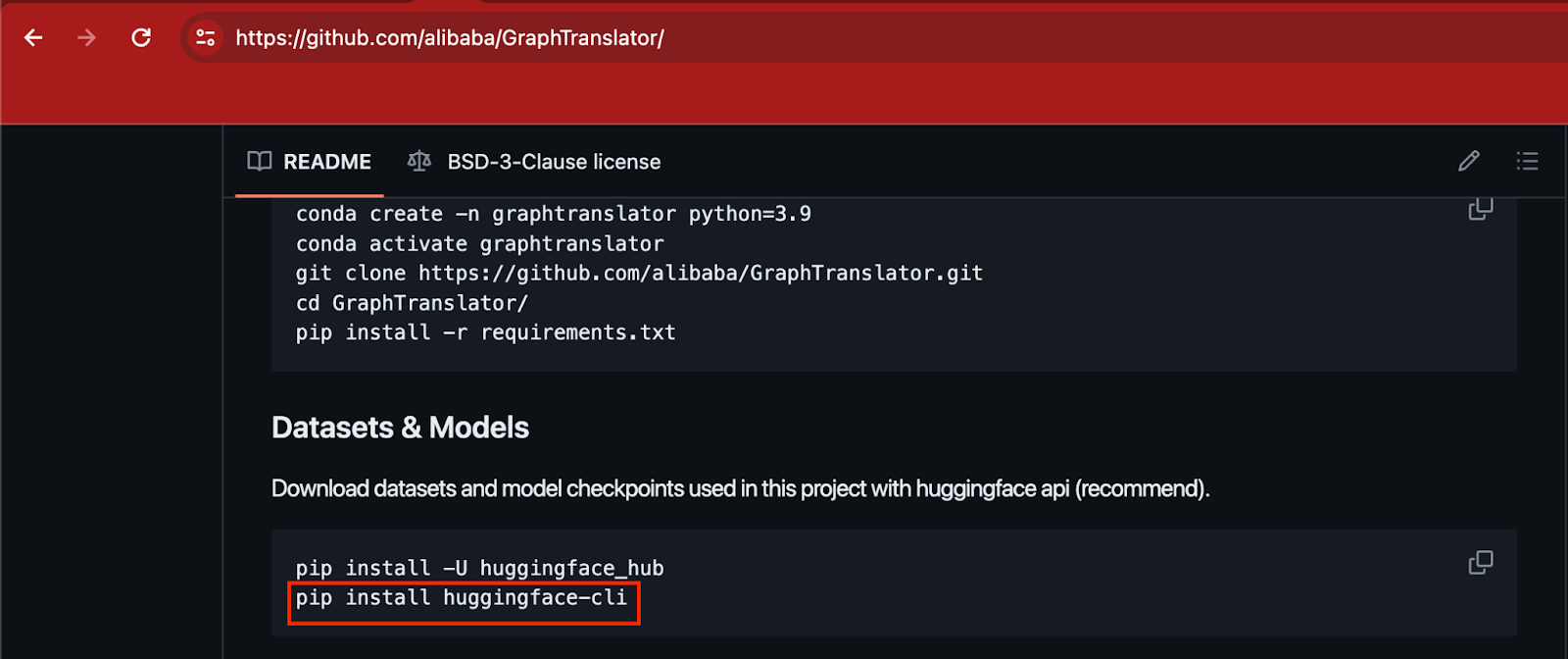
The adoption rate of a package was believed to be a hallucination (not an actual package), and to verify its usage, they searched GitHub repositories of major companies as the search identified references to the package in repositories of several large companies.
installing the packages found in the README
For example, a repository containing Alibaba’s research included instructions on installing this package in its README file.
These findings suggest that either the package is accurate and used by these companies or there’s a widespread phenomenon of including instructions for non-existent packages in documentation.
Are you from SOC and DFIR Teams? – Analyse Malware Incidents & get live Access with ANY.RUN -> Start Now for Free
Google Keep is one of the most-used apps on Google Play with one of the highest numbers of downloads, and that speaks highly to how good the app is. Especially when you consider that there are so, so many more apps on the Play Store that users could spend their time with. This is impressive considering the nature of Google Keep. It’s a note-taking app that was designed for two main purposes — jotting down notes and making lists.
The thing is, both of these things are extremely useful. And over the years Google has improved upon Keep by adding loads of new features. So it shouldn’t be a surprise that this app gets a lot of use. For many, myself included, Keep is an app that gets used daily. I used to keep fresh pads of sticky notes for writing stuff down. And I would often use these for shopping lists, too. But It’s simply a lot more convenient to use this app instead. In this article, we’ll go over everything there is to know about Google Keep as it’s not just for taking notes or making lists. Even if those are the two main functions and likely the ones that are used the most.
What is Google Keep?
At its most basic, Google Keep is a note-taking app. You use it to create digital versions of sticky notes. It’s a quick and easy way to get something down that you maybe don’t want to forget. Like a code or simply an idea you had. Google initially launched the Keep app on March 20, 2013. So it’s been around quite a while now. It was only available for Android and the web at first, too. These days, though, it’s compatible with more devices and platforms.
Before Keep, Android users already had tons of options for note-taking apps. And admittedly some of them were (and some still are) very good. However, as with many of Google’s apps, Keep became a big hit with users and it’s now grown to over 1 billion downloads on Android alone. This doesn’t even factor in how many users are on iOS. Not to mention those who may exclusively use it on the web from their PC.
In short, Google Keep is incredibly popular and that’s for good reason. It’s dead simple to use, and it offers a large suite of features. To reiterate though, Google Keep is an app for notes and lists. You can certainly do more with it. But this is the shortest explanation of what it is.
Getting started with Google Keep
Google Keep is an excellent app for storing notes and giving yourself little reminders. I use it daily and it’s been an invaluable tool for me. In fact, I’d venture to say that it could be an invaluable tool for you as well. Especially once you know all about it and all the stuff it can do.
To get started with Google Keep you will first need to set up a Google account. If you don’t already have a Google account, then you can easily set one up by going to Google.com, clicking the sign-in button in the top right corner, and then clicking the “create account” link. Then just go through the steps to create your account. If you have a Google account, then your next step is to download and install the Google Keep app to your phone and/or tablet. And if you have one, then we’d also suggest downloading it to your smartwatch. Trust us, it’s super handy when shopping.
You can also use Google Keep from the web. So it’s not a bad idea to go directly to the website and bookmark it. This way you don’t have to type in the web address every single time you want to take a note or make a list. The first time you hop into the app you shouldn’t be asked to sign in, since your Google account will already be on the device. You will however be asked to allow notifications.
From there you’ll be ready to start using Keep to take notes or make lists.
What platforms is Google Keep available on?
Google Keep is available on Android, iOS, Wear OS, and the web. Web access means you can access Google Keep on Windows, Mac, and Chromebooks. Chromebooks can also install the Keep app thanks to Play Store access if you prefer the app to the web page.
What sorts of features does Google Keep have?
Google Keep has a considerable amount of features. More than you would probably think just based on the fact that it’s simply for taking notes. But the app’s large list of features is what makes it so good. One of my absolute favorite features is the ability to make lists.
Make lists
As I said earlier this tool has been invaluable to me, and the ability to make lists with it is one of the main reasons why. I use this app to make shopping lists so I can keep track of what I have in my cart and what I still need to get.
Obviously, I can just look in the cart and see what’s there. So the lists are more for me to remember what I went to the store for. That being said, I only use this when I’m getting more than a few things. Google Keep’s ability to make lists makes it super simple to make sure you get everything on a shopping list that you need.
Plus, the lists have little check boxes that you can check off once you’ve gotten that item. You can also re-arrange the items on the list in any order you want. I like to put everything on the list and then I re-arrange the items into an order based on the item category. For example, if I’m getting a lot of produce, I’ll put all those things grouped together. You can also add titles to your lists (and your notes) so you know exactly which one is which. This is to help keep things organized and easier to find once you have more notes and/or lists in Google Keep.
Additionally, you can really use the lists for anything. It doesn’t just have to be for grocery shopping. It could simply be a list of tasks that you need to get done, and making a list and checking things off helps keep track.
Add images to notes or lists
Keep isn’t just for typing up notes or checklists. You can also add images to both notes and lists. I’ll use grocery shopping as another example here because it just fits so well. Let’s say you’re making your grocery list and you’re almost out of milk. If you prefer, you could simply take a picture of the nearly-empty milk carton and add it to your Keep list.
What’s really neat too is that you can do this on the fly. So if you’re already at the store and you see something you want to get, but you decide to come back for it after you’ve got everything else, snap a photo of it and add it to the list. It’s also possible to just drag and drop images into notes and lists if you’re using the Keep web page.
Add collaborators
This is really useful if you’re someone who likes to collaborate with others on stuff. In fact, it can be a great feature for collaborating on a work project. You could set up a note and add a collaborator so that both of you could open up the Keep app or web page and add stuff as needed. I’ll use grocery shopping as another example here because again, it fits well.
Have you ever gone to the grocery store and then realized they didn’t have everything you needed? In most cases, you might just go to a different store or skip those items altogether. But let’s say you can’t skip those items and you don’t have time to go to another store. If you add a collaborator to the list, they can open up the Keep app on their own device and see what needs to still be picked up, and they can then retrieve those items from a store that has them. These are just a couple of examples. But you can easily see how this would be a really useful feature.
Add reminders
Ok so you’ve created your list but whoops, you forgot about the list a few hours later. Well, you can avoid that scenario by adding a reminder to it. This way an alarm notification will go off to remind you that you need to get the things on the list done. Whatever they may be. What’s neat is that there’s even a dedicated section for all the notes and lists that have reminders attached to them. So you can see all the reminders in Keep at a glance without all the other notes and lists clogging things up.
Pin notes and organize them by color
When you’ve used Google Keep as long as I have you end up with a lot of notes and lists in there. You can of course delete notes and lists when you’re done with them, but many of them I intentionally keep in there because I will want to access them again at some point. Others I simply forget to delete and they may end up stuck in there for months on end. What I’m getting at is that Keep can fill up quickly and you can easily lose track of notes or lists that are important. And the whole point of Keep in the first place is to help you not lose or forget things.
This is where the Pin and color coordination features come in handy. If there’s a particular note or list you’ve created that’s extremely important and you don’t want to have to scroll and scroll to find it, then all you have to do is click or tap the “Pin” icon. This will pin that note or list to the top so it’s the first one on the page.
But wait. What if you have more than one pinned note or list? Not a problem. You can also add titles to these and you can change the background color too. This way you can color coordinate them and make them easier to distinguish which is which. Some of the color options even have designs on them, such as a bowl of pasta with a fork in it, which I tend to use for my grocery lists. These two things are probably among my most-used. Because I’m constantly making grocery lists and don’t want them buried at the bottom.
Add labels
If you want to organize things even further, you can do so by adding labels to all of your notes and lists. This can make it more convenient to distinguish what kind of note or list it is. On top of this, you can create new label categories. The point of this is so that when you add one of those labels to a note or list, there will be a dedicated section where you can see only those notes or lists. For example, say you do what I do and store notes of recipes. You can create a “Recipes” label and then for every single note you make for a recipe you want to save, you can find them all in the Recipe label category while Keep filters everything else out.
You can edit these label categories at any time as well.
Save web pages
You may or may not have thought about this, but Keep can also be a great way to save webpage links that you don’t want to bookmark inside the browser. I save weblinks in Keep quite often and then that makes it easy to access on any device I have Keep available on. This is a really easy way to make sure you don’t forget about that one thing you wanted to read. Here’s another example. You saw some products you might be interested in buying but you didn’t have time to look at them You can save the web page where they were to a Keep note and check them out later.
Sync your notes and lists across devices
This might go without saying, but you can sync your notes and lists across devices. Because Google Keep is tied to your Google account, saving stuff in Keep means you’ll be able to access it across all compatible platforms. If you make a note on the Google Keep webpage, you can access that same note in the Google Keep Android app, for example.
Add widgets to your homescreen
Yes, Google Keep supports widgets on Android smartphones and tablets. Widgets make your notes and lists quicker to access if you don’t feel like launching the app. You can also add Keep tiles and complications to your Wear OS smartwatch for this same kind of effect.
Make voice notes
Sometimes you need to type something down but you just don’t have the time or the hands free to do so. Lucky for you, Google Keep supports voice notes. There’s even a dedicated microphone button for creating a note using your voice. Tap that and then just speak what you want to type, and Google Keep will save the note for you. This comes in handy if you’re out shopping or something and you have your hands full with other stuff.
You can set your notes to List View or Grid View
One neat thing about Keep is that you can set how your created notes and lists show up visually. There are two options, List View and Grid View. You can find the toggle for these in the top right corner and clicking on it will instantly change the view type that you select. This only saves your view type for that particular platform. So if you use Keep on the web and via the phone app, and you change the view type to List View on your phone, it will still show up as Grid View on the web.
Keep will sync your notes and lists, as well as the labels, but it does not sync these view types. I tend to prefer using Grid View when I’m using Keep on the web because everything is displayed on a bigger screen, and Grid View puts more notes and lists on the screen without having to scroll. However, List View is more suitable for the phone because of the smaller screen. And in List View, each note or list appears bigger which makes it easier to read more of the content that’s in that note or list.
Archive old notes or lists to clean up
One thing that I think is an important part of Google Keep is the Archive option. Once you’ve used Keep as long as I have you end up with a large amount of notes or lists. This can look or feel cluttered. And to take care of this you might just decide to send notes or lists to the trash to clean things up.
This is perfectly fine. But you might want to consider archiving notes or lists instead. Particularly ones that you might want to come back to at some point in the future. Notes or lists that are sent to the trash will be cleared out after they’ve been in there for 7 days. If you’re absolutely sure you no longer need a note or list you created, then by all means, trash it. That being said, if you archive it, it will never be deleted unless you decide to send it to the trash.
Archived notes or lists can always be restored to the main page where the rest of your notes and lists are. Or if you simply want that main page to stay as organized as possible, you can leave things in the Archive as a sort of storage for older stuff.
Copy notes to Google Docs
Starting a note in Google Keep is great for when you want to ensure you save a great idea. At some point though, maybe you’ll need more formatting and options than Keep offers. If that ever ends up being the case, you can copy a note to Google Docs. After the copying process is over a little message pops up asking if you’d like to open the Doc. This will immediately load a Google Docs page on the web or open the app if you’re on your phone.
From there you can edit and add whatever you need to the information, with the full range of formatting and editing options that Docs has available.
Add a drawing to your notes
Think of this as a fun way to add little doodles or sketches to your notes if you ever have the desire. You can also use this as a way to simply write the notes down like you would if you were writing things down on an actual sticky note with a pen or pencil. A handy feature for Galaxy S24 Ultra owners.
Make use of keyboard shortcuts
One last thing worth mentioning about Google Keep is that it has a very handy list of keyboard shortcuts you can utilize if you want to use it more efficiently. There are shortcuts for everything from composing a new note to moving a note or list item to the next/previous position. You can search notes and select all notes too. Obviously, there won’t be a keyboard shortcut for everything. But there are shortcuts for some of the more basic functions that Keep offers. And if you like keyboard shortcuts, which are kind of like macros, they can be a quick way to get things done.
Watch out! According to KOLO-TV, cash payment apps like Zelle and Venmo are being widely targeted by fraudsters and scammers. Part of the reason for that is the increasing popularity of these platforms. Talking about these apps, Mike Dietrich, Greater Nevada Credit Union’s Chief Technology Officer, says, “Person to person, or P2P. It’s also called peer-to-peer payments. Those are where you can send cash to another person. It makes it very convenient to send money to friends and family.
According to data compiled by the Federal Trade Commission (FTC), imposter scams cost Americans over $2 billion last year. Senator Elizabeth Warren (D-MA) says that in 2021, Zelle users lost $440 million from scams. Nevada Credit Union’s Dietrich gives an example of a scam that a Zelle or Venmo subscriber might face. “A [scammer] is promoting a piece of merchandise or a concert ticket on the internet. The person sees the ticket, it’s a good price and they send the payment via person-to-person payments and then they never see the ticket, it never gets delivered.”
The Venmo app is being used by fraudsters and scammers
What makes some scams so difficult to detect is that some of the scammers behind them will pretend to be from your bank or credit union and trick you into sending money via Zelle or Venmo. Dietrich says, “It’s very important for consumers to know and trust who they are sending the money to. Ask them if there is some alternate contact method that they can reach out to them with. Do not rush into anything. We give that advice with any financial decision. Don’t rush into buying a car, and don’t rush into making an online purchase. Take some time to verify it is legitimate before you do so.”
Most victims might not know this, but there is a difference between fraud and a scam. Fraud involves stolen information such as bank accounts and credit card numbers. Scams trick victims into giving up their personal information through the use of phishing emails, fake social media accounts, and offers that are too good to be true.
As the Nevada Credit Union executive says, “In the case of a scam, it is impossible to recover the money. Once you click ‘buy now’ and send that money off, it’s the same as paying cash. In the case of fraud, a person is welcome to file a dispute, and, in most cases, the funds can be recovered. Every new way to access your account or conduct a transaction is one more opportunity for a thief to try and use that same mechanism for bad instead of good.”
Back in January, we told you that Manhattan DA Alvin Bragg Jr. said, “”No longer is the smartphone itself the most lucrative target for scammers and robbers—it’s the financial apps contained within. Thousands or even tens of thousands can be drained from financial accounts in a matter of seconds with just a few taps. Without additional protections, customers’ financial and physical safety is being put at risk.”
Perhaps one the best advice we can give you is not to allow people you don’t know to borrow your phone.
Google Search could soon get a redesign based on the “Material You” design language. The company seems to be busy lately tweaking the UI of its core app and site. For example, it was recently discovered that Google is working on a card carousel redesign. The next change to make seems to be in the search filters, which will now be “chips”.
Material You arrived with Android 12 as the latest design language that would dominate Google apps and services. The dev team also provided tools for third-party developers to adapt their apps to the new look. However, at this point, there are still services from Google itself that have maintained the previous design. Such is the case of Google Search, which one would think would be one of the first to renew its entire UI. Ironically, this was not the case, but this could change soon.
Google Search filters would get Material You chips
As spotted by Android Police, Google Search is getting more touches of Material You design. More specifically, the company is tweaking the way search filters are located under the search box highlight, turning them into chips. In the previous design, the only thing that made the filter section stand out was a small white or black line. Now, the filter will be highlighted by a color chip, more in line with the latest Material You guidelines.
The new design gives the filters a more modern look and makes it clear where you are at a glance. According to the source, the UI tweak is reaching some devices as a test in the latest Google app 15.13.43.29 update. It is not yet known when Google will start rolling out the new design, or if it will even do so. After all, it wouldn’t be the first time the company backtracked on a tweak during the testing stage.
It looks like Google might be leaking the Pixel 8a in a Google Fi wireless ad, intentionally or unintentionally. The Pixel 8a hasn’t officially been announced yet but it’s almost a sure bet that Google plans to launch one later this year. As there have been numerous leaks of the device so far. From renders to supposedly live images of the phone. Including multiple colorway options. In short, the Pixel 8a isn’t a total surprise anymore. So long as all the leaks are accurate.
Leaks don’t often happen from the company that’s making the product, however. And that’s what makes this potential leak more interesting. A new report from GSM Arena has pointed out the possibility that Google may have shown what the Pixel 8a looks like in an ad. The ad was seen on YouTube by a user named Frutejuise. Who pointed out a few key details about the phone.
Pixel 8a potentially seen in Google Fi ad on YouTube
One notable detail about the Pixel 8a is that it will supposedly come without a mic next to the LED flash. On the regular Pixel 8, there is a little mic that can be seen next to the flash module. In all of the Pixel 8a leaks, however, this mic is missing. In the Fi ad, what appears to be a Pixel 8 series device can be seen without this mic on the back. What’s more, is that both phones can be seen in colorways that are only offered on the Pixel 8 Pro — Bay and Porcelain.
These are also most certainly not Pixel 8 Pro phones for two key reasons. There are only two camera sensors, and the frames have matte finishes. The Pixel 8 Pro has three camera sensors and its frame has a glossy finish.
It goes without saying that none of this is ironclad proof. So take the potential leak with a grain of salt. However, the image in the ad does very much look like a Pixel 8a when compared to already leaked images. And that paired with the colors that aren’t available on the standard Pixel 8 suggests this is Google’s latest upcoming A series device.
NASA states that on April 8, 2024, a total solar eclipse will cross North America, passing over Mexico, the United States, and Canada. It’s a rare event (this particular one won’t happen again for another 20 years) and the people belonging to the regions will likely take photographs of it. Most people don’t use a dedicated camera on a regular basis and many don’t even have access to one.
Keeping all these in mind, Google now offers tips on how to fully utilize the brief moments in capturing the total solar eclipse.
Google offers tips to make the most of the few minutes the eclipse will be visible
The company starts by noting that people living within the path of a total solar eclipse will only get a handful of minutes to view it. Google‘s Michael Specht, a photography expert, and a Pixel Camera Product Manager, recommended some tips to capture the total and partial solar eclipse successfully.
Whether you belong to a region of totality or you’re traveling to one of the places, it’s important to pack the essentials. Alongside safety glasses (“eclipse glasses”) and your Pixel or a camera, you should include your charger or a battery pack (if you’re traveling). “It’s a good thing to not be in a state of panic when you’re deciding whether to have your camera rolling or your phone shut off to save battery,” notes Michael Specht.
While phones these days do most of the things all by themselves thanks to the advancement in computational photography, you still need to play with your phone’s camera to get an idea of what it can do or how to utilize its capabilities in capturing the total solar eclipse. “Practice taking photos at different times of day, to mimic the descent into darkness that will happen at the time of the total eclipse itself,” tips Google’s blog post.
Michael suggests playing around with the Pro Controls of the Google Pixel 8 Pro before the day to get an idea of how the different parameters like exposure, ISO, focus, etc influence the photo you take. It will help you make the most of those couple of minutes of the beginning and end of the total solar eclipse.
And if you don’t want to manage all the different parameters all by yourself, there’s nothing to worry about. Computational photography is where a Pixel stands out.
Credit: Google
You can use a tripod if you have access to one
You may prefer to use a tripod if you have access to one. It will help you and your camera/phone capture sharper images with relatively longer exposures during the dimly lit moments. As a last tip for capturing the solar eclipse, Google advises avoiding the astrophotography mode in Pixel as it may take as long as 4 minutes to capture a shot based on the light intensity. NASA predicts the totality will last around 4 minutes or less and you won’t be willing to lose all of it. And don’t forget to enjoy the rare moment.
Flare is pleased to announce the onboarding of Hypernative, an industry leader in proactive institutional grade Web3 security. The Hypernative platform will protect Flare ecosystem participants against zero-day cyberattacks, alerting the network ahead of emerging risks to digital assets, protocol/dApp vulnerabilities, and evolving threats to web3 users.
Web3 attacks are becoming more sophisticated and are originating from a broader base of exploit vectors. As the industry continues to grow, it becomes a larger target for bad actors across the globe. By teaming up with an established leader in web3 security, Flare is increasing safety and protection for all users, dApps and institutions in the Flare ecosystem.
The Hypernative platform has developed cutting-edge technology designed to stay several steps ahead of web3 exploits, continuously looking for weaknesses across assets, protocols, and applications. As of today, the platform has detected over 270 exploits that could have potentially cost $14 Billion in damages. A leader in the field, Hypernative serves some of the largest web3 ecosystems in the industry, totalling $37 Billion in total value monitored.
The Hypernative architecture is unique in the web3 space. It can provide “always-on” monitoring of various activities including on-chain, governance, financial, and security-based. It was designed to preemptively detect many risks and attacks before the impact is felt, allowing clients to take action and mitigate any losses.
To date, over 764K risks have been detected across 1443 protocols that are constantly monitored. Because of the high volume, Hypernative focuses on critical insights, alerts, and recommended actions to avoid false positives (but without compromising via false negatives).
The system is easily integrated across all web3 platforms, complete with API data, alerts, and customization options. This type of security is especially important for those web3 institution groups with heavy financial activity, such as DeFi. These types of platforms are targeted due to the financial opportunities and therefore will benefit from the increased and proactive protection provided by Hypernative.
Hugo Philion, Co-founder of Flare & CEO of Flare Labs, commented, “Flare has been architected with enshrined oracles to support high transaction value use cases, including DeFi and AI. Hypernative’s monitoring on Flare will help provide applications and their users with an additional layer of defence against potential exploits. We aim to provide the highest level of security possible, so institutions, builders and community members have the confidence to engage with decentralized applications on the network.”
Flare is an EVM smart contract platform optimized for decentralized data acquisition. With a set of integrated oracles secured at the network layer, Flare offers developers secure, low-cost access to a broad range of price and state data for their dApps. As an EVM-based platform, any Solidity-coded applications can be launched and run on the network.
“There is a dawning realization that web3 needs a new security standard that goes beyond audits and bounties,” said Gal Sagie, co-founder and CEO of Hypernative. “It’s encouraging to see leading protocols like Flare take a global approach to security and implement active strategies that protect their entire ecosystem.”
As web3 smart contracts get more and more complex, the intelligence needed to protect them must continuously improve as well. Because of Hypernative’s strong record of protecting some of blockchain’s most advanced platforms, the tools it has developed are not only industrial strength, they are battle-hardened. Hypernative will be instrumental in protecting the over 290 projects built on Flare with real-time, proactive warnings designed to prevent and minimize the potential damage created from even sophisticated attacks.
Along with access to the platform and assistance in setting up their alert configuration, Flare projects will be able to see the monitoring and prevention flows, receive alerts and actions needed, and receive assistance from Hypernative in the event there is an attack.
About Hypernative
Hypernative stops zero-day cyber-attacks, and economic risks, detects on-chain anomalies, and protects digital assets, protocols, and web3 applications from significant losses or threats. The platform monitors on and off-chain data sources using proprietary machine learning models to accurately predict cyber, economic, and governance threats before they happen and connect these to automated playbooks to prevent and mitigate risks in real time.
About Flare
Flare is the blockchain for data: an EVM smart contract platform specifically designed to support data-intensive use cases, including Machine Learning/AI, RWA tokenization, gaming and social. With decentralized, enshrined oracles secured at the network layer, Flare is the only smart contract platform optimized for decentralized data acquisition – price & time series data, blockchain event & state data, and web2 API data.
By giving developers trustless access to the broadest range of data and data proofs at scale and for minimal cost, Flare expands the utility of blockchain and supports the development of new and improved use cases.
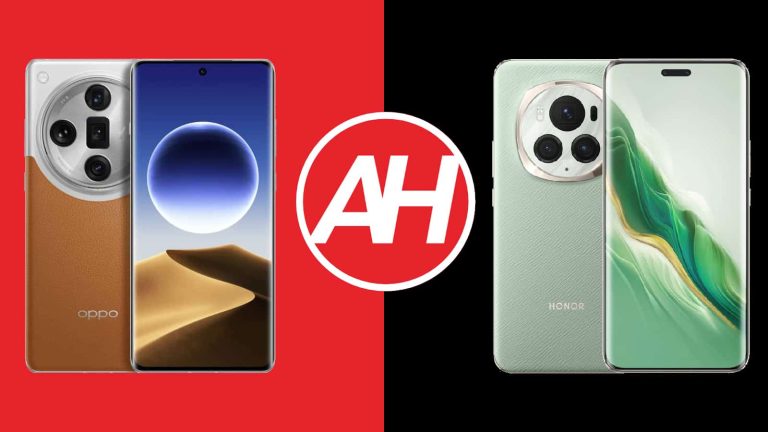
We’re here to compare some of the best camera smartphones in the world. These two phones are the best OPPO and HONOR have to offer at the moment. As you already know, we’re comparing the OPPO Find X7 Ultra vs HONOR Magic6 Pro. Both of these smartphones launched in the first quarter of the year. They’re brand new, basically, and they do have a lot to offer.
Truth be said, they are both camera-focused, but that’s not all they have to offer. Both of them are full-fledged flagship smartphones. We’ll kick things off by listing their specifications. Following that, we’ll compare them across a number of categories, including design, display, performance, battery, cameras, and audio. Having said that, let’s get things started, shall we?
Specs
OPPO Find X7 Ultra vs HONOR Magic6 Pro, respectively
When it comes to their designs, they do look and feel quite different. There are some similarities here, though. They are both large flagships with curved displays and proportionally curved backplates. That’s about it when it comes to similarities. The OPPO Find X7 Ultra has a centered display camera hole on the front, while the HONOR Magic6 Pro includes a pill-shaped cutout. There’s a reason for that, as the phone offers 3D facial scanning.
On the back, both smartphones do have large camera islands, though the one on the OPPO Find X7 Ultra is definitely larger and protrudes more. The OPPO Find X7 Ultra has four cameras in there, while the HONOR Magic6 Pro hides three cameras inside its rear camera setup. The OPPO Find X7 Ultra combines vegan leather and glass on most of its variants, though you can also get a model with a glass back only. That phone is available in China only, though, to emphasize once again. The HONOR Magic6 Pro comes with a glass back or silicone polymer backplate (aka vegan leather).
Both smartphones include their physical buttons on the right-hand side. The OPPO Find X7 Ultra also has an alert slider, which sits on the left side of the phone. The OPPO Find X7 Ultra is slightly taller, wider, and thicker than the HONOR Magic6 Pro. It is slightly lighter than the glass model of the HONOR Magic6 Pro and slightly heavier than the vegan leather variant. Both smartphones feel great to hold and use, though their glass models are quite slippery. They’re both IP68 certified and feel like truly premium devices.
OPPO Find X7 Ultra vs HONOR Magic6 Pro: Display
The OPPO Find X7 Ultra features a 6.82-inch QHD+ (3168 x 1440) LTPO AMOLED display. That panel is curved, and it supports an adaptive refresh rate (1-120Hz). It also supports HDR10+ content and Dolby Vision. This panel can project up to 1 billion colors, and its brightness can theoretically go up to 4,500 nits. The screen-to-body ratio of this smartphone is at around 90%, in case you were wondering. Its display is protected by the Gorilla Glass Victus 2.
HONOR Magic6 Pro
The HONOR Magic6 Pro has a 6.8-inch 2800 x 1280 LTPO OLED display. That panel is curved too, and it can project up to 1 billion colors. It offers an adaptive refresh rate (1-120Hz), and its brightness theoretically goes up to 5,000 nits. HDR content is supported. The display aspect ratio of the display is 19.5:9, while the panel is protected by Jurhino glass. The screen-to-body ratio is around 91% here.
Both of these displays are outstanding, basically. During the review period, I enjoyed using both the same, to be quite honest. They’re both big, bright, and vivid. The blacks are deep, and the viewing angles of both displays are great. The touch response is also good, and both have a high PWM dimming to protect your eyes. The HONOR Magic6 Pro does have an advantage in that regard, but that’s not something you’ll notice, as the OPPO FInd X7 Ultra also offers high PWM dimming. Both displays also get plenty bright in all conditions, so there’s nothing to worry about in that department.
OPPO Find X7 Ultra vs HONOR Magic6 Pro: Performance
The Snapdragon 8 Gen 3 SoC is included inside both of these smartphones. That is Qualcomm’s most powerful processor at the moment. Both devices also offer up to 16GB of LPDDR5X RAM. Well, the global HONOR Magic6 Pro model comes with 12GB of RAM only, and we’re focusing on that model, so… keep that in mind. Both devices also offer UFS 4.0 flash storage, which is not expandable.
The performance of both of these devices is outstanding. There are some quirks with the OPPO Find X7 Ultra’s software, but only because it’s made for China. It does work fine once you install the Google Play Store, though. Both smartphones fly through anything you throw at them. Multitasking is a breeze, as is anything else you can think of, including gaming. They can open apps really fast, they’re great for browsing, multimedia consumption, image editing, video processing, and so on.
We’ve played Genshin Impact on both smartphones, and they both handled it beautifully. There were no performance dips during the 1-hour test, and even though they both got warm, that did not affect the performance, nor did they feel too hot to use. The performance is excellent on both smartphones. Their fingerprint scanners work beautifully, and the same goes for the 3D facial scanning on the HONOR Magic6 Pro. It simply works, in all lighting conditions.
OPPO Find X7 Ultra vs HONOR Magic6 Pro: Battery
There is a 5,000mAh battery included inside the OPPO Find X7 Ultra. The HONOR Magic6 Pro has a 5,600mAh battery on the inside. HONOR used a second-gen silicon carbon battery in the HONOR Magic6 Pro, which allowed the company to squeeze more capacity here. The battery life both of these phones offer is great, by the way. Both of them did great in our battery drain test, and in general performance too.
We were able to squeeze out over 8 hours of screen-on-time on both smartphones. The HONOR Magic6 Pro even reached the 9-hour mark at one point. Do note that we did use both smartphones for various tasks on those days, but without gaming included. Everything else was fair game, emails, messaging, TikTok, YouTube, browsing, image editing, short video processing, and more. When you do throw in gaming in the here, the battery life does change, of course.
Your mileage may vary, though, of course, as you’ll be using your phone with different apps installed, in different ways, and with different signal strengths. Also, we used them while hooked up on WiFi most of the time. We did not notice major drainage when they were hooked up to 5G, however. We did have a good signal, though, so keep that in mind. The point is, both smartphones do offer great battery life.
They also support extremely fast charging. The OPPO Find X7 Ultra supports 100W wired, 50W wireless, and 10W reverse wireless charging. It also has a charger in the box. The HONOR Magic6 Pro supports 80W wired, 66W wired, and 5W reverse wired charging. Do note that it does not come with a charger in the box, though. You’ll have to get one separately.
OPPO Find X7 Ultra vs HONOR Magic6 Pro: Cameras
Both of these are outstanding camera smartphones, to say the least. The OPPO Find X7 Ultra has four cameras on the back. It has a 50-megapixel main camera, a 50-megapixel ultrawide unit (123-degree FoV), a 50-megapixel periscope telephoto camera (2.8x optical zoom), and a 50-megapixel periscope telephoto camera (6x optical zoom). The HONOR Magic6 Pro, on the other hand, has three cameras on the back. It has a 50-megapixel main camera (f/1.4-f2.0 aperture), a 50-megapixel ultrawide unit (122-degree FoV), and a 180-megapixel periscope telephoto camera (2.5x optical zoom).
OPPO Find X7 Ultra
Despite the fact both smartphones do a great job when it comes to photography, the results are considerably different. The HONOR Magic6 Pro simply prefers warmer images, which usually end up looking a bit brighter than the ones from the OPPO Find X7 Ultra. OPPO’s flagship leans more towards a realistic representation, with moodier shots, and emphasized contrast between light and dark areas. Both do a fantastic job, and that goes for main, ultrawide, and zoomed-in shots.
The two phones traded blows from one photo to the next, and it was all a matter of preference. I enjoyed using both camera setups equally, to be quite honest. If you want more realistic low-light shots, the OPPO Find X7 Ultra is the way to go. If you want them to look great, but a bit brighter than you’d see them, the HONOR Magic6 Pro is the phone for you. Both phones do great in the macro department, while both ultrawide cameras follow the color science of the main cameras brilliantly. You really can’t go wrong with either one of these for your photography needs.
Audio
Both of these smartphones come with stereo speakers. The loudness they provide is comparable, and both sets are more than loud enough. Also, they’re well-balanced, with minium distortion at the highest of volumes, which is very difficult to even notice.
You will not find an audio jack on either phone, though. You’ll have to use their Type-C ports for a wired connection for your headphones. If you prefer to go wireless, you’ll be glad to hear that Bluetooth 5.4 is supported on the OPPO Find X7 Ultra, and Bluetooth 5.3 on the HONOR Magic6 Pro.
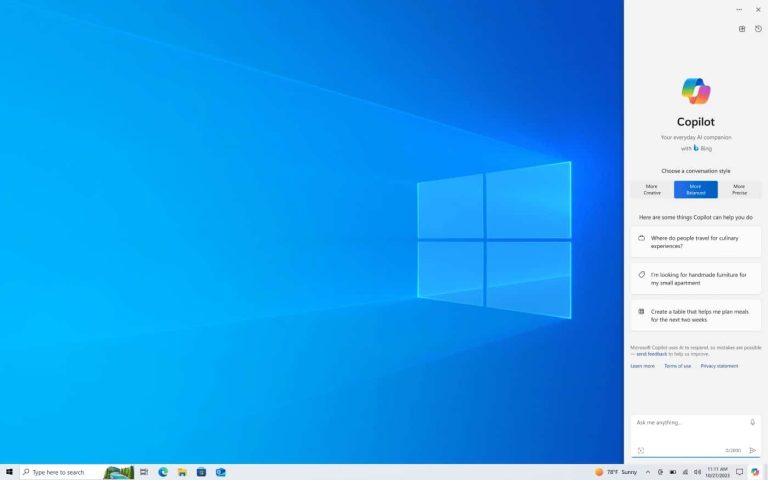
Microsoft Windows 10 will receive Extended Security Updates (ESU) just like Windows 7. However, getting these security updates will be expensive.
Most of the Windows 10 editions will reach the end of support on October 14, 2025. This may seem a little far off, but the date is approaching fast, especially for Windows 10 loyalists. Microsoft has indicated that it will offer paid security updates for Windows 10 after the OS hits its end of life.
Getting Windows 10 Security Updates after the OS hits its end of life will be costly
Microsoft has published a detailed blog post reminding Windows 10 users they have limited time with a fully supported and regularly updated Operating System.
End of life for an OS essentially means it won’t receive new features, updates, or security patches. However, Microsoft has supported Windows 7 with Extended Security Updates for quite a long time after the company replaced it with Windows 10.
Microsoft released Windows 11 in October 2021. The OS is now more than two years old. It succeeds Windows 10. However, millions of PC users refuse to ditch Windows 10 and upgrade to Windows 11 even though the latter is still free for legitimate users.
However, Microsoft will not offer free support for Windows 10 after October 14, 2025. The company will, however, offer paid support. Needless to say, Microsoft will only offer security updates.
Microsoft is reportedly offering three paid options for businesses looking to continue using Windows 10. There’s the traditional 5-by-5 activation key method, a cloud-based activation method, and activation that comes bundled with a Windows 365 subscription.
The 5-by-5 activation key method will need users to purchase and download an activation key. They would have to enter this key into their Windows 10 PC. This key will be valid for a year. The base license package for Windows 10 ESU will cost $61 per device per year.
Businesses that have been using a Microsoft cloud-based update management solution such as Microsoft Intune or Windows Autopatch, can get a hefty discount. A Windows 10 ESU license, activated through Microsoft’s cloud solutions, will cost $45 per user, and it will be valid for up to five devices for one year.
Should businesses opt for a Windows 10 ESU subscription?
There’s no doubt Windows 10 ESU subscriptions are quite expensive, especially for businesses that have hundreds of PCs that will need security updates.
Windows 11 does have a stringent hardware requirement. In other words, businesses will have to upgrade hardware to ensure Windows 11 compatibility or acquire a Windows 10 ESU subscription.
Either way, Windows 10 won’t get any feature updates after October 2025. Moreover, it is not clear how long Microsoft will release security updates for Windows 10. If that’s not scary enough, Microsoft may increase the price of the Windows 10 ESU subscription for each additional year.
As for non-commercial Windows 10 users, upgrading to Windows 11 would essentially be mandatory. Incidentally, Microsoft hasn’t yet offered any ESU subscription for Windows 10 intended for personal or educational use.