It should be common knowledge by now that Microsoft is trying to push Edge onto any human being that has a pulse. If you’re using any other web browser on a Windows system, you’re more than likely to have seen the company pushing you to use Microsoft Edge as the default browser. It appears that the company is not stopping, as Microsoft is, yet again, showing a popup to Chrome users on Windows.
Microsoft has been in the headlines quite a bit recently. On Friday, the company unveiled Copilot Pro. This is the paid subscription service that gives copilot users a bevy of AI tools along with an extremely powerful AI model.
Also, Microsoft pointed fingers at Google’s dominance over the AI market during an EU probe. In a report submitted to EU regulators, Microsoft spoke about how Google’s business structure and voice assistant are a reason why the company has such a strong presence in the AI market.
Microsoft is showing Chrome uses a popup to switch to Edge again
This popup for Chrome users actually has a fair amount of people worried. According to several reports on Reddit, users were actually worried that they had been afflicted with some sort of malware. When a random popup appears pushing a user to a certain service, it’s usually indicative of some unwanted software on a computer. It prompted users to contact Microsoft to see if this was legitimate or if they needed to scan their computers. Microsoft confirmed that this was indeed from the company.
So, users uttered a sigh of relief before facepalming and cursing Microsoft. We all know that Microsoft wants to push people to use Edge, but it’s a little annoying having popups appearing out of nowhere pushing you to adapt to a completely different browser.
The popup will appear on the right side of the screen for users. Obviously, it’s pushing users over to Edge because of the AI features. Users will see the text “Chat with GPT-4 for free on Chrome! Get hundreds of daily chat turns with BingAI.” Under that, the popup lists some bullet-pointed items. The first one is “Try Bing as default search – easy to switch back.” The second says “Install Bing service to improve chat experience.” Under that, you get the option to accept or decline it.
Fortunately, this is only a one-time thing. Microsoft confirms that the popup will only appear once on your computer. So, if you’ve already shooed away the popup, it will be gone until the next time Microsoft decides to push it again.
To beta testers out there, WhatsApp Beta has now been leaked with a new feature that gives Android users more authentication options to work with. This means that the app can unlock in several different ways other than just biometric detection such as fingerprint, face recognition, or using your device code.
WhatsApp planning to add more authentication features to Android devices
WhatsApp previously allowed only for biometric authentication thereby barring users who preferred other methods or had no biometrics capabilities on their devices. The intention of expanding the authentication options is to cater to various types of devices among different users according to WhatsApp.
The addition of extra secure identification systems is an important development in preserving user confidentiality and saving private information. By having numerous authentication alternatives, this not only improved flexibility but also made it harder for unauthorized people to access one’s account thus strengthening the overall security.
Furthermore, the new feature will help people with problems related to damaged or malfunctioning biometric sensors. WhatsApp has taken into consideration alternative ways of authentication like the device passcode so that individuals facing similar difficulties are still able to log into their accounts safely.
However, with the recent version, the updated one can cause app crashes for some users as depicted by WAbetainfo’s post X. Therefore, it is inadvisable to install this version. It may not fully support all kinds of devices just yet. Instead of this, they should just wait for the next mainstream update that might be coming up and will provide a solution to crashes.
Credits: WABetaInfo
Availability details for the new authentication features
WhatsApp recently introduced an improved app lock feature that offers better security and flexibility in application authentication. Currently, beta testers who have installed the latest updates from the Google Play Store can access this feature.
Once enabled, biometric authentication like face ID touch ID, or PIN should be there to get inside the app using the app lock feature. If you are afraid of unauthorized entry into your private posts and details, then this upgrade is a positive thing for you.
The minimum download speed required for internet service to be called “broadband,” by the Federal Communications Commission (FCC), has been quadrupled in a sudden but notable move. This is the first time since 2015 that the FCC’s internet speed regulations have changed. The new standards aim at 100Mbps for downloads and 20Mbps for uploads.
FCC internet speed regulations require the ‘Broadband’ label to be exclusive to 100Mbps Download speeds
This comes after the FCC’s annual evaluation of high-speed internet, which emphasized the need for better national connectivity. The report, however, indicates insufficient broadband deployment, particularly in rural areas and Tribal lands where millions of Americans lack access to quality high-speed internet.
Moreover, about twenty-four million people in America still lack fixed terrestrial broadband services as identified by TheVerge (via the official FCC report) with many rural and tribal populations making up a significant percentage of such numbers. Additionally, around nine percent of all Americans lack adequate 5G cellular speeds including higher percentages in more remote areas without tribal government.
Looking into the future, the Federal Communications Commission has envisaged achieving 1Gbps download speeds and upload speeds of 500Mbps as its long-term aim. This ambitious target provides a common goal for stakeholders suggesting possible amendments to come in the future regarding broadband standards.
FCC aims to improve the quality of internet in the US by dialing up the thresholds
To bring about improvements in services, the decision to increase broadband speed requirements aims at forcing Internet Service Providers (ISPs) to take action. The Federal Communications Commission cannot force speed upgrades but it can bar the ISPs from branding their offerings as “broadband” if they don’t exceed the new thresholds
Also, this act affirms the FCC’s commitment to high-quality internet service for all Americans, following the Biden administration’s attempt. Nevertheless, its effectiveness will depend on whether ISPs find it viable to follow these policies as they push to provide a more dependable and faster connection to their customers. Faster internet doesn’t necessarily mean a reliable connection, and one often comes at the expense of the other.
ASUS announced a new flagship smartphone in March 2024, the ZenFone 11 Ultra. This handset is completely different from its predecessor, at least as far as the design and size are concerned. In this article, we’ll compare those two smartphones, the ASUS ZenFone 10 vs ASUS ZenFone 11 Ultra. It doesn’t seem like ASUS plans to announce a smaller flagship this year, so the ZenFone 11 Ultra will be your alternative to the ZenFone 10 if you’d like to upgrade to the Snapdragon 8 Gen 3.
As per usual, we’ll first take a look at their specifications, and will then move to various other categories. We’ll check out their designs, displays, performance, battery life, cameras, and audio performance. There is plenty to talk about here, considering how different the two phones are, so let’s get to it.
Specs
ASUS ZenFone 10 vs ASUS ZenFone 11 Ultra, respectively
These two smartphones are not only different when it comes to size itself, but design as well. That goes for the overall look, and even the materials used. The ZenFone 10 is made out of metal and soft-touch plastic on the back. The ASUS ZenFone 11 Ultra utilizes a metal and glass build. The ZenFone 10 is a lot grippier than the ZenFone 11 Ultra, in addition to being a lot smaller. When we say a lot, we mean that.
The ZenFone 10 measures 146.5 x 68.1 x 9.4mm compared to 163.8 x 76.8 x 8.9mm of the ZenFone 11 Ultra. It is a bit thicker than its sibling, but it’s a lot shorter and a lot narrower. The ZenFone 11 Ultra is a true behemoth of a phone. It’s also 52 grams heavier than the ZenFone 10. That will be a huge change if you upgrade from the ZenFone 10 to the ZenFone 11 Ultra, that’s for sure.
You will also notice that the ZenFone 10 has thicker bezels than the ZenFone 11 Ultra. Both phones have flat displays, but their display camera holes sit in different places. The ZenFone 10’s display camera hole sits in the top-left corner. The one on the ZenFone 11 Ultra is centered at the top. When we flip the two phones around, you’ll notice even more differences, as they have entirely different camera setups.
The ZenFone 10 has two separate, circular camera islands on the back. They’re vertically-aligned, and placed in the top-left corner. The ZenFone 11 Ultra has a single camera island, and it also sits in the top-left corner. Despite the fact it has one extra camera in there, it takes up less space than the ZenFone 10’s setup. Both smartphones are IP68 certified for water and dust resistance. The in-hand feel could not be more different, though. The ZenFone 11 Ultra is definitely not a phone for one-hand use in any way, shape, or form, unlike the ZenFone 10.
ASUS ZenFone 10 vs ASUS ZenFone 11 Ultra: Display
The ASUS ZenFone 10 features a 5.92-inch fullHD+ (2400 x 1080) Super AMOLED display. That panel is flat, and it has a 144Hz refresh rate at its maximum. Do note that such a refresh rate will be available only in some games, in regular use, you’ll go up to 120Hz. The display does support HDR10+ content and goes up to 1,100 nits of brightness at its peak. The panel is protected by the Gorilla Glass Victus, and it has a 20:9 aspect ratio. The screen-to-body ratio is around 84%.
ASUS ZenFone 10
The ASUS ZenFone 11 Ultra, on the flip side, includes a 6.78-inch fullHD+ (2400 x 1080) LTPO AMOLED display. Its refresh rate also goes up to 120Hz during regular use, and up to 144Hz with some games. HDR10 content is supported, while the maximum brightness here is 2,500 nits. The display is flat, as is the one on the ZenFone 10. The display aspect ratio is 20:9, and the screen-to-body ratio is around 88%. The Gorilla Glass Victus 2 sits on top of the ZenFone 11 Ultra’s panel.
Both of these two panels are great in terms of being vivid, having great viewing angles, and being more than sharp enough. The scrolling is immensely smooth thanks to a high refresh rate, and the touch response is good. Both displays are on par in a number of ways, but the one on the ‘Ultra’ model does have one notable advantage. It comes with a considerably higher brightness, which you will notice when you’re using your phone outdoors especially.
ASUS ZenFone 10 vs ASUS ZenFone 11 Ultra: Performance
Qualcomm’s Snapdragon 8 Gen 2 SoC fuels the ZenFone 10. That is the company’s flagship processor for last year. It is still very powerful, though. The phone comes with up to 16GB of LPDDR5X RAM and UFS 4.0 flash storage. The ASUS ZenFone 11 Ultra is fueled by the Snapdragon 8 Gen 3, the latest and greatest chip from Qualcomm. The device utilizes up to 16GB of LPDDR5X RAM, and it also uses UFS 4.0 flash storage.
Both smartphones performed great during regular use. They were snappy, multitasking was a breeze, and so was everything else you can think of. The ZenFone 11 Ultra didn’t really shine in some performance benchmarks, in terms of stability (3D Mark), but that doesn’t really mean anything. The phone offered outstanding performance, we didn’t really notice any lag or anything of the sort. The fact that it has rather light software (stock Android + useful additions by ASUS), only helps things. The same goes for the ZenFone 10, actually.
In terms of gaming, both phones deliver. Even when you run truly demanding games, such as Genshin Impact, both smartphones do their part really well. They both do get quite warm after a 1-hour gaming session of Genshin Impact, but we did not notice any hit on their performance or anything of the sort.
ASUS ZenFone 10 vs ASUS ZenFone 11 Ultra: Battery
The ASUS ZenFone 10 utilizes a 4,300mAh battery, and it offers outstanding battery life despite being a small phone. The ZenFone 11 Ultra comes with a 5,500mAh battery on the inside. Now, the ZenFone 11 Ultra didn’t really do a great job in our battery rundown test, but it provided really good battery life regardless. We were able to get over a day of use on a single charge with regular use.
The ZenFone 11 Ultra didn’t really match the ZenFone 10 in terms of battery life, though. That may be surprising for some of you, but the ZenFone 10 did offer outstanding battery life for us. Getting over 9 hours of screen-on-time is not that hard to achieve on this phone. We were even able to clock around 10 hours of screen-on-time on a couple of occasions. It’s easily the best battery life smartphone when it comes to more compact devices, that’s for sure. It can even trade blows with the best out there.
What about charging? Well, the ZenFone 10 supports 30W wired, 15W wireless, and 5W reverse wired charging. The ZenFone 11 Ultra supports 65W wired, 15W wireless, and 10W reverse wired charging. Do note that both phones support PD3.0 and PPS charging standards. Quick Charge 4.0 is supported by the ZenFone 10, and Quick Charge 5.0 by the ZenFone 11 Ultra. One thing to note is that the ZenFone 11 Ultra does not ship with a charger, unlike the ZenFone 10.
ASUS ZenFone 10 vs ASUS ZenFone 11 Ultra: Cameras
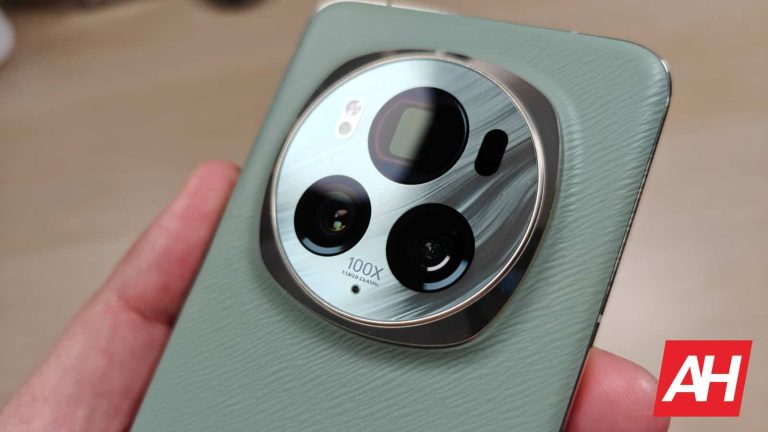
The ZenFone 10 has two cameras on the back. It has a 50-megapixel main camera, and a 13-megapixel ultrawide unit (120-degree FoV). The ZenFone 11 Ultra comes with three cameras on its back. A 50-megapixel main camera is backed by a 13-megapixel ultrawide unit (120-degree FoV), and a 32-megapixel telephoto camera (3x optical zoom). If you’ve been missing the telephoto camera on the ZenFone 10, you’ll be right at home with the ‘Ultra’ model.
ASUS ZenFone 11 Ultra
Both main cameras support gimbal OIS and the stabilization is outstanding. Neither one of these two phones has outstanding camera performance when it comes to photos, though. Don’t get me wrong, they’re good, but they’re not great. When it comes to daylight shots, the detail levels could be slightly better on both phones, while some scenes do look quite processed. We also noticed excess sharpening, which is especially noticeable in some scenes. Both phones do like to tune up the saturation (the ZenFone 10 a bit more, though), so just keep that in mind. The HDR performance is very good, as is the white balance. They’re good overall, but just note that the processing is quite strong.
Images in low light do look good. The noise is kept at a minimum, and both phones tend to brighten up low-light scenes and are able to grab enough details from the shadows. They are both good in such situations, but not great. Their ultrawide cameras do follow the color science of the main cameras really well, but they’re a step below the main shooters. The telephoto camera on the ZenFone 11 Ultra does a good job, but it’s not outstanding by any means.
Audio
You’ll find a set of stereo speakers on both the ZenFone 10 and ZenFone 11 Ultra. The ones on the ZenFone 11 Ultra are slightly louder, but the difference is negligible. Both sets of speakers do a good job, though they’re not among the best around.
What may surprise you is that both smartphones come with an audio jack. If you want to connect your wired headphones, there you go. The ZenFone 10 also includes Bluetooth 5.3, while the ‘Ultra’ model supports Bluetooth 5.4 for wireless connections.
Microsoft is sunsetting Windows Speech Recognition (WSR) and replacing it with Voice Access. The change has been on the cards since last year, but the company has now indicated the timeline. Microsoft has announced that it will transition Windows 11’s speech recognition to the new Voice Access platform later this year. The new system is better than WSR, however, Windows 10 users will have to make some tough choices.
Only Microsoft Windows 11 22H2 and later versions get Voice Access
Microsoft has been steadily scaling back access to Windows Speech Recognition. However, the company’s motives weren’t clear, until this week. Microsoft has confirmed that the new Voice Access app will entirely replace the WSR app. The change will take place in Windows 11 22H2 and newer versions. The WSR app should cease to be available in September 2024, according to a new Support Document:
“Windows 11 22H2 and later, Windows Speech Recognition (WSR) will be replaced by voice access starting in September 2024.” Microsoft has made it clear that it will keep WSR operational on Windows 11 21H2. What this also means is that Windows 10 users will have to continue relying on the deprecated platform.
Incidentally, the Voice Access app is exclusive to Windows 11. Hence, Windows 10 loyalists will have to decide to upgrade to Windows 11 if they wish to use Voice Access. Windows 10 will reach its end of support on October 14, 2025. In other words, Windows 10 users do not have much time to stick to the OS before upgrading to Windows 11.
Why Is Microsoft Retiring WSR?
Microsoft has been prioritizing Voice Access over WSR for quite some time. While Voice Access and WSR appear on the same Accessibility settings page inside the Windows 11 Settings app, the latter appears under the ‘Other voice commands’ section. Microsoft has been warning WSR users that support for the platform is ending. As the company has already confirmed the deprecation of WSR, the platform won’t be getting any new features or updates.
Currently, WSR has an edge over Voice Access because it supports far more languages. However, that’s where its superiority ends. WSR has always had trouble understanding the English language and the simplest of phrases or commands. Several users reported they turned WSR off after unsuccessfully using it to compose emails.
Voice Access, on the other hand, is backed by AI, which is increasingly evolving into Artificial General Intelligence (AGI). AI has a far better understanding of how humans interact and understand each other. Additionally, Microsoft has been actively adding languages to Voice Access. Besides supporting regional dialects of English, Voice Access now supports French German, and Spanish from multiple locales.
While Microsoft will continue improving Voice Access, the company is also integrating Copilot deeper inside Windows 11. When used together, Windows 11 users would gradually be able to control or change OS settings without ever opening the Settings app.
The House of Representatives passed a bill earlier this week that could ban the popular video site TikTok in the U.S. unless its parent company ByteDance divests its stake in TikTok. The problem is that ByteDance is a Chinese company that is considered to be close to the Communist Chinese government. The concern is that ByteDance collects user data when Americans sign up for TikTok and this data ends up on a server sitting on a desk in Beijing.
Per Gizmodo, the bill doesn’t stop with TikTok and could ban other apps that the president deems a “national security threat.” Santa Clara University internet law professor Eric Goldman told Gizmodo, “Nobody actually knows who’s covered by this bill. We focus on the TikTok piece because that’s obviously who would be targeted first. But this law has uncertain effects because we really don’t even know who we’re talking about.”
The bill is designed to get rid of lawmakers’ public enemy number o
ByteDance
The bill heading to the Senate could ban an app that has certain characteristics including a large following, demand that subscribers create an online profile to share content, and be “controlled by a foreign adversary.” This control could simply mean that an app is “subject to the direction or control” of someone in Russia, China, North Korea, or Iran. A broad reading of the bill could mean that “X” might be banned since it accepted money from the terrorist group Hamas for blue verification checkmarks while posting misinformation.
Facebook could also be considered under the control of a foreign adversary such as Russia, as it used surveys on Facebook groups put up by Russians to help persuade American voters to vote a certain way in 2016. Again, that would require an extremely broad understanding of the bill.
Evan Brown, a Chicago-based tech lawyer says, “There’s plenty of room here for creative interpretation for how someone could be in a foreign country calling the shots without being an owner. The President really has the unchecked power to put another app on this list.” The bill can ban apps with as few as one million monthly users.
Make no mistake about it, ByteDance/TikTok is public enemy number one and is the main target of the bill. But most lawmakers have no love for social media apps like Facebook and “X.” So if other platforms get killed off, well, it is just collateral damage and nothing that those on Capitol Hill will lose sleep over.
Best Buy has kicked off a new 3-day sale, which starts on Friday (March 15) and ends on Sunday (March 17). This sale includes a really impressive discount on the Apple MacBook Air M2. It’s now on sale for $899. That’s $100 off of its new regular price but $300 off of its original price.
With the MacBook Air M3 being announced last week, the M2 model was discounted to $999 but staying in Apple’s lineup. Now at $899, this is an absolute steal of a laptop, especially with its battery life.
The MacBook Air M2 has been my favorite laptop, and it has also been Apple’s most popular laptop ever. It’s not hard to see why. The MacBook Air M2 is super thin and light while offering incredible battery life and performance. Talking about battery life, I’ve used this for an entire workday, using Chrome, Google Meet, Zoom, and a few other apps, and I still had about 60% left after an eight-hour workday. Now, that is impressive, and it did not miss a beat.
One of the great features that Apple Silicon brings is performance. And that’s on battery and on power. So whether your MacBook Air is plugged in or not, you’re going to get the same performance, unlike some PCs, where power is limited when it is not plugged in, to try to conserve battery life. Since the MacBook Air is already so good on battery life, that’s not needed here.
With the MacBook Air M2, you’re getting the new redesign, which looks incredible and does bring back MagSafe to the Mac. This is a really great feature to have, because if someone or something gets caught on your charging cable, it won’t pull your MacBook Air off of the table, it’ll simply unplug. You’ll also get two USB-C/Thunderbolt ports and a headphone jack. Surprisingly, Apple has left the headphone jack intact here, unlike with their iPhones.
The only people I would not recommend the MacBook Air to are those that need more RAM. Or those who want a much better display like the Mini LED display on the MacBook Pro. But for most people, the MacBook Air is perfect.
According to Tech Crunch, Instagram is reportedly working on a new Reels feature that’ll set it apart from TikTok. The new feature dubbed Spins will let you copy other user’s Reels and swap out their text and audio with your own. Spins is in the prototype phase but leaker Alessandro Paluzzi shared a few screenshots of the feature on X.
How the Spins feature will work on Instagram Reels
The apparent aim of this feature is to make it easier for Instagram users to jump onto trends using existing content. For example, if you come across a trending template and you like it, simply change up the audio and text to convey your message based on the viral video.
Instagram Spins may sound similar to the existing Instagram Remix feature or TikTok Duet but it’s a bit different. It lets you add audio and text commentary whereas Remix and Duet work by splitting your screen and allowing you to add video commentary on an existing post.
This new feature will be the telltale differentiator between TikTok and Instagram given that Duet and Remix are identical. Considering the recent passing of TikTok’s ban by the US House, the Spins feature may just give Instagram an edge over the former.
Will original content owners get credit?
According to Paluzzi’s leaked screenshot of the Spins feature, every spin on your Reel means more eyes on your account. Once someone spins your content, you’ll also reach their audience—so you’ll get credit for being the original creator. The screenshot also shows that there’s a dedicated toggle button to permit other Instagram users to spin your Reel. You’ll have this option just before you publish your post.
It’s worth noting that this feature is just an internal prototype at the moment. Meta is yet to confirm whether or not Spins will be available on the stable Instagram version anytime soon. However, given that TikTok doesn’t offer anything similar to Spins, Instagram is likely to go ahead and at least test out this feature on Reels.
If you’ve been around the Android scene long enough, you’ll remember a time when Dead Zebra’s Android Minis (some of them rare) that would go on sale was a big deal within the enthusiast community. These little figurines depict the Android robot and generally come in all kinds of fun and unique designs. Some of these would gain immense amounts of popularity among collectors either due to their rarity or just because they were a cool design. Sometimes both.
If you happen to be all about these little figures then you’ll want to take note of Dead Zebra’s next major sale. The company is “moving the warehouse” and it needs to get rid of stock to help fundraise the transition it says. To that end, it’s planning to put up for sale loads of rare and previously unreleased Android Minis. All of this will take place on March 20 but you’ll be able to take a headcount of what’s going to be put up for sale prior to the release date. “A preview of the items will go up prior to the sale start” Dead Zebra says.
Some of the Android Minis going up for sale were previously unavailable to the public
Some of the little figures will be of stock that was never made available to the public before. That should tickle your fancy if you like seeking out these kinds of super rare collectibles. As mentioned above, Dead Zebra plans to show a preview of what items will be available. As of right now though the previews aren’t live.
In addition to previously unavailable items, some of the figures will simply be archived stock of extremely rare figures. Basically, ones that had been sold before but there weren’t that many in circulation. Dead Zebra says these are all going to be production samples. Production samples are small batches of figures that were set aside during a new run for quality control purposes. But now Dead Zebra is looking to unload them so it can put those funds toward the move and “further projects.”
The figures will be sold on a daily sliding scale
Keep in mind this is geared towards collectors. So if the prices seem like they start high, it’s intentional. Dead Zebra will begin by selling everything on the first and second days for $100 each. But as each pair of days goes by, the sliding scale will shift those prices downwards. Days three and four will see everything drop to $75 each. Then to $50 each on days five and six, and all the way down to $12 each. There are some things to keep in mind here, though.
Things won’t be $12 each until days nine and ten. The more important detail is that many of these figures will have very low stock. And they’re likely to run out incredibly fast. Dead Zebra says that most of the samples listed will have an average of about 20 in stock. That already isn’t a ton. Some, however, will only have a stock of 2 or 3. And those will most assuredly be gone immediately. The point is, if you fancy yourself some new rare Android Minis, don’t wait till the prices are lower. Because you’ll likely miss out.
Just recently, we reported about a new bill passed in the US House of Representatives that might end the game for TikTok. It passed with bipartisan support i.e., both the government and opposition co-operated on this decision which isn’t a usual thing. The representatives recommended TikTok parent Bytedance to either sell the company or face a complete ban. But, there’s more to the story before a full ban, it’s about the decision from the US Senate.
TikTok advertisers might go ahead with Reels and Shorts if TikTok becomes a thing of the past in the US
Advertisers who have long relied on TikTok to target the young audience might want to explore other platforms. Per Reuters, advertisers might move ahead with TikTok rivals which, are mainly YouTube Shorts or Meta’s Reels. However, the final decision remains in the hands of the Senate so the shift isn’t happening before that comes into action.
Reuters report cited ad experts who acknowledge Reels and Shorts as “TikTok’s biggest competitors.” More importantly, TikTok doesn’t have a very good history with these suits, and it has faced a ban in India, as well, which is one of the biggest market shares of Meta and even Google.
No doubt, Meta’s Reels and YouTube Shorts are worthy contenders
Meta’s Reels on Instagram and YouTube Shorts give TikTok tough competition as they gain popularity. Let’s not delve into the business prospect for now, but advertisers could benefit from these platforms.
TikTok is the most popular in this arena, especially among young users. But if it gets banned, people might take no chance than switching to other apps. This could first come from the content creators who have a massive following, and one content creator could also take along their audience which would pave the way for advertisers’ entry. A report from last year compared engagement rates: YouTube Shorts averages 3.80%, Reels hits 4.36%, and TikTok leads with 5.53%.