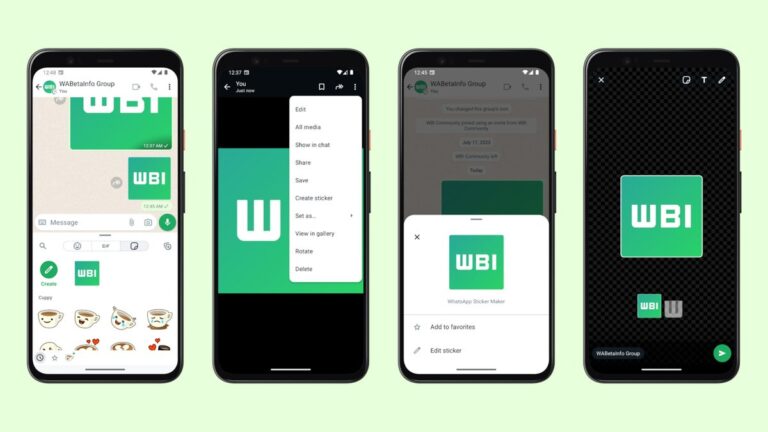
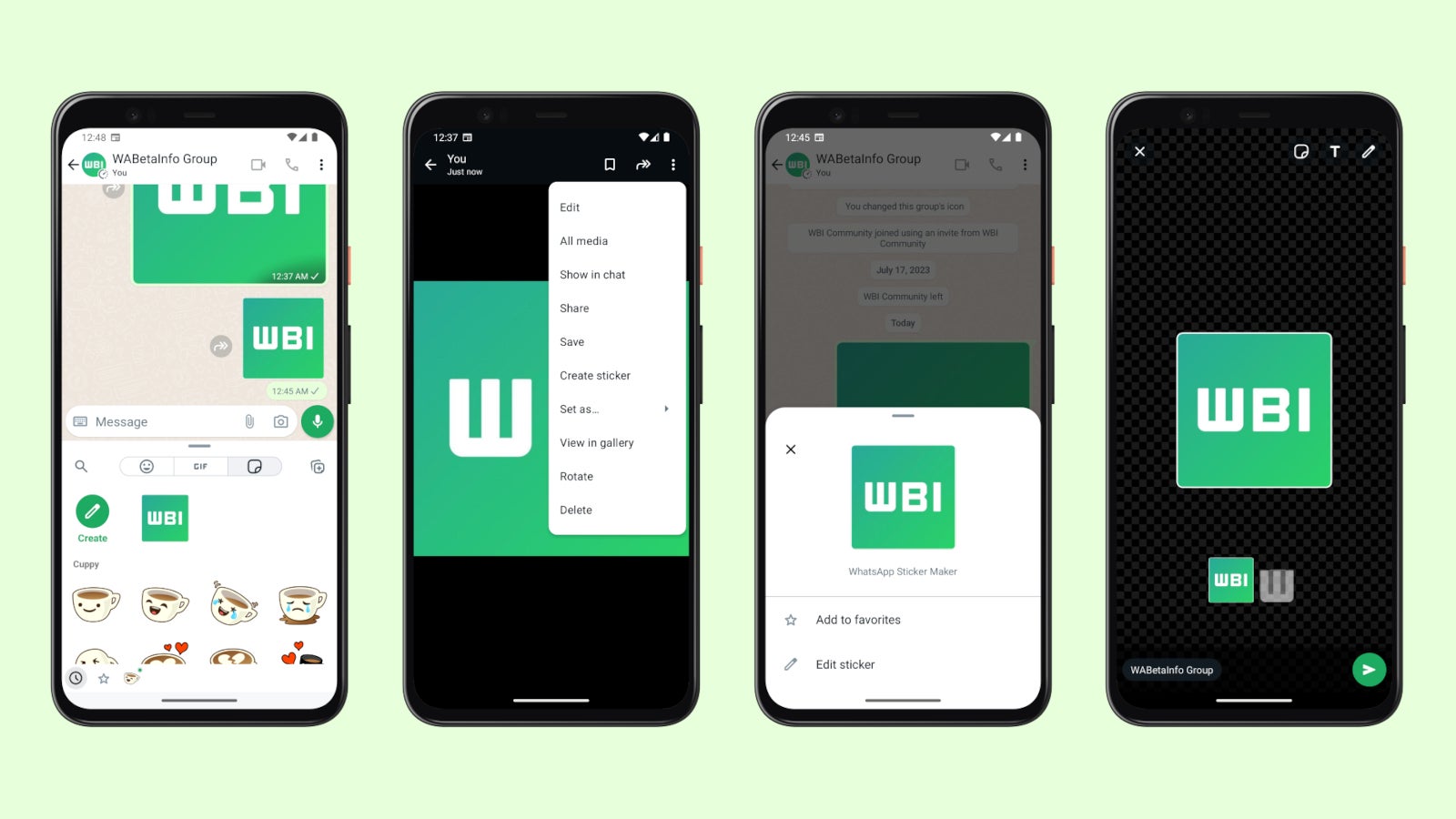
WhatsApp is testing new features all the time, even before they are spotted in the beta version of the app. This time around the chat app is preparing to launch a new feature that will allow users to create their own stickers.
Spotted by the fine folks at WaBetaInfo, the new sticker editor feature is now available in the WhatsApp beta version of the app on Android. If you’re an iPhone user, then this isn’t really news for you since the sticker editor has been available on iOS for quite some time.
The customization options that come with the new sticker editor make it possible to convert a sticker from an image, as well as the ability to edit an existing sticker via the “Edit sticker” option.
When an image is selected to be converted into a sticker, the app will open the drawing editor and highlight the subject. Additional stickers are available at the bottom of the screen if you’re not content with what WhatsApp automatically chose the first time you selected the image.
Currently, the sticker editor is only available to a limited number of users on Android, but it’s safe to assume that a wider roll-out will happen in the coming weeks. It’s hard to tell when it will make it to the stable version of WhatsApp, but we’re probably talking about a few months.
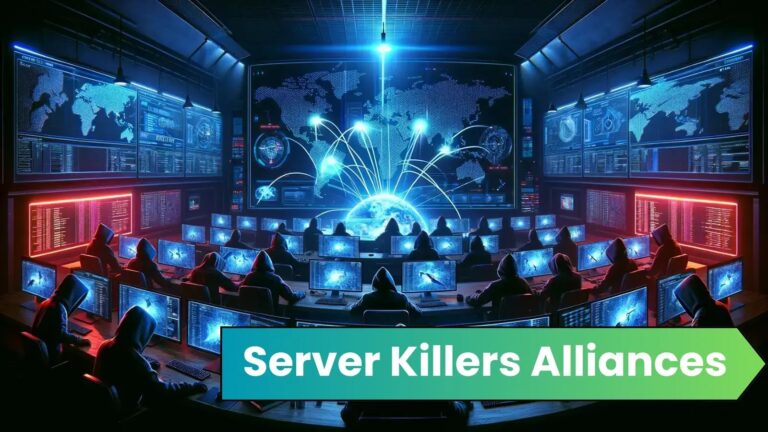
The hacker group known as Server Killers has announced their participation in a coordinated cyber attack on Moldova.
This group has joined forces with several other notorious hacker collectives, signaling a worrying escalation in cyber threats against the Eastern European nation.
The Coalition of Cyber Threats
The Server Killers team has publicly declared its alliance with several hacker groups, each with a history of cyber disruptions and attacks.
DocumentIntegrate ANY.RUN in your company for Effective Malware Analysis
Malware analysis can be fast and simple. Just let us show you the way to:
Interact with malware safely
Set up virtual machine in Linux and all Windows OS versions
Work in a team
Get detailed reports with maximum data
If you want to test all these features now with completely free access to the sandbox: ..
The list of these groups includes:
NoName057(16)
Digital Revolt
2CC
Russian CyberArmy
Phoenix
Coup Team
Lulzsec Muslims
Cyber Dragon
This coalition brings together a diverse array of cyber capabilities and suggests a high level of coordination among groups typically known to operate independently.
A new tweet from Daily Dark Web reports that a group called The Server Killers has formed an alliance and is planning to launch cyber attacks on Moldova.
#Moldova 🇲🇩 – The Server Killers alliance has been announced, consisting of the groups NoName057(16), Digital Revolt, 22C, Russian CyberArmy, Phoenix, Coup Team, Lulzsec Muslims, and Cyber Dragon.
The image released by the Server Killers features a central figure cloaked and masked, symbolizing these groups’ anonymity and secretive nature.
The figure is tearing apart a coat of arms, which appears to represent Moldova, indicating the target of their joint operation.
Below the image, a message confirms the alliance and expresses confidence in their success, stating, “We believe in our victory!!!” This bold declaration is accompanied by a series of logos representing each allied hacker group, further emphasizing the united front presented by these cyber adversaries.
Implications for Cybersecurity
The formation of this alliance poses a significant threat to Moldova and the international community, as it demonstrates the potential for collaboration among groups that can amplify the scale and impact of cyber attacks.
These groups’ collective expertise and resources could lead to sophisticated and potentially devastating cyber operations.
The announcement is a stark reminder of the evolving landscape of cyber warfare, in which national boundaries are blurred, and the battleground is the global network infrastructure.
Governments, corporations, and individuals must remain vigilant and invest in robust cybersecurity measures to protect against such coordinated threats.
As the situation develops, cybersecurity experts and law enforcement agencies must closely monitor these groups’ activities.
Sharing information and strengthening international cooperation will be vital to mitigating the risks posed by this and similar alliances.
The alliance of these hacker groups under the Server Killers banner is a testament to the evolving challenges that nations and organizations face in protecting their digital infrastructures.
You can block malware, including Trojans, ransomware, spyware, rootkits, worms, and zero-day exploits, with Perimeter81 malware protection. All are incredibly harmful, can wreak havoc, and damage your network.
Stay updated on Cybersecurity news, Whitepapers, and Infographics. Follow us on LinkedIn & Twitter.
The US Treasury Department has sanctioned Predator spyware vendor Intellexa Consortium, and banned the company from doing business in the US.
Predator can turn infected smartphones into surveillance devices. Intellexa is based in Greece but the Treasury Department imposed the sanctions because of the use of the spyware against Americans, including US government officials, journalists, and policy experts.
Under Secretary of the Treasury for Terrorism and Financial Intelligence Brian E. Nelson said:
“Today’s actions represent a tangible step forward in discouraging the misuse of commercial surveillance tools, which increasingly present a security risk to the United States and our citizens.”
Since its founding in 2019, the Intellexa Consortium has marketed the Predator label as a suite of tools created by a variety of offensive cybercompanies that enable targeted and mass surveillance campaigns.
Predator is capable of infiltrating a range of electronic devices without any user interaction (known as ‘zero-click’). Once installed, Predator deploys its extensive data-stealing and surveillance capabilities, giving the attacker access to a variety of applications and personal information on the compromised device. The spyware is capable of turning on the user’s microphone and camera, downloading their files without their knowledge, tracking their location, and more.
Under the sanctions, Americans and people who do business with the US are forbidden from transacting with Intellexa, its founder and architect Tal Dilian, employee Sara Hamou and four of the companies affiliated with Intellexa.
Sanctions of this magnitude leveraged against commercial spyware vendors for enabling misuse of their tools are unprecedented, but the US has expressed concerns about commercial spyware vendors before.
“A growing number of foreign governments around the world, moreover, have deployed this technology to facilitate repression and enable human rights abuses, including to intimidate political opponents and curb dissent, limit freedom of expression, and monitor and target activists and journalists.”
In July 2023, the US Commerce Department’s Bureau of Industry and Security (BIS) added Intellexa and Cytrox AD to the Entity List for trafficking in cyber exploits used to gain access to information systems. Cytrox AD is a North Macedonia-based company within the Intellexa Consortium and acts as a developer of the consortium’s Predator spyware.
The Entity List is a trade control list created and maintained by the US government. It identifies foreign individuals, organizations, companies, and government entities that are subject to specific export controls and restrictions due to their involvement in activities that threaten US national security or foreign policy interests.
While you’ll see Predator and Pegasus usually deployed in small-scale and targeted attacks, putting a stop to the development and deployment of spyware by these commercial entities is good news for everyone.
How to remove spyware
Because spyware apps install under a different name and hide themselves from the user, it can be hard to find and remove them. That is where Malwarebytes for Android can help you.
Open Malwarebytes for Android and navigate to the dashboard
Tap Scannow
It may take a few minutes to scan your device, but it will tell you if it finds spyware or any other nasties.
You can then uninstall the app.
We don’t just report on phone security—we provide it
If you’re in the market for a new USB-C wall charger, then you’ll want to look no further than the Anker 735. This is a three-port USB-C charger with two USB-C ports and a USB-A port for only $39.99 (regularly $55.99). With many smartphones coming without a wall charger these days, this is a great purchase.
Anker is well-known for its chargers, and this is another great one. I actually have one myself and use it when I travel. Mostly because it is pretty tiny, it has a foldable plug and can charge multiple phones at the same time, which is super useful when traveling.
As if that wasn’t a big enough reason to buy this charger, it is also a GaN charger – or Gallium Nitride. What this means is that you’re going to get a much smaller charger that can charge faster. Anker claims that this is about 53% smaller than most other 65W chargers. This means that when you plug it into a surge protector, it won’t cover other outlets.
It’s a 65W charger, but it can actually push out 65W from a single outlet. However, the more you plug in, the slower it’ll get. If you use all three outlets, the USB-C1 will charge at 40W max, USB-C2 will charge at 12W max, and the USB-A will charge at 12W max – that does only equal 64W, however, as there are some losses expected.
If you do a lot of traveling or need a new charger for your office, bedroom, or anywhere else, this is a great pickup.
Businesses in the rapidly evolving technology sector are always coming up with new ideas. Whether if it is pushing the envelope of what’s feasible. Apple has long been regarded as the “World’s Most Valuable Company,” thanks to its inventive goods and devoted clientele. But with generative AI becoming more and more popular, there are rumors that Apple’s supremacy may be in danger. Meanwhile, Analysts have expressed worries about how well Apple’s generative AI services are doing. In addition, how this would affect the company’s status in the market.
The rise of generative AI
Artificial intelligence’s generative branch, which emphasizes invention and creativity, is gaining traction across a number of sectors. The generative AI has demonstrated enormous promise, capable of producing lifelike pictures and even music. Businesses leading the way in the development of this technology include OpenAI and Google. Both the tech giants have demonstrated its potential via a range of projects and activities.
How generative AI could impact Apple
There are worries that Apple’s stranglehold in the market may be threatened by the growing powers of generative artificial intelligence. Innovation and design have always been priorities for the computer behemoth, since they have helped it climb the corporate ladder. Still, Apple could struggle to hold onto its competitive advantage if generative AI keeps developing at its present rate.
Concerns over Apple’s generative AI services have lately been expressed by analysts, who have noted a drop in accuracy and performance. There can be serious repercussions for the business if these services don’t live up to expectations. It may damage Apple’s financial results and, eventually, its standing as the “World’s Most Valuable Company,” in addition to eroding consumer confidence and loyalty.
Will Apple’s position as the ‘World’s Most Valuable Company’ be threatened?
Everyone is wondering if Apple would ever regain its esteemed reputation in the event that Generative AI fails. Even while it is challenging to make certain predictions about the future, one thing is certain: the state of technology is always changing. Apple may lose its number one position to rivals that swiftly implement this cutting-edge technology if it is unable to take use of generative AI or if it lags behind in terms of innovation.
Now, the key question is whether Apple can turn things around and address the problems with its generative AI services. Apple cannot afford to lag behind its rivals who are always pushing the limits of innovation and technology. To guarantee that its generative AI services meet and beyond client expectations, the business will need to make investments in R&D as well as talent acquisition.
The risks are bigger than ever for businesses like Apple as customers grow increasingly dependent on AI-driven products. The company’s future success will depend on how well it can innovate and adapt to this quickly changing environment. Apple may be able to hang on to its title of “World’s Most Valuable Company” if it can step up to the plate and provide generative AI capabilities that genuinely wow clients.
According to Engadget, Meta is shaking things up by infusing AI into Facebook’s video recommendations. Tom Alison, Head of Facebook, spilled the beans that the new video recommendation algorithm, powered by AI, is already in action on Reels – Meta’s answer to TikTok.
The plan is to roll this new AI-powered recommendation engine out across all sections of Facebook featuring videos — from the main Facebook feed to Groups. This is part of a broader “technology roadmap” set to unfold through 2026, revealed Alison during a tech conference at Morgan Stanley in San Francisco.
Making a splash in the TikTok arena has been a key focus for Meta, especially since the Chinese app, famed for its vertical video clips and a robust recommendation engine that seemingly knows what hooks users, skyrocketed in popularity in the US over the past few years. When Meta put the new AI-powered recommendation engine to the test with Reels, watch time shot up by approximately 8 to 10 percent, as shared by Alison.
Alison highlighted that the results showed them that this new model architecture is learning from the data much more efficiently than the previous generation and the company is on the “right track.”
Until now, Facebook had separate video recommendation engines for Reels, Groups, and the main Facebook feed. However, with the positive results observed in Reels, the company is now looking to apply the same AI-powered engine across all these products. Alison stated:
Instead of just powering Reels, we’re working on a project to power our entire video ecosystem with this single model, and then can we add our Feed recommendation product to also be served by this model. If we get this right, not only will the recommendations be kind of more engaging and more relevant, but we think the responsiveness of them can improve as well.
Meta’s push to incorporate AI into all its products gained momentum with the explosion of AI technology following the launch of OpenAI’s ChatGPT at the end of 2022. In a video earlier this year, Mark Zuckerberg disclosed that the company is shelling out billions to snatch up hundreds of thousands of high-priced NVIDIA GPUs, crucial for training and powering AI models.
Tycoon and Storm-1575 groups are identified as key players, with Tycoon offering MFA bypass as a service and Storm-1575 targeting Microsoft 365 credentials.
Public schools across the United States are facing a surge in sophisticated phishing campaigns, according to a new report by PIXM, a cybersecurity firm specializing in artificial intelligence solutions.
Threat actors launch targeted spear phishing attacks using stealthy attack patterns to target officials at large US school districts, bypassing MFA protections.
The report highlights a worrying trend: attackers are increasingly employing tactics to bypass Multi-Factor Authentication (MFA), a security measure previously thought to offer robust protection.
Since December 2023, a surge in MFA-based phishing campaigns targeting US teachers, staff, and administrators has been observed, using dadsec and Phishing-as-a-Service (PhaaS) platforms to compromise administrator email accounts and deliver ransomware, researchers noted.
Tycoon and Storm-1575
PIXM discovered phishing activity in November 2023 and linked it to Tycoon and Storm-1575 threat groups. These groups were singled out because of their common attack pattern. Both actors use social engineering techniques, spoofing emails to appear legitimate and using AiTM (Adversary-in-the-Middle) phishing to bypass MFA tokens and session cookies.
They also create customized login experiences and use dadsec and phisingkit PhaaS services to point at legitimate sites. Their infrastructure, including C2 servers, domain generation algorithms, legitimate hosting services, and SSL certificates, allows them to control large numbers of phishing websites and avoid detection.
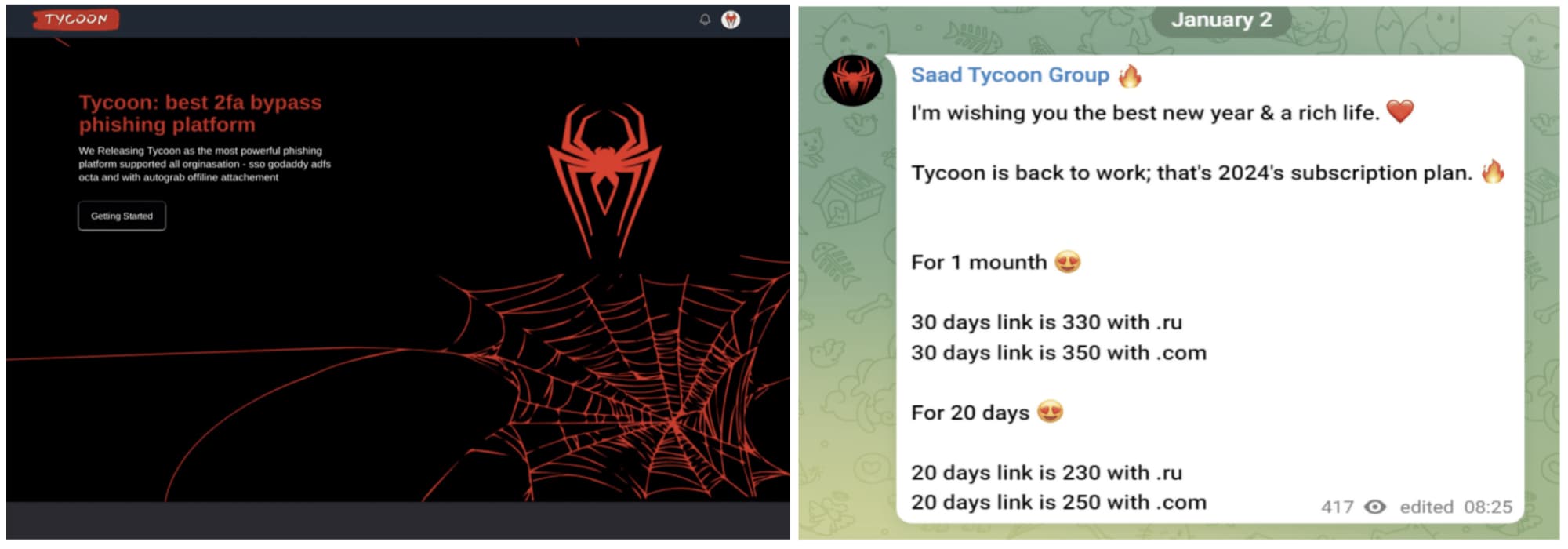
For your information, The Tycoon Group’s PaaS, available on Telegram for just $120, boasts key features like bypassing Microsoft’s two-factor authentication. On the other hand, Microsoft identifies Storm-1575 as a threat actor engaging in phishing campaigns through the Dadsec platform. They employ numerous Domain Generated Algorithm domains to host credential harvesting pages, targeting global organizations to extract Microsoft 365 credentials.
Tycoon group on Telegram (Screenshot: PIXM)
In the attacks, as detailed by PIXM in a blog post, targeted officials received phishing emails prompting them to update passwords. This led to encountering a Cloudflare Captcha and a spoofed Microsoft password page. If unthwarted, attackers would forward passwords to legitimate login pages, requesting two-factor authentication codes, and bypassing MFA protections.
Common targets include the Chief of Human Capital and multiple finance and payroll administrator accounts. Some attacks attempted to alter Windows registry keys, potentially infecting machines with malicious scripts. The attacks concealed their tracks using stealth tactics like hiding behind Cloudflare infrastructure and spinning up new domains.
The use of CAPTCHAs in phishing attacks can delay the delivery of the payload and provide a sense of legitimacy to end users. However, there is also a potential for malicious trojan activity, such as modifying Windows registry keys for the VBS file format and injecting a malicious file’script.vbs’. These attacks can be used for malware installation, ransomware, and data exfiltration.
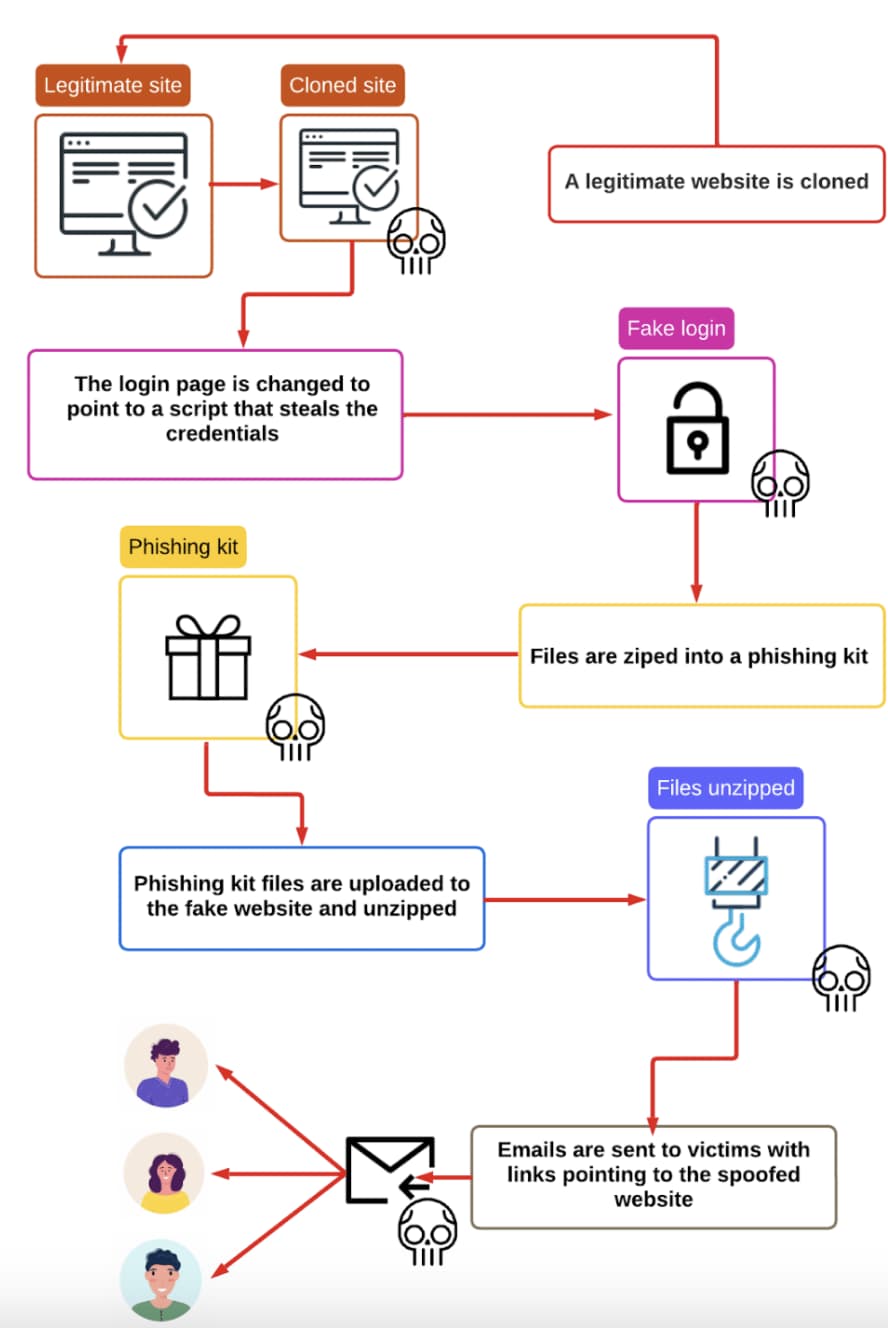
Attack flow – (Screenshot: PIXM)
Schools, Most Targeted Industry
While schools are the most targeted industry by ransomware gangs, student data has also been a prominent prey of cybercrime, but the extensiveness of data loss noticed recently is unprecedented. It is estimated that over 900 schools were targeted in MOVEit-linked cyber attacks.
A data leak involving Raptor Technologies in January 202, reported by cybersecurity researcher Jeremiah Fowler, exposed around 4,024,001 sensitive records belonging to students, parents, and staff, raising concerns about student privacy and school safety.
Just one month later, in February 2024, Fowler discovered a non-password-protected database storing 210,020 records or 153.76 GB of data, containing sensitive information like full names, addresses, phone numbers, and tax records of students and parents, associated with the Online Voucher Application.
To protect against such phishing attacks, organizations should identify high-priority staff with sensitive access or regular communication patterns, invest in tailored awareness efforts, arm users with caution against links and websites prompting MFA tokens and CAPTCHAs, and implement proactive AI-driven protections at the browser and email layers.
The privacy-focused browser Brave has now developed an exciting AI experience for Android users. As announced, Brave has launched ‘Leo’ as its very own AI assistant for Android browsers, hoping to enhance users’ experience.
Brave AI Assistant For Android Publicly Released
According to a recent post from Brave, its Android users can now experience improved browsing via the AI assistant ‘Leo’. As evident from the name, Leo will be the face of Brave’s artificial intelligence for Android users, facilitating them with their searches and browsing experience.
Explaining Leo’s functionalities, Brave provided a brief overview of how the new feature can assist users in various ways. As expected, Brave’s Leo not only simplifies searches by answering users’ queries but also exhibits content generation functionalities. This includes content translation, generating long-form content, creating audio/video transcripts and writing codes.
By launching this feature on Android, Brave aims at helping users perform their routine browser-related activities on the go. In addition, Brave ensures protecting Android users’ online privacy even when using Leo, hence providing them with a safer browsing experience on their phones. Besides, using Leo requires no registration or sign-ins. So, using this tool gets really convenient when users can start interacting with Leo right after opening their browsers.
Regarding the technical aspects, Brave explained that Leo is powered by several LLMs, including Mixtral 8x7B, Claude Instant, and Llama 2 13B. One of these LLMs – Mixtral 8x7B – is also the one that powers Leo on Brave browser for desktop, which the firm rolled out earlier this year.
While Leo on Brave for Android is available as a free-to-use feature, it also comes with a Premium subscription plan, offering better functionalities.
Before Brave, Microsoft Edge remained in the limelight for its Bing Chat AI assistant. Nonetheless, this isn’t the very first initiative from Brave regarding AI releases as, in 2023, the service also integrated AI to its search function, amidst similar moves from Microsoft and DuckDuckGo, followed by a desktop browser release of its Leo AI.
OnePlus is rolling out a new update to the OnePlus 12. It brings the February 2024 Android security patch, camera improvements, and a handful of other changes. The update is currently available in India. A global rollout may follow soon.
A new update brings camera improvements to the OnePlus 12
This is the second feature update for the OnePlus 12 since its global launch in late January. The first update came in early February and brought Hasselblad Master Mode for enhanced colors in photos, fingerprint improvements, connectivity improvements, and more. The Chinese version of the phone, which runs HydrogeOS instead of OxygenOS, also picked up a host of AI features last month.
While those AI features are yet to make it into the global version of the OnePlus 12, the company is now pushing another update with more camera improvements. According to the official release notes, the zoom buttons in the camera app now let you switch between more focal lengths. OnePlus has also enhanced the clarity of photos captured with 2x zoom in Portrait mode.
Additionally, the company has improved the color accuracy of selfies captured in warm-light environments. This update also improves the stability of NFC and network connections. OnePlus mentions system stability improvements as well. While not included in the release notes, Android Authority confirms that the update adds the ability to unlock the device without turning the display on.
According to the publication, the OnePlus 12’s under-display fingerprint now works even if you have disabled AOD (Always-On Display). The fingerprint icon briefly appears on the screen when you move the device without turning the screen on. There may be more hidden changes that OnePlus didn’t list in the changelog. Don’t expect the latest security patch, though. You are only getting the February release.
OnePlus says this update is India-only
The latest update for the OnePlus 12 is currently rolling out in India with firmware version CPH2573_14.0.0.602(EX01). Interestingly, the company says the update is India-only. In Europe and North America, the phone is getting a different update with build numbers CPH2581_14.0.0.502(EX01) and CPH2583_14.0.0.502(EX01), respectively. More importantly, the latter markets aren’t getting the camera improvements and other changes.
The official changelog for these regions only mentions system stability improvements. It is unclear whether OnePlus will roll out another update later with the additional changes. Hopefully, it does sooner rather than later. Perhaps a bigger update may be on the cards with the aforementioned AI features that are available to OnePlus 12 users in China. We will let you know when we have more information.
Any improvement geared towards enhancing the user experience is always a welcomed change, and it seems Pixel phone owners are in for a treat.
As per the intel from serial leaker Mishaal Rahman (via Android Authority), Google is introducing a document scanner to the Files by Google app. Notably, this feature appears to be part of a server-side update, eliminating the need for users to install a new version of the app to access it.
The Files by Google app is getting a new “scan” button that lets you digitize documents.
Scanned documents are saved as PDF files under a new “Scanned” collection under “Documents” (the actual location is /Files by Google/Scanned).
Upon launching the app, a fresh addition awaits – a “Scan” button at the bottom right corner. A simple tap on this button kickstarts the document-scanning process using the rear camera of your Pixel. Whether you prefer auto-capturing or manually defining the scan area, the choice is yours. Additionally, you can fine-tune your scans by cropping, rotating, cleaning, and even adding filters for that extra touch.Once the scanning process wraps up, your transformed documents will find a home as PDFs in the app’s new “Scanned” folder. It’s worth noting that a document scanner is also present in the Google Drive app, and the one integrated into Files By Google operates similarly by identifying and processing documents directly on the device.
It seems this feature is currently making its way to numerous Pixel device users. If you happen to own one, it’s worth checking to see if this handy addition has already landed on your device.