Game studios and the companies that make stuff for games have come up with all sorts of ways to enhance the experience and make the games more immersive, but this new scent release device from GameScent AI is perhaps the strangest one to ever hit the market. Have you ever wanted to smell your games? Well, if you answered yes to that question, then now you can! GameScent AI has announced a product of the same name (called GameScent), a scent release device that uses AI to disperse the smells of your in-game content in real time. It’s essentially an atomizer that poofs out smells as you play.
As funny as this product sounds, it also seems like it could have the potential to enhance gameplay. That is if you desire your games to have a more vivid feel based on smell. If you think about it, this could be the type of device to really put immersion in games over the edge if you have other equipment to pair with it. Something like the Nanoleaf 4D kit to mirror the colors on-screen while you play, and a haptic vest or suit that reacts to in-game moments as the GameScent disperses smells like fresh rain after a storm or gunfire if you’re playing a shooter.
Breathe deep the smell of a blazing hail of bullets in the latest Call of Duty, because why settle for boring old candles or regular scent throws? Fancy the smell of the forest as you travel the lands between with the upcoming Elden Ring DLC? Well, get ready, because GameScent will make it happen.
The GameScent scent release device will have 6 different scents at launch
Before you scoff at this device, imagine the real possibilities for this to add some immersion to the games you play. Sure, it seems a little goofy. It’s extremely niche and we can’t imagine the GameScent will be sweeping the nation and filling game rooms across the globe. But that doesn’t mean it isn’t a cool experience that adds to your games in some way.
There will be six different scents that come with it in the box at launch. But GameScent AI also says there will be DLC scents available in the store that you can purchase. The scents that come with the device include Gunfire, Forest, Storm, Racing Cars, Explosion, and Clean Air. As for DLC scents, there’s Blood, Ocean, Sports Arena, and Fresh Cut Grass “coming soon” according to the company’s website. The box also says there will be scents for Human Exertion (which we imagine is supposed to be sweat), Napalm, and Golf Course.
Scents are said to be easy to swap in and out and they appear to be as they come in tiny cartridges you slot into the atomizer. Scents also trigger 1-2 seconds after a recognized in-game moment according to the company’s marketing. GameScent is compatible with both PC and consoles, you just have to plug in an HDMI cable to the monitor.
The device is available for sale already at both Amazon and Best Buy. The retail price for it is $180, but it’s currently available at a promotional launch price of $150. Don’t just play your games, smell them.
Google launched the YouTube Create app last year in order to provide content creators with an easy way to record, edit, and add effects to their videos right from their mobile devices. The app initially launched in beta and was limited to only a few countries, including the United States.
However, today YouTube announced via its blog that the app is now expanding to thirteen more countries, joining the existing eight. This update now makes the app available to download via the Play Store in the United States, France, Singapore, Germany, South Korea, India, the United Kingdom, and Indonesia, plus the new countries, which are Argentina, Australia, Brazil, Canada, Finland, Hong Kong, Ireland, the Netherlands, New Zealand, Spain, Taiwan, Thailand, and Turkey.
Images Credit: YouTube Blog
Traditionally, creating engaging videos for YouTube could be a time-consuming process, often requiring multiple apps and software. However, with the. YouTube Create app, YouTube aims to streamline the video creation process without much fuss.
YouTube Create is intended to be a one-stop shop for all your video editing needs, be it short form or long form video. It allows you to record videos directly from your phone, add music and other audio effects, and edit your footage with a variety of semi-professional tools. You can even add captions to your videos, making them more accessible to a wider audience.
One of the standout features of YouTube Create is its built-in audio cleanup tool. This tool can help remove unwanted background noise from your recordings, making your videos sound more professional.
YouTube Create is a great tool for anyone who wants to create videos for YouTube. The app is easy to use, even for those with no prior video editing experience. If you’re an Android user looking for a way to make your YouTube video creation process easier, YouTube Create is definitely worth checking out.
Google Docs is an extremely useful and popular tool for writing down everything from quick notes to business proposals to entire novels. Google has been adding some new features to it like the generative AI feature called Help me write. Now, Google is bringing the ability to add handwritten annotations to Docs. This will allow you to better annotate your documents and provide feedback for other collaborators.
Help me write is a generative AI tool that’s powered by Google Gemini to generate any type of text based on your request. If you want to type a story or a proposal for you, you can simply request it. Also, just like with any generative AI tool, you can provide additional suggestions to refine the generated text. This feature is free to use for Google users, and it’s quickly accessible on the left side of your document.
Google is adding handwritten annotations to Docs
Sometimes, nothing’s better than good old-fashioned handwriting. If you are collaborating with a team of people, and you want to give feedback on certain sections, it’s easier to circle a sentence or draw an arrow than to highlight and type. This is something that Google acknowledges, and the company has just come up with a good solution.
Google is rolling out the ability to make handwritten annotations on Docs. This is only for people using the Android app. If you have a stylus, you can easily use this feature.
How to use the feature
Open the Google Docs app and look for the Annotate button on the top toolbar. It will be on the right side next to the Font button. When you do that, you’ll enter Annotate mode. You’ll see a little toolbar emerge from the right side of the screen. This will have certain tools to help you with adding your annotations.
There’s a pen tool that you can use for basic writing. You can adjust the color and the thickness of the point. Next, there’s a highlight tool that will let you easily highlight text. Under that, there is an erase button and a hide annotation button under that. To exit annotation mode, simply tap on the annotate button again.
While you can only use this feature on Android, iOS users can still view a document with markups, delete annotations, and show/hide annotations.
Availability
When this feature rolls out, it will be available for all Google Workspace customers, Google Workspace individual subscribers, and users of personal Google accounts.
As for the rollout, there are two rollout schedules. Rapid rollout domains will start to see the feature hitting their devices over the next 14 days. People in the Scheduled rollout domain will start seeing the feature hit their devices within 15 days starting on March 11th.
Just after Reddit signed a massive deal to sell user data to train AI, it seems Tumblr might be about to do the same thing. A report from 404media alleges that an inside source has all but confirmed the deal. 404media has also reviewed leaked internal communications between Tumblr’s parent company Automattic, and the aforementioned AI companies. The report claims that users can choose to opt out of sharing their data.
An internal source has shared details about the impending deal
A source with inside knowledge shared the details with 404media, including internal communications. According to 404media, the reports make it clear that the deal is “imminent”. Automattic, also the owner of WordPress, has publicly stated that it will also share data from that site. The public statement does not mention which companies Automattic would be sharing data with.
In the documentation there was also talks of a mistake that happened recently. Apparently, Tumblr accidentally scraped a lot of user data that was supposed to be private or on deleted posts. This data scrape collected user data from 2014 to 2023, and will be given to OpenAI and Midjourney. Cyle Gage, product manager at Tumblr, writes, “the way the data was queried for the initial data dump to Midjourney/OpenAI means we compiled a list of all Tumblr’s public post content between 2014 and 2023”. It is only data from now on that users can choose to not share with the AI companies. Whether the accidentally scraped private data was shared as well remains unknown.
What Tumblr selling data could mean for AI
Tumblr is a social networking site centered around microblogging. Though this can take a lot of forms, it is almost all visual. OpenAI has an image generation AI model named DALL-E. Midjourney’s entire business model revolves around its image generation AI. To these companies, massive dumps of data detailing casual interaction is priceless. Tumblr and WordPress provide them with exactly that.
With data from Tumblr, both companies will see a massive boost in image generation capabilities. Furthermore, the specific data Tumblr provides is quite unique, especially in this volume. Memes, captioned images, and unique art styles not found anywhere else. Tumblr has been blocking AI crawlers for a long time now, as mentioned in Automattic’s statement. With this deal, the company can not only capitalize on their data, but perhaps also raise Tumblr’s worth. Yahoo bought the company for $1 billion in 2013, but Automattic acquired it for only $3 million in 2019.
In late January 2024, the ThreatDown Managed Detection and Response (MDR) team found and stopped a three-month long malware campaign against a Managed Service Provider (MSP) based in Europe. In line with our observations of attackers increasingly relying on legitimate software in their attackers, the attacker employed various Living Off the Land (LOTL) techniques to avoid detection.
MSPs are a prime target of cyberattacks for two main reasons. One, they provide services to multiple clients, giving attackers access to a broader network of targets through a single breach. Two, MSPs often operate on tight security budgets, making them more vulnerable to attacks.
Almost immediately after onboarding the MSP in mid-January, the ThreatDown MDR team found extensive evidence of an ongoing malware campaign. The attackers, who targeted the MSP’s network from October 2023 to January 2024, silently monitored and manipulated the network for months, leveraging legitimate remote access tools like AnyDesk and TeamViewer and attempting to install malware like Remcos RAT and AsyncRAT.
Let’s dive into the details of this incident and how ThreatDown MDR neutralized the threat.
Initial discovery and evidence of compromise
In late October 2023, ThreatDown Endpoint Detection and Response (EDR) flagged multiple suspicious outbound connections on the MSP’s network. These were attempts to communicate with known malicious external sites and IPs, involving several endpoints within the network.
This activity was immediately blocked by ThreatDown, marking the first documented evidence of a security breach. The nature of these attempts—targeting sites associated with RDP-based attacks and other malicious activities—indicated a possible compromise.
List of malicious sites automatically blocked by ThreatDown MDR.
Expanding presence and evasion
Following the initial detections in October, the attacker quietly expanded their presence within the network. On December 8th, network scanning activity was detected from an endpoint, indicative of the attacker’s efforts to map out the network for further exploitation. This activity went beyond mere exploration, suggesting a systematic approach to identify additional targets or vulnerabilities within the MSP’s digital environment.
Escalation and discovery of malware
The situation escalated in January 2024 with the discovery of malware on several endpoints, linked to unauthorized remote access tools like ScreenConnect and AnyDesk.
This pointed towards a more aggressive phase of the attack, with the attackers deploying malware to maintain and expand their access. An attempt to uninstall McAfee via PowerShell, observed on an endpoint, further underscored the attackers’ intentions to weaken the network’s defenses.
Detection of malware leveraging RMM tools.
Ongoing surveillance and response
The implementation of ThreatDown MDR services on January 18th, 2024, was a strategic move by the MSP to gain deeper insights into the attackers’ movements. By this time, the attackers had already established a significant presence within the network, as evidenced by the attempted communications with a known AsyncRAT botnet C2 server and the discovery of additional remote management and monitoring (RMM) tools on the network.
Connections to AsyncRAT were detected and automatically blocked by ThreatDown MDR
Fortunately, the ThreatDown MDR team caught the attack in action and made several immediate recommendations for the MSP, including:
Isolating the compromised endpoints to halt the infection spread and re-imaging them for a clean slate.
Changing all administrative and local passwords three times to fortify security.
Restoring all infected endpoints from secure backups, eliminating the use of local administrator accounts, and implementing application and DNS filtering to control software usage and web access.
Threat hunting with ThreatDown MDR
How ThreatDown MDR works
MSPs continue to be a prime target in cyber attacks—and as we’ve seen in this case study, attackers are in it for the long-haul, able to remain undetected for several months after compromising a network.
The attacker’s use of legitimate tools such as TeamViewer, ScreenConnect, and PowerShell, in their months-long attack on the MSP underscores a key theme we’ve been writing about on the blog recently: attackers are increasingly relying on LOTL techniques in their attacks to avoid detection.
In this example, if the attack had been allowed to continue, the MSP could have suffered a ransomware attack, data breach, or both. Fortunately, however, by hunting down LOTL techniques for the MSP based on suspicious activity and past indicators of compromise (IOCs), the ThreatDown MDR team successfully stopped the threat.
Protecting your MSP from stealthy LOTL threats takes an elite team of security professionals scouring your systems 24×7 for IOCs and suspicious activity observed on endpoints. Learn more about ThreatDown today.
Samsung plans to add a new mid-range model to its Android tablet lineup soon. Evidence suggests the company will re-release the Galaxy Tab S6 Lite, likely with a newer processor and software. Ideally, the device should be called the Galaxy Tab S6 Lite (2024), though there are rumors that it might be called the Galaxy Tab S9 FE. Amid this uncertainty, the refreshed tablet is making its way through certification processes globally.
Galaxy Tab S6 Lite (2024) certified by the FCC, BIS, and UL
Over the past few days, the Galaxy Tab S6 Lite (2024) has popped up on the official websites of several certification agencies around the world. The folks at 91Mobiles spotted the device on the FCC (USA), UL (Denmark), and BIS (India) databases. This comes shortly after the Global Certification Forum certified the tablet. We have also previously seen the device on benchmarking platform Geekbench.
Unfortunately, none of these listings feature its name. We only have the model numbers SM-P620 and SM-P625, which correspond to the Wi-Fi and cellular (4G) versions of the tablet, respectively. Rumors suggest there will also be a 5G version with the model number SM-P627. Based on this data, the upcoming Samsung tablet is likely to be called the Galaxy Tab S6 Lite (2024).
If you recall, the original Galaxy Tab S6 Lite (2020) had model numbers SM-P610 and SM-P615. Samsung launched a refreshed version in 2022 with identifiers SM-P613 and SM-P619. It arrived with a newer chipset and Android 12 out of the box (the original model had Android 10). Everything else remained unchanged. We might see Samsung do something similar with the Galaxy Tab S6 Lite (2024).
That said, certifications show the new tablet has Bluetooth 5.3. That’s an upgrade from Bluetooth 5.0 on the 2020 and 2022 versions of the Galaxy Tab S6 Lite. Unfortunately, Samsung appears to have still limited the device to Wi-Fi 5. No Wi-Fi 6 here, let alone Wi-Fi 6E or 7. Its batter capacity and charging speed may also remain unchanged at 7,040mAh and 15W, respectively.
Android 14 out of the box
The Galaxy Tab S6 Lite (2024) is expected to run Android 14 out of the box, with One UI 6.1 on top. We have seen the device with Samsung’s Exynos 1280 processor paired with 4GB of RAM. The FCC has also confirmed S Pen support and hinted at an unchanged 10.4-inch LCD panel. It shouldn’t be long before the Korean behemoth officially takes wraps off the Galaxy Tab S6 Lite (2024) or Galaxy Tab S9 FE, whatever it is called.
AI technology is all the rage, and companies are all capitalizing on it. This is extremely true for Google, as the company is looking to make Gemini a household name. One step to doing this is through the dedicated app. In case you’re wondering how to use the Gemini app, here’s a useful guide explaining everything you need to know.
We’ll go over everything from signing up to use Gemini to actually cracking into the app. This piece will also include information about Gemini Advanced, which is the most powerful version of Gemini that’s out there. If you want to know more about what this chatbot is and how it can boost your experience, then check out Everything You Need To Know About Gemini Advanced. Without further ado, let’s dive into this guide.
Signing up for Gemini
If you’ve been using Google Bard, then you already have access to Google Gemini. All you have to do is go to the official Gemini site and you’ll be able to start chatting right away. You’ll see some popups letting you know about the name change. Don’t worry, all of the conversations you had in Bard will transfer over to Gemini. The only thing that’s changed is the name.
If you’ve never used Bard or Gemini, you’ll still want to go to the official Gemini website linked above. You’ll see an introduction screen. If you’re not logged into your Google account, you’ll see the Sign in button. If you are logged in, then you’ll see the Chat with Gemini button. Make sure you’re logged in with a Google account that you’re logged into on your phone.
Do your reading
After signing in and clicking the Chat with Gemini button, you’ll see a page with the terms of service you have to accept in order to use Gemini. If you have the time, and you care about what’s going on with your data, you’ll want to take the time to read the terms. You’ll have to come to terms with the fact that your conversations will be collected by Google and used to train the model.
If you want to know more about how your data is used, we’ll go through that later on in the guide. However, if you want to skip to that section, you can jump right there.
Logging into the app
Once you’re logged into your account, then you’ll be able to start using the app. Use the link below to get the Gemini Android app.
Once you get the app, you’ll be able to start typing. You’ll automatically be logged in with the main Google account on your phone. If you want to use a different account, it’s simple to switch. Tap on your account profile picture at the top right corner. You’ll see a popup appear. Right next to the picture of your account, you’ll see a downward-facing arrow. Tap on it to expand to show you the other accounts on your phone. Then, tap on the account you want to use.
When you switch accounts, you may see the app close. If that happens, you’ll just want to restart it. When you do that, you’ll see it logged into the account you want.
Tour of the Gemini app
The interface of the Gemini app is pretty similar to other AI chatbot apps; it’s extremely simple. All of the magic happens in the text field.
The home screen
When you open the app, you’ll see your home screen. At the very top of the screen is your profile picture. Tapping on this will open the popup window with additional options. We’ll get to that in a second. Next, you’ll see a greeting.
Under the greeting, you’ll see a horizontally scrolling carousel of suggestions of things to ask Gemini. These are just to get the juices flowing. If you don’t want to see the suggestions, swipe all the way to the end of the carousel and tap on the Hide suggestions button. When you do that, you’ll see them disappear, and you’ll also see a little button appear right under your profile picture. If you tap on that icon, the suggestions will come back.
If you’ve used Gemini or Bard before, then you’ll see a list of your most recent conversations. However, if you’re new to both chatbots, then it will be empty.
Options panel
The Options panel pops up when you tap on your profile picture. At the top, you’ll see the account switch that allows you to change the account you’re using. The Manage your Google Account button will take you to the Google Accounts page.
Under that, you’ll see the Gemini Apps Activity button. This is where you’ll be able to manage how your data is handled by the app. The Extensions button will let you enable and disable the available extensions. Next, the Updates button will bring the app’s changelog that shows you the latest updates that landed. The PrivacyHub button will show you an extended document with information about how Gemini uses your data.
Under those options, you’ll see your settings button. This will take you to your core app settings.
Using the Gemini app
Using the Gemini app is rather simple. There are different ways for you to interact with Gemini through the app.
Text/speech input
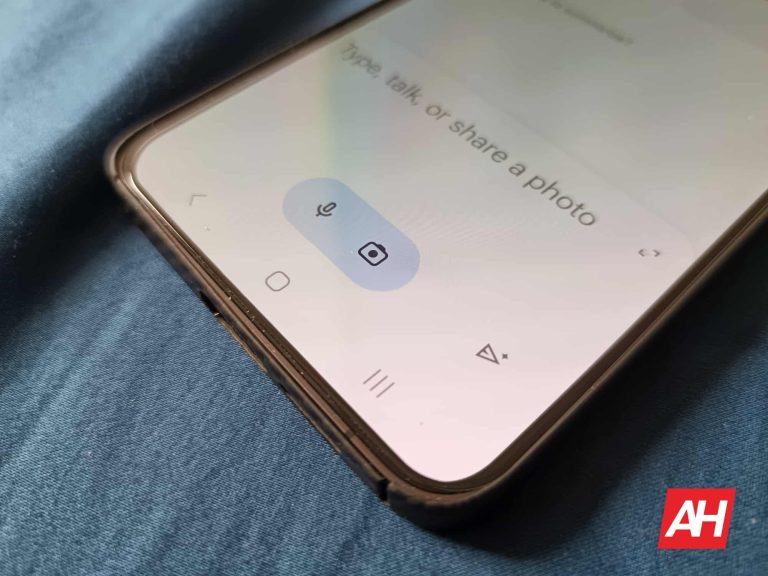
At the bottom of the screen is where all of the action happens. There’s a panel that houses the text field where you’ll type your query. Tap on it and type in your query. When you do that, you’ll enter a new conversation. Within the text field, you’ll see a little pill-shaped button with two icons inside. You’ll see a microphone icon and a camera icon.
Tap on the microphone to speak into your phone and have Gemini listen to you. You’ll do this if you can’t use the keyboard. If it’s your first time using the app, you’ll see a popup asking you to give it permission to access your microphone.
Image input
If you tap on the camera icon, you’ll upload an image for Gemini to ascertain. Just like when pressing the microphone icon, you’ll see a popup appear if this is your first time using the app. This will give the app permission to access your camera.
Tapping on the camera will bring up a simple viewfinder UI. It will allow you to take a picture of whatever you want to ask Gemini about. Tap on the big button at the bottom of the screen. This will take a picture of the object and paste it into the text field. Above the shutter button, you’ll see the different camera sensors you can use to take the picture.
If you want to upload an image instead, tap on the camera icon and tap on the picture icon to the left of the shutter button. This will bring up the photo picker. Just tap on the picture you want to upload, and it will paste it into the text field.
At that point, you can ask Gemini questions about the image. Just type your question or query and press the Send button.
How Gemini uses your data
A major part of generative AI is the collection of your data and conversations to help train the models and make the AI better. However, you have the right to know what data is being used and where it’s going. So, we’re going to go over that in this section.
What data is collected
Gemini collects your conversations, location, feedback, and usage information. The company stated that it will collect additional information if you use Gemini as an assistant.
Apps Activity
Firstly, you can set the app to not save your conversations. To do this, go to your options panel and tap on the Gemini Apps Activity button. On the resulting page, the first thing you’ll see is the Saving Activity section. Here is where you’ll set Gemini to not save your activity. Tap on the Turn off button, and you’ll see two options. The first option will set it so that your future conversations won’t be saved. The second option will do that and delete all of your current conversations.
The next section will set when Gemini will automatically delete your data. Tap on the arrow, and it will take you to a new page. Here, you’ll be able to have Gemini delete your data older than 3 months, 18 months, and 36 months. If you don’t want it to delete your data, select the Don’t auto-delete activity option.
Next, you’ll see a scrolling list of all of your saved conversations. You can look through it and check out the prompts you fed into Gemini. This will also include conversations you had with Bard. The list is separated by date, and each item has the time they were prompted, so you’ll know when you prompted each one.
If you tap on the Details button under each item, you’ll see that entire conversation, along with the time and date it was prompted. Lastly, on the right of each item, you’ll see an “Χ” allowing you to delete it. There’s also the option to delete an entire day’s worth of prompts.
Deleting the data
Above the list, there’s a Delete button. This will give you some options for deleting your history. You can choose to delete conversations from the last hour and the last day. There’s also the option to delete conversations from a custom date range. If you want to delete everything, there’s an All time option that will clear everything.
One thing to know is that, when you set Gemini to not save your conversations, Google will save your conversations for up to 72 hours. After that, they will be deleted. Also, those conversations don’t show up on your activity feed.
A new variant of the AMOS (Atomic) Stealer malware has emerged, targeting macOS users with sophisticated techniques to steal sensitive information.
Bitdefender’s recent analysis sheds light on this alarming development, revealing the malware’s methods and implications for individual users and organizations.
A short look into the code revealed that these files are significantly similar to other samples analyzed in the last months
You can analyze a malware file, network, module, and registry activity with the ANY.RUN malware sandbox, and the Threat Intelligence Lookup that will let you interact with the OS directly from the browser.
Stealthy Infiltration and Data Theft
The AMOS Stealer, first documented in early 2023, has quickly become one of the most prevalent threats to macOS users.
This new variant employs a combination of Python and Apple Script code to execute its malicious activities discreetly.
By dropping a Python script on the victim’s disk, the malware is capable of gathering a wide range of sensitive data, including files associated with crypto-wallet extensions, browser data (passwords, cookies, login data, etc.), files from Desktop and Documents directories, hardware-related and system information, and even the password of the local user account.
One of the most cunning tactics this malware uses is displaying a fake dialog impersonating the operating system.
Under the guise of a system update, it prompts users for their local account password, which, if entered, is captured and utilized for further malicious activities.
Bitdefender’s further analysis of the AMOS Stealer’s code revealed significant similarities with the RustDoor backdoor, suggesting a convergence of tactics among different malware families.
Both malware types focus on collecting sensitive files from the victim’s computer, with the AMOS Stealer being a more developed version capable of additional data theft, including the extraction of Safari browser cookies.
Distribution Tactics
The AMOS Stealer spreads through disk image files that are surprisingly small, making them less likely to raise suspicion.
These files contain a FAT binary with Mach-O files for both Intel and ARM architectures, acting as a dropper for the Python script.
A common tactic to bypass Apple’s security mechanisms involves tricking users into right-clicking and opening a seemingly innocuous “Crack Installer” application in the disk image.
Crack Installer
Protecting Against AMOS Stealer
Given the stealthy nature and potential damage caused by the AMOS Stealer, macOS users must stay vigilant.
Apple’s built-in protections, such as XProtect and the Malware Removal Tool (MRT), offer some defense against known malware by automatically updating and blocking malicious software.
However, the evolving tactics of malware creators mean that users must also adopt safe browsing habits, be cautious of unsolicited software updates, and consider additional cybersecurity measures.
The discovery of the new AMOS Stealer variant highlights the ongoing malware threat to macOS users.
AMOS (Atomic) Stealer was previously associated with a Russian threat actor, which is again confirmed by the address of the C2 server
By employing sophisticated techniques to steal a wide range of sensitive information, this malware poses a significant risk to personal and organizational security. Awareness and proactive cybersecurity practices are essential in combating this and similar threats.
IOCs
IOCs Hashes for the DMG files:
0caf5b5cc825e724c912ea2a32eceb59
f0dc72530fa06b278b7da797e5fcb3a1
6c402df53630f7a41f9ceaafdca63173
e5c059cc26cc430d3294694635e06aef
b1e0274963801a8c27ef5d6b17fe4255
8672d682b0a8963704761c2cc54f7acc
11183a3f8a624dbf66393f449db8212e
e6412f07e6f2db27c79ad501fbdb6a99
b1b64298a01b55720eb71145978dd96b
15e64a1f7c5ca5d64f4b2a8bf60d76a0
4dce69d4d030bd60ee24503b8bdda39d
740e5f807102b524188ffd198fe9bb3b
8c71b553c29ff57cf135863f6de7125e
IOCs for the Mach-O droppers:
6aab14b38bbb6b07bd9e5b29a6514b62
af23cd92ab15ebcc02b91664a0adc6fb
d9c40f35b9eaf16a2a7b4204a4e369a8
6e777e9d95945386ced5c1cbb3173854
bc113574cfe6b8d0fb6fb13f43be261b
e125d2e359995c4f4b4d262244767385
98fdef18dfca95dfd75630d8f1d54322
a66027146c009b3fdbc29400c7c74346
df74b93df64240e86d8d721c03d7a8a3
08fc1d03db95a69cddcd173c1311e681
013f3ba3a61ba52ba00b53da40da8a2b
259809091a9d4144a307c6363e32d2ea
IoCs for the Python scripts
6e375185480ee26c2f31c04c36a8a0e8
c8ac97b9df5a2dc51be6a65e6d7bce6b
70b0f6ff8facca122591249f9770d7c9
fba8e41640a249f638de197ad615bd72
You can block malware, including Trojans, ransomware, spyware, rootkits, worms, and zero-day exploits, with Perimeter81 malware protection. All are incredibly harmful, can wreak havoc, and damage your network.
Stay updated on Cybersecurity news, Whitepapers, and Infographics. Follow us on LinkedIn & Twitter.
OnePlus has unveiled a new crossover with HoYoverse as part of MWC 2024, and will be releasing a new OnePlus 12R Genshin Impact Edition. Like last year’s Genshin Impact Edition of the OnePlus 11, the new OnePlus 12R crossover phone will have a themed design. This will come alongside a themed box and a whole bunch of goodies that come inside of it. While the OnePlus 11 was themed after Xiangling, this time around the phone will be themed after Keqing, one of the game’s Electro-wielding heroes. As such, the phone and the special edition collector’s box come in a brand-new violet colorway with various design elements revolving around the character.
This includes an etching of Keqing’s name across the bottom of the phone’s back panel. Additionally, there are etchings of Keqing’s signature lightning stiletto and Electro element. But the crossover doesn’t stop there. The box itself is a collectible and was designed to be kept and put on display. The phone also comes with a handful of collectible merchandise, as well as a themed Keqing case, SIM ejector tool, charging brick, and USB-C charging cable. On top of all that, the phone has a fully customized UI. Including personalized power-on and fingerprint unlock animations.
What’s really neat though are the customized system app icons, in addition to the charging animation themed after the Electro element. There’s also one last little trick this phone offers. And it’s the coolest part about the device.
The OnePlus 12R Genshin Impact Edition will project Keqing’s name onto surfaces
You’re probably wondering how the phone does this. And that’s a valid thing to wonder about. The process is actually rather fitting given the name. Using a process called “Electro Etching,” the “Keqing” that comes etched across the bottom of the phone’s back panel will project onto nearby surfaces. This happens because Electro Etching reflects light. So if you illuminate the back of the device, specifically the name Keqing, it’ll reflect the light back and project the name.
It’s a very cool little trick that would fit perfectly in a collector setup with everything else on display alongside the device.
The phone is available in limited quantities, starting at $649.99
If you’re a huge Genshin Impact fan and want to get your hands on this phone, there’s good and bad news. Pre-orders opened on February 28 but it didn’t take long for stock to be depleted. The good news is that OnePlus will have more stock of the device once it launches on March 21. The phone goes live at 6 A.M. PST/9 A.M. EST.
That being said, the phone will still be available in limited quantities. So you’ll want to be fast if you plan to pick this phone up. The OnePlus 12R Genshin Impact Edition will be sold exclusively through the OnePlus website. It’ll retail for $649.99 in the US and $869.99 CAD in Canada. OnePlus is also extending its “ANY phone in ANY condition” promotion to the OnePlus 12R Genshin Impact Edition. This means you can trade in your old device for $100 off the Genshin phone if you’re a US consumer. Those buying the phone in Canada will be able to save $150 CAD.
Over the past week, Google has been getting some backlash over its AI tool Gemini. It has the ability to generate images of people, but it has been generating racially inaccurate depictions of historical figures. Now, Sundar Pichai, Google’s CEO, has finally spoken out about Gemini’s inaccurate images.
So, to catch you up, people using Gemini’s image generation feature have found that the tool created inaccurate depictions of historical figures. When generating images of people who would be historically white, Gemini would “miss the mark” and depict them as a non-white race. Also, the tool would depict people who’d be male as female.
We would see images of German people being depicted as dark-skinned. There was another example where a person asked it to generate an image of the founding fathers, and it showed images of people of Asian descent. There are many more examples of this, and it led some people to call the tool “woke”. It seems to be that Google was looking to make Gemini a very inclusive platform, but it overshot it just a bit Anyway, we have to give it points for effort.
In any case, this is an issue that the company is currently working on. For certain regions in the world, Gemini does not generate images of people. The company halted the image generation of human beings until it could fix the issue.
Google’s CEO, Sundar Pichai, finally addressed the issue and issued a statement. He said, “I know that some of its responses have offended our users and shown bias – to be clear, that’s completely unacceptable and we got it wrong,”. Along with that statement, he also gave some good news for people wanting the functionality to return. “Our teams have been working around the clock to address these issues. We’re already seeing a substantial improvement on a wide range of prompts.”
So, the company is making improvements to its tool. As for the timeline, we are still in the dark. The issue with Gemini seems to be a deeply rooted flaw in the system. So, there’s no telling how long it will take Google to fix this issue. We’re all just going to have to stay tuned.