DuckDuckGo, the company behind the privacy-oriented search engine and web browser of the same name, has introduced a new Sync & Backup feature for its browser. It lets you sync your saved passwords, bookmarks, and Email Protection settings across multiple devices. In line with the firm’s privacy-first approach, the feature doesn’t require an account to sync the information.
DuckDuckGo browser can now sync saved passwords across your devices
DuckDuckGo isn’t a household name in the browser world but is fairly popular among privacy-conscious users. It takes pride in being extremely privacy-oriented while still offering most of the features you expect from a web browser if not all. One of its biggest drawbacks was the lack of a password sync feature. People using DuckDuckGo for privacy couldn’t access their saved passwords across their devices.
The company has now addressed this limitation. With the new Sync & Backup features, you can find your saved passwords, bookmarks, and more on the DuckDuckGo browser on all of your Android or iOS phones, tablets, and computers. However, since it doesn’t require an account, you will have to manually link all your devices to sync the information. Follow the steps below to do that.
Once you have updated DuckDuckGo to the latest version, click on the three vertical dots in the top-right corner and select Settings. Tap on Sync & Backup and select Sync With Another Device. If asked, unlock your device to verify your identity. Now, repeat these steps on all of your devices. On phones or tablets, you will see a QR code. On laptops and desktop computers, you will find an alphanumeric code.
Scan the QR code on one device from the other or manually enter the alphanumeric code to sync the devices. If only one of your devices synced, go back to the unsynced device and select Sync and Back Up This Device under the Single-Device Setup menu in Sync & Backup. This should sync the device with others. You will find a list of all your synced devices here. You can edit device names and adjust your settings.
Your data is end-to-end encrypted
DuckDuckGo makes you sync your devices manually to protect your privacy. This ensures that your data remains end-to-end encrypted throughout the process. “Your passwords are completely inaccessible to anyone but you,” the company assures. “That includes us: DuckDuckGo cannot access your data at any time,” because the unique key needed to decrypt it is stored locally on your devices.
This means DuckDuckGo can’t help you recover the saved data in case you lose or damage your devices. Thankfully, there is a workaround that works locally. When you first set up Sync, you will be asked to download a Recovery PDF. The document contains your recovery code. You have to scan this code to recover your passwords and other saved data on DuckDuckGo. Make sure to store this document securely on some other device.
Whether you’re rocking an iPhone or an Android phone as your daily driver, you are no longer limited to playing games specifically designed for smaller screens. Microsoft promised last month that it will make it possible to play games on iOS and Android devices without having to use a controller.
Today, the Xbox February update is bringing the much-needed touch controls for remote play with the iOS and Android Xbox apps. This means that even if you don’t have an Xbox Wireless Controller, you can now play games when away from your console.
The same custom touch layouts available through Xbox Cloud Gaming (Beta) are now available when remotely playing games from your Xbox console. The vast majority of games support touch controls, including Minecraft Dungeons, Psychonauts 2, and Sea of Thieves.
In fact, Xbox remote play supports custom touch control layouts on more than a hundred games when using the Xbox app on iOS, Android, and Windows devices.
Besides adding touch controls in Xbox remote play, the latest Xbox update brings a new thumbstick calibration tool for Xbox Wireless Controllers, as well as improved filtering and sorting in My games & apps.
As part of its February 2024 Patch Tuesday updates, Microsoft has published patches to address 73 security flaws, including two zero-day vulnerabilities that have been actively exploited.
Five of the 73 vulnerabilities are classified as ‘Critical’, 65 as ‘Important’, and three as ‘Moderate’ in severity.
DocumentLive Account Takeover Attack Simulation
Live attack simulation Webinar demonstrates various ways in which account takeover can happen and practices to protect your websites and APIs against ATO attacks.
Two Zero-Days Patched
The two vulnerabilities identified as being actively targeted are:
CVE-2024-21351 – Windows SmartScreen Security Bypass
The vulnerability, which has a CVSS score of 7.6, enables an attacker to insert code into SmartScreen and perhaps acquire code execution. This could result in some data disclosure, a lack of system availability, or both.
“An authorized attacker must send the user a malicious file and convince the user to open it,” Microsoft said.
Thus, if this vulnerability was successfully exploited, an attacker could bypass the SmartScreen user experience.
Microsoft does not disclose the widespread of these attacks, although it is anticipated that the number of exploits will rise.
CVE-2024-21412 – Internet Shortcut Files Security Feature Bypass Vulnerability
“An unauthenticated attacker could send the targeted user a specially crafted file that is designed to bypass displayed security checks,” Microsoft.
In this case, it would be impossible for the attacker to convince a user to see content that they controlled. In addition, by clicking on the file link, the attacker would have convinced them to take action.
As a result, the attacker must convince the victim to open a malicious file that they sent them.
According to a Trend Micro report, the Water Hydra APT is using the vulnerability to infect victims with the malware DarkMe.
After developing a proof-of-concept (PoC) for additional testing, the researchers found that the original shortcut bypassed the CVE-2023-36025 patch while evading SmartScreen security measures.
Critical Security Flaws Addressed
Five critical vulnerabilities, including those involving privilege elevation (CVE-2024-21410), denial of service (CVE-2024-20684), remote code execution (CVE-2024-21357, CVE-2024-21413), and information disclosure (CVE-2024-21380) are fixed in this Patch Tuesday.
Other vendors, in addition to Microsoft, have also provided security upgrades in recent weeks to address multiple vulnerabilities. These firms include Google, Adobe, Cisco, ExpressVPN, Ivanti, Fortinet, Linux, SAP and JetBrains.
The complete list of the 73 Microsoft CVEs may be found here.
Stay updated on Cybersecurity news, Whitepapers, and Infographics. Follow us on LinkedIn & Twitter.
If you find yourself often in noisy environments, or you’ve got hearing problems, or you haven’t got the time to listen to lengthy voice messages – or you simply hate it when your friends bombard you with 60-second “uhhhh”/“uhmmmm”-plagued voice messages that actually contain 2 lines of meaningful information – well, Skype has you covered.The once-almighty chat platform announces the new Audio Transcription feature that converts voice messages into text for improved clarity and accessibility (via MSPowerUser). Users can activate transcription with a tap, seeing both audio waveform and text simultaneously.
Thanks to Skype’s latest Insider build (8.113) the new feature for improved accessibility and clarity in audio messaging (Audio Transcription) is accessible: it allows users to convert voice messages into text format, enhancing message comprehension and facilitating communication for users with hearing impairments.
Skype’s commitment to inclusivity shines brighter with audio transcriptions, making audio messages accessible to everyone, including those with hearing impairments.
“Moreover, Skype also introduced a top menu selector for easier navigation between reaction categories, eliminating the need for extensive scrolling. The user-friendly design features readily accessible favorite reactions and expands the emoticon library with more options for expressive communication”, the report reads.
Say goodbye to endless scrolling! Our top menu selector allows you to swiftly jump between categories like Love, Celebrations, and Agreement, making it a breeze to find your desired reaction.
These features are currently available in the Insider build and are expected to be released to the broader user base in the near future!
Eric Adams, Mayor of New York City, said that his administration has filed a lawsuit against social media companies for fueling mental health crisis among the youth (via Reuters).
The lawsuit includes Facebook and Instagram’s parent company Meta, as well as YouTube’s Google (legally known as Alphabet), Snapchat’s Snap Inc. and TikTok’s ByteDance. The lawsuit is filed in the California Superior Court and alleges that the companies intentionally designed their platforms to “purposefully manipulate and addict children and teens to social media applications”.
“Over the past decade, we have seen just how addictive and overwhelming the online world can be, exposing our children to a non-stop stream of harmful content and fueling our national youth mental health crisis”, Adams said in a statement.
This is far from the first time that social media giants are hit with similar lawsuits – they’ve come under intense scrutiny as regulators push them to protect children from harmful content. Meta, TikTok and YouTube already face hundreds of lawsuits filed on behalf of children and school districts over the addictiveness of social media, the report reads.
Just last month Meta CEO Mark Zuckerberg apologized to families at a US Senate hearing about the impact that social media has on children.
Per their own spokesperson, Meta says they wanted teens to have “safe, age-appropriate experiences online”, while TikTok said it will continue to work to keep the community safe by tackling industry-wide challenges.
Alphabet (read Google, YouTube) denied the allegations: “We’ve built services and policies to give young people age-appropriate experiences, and parents robust controls. The allegations in this complaint are simply not true”, Google’s spokesperson Jose Castaneda said in a statement.
Many companies follow the long-term modern trend to migrate databases from commercial DBMS to free open-source equivalent in order to reduce total cost of ownership. For this purpose, PostgreSQL is the ideal choice among all free database management systems due to the following advantages:
– it is 100% compliant with SQL standard – it supports point-in-time recovery – it supports sophisticated locking mechanisms – it provides advanced data types such as multi-dimensional arrays and spatial
The most straight forward way to migrate from SQL Server to PostgreSQL manually or semi-manually is known as extract-transfer-load or ETL model. It consists of the following steps:
– All SQL Server database entries (table definitions, indexes and constraints) are extracted in form of CREATE-statements – Those items are transformed to comply with PostgreSQL syntax of CREATE-statements (with respect to types mapping and naming rules) and loaded to the target database – SQL Server data is extracted from the source database into CSV files used as external intermediate storage – The CSV files must be transformed to comply with PostgreSQL format when it is necessary (special attention to dates and binary data) – The final step is to load the resulting data into the PostgreSQL database
Now, let’s explore each of those steps in details. To extract definitions of SQL Server tables, open Microsoft SQL Server Management Studio, right-click on the database name, then click on ‘Tasks > Generate Scripts’ menu item. Navigate to “Set scripting options” tab in the appeared window, click on Advanced link and select “data and schema” in the ‘General’ section.
The resulting script must be modified according to PostgreSQL format as follows:
– remove square brackets around types – replace all square brackets around names of database entries by double quotes – replace all occurrences of the default SQL Server schema “dbo” by PostgreSQL equivalent “public” – remove SQL Server keywords that are optional and not supported by PostgreSQL (i.e. “WITH NOCHECK”, “CLUSTERED”) – remove any specifications of filegroup, for example “ON PRIMARY” – change SQL Server data type “INT IDENTITY(…)” to PostgreSQL “SERIAL” – convert types that are not supported by PostgreSQL into equivalents (i.e. “DATETIME” becomes “TIMESTAMP”, “MONEY” becomes NUMERIC(19,4)) – all statements “GO” used to terminate SQL Server queries must be replaced by semicolons “;”
Next step to migrate SQL Server to PostgreSQL is processing the data, which can be accomplished with the use of the Microsoft SQL Server Management Studio:
– Right-click on the database to migrate, then navigate to the Tasks > Export Data menu – Using intuitive interface of the wizard specify “Microsoft OLE DB Provider for SQL Server” as data source and “Flat File Destination” as destination.
After the export is completed, the resulting data will appear in the specified destination file according to the comma-separated values (CSV) format.
Now it is time to load data from CSV files to PostgreSQL tables through the “COPY” command like this:
COPY <table name> FROM <path to csv file> DELIMITER ‘,’ CSV;
If you receive a “Permission denied” error, try the “\COPY” command instead.
The steps above illustrate that manual conversion is a time-consuming procedure with high risk of data loss or corruption. Fortunately, there are some special tools which can migrate SQL Server to PostgreSQL within just a couple of clicks making the entire procedure smooth and safe. One of such solutions is MS SQL to PostgreSQL converter, a program having all necessary features to handle migration of large and complicated databases between the two DBMS. It has been developed by Intelligent Converters, software company focusing on database conversion and synchronization techniques since 2001.
Basic features of the converter:
– Schemas, data, sequences, indexes, constraints and views are migrated from SQL Server to PostgreSQL – All modern versions of on-premises and could variations of DBMS are supported – Merging and synchronizing PostgreSQL databases with SQL Server data – Option to script and schedule the database migration via command line version of the tool – Store configuration of the completed migration into a profile to simplify next launch
Besides those basic features the converter offers a few powerful capabilities to make the migration even more customizable. First is filtering data to migrate via SELECT queries. SQL Server to PostgreSQL converter allows users to compose SELECT query over the source database and then migrate resulting rowset as if it would be a regular table. This option may be uses to filter data, rename columns or tables, merge data from multiple into a single one and many other tasks.
Next capability is called ‘Edit Table’. It allows to completely customize resulting table: change name, type and attributes of any column and exclude some columns from migration. It is implemented via dialog window having easy-to-use intuitive interface, so any technical skills are not required to entirely customize the database migration.
Learn more about how to migrate SQL Server to PostgreSQL and the related software solutions at the homepage of Intelligent Converters.
Days after naming a new CEO, Mozilla has announced a job cut affecting about 5% of its workforce. The company, best known for the Firefox browser, is laying off around 60 employees. It is also shutting down Mozilla Hubs and scaling back investment in several other products.
Mozilla cuts around 60 jobs as part of a shake-up under the new CEO
Last week, Mozilla announced that Mitchell Baker is stepping down from the role of CEO to become the company’s Executive Chairwoman. Laura Chambers, a former Airbnb, PayPal, and eBay executive, replaced her as the interim CEO for the remainder of the year. This leadership change was part of its refined vision and product strategy for the future. The planned strategy overhaul is now underway with around 60 job cuts.
First reported by Bloomberg, Mozilla’s latest layoffs primarily affect the product development organization. In a statement, the company said that this job cut will allow it to focus on areas where it has the greatest chance of success. “We intend to re-prioritize resources against products like Firefox Mobile, where there’s a significant opportunity to grow and establish a better model for the industry,” Mozilla said.
An internal memo obtained by TechCrunch further revealed that Mozilla is shutting down Hubs, a 3D virtual platform launched in 2018. The company blamed an unfavorable shift in demand for these kinds of products since early 2023 for its closure. Additionally, it plans to scale back investment in a bunch of products, including mozilla.social, a decentralized social media platform powered by Mastodon.
Introduced in 2023 amid chaos at X (formerly Twitter), Mozilla wanted to shape the future of social media with the new platform. The firm invested big in this idea but things didn’t pan out as intended. “It was a noble idea but one we struggled to execute,” Mozilla said in the memo. It is now reducing resources dedicated to the platform. Mozilla is also scaling back investments in VPN, Relay, and Online Footprint Scrubber.
Mozilla will focus on enhancing its AI offerings
With generative AI finding its way into all sorts of tech products lately, Mozilla will focus on enhancing its AI offerings. It will bring “trustworthy AI” into its Firefox browser, while housing teams working on Pocket, Content, and AI/ML together with the Firefox Organization. The company plans to share more details on the specific organizational changes later. This strategy overhaul from Mozilla doesn’t affect MDN, Ads, or Fakespot.
Threat actors exploit HijackLoader because it is a powerful tool for injecting malicious code into legitimate processes, enabling stealthy execution of payloads.
This technique helps them to evade detection by leveraging trusted applications to carry out malicious activities.
This scenario makes it more complicated for security measures to effectively identify and mitigate the threat.
Cybersecurity researchers at Crowdsrtike recently discovered a HijackLoader (aka IDAT Loader) that employs sophisticated techniques to evade detection.
Sophisticated HijackLoader Malware
CrowdStrike researchers found HijackLoader evolving with new defense evasion tricks like process hollowing, pipe-triggered activation, and a mix of process doppelganging.
These enhancements make it stealthier and harder to analyze, not only that even extra unhooking techniques were also spotted.
CrowdStrike uncovered a sophisticated HijackLoader sample that starts with streaming_client.exe, which obfuscates a configuration to evade static analysis.
Using WinHTTP APIs, it tests internet connectivity by contacting https[:]//nginx[.]org. If successful, it downloads a second-stage config from a remote server.
After getting the second-stage config, the malware hunts for PNG header bytes and a magic value. It then decrypts using XOR and decompresses using RtlDecompressBuffer API.
Next, it loads a legit Windows DLL specified in the configuration and writes the shellcode to its .text section for execution. It utilizes Heaven’s Gate to evade user mode hooks and injects more shellcodes into cmd.exe.
The third-stage shellcode injects a final payload like a Cobalt Strike beacon into logagent.exe using process hollowing.
HijackLoader evades detection with Heaven’s Gate hook bypass and unhooking DLLs watched by security tools. It also uses process hollowing variations and transacted hollowing for injection.
This merges the transacted section and process doppelgänging with DLL hollowing.
Main Evasion Techniques
Here below, we have mentioned all the main evasion techniques that the HijackLoader and Shellcode use:-
Hook Bypass: Heaven’s Gate and Unhooking
Process Hollowing Variation
Interactive Process Hollowing Variation: Tradecraft Analysis
The exploitation of HijackLoader underscores the significance of proactive cybersecurity measures to detect and prevent such covert attacks.
Organizations should prioritize regular security audits, employ robust endpoint protection, and stay updated on emerging threats to effectively defend against the evolving tactics employed by threat actors.
Besides this, user education and awareness training are essential in mitigating the risks associated with these sophisticated attack vectors.
Stay updated on Cybersecurity news, Whitepapers, and Infographics. Follow us on LinkedIn & Twitter.
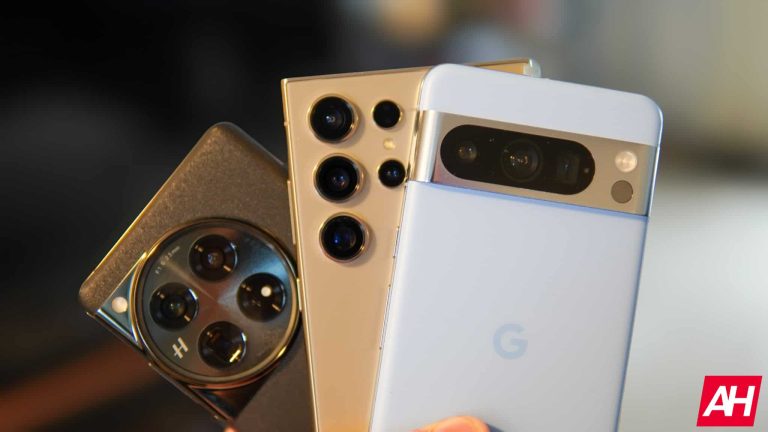
Some truly compelling foldable smartphones launched in the last year or so. The two that we are going to talk about in this article are considered to be some of the best. We’ll compare the OnePlus Open vs HONOR Magic V2. Both of these are available in global markets, and they are actually quite different. They are not only different design-wise, but in a number of other ways, which should make things interesting.
Do note that both of these smartphones are book-style foldable, but they have different approaches to design, cameras, software, and so on. We’ll first list their specifications, and then we’ll talk about various other aspects of these phones. Their designs will be in huge focus, and then we’ll jump over to displays, performance, battery life, cameras, and audio performance. Let’s get to it, shall we?
Both of these smartphones are book-style foldable, but they are quite different. The OnePlus Open has flat sides with chamfered edges, while the HONOR Magic V2 uses way more curves on the sides. The HONOR Magic V2 is also a bit thinner in both folded and unfolded forms, even though not by much. Those curves on the side do make it seem even thinner than it actually is, though.
The OnePlus Open is 5.8mm thick when folded, and 11.7mm when unfolded. The HONOR Magic V2 measures 4.7-4.8mm when folded, and 9.9-10.1mm when unfolded. It all depends on what variant we’re talking about, a vegan leather model, or a glass model. The vegan leather variant of the Magic V2 is a bit thinner. The OnePlus Open’s vegan leather model comes in a black color, while the glass model is green-colored. The same goes for Magic V2’s black model, while the glass variant is purple-colored.
Both smartphones have a centered display camera hole on the cover display. Both of them have a fingerprint scanner inside the power/lock key, and both have a great hinge. The opening and closing of both smartphones are very satisfying, and both offer that proper ‘click’ when they lock in place.
They have very different camera setups, in general
If we flip them around, you’ll notice that their camera setups are quite different. The OnePlus Open has a huge camera oreo on the back, which is centered. That camera island also protrudes on the back quite a bit and is a good anchor for your index finger, when you’re holding the device. The Magic V2 has a much smaller camera island, and it sits in the top-left corner of the back. Both phones include three cameras on the back. Both devices also have thin bezels around both their main and cover displays.
Do note that only the OnePlus Open offers an IPX4 rating for splash resistance. The HONOR Magic V2 does not come with such a rating. Both phones feel great to hold and use, while they are also very similar in terms of weight. They do feel different to use, though, due to different design choices. There’s no clear winner here, though, it all depends on what your preferences are.
OnePlus Open vs HONOR Magic V2: Display
The OnePlus Open features a 7.82-inch 2268 x 2440 main display. That is a foldable LTPO3 AMOLED panel that can project up to 1 billion colors. Dolby Vision is supported here, and the panel goes up to 120Hz. The peak brightness of this display is 2,800 nits. The cover display measures 6.31 inches and has a resolution of 2484 x 1116. That is an LTPO3 OLED panel that can also project up to 1 billion colors and has Dolby Vision support. Its refresh rate also goes up to 120Hz, and it has the same max brightness as the main panel. Ceramic Guard is protecting the cover panel on the OnePlus Open.
HONOR Magic V2
The HONOR Magic V2, on the other hand, has a 7.92-inch 2156 x 2344 foldable LTPO OLED main display. That panel projects up to 1 billion colors too, and its refresh rate goes up to 120Hz. It supports HDR10+ content too, and it is ‘IMAX Enhanced’. This display has a peak brightness of 1,600 nits. The cover display, on the flip side, measures 6.43 inches, and it has a resolution of 2376 x 1060. This is an LTPO OLED display which can project up to 1 billion colors. It supports HDR10+ content, and its refresh rate also goes up to 120Hz. It has a peak brightness of 2,500 nits, and it’s protected by the Nanocrystal Glass 2.0.
In terms of actual display quality for real-life usage, all four of these panels are outstanding. They’re bright, vivid, and have great viewing angles. The blacks are deep, and neither main panel felt too plasticky during usage, not at all. The crease is also well-hidden on both main displays, and the touch response is great on all four panels. Truth be said, you’ll be good to go regardless of what phone you choose… as far as the display is concerned.
OnePlus Open vs HONOR Magic V2: Performance
The OnePlus Open is fueled by the Snapdragon 8 Gen 2 processor, while it also includes 16GB of LPDDR5X RAM and UFS 4.0 flash storage. The HONOR Magic V2 comes with the Snapdragon 8 Gen 2 as well, along with 16GB of LPDDR5X RAM and UFS 4.0 flash storage. They’re on the same playing field in terms of specifications. Does that translate to actual usage on both devices? Well, yes, it does.
Both of these phones offer great performance. We’ve enjoyed using both, though I have to say that the software on the OnePlus Open has been more enjoyable to use. It has more features for the foldable aspect of the phone, and better ones, to be quite honest. It also works better with some apps when it comes to folding/unfolding the display. MagicOS on the HONOR Magic V2 is very fluid and works great in general, but some changes are needed, and also better multitasking as a whole.
Both software iterations were very fluid, though. Multitasking was a breeze, and that goes for everything you’ll use these devices for in day-to-day use. Even when it comes to gaming both phones did a really good job, so no worries there.
OnePlus Open vs HONOR Magic V2: Battery
What about their batteries? The OnePlus Open has a 4,805mAh unit, while the HONOR Magic V2 includes a 5,000mAh battery. HONOR actually used a silicon-carbon battery for the Magic V2. Both battery capacities are good enough in theory, does that translate to actual usage, though? Well, yes, the battery life was very good on both smartphones, at least that was the case for us, for our usage.
We were able to cross the 7-7.5-hour screen-on-time mark on the OnePlus Open a number of times. Truth be said, during that usage, gaming wasn’t really a part of the equation, but we were not sparing the phone. When it comes to the HONOR Magic V2, the battery life was also very good, though not as good as on the OnePlus Open. getting to 7 hours of screen-on-time is doable, though, as the Magic V2 is not trailing far behind in the battery life department. All in all, chances are you’ll be happy with the battery life on both devices.
When it comes to charging, they can both charge really fast. The OnePlus Open supports 67W wired and 5W reverse wired charging. The HONOR Magic V2 supports 66W wired, and 5W reverse wired charging. Both phones charge well under an hour, and both of them ship with chargers in the box, unlike some other high-end smartphones these days. Neither phone supports wireless charging, though.
OnePlus Open vs HONOR Magic V2: Cameras
The OnePlus Open has a 48-megapixel main camera, a 48-megapixel ultrawide unit (114-degree FoV), and a 64-megapixel periscope telephoto camera (3x optical zoom, 6x ‘in-sensor’ zoom) on the back. The HONOR Magic V2, on the other hand, includes a 50-megapixel main camera, a 50-megapixel ultrawide unit, and a 20-megapixel telephoto camera (2.5x optical zoom).
OnePlus Open
These two smartphones provide entirely different pictures. The OnePlus Open tries to keep things closer to real life while keeping the shadows a bit darker and making images a bit more contrasty. The colors on the images the OnePlus Open provides are outstanding. The HONOR Magic V2 does tend to brighten up images in low light quite a bit, and the colors end up being more playful in general. Images from the Magic V2 also tend to look a bit more processed in comparison.
During the daytime, both smartphones do a great job. The images end up looking sharp, and detailed, and even the HDR performance is great from both smartphones. We did prefer the performance of the OnePlus Open, though, generally speaking. That goes for all three cameras on the back, though the HONOR Magic V2’s camera performance is not bad at all. It’s just a level below what the OnePlus Open has to offer.
Audio
There are stereo speakers included on both of these smartphones. The speakers on the HONOR Magic V2 ended up being a bit louder, but the difference is not that big at all. The sound coming from both smartphones was well-balanced, and the distortion was next to non-existent.
You won’t get an audio jack on either of these two smartphones, though. You can always utilize their Type-C ports for wired audio connections. If you prefer to go wireless, however, both smartphones do support Bluetooth 5.3.
In an unusual incident that took place in San Francisco’s Chinatown, a crowd set fire to a Waymo self-driving car. The incident occurred during the Lunar New Year celebration over the weekend. A video circulating online shows that the crowd set fire to the Waymo’s car around 9 pm local time.
Crowd sets Waymo’s self-driving car on fire
This isn’t the first time people have attacked a self-driving car. But this time, it’s worse. It shows that more and more people are getting mad at self-driving cars. It came into a much brighter light when the fire department shared pictures of the burned car on social media. They said a firework inside the car caused the fire.
A Waymo spokesperson confirmed to TechCrunch that there were no injuries or deaths. “The vehicle was not transporting any riders and no injuries have been reported,” they told the publication.
What caused this incident remains a mystery
It’s not clear why the vandalism happened. However, according to witnesses around the incident, the road is often busy with fireworks and celebrations for the Lunar New Year. Nevertheless, it has sparked a debate that how people are reacting to advancements in technologies like self-driving cars and AI. Especially after reports say that Waymo driverless cars have outperformed humans.
While cars with human drivers could move away from the fireworks, the self-driving car couldn’t. So, people started damaging it. Eventually, someone threw a lit firework through the front passenger window, which quickly caused a fire inside the car.
San Francisco’s Mayor, London Breed, called this incident a “dangerous and destructive act of vandalism,” adding it could have impacted the surroundings. On the same note, the United States Attorney’s Office for the Northern District of California shared a part of the law that talks about the punishments for destroying a vehicle with fire or explosives. If nobody gets hurt from the act, the minimum jail time mentioned in the law is five years in prison.